remote control BMW X5 4.4I 2000 User Guide
[x] Cancel search | Manufacturer: BMW, Model Year: 2000, Model line: X5 4.4I, Model: BMW X5 4.4I 2000Pages: 201, PDF Size: 1.93 MB
Page 55 of 201
IndexDataTechnologyRepairsCar careControlsOverview
55n
Car Memory, Key Memory
Your BMW center can adjust your
vehicle's systems in such a man-
ner that your personalized settings are
automatically called up for the seat,
mirror and steering wheel positions
when you unlock the vehicle with your
personal remote control.<
If you make use of the Key Mem-
ory, be sure that the footwell
behind the driver's seat is unobstructed
before unlocking the vehicle. If you fail
to do so, persons or objects could be
injured or damaged if the seat should
move backward.<
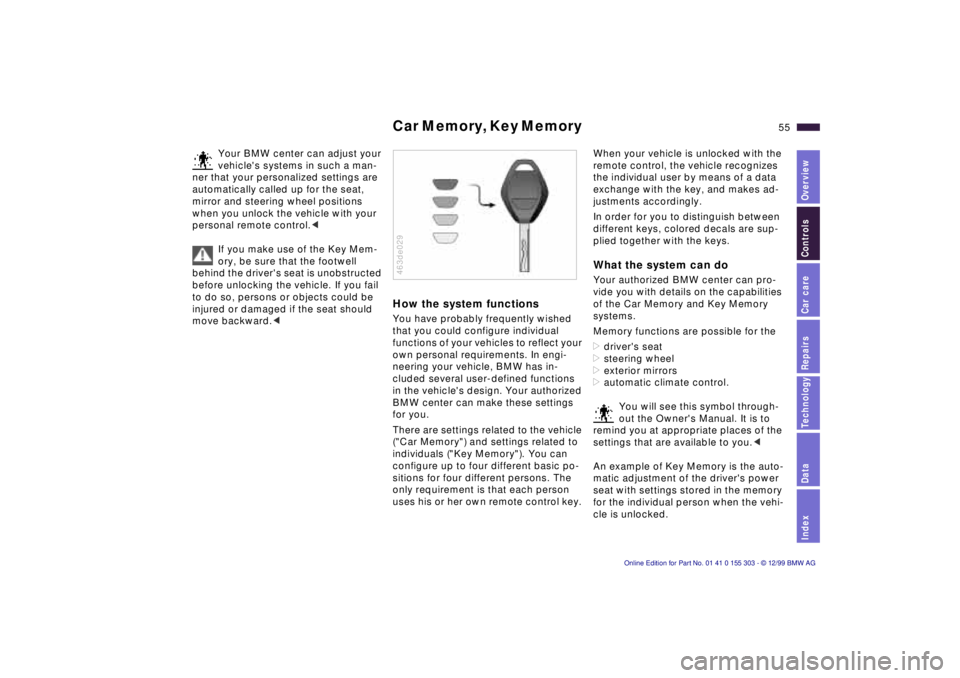
How the system functions You have probably frequently wished
that you could configure individual
functions of your vehicles to reflect your
own personal requirements. In engi-
neering your vehicle, BMW has in-
cluded several user-defined functions
in the vehicle's design. Your authorized
BMW center can make these settings
for you.
There are settings related to the vehicle
("Car Memory") and settings related to
individuals ("Key Memory"). You can
configure up to four different basic po-
sitions for four different persons. The
only requirement is that each person
uses his or her own remote control key. 463de029
When your vehicle is unlocked with the
remote control, the vehicle recognizes
the individual user by means of a data
exchange with the key, and makes ad-
justments accordingly.
In order for you to distinguish between
different keys, colored decals are sup-
plied together with the keys. What the system can do Your authorized BMW center can pro-
vide you with details on the capabilities
of the Car Memory and Key Memory
systems.
Memory functions are possible for the
>driver's seat
>steering wheel
>exterior mirrors
>automatic climate control.
You will see this symbol through-
out the Owner's Manual. It is to
remind you at appropriate places of the
settings that are available to you.<
An example of Key Memory is the auto-
matic adjustment of the driver's power
seat with settings stored in the memory
for the individual person when the vehi-
cle is unlocked.
Page 92 of 201
92n
Automatic climate control Tips for pleasant driving Use the automatic system (that is press
AUTO button 6). Select an interior tem-
perature that is comfortable for you Ñ
we recommend 72 7 (22 6). When
the outside temperature is above 41 7
(5 6), you can also use the air condi-
tioner 12. This will dry the air as well as
preventing condensation on the win-
dow surfaces Ñ if there are passengers
with damp clothing, for example. Set
the air outlets 2 so that the air flows
past you and is not directed straight at
you. Set the rotary dial between the
outlets 2 for the upper body to a central
position so that cooler air will help to
prevent fatigue during the journey.
Detailed setting options are described
for you in the following section.
Your vehicle is set in such a man-
ner that, when you unlock the ve-
hicle via remote control with your per-
sonalized key, your own setting for the
automatic climate control is initiated.<
Automatic air distribution
The AUTO program as-
sumes the adjustment of
the air distribution and the air supply for
you and also adapts the temperature to
external influences (summer, winter) to
meet preferences you can specify. This
program maintains a comfortable in-car
climate regardless of the season. Select
an interior temperature that is comfort-
able for you Ñ we recommend 72 7
(22 6).
The selected temperature and AUTO
for the air flow appear in the display 9.
Refer to the overview on page 90. Open
the ventilation outlets for the upper
body. Switch on the air conditioner 12
in warm weather. The maximum cooling
capacity is achieved when you set ro-
tary dial 3 (refer to page 94) to cold.
Individual air distribution
You can cancel the AUTO
program by selecting spe-
cific air distribution patterns
for your personal comfort.
You can direct air to flow
onto the windows , toward the upper
body , and into the footwell .
Temperature
You can make individual
temperature adjustments on
the driver's side or the front
passenger side. Your settings will be
shown in the display 9. The displayed
temperatures are reference values for
the interior temperature. We recom-
mend 72 7 (22 6) as a comfortable
setting, whether the air conditioner is
operating or not. When you start the
vehicle, this system ensures that the
selected temperature is achieved as
quickly as possible. It then maintains
this temperature, regardless of the
season.
Set the rotary dial 3 (refer to "Draft-free
ventilation" on page 94) to a medium
position to provide somewhat cooler
air. This helps to promote driving with-
out fatigue. Utilize this method of mix-
ing air especially for making minor
adjustments for personal comfort.
You can set uncontrolled heater
output up to 90 7 (32 6). Full
cooling output is available from the air
conditioner down to 60 7 (16 6).<
Page 99 of 201
IndexDataTechnologyRepairsCar careControlsOverview
99n
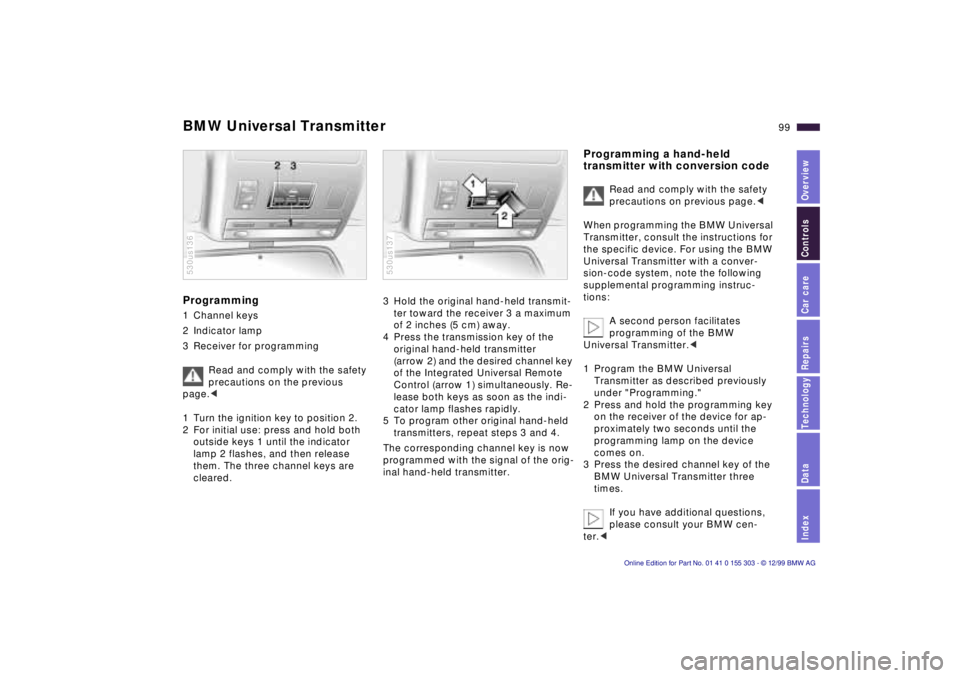
BMW Universal TransmitterProgramming 1 Channel keys
2 Indicator lamp
3 Receiver for programming
Read and comply with the safety
precautions on the previous
page.<
1 Turn the ignition key to position 2.
2 For initial use: press and hold both
outside keys 1 until the indicator
lamp 2 flashes, and then release
them. The three channel keys are
cleared.530us136
3 Hold the original hand-held transmit-
ter toward the receiver 3 a maximum
of 2 inches (5 cm) away.
4 Press the transmission key of the
original hand-held transmitter
(arrow 2) and the desired channel key
of the Integrated Universal Remote
Control (arrow 1) simultaneously. Re-
lease both keys as soon as the indi-
cator lamp flashes rapidly.
5 To program other original hand-held
transmitters, repeat steps 3 and 4.
The corresponding channel key is now
programmed with the signal of the orig-
inal hand-held transmitter. 530us137
Programming a hand-held
transmitter with conversion code
Read and comply with the safety
precautions on previous page.<
When programming the BMW Universal
Transmitter, consult the instructions for
the specific device. For using the BMW
Universal Transmitter with a conver-
sion-code system, note the following
supplemental programming instruc-
tions:
A second person facilitates
programming of the BMW
Universal Transmitter.<
1 Program the BMW Universal
Transmitter as described previously
under "Programming."
2 Press and hold the programming key
on the receiver of the device for ap-
proximately two seconds until the
programming lamp on the device
comes on.
3 Press the desired channel key of the
BMW Universal Transmitter three
times.
If you have additional questions,
please consult your BMW cen-
ter.<
Page 193 of 201
Everything from A to Z
193n
IndexDataTechnologyRepairsCar careControlsOverview
Cold start64
Comfort seat50
Compartments101
Computer80
Configuring the settings55
Contamination on
paintwork144
Convenience operation of
windows and sliding/tilt
sunroof36
Convenience starting
feature64
Coolant123, 140
Coolant, antifreeze123
Cornering Brake Control
(CBC)120
Cruise control72
Cup holder102
Curb weight186DDashboard16
Data link connector for On-
Board Diagnostics150
Date, refer to the Radio or
Onboard Computer
Owner's Manual
Daytime-driving lamp86
DBC (Dynamic Brake
Control)24, 120Deep water117
Defrosting the windows93
Digital clock, refer to the
Radio or Onboard
Computer Owner's Manual
Digital sound processor179
Dimensions185
Dipstick, engine oil137
Disc brakes122
Displacement184
Display lighting86
Displays18, 20
Distance warning82
Diversity Antenna
system178
Divided rear backrest107
Door keys34
Door locks, care123
Doors
Manual operation36
Remote control38
Unlocking and locking36
Drive belts188
Driving through water117
Driving your BMW X5117
DSC (Dynamic Stability
Control)24, 83, 177
DSP amplifier, refer to the
Radio Owner's ManualDynamic Brake Control
(DBC)24, 120
Dynamic Stability Control
(DSC)24, 83, 177
EEBV (Electronic Brake Force
Distribution)120
Electric power windows45
Electrical malfunction
Fuel filler door168
Liftgate168
Sliding/Tilt sunroof168
Tailgate169
Electrical system188
Electronic Brake Force
Distribution (EBV)120
Electronic immobilizer35
Elements of operation16
Emergency operation
Doors36
Fuel filler door168
Sliding/Tilt sunroof168
Tailgate168
Energy Control75
Engine compartment134
Engine coolant140
Engine knock control30
Engine oil consumption137
Engine oil grades138
Engine oil level24Engine oil pressure22
Engine output184
Engine specifications184
Error indicators77
Exterior finish144
Exterior mirrors52
FFailure of an electrical
accessory167
Failure warnings77
Filler cap cover29
First-aid kit28
Fittings, tow-starting and
towing171
Flashlight101
Flat tire127, 160
Fog lamps87
Bulb replacement156
Folding rear backrest107
Footbrake122
Footwell lamps88
Bulb replacement158
Front area lighting88
Front fog lamps87
Front seat adjustment48
Frost protection,
radiator140
Fuel30
Fuel capacity187
Fuel display75
Page 194 of 201

Everything from A to ZFuel filler door release after
electrical fault168
Fuel gauge75
Fuel quality30
Fuel tank capacity187
Fuses167GGarage-door opener98
Gasoline30
General driving notes118
Glasses compartment102
Glove compartment101
Glove compartment lamp,
bulb replacement159
Gross vehicle weight186
Ground clearance117HHandbrake65
Handsfree system102
Hazard warning flashers28
Hazard warning triangle28
HDC (Hill Descent
Control)84
Head restraints49
Headlamp covers,
care143, 155
Headlamp flasher69
Headlamp washer
system136Headlamp washers70
Heated steering wheel96
Heating and ventilation90
Heating while stopped94
Heavy cargo112
Height185
Height adjustment, seats48
Height adjustment, steering
wheel51
HiFi system179
High beams25, 87
Bulb replacement155
Hill Descent Control
(HDC)84
Hood release133
Horn26, 27
Hydraulic Brake Assistant
refer to DBC24, 120
IIce warning74
Identification number141
Identification, tires130
Ignition key34
Ignition lock63
Independent ventilation97
Indicator lamps22
Inflation pressure31, 127
INSPECTION76
Instrument cluster18, 20
Instrument lighting86Instrument panel20
Instruments18
Integrated rear axle180
Interference indicators77
Interference, cellular
phone126
Interior and exterior rearview
mirrors, automatic
dimming feature53
Interior lamps87
Bulb replacement158
Remote control38
Interior mirror53
Interior motion sensor44
Interior rearview mirror,
automatic dimming
feature179
Interlock63
Intermittent switch69
JJump-starting170KKey Memory55
Keys34
Keys with radio remote
control34
Kickdown67
LLashing eyes42, 112
Leather care147
Length185
Level control
system24, 125, 181
License plate lamp, bulb
replacement158
Liftgate42, 168
Light switch86
Light-alloy wheel132
Lighter103
Lights-on warning86
Load-securing devices112
Louvers90
Low beams86
Bulb replacement155
Low-fuel warning lamp75
Lug bolts163
Lug wrench160
Luggage net42
Luggage space42
Luggage straps42
Lumbar support49MM+S tires131
Maintenance76, 142
Manual operation
Doors36
Liftgate168
Sliding/Tilt sunroof168
Tailgate169
Page 195 of 201

Everything from A to Z
195n
IndexDataTechnologyRepairsCar careControlsOverview
Master key34
Memory54
Microfilter95
MID (Multi-Information
Display), refer to the Radio
Owner's Manual
Mirror52
Mirror defrosting52
Mirror memory54
Mobile phones126
Modifications,
technical6, 149
Multifunction steering
wheel26
Multi-Information Display
(MID), refer to the Radio
Owner's ManualNNavigation system, refer to
the separate Owner's
ManualOOBD interface socket150
Odometer74
Oil additives137
Oil change interval, see the
Service and Warranty
Information Booklet (US
models) or the Warranty
and Service Guide Booklet
(Canadian models)Oil consumption137
Oil dipstick137
Oil grades138
Oil level, indicator
lamp23, 24
Oil pressure, indicator
lamp22
OILSERVICE76
Onboard computer80
refer also to the Onboard
computer Owner's Manual
Onboard monitor
refer to the separate
Owner's Manual
Onboard tool kit154
Opening and closing
From the inside40
From the outside36
Operating range80
Outlets, ventilation90
Output184
Outside temperature
display74
Outside temperature in the
onboard computer80
PPaintwork, minor
repairs145
Paintwork, waxing145
Park Distance Control
(PDC)82
Parking aid82Parking brake23, 65
Parking in the winter125
Parking lamps87
Passenger side mirror tilt
function54
PDC (Park Distance
Control)82
Playing cassettes, refer to
the Radio Owner's
Manual126
Playing CDs, refer to the
Radio Owner's
Manual126
"Please wear your safety
belt" warning lamp23
Pocket flashlight101
Pollen95
Poor driving conditions117
Power rear-seat
backrests51
Power seat48
Power steering125
Power windows45
Safety switch46
Pressure, tires127
Pre-warmed seats96
Pull-out cargo floor111
RRadio reception126, 178
Radio, refer to the Radio
Owner's Manual126
Reading lamps88
Rear backrests, folding
down107
Rear lamps157
Rear passenger area climate
control94
Rear seats, power51
Rear view mirror52
Rear window
defroster71, 94
Rear window wiper71
Rear window wiper, wiper
blade replacement154
Rear-seat backrest, folding
down107
Rear-seat backrests,
power51
Recirculated air mode93
Reclining seat48
Refueling29
Remote control37
Removing condensation
from the windows93
Replacement key34
Replacement of tires128
Reservoir, washer
system136
Residual heat94
Page 196 of 201

Everything from A to ZRestraint system57
Reverse67
Rims130
Roof load capacity186
Roof-mounted luggage
rack113
Rubber parts124SSafety belt height
adjustment56
Safety belt tensioner178
Safety belts56
Safety lock buttons40
Seat heating96
Seat memory54
Seat, power48
Securing cargo42, 112
Securing the load112
Selector lever, automatic
transmission66
Service and Warranty
Information Booklet (US
models)142
Service Interval
Display76, 142
Servotronic125
Shiftlock66
Shoulder support50
Shutting off the engine65
Side airbags57
Side Impact Head Protection
System57Side lamps86
Bulb replacement156
Ski bag105
Skidcontrol125
Sliding/Tilt sunroof46
Closing following an
electrical malfunction168
Convenience
operation36
Power loss47
Remote control38
Slippery roads124
Snow chains124, 131
Socket104
Spare key34
Spare tire161
Spare wheel161
Spark plugs188
Speaker102
Special wash program70
Speed control72
Speedometer18, 20
Sports seat50
Starting64
Starting problems
64, 118, 170, 171
Steering125
Steering wheel
adjustment51
Automatic52
Steering wheel heating96
Steering wheel lock63
Steering wheel memory54Steptronic66
Storage compartments101
Storage compartments in the
cargo area109
Storing the vehicle148
Summer tires130
Sun visors53
Switching off the vehicle65
Symbols4
Synthetic oils138
TTachometer75
Tail lamps157
Bulb replacement157
Tailgate42
Opening from the
inside41
Opening from the
outside41
Radio control
operation39
Release following an
electrical malfunction168
Technical
modifications6, 149
Telephone hookup102
Telephone, refer to the
separate Owner's Manual
Temperature display,
outside
temperature74, 80
Temperature gauge76Temperature layering94
Thigh support
adjustment50
Third brake lamp157
Tilt alarm38, 44
Tilt function, passenger side
mirror54
Timer, refer to the Radio
Owner's Manual
Tire code130
Tire damage127
Tire inflation
pressure31, 127
Tire renewal128
Tire rotation between front
and rear129
Tire specifications132
Tire tread127
Tools154
Torque184
Tow fittings171
Towing171
Tow-starting172
Track width185
Traction Control System
refer to DSC83
Transmission66
Tread depth, tires127
Trip odometer74
Turn signal indicator69
Bulb
replacement156, 157
Turning circle185
Page 197 of 201
Everything from A to Z
197n
IndexDataTechnologyRepairsCar careControlsOverview
UUniversal Transmitter98
Used batteries166VValve caps130
Vanity mirror53
Vehicle battery165, 188
Vehicle care, interior146
Vehicle Identification
No.141
Vehicle immobilizer35
Vehicle jack160, 163
Vehicle keys34
Vehicle removal from
service148
Ventilation94
Ventilation in the rear94
Ventilation while parked97
Ventilation, draft-free94
Vinyl care146
Viscosity138WWarm feet Ð cool head94
Warning lamps22
Warnings77
Warranty and Service Guide
(Canadian models)142
Washer reservoir, filling136
Washer/Wiper system69
Washing your vehicle143Waxing, paintwork145
Weights186
Wheelbase185
Wheels and tires130, 132
Width185
Windows45
Convenience
operation36
Remote control38
Windshield washer nozzle
adjustment136
Windshield washer reservoir,
filling136
Windshield wiper69
Windshield wiper blade
replacement154
Winter driving124
Winter operation123
Winter tires130, 131
Wiper blade
replacement154
Wipers69
Work in the engine
compartment133
XXenon lamps156, 181