display BMW X5 4.4I 2001 Owner's Manual
[x] Cancel search | Manufacturer: BMW, Model Year: 2001, Model line: X5 4.4I, Model: BMW X5 4.4I 2001Pages: 223, PDF Size: 2.66 MB
Page 91 of 223
IndexDataTechnologyRepairsCar careControlsOverview
91n
Computer in the MID
*
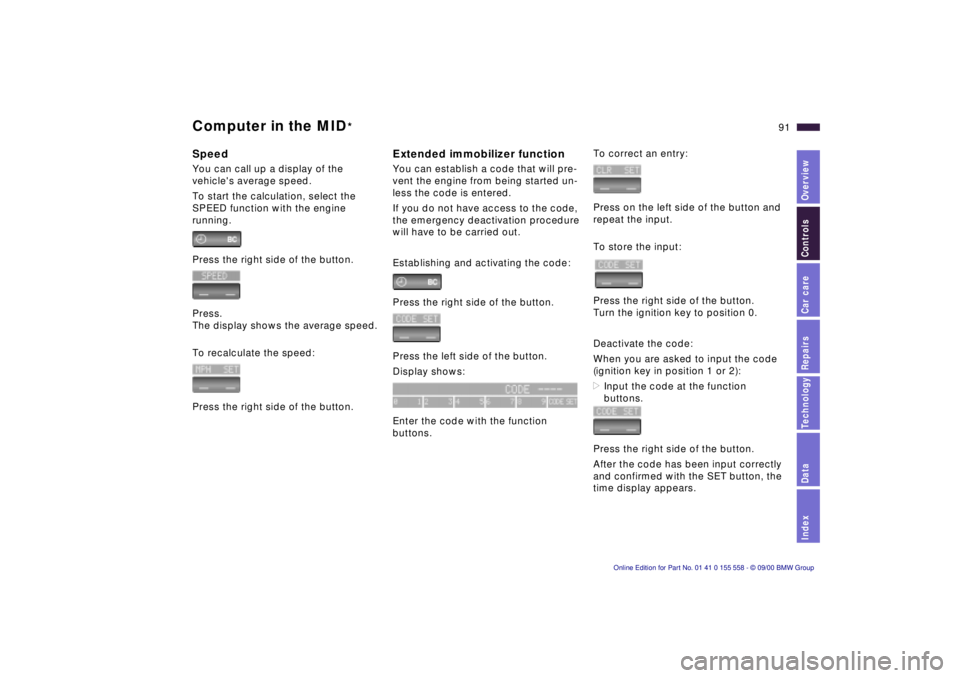
SpeedYou can call up a display of the
vehicle's average speed.
To start the calculation, select the
SPEED function with the engine
running.
Press the right side of the button.
Press.
The display shows the average speed.
To recalculate the speed:
Press the right side of the button.
Extended immobilizer functionYou can establish a code that will pre-
vent the engine from being started un-
less the code is entered.
If you do not have access to the code,
the emergency deactivation procedure
will have to be carried out.
Establishing and activating the code:
Press the right side of the button.
Press the left side of the button.
Display shows:
Enter the code with the function
buttons.
To correct an entry:
Press on the left side of the button and
repeat the input.
To store the input:
Press the right side of the button.
Turn the ignition key to position 0.
Deactivate the code:
When you are asked to input the code
(ignition key in position 1 or 2):
>Input the code at the function
buttons.
Press the right side of the button.
After the code has been input correctly
and confirmed with the SET button, the
time display appears.
Page 92 of 223
92n
Computer in the MID
*
After three incorrect code inputs, or
three attempts to start the engine with-
out a code input, the alarm will sound
for 30 seconds on vehicles fitted with
an alarm.
Deactivating the alarm in an
emergency:
If you have forgotten the code, proceed
as follows:
1 Disconnect the battery, wait approx.
2 minutes, then reconnect it. Note
that on vehicles with an alarm, this
will sound.
2 Set the ignition key to position 1:
The time display will count down for
the next ten minutes.
3 After ten minutes, start the engine.
If the code becomes available
again in the meantime, it can be
input during the waiting period after
pressing the CODE button.<
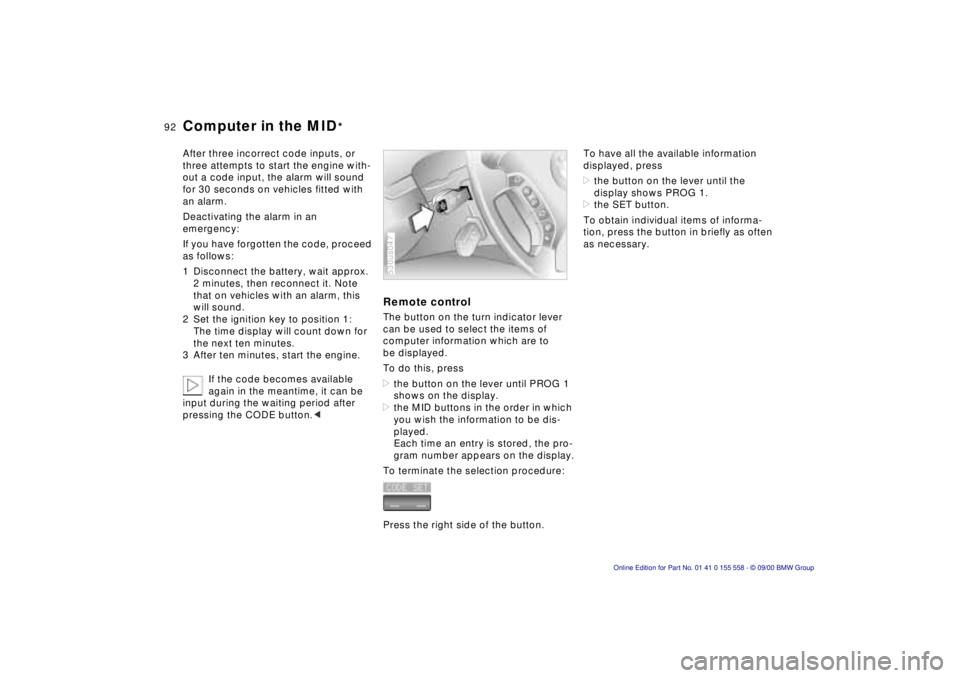
Remote controlThe button on the turn indicator lever
can be used to select the items of
computer information which are to
be displayed.
To do this, press
>the button on the lever until PROG 1
shows on the display.
>the MID buttons in the order in which
you wish the information to be dis-
played.
Each time an entry is stored, the pro-
gram number appears on the display.
To terminate the selection procedure:
Press the right side of the button.530us047
To have all the available information
displayed, press
>the button on the lever until the
display shows PROG 1.
>the SET button.
To obtain individual items of informa-
tion, press the button in briefly as often
as necessary.
Page 107 of 223
IndexDataTechnologyRepairsCar careControlsOverview
107n
Automatic climate control
*
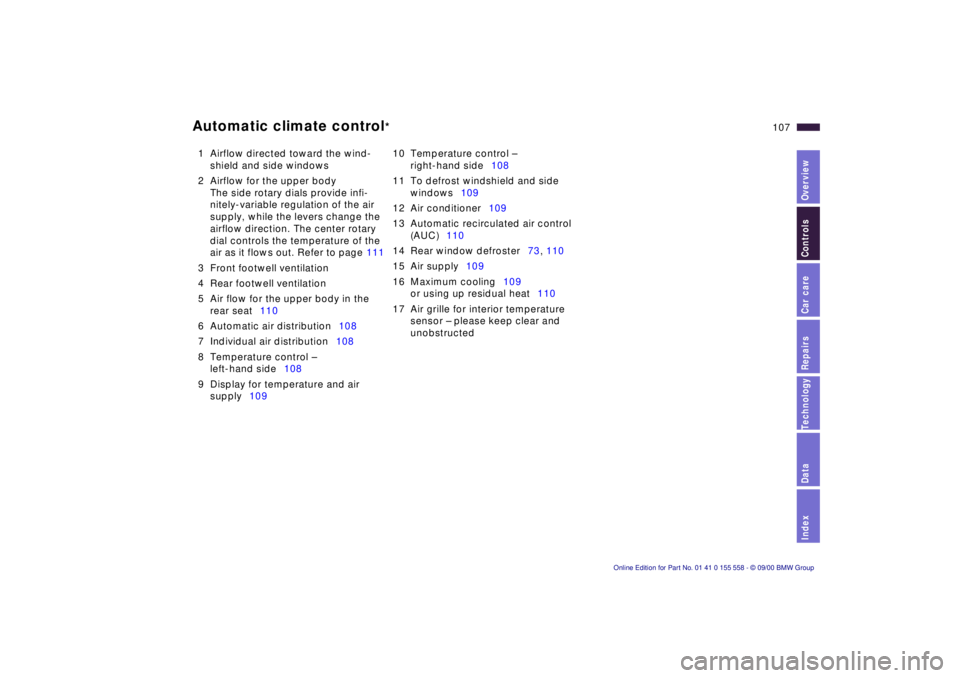
1 Airflow directed toward the wind-
shield and side windows
2 Airflow for the upper body
The side rotary dials provide infi-
nitely-variable regulation of the air
supply, while the levers change the
airflow direction. The center rotary
dial controls the temperature of the
air as it flows out. Refer to page 111
3 Front footwell ventilation
4 Rear footwell ventilation
5 Air flow for the upper body in the
rear seat110
6 Automatic air distribution108
7 Individual air distribution108
8 Temperature control –
left-hand side108
9 Display for temperature and air
supply10910 Temperature control –
right-hand side108
11 To defrost windshield and side
windows109
12 Air conditioner109
13 Automatic recirculated air control
(AUC)110
14 Rear window defroster73, 110
15 Air supply109
16 Maximum cooling109
or using up residual heat110
17 Air grille for interior temperature
sensor – please keep clear and
unobstructed
Page 108 of 223
108n
Automatic climate control
*
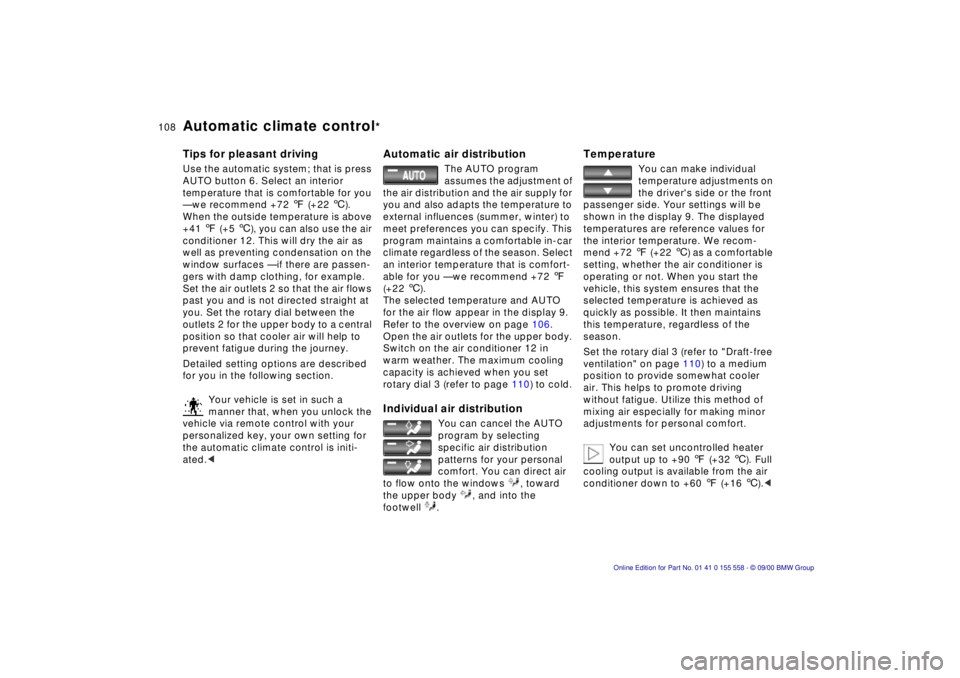
Tips for pleasant drivingUse the automatic system; that is press
AUTO button 6. Select an interior
temperature that is comfortable for you
— we recommend +72 7 (+22 6).
When the outside temperature is above
+41 7 (+5 6), you can also use the air
conditioner 12. This will dry the air as
well as preventing condensation on the
window surfaces — if there are passen-
gers with damp clothing, for example.
Set the air outlets 2 so that the air flows
past you and is not directed straight at
you. Set the rotary dial between the
outlets 2 for the upper body to a central
position so that cooler air will help to
prevent fatigue during the journey.
Detailed setting options are described
for you in the following section.
Your vehicle is set in such a
manner that, when you unlock the
vehicle via remote control with your
personalized key, your own setting for
the automatic climate control is initi-
ated.<
Automatic air distribution
The AUTO program
assumes the adjustment of
the air distribution and the air supply for
you and also adapts the temperature to
external influences (summer, winter) to
meet preferences you can specify. This
program maintains a comfortable in-car
climate regardless of the season. Select
an interior temperature that is comfort-
able for you — we recommend +72 7
(+22 6).
The selected temperature and AUTO
for the air flow appear in the display 9.
Refer to the overview on page 106.
Open the air outlets for the upper body.
Switch on the air conditioner 12 in
warm weather. The maximum cooling
capacity is achieved when you set
rotary dial 3 (refer to page 110) to cold.
Individual air distribution
You can cancel the AUTO
program by selecting
specific air distribution
patterns for your personal
comfort. You can direct air
to flow onto the windows , toward
the upper body , and into the
footwell .
Temperature
You can make individual
temperature adjustments on
the driver's side or the front
passenger side. Your settings will be
shown in the display 9. The displayed
temperatures are reference values for
the interior temperature. We recom-
mend +72 7 (+22 6) as a comfortable
setting, whether the air conditioner is
operating or not. When you start the
vehicle, this system ensures that the
selected temperature is achieved as
quickly as possible. It then maintains
this temperature, regardless of the
season.
Set the rotary dial 3 (refer to "Draft-free
ventilation" on page 110) to a medium
position to provide somewhat cooler
air. This helps to promote driving
without fatigue. Utilize this method of
mixing air especially for making minor
adjustments for personal comfort.
You can set uncontrolled heater
output up to +90 7 (+32 6). Full
cooling output is available from the air
conditioner down to +60 7 (+16 6).<
Page 109 of 223
IndexDataTechnologyRepairsCar careControlsOverview
109n
Automatic climate control
*
Air supply
In the AUTO program, the
air flow is controlled auto-
matically. AUTO will appear in the
display 9 (refer to the overview on
page 106). Use "+" and "–" to vary the
airflow. When your setting is displayed
by bars, the automatic airflow is
switched off. Automatic air distribution
maintains its setting. You can reactivate
the automatic air supply by pressing the
AUTO button.
When you press "– " during operation at
minimum blower speed all displays are
canceled: the blower, heating and air
conditioner are switched off. The
outside air supply is closed. You can
switch the system back on by pressing
any button of the automatic climate
control.
To defrost windows and remove
condensation
This program quickly
removes ice and conden-
sation from the windshield and the side
windows.
Air conditioner
The air is cooled and
dehumidified and —
depending on the temperature setting —
warmed again when the air conditioner
system is switched on. Depending on
the weather, the windshield may fog
over briefly when the engine is started.
Use the button to switch the air condi-
tioner off at outside temperatures
below approx. +41 7(+5 6). This will
help to prevent the windows from
fogging over.
If the windows fog over after switching
the air conditioner off, switch it back
on.
Condensation forms in the air
conditioner system during opera-
tion, which then exits under the vehicle.
Traces of condensed water of this kind
are thus normal.<
Maximum cooling
You will get maximum
cooling capacity using this
program if the engine is running and
the outside temperature is above
+41 7(+5 6).
The temperature display 9 drops to
+61 7 (+16 6), the system switches
over to the recirculated-air mode, and
the air streams out of the ventilation grill
with the maximum amount of flow. That
is why you need to keep these open if
you select this program.
Page 114 of 223

114n
Independent ventilation system
*
You can use this system to ventilate the
interior and lower its temperature, using
the blower of the automatic climate
control.
The independent ventilation system is
operated via the Multi-Information
display (MID), refer to page 87 or via the
Onboard Computer, refer to the sepa-
rate Owner's Manual.
You can set two different times for the
system to start; it will remain active for
30 minutes. You can also turn it on and
off directly. Since the system uses a
substantial amount of electrical current,
you should refrain from activating it
twice in succession without allowing
the battery to be recharged in normal
operation between use. When a preselected activation time is
set, the independent ventilation system
is operational at outside temperatures
above +60 7 (+16 6), or by direct
switch activation. It cannot be switched
on when the vehicle is moving.
The air emerges via the air outlets for
the upper body. Therefore, the air
outlets must be open for the system to
operate.
Page 149 of 223

IndexDataTechnologyRepairsCar careControlsOverview
149n
Special features of winter tires Snow chains
*
Choosing the right tireBMW recommends winter tires (M+S
radial tires) for operation under inclem-
ent winter driving conditions. While
so-called all-season tires (M+S desig-
nation) provide better winter traction
than summer tires with the load ratings
H, V, W, Y and ZR, they generally do
not achieve the performance of winter
tires.
In the interests of safe tracking and
steering response, install radial tires
made by the same manufacturer and
with the same tread configuration on all
four wheels if you elect to mount winter
tires.
Do not exceed specified
maximum speeds
Never exceed the maximum speed
for which the tires are rated.
Unprofessional attempts by laymen to
service tires can lead to damage and
accidents.
Have this work performed by skilled
professionals only. Your BMW center
will be glad to assist you with both their
expertise and the proper equipment for
your vehicle.<
Tire condition, tire pressureWinter tires display a perceptible loss in
their ability to cope with winter driving
conditions once the tread wears to
below 0.16 in (4 mm), and should thus
be replaced.
Comply with the specified tire inflation
pressures — and be sure to have the
wheel and tire assemblies balanced
every time you change the tires.
The use of narrow-link BMW snow
chains is approved only in pairs on the
rear wheels and only with tire size
235/65 R 17. Comply with all manufac-
turer's safety precautions when
mounting the chains.
Page 162 of 223
162n
The BMW Maintenance System has
been designed as a reliable means of
providing maximum driving and oper-
ating safety – and as cost-effectively as
possible for you.
Please keep in mind that regular main-
tenance is not only necessary for the
safety of your vehicle, but also plays a
significant role in maintaining the resale
value of the vehicle.
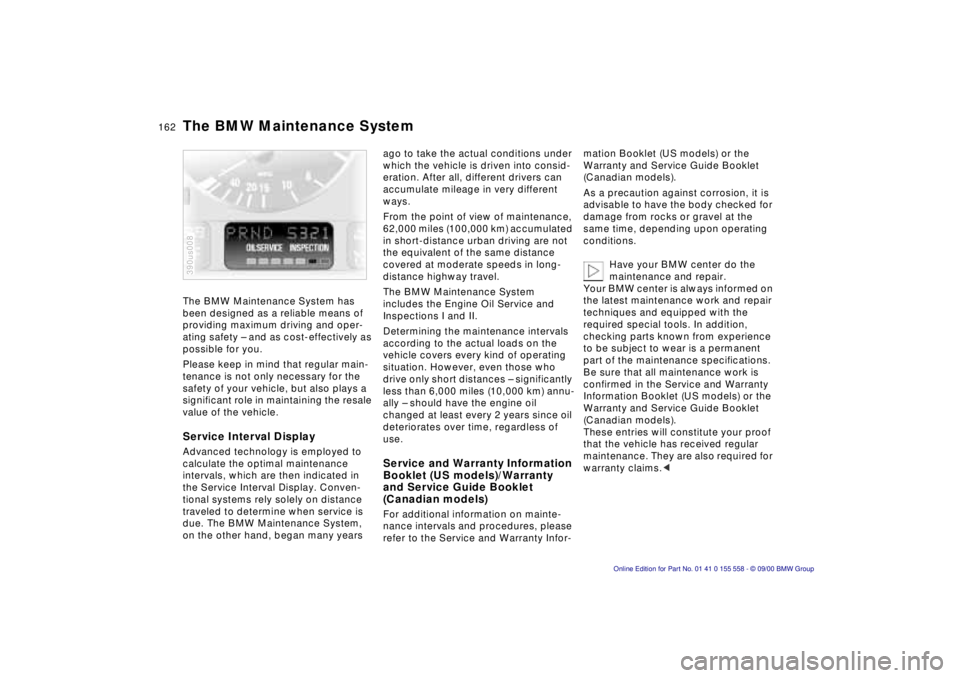
Service Interval DisplayAdvanced technology is employed to
calculate the optimal maintenance
intervals, which are then indicated in
the Service Interval Display. Conven-
tional systems rely solely on distance
traveled to determine when service is
due. The BMW Maintenance System,
on the other hand, began many years 390us008
ago to take the actual conditions under
which the vehicle is driven into consid-
eration. After all, different drivers can
accumulate mileage in very different
ways.
From the point of view of maintenance,
62,000 miles (100,000 km) accumulated
in short-distance urban driving are not
the equivalent of the same distance
covered at moderate speeds in long-
distance highway travel.
The BMW Maintenance System
includes the Engine Oil Service and
Inspections I and II.
Determining the maintenance intervals
according to the actual loads on the
vehicle covers every kind of operating
situation. However, even those who
drive only short distances – significantly
less than 6,000 miles (10,000 km) annu-
ally – should have the engine oil
changed at least every 2 years since oil
deteriorates over time, regardless of
use.Service and Warranty Information
Booklet (US models)/Warranty
and Service Guide Booklet
(Canadian models)For additional information on mainte-
nance intervals and procedures, please
refer to the Service and Warranty Infor-mation Booklet (US models) or the
Warranty and Service Guide Booklet
(Canadian models).
As a precaution against corrosion, it is
advisable to have the body checked for
damage from rocks or gravel at the
same time, depending upon operating
conditions.
Have your BMW center do the
maintenance and repair.
Your BMW center is always informed on
the latest maintenance work and repair
techniques and equipped with the
required special tools. In addition,
checking parts known from experience
to be subject to wear is a permanent
part of the maintenance specifications.
Be sure that all maintenance work is
confirmed in the Service and Warranty
Information Booklet (US models) or the
Warranty and Service Guide Booklet
(Canadian models).
These entries will constitute your proof
that the vehicle has received regular
maintenance. They are also required for
warranty claims.<
The BMW Maintenance System
Page 169 of 223

IndexDataTechnologyRepairsCar careControlsOverview
169n
Any BMW center will be glad to inform
you of the advisability, legal require-
ments and factory recommendations
with regard to technical modifications
on the vehicle. For this purpose, the
BMW center will require the Vehicle
Identification Number and, in some
cases, also the engine number.
Light-Emitting Diodes (LEDs) Light-emitting diodes installed behind
translucent lenses serve as the light
source for many of the controls and
displays in your vehicle. The concept
behind their operation is related to that
employed for lasers, and they are
formally designated as Class 1 light-
emitting diodes.
Do not remove the protective lens
and avoid staring directly at the
unfiltered beam for extended periods
(several hours), as inflammation of the
iris could result.<
California laws require us to state the
following warning:
Engine exhaust, some of its
constituents, and certain vehicle
components contain or emit chemicals
known to the State of California to
cause cancer and birth defects or other
reproductive harm.<
Technical modifications California Proposition 65 Warning
Page 215 of 223

Everything from A to Z215n
Index
Data
Technology
Repairs
Car care
Controls
Overview
Cellular phone 118, 144
refer to the separate
Owner's Manual
Center (high-mount) brake lamp 177
Central locking system 36
button 40
Changing a wheel 180t
Charge indicator lamp 22
Charging the battery 186t
Check air pressure 30
CHECK button 79
Check Control 79
Checking engine oil level 157
tire pressure 30t
Child restraint systems 61, 62
Child's seat 61
Child-safety locks 63
Cigarette lighter front 120
rear 121
socket 121t
Clean the windshield 72
Climate control in the rear passenger area 111
Clock 85
refer also to the onboard
monitor Owner's Manual
Cockpit 16 Code
91
activating 91
deactivating 91
refer also to the radio
Owner's Manual
selecting 91
Cold start 65
Comfort seat 50
Compartments 118
Computer 82, 88
refer also to the onboard
computer Owner's Manual
remote control 92
Configuring the settings 56
Consumption, fuel 90
Contamination on paintwork 164
Convenience operation of windows and sliding/tilt
sunroof 36
Convenience starting feature 65
Coolant 141, 160
antifreeze 141
temperature gauge 78
Cornering Brake Control (CBC) 138
Cruise control 74
Cruising range 82, 90
Cup holder 119
Curb weight 208D
Data link connector for On-
board Diagnostics 170
Date calling up 85
changing 85
refer also to the onboard
monitor Owner's Manual
Daytime-driving lamp 97
DBC (Dynamic Brake Control) 24, 138
Deactivating 92
Deactivating the interior motion
sensor 38t , 44 t
Deep water 135
Defrosting the windows 105t, 109 t
Difficult steering 143t
Digital clock 85
refer also to the onboard
monitor Owner's Manual
Digital sound processor 199
Dimensions 207
Dipstick, engine oil 157t
Disc brakes 140
Disconnect the battery 186t
Displacement 206
Display lighting 97
Displays 18, 20 Disposal
used batteries 186t
used oil 159t
Distance 89
Distance warning 93
Diversity Antenna system 198
Divided rear backrest 124
Door keys 34
Door locks, care 141
Doors manual operation 36
remote control 38
unlocking and locking 36
DOT Quality Grades 146
Drink holder, refer to cup holder 119
Drive belts 210
Driving notes 136, 140
Driving through water 135
Driving your BMW X5 135
DSC (Dynamic Stability Control) 24, 94 , 197
DSP amplifier, refer to the radio Owner's Manual
DSP sound system 199
Dynamic Brake Control (DBC) 24, 138
Dynamic Stability Control (DSC) 24, 94 , 197