instrument cluster BMW X5 4.4I 2001 Owners Manual
[x] Cancel search | Manufacturer: BMW, Model Year: 2001, Model line: X5 4.4I, Model: BMW X5 4.4I 2001Pages: 223, PDF Size: 2.66 MB
Page 10 of 223

Contents
Overview
Controls and features
Cockpit 16
Instrument cluster 18
Indicator and warning lamps 22
Multifunction steering wheel 26
Sports steering wheel 27
Hazard warning flashers 28
Warning triangle 28
First-aid kit 28
Refueling 29
Fuel specifications 30
Tire inflation pressure 30
Locks and security systems:
Keys34
Electronic vehicle immobilizer 35
Central locking system 36
Opening and closing – from the outside 36
Using the key 36
Using the remote control 37
Opening and closing – from the inside 40
Liftgate 41
Tailgate 41
Alarm system 43
Electric power windows 45
Sliding/Tilt sunroof with glass moonroof 46
Adjustments:
Seats48
Steering wheel 52
Mirrors 53
Seat, mirror and steering wheel memory 55
Car Memory, Key Memory 56
Passenger safety systems:
Safety belts57
Airbags 58
Transporting children safely 61
Driving:
Steering/Ignition lock64
Starting the engine 64
Switching off the engine 65
Parking brake 66
Manual transmission 67
Automatic transmission with Steptronic 68
Turn signal indicator/Headlamp flasher 70
Washer/Wiper system 71
Rear window defroster 73
Cruise control 74
Everything under control:
Odometer, outside temperature
display 76
Tachometer 77
Energy control 77
Fuel gauge 77
Coolant temperature gauge 78
Service Interval Display 78
Check Control 79
Computer 82
Multi-Information display (MID) 84
Digital clock in the MID 85
Computer in the MID 88
Contents
Page 15 of 223
Index
Data
Technology
Repairs
Car care
Controls
Overview
Overview
Controls and features Operation, care
and maintenance
Owner service procedures
Technical dataIndex
Advanced technology
15
n
Cockpit 16
Instrument cluster 18
Indicator and warning lamps 22
Multifunction steering wheel 26
Sports steering wheel 27
Hazard warning flashers 28
Warning triangle 28
First-aid kit 28
Refueling 29
Fuel specifications 30
Tire inflation pressure 30
Overview
Page 18 of 223
18n
Instrument cluster
530us002
Page 19 of 223
Index
Data
Technology
Repairs
Car care
Controls
Overview
19n
Instrument cluster
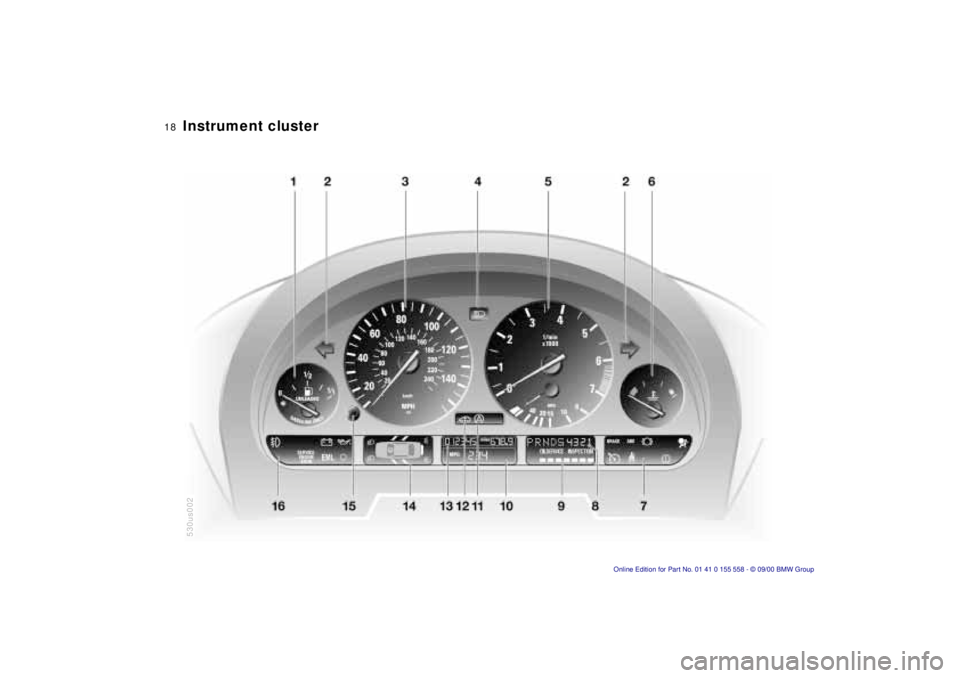
There are two versions, depending on
the equipment on your vehicle.
1 Fuel gauge with indicator lamp for fuel reserve 77
2 Indicator lamp for turn signals 25
3 Speedometer
4 Indicator lamp for high beams 25
5 Tachometer and Energy Control 77
6 Coolant temperature gauge with "Coolant temperature too high"
indicator 78
7 Indicator and warning lamps (clockwise) for:
>
Parking brake/Brake hydraulic
system, Dynamic Brake Control
(DBC) 22, 24
>
Antilock Brake System (ABS) 23
>
Brake pads24
>
Airbags23
>
Automatic transmission
*
24
>
Please fasten safety belts 23
>
Cruise control25
8 Selector lever and program display for automatic transmission
*
68
9 Service Interval Display 7810 Computer display –
operation via the turn signal lever,
refer to page 82:
>
Outside temperature
>
Average fuel consumption
>
Cruising range
>
Average speed
11 Indicator lamp for Dynamic Stability Control (DSC) 24
12 Indicator lamp for level control system
*
24
13 Odometer and trip odometer 76
14 Indicator for Check Control 79
15 Reset button for trip odometer 76
16 Indicator and warning lamps (clockwise) for:
>
Fog lamps 25
>
Battery charge current 22
>
Engine oil level/Engine oil
pressure22, 24
>
Engine Power Control 24
>
Service Engine Soon24
Page 20 of 223
20n
Instrument cluster
*
530us003
Page 21 of 223

Index
Data
Technology
Repairs
Car care
Controls
Overview
21n
Instrument cluster
*
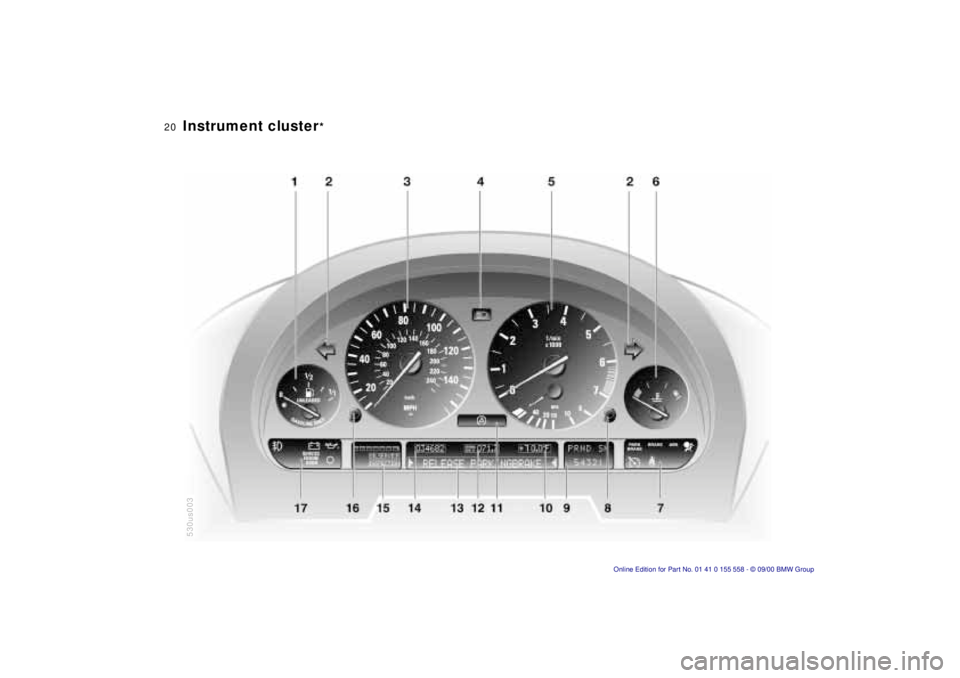
There are two versions, depending on
the equipment on your vehicle. 1 Fuel gauge with indicator lamp for fuel reserve 77
2 Indicator lamp for turn signals 25
3 Speedometer
4 Indicator lamp for high beams 25
5 Tachometer and Energy Control 77
6 Engine coolant temperature gauge 78
7 Indicator and warning lamps (clockwise) for:
>
Parking brake 23
>
Brake hydraulic system/Dynamic
Brake Control (DBC) 22, 24
>
Antilock Brake System (ABS) 23
>
Airbags23
>
Please fasten safety belts 23
>
Cruise control25
8 CHECK button 79
9 Selector lever and program display for automatic transmission
*
68 10 Outside temperature display
76
11 Indicator lamp for Dynamic Stability Control (DSC) 24
12 Trip odometer 76
13 Indicator for Check Control
*
79
14 Odometer 76
15 Service Interval Display 78
16 Reset button for trip odometer 76
17 Indicator and warning lamps (clockwise) for:
>
Fog lamps 25
>
Battery charge current 22
>
Engine oil pressure22
>
Service Engine Soon 24
Page 66 of 223
66nParking brake
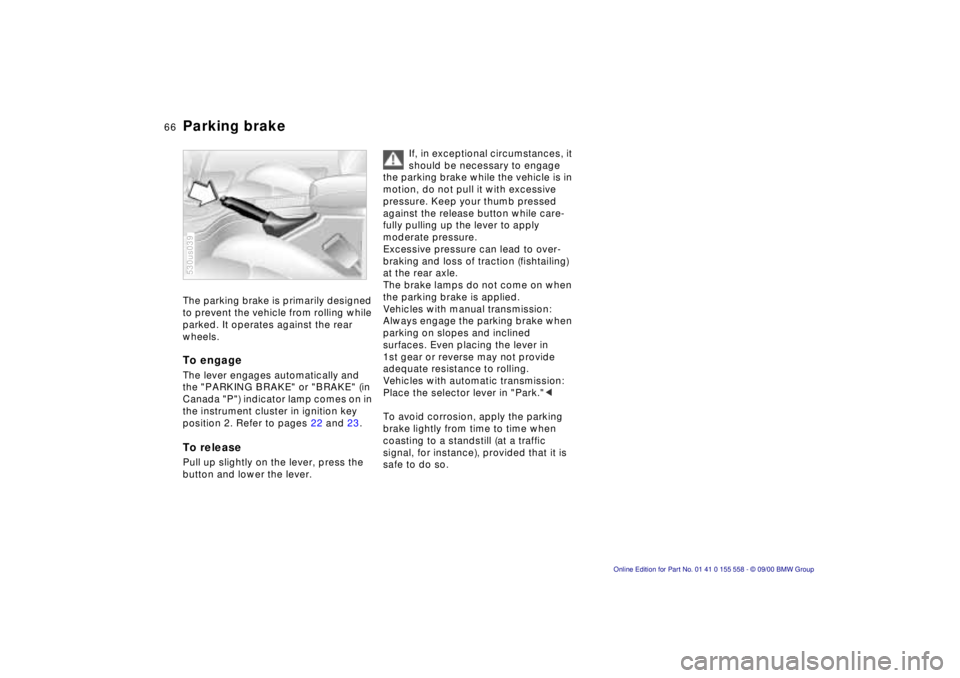
The parking brake is primarily designed
to prevent the vehicle from rolling while
parked. It operates against the rear
wheels.
To engage
The lever engages automatically and
the "PARKING BRAKE" or "BRAKE" (in
Canada "P") indicator lamp comes on in
the instrument cluster in ignition key
position 2. Refer to pages 22 and 23.
To release
Pull up slightly on the lever, press the
button and lower the lever.
530us039
If, in exceptional circumstances, it
should be necessary to engage
the parking brake while the vehicle is in
motion, do not pull it with excessive
pressure. Keep your thumb pressed
against the release button while care-
fully pulling up the lever to apply
moderate pressure.
Excessive pressure can lead to over-
braking and loss of traction (fishtailing)
at the rear axle.
The brake lamps do not come on when
the parking brake is applied.
Vehicles with manual transmission:
Always engage the parking brake when
parking on slopes and inclined
surfaces. Even placing the lever in
1st gear or reverse may not provide
adequate resistance to rolling.
Vehicles with automatic transmission:
Place the selector lever in "Park." <
To avoid corrosion, apply the parking
brake lightly from time to time when
coasting to a standstill (at a traffic
signal, for instance), provided that it is
safe to do so.
Page 69 of 223
Index
Data
Technology
Repairs
Car care
Controls
Overview
69nAutomatic transmission with Steptronic*
Do not leave the vehicle unattended
with the engine running. An unattended
vehicle with a running engine repre-
sents a potential safety hazard. <
P — Park
Select "Park" only when the vehicle is
completely stopped. The transmission
locks to prevent the rear wheels from
turning.
R — Reverse
Select "Reverse" only when the vehicle
is completely stopped.
N — Neutral
Select "Neutral" only if your journey is
interrupted for a longer period.
D — Drive
(automatic shift program)
This position is designed for driving
under all normal operating conditions.
All forward gears are available.
"Kickdown"
In the "Kickdown" mode, you achieve
maximum performance.
Depress the accelerator pedal past the
increased resistance point at the full-
throttle position.
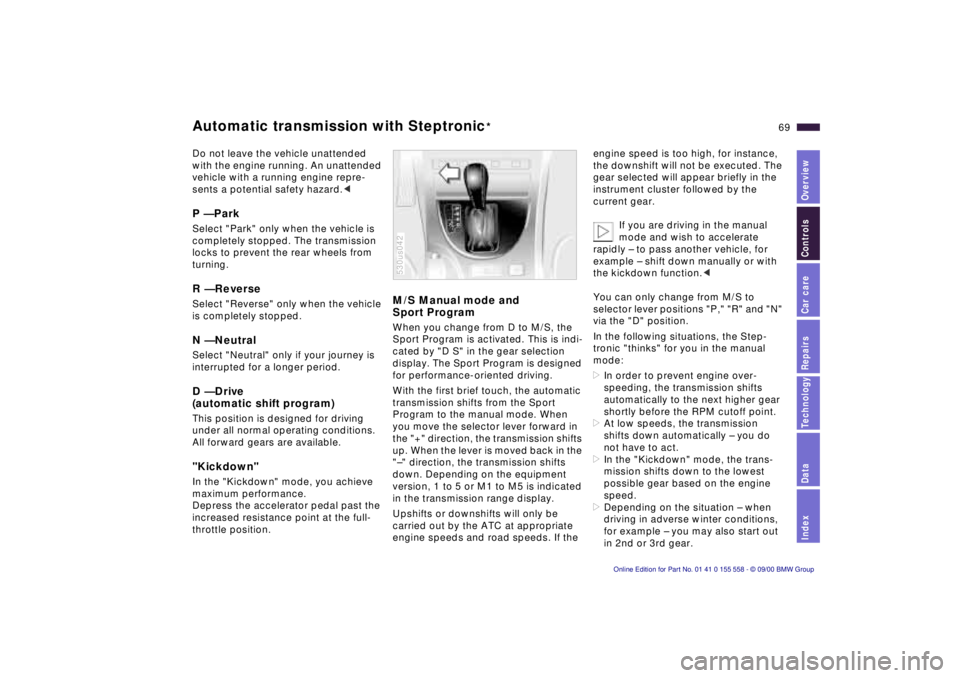
M/S Manual mode and
Sport Program
When you change from D to M/S, the
Sport Program is activated. This is indi-
cated by "D S" in the gear selection
display. The Sport Program is designed
for performance-oriented driving.
With the first brief touch, the automatic
transmission shifts from the Sport
Program to the manual mode. When
you move the selector lever forward in
the "+" direction, the transmission shifts
up. When the lever is moved back in the
"–" direction, the transmission shifts
down. Depending on the equipment
version, 1 to 5 or M1 to M5 is indicated
in the transmission range display.
Upshifts or downshifts will only be
carried out by the ATC at appropriate
engine speeds and road speeds. If the
530us042
engine speed is too high, for instance,
the downshift will not be executed. The
gear selected will appear briefly in the
instrument cluster followed by the
current gear.
If you are driving in the manual
mode and wish to accelerate
rapidly – to pass another vehicle, for
example – shift down manually or with
the kickdown function. <
You can only change from M/S to
selector lever positions "P," "R" and "N"
via the "D" position.
In the following situations, the Step-
tronic "thinks" for you in the manual
mode:
> In order to prevent engine over-
speeding, the transmission shifts
automatically to the next higher gear
shortly before the RPM cutoff point.
> At low speeds, the transmission
shifts down automatically – you do
not have to act.
> In the "Kickdown" mode, the trans-
mission shifts down to the lowest
possible gear based on the engine
speed.
> Depending on the situation – when
driving in adverse winter conditions,
for example – you may also start out
in 2nd or 3rd gear.
Page 74 of 223
74nCruise control
You can store and automatically main-
tain any desired vehicle speed above
approx. 20 mph (30 km/h).
Do not use cruise control on
twisting roads, when high traffic
density prevents driving at a constant
speed, when the road surface is slick
(snow, rain, ice), or when the road
surface is loose (rocks or gravel,
sand). <
To activate the system
In ignition key position 1 or 2:
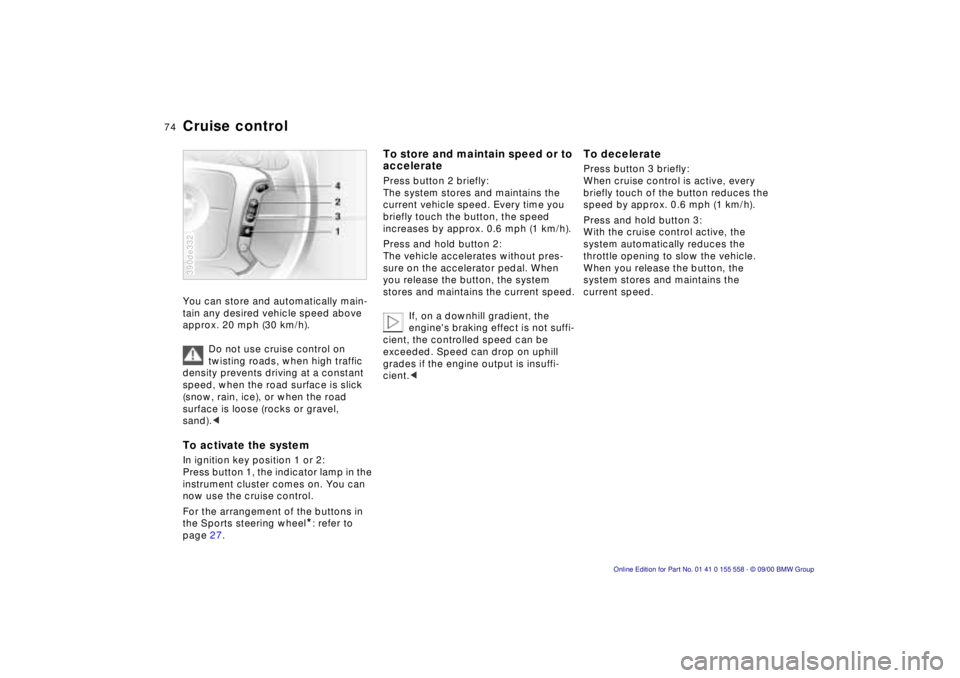
Press button 1, the indicator lamp in the
instrument cluster comes on. You can
now use the cruise control.
For the arrangement of the buttons in
the Sports steering wheel
*: refer to
page 27.
390de332
To store and maintain speed or to
accelerate
Press button 2 briefly:
The system stores and maintains the
current vehicle speed. Every time you
briefly touch the button, the speed
increases by approx. 0.6 mph (1 km/h).
Press and hold button 2:
The vehicle accelerates without pres-
sure on the accelerator pedal. When
you release the button, the system
stores and maintains the current speed.
If, on a downhill gradient, the
engine's braking effect is not suffi-
cient, the controlled speed can be
exceeded. Speed can drop on uphill
grades if the engine output is insuffi-
cient. <
To decelerate
Press button 3 briefly:
When cruise control is active, every
briefly touch of the button reduces the
speed by approx. 0.6 mph (1 km/h).
Press and hold button 3:
With the cruise control active, the
system automatically reduces the
throttle opening to slow the vehicle.
When you release the button, the
system stores and maintains the
current speed.
Page 76 of 223
76n
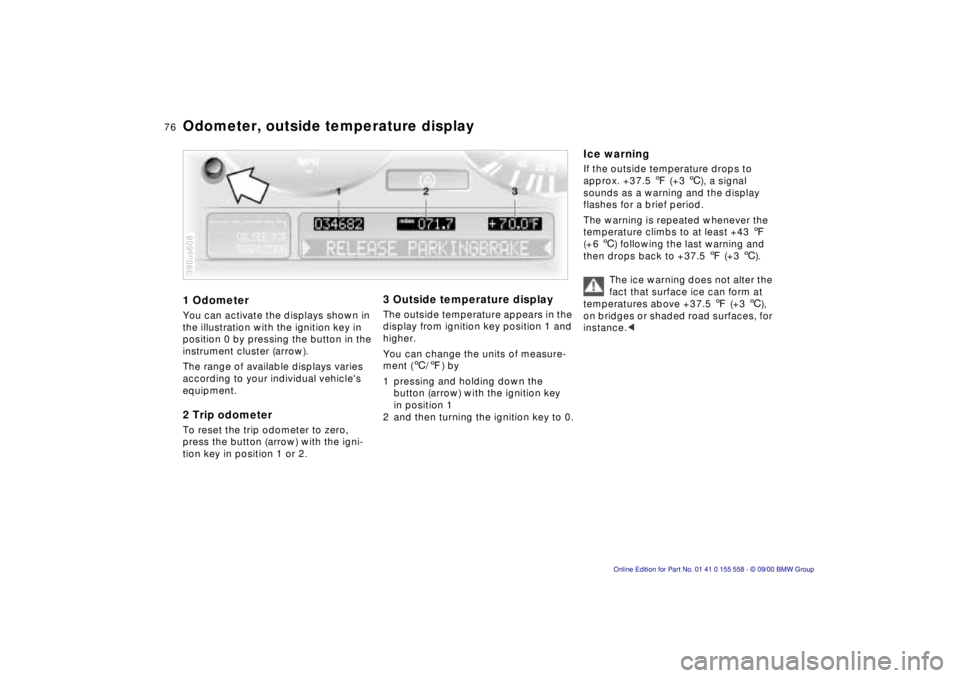
1 Odometer
You can activate the displays shown in
the illustration with the ignition key in
position 0 by pressing the button in the
instrument cluster (arrow).
The range of available displays varies
according to your individual vehicle's
equipment.
2 Trip odometer
To reset the trip odometer to zero,
press the button (arrow) with the igni-
tion key in position 1 or 2.
390us608
3 Outside temperature display
The outside temperature appears in the
display from ignition key position 1 and
higher.
You can change the units of measure-
ment ( 6/7 ) by
1 pressing and holding down the button (arrow) with the ignition key
in position 1
2 and then turning the ignition key to 0.
Ice warning
If the outside temperature drops to
approx. +37.5 7 (+3 6), a signal
sounds as a warning and the display
flashes for a brief period.
The warning is repeated whenever the
temperature climbs to at least +43 7
(+6 6) following the last warning and
then drops back to +37.5 7 (+3 6).
The ice warning does not alter the
fact that surface ice can form at
temperatures above +37.5 7 (+3 6),
on bridges or shaded road surfaces, for
instance. <
Odometer, outside temperature display