ECO mode BMW X5 4.8I 2008 E70 User Guide
[x] Cancel search | Manufacturer: BMW, Model Year: 2008, Model line: X5 4.8I, Model: BMW X5 4.8I 2008 E70Pages: 292, PDF Size: 9.32 MB
Page 248 of 292
Maintenance
246
Socket for OBD Onboard
Diagnostics interface
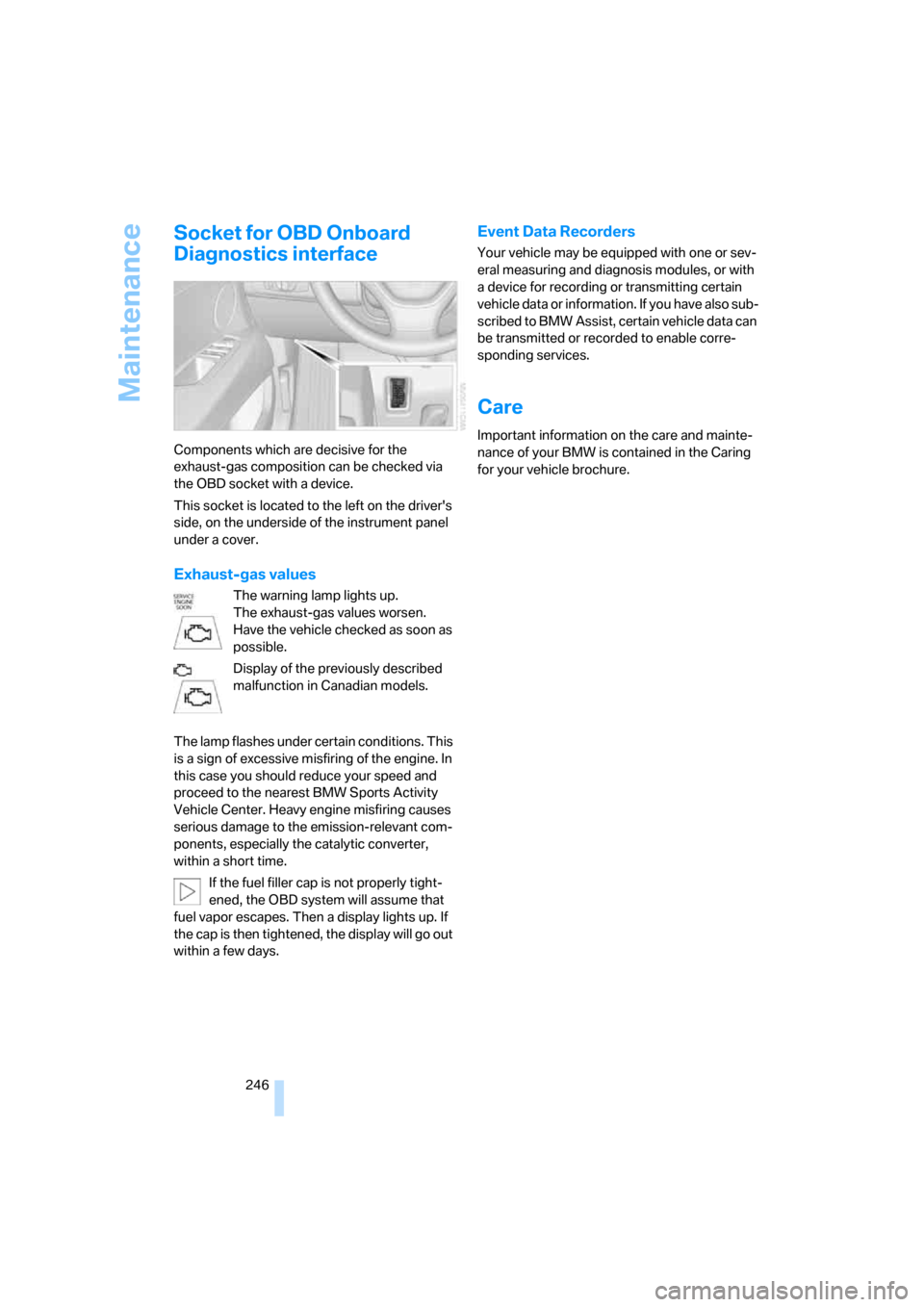
Components which are decisive for the
exhaust-gas composition can be checked via
the OBD socket with a device.
This socket is located to the left on the driver's
side, on the underside of the instrument panel
under a cover.
Exhaust-gas values
The warning lamp lights up.
The exhaust-gas values worsen.
Have the vehicle checked as soon as
possible.
Display of the previously described
malfunction in Canadian models.
The lamp flashes under certain conditions. This
is a sign of excessive misfiring of the engine. In
this case you should reduce your speed and
proceed to the nearest BMW Sports Activity
Vehicle Center. Heavy engine misfiring causes
serious damage to the emission-relevant com-
ponents, especially the catalytic converter,
within a short time.
If the fuel filler cap is not properly tight-
ened, the OBD system will assume that
fuel vapor escapes. Then a display lights up. If
the cap is then tightened, the display will go out
within a few days.
Event Data Recorders
Your vehicle may be equipped with one or sev-
eral measuring and diagnosis modules, or with
a device for recording or transmitting certain
vehicle data or information. If you have also sub-
scribed to BMW Assist, certain vehicle data can
be transmitted or recorded to enable corre-
sponding services.
Care
Important information on the care and mainte-
nance of your BMW is contained in the Caring
for your vehicle brochure.
Page 276 of 292
Everything from A to Z
274 Control Display, refer to
iDrive16
– setting brightness82
Controller, refer to iDrive16
Controls, refer to Cockpit10
Controls of DVD system in
rear192
Convenient operation
– panorama glass
sunroof30,32
– panorama glass sunroof with
comfort access37
– windows30,32
– windows with comfort
access37
– with comfort access37
Coolant244
– checking level244
– temperature72
Cooling, maximum109
Cornering Brake Control
CBC88
Courtesy lamps, refer to
Interior lamps105
Cradle for telephone or mobile
phone119
Cruise control69
Cruising range73
Cup holders120
Curb weight, refer to
Weights264
Current fuel consumption72
"Current position"157
Current position
– displaying157
– entering146
– storing146
"Customer
Relations"218,226
Cylinders, refer to Engine
data262
D
Dashboard, refer to
Cockpit10
Data262
– capacities264
– dimensions263
– engine262
– technical data262
– weights264
"Date"82
Date71
– display format82
– retrieving71
– setting82
"Date format"82
"Daytime running lamps"103
Daytime running lamps103
"Deactivated"45
Decommissioning the vehicle,
refer to Caring for your
vehicle brochure
Defrosting windows108
Defrosting windows and
removing condensation108
Defrost position, refer to
Defrosting windows108
"Delete address book" for
navigation system147
"Delete all numbers" on the
mobile phone217
"Delete data" for navigation
system147
"Delete" for mobile
phone217
Destination address
– deleting147
– entering139,141
Destination for navigation
– destination list145
– entry138
– selecting from address
book147
– selecting using
information144
– selecting using voice141
– storing146Destination guidance150
– canceling voice
instructions54
– changing specified
route148
– displaying route151
– distance and arrival150
– ending/continuing150
– starting150
– voice instructions153
– volume of voice
instructions154
Destination list for navigation
system
145
Destinations recently driven
to145
"Details"
– DVD system in the rear200
– in audio mode190
"Dial" for mobile phone215
"Dial number"215
"Diamond button"54
Digital clock71
Digital compass117
Digital radio, refer to High
Definition Radio169
Dimensions263
Directional indicators, refer to
Turn signals66
Direction instructions, refer to
Voice instructions153
Directory for navigation, refer
to Address book146
Direct selection buttons21
Displacement, refer to Engine
data262
"Display"82
Display, refer to iDrive16
Displaying images200
Display lighting, refer to
Instrument lighting105
"Display off"21
Displays, refer to Instrument
panel12
"Display settings"82,99
Displays on the windshield,
refer to Head-Up Display99
Page 284 of 292
Everything from A to Z
282 Radio readiness59
– switched off59
– switched on59
– with comfort access37
Rain sensor67
"Random"
– for DVD system in rear199
– refer to Random
sequence178
"Random all"
– for DVD system in rear200
– in audio mode178
"Random directory"
– for DVD system in rear200
– in audio mode178
Random sequence178
"RDS" Radio Data
System169
Reading lamps105
Rear automatic climate
control111
– activating on Control
Display112
– air supply112
– switching off112
"Rear climate control"112
"Rear enabled"192
Rear entertainment, refer to
DVD system in rear192
Rear lamps, refer to Tail
lamps249
– replacing bulbs249
Rear seat backrest,
folding123
Rear seats
– adjusting47
– adjusting head restraints47
– folding over backrest123
– head restraint adjustment47
– heating50,51
Rear socket122
Rear ventilation111
– rear automatic climate
control111
– 3rd row seats111Rear view camera86
– cleaning88
– displaying88
– driver assistance
functions86
– switching off86
– switching on86
Rearview mirror51
Rear window
– heating108
– replacing wiper blade247
– windshield wiper
68,130
Rear window safety switch39
Rear window wiper, replacing
wiper blade247
"Received calls"216
Recent numbers in mobile
phone217
Reception level of mobile
phone, refer to Status
information20
Recirculated-air mode109
– air recirculation109
– AUC Automatic
recirculated-air control109
Reclining seat, refer to
Seats43
Recording times, refer to
Stopwatch80
"Redial" for mobile phone216
Reflectors, refer to Tail
lamps249
Refueling232
Releasing
– hood241
– refer to Unlocking36
"Relock door if not
opened"32
Remaining distance, refer to
Cruising range73
Remaining distance to
destination, refer to
Computer73Remote control28
– comfort access36
– DVD system in rear193
– garage door opener115
– liftgate30
– malfunction31,37
– replacing battery38
Removing condensation on
the windows108
"Repeat"
– for DVD system in rear199
– in audio mode178
"Repeat directory"
– for DVD system in
rear198,200
– in audio mode178
"Repeat track"
– for DVD system in
rear198,200
– in audio mode178
Replacement fuses253
Replacement of tires239
– changing wheels251
– new wheels and tires239
Replacing bulbs, refer to
Lamps and bulbs247
Replacing wheels/tires, refer
to New wheels and tires239
Replacing wiper blades247
Reporting an accident, refer to
Initiating an emergency
request255
Reporting safety defects7
Reserve warning, refer to Fuel
gauge72
"Reset"93,95
– for DVD system in
rear196,197
– stopwatch80
– tone settings165
Reset, refer to Resetting tone
settings165
"resetting FTM …"93
Residual heat110
Restraint systems
– for children55
– refer to Safety belts48
Retreaded tires239
Page 288 of 292
Everything from A to Z
286 "Top 8" for mobile phone216
Torque
– engine262
– lug bolts, refer to After
mounting252
Touch tone dialing218
Tow fitting257
Towing257
– tow fitting257
"Town / City" for destination
entry139
Town/city for destination
entry139
Tow-starting257,258
"TPM"95
TPM Tire Pressure
Monitor94
– resetting system94
– system limits94
– warning lamp95
Tracks
– finding177
– random sequence178
– sampling, scan177
Track width, refer to
Dimensions263
Traction-assist feature, refer
to DSC Dynamic Stability
Control89
Traction control, refer to
DSC Dynamic Stability
Control89
Traffic congestion
– bypassing157
– displaying traffic
information154
Traffic information for
navigation
– depiction in route map156
– displaying155
– during destination
guidance157
– switching on/off155
– symbols156
"Traffic Info settings"155Transmission
– automatic transmission with
Steptronic64
– manually releasing
transmission lock on
automatic transmission with
Steptronic65
– starting assistant91
Transmission positions, refer
to Automatic transmission
with Steptronic64
Transporting children
safely55
Transport securing device,
refer to Securing cargo132
Tread depth, refer to Minimum
tread depth238
Treble, refer to Tone
control
163
"Treble / Bass" for DVD
system in rear197
"Trip computer"74
Trip computer74
Trip-distance counter, refer to
Trip odometer71
"Triple turn signal"67
Trip odometer71
Turning circle, refer to
Dimensions263
Turn signals66
– indicator lamp12
– replacing bulbs248
U
Underbody protection, refer to
Caring for your vehicle
brochure
Uniform Tire Quality Grading/
UTQR237
"Units"83
Units
– average fuel
consumption82
– temperature82
Universal garage-door
opener, refer to Integrated
universal remote
control115Universal remote control115
"Unlock button"30
Unlocking
– from inside32
– liftgate30
– using remote control30
– without key, refer to Comfort
access36
Unlocking and locking doors,
using remote control30
Unlocking without key, refer to
Comfort access36
"Unlock rear menu" for DVD
system in rear192
"Update services"227
USB audio interface189
"USB" in audio
mode188,190
Used batteries
– refer to Disposal253
– refer to Replacing battery38
V
Valve screw caps, refer to
After mounting252
Vehicle
– battery253
– breaking-in128
– care246
– care, refer to Caring for your
vehicle brochure
– decommissioning, refer to
Caring for your vehicle
brochure
– loading131
– measurements, refer to
Dimensions263
– parking60
– washing, refer to Caring for
your vehicle brochure
– weights264
"Vehicle / Tires" for
unlocking30
Vehicle jack251
– jacking points252
Vehicle position, refer to
Displaying current
position157