steering BMW X5 4.8IS 2004 E53 Owner's Guide
[x] Cancel search | Manufacturer: BMW, Model Year: 2004, Model line: X5 4.8IS, Model: BMW X5 4.8IS 2004 E53Pages: 200, PDF Size: 3.91 MB
Page 134 of 200
132n
Cargo loading Roof-mounted luggage rack
*
Always position and secure the
load as described above. If you do
not, it can even endanger the passen-
gers during braking or evasive maneu-
vers.
Do not exceed the permissible gross
vehicle weight and the permissible axle
loads, refer to page 180. If you do, the
operating safety of the vehicle is no
longer ensured and you are in violation
of the law.
You should never transport heavy or
hard objects unsecured in the passen-
ger compartment, as they could fly
around and pose a safety hazard to the
vehicle's occupants even during abrupt
braking or evasive maneuvers.<
A special rack system is available as an
option for your BMW. Please comply
with the precautions included with the
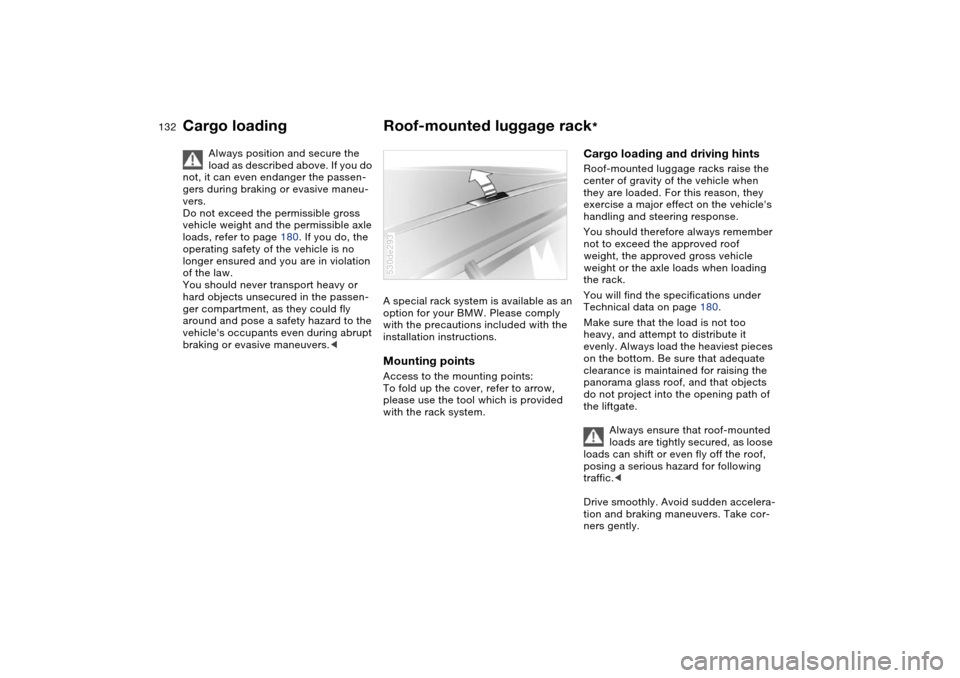
installation instructions.Mounting pointsAccess to the mounting points:
To fold up the cover, refer to arrow,
please use the tool which is provided
with the rack system.530de293
Cargo loading and driving hintsRoof-mounted luggage racks raise the
center of gravity of the vehicle when
they are loaded. For this reason, they
exercise a major effect on the vehicle's
handling and steering response.
You should therefore always remember
not to exceed the approved roof
weight, the approved gross vehicle
weight or the axle loads when loading
the rack.
You will find the specifications under
Technical data on page 180.
Make sure that the load is not too
heavy, and attempt to distribute it
evenly. Always load the heaviest pieces
on the bottom. Be sure that adequate
clearance is maintained for raising the
panorama glass roof, and that objects
do not project into the opening path of
the liftgate.
Always ensure that roof-mounted
loads are tightly secured, as loose
loads can shift or even fly off the roof,
posing a serious hazard for following
traffic.<
Drive smoothly. Avoid sudden accelera-
tion and braking maneuvers. Take cor-
ners gently.
Page 141 of 200
139n
OverviewControlsMaintenanceRepairsDataIndex
Safe braking Emergency stopsYou brake most effectively when you
apply maximum pedal pressure in situa-
tions requiring it: emergency stops.
Since the vehicle maintains steering
responsiveness, you can nevertheless
avoid possible obstacles with a mini-
mum of steering effort.
Pulsation at the brake pedal combined
with sounds from the hydraulic circuits
indicates to the driver that ABS is in its
active mode.Brake fluid level If the brake fluid level is too low and
brake pedal travel has become longer,
there may be a defect in one of the two
brake system's hydraulic circuits.
Proceed to the nearest BMW
Sports Activity Vehicle center.
Here increased pressure on the brake
pedal may be required, and slight pull-
ing to the side and longer braking dis-
tances may result. Please remember to
adapt your driving style accordingly.<
Disk brakes When the vehicle is driven only occa-
sionally, during extended periods when
the vehicle is not used at all, and in
operating conditions where brake appli-
cations are less frequent, there is an
increased tendency for corrosion to
form on rotors, while contaminants
accumulate on the brake pads. This
occurs because the minimal pressure
which must be exerted by the pads dur-
ing brake applications to clean the
rotors is not reached.
If the brake rotors are corroded, they
will tend to respond to braking with a
pulsating effect which even extended
application will fail to cure.
When driving in wet conditions and in
heavy rain, it is advisable to apply light
pressure to the brake pedal from time
to time. Monitor traffic conditions to
ensure that this maneuver does not
endanger other road users. The heat
generated in this process helps dry the
pads and rotors to ensure that the brak-
ing force is then immediately available
when required.
Extended or steep mountain descents
should be driven in the gear in which
only minimal periodic brake application
is required. This avoids excessive strain on the brakes and possible impairment
of the braking effect.
Do not coast with the clutch
depressed or with the transmis-
sion or selector lever in neutral. Do not
drive with the engine switched off. The
engine provides no braking effect when
the clutch is depressed or the transmis-
sion is in neutral, and there is no
power-assist for braking or steering
when the engine is not running.
BMW recommends having brake
inspections performed at a BMW
Sports Activity Vehicle center only. If
you do not, parts of the 4-wheel drive
system could be damaged.
Never allow floor mats, carpets or any
other objects to protrude into the area
around the accelerator, clutch and
brake pedals and obstruct their move-
ment.<
Brake pads
For your own safety: use only
brake pads that BMW has
released for your particular vehicle
model. BMW cannot evaluate non-
approved brake pads to determine if
they are suited for use, and therefore
cannot ensure the operating safety of
the vehicle if they are installed.<
Page 165 of 200
163n
OverviewControlsMaintenanceRepairsDataIndex
Lamps and bulbs Changing a tire Light-emitting diodes LEDs Light-emitting diodes installed behind
translucent lenses serve as the light
source for many of the controls and dis-
plays in your vehicle. The concept
behind their operation is related to that
employed for lasers.
Do not remove the covers, and
never stare into the unfiltered light
several hours, as irritation of the iris
could result.<
Safety precautions to observe in
the event of a flat and during all
tire changes:
Park the vehicle as far as possible from
passing traffic. Park on a firm, flat, sur-
face. Switch on the hazard warning
flashers.
Turn the steering wheel to the straight-
ahead position, remove the key and
engage the steering lock. Shift into 1st
or reverse, selector lever in Park with
automatic transmission, and engage
the handbrake.
All passengers should be outside the
vehicle and well away from your imme-
diate working area, behind a guardrail,
for instance.
If a warning triangle or portable hazard
warning lamp is required, set it up on
the roadside at an appropriate distance
from the rear of the vehicle. Comply
with all safety guidelines and regula-
tions.
Change the wheel only on a level, firm
surface which is not slippery. The vehi-
cle or the jack could slip to the side if
you attempt to raise the vehicle on a
soft or slippery surface such as snow,
ice, tiles, etc.
Position the jack on a firm support sur-
face.
Do not place wooden blocks or similar
objects under the jack. If this is done,
the jack might not be able to reach its
full support capacity because of the
limited height. To avoid serious or fatal
injury: never lie under the vehicle, and
never start the engine while it is sup-
ported by the jack.<
Page 171 of 200
169n
OverviewControlsMaintenanceRepairsDataIndex
Battery FusesPower failure Following a temporary power failure,
e.g. in the case of a flat battery, some
equipment is subject to restricted use
and must be reinitialized. Individual set-
tings are also lost and must be updated
again:
>Seat, mirror and steering wheel
memory
The position must be newly stored,
refer to page 50
>Time and date
Have to be updated, refer to page 84
>Activation time for independent venti-
lation
Must be updated again, refer to
page 86.
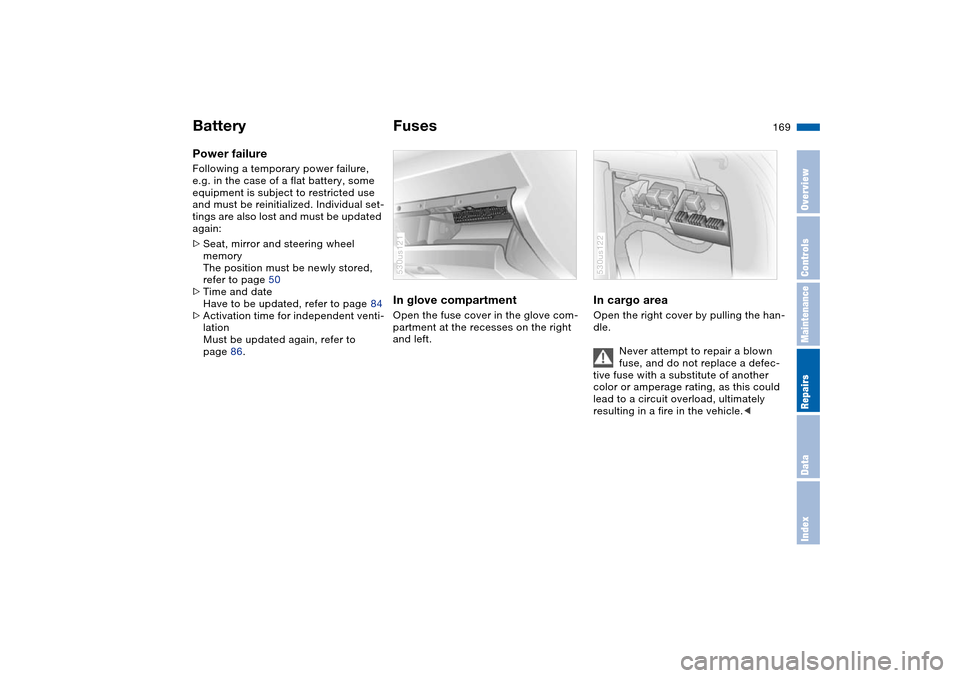
In glove compartment Open the fuse cover in the glove com-
partment at the recesses on the right
and left.530us121
In cargo area Open the right cover by pulling the han-
dle.
Never attempt to repair a blown
fuse, and do not replace a defec-
tive fuse with a substitute of another
color or amperage rating, as this could
lead to a circuit overload, ultimately
resulting in a fire in the vehicle.< 530us122
Page 175 of 200
173n
OverviewControlsMaintenanceRepairsDataIndex
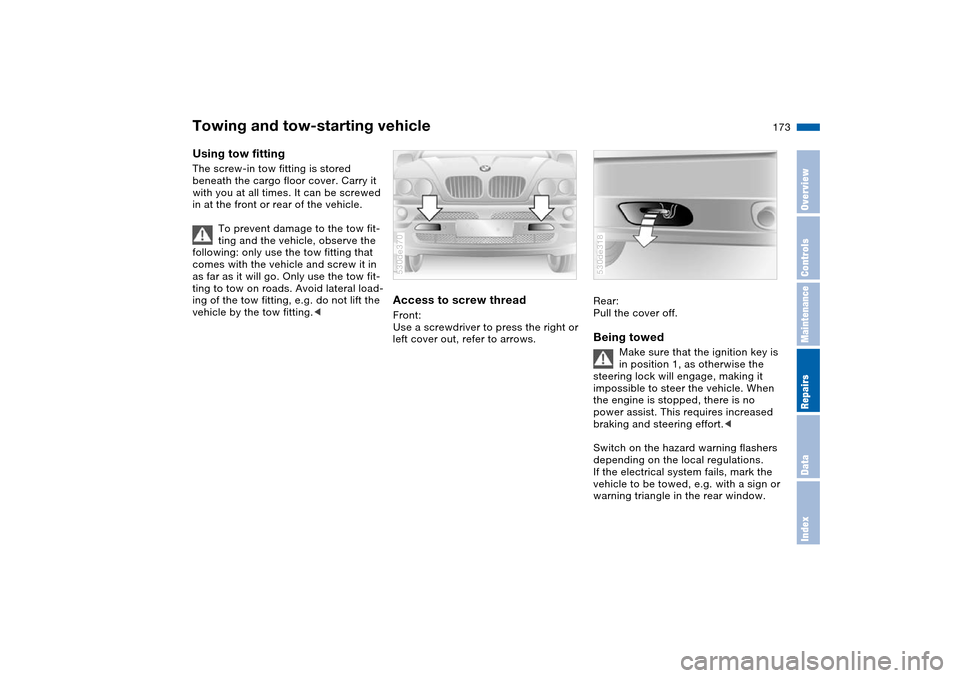
Towing and tow-starting vehicle Using tow fitting The screw-in tow fitting is stored
beneath the cargo floor cover. Carry it
with you at all times. It can be screwed
in at the front or rear of the vehicle.
To prevent damage to the tow fit-
ting and the vehicle, observe the
following: only use the tow fitting that
comes with the vehicle and screw it in
as far as it will go. Only use the tow fit-
ting to tow on roads. Avoid lateral load-
ing of the tow fitting, e.g. do not lift the
vehicle by the tow fitting.<
Access to screw thread Front:
Use a screwdriver to press the right or
left cover out, refer to arrows. 530de370
Rear:
Pull the cover off. Being towed
Make sure that the ignition key is
in position 1, as otherwise the
steering lock will engage, making it
impossible to steer the vehicle. When
the engine is stopped, there is no
power assist. This requires increased
braking and steering effort.<
Switch on the hazard warning flashers
depending on the local regulations.
If the electrical system fails, mark the
vehicle to be towed, e.g. with a sign or
warning triangle in the rear window.
530de318
Page 186 of 200
Everything from A to ZA
Ability to climb, refer to
Driving on bad roads 137
ABS Antilock Brake
System 93
Accessories 9
refer to Your individual
vehicle 8
Accident, refer to
Emergency call 170
Roadside Assistance 170
Activated-charcoal filter 114
Adaptive Head Light 103
Adjusting cooling capacity of
rear climate control 114
Adjusting seats 44
electric 46
electric comfort seat 46
mechanical 45
mechanical sports seat 45
Air circulation, refer to
Recirculated-air mode 107
Air conditioner 106
Air conditioning
air conditioner 107
automatic climate
control 112
switching on and off
manually 107, 112Air distribution
air conditioner 107
automatic climate
control 111
individual 111
Air outlets, refer to
Ventilation 108, 113
Air pressure, refer to Tire
inflation pressure 140
Air recirculation, refer to
AUC Automatic recircu-
lated-air control 112
Air supply
air conditioner 107
automatic climate
control 111
rear climate control 113
Air vents, refer to
Ventilation 106, 109
Air, drying, refer to Air
conditioning 107, 112
Airbags 57
indicator lamp 21
sitting safely 43
Airing, refer to
Ventilation 108, 113
Alarm system 38
avoiding unintentional
alarms 39All-season tires, refer to
Special features of winter
tires 145
Antenna, refer to Caring for
your vehicle brochure
Antifreeze
coolant 150
washer fluid 148
Antilock Brake System
ABS 93
Anti-theft alarm system 31
refer to Alarm system 38
Anti-trapping mechanism
panorama glass roof 42
power windows 40
Armrest, refer to Storage
compartments 119
Artificial leather, refer to
Caring for your vehicle
brochure
Artificial wood trim, refer to
Caring for your vehicle
brochure
Ashtray
front 121
rear 121
AUC Automatic recirculated-
air control 112AUTO program, refer to
Automatic air distribution
and air flow 111
Automatic
air distribution 111
air supply 111
climate control 109
cruise control 73
curb monitor 51
headlamp control 102
rear window washer 73
steering wheel
adjustment 53
Automatic car wash, refer to
Caring for your vehicle
brochure
Automatic recirculated-air
control AUC 112
Automatic speed reduction
for descents, refer to HDC
Hill Descent Control 96
Automatic transmission with
Steptronic 67
ignition 64
indicator lamp 20, 21
interlock 64
selector lever interlock 68
shiftlock 68
towing 174
tow-starting 174
Page 189 of 200
Everything from A to Z
187n
OverviewControlsMaintenanceRepairsDataIndex
Courtesy lighting 105
Cruise control 73
buttons on steering
wheel 23
indicator lamp 22
Cruising range 82, 89
Cup holders 120
Curb weight, refer to
Weights 180
Current consumption, refer
to Energy Control 76
Cylinders, refer to Engine
data 178
D
Data, technical 178
dimensions 179
engine 178
filling capacities 181
weights 180
Date
also refer to Owner's
Manual for Onboard
Computer
calling up 84
changing 84
Daytime driving lamps 102
Deactivating the alarm in an
emergency 91Defect
door lock 33
driver's door 33
fuel filler door 24
liftgate 35
panorama glass roof 42
tailgate 37
Defective lamp 159
Defrost position, refer to
Defrosting
windows 108, 111
Defrosting
windows 108, 111
air conditioner 108
automatic climate
control 111
Defrosting windows and
removing condensation
air conditioner 108
automatic climate
control 111
Defrosting windshield, refer
to Defrosting
windows 108, 111
Digital clock 84
also refer to Owner's
Manual for Onboard
Computer
Dimensions 179
Dipstick, engine oil 148Directional indicators, refer
to Turn signals 70
Disk brakes 139
Displacement, refer to
Engine specifications 178
Display lighting, refer to
Instrument lighting 104
Displays, refer to Instrument
cluster 15, 17, 18
Disposal
used oil 149
vehicle battery 168
Distance 88
Distance to destination 88
Distance warning 92
Divided rear seat backrest,
refer to Folding rear seat
back 124
Door keys 30
Door lock 33
DOT Quality Grades 142
Draft-free
ventilation 108, 113
Driving lamps, refer to
Parking lamps/low
beams 102
Driving notes
break-in procedures 136
driving hints 137, 138
Driving on bad roads 137
Driving stability control 94Driving your X5 137
Dry air, refer to Air
conditioning 107, 112
DSC Dynamic Stability
Control 94
indicator lamp 22
E
Electric steering wheel
adjustment 52
Electrical malfunction
door lock 33
driver's door 33
fuel filler door 24
liftgate 35
panorama glass roof 42
tailgate 37
Electronic transmission
control module 69
Emergency call 170
Emergency operation, refer
to Manual operation
driver's door 33
fuel filler door 24
liftgate 35
panorama glass roof 42
tailgate 37
Energy Control 76
Energy-conscious driving,
refer to Energy Control 76
Page 191 of 200
Everything from A to Z
189n
OverviewControlsMaintenanceRepairsDataIndex
Gear display 67
Gearshift lever
automatic transmission
with Steptronic 67
manual transmission 66
General driving notes 138
Glove compartment 119
Grills, refer to
Ventilation 108, 113
Gross weight, refer to
Weights 180
Ground clearance 137
H
Hand lamp, refer to Rechar-
geable flashlight 119
Handbrake 66
indicator lamp 19, 21
Hands-free microphone,
refer to Portable
phone 118
Hands-free system 118
Having vehicle towed 173
Hazard warning flashers 14
HDC Hill Descent Control 96
Head airbags 57
Head restraints 47
Headlamp control,
automatic 102
Headlamp cover, care, refer
to Caring for your vehicle
brochureHeadlamp flasher 70
indicator lamp 22
Headlamp washer fluid
tank 148
capacity, refer to Filling
capacities 181
Headlamp washer system
cleaning headlamps 72
washer fluid 148
Headlamps
bulb replacement 159
care, refer to Caring for
your vehicle brochure
Heated mirrors 54
Heated rear window
air conditioner 107
automatic climate
control 112
Heated seats 52
Heated steering wheel 53
Heating
exterior mirror 54
rear window 107, 112
seats 52
steering wheel 53
Heating and
ventilation 106, 109
Heating while stopped 113
Heavy cargo 131
Height adjustment
seats 45, 46
steering wheel 52Height, refer to
Dimensions 179
High beams 103
bulb replacement 160
headlight flasher 70
indicator lamp 22
Hills 137, 139
Holder for cups 120
Horn 14
Hydroplaning 138, 143
I
Ice warning 75
Ignition 64
Ignition key 30
Ignition lock 64
Immobilizer function 90
Imprint 4
Independent ventilation 115
entering switch-on
times 86
switching on and off 86
switching on and off, also
refer to Owner's Manual
for Onboard Computer
Indicating
elements 15, 17, 18
Indicator and warning lamps,
overview 19Indicator/warning lamp
airbags 59
alarm system 38
coolant temperature 78
DSC 94
engine temperature 78
fasten safety belts 49
Flat Tire Monitor 101
front fog lamps 104
reserve 77
self-leveling
suspension 97
Individual air distribution 111
Individual settings, refer to
Vehicle Memory, Key
Memory 63
Inflation pressure
monitoring, refer to Flat
Tire Monitor 100
INSPECTION 78
Instrument cluster 15, 17, 18
Instrument illumination, refer
to Instrument lighting 104
Instrument lighting 104
Instrument panel lighting,
refer to Instrument
lighting 104
Instrument panel, refer to
Instrument
cluster 15, 17, 18
Integrated universal remote
control 116
Page 192 of 200
Everything from A to ZInterface socket for onboard
diagnosis 153
Interior lamps 104
remote control 31
Interior mirror
automatic dimming
feature 55
compass 55
Interior motion sensor 39
switching off 31, 39
Interior rearview mirror 54
Interlock, refer to Locking
steering 64
Intermittent operation,
wipers 71
J
Jumpering, refer to Jump-
starting 171
Jump-starting 171
K
Key Memory 63
Keys 30
Kickdown 68
L
Lamps and bulbs 159
Lamps, refer to Parking
lamps/low beams 102
Lashing eyes, refer to
Securing the load 131LATCH child-restraint
fixing 62
LEDs light-emitting
diodes 163
Length, refer to
Dimensions 179
License plate lamp, bulb
replacement 162
Liftgate 35
emergency operation,
refer to Unlocking
manually 35
opening, remote
control 31
Liftgate/tailgate
opening from inside 35
opening from outside 35
remote control 31
unlocking manually 35
Light switch 102
Light-alloy wheels, care,
refer to Caring for your
vehicle brochure
Light-emitting diodes
LEDs 163
Lighter 121, 122
Lighter socket 121
Lighting of instruments 104
Lights on warning 102
Limit 87
Load, refer to Cargo
loading 130Lock buttons, doors, refer to
Locking 34
Locking
from inside 34
from outside 31, 33
Locking and unlocking doors
from inside 34
from outside 31, 33
Locking, vehicle
from inside 34
from outside 31, 33
Low beams 102
automatic 102
bulb replacement 159
Lower back support, refer to
Lumbar support 46
Low-fuel warning light, refer
to Fuel gauge 77
Lug bolts 167
Lug wrench 164
Luggage compartment lid,
refer to Liftgate/tailgate 36
Luggage net 37
Luggage rack, refer to Roof-
mounted luggage rack 132
Luggage straps 37
Lumbar support 46
M
M+S tires, refer to Winter
tires 145
Maintenance system 152Maintenance, refer to
Service Interval Display 78
Manual operation
door lock 33
driver's door 33
fuel filler door 24
liftgate 35
panorama glass roof 42
tailgate 37
Manual transmission 66
Marking, tires 142
Master key 30
with remote control 30
Maximum cooling 112
Maximum roof weight 180
Maximum speed with winter
tires 145
Measurements, refer to
Dimensions 179
Mechanical key, refer to
Spare key 30
Mechanical seats 45
Memo 85
Memory, refer to
Seat, mirror and steering
wheel memory 50
Vehicle Memory, Key
Memory 63
Microfilter
air conditioner 108
automatic climate
control 114
Page 193 of 200
Everything from A to Z
191n
OverviewControlsMaintenanceRepairsDataIndex
Microphone for telephone,
refer to Telephone 118
Microphone, refer to
Telephone 118
MID Multi-Information
Display 83
Mirror
automatic curb monitor 51
mirror heating 54
mirror memory, refer to
Seat, mirror and steering
wheel memory 50
Mirror dimming feature 55
Mirrors 54
Multifunction switch
turn signals/headlamp
flasher 70
washer/wiper system 71
Multi-Information Display
MID 83
N
Navigation system, refer to
Owner's Manual for
Onboard Computer/Radio
and Navigation System
Neck support, refer to Head
restraints 47
Nozzles, refer to
Ventilation 108, 113O
OBD interface socket 153
Odometer 75
Oil
additives, refer to Adding
engine oil 149
consumption 148
dipstick 148
filling capacity 181
specified engine oil
grades 149
Oil change interval, refer to
Service and Warranty
Information Booklet, US
models or Warranty and
Service Guide Booklet,
Canadian models
Oil pressure, indicator/
warning lamp 19
OILSERVICE 78
Old batteries, refer to
Disposal 168
Onboard computer, refer to
separate Owner's Manual
Onboard tool kit 158
Opening and closing
from inside 34
using the door lock 33
using the remote
control 31
Output, refer to Engine
specifications 178Outside temperature
display 75
changing unit of
measure 75, 82
in computer 82
P
Panorama glass roof 41
automatic opening and
closing 41
closing in the event of an
electrical defect 42
comfort position 41
convenience operation 33
initializing 42
power failure 42
remote control 31
Park Distance Control
PDC 92
Parking aid, refer to PDC
Park Distance Control 92
Parking lamps 102
bulb replacement 160
Parking lamps/low
beams 102
Parking, vehicle 65
Parts and accessories, refer
to Your individual vehicle 8
Passenger-side mirror tilt
function 51
Pathway lighting 102PDC Park Distance
Control 92
Permissible axle load, refer
to Weights 180
Permissible gross weight,
refer to Weights 180
Plastic, refer to Caring for
your vehicle brochure
Pollen, refer to
Microfilter 108
Microfilter/activated-
charcoal filter 114
Power failure, battery 169
Power rear-seat
backrests 48
Power seat 46
Power windows 39
safety switch 40
Pressure monitoring,
tires 100
Flat Tire Monitor 100
Pressure, tires 140
Producing tire inflation
pressure 140
Programming settings, refer
to Vehicle Memory, Key
Memory 63
Protective function
panorama glass roof 42
Pull-out cargo floor 128