tow BMW X5 XDRIVE 35I SPORT ACTIVITY 2013 Owner's Guide
[x] Cancel search | Manufacturer: BMW, Model Year: 2013, Model line: X5 XDRIVE 35I SPORT ACTIVITY, Model: BMW X5 XDRIVE 35I SPORT ACTIVITY 2013Pages: 345, PDF Size: 9.45 MB
Page 285 of 345
Indications of tire damage or other vehicle de‐
fects:▷Unusual vibrations during driving.▷Unusual handling such as a strong ten‐
dency to pull to the left or right.
Damage can be caused by driving over curbs,
road damage and similar situations.
In case of tire damage
If there are indications of tire damage, re‐
duce your speed immediately and have the
wheels and tires checked right away; other‐
wise, there is the increased risk of an accident.
Drive carefully to the next service center or tire
shop.
If necessary, have the vehicle towed.
Otherwise, tire damage can present a life-
threatening hazard to vehicle occupants and
other road users.◀
Repair of tire damage
For safety reasons, the manufacturer of
your vehicle recommends that you do not have
damaged tires repaired; they should be re‐
placed. Otherwise, damage can occur as a re‐
sult.◀
Changing wheels and tires
Mounting Information on mounting tires
Have mounting and balancing performed
only by a service center or tire specialist.
If this work is not carried out properly, there is
the danger of subsequent damage and related
safety hazards.◀
Wheel and tire combination
Information on the right wheel and tire combi‐
nation and rim version for your vehicle can be
obtained from the service center.
Incorrect wheel and tire combinations impair
the function of a variety of systems such as
ABS or DSC.
To maintain good handling and vehicle re‐
sponse, use only tires with a single tread con‐
figuration from a single manufacturer.
Following tire damage, have the original wheel
and tire combination remounted on the vehicle
as soon as possible.
Approved wheels and tires
The manufacturer of your vehicle recom‐
mends that you use only wheels and tires that
have been approved for your particular vehicle
model.
For example, despite having the same official
size ratings, variations can lead to body con‐
tact and with it, the risk of severe accidents.
The manufacturer of your vehicle cannot eval‐
uate non-approved wheels and tires to deter‐
mine if they are suited for use, and therefore
cannot ensure the operating safety of the vehi‐
cle if they are mounted.◀
Wheels with electronics for TPM Tire
Pressure Monitor
When mounting new tires or changing from
summer to winter tires or vice versa, only use
wheels with TPM electronics; otherwise, the
Tire Pressure Monitor will not be able to detect
a flat tire, refer to page 99. Your service center
will be glad to advise you.Seite 285Wheels and tiresMobility285
Online Edition for Part no. 01 40 2 918 395 - III/13
Page 295 of 345
Replacing componentsVehicle equipmentThis chapter describes all series equipment as
well as country-specific and special equipment
offered for this model series.Therefore, it also
describes equipment that may not be found in
your vehicle, for instance due to the selected
special equipment or the country version. This
also applies to safety-related functions and
systems.
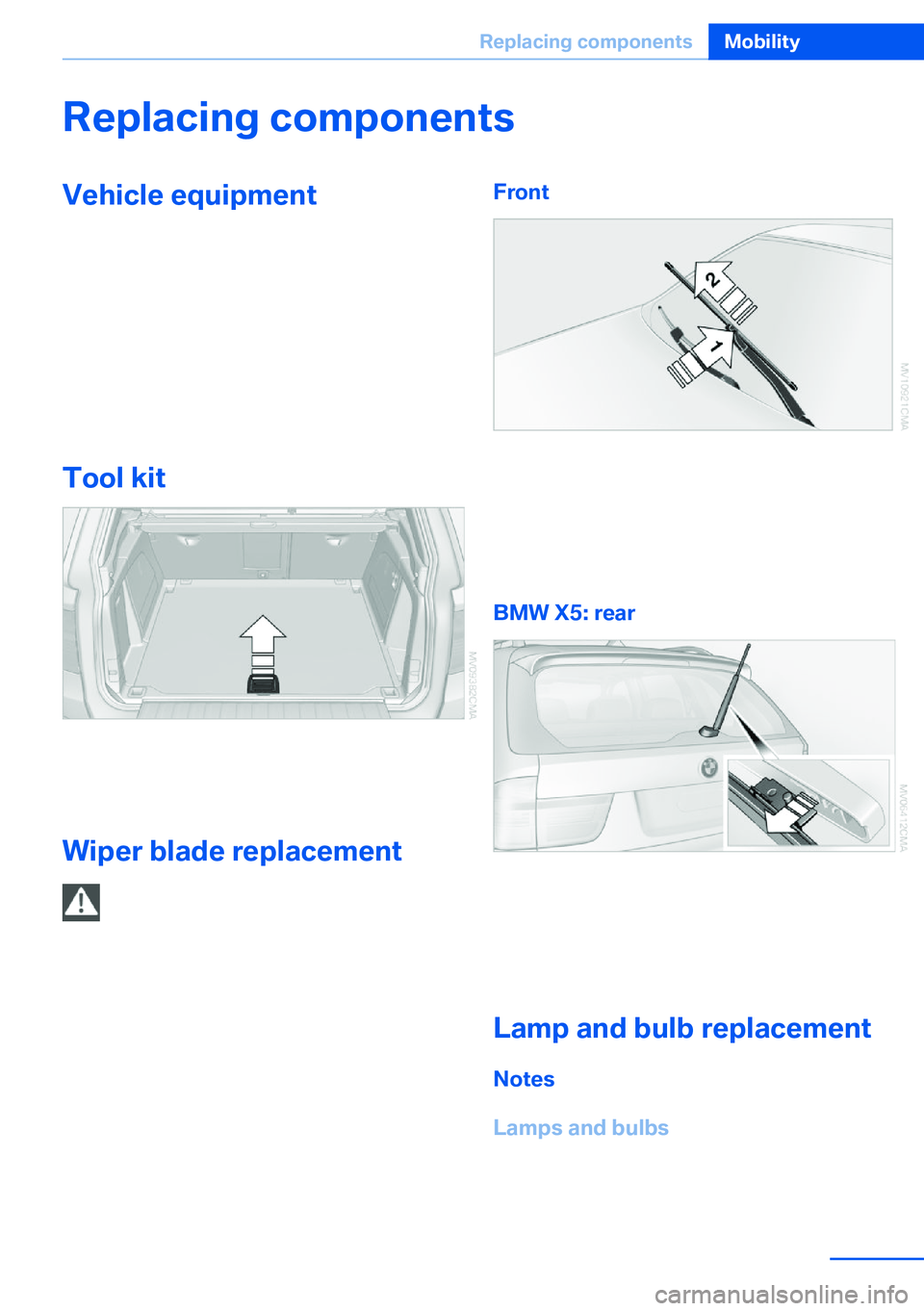
Tool kit
The tool kit is stowed under the cargo floor
panel in the cargo area.
Wiper blade replacement Do not fold down the wipers without
wiper blades
Do not fold down the wipers if wiper blades
have not been installed; this may damage the
windshield.◀
Front1.Fold up the wiper arm.2.Press the release button on the wiper arm,
see arrow 1.3.Pull off the wiper blade toward the front,
see arrow 2.
BMW X5: rear
1.Lift off the wiper arm completely and pull
off the wiper blade, refer to arrow.2.Mount the new wiper blade and press on
until it is heard to engage.
Lamp and bulb replacement
Notes
Lamps and bulbs
Lamps and bulbs make an essential contribu‐
tion to vehicle safety.
Seite 295Replacing componentsMobility295
Online Edition for Part no. 01 40 2 918 395 - III/13
Page 304 of 345
4.Screw in the remaining lug bolts. Tighten
all the bolts securely in a diagonal pattern.5.Lower the vehicle and remove the jack
from beneath the vehicle.
After mounting
1.Tighten the lug bolts in a diagonal pattern.
Checking that the lug bolts are tight
To ensure safety, always have the lug
bolts checked with a calibrated torque
wrench as soon as possible to ensure that
they are tightened to the specified torque.
Otherwise, incorrectly tightened lug bolts
are a hidden safety risk. The tightening tor‐
que equals 101 lb ft/140 Nm.◀2.Stow the defective wheel in the cargo area.
The defective wheel cannot be stored un‐
der the floor panel flap due to its size.3.Check and correct the tire inflation pres‐
sure at the earliest opportunity.4.Initialize the Flat Tire Monitor, refer to
page 97, or reset the Tire Pressure Moni‐
tor, refer to page 99.5.Replace the damaged tire as soon as pos‐
sible and have the new wheel/tire bal‐
anced.
Driving with compact wheel
Do not exceed a speed of
50 mph/80 km/h.
Drive conservatively and do not exceed a
speed of 50 mph/80 km/h. Otherwise, changes
in the driving characteristics could result, for
example reduced track stability on braking, ex‐ tended braking distance, and altered self-
steering characteristics in the limit range. In
conjunction with winter tires, these character‐
istics are more pronounced.◀
Only mount one compact wheel
Only one compact wheel may be
mounted. Restore the wheels and tires to their
original size as quickly as possible. Failure to
do so is a safety risk.◀
Vehicle battery
Maintenance
The battery is maintenance-free, i.e., the elec‐
trolyte will last for the life of the battery.
Your service center will be glad to advise you
on questions regarding the battery.
Battery replacement Use approved vehicle batteries
Only use vehicle batteries that have been
approved for your vehicle by the manufacturer;
otherwise, the vehicle could be damaged and
systems or functions may not be fully availa‐
ble.◀
After a battery replacement, have the battery
registered on the vehicle by your service cen‐
ter to ensure that all comfort functions are fully
available.
Charging the battery
Note Do not connect the charger to the socket
Do not connect the battery charger to
the socket installed in the vehicle at the factory as this could damage the battery.◀
General information Ensure that the battery is sufficiently charged
to achieve the full battery life.
It may be necessary to charge the battery in
the following cases:▷When the vehicle is frequently used to
drive short distances.Seite 304MobilityReplacing components304
Online Edition for Part no. 01 40 2 918 395 - III/13
Page 309 of 345
Bodywork contact between vehicles
There must not be any contact between
the bodies of the two vehicles, otherwise there
is a danger of shorting.◀
Starting aid terminals Connecting order
Connect the jumper cables in the correct
order; otherwise, there is the danger of injury
from sparking.◀
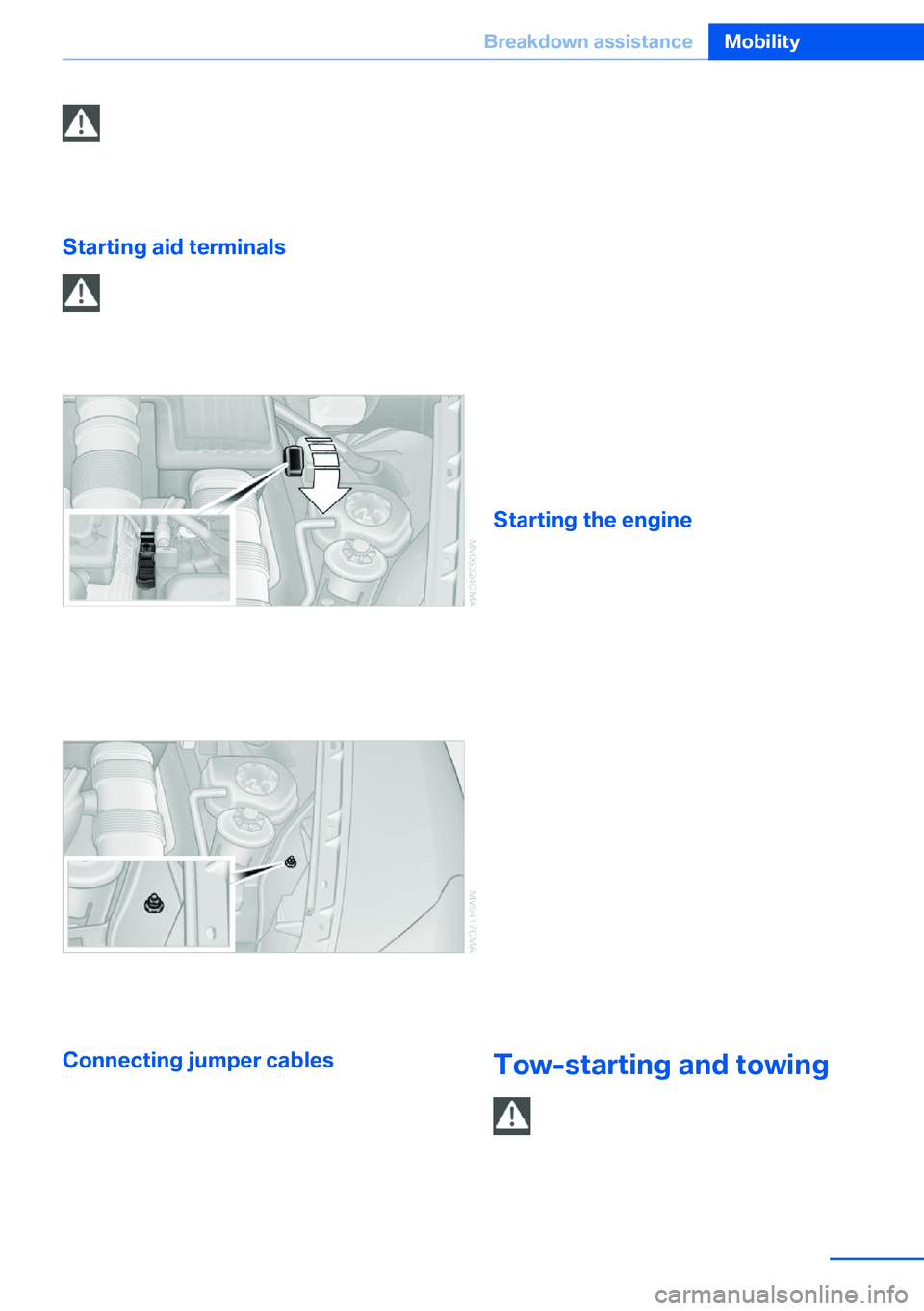
The so-called starting aid terminal in the en‐
gine compartment acts as the battery's posi‐
tive terminal. Fold open the cover. To do so,
pull the tab.
The body ground or a special nut acts as the
negative terminal.
Connecting jumper cables
1.Fold open the cover of the BMW starting-
aid terminal. To do so, pull the tab.2.Attach one terminal clamp of the positive
jumper cable to the positive terminal of the
battery, or to the corresponding startingaid terminal of the vehicle providing assis‐
tance.3.Attach the other end of the cable to the
positive terminal of the battery, or to the
corresponding starting aid terminal of the
vehicle to be started.4.Attach one terminal clamp of the negative
jumper cable to the negative terminal of
the battery, or to the corresponding engine
or body ground of the vehicle providing as‐
sistance.5.Attach the other end of the cable to the
negative terminal of the battery, or to the
corresponding engine or body ground of
the vehicle to be started.
Starting the engine
Never use spray fluids to start the engine.
1.Start the engine of the assisting vehicle
and let it run for several minutes at an in‐
creased idle speed.
If the vehicle being started has a diesel en‐
gine: let the engine of the assisting vehicle
run for approx. 10 minutes.2.Start the engine of the vehicle being
started in the usual way.
If the first starting attempt is not success‐
ful, wait a few minutes before making an‐
other attempt in order to allow the dis‐
charged battery to recharge.3.Let both engines run for several minutes.4.Disconnect the jumper cables in the re‐
verse order.
Check the battery and recharge if necessary.
Tow-starting and towing Observe applicable laws and regulations
Observe applicable laws and regulations
for tow-starting and towing.◀
Seite 309Breakdown assistanceMobility309
Online Edition for Part no. 01 40 2 918 395 - III/13
Page 310 of 345
No additional passengers
Do not transport any passengers other
than the driver in a vehicle that is being
towed.◀
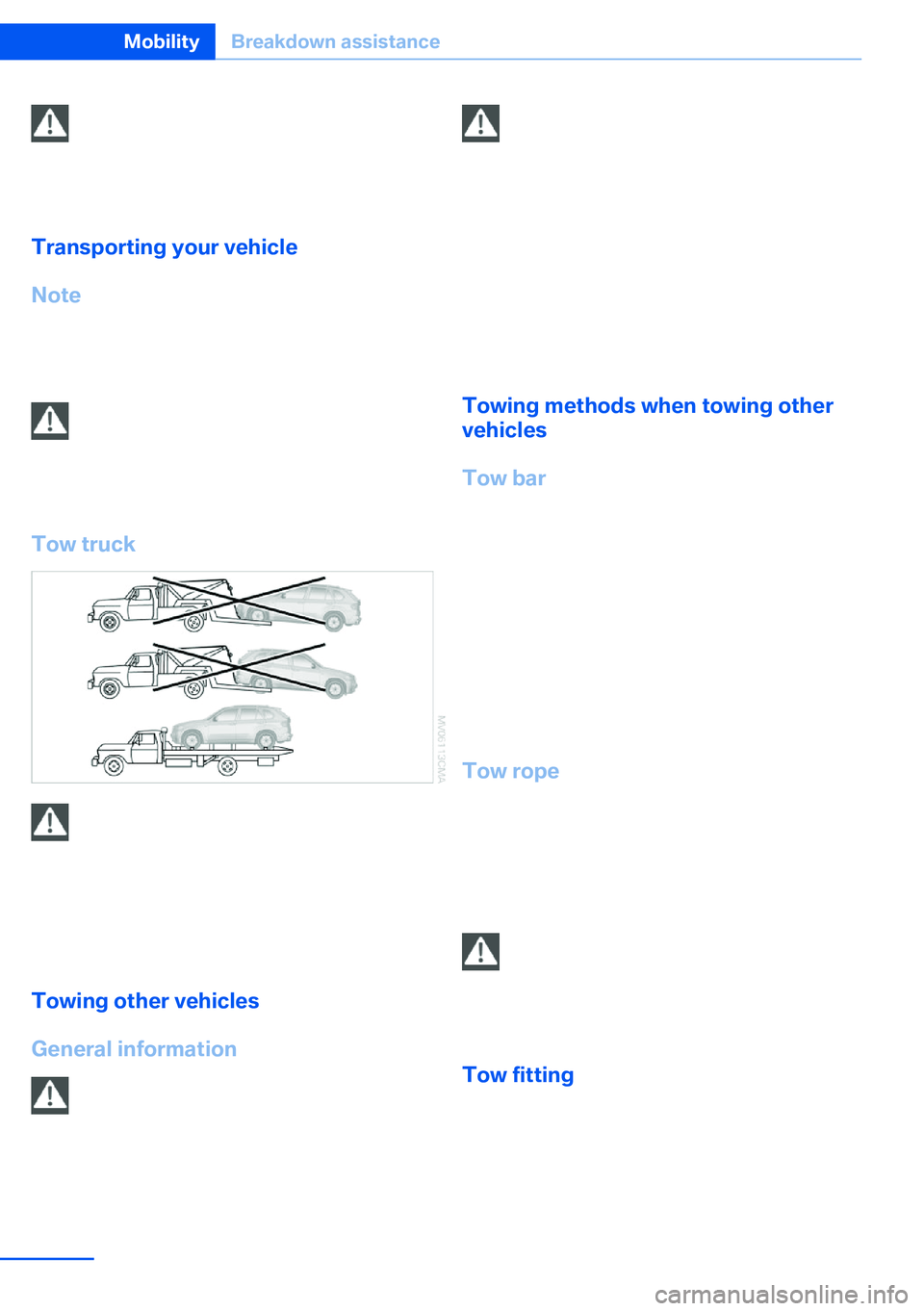
Transporting your vehicle
Note Your vehicle is not permitted to be towed.
Therefore, contact a service center in the
event of a breakdown.
Do not have the vehicle towed
Have your vehicle transported on a load‐
ing platform only; otherwise, damage may oc‐
cur.◀
Tow truck
Do not lift the vehicle
Do not lift the vehicle by the tow fitting or
body and chassis parts; otherwise, damage
may result.◀
Use the tow fitting screwed in at the front for
maneuvering the vehicle only.
Towing other vehicles
General information Light towing vehicle
Your vehicle must not be lighter than the
vehicle being towed; otherwise, it will not be
possible to control vehicle response.◀
Attaching the tow bar/tow rope correctly
Attach the tow bar or tow rope to the tow
fitting; connecting it to other vehicle parts may
cause damage.◀▷Switch on the hazard warning system, de‐
pending on local regulations.▷If the electrical system has failed, clearly
identify the vehicle being towed by placing
a sign or a warning triangle in the rear win‐
dow.
Towing methods when towing other
vehicles
Tow bar The tow fittings used should be on the same
side on both vehicles.
Should it prove impossible to avoid mounting
the tow bar at an offset angle, please observe
the following:
▷Clearance and maneuvering capability will
be sharply limited during cornering.▷The tow bar will generate lateral forces if it
is attached offset.
Tow rope
When starting to tow the vehicle, make sure
that the tow rope is taut.
To avoid jerking and the associated stresses
on the vehicle components when towing, al‐
ways use nylon ropes or nylon straps.
Attaching the tow rope correctly
Only secure the tow rope on the tow fit‐
ting; otherwise, damage can occur when it is
secured on other parts of the vehicle.◀
Tow fitting
The screw-in tow fitting should always be car‐
ried in the vehicle. It can be screwed in at the
front or rear of the BMW.
It is stored with the tool kit under the cargo
floor cover in the cargo area, refer to page 295.
Seite 310MobilityBreakdown assistance310
Online Edition for Part no. 01 40 2 918 395 - III/13
Page 311 of 345
Tow fitting, information on use▷Use only the tow fitting provided with
the vehicle and screw it all the way in.▷Use the tow fitting for towing on paved
roads only.▷Avoid lateral loading of the tow fitting, e.g.,
do not lift the vehicle by the tow fitting.
Otherwise, damage to the tow fitting and the
vehicle can occur.◀
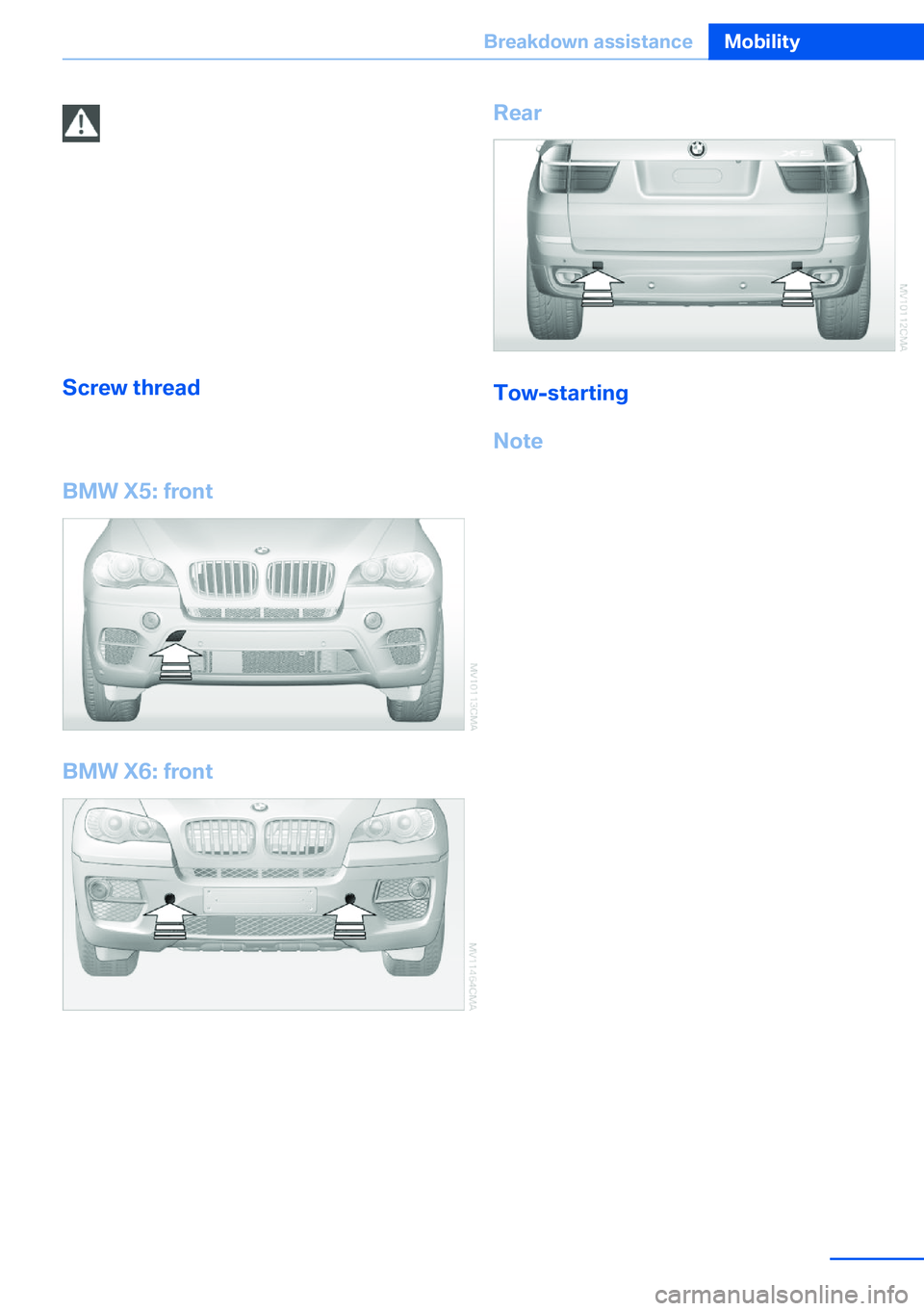
Screw thread Left/right cover in the bumper: press on the ar‐
row symbol on the cover.
BMW X5: front
BMW X6: front
Rear
Tow-starting
Note Do not tow-start your vehicle.
Due to the automatic transmission, the engine
cannot be started by tow-starting.
Have the cause of the starting difficulties rem‐
edied.
Seite 311Breakdown assistanceMobility311
Online Edition for Part no. 01 40 2 918 395 - III/13
Page 323 of 345
Equipment FunctionCommandOpen the air conditioning settings.›Climate‹Open the Head-up Display.›head up display‹Enable the rear.›Allow rear control‹
Vehicle information
Computer
FunctionCommandOpen the computer.›Onboard info‹Open the trip computer.›Trip computer‹
Vehicle
FunctionCommandOpen the vehicle information.›Vehicle info‹Open the vehicle status.›Vehicle status‹
Navigation
General information
FunctionCommandNavigation menu.›Navigation‹Open the destination entry.›Enter address‹Enter the address.›Enter address‹Enter the town/city.›City‹Enter the country.›State‹Enter the postal code.›Postal Code‹Open destination guidance.›Guidance‹Seite 323Short commands for voice activation systemReference323
Online Edition for Part no. 01 40 2 918 395 - III/13
Page 335 of 345

External temperature display,changing the units of meas‐
ure, changing the units of
measure on the Control Dis‐
play 88
External temperature warn‐ ing 79
Externel temperature dis‐ play 79
Eyes for securing cargo 162
F
Fader 190
Failure messages, refer to Check Control 85
False alarm– Avoiding unintentional
alarms 43– Ending an alarm 43
Fastening safety belts, refer
to Safety belts 54
Fault messages, refer to Check Control 85
Filling capacities 321
Filter, refer to Microfilter/acti‐ vated-charcoal filter 135
Fine wood, care 314
First aid kit 308
Fitting for towing 310
Fixing system, adaptive 150
Flashing when locking/ unlocking 33
Flat Tire Monitor FTM 97
Flat Tire Monitor FTM, snow chains 287
Flat tire, run-flat tires 286
Flat tire, Tire Pressure Moni‐ tor TPM 99
Flat tire, warning lamp 98, 100
Flat tire, wheel change 302
Flooding, refer to Driving through water 157
Floor carpet, care 315
Floor mats, care 315
FM/AM station 192
Fog on windows, remov‐
ing 132
Foldable rear seat back‐ rest 146
Foot brake 157
Footwell lamps, refer to Inte‐ rior lamps 94
For your own safety 6
Four-wheel drive, refer to xDrive 107
Front airbags 95
Front fog lamps 93
Front fog lamps, bulb replace‐ ment 297, 300
Front fog lamps, indicator lamp 93
FTM Flat Tire Monitor 97
Fuel 270
Fuel– Refer to Average fuel con‐
sumption 82
Fuel, additives 270
Fuel, average consump‐ tion 82
Fuel cap 268
Fuel cap, closing 268
Fuel consumption display
– Average fuel consump‐
tion 82
Fuel consumption display,
current fuel consump‐
tion 80
Fuel-efficient driving, refer to Current fuel consump‐
tion 80
Fuel filler flap, closing 268
Fuel filler flap, opening 268
Fuel filler flap, unlocking in case of an electrical mal‐
function 268
Fuel gauge 81
Fuel, saving 164
Fuel tank capacity, refer to Filling capacities 321
Fuel tank contents, refer to Filling capacities 321
Fuel tank, refer to Filling ca‐
pacities 321
Fuse 305
G
Garage door opener, refer to Universal Garage Door
Opener 139
Gasoline 270
Gasoline gauge, refer to Fuel gauge 81
Gasoline quality 270
Gas station recommenda‐ tion 181
Gear change, automatic transmission with Step‐
tronic 77
Gear change, via shift pad‐ dles 77
General driving notes 156
Glass sunroof, closing 47
Glass sunroof, electric– Convenient operation 33– Remote control 33
Glass sunroof, initializing 48
Glass sunroof, opening 47
Glass sunroof, pinch protec‐ tion 47
Glass sunroof, power fail‐ ure 48
Glass sunroof, refer to Panor‐ amic glass sunroof 45
Glass sunroof, tilting 47
Glove compartment 147
Glove compartment, light‐ ing 147
GPS navigation, refer to Navi‐ gation system 168
Gross vehicle weight, refer to Weights 320
H
Handbrake, refer to Parking brake 69
Seite 335Everything from A to ZReference335
Online Edition for Part no. 01 40 2 918 395 - III/13
Page 340 of 345

Remote control– Battery replacement 42– Comfort Access 40– Garage door opener 139– Malfunction 34, 41– Tailgate 33– Universal 139
Remote control, rear DVD
system 221
Remote control, removing from the ignition lock 67
Remote control, service data 293
Remote inquiry 242
Replacement fuse 305
Replacement remote con‐ trol 30
Replacing wheels/tires 285
Reporting safety defects 8
Reserve warning, refer to Fuel gauge 81
Reservoir for washer fluid, re‐ fer to Washer fluid reser‐
voir 75
Resetting, Tire Pressure Monitor TPM 100
Residual heat 134
Restraining systems
– Refer to Safety belts 54
Restraint systems for chil‐
dren 61
Retaining straps, securing cargo 162
Retreaded tires 286
Rim cleaner, care 314
Road, avoiding 179
Road detour 179
Roadside Assistance 262
Roadside parking lamps 92
Roller sunblinds 45
RON gasoline quality 270
RON, refer to Fuel qual‐ ity 270
Roof load capacity 320
Roof-mounted luggage rack 162
Rope, refer to Towing 310
Route 180
Route criteria, route 179
Route, displaying 180
Route section, bypass‐ ing 180
RSC Runflat System Compo‐ nent, refer to Run-flat
tires 286
Rubber components, care 314
Run-flat tires 286
Run-flat tires, tire inflation pressure 275
Running lights, refer to Park‐ ing lamps/low beams 90
S Safe braking 157
Safety 6
Safety belts 54
Safety belts– Damage 55
Safety belts, care 314
Safety belts, indicator/warn‐ ing lamp 55
Safety belts, reminder 55
Safety switch for rear win‐ dows 44
Safety systems
– Safety belts 54
Safety systems, airbags 95
Safety tires, refer to Run-flat tires 286
Satellite radio 194
Saving fuel 164
Scale, changing during navi‐ gation 182
Screen, folding open/closed, rear DVD system 220
Screen, refer to Control Dis‐ play 19
Search, refer to BMW On‐ line 262
Seat adjustment, electric 50
Seat adjustment, manual 49
Seat and mirror memory 57
Seat belts– Refer to Safety belts 54
Seat heating 52, 53
Seat heating, rear 52
Seats
– Adjusting electrically 50– Heating 52– Memory, refer to Seat and
mirror memory 57– Sitting safely 49– Storing the setting, refer to
Seat and mirror memory 57– Ventilation, refer to Active
seat ventilation and seat
heating 53
Seats, adjusting 49
Seats, backrest width 50
Seats in the rear 51
Seats, shoulder support 50
2nd row seats 51
Selector lever, automatic transmission with Step‐
tronic 76
Selector lever lock, releas‐ ing 76
Self-leveling suspension 110
Sensors, care 315
Service and warranty 7
Service data in the remote control 293
Service interval display, refer to Condition Based Service
CBS 293
Service interval display, refer to Service requirements 83
Service requirements 83
Service requirements, CBS Condition Based Serv‐
ice 293
Service, Roadside Assis‐ tance 308
Settings, clock, 12h/24h mode 87
Settings, configuring, refer to Personal Profile 30
Settings, DVD 203
Seite 340ReferenceEverything from A to Z340
Online Edition for Part no. 01 40 2 918 395 - III/13
Page 342 of 345

Temperature, adjusting in up‐per body region 132
Temperature, coolant, refer to Coolant temperature 80
Temperature display– External temperature 79– External temperature warn‐
ing 79
Temperature display, setting
the units 88
Temperature, engine oil 80
Temperature, setting with au‐ tomatic climate con‐
trol 132 , 136
Temperature warning 79
Text messages 252
Theft alarm system, refer to Alarm system 42
Thigh support adjustment 49
Third brake lamp, refer to Center brake lamp 298, 301
Seats, 3rd row seats 51
Tilting the passenger side mirror 58
Time, setting 87
Tire age 283
Tire identification marks 283
Tire inflation pressure 275
Tire inflation pressure, check‐ ing 275
Tire pressure monitor, refer to Flat Tire Monitor 97
Tire Pressure Monitor TPM 99
Tire Quality Grading 283
Tires
– Inflation pressure 275
Tires, breaking in 156
Tires, changing 285
Tires, condition 284
Tires, damage 284
Tire size 283
Tires, minimum tread 284
Tires, retreaded tires 286
Tires, run-flat tires 286
Tires, storage 286
Tire tread 284
Toll roads, route 179
Tone 190
Tool kit, refer to Onboard ve‐ hicle tool kit 295
Tools, refer to Onboard vehi‐ cle tool kit 295
Top View 124
Tow bar 310
Tow fitting 310
Towing 309
Town/city, navigation 171
Tow rope 310
Tow-starting 309, 311
TPM Tire Pressure Moni‐ tor 99
Traction control 106
Traffic bulletins, naviga‐ tion 183
Transmission, automatic transmission with Step‐
tronic 75
Transmission positions, auto‐ matic transmission with
Steptronic 75
Transporting children safely 61
Treble, tone 190
Trip computer, refer to Dis‐ plays on the Control Dis‐
play 82
Trip-distance counter, refer to Trip odometer 80
Triple turn signal activa‐ tion 73
Trip odometer 80
Trips, planning 177
Trunk lid, refer to Tailgate 38
Turning circle, refer to Dimen‐ sions 318
Turning lamps, refer to Adap‐ tive Light Control 91
Turn signal, indicator lamp 14
Turn signals 72
Turn signals, triple turn signal activation 73 U
Uniform Tire Quality Grading/ UTQG 283
Unintentional alarms, avoid‐ ing 43
Units, average fuel consump‐ tion 88
Units, temperature 88
Universal Garage Door Opener 139
Universal remote control 139
Unlocking– From the outside 32– Setting the unlocking char‐
acteristics 32– Tailgate 41– Without remote control, re‐
fer to Comfort Access 40
Unlocking, from the inside 35
Unlocking, hood 289
Updates made after the edito‐ rial deadline 6
Update, software 218
Upholstery care 313
Upper tailgate 36
Upper tailgate, automatic op‐ eration 37
Upper tailgate, closing 36
Upper tailgate, emergency operation, refer to Opening
manually 36
Upper tailgate, opening from the inside 36
Upper tailgate, opening from the outside 36
Upper tailgate, opening man‐ ually 36
USB audio interface 212
USB interface 147
V
Vacuum cleaner, connecting, refer to Connecting electri‐
cal devices 143
Seite 342ReferenceEverything from A to Z342
Online Edition for Part no. 01 40 2 918 395 - III/13