belt BMW X5 XDRIVE 48I 2009 E70 User Guide
[x] Cancel search | Manufacturer: BMW, Model Year: 2009, Model line: X5 XDRIVE 48I, Model: BMW X5 XDRIVE 48I 2009 E70Pages: 317, PDF Size: 9.56 MB
Page 97 of 317
Controls
95Reference
At a glance
Driving tips
Communications
Navigation
Entertainment
Mobility
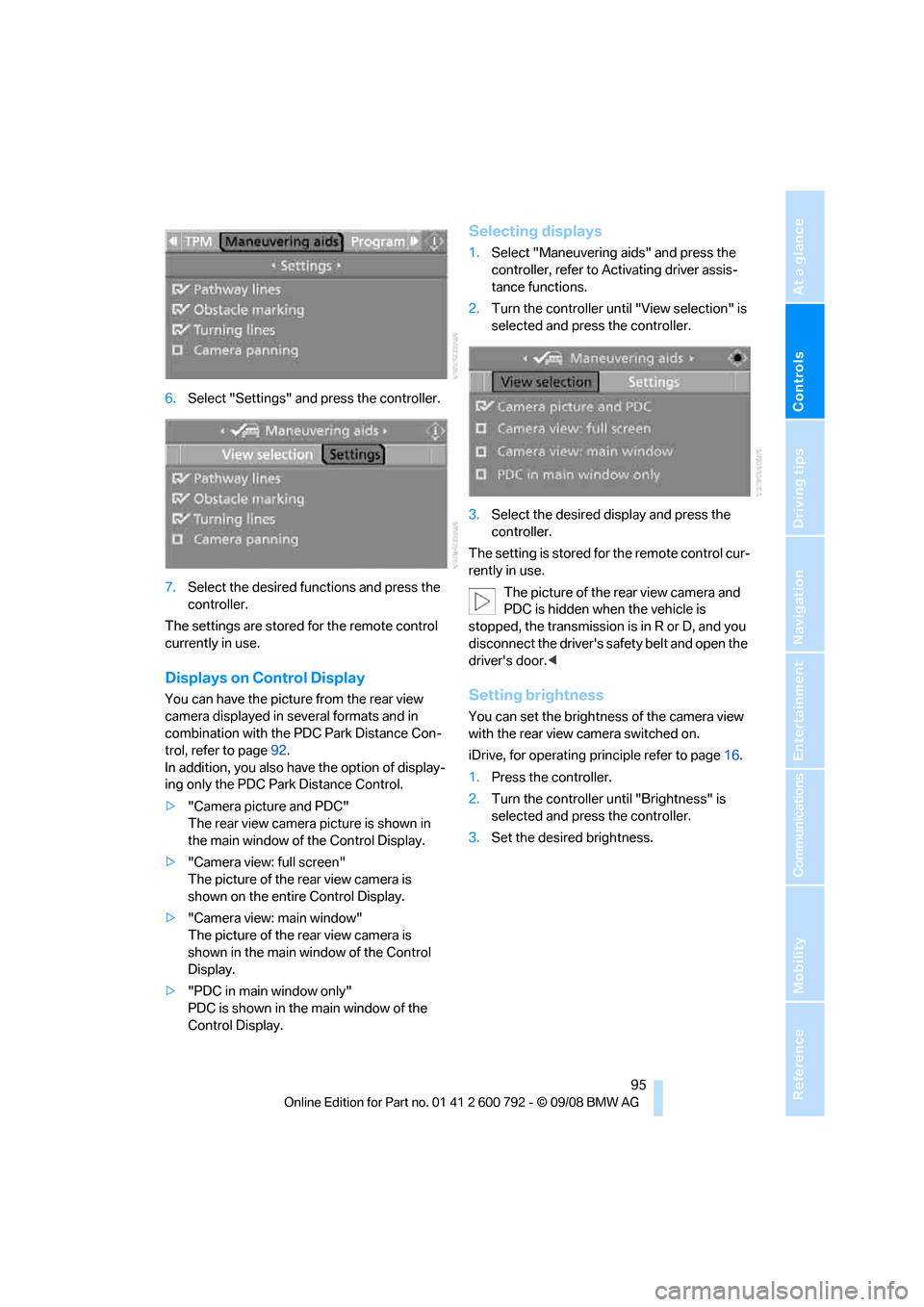
6.Select "Settings" and press the controller.
7. Select the desired fu nctions and press the
controller.
The settings are stored for the remote control
currently in use.
Displays on Control Display
You can have the picture from the rear view
camera displayed in se veral formats and in
combination with the PDC Park Distance Con-
trol, refer to page 92.
In addition, you also have the option of display-
ing only the PDC Park Distance Control.
> "Camera picture and PDC"
The rear view camera picture is shown in
the main window of the Control Display.
> "Camera view: full screen"
The picture of the rear view camera is
shown on the entire Control Display.
> "Camera view: main window"
The picture of the rear view camera is
shown in the main window of the Control
Display.
> "PDC in main window only"
PDC is shown in the main window of the
Control Display.
Selecting displays
1.Select "Maneuvering aids" and press the
controller, refer to Activating driver assis-
tance functions.
2. Turn the controller until "View selection" is
selected and press the controller.
3. Select the desired display and press the
controller.
The setting is stored for the remote control cur-
rently in use. The picture of the rear view camera and
PDC is hidden when the vehicle is
stopped, the transmission is in R or D, and you
disconnect the driver's safety belt and open the
driver's door. <
Setting brightness
You can set the brightness of the camera view
with the rear view camera switched on.
iDrive, for operating pr inciple refer to page16.
1. Press the controller.
2. Turn the controller until "Brightness" is
selected and press the controller.
3. Set the desired brightness.
Page 107 of 317
Controls
105Reference
At a glance
Driving tips
Communications
Navigation
Entertainment
Mobility
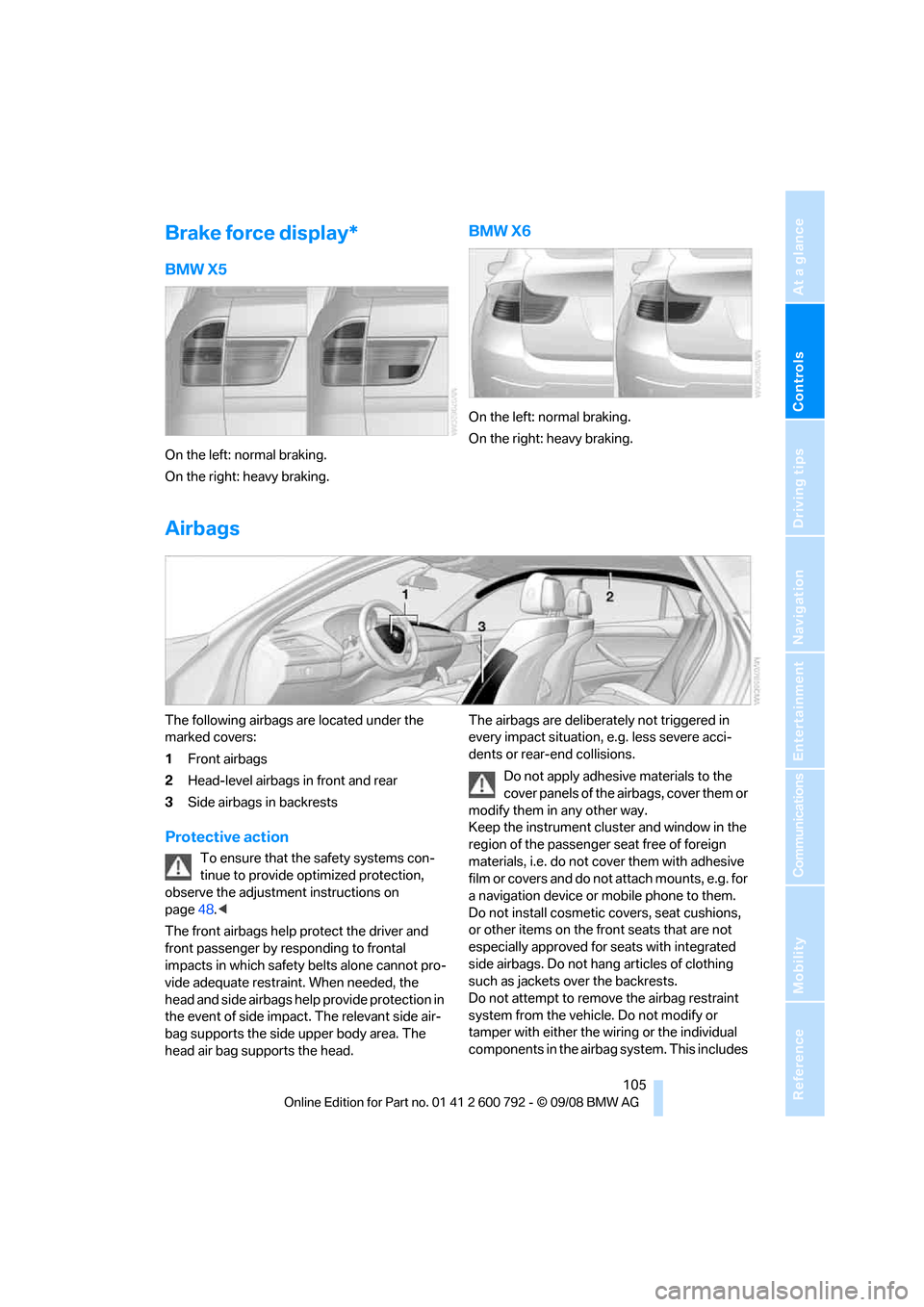
Brake force display*
BMW X5
On the left: normal braking.
On the right: heavy braking.
BMW X6
On the left: normal braking.
On the right: heavy braking.
Airbags
The following airbags are located under the
marked covers:
1Front airbags
2 Head-level airbags in front and rear
3 Side airbags in backrests
Protective action
To ensure that the safety systems con-
tinue to provide optimized protection,
observe the adjustment instructions on
page 48.<
The front airbags help protect the driver and
front passenger by re sponding to frontal
impacts in which safety belts alone cannot pro-
vide adequate restraint. When needed, the
head and side airbags help provide protection in
the event of side impact. The relevant side air-
bag supports the side upper body area. The
head air bag supports the head. The airbags are deliberately not triggered in
every impact situation, e.g. less severe acci-
dents or rear-end collisions.
Do not apply adhesive materials to the
cover panels of the airbags, cover them or
modify them in any other way.
Keep the instrument cluster and window in the
region of the passenger seat free of foreign
materials, i.e. do not co ver them with adhesive
film or covers and do not attach mounts, e.g. for
a navigation device or mobile phone to them.
Do not install cosmetic covers, seat cushions,
or other items on the fr ont seats that are not
especially approved for seats with integrated
side airbags. Do not hang articles of clothing
such as jackets over the backrests.
Do not attempt to remove the airbag restraint
system from the vehicle. Do not modify or
tamper with either the wiring or the individual
components in the airbag system. This includes
Page 109 of 317
Controls
107Reference
At a glance
Driving tips
Communications
Navigation
Entertainment
Mobility
The front and side airbags on the front pas-
senger side are activated.
> The indicator lamp does not light up when
the seat is empty.
However, the front and side airbags on the
front passenger side are not activated.
Operational readiness of airbag system
From radio readiness, refer to page 65, the
warning lamp lights up br iefly, indicating the
operational readiness of the entire airbag sys-
tem and the safety belt tensioners.
Airbag system malfunction
> Warning lamp does not light up from radio
readiness.
> Warning lamp lights up continuously.
Have the airbag system checked immedi-
ately in case of a malfunction, otherwise
there is a danger that the airbag system may not
respond in the expected manner in an accident
despite an impact of corresponding intensity. <
Head-Up Display*
The concept
With the Head-Up Display important informa-
tion is projected into the driver's field of view,
e.g. navigation instructions. This enables you to
take in this information without looking away
from the road.
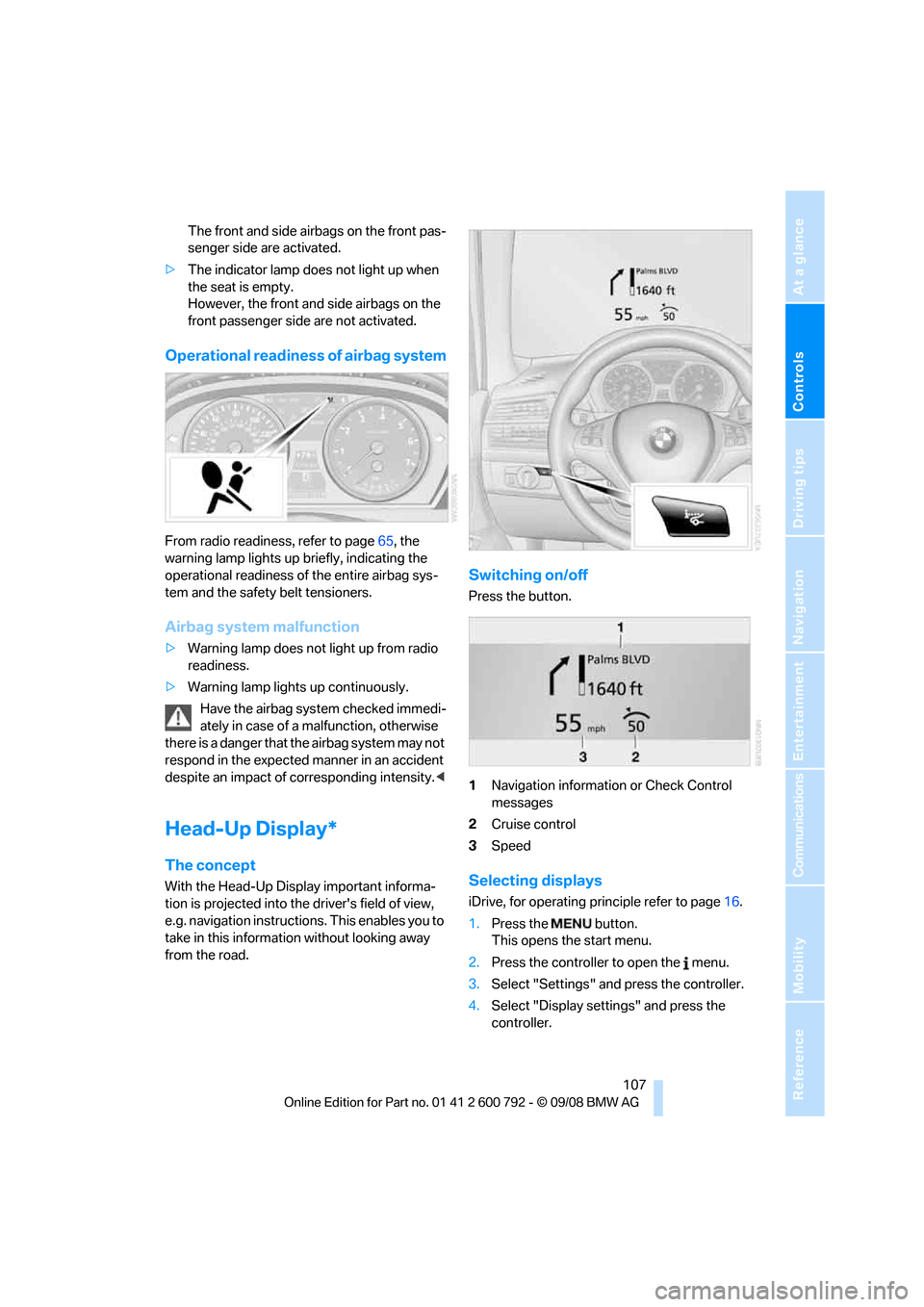
Switching on/off
Press the button.
1 Navigation information or Check Control
messages
2 Cruise control
3 Speed
Selecting displays
iDrive, for operating pr inciple refer to page16.
1. Press the button.
This opens the start menu.
2. Press the controller to open the menu.
3. Select "Settings" and press the controller.
4. Select "Display settings" and press the
controller.
Page 134 of 317
Practical interior accessories
132
Installing
When installing, proceed in the opposite order
of removal.
1.Set the cargo bay cove r into place on the
left and right sides.
2. Lift the back of the co ver slightly and slide
forward until it snaps into the two side
brackets.
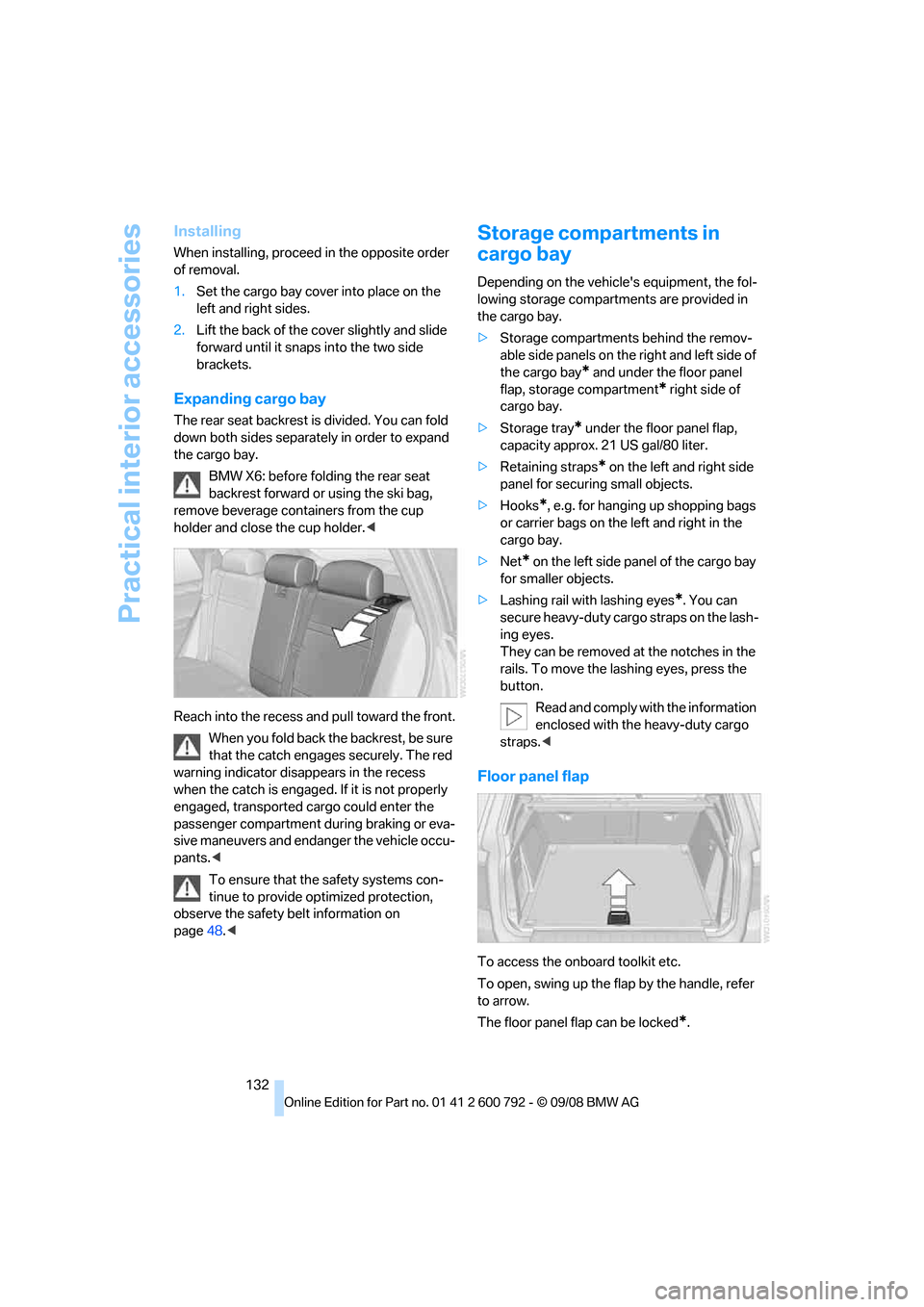
Expanding cargo bay
The rear seat backrest is divided. You can fold
down both sides separate ly in order to expand
the cargo bay.
BMW X6: before folding the rear seat
backrest forward or using the ski bag,
remove beverage containers from the cup
holder and close the cup holder. <
Reach into the recess an d pull toward the front.
When you fold back the backrest, be sure
that the catch engages securely. The red
warning indicator disappears in the recess
when the catch is engaged. If it is not properly
engaged, transported cargo could enter the
passenger compartment during braking or eva-
sive maneuvers and endanger the vehicle occu-
pants. <
To ensure that the safety systems con-
tinue to provide optimized protection,
observe the safety belt information on
page 48.<
Storage compartments in
cargo bay
Depending on the vehicle's equipment, the fol-
lowing storage compartments are provided in
the cargo bay.
> Storage compartments behind the remov-
able side panels on the right and left side of
the cargo bay
* and under the floor panel
flap, storage compartment
* right side of
cargo bay.
> Storage tray
* under the floor panel flap,
capacity approx. 21 US gal/80 liter.
> Retaining straps
* on the left and right side
panel for securing small objects.
> Hooks
*, e.g. for hanging up shopping bags
or carrier bags on the left and right in the
cargo bay.
> Net
* on the left side pa nel of the cargo bay
for smaller objects.
> Lashing rail with lashing eyes
*. You can
secure heavy-duty cargo straps on the lash-
ing eyes.
They can be removed at the notches in the
rails. To move the lashing eyes, press the
button.
Read and comply with the information
enclosed with the heavy-duty cargo
straps. <
Floor panel flap
To access the onboard toolkit etc.
To open, swing up the flap by the handle, refer
to arrow.
The floor panel flap can be locked
*.
Page 136 of 317
Practical interior accessories
134
Ski bag*
The ski bag is designed for safe, clean transport
of up to 4 pairs of standard skis or up to 2 snow-
boards.
With the ski bag you can stow skis with a length
of up to 6.9 ft/2.10 m. When skis of 6.9 ft/
2.10 m in length are loaded, the ski bag will tend
to contract, reducing its overall capacity.
Before loading the ski bag, fold in the dis-
play screen of the DVD system in the
rear
*, as otherwise the display screen could be
damaged. <
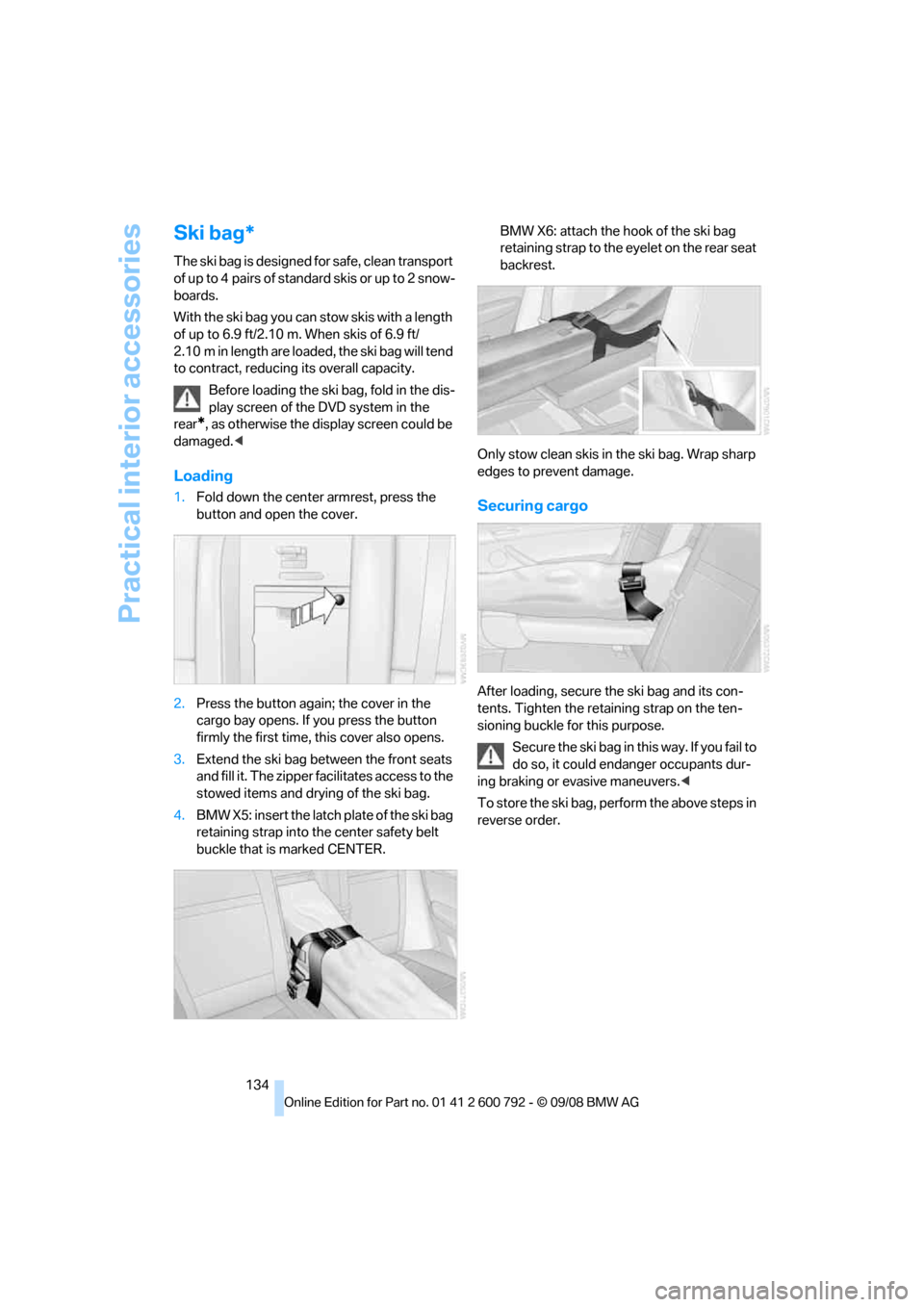
Loading
1.Fold down the center armrest, press the
button and open the cover.
2. Press the button again; the cover in the
cargo bay opens. If you press the button
firmly the first time, this cover also opens.
3. Extend the ski bag be tween the front seats
and fill it. The zipper facilitates access to the
stowed items and drying of the ski bag.
4. BMW X5: insert the latch plate of the ski bag
retaining strap into th e center safety belt
buckle that is marked CENTER. BMW X6: attach the hook of the ski bag
retaining strap to the eyelet on the rear seat
backrest.
Only stow clean skis in the ski bag. Wrap sharp
edges to prevent damage.Securing cargo
After loading, secure the ski bag and its con-
tents. Tighten the retaining strap on the ten-
sioning buckle for this purpose. Secure the ski bag in th is way. If you fail to
do so, it could enda nger occupants dur-
ing braking or evasive maneuvers. <
To store the ski bag, perform the above steps in
reverse order.
Page 144 of 317
Things to remember when driving
142
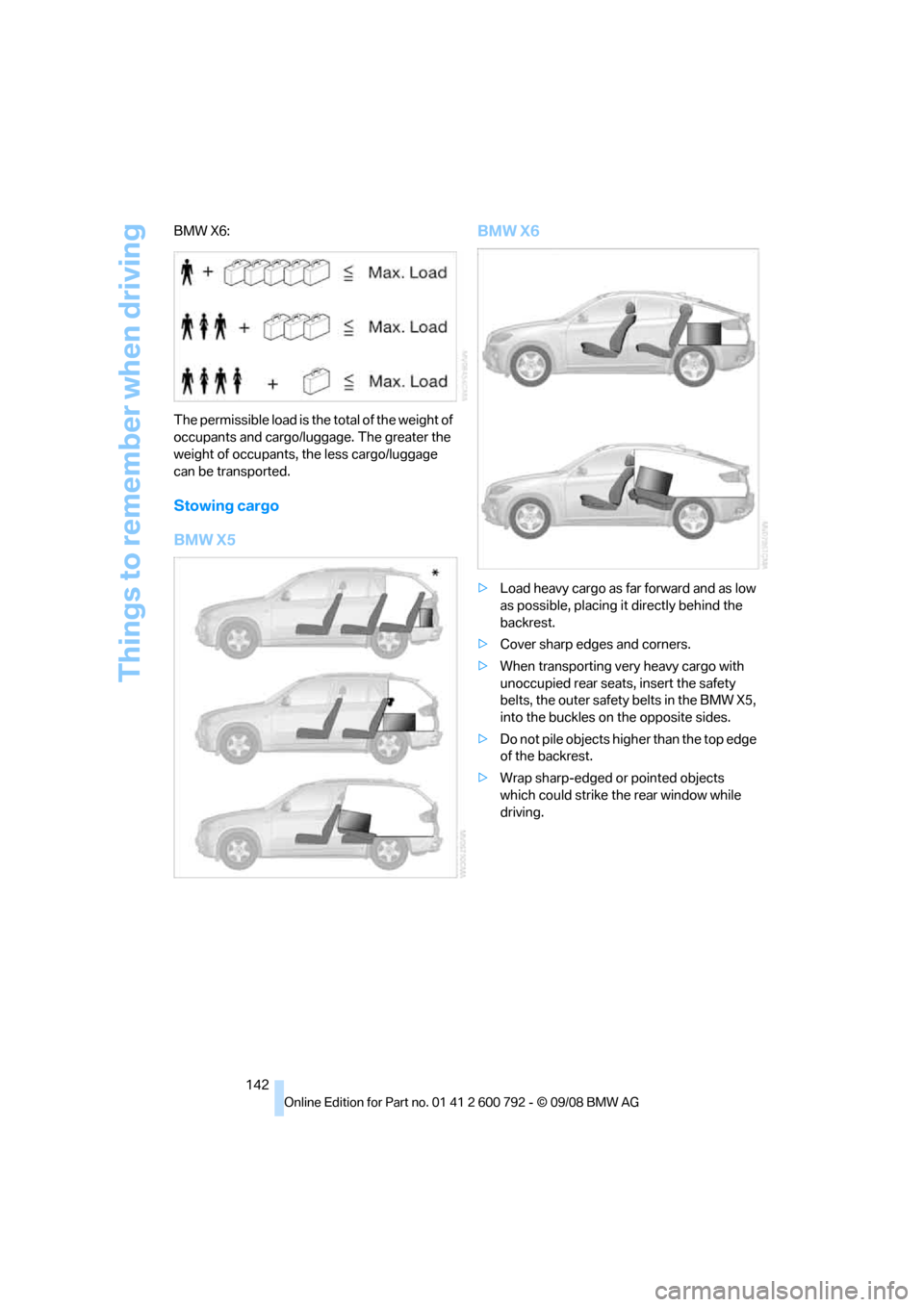
BMW X6:
The permissible load is the total of the weight of
occupants and cargo/luggage. The greater the
weight of occupants, the less cargo/luggage
can be transported.
Stowing cargo
BMW X5
BMW X6
>
Load heavy cargo as far forward and as low
as possible, placing it directly behind the
backrest.
> Cover sharp edges and corners.
> When transporting very heavy cargo with
unoccupied rear seats, insert the safety
belts, the outer safety belts in the BMW X5,
into the buckles on the opposite sides.
> Do not pile objects high er than the top edge
of the backrest.
> Wrap sharp-edged or pointed objects
which could strike th e rear window while
driving.
Page 256 of 317
Wheels and tires
254
Tire identification marks
Knowledge of the labeling on the side of the tire
makes it easier to identify and choose the right
tires.
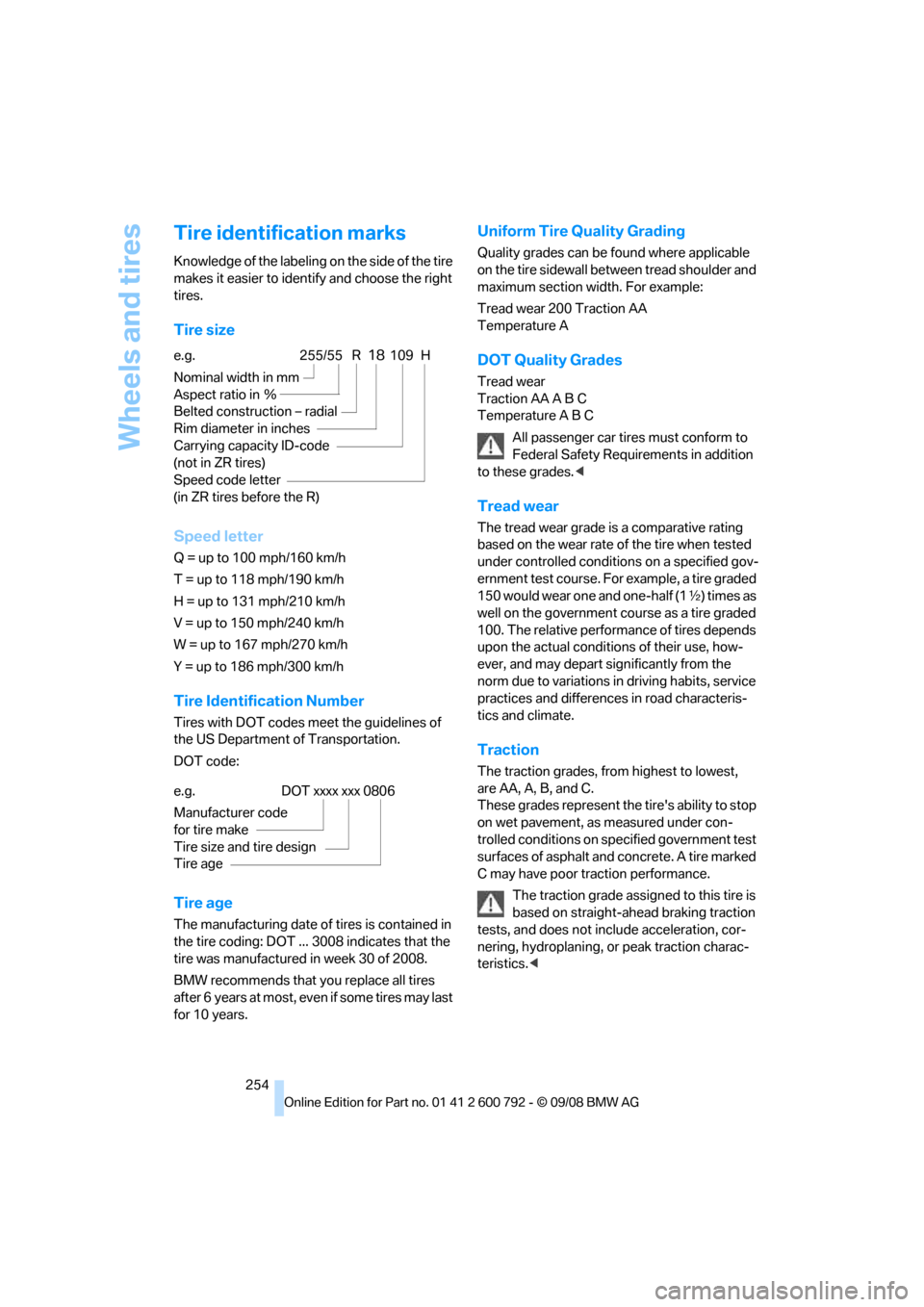
Tire size
Speed letter
Q = up to 100 mph/160 km/h
T = up to 118 mph/190 km/h
H = up to 131 mph/210 km/h
V = up to 150 mph/240 km/h
W = up to 167 mph/270 km/h
Y = up to 186 mph/300 km/h
Tire Identification Number
Tires with DOT codes meet the guidelines of
the US Department of Transportation.
DOT code:
Tire age
The manufacturing date of tires is contained in
the tire coding: DOT ... 3008 indicates that the
tire was manufactured in week 30 of 2008.
BMW recommends that you replace all tires
after 6 years at most, even if some tires may last
for 10 years.
Uniform Tire Quality Grading
Quality grades can be found where applicable
on the tire sidewall betw een tread shoulder and
maximum section width. For example:
Tread wear 200 Traction AA
Temperature A
DOT Quality Grades
Tread wear
Traction AA A B C
Temperature A B C
All passenger car tires must conform to
Federal Safety Requirements in addition
to these grades. <
Tread wear
The tread wear grade is a comparative rating
based on the wear rate of the tire when tested
under controlled conditions on a specified gov-
ernment test course. For example, a tire graded
150 would wear one and one-half (1 γ) times as
well on the government course as a tire graded
100. The relative perfor mance of tires depends
upon the actual conditio ns of their use, how-
ever, and may depart significantly from the
norm due to variations in driving habits, service
practices and differences in road characteris-
tics and climate.
Traction
The traction grades, from highest to lowest,
are AA, A, B, and C.
These grades represent th e tire's ability to stop
on wet pavement, as measured under con-
trolled conditions on specified government test
surfaces of asphalt and concrete. A tire marked
C may have poor traction performance.
The traction grade assign ed to this tire is
based on straight-ahead braking traction
tests, and does not in clude acceleration, cor-
nering, hydroplaning, or peak traction charac-
teristics. <
e.g.
Nominal width in mm
Aspect ratio in Ξ
Belted construction – radial
Rim diameter in inches
Carrying capacity ID-code
(not in ZR tires)
Speed code letter
(in ZR tires before the R)255/55 R18109 H
e.g.
Manufacturer code
for tire make
Tire size and tire design
Tire ageDOT xxxx xxx 0806
Page 270 of 317
Care
268
Safety belts
Do not use cleansers to clean the safety
belts since this can destroy the web-
bing. <
Inside sens ors/cameras
Clean inside sensors and cameras, such as
those of the high-beam assistant, using a lint-
free cloth moistened with glass cleaner.
Displays
Clean displays like the ra dio or the instrument
cluster using a display-cleaning cloth or a soft,
nonabrasive lint-free cloth.
Avoid using excessive pressure when
cleaning displays; otherwise, you could
damage them. <
Never use chemical-based cleansers or
household scouring products. Keep all
liquids away from the equipment. Otherwise
surfaces or electrical components could be
attacked or damaged. <
CD/DVD-player
Do not use cleaning CDs; they can dam-
age parts of the player. <
Storing your vehicle
When storing your vehicle for longer than three
months, please seek the advice of your BMW
Sports Activity Vehicle Center or a workshop
that works in accordance with BMW guidelines.
Page 299 of 317
Reference 297
At a glance
Controls
Driving tips
Communications
Navigation
Entertainment
Mobility
Ashtray
– front128
– rear 129
Assist 235
– refer to separate operating
instructions
Assistance systems, refer to Driving stability control
systems 96
Assistance window 20
"Assist profile" 241
"Assist. window off" 21
AUC Automatic recirculated-
air control 117
"Audio" 177,181
– for DVD system in rear 216
Audio 174
– controls 174
– switching on/off 174
– tone control 175
– volume 175
Audio CD for DVD system in
rear 210
Audio device, external 127
Automatic
– air distribution 115,120
– air volume 115,120
– BMW Teleservice call 237
– headlamp control 110
– liftgate operation 34,37
– steering wheel adjustment,
refer to Easy entry/exit 58
– storing stations 179
Automatic car washes 140
Automatic climate control
– automatic air distribution 115,120
– in rear 119
– in rear, activating on Control Display 120
– switching off 118,120
– ventilation in rear 119
– with 2-zone control 115
– with 4-zone control 119
Automatic closing of doors, refer to Automatic soft
closing 33 Automatic curb monitor
58
Automatic garage door
opener 123
Automatic Hold 67
– activating 68
– deactivating 68
– parking 68
Auto
matic lighting
– refer to Automatic headlamp control 110
– refer to Daytime driving
lamps 111
– refer to Interior lamps 113
– refer to Pathway lighting 111
"Automatic programs" 116
Automatic recirculated-air
control AUC 117
Automatic soft closing 33
Automatic station search 179
Automatic transmission with Steptronic 70
– deactivating selector lever
interlock 71
– kick-down 71
– manually releasing
transmission lock 72
– tow-starting 282
– with comfort access 40
"Automatic ventilation" 121
AUTO program for automatic climate control 115,120
"Auto Request" 237
"Autostore"
– on the radio 180
"AUX" 175,200 ,202
– AUX-In connection 200
– for DVD system in rear 215
– USB audio interface 201
"AUX / Rear" 206
AUX-In connection 127,200
Average fuel consumption 80
– setting units 89
Average speed, refer to
Computer 80
"Avoid ferries" in navigation 161
"Avoid highways" in navigation 160 Avoiding highways for
navigation 160
Avoiding unintentional alarms 39
"Avoid tollroads" in
navigation 161
Axle weights, refer to Weights 289
"A - Z" 228
B
Backrest contour, refer to
Lumbar support 50
Backrests, refer to Seats 49
Backrest width adjustment 50
Backup lamps, replacing bulbs 270,273
Balance, refer to Tone
control 176
"Balance" for DVD system in rear 209
Band-aids, refer to First-aid kit 279
Bass, refer to Tone
control 175
Battery
– charging 277
– jump starting 280
– power failure 278
– refer to Vehicle battery 277
Battery disposal
– remote control with comfort access 41
– vehicle battery 277
Battery replacement
– remote control for DVD
system in rear 206
– remote control with comfort access 41
Being towed 282
Belts, refer to Safety belts 54
Beverage holder, refer to Cup
holders 127
Blower, refer to Air volume 116,120
BMW Advanced Diesel 245
Page 300 of 317
Everything from A to Z
298
"BMW
Assist" 236,237, 238, 239
BMW Assist
– activating 240
– concierge service 239
– contacting BMW Customer Relations 238
– offered services 235
– roadside assistance 236
– TeleServices 237
"BMW Contact" 230
"BMW Contact Numbers" 230
BMW homepage 4
BMW maintenance system 263
"BMW Service settings" 241
BMW Teleservice call
– automatic 237
– manual 237
BMW TeleServices 237
BMW TeleServices services
– displaying 238
– updating 238
BMW website 4
Bottle holder, refer to Cup holders 127
Brake assistant 96
Brake force display 105
Brake lamps
– brake force display 105
– replacing bulbs 270,273
Brake rotors 140
Brakes
– ABS Antilock Brake System 96
– brake assistant 96
– brake force display 105
– breaking-in 138
– CBC Cornering Brake
Control 96
– electronic brake-force distribution 96
– parking brake 67
– refer to Braking safely 140
– warning lamp 13 Brake system
138
– brake pads 138
– breaking-in 138
– disk brakes 140
Braking safely 140
Breakdown, Flat Tire Monitor 100
Breakdown services, refer to
Roadside Assistance 280
Breaking-in brake pads 138
Breaking-in d
ifferential 138
Break-in period 138
"Brightness" 89
– DVD changer 196
– DVD system in rear 208
Brightness
– of Control Display 89
– of the rear view camera 95
– on Head-Up Display 108
"Brightness / Position" 108
Button for starting engine 65
Buttons on steering wheel 11
Bypassing traffic congestion 169
C
Calibrating driver's seat 55
California Proposition 65 Warning 6
"Call" 228,239
Call
– accepting 226
– displaying accepted 229
– ending 227
– in absence 229
– starting 227
Calling
– from phone book 228
– from Top 8 list 229
– redialing 229
– refer to telephone operating instructions
Camera, refer to Rear view camera 93
"Camera picture and PDC" 95"Camera view
– full screen"
95
– main window" 95
Can holder, refer to Cup holders 127
Capacities 290
Capacity of cargo bay 289
Car battery, refer to Vehicle
battery 277
"Car Data" 81
Care 265
– car-care products 265
– carpets 267
– car washes 265
– CD/DVD-player 268
– chrome components 266
– displays 268
– exterior 265
– fine wooden
components 267
– hand washing 266
– headlamps 266
– high-pressure cleaning jets 266
– interior 267
– leather 267
– light-alloy wheels 267
– paint 266
– plastic components 267
– rubber gaskets 266
– running boards 267
– safety belts 268
– sensors and cameras 267,268
– upholstery materials and cloth-covered paneling 267
– windows 266
–
wiper blades 266
Cargo
– refer to Loading 141
– securing 143
– securing with ski bag 134
Cargo area, refer to Cargo
bay 130
Cargo area cover, refer to Roll- up cover 130