brake light BMW X5 XDRIVE 50I 2014 Owner's Manual
[x] Cancel search | Manufacturer: BMW, Model Year: 2014, Model line: X5 XDRIVE 50I, Model: BMW X5 XDRIVE 50I 2014Pages: 265, PDF Size: 6.2 MB
Page 142 of 265
Your vehicle accelerates automatically as
soon as the vehicle in the range of the ra‐
dar sensor moves off.▷Marking in the speedometer turns orange:
no automatic driving away.
To accelerate to the desired speed auto‐
matically, press the accelerator or press
the RES or SET button.
Rolling bars in the distance display indicate
that the vehicle in the radar sensor detection
range has moved off.
Your vehicle was braked to a halt by pressing
on the brake pedal and it is standing behind
another vehicle:
1. Press the button to call up a stored
desired speed.2.Release the brake pedal.3.Press on the accelerator briefly, or press
the RES rocker switch when the vehicle
ahead of you drives away.
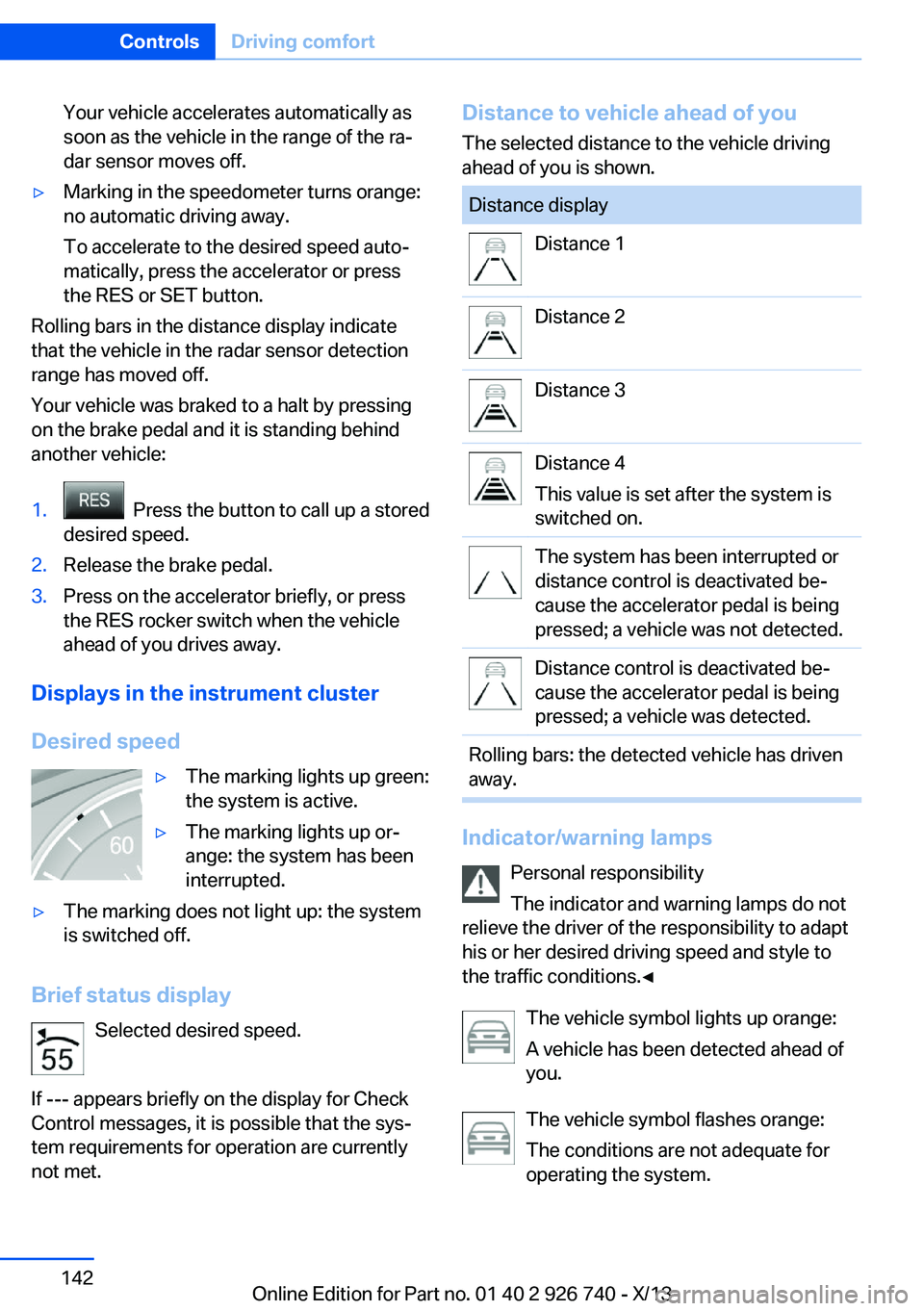
Displays in the instrument cluster
Desired speed
▷The marking lights up green:
the system is active.▷The marking lights up or‐
ange: the system has been
interrupted.▷The marking does not light up: the system
is switched off.
Brief status display
Selected desired speed.
If --- appears briefly on the display for Check
Control messages, it is possible that the sys‐
tem requirements for operation are currently
not met.
Distance to vehicle ahead of you
The selected distance to the vehicle driving
ahead of you is shown.Distance displayDistance 1Distance 2Distance 3Distance 4
This value is set after the system is
switched on.The system has been interrupted or
distance control is deactivated be‐
cause the accelerator pedal is being
pressed; a vehicle was not detected.Distance control is deactivated be‐
cause the accelerator pedal is being
pressed; a vehicle was detected.Rolling bars: the detected vehicle has driven
away.
Indicator/warning lamps
Personal responsibility
The indicator and warning lamps do not
relieve the driver of the responsibility to adapt
his or her desired driving speed and style to
the traffic conditions.◀
The vehicle symbol lights up orange:
A vehicle has been detected ahead of
you.
The vehicle symbol flashes orange:
The conditions are not adequate for
operating the system.
Seite 142ControlsDriving comfort142
Online Edition for Part no. 01 40 2 926 740 - X/13
Page 143 of 265
The system was deactivated but applies the
brakes until you actively resume control by
pressing on the brake pedal or accelerator
pedal.
The vehicle symbol flashes red and an
acoustic signal sounds:
You are requested to intervene by
braking or making an evasive maneuver.
Displays in the Head-up Display The information from Active Cruise Control
can also be displayed in the Head-up Display.
Adjusting the Head-up Display, refer to
page 97.
System limits
Speed range
Best results are achieved when using the sys‐
tem on well-developed roads and highways.
The system is functional at speeds beginning
at approx. 20 mph/30 km/h.
The maximum speed that can be set depends
on the vehicle.
The system can also be activated when sta‐
tionary.
Comply with the legal speed limit in every sit‐
uation when using the system.
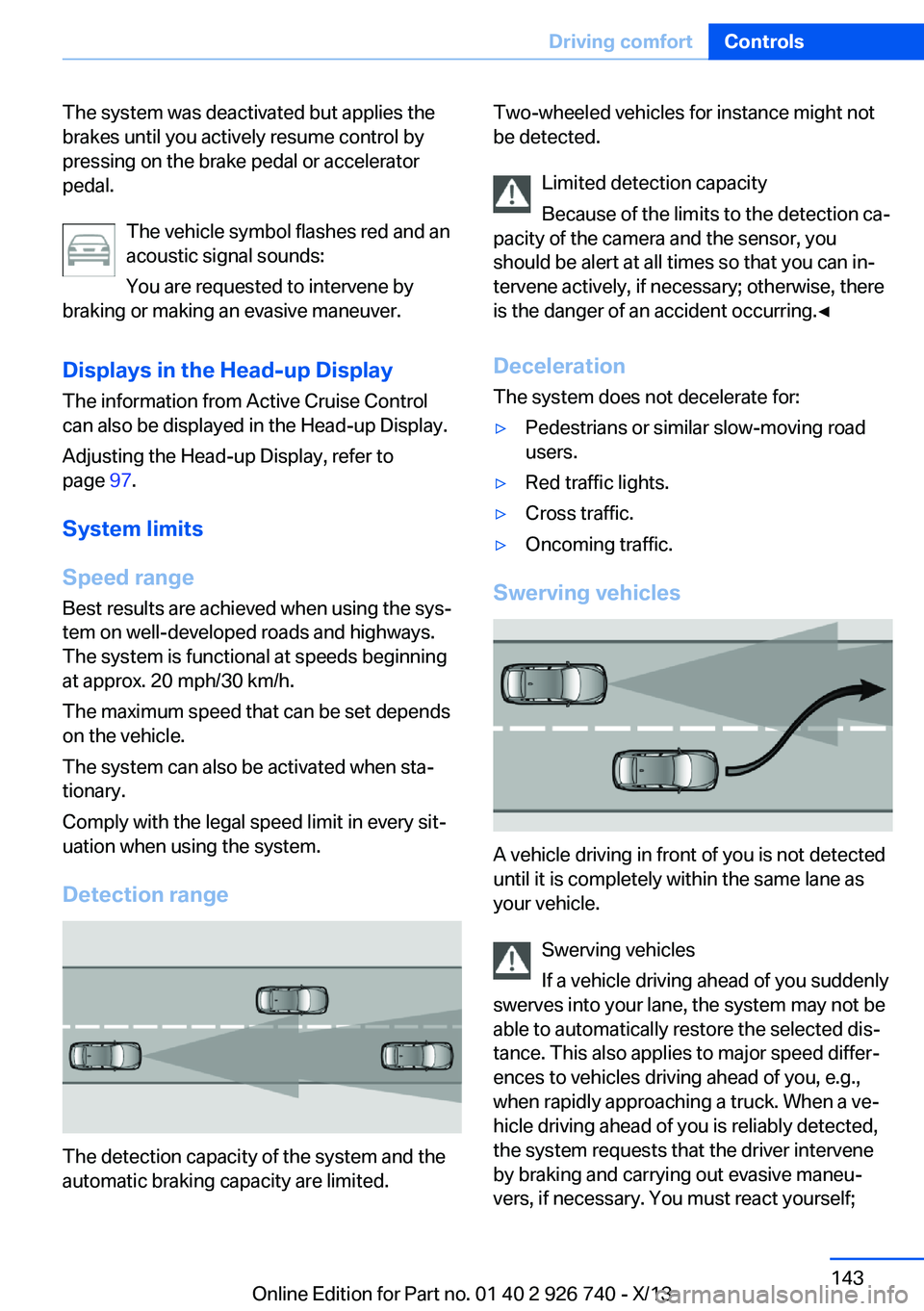
Detection range
The detection capacity of the system and the
automatic braking capacity are limited.
Two-wheeled vehicles for instance might not
be detected.
Limited detection capacity
Because of the limits to the detection ca‐
pacity of the camera and the sensor, you
should be alert at all times so that you can in‐
tervene actively, if necessary; otherwise, there
is the danger of an accident occurring.◀
Deceleration
The system does not decelerate for:▷Pedestrians or similar slow-moving road
users.▷Red traffic lights.▷Cross traffic.▷Oncoming traffic.
Swerving vehicles
A vehicle driving in front of you is not detected
until it is completely within the same lane as
your vehicle.
Swerving vehicles
If a vehicle driving ahead of you suddenly
swerves into your lane, the system may not be
able to automatically restore the selected dis‐
tance. This also applies to major speed differ‐
ences to vehicles driving ahead of you, e.g.,
when rapidly approaching a truck. When a ve‐
hicle driving ahead of you is reliably detected,
the system requests that the driver intervene
by braking and carrying out evasive maneu‐
vers, if necessary. You must react yourself;
Seite 143Driving comfortControls143
Online Edition for Part no. 01 40 2 926 740 - X/13
Page 145 of 265
Congestion Assistant
The concept In congestion situations, the system controls
the speed, steers independently as required
and keeps the vehicle close to the center of
the lane.
To the extent possible, the system automati‐
cally adjusts the speed to a slower vehicle
ahead of you. The distance that the vehicle
maintains to the vehicle ahead of you can be
varied. For safety reasons, it depends on the
speed. To maintain a certain distance, the sys‐
tem automatically reduces the speed, applies
the brakes lightly, or accelerates again if the
vehicle ahead begins moving faster.
When lane markings are detected, the system
keeps the vehicle in the center of the lane. For
this purpose, the system steers independently
as needed, for example, during cornering.
General information The congestion assistant determines speed
and distance from the vehicle in front and the
position of the lane markings via a radar sensor
and a camera.
Sensors on the steering wheel detect whether
the steering wheel is being touched.
The system is deactivated as soon as the
steering wheel is no longer being touched.
In order to be able to use the Congestion As‐
sistant, place your hands around the steering
wheel.
When driving with gloves or with protective
covers, contact with the steering wheel cannot
be detected by the sensors. The system in this
case cannot be used.
Hints Personal responsibility
Even an active system does not release
the driver from personal responsibility for the
driving process, especially for lane tracking,adaptation of speed, distance and driving style
to the traffic conditions.
Because of technical system limits, the system
cannot independently react appropriately in all
traffic situations.
Monitor the driving process, the surrounding
area and what is occurring in traffic continu‐
ously and attentively and actively intervene as
required, e.g., by braking, steering or making
an evasive maneuver.◀
Unfavorable weather conditions
In the event of unfavorable weather and
light conditions, e. g. if there is rain, snowfall,
slush, fog or glare, this may result in poorer
recognition of vehicles and lane limits as well
as short-term interruptions for vehicles that are
already detected. Drive attentively, and react to
the current traffic events. Intervene actively
when necessary, e.g., by braking, steering or
making an evasive maneuver, otherwise, there
is danger of an accident.◀
Functional requirements▷Drive on approved road type. The data on
this are stored in the navigation system.
Approved road types are highways.▷Sufficient lane width.▷Lane marking on both sides is detected.▷Vehicle driving ahead is detected.▷Speed below 25 mph/40 km/h.▷Both hands on the steering wheel rim.▷Sufficient curvature.▷Drive in the center of the lane.Seite 145Driving comfortControls145
Online Edition for Part no. 01 40 2 926 740 - X/13
Page 191 of 265
Do not remove the heat shields installed and
never apply undercoating to them. Make sure
that flammable materials, e. g. hay, leaves,
grass, etc. do not come in contact with the hot
exhaust system during driving, while in idle po‐
sition mode, or when parked. Such contact
could lead to a fire, and with it the risk of seri‐
ous personal injury as well as property dam‐
age.
Do not touch hot exhaust pipes; otherwise,
there is the danger of getting burned.◀
Diesel particulate filter
The diesel particulate filter collects soot parti‐
cles and burns them periodically at high tem‐
peratures.
During the cleaning time of several minutes,
the following may occur:▷Temporarily, the engine may run less
smoothly.▷Noises and a slight amount of smoke com‐
ing from the exhaust until shortly after the
engine is shut down.▷A somewhat higher engine speed is neces‐
sary to achieve the accustomed perform‐
ance.
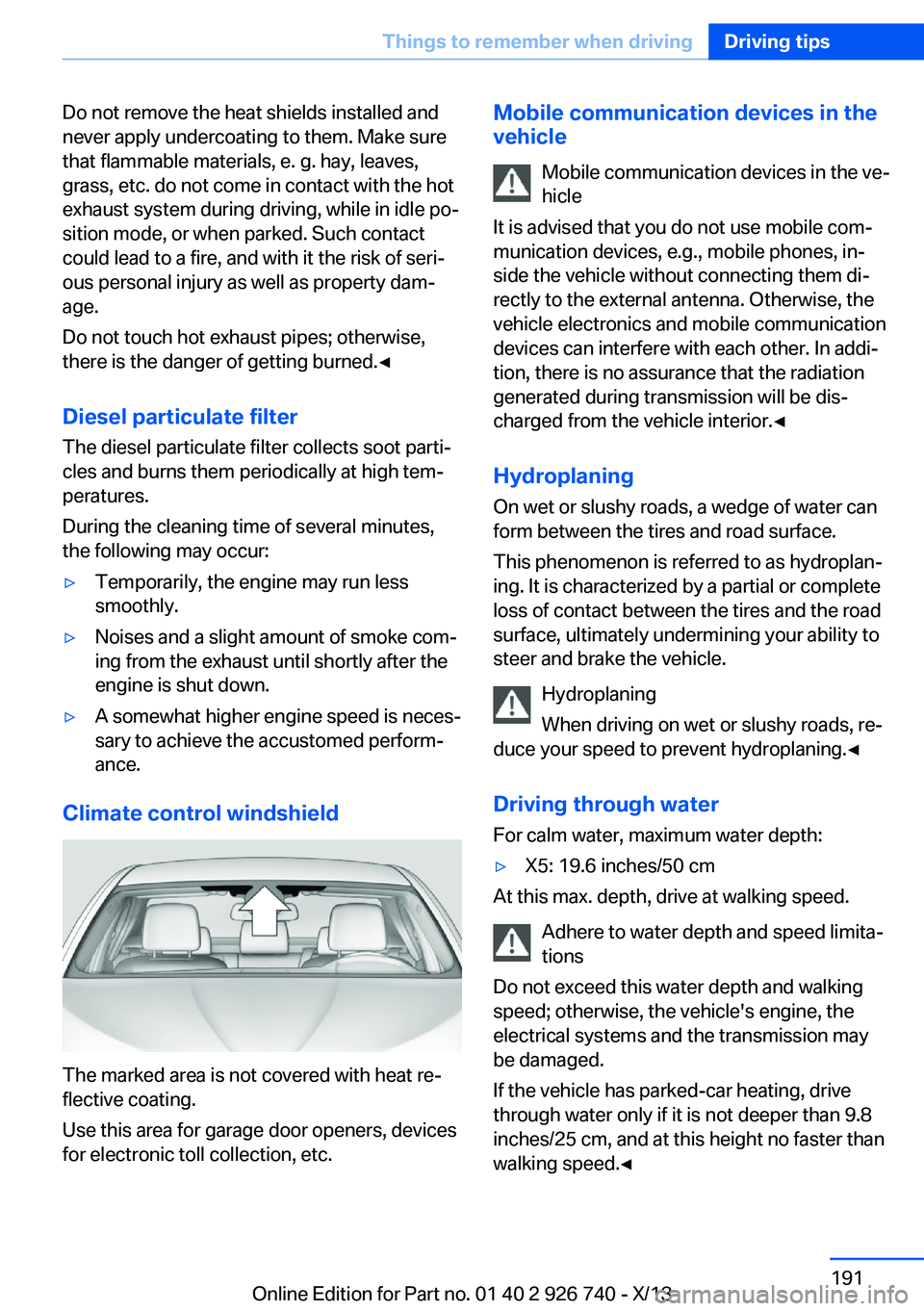
Climate control windshield
The marked area is not covered with heat re‐
flective coating.
Use this area for garage door openers, devices
for electronic toll collection, etc.
Mobile communication devices in the
vehicle
Mobile communication devices in the ve‐
hicle
It is advised that you do not use mobile com‐
munication devices, e.g., mobile phones, in‐
side the vehicle without connecting them di‐
rectly to the external antenna. Otherwise, the
vehicle electronics and mobile communication
devices can interfere with each other. In addi‐
tion, there is no assurance that the radiation
generated during transmission will be dis‐
charged from the vehicle interior.◀
Hydroplaning
On wet or slushy roads, a wedge of water can
form between the tires and road surface.
This phenomenon is referred to as hydroplan‐
ing. It is characterized by a partial or complete
loss of contact between the tires and the road
surface, ultimately undermining your ability to steer and brake the vehicle.
Hydroplaning
When driving on wet or slushy roads, re‐
duce your speed to prevent hydroplaning.◀
Driving through water
For calm water, maximum water depth:▷X5: 19.6 inches/50 cm
At this max. depth, drive at walking speed.
Adhere to water depth and speed limita‐
tions
Do not exceed this water depth and walking
speed; otherwise, the vehicle's engine, the
electrical systems and the transmission may
be damaged.
If the vehicle has parked-car heating, drive
through water only if it is not deeper than 9.8
inches/25 cm, and at this height no faster than
walking speed.◀
Seite 191Things to remember when drivingDriving tips191
Online Edition for Part no. 01 40 2 926 740 - X/13
Page 192 of 265
Braking safely
Your vehicle is equipped with ABS as a stand‐ ard feature.
Applying the brakes fully is the most effective
way of braking in situations when this is neces‐
sary.
The vehicle maintains steering responsive‐
ness. You can still avoid any obstacles with a
minimum of steering effort.
Pulsation of the brake pedal and sounds from
the hydraulic circuits indicate that ABS is in its
active mode.
Objects within the range of movement
of the pedals
No objects in the area around the pedals
Keep floor mats, carpets, and any other
objects out of the area of motion of the pedals;
otherwise, the function of the pedals could be
impeded while driving and create the risk of an
accident.
Do not place additional floor mats over existing
mats or other objects.
Only use floor mats that have been approved
for the vehicle and can be properly fixed in
place.
Ensure that the floor mats are securely fas‐
tened again after they were removed for clean‐
ing, for example.◀
Driving in wet conditions When roads are wet coated with road salt or
there is heavy rain, briefly exert gentle pres‐
sure on the brake pedal every few miles.
Ensure that this action does not endanger
other road users.
The heat generated in this process helps dry
the brake discs and pads.
In this way braking efficiency will be available
when you need it.Hills
Drive long or steep downhill gradients in the
gear in which the least braking is required.
Otherwise, the brake system may overheat, re‐
sulting in a reduction in the brake system effi‐
ciency.
You can increase the engine's braking effect
by shifting down, going all the way to first gear,
if necessary.
Avoid load on the brakes
Avoid placing excessive load on the
brake system. Light but consistent brake pres‐
sure can lead to high temperatures, brake wear
and possibly even brake failure.◀
Do not drive in neutral
Do not drive in neutral or with the engine
stopped, as doing so disables engine braking.
In addition, steering and brake assist are un‐
available with the engine stopped.◀
Brake disc corrosion The corrosion on the brake discs and the con‐
tamination on the brake pads are furthered by:▷Low mileage.▷Extended periods when the vehicle is not
used at all.▷Infrequent use of the brakes.
Corrosion occurs when the minimum pressure
that must be exerted by the pads during brake
applications to clean the discs is not reached.
Should corrosion form on the brake discs, the
brakes will tend to respond with a pulsating ef‐
fect that generally cannot be corrected.
Condensation under the parked
vehicle
When using the automatic climate control,
condensation water develops that exits under‐
neath the vehicle.
Traces of water under the vehicle like this are
normal.
Seite 192Driving tipsThings to remember when driving192
Online Edition for Part no. 01 40 2 926 740 - X/13
Page 246 of 265

To guard against discoloration, such as from
clothing, provide leather care roughly every
two months.
Clean light-colored leather more frequently be‐
cause soiling on such surfaces is substantially
more visible.
Use leather care products; otherwise, dirt and
grease will gradually break down the protective
layer of the leather surface.
Suitable care products are available from the
service center.
Upholstery material care Vacuum regularly with a vacuum cleaner.
If they are very dirty, e.g., beverage stains, use
a soft sponge or microfiber cloth with a suita‐
ble interior cleaner.
Clean the upholstery down to the seams using
large sweeping motions. Avoid rubbing the
material vigorously.
Damage from Velcro® fasteners
Open Velcro® fasteners on pants or
other articles of clothing can damage the seat
covers. Ensure that any Velcro® fasteners are
closed.◀
Caring for special components
Light-alloy wheels When cleaning the vehicle, use only neutral
wheel cleaners having a pH value from 5 to 9.
Do not use abrasive cleaning agents or steam
jets above 140 ℉/60 ℃. Follow the manufac‐
turer's instructions.
Aggressive, acidic or alkaline cleaning agents
can destroy the protective layer of adjacent
components, such as the brake disk.
Chrome surfaces Carefully clean components such as the radia‐
tor grille or door handles with an ample supply of water, possibly with shampoo added, partic‐ularly when they have been exposed to road
salt.
Rubber components Aside from water, treat only with rubber
cleansers.
When cleaning rubber seals, do not use any
silicon-containing car care products in order to
avoid damage or reduced noise damping.
Fine wood parts Clean fine wood facing and fine wood compo‐
nents only with a moist rag. Then dry with a
soft cloth.
Plastic components
These include:▷Imitation leather surfaces.▷Headliner.▷Lamp lenses.▷Instrument cluster cover.▷Matte black spray-coated components.▷Painted parts in the interior.
Clean with a microfiber cloth.
Lightly dampen the cloth with water.
Do not soak the headliner.
Do not use cleansers that contain alcohol
or solvents
Do not use cleansers that contain alcohol or
solvents, such as lacquer thinners, heavy-duty
grease removers, fuel, or such; this could lead
to surface damage.◀
Safety belts
Dirty belt straps impede the reeling action and
thus have a negative impact on safety.
Chemical cleaning
Do not clean chemically; this can destroy
the webbing.◀
Seite 246MobilityCare246
Online Edition for Part no. 01 40 2 926 740 - X/13
Page 254 of 265
Everything from A to Z
IndexA ABS, Antilock Brake Sys‐ tem 131
ACC, Active Cruise Control with Stop & Go 138
Acceleration Assistant, refer to Launch Control 80
Activated-charcoal filter 168
Active Blind Spot Detec‐ tion 126
Active Cruise Control with Stop & Go, ACC 138
Active Protection 128
Active roll stabilization 135
Active seat ventilation, front 53
Active Steering 134
Adaptive brake lights, refer to Brake force display 128
Adaptive Light Control 100
Additives, oil 225
Adjustments, seats/head re‐ straints 50
After washing vehicle 245
Airbags 104
Airbags, indicator/warning light 105
Air circulation, refer to Recir‐ culated-air mode 167
Air, dehumidifying, refer to Cooling function 167
Air distribution, manual 166
Air flow, automatic climate control 166
Air pressure, tires 211
Air vents, refer to Ventila‐ tion 168
Alarm system 45
Alarm, unintentional 46 All around the center con‐
sole 16
All around the headliner 17
All around the steering wheel 14
All-season tires, refer to Win‐ ter tires 219
All-wheel-drive 133
Alternating-code hand-held transmitter 176
Alternative oil types 226
Antifreeze, washer fluid 77
Antilock Brake System, ABS 131
Anti-slip control, refer to DSC 132
Approved axle load 250
Approved engine oils 225
Arrival time 94
Ashtray 177
Ashtray, front 177
Assistance, Roadside Assis‐ tance 240
Assistance when driving off 131
Assist system, refer to Intelli‐ gent Safety 112
Attentiveness assistant 128
AUTO H button, refer to Au‐ tomatic Hold 72
AUTO intensity 166
Automatic car wash 244
Automatic climate con‐ trol 165
Automatic Cruise Control with Stop & Go 138
Automatic Curb Monitor 60
Automatic deactivation, front passenger airbags 106
Automatic headlamp con‐ trol 100 Automatic Hold 72
Automatic locking 44
Automatic recirculated-air control 167
Automatic Soft Closing, doors 40
Automatic tailgate 40
Automatic transmission with Steptronic 78
AUTO program, automatic cli‐ mate control 166
AUTO program, intensity 166
Auto Start/Stop function 69
Average fuel consumption 94
Average speed 94
Axle loads, weights 250
B Backrest curvature, refer to Lumbar support 52
Backrest, width 53
Backup camera 153
Bad road trips 193
Band-aids, refer to First aid kit 240
Bar for tow-starting/ towing 243
Battery replacement, vehicle battery 237
Battery replacement, vehicle remote control 34
Battery, vehicle 237
Belts, safety belts 55
Beverage holder, cu‐ pholder 185
Blinds, sun protection 48
BMW Advanced Diesel 207
BMW Assist, see user's manual for Navigation, En‐Seite 254ReferenceEverything from A to Z254
Online Edition for Part no. 01 40 2 926 740 - X/13
Page 255 of 265
tertainment and Communi‐
cation
BMW Homepage 6
BMW Internet page 6
BMW maintenance sys‐ tem 229
Bonus range, ECO PRO 199
Bottle holder, refer to Cu‐ pholder 185
Brake assistant 131
Brake discs, breaking in 190
Brake force display 128
Brake lamps, brake force dis‐ play 128
Brake lights, adaptive 128
Brake pads, breaking in 190
Braking, hints 192
Breakdown assis‐ tance 239, 240
Breaking in 190
Brightness of Control Dis‐ play 96
Bulb replacement 232
Bulb replacement, front 233
Bulb replacement, rear 235
Bulbs and lamps 232
Button, RES 141
Button, Start/Stop 67
Bypassing, refer to Jump- starting 241
C
California Proposition 65 Warning 7
Calling up mirror adjust‐ ment 45
Calling up seat adjust‐ ment 45
Calling up steering wheel ad‐ justment 45
Camera, care 247
Camera, Panorama View 158
Camera, rearview cam‐ era 153
Camera, Top View 156 Can holder, refer to Cu‐
pholder 185
Car battery 237
Car care products 245
Care, displays 247
Care, vehicle 245
Cargo 194
Cargo area 180
Cargo area, enlarging 180
Cargo area lid 40
Cargo area, storage compart‐ ments 186
Cargo cover 180
Cargo, securing 195
Cargo straps, securing cargo 195
Car key, refer to Remote con‐ trol 34
Carpet, care 247
Car wash 244
Catalytic converter, refer to Hot exhaust system 190
CBS Condition Based Serv‐ ice 229
CD/Multimedia, see user's manual for Navigation, En‐
tertainment and Communi‐
cation
Center armrest 183
Center console 16
Center-Lock, see button for central locking 37
Central locking system 37
Central screen, refer to Con‐ trol Display 18
Changes, technical, refer to Safety 7
Changing parts 231
Changing wheels 235
Changing wheels/tires 218
Check Control 86
Checking the oil level elec‐ tronically 224
Children, seating position 63
Children, transporting safely 63 Child restraint fixing sys‐
tem 63
Child restraint fixing system LATCH 65
Child restraint fixing systems, mounting 63
Child safety locks 66
Child seat, mounting 63
Child seats 63
Chrome parts, care 246
Cigarette lighter 177
Cleaning, displays 247
Climate control 165
Climate control wind‐ shield 191
Clock 89
Closing/opening from in‐ side 40
Closing/opening via door lock 39
Closing/opening with remote control 38
Clothes hooks 186
Coasting 200
Coasting with engine decou‐ pled, coasting 200
Coasting with idling en‐ gine 200
Cockpit 14
Cold starting, refer to Starting the engine 68
Collision warning with braking function 116
Collision warning with City Braking function 113
Combination switch, refer to Turn signals 74
Combination switch, refer to Wiper system 75
Comfort Access 43
COMFORT program, Driving Dynamics Control 137
Compact wheel 235
Compartments in the doors 183
Compass 94 Seite 255Everything from A to ZReference255
Online Edition for Part no. 01 40 2 926 740 - X/13
Page 256 of 265
Computer 93
Condensation on win‐ dows 166
Condensation under the vehi‐ cle 192
Condition Based Service CBS 229
Confirmation signal 44
Congestion Assistant 145
ConnectedDrive, see user's manual for Navigation, En‐
tertainment and Communi‐
cation
ConnectedDrive Services
Connecting electrical devi‐ ces 178
Connection for an external audio device 184
Control Display 18
Control Display, settings 95
Controller 18, 19
Control systems, driving sta‐ bility 131
Convenient opening 38
Coolant 227
Coolant temperature 89
Cooling function 167
Cooling, maximum 167
Cooling system 227
Corrosion on brake discs 192
Cruise control 148
Cruise control, active with Stop & Go 138
Cruise Control, refer to Active Cruise Control 138
Cruising range 89
Cupholder 185
Current fuel consumption 90
D
Damage, tires 218
Data, technical 250
Date 89
Daytime running lights 100 Defrosting, refer to Windows,
defrosting 166
Dehumidifying, air 167
Departure time, parked-car heating 172
Departure time, parked-car ventilation 172
Destination distance 94
Diesel exhaust fluid, at low temperatures 208
Diesel exhaust fluid, having refilled 208
Diesel exhaust fluid, on mini‐ mum 208
Diesel exhaust fluid, replen‐ ishing yourself 208
Diesel particulate filter 191
Digital clock 89
Dimensions 250
Dimmable exterior mirrors 61
Dimmable interior rearview mirror 61
Direction indicator, refer to Turn signals 74
Display, electronic, instru‐ ment cluster 84
Display in windshield 97
Display lighting, refer to In‐ strument lighting 102
Displays 82
Displays, cleaning 247
Disposal, coolant 228
Disposal, vehicle battery 238
Distance control, refer to PDC 150
Distance information 164
Distance to destination 94
Divided screen view, split screen 24
Door lock, refer to Remote control 34
Doors, Automatic Soft Clos‐ ing 40
Downhill control 133
Drink holder, third row of seats 186 Drive-off assistant 131
Drive-off assistant, refer to DSC 132
Driving Dynamics Con‐ trol 135
Driving instructions, breaking in 190
Driving mode 135
Driving notes, general 190
Driving on bad roads 193
Driving stability control sys‐ tems 131
Driving tips 190
DSC Dynamic Stability Con‐ trol 132
DTC driving dynamics 133
DTC Dynamic Traction Con‐ trol 133
Dynamic Stability Control DSC 132
Dynamic Traction Control DTC 133
E
ECO PRO 198
ECO PRO, bonus range 199
ECO PRO display 198
ECO PRO driving mode 198
ECO PRO mode 198
ECO PRO Tip - driving in‐ struction 199
EfficientDynamics 200
Electronic displays, instru‐ ment cluster 84
Electronic Stability Program ESP, refer to DSC 132
Emergency detection, remote control 35
Emergency release, door lock 40
Emergency release, fuel filler flap 204
Emergency release, parking brake 73
Emergency Request 239 Seite 256ReferenceEverything from A to Z256
Online Edition for Part no. 01 40 2 926 740 - X/13