sound system BMW X5 XDRIVE35D 2012 User Guide
[x] Cancel search | Manufacturer: BMW, Model Year: 2012, Model line: X5 XDRIVE35D, Model: BMW X5 XDRIVE35D 2012Pages: 317, PDF Size: 8.83 MB
Page 211 of 317
External device
Connecting
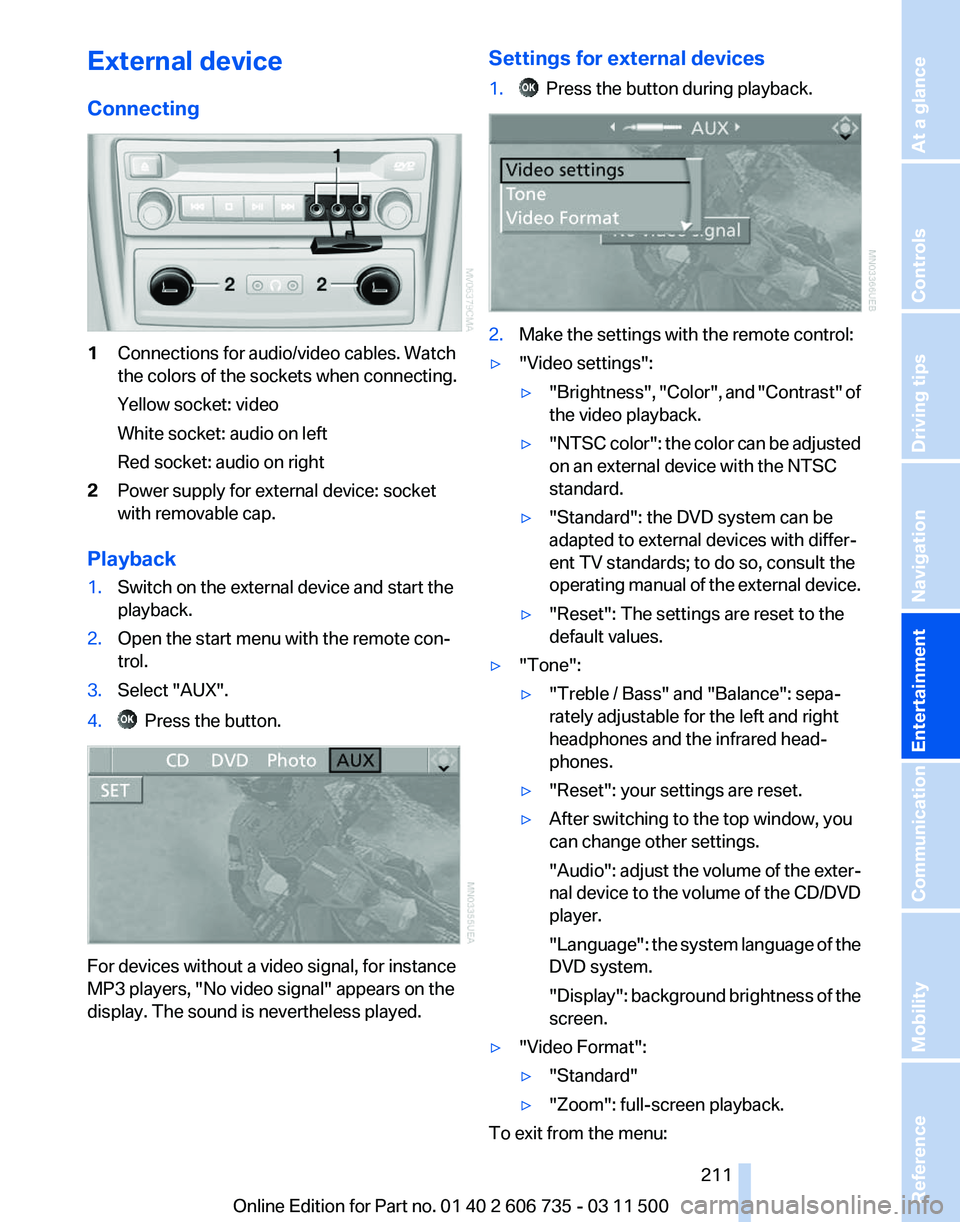
1
Connections for audio/video cables. Watch
the colors of the sockets when connecting.
Yellow socket: video
White socket: audio on left
Red socket: audio on right
2 Power supply for external device: socket
with removable cap.
Playback
1. Switch on the external device and start the
playback.
2. Open the start menu with the remote con‐
trol.
3. Select "AUX".
4. Press the button.
For devices without a video signal, for instance
MP3 players, "No video signal"
appears on the
display. The sound is nevertheless played. Settings for external devices
1. Press the button during playback.
2.
Make the settings with the remote control:
▷ "Video settings":
▷"Brightness", "Color",
and "Contrast" of
the video playback.
▷ "NTSC
color": the color can be adjusted
on an external device with the NTSC
standard.
▷ "Standard": the DVD system can be
adapted to external devices with differ‐
ent TV standards; to do so, consult the
operating
manual of the external device.
▷ "Reset": The settings are reset to the
default values.
▷ "Tone":
▷"Treble / Bass" and "Balance": sepa‐
rately adjustable for the left and right
headphones and the infrared head‐
phones.
▷ "Reset": your settings are reset.
▷ After switching to the top window, you
can change other settings.
"Audio":
adjust the volume of the exter‐
nal device to the volume of the CD/DVD
player.
"Language": the system language of the
DVD system.
"Display": background brightness of the
screen.
▷ "Video Format":
▷"Standard"
▷ "Zoom": full-screen playback.
To exit from the menu:
Seite 211
211Online Edition for Part no. 01 40 2 606 735 - 03 11 500
Reference Mobility Communication
Entertainment Navigation Driving tips Controls At a glance
Page 216 of 317
Telephone*
At a glance
The concept
Mobile
phones or other external devices such as
audio players can be connected to the vehicle
via Bluetooth.
Bluetooth® is a registered trademark of Blue‐
tooth® SIG, Inc.
After these devices are paired once, they are
recognized automatically when the ignition is
switched on as soon as they are in the vehicle
and can then be operated via iDrive, the buttons
on the steering wheel, and via voice activation*.
Depending on their functionality, external devi‐
ces can be used via the vehicle as a telephone
or as an audio source. The telephone functions
are described in the following. Operating the au‐
dio functions, refer to page 196.
Up to four external devices can be paired.
Certain functions may need to be enabled by the
mobile phone provider or service provider.
Using the mobile phone while driving
Make entries only when traffic and road
conditions allow. Do not hold the mobile phone
in your hand while you are driving; use the
hands-free system instead. If you do not ob‐
serve this precaution, you can endanger the ve‐
hicle occupants and other road users.◀
Snap-in adapter*
The snap-in adapter is used to:
▷ Hold the mobile phone.
▷ Recharge the battery.
▷ Connect the mobile phone to an outside an‐
tenna of the vehicle.
This provides for better network reception
and consistent sound quality.
Approved mobile phones
Details on which mobile phones and external
devices with a Bluetooth interface are sup‐ ported by the mobile phone preparation pack‐
age
can be obtained at www.bmwusa.com/blue‐
tooth.
Displaying the vehicle identification
number and software part number
The vehicle identification number and software
part number are needed to determine which mo‐
bile phones are supported by the mobile phone
preparation package. The software version of
the mobile phone may also be required.
1. "Telephone"
2. Open "Options".
3. "Bluetooth® info"
4. "Display system information"
These approved mobile phones with a certain
software version, support the vehicle functions
described below.
Malfunctions may occur with other mobile
phones or software versions.
Do
not operate a mobile phone that is connected
to the vehicle on the mobile phone keypad, as
this may lead to a malfunction.
A software update, refer to page 199, can be
performed if necessary.
Pairing/unpairing the mobile
phone
General information
The following functions are available:
▷ Use of a mobile phone as a telephone.
▷ Use of a mobile phone as an additional tele‐
phone.
▷ Use of a mobile phone as an audio source.
▷ Use of an audio device as an audio source,
refer to page 196.
Seite 216
216 Online Edition for Part no. 01 40 2 606 735 - 03 11 500
Telephone
Page 312 of 317
Screen, refer to Control Dis‐
play 19
Search, refer to BMW On‐ line 239
Seat adjustment, electric 46
Seat adjustment, manual 45
Seat and mirror memory 53
Seat belts
– Refer to Safety belts 50
Seat heating 48, 49
Seat heating, rear 48
Seats
– Adjusting electrically 46
– Heating 48
– Memory, refer to Seat and mirror memory 53
– Sitting safely 45
– Storing the setting, refer to Seat and mirror memory 53
– Ventilation, refer to Active seat ventilation and seat
heating 49
Seats, adjusting 45
Seats, backrest width 46
Seats in the rear 47
Seats, shoulder support 46
2nd row seats 47
Selector lever, automatic transmission with Step‐
tronic 69
Selector lever lock, releas‐ ing 69
Self-leveling suspension 100
Sensors, care 287
Service and warranty 7
Service data in the remote control 268
Service interval display, refer to Condition Based Service
CBS 268
Service interval display, refer to Service requirements 75
Service requirements 75
Service requirements, CBS Condition Based Serv‐
ice 268
Service, Roadside Assis‐ tance 281 Settings, clock, 12h/24h
mode 79
Settings, configuring, refer to Personal Profile 28
Settings, DVD 184
Settings on the Control Dis‐ play, changing 78
Shifting, automatic transmis‐ sion with Steptronic 70
Shift paddles 70
Short commands, voice acti‐ vation 295
Side airbags 86
Side View 116
Side windows, refer to Win‐ dows 40
Size, refer to Dimensions 291
Ski bag 138
Slide/tilt glass roof, refer to Glass sunroof 43
Slide/tilt glass roof, refer to Panoramic glass sunroof 42
Slot for remote control 61
Smokers' package, refer to Ashtray 130
Snap-in adapter, mobile phone 225
Snap-in adapter, refer to Stor‐ age compartment of center
armrest 134
Snow chains 261
Socket, OBD Onboard Diag‐ nosis 269
Socket, refer to Connecting electrical devices 131
Software applications, iPhone 241
Software part number 216
Software update 199
Soot particulate filter, refer to Diesel particulate filter 143
SOS, refer to Emergency Re‐ quest, initiating 280
Sound output 174, 181
Spare fuse 279
Special destinations, naviga‐ tion 156
Speed, average 73 Speed limit
78
Speed limit, setting 78
Speedometer 14
Speed, with winter tires 261
Split screen 22
Split
screen map settings 164
Spoken instructions, naviga‐ tion 163
Sport program, automatic transmission with Step‐
tronic 70
Spray nozzles, refer to Clean‐ ing the windshield and head‐
lamps 67
Spray nozzles, refer to Wind‐ shield washer nozzles 68
Stability control systems 96
Start/Stop button 61
Start/Stop button, starting the engine 62
Start/Stop button, switching off the engine 62
Starting the engine 62
Start problems, refer to Jump- starting 281
State/province, selecting for navigation 153
Stations, stored 180
Station, storing 174
Status information, iDrive 21
Status of Owner's Manual 6
Steam jets 285
Steering wheel 55
Steering wheel, adjusting 55
Steering wheel, easy entry/ exit 55
Steering wheel lock 61
Steering with variable transla‐ tion, refer to Active steer‐
ing 100
Steptronic, refer to Sport pro‐ gram and manual mode M/
S 70
Stopping, engine 62
Storage compartment nets 135
Storage compart‐ ments 134, 135
Seite 312
312 Online Edition for Part no. 01 40 2 606 735 - 03 11 500
Everything from A to Z