seat BMW X5 XDRIVE35D 2013 Owner's Manual
[x] Cancel search | Manufacturer: BMW, Model Year: 2013, Model line: X5 XDRIVE35D, Model: BMW X5 XDRIVE35D 2013Pages: 345, PDF Size: 9.45 MB
Page 66 of 345
On the center seat when equipped with three
rows of seats:1.Slide the head restraint upward.2.Guide the tether strap between the head
restraint brackets.3.Hook in the tether strap on the mounting
point with the hook.4.Slide the head restraint into the bottom po‐
sition.5.Pull tether strap taut.
BMW X6
1.Route the upper retaining strap over the
middle of the head restraint.2.Attach the upper retaining strap to the
mounting point with the hook.3.Pull the retaining strap taut until it com‐
presses the cushion of the head restraint,
thus preventing the strap from sliding off.
Locking the doors and
windows
Rear doors
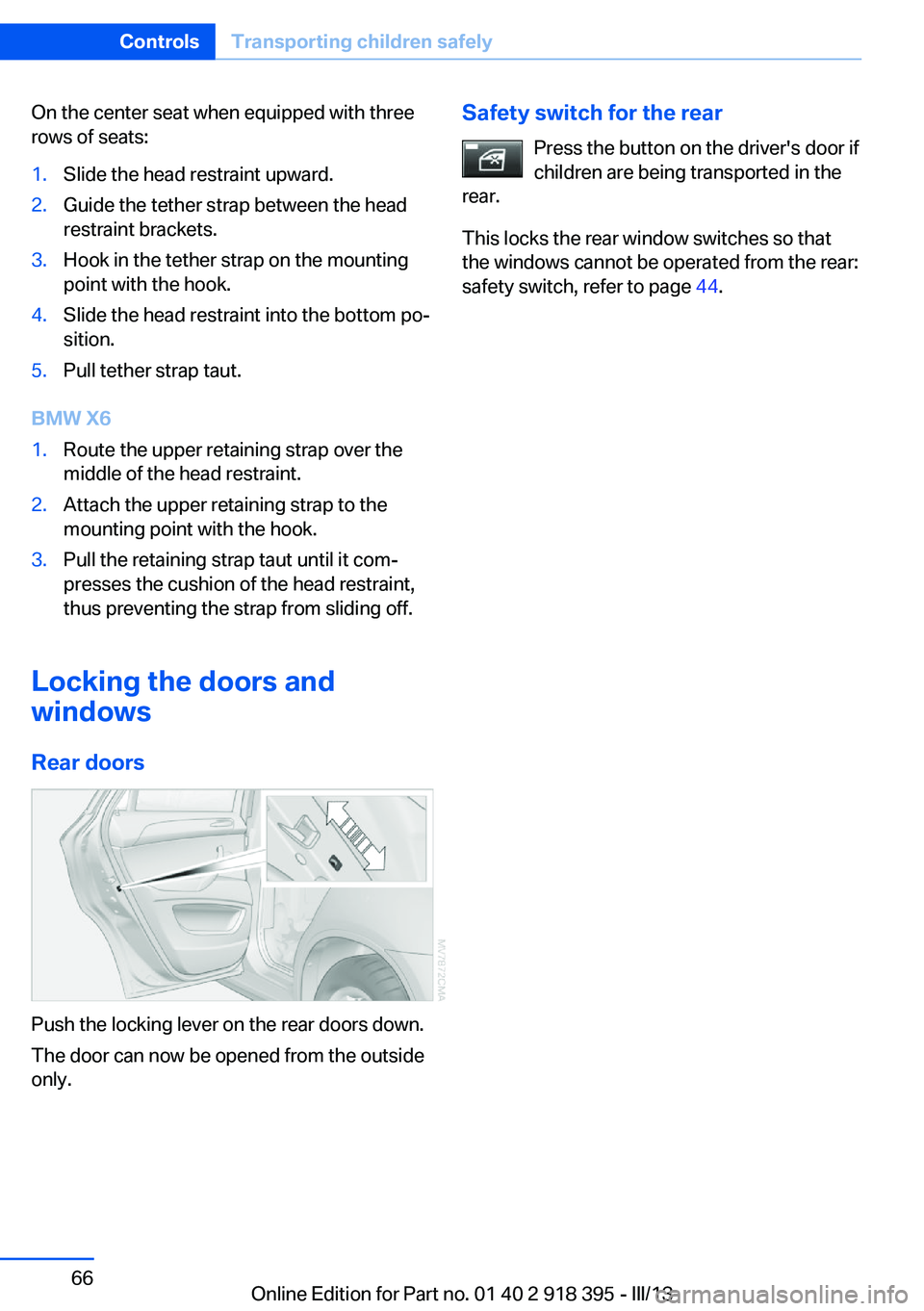
Push the locking lever on the rear doors down.
The door can now be opened from the outside
only.
Safety switch for the rear
Press the button on the driver's door if
children are being transported in the
rear.
This locks the rear window switches so that
the windows cannot be operated from the rear:
safety switch, refer to page 44.Seite 66ControlsTransporting children safely66
Online Edition for Part no. 01 40 2 918 395 - III/13
Page 96 of 345
▷Make sure that the front passenger is sit‐
ting correctly, i.e., keeps his or her feet and
legs in the footwell; otherwise, leg injuries
can occur if the front airbag is triggered.▷Do not place slip covers, seat cushions or
other objects on the front passenger seat
that are not approved specifically for seats
with integrated side airbags.▷Do not hang pieces of clothing, such as
jackets, over the backrests.▷Make sure that occupants keep their heads
away from the side airbag and do not rest
against the head airbag; otherwise, injuries
can occur if the airbags are triggered.▷Do not remove the airbag restraint system.▷Do not remove the steering wheel.▷Do not apply adhesive materials to the air‐
bag cover panels, cover them or modify
them in any way.▷Never modify either the individual compo‐
nents or the wiring in the airbag system.
This also applies to steering wheel covers,
the dashboard, the seats, the roof pillars
and the sides of the headliner.◀
Even when all instructions are followed closely,
injury from contact with the airbags cannot be
ruled out in certain situations.
The ignition and inflation noise may lead to
short-term and, in most cases, temporary
hearing impairment in sensitive individuals.
In the case of a malfunction, deactivation
and after triggering of the airbags
Do not touch the individual components imme‐
diately after the system has been triggered;
otherwise, there is the danger of burns.
Only have the airbags checked, repaired or dis‐
mantled and the airbag generator scrapped by
your service center or a workshop that has the
necessary authorization for handling explo‐
sives.
Non-professional attempts to service the sys‐
tem could lead to failure in an emergency or
undesired triggering of the airbag, either of
which could result in injury.◀
Warnings and information on the airbags are
also found on the sun visors.
Automatic deactivation of the frontpassenger airbags
The occupation of the seat is detected by eval‐
uating the impression on the occupied seat
surface of the front passenger seat.
The front and side airbags on the front passen‐
ger side are activated or deactivated accord‐
ingly by the system.
The indicator lamp above the interior rearview
mirror shows the current status of the front
passenger airbags, deactivated or activated,
refer to Front passenger airbag indicator lamp
below.
Leave feet in the footwell
Make sure that the front passenger
keeps his or her feet in the footwell; otherwise,
the front passenger airbags may not function
properly.◀
Child restraint fixing system in the front
passenger seat
Before transporting a child on the front pas‐
senger seat, refer to the safety notes and in‐
structions under Children on the front passen‐
ger seat, refer to page 61.◀
Malfunction of the automatic
deactivation system
When transporting older children and adults,
the front passenger airbags may be deacti‐
vated in certain sitting positions. In this case,
the indicator lamp for the front passenger air‐ bags lights up.
In this case, change the sitting position so that
the front passenger airbags are activated and
the indicator lamp goes out.Seite 96ControlsSafety96
Online Edition for Part no. 01 40 2 918 395 - III/13
Page 97 of 345
If it is not possible to activate the airbags, have
the person sit in the rear.
To make sure that occupation of the seat
cushion can be detected correctly:▷Do not attach seat covers, seat cushion
padding, ball mats or other items to the
passenger seat unless they are specifically
recommended by BMW.▷Do not place objects under the seat that
could press against the seat from below.
Indicator lamp for the front passenger
airbags
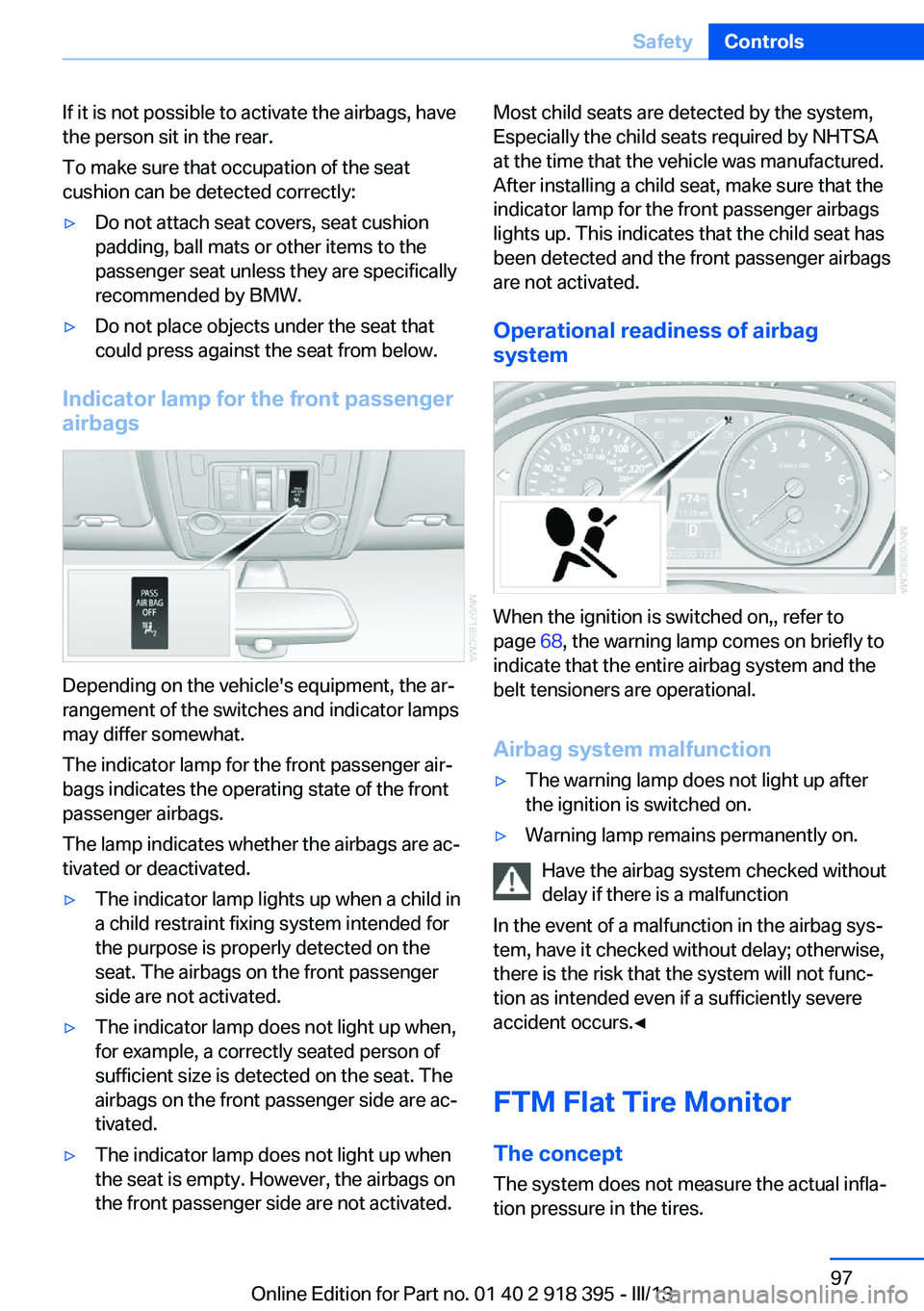
Depending on the vehicle's equipment, the ar‐
rangement of the switches and indicator lamps
may differ somewhat.
The indicator lamp for the front passenger air‐
bags indicates the operating state of the front
passenger airbags.
The lamp indicates whether the airbags are ac‐
tivated or deactivated.
▷The indicator lamp lights up when a child in
a child restraint fixing system intended for
the purpose is properly detected on the
seat. The airbags on the front passenger
side are not activated.▷The indicator lamp does not light up when,
for example, a correctly seated person of
sufficient size is detected on the seat. The
airbags on the front passenger side are ac‐
tivated.▷The indicator lamp does not light up when
the seat is empty. However, the airbags on
the front passenger side are not activated.Most child seats are detected by the system,
Especially the child seats required by NHTSA
at the time that the vehicle was manufactured.
After installing a child seat, make sure that the
indicator lamp for the front passenger airbags
lights up. This indicates that the child seat has
been detected and the front passenger airbags
are not activated.
Operational readiness of airbag
system
When the ignition is switched on,, refer to
page 68, the warning lamp comes on briefly to
indicate that the entire airbag system and the
belt tensioners are operational.
Airbag system malfunction
▷The warning lamp does not light up after
the ignition is switched on.▷Warning lamp remains permanently on.
Have the airbag system checked without
delay if there is a malfunction
In the event of a malfunction in the airbag sys‐
tem, have it checked without delay; otherwise,
there is the risk that the system will not func‐
tion as intended even if a sufficiently severe
accident occurs.◀
FTM Flat Tire Monitor The conceptThe system does not measure the actual infla‐
tion pressure in the tires.
Seite 97SafetyControls97
Online Edition for Part no. 01 40 2 918 395 - III/13
Page 126 of 345
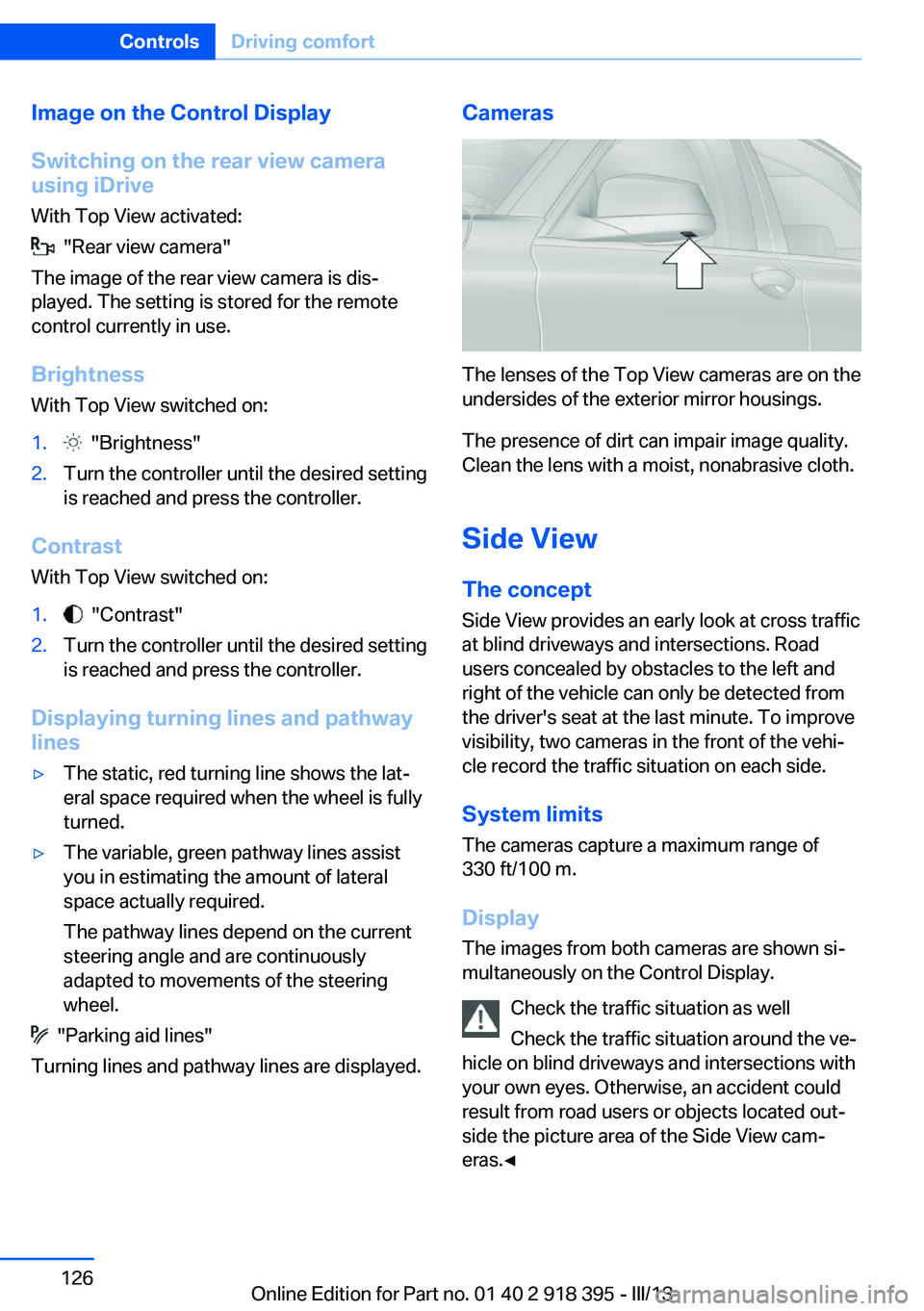
Image on the Control Display
Switching on the rear view camera
using iDrive
With Top View activated:
"Rear view camera"
The image of the rear view camera is dis‐
played. The setting is stored for the remote
control currently in use.
Brightness
With Top View switched on:
1. "Brightness"2.Turn the controller until the desired setting
is reached and press the controller.
Contrast
With Top View switched on:
1. "Contrast"2.Turn the controller until the desired setting
is reached and press the controller.
Displaying turning lines and pathway
lines
▷The static, red turning line shows the lat‐
eral space required when the wheel is fully
turned.▷The variable, green pathway lines assist
you in estimating the amount of lateral
space actually required.
The pathway lines depend on the current
steering angle and are continuously
adapted to movements of the steering
wheel.
"Parking aid lines"
Turning lines and pathway lines are displayed.
Cameras
The lenses of the Top View cameras are on the
undersides of the exterior mirror housings.
The presence of dirt can impair image quality.
Clean the lens with a moist, nonabrasive cloth.
Side ViewThe concept
Side View provides an early look at cross traffic
at blind driveways and intersections. Road
users concealed by obstacles to the left and
right of the vehicle can only be detected from
the driver's seat at the last minute. To improve
visibility, two cameras in the front of the vehi‐
cle record the traffic situation on each side.
System limits
The cameras capture a maximum range of
330 ft/100 m.
Display
The images from both cameras are shown si‐
multaneously on the Control Display.
Check the traffic situation as well
Check the traffic situation around the ve‐
hicle on blind driveways and intersections with
your own eyes. Otherwise, an accident could
result from road users or objects located out‐
side the picture area of the Side View cam‐
eras.◀
Seite 126ControlsDriving comfort126
Online Edition for Part no. 01 40 2 918 395 - III/13
Page 131 of 345
Automatic climate control with 4-zone con‐
trol 135
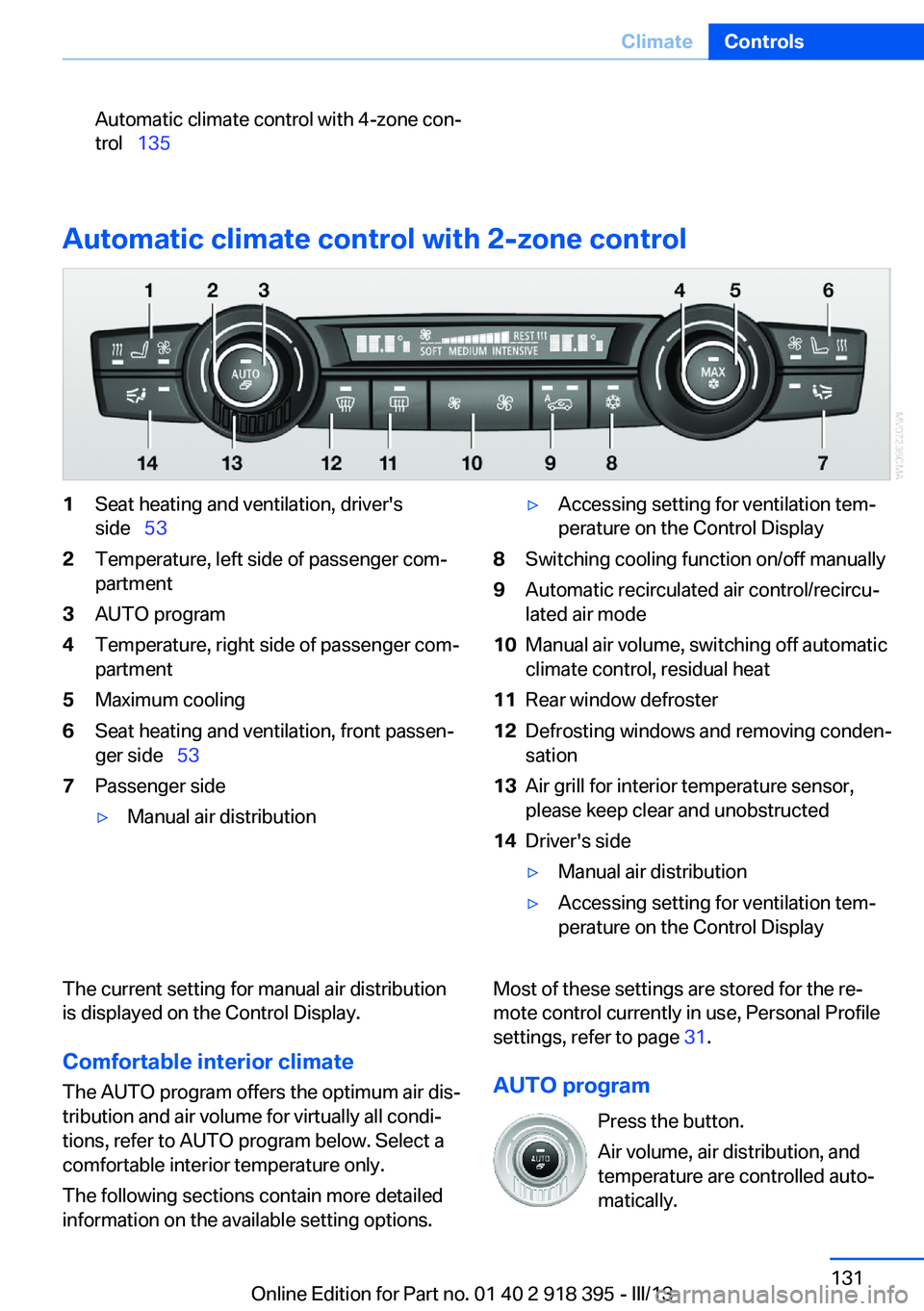
Automatic climate control with 2-zone control
1Seat heating and ventilation, driver's
side 532Temperature, left side of passenger com‐
partment3AUTO program4Temperature, right side of passenger com‐
partment5Maximum cooling6Seat heating and ventilation, front passen‐
ger side 537Passenger side▷Manual air distribution▷Accessing setting for ventilation tem‐
perature on the Control Display8Switching cooling function on/off manually9Automatic recirculated air control/recircu‐
lated air mode10Manual air volume, switching off automatic
climate control, residual heat11Rear window defroster12Defrosting windows and removing conden‐
sation13Air grill for interior temperature sensor,
please keep clear and unobstructed14Driver's side▷Manual air distribution▷Accessing setting for ventilation tem‐
perature on the Control DisplayThe current setting for manual air distribution
is displayed on the Control Display.
Comfortable interior climate The AUTO program offers the optimum air dis‐
tribution and air volume for virtually all condi‐
tions, refer to AUTO program below. Select a
comfortable interior temperature only.
The following sections contain more detailed
information on the available setting options.Most of these settings are stored for the re‐
mote control currently in use, Personal Profile
settings, refer to page 31.
AUTO program Press the button.
Air volume, air distribution, and
temperature are controlled auto‐
matically.Seite 131ClimateControls131
Online Edition for Part no. 01 40 2 918 395 - III/13
Page 135 of 345
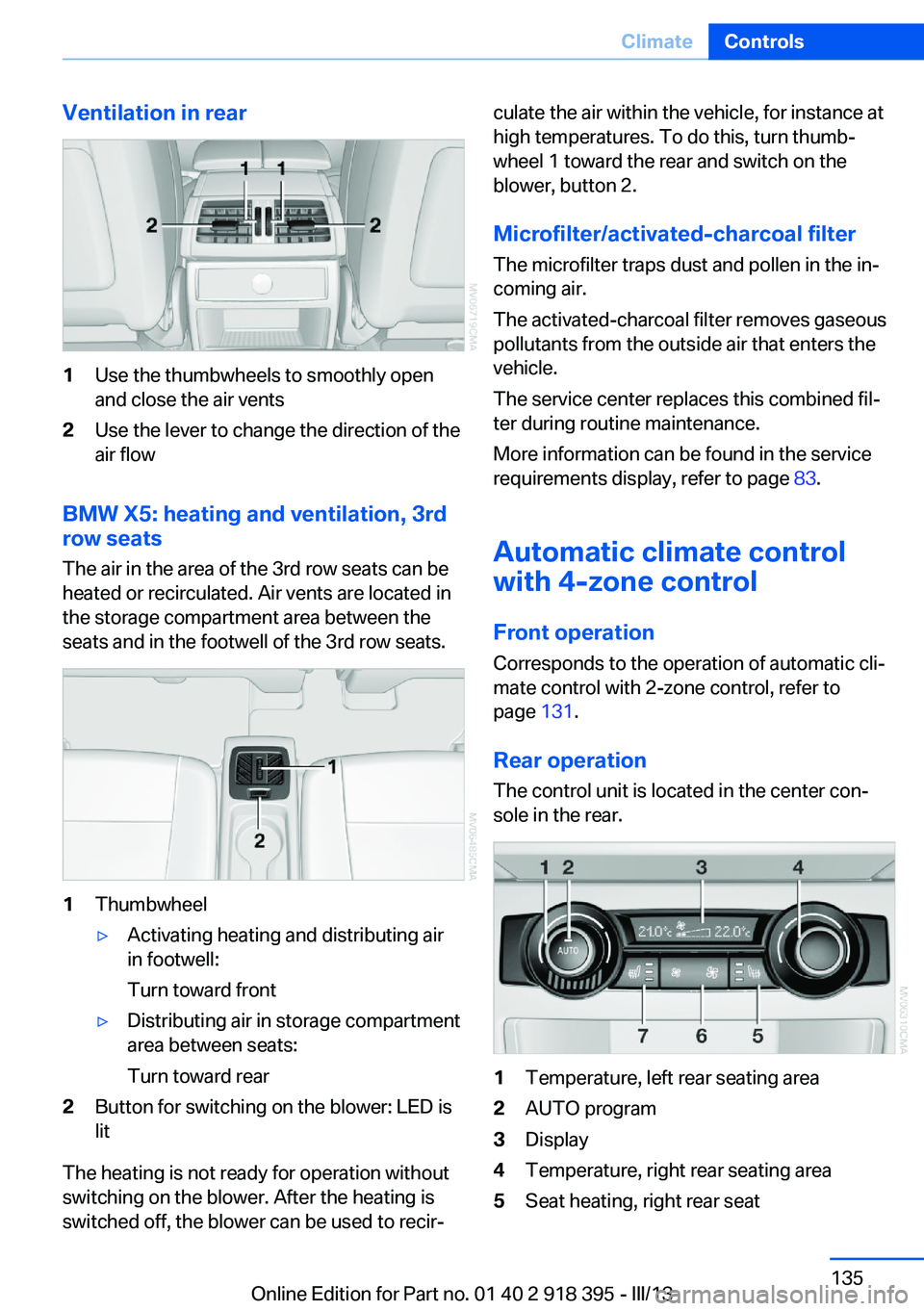
Ventilation in rear1Use the thumbwheels to smoothly open
and close the air vents2Use the lever to change the direction of the
air flow
BMW X5: heating and ventilation, 3rd
row seats
The air in the area of the 3rd row seats can be
heated or recirculated. Air vents are located in
the storage compartment area between the
seats and in the footwell of the 3rd row seats.
1Thumbwheel▷Activating heating and distributing air
in footwell:
Turn toward front▷Distributing air in storage compartment
area between seats:
Turn toward rear2Button for switching on the blower: LED is
lit
The heating is not ready for operation without
switching on the blower. After the heating is
switched off, the blower can be used to recir‐
culate the air within the vehicle, for instance at
high temperatures. To do this, turn thumb‐
wheel 1 toward the rear and switch on the
blower, button 2.
Microfilter/activated-charcoal filter The microfilter traps dust and pollen in the in‐
coming air.
The activated-charcoal filter removes gaseous
pollutants from the outside air that enters the
vehicle.
The service center replaces this combined fil‐
ter during routine maintenance.
More information can be found in the service
requirements display, refer to page 83.
Automatic climate control
with 4-zone control
Front operation Corresponds to the operation of automatic cli‐
mate control with 2-zone control, refer to
page 131.
Rear operation
The control unit is located in the center con‐
sole in the rear.1Temperature, left rear seating area2AUTO program3Display4Temperature, right rear seating area5Seat heating, right rear seatSeite 135ClimateControls135
Online Edition for Part no. 01 40 2 918 395 - III/13
Page 136 of 345
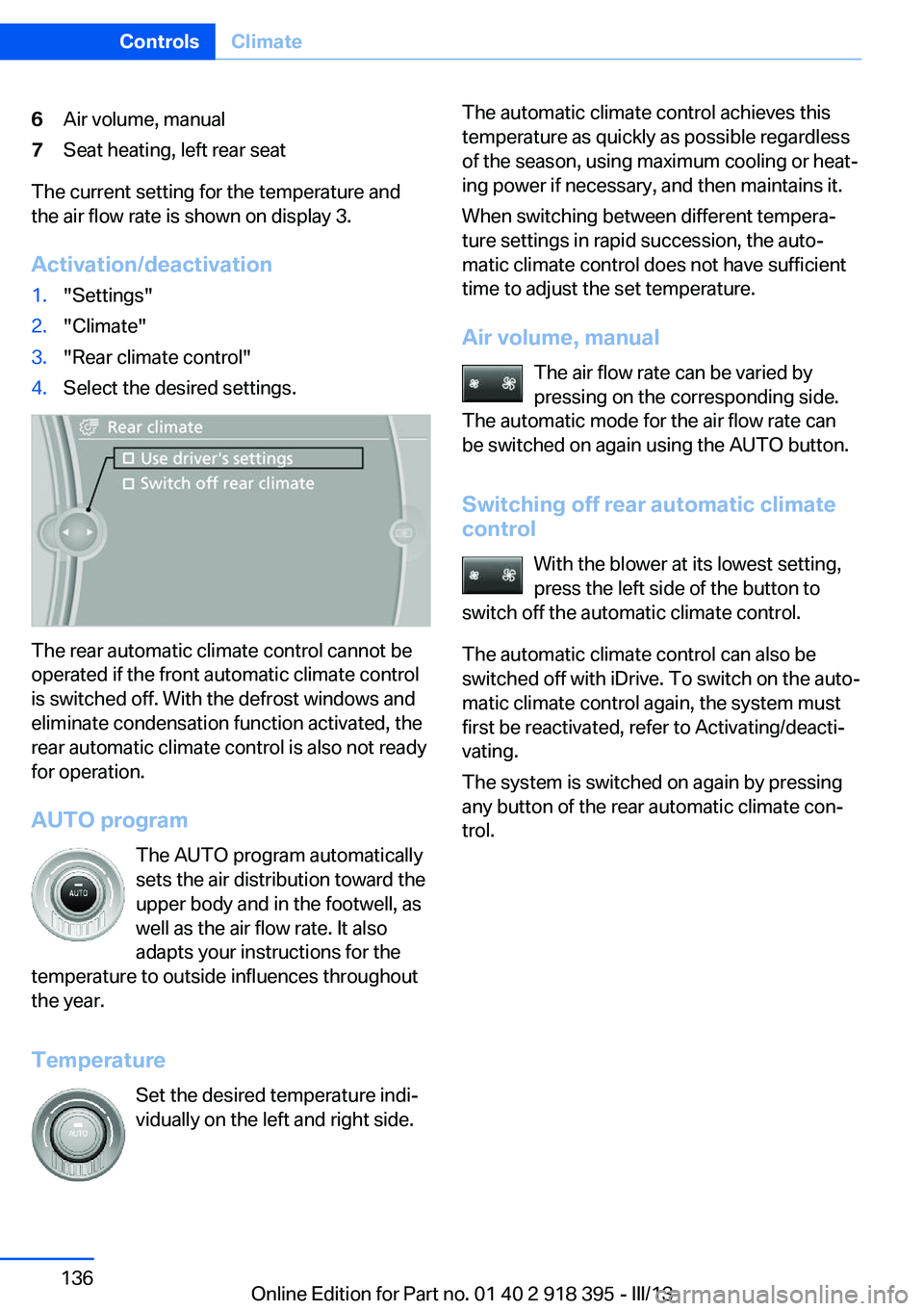
6Air volume, manual7Seat heating, left rear seat
The current setting for the temperature and
the air flow rate is shown on display 3.
Activation/deactivation
1."Settings"2."Climate"3."Rear climate control"4.Select the desired settings.
The rear automatic climate control cannot be
operated if the front automatic climate control
is switched off. With the defrost windows and
eliminate condensation function activated, the
rear automatic climate control is also not ready
for operation.
AUTO program The AUTO program automatically
sets the air distribution toward the
upper body and in the footwell, as
well as the air flow rate. It also
adapts your instructions for the
temperature to outside influences throughout the year.
Temperature Set the desired temperature indi‐
vidually on the left and right side.
The automatic climate control achieves this
temperature as quickly as possible regardless
of the season, using maximum cooling or heat‐
ing power if necessary, and then maintains it.
When switching between different tempera‐
ture settings in rapid succession, the auto‐
matic climate control does not have sufficient
time to adjust the set temperature.
Air volume, manual The air flow rate can be varied by
pressing on the corresponding side.
The automatic mode for the air flow rate can
be switched on again using the AUTO button.
Switching off rear automatic climate
control
With the blower at its lowest setting,
press the left side of the button to
switch off the automatic climate control.
The automatic climate control can also be
switched off with iDrive. To switch on the auto‐
matic climate control again, the system must
first be reactivated, refer to Activating/deacti‐
vating.
The system is switched on again by pressing
any button of the rear automatic climate con‐
trol.Seite 136ControlsClimate136
Online Edition for Part no. 01 40 2 918 395 - III/13
Page 137 of 345
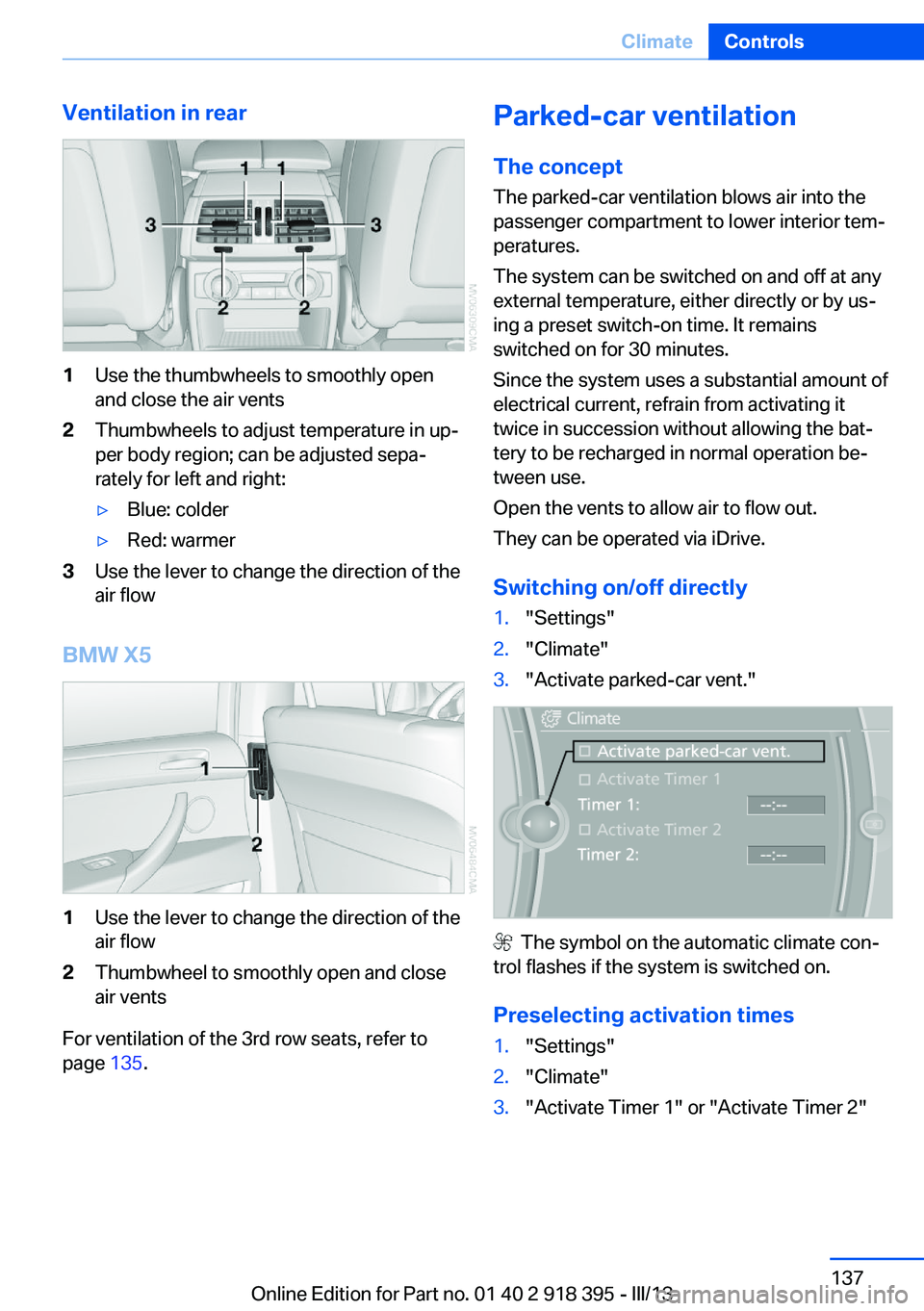
Ventilation in rear1Use the thumbwheels to smoothly open
and close the air vents2Thumbwheels to adjust temperature in up‐
per body region; can be adjusted sepa‐
rately for left and right:▷Blue: colder▷Red: warmer3Use the lever to change the direction of the
air flow
BMW X5
1Use the lever to change the direction of the
air flow2Thumbwheel to smoothly open and close
air vents
For ventilation of the 3rd row seats, refer to
page 135.
Parked-car ventilation
The concept The parked-car ventilation blows air into the
passenger compartment to lower interior tem‐
peratures.
The system can be switched on and off at any
external temperature, either directly or by us‐
ing a preset switch-on time. It remains
switched on for 30 minutes.
Since the system uses a substantial amount of
electrical current, refrain from activating it
twice in succession without allowing the bat‐
tery to be recharged in normal operation be‐
tween use.
Open the vents to allow air to flow out.
They can be operated via iDrive.
Switching on/off directly1."Settings"2."Climate"3."Activate parked-car vent."
The symbol on the automatic climate con‐
trol flashes if the system is switched on.
Preselecting activation times
1."Settings"2."Climate"3."Activate Timer 1" or "Activate Timer 2"Seite 137ClimateControls137
Online Edition for Part no. 01 40 2 918 395 - III/13
Page 146 of 345
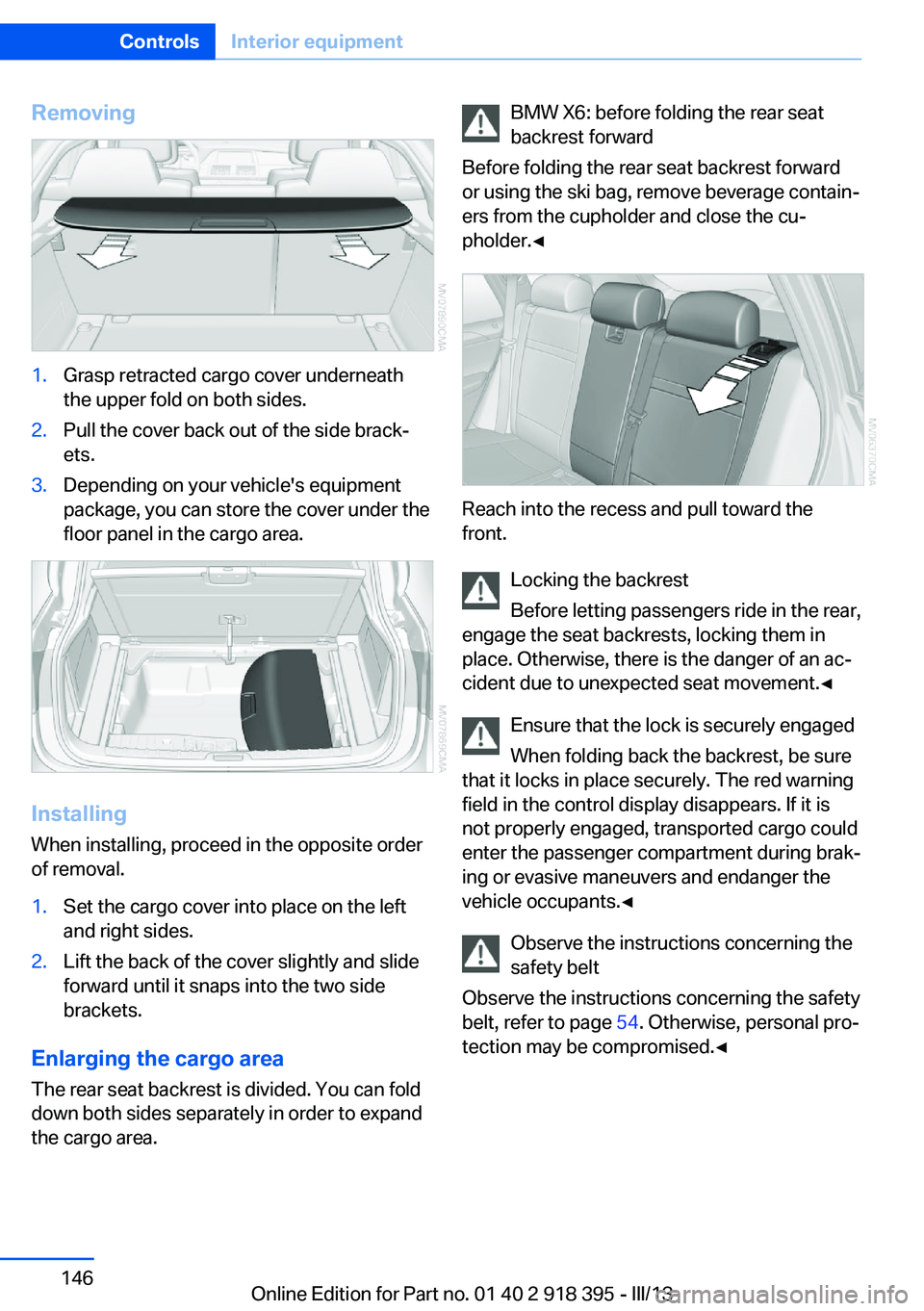
Removing1.Grasp retracted cargo cover underneath
the upper fold on both sides.2.Pull the cover back out of the side brack‐
ets.3.Depending on your vehicle's equipment
package, you can store the cover under the
floor panel in the cargo area.
Installing
When installing, proceed in the opposite order
of removal.
1.Set the cargo cover into place on the left
and right sides.2.Lift the back of the cover slightly and slide
forward until it snaps into the two side
brackets.
Enlarging the cargo area
The rear seat backrest is divided. You can fold
down both sides separately in order to expand
the cargo area.
BMW X6: before folding the rear seat
backrest forward
Before folding the rear seat backrest forward
or using the ski bag, remove beverage contain‐
ers from the cupholder and close the cu‐
pholder.◀
Reach into the recess and pull toward the
front.
Locking the backrest
Before letting passengers ride in the rear,
engage the seat backrests, locking them in
place. Otherwise, there is the danger of an ac‐
cident due to unexpected seat movement.◀
Ensure that the lock is securely engaged
When folding back the backrest, be sure
that it locks in place securely. The red warning
field in the control display disappears. If it is
not properly engaged, transported cargo could
enter the passenger compartment during brak‐
ing or evasive maneuvers and endanger the
vehicle occupants.◀
Observe the instructions concerning the
safety belt
Observe the instructions concerning the safety
belt, refer to page 54. Otherwise, personal pro‐
tection may be compromised.◀
Seite 146ControlsInterior equipment146
Online Edition for Part no. 01 40 2 918 395 - III/13
Page 148 of 345
▷Do not use force when plugging the con‐
nector into the USB interface.▷Do not connect devices such as fans or
lamps to the USB interface.▷Do not connect a USB hard drive.▷Do not use the USB interface to recharge
external devices.
Center armrest front
Storage compartment A storage compartment is located under the
armrest between the front seats and, depend‐
ing on the vehicle's equipment, also a cover for
the mobile phone cradle or the snap-in
adapter.
Details on this mobile phone cradle, refer to
page 247.
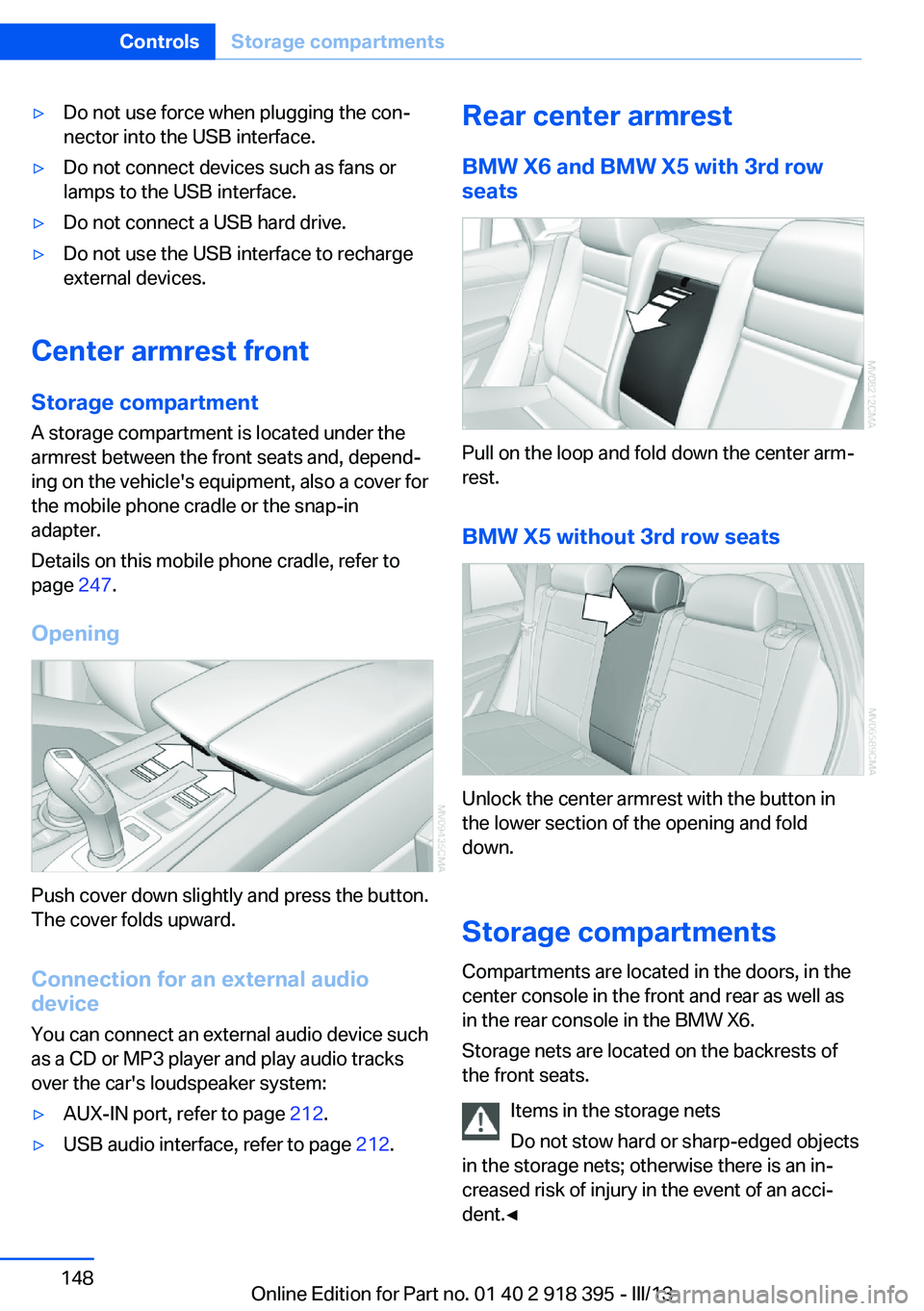
Opening
Push cover down slightly and press the button.
The cover folds upward.
Connection for an external audio
device
You can connect an external audio device such
as a CD or MP3 player and play audio tracks over the car's loudspeaker system:
▷AUX-IN port, refer to page 212.▷USB audio interface, refer to page 212.Rear center armrest
BMW X6 and BMW X5 with 3rd row
seats
Pull on the loop and fold down the center arm‐
rest.
BMW X5 without 3rd row seats
Unlock the center armrest with the button in
the lower section of the opening and fold
down.
Storage compartments Compartments are located in the doors, in the
center console in the front and rear as well as
in the rear console in the BMW X6.
Storage nets are located on the backrests of
the front seats.
Items in the storage nets
Do not stow hard or sharp-edged objects
in the storage nets; otherwise there is an in‐
creased risk of injury in the event of an acci‐ dent.◀
Seite 148ControlsStorage compartments148
Online Edition for Part no. 01 40 2 918 395 - III/13