sunroof BMW X5M 2009 E70 User Guide
[x] Cancel search | Manufacturer: BMW, Model Year: 2009, Model line: X5M, Model: BMW X5M 2009 E70Pages: 317, PDF Size: 9.56 MB
Page 48 of 317
Opening and closing
46
Closing without pinch protection
system
When there is danger outside the vehicle, pro-
ceed as follows:
1.Slide the switch forward past the resistance
point and hold it there. The pinch protection
system is limited and the sunroof opens
slightly if the closing force exceeds a certain
value.
2. Within about 4 seconds, slide the switch
forward again beyond the resistance point
and hold it there. The roof closes without
the pinch protection system.
Following interruptions in electrical
power supply
After a power loss, the sunroof may only
respond to the raise co mmand. Then have the
system initialized. BM W recommends having
this work carried out by your BMW Sports
Activity Vehicle Center.
Moving manually*
In the event of an electrical malfunction, you can
move the sunroof manually:
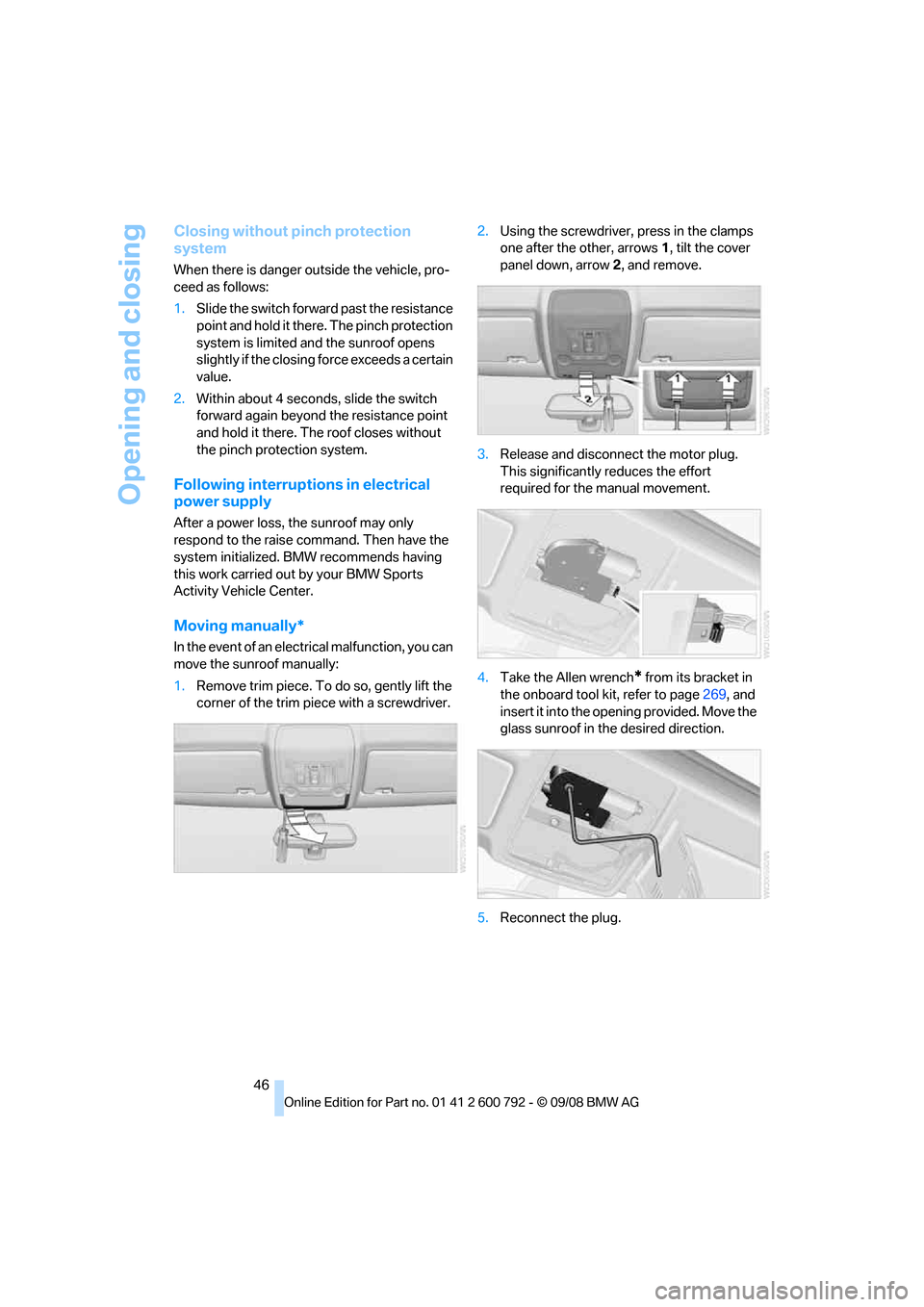
1. Remove trim piece. To do so, gently lift the
corner of the trim piece with a screwdriver. 2.
Using the screwdriver, press in the clamps
one after the other, arrows 1, tilt the cover
panel down, arrow 2, and remove.
3. Release and disconnect the motor plug.
This significantly reduces the effort
required for the manual movement.
4. Take the Allen wrench
* from its bracket in
the onboard tool ki t, refer to page269, and
insert it into the opening provided. Move the
glass sunroof in the desired direction.
5. Reconnect the plug.
Page 140 of 317
Things to remember when driving
138
Things to remember when driving
Break-in period
Moving parts need breaking-in time to adjust to
each other. To ensure that your vehicle contin-
ues to provide optimized economy of operation
throughout an extended service life, we request
that you devote careful attention to the follow-
ing section.
Engine and differential
Always obey all official speed limits.
Up to 1,200 miles/2,000 km
Drive at changing engine and vehicle speeds,
however do not exceed:
> Gasoline engine
4,500 rpm or 100 mph/160 km/h
> Diesel engine
3,500 rpm or 90 mph/150 km/h
Avoid full-throttle operation and use of the
transmission's kick-down mode during these
initial miles.
From 1,200 miles/2,000 km
The engine and vehicle speed can gradually be
increased.
Tires
Due to technical factors associated with their
manufacture, tires do no t achieve their full trac-
tion potential until afte r an initial break-in
period. Therefore, drive reservedly during the
first 200 miles/300 km.
Brake system
Brakes require an initial break-in period of
approx. 300 miles/500 km to achieve optimized
contact and wear patterns between brake pads
and rotors. Drive in a reserved manner during
this break-in period.
Following part replacement
Observe the break-in instructions again if com-
ponents mentioned above must be replaced
after subsequent driving operation.
Saving fuel
The fuel consumption of your vehicle depends
on various factors. Through a few simple steps,
your driving style, and regular maintenance, you
can have a positive influence on your fuel con-
sumption and environmental impact.
Removing unnecessary cargo
Additional weight incr eases fuel consumption.
Removing add-on parts after use
Remove unneeded auxiliary mirrors, roof or rear
luggage racks after use. Add-on parts attached
to the vehicle impede the aerodynamics and
increase the fuel consumption.
Closing windows and glass sunroof*/
panorama glass sunroof*
An open glass sunroof/panorama glass sunroof
or open windows likewise increase the drag
coefficient and therefore the fuel consumption.
Checking tire in flation pressures
regularly
Check and correct the tire inflation pressure as
needed at least twice a month and before long
trips.
An insufficient tire inflation pressure increases
the rolling resistance an d thus increases the
fuel consumption and tire wear.
Driving off immediately
Do not allow the engine to warm up by leaving it
running while the vehicl e remains stationary.
Instead, begin to drive at a moderate engine
Page 141 of 317
Driving tips
139Reference
At a glance
Controls
Communications
Navigation
Entertainment
Mobility
speed. This is the fastest way for the cold
engine to reach its operating temperature.
Thinking ahead when driving
Avoid unnecessary acceleration and braking.
To do so, maintain the appropriate distance
from the vehicle in front of you. An anticipatory
and smooth driving style reduces fuel con-
sumption.
Avoiding high engine speeds
Driving at a low engine speed reduces fuel con-
sumption and minimizes wear.
Taking advantage of coasting
The flow of fuel is interrupted when coasting.
Switching off engine during longer
stops
Switch off the engine at longer stops such as
traffic signals, railroad cr ossings, or in traffic
jams. Even having the en gine switched off for
approx. 4 seconds results in fuel savings.
Switching off functions currently not
required
Functions such as air conditioning, seat heat-
ing, or rear window defrosting consume a lot of
energy and require additional fuel. Their influ-
ence is particularly pron ounced in city traffic
and stop & go operation. For this reason, it is a
good idea to switch th ese functions off when
they are not really needed.
Having maintenance carried out
Have the vehicle serviced regularly in order to
achieve the optimum economy and service life
of your vehicle. BMW recommends having the
maintenance performed by a BMW Sports
Activity Vehicle Center. Also pay attention to
the BMW maintenance system, refer to
page 263.
General driving notes
Closing liftgate
Operate the vehicle only when the liftgate
is completely closed. Otherwise, exhaust
fumes could enter into the passenger compart-
ment. <
If it is absolutely necessa ry to drive with the lift-
gate open:
1. Close all windows as well as the glass sun-
roof
*/panorama glass sunroof*.
2. Increase the air volume of the automatic cli-
mate control to a high level, refer to
page 116.
Hot exhaust system
As in all vehicles, extremely high temper-
atures are generated on the exhaust sys-
tem. Do not remove the heat shields installed
adjacent to it, and neve r apply undercoating to
them. When driving, stan ding at idle and while
parking take care to avoid possible contact
between the hot exhaust system and any highly
flammable materials such as hay, leaves, grass,
etc. Such contact could lead to a fire, and with it
the risk of serious property damage as well as
personal injury. Do not touch hot tailpipes, as
otherwise there is a danger of burns. <
Diesel particulate filter*
Soot particles are collected in the diesel partic-
ulate filter and are periodically cleared out
through high-temperature combustion. This
cleaning process lasts fo r several minutes. You
may sometimes notice it by the fact that the
engine temporarily runs a little less smoothly
and requires a somewhat higher engine speed
to achieve the usual powe r. You may also notice
additional sounds and small amounts of smoke
coming from the exhaust, even for a brief time
after switching off the engine.
Hydroplaning
When driving on wet or slushy roads,
reduce road speed. If you do not, a wedge
of water can form between tires and road sur-
face. This phenomenon is referred to as hydro-
Page 145 of 317
Driving tips
143Reference
At a glance
Controls
Communications
Navigation
Entertainment
Mobility
Securing cargo
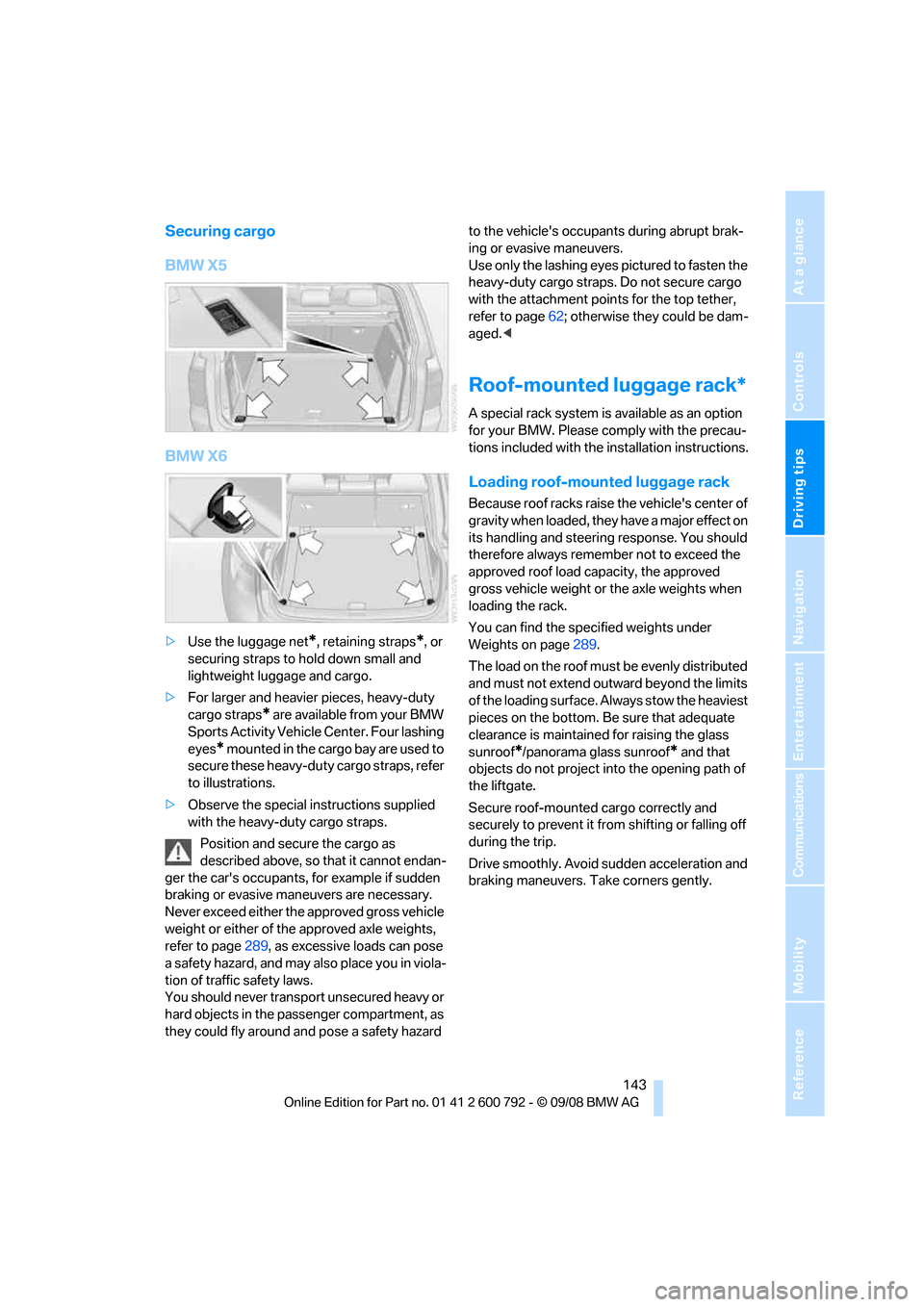
BMW X5
BMW X6
>Use the luggage net*, retaining straps*, or
securing straps to hold down small and
lightweight luggage and cargo.
> For larger and heavier pieces, heavy-duty
cargo straps
* are available from your BMW
Sports Activity Vehicl e Center. Four lashing
eyes
* mounted in the cargo bay are used to
secure these heavy-duty cargo straps, refer
to illustrations.
> Observe the special instructions supplied
with the heavy-duty cargo straps.
Position and secure the cargo as
described above, so that it cannot endan-
ger the car's occupants, for example if sudden
braking or evasive maneuvers are necessary.
Never exceed either the approved gross vehicle
weight or either of the approved axle weights,
refer to page 289, as excessive loads can pose
a safety hazard, and may also place you in viola-
tion of traffic safety laws.
You should never transport unsecured heavy or
hard objects in the passenger compartment, as
they could fly around and pose a safety hazard to the vehicle's occupants during abrupt brak-
ing or evasive maneuvers.
Use only the lashing eyes pictured to fasten the
heavy-duty cargo straps. Do not secure cargo
with the attachment points for the top tether,
refer to page
62; otherwise they could be dam-
aged. <
Roof-mounted luggage rack*
A special rack system is available as an option
for your BMW. Please co mply with the precau-
tions included with the installation instructions.
Loading roof-mounted luggage rack
Because roof racks raise the vehicle's center of
gravity when loaded, they have a major effect on
its handling and steering response. You should
therefore always remember not to exceed the
approved roof load capacity, the approved
gross vehicle weight or the axle weights when
loading the rack.
You can find the specified weights under
Weights on page 289.
The load on the roof must be evenly distributed
and must not extend outward beyond the limits
of the loading surface. Always stow the heaviest
pieces on the bottom. Be sure that adequate
clearance is maintained for raising the glass
sunroof
*/panorama glass sunroof* and that
objects do not project into the opening path of
the liftgate.
Secure roof-mounted cargo correctly and
securely to prevent it fr om shifting or falling off
during the trip.
Drive smoothly. Avoid su dden acceleration and
braking maneuvers. Take corners gently.
Page 235 of 317
233
Entertainment
Reference
At a glance
Controls
Driving tips
Communications
Navigation
Mobility
Creating and editing voice phone
book*
Store entry:
An entry always consists of a name and phone
number.
Delete entry:
You can delete any entr y from the voice phone
book.
Delete all entries:
{ Delete phone book } deletes all entries in the
phone book.
Have entries read aloud and select:
You can have all the entries of your voice phone
book read aloud in the order of input and select
a certain entry to establish a connection:
Selecting an entry
The connection to the phone number of the
selected entry is established.
Redialing
The {Redial } command opens "Redial".
Notes
Important for voice commands
For voice commands, keep the following in
mind:
>Issue the commands smoothly and at nor-
mal volume, avoiding excessive emphases
and pauses.
> Keep the doors, windows and glass sunroof
closed to prevent interference from ambi-
ent noise.
> Avoid making other noise in the vehicle
while speaking.
Inserting/removing snap-in
adapter*
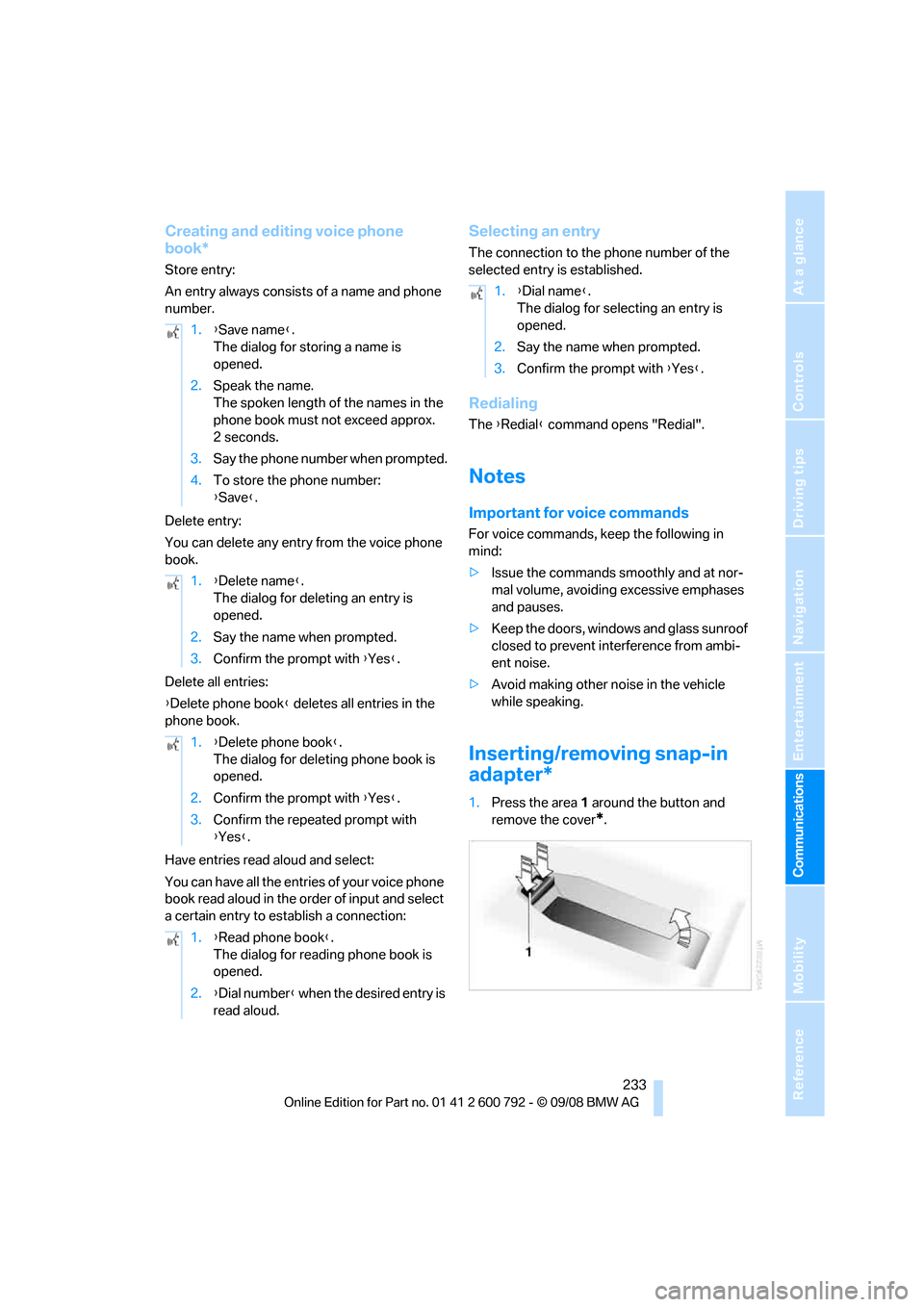
1.Press the area 1 around the button and
remove the cover
*.
1.
{Save name }.
The dialog for storing a name is
opened.
2. Speak the name.
The spoken length of the names in the
phone book must not exceed approx.
2seconds.
3. Say the phone number when prompted.
4. To store the phone number:
{Save }.
1. {Delete name }.
The dialog for deleting an entry is
opened.
2. Say the name when prompted.
3. Confirm the prompt with {Yes }.
1. {Delete phone book }.
The dialog for deleting phone book is
opened.
2. Confirm the prompt with {Yes }.
3. Confirm the repeated prompt with
{Yes }.
1. {Read phone book }.
The dialog for reading phone book is
opened.
2. {Dial number } when the desired entry is
read aloud.
1. {Dial name }.
The dialog for selecting an entry is
opened.
2. Say the name when prompted.
3. Confirm the prompt with {Yes }.
Page 280 of 317
Replacing components
278
Vehicle Center or bring them to a collection
point. Maintain the battery
in an upright position
for transport and storage. Always restrain the
battery to prevent it from tipping over during
transport. <
Power failure
Following a temporary power failure, e.g. due to
a discharged battery, the use of some equip-
ment will be restricted, requiring its reinitializa-
tion. In the same way, individual settings are lost
and must be updated again:
> Seat, mirror and steering wheel memory
The positions must be stored again, refer to
page 50.
> Time and Date
The values must be updated again, refer to
pages 88, 89.
> Radio
Radio stations must be stored again, refer
to page 180.
> Navigation system
You must wait until the system becomes
functional again, refer to page 170.
> Glass sunroof/panorama glass sunroof
It may only be possible to raise the glass
sunroof/panorama gl ass sunroof The sys-
tem must be initialized, refer to page 46.
> Digital compass
The system must be calibrated, refer to
page 126.
Before removing the vehicle from stor-
age, consult your BMW Sports Activity
Vehicle Center. <
Fuses
Never attempt to repair a blown fuse and
do not replace a defective fuse with a sub-
stitute of another color or amperage rating, as
this could lead to a circ uit overload, ultimately
resulting in a fire in the vehicle. <
Spare fuses, a pair of plastic tweezers and infor-
mation on the fuse assi gnment are located near
the fuses in the cargo bay.
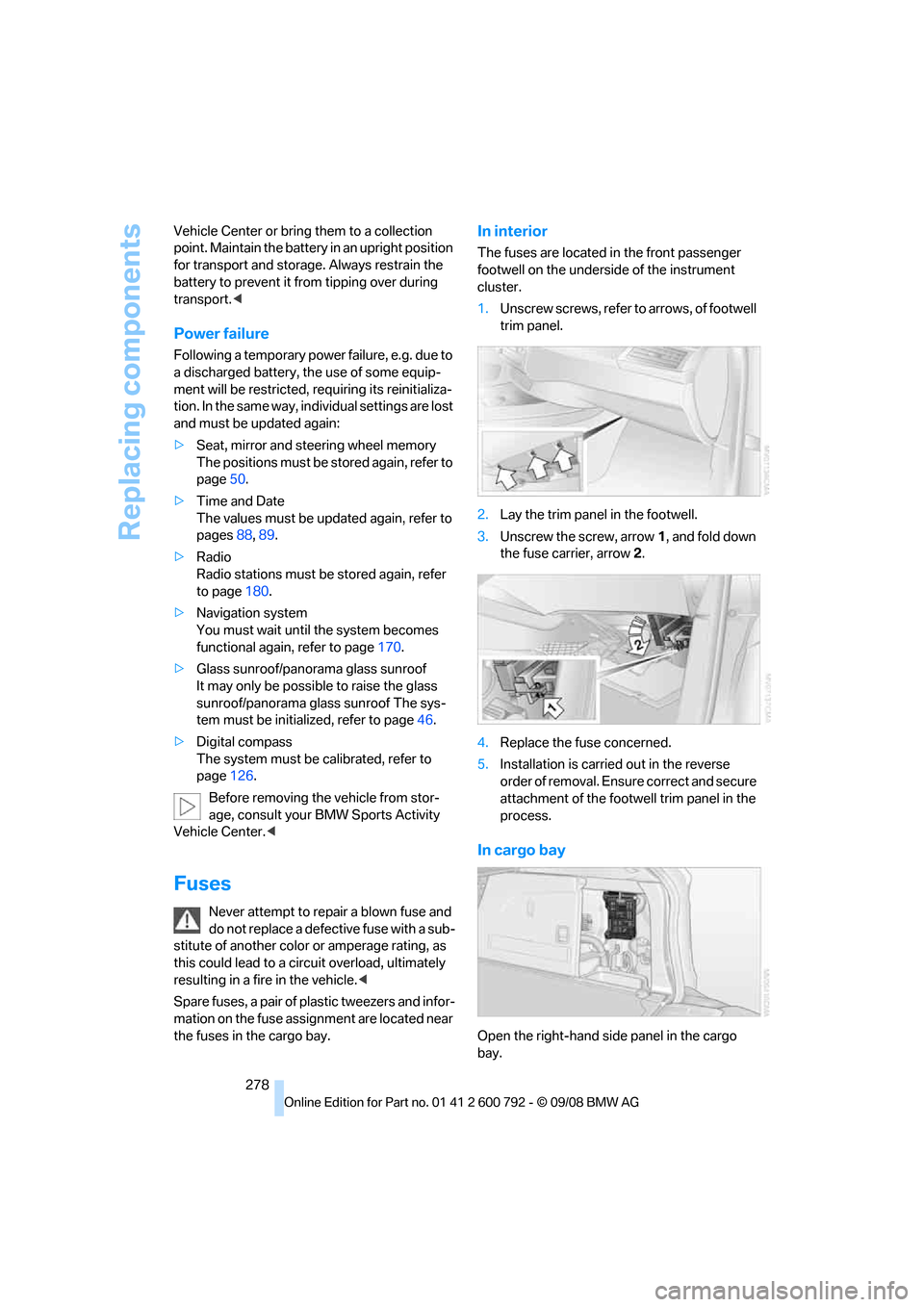
In interior
The fuses are located in the front passenger
footwell on the undersid e of the instrument
cluster.
1. Unscrew screws, refer to arrows, of footwell
trim panel.
2. Lay the trim panel in the footwell.
3. Unscrew the screw, arrow 1, and fold down
the fuse carrier, arrow 2.
4. Replace the fuse concerned.
5. Installation is carrie d out in the reverse
order of removal. Ensure correct and secure
attachment of the foot well trim panel in the
process.
In cargo bay
Open the right-hand side panel in the cargo
bay.
Page 302 of 317
Everything from A to Z
300
Compartments, refer to
Storage compartments 127
Compass, digital 124
Computer 80
– displays in instrument
panel 80
– displays on Control Display 80
– trip computer 81
"Concierge" 239
Concierge service 239
Condition Based Service CBS 263
"Confirmation" 31
Connecting car vacuum cleaner, refer to Connecting
electrical devices 129
Connecting headphones 205
Consumption, refer to
Average fuel
consumption 80
Consumption indicator,
energy control 79
Consumption statistics, refer to Average fuel
consumption 80
"Contrast"
– DVD changer 196
– DVD system in rear 208
Control Center, refer to iDrive 16
Control Display, refer to iDrive 16
– setting brightness 89
Controller, refer to iDrive 16
Controls
– DVD changer 193
– DVD system in rear 204
– refer to Cockpit 10
Convenience operation
– glass sunroof 30,32
– glass sunroof with comfort access 40
– windows 30,32
– windows with comfort access 40
– with comfort access 40Coolant
262
– checking level 262
– temperature 79
Cooling, maximum 117
Cornering Brake Control
CBC 96
Courtesy lamps, refer to Interior lamps 113
Cradle for telephone or mobile phone 127
Cruise control 75
Cruising range 80
Cup holders 127
Curb weight, refer to Wei
ghts 289
"Current position" 169
Current position
– displaying 169
– entering 158
– storing 158
"Customer Relations" 230,238
Cylinders, refer to Engine data 286
D
Data 286
– capacities 290
– dimensions 287
– engine 286
– technical data 286
– weights 289
"Date" 89
Date 78
– display format 89
– retrieving 78
– setting 89
"Date format" 89
Daytime driving lamps 111
"Deactivated" 51
Defrosting windows 116
Defrosting windows and
removing condensation 116
Defrost position, refer to Defrosting windows 116
"Delete all numbers" on the mobile phone 229 "Delete data" for
navigation 159
"Delete" for mobile phone 229
Destination address
– deleting 159
– entering 151,153
Destination for navigation
– destination list 157
– entering 150
– selecting from address
book 159
– selecting using
information 156
– selecting using voice 153
– storing 158
Destination guidance 162
– canceling voice instructions 60
– changing specified route 160
– displaying route 163
– distance and arrival 162
– ending/continuing 162
– starting 162
– voice instructions 165
– volume of voice instructions 166
Destination list for navigation system 157
Destinations recently driven
to 157
"Details"
– DVD system in the rear 212
– in audio mode 202
"Dial" for mobile phone 227
"Dial number" 227
"
Diamond button" 59
Diesel exhaust fluid
– at low temperatures 246
– at minimum 246
– refilling yourself 247
Diesel particulate filter 139
Digital clock 78
Digital compass 124
Digital radio, refer to High
Definition Radio 181
Page 304 of 317
Everything from A to Z
302
Dynamic Performance
Control 97
"Dynamic route" in navigation 161
Dynamic Stability Control
DSC 96
Dynamic Traction Control DTC 97
E
Easy entry/exit 58
Eject button, refer to Buttons
on the CD player 174
Electrical malfunction
– automatic transmission with
Steptronic 72
– door lock 32
– driver's door 32
– fuel filler door 244
– glass sunroof, electric 46
– liftgate 33
– panorama glass sunroof 44
– parking brake 69
Electric seat 49
Electronic brake-force distribution 96
Electronic oil level check 260
Emergency operation, refer to Manual operation
– door lock 32
– driver's door 32
– fuel filler door 244
– liftgate 33
– transmission lock, automatic transmission 72
Emergency request 279
Emergency services, refer to Roadside Assistance 280
"Enabled services" 241
"Enabled TeleServices" 238
"End call" 228 Engine
– breaking-in
138
– data 286
– oil temperature 79
– overheated, refer to Coolant
temperature 79
– speed 286
– starting 66
– starting, with comfort access 40
– switching off 66
Engine compartment 259
Engine coolant 262
Engine oil
– adding 261
– additives, refer to Approved
engine oils 262
– approved engine oil 262
– checking oil level 260
– electronic oil level check 260
– temperature 79
Engine oil temperature 79
Engine output, refer to Engine data 286
Engine overheating, refer to
Coolant temperature 79
Engine speed 286
Engine starting, refer to
Starting engine 66
E
ntering country of destination 151
Entering destination 151
Entering house number or intersection 152
Entering intersection 152
Entering street 152
"Entertainment" 174
Entertainment sound output on/off 175
"Equalizer", refer to Tone
control 177
Equalizer, refer to Tone control 177
"ESN" 184
ESP Electronic Stability Program, refer to DSC
Dynamic Stability
Control 96 Event Data Recorders
264
Exhaust system, refer to Hot
exhaust system 139
Exterior mirrors 57
– adjusting 57
– automatic dimming feature 58
– automatic heating 58
– folding in and out 57
– tilting down passenger-side exterior mirror 58
External audio device 127
– refer to AUX-In
connection 200
Eye for tow-starting and towing, refer to Tow
fitting 281
F
Fader, refer to Tone
control 176
Failure messages, refer to Check Control 85
False alarm, refer to Avoiding
unintentional alarms 39
Fastening safety belts, refer to Safety belts 54
– warning lamp 55
Fastest route for navigation 160
Fast forward
– CD changer 190
– CD player 190
– DVD changer 195
"Fast route" in navigation 160
Fault displays, refer to Check
Control 85
Filler neck for washer fluid 75
First aid, refer to First-aid
kit 279
First-aid kit 279
Fixing system, adaptive 133
Flashing during locking/ unlocking, refer to Setting
confirmation signals 31
Page 305 of 317
Reference 303
At a glance
Controls
Driving tips
Communications
Navigation
Entertainment
Mobility
Flat tire
– changing wheels275
– compact wheel 275
– Flat Tire Monitor 100
– run-flat tires 101,103, 256
– TPM Tire Pressure Monitor 101
Flat Tire Monitor FTM 100
Fluid reservoir, refer to Filler neck for washer fluid 75
"FM", reception
range 175,178
FM, waveband 178
Fog lamps 112
– indicator lamp 13,112
Folding display screen open/
closed, DVD system in
rear 204
Folding rear seat backrest 132
Footbrake, refer to Braking safely 140
Footwell lamps 113
For your own safety 5
4-wheel drive system, refer to xDrive 97
Front airbags 105
Front passenger airbags 105
– deactivating 106
– refer to Exception of front passenger seat 61
Front seat adjustment 49
FTM Flat Tire Monitor 100
– false alarms 100
– indicating a flat tire 101
– initializing the system 100
– snow chains 257
– system limits 100
– warning lamp 101
Fuel 245
– capacity 290
– display 80
– high-quality brands 245
– quality 245
– saving 138
– specifications 245
Fuel clock, refer to Fuel
gauge 80 Fuel consumption display
– computer, average fuel
consumption 80
Fuel display, refer to Fuel gauge 80
Fuel filler door 244
– closing 24
4
– opening 244
– releasing manually 244
Fuses 278
G
Garage door opener, refer to
Integrated universal remote
control 123
Gasoline, refer to Required fuel 245
Gasoline display, refer to Fuel
gauge 80
Gearshifts, automatic transmission with
Steptronic 71
General driving notes 138,139
Glass sunroof
– convenience operation from outside 32
– convenience operation with comfort access 40
– remote control 30
Glass sunroof, electric 45
– moving manually 46
– opening, closing 45
– power interruption 46
– raising 45
Glove compartment 126
– lighting 126
GPS navigation, refer to Navigation system 148
Grills, refer to Ventilation 118
Grills of the automatic climate control 114
Gross vehicle weight, refer to Weights 289
H
Handbrake, refer to Parking
brake 67
Hands-free system, refer to
Microphone 14
Hand washing 266
Have diesel exhaust fluid
refilled 246
Hazard warning flashers 15
HDC Hill Descent Control 98
"HD radio" 181
HD radio, refer to High
Definition Radio 181
Head airbags 105
Headlamp control,
automatic 110
Headlamp flasher 73
Headlamps 110
– cleaning, refer to Washer/ wiper system 74
– replacing bulbs 269
Head Light, refer to Adaptive Head Light 112
Head restraints 52
– sitting safely 48
"Head-Up Display" 108
Head-Up Display 107
Heated
– mirrors 58
– rear window 116
– seats 55,56
– steering wheel 59
Heating 114
– exterior mirrors 58
– interior 114
– rear window 116
– residual heat 118
– seats 55,56
– steering wheel 59
Heating with engine switched off, refer to Residual
heat 118
Heavy cargo, refer to Securing cargo 143
Height, refer to
Dimensions 287
Page 307 of 317
Reference 305
At a glance
Controls
Driving tips
Communications
Navigation
Entertainment
Mobility
Interior rearview mirror58
– automatic dimming
feature 58
– compass 124
Intermittent mode of the
wipers 74
J
Jacking points 276
Joystick
– refer to iDrive 16
– refer to Selector lever,
selecting transmission
positions 70
Jump starting 280
K
Keyless-Go, refer to Comfort
access 39
Keyless opening and closing,
refer to Comfort access 39
Key Memory, refer to Personal Profile 28
"Keypad" 230
Keys 28
– key-related settings, refer to
Personal Profile 28
Kick-down, automatic transmission with
Steptronic 71
Knock control 245
L
Lamps, refer to Parking lamps/
low beams 110
Lamps and bulbs 269
"Language / Units" 89,90
– for navigation 149
"Language" for DVD system in rear 208,209
"Languages" 90
– for navigation 149,165
Lashing eyes, refer to
Securing cargo 143
Last destinations, refer to Destination list 157 "Last seat pos."
51
LATCH child restraint fixing
system 62
Leather care 267
LEDs light-emitting
diodes 270
Length, refer to Dimensions 287
License plate lamp, replacing bulbs 272,275
Liftgate 33,35
– adjusting opening height 34,36, 37
– automatic operation 34,37
– closing 34,37
– locking and unlocking from
inside 32
– opening from inside 33,36
– opening from outside 33,36
– opening manually 33,36
Light-emitting diodes LEDs 270
Lighter 129
Lighter socket 129
"Lighting" 73,111
Lighting
– instruments 113
– lamps and bulbs 269
– of the vehicle, refer to Lamps 110
Light switch 110
"Limit" 87
Load 141
Loadin
g141
– securing cargo 143
– stowing cargo 142
– vehicle 141
Load securing equipment, refer to Securing cargo 143
"Lock after driving" 33
Lock buttons in the doors, refer to Locking 33
Locking
– from inside 32
– setting confirmation signals 31
– using remote control 29
– without key, refer to Comfort access 39 Locking and unlocking doors
– from inside
32
– setting confirmation signals 31
Locking without key, refer to
Comfort access 39
Low beams 110
– automatic 110
Lower back support, refer to Lumbar support 50
Lows, refer to Treble and
bass 175
Lug bolts 276
– tightening torque, refer to After mounting 277
– wrench 276
Luggage compartment capacity, refer to Cargo bay
capacity 289
Luggage rack, refer to Roof- mounted luggage rack 143
Lumbar support 50
M
M+S tires, refer to Winter
tires 257
"Main menu" for DVD system
in rear 209
Maintenance
– refer to Service and
Warranty Information
Booklet for US models 263
– refer to Service
requirements 82
– refer to Warranty and Service Guide Booklet for
Canadian models 263
Maintenance system 263
Malfunction
– door lock 32
– driver's door 32
– fuel filler door 244
– glass sunroof, electric 46
– liftgate 33
– panorama glass sunroof 44
– parking brake 69