tow BMW X5M 2009 E70 Owner's Guide
[x] Cancel search | Manufacturer: BMW, Model Year: 2009, Model line: X5M, Model: BMW X5M 2009 E70Pages: 317, PDF Size: 9.56 MB
Page 133 of 317
Controls
131Reference
At a glance
Driving tips
Communications
Navigation
Entertainment
Mobility
Do not place heavy or hard objects on the
roll-up cover. If you do so, they may
already pose a danger to vehicle occupants dur-
ing braking or evasive maneuvers.
Do not allow the roll-up cover to snap back, oth-
erwise it can be damaged. <
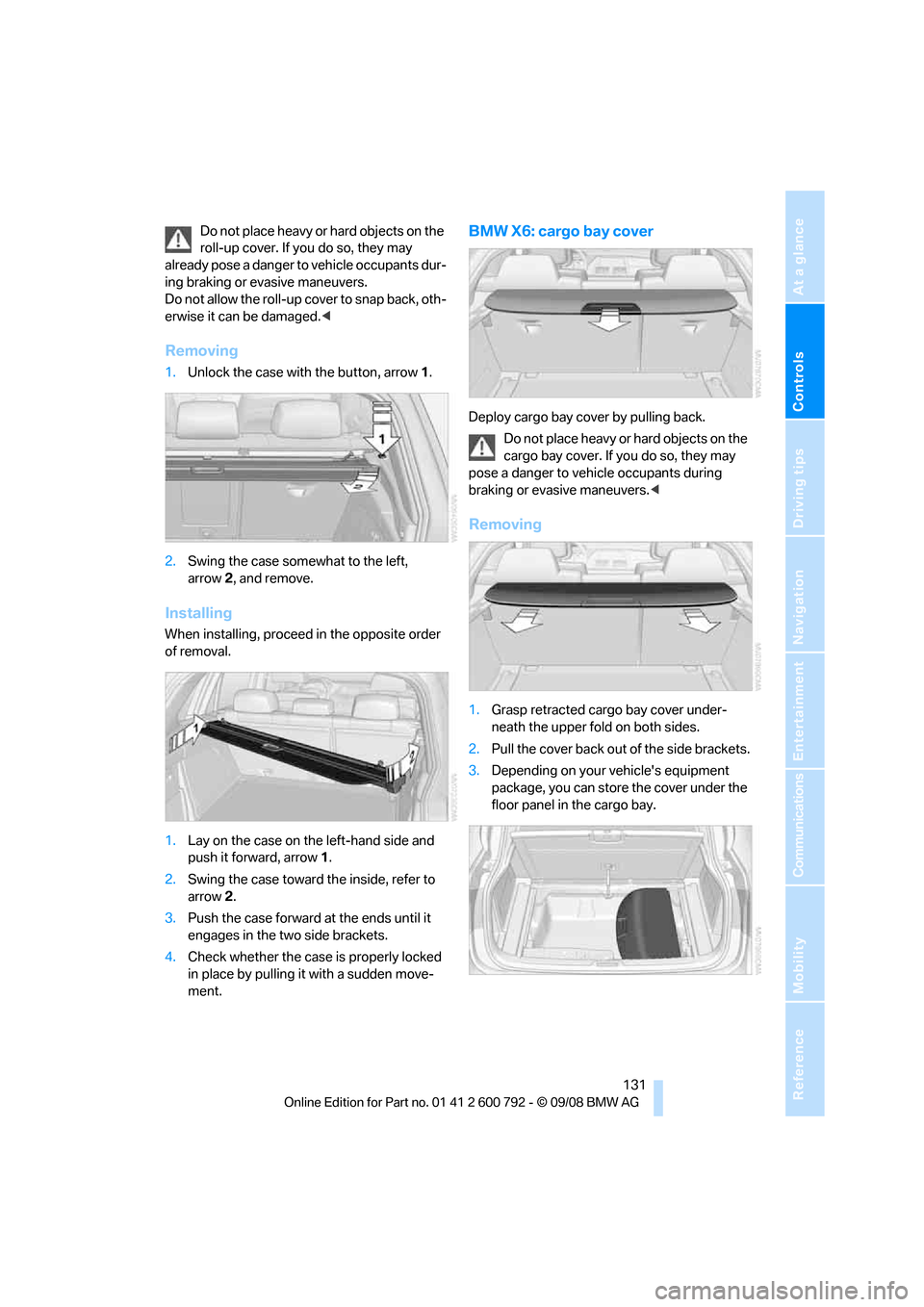
Removing
1.Unlock the case with the button, arrow 1.
2. Swing the case somewhat to the left,
arrow 2, and remove.
Installing
When installing, proceed in the opposite order
of removal.
1. Lay on the case on the left-hand side and
push it forward, arrow 1.
2. Swing the case toward the inside, refer to
arrow 2.
3. Push the case forward at the ends until it
engages in the two side brackets.
4. Check whether the case is properly locked
in place by pulling it with a sudden move-
ment.
BMW X6: cargo bay cover
Deploy cargo bay cover by pulling back.
Do not place heavy or hard objects on the
cargo bay cover. If you do so, they may
pose a danger to vehicle occupants during
braking or evasive maneuvers. <
Removing
1.Grasp retracted cargo bay cover under-
neath the upper fold on both sides.
2. Pull the cover back out of the side brackets.
3. Depending on your vehicle's equipment
package, you can store the cover under the
floor panel in the cargo bay.
Page 134 of 317
Practical interior accessories
132
Installing
When installing, proceed in the opposite order
of removal.
1.Set the cargo bay cove r into place on the
left and right sides.
2. Lift the back of the co ver slightly and slide
forward until it snaps into the two side
brackets.
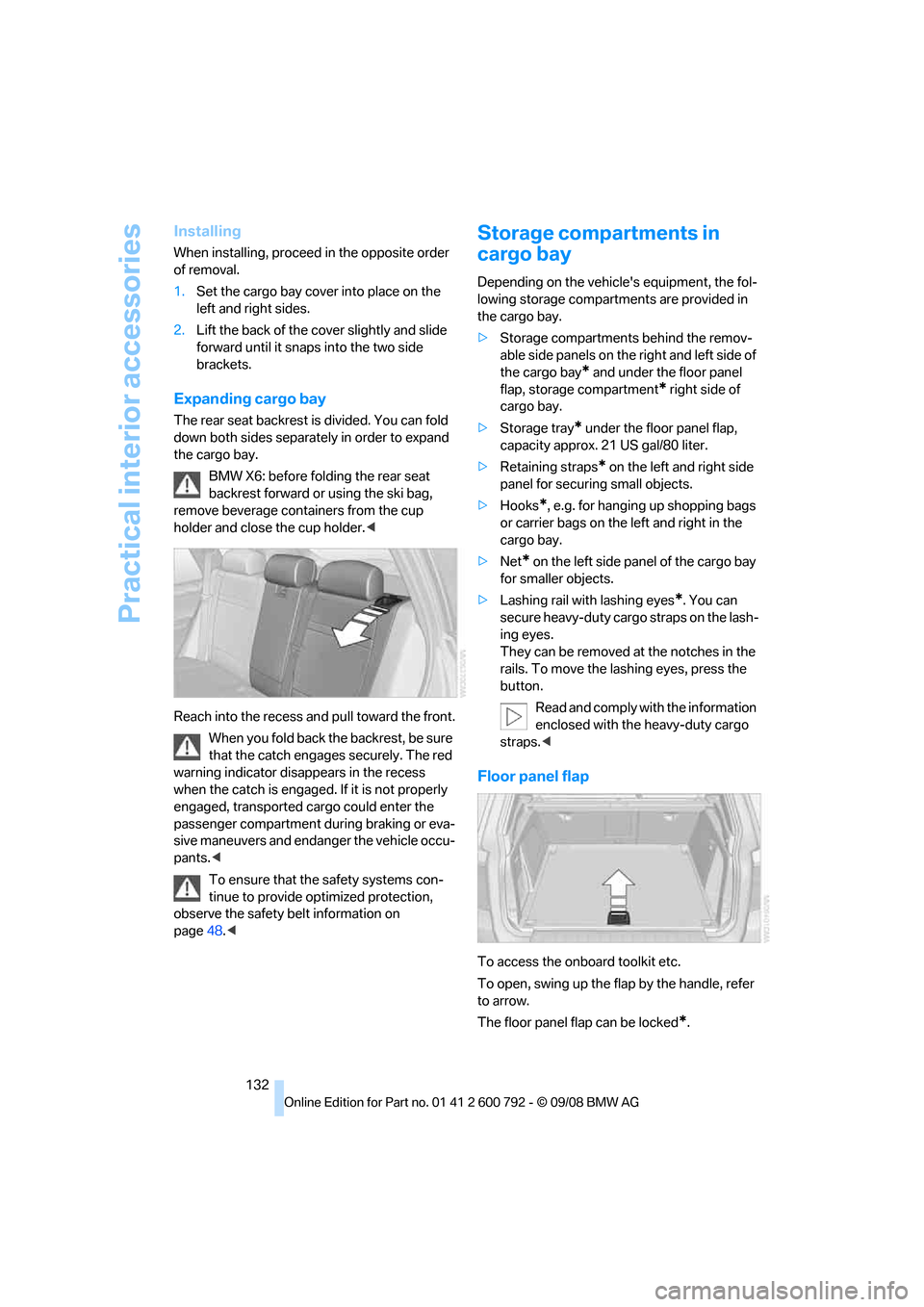
Expanding cargo bay
The rear seat backrest is divided. You can fold
down both sides separate ly in order to expand
the cargo bay.
BMW X6: before folding the rear seat
backrest forward or using the ski bag,
remove beverage containers from the cup
holder and close the cup holder. <
Reach into the recess an d pull toward the front.
When you fold back the backrest, be sure
that the catch engages securely. The red
warning indicator disappears in the recess
when the catch is engaged. If it is not properly
engaged, transported cargo could enter the
passenger compartment during braking or eva-
sive maneuvers and endanger the vehicle occu-
pants. <
To ensure that the safety systems con-
tinue to provide optimized protection,
observe the safety belt information on
page 48.<
Storage compartments in
cargo bay
Depending on the vehicle's equipment, the fol-
lowing storage compartments are provided in
the cargo bay.
> Storage compartments behind the remov-
able side panels on the right and left side of
the cargo bay
* and under the floor panel
flap, storage compartment
* right side of
cargo bay.
> Storage tray
* under the floor panel flap,
capacity approx. 21 US gal/80 liter.
> Retaining straps
* on the left and right side
panel for securing small objects.
> Hooks
*, e.g. for hanging up shopping bags
or carrier bags on the left and right in the
cargo bay.
> Net
* on the left side pa nel of the cargo bay
for smaller objects.
> Lashing rail with lashing eyes
*. You can
secure heavy-duty cargo straps on the lash-
ing eyes.
They can be removed at the notches in the
rails. To move the lashing eyes, press the
button.
Read and comply with the information
enclosed with the heavy-duty cargo
straps. <
Floor panel flap
To access the onboard toolkit etc.
To open, swing up the flap by the handle, refer
to arrow.
The floor panel flap can be locked
*.
Page 135 of 317
Controls
133Reference
At a glance
Driving tips
Communications
Navigation
Entertainment
Mobility
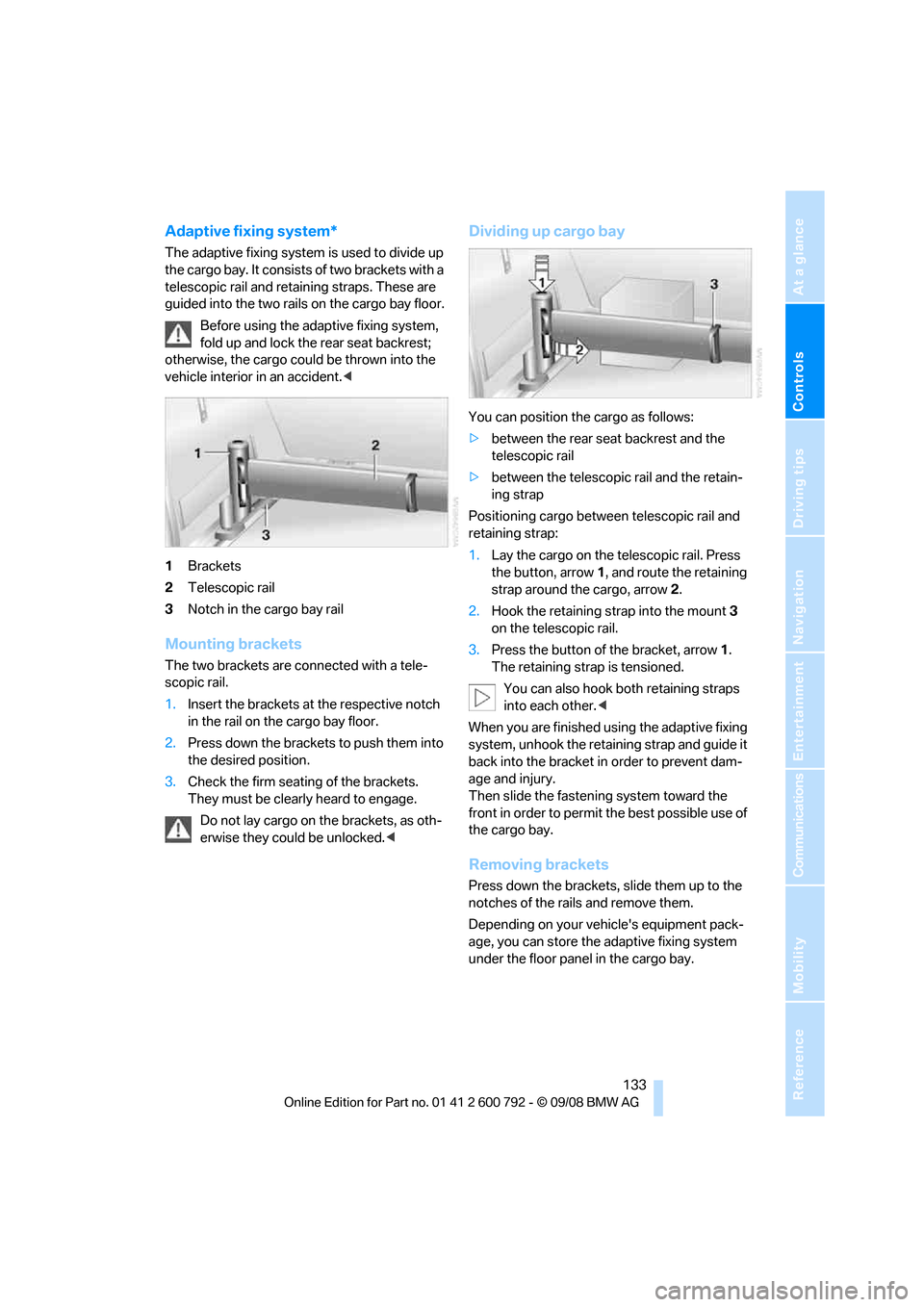
Adaptive fixing system*
The adaptive fixing system is used to divide up
the cargo bay. It consists of two brackets with a
telescopic rail and retaining straps. These are
guided into the two rails on the cargo bay floor.
Before using the adaptive fixing system,
fold up and lock the rear seat backrest;
otherwise, the cargo coul d be thrown into the
vehicle interior in an accident.<
1 Brackets
2 Telescopic rail
3 Notch in the cargo bay rail
Mounting brackets
The two brackets are co nnected with a tele-
scopic rail.
1. Insert the brackets at the respective notch
in the rail on the cargo bay floor.
2. Press down the brackets to push them into
the desired position.
3. Check the firm seating of the brackets.
They must be clearl y heard to engage.
Do not lay cargo on the brackets, as oth-
erwise they could be unlocked. <
Dividing up cargo bay
You can position the cargo as follows:
>between the rear seat backrest and the
telescopic rail
> between the telescopic rail and the retain-
ing strap
Positioning cargo betwee n telescopic rail and
retaining strap:
1. Lay the cargo on the te lescopic rail. Press
the button, arrow 1, and route the retaining
strap around the cargo, arrow 2.
2. Hook the retaining strap into the mount 3
on the telescopic rail.
3. Press the button of the bracket, arrow 1.
The retaining strap is tensioned.
You can also hook both retaining straps
into each other. <
When you are finished using the adaptive fixing
system, unhook the retaining strap and guide it
back into the bracket in order to prevent dam-
age and injury.
Then slide the fastening system toward the
front in order to permit the best possible use of
the cargo bay.
Removing brackets
Press down the brackets, slide them up to the
notches of the rails and remove them.
Depending on your vehicle's equipment pack-
age, you can store the adaptive fixing system
under the floor panel in the cargo bay.
Page 136 of 317
Practical interior accessories
134
Ski bag*
The ski bag is designed for safe, clean transport
of up to 4 pairs of standard skis or up to 2 snow-
boards.
With the ski bag you can stow skis with a length
of up to 6.9 ft/2.10 m. When skis of 6.9 ft/
2.10 m in length are loaded, the ski bag will tend
to contract, reducing its overall capacity.
Before loading the ski bag, fold in the dis-
play screen of the DVD system in the
rear
*, as otherwise the display screen could be
damaged. <
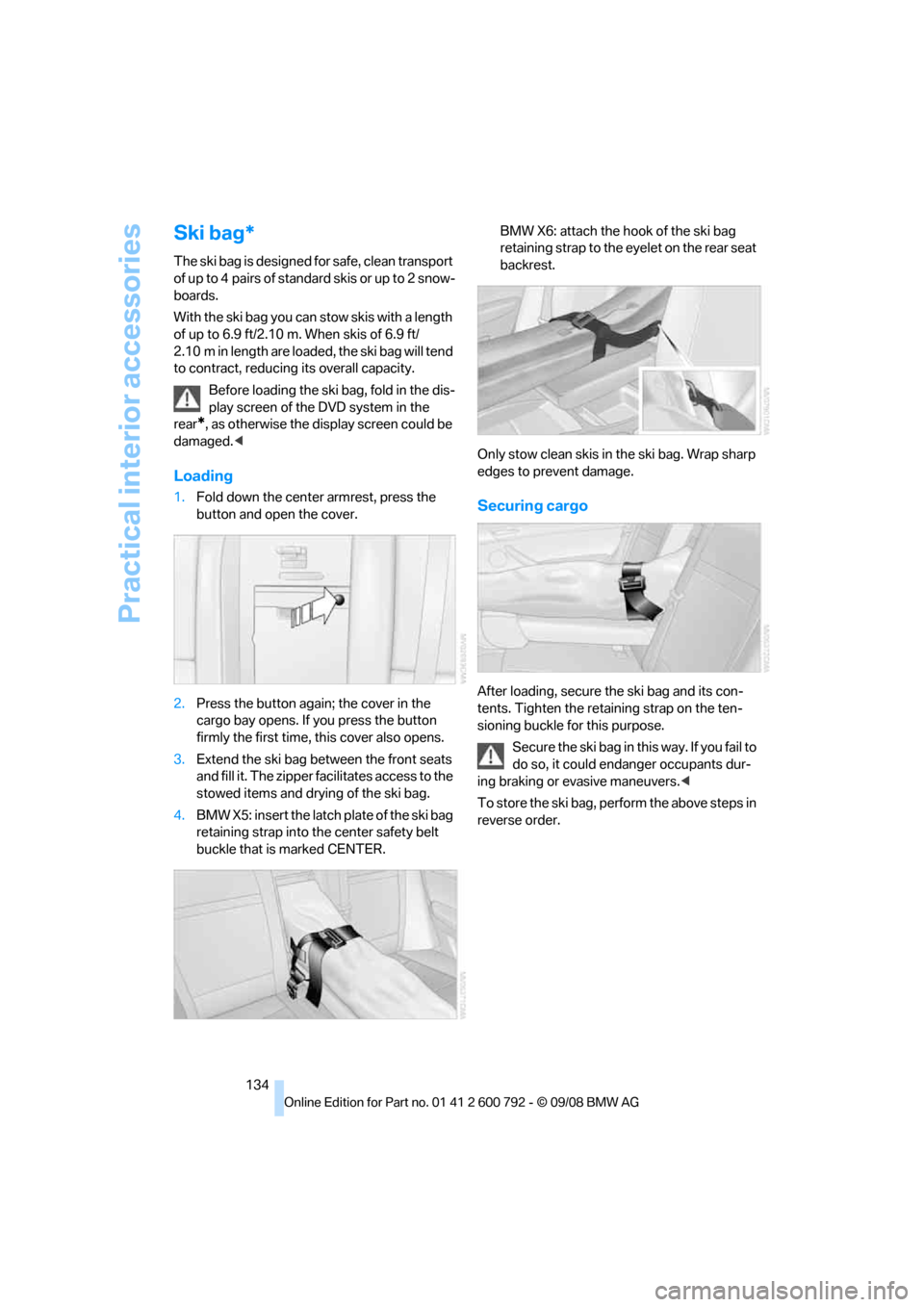
Loading
1.Fold down the center armrest, press the
button and open the cover.
2. Press the button again; the cover in the
cargo bay opens. If you press the button
firmly the first time, this cover also opens.
3. Extend the ski bag be tween the front seats
and fill it. The zipper facilitates access to the
stowed items and drying of the ski bag.
4. BMW X5: insert the latch plate of the ski bag
retaining strap into th e center safety belt
buckle that is marked CENTER. BMW X6: attach the hook of the ski bag
retaining strap to the eyelet on the rear seat
backrest.
Only stow clean skis in the ski bag. Wrap sharp
edges to prevent damage.Securing cargo
After loading, secure the ski bag and its con-
tents. Tighten the retaining strap on the ten-
sioning buckle for this purpose. Secure the ski bag in th is way. If you fail to
do so, it could enda nger occupants dur-
ing braking or evasive maneuvers. <
To store the ski bag, perform the above steps in
reverse order.
Page 137 of 317
Controls
135Reference
At a glance
Driving tips
Communications
Navigation
Entertainment
Mobility
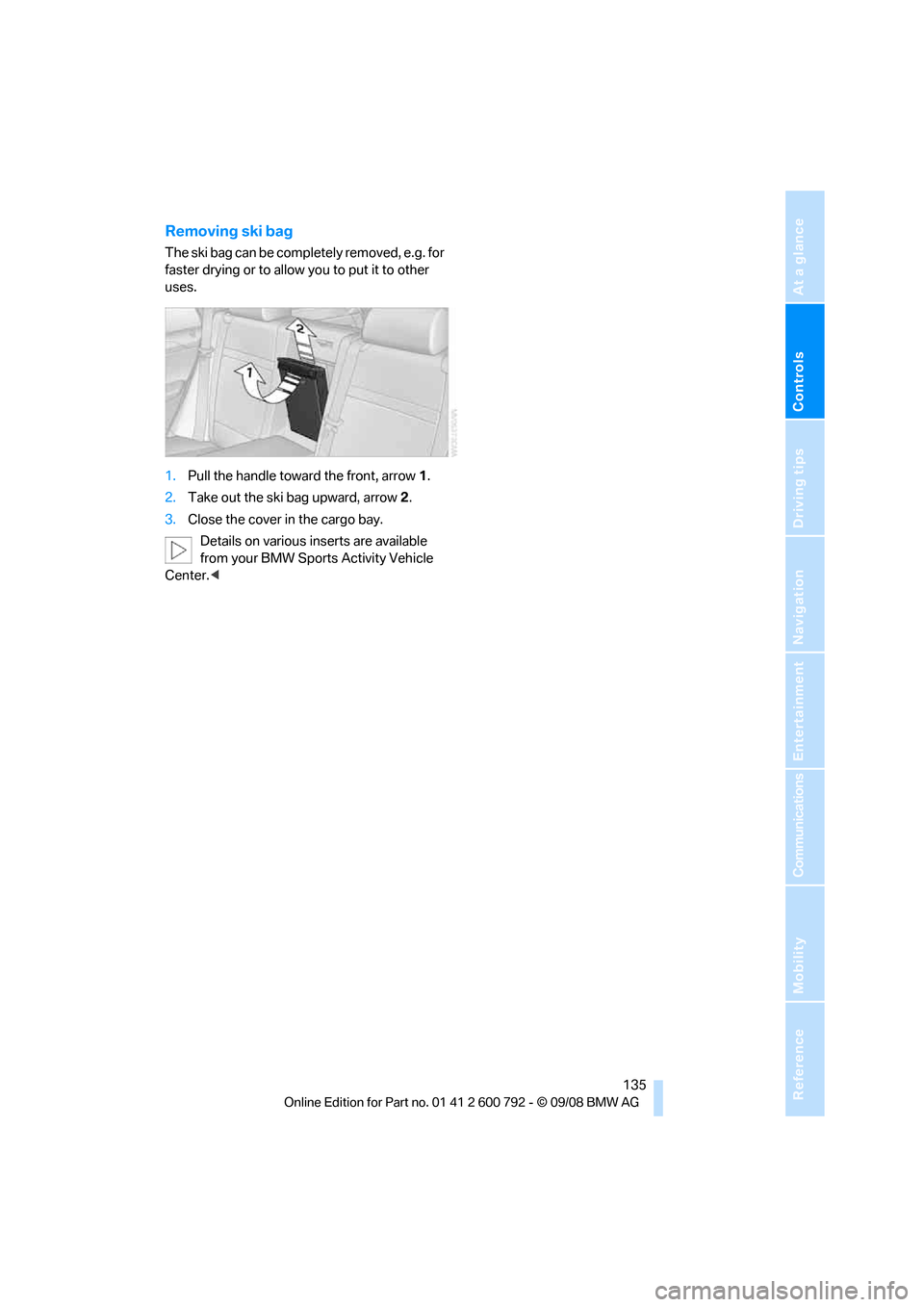
Removing ski bag
The ski bag can be completely removed, e.g. for
faster drying or to allow you to put it to other
uses.
1. Pull the handle toward the front, arrow 1.
2. Take out the ski bag upward, arrow 2.
3. Close the cover in the cargo bay.
Details on various inserts are available
from your BMW Sports Activity Vehicle
Center. <
Page 143 of 317
Driving tips
141Reference
At a glance
Controls
Communications
Navigation
Entertainment
Mobility
General information on the care of your BMW is
provided beginning on page265.
Mixed tires*
Before driving into a car wash, make sure
that the vehicle width is not too large for
the car wash, as otherwise the vehicle and the
car wash could be damaged. <
BMW X5: rear window wiper
The rear window wiper can be damaged in car
washes. Take appropriate protective measures;
ask the car wash operator if necessary.
With comfort access*
Insert the remote control into the ignition lock.
The engine can be switched off in transmission
position N, also refer to page41.
Loading
To avoid loading the tires beyond their
approved carrying capacity, never over-
load the vehicle. Overlo ading can lead to over-
heating and increases the rate at which damage
develops inside the tire s. The ultimate result
can assume the form of a sudden blow-out. <
Make sure that no fluids leak in the cargo
bay; otherwise the vehicle could be dam-
aged. <
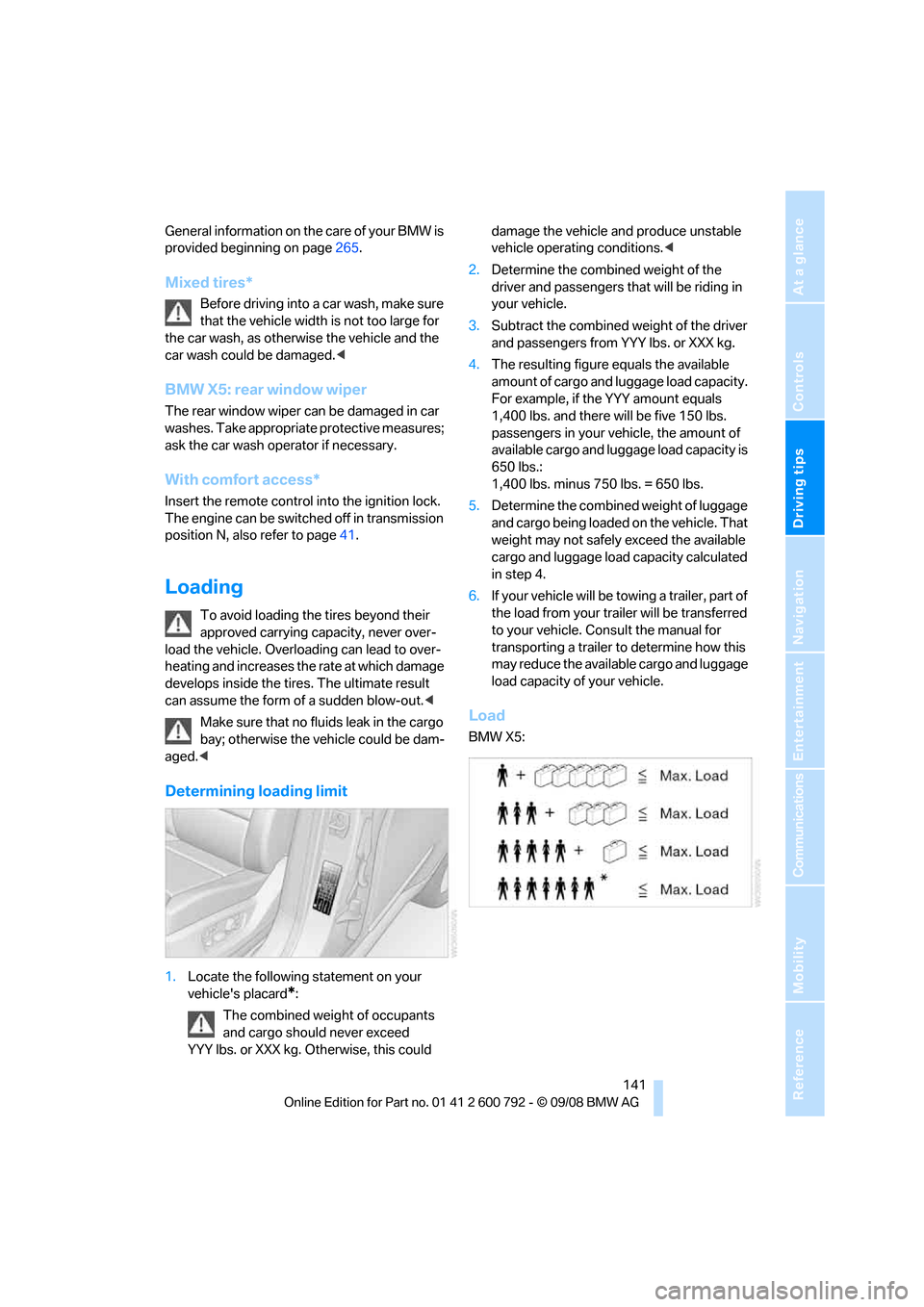
Determining loading limit
1.Locate the following statement on your
vehicle's placard
*:
The combined weight of occupants
and cargo should never exceed
YYY lbs. or XXX kg. Otherwise, this could damage the vehicle and produce unstable
vehicle operating conditions.
<
2. Determine the combined weight of the
driver and passengers that will be riding in
your vehicle.
3. Subtract the combined weight of the driver
and passengers from YYY lbs. or XXX kg.
4. The resulting figure equals the available
amount of cargo and luggage load capacity.
For example, if the YYY amount equals
1,400 lbs. and there will be five 150 lbs.
passengers in your ve hicle, the amount of
available cargo and lugga ge load capacity is
650 lbs.:
1,400 lbs. minus 750 lbs. = 650 lbs.
5. Determine the combined weight of luggage
and cargo being loaded on the vehicle. That
weight may not safely exceed the available
cargo and luggage load capacity calculated
in step 4.
6. If your vehicle will be towing a trailer, part of
the load from your tra iler will be transferred
to your vehicle. Consult the manual for
transporting a trailer to determine how this
may reduce the availa ble cargo and luggage
load capacity of your vehicle.
Load
BMW X5:
Page 144 of 317
Things to remember when driving
142
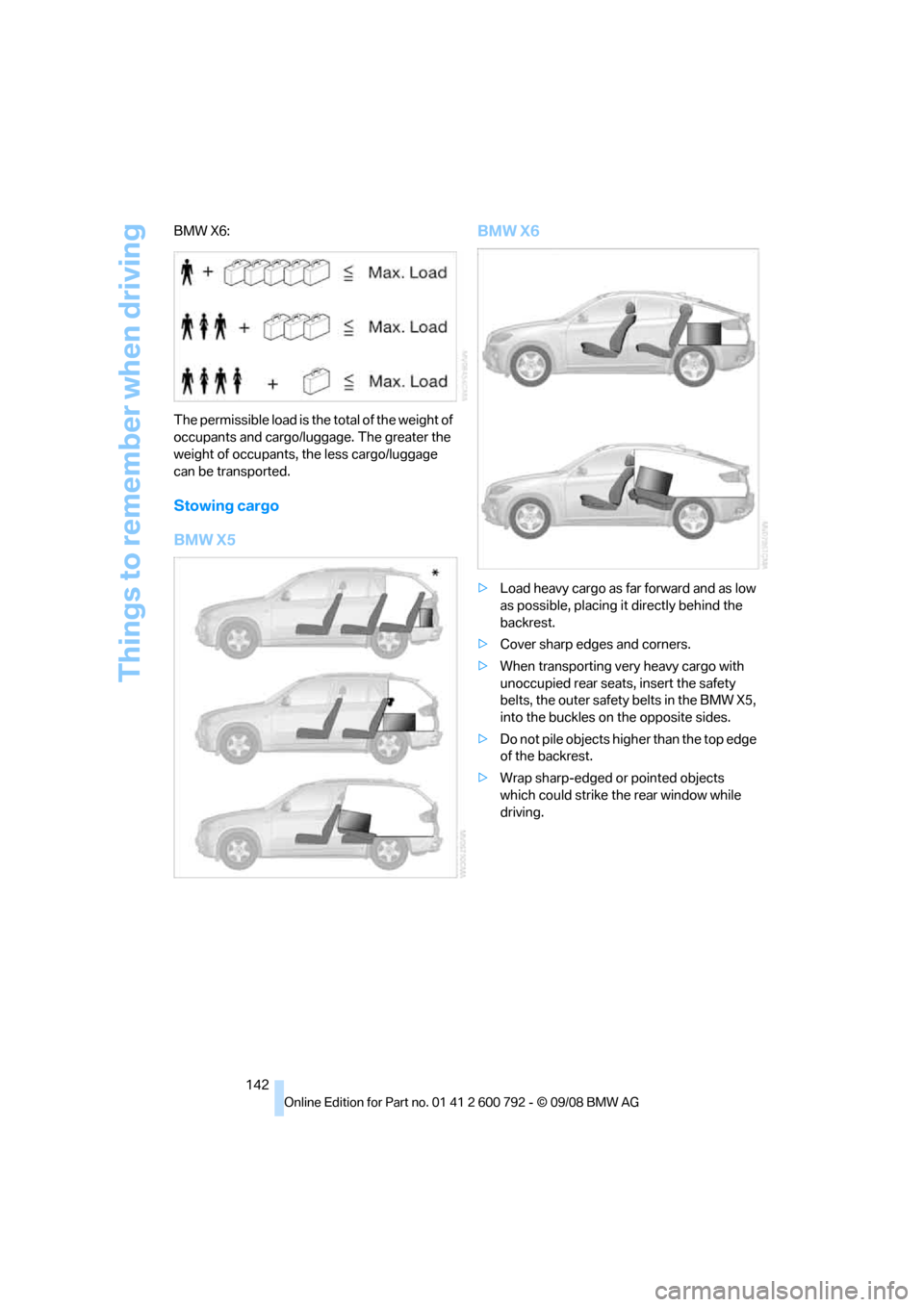
BMW X6:
The permissible load is the total of the weight of
occupants and cargo/luggage. The greater the
weight of occupants, the less cargo/luggage
can be transported.
Stowing cargo
BMW X5
BMW X6
>
Load heavy cargo as far forward and as low
as possible, placing it directly behind the
backrest.
> Cover sharp edges and corners.
> When transporting very heavy cargo with
unoccupied rear seats, insert the safety
belts, the outer safety belts in the BMW X5,
into the buckles on the opposite sides.
> Do not pile objects high er than the top edge
of the backrest.
> Wrap sharp-edged or pointed objects
which could strike th e rear window while
driving.
Page 145 of 317
Driving tips
143Reference
At a glance
Controls
Communications
Navigation
Entertainment
Mobility
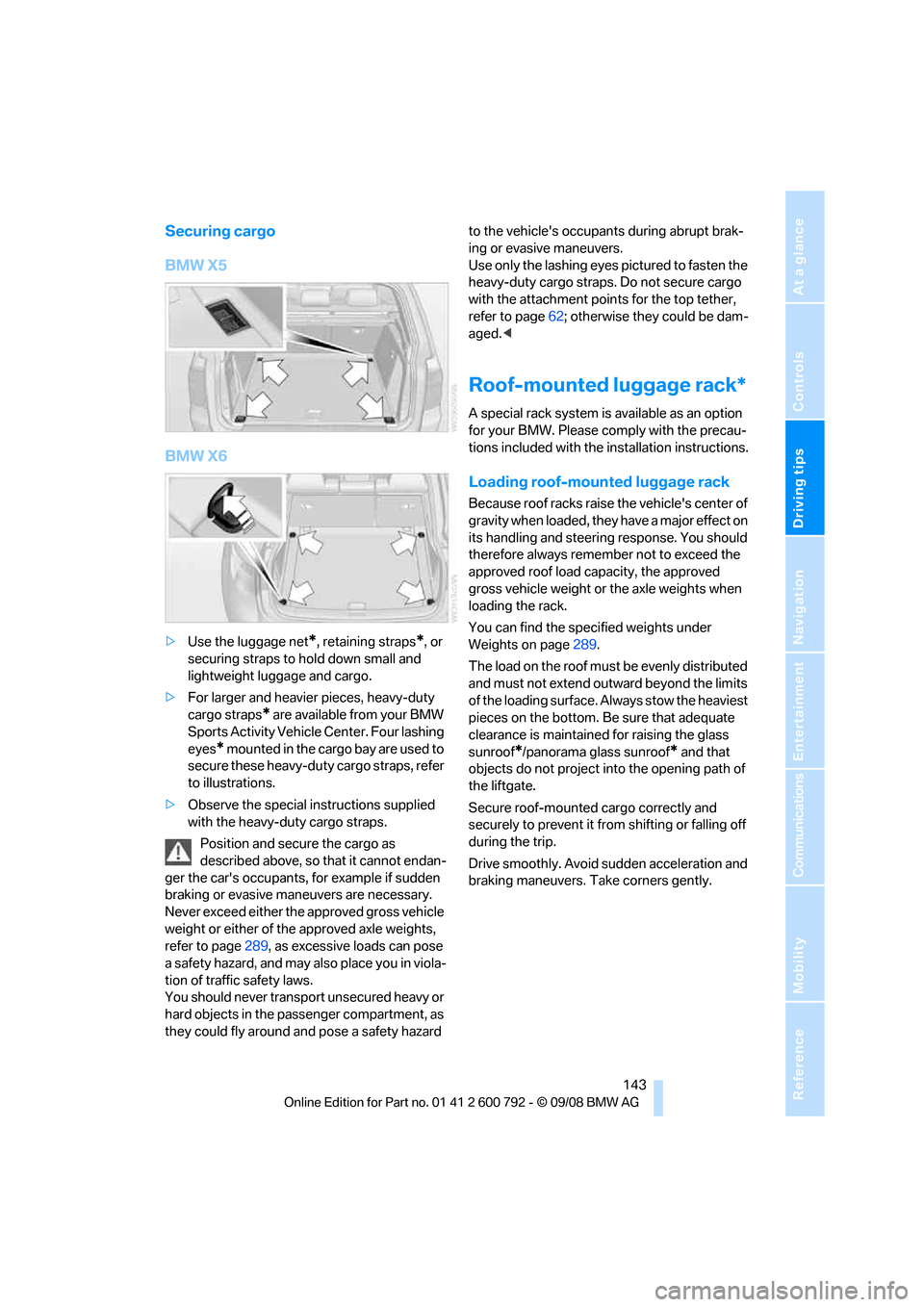
Securing cargo
BMW X5
BMW X6
>Use the luggage net*, retaining straps*, or
securing straps to hold down small and
lightweight luggage and cargo.
> For larger and heavier pieces, heavy-duty
cargo straps
* are available from your BMW
Sports Activity Vehicl e Center. Four lashing
eyes
* mounted in the cargo bay are used to
secure these heavy-duty cargo straps, refer
to illustrations.
> Observe the special instructions supplied
with the heavy-duty cargo straps.
Position and secure the cargo as
described above, so that it cannot endan-
ger the car's occupants, for example if sudden
braking or evasive maneuvers are necessary.
Never exceed either the approved gross vehicle
weight or either of the approved axle weights,
refer to page 289, as excessive loads can pose
a safety hazard, and may also place you in viola-
tion of traffic safety laws.
You should never transport unsecured heavy or
hard objects in the passenger compartment, as
they could fly around and pose a safety hazard to the vehicle's occupants during abrupt brak-
ing or evasive maneuvers.
Use only the lashing eyes pictured to fasten the
heavy-duty cargo straps. Do not secure cargo
with the attachment points for the top tether,
refer to page
62; otherwise they could be dam-
aged. <
Roof-mounted luggage rack*
A special rack system is available as an option
for your BMW. Please co mply with the precau-
tions included with the installation instructions.
Loading roof-mounted luggage rack
Because roof racks raise the vehicle's center of
gravity when loaded, they have a major effect on
its handling and steering response. You should
therefore always remember not to exceed the
approved roof load capacity, the approved
gross vehicle weight or the axle weights when
loading the rack.
You can find the specified weights under
Weights on page 289.
The load on the roof must be evenly distributed
and must not extend outward beyond the limits
of the loading surface. Always stow the heaviest
pieces on the bottom. Be sure that adequate
clearance is maintained for raising the glass
sunroof
*/panorama glass sunroof* and that
objects do not project into the opening path of
the liftgate.
Secure roof-mounted cargo correctly and
securely to prevent it fr om shifting or falling off
during the trip.
Drive smoothly. Avoid su dden acceleration and
braking maneuvers. Take corners gently.
Page 153 of 317
Navigation
Driving tips
151Reference
At a glance
Controls
Communications
Entertainment
Mobility
Entering a destination
manually
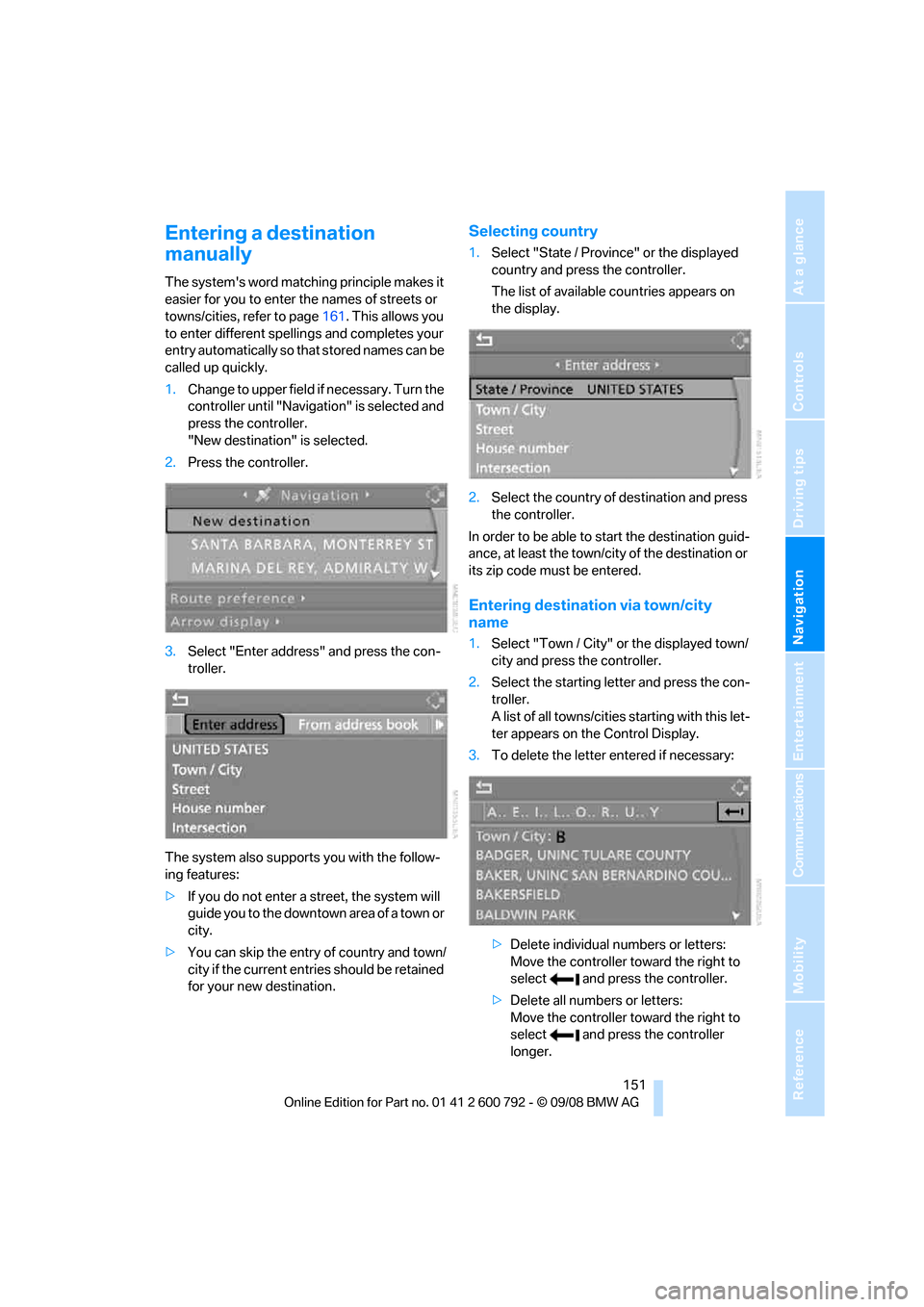
The system's word matching principle makes it
easier for you to enter the names of streets or
towns/cities, refer to page161. This allows you
to enter different spellin gs and completes your
entry automatically so that stored names can be
called up quickly.
1. Change to upper field if necessary. Turn the
controller until "Navigation" is selected and
press the controller.
"New destination" is selected.
2. Press the controller.
3. Select "Enter address" and press the con-
troller.
The system also supports you with the follow-
ing features:
> If you do not enter a street, the system will
guide you to the downtown a r e a o f a t o w n o r
city.
> You can skip the entry of country and town/
city if the current entries should be retained
for your new destination.
Selecting country
1.Select "State / Province" or the displayed
country and press the controller.
The list of available countries appears on
the display.
2. Select the country of destination and press
the controller.
In order to be able to start the destination guid-
ance, at least the town/cit y of the destination or
its zip code must be entered.
Entering destination via town/city
name
1. Select "Town / City" or the displayed town/
city and press the controller.
2. Select the starting letter and press the con-
troller.
A list of all towns/cities starting with this let-
ter appears on the Control Display.
3. To delete the letter entered if necessary:
>Delete individual numbers or letters:
Move the controller to ward the right to
select and press the controller.
> Delete all numbers or letters:
Move the controller to ward the right to
select and press the controller
longer.
Page 154 of 317
Destination entry
152
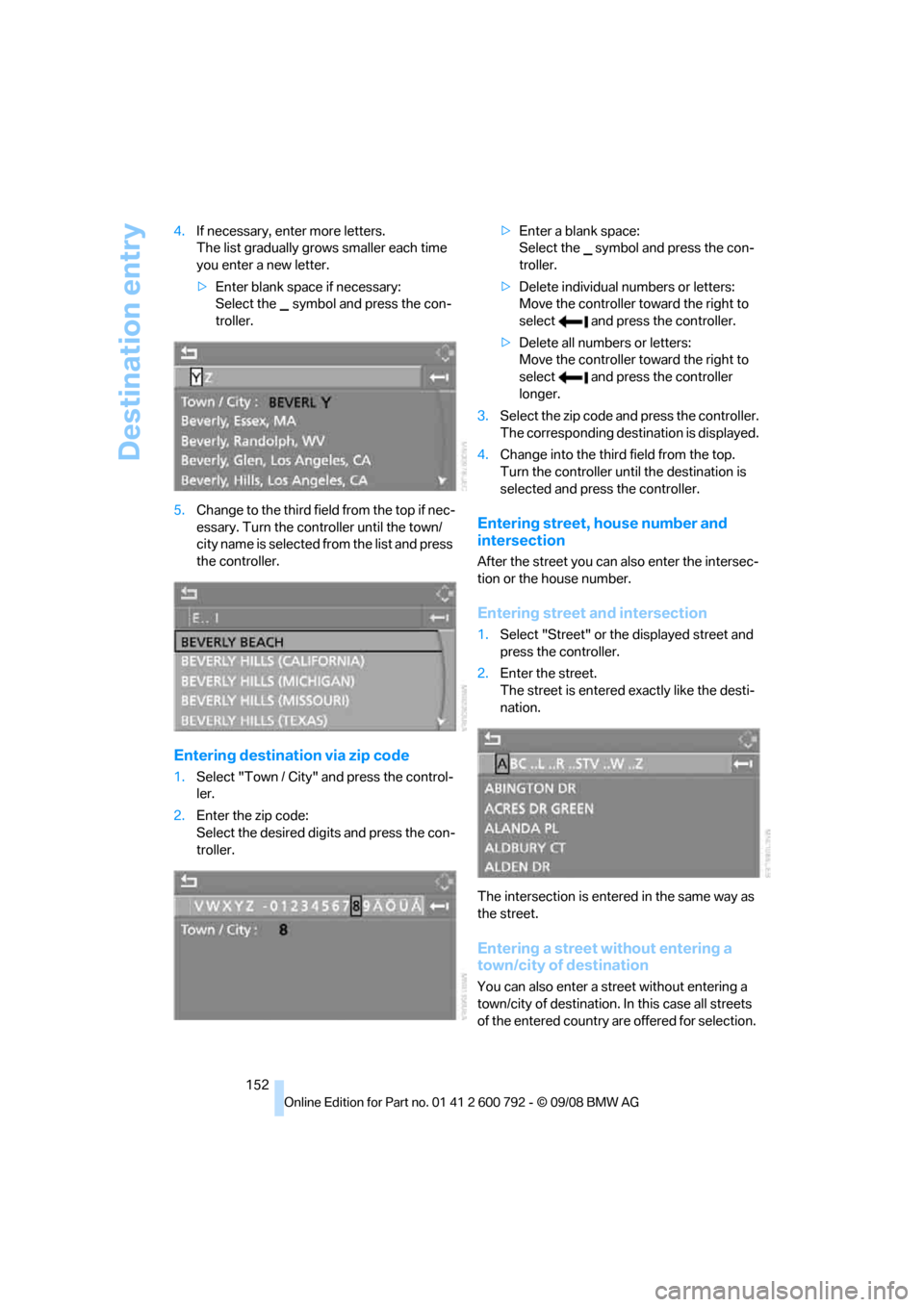
4.
If necessary, enter more letters.
The list gradually grow s smaller each time
you enter a new letter.
> Enter blank space if necessary:
Select the symbol and press the con-
troller.
5. Change to the third fiel d from the top if nec-
essary. Turn the cont roller until the town/
city name is selected from the list and press
the controller.
Entering destinat ion via zip code
1.Select "Town / City" and press the control-
ler.
2. Enter the zip code:
Select the desired digits and press the con-
troller. >
Enter a blank space:
Select the symbol and press the con-
troller.
> Delete individual numbers or letters:
Move the controller toward the right to
select and press the controller.
> Delete all numbers or letters:
Move the controller toward the right to
select and press the controller
longer.
3. Select the zip code and press the controller.
The corresponding dest ination is displayed.
4. Change into the third field from the top.
Turn the controller until the destination is
selected and press the controller.
Entering street, house number and
intersection
After the street you can also enter the intersec-
tion or the house number.
Entering street and intersection
1.Select "Street" or the displayed street and
press the controller.
2. Enter the street.
The street is entered exactly like the desti-
nation.
The intersection is entered in the same way as
the street.
Entering a street without entering a
town/city of destination
You can also enter a street without entering a
town/city of destination. In this case all streets
of the entered country are offered for selection.