transmission BMW X5M 2009 E70 Owner's Guide
[x] Cancel search | Manufacturer: BMW, Model Year: 2009, Model line: X5M, Model: BMW X5M 2009 E70Pages: 317, PDF Size: 9.56 MB
Page 143 of 317
Driving tips
141Reference
At a glance
Controls
Communications
Navigation
Entertainment
Mobility
General information on the care of your BMW is
provided beginning on page265.
Mixed tires*
Before driving into a car wash, make sure
that the vehicle width is not too large for
the car wash, as otherwise the vehicle and the
car wash could be damaged. <
BMW X5: rear window wiper
The rear window wiper can be damaged in car
washes. Take appropriate protective measures;
ask the car wash operator if necessary.
With comfort access*
Insert the remote control into the ignition lock.
The engine can be switched off in transmission
position N, also refer to page41.
Loading
To avoid loading the tires beyond their
approved carrying capacity, never over-
load the vehicle. Overlo ading can lead to over-
heating and increases the rate at which damage
develops inside the tire s. The ultimate result
can assume the form of a sudden blow-out. <
Make sure that no fluids leak in the cargo
bay; otherwise the vehicle could be dam-
aged. <
Determining loading limit
1.Locate the following statement on your
vehicle's placard
*:
The combined weight of occupants
and cargo should never exceed
YYY lbs. or XXX kg. Otherwise, this could damage the vehicle and produce unstable
vehicle operating conditions.
<
2. Determine the combined weight of the
driver and passengers that will be riding in
your vehicle.
3. Subtract the combined weight of the driver
and passengers from YYY lbs. or XXX kg.
4. The resulting figure equals the available
amount of cargo and luggage load capacity.
For example, if the YYY amount equals
1,400 lbs. and there will be five 150 lbs.
passengers in your ve hicle, the amount of
available cargo and lugga ge load capacity is
650 lbs.:
1,400 lbs. minus 750 lbs. = 650 lbs.
5. Determine the combined weight of luggage
and cargo being loaded on the vehicle. That
weight may not safely exceed the available
cargo and luggage load capacity calculated
in step 4.
6. If your vehicle will be towing a trailer, part of
the load from your tra iler will be transferred
to your vehicle. Consult the manual for
transporting a trailer to determine how this
may reduce the availa ble cargo and luggage
load capacity of your vehicle.
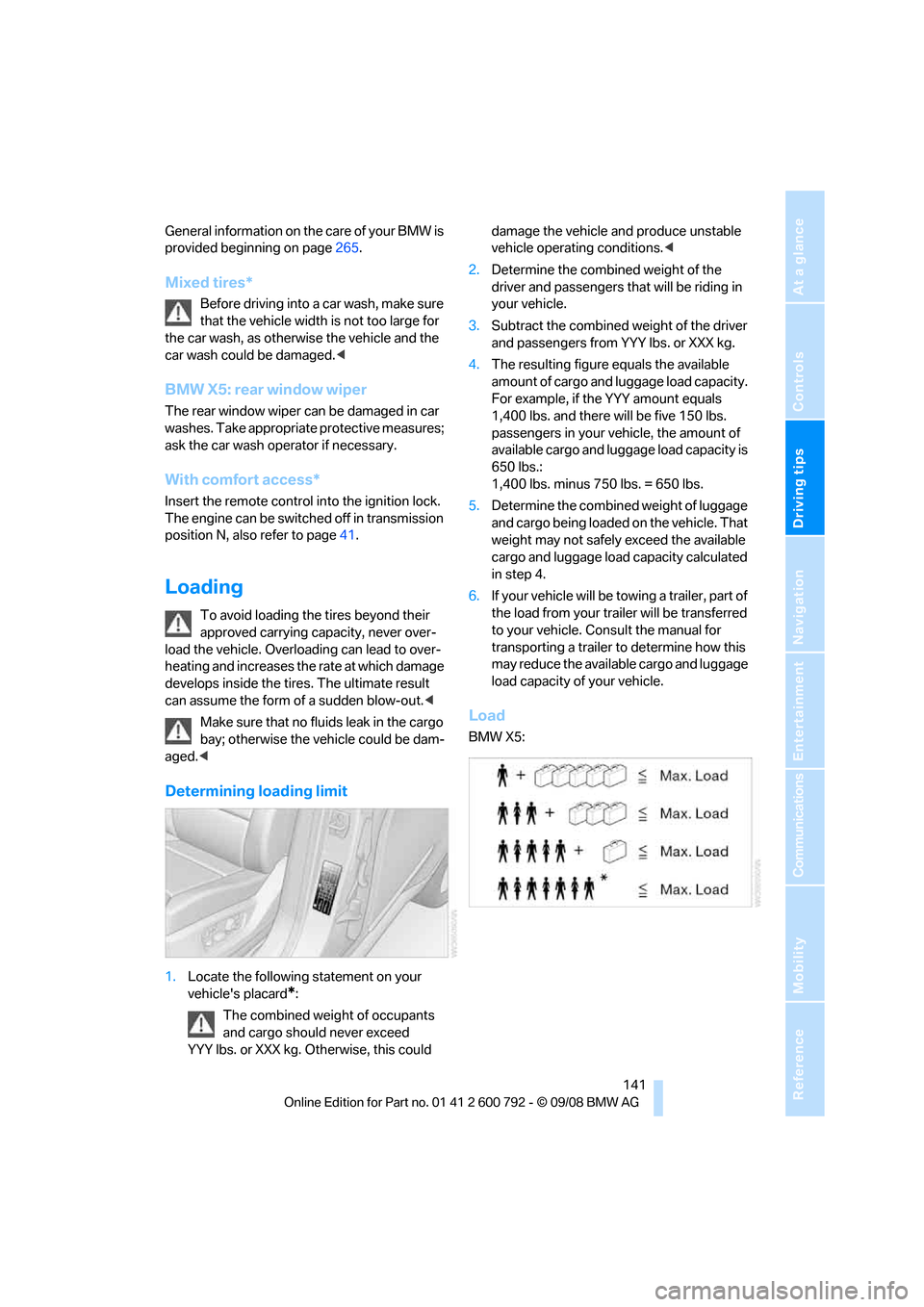
Load
BMW X5:
Page 181 of 317
Navigation
Entertainment
Driving tips
179Reference
At a glance
Controls
Communications
Mobility
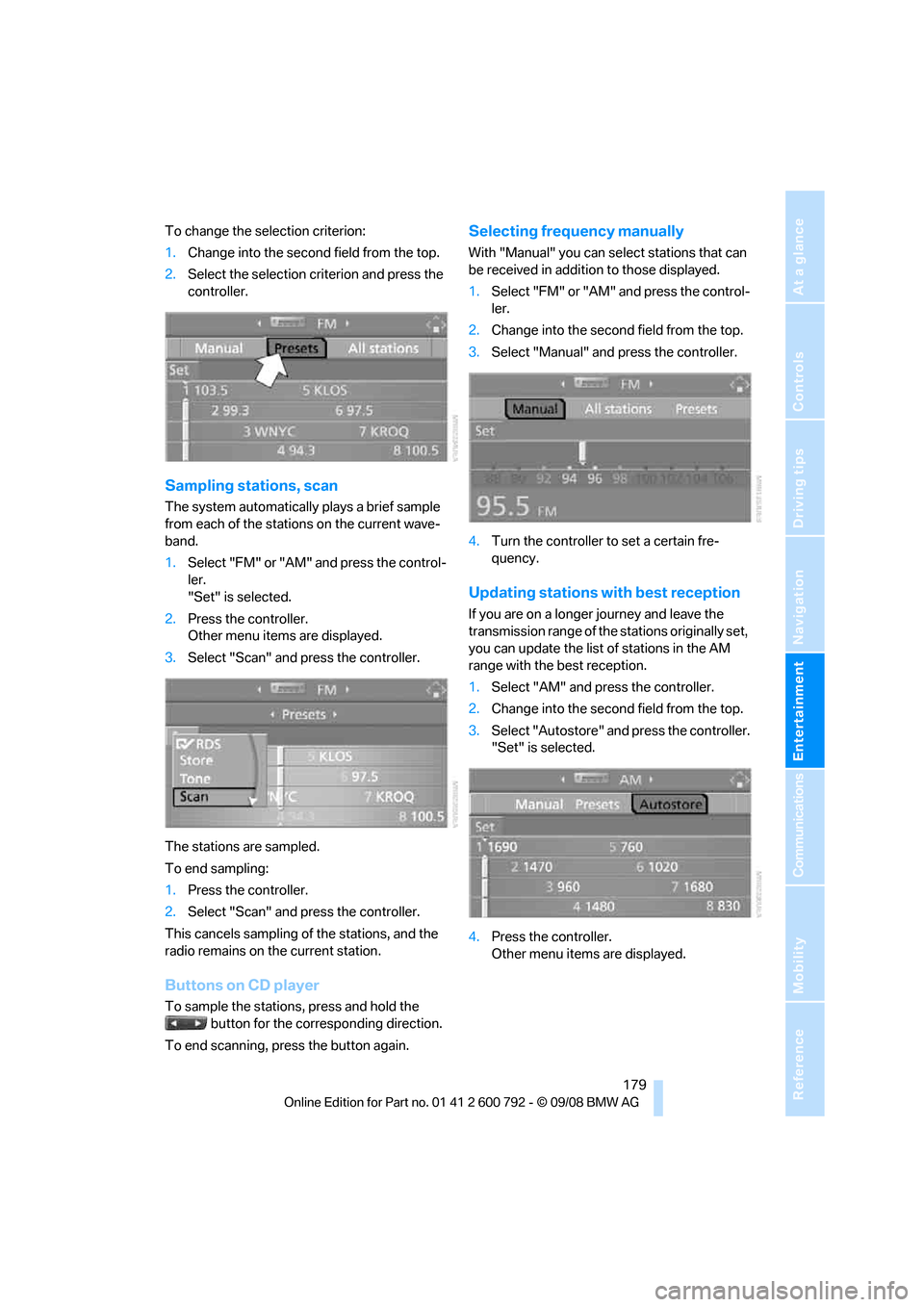
To change the selection criterion:
1.Change into the second field from the top.
2. Select the selection criterion and press the
controller.
Sampling stations, scan
The system automatically plays a brief sample
from each of the stations on the current wave-
band.
1.Select "FM" or "AM" and press the control-
ler.
"Set" is selected.
2. Press the controller.
Other menu items are displayed.
3. Select "Scan" and press the controller.
The stations are sampled.
To end sampling:
1. Press the controller.
2. Select "Scan" and press the controller.
This cancels sampling of the stations, and the
radio remains on the current station.
Buttons on CD player
To sample the stations, press and hold the button for the corresponding direction.
To end scanning, press the button again.
Selecting frequency manually
With "Manual" you can se lect stations that can
be received in additi on to those displayed.
1. Select "FM" or "AM" and press the control-
ler.
2. Change into the second field from the top.
3. Select "Manual" and press the controller.
4. Turn the controller to set a certain fre-
quency.
Updating stations with best reception
If you are on a longer journey and leave the
transmission range of the stations originally set,
you can update the list of stations in the AM
range with the best reception.
1.Select "AM" and pr ess the controller.
2. Change into the second field from the top.
3. Select "Autostore" and press the controller.
"Set" is selected.
4. Press the controller.
Other menu items are displayed.
Page 184 of 317
Radio
182
With some stations the
digital signals are not
transmitted simultaneously with the analog sig-
nals. If you are in an ar ea in which the selected
station is not continuous ly received digitally,
playback changes betwee n analog and digital
reception. This can result in repetitions or inter-
ruptions. In this case it may be advisable to
deactivate digital radio reception.
Selecting programs of a digital station*
Some stations transmit several programs on
one frequency. To select one of these pro-
grams:
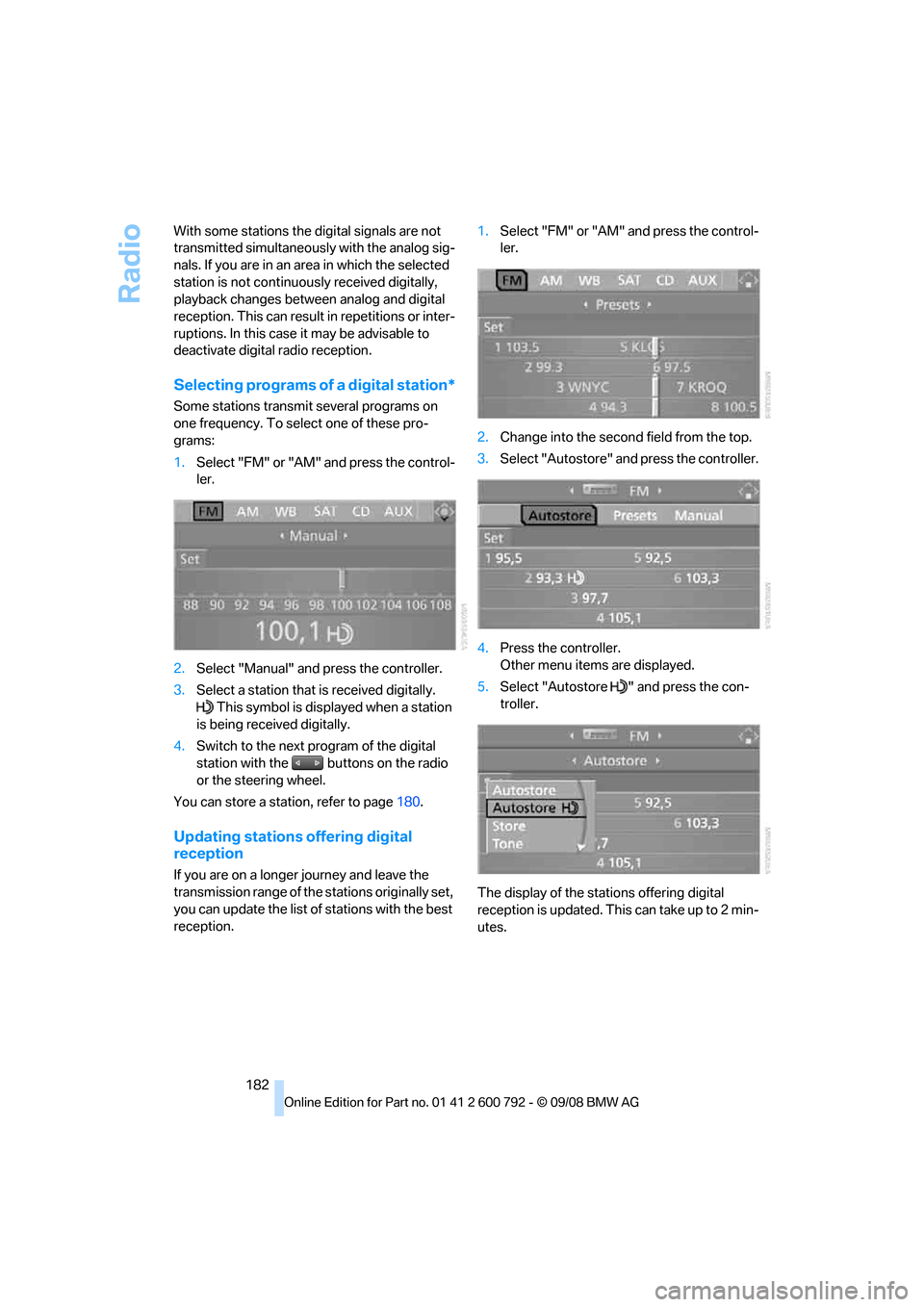
1. Select "FM" or "AM" and press the control-
ler.
2. Select "Manual" and press the controller.
3. Select a station that is received digitally.
This symbol is displayed when a station
is being received digitally.
4. Switch to the next program of the digital
station with the buttons on the radio
or the steering wheel.
You can store a station, refer to page 180.
Updating stations offering digital
reception
If you are on a longer journey and leave the
transmission range of the stations originally set,
you can update the list of stations with the best
reception. 1.
Select "FM" or "AM" and press the control-
ler.
2. Change into the second field from the top.
3. Select "Autostore" and press the controller.
4. Press the controller.
Other menu items are displayed.
5. Select "Autostore " and press the con-
troller.
The display of the stations offering digital
reception is updated. This can take up to 2 min-
utes.
Page 196 of 317
DVD changer
194
Removing all DVDs from DVD changer
1.Hold down the button.
The DVDs are pushed partially out of the
DVD changer in sequence.
2. Remove the DVDs individually.
Malfunctions
If all of the LEDs on the DVD changer flash rap-
idly, then a malfunction is occurring. In this
case, proceed as follows.
1. Press the button or button.
The DVD last inserted is ejected.
2. Remove the DVD.
The DVD changer tests the DVD compartments
and the rapid flashing of the LEDs stops. The
DVD changer is once more operational.
DVD country codes
Your DVD player only plays DVDs with the cod-
ing of your home regi on, e.g. Europe = 2. The
country codes supported by your DVD are con-
tained in the information on your DVD. It is not
possible to change this coding. An overview of
the six coding zones:
DVDs with the code 0 can be played back
on all units. <
Playing DVDs
Depending on the equipment in your vehicle,
you have the option of playing back both the
audio track and video track of DVDs or only their
audio track.
>Vehicles with two drives: audio and video
playback
> Vehicles with a single drive: audio playback,
refer to page 197
Audio and video playback
For your own safety, the picture only appears on
the Control Display at sp eeds of up to about
2 mph/3 km/h. For certain national-market ver-
sions, the picture does not appear on the Con-
trol Display unless the ve hicle is stationary and
the transmission is in Park.
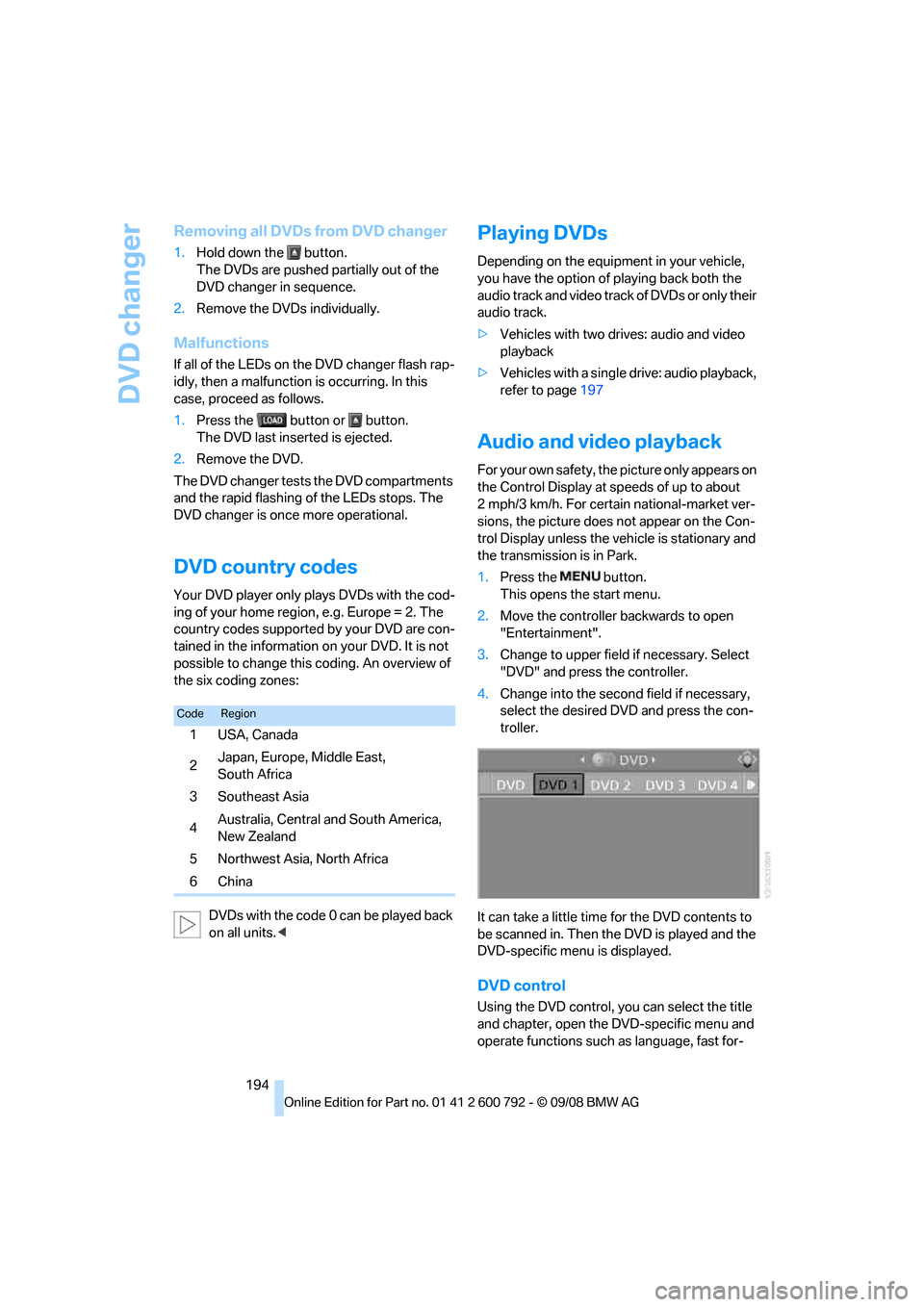
1. Press the button.
This opens the start menu.
2. Move the controller backwards to open
"Entertainment".
3. Change to upper field if necessary. Select
"DVD" and press the controller.
4. Change into the second field if necessary,
select the desired DVD and press the con-
troller.
It can take a little time for the DVD contents to
be scanned in. Then the DVD is played and the
DVD-specific menu is displayed.
DVD control
Using the DVD control, yo u can select the title
and chapter, open the DVD-specific menu and
operate functions such as language, fast for-
CodeRegion
1USA, Canada
2Japan, Europe, Middle East,
South Africa
3Southeast Asia
4 Australia, Central and South America,
New Zealand
5 Northwest Asia, North Africa
6China
Page 225 of 317
223
Entertainment
Reference
At a glance
Controls
Driving tips
Communications
Navigation
Mobility
As soon as a mobile phone is detected by the
vehicle, the phone book entries stored on the
SIM card or on your mobile phone are transmit-
ted to your vehicle. This transmission is depen-
dent on your mobile phone, refer to the operat-
ing instructions of your mobile phone if
necessary, and can take several minutes.
If not all phone book entries are displayed:
> Transfer all phone book entries from the
SIM card to the mobile phone if necessary.
> It may not be possible to display phone
book entries with special characters.
Up to four mobile phones can be paired consec-
utively. When you pair a fifth mobile phone, the
pairing data of the mob ile phone for which the
pairing data were stored first in the vehicle will
be deleted.
Checking if pairing is unsuccessful
> Is the mobile phone supported by the
mobile phone preparation package? Infor-
mation on this subject is also provided on
the Internet at: www.bmw.com.
> Do the Bluetooth pass keys on the mobile
phone and the vehicle match? The same
Bluetooth passkey must be entered both on
the mobile phone display and via iDrive.
> Have you required lo nger than 30 seconds
to enter the Bluetooth passkey?
> Only a limited number of devices can be
connected to the mobile phone. Delete the
connection to other devices if necessary.
> The mobile phone no longer reacts? Switch
the mobile phone off and then on again or
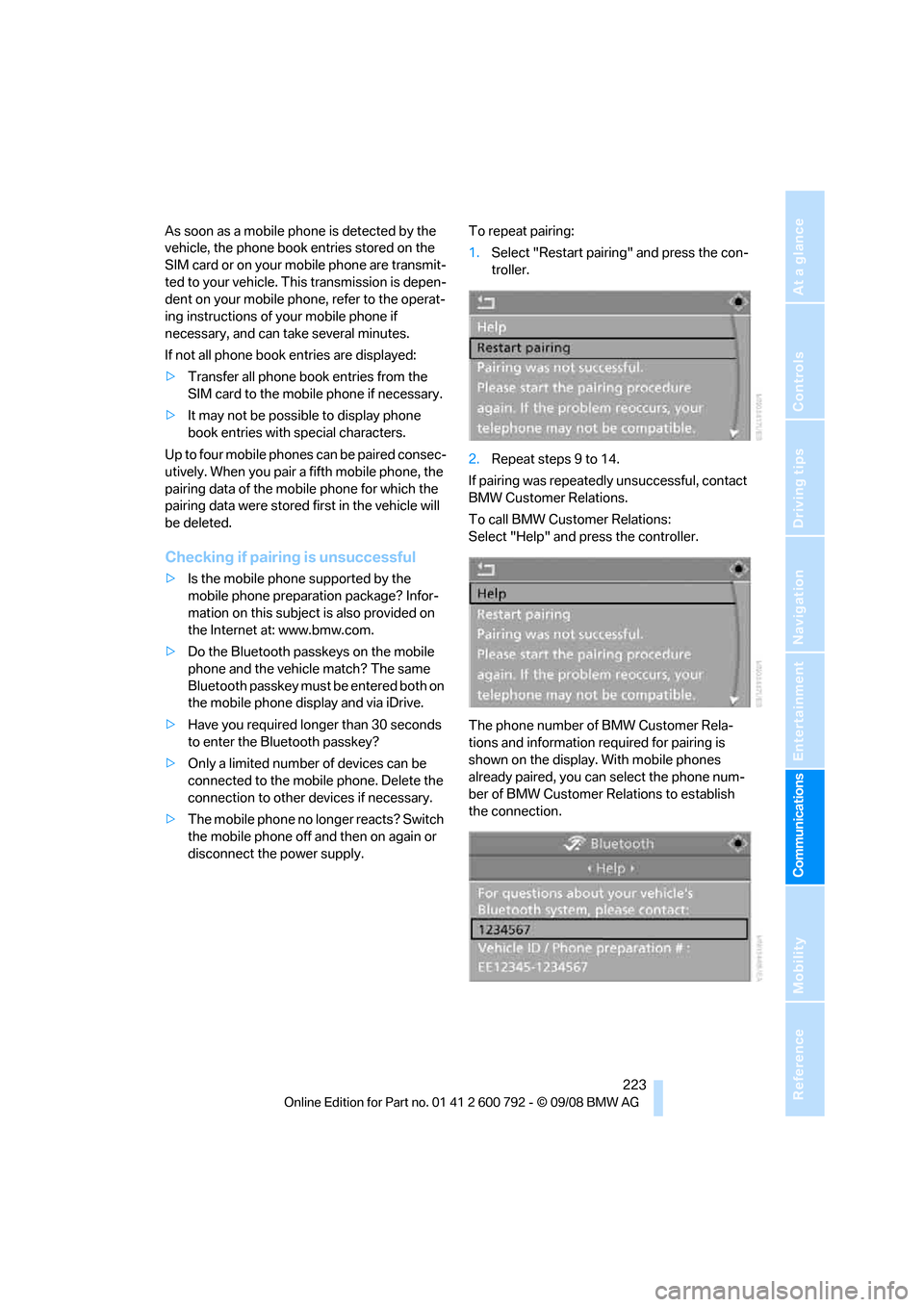
disconnect the power supply. To repeat pairing:
1.
Select "Restart pairing" and press the con-
troller.
2. Repeat steps 9 to 14.
If pairing was repeatedly unsuccessful, contact
BMW Customer Relations.
To call BMW Customer Relations:
Select "Help" and press the controller.
The phone number of BMW Customer Rela-
tions and information required for pairing is
shown on the display. With mobile phones
already paired, you can select the phone num-
ber of BMW Customer Relations to establish
the connection.
Page 248 of 317
Refueling
246
In order to be able to start the engine in the
usual way, there must be a sufficient supply of
diesel exhaust fluid in the separate reservoir.
System heating
In order to bring the system to operating tem-
perature after a cold start of the engine, the
automatic transmission
shifts into the next
higher gear at a later point.
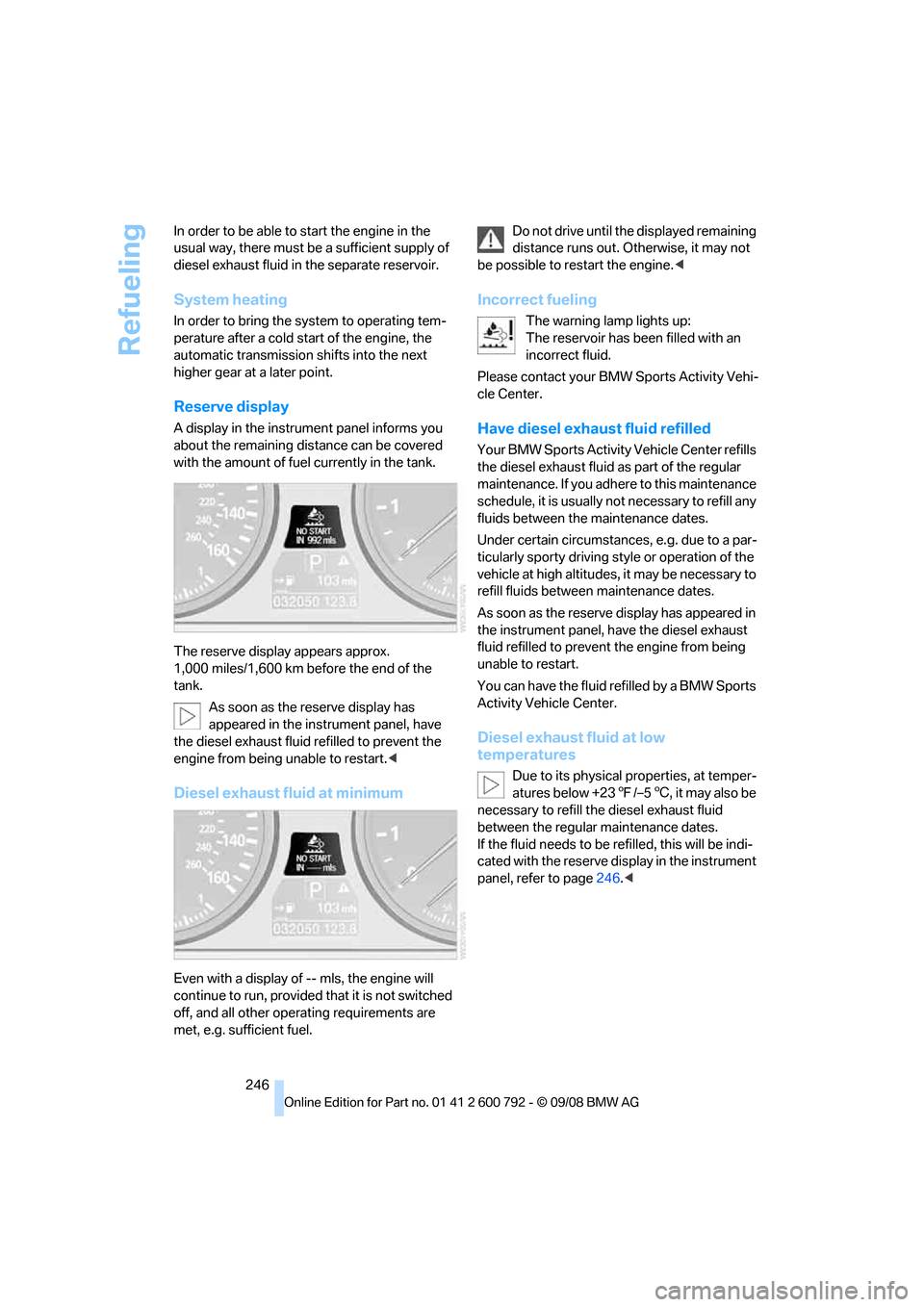
Reserve display
A display in the instrument panel informs you
about the remaining distance can be covered
with the amount of fuel currently in the tank.
The reserve display appears approx.
1,000 miles/1,600 km before the end of the
tank.
As soon as the reserve display has
appeared in the inst rument panel, have
the diesel exhaust fluid refilled to prevent the
engine from being unable to restart. <
Diesel exhaust fluid at minimum
Even with a display of -- mls, the engine will
continue to run, provided that it is not switched
off, and all other operating requirements are
met, e.g. sufficient fuel. Do not drive until the displayed remaining
distance runs out. Otherwise, it may not
be possible to restart the engine. <
Incorrect fueling
The warning lamp lights up:
The reservoir has been filled with an
incorrect fluid.
Please contact your BMW Sports Activity Vehi-
cle Center.
Have diesel exhaust fluid refilled
Your BMW Sports Activity Vehicle Center refills
the diesel exhaust fluid as part of the regular
maintenance. If you adhe re to this maintenance
schedule, it is usually no t necessary to refill any
fluids between the maintenance dates.
Under certain circumstances, e.g. due to a par-
ticularly sporty driving st yle or operation of the
vehicle at high altitudes, it may be necessary to
refill fluids betwee n maintenance dates.
As soon as the reserve display has appeared in
the instrument panel, have the diesel exhaust
fluid refilled to prevent the engine from being
unable to restart.
You can have the fluid refilled by a BMW Sports
Activity Vehicle Center.
Diesel exhaust fluid at low
temperatures
Due to its physical properties, at temper-
atures below +23 7/–5 6, it may also be
necessary to refill the diesel exhaust fluid
between the regular maintenance dates.
If the fluid needs to be re filled, this will be indi-
cated with the reserve display in the instrument
panel, refer to page 246.<
Page 267 of 317
Mobility
265Reference
At a glance
Controls
Driving tips
Communications
Navigation
Entertainment
Care
Car-care products
For the cleaning and care of your vehicle, BMW
recommends using only products that BMW
has approved for this purpose.
Regular cleaning and care make a significant
contribution to retain ing your BMW's value.
The BMW Sports Activity Vehicle Center will be
happy to consult you on products and services
for the cleaning and care of your BMW.
Genuine BMW Care Products are materi-
als tested, laboratory tested, and tested in
actual use. They offer optimum care and pro-
tection for your vehicle. <
Do not use cleaners that contain alcohol
or solvents; they can damage your vehi-
cle. <
Cleaning agents can contain substances
that are dangerous or pose health risks.
You should therefore heed the warnings and
hazard indications on the packaging. Open the
doors or windows on your vehicle whenever
cleaning the interior. Make sure there is suffi-
cient ventilation in enclosed spaces. Use only
products that are formul ated for vehicle clean-
ing. <
Exterior care
Washing your vehicle
In the winter months, it is especially
important to ensure that the vehicle is
washed on a regular basis. Otherwise, signifi-
cant soiling and road salt can cause damage to
the vehicle.<
After washing the vehicle, apply the
brakes briefly to dry th em. Failure to do so
may lead to a reduction in braking efficiency and
also to corrosion of the brake rotors. <
Car washes
Give preference to cloth car washes.
Before driving into the car wash, make sure that
it is suitable for your BMW. Pay attention to the
following points:
> Dimensions of your vehicle, refer to
page 287.
> If necessary: fold in door mirror, refer to
page 57.
> Maximum permissible tire width.
Preparations for driving into the car wash:
> Deactivate rain sensor
* to prevent
unwanted wiper activation.
> BMW X5: deactivate rear window wiper and
protect it from damage. Take appropriate
protective measures; inquiring with the car
wash operator as needed.
> Remove additional add- on parts, e.g. spoil-
ers or phone antennas, if they could be
damaged.
Automatic transmission with
Steptronic
Before driving into the car wash, observe the
following so that the vehicle is able to roll:
1. Insert the remote cont rol into the ignition
lock, even with comfort access.
2. Shift into transmission position N.
3. Release the parking brake.
4. Deactivate Automatic Hold, refer to
page 68.
5. Switch off the engine.
6. Leave the remote control in the ignition lock
so that the vehicle can roll.
Page 278 of 317
Replacing components
276
far as possible from passi
ng traffic and on solid
ground. Switch on the ha zard warning flashers.
Set the parking brake and engage transmission
position P.
Have all vehicle occupants get out of the vehicle
and ensure that they remain outside the imme-
diate area in a safe place, such as behind a
guardrail.
If a warning triangle
* or portable hazard warning
lamp
* is required, set it up on the roadside at an
appropriate distance from the rear of the vehi-
cle. Comply with all safe ty guidelines and regu-
lations.
Change the wheel only on a level, firm surface
which is not slippery. Th e vehicle or the jack
could slip to the side if you attempt to raise the
vehicle on a soft or slippery surface such as
snow, ice, tiles, etc.
Position the jack on a firm support surface.
Do not use a wooden block or similar object as a
support base for the jack, as this would prevent
it from extending to its full support height and
reduce its load-carrying capacity.
To avoid serious or fata l injury: never lie under
the vehicle, and never start the engine while it is
supported by the jack. <
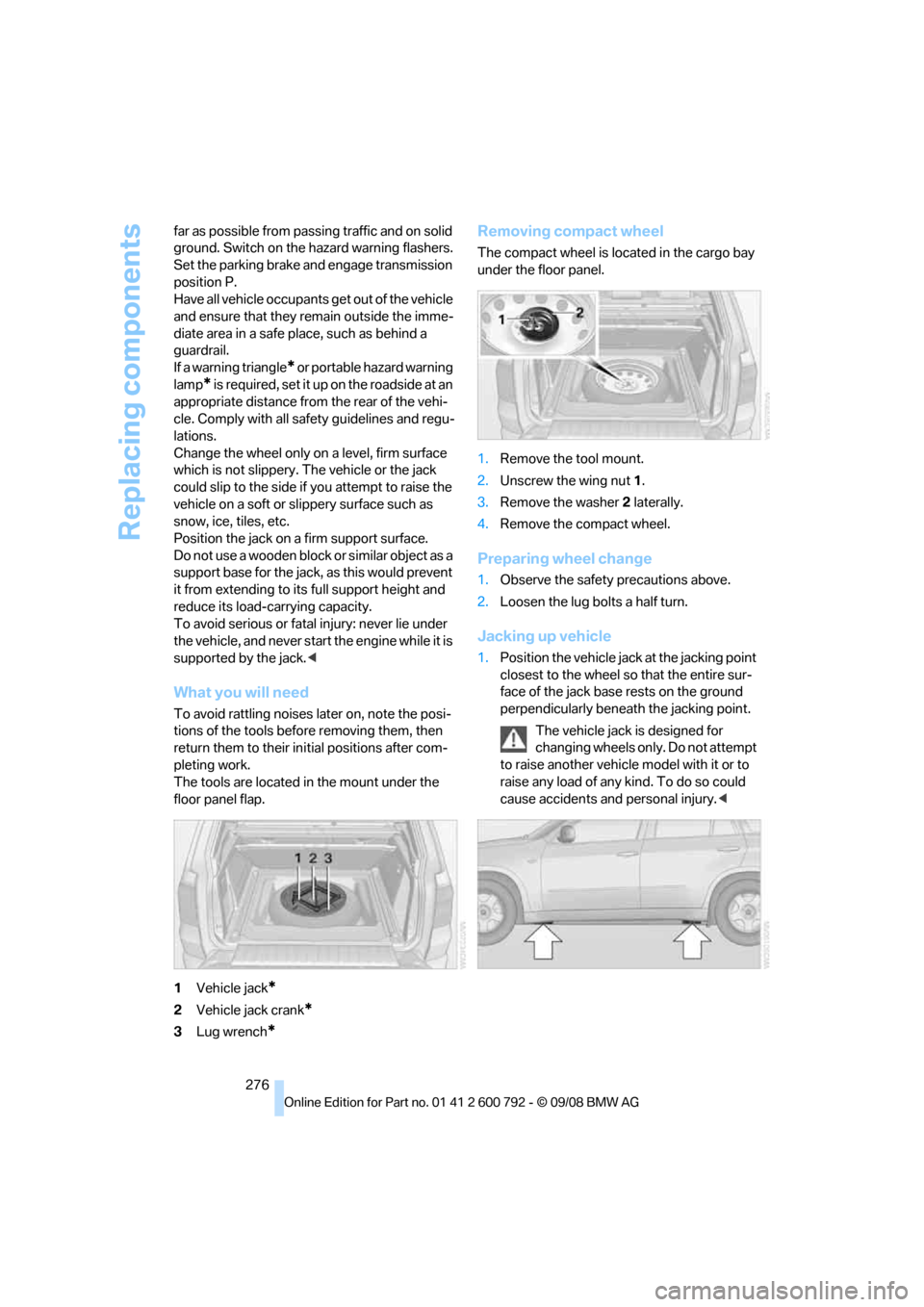
What you will need
To avoid rattling noises later on, note the posi-
tions of the tools before removing them, then
return them to their in itial positions after com-
pleting work.
The tools are located in the mount under the
floor panel flap.
1 Vehicle jack
*
2Vehicle jack crank*
3Lug wrench*
Removing compact wheel
The compact wheel is lo cated in the cargo bay
under the floor panel.
1. Remove the tool mount.
2. Unscrew the wing nut 1 .
3. Remove the washer 2 laterally.
4. Remove the compact wheel.
Preparing wheel change
1.Observe the safety precautions above.
2. Loosen the lug bolts a half turn.
Jacking up vehicle
1.Position the vehicle jack at the jacking point
closest to the wheel so that the entire sur-
face of the jack base rests on the ground
perpendicularly beneat h the jacking point.
The vehicle jack is designed for
changing wheels only. Do not attempt
to raise another vehicle model with it or to
raise any load of any kind. To do so could
cause accidents and personal injury. <
Page 284 of 317
Giving and receiving assistance
282
Being towed
Make sure that the ignition is switched on,
refer to page65, otherwise the low
beams, tail lamps, turn signals and windshield
wipers would not be available. When the engine
is stopped, there is no power assist. This then
requires increased effort for braking and steer-
ing. Active steering is deactivated and larger
steering wheel movements are required.<
Switch on the hazard wa rning flashers depend-
ing on the local regulations. If the electrical sys-
tem fails, mark the vehicle to be towed, e.g. with
a sign or warning triangle in the rear window.
Before towing, manua lly unlock the trans-
mission lock, refer to page 72; failure to
do so can result in damage to the transmis-
sion. <
Do not exceed a towing speed of 45 mph/
70 km/h and a towing distance of
90 miles/150 km, otherwise the automatic
transmission may be damaged. <
Towing methods
Do not lift vehicle by tow fitting or body
and chassis parts, otherwise damage may
result. <
In some countries, towi ng with tow bars or
ropes in public traffic is not permitted. Familiar-
ize yourself with the regu lations on towing in the
respective country.
With tow bar
The towing vehicle may not be lighter
than the vehicle to be towed, otherwise it
will not be possible to reliably control vehicle
response. <
The tow fittings used sh ould be on the same
side on both vehicles. Should it prove impossi-
ble to avoid mounting the tow bar at an offset
angle, observe the following:
> Clearance and maneuvering capability will
be sharply limited during cornering.
> When mounted at an angle, the tow bar will
exert lateral forces, tending to push the
vehicle sideways. Only attach the tow bar to the tow fittings,
as attachment to other vehicle parts can
lead to damage. <
With tow rope
When starting off in the towing vehicle, make
sure that the tow rope is taut.
To avoid jerking and the associated
stresses on vehicle components when
towing, always use nylon ropes or nylon straps.
Only attach tow ropes to the tow fittings, as
attachment to other vehi cle parts can lead to
damage. <
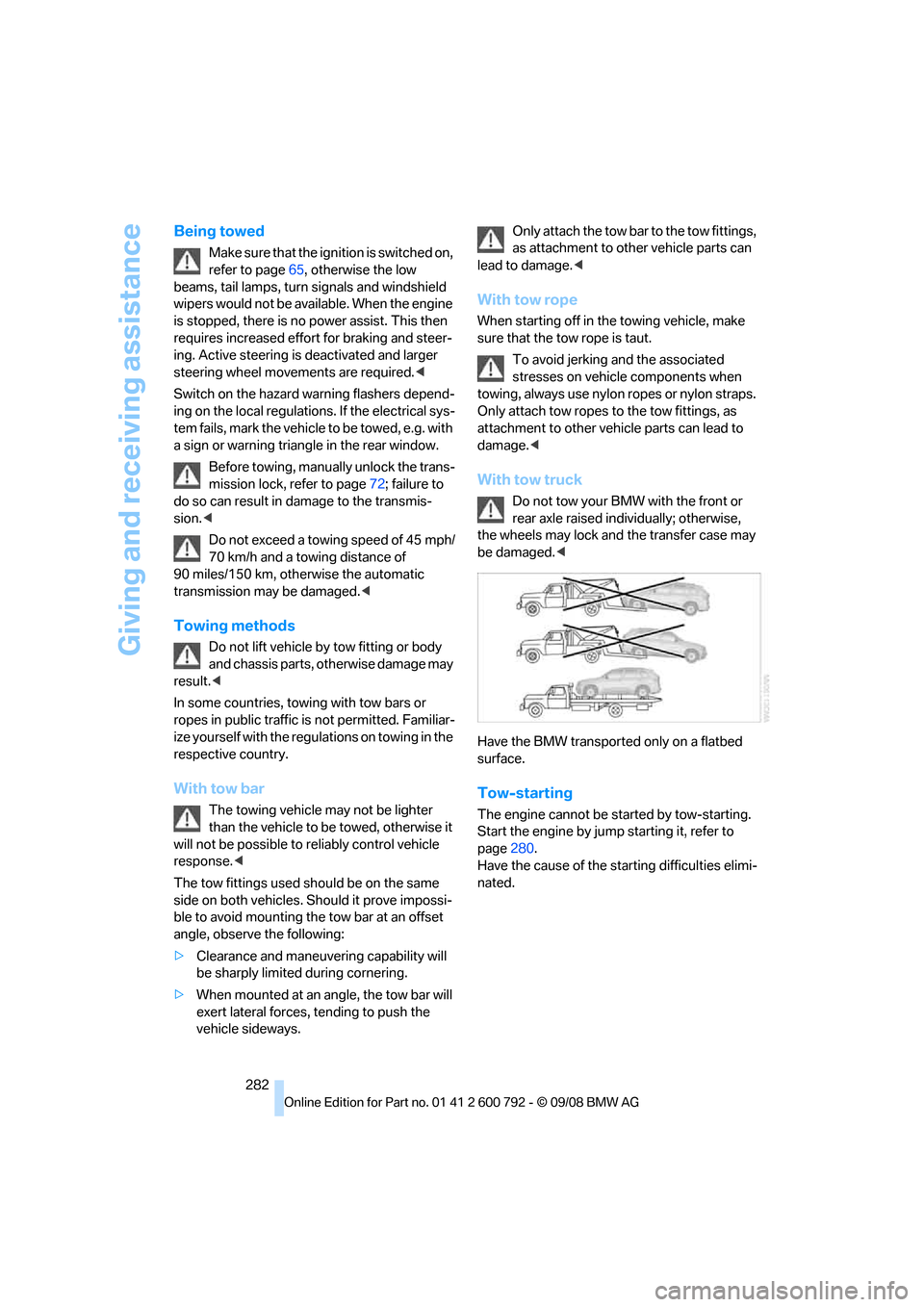
With tow truck
Do not tow your BMW with the front or
rear axle raised indi vidually; otherwise,
the wheels may lock and the transfer case may
be damaged. <
Have the BMW transported only on a flatbed
surface.
Tow-starting
The engine cannot be started by tow-starting.
Start the engine by jump starting it, refer to
page 280.
Have the cause of the st arting difficulties elimi-
nated.
Page 299 of 317
Reference 297
At a glance
Controls
Driving tips
Communications
Navigation
Entertainment
Mobility
Ashtray
– front128
– rear 129
Assist 235
– refer to separate operating
instructions
Assistance systems, refer to Driving stability control
systems 96
Assistance window 20
"Assist profile" 241
"Assist. window off" 21
AUC Automatic recirculated-
air control 117
"Audio" 177,181
– for DVD system in rear 216
Audio 174
– controls 174
– switching on/off 174
– tone control 175
– volume 175
Audio CD for DVD system in
rear 210
Audio device, external 127
Automatic
– air distribution 115,120
– air volume 115,120
– BMW Teleservice call 237
– headlamp control 110
– liftgate operation 34,37
– steering wheel adjustment,
refer to Easy entry/exit 58
– storing stations 179
Automatic car washes 140
Automatic climate control
– automatic air distribution 115,120
– in rear 119
– in rear, activating on Control Display 120
– switching off 118,120
– ventilation in rear 119
– with 2-zone control 115
– with 4-zone control 119
Automatic closing of doors, refer to Automatic soft
closing 33 Automatic curb monitor
58
Automatic garage door
opener 123
Automatic Hold 67
– activating 68
– deactivating 68
– parking 68
Auto
matic lighting
– refer to Automatic headlamp control 110
– refer to Daytime driving
lamps 111
– refer to Interior lamps 113
– refer to Pathway lighting 111
"Automatic programs" 116
Automatic recirculated-air
control AUC 117
Automatic soft closing 33
Automatic station search 179
Automatic transmission with Steptronic 70
– deactivating selector lever
interlock 71
– kick-down 71
– manually releasing
transmission lock 72
– tow-starting 282
– with comfort access 40
"Automatic ventilation" 121
AUTO program for automatic climate control 115,120
"Auto Request" 237
"Autostore"
– on the radio 180
"AUX" 175,200 ,202
– AUX-In connection 200
– for DVD system in rear 215
– USB audio interface 201
"AUX / Rear" 206
AUX-In connection 127,200
Average fuel consumption 80
– setting units 89
Average speed, refer to
Computer 80
"Avoid ferries" in navigation 161
"Avoid highways" in navigation 160 Avoiding highways for
navigation 160
Avoiding unintentional alarms 39
"Avoid tollroads" in
navigation 161
Axle weights, refer to Weights 289
"A - Z" 228
B
Backrest contour, refer to
Lumbar support 50
Backrests, refer to Seats 49
Backrest width adjustment 50
Backup lamps, replacing bulbs 270,273
Balance, refer to Tone
control 176
"Balance" for DVD system in rear 209
Band-aids, refer to First-aid kit 279
Bass, refer to Tone
control 175
Battery
– charging 277
– jump starting 280
– power failure 278
– refer to Vehicle battery 277
Battery disposal
– remote control with comfort access 41
– vehicle battery 277
Battery replacement
– remote control for DVD
system in rear 206
– remote control with comfort access 41
Being towed 282
Belts, refer to Safety belts 54
Beverage holder, refer to Cup
holders 127
Blower, refer to Air volume 116,120
BMW Advanced Diesel 245