radio BMW X5M 2009 E70 Owner's Guide
[x] Cancel search | Manufacturer: BMW, Model Year: 2009, Model line: X5M, Model: BMW X5M 2009 E70Pages: 317, PDF Size: 9.56 MB
Page 183 of 317
Navigation
Entertainment
Driving tips
181Reference
At a glance
Controls
Communications
Mobility
5.Turn the controller until the desired mem-
ory position is selected.
The number of the memory position
appears beside the na me or frequency of
the station.
6. Press the controller.
The station is stored.
RDS Radio Data System
In the FM frequency range, additional informa-
tion is transmitted via RDS. If the reception con-
ditions are good, the station names are shown
on the Control Display. If the reception is weak
or disrupted, it can take some time before the
station names are displayed.
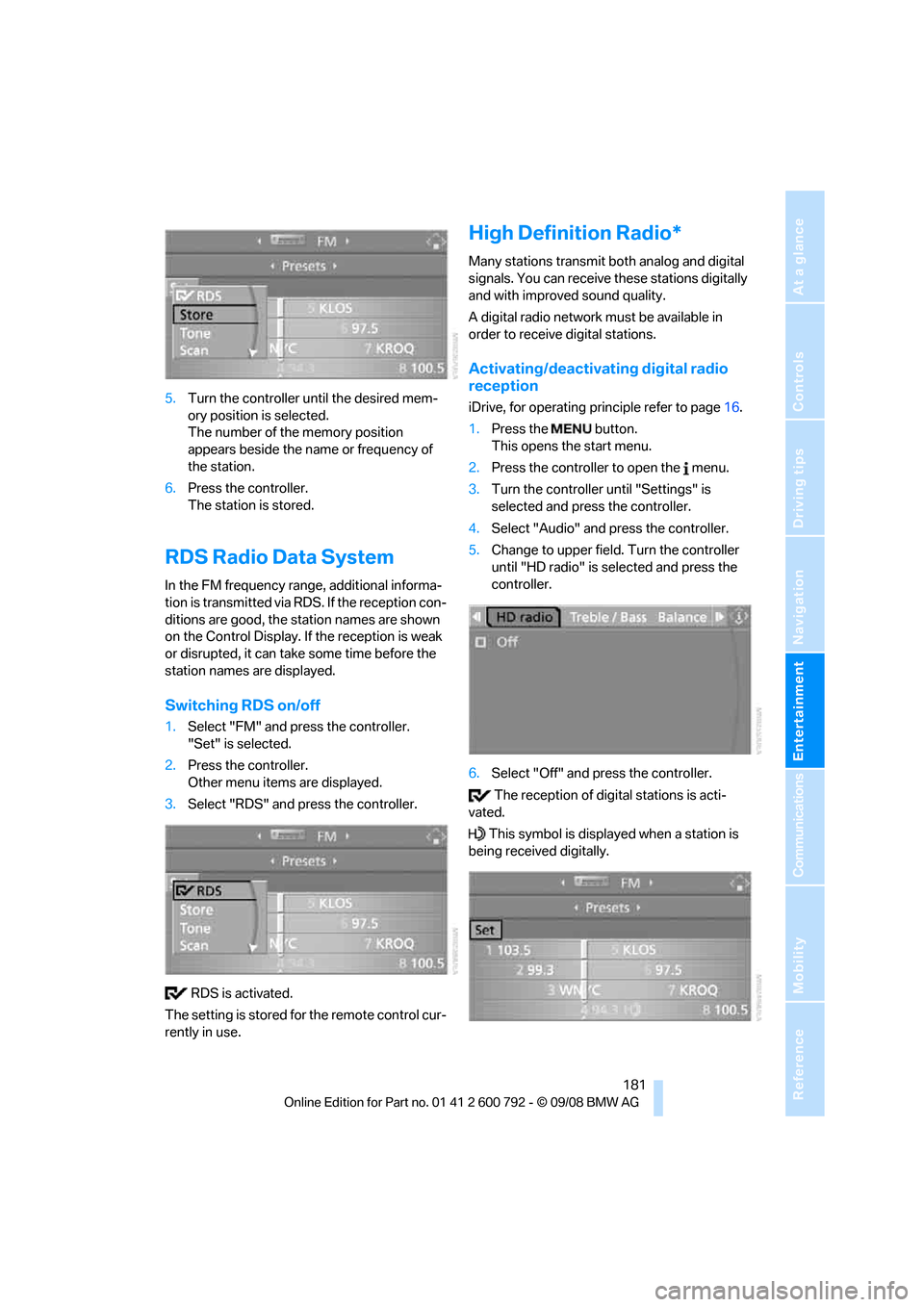
Switching RDS on/off
1. Select "FM" and press the controller.
"Set" is selected.
2. Press the controller.
Other menu items are displayed.
3. Select "RDS" and press the controller.
RDS is activated.
The setting is stored for the remote control cur-
rently in use.
High Definition Radio*
Many stations transmit both analog and digital
signals. You can receive these stations digitally
and with improved sound quality.
A digital radio network must be available in
order to receive digital stations.
Activating/deactivating digital radio
reception
iDrive, for operating pr inciple refer to page16.
1. Press the button.
This opens the start menu.
2. Press the controller to open the menu.
3. Turn the controller until "Settings" is
selected and press the controller.
4. Select "Audio" and press the controller.
5. Change to upper field. Turn the controller
until "HD radio" is se lected and press the
controller.
6. Select "Off" and press the controller.
The reception of digital stations is acti-
vated.
This symbol is displa yed when a station is
being received digitally.
Page 184 of 317
Radio
182
With some stations the
digital signals are not
transmitted simultaneously with the analog sig-
nals. If you are in an ar ea in which the selected
station is not continuous ly received digitally,
playback changes betwee n analog and digital
reception. This can result in repetitions or inter-
ruptions. In this case it may be advisable to
deactivate digital radio reception.
Selecting programs of a digital station*
Some stations transmit several programs on
one frequency. To select one of these pro-
grams:
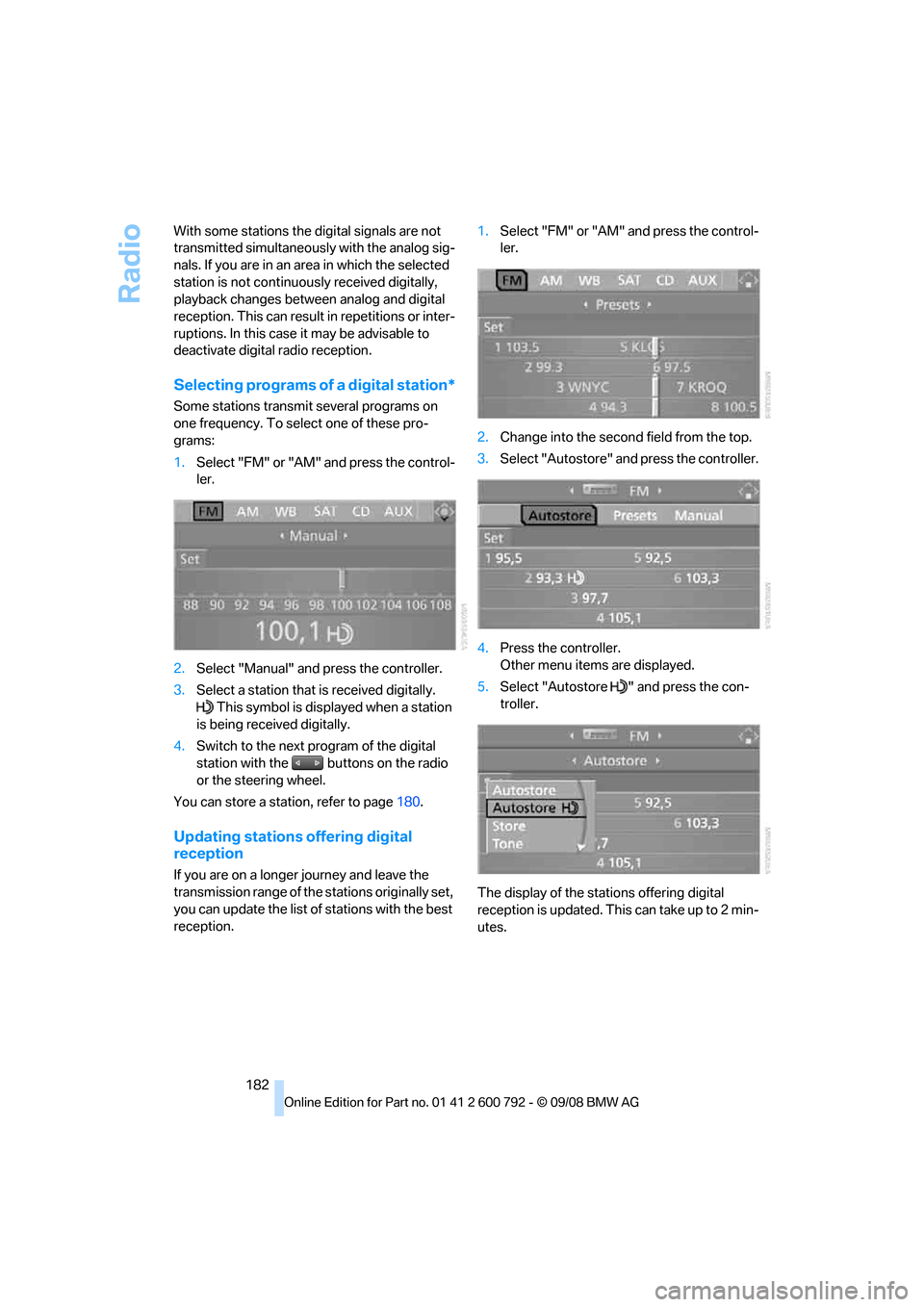
1. Select "FM" or "AM" and press the control-
ler.
2. Select "Manual" and press the controller.
3. Select a station that is received digitally.
This symbol is displayed when a station
is being received digitally.
4. Switch to the next program of the digital
station with the buttons on the radio
or the steering wheel.
You can store a station, refer to page 180.
Updating stations offering digital
reception
If you are on a longer journey and leave the
transmission range of the stations originally set,
you can update the list of stations with the best
reception. 1.
Select "FM" or "AM" and press the control-
ler.
2. Change into the second field from the top.
3. Select "Autostore" and press the controller.
4. Press the controller.
Other menu items are displayed.
5. Select "Autostore " and press the con-
troller.
The display of the stations offering digital
reception is updated. This can take up to 2 min-
utes.
Page 185 of 317
Navigation
Entertainment
Driving tips
183Reference
At a glance
Controls
Communications
Mobility
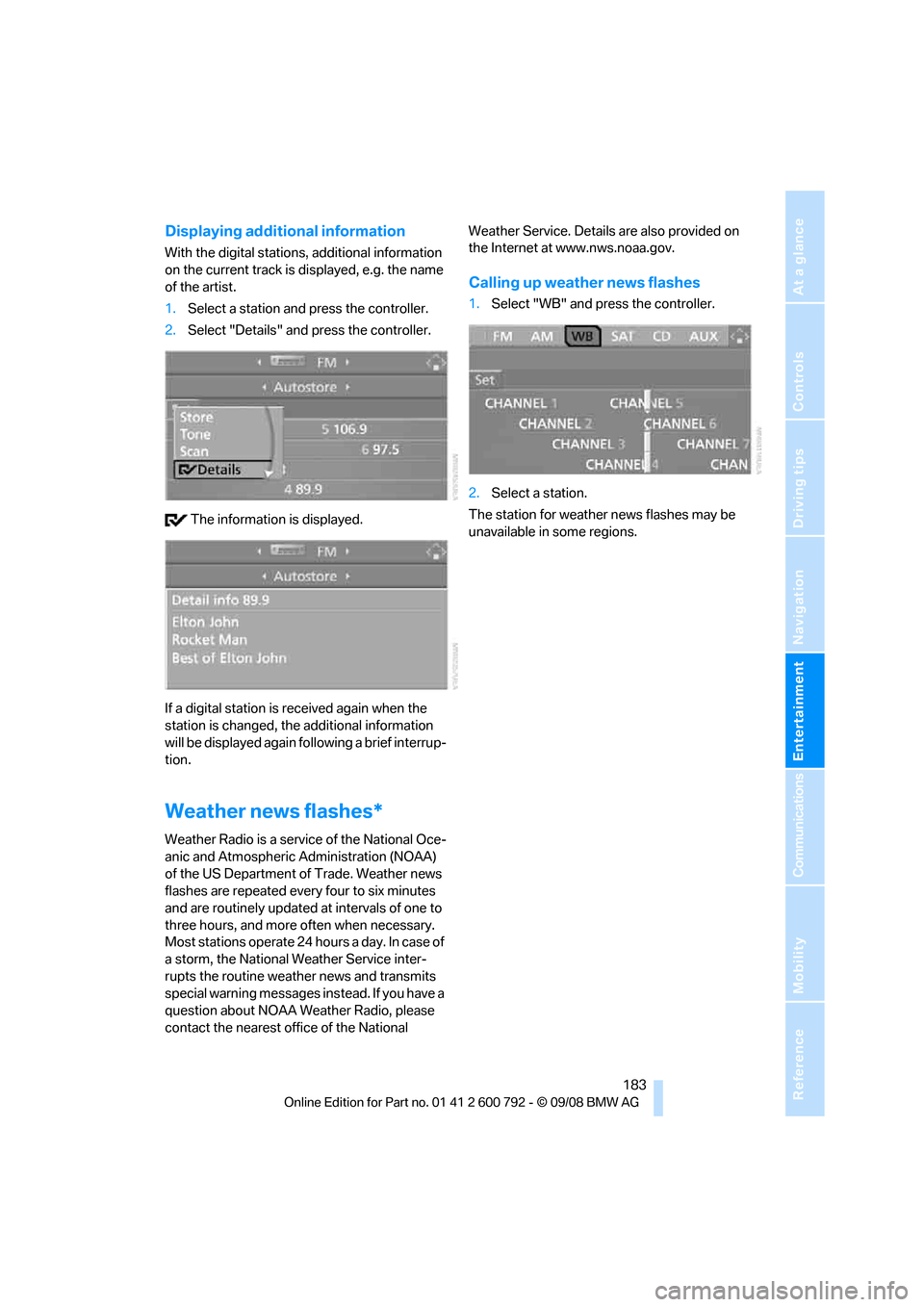
Displaying additional information
With the digital stations, additional information
on the current track is displayed, e.g. the name
of the artist.
1. Select a station and press the controller.
2. Select "Details" and press the controller.
The information is displayed.
If a digital station is received again when the
station is changed, the additional information
will be displayed again following a brief interrup-
tion.
Weather news flashes*
Weather Radio is a service of the National Oce-
anic and Atmospheric Administration (NOAA)
of the US Department of Trade. Weather news
flashes are repeated every four to six minutes
and are routinely updated at intervals of one to
three hours, and more often when necessary.
Most stations operate 24 ho urs a day. In case of
a storm, the National Weather Service inter-
rupts the routine weather news and transmits
special warning messages in stead. If you have a
question about NOAA Weather Radio, please
contact the nearest offi ce of the National Weather Service. Details are also provided on
the Internet at www.nws.noaa.gov.
Calling up weather news flashes
1.
Select "WB" and press the controller.
2. Select a station.
The station for weather news flashes may be
unavailable in some regions.
Page 186 of 317
Satellite radio
184
Satellite radio
You can receive over 100 different channels
with high sound quality.
The channels are offered to you in predefined
packages. To receive the channels of your
choice, you must have this package enabled.
With this new techno logy the signal may
fail, causing interruptions in reception. <
Enabling or disabling
channels
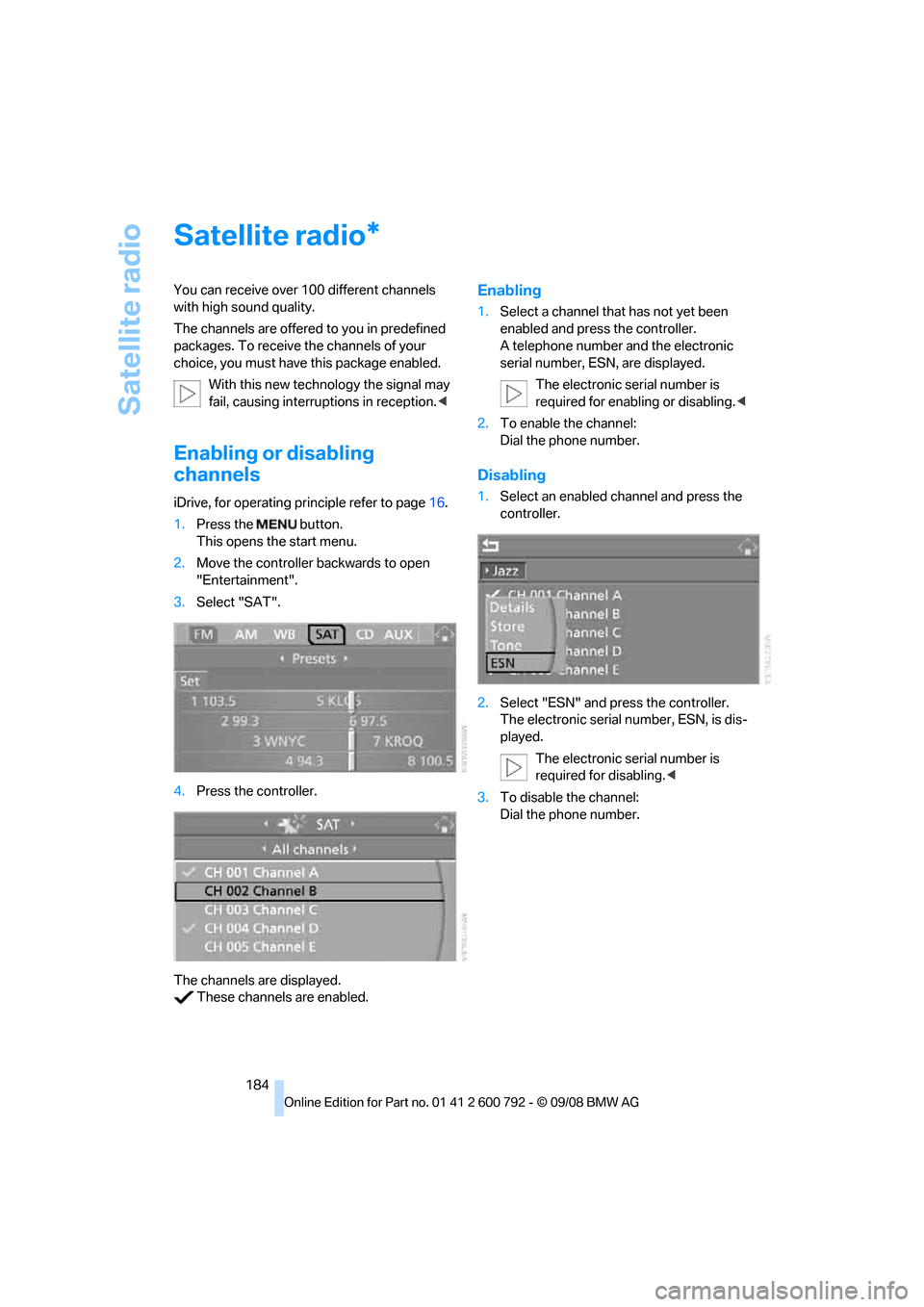
iDrive, for operating principle refer to page16.
1. Press the button.
This opens the start menu.
2. Move the controller backwards to open
"Entertainment".
3. Select "SAT".
4. Press the controller.
The channels are displayed. These channels are enabled.
Enabling
1. Select a channel that has not yet been
enabled and press the controller.
A telephone number and the electronic
serial number, ESN, are displayed.
The electronic serial number is
required for enabling or disabling. <
2. To enable the channel:
Dial the phone number.
Disabling
1.Select an enabled channel and press the
controller.
2. Select "ESN" and press the controller.
The electronic serial number, ESN, is dis-
played.
The electronic serial number is
required for disabling. <
3. To disable the channel:
Dial the phone number.
*
Page 188 of 317
Satellite radio
186
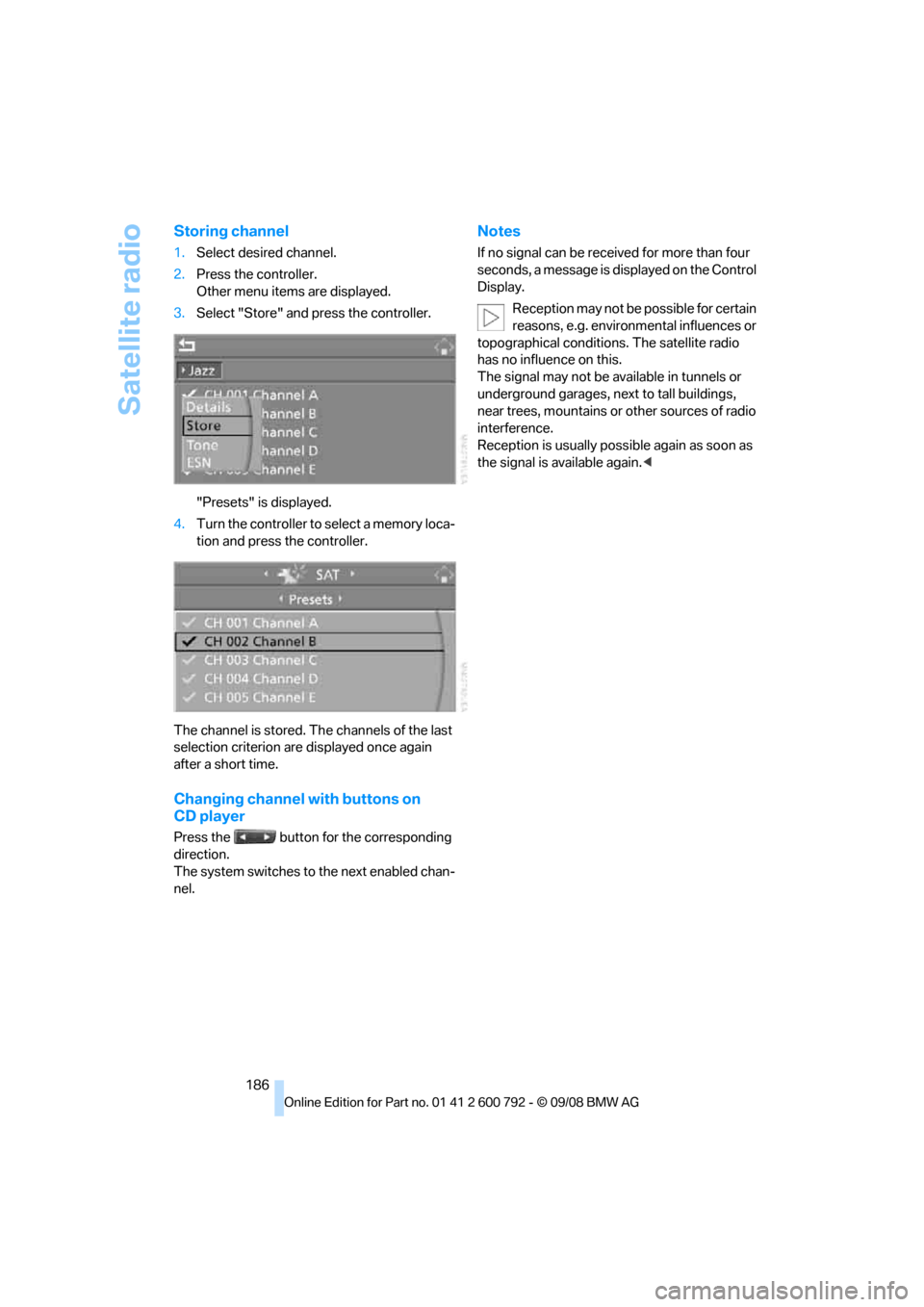
Storing channel
1.Select desired channel.
2. Press the controller.
Other menu items are displayed.
3. Select "Store" and press the controller.
"Presets" is displayed.
4. Turn the controller to select a memory loca-
tion and press the controller.
The channel is stored. Th e channels of the last
selection criterion are displayed once again
after a short time.
Changing channel with buttons on
CD player
Press the button for the corresponding
direction.
The system switches to the next enabled chan-
nel.
Notes
If no signal can be rece ived for more than four
seconds, a message is displayed on the Control
Display.
Reception may not be possible for certain
reasons, e.g. environmental influences or
topographical conditions. The satellite radio
has no influence on this.
The signal may not be av ailable in tunnels or
underground garages, ne xt to tall buildings,
near trees, mountains or other sources of radio
interference.
Reception is usually poss ible again as soon as
the signal is available again. <
Page 228 of 317
Telephoning
226
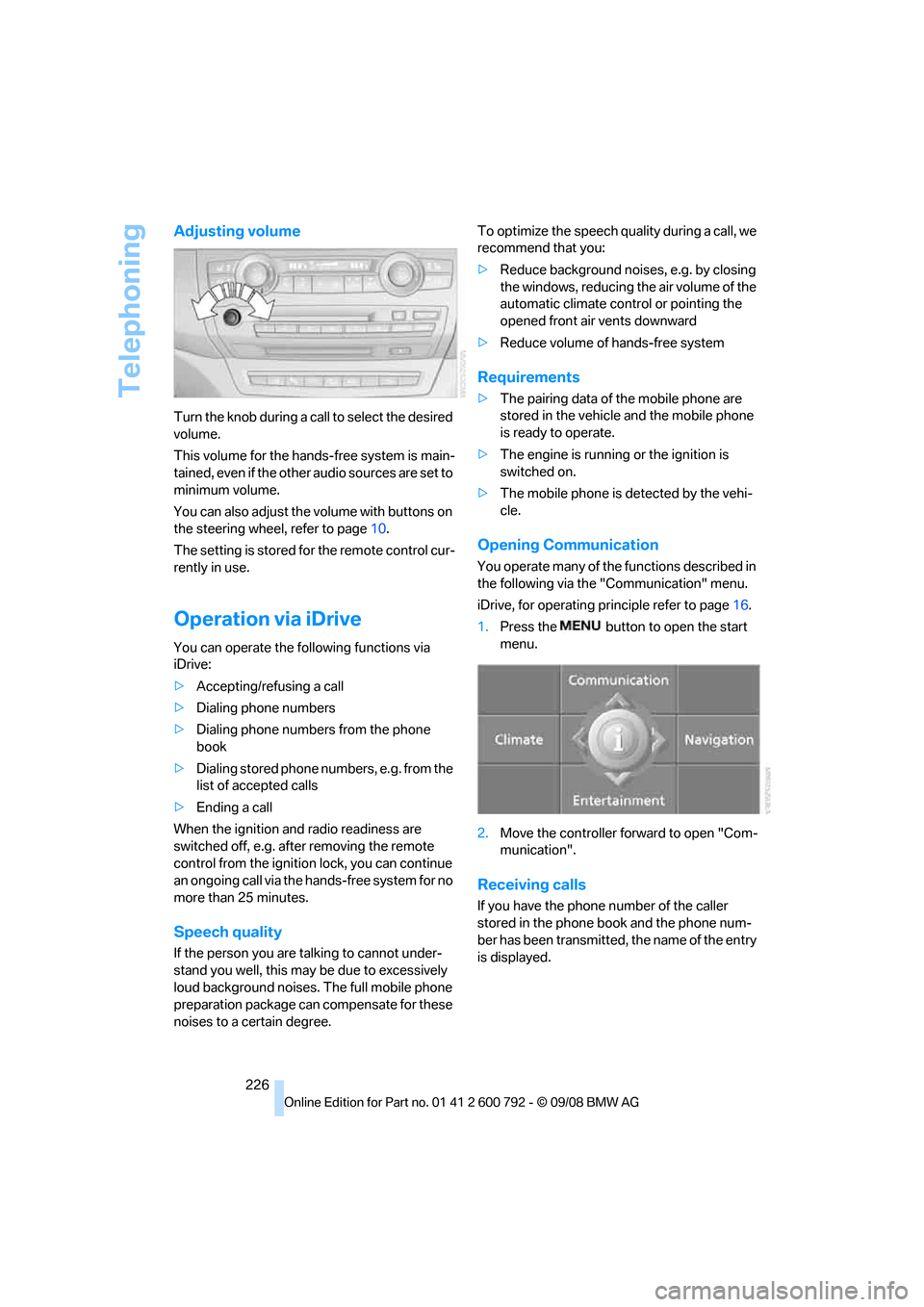
Adjusting volume
Turn the knob during a call to select the desired
volume.
This volume for the hand s-free system is main-
tained, even if the other audio sources are set to
minimum volume.
You can also adjust the volume with buttons on
the steering wheel, refer to page 10.
The setting is stored fo r the remote control cur-
rently in use.
Operation via iDrive
You can operate the following functions via
iDrive:
> Accepting/refusing a call
> Dialing phone numbers
> Dialing phone numbers from the phone
book
> Dialing stored phone numbers, e.g. from the
list of accepted calls
> Ending a call
When the ignition and radio readiness are
switched off, e.g. after removing the remote
control from the ignition lock, you can continue
an ongoing call via the hands-free system for no
more than 25 minutes.
Speech quality
If the person you are talking to cannot under-
stand you well, this may be due to excessively
loud background noises. The full mobile phone
preparation package can compensate for these
noises to a certain degree. To optimize the speech qua
lity during a call, we
recommend that you:
> Reduce background noises, e.g. by closing
the windows, reducing the air volume of the
automatic climate control or pointing the
opened front air vents downward
> Reduce volume of hands-free system
Requirements
>The pairing data of the mobile phone are
stored in the vehicle and the mobile phone
is ready to operate.
> The engine is running or the ignition is
switched on.
> The mobile phone is detected by the vehi-
cle.
Opening Communication
You operate many of the functions described in
the following via the "Communication" menu.
iDrive, for operating pr inciple refer to page16.
1. Press the button to open the start
menu.
2. Move the controller forward to open "Com-
munication".
Receiving calls
If you have the phone number of the caller
stored in the phone book and the phone num-
ber has been transmitted, the name of the entry
is displayed.
Page 236 of 317
Telephoning
234
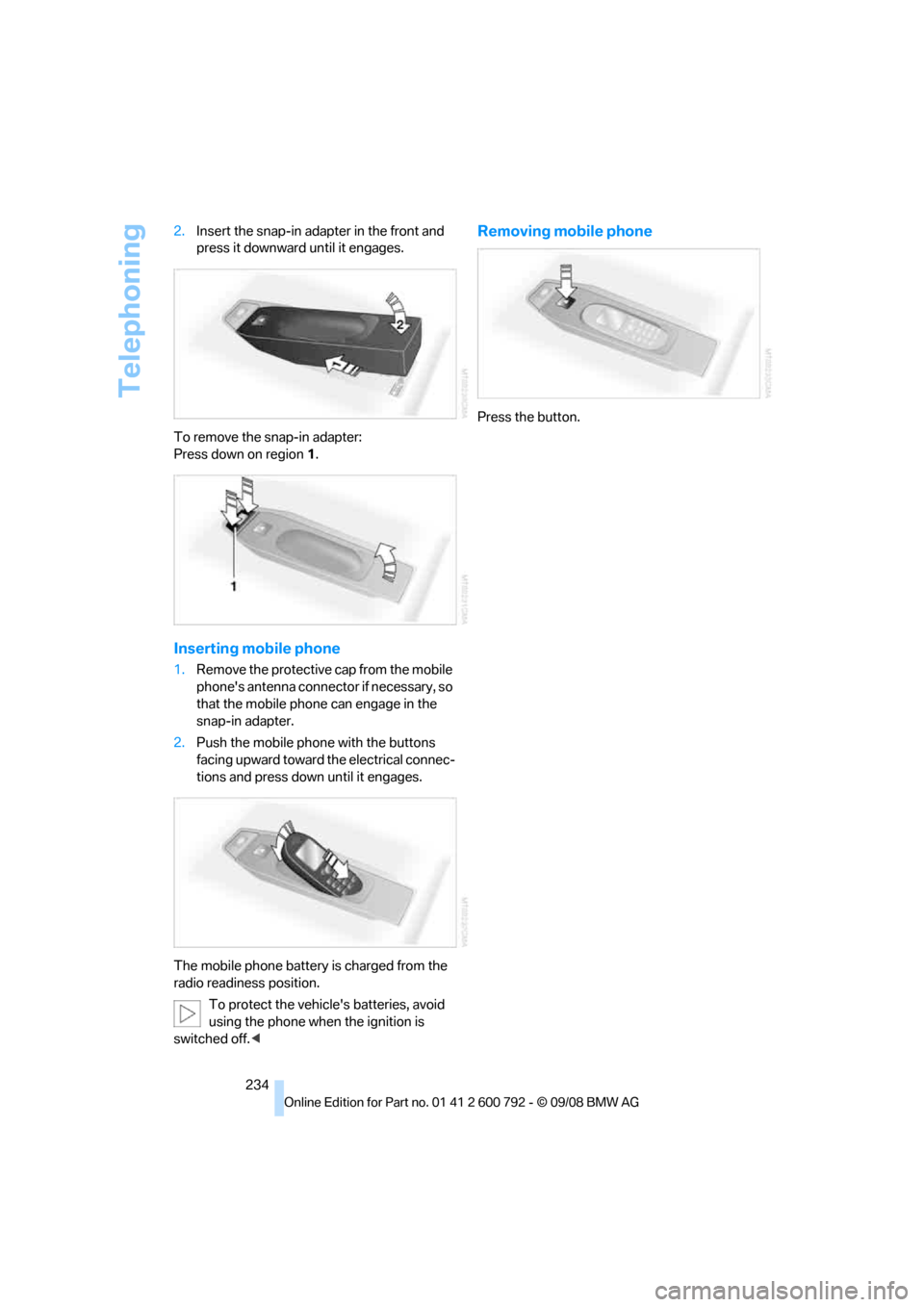
2.
Insert the snap-in adapter in the front and
press it downward until it engages.
To remove the snap-in adapter:
Press down on region 1.
Inserting mobile phone
1. Remove the protective cap from the mobile
phone's antenna connector if necessary, so
that the mobile phone can engage in the
snap-in adapter.
2. Push the mobile phone with the buttons
facing upward toward the electrical connec-
tions and press down until it engages.
The mobile phone battery is charged from the
radio readiness position. To protect the vehicle's batteries, avoid
using the phone when the ignition is
switched off. <
Removing mobile phone
Press the button.
Page 280 of 317
Replacing components
278
Vehicle Center or bring them to a collection
point. Maintain the battery
in an upright position
for transport and storage. Always restrain the
battery to prevent it from tipping over during
transport. <
Power failure
Following a temporary power failure, e.g. due to
a discharged battery, the use of some equip-
ment will be restricted, requiring its reinitializa-
tion. In the same way, individual settings are lost
and must be updated again:
> Seat, mirror and steering wheel memory
The positions must be stored again, refer to
page 50.
> Time and Date
The values must be updated again, refer to
pages 88, 89.
> Radio
Radio stations must be stored again, refer
to page 180.
> Navigation system
You must wait until the system becomes
functional again, refer to page 170.
> Glass sunroof/panorama glass sunroof
It may only be possible to raise the glass
sunroof/panorama gl ass sunroof The sys-
tem must be initialized, refer to page 46.
> Digital compass
The system must be calibrated, refer to
page 126.
Before removing the vehicle from stor-
age, consult your BMW Sports Activity
Vehicle Center. <
Fuses
Never attempt to repair a blown fuse and
do not replace a defective fuse with a sub-
stitute of another color or amperage rating, as
this could lead to a circ uit overload, ultimately
resulting in a fire in the vehicle. <
Spare fuses, a pair of plastic tweezers and infor-
mation on the fuse assi gnment are located near
the fuses in the cargo bay.
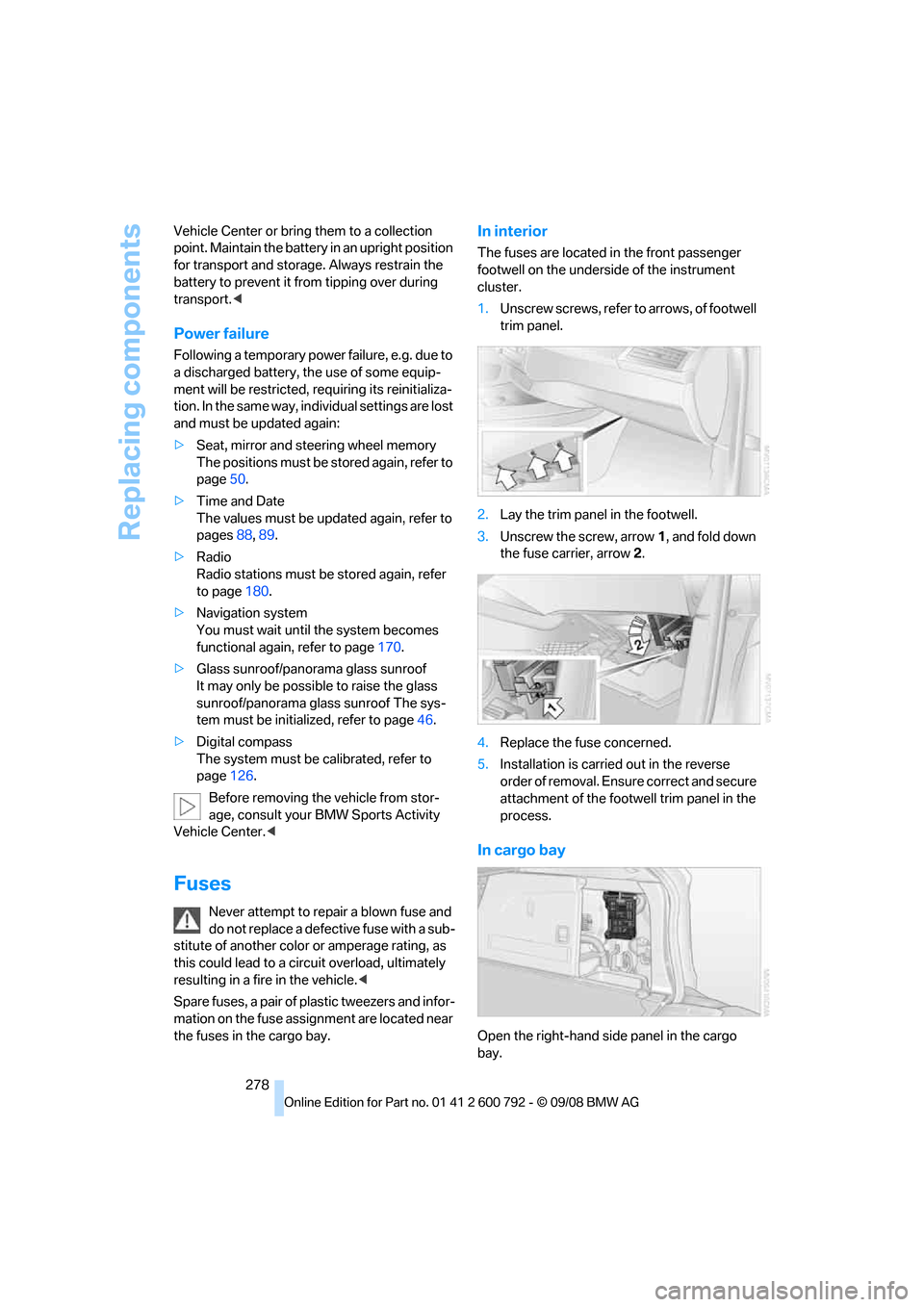
In interior
The fuses are located in the front passenger
footwell on the undersid e of the instrument
cluster.
1. Unscrew screws, refer to arrows, of footwell
trim panel.
2. Lay the trim panel in the footwell.
3. Unscrew the screw, arrow 1, and fold down
the fuse carrier, arrow 2.
4. Replace the fuse concerned.
5. Installation is carrie d out in the reverse
order of removal. Ensure correct and secure
attachment of the foot well trim panel in the
process.
In cargo bay
Open the right-hand side panel in the cargo
bay.
Page 281 of 317
Mobility
279Reference
At a glance
Controls
Driving tips
Communications
Navigation
Entertainment
Giving and receiving assistance
Emergency request
Conditions for an emergency request:
>Full preparation package mobile phone.
With this equipment, an emergency request
is still possible when no mobile phone is
paired in the vehicle.
> BMW Assist is activated.
Activating BMW Assist, refer to page 240.
> Radio readiness is switched on.
> The BMW Assist system is logged in on a
wireless communications network.
> The emergency request system is opera-
ble.
When the contract of participation with BMW
Assist expires, the BMW Assist system can be
deactivated by a BMW Sports Activity Vehicle
Center without having to visit a workshop. Once
the BMW Assist system has been deactivated,
emergency requests are not possible. The
BMW Assist system be reactivated by a BMW
Sports Activity Vehicle Center after signing a
new contract.
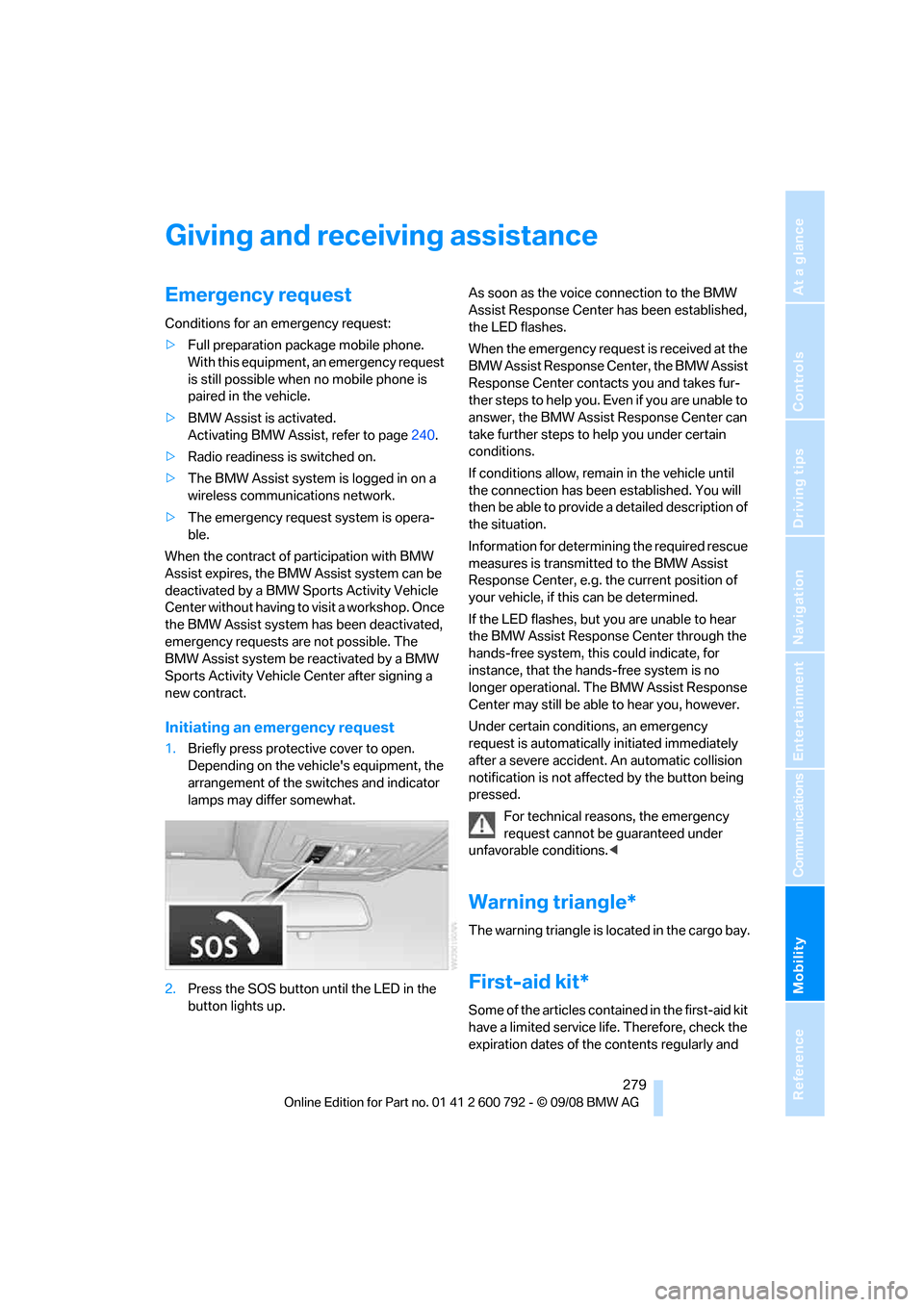
Initiating an emergency request
1. Briefly press protective cover to open.
Depending on the vehicle's equipment, the
arrangement of the switches and indicator
lamps may differ somewhat.
2. Press the SOS button until the LED in the
button lights up. As soon as the voice connection to the BMW
Assist Response Center has been established,
the LED flashes.
When the emergency request is received at the
BMW Assist Response Center, the BMW Assist
Response Center contacts you and takes fur-
ther steps to help you. Even if you are unable to
answer, the BMW Assist Response Center can
take further steps to help you under certain
conditions.
If conditions allow, remain in the vehicle until
the connection has been
established. You will
then be able to provide a detailed description of
the situation.
Information for determining the required rescue
measures is transmitted to the BMW Assist
Response Center, e.g. the current position of
your vehicle, if this can be determined.
If the LED flashes, but you are unable to hear
the BMW Assist Response Center through the
hands-free system, this could indicate, for
instance, that the hand s-free system is no
longer operational. The BMW Assist Response
Center may still be able to hear you, however.
Under certain conditions, an emergency
request is automatically initiated immediately
after a severe accident . An automatic collision
notification is not affected by the button being
pressed.
For technical reasons, the emergency
request cannot be guaranteed under
unfavorable conditions. <
Warning triangle*
The warning triangle is located in the cargo bay.
First-aid kit*
Some of the articles cont ained in the first-aid kit
have a limited service life. Therefore, check the
expiration dates of the contents regularly and
Page 295 of 317
Reference 293
At a glance
Controls
Driving tips
Communications
Navigation
Entertainment
Mobility
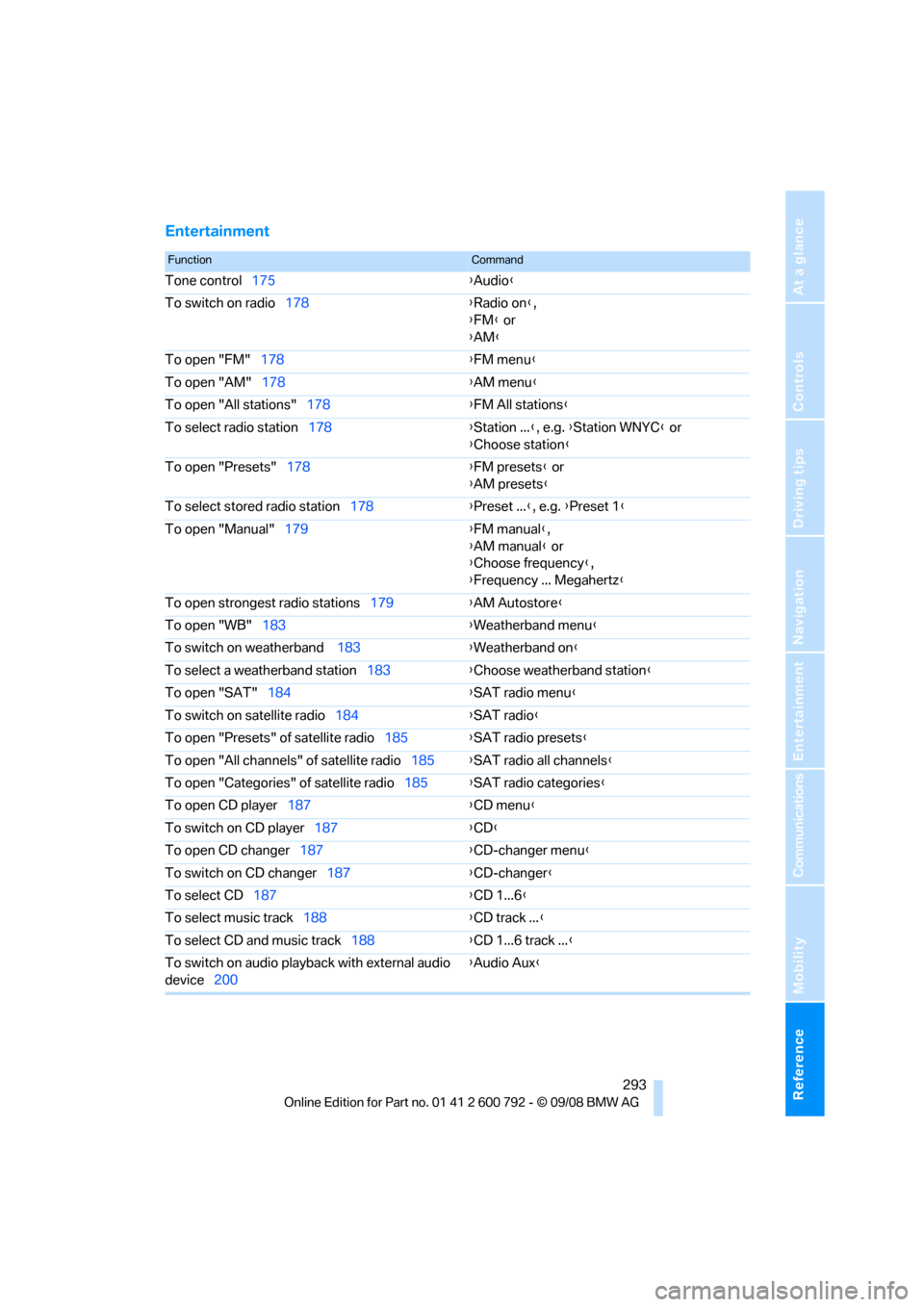
Entertainment
FunctionCommand
Tone control175 {Audio }
To switch on radio 178 {Radio on },
{ FM } or
{ AM }
To open "FM" 178 {FM menu }
To open "AM" 178 {AM menu }
To open "All stations" 178 {FM All stations }
To select radio station 178 {Station ... }, e.g. {Station WNYC } or
{ Choose station }
To open "Presets" 178 {FM presets } or
{ AM presets }
To select stored radio station 178{Preset ... }, e.g. {Preset 1 }
To open "Manual" 179 {FM manual },
{ AM manual } or
{ Choose frequency },
{ Frequency ... Megahertz }
To open strongest radio stations 179{AM Autostore }
To open "WB" 183 {Weatherband menu }
To switch on weatherband 183{Weatherband on }
To select a weatherband station 183{Choose weatherband station }
To open "SAT" 184 {SAT radio
menu}
To switch on satellite radio 184{SAT radio }
To open "Presets" of satellite radio 185{SAT radio presets }
To open "All channels" of satellite radio 185{SAT radio all channels }
To open "Categories" of satellite radio 185{SAT radio categories }
To open CD player 187 {CD menu }
To switch on CD player 187 {CD }
To open CD changer 187 {CD-changer menu }
To switch on CD changer 187{CD-changer }
To select CD 187 {CD 1...6 }
To select music track 188 {CD track ... }
To select CD and music track 188{CD 1...6 track ... }
To switch on audio playback with external audio
device 200 {
Audio Aux }