warning BMW X5M 2011 E70 Owner's Guide
[x] Cancel search | Manufacturer: BMW, Model Year: 2011, Model line: X5M, Model: BMW X5M 2011 E70Pages: 312, PDF Size: 8.96 MB
Page 85 of 312
Controls
83Reference
At a glance
Driving tips
Communications
Navigation
Entertainment
Mobility
Indicator and warning lamps
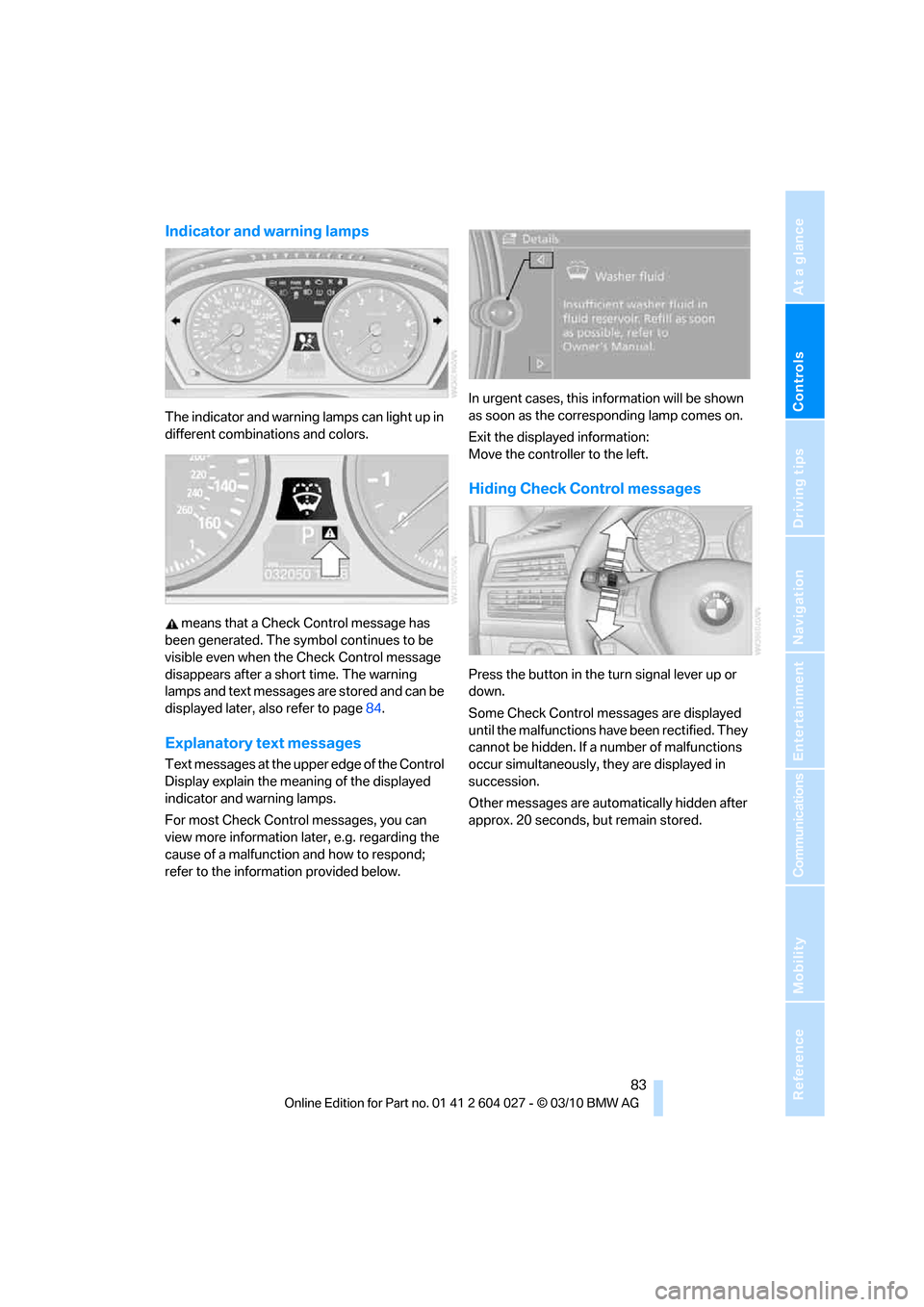
The indicator and warning lamps can light up in
different combinations and colors.
means that a Check Control message has
been generated. The symbol continues to be
visible even when the Check Control message
disappears after a short time. The warning
lamps and text messages are stored and can be
displayed later, also refer to page84.
Explanatory text messages
Text messages at the upper edge of the Control
Display explain the meaning of the displayed
indicator and warning lamps.
For most Check Control messages, you can
view more information later, e.g. regarding the
cause of a malfunction and how to respond;
refer to the information provided below.In urgent cases, this information will be shown
as soon as the corresponding lamp comes on.
Exit the displayed information:
Move the controller to the left.
Hiding Check Control messages
Press the button in the turn signal lever up or
down.
Some Check Control messages are displayed
until the malfunctions have been rectified. They
cannot be hidden. If a number of malfunctions
occur simultaneously, they are displayed in
succession.
Other messages are automatically hidden after
approx. 20 seconds, but remain stored.
Page 86 of 312
Controls Overview
84
Displaying stored Check Control
messages
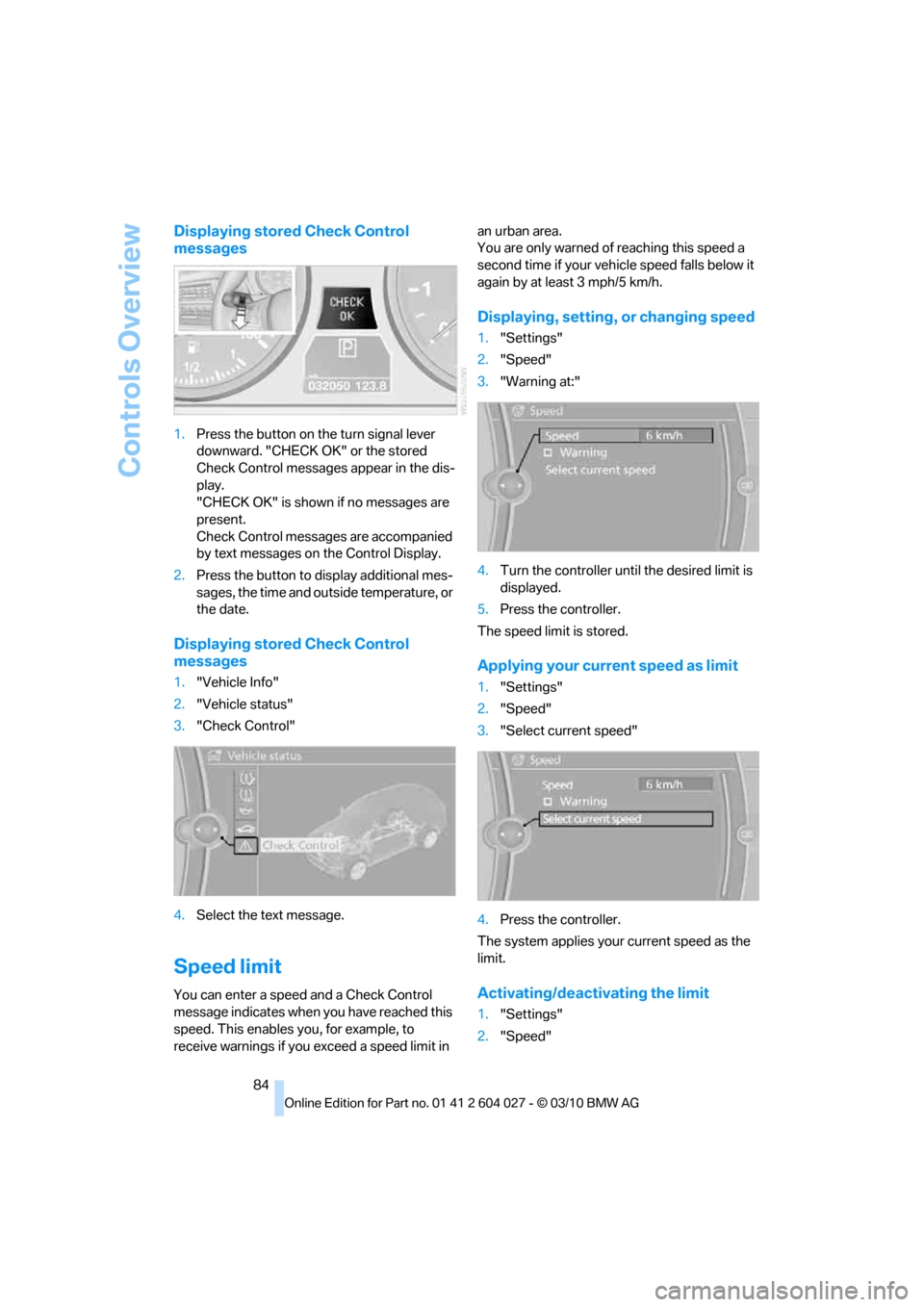
1.Press the button on the turn signal lever
downward. "CHECK OK" or the stored
Check Control messages appear in the dis-
play.
"CHECK OK" is shown if no messages are
present.
Check Control messages are accompanied
by text messages on the Control Display.
2.Press the button to display additional mes-
sages, the time and outside temperature, or
the date.
Displaying stored Check Control
messages
1."Vehicle Info"
2."Vehicle status"
3."Check Control"
4.Select the text message.
Speed limit
You can enter a speed and a Check Control
message indicates when you have reached this
speed. This enables you, for example, to
receive warnings if you exceed a speed limit in an urban area.
You are only warned of reaching this speed a
second time if your vehicle speed falls below it
again by at least 3 mph/5 km/h.
Displaying, setting, or changing speed
1."Settings"
2."Speed"
3."Warning at:"
4.Turn the controller until the desired limit is
displayed.
5.Press the controller.
The speed limit is stored.
Applying your current speed as limit
1."Settings"
2."Speed"
3."Select current speed"
4.Press the controller.
The system applies your current speed as the
limit.
Activating/deactivating the limit
1."Settings"
2."Speed"
Page 87 of 312
Controls
85Reference
At a glance
Driving tips
Communications
Navigation
Entertainment
Mobility
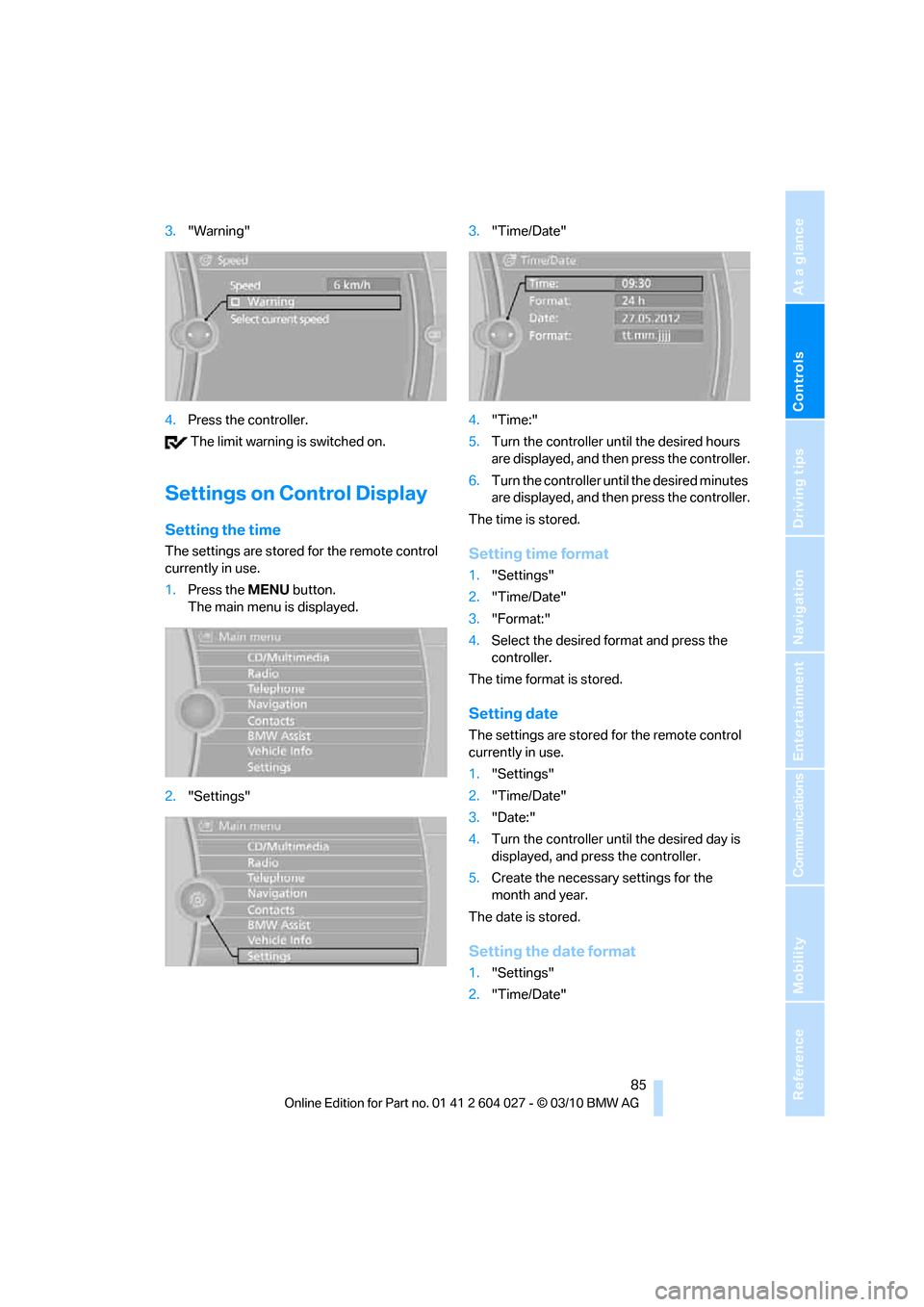
3."Warning"
4.Press the controller.
The limit warning is switched on.
Settings on Control Display
Setting the time
The settings are stored for the remote control
currently in use.
1.Press the MENUbutton.
The main menu is displayed.
2."Settings"3."Time/Date"
4."Time:"
5.Turn the controller until the desired hours
are displayed, and then press the controller.
6.Turn the controller until the desired minutes
are displayed, and then press the controller.
The time is stored.Setting time format
1."Settings"
2."Time/Date"
3."Format:"
4.Select the desired format and press the
controller.
The time format is stored.
Setting date
The settings are stored for the remote control
currently in use.
1."Settings"
2."Time/Date"
3."Date:"
4.Turn the controller until the desired day is
displayed, and press the controller.
5.Create the necessary settings for the
month and year.
The date is stored.
Setting the date format
1."Settings"
2."Time/Date"
Page 89 of 312
Controls
87Reference
At a glance
Driving tips
Communications
Navigation
Entertainment
Mobility
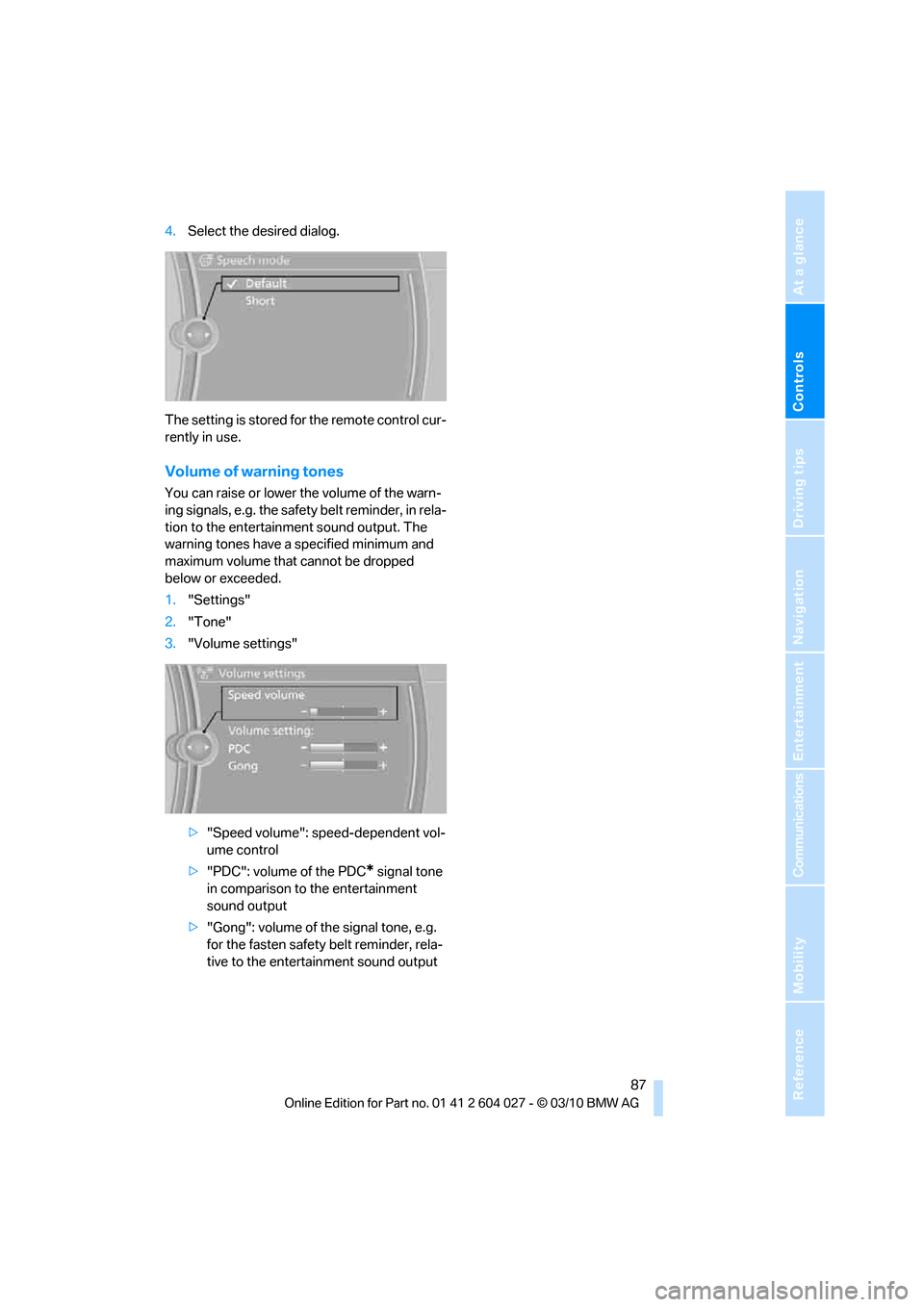
4.Select the desired dialog.
The setting is stored for the remote control cur-
rently in use.
Volume of warning tones
You can raise or lower the volume of the warn-
ing signals, e.g. the safety belt reminder, in rela-
tion to the entertainment sound output. The
warning tones have a specified minimum and
maximum volume that cannot be dropped
below or exceeded.
1."Settings"
2."Tone"
3."Volume settings"
>"Speed volume": speed-dependent vol-
ume control
>"PDC": volume of the PDC
* signal tone
in comparison to the entertainment
sound output
>"Gong": volume of the signal tone, e.g.
for the fasten safety belt reminder, rela-
tive to the entertainment sound output
Page 90 of 312
Technology for comfort, convenience and safety
88
Technology for comfort, convenience and
safety
PDC Park Distance Control*
The concept
In addition to the PDC Park Distance Control,
the rear view camera
*, refer to page93, can
also be switched on.
PDC assists you during parking. A slow
approach to an object in front of or behind your
vehicle is announced by:
>Signal tones
>Optical displays
Measurement
Ultrasonic sensors in the bumpers carry out the
measurement.
Their range is approx. 7 ft/2 m.
The acoustic warning begins:
>At approx. 24 in/60 cm for the front
* sen-
sors and the two rear corner sensors.
>At approx. 5 ft/1.50 m for the middle sen-
sors in the rear.
System limitations
PDC cannot replace the personal assess-
ment of the traffic situation. Also make a
direct visual check of the traffic situation around
the vehicle. Otherwise, there could be a risk of
accident, for example due to other road users or
objects outside the detection range of PDC.
Loud sources of sound, inside and outside the
vehicle, could drown out the PDC signal tone.<
Avoid approaching an object too quickly.
Avoid starting off quickly while PDC is not
yet activated.
Otherwise, physical circumstances could cause
the system to issue a warning late.<
Limitations of ultrasonic measurement
The detection of objects can come up against
the limitations of physical ultrasonic measure-
ment, for example:
>When using tow bars and towing hitches
>In the presence of thin or wedge-shaped
objects
>In the presence of low objects
>In the presence of objects with corners and
sharp edges
Low objects that have already been displayed,
e.g. curbs, can disappear again from the detec-
tion area of the sensors before or after a contin-
uous tone sounds.
Higher, protruding objects, e.g. ledges, cannot
be detected.
False warnings
Under the following conditions, PDC may dis-
play a warning even though no obstacle is
present in the detection range:
>In heavy rain
>When the sensors are heavily soiled or iced-
over
>When the sensors are covered with snow
>On rough road surfaces
>In large, rectangular buildings with smooth
walls, e.g. underground garages
>In the presence of heavy exhaust
>Due to the presence of other ultrasonic
sources such as street sweepers, steam
cleaners, or neon lamps.
Automatic activation
With the engine running or the ignition switched
on, shift the selector lever into position R.
Automatic deactivation
The system switches off and the LED goes out:
Page 91 of 312
Controls
89Reference
At a glance
Driving tips
Communications
Navigation
Entertainment
Mobility
>After approx. 165 ft/50 m when driving for-
ward
>At speeds over approx. 25 mph/35 km/h
when driving forward
Switch the system back on as needed.
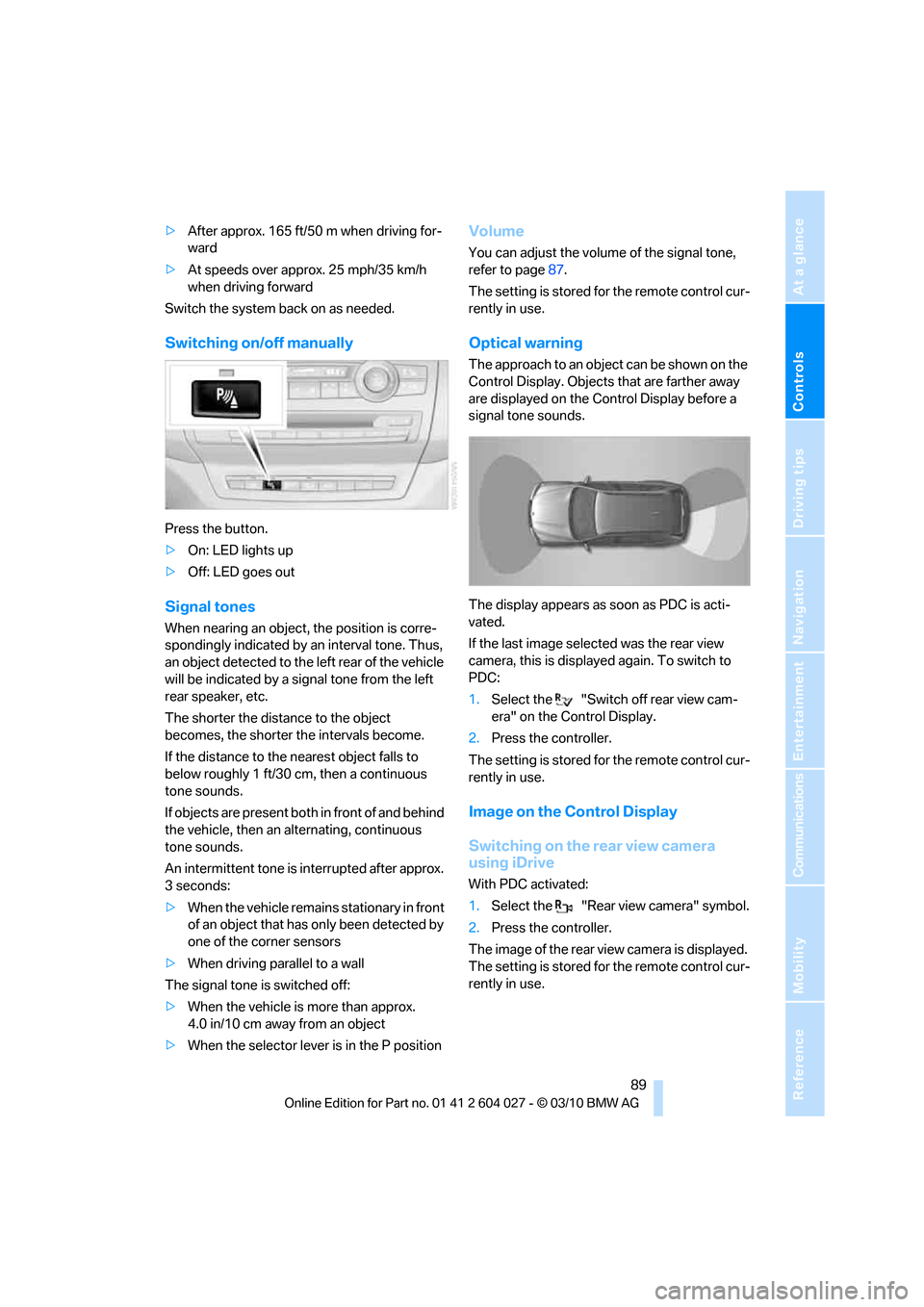
Switching on/off manually
Press the button.
>On: LED lights up
>Off: LED goes out
Signal tones
When nearing an object, the position is corre-
spondingly indicated by an interval tone. Thus,
an object detected to the left rear of the vehicle
will be indicated by a signal tone from the left
rear speaker, etc.
The shorter the distance to the object
becomes, the shorter the intervals become.
If the distance to the nearest object falls to
below roughly 1 ft/30 cm, then a continuous
tone sounds.
If objects are present both in front of and behind
the vehicle, then an alternating, continuous
tone sounds.
An intermittent tone is interrupted after approx.
3seconds:
>When the vehicle remains stationary in front
of an object that has only been detected by
one of the corner sensors
>When driving parallel to a wall
The signal tone is switched off:
>When the vehicle is more than approx.
4.0 in/10 cm away from an object
>When the selector lever is in the P position
Volume
You can adjust the volume of the signal tone,
refer to page87.
The setting is stored for the remote control cur-
rently in use.
Optical warning
The approach to an object can be shown on the
Control Display. Objects that are farther away
are displayed on the Control Display before a
signal tone sounds.
The display appears as soon as PDC is acti-
vated.
If the last image selected was the rear view
camera, this is displayed again. To switch to
PDC:
1.Select the "Switch off rear view cam-
era" on the Control Display.
2.Press the controller.
The setting is stored for the remote control cur-
rently in use.
Image on the Control Display
Switching on the rear view camera
using iDrive
With PDC activated:
1.Select the "Rear view camera" symbol.
2.Press the controller.
The image of the rear view camera is displayed.
The setting is stored for the remote control cur-
rently in use.
Page 93 of 312
Controls
91Reference
At a glance
Driving tips
Communications
Navigation
Entertainment
Mobility
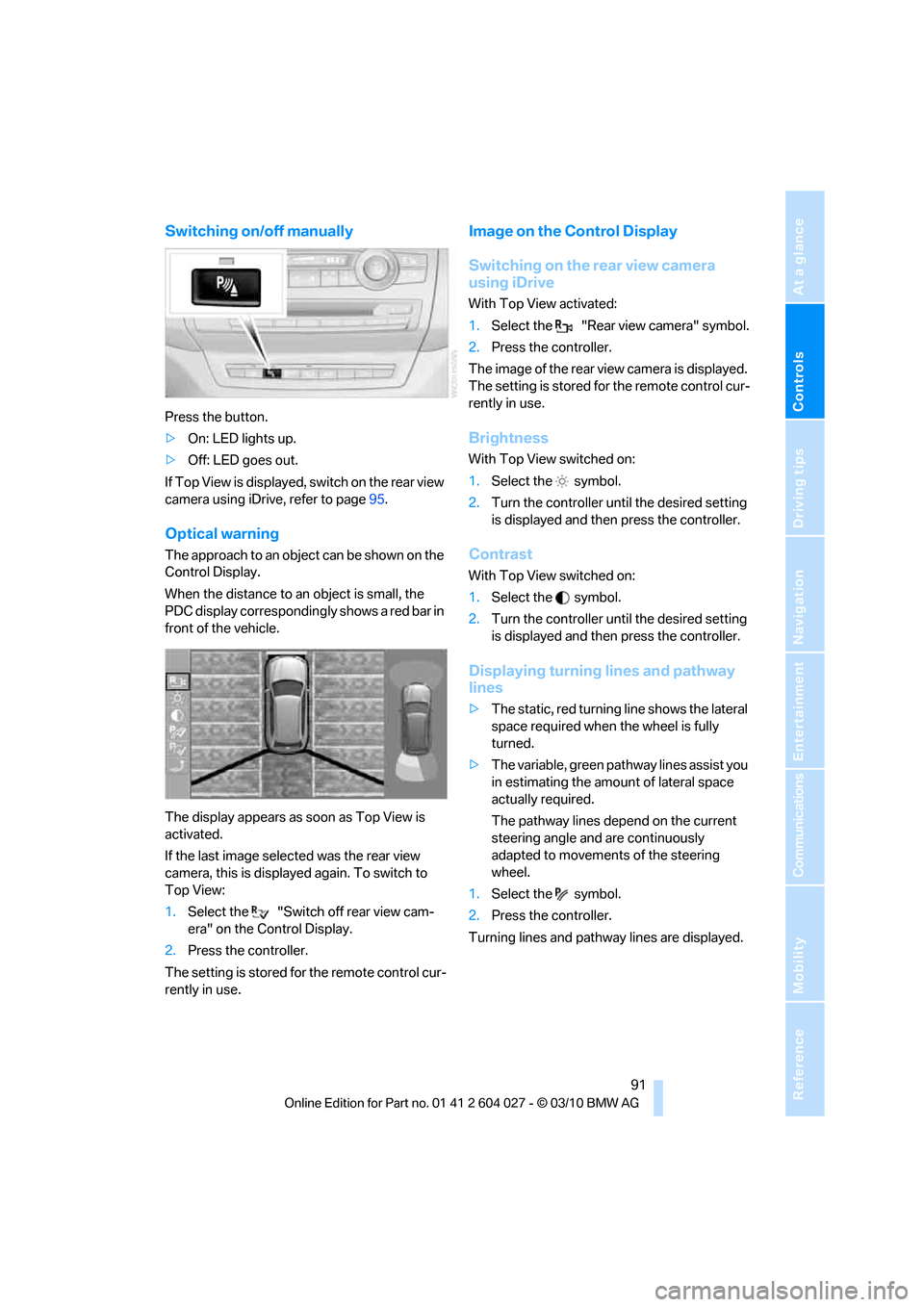
Switching on/off manually
Press the button.
>On: LED lights up.
>Off: LED goes out.
If Top View is displayed, switch o n the rea r vie w
camera using iDrive, refer to page95.
Optical warning
The approach to an object can be shown on the
Control Display.
When the distance to an object is small, the
PDC display correspondingly shows a red bar in
front of the vehicle.
The display appears as soon as Top View is
activated.
If the last image selected was the rear view
camera, this is displayed again. To switch to
Top View:
1.Select the "Switch off rear view cam-
era" on the Control Display.
2.Press the controller.
The setting is stored for the remote control cur-
rently in use.
Image on the Control Display
Switching on the rear view camera
using iDrive
With Top View activated:
1.Select the "Rear view camera" symbol.
2.Press the controller.
The image of the rear view camera is displayed.
The setting is stored for the remote control cur-
rently in use.
Brightness
With Top View switched on:
1.Select the symbol.
2.Turn the controller until the desired setting
is displayed and then press the controller.
Contrast
With Top View switched on:
1.Select the symbol.
2.Turn the controller until the desired setting
is displayed and then press the controller.
Displaying turning lines and pathway
lines
>The static, red turning line shows the lateral
space required when the wheel is fully
turned.
>The variable, green pathway lines assist you
in estimating the amount of lateral space
actually required.
The pathway lines depend on the current
steering angle and are continuously
adapted to movements of the steering
wheel.
1.Select the symbol.
2.Press the controller.
Turning lines and pathway lines are displayed.
Page 102 of 312
Technology for comfort, convenience and safety
100
Function requirements
The system must have been initialized while the
tire inflation pressure was correct; otherwise,
reliable signaling of a flat tire is not ensured.
Initialize the system after every correction of the
tire inflation pressure and after every tire or
wheel change.
System limits
Sudden serious tire damage caused by
external influences cannot be indicated in
advance.<
A natural, even pressure loss in all four tires
cannot be detected. Therefore, check the tire
inflation pressure regularly.
In the following situations, the system could be
delayed or malfunction:
>System has not been initialized
>Driving on snowy or slippery road surface
>Sporty driving style: slip in the drive wheels,
high lateral acceleration
>Driving with snow chains
*
When you are driving with the compact wheel*
the Flat Tire Monitor is unable to function.
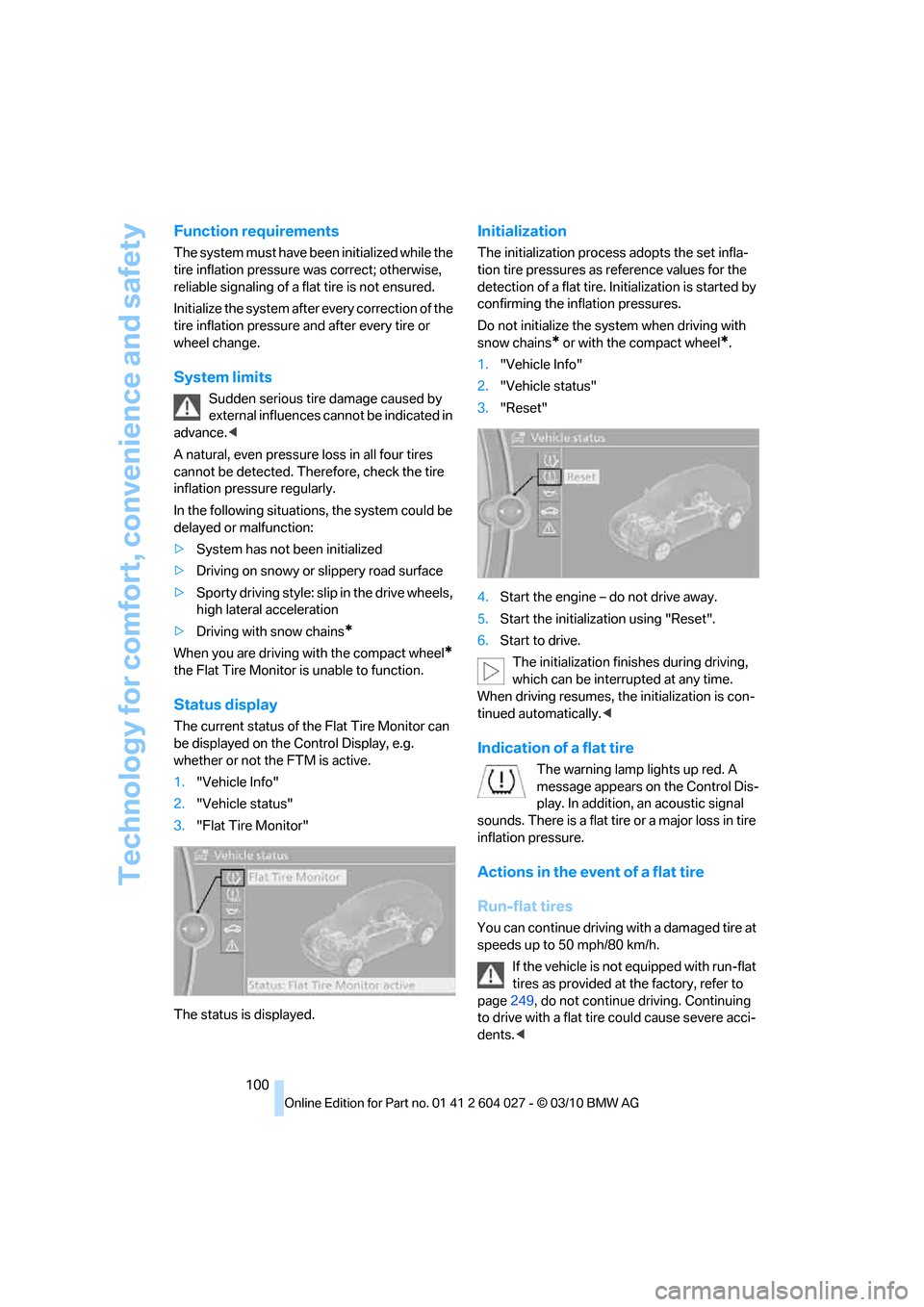
Status display
The current status of the Flat Tire Monitor can
be displayed on the Control Display, e.g.
whether or not the FTM is active.
1."Vehicle Info"
2."Vehicle status"
3."Flat Tire Monitor"
The status is displayed.
Initialization
The initialization process adopts the set infla-
tion tire pressures as reference values for the
detection of a flat tire. Initialization is started by
confirming the inflation pressures.
Do not initialize the system when driving with
snow chains
* or with the compact wheel*.
1."Vehicle Info"
2."Vehicle status"
3."Reset"
4.Start the engine – do not drive away.
5.Start the initialization using "Reset".
6.Start to drive.
The initialization finishes during driving,
which can be interrupted at any time.
When driving resumes, the initialization is con-
tinued automatically.<
Indication of a flat tire
The warning lamp lights up red. A
message appears on the Control Dis-
play. In addition, an acoustic signal
sounds. There is a flat tire or a major loss in tire
inflation pressure.
Actions in the event of a flat tire
Run-flat tires
You can continue driving with a damaged tire at
speeds up to 50 mph/80 km/h.
If the vehicle is not equipped with run-flat
tires as provided at the factory, refer to
page249, do not continue driving. Continuing
to drive with a flat tire could cause severe acci-
dents.<
Page 104 of 312
Technology for comfort, convenience and safety
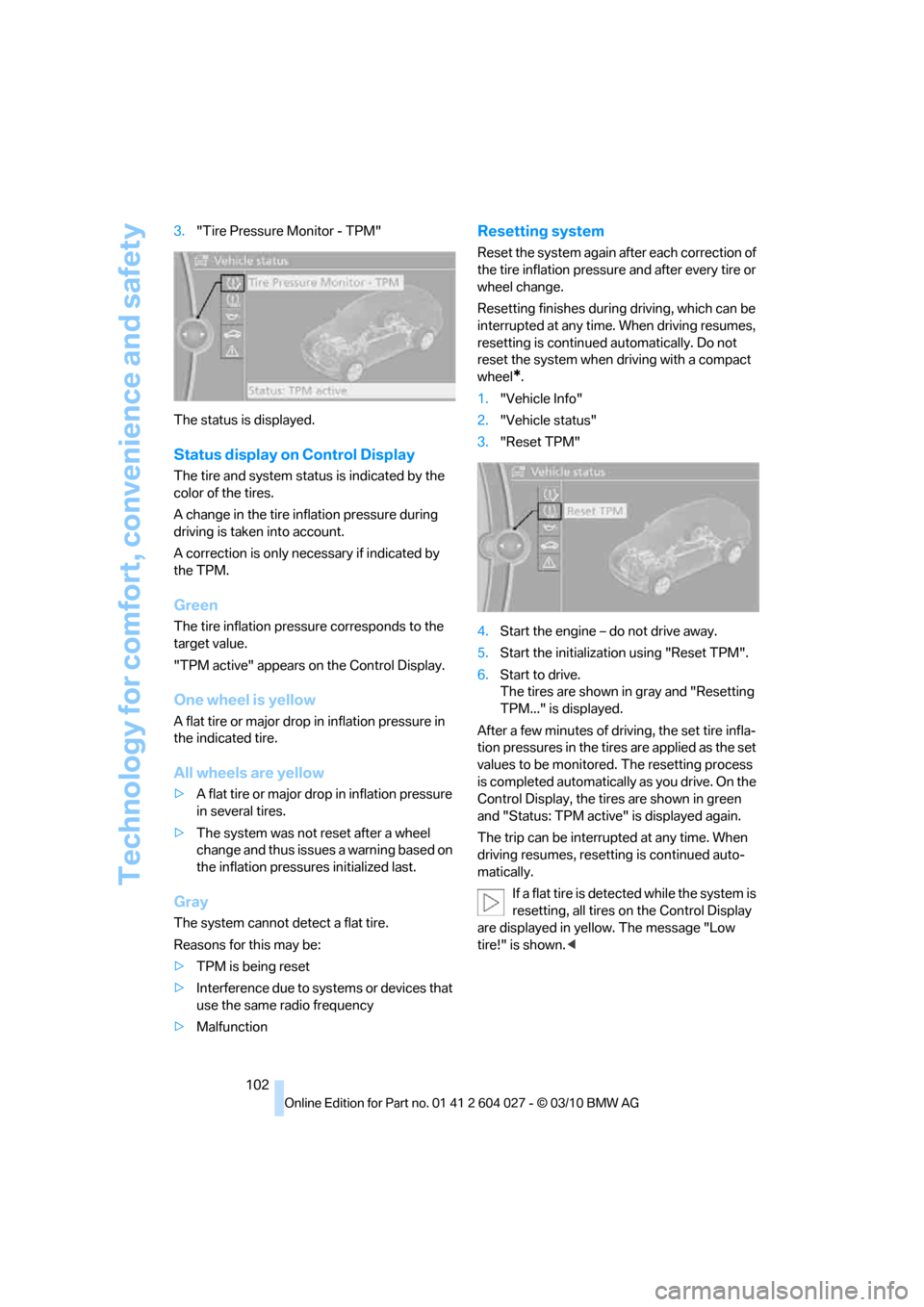
102 3."Tire Pressure Monitor - TPM"
The status is displayed.
Status display on Control Display
The tire and system status is indicated by the
color of the tires.
A change in the tire inflation pressure during
driving is taken into account.
A correction is only necessary if indicated by
the TPM.
Green
The tire inflation pressure corresponds to the
target value.
"TPM active" appears on the Control Display.
One wheel is yellow
A flat tire or major drop in inflation pressure in
the indicated tire.
All wheels are yellow
>A flat tire or major drop in inflation pressure
in several tires.
>The system was not reset after a wheel
change and thus issues a warning based on
the inflation pressures initialized last.
Gray
The system cannot detect a flat tire.
Reasons for this may be:
>TPM is being reset
>Interference due to systems or devices that
use the same radio frequency
>Malfunction
Resetting system
Reset the system again after each correction of
the tire inflation pressure and after every tire or
wheel change.
Resetting finishes during driving, which can be
interrupted at any time. When driving resumes,
resetting is continued automatically. Do not
reset the system when driving with a compact
wheel
*.
1."Vehicle Info"
2."Vehicle status"
3."Reset TPM"
4.Start the engine – do not drive away.
5.Start the initialization using "Reset TPM".
6.Start to drive.
The tires are shown in gray and "Resetting
TPM..." is displayed.
After a few minutes of driving, the set tire infla-
tion pressures in the tires are applied as the set
values to be monitored. The resetting process
is completed automatically as you drive. On the
Control Display, the tires are shown in green
and "Status: TPM active" is displayed again.
The trip can be interrupted at any time. When
driving resumes, resetting is continued auto-
matically.
If a flat tire is detected while the system is
resetting, all tires on the Control Display
are displayed in yellow. The message "Low
tire!" is shown.<
Page 105 of 312
Controls
103Reference
At a glance
Driving tips
Communications
Navigation
Entertainment
Mobility
Message with low tire inflation
pressure
The warning lamp lights up yellow. A
message appears on the Control Dis-
play. In addition, an acoustic signal
sounds.
>There is a flat tire or a major loss in tire infla-
tion pressure.
>The system was not reset after a wheel
change and thus issues a warning based on
the inflation pressures initialized last.
Cautiously reduce speed to below 50 mph/
80 km/h. Avoid sudden braking and steering
maneuvers. Do not exceed a speed of 50 mph/
80 km/h.
If the vehicle is not equipped with run-flat
tires as provided at the factory, refer to
page249, do not continue driving. Continuing
to drive with a flat tire could cause severe acci-
dents.<
Continued driving with a flat tire
Possible driving distance with complete loss of
tire inflation pressure:
>With a light load:
1 to 2 persons without luggage:
Approx. 155 miles/250 km
>With a medium load:
2 persons, cargo area full, or
4 persons without luggage:
Approx. 95 miles/150 km
>With a full load:
4 or more persons, cargo area full:
Approx. 30 miles/50 km
Drive reservedly and do not exceed a
speed of 50 mph/80 km/h.
A loss of tire inflation pressure results in a
change in the handling characteristics, e.g.
reduced lane stability during braking, a longer
braking distance and altered self-steering prop-
erties.<
Vibrations or loud noises while driving can
indicate complete failure of the tire.
Reduce your speed and stop; otherwise, pieces
of the tire could come loose and cause an acci-dent. Do not continue driving, and contact your
BMW Sports Activity Vehicle Center.<
Message when not reset
The yellow warning lamp lights up. A
message appears on the Control Dis-
play.
The system is not reset, e.g. after a wheel
change.
Check the tire inflation pressure and reset the
system, refer to page102.
Malfunction
The yellow warning lamp flashes and
then lights up continuously. The tires
are displayed in gray on the Control
Display. No flat tire can be detected.
Display in the following situations:
>Malfunction:
Have the system checked
>If a wheel without TPM electronics is
mounted, e.g. a compact wheel
*
>Interference due to systems or devices that
use the same radio frequency:
The system automatically reactivates once
it is outside of the field of interference.
Explanation according to the NHTSA/
FMVSS 138 Tire Pressure Monitoring
Systems
Each tire, including the spare (if provided),
should be checked monthly when cold and
inflated to the inflation pressure recommended
by the vehicle manufacturer on the vehicle plac-
ard or tire inflation pressure label. (If your vehi-
cle has tires of a different size than the size indi-
cated on the vehicle placard or tire inflation
pressure label, you should determine the
proper tire inflation pressure for those tires.)
As an added safety feature, your vehicle has
been equipped with a tire pressure monitoring
system (TPMS) that illuminates a low tire pres-
sure telltale when one or more of your tires is
significantly underinflated. Accordingly, when
the low tire pressure telltale illuminates, you
should stop and check your tires as soon as