cargo BMW X5M 2012 User Guide
[x] Cancel search | Manufacturer: BMW, Model Year: 2012, Model line: X5M, Model: BMW X5M 2012Pages: 317, PDF Size: 8.83 MB
Page 90 of 317
Approx. 30 miles/50 km.
The possible driving distance after a loss of tire
inflation pressure depends on the cargo load
and the driving style and conditions.
When the vehicle is driven with a damaged tire,
its handling characteristics change, e.g., re‐
duced lane stability during braking, a longer
braking distance, and altered self-steering
properties. Adjust your driving style accord‐
ingly. Avoid abrupt steering maneuvers or driv‐
ing over obstacles, e. g., curbs, potholes, etc.
Because
the possible driving distance depends
on how the vehicle is used during the trip, the
actual distance may be smaller or greater de‐
pending on the driving speed, road conditions,
external temperature, cargo load, etc.
Continued driving with a flat tire
Drive moderately and do not exceed a
speed of 50 mph/80 km/h.
A loss of tire inflation pressure results in a
change in the handling characteristics, e.g., re‐
duced lane stability during braking, a longer
braking distance and altered self-steering prop‐
erties.◀
Final tire failure
Vibrations or loud noises while driving can
indicate the final failure of the tire. Reduce speed
and stop; otherwise, pieces of the tire could
come loose and cause an accident. Do not con‐
tinue driving, and contact your service center.◀
Tire Pressure Monitor TPM*
The concept
The tire inflation pressure is measured in the
four mounted tires. The system notifies you if
there is a significant loss of pressure in one or
more tires.
Functional requirements
The system must have been reset while the in‐
flation pressure was correct; otherwise, reliable
signaling of a flat tire is not ensured. Always use wheels with TPM electronics to en‐
sure that the system will operate properly.
Reset the system after each correction of the
tire inflation pressure and after every tire or
wheel change.
System limits
Sudden tire damage
Sudden serious tire damage caused by
external influences cannot be indicated in ad‐
vance.◀
The system does not operate correctly if it has
not been reset. For example, a flat tire may be
indicated despite correct tire inflation pres‐
sures.
The
system is inactive and cannot indicate a flat
tire:
▷ If a wheel without TPM electronics is
mounted, e.g.,
compact wheel*.
▷ When the TPM is disturbed by other sys‐
tems or devices with the same radio fre‐
quency.
Status display
1. "Vehicle Info"
2. "Vehicle status"
3. "TPM"
The status is displayed.
Status
indicator on the Control Display
The tire and system status is indicated by the
color of the tires.
A change in the tire inflation pressure during
driving is taken into account.
A correction is only necessary if this is indicated
by the TPM
Wheels, green
The tire inflation pressure is equal to the target
state.
One wheel is yellow
A flat tire or major drop in inflation pressure in
the indicated tire. Seite 90
90 Online Edition for Part no. 01 40 2 606 735 - 03 11 500
Safety
Page 92 of 317
Approx. 155 miles/200 km.
▷ With a medium load:
2
persons, cargo area full, or 4 persons with‐
out luggage:
Approx. 94 miles/150 km.
▷ With a full load:
4 or more persons, cargo area full:
Approx. 30 miles/50 km.
The possible driving distance after a loss of tire
inflation pressure depends on the cargo load
and the driving style and conditions.
When the vehicle is driven with a damaged tire,
its handling characteristics change, e.g., re‐
duced lane stability during braking, a longer
braking distance, and altered self-steering
properties. Adjust your driving style accord‐
ingly. Avoid abrupt steering maneuvers or driv‐
ing over obstacles, e. g., curbs, potholes, etc.
Because
the possible driving distance depends
on how the vehicle is used during the trip, the
actual distance may be smaller or greater de‐
pending on the driving speed, road conditions,
external temperature, cargo load, etc.
Continued driving with a flat tire
Drive moderately and do not exceed a
speed of 50 mph/80 km/h.
A loss of tire inflation pressure results in a
change in the handling characteristics, e.g., re‐
duced lane stability during braking, a longer
braking distance and altered self-steering prop‐
erties.◀
Final tire failure
Vibrations or loud noises while driving can
indicate the final failure of the tire. Reduce speed
and stop; otherwise, pieces of the tire could
come loose and cause an accident. Do not con‐
tinue driving, and contact your service center.◀
Message when the system was not
reset
The yellow warning lamp lights up. A
message appears on the Control Dis‐
play. The system detected a wheel change but was
not reset.
Warnings regarding the current tire inflation
pressure are not reliable.
Check the tire inflation pressure and reset the
system.
Malfunction
The
small warning lamp flashes in yel‐
low and then lights up continuously;
the larger warning lamp comes on in
yellow. On the Control Display, the
tires are shown in gray and a message appears.
No flat tire can be detected.
Display in the following situations:
▷ If a wheel without TPM electronics is fitted,
for instance a compact wheel*: have the
service center check it if necessary.
▷ Malfunction: have the system checked by
your service center.
▷ TPM could not be fully reset. Reset the sys‐
tem again.
▷ Disturbance by systems or devices with the
same
radio frequency: after leaving the area
of the disturbance, the system automatically
becomes active again.
Declaration according to NHTSA/
FMVSS 138 Tire Pressure Monitoring
Systems
Each tire, including the spare (if provided)
should be checked monthly when cold and in‐
flated
to the inflation pressure recommended by
the vehicle manufacturer on the vehicle placard
or tire inflation pressure label. (If your vehicle has
tires of a different size than the size indicated on
the vehicle placard or tire inflation pressure la‐
bel, you should determine the proper tire infla‐
tion pressure for those tires.)
As an added safety feature, your vehicle has
been equipped with a tire pressure monitoring
system (TPMS) that illuminates a low tire pres‐
sure telltale when one or more of your tires is
significantly under-inflated. Accordingly, when
the low tire pressure telltale illuminates, you Seite 92
92 Online Edition for Part no. 01 40 2 606 735 - 03 11 500
Safety
Page 100 of 317
Chassis and suspension tuning
Two chassis and suspension tunings are avail‐
able for selection.
▷
Normal:
The comfortable basic setting offers opti‐
mum comfort when traveling.
▷ Sport:
The sporty basic setting offers increased
driving agility.
Selecting chassis and suspension
tuning Press the button.
The system switches between the two chassis
and suspension tuning settings.
▷
Sport:
The
LED in the button lights up and SPORT
is displayed in the instrument panel.
▷ Normal:
The LED in the button goes out.
The selection of the chassis and suspension
tuning setting is stored for the remote control
currently in use.
Drive-off assistant
This
system supports driving away on gradients.
The parking brake is not required.
1. Hold the vehicle in place with the foot brake.
2. Release the foot brake and drive away with‐
out delay.
Depending on the vehicle load, the vehicle may
roll back slightly. Driving off without delay
After
releasing the foot brake, start driving
without delay, since the drive-off assistant will
not hold the vehicle in place for more than ap‐
prox. 2 seconds and the vehicle will begin rolling
back.◀
Self-leveling suspension*
The concept
The self-leveling suspension on the rear axle
assures a continuous ground clearance.
To do so, the height of the vehicle is measured
by sensors at both rear wheels.
If the actual height deviates from the defined
height, such as due to cargo in the vehicle, this
difference is compensated very quickly. In ad‐
dition, spring motions resulting from cornering
or irregularities in the road surface are reduced
to a minimum.
The system works automatically.
Malfunctions
Malfunctions are displayed via Check Control,
refer to page 76.
Active steering*
The concept
The active steering actively varies the steering
angle of the front wheels in relation to the steer‐
ing wheel movements. In addition, it also varies
the steering force required for steering depend‐
ing on the vehicle's speed.
When you are driving in the low speed range, for
instance in a town or when parking, the steering
angle increases, i.e., steering becomes very di‐
rect. In the higher speed range, on the other
hand, the steering angle is reduced more and
more. This improves the handling of your vehicle
over the entire speed range.
In critical situations, the system can make tar‐
geted corrections to the steering angle provided Seite 100
100 Online Edition for Part no. 01 40 2 606 735 - 03 11 500
Driving stability control systems
Page 131 of 317
Connecting electrical devices
Sockets
The lighter socket can be used as a socket for
electrical
equipment while the engine is running
or when the ignition is switched on. The total
load of all sockets must not exceed 140 watt at
12 volt.
Avoid damaging the sockets by attempting to
insert plugs of unsuitable shape or size.
Front center console Slide the cover forward.
To
access the socket: remove the cap or pull out
the cigarette lighter*.
Rear center console* The arrangement of the sockets*
may vary with
the equipment.
To access the sockets: remove the caps. In storage compartment under center
armrest*
To access the socket*: remove the cover.
In the cargo area*
To access the socket: fold open the cover.
BMW X6: in the rear console
Slide the cover back.
To access the socket: pull off the cover.
Seite 131
131Online Edition for Part no. 01 40 2 606 735 - 03 11 500
Reference Mobility Communication Entertainment Navigation Driving tips
Controls At a glance
Page 132 of 317
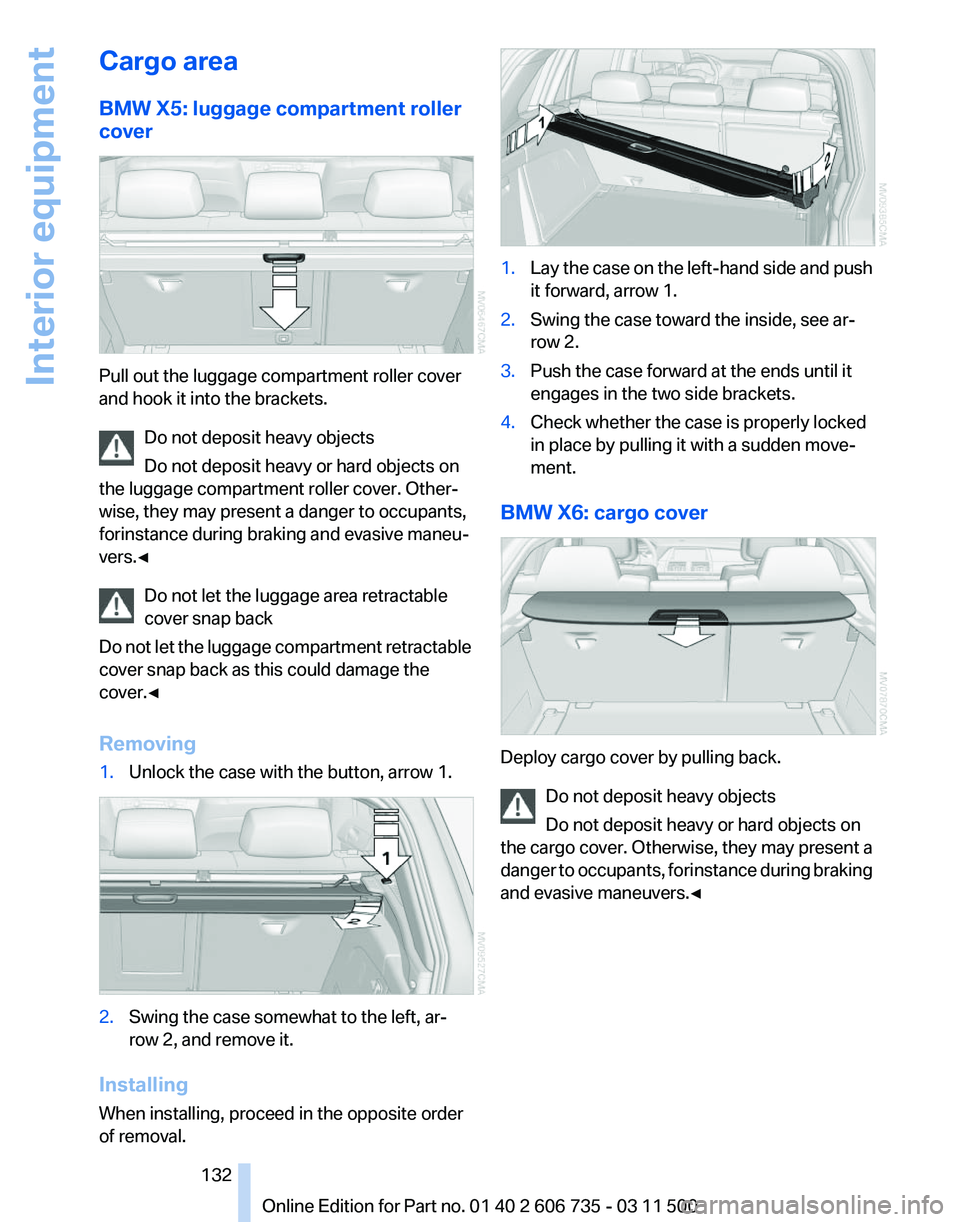
Cargo area
BMW X5: luggage compartment roller
cover
Pull out the luggage compartment roller cover
and hook it into the brackets.
Do not deposit heavy objects
Do not deposit heavy or hard objects on
the luggage compartment roller cover. Other‐
wise, they may present a danger to occupants,
for instance during braking and evasive maneu‐
vers.◀
Do not let the luggage area retractable
cover snap back
Do
not let the luggage compartment retractable
cover snap back as this could damage the
cover.◀
Removing
1. Unlock the case with the button, arrow 1. 2.
Swing the case somewhat to the left, ar‐
row 2, and remove it.
Installing
When installing, proceed in the opposite order
of removal. 1.
Lay the case on the left-hand side and push
it forward, arrow 1.
2. Swing the case toward the inside, see ar‐
row 2.
3. Push the case forward at the ends until it
engages in the two side brackets.
4. Check whether the case is properly locked
in place by pulling it with a sudden move‐
ment.
BMW X6: cargo cover Deploy cargo cover by pulling back.
Do not deposit heavy objects
Do not deposit heavy or hard objects on
the
cargo cover. Otherwise, they may present a
danger to occupants, for instance during braking
and evasive maneuvers.◀ Seite 132
132 Online Edition for Part no. 01 40 2 606 735 - 03 11 500
Interior equipment
Page 133 of 317
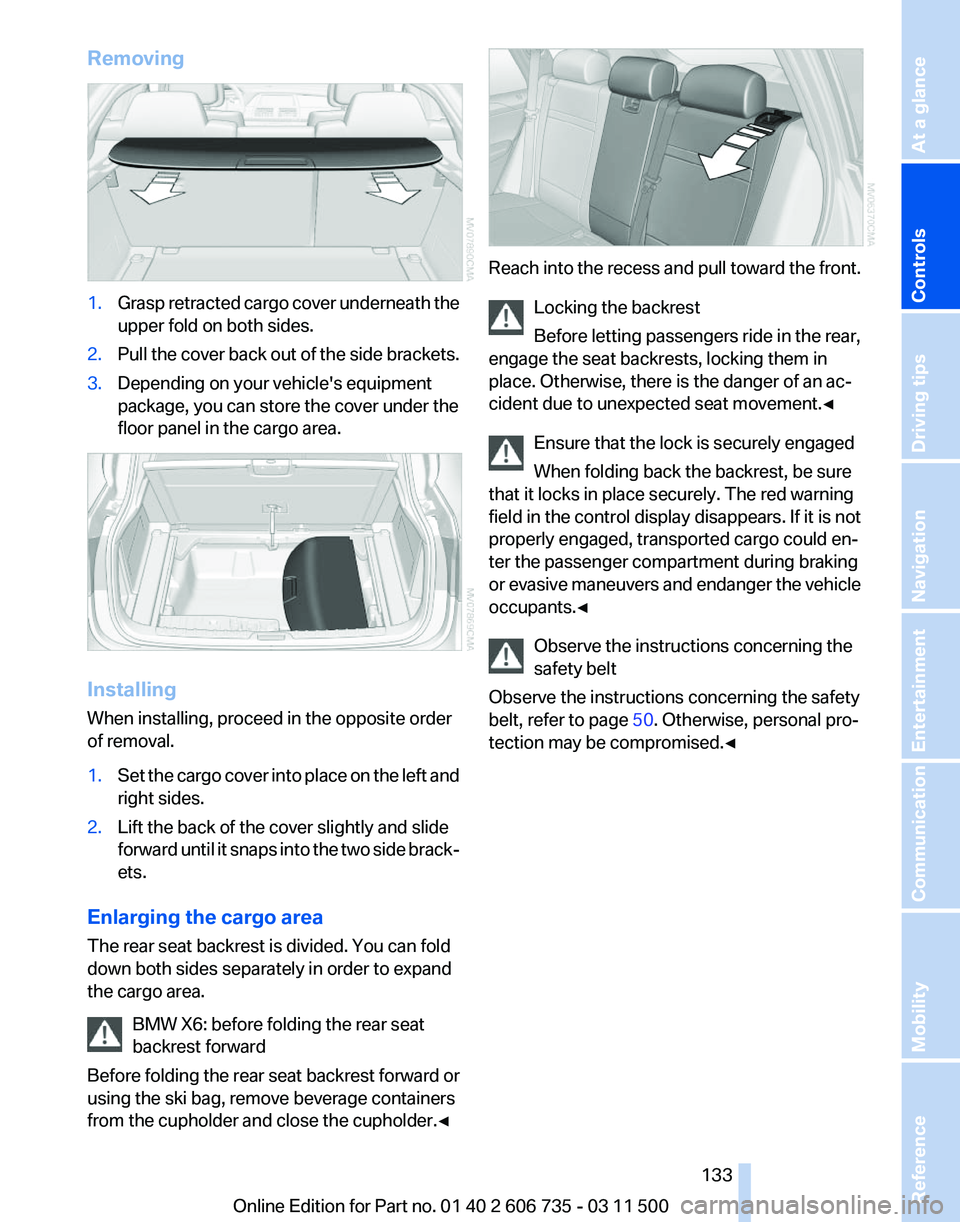
Removing
1.
Grasp retracted cargo cover underneath the
upper fold on both sides.
2. Pull the cover back out of the side brackets.
3. Depending on your vehicle's equipment
package, you can store the cover under the
floor panel in the cargo area. Installing
When installing, proceed in the opposite order
of removal.
1.
Set the cargo cover into place on the left and
right sides.
2. Lift the back of the cover slightly and slide
forward
until it snaps into the two side brack‐
ets.
Enlarging the cargo area
The rear seat backrest is divided. You can fold
down both sides separately in order to expand
the cargo area. BMW X6: before folding the rear seat
backrest forward
Before
folding the rear seat backrest forward or
using the ski bag, remove beverage containers
from the cupholder and close the cupholder.◀ Reach into the recess and pull toward the front.
Locking the backrest
Before letting passengers ride in the rear,
engage the seat backrests, locking them in
place. Otherwise, there is the danger of an ac‐
cident due to unexpected seat movement.
◀
Ensure that the lock is securely engaged
When folding back the backrest, be sure
that it locks in place securely. The red warning
field in the control display disappears. If it is not
properly engaged, transported cargo could en‐
ter the passenger compartment during braking
or evasive maneuvers and endanger the vehicle
occupants.◀
Observe the instructions concerning the
safety belt
Observe the instructions concerning the safety
belt, refer to page 50. Otherwise, personal pro‐
tection may be compromised.◀ Seite 133
133Online Edition for Part no. 01 40 2 606 735 - 03 11 500
Reference Mobility Communication Entertainment Navigation Driving tips
Controls At a glance
Page 136 of 317
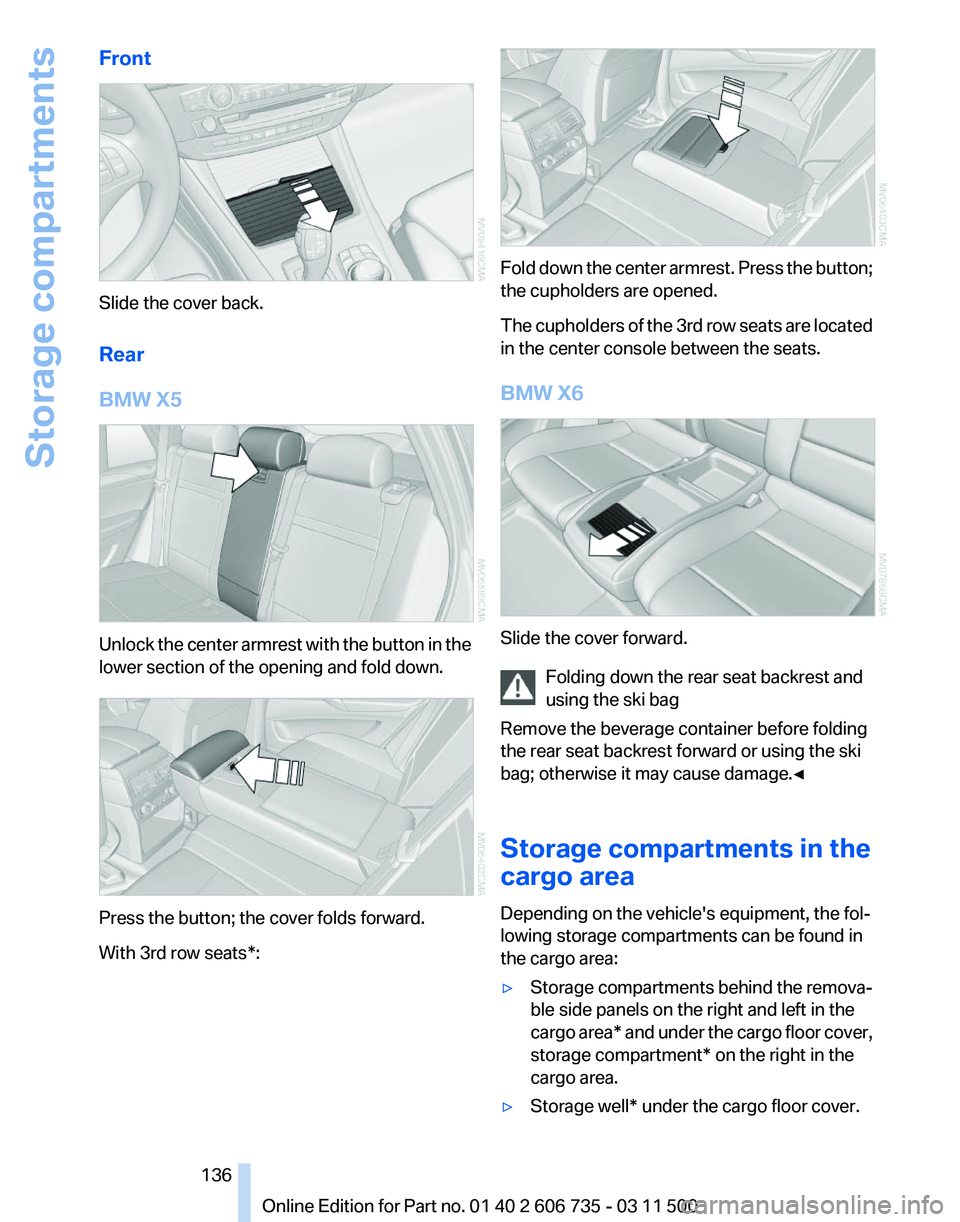
Front
Slide the cover back.
Rear
BMW X5
Unlock the center armrest with the button in the
lower section of the opening and fold down.
Press the button; the cover folds forward.
With 3rd row seats*: Fold down the center armrest. Press the button;
the cupholders are opened.
The
cupholders of the 3rd row seats are located
in the center console between the seats.
BMW X6 Slide the cover forward.
Folding down the rear seat backrest and
using the ski bag
Remove the beverage container before folding
the rear seat backrest forward or using the ski
bag; otherwise it may cause damage.
◀
Storage compartments in the
cargo area
Depending on the vehicle's equipment, the fol‐
lowing storage compartments can be found in
the cargo area:
▷ Storage compartments behind the remova‐
ble side panels on the right and left in the
cargo
area* and under the cargo floor cover,
storage compartment* on the right in the
cargo area.
▷ Storage well* under the cargo floor cover. Seite 136
136 Online Edition for Part no. 01 40 2 606 735 - 03 11 500
Storage compartments
Page 137 of 317
▷
Retaining straps* on the left and right side
trim for fastening small objects.
▷ Lashing rail with lashing eyes*. You can se‐
cure
heavy-duty cargo straps on the lashing
eyes. They can be removed at the notches
in the rails. To move the lashing eyes, press
the button.
Read and comply with the information enclosed
with the heavy-duty cargo straps.
Floor panel flap To access the onboard vehicle tool kit etc.
To open, swing up the flap by the handle, refer
to arrow.
The cargo floor cover is lockable*.
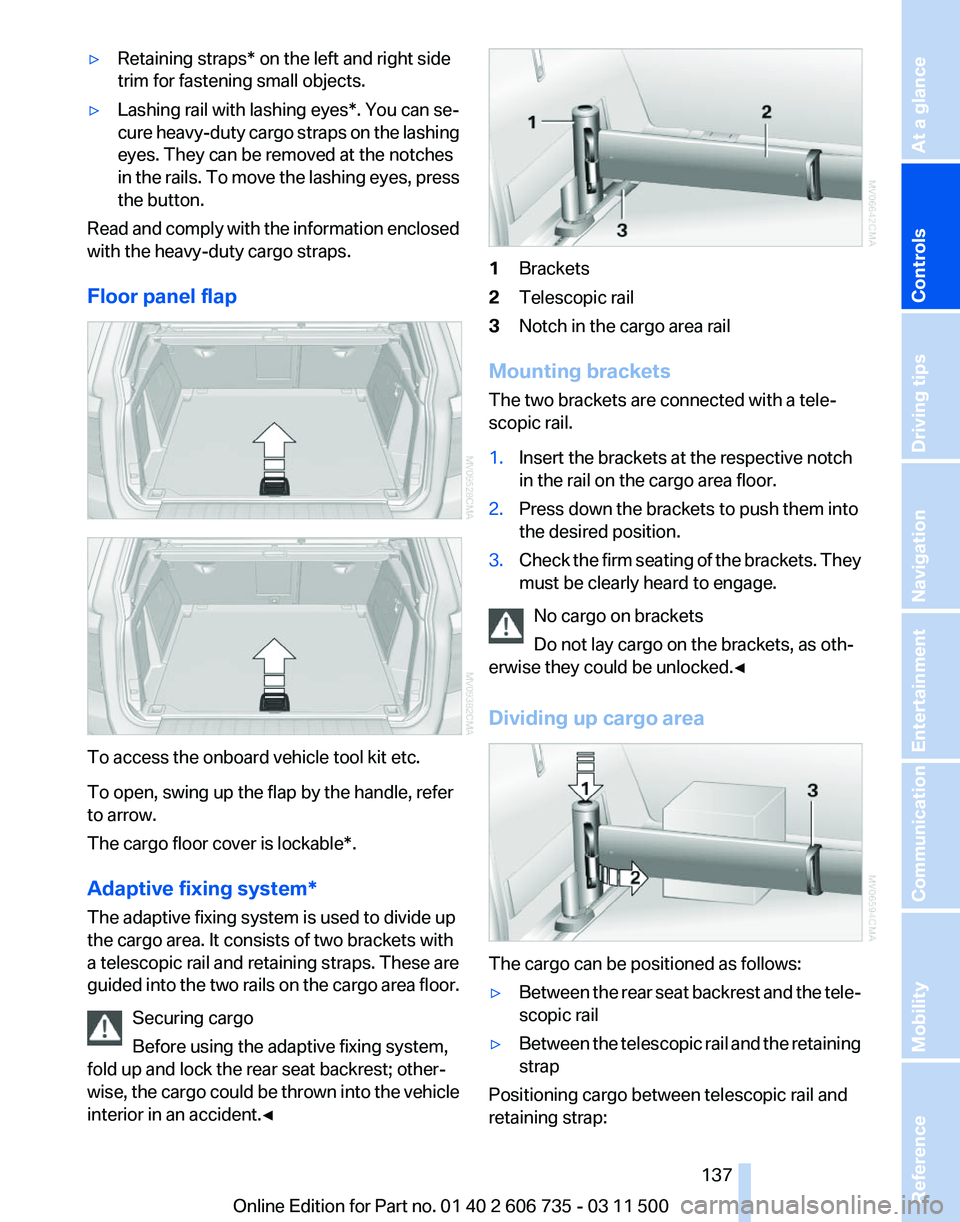
Adaptive fixing system
*
The adaptive fixing system is used to divide up
the cargo area. It consists of two brackets with
a telescopic rail and retaining straps. These are
guided into the two rails on the cargo area floor.
Securing cargo
Before using the adaptive fixing system,
fold up and lock the rear seat backrest; other‐
wise, the cargo could be thrown into the vehicle
interior in an accident.◀ 1
Brackets
2 Telescopic rail
3 Notch in the cargo area rail
Mounting brackets
The two brackets are connected with a tele‐
scopic rail.
1. Insert the brackets at the respective notch
in the rail on the cargo area floor.
2. Press down the brackets to push them into
the desired position.
3. Check the firm seating of the brackets. They
must be clearly heard to engage.
No cargo on brackets
Do not lay cargo on the brackets, as oth‐
erwise they could be unlocked.◀
Dividing up cargo area The cargo can be positioned as follows:
▷
Between the rear seat backrest and the tele‐
scopic rail
▷ Between the telescopic rail and the retaining
strap
Positioning cargo between telescopic rail and
retaining strap: Seite 137
137Online Edition for Part no. 01 40 2 606 735 - 03 11 500
Reference Mobility Communication Entertainment Navigation Driving tips
Controls At a glance
Page 138 of 317
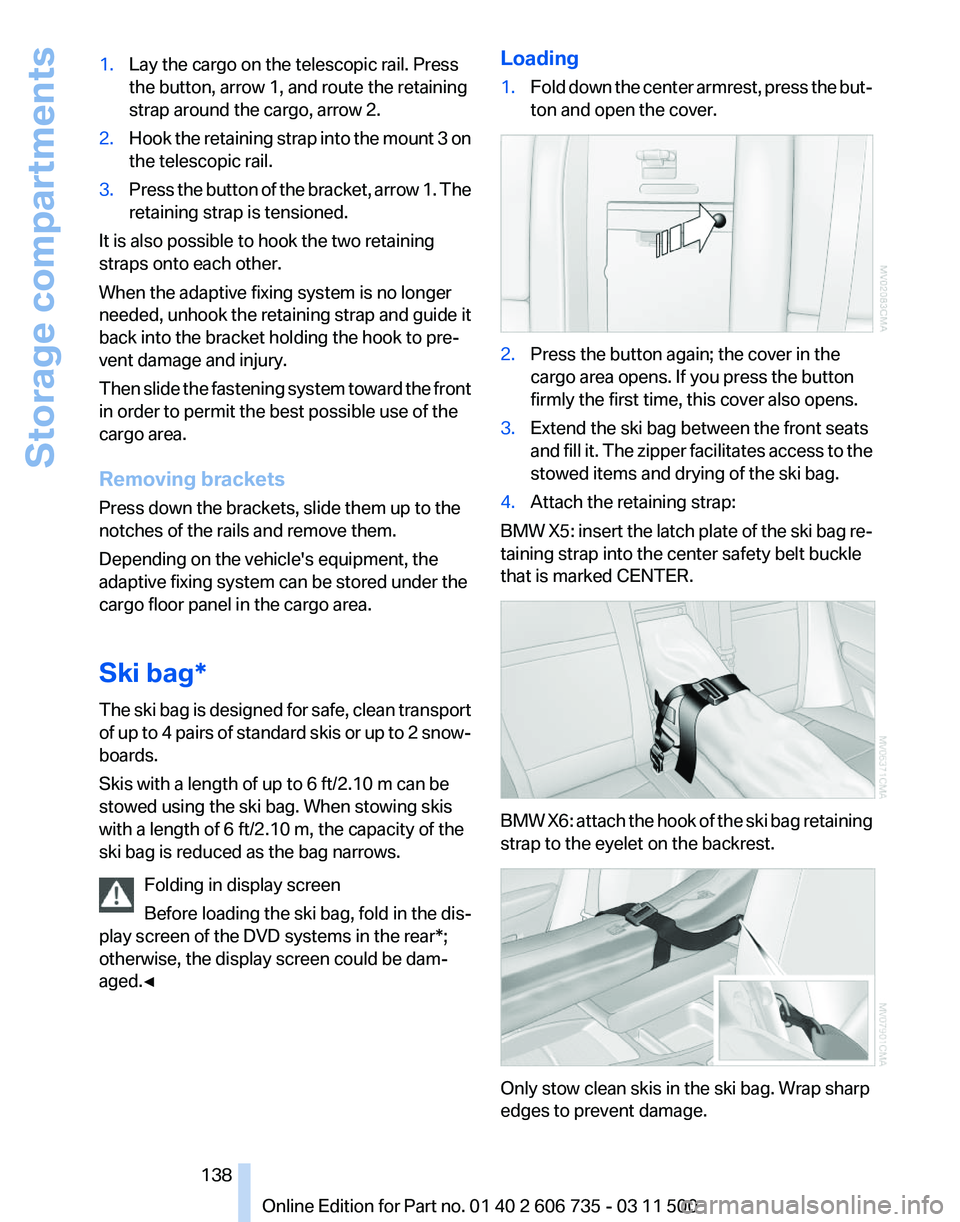
1.
Lay the cargo on the telescopic rail. Press
the button, arrow 1, and route the retaining
strap around the cargo, arrow 2.
2. Hook the retaining strap into the mount 3 on
the telescopic rail.
3. Press the button of the bracket, arrow 1. The
retaining strap is tensioned.
It is also possible to hook the two retaining
straps onto each other.
When the adaptive fixing system is no longer
needed,
unhook the retaining strap and guide it
back into the bracket holding the hook to pre‐
vent damage and injury.
Then slide the fastening system toward the front
in order to permit the best possible use of the
cargo area.
Removing brackets
Press down the brackets, slide them up to the
notches of the rails and remove them.
Depending on the vehicle's equipment, the
adaptive fixing system can be stored under the
cargo floor panel in the cargo area.
Ski bag*
The ski bag is designed for safe, clean transport
of up to 4 pairs of standard skis or up to 2 snow‐
boards.
Skis with a length of up to 6 ft/2.10 m can be
stowed using the ski bag. When stowing skis
with a length of 6 ft/2.10 m, the capacity of the
ski bag is reduced as the bag narrows.
Folding in display screen
Before loading the ski bag, fold in the dis‐
play screen of the DVD systems in the rear*;
otherwise, the display screen could be dam‐
aged.◀ Loading
1.
Fold down the center armrest, press the but‐
ton and open the cover. 2.
Press the button again; the cover in the
cargo area opens. If you press the button
firmly the first time, this cover also opens.
3. Extend the ski bag between the front seats
and
fill it. The zipper facilitates access to the
stowed items and drying of the ski bag.
4. Attach the retaining strap:
BMW X5: insert the latch plate of the ski bag re‐
taining strap into the center safety belt buckle
that is marked CENTER. BMW X6: attach the hook of the ski bag retaining
strap to the eyelet on the backrest.
Only stow clean skis in the ski bag. Wrap sharp
edges to prevent damage.
Seite 138
138 Online Edition for Part no. 01 40 2 606 735 - 03 11 500
Storage compartments
Page 139 of 317
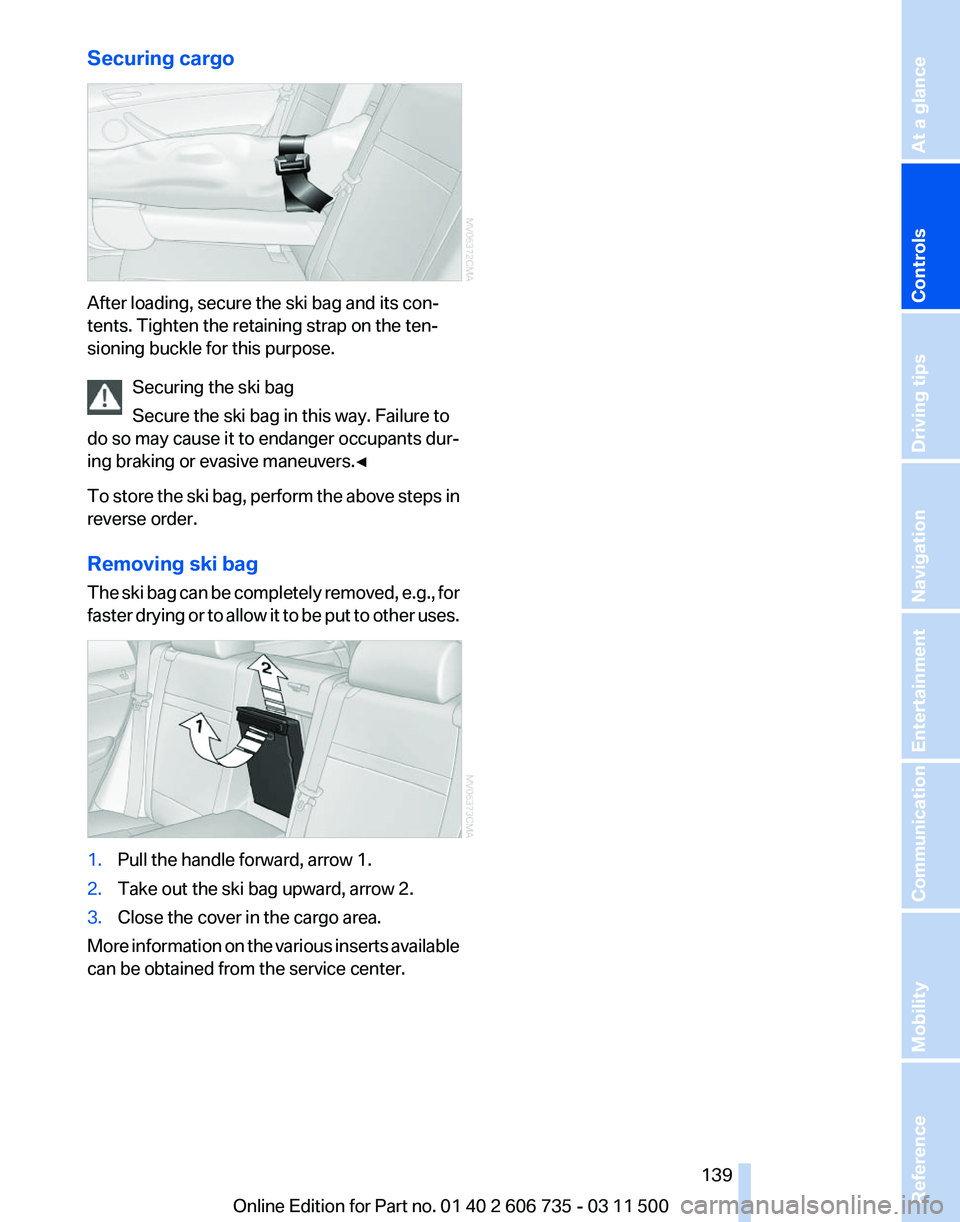
Securing cargo
After loading, secure the ski bag and its con‐
tents. Tighten the retaining strap on the ten‐
sioning buckle for this purpose.
Securing the ski bag
Secure the ski bag in this way. Failure to
do so may cause it to endanger occupants dur‐
ing braking or evasive maneuvers.◀
To
store the ski bag, perform the above steps in
reverse order.
Removing ski bag
The ski bag can be completely removed, e.g., for
faster drying or to allow it to be put to other uses. 1.
Pull the handle forward, arrow 1.
2. Take out the ski bag upward, arrow 2.
3. Close the cover in the cargo area.
More information on the various inserts available
can be obtained from the service center. Seite 139
139Online Edition for Part no. 01 40 2 606 735 - 03 11 500
Reference Mobility Communication Entertainment Navigation Driving tips
Controls At a glance