headlamp BMW X5M 2012 User Guide
[x] Cancel search | Manufacturer: BMW, Model Year: 2012, Model line: X5M, Model: BMW X5M 2012Pages: 317, PDF Size: 8.83 MB
Page 263 of 317
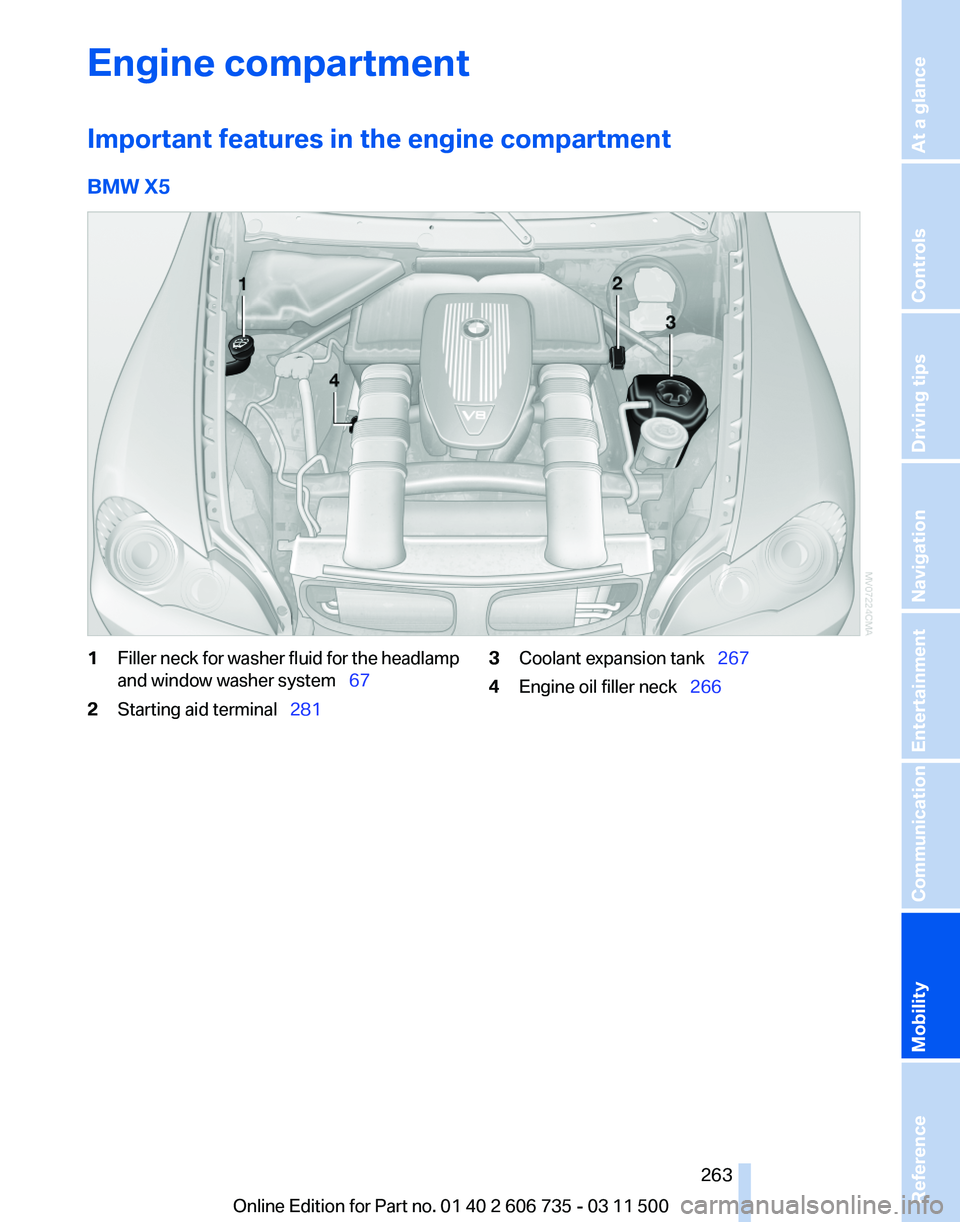
Engine compartment
Important features in the engine compartment
BMW X5
1
Filler neck for washer fluid for the headlamp
and window washer system 67
2 Starting aid terminal 281 3
Coolant expansion tank 267
4 Engine oil filler neck 266
Seite 263
263Online Edition for Part no. 01 40 2 606 735 - 03 11 500
Reference
Mobility Communication Entertainment Navigation Driving tips Controls At a glance
Page 271 of 317
Do not touch the bulbs
Do not touch the glass of new bulbs with
your bare hands, as even minute amounts of
contamination will burn into the bulb's surface
and reduce its service life.
Use
a clean tissue, cloth or something similar, or
hold the bulb by its base.◀
Light-emitting diodes LED
Light-emitting diodes installed behind translu‐
cent lenses serve as the light source for many of
the controls, displays and other equipment in
your vehicle.
These light-emitting diodes, which operate us‐
ing a concept similar to that applied in conven‐
tional lasers, are officially designated as Class 1
light-emitting diodes.
Do not remove the covers
Do not remove the covers, and never stare
into the unfiltered light for several hours; other‐
wise, irritation of the retina could result.◀
Headlamp glass
Condensation can form on the inside of the ex‐
ternal lamps in cool or humid weather. When the
light is switched on, the condensation evapo‐
rates after a short time. The headlamp glasses
do not need to be changed.
If there is a large amount of moisture, e.g., water
droplets form in the lamp, have the lamp
checked by your service center.
BMW X5: bulb replacement
Xenon headlamps
Because of the long life of these bulbs, the like‐
lihood of failure is very low. Switching the lamps
on and off frequently shortens their life.
If a bulb fails, switch on the front fog lamps* and
continue the trip with great care. Comply with
local regulations. Do not perform work/bulb replacement on
xenon headlamps
Have
any work on the xenon lighting system, in‐
cluding bulb replacement, performed only by a
service center.
Due to the high voltage present in the system,
there is the danger of fatal injuries if work is car‐
ried out improperly.◀
Parking lamps, roadside parking lamps,
daytime running lights*
These lamps are made using LED technology.
Contact your service center in the event of a
malfunction.
Turn signals, front
24-watt bulb, PY24W
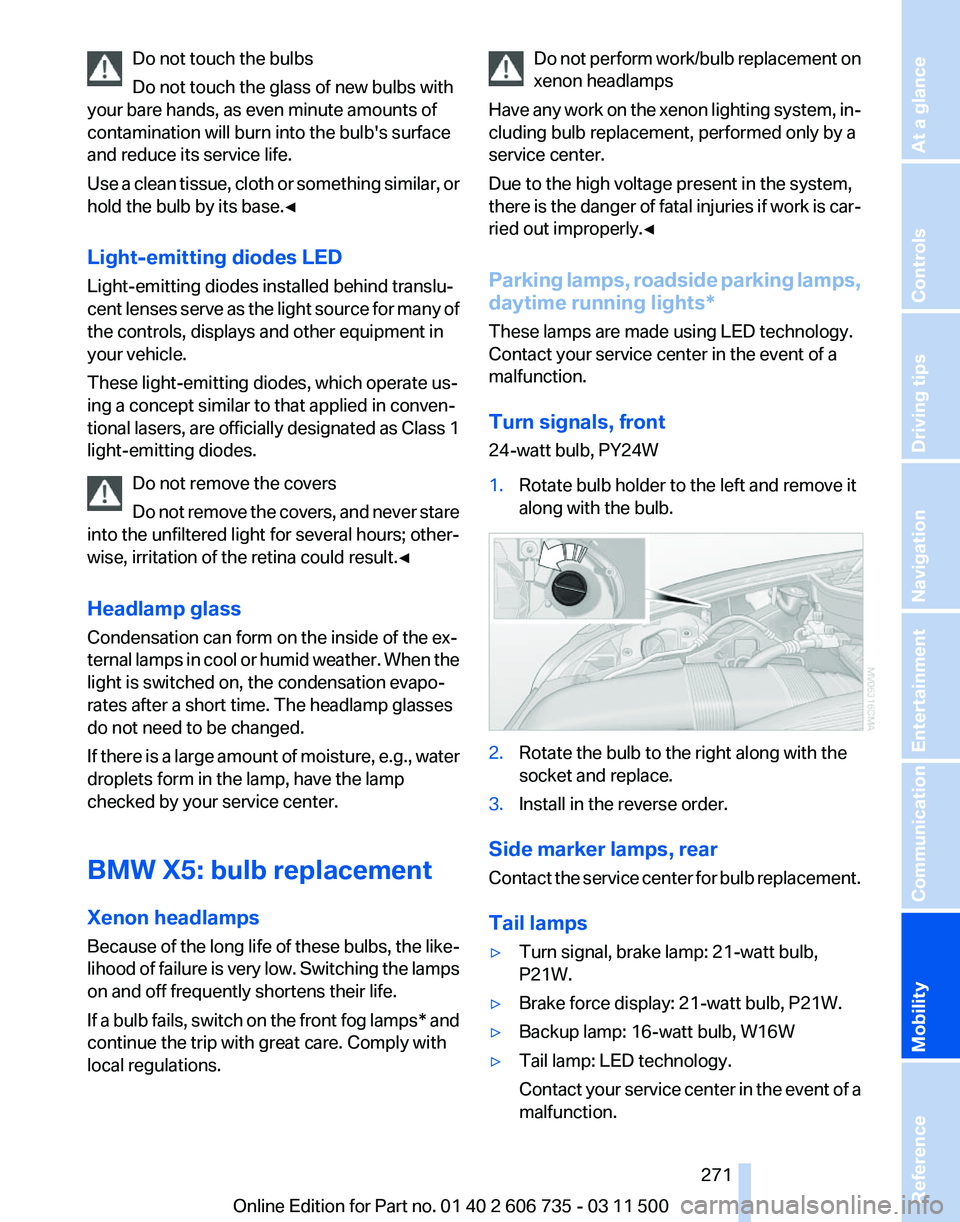
1. Rotate bulb holder to the left and remove it
along with the bulb. 2.
Rotate the bulb to the right along with the
socket and replace.
3. Install in the reverse order.
Side marker lamps, rear
Contact
the service center for bulb replacement.
Tail lamps
▷ Turn signal, brake lamp: 21-watt bulb,
P21W.
▷ Brake force display: 21-watt bulb, P21W.
▷ Backup lamp: 16-watt bulb, W16W
▷ Tail lamp: LED technology.
Contact
your service center in the event of a
malfunction. Seite 271
271Online Edition for Part no. 01 40 2 606 735 - 03 11 500
Reference
Mobility Communication Entertainment Navigation Driving tips Controls At a glance
Page 273 of 317
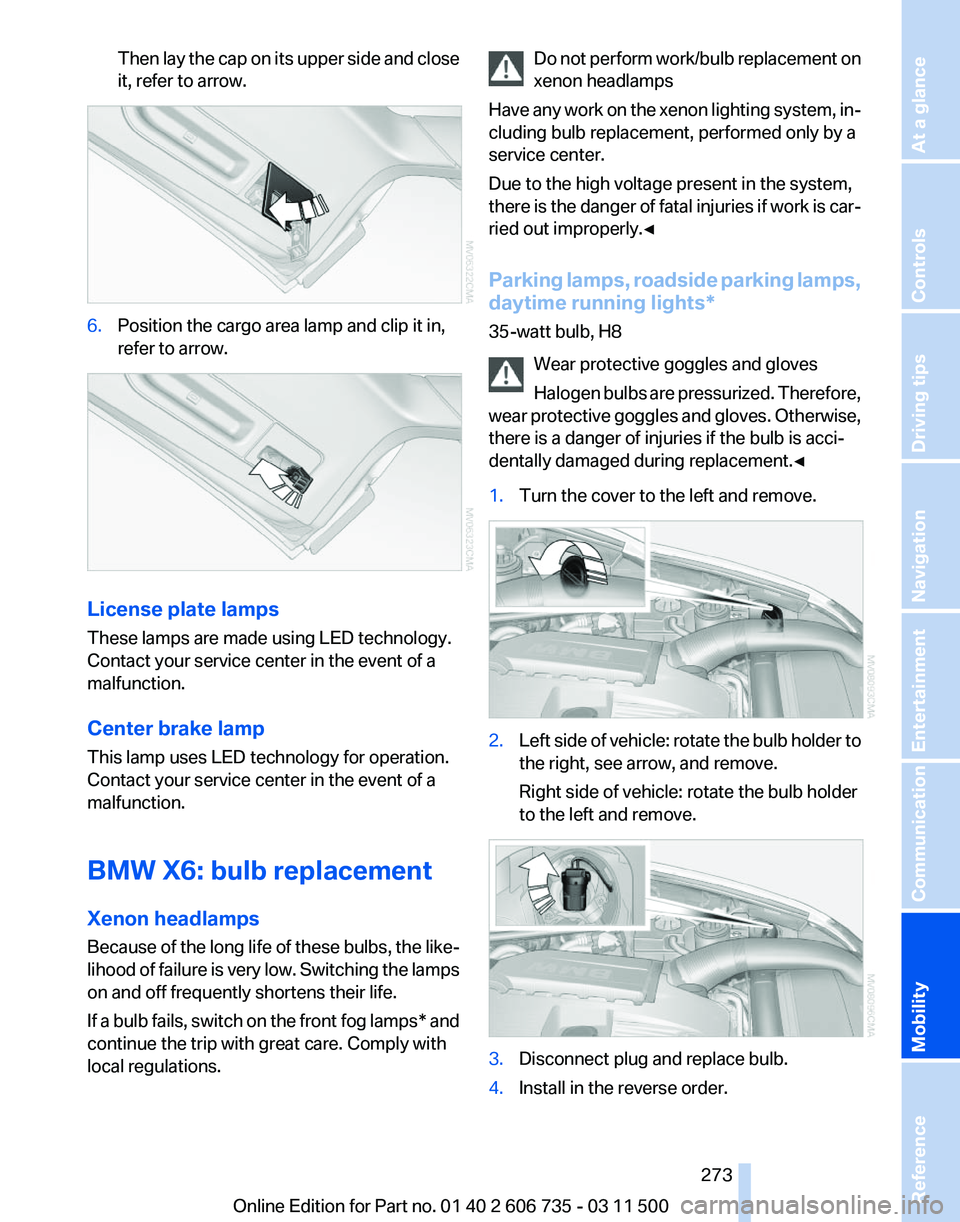
Then lay the cap on its upper side and close
it, refer to arrow.
6.
Position the cargo area lamp and clip it in,
refer to arrow. License plate lamps
These lamps are made using LED technology.
Contact your service center in the event of a
malfunction.
Center brake lamp
This lamp uses LED technology for operation.
Contact your service center in the event of a
malfunction.
BMW X6: bulb replacement
Xenon headlamps
Because
of the long life of these bulbs, the like‐
lihood of failure is very low. Switching the lamps
on and off frequently shortens their life.
If a bulb fails, switch on the front fog lamps* and
continue the trip with great care. Comply with
local regulations. Do not perform work/bulb replacement on
xenon headlamps
Have
any work on the xenon lighting system, in‐
cluding bulb replacement, performed only by a
service center.
Due to the high voltage present in the system,
there is the danger of fatal injuries if work is car‐
ried out improperly.◀
Parking lamps, roadside parking lamps,
daytime running lights*
35-watt bulb, H8
Wear protective goggles and gloves
Halogen bulbs are pressurized. Therefore,
wear protective goggles and gloves. Otherwise,
there is a danger of injuries if the bulb is acci‐
dentally damaged during replacement.◀
1. Turn the cover to the left and remove. 2.
Left side of vehicle: rotate the bulb holder to
the right, see arrow, and remove.
Right side of vehicle: rotate the bulb holder
to the left and remove. 3.
Disconnect plug and replace bulb.
4. Install in the reverse order. Seite 273
273Online Edition for Part no. 01 40 2 606 735 - 03 11 500
Reference
Mobility Communication Entertainment Navigation Driving tips Controls At a glance
Page 285 of 317
Care
Car washes
Notes
Steam jets or high-pressure washers
When using steam jets or high-pressure
washers, hold them a sufficient distance away
and use a maximum temperature of 140 ℉/
60 ℃.
Holding them too close or using excessively
high
pressures or temperatures can cause dam‐
age or preliminary damage that may then lead to
long-term damage.
Follow the operating instructions for the high-
pressure washer.◀
Cleaning sensors/cameras with high-
pressure washers
When using high-pressure washers, do not
spray the exterior sensors and cameras, for Park
Distance Control* or the backup camera*, for
instance, for extended periods of time and only
from a distance of at least 12 in/30 cm.◀
Wash your vehicle frequently, particularly in win‐
ter.
Intense soiling and road salt can damage the ve‐
hicle.
Washing in automatic car washes
Your vehicle can be washed in automatic car
washes right from the start.
Give preference to cloth car washes or those
that use soft brushes in order to avoid paint
damage.
Notes
Note the following:
▷ Make sure that the wheels and tires are not
damaged by the transport mechanisms.
▷ Fold in the exterior mirrors; otherwise, they
may
be damaged, depending on the width of
the vehicle. ▷
Deactivate rain sensor, refer to page 67, to
prevent unintentional wiper action.
▷ BMW X5: deactivate the rear window wiper
and protect it from damage. Ask the car
wash
operator about any necessary protec‐
tive measures.
▷ Remove additional attachments, for in‐
stance a spoiler or telephone antenna, if
there is a risk that these may be damaged.
Guide rails in car washes
Avoid car washes with guide rails higher
than 4 in/10 cm; otherwise, the vehicle body
could be damaged.
◀
Before driving into a car wash
The vehicle is able to roll if the following steps
are taken.
1. Insert the remote control into the ignition
lock, even with Comfort Access.
2. Engage transmission position N.
3. Release the parking brake.
4. Deactivating Automatic Hold, refer to
page 64.
5. Switch the engine off.
6. Leave the remote control in the ignition lock
so that the vehicle can roll.
Mixed tires* Note the vehicle width
Before driving into a car wash, make sure
that
the vehicle width is not too large for the car
wash, as otherwise the vehicle and the car wash
could be damaged.◀
Headlamps
▷ Do not rub dry and do not use abrasive or
caustic cleansers.
▷ Soak areas that have been soiled e.g. due to
insects, with shampoo and wash off with
water. Seite 285
285Online Edition for Part no. 01 40 2 606 735 - 03 11 500
Reference
Mobility Communication Entertainment Navigation Driving tips Controls At a glance
Page 294 of 317
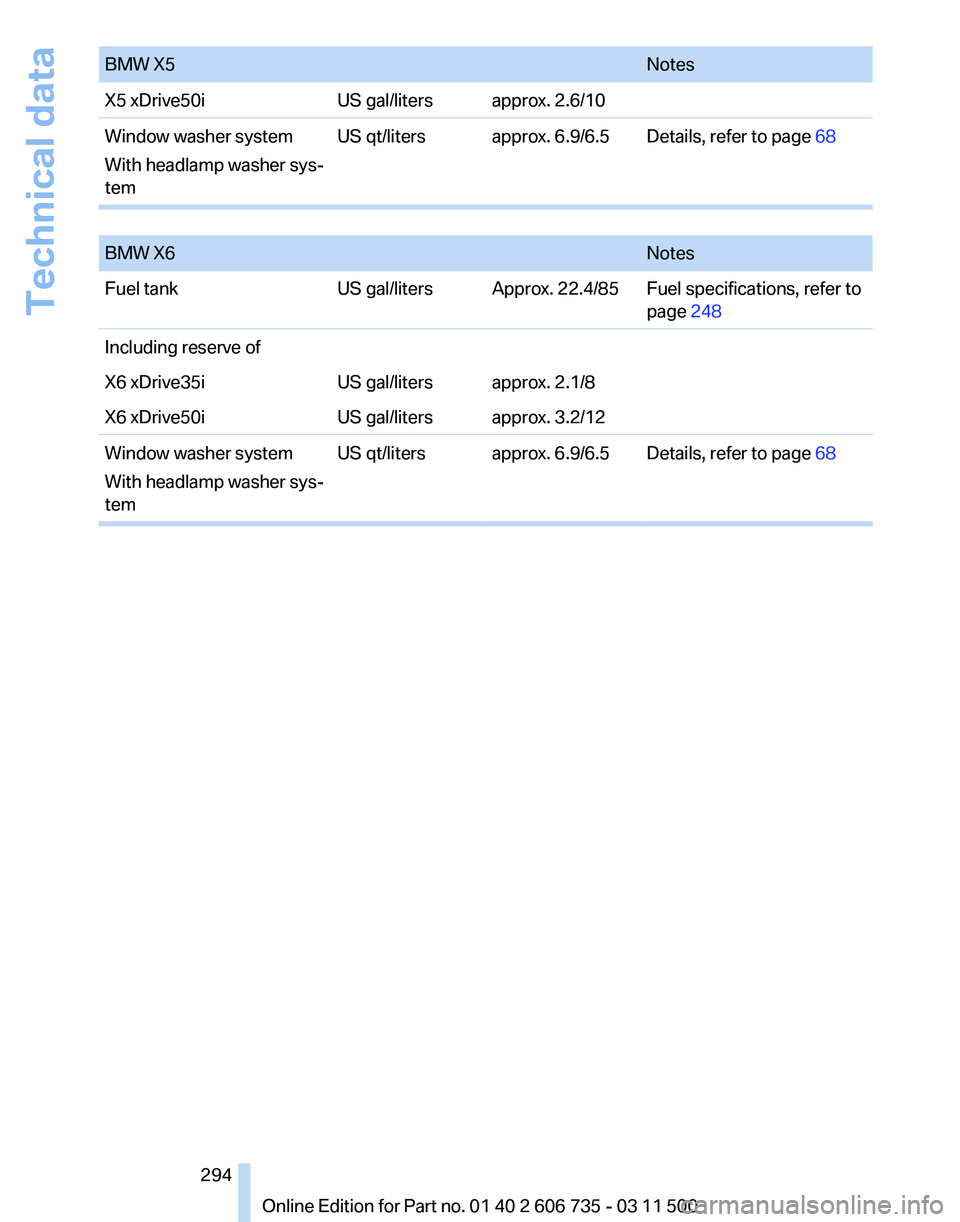
BMW X5
Notes
X5 xDrive50i US gal/liters approx. 2.6/10
Window washer system
With headlamp washer sys‐
tem US qt/liters approx. 6.9/6.5 Details, refer to page
68
BMW X6
Notes
Fuel tank US gal/liters Approx. 22.4/85 Fuel specifications, refer to
page 248
Including reserve of
X6 xDrive35i US gal/liters approx. 2.1/8
X6 xDrive50i US gal/liters approx. 3.2/12
Window washer system
With headlamp washer sys‐
tem US qt/liters approx. 6.9/6.5 Details, refer to page
68 Seite 294
294 Online Edition for Part no. 01 40 2 606 735 - 03 11 500Technical data
Page 303 of 317
Automatic climate control in
rear, deactivating on Control
Display 124
Automatic climate control in rear, switching off 125
Automatic climate control, switching off 123, 125
Automatic climate control, ventilation in rear 123
Automatic climate control, with 2-zone control 120
Automatic climate control, with 4-zone control 124
Automatic, cruise control 108
Automatic
Cruise Control 102
Automatic Curb Monitor 54
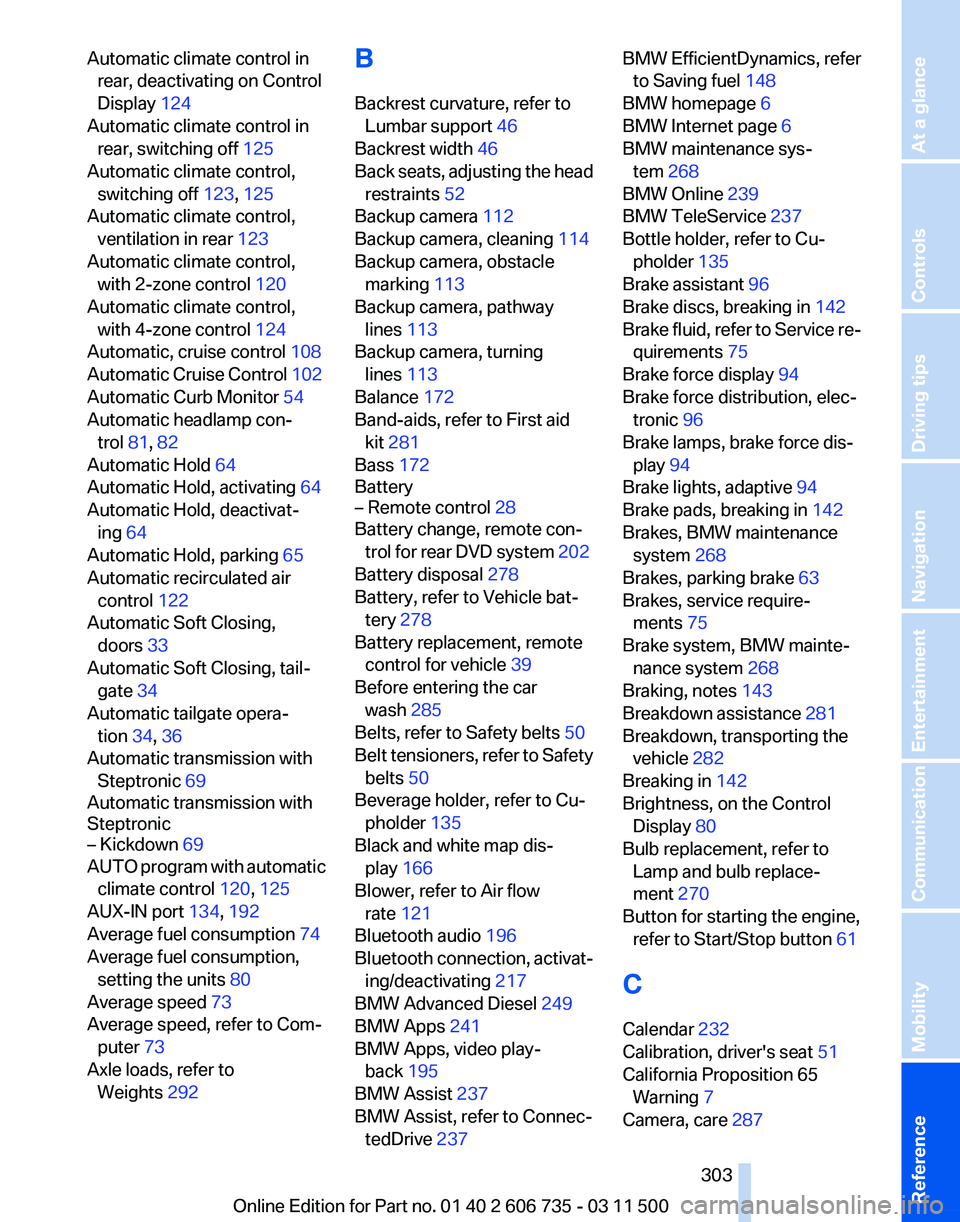
Automatic headlamp con‐ trol 81, 82
Automatic Hold 64
Automatic Hold, activating 64
Automatic Hold, deactivat‐ ing 64
Automatic Hold, parking 65
Automatic recirculated air control 122
Automatic Soft Closing, doors 33
Automatic Soft Closing, tail‐ gate 34
Automatic tailgate opera‐ tion 34, 36
Automatic transmission with Steptronic 69
Automatic transmission with
Steptronic
– Kickdown 69
AUTO program with automatic
climate control 120, 125
AUX-IN port 134, 192
Average fuel consumption 74
Average fuel consumption, setting the units 80
Average speed 73
Average speed, refer to Com‐ puter 73
Axle loads, refer to Weights 292 B
Backrest curvature, refer to
Lumbar support 46
Backrest width 46
Back
seats, adjusting the head
restraints 52
Backup camera 112
Backup camera, cleaning 114
Backup camera, obstacle marking 113
Backup camera, pathway lines 113
Backup camera, turning lines 113
Balance 172
Band-aids, refer to First aid kit 281
Bass 172
Battery
– Remote control 28
Battery change, remote con‐
trol
for rear DVD system 202
Battery disposal 278
Battery, refer to Vehicle bat‐ tery 278
Battery replacement, remote control for vehicle 39
Before entering the car wash 285
Belts, refer to Safety belts 50
Belt tensioners, refer to Safety belts 50
Beverage holder, refer to Cu‐ pholder 135
Black and white map dis‐ play 166
Blower, refer to Air flow rate 121
Bluetooth audio 196
Bluetooth connection, activat‐ ing/deactivating 217
BMW Advanced Diesel 249
BMW Apps 241
BMW Apps, video play‐ back 195
BMW Assist 237
BMW Assist, refer to Connec‐ tedDrive 237 BMW EfficientDynamics, refer
to Saving fuel 148
BMW homepage 6
BMW Internet page 6
BMW maintenance sys‐ tem 268
BMW Online 239
BMW TeleService 237
Bottle holder, refer to Cu‐ pholder 135
Brake assistant 96
Brake discs, breaking in 142
Brake
fluid, refer to Service re‐
quirements 75
Brake force display 94
Brake force distribution, elec‐ tronic 96
Brake lamps, brake force dis‐ play 94
Brake lights, adaptive 94
Brake pads, breaking in 142
Brakes, BMW maintenance system 268
Brakes, parking brake 63
Brakes, service require‐ ments 75
Brake system, BMW mainte‐ nance system 268
Braking, notes 143
Breakdown assistance 281
Breakdown, transporting the vehicle 282
Breaking in 142
Brightness, on the Control Display 80
Bulb replacement, refer to Lamp and bulb replace‐
ment 270
Button for starting the engine, refer to Start/Stop button 61
C
Calendar 232
Calibration, driver's seat 51
California Proposition 65 Warning 7
Camera, care 287
Seite 303
303Online Edition for Part no. 01 40 2 606 735 - 03 11 500
Reference Mobility Communication Entertainment Navigation Driving tips Controls At a glance
Page 304 of 317
Camera, refer to Backup cam‐
era 112
Camera, Side View 117
Camera, Top View 116
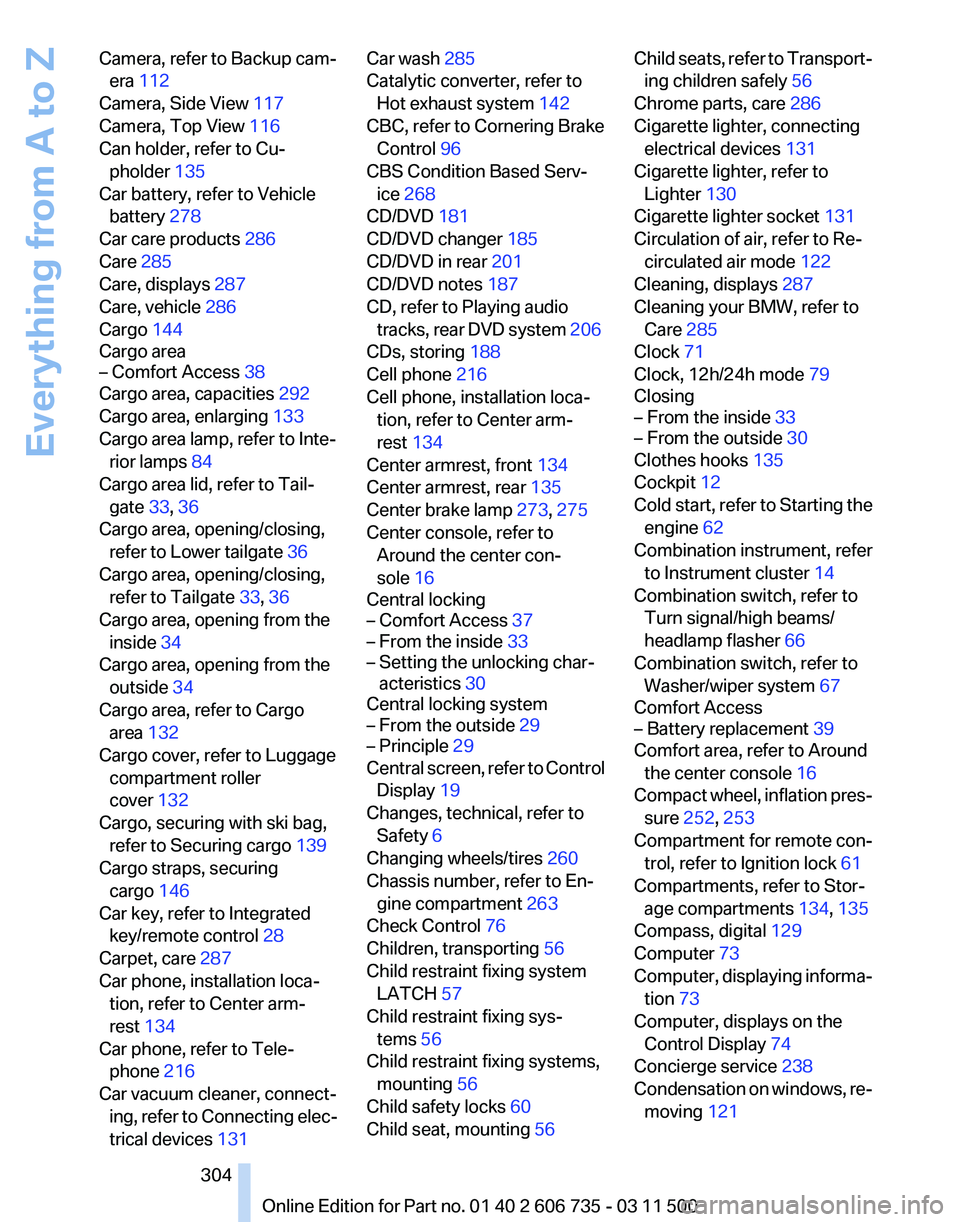
Can holder, refer to Cu‐ pholder 135
Car battery, refer to Vehicle battery 278
Car care products 286
Care 285
Care, displays 287
Care, vehicle 286
Cargo 144
Cargo area
– Comfort Access 38
Cargo area, capacities 292
Cargo area, enlarging 133
Cargo area lamp, refer to Inte‐ rior lamps 84
Cargo area lid, refer to Tail‐ gate 33, 36
Cargo area, opening/closing, refer to Lower tailgate 36
Cargo area, opening/closing, refer to Tailgate 33, 36
Cargo area, opening from the inside 34
Cargo area, opening from the outside 34
Cargo area, refer to Cargo area 132
Cargo cover, refer to Luggage compartment roller
cover 132
Cargo, securing with ski bag, refer to Securing cargo 139
Cargo straps, securing cargo 146
Car key, refer to Integrated key/remote control 28
Carpet, care 287
Car phone, installation loca‐ tion, refer to Center arm‐
rest 134
Car phone, refer to Tele‐ phone 216
Car vacuum cleaner, connect‐ ing,
refer to Connecting elec‐
trical devices 131 Car wash 285
Catalytic converter, refer to
Hot exhaust system 142
CBC, refer to Cornering Brake Control 96
CBS Condition Based Serv‐ ice 268
CD/DVD 181
CD/DVD changer 185
CD/DVD in rear 201
CD/DVD notes 187
CD, refer to Playing audio tracks,
rear DVD system 206
CDs, storing 188
Cell phone 216
Cell phone, installation loca‐ tion, refer to Center arm‐
rest 134
Center armrest, front 134
Center armrest, rear 135
Center brake lamp 273, 275
Center console, refer to Around the center con‐
sole 16
Central locking
– Comfort Access 37
– From the inside 33
– Setting the unlocking char‐ acteristics 30
Central locking system
– From the outside 29
– Principle 29
Central screen, refer to Control
Display 19
Changes, technical, refer to Safety 6
Changing wheels/tires 260
Chassis number, refer to En‐ gine compartment 263
Check Control 76
Children, transporting 56
Child restraint fixing system LATCH 57
Child restraint fixing sys‐ tems 56
Child restraint fixing systems, mounting 56
Child safety locks 60
Child seat, mounting 56 Child seats, refer to Transport‐
ing children safely 56
Chrome parts, care 286
Cigarette lighter, connecting electrical devices 131
Cigarette lighter, refer to Lighter 130
Cigarette lighter socket 131
Circulation of air, refer to Re‐ circulated air mode 122
Cleaning, displays 287
Cleaning your BMW, refer to Care 285
Clock 71
Clock, 12h/24h mode 79
Closing
– From the inside 33
– From the outside 30
Clothes hooks 135
Cockpit 12
Cold
start, refer to Starting the
engine 62
Combination instrument, refer to Instrument cluster 14
Combination switch, refer to Turn signal/high beams/
headlamp flasher 66
Combination switch, refer to Washer/wiper system 67
Comfort Access
– Battery replacement 39
Comfort area, refer to Around
the center console 16
Compact
wheel, inflation pres‐
sure 252, 253
Compartment for remote con‐ trol, refer to Ignition lock 61
Compartments, refer to Stor‐ age compartments 134, 135
Compass, digital 129
Computer 73
Computer, displaying informa‐ tion 73
Computer, displays on the Control Display 74
Concierge service 238
Condensation on windows, re‐ moving 121
Seite 304
304 Online Edition for Part no. 01 40 2 606 735 - 03 11 500
Everything from A to Z
Page 307 of 317
Flat Tire Monitor FTM, snow
chains 261
Flat tire, run-flat tires 261
Flat
tire, Tire Pressure Monitor
TPM 90
Flat tire, warning lamp 89, 91
Flat tire, wheel change 275
Flooding, refer to Driving through water 143
Floor carpet, care 287
Floor mats, care 287
FM/AM station 174
Fog on windows, remov‐ ing 121
Foldable rear seat back‐ rest 133
Foot brake 143
Footwell lamps, refer to Inte‐ rior lamps 84
For your own safety 6
Four-wheel drive, refer to xDrive 98
Front airbags 86
Front fog lamps 84
Front fog lamps, indicator lamp 84
FTM Flat Tire Monitor 88
Fuel 248
Fuel
– Refer to Average fuel con‐ sumption 74
Fuel, average consump‐
tion 74
Fuel cap 246
Fuel cap, closing 246
Fuel consumption display
– Average fuel consump‐ tion 74
Fuel consumption display,
current fuel consumption 72
Fuel-efficient driving, refer to Current
fuel consumption 72
Fuel filler flap, closing 246
Fuel filler flap, opening 246
Fuel filler flap, unlocking in case of an electrical malfunc‐
tion 246
Fuel gauge 73
Fuel, high-quality brands 248 Fuel, quality
248
Fuel, saving 148
Fuel, specifications 248
Fuel
tank capacity, refer to Fill‐
ing capacities 293
Fuel tank contents, refer to Filling capacities 293
Fuel tank, refer to Filling ca‐ pacities 293
Fuse 279
G
Garage door opener, refer to Integrated universal remote
control 127
Gasoline gauge, refer to Fuel gauge 73
Gasoline, refer to Required fuel 248
Gas station recommenda‐ tion 162
Gear change, automatic trans‐ mission with Steptronic 70
Gear change, via shift pad‐ dles 70
General driving notes 142
Glass sunroof, closing 43
Glass sunroof, electric
– Convenient operation 30
– Remote control 30
Glass sunroof, initializing 44
Glass sunroof, opening 43
Glass sunroof, pinch protec‐
tion 44
Glass sunroof, power fail‐ ure 44
Glass sunroof, refer to Panor‐ amic glass sunroof 42
Glass sunroof, tilting 43
Glove compartment 134
Glove compartment
– USB interface 134
Glove compartment, light‐
ing 134
GPS navigation, refer to Navi‐ gation system 152
Gross vehicle weight, refer to Weights 292 H
Handbrake, refer to Parking
brake 63
Hand-held transmitter, alter‐ nating code 128
Hands-free microphone 16
Hazard warning sys‐ tem 16, 280
HDC Hill Descent Control 98
HD Radio 175
Head airbags 86
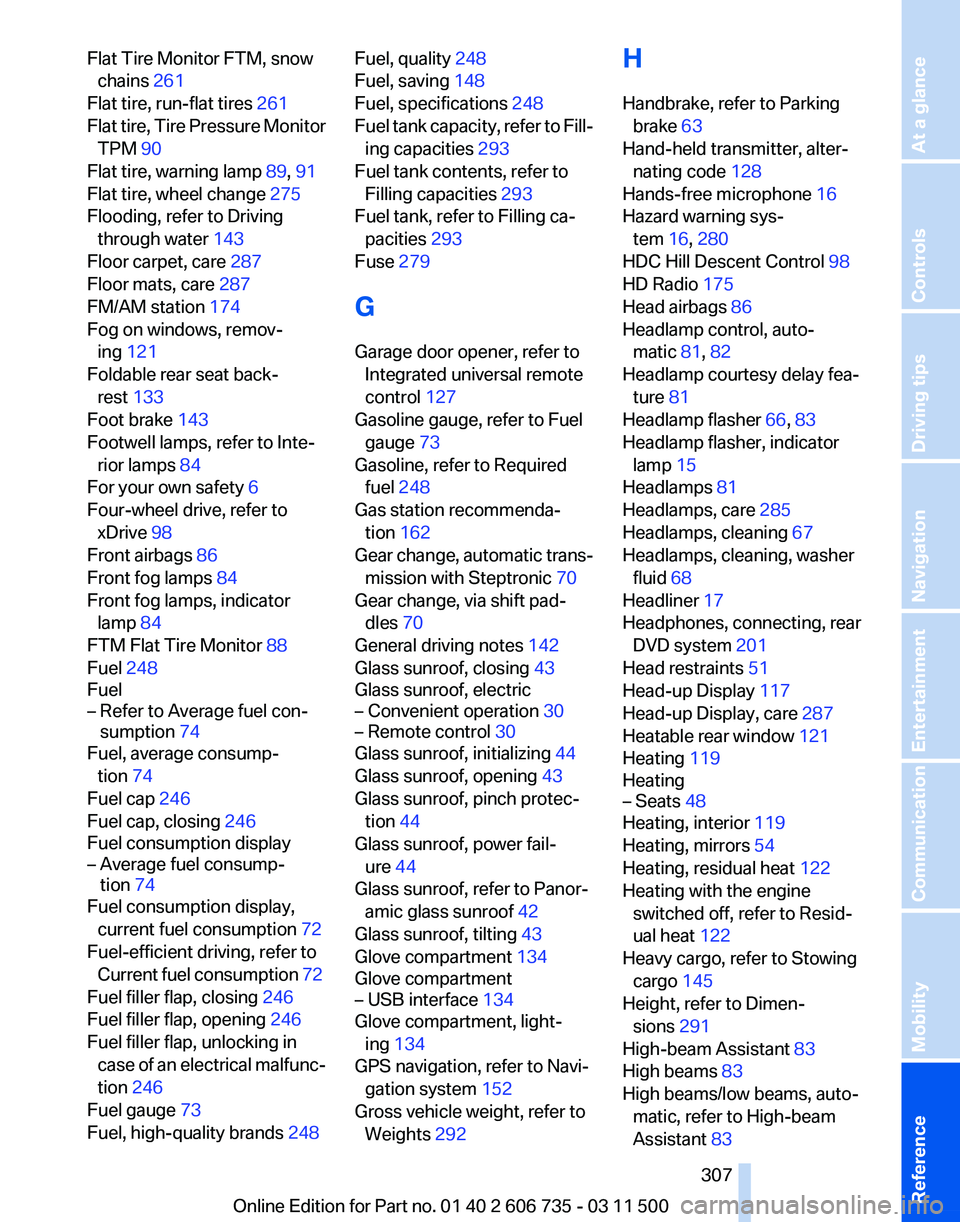
Headlamp control, auto‐ matic 81, 82
Headlamp courtesy delay fea‐ ture 81
Headlamp flasher 66, 83
Headlamp flasher, indicator lamp 15
Headlamps 81
Headlamps, care 285
Headlamps, cleaning 67
Headlamps, cleaning, washer fluid 68
Headliner 17
Headphones,
connecting, rear
DVD system 201
Head restraints 51
Head-up Display 117
Head-up Display, care 287
Heatable rear window 121
Heating 119
Heating
– Seats 48
Heating, interior 119
Heating, mirrors 54
Heating, residual heat 122
Heating with the engine switched off, refer to Resid‐
ual heat 122
Heavy cargo, refer to Stowing cargo 145
Height, refer to Dimen‐ sions 291
High-beam Assistant 83
High beams 83
High beams/low beams, auto‐ matic, refer to High-beam
Assistant 83
Seite 307
307Online Edition for Part no. 01 40 2 606 735 - 03 11 500
Reference Mobility Communication Entertainment Navigation Driving tips Controls At a glance
Page 308 of 317
High beams, indicator
lamp 15
High-pressure washers 285
Hill Descent Control HDC 98
Hill drive-off assistant, refer to Drive-off assistant 100
Hills 144
Holder for beverages 135
Holder for remote control, re‐ fer to Ignition lock 61
Homepage 6
Hood 264
Hood, opening 264
Horn 12
Hot exhaust system 142
Hotline 240
House number, entering for navigation 154
Hydraulic brake assistant 96
Hydroplaning 143
I
Ice warning, refer to External temperature warning 71
Icy roads, refer to External temperature warning 71
Identification marks, tires 258
iDrive 18
iDrive, changing settings 78
iDrive, changing the lan‐ guage 80
iDrive, changing the units of measure and display for‐
mat 80
iDrive, setting the bright‐ ness 80
iDrive, setting the date 79
iDrive, setting the time 79
Ignition 61
Ignition
key position 1, refer to
Radio ready state 61
Ignition key position 2, refer to Ignition on 61
Ignition key, refer to Remote control with integrated
key 28
Ignition lock 61 Ignition, switched off 61
Ignition, switched on 61
Images, displaying, rear DVD
system 208
Indication of a flat tire 89, 91
Indicator and warning lamps 15
Inflation pressure monitor, re‐ fer to Flat Tire Monitor 88
Inflation
pressure, refer to Tire
inflation pressure 252
Information on the navigation data 152
Initialization after power fail‐ ure 278
Initializing
– Compass, refer to Calibrat‐ ing 129
– Panoramic glass sunroof 43
Initializing, Flat Tire Monitor
FTM 89
Initializing, glass sunroof 44
Initializing, refer to Setting the date 79
Initializing, refer to Setting the time 79
Initializing,
Tire Pressure Mon‐
itor TPM 91
Installation location, tele‐ phone 134
Instrument cluster 14
Instrument lighting 84
Instrument panel, refer to In‐ strument cluster 14
Instruments, refer to Cock‐ pit 12
Integrated key 28
Integrated universal remote control 127
Interactive map 157
Interior equipment 127
Interior lamps 84
Interior lamps
– Remote control 30
Interior mirror 54
Interior rearview mirror, auto‐ matic dimming 55
Interior rearview mirror, com‐ pass 129 Interior temperature, setting,
automatic climate con‐
trol 119
Intermediate
destinations 159
Internet page 6
Intersection, entering for navi‐ gation 154
iPod/iPhone 193
J
Jacking points for the vehicle jack 276
Jack, refer to Vehicle jack 276
Joystick, refer to Selector lever 69
Jump-starting 281
K
Keyless Go, refer to Comfort Access 37
Keyless opening and closing, refer to Comfort Access 37
Key Memory, refer to Personal Profile 28
Key, refer to Integrated key/re‐ mote control 28
Kickdown
– Automatic transmission with Steptronic 69
Knocking control 248
L
Label, run-flat tire 261
Lamp and bulb replacement, lamp replacement 270
Lamps 81
Lamps, automatic headlamp control 81, 82
Lamps, High-beam Assis‐ tant 83
Lamps, parking lamps/low beams 81
Lamps, replacing, refer to Lamp and bulb replace‐
ment 270
Lane departure warning 93
Seite 308
308 Online Edition for Part no. 01 40 2 606 735 - 03 11 500
Everything from A to Z
Page 315 of 317
Wiper fluid
68
Wood, care 287
Word match concept, naviga‐ tion 23
Working in the engine com‐ partment 264
Wrench/screwdriver, refer to Onboard vehicle tool kit 270
X
xDrive 98
Xenon headlamps 271
Y
Your individual vehicle 6
Your individual vehicle
– Settings, refer to Personal Profile 28
Seite 315
315Online Edition for Part no. 01 40 2 606 735 - 03 11 500
Reference Mobility Communication Entertainment Navigation Driving tips Controls At a glance