park assist BMW X5M 2012 User Guide
[x] Cancel search | Manufacturer: BMW, Model Year: 2012, Model line: X5M, Model: BMW X5M 2012Pages: 317, PDF Size: 8.83 MB
Page 114 of 317
Show the obstacle marking via the iDrive, refer
to page
114.
Activating assistance functions
Several
assistance functions can be active at the
same time.
Showing the parking aid lines "Parking aid lines"
Pathway and turning lines are displayed.
Showing the obstacle marking "Obstacle marking"
Three-dimensionally-shaped markings are dis‐
played.
Image on the Control Display
Switching on the rear view camera
using iDrive
With PDC activated: "Rear view camera"
The
image of the rear view camera is displayed.
The setting is stored for the remote control cur‐
rently in use.
Brightness
With the rear view camera switched on:
1. Select the symbol.
2. Turn the controller until the desired setting
is reached and press the controller.
Contrast
With the rear view camera switched on:
1. Select the symbol.
2. Turn the controller until the desired setting
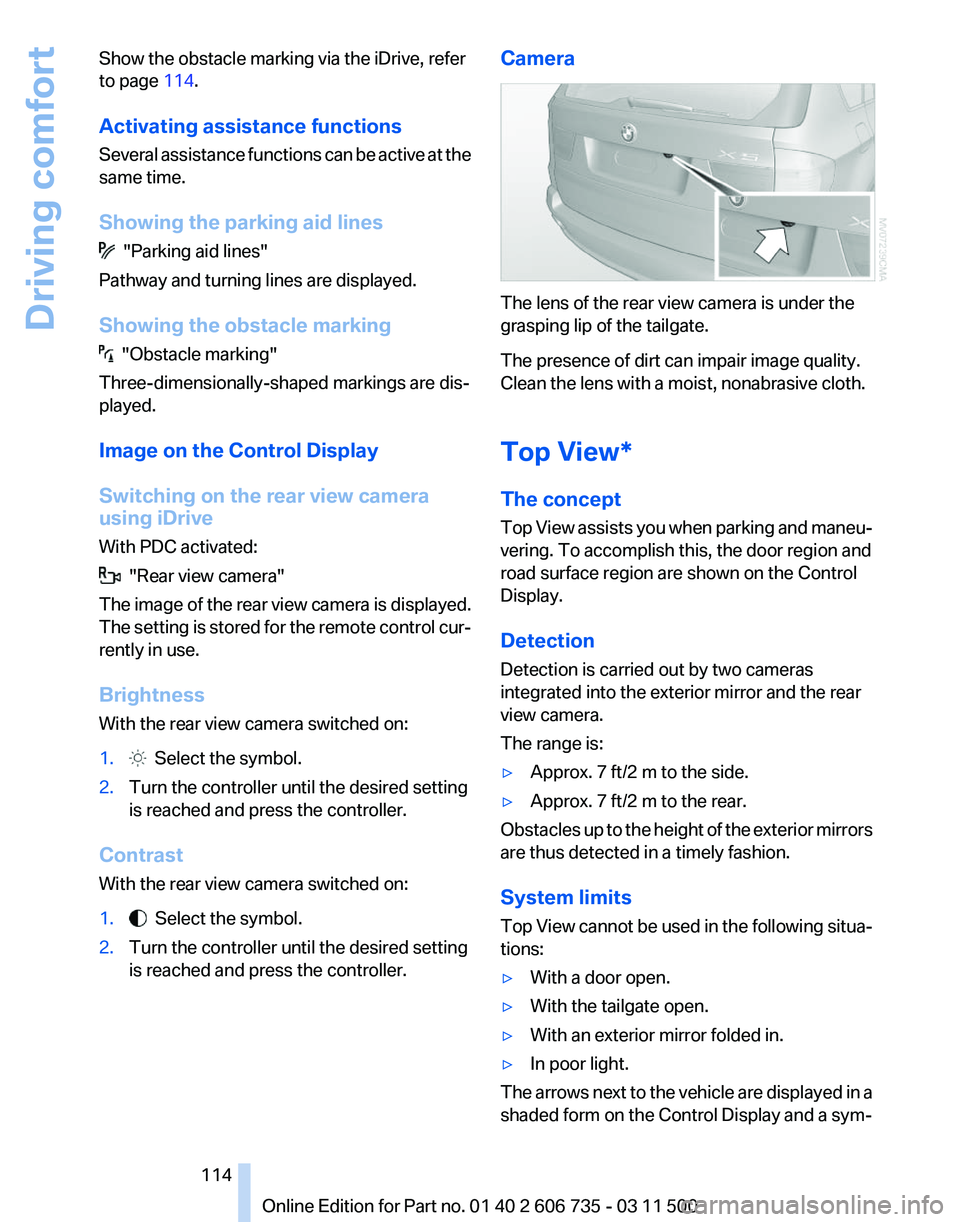
is reached and press the controller. Camera The lens of the rear view camera is under the
grasping lip of the tailgate.
The presence of dirt can impair image quality.
Clean the lens with a moist, nonabrasive cloth.
Top View*
The concept
Top
View assists you when parking and maneu‐
vering. To accomplish this, the door region and
road surface region are shown on the Control
Display.
Detection
Detection is carried out by two cameras
integrated into the exterior mirror and the rear
view camera.
The range is:
▷ Approx. 7 ft/2 m to the side.
▷ Approx. 7 ft/2 m to the rear.
Obstacles up to the height of the exterior mirrors
are thus detected in a timely fashion.
System limits
Top
View cannot be used in the following situa‐
tions:
▷ With a door open.
▷ With the tailgate open.
▷ With an exterior mirror folded in.
▷ In poor light.
The arrows next to the vehicle are displayed in a
shaded form on the Control Display and a sym‐
Seite 114
114 Online Edition for Part no. 01 40 2 606 735 - 03 11 500
Driving comfort
Page 116 of 317
Displaying turning lines and pathway
lines
▷
The static, red turning line shows the lateral
space required when the wheel is fully
turned.
▷ The variable, green pathway lines assist you
in
estimating the amount of lateral space ac‐
tually required.
The pathway lines depend on the current
steering angle and are continuously
adapted to movements of the steering
wheel. "Parking aid lines"
Turning lines and pathway lines are displayed.
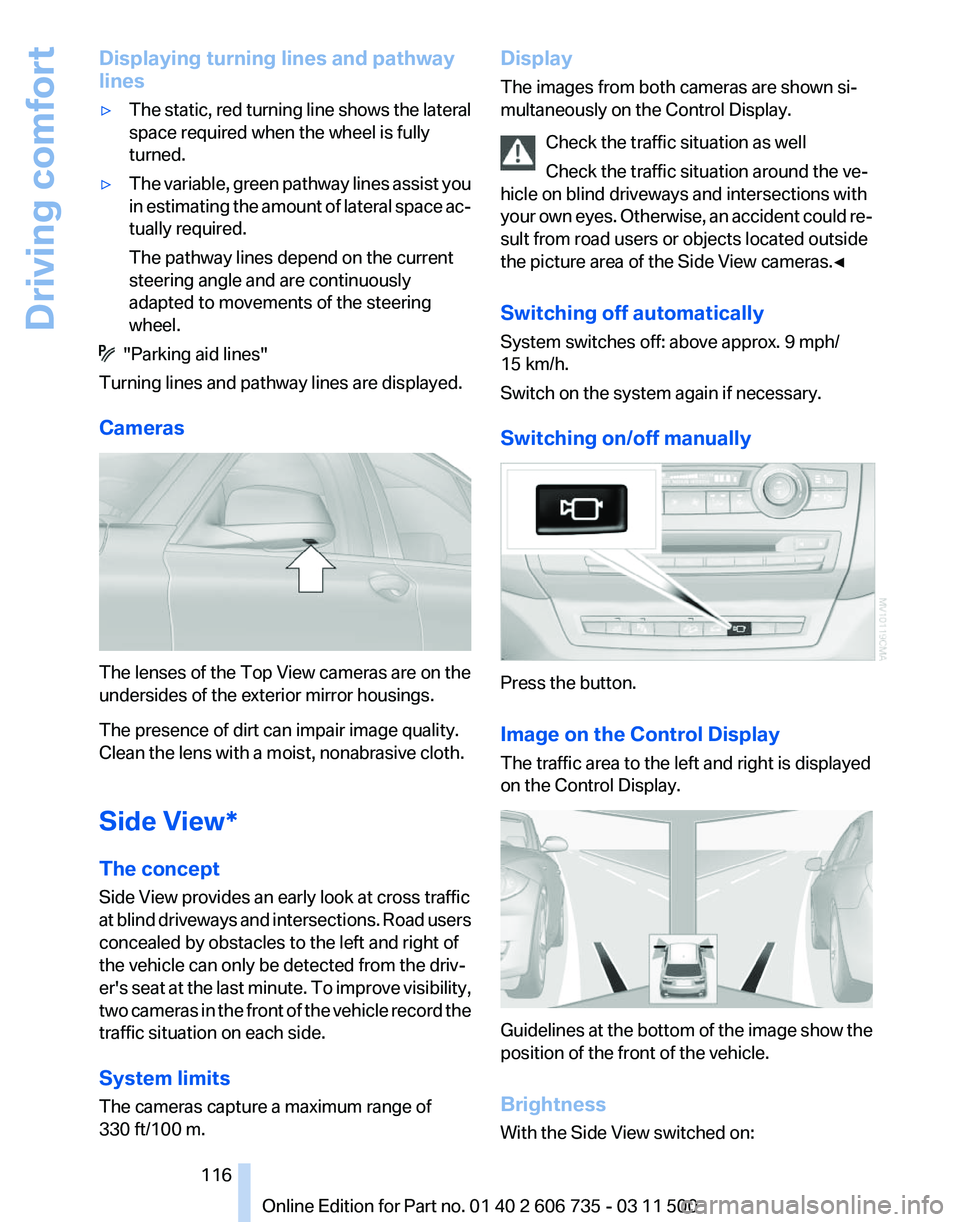
Cameras The lenses of the Top View cameras are on the
undersides of the exterior mirror housings.
The presence of dirt can impair image quality.
Clean the lens with a moist, nonabrasive cloth.
Side View*
The concept
Side View provides an early look at cross traffic
at
blind driveways and intersections. Road users
concealed by obstacles to the left and right of
the vehicle can only be detected from the driv‐
er's seat at the last minute. To improve visibility,
two cameras in the front of the vehicle record the
traffic situation on each side.
System limits
The cameras capture a maximum range of
330 ft/100 m. Display
The images from both cameras are shown si‐
multaneously on the Control Display.
Check the traffic situation as well
Check the traffic situation around the ve‐
hicle on blind driveways and intersections with
your
own eyes. Otherwise, an accident could re‐
sult from road users or objects located outside
the picture area of the Side View cameras.◀
Switching off automatically
System switches off: above approx. 9 mph/
15 km/h.
Switch on the system again if necessary.
Switching on/off manually Press the button.
Image on the Control Display
The traffic area to the left and right is displayed
on the Control Display.
Guidelines at the bottom of the image show the
position of the front of the vehicle.
Brightness
With the Side View switched on: Seite 116
116 Online Edition for Part no. 01 40 2 606 735 - 03 11 500
Driving comfort
Page 144 of 317
Driving in wet conditions
When
roads are wet or there is heavy rain, briefly
exert gentle pressure on the brake pedal every
few miles.
Ensure that this action does not endanger other
road users.
The heat generated in this process helps dry the
brake discs and pads.
In this way braking efficiency will be available
when you need it.
Hills
Drive long or steep downhill gradients in the gear
in which the least braking is required. Otherwise,
the brake system may overheat, resulting in a
reduction in the brake system efficiency.
The engine braking action can be further en‐
hanced by shifting down during manual opera‐
tion of the automatic transmission, refer to
page 69, if necessary all the way down to first
gear.
Avoid load on the brakes
Avoid placing excessive load on the brake
system. Light but consistent brake pressure can
lead to high temperatures, brake wear and pos‐
sibly even brake failure.◀
Do not drive in neutral
Do not drive in neutral or with the engine
stopped, as doing so disables engine braking. In
addition, steering and brake assist is unavailable
with the engine stopped.◀
Brake disc corrosion
Corrosion on the brake discs and contamination
on the brake pads are furthered by:
▷ Low mileage.
▷ Extended periods when the vehicle is not
used at all.
▷ Infrequent use of the brakes.
Corrosion occurs when the minimum pressure
that must be exerted by the pads during brake
applications to clean the discs is not reached. Should corrosion form on the brake discs, the
brakes will tend to respond with a pulsating ef‐
fect that generally cannot be corrected.
Condensation
under the parked vehicle
When using the automatic climate control, con‐
densation water develops that exits underneath
the vehicle.
Therefore, traces of condensed water under the
vehicle are normal.
Loading
Overloading the vehicle
To avoid exceeding the approved carrying
capacity of the tires, never overload the vehicle.
Overloading can lead to overheating and in‐
creases the rate at which damage develops in‐
side the tires. This could result in a sudden loss
of tire inflation pressure.◀
No fluids in the cargo area
Make sure that fluids do not leak into the
cargo area; otherwise, the vehicle may be dam‐
aged.◀
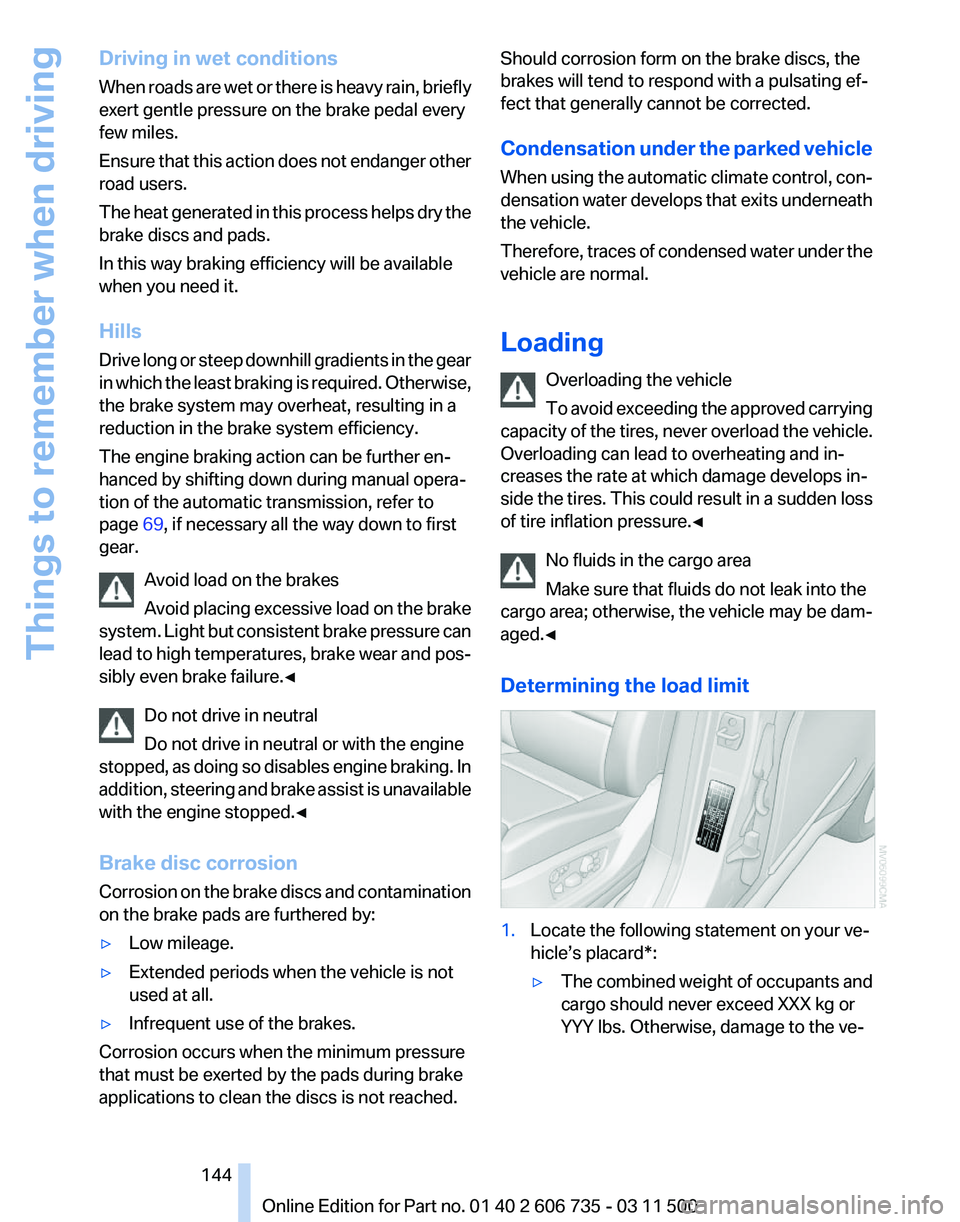
Determining the load limit 1.
Locate the following statement on your ve‐
hicle’s placard*:
▷The combined weight of occupants and
cargo should never exceed XXX kg or
YYY lbs. Otherwise, damage to the ve‐ Seite 144
144 Online Edition for Part no. 01 40 2 606 735 - 03 11 500
Things to remember when driving
Page 239 of 317
nection is established to Roadside Assis‐
tance.
Starting Roadside Assistance with
BMW Assist or TeleService
General information
In vehicles equipped with TeleService, support
is first offered by TeleService Diagnosis and
then, if necessary, by TeleService Help.
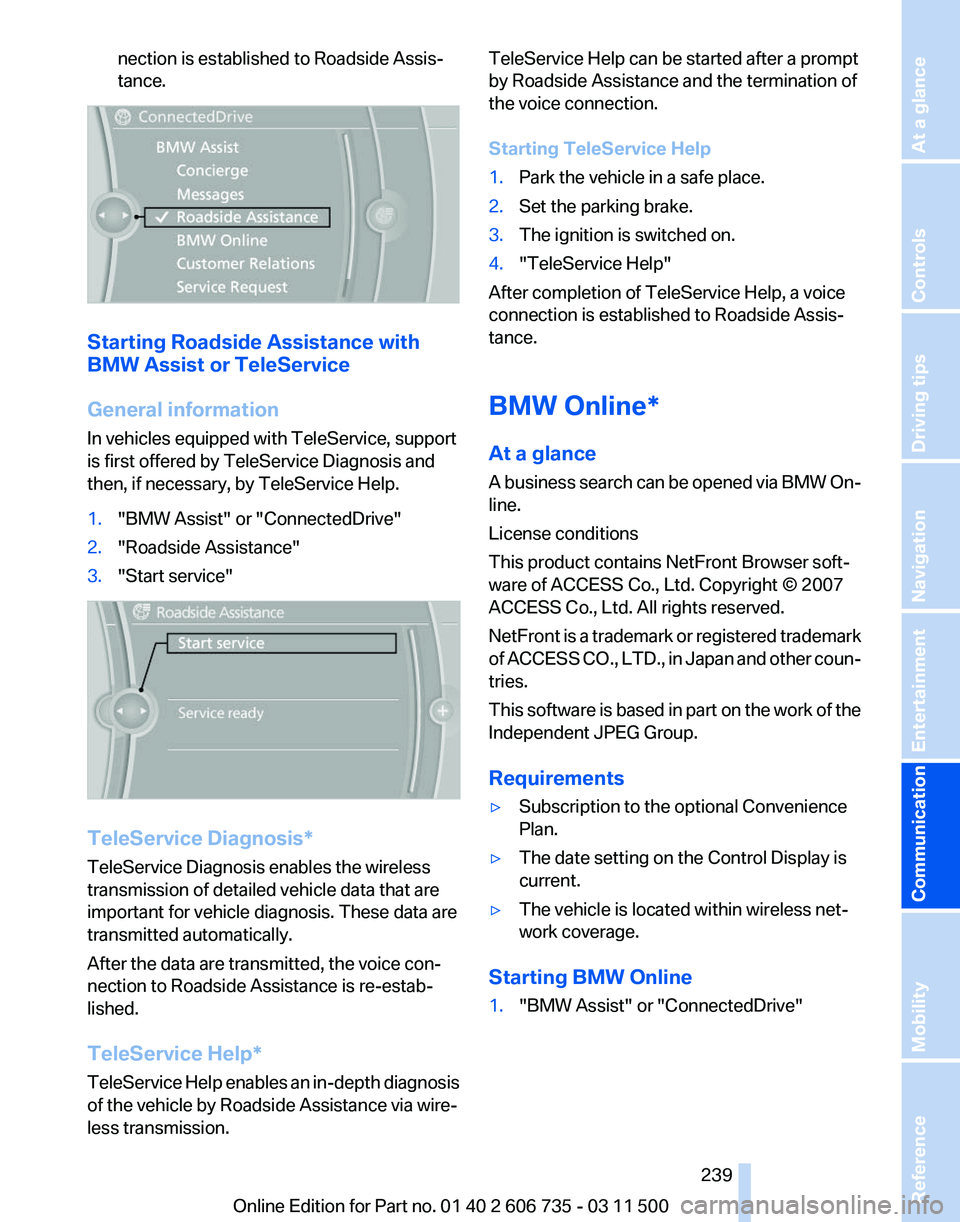
1.
"BMW Assist" or "ConnectedDrive"
2. "Roadside Assistance"
3. "Start service" TeleService Diagnosis*
TeleService Diagnosis enables the wireless
transmission of detailed vehicle data that are
important for vehicle diagnosis. These data are
transmitted automatically.
After the data are transmitted, the voice con‐
nection to Roadside Assistance is re-estab‐
lished.
TeleService Help
*
TeleService Help enables an in-depth diagnosis
of the vehicle by Roadside Assistance via wire‐
less transmission. TeleService Help can be started after a prompt
by Roadside Assistance and the termination of
the voice connection.
Starting TeleService Help
1.
Park the vehicle in a safe place.
2. Set the parking brake.
3. The ignition is switched on.
4. "TeleService Help"
After completion of TeleService Help, a voice
connection is established to Roadside Assis‐
tance.
BMW Online*
At a glance
A
business search can be opened via BMW On‐
line.
License conditions
This product contains NetFront Browser soft‐
ware of ACCESS Co., Ltd. Copyright © 2007
ACCESS Co., Ltd. All rights reserved.
NetFront is a trademark or registered trademark
of ACCESS CO., LTD., in Japan and other coun‐
tries.
This software is based in part on the work of the
Independent JPEG Group.
Requirements
▷ Subscription to the optional Convenience
Plan.
▷ The date setting on the Control Display is
current.
▷ The vehicle is located within wireless net‐
work coverage.
Starting BMW Online
1. "BMW Assist" or "ConnectedDrive"
Seite 239
239Online Edition for Part no. 01 40 2 606 735 - 03 11 500
Reference Mobility
Communication Entertainment Navigation Driving tips Controls At a glance
Page 281 of 317
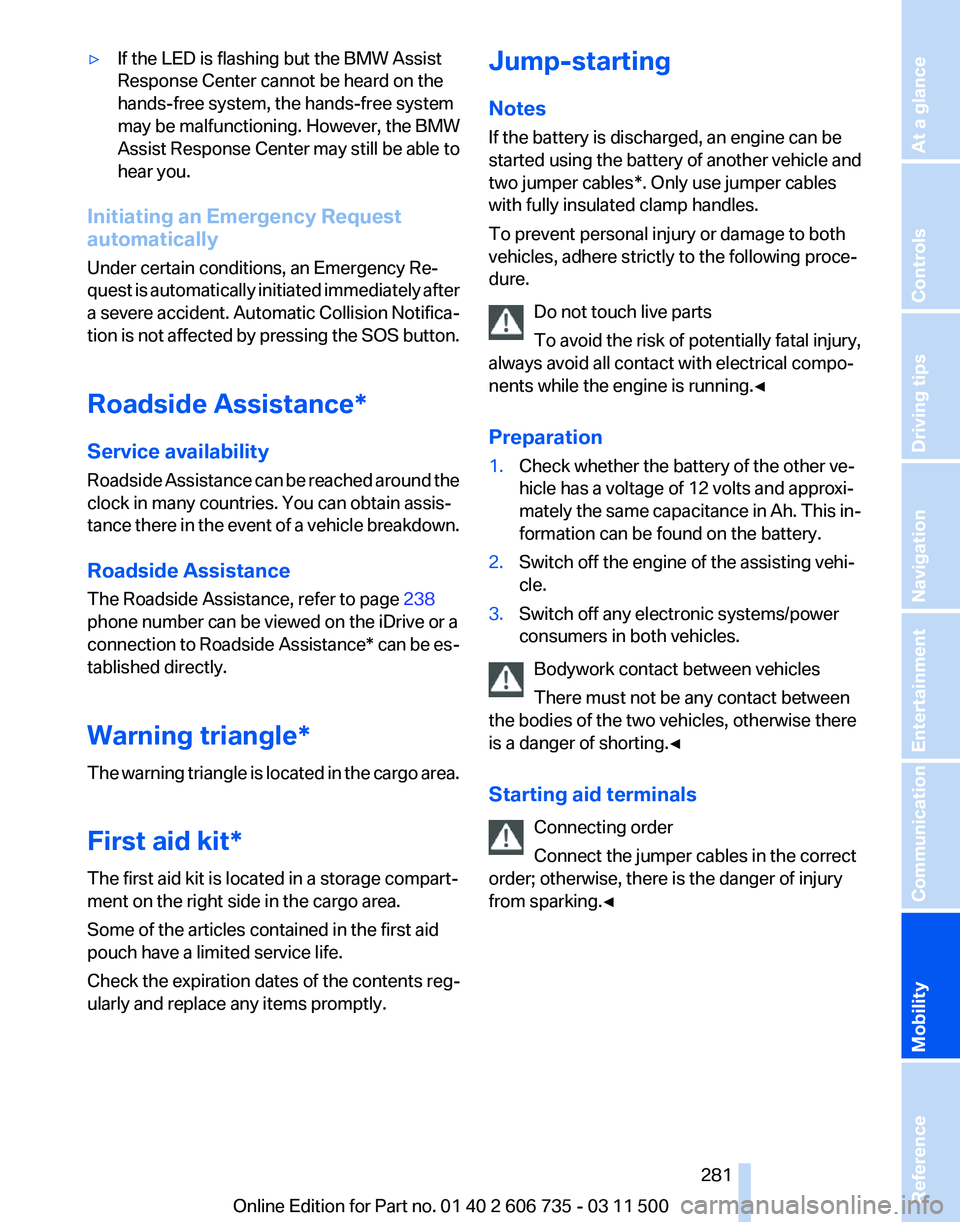
▷
If the LED is flashing but the BMW Assist
Response Center cannot be heard on the
hands-free system, the hands-free system
may be malfunctioning. However, the BMW
Assist
Response Center may still be able to
hear you.
Initiating an Emergency Request
automatically
Under certain conditions, an Emergency Re‐
quest
is automatically initiated immediately after
a severe accident. Automatic Collision Notifica‐
tion is not affected by pressing the SOS button.
Roadside Assistance*
Service availability
Roadside Assistance can be reached around the
clock in many countries. You can obtain assis‐
tance there in the event of a vehicle breakdown.
Roadside Assistance
The Roadside Assistance, refer to page 238
phone number can be viewed on the iDrive or a
connection to Roadside Assistance* can be es‐
tablished directly.
Warning triangle*
The warning triangle is located in the cargo area.
First aid kit*
The first aid kit is located in a storage compart‐
ment on the right side in the cargo area.
Some of the articles contained in the first aid
pouch have a limited service life.
Check the expiration dates of the contents reg‐
ularly and replace any items promptly. Jump-starting
Notes
If the battery is discharged, an engine can be
started using the battery of another vehicle and
two jumper cables*. Only use jumper cables
with fully insulated clamp handles.
To prevent personal injury or damage to both
vehicles, adhere strictly to the following proce‐
dure.
Do not touch live parts
To avoid the risk of potentially fatal injury,
always avoid all contact with electrical compo‐
nents while the engine is running.◀
Preparation
1. Check whether the battery of the other ve‐
hicle has a voltage of 12 volts and approxi‐
mately
the same capacitance in Ah. This in‐
formation can be found on the battery.
2. Switch off the engine of the assisting vehi‐
cle.
3. Switch off any electronic systems/power
consumers in both vehicles.
Bodywork contact between vehicles
There must not be any contact between
the bodies of the two vehicles, otherwise there
is a danger of shorting.◀
Starting aid terminals
Connecting order
Connect the jumper cables in the correct
order; otherwise, there is the danger of injury
from sparking.◀ Seite 281
281Online Edition for Part no. 01 40 2 606 735 - 03 11 500
Reference
Mobility Communication Entertainment Navigation Driving tips Controls At a glance
Page 303 of 317
Automatic climate control in
rear, deactivating on Control
Display 124
Automatic climate control in rear, switching off 125
Automatic climate control, switching off 123, 125
Automatic climate control, ventilation in rear 123
Automatic climate control, with 2-zone control 120
Automatic climate control, with 4-zone control 124
Automatic, cruise control 108
Automatic
Cruise Control 102
Automatic Curb Monitor 54
Automatic headlamp con‐ trol 81, 82
Automatic Hold 64
Automatic Hold, activating 64
Automatic Hold, deactivat‐ ing 64
Automatic Hold, parking 65
Automatic recirculated air control 122
Automatic Soft Closing, doors 33
Automatic Soft Closing, tail‐ gate 34
Automatic tailgate opera‐ tion 34, 36
Automatic transmission with Steptronic 69
Automatic transmission with
Steptronic
– Kickdown 69
AUTO program with automatic
climate control 120, 125
AUX-IN port 134, 192
Average fuel consumption 74
Average fuel consumption, setting the units 80
Average speed 73
Average speed, refer to Com‐ puter 73
Axle loads, refer to Weights 292 B
Backrest curvature, refer to
Lumbar support 46
Backrest width 46
Back
seats, adjusting the head
restraints 52
Backup camera 112
Backup camera, cleaning 114
Backup camera, obstacle marking 113
Backup camera, pathway lines 113
Backup camera, turning lines 113
Balance 172
Band-aids, refer to First aid kit 281
Bass 172
Battery
– Remote control 28
Battery change, remote con‐
trol
for rear DVD system 202
Battery disposal 278
Battery, refer to Vehicle bat‐ tery 278
Battery replacement, remote control for vehicle 39
Before entering the car wash 285
Belts, refer to Safety belts 50
Belt tensioners, refer to Safety belts 50
Beverage holder, refer to Cu‐ pholder 135
Black and white map dis‐ play 166
Blower, refer to Air flow rate 121
Bluetooth audio 196
Bluetooth connection, activat‐ ing/deactivating 217
BMW Advanced Diesel 249
BMW Apps 241
BMW Apps, video play‐ back 195
BMW Assist 237
BMW Assist, refer to Connec‐ tedDrive 237 BMW EfficientDynamics, refer
to Saving fuel 148
BMW homepage 6
BMW Internet page 6
BMW maintenance sys‐ tem 268
BMW Online 239
BMW TeleService 237
Bottle holder, refer to Cu‐ pholder 135
Brake assistant 96
Brake discs, breaking in 142
Brake
fluid, refer to Service re‐
quirements 75
Brake force display 94
Brake force distribution, elec‐ tronic 96
Brake lamps, brake force dis‐ play 94
Brake lights, adaptive 94
Brake pads, breaking in 142
Brakes, BMW maintenance system 268
Brakes, parking brake 63
Brakes, service require‐ ments 75
Brake system, BMW mainte‐ nance system 268
Braking, notes 143
Breakdown assistance 281
Breakdown, transporting the vehicle 282
Breaking in 142
Brightness, on the Control Display 80
Bulb replacement, refer to Lamp and bulb replace‐
ment 270
Button for starting the engine, refer to Start/Stop button 61
C
Calendar 232
Calibration, driver's seat 51
California Proposition 65 Warning 7
Camera, care 287
Seite 303
303Online Edition for Part no. 01 40 2 606 735 - 03 11 500
Reference Mobility Communication Entertainment Navigation Driving tips Controls At a glance
Page 305 of 317
Condensation under the vehi‐
cle 144
Condition Based Service CBS 268
Confirmation signals for lock‐ ing/unlocking the vehicle 31
ConnectedDrive 237
Connecting,
mobile phone, re‐
fer to Pairing the mobile
phone 216
Consumption, refer to Aver‐ age fuel consumption 74
Contacts 227, 235
Control Display 19
Control Display, care 287
Control Display, setting the brightness 80
Controller, refer to Con‐ trols 18
Controls and displays 12
Controls, rear DVD sys‐ tem 200
Control systems, driving sta‐ bility 96
Convenient operation
– Glass sunroof 30, 32
– Window 30
Coolant 267
Coolant, checking the
level 267
Coolant temperature 72
Cooling
function, switching on
and off 122
Cooling, maximum 122
Cooling system, refer to Cool‐ ant 267
Cornering Brake Control CBC 96
Corrosion on brake discs 144
Courtesy lamps, refer to Inte‐ rior lamps 84
Cradle for telephone or mobile phone, refer to Snap-in
adapter 225
Cruise control 108
Cruise control
– Malfunction 110
Cruise control, active 102
Cupholder 135 Curb weight, refer to
Weights 292
Current fuel consumption 72
Current location, storing 155
Curve lights, refer to Adaptive light control 82
Cylinders, number of, refer to Engine data 290
D
Dashboard
lighting, refer to In‐
strument lighting 84
Dashboard, refer to Cock‐ pit 12
Data memory 269
Data, technical 290
Date 71
Date, display format 79
Date, retrieving 71
Date, setting 79
Daytime running lights 82
Defroster, rear window 121
Defrosting windows 121
Defrost setting, refer to De‐ frosting windows 121
Destination entry via the ad‐ dress book 154
Destination guidance 161
Destination guidance with in‐ termediate destinations 159
Destination input, naviga‐ tion 153
Diesel exhaust fluid, at low temperatures 250
Diesel exhaust fluid, at mini‐ mum 249
Diesel exhaust fluid, having re‐ filled 250
Diesel exhaust fluid, refilling yourself 250
Diesel particulate filter 143
Digital clock 71
Digital compass 129
Digital radio 175
Dimming mirrors 55
Directional indicators, refer to Turn signals 66 Displacement, refer to Engine
data 290
Display in front wind‐ shield 117
Display
lighting, refer to Instru‐
ment lighting 84
Displays and controls 12
Displays, care 287
Displays, cleaning 287
Displays, refer to Instrument cluster 14
Disposal, coolant 267
Disposal, vehicle battery 278
Distance control, refer to Ac‐ tive Cruise Control 102
Distance, selecting, with Ac‐ tive Cruise Control 104
Distance warning, refer to Park Distance Control PDC 110
Divided screen view, split screen 22
Door key, refer to Remote con‐ trol with integrated key 28
Door lock 32
Doors, manual operation 32
Doors, unlocking and locking
– Confirmation signals 31
– From the inside 33
– From the outside 30
DOT Quality Grades 258
Downhill control 98
Draft-free ventilation 123
Drive-off assistant 100
Driver's seat, calibrating 51
Driving away on inclines, refer to Drive-off assistant 100
Driving
notes, breaking in 142
Driving notes, general 142
Driving on poor roads 147
Driving stability control sys‐ tems 96
Driving through water 143
Driving tips, refer to Driving notes 142
Dry air, refer to Cooling func‐ tion 122
DSC Dynamic Stability Con‐ trol 96
Seite 305
305Online Edition for Part no. 01 40 2 606 735 - 03 11 500
Reference Mobility Communication Entertainment Navigation Driving tips Controls At a glance
Page 306 of 317
DTC Dynamic Traction Con‐
trol 97
DTMF suffix dialing 222
DVD/CD 181
DVDs, storing 188
DVD system in rear 200
DVD, video 183
Dynamic destination guid‐ ance 167
Dynamic Performance Con‐ trol 98
Dynamic Stability Control DSC 96
Dynamic Traction Control DTC 97
E
Easy entry/exit 55
EfficientDynamics, refer to Saving fuel 148
Electrical malfunction
– Door lock 32
– Driver's door 32
– Fuel filler flap 246
Electrical malfunction of upper
tailgate 34
Electrical malfunction, parking brake 65
Electric seat adjustment 46
Electric
steering wheel adjust‐
ment 55
Electronic brake-force distri‐ bution 96
Electronic engine oil level check 265
Electronic Stability Program ESP, refer to Dynamic Stabil‐
ity Control DSC 96
Emergency operation
– Door lock, refer to Manual operation 32
Emergency operation, fuel
filler flap, unlocking man‐
ually 246
Emergency Request 280
Emergency service, refer to Roadside Assistance 281 Energy-conscious driving, re‐
fer to Current fuel consump‐
tion 72
Energy,
saving, refer to Saving
fuel 148
Engine, breaking in 142
Engine compartment 263
Engine coolant, refer to Cool‐ ant 267
Engine oil, adding 266
Engine oil, additives, refer to Approved engine oils 266
Engine oil, alternative oil types 266
Engine oil, BMW maintenance system 268
Engine oil change intervals, re‐ fer to Service require‐
ments 75
Engine oil, checking the level 265
Engine oil, filling capacity 293
Engine oil temperature 72
Engine oil types, alterna‐ tive 266
Engine oil types, ap‐ proved 266
Engine, overheating, refer to Coolant temperature 72
Engine power, refer to Engine data 290
Engine, RPM 290
Engine start, assistance 281
Engine, starting 62
Engine, starting
– Comfort Access 37
Engine, starting, Start/Stop
button 61
Engine, stopping, Start/Stop button 61
Engine, switching off 62
Entry lamps, refer to Interior lamps 84
Environmentally friendly driv‐ ing,
refer to Current fuel con‐
sumption 72
Equalizer 172
Equipment, interior 127 ESP Electronic Stability Pro‐
gram, refer to Dynamic Sta‐
bility Control DSC 96
Exchanging wheels/tires 260
Exhaust system 142
Exterior mirrors 53
Exterior mirrors, adjusting 53
Exterior mirrors, automatic dimming 55
Exterior mirrors, automatic heating 54
Exterior mirrors, folding in and out 54
External audio device 134
External devices 192
External temperature dis‐ play 71
External temperature display, changing the units of meas‐
ure, changing the units of
measure on the Control Dis‐
play 80
External temperature warn‐ ing 71
Eyes for securing cargo 146
F
Fader 172
Failure messages, refer to Check Control 76
False alarm
– Avoiding unintentional alarms 40
– Ending an alarm 39
Fastening safety belts, refer to
Safety belts 50
Fault messages, refer to Check Control 76
Filling capacities 293
Filter, refer to Microfilter/acti‐ vated-charcoal filter 124
Fine wood, care 287
First aid kit 281
Fitting for towing 283
Fixing system, adaptive 137
Flashing
when locking/unlock‐
ing 31
Flat Tire Monitor FTM 88
Seite 306
306 Online Edition for Part no. 01 40 2 606 735 - 03 11 500
Everything from A to Z
Page 307 of 317
Flat Tire Monitor FTM, snow
chains 261
Flat tire, run-flat tires 261
Flat
tire, Tire Pressure Monitor
TPM 90
Flat tire, warning lamp 89, 91
Flat tire, wheel change 275
Flooding, refer to Driving through water 143
Floor carpet, care 287
Floor mats, care 287
FM/AM station 174
Fog on windows, remov‐ ing 121
Foldable rear seat back‐ rest 133
Foot brake 143
Footwell lamps, refer to Inte‐ rior lamps 84
For your own safety 6
Four-wheel drive, refer to xDrive 98
Front airbags 86
Front fog lamps 84
Front fog lamps, indicator lamp 84
FTM Flat Tire Monitor 88
Fuel 248
Fuel
– Refer to Average fuel con‐ sumption 74
Fuel, average consump‐
tion 74
Fuel cap 246
Fuel cap, closing 246
Fuel consumption display
– Average fuel consump‐ tion 74
Fuel consumption display,
current fuel consumption 72
Fuel-efficient driving, refer to Current
fuel consumption 72
Fuel filler flap, closing 246
Fuel filler flap, opening 246
Fuel filler flap, unlocking in case of an electrical malfunc‐
tion 246
Fuel gauge 73
Fuel, high-quality brands 248 Fuel, quality
248
Fuel, saving 148
Fuel, specifications 248
Fuel
tank capacity, refer to Fill‐
ing capacities 293
Fuel tank contents, refer to Filling capacities 293
Fuel tank, refer to Filling ca‐ pacities 293
Fuse 279
G
Garage door opener, refer to Integrated universal remote
control 127
Gasoline gauge, refer to Fuel gauge 73
Gasoline, refer to Required fuel 248
Gas station recommenda‐ tion 162
Gear change, automatic trans‐ mission with Steptronic 70
Gear change, via shift pad‐ dles 70
General driving notes 142
Glass sunroof, closing 43
Glass sunroof, electric
– Convenient operation 30
– Remote control 30
Glass sunroof, initializing 44
Glass sunroof, opening 43
Glass sunroof, pinch protec‐
tion 44
Glass sunroof, power fail‐ ure 44
Glass sunroof, refer to Panor‐ amic glass sunroof 42
Glass sunroof, tilting 43
Glove compartment 134
Glove compartment
– USB interface 134
Glove compartment, light‐
ing 134
GPS navigation, refer to Navi‐ gation system 152
Gross vehicle weight, refer to Weights 292 H
Handbrake, refer to Parking
brake 63
Hand-held transmitter, alter‐ nating code 128
Hands-free microphone 16
Hazard warning sys‐ tem 16, 280
HDC Hill Descent Control 98
HD Radio 175
Head airbags 86
Headlamp control, auto‐ matic 81, 82
Headlamp courtesy delay fea‐ ture 81
Headlamp flasher 66, 83
Headlamp flasher, indicator lamp 15
Headlamps 81
Headlamps, care 285
Headlamps, cleaning 67
Headlamps, cleaning, washer fluid 68
Headliner 17
Headphones,
connecting, rear
DVD system 201
Head restraints 51
Head-up Display 117
Head-up Display, care 287
Heatable rear window 121
Heating 119
Heating
– Seats 48
Heating, interior 119
Heating, mirrors 54
Heating, residual heat 122
Heating with the engine switched off, refer to Resid‐
ual heat 122
Heavy cargo, refer to Stowing cargo 145
Height, refer to Dimen‐ sions 291
High-beam Assistant 83
High beams 83
High beams/low beams, auto‐ matic, refer to High-beam
Assistant 83
Seite 307
307Online Edition for Part no. 01 40 2 606 735 - 03 11 500
Reference Mobility Communication Entertainment Navigation Driving tips Controls At a glance
Page 308 of 317
High beams, indicator
lamp 15
High-pressure washers 285
Hill Descent Control HDC 98
Hill drive-off assistant, refer to Drive-off assistant 100
Hills 144
Holder for beverages 135
Holder for remote control, re‐ fer to Ignition lock 61
Homepage 6
Hood 264
Hood, opening 264
Horn 12
Hot exhaust system 142
Hotline 240
House number, entering for navigation 154
Hydraulic brake assistant 96
Hydroplaning 143
I
Ice warning, refer to External temperature warning 71
Icy roads, refer to External temperature warning 71
Identification marks, tires 258
iDrive 18
iDrive, changing settings 78
iDrive, changing the lan‐ guage 80
iDrive, changing the units of measure and display for‐
mat 80
iDrive, setting the bright‐ ness 80
iDrive, setting the date 79
iDrive, setting the time 79
Ignition 61
Ignition
key position 1, refer to
Radio ready state 61
Ignition key position 2, refer to Ignition on 61
Ignition key, refer to Remote control with integrated
key 28
Ignition lock 61 Ignition, switched off 61
Ignition, switched on 61
Images, displaying, rear DVD
system 208
Indication of a flat tire 89, 91
Indicator and warning lamps 15
Inflation pressure monitor, re‐ fer to Flat Tire Monitor 88
Inflation
pressure, refer to Tire
inflation pressure 252
Information on the navigation data 152
Initialization after power fail‐ ure 278
Initializing
– Compass, refer to Calibrat‐ ing 129
– Panoramic glass sunroof 43
Initializing, Flat Tire Monitor
FTM 89
Initializing, glass sunroof 44
Initializing, refer to Setting the date 79
Initializing, refer to Setting the time 79
Initializing,
Tire Pressure Mon‐
itor TPM 91
Installation location, tele‐ phone 134
Instrument cluster 14
Instrument lighting 84
Instrument panel, refer to In‐ strument cluster 14
Instruments, refer to Cock‐ pit 12
Integrated key 28
Integrated universal remote control 127
Interactive map 157
Interior equipment 127
Interior lamps 84
Interior lamps
– Remote control 30
Interior mirror 54
Interior rearview mirror, auto‐ matic dimming 55
Interior rearview mirror, com‐ pass 129 Interior temperature, setting,
automatic climate con‐
trol 119
Intermediate
destinations 159
Internet page 6
Intersection, entering for navi‐ gation 154
iPod/iPhone 193
J
Jacking points for the vehicle jack 276
Jack, refer to Vehicle jack 276
Joystick, refer to Selector lever 69
Jump-starting 281
K
Keyless Go, refer to Comfort Access 37
Keyless opening and closing, refer to Comfort Access 37
Key Memory, refer to Personal Profile 28
Key, refer to Integrated key/re‐ mote control 28
Kickdown
– Automatic transmission with Steptronic 69
Knocking control 248
L
Label, run-flat tire 261
Lamp and bulb replacement, lamp replacement 270
Lamps 81
Lamps, automatic headlamp control 81, 82
Lamps, High-beam Assis‐ tant 83
Lamps, parking lamps/low beams 81
Lamps, replacing, refer to Lamp and bulb replace‐
ment 270
Lane departure warning 93
Seite 308
308 Online Edition for Part no. 01 40 2 606 735 - 03 11 500
Everything from A to Z