tow BMW X5M 2012 User Guide
[x] Cancel search | Manufacturer: BMW, Model Year: 2012, Model line: X5M, Model: BMW X5M 2012Pages: 317, PDF Size: 8.83 MB
Page 100 of 317
Chassis and suspension tuning
Two chassis and suspension tunings are avail‐
able for selection.
▷
Normal:
The comfortable basic setting offers opti‐
mum comfort when traveling.
▷ Sport:
The sporty basic setting offers increased
driving agility.
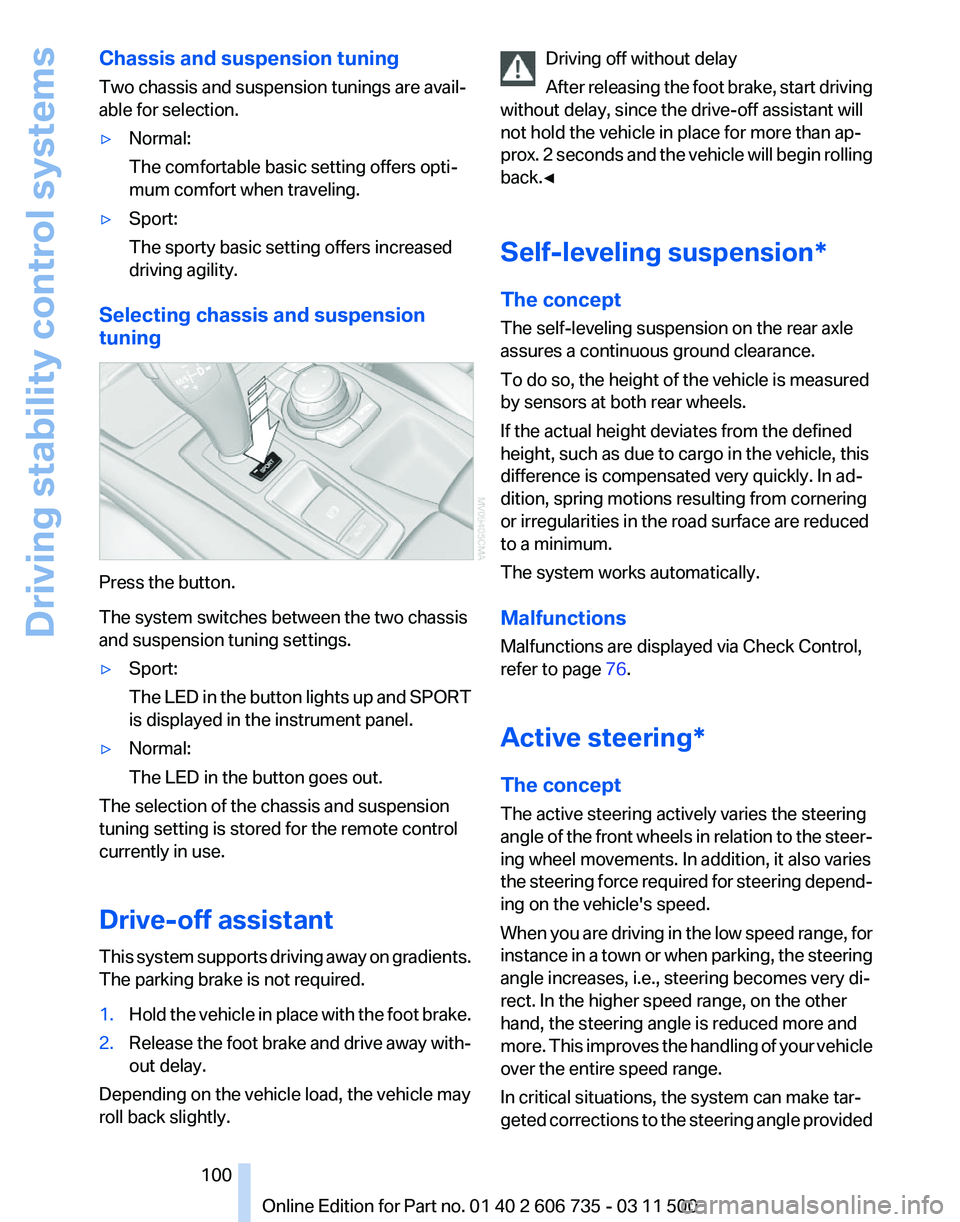
Selecting chassis and suspension
tuning Press the button.
The system switches between the two chassis
and suspension tuning settings.
▷
Sport:
The
LED in the button lights up and SPORT
is displayed in the instrument panel.
▷ Normal:
The LED in the button goes out.
The selection of the chassis and suspension
tuning setting is stored for the remote control
currently in use.
Drive-off assistant
This
system supports driving away on gradients.
The parking brake is not required.
1. Hold the vehicle in place with the foot brake.
2. Release the foot brake and drive away with‐
out delay.
Depending on the vehicle load, the vehicle may
roll back slightly. Driving off without delay
After
releasing the foot brake, start driving
without delay, since the drive-off assistant will
not hold the vehicle in place for more than ap‐
prox. 2 seconds and the vehicle will begin rolling
back.◀
Self-leveling suspension*
The concept
The self-leveling suspension on the rear axle
assures a continuous ground clearance.
To do so, the height of the vehicle is measured
by sensors at both rear wheels.
If the actual height deviates from the defined
height, such as due to cargo in the vehicle, this
difference is compensated very quickly. In ad‐
dition, spring motions resulting from cornering
or irregularities in the road surface are reduced
to a minimum.
The system works automatically.
Malfunctions
Malfunctions are displayed via Check Control,
refer to page 76.
Active steering*
The concept
The active steering actively varies the steering
angle of the front wheels in relation to the steer‐
ing wheel movements. In addition, it also varies
the steering force required for steering depend‐
ing on the vehicle's speed.
When you are driving in the low speed range, for
instance in a town or when parking, the steering
angle increases, i.e., steering becomes very di‐
rect. In the higher speed range, on the other
hand, the steering angle is reduced more and
more. This improves the handling of your vehicle
over the entire speed range.
In critical situations, the system can make tar‐
geted corrections to the steering angle provided Seite 100
100 Online Edition for Part no. 01 40 2 606 735 - 03 11 500
Driving stability control systems
Page 110 of 317
▷
Green: the system is active.
▷ Orange: the system is interrupted.
2 Selected desired speed appears briefly
If the display --- mph or --- km/h appears briefly,
conditions may not be adequate to operate the
system.
Call up Check Control messages, refer to
page 77.
Malfunction The
warning lamp comes on when the
system has failed.
A message appears on the Control
Display. More information, refer to page 76.
Park Distance Control PDC*
The concept
In addition to the PDC Park Distance Control, the
backup camera*, refer to page 112, can be
switched on.
PDC supports you when parking. A slow ap‐
proach to an object in front of or behind your ve‐
hicle is announced by:
▷ Signal tones.
▷ Visual display.
Measurement
Measurements
are made by ultrasound sensors
in the bumpers.
The range is approx. 6 ft/2 m.
An acoustic warning is first given:
▷ By the front* sensors and two rear corner
sensors at approx. 24 in/60 cm.
▷ By the rear middle sensors at approx. 5 ft/
1.50 m.
System limits Check the traffic situation as well
PDC cannot serve as a substitute for the
driver's personal judgment of the traffic situa‐
tion.
Check the traffic situation around the vehi‐ cle with your own eyes. Otherwise, an accident
could result from road users or objects located
outside of the PDC detection range.
Loud
noises from outside and inside the vehicle
may prevent you from hearing the PDC's signal
tone.◀
Avoid driving quickly with PDC
Avoid approaching an object quickly.
Avoid driving away quickly while PDC is not yet
active.
For technical reasons, the system may other‐
wise be too late in issuing a warning.◀
Limits of ultrasonic measurement
The detection of objects can reach the physical
limits of ultrasonic measurement, for instance:
▷ With tow bars and trailer hitches.
▷ With thin or wedge-shaped objects.
▷ With low objects.
▷ With objects with corners and sharp edges.
Low objects already displayed, e.g., curbs, can
move
into the blind area of the sensors before or
after a continuous tone sounds.
High, protruding objects such as ledges may not
be detected.
False warnings
PDC may issue a warning under the following
conditions even though there is no obstacle
within the detection range:
▷ In heavy rain.
▷ When sensors are very dirty or covered in
ice.
▷ When sensors are covered in snow.
▷ On rough road surfaces.
▷ In large buildings with right angles and
smooth
walls, e.g., in underground garages.
▷ In heavy exhaust.
▷ Due to other ultrasound sources, e.g.,
sweeping machines, high pressure steam
cleaners or neon lights. Seite 110
110 Online Edition for Part no. 01 40 2 606 735 - 03 11 500
Driving comfort
Page 119 of 317
Climate
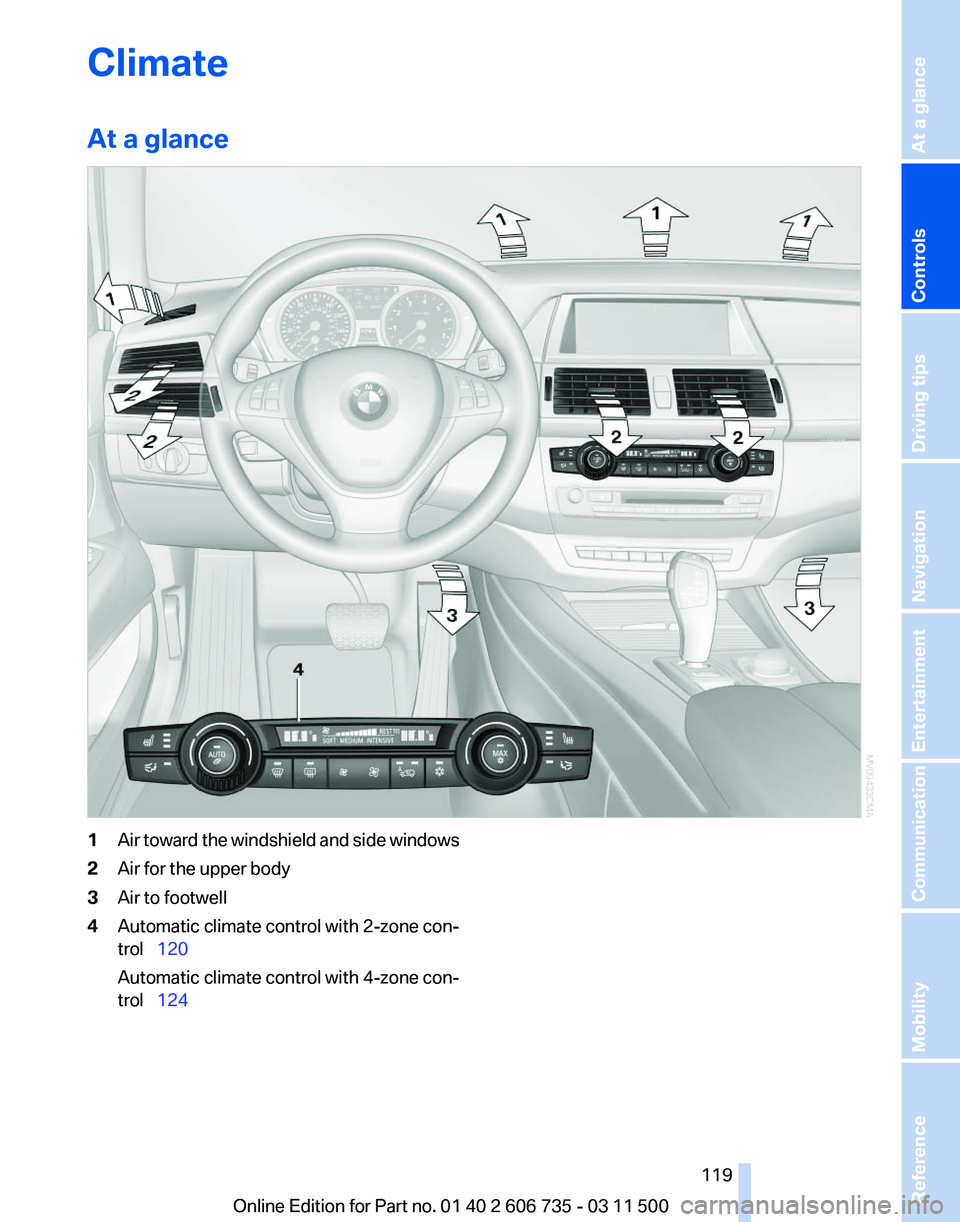
At a glance
1
Air toward the windshield and side windows
2 Air for the upper body
3 Air to footwell
4 Automatic climate control with 2-zone con‐
trol 120
Automatic climate control with 4-zone con‐
trol 124
Seite 119
119Online Edition for Part no. 01 40 2 606 735 - 03 11 500
Reference Mobility Communication Entertainment Navigation Driving tips
Controls At a glance
Page 122 of 317
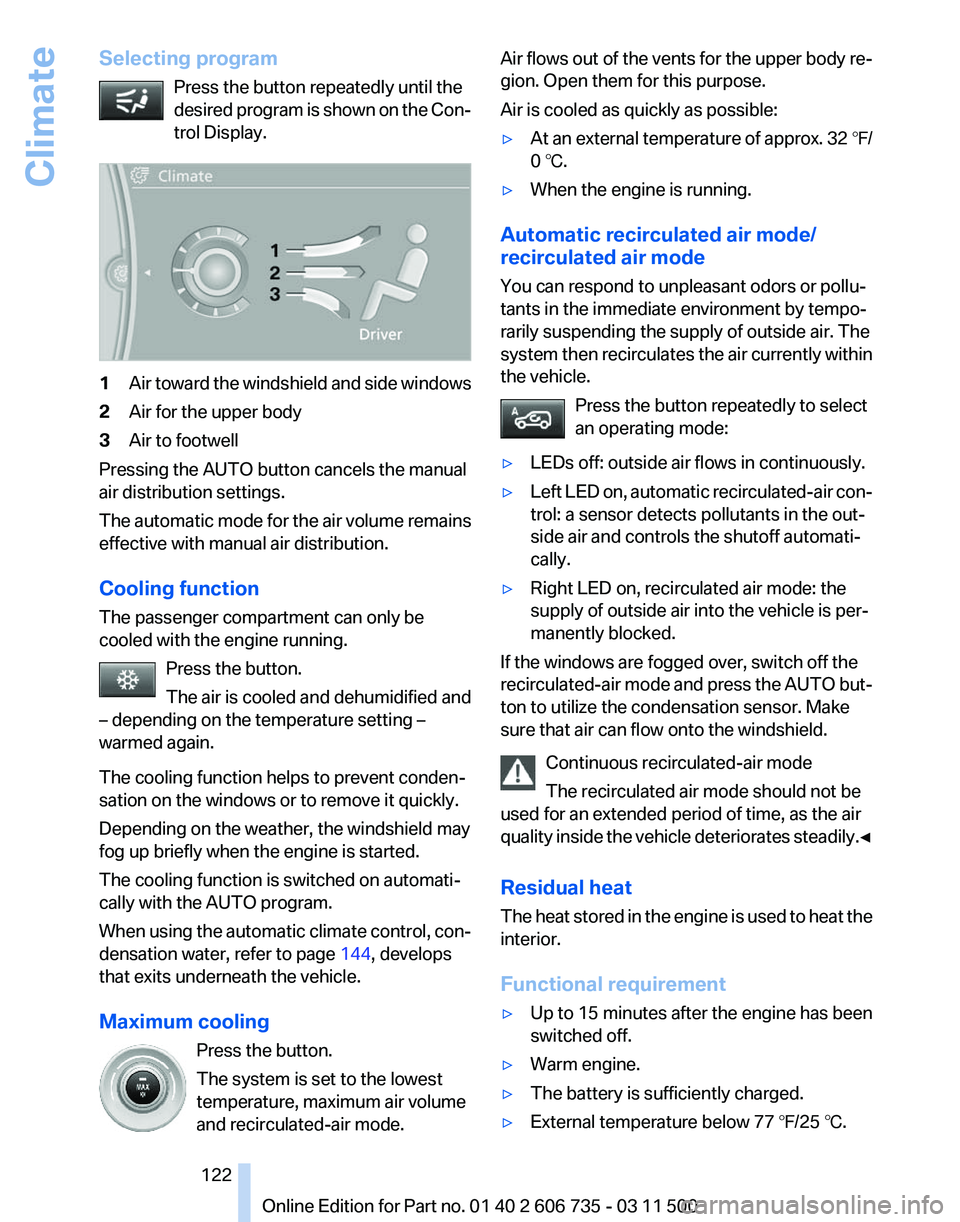
Selecting program
Press the button repeatedly until the
desired
program is shown on the Con‐
trol Display. 1
Air toward the windshield and side windows
2 Air for the upper body
3 Air to footwell
Pressing the AUTO button cancels the manual
air distribution settings.
The
automatic mode for the air volume remains
effective with manual air distribution.
Cooling function
The passenger compartment can only be
cooled with the engine running.
Press the button.
The air is cooled and dehumidified and
– depending on the temperature setting –
warmed again.
The cooling function helps to prevent conden‐
sation on the windows or to remove it quickly.
Depending on the weather, the windshield may
fog up briefly when the engine is started.
The cooling function is switched on automati‐
cally with the AUTO program.
When using the automatic climate control, con‐
densation water, refer to page 144, develops
that exits underneath the vehicle.
Maximum cooling
Press the button.
The system is set to the lowest
temperature, maximum air volume
and recirculated-air mode. Air flows out of the vents for the upper body re‐
gion. Open them for this purpose.
Air is cooled as quickly as possible:
▷
At an external temperature of approx. 32 ℉/
0 ℃.
▷ When the engine is running.
Automatic recirculated air mode/
recirculated air mode
You can respond to unpleasant odors or pollu‐
tants in the immediate environment by tempo‐
rarily suspending the supply of outside air. The
system
then recirculates the air currently within
the vehicle.
Press the button repeatedly to select
an operating mode:
▷ LEDs off: outside air flows in continuously.
▷ Left LED on, automatic recirculated-air con‐
trol: a sensor detects pollutants in the out‐
side air and controls the shutoff automati‐
cally.
▷ Right LED on, recirculated air mode: the
supply of outside air into the vehicle is per‐
manently blocked.
If the windows are fogged over, switch off the
recirculated-air
mode and press the AUTO but‐
ton to utilize the condensation sensor. Make
sure that air can flow onto the windshield.
Continuous recirculated-air mode
The recirculated air mode should not be
used for an extended period of time, as the air
quality inside the vehicle deteriorates steadily.◀
Residual heat
The heat stored in the engine is used to heat the
interior.
Functional requirement
▷ Up to 15 minutes after the engine has been
switched off.
▷ Warm engine.
▷ The battery is sufficiently charged.
▷ External temperature below 77 ℉/25 ℃. Seite 122
122 Online Edition for Part no. 01 40 2 606 735 - 03 11 500
Climate
Page 124 of 317
▷
Activating heating and distributing air in
footwell:
Turn toward front
▷ Distributing air in storage compartment
area between seats:
Turn toward rear
2 Button for switching on the blower: LED is lit
The heating is not ready for operation without
switching on the blower. After the heating is
switched
off, the blower can be used to recircu‐
late the air within the vehicle, for instance at high
temperatures. To do this, turn thumbwheel 1 to‐
ward the rear and switch on the blower, button 2.
Microfilter/activated-charcoal filter
The microfilter traps dust and pollen in the in‐
coming air.
The activated-charcoal filter removes gaseous
pollutants from the outside air that enters the
vehicle.
The service center replaces this combined filter
during routine maintenance.
More information can be found in the service re‐
quirements display, refer to page 75.
Automatic climate control
with 4-zone control*
Front operation
Corresponds to the operation of automatic cli‐
mate control with 2-zone control, refer to
page 120.
Rear operation
The control unit is located in the center console
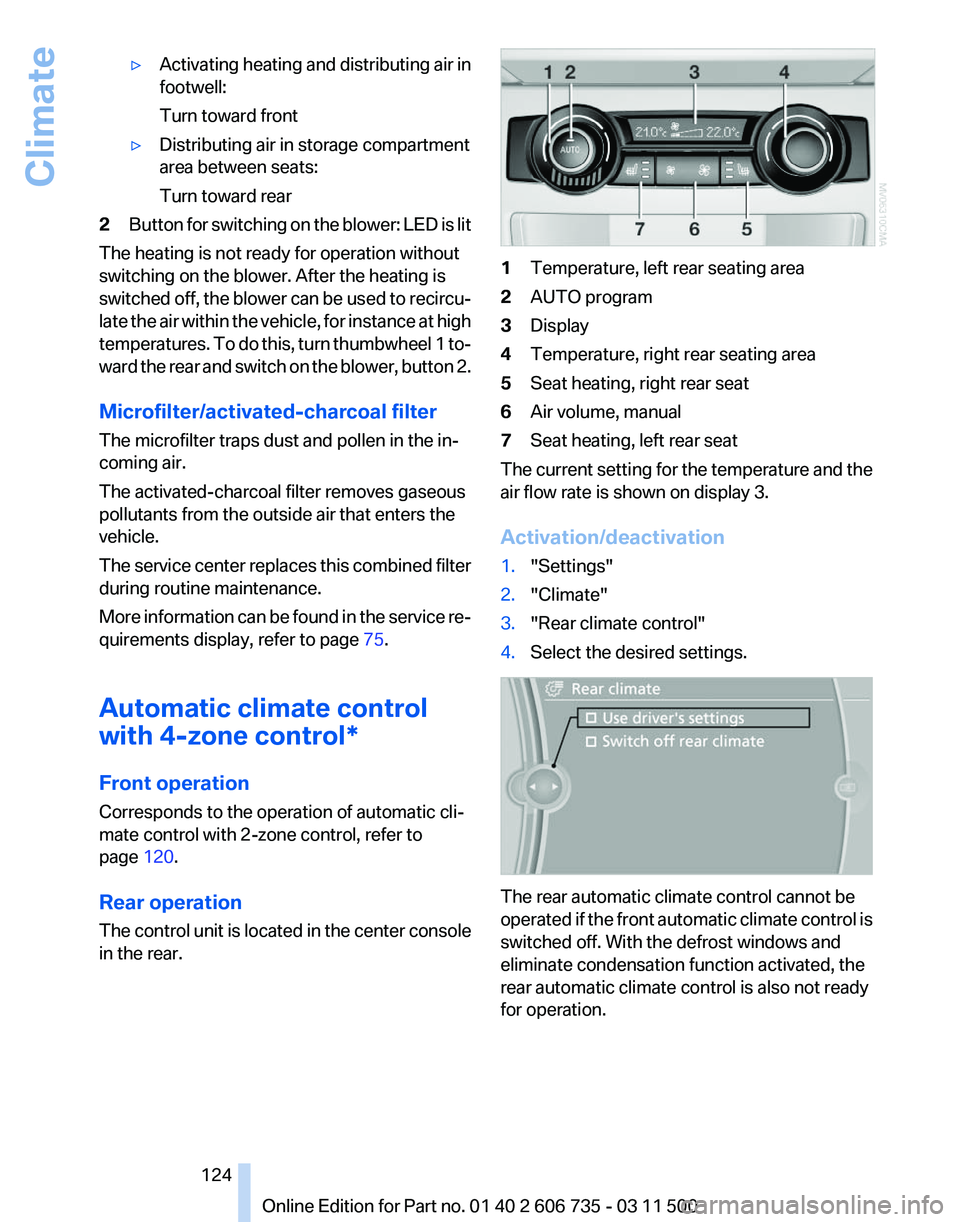
in the rear. 1
Temperature, left rear seating area
2 AUTO program
3 Display
4 Temperature, right rear seating area
5 Seat heating, right rear seat
6 Air volume, manual
7 Seat heating, left rear seat
The current setting for the temperature and the
air flow rate is shown on display 3.
Activation/deactivation
1. "Settings"
2. "Climate"
3. "Rear climate control"
4. Select the desired settings. The rear automatic climate control cannot be
operated
if the front automatic climate control is
switched off. With the defrost windows and
eliminate condensation function activated, the
rear automatic climate control is also not ready
for operation.
Seite 124
124 Online Edition for Part no. 01 40 2 606 735 - 03 11 500
Climate
Page 125 of 317
AUTO program
The AUTO program automatically
sets the air distribution toward the
upper body and in the footwell, as
well as the air flow rate. It also
adapts your instructions for the
temperature to outside influences throughout
the year.
Temperature
Set the desired temperature indi‐
vidually on the left and right side.
The automatic climate control achieves this
temperature
as quickly as possible regardless of
the season, using maximum cooling or heating
power if necessary, and then maintains it.
When switching between different temperature
settings in rapid succession, the automatic cli‐
mate control does not have sufficient time to
adjust the set temperature.
Air volume, manual
The air flow rate can be varied by press‐
ing on the corresponding side. The au‐
tomatic mode for the air flow rate can be
switched on again using the AUTO button.
Switching off rear automatic climate
control
With the blower at its lowest setting,
press the left side of the button to
switch off the automatic climate control.
The automatic climate control can also be
switched off with iDrive. To switch on the auto‐
matic climate control again, the system must
first be reactivated, refer to Activating/deacti‐
vating.
The system is switched on again by pressing
any button of the rear automatic climate control. Ventilation in rear
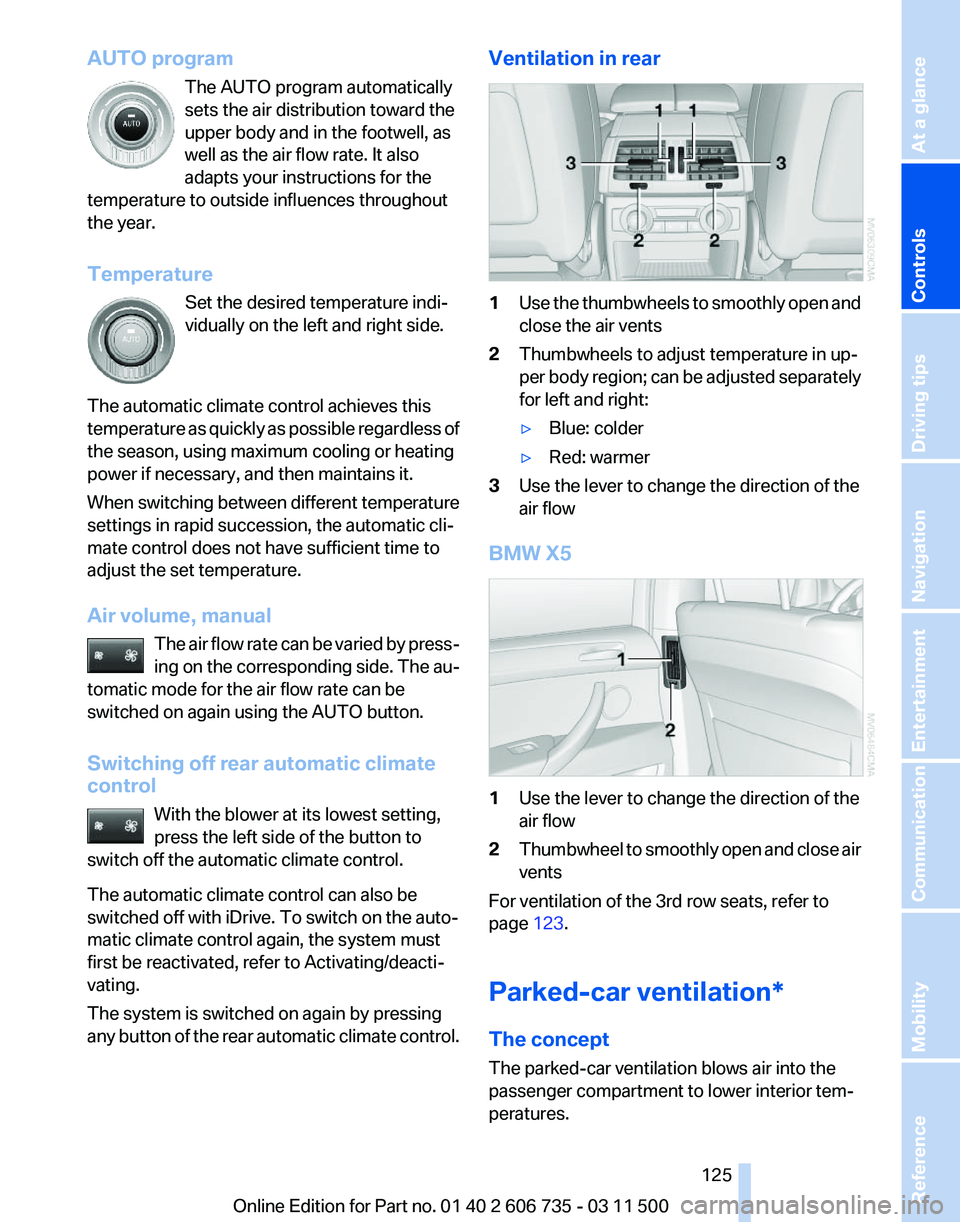
1
Use the thumbwheels to smoothly open and
close the air vents
2 Thumbwheels to adjust temperature in up‐
per
body region; can be adjusted separately
for left and right:
▷ Blue: colder
▷ Red: warmer
3 Use the lever to change the direction of the
air flow
BMW X5 1
Use the lever to change the direction of the
air flow
2 Thumbwheel to smoothly open and close air
vents
For ventilation of the 3rd row seats, refer to
page 123.
Parked-car ventilation*
The concept
The parked-car ventilation blows air into the
passenger compartment to lower interior tem‐
peratures.
Seite 125
125Online Edition for Part no. 01 40 2 606 735 - 03 11 500
Reference Mobility Communication Entertainment Navigation Driving tips
Controls At a glance
Page 132 of 317
Cargo area
BMW X5: luggage compartment roller
cover
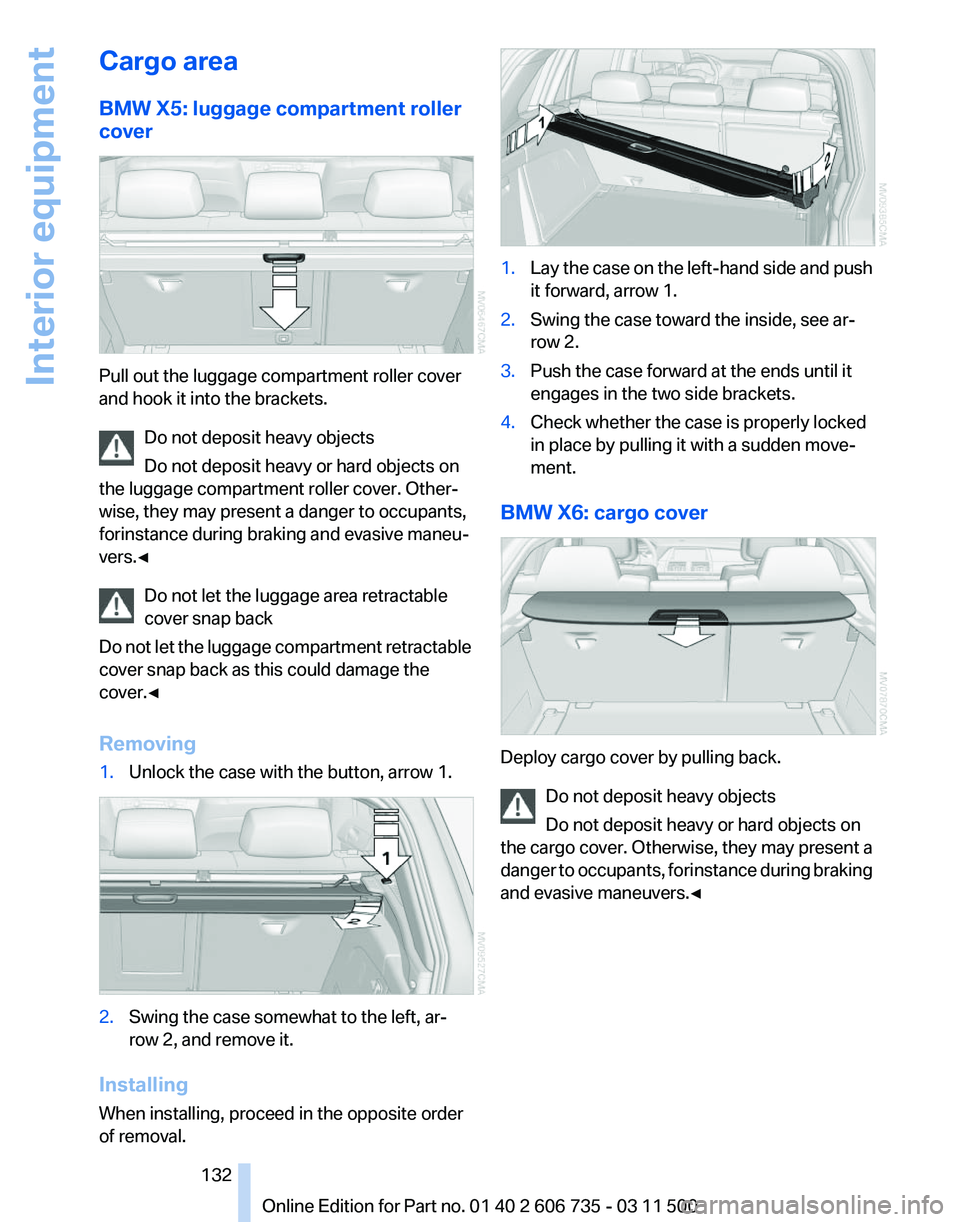
Pull out the luggage compartment roller cover
and hook it into the brackets.
Do not deposit heavy objects
Do not deposit heavy or hard objects on
the luggage compartment roller cover. Other‐
wise, they may present a danger to occupants,
for instance during braking and evasive maneu‐
vers.◀
Do not let the luggage area retractable
cover snap back
Do
not let the luggage compartment retractable
cover snap back as this could damage the
cover.◀
Removing
1. Unlock the case with the button, arrow 1. 2.
Swing the case somewhat to the left, ar‐
row 2, and remove it.
Installing
When installing, proceed in the opposite order
of removal. 1.
Lay the case on the left-hand side and push
it forward, arrow 1.
2. Swing the case toward the inside, see ar‐
row 2.
3. Push the case forward at the ends until it
engages in the two side brackets.
4. Check whether the case is properly locked
in place by pulling it with a sudden move‐
ment.
BMW X6: cargo cover Deploy cargo cover by pulling back.
Do not deposit heavy objects
Do not deposit heavy or hard objects on
the
cargo cover. Otherwise, they may present a
danger to occupants, for instance during braking
and evasive maneuvers.◀ Seite 132
132 Online Edition for Part no. 01 40 2 606 735 - 03 11 500
Interior equipment
Page 133 of 317
Removing
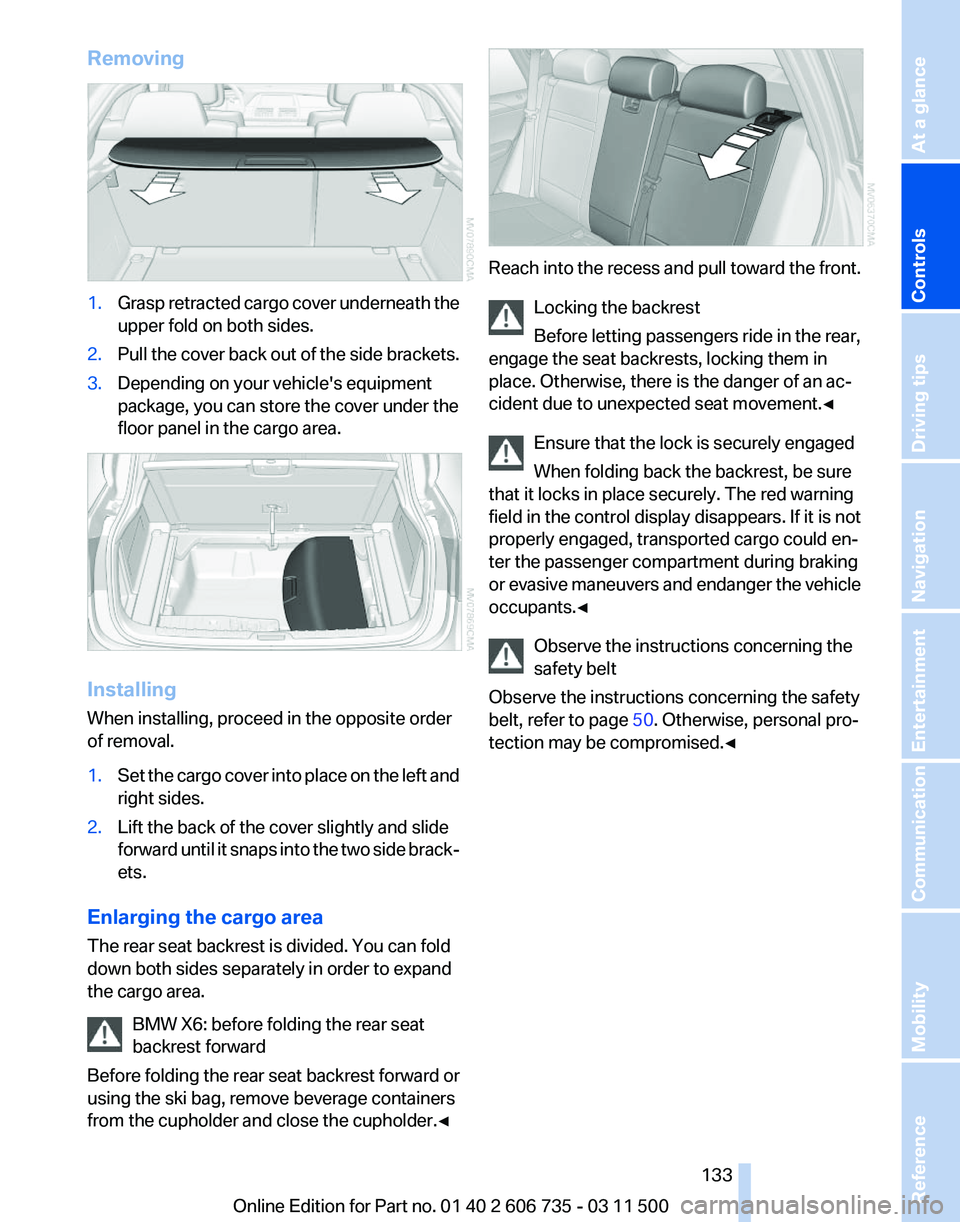
1.
Grasp retracted cargo cover underneath the
upper fold on both sides.
2. Pull the cover back out of the side brackets.
3. Depending on your vehicle's equipment
package, you can store the cover under the
floor panel in the cargo area. Installing
When installing, proceed in the opposite order
of removal.
1.
Set the cargo cover into place on the left and
right sides.
2. Lift the back of the cover slightly and slide
forward
until it snaps into the two side brack‐
ets.
Enlarging the cargo area
The rear seat backrest is divided. You can fold
down both sides separately in order to expand
the cargo area. BMW X6: before folding the rear seat
backrest forward
Before
folding the rear seat backrest forward or
using the ski bag, remove beverage containers
from the cupholder and close the cupholder.◀ Reach into the recess and pull toward the front.
Locking the backrest
Before letting passengers ride in the rear,
engage the seat backrests, locking them in
place. Otherwise, there is the danger of an ac‐
cident due to unexpected seat movement.
◀
Ensure that the lock is securely engaged
When folding back the backrest, be sure
that it locks in place securely. The red warning
field in the control display disappears. If it is not
properly engaged, transported cargo could en‐
ter the passenger compartment during braking
or evasive maneuvers and endanger the vehicle
occupants.◀
Observe the instructions concerning the
safety belt
Observe the instructions concerning the safety
belt, refer to page 50. Otherwise, personal pro‐
tection may be compromised.◀ Seite 133
133Online Edition for Part no. 01 40 2 606 735 - 03 11 500
Reference Mobility Communication Entertainment Navigation Driving tips
Controls At a glance
Page 135 of 317
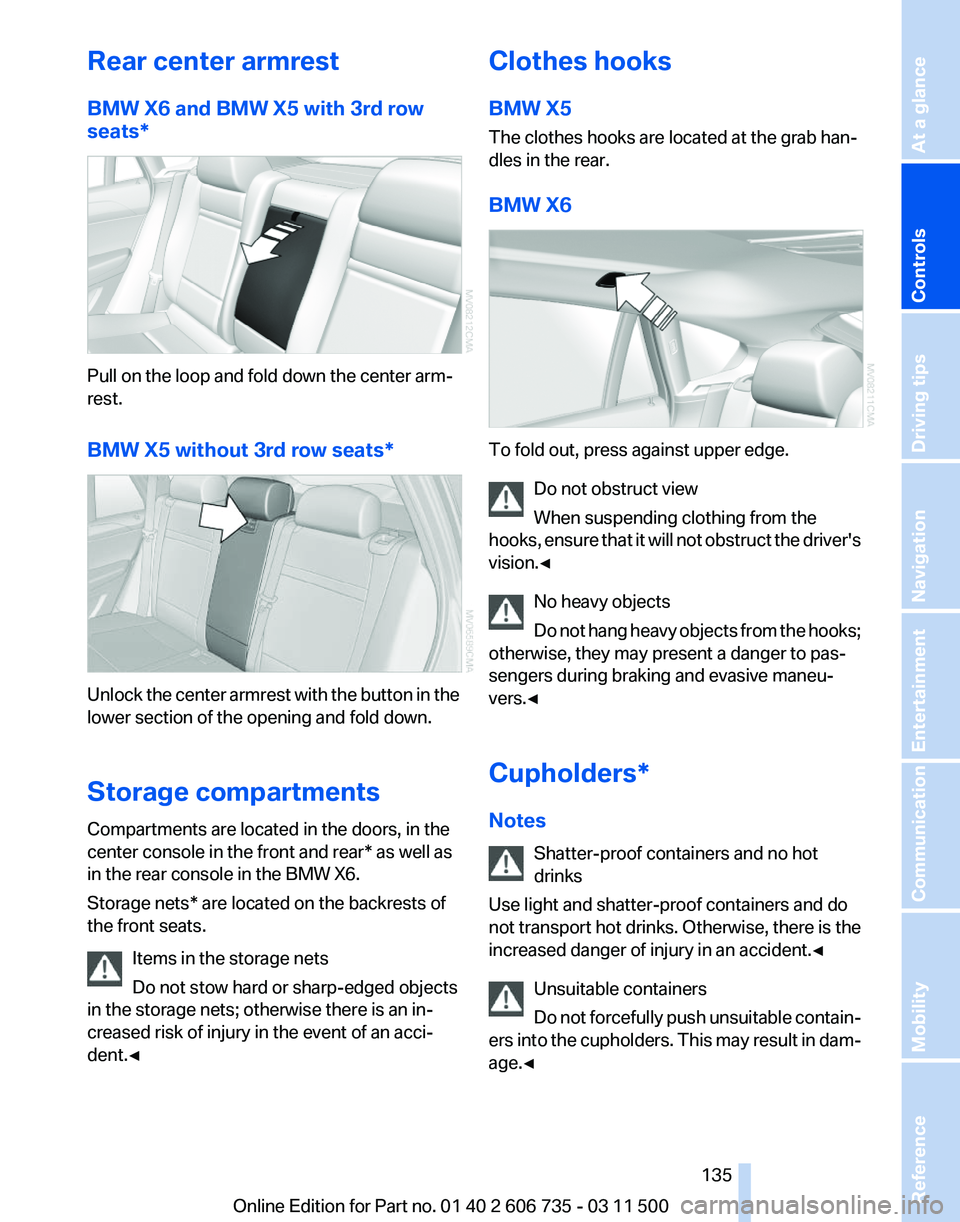
Rear center armrest
BMW X6 and BMW X5 with 3rd row
seats*
Pull on the loop and fold down the center arm‐
rest.
BMW X5 without 3rd row seats*
Unlock the center armrest with the button in the
lower section of the opening and fold down.
Storage compartments
Compartments are located in the doors, in the
center console in the front and rear* as well as
in the rear console in the BMW X6.
Storage nets* are located on the backrests of
the front seats.
Items in the storage nets
Do not stow hard or sharp-edged objects
in the storage nets; otherwise there is an in‐
creased risk of injury in the event of an acci‐
dent.◀ Clothes hooks
BMW X5
The clothes hooks are located at the grab han‐
dles in the rear.
BMW X6
To fold out, press against upper edge.
Do not obstruct view
When suspending clothing from the
hooks,
ensure that it will not obstruct the driver's
vision.◀
No heavy objects
Do not hang heavy objects from the hooks;
otherwise, they may present a danger to pas‐
sengers during braking and evasive maneu‐
vers.◀
Cupholders*
Notes
Shatter-proof containers and no hot
drinks
Use light and shatter-proof containers and do
not transport hot drinks. Otherwise, there is the
increased danger of injury in an accident.◀
Unsuitable containers
Do not forcefully push unsuitable contain‐
ers into the cupholders. This may result in dam‐
age.◀ Seite 135
135Online Edition for Part no. 01 40 2 606 735 - 03 11 500
Reference Mobility Communication Entertainment Navigation Driving tips
Controls At a glance
Page 138 of 317
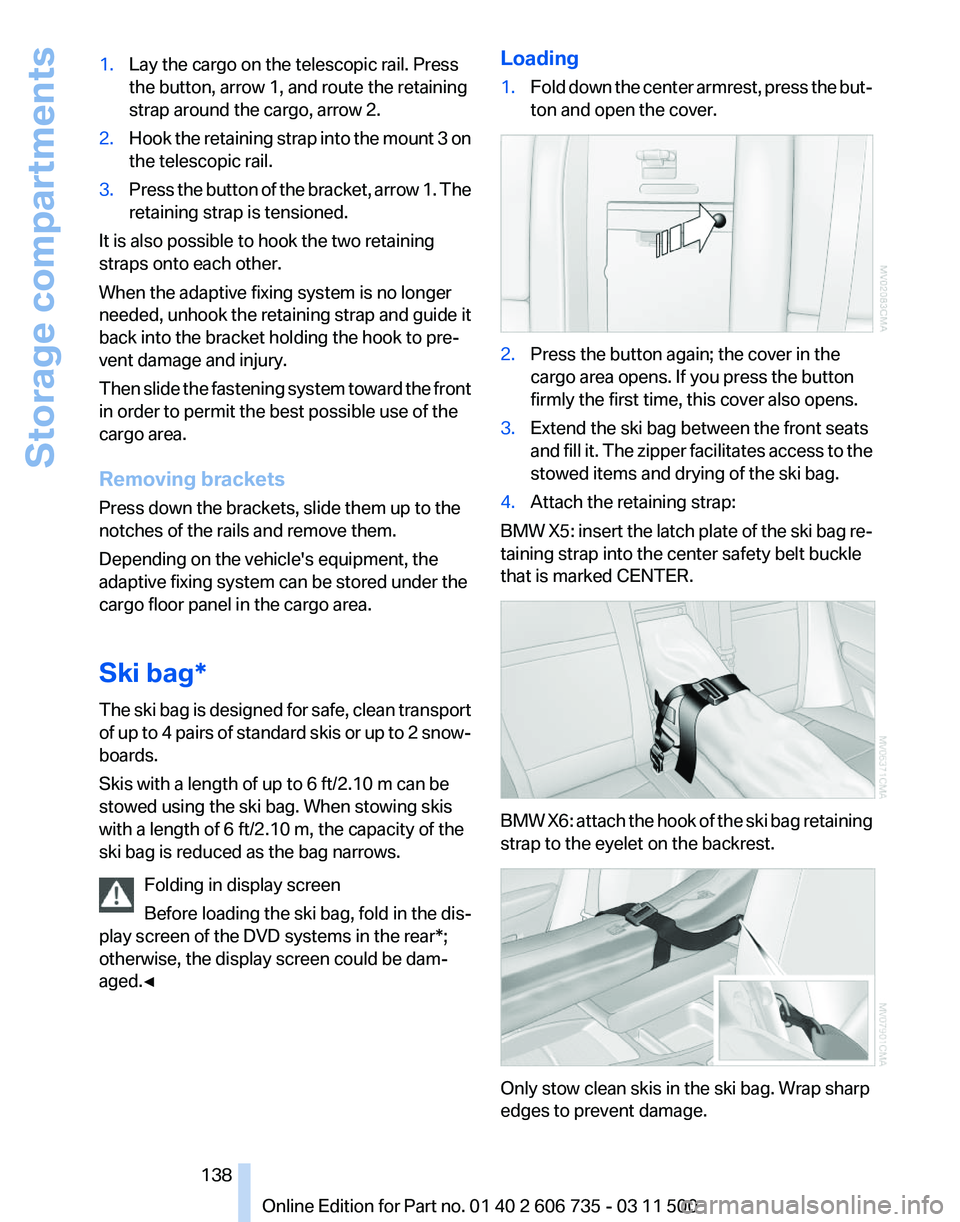
1.
Lay the cargo on the telescopic rail. Press
the button, arrow 1, and route the retaining
strap around the cargo, arrow 2.
2. Hook the retaining strap into the mount 3 on
the telescopic rail.
3. Press the button of the bracket, arrow 1. The
retaining strap is tensioned.
It is also possible to hook the two retaining
straps onto each other.
When the adaptive fixing system is no longer
needed,
unhook the retaining strap and guide it
back into the bracket holding the hook to pre‐
vent damage and injury.
Then slide the fastening system toward the front
in order to permit the best possible use of the
cargo area.
Removing brackets
Press down the brackets, slide them up to the
notches of the rails and remove them.
Depending on the vehicle's equipment, the
adaptive fixing system can be stored under the
cargo floor panel in the cargo area.
Ski bag*
The ski bag is designed for safe, clean transport
of up to 4 pairs of standard skis or up to 2 snow‐
boards.
Skis with a length of up to 6 ft/2.10 m can be
stowed using the ski bag. When stowing skis
with a length of 6 ft/2.10 m, the capacity of the
ski bag is reduced as the bag narrows.
Folding in display screen
Before loading the ski bag, fold in the dis‐
play screen of the DVD systems in the rear*;
otherwise, the display screen could be dam‐
aged.◀ Loading
1.
Fold down the center armrest, press the but‐
ton and open the cover. 2.
Press the button again; the cover in the
cargo area opens. If you press the button
firmly the first time, this cover also opens.
3. Extend the ski bag between the front seats
and
fill it. The zipper facilitates access to the
stowed items and drying of the ski bag.
4. Attach the retaining strap:
BMW X5: insert the latch plate of the ski bag re‐
taining strap into the center safety belt buckle
that is marked CENTER. BMW X6: attach the hook of the ski bag retaining
strap to the eyelet on the backrest.
Only stow clean skis in the ski bag. Wrap sharp
edges to prevent damage.
Seite 138
138 Online Edition for Part no. 01 40 2 606 735 - 03 11 500
Storage compartments