engine BMW X5M 2012 Repair Manual
[x] Cancel search | Manufacturer: BMW, Model Year: 2012, Model line: X5M, Model: BMW X5M 2012Pages: 317, PDF Size: 8.83 MB
Page 269 of 317
Socket for OBD Onboard
Diagnosis
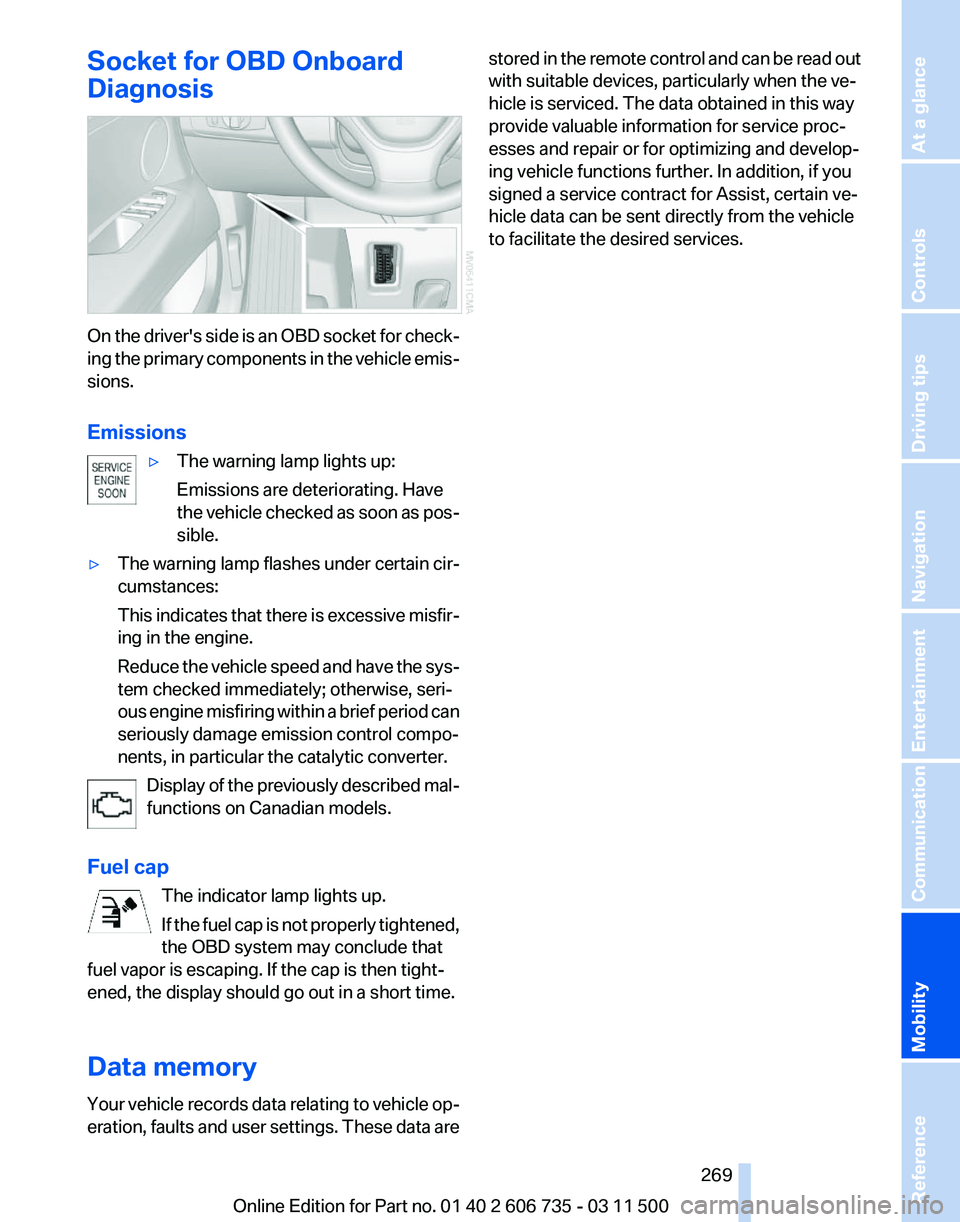
On the driver's side is an OBD socket for check‐
ing
the primary components in the vehicle emis‐
sions.
Emissions
▷The warning lamp lights up:
Emissions are deteriorating. Have
the
vehicle checked as soon as pos‐
sible.
▷ The warning lamp flashes under certain cir‐
cumstances:
This
indicates that there is excessive misfir‐
ing in the engine.
Reduce the vehicle speed and have the sys‐
tem checked immediately; otherwise, seri‐
ous engine misfiring within a brief period can
seriously damage emission control compo‐
nents, in particular the catalytic converter.
Display of the previously described mal‐
functions on Canadian models.
Fuel cap The indicator lamp lights up.
If
the fuel cap is not properly tightened,
the OBD system may conclude that
fuel vapor is escaping. If the cap is then tight‐
ened, the display should go out in a short time.
Data memory
Your vehicle records data relating to vehicle op‐
eration, faults and user settings. These data are stored in the remote control and can be read out
with suitable devices, particularly when the ve‐
hicle is serviced. The data obtained in this way
provide valuable information for service proc‐
esses and repair or for optimizing and develop‐
ing vehicle functions further. In addition, if you
signed a service contract for Assist, certain ve‐
hicle data can be sent directly from the vehicle
to facilitate the desired services.
Seite 269
269Online Edition for Part no. 01 40 2 606 735 - 03 11 500
Reference
Mobility Communication Entertainment Navigation Driving tips Controls At a glance
Page 276 of 317
They do not need to be replaced immediately in
the event of a puncture.
When mounting new tires or changing from
summer
to winter tires or vice versa, use run-flat
tires for your own safety.
BMW X6: do not rotate the front wheels to the
rear or vice versa, as otherwise the handling
characteristics will be negatively affected.
The tools for changing wheels are available as
accessories from your service center.
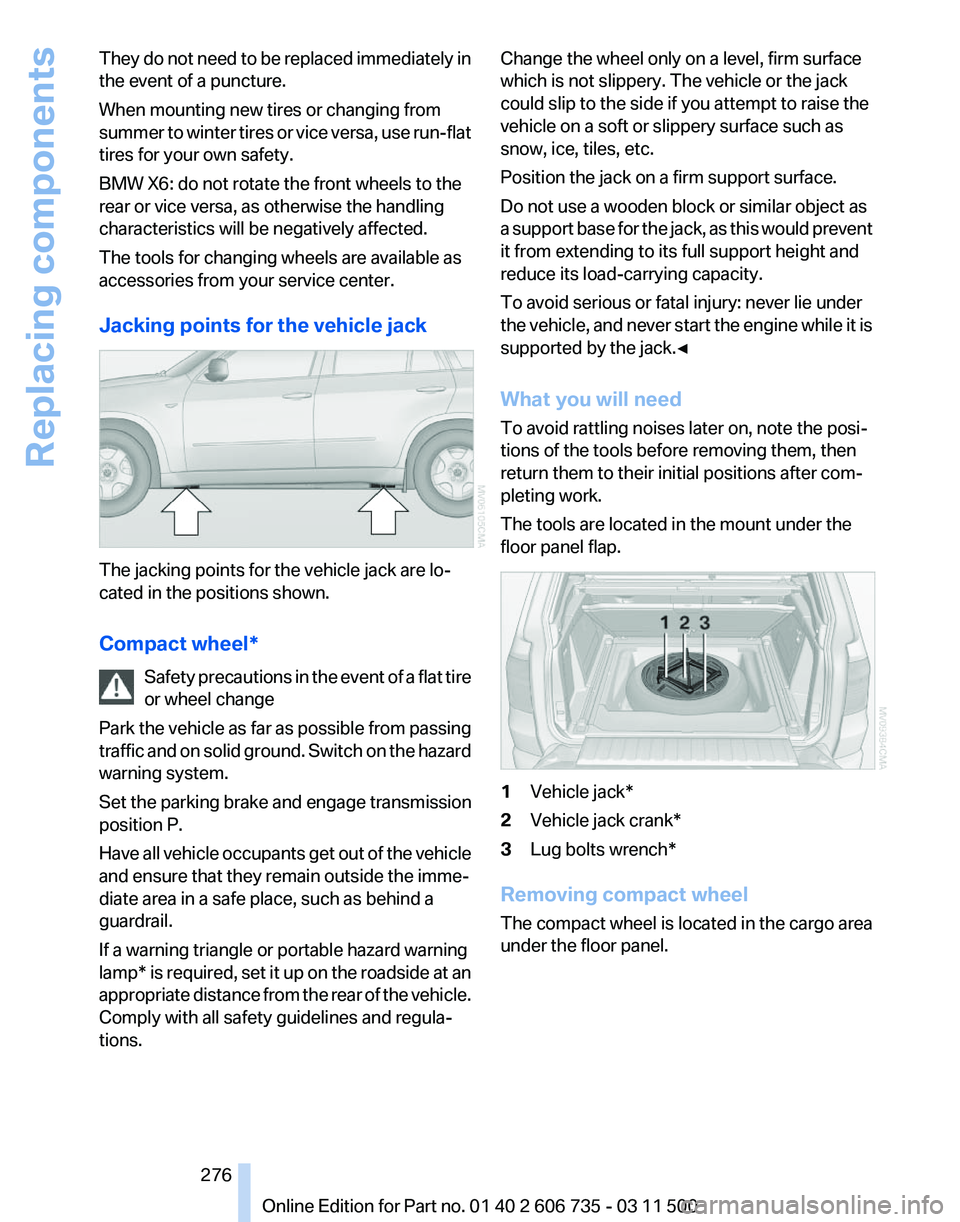
Jacking points for the vehicle jack The jacking points for the vehicle jack are lo‐
cated in the positions shown.
Compact wheel*
Safety
precautions in the event of a flat tire
or wheel change
Park the vehicle as far as possible from passing
traffic and on solid ground. Switch on the hazard
warning system.
Set the parking brake and engage transmission
position P.
Have all vehicle occupants get out of the vehicle
and ensure that they remain outside the imme‐
diate area in a safe place, such as behind a
guardrail.
If a warning triangle or portable hazard warning
lamp* is required, set it up on the roadside at an
appropriate distance from the rear of the vehicle.
Comply with all safety guidelines and regula‐
tions. Change the wheel only on a level, firm surface
which is not slippery. The vehicle or the jack
could slip to the side if you attempt to raise the
vehicle on a soft or slippery surface such as
snow, ice, tiles, etc.
Position the jack on a firm support surface.
Do not use a wooden block or similar object as
a
support base for the jack, as this would prevent
it from extending to its full support height and
reduce its load-carrying capacity.
To avoid serious or fatal injury: never lie under
the vehicle, and never start the engine while it is
supported by the jack.◀
What you will need
To avoid rattling noises later on, note the posi‐
tions of the tools before removing them, then
return them to their initial positions after com‐
pleting work.
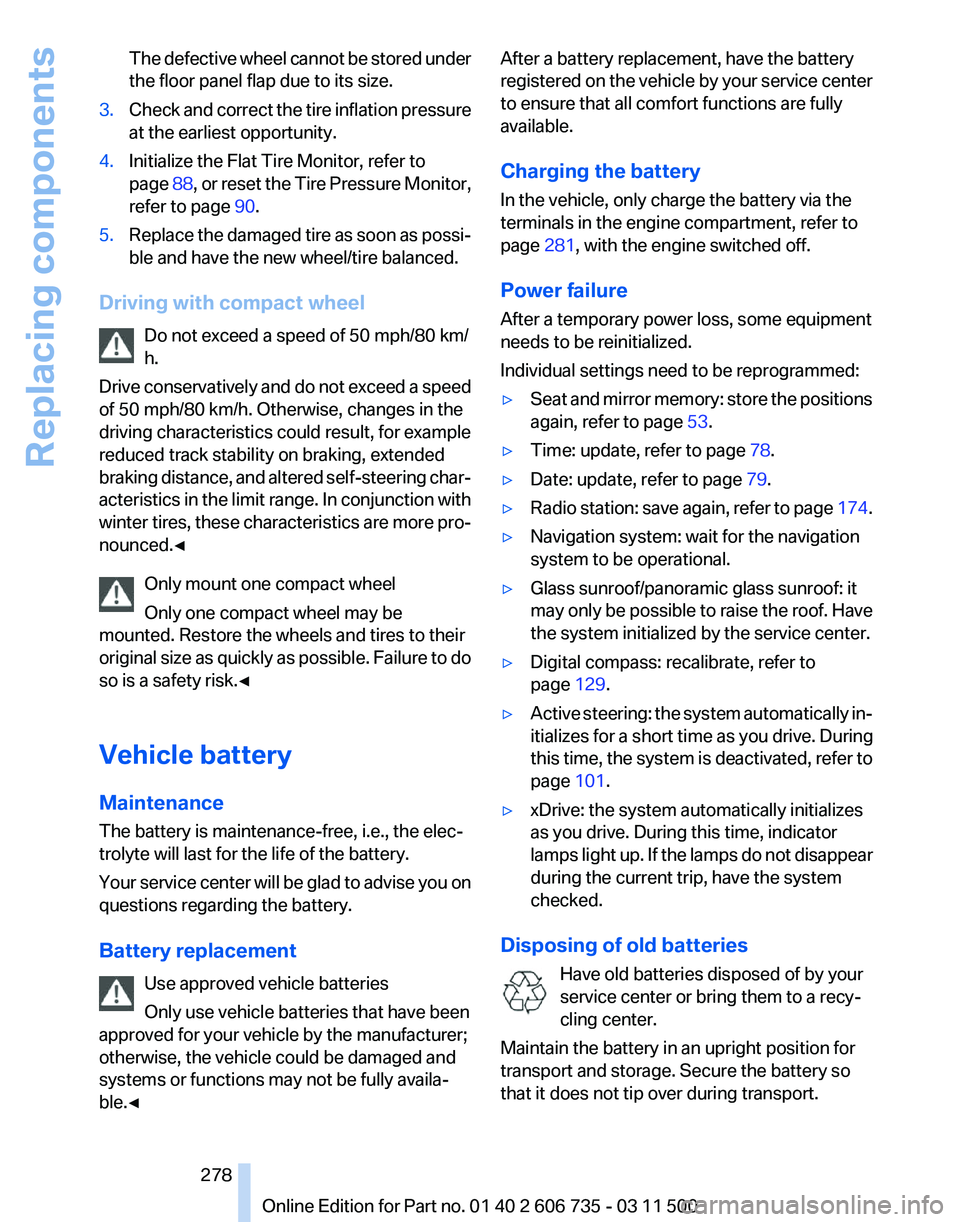
The tools are located in the mount under the
floor panel flap. 1
Vehicle jack*
2 Vehicle jack crank*
3 Lug bolts wrench*
Removing compact wheel
The compact wheel is located in the cargo area
under the floor panel.
Seite 276
276 Online Edition for Part no. 01 40 2 606 735 - 03 11 500
Replacing components
Page 278 of 317
The defective wheel cannot be stored under
the floor panel flap due to its size.
3. Check and correct the tire inflation pressure
at the earliest opportunity.
4. Initialize the Flat Tire Monitor, refer to
page 88,
or reset the Tire Pressure Monitor,
refer to page 90.
5. Replace the damaged tire as soon as possi‐
ble and have the new wheel/tire balanced.
Driving with compact wheel Do not exceed a speed of 50 mph/80 km/
h.
Drive
conservatively and do not exceed a speed
of 50 mph/80 km/h. Otherwise, changes in the
driving characteristics could result, for example
reduced track stability on braking, extended
braking distance, and altered self-steering char‐
acteristics in the limit range. In conjunction with
winter tires, these characteristics are more pro‐
nounced.◀
Only mount one compact wheel
Only one compact wheel may be
mounted. Restore the wheels and tires to their
original size as quickly as possible. Failure to do
so is a safety risk.◀
Vehicle battery
Maintenance
The battery is maintenance-free, i.e., the elec‐
trolyte will last for the life of the battery.
Your service center will be glad to advise you on
questions regarding the battery.
Battery replacement
Use approved vehicle batteries
Only use vehicle batteries that have been
approved for your vehicle by the manufacturer;
otherwise, the vehicle could be damaged and
systems or functions may not be fully availa‐
ble.◀ After a battery replacement, have the battery
registered
on the vehicle by your service center
to ensure that all comfort functions are fully
available.
Charging the battery
In the vehicle, only charge the battery via the
terminals in the engine compartment, refer to
page 281, with the engine switched off.
Power failure
After a temporary power loss, some equipment
needs to be reinitialized.
Individual settings need to be reprogrammed:
▷ Seat and mirror memory: store the positions
again, refer to page 53.
▷ Time: update, refer to page 78.
▷ Date: update, refer to page 79.
▷ Radio station: save again, refer to page 174.
▷ Navigation system: wait for the navigation
system to be operational.
▷ Glass sunroof/panoramic glass sunroof: it
may
only be possible to raise the roof. Have
the system initialized by the service center.
▷ Digital compass: recalibrate, refer to
page 129.
▷ Active steering: the system automatically in‐
itializes for a short time as you drive. During
this
time, the system is deactivated, refer to
page 101.
▷ xDrive: the system automatically initializes
as you drive. During this time, indicator
lamps
light up. If the lamps do not disappear
during the current trip, have the system
checked.
Disposing of old batteries Have old batteries disposed of by your
service center or bring them to a recy‐
cling center.
Maintain the battery in an upright position for
transport and storage. Secure the battery so
that it does not tip over during transport. Seite 278
278 Online Edition for Part no. 01 40 2 606 735 - 03 11 500
Replacing components
Page 281 of 317
▷
If the LED is flashing but the BMW Assist
Response Center cannot be heard on the
hands-free system, the hands-free system
may be malfunctioning. However, the BMW
Assist
Response Center may still be able to
hear you.
Initiating an Emergency Request
automatically
Under certain conditions, an Emergency Re‐
quest
is automatically initiated immediately after
a severe accident. Automatic Collision Notifica‐
tion is not affected by pressing the SOS button.
Roadside Assistance*
Service availability
Roadside Assistance can be reached around the
clock in many countries. You can obtain assis‐
tance there in the event of a vehicle breakdown.
Roadside Assistance
The Roadside Assistance, refer to page 238
phone number can be viewed on the iDrive or a
connection to Roadside Assistance* can be es‐
tablished directly.
Warning triangle*
The warning triangle is located in the cargo area.
First aid kit*
The first aid kit is located in a storage compart‐
ment on the right side in the cargo area.
Some of the articles contained in the first aid
pouch have a limited service life.
Check the expiration dates of the contents reg‐
ularly and replace any items promptly. Jump-starting
Notes
If the battery is discharged, an engine can be
started using the battery of another vehicle and
two jumper cables*. Only use jumper cables
with fully insulated clamp handles.
To prevent personal injury or damage to both
vehicles, adhere strictly to the following proce‐
dure.
Do not touch live parts
To avoid the risk of potentially fatal injury,
always avoid all contact with electrical compo‐
nents while the engine is running.◀
Preparation
1. Check whether the battery of the other ve‐
hicle has a voltage of 12 volts and approxi‐
mately
the same capacitance in Ah. This in‐
formation can be found on the battery.
2. Switch off the engine of the assisting vehi‐
cle.
3. Switch off any electronic systems/power
consumers in both vehicles.
Bodywork contact between vehicles
There must not be any contact between
the bodies of the two vehicles, otherwise there
is a danger of shorting.◀
Starting aid terminals
Connecting order
Connect the jumper cables in the correct
order; otherwise, there is the danger of injury
from sparking.◀ Seite 281
281Online Edition for Part no. 01 40 2 606 735 - 03 11 500
Reference
Mobility Communication Entertainment Navigation Driving tips Controls At a glance
Page 282 of 317
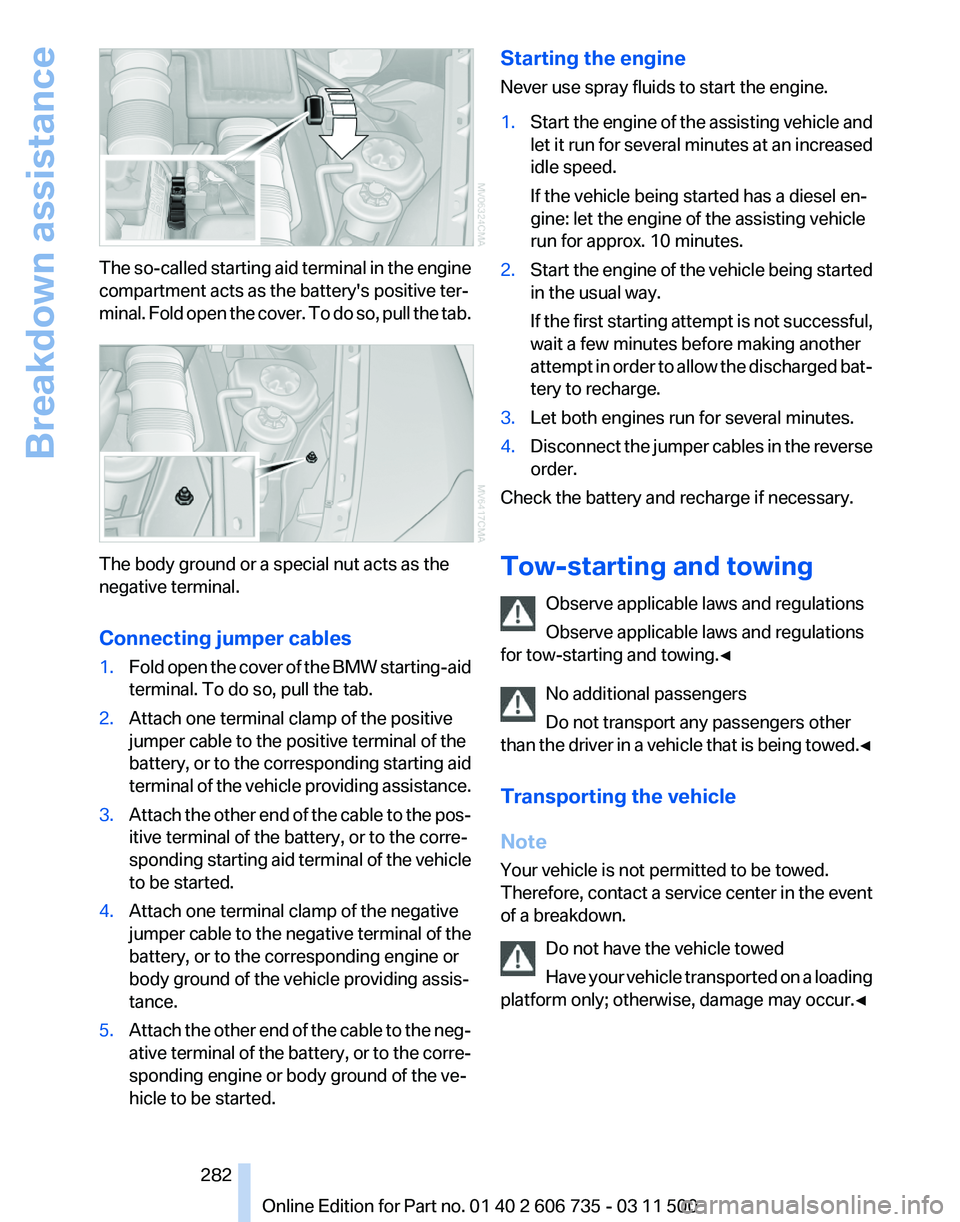
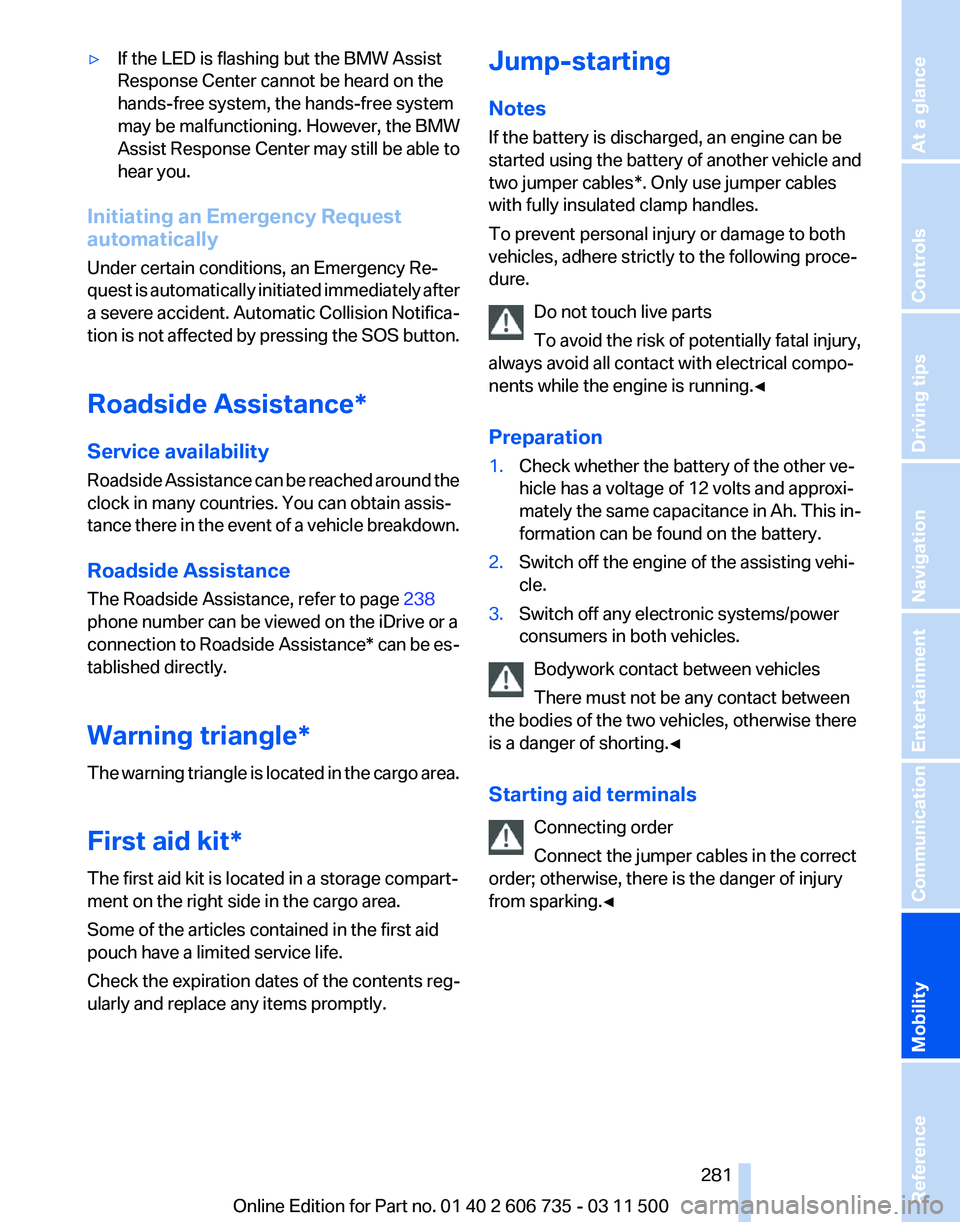
The so-called starting aid terminal in the engine
compartment acts as the battery's positive ter‐
minal.
Fold open the cover. To do so, pull the tab. The body ground or a special nut acts as the
negative terminal.
Connecting jumper cables
1.
Fold open the cover of the BMW starting-aid
terminal. To do so, pull the tab.
2. Attach one terminal clamp of the positive
jumper cable to the positive terminal of the
battery,
or to the corresponding starting aid
terminal of the vehicle providing assistance.
3. Attach the other end of the cable to the pos‐
itive terminal of the battery, or to the corre‐
sponding
starting aid terminal of the vehicle
to be started.
4. Attach one terminal clamp of the negative
jumper
cable to the negative terminal of the
battery, or to the corresponding engine or
body ground of the vehicle providing assis‐
tance.
5. Attach the other end of the cable to the neg‐
ative
terminal of the battery, or to the corre‐
sponding engine or body ground of the ve‐
hicle to be started. Starting the engine
Never use spray fluids to start the engine.
1.
Start the engine of the assisting vehicle and
let
it run for several minutes at an increased
idle speed.
If the vehicle being started has a diesel en‐
gine: let the engine of the assisting vehicle
run for approx. 10 minutes.
2. Start the engine of the vehicle being started
in the usual way.
If
the first starting attempt is not successful,
wait a few minutes before making another
attempt in order to allow the discharged bat‐
tery to recharge.
3. Let both engines run for several minutes.
4. Disconnect the jumper cables in the reverse
order.
Check the battery and recharge if necessary.
Tow-starting and towing
Observe applicable laws and regulations
Observe applicable laws and regulations
for tow-starting and towing.◀
No additional passengers
Do not transport any passengers other
than
the driver in a vehicle that is being towed.◀
Transporting the vehicle
Note
Your vehicle is not permitted to be towed.
Therefore, contact a service center in the event
of a breakdown. Do not have the vehicle towed
Have your vehicle transported on a loading
platform only; otherwise, damage may occur.◀ Seite 282
282 Online Edition for Part no. 01 40 2 606 735 - 03 11 500
Breakdown assistance
Page 284 of 317
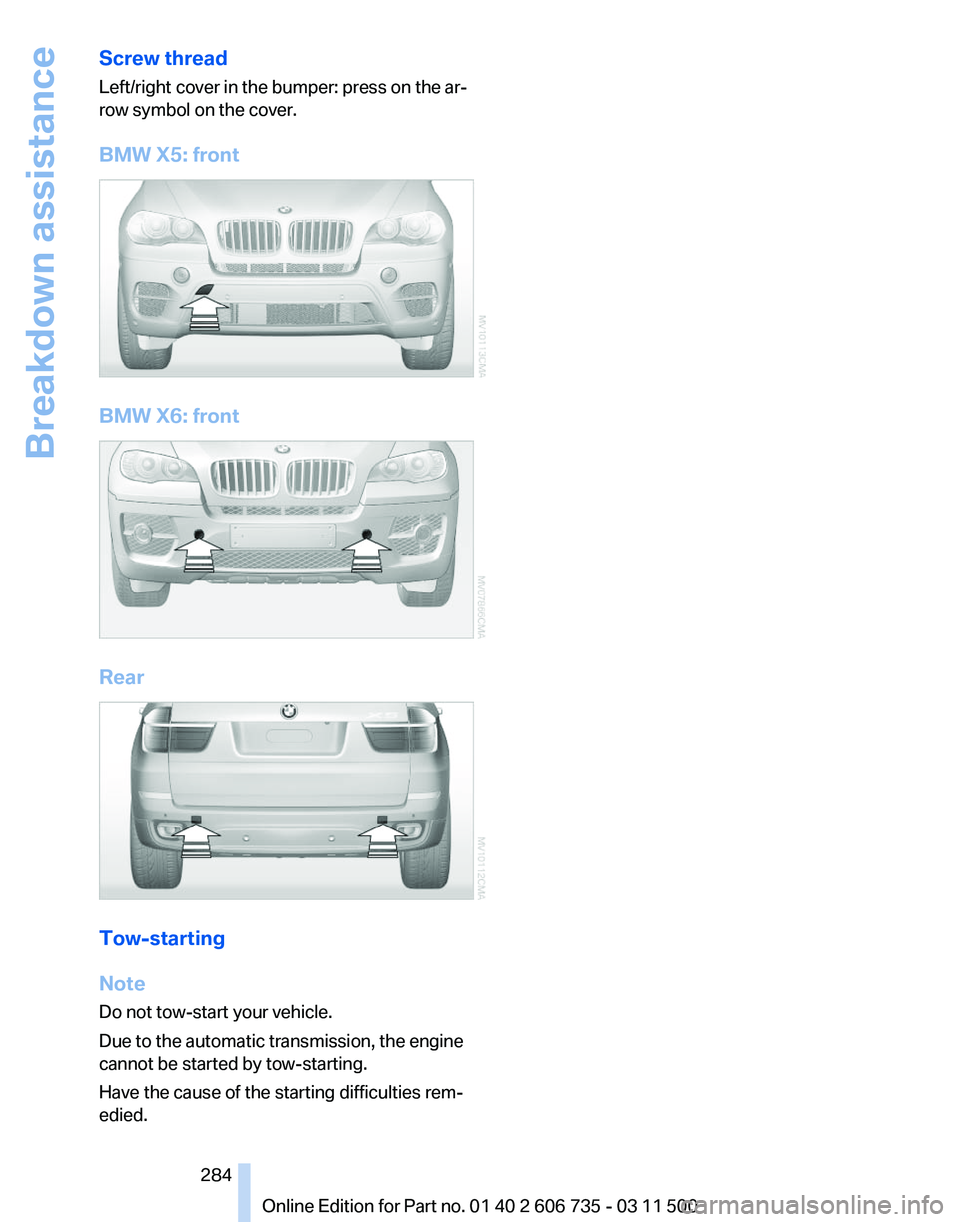
Screw thread
Left/right cover in the bumper: press on the ar‐
row symbol on the cover.
BMW X5: front
BMW X6: front
Rear
Tow-starting
Note
Do not tow-start your vehicle.
Due to the automatic transmission, the engine
cannot be started by tow-starting.
Have the cause of the starting difficulties rem‐
edied.
Seite 284
284 Online Edition for Part no. 01 40 2 606 735 - 03 11 500Breakdown assistance
Page 285 of 317
Care
Car washes
Notes
Steam jets or high-pressure washers
When using steam jets or high-pressure
washers, hold them a sufficient distance away
and use a maximum temperature of 140 ℉/
60 ℃.
Holding them too close or using excessively
high
pressures or temperatures can cause dam‐
age or preliminary damage that may then lead to
long-term damage.
Follow the operating instructions for the high-
pressure washer.◀
Cleaning sensors/cameras with high-
pressure washers
When using high-pressure washers, do not
spray the exterior sensors and cameras, for Park
Distance Control* or the backup camera*, for
instance, for extended periods of time and only
from a distance of at least 12 in/30 cm.◀
Wash your vehicle frequently, particularly in win‐
ter.
Intense soiling and road salt can damage the ve‐
hicle.
Washing in automatic car washes
Your vehicle can be washed in automatic car
washes right from the start.
Give preference to cloth car washes or those
that use soft brushes in order to avoid paint
damage.
Notes
Note the following:
▷ Make sure that the wheels and tires are not
damaged by the transport mechanisms.
▷ Fold in the exterior mirrors; otherwise, they
may
be damaged, depending on the width of
the vehicle. ▷
Deactivate rain sensor, refer to page 67, to
prevent unintentional wiper action.
▷ BMW X5: deactivate the rear window wiper
and protect it from damage. Ask the car
wash
operator about any necessary protec‐
tive measures.
▷ Remove additional attachments, for in‐
stance a spoiler or telephone antenna, if
there is a risk that these may be damaged.
Guide rails in car washes
Avoid car washes with guide rails higher
than 4 in/10 cm; otherwise, the vehicle body
could be damaged.
◀
Before driving into a car wash
The vehicle is able to roll if the following steps
are taken.
1. Insert the remote control into the ignition
lock, even with Comfort Access.
2. Engage transmission position N.
3. Release the parking brake.
4. Deactivating Automatic Hold, refer to
page 64.
5. Switch the engine off.
6. Leave the remote control in the ignition lock
so that the vehicle can roll.
Mixed tires* Note the vehicle width
Before driving into a car wash, make sure
that
the vehicle width is not too large for the car
wash, as otherwise the vehicle and the car wash
could be damaged.◀
Headlamps
▷ Do not rub dry and do not use abrasive or
caustic cleansers.
▷ Soak areas that have been soiled e.g. due to
insects, with shampoo and wash off with
water. Seite 285
285Online Edition for Part no. 01 40 2 606 735 - 03 11 500
Reference
Mobility Communication Entertainment Navigation Driving tips Controls At a glance
Page 290 of 317
Technical data
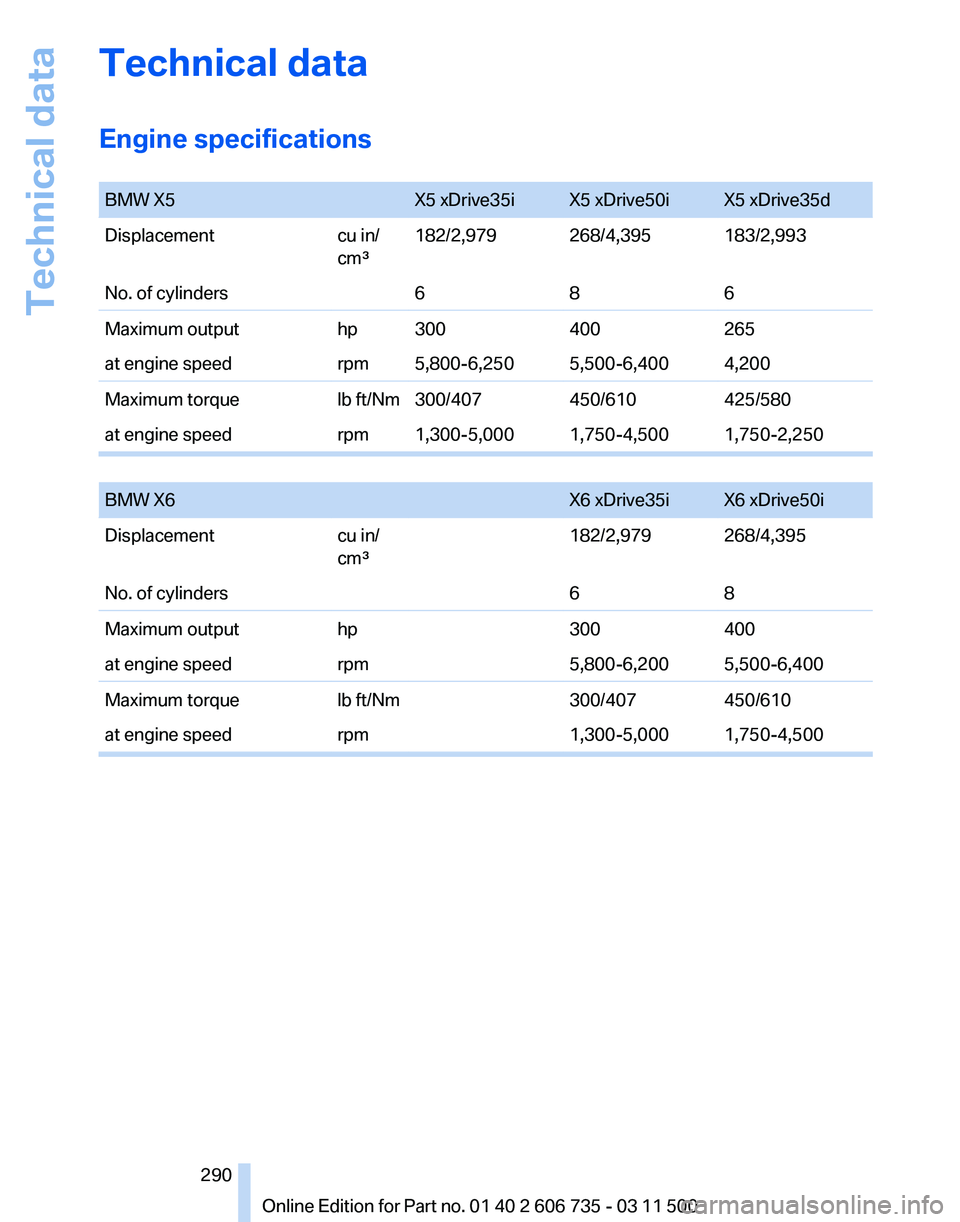
Engine specifications
BMW X5
X5 xDrive35i X5 xDrive50i X5 xDrive35d
Displacement cu in/
cm³182/2,979 268/4,395 183/2,993
No. of cylinders 686
Maximum output hp 300400265
at engine speed rpm 5,800-6,250 5,500-6,400 4,200
Maximum torque lb ft/Nm 300/407450/610425/580
at engine speed rpm 1,300-5,000 1,750-4,500 1,750-2,250
BMW X6
X6 xDrive35i X6 xDrive50i
Displacement cu in/
cm³182/2,979 268/4,395
No. of cylinders 68
Maximum output hp300400
at engine speed rpm5,800-6,200 5,500-6,400
Maximum torque lb ft/Nm300/407450/610
at engine speed rpm1,300-5,000 1,750-4,500 Seite 290
290 Online Edition for Part no. 01 40 2 606 735 - 03 11 500Technical data
Page 302 of 317
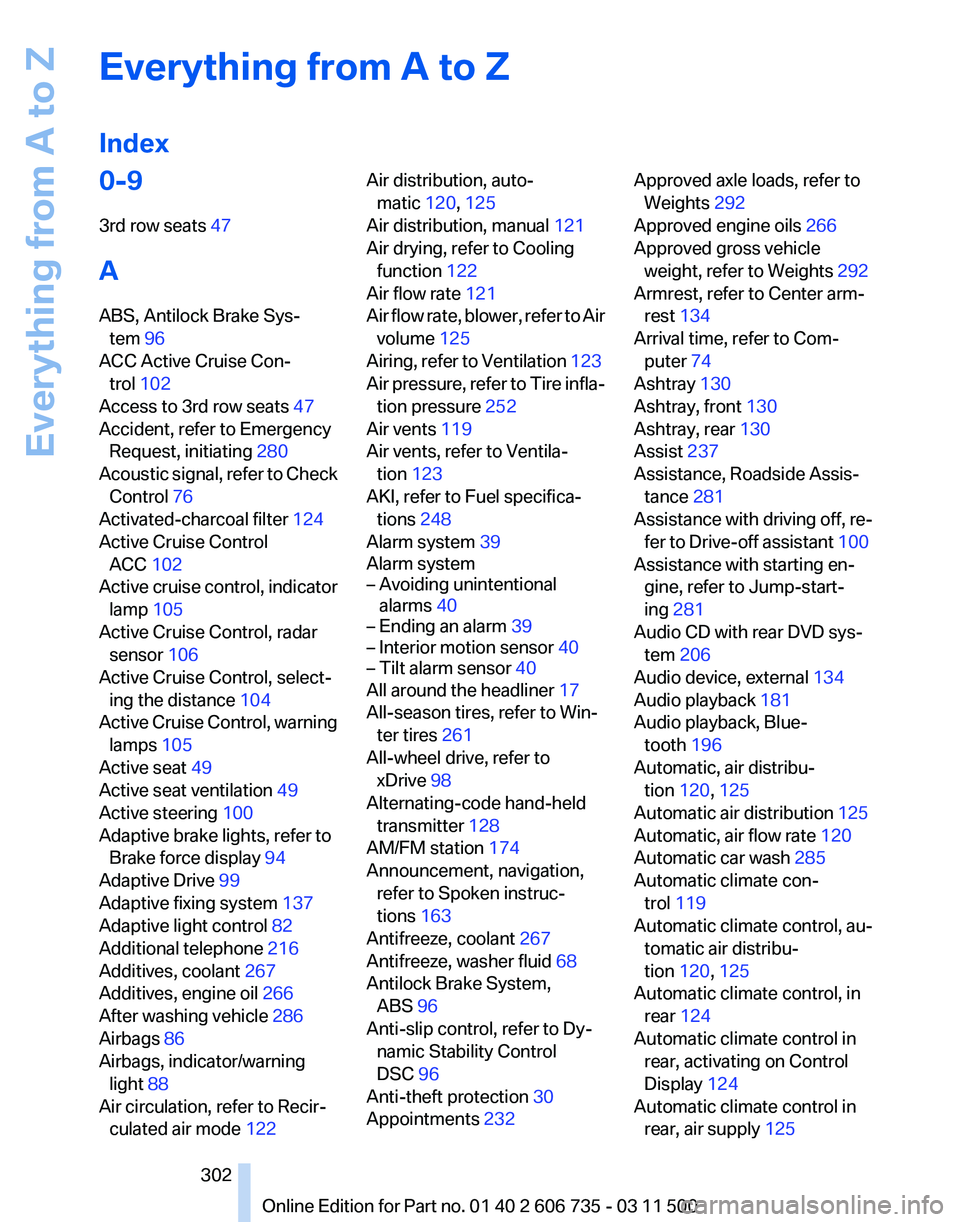
Everything from A to Z
Index
0-9
3rd row seats 47
A
ABS, Antilock Brake Sys‐ tem 96
ACC Active Cruise Con‐ trol 102
Access to 3rd row seats 47
Accident, refer to Emergency Request, initiating 280
Acoustic
signal, refer to Check
Control 76
Activated-charcoal filter 124
Active Cruise Control ACC 102
Active cruise control, indicator lamp 105
Active Cruise Control, radar sensor 106
Active Cruise Control, select‐ ing the distance 104
Active Cruise Control, warning lamps 105
Active seat 49
Active seat ventilation 49
Active steering 100
Adaptive brake lights, refer to Brake force display 94
Adaptive Drive 99
Adaptive fixing system 137
Adaptive light control 82
Additional telephone 216
Additives, coolant 267
Additives, engine oil 266
After washing vehicle 286
Airbags 86
Airbags, indicator/warning light 88
Air circulation, refer to Recir‐ culated air mode 122 Air distribution, auto‐
matic 120, 125
Air distribution, manual 121
Air drying, refer to Cooling function 122
Air flow rate 121
Air
flow rate, blower, refer to Air
volume 125
Airing, refer to Ventilation 123
Air pressure, refer to Tire infla‐ tion pressure 252
Air vents 119
Air vents, refer to Ventila‐ tion 123
AKI, refer to Fuel specifica‐ tions 248
Alarm system 39
Alarm system
– Avoiding unintentional alarms 40
– Ending an alarm 39
– Interior motion sensor 40
– Tilt alarm sensor 40
All around the headliner 17
All-season tires, refer to Win‐ ter tires 261
All-wheel drive, refer to xDrive 98
Alternating-code hand-held transmitter 128
AM/FM station 174
Announcement, navigation, refer to Spoken instruc‐
tions 163
Antifreeze, coolant 267
Antifreeze, washer fluid 68
Antilock Brake System, ABS 96
Anti-slip control, refer to Dy‐ namic Stability Control
DSC 96
Anti-theft protection 30
Appointments 232 Approved axle loads, refer to
Weights 292
Approved engine oils 266
Approved gross vehicle weight, refer to Weights 292
Armrest, refer to Center arm‐ rest 134
Arrival time, refer to Com‐ puter 74
Ashtray 130
Ashtray, front 130
Ashtray, rear 130
Assist 237
Assistance, Roadside Assis‐ tance 281
Assistance
with driving off, re‐
fer to Drive-off assistant 100
Assistance with starting en‐ gine, refer to Jump-start‐
ing 281
Audio CD with rear DVD sys‐ tem 206
Audio device, external 134
Audio playback 181
Audio playback, Blue‐ tooth 196
Automatic, air distribu‐ tion 120, 125
Automatic air distribution 125
Automatic, air flow rate 120
Automatic car wash 285
Automatic climate con‐ trol 119
Automatic climate control, au‐ tomatic air distribu‐
tion 120, 125
Automatic climate control, in rear 124
Automatic climate control in rear, activating on Control
Display 124
Automatic climate control in rear, air supply 125
Seite 302
302 Online Edition for Part no. 01 40 2 606 735 - 03 11 500
Everything from A to Z
Page 303 of 317
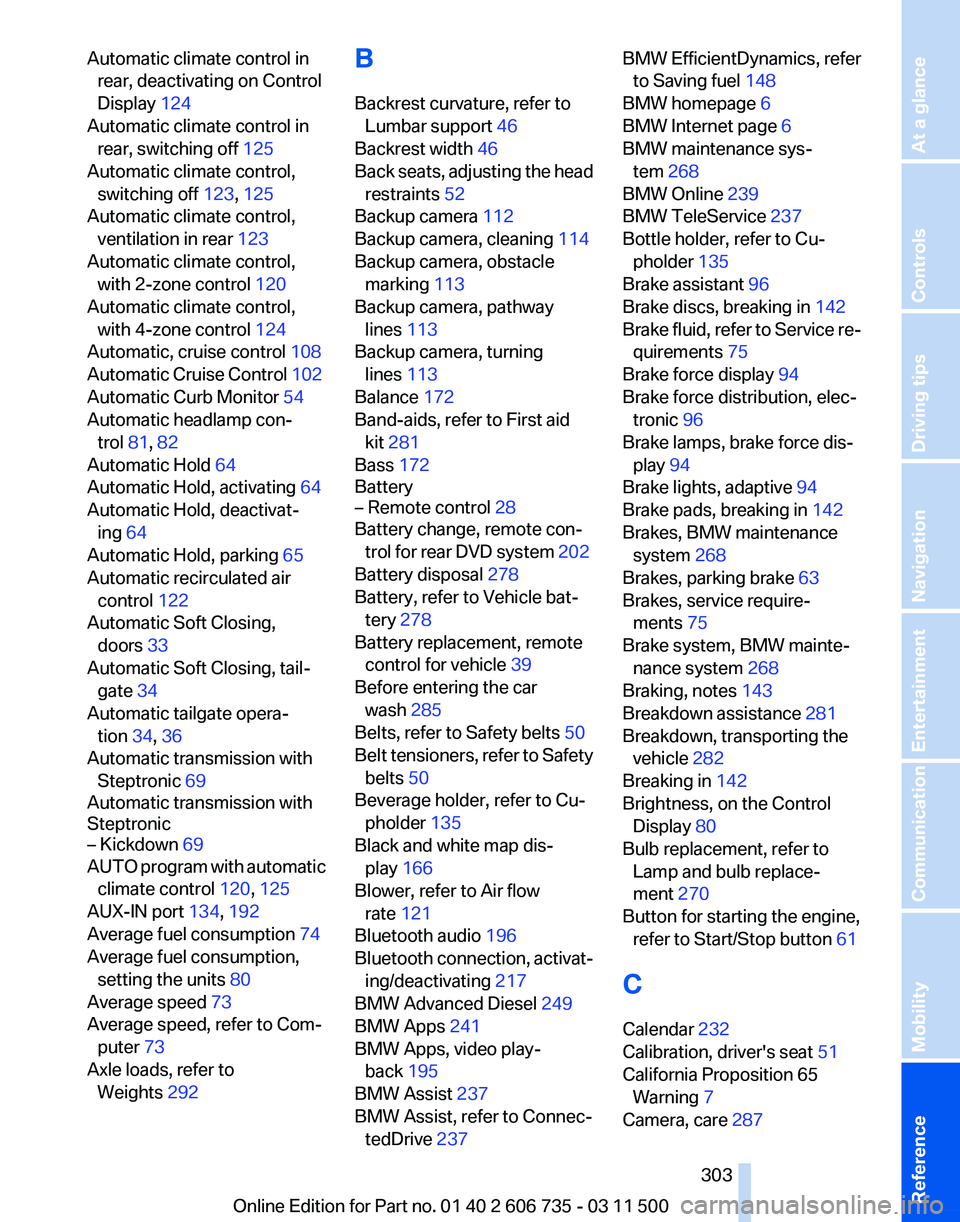
Automatic climate control in
rear, deactivating on Control
Display 124
Automatic climate control in rear, switching off 125
Automatic climate control, switching off 123, 125
Automatic climate control, ventilation in rear 123
Automatic climate control, with 2-zone control 120
Automatic climate control, with 4-zone control 124
Automatic, cruise control 108
Automatic
Cruise Control 102
Automatic Curb Monitor 54
Automatic headlamp con‐ trol 81, 82
Automatic Hold 64
Automatic Hold, activating 64
Automatic Hold, deactivat‐ ing 64
Automatic Hold, parking 65
Automatic recirculated air control 122
Automatic Soft Closing, doors 33
Automatic Soft Closing, tail‐ gate 34
Automatic tailgate opera‐ tion 34, 36
Automatic transmission with Steptronic 69
Automatic transmission with
Steptronic
– Kickdown 69
AUTO program with automatic
climate control 120, 125
AUX-IN port 134, 192
Average fuel consumption 74
Average fuel consumption, setting the units 80
Average speed 73
Average speed, refer to Com‐ puter 73
Axle loads, refer to Weights 292 B
Backrest curvature, refer to
Lumbar support 46
Backrest width 46
Back
seats, adjusting the head
restraints 52
Backup camera 112
Backup camera, cleaning 114
Backup camera, obstacle marking 113
Backup camera, pathway lines 113
Backup camera, turning lines 113
Balance 172
Band-aids, refer to First aid kit 281
Bass 172
Battery
– Remote control 28
Battery change, remote con‐
trol
for rear DVD system 202
Battery disposal 278
Battery, refer to Vehicle bat‐ tery 278
Battery replacement, remote control for vehicle 39
Before entering the car wash 285
Belts, refer to Safety belts 50
Belt tensioners, refer to Safety belts 50
Beverage holder, refer to Cu‐ pholder 135
Black and white map dis‐ play 166
Blower, refer to Air flow rate 121
Bluetooth audio 196
Bluetooth connection, activat‐ ing/deactivating 217
BMW Advanced Diesel 249
BMW Apps 241
BMW Apps, video play‐ back 195
BMW Assist 237
BMW Assist, refer to Connec‐ tedDrive 237 BMW EfficientDynamics, refer
to Saving fuel 148
BMW homepage 6
BMW Internet page 6
BMW maintenance sys‐ tem 268
BMW Online 239
BMW TeleService 237
Bottle holder, refer to Cu‐ pholder 135
Brake assistant 96
Brake discs, breaking in 142
Brake
fluid, refer to Service re‐
quirements 75
Brake force display 94
Brake force distribution, elec‐ tronic 96
Brake lamps, brake force dis‐ play 94
Brake lights, adaptive 94
Brake pads, breaking in 142
Brakes, BMW maintenance system 268
Brakes, parking brake 63
Brakes, service require‐ ments 75
Brake system, BMW mainte‐ nance system 268
Braking, notes 143
Breakdown assistance 281
Breakdown, transporting the vehicle 282
Breaking in 142
Brightness, on the Control Display 80
Bulb replacement, refer to Lamp and bulb replace‐
ment 270
Button for starting the engine, refer to Start/Stop button 61
C
Calendar 232
Calibration, driver's seat 51
California Proposition 65 Warning 7
Camera, care 287
Seite 303
303Online Edition for Part no. 01 40 2 606 735 - 03 11 500
Reference Mobility Communication Entertainment Navigation Driving tips Controls At a glance