USB BMW X5M 2013 User Guide
[x] Cancel search | Manufacturer: BMW, Model Year: 2013, Model line: X5M, Model: BMW X5M 2013Pages: 345, PDF Size: 9.44 MB
Page 218 of 345
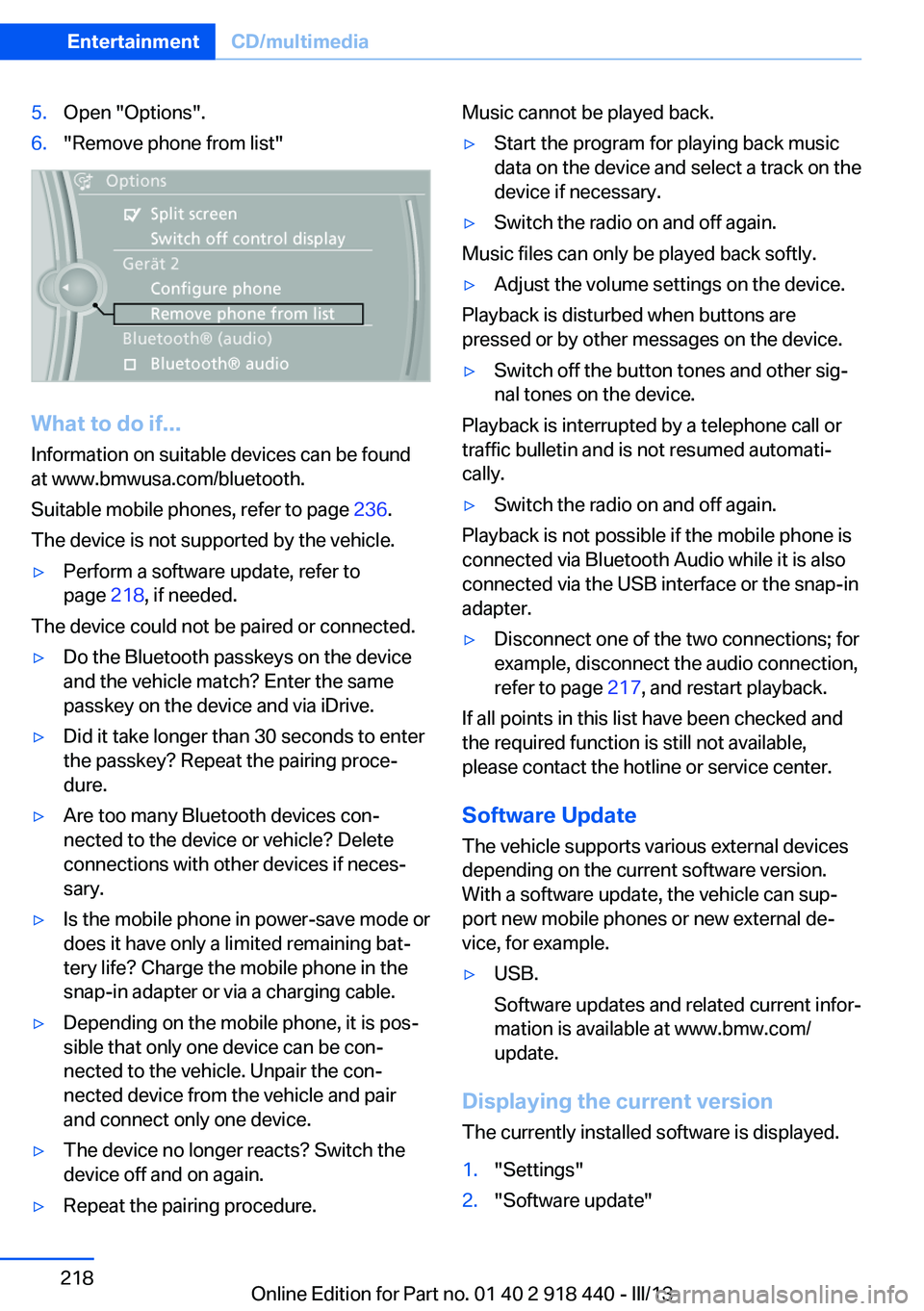
5.Open "Options".6."Remove phone from list"
What to do if...
Information on suitable devices can be found
at www.bmwusa.com/bluetooth.
Suitable mobile phones, refer to page 236.
The device is not supported by the vehicle.
▷Perform a software update, refer to
page 218, if needed.
The device could not be paired or connected.
▷Do the Bluetooth passkeys on the device
and the vehicle match? Enter the same
passkey on the device and via iDrive.▷Did it take longer than 30 seconds to enter
the passkey? Repeat the pairing proce‐
dure.▷Are too many Bluetooth devices con‐
nected to the device or vehicle? Delete
connections with other devices if neces‐
sary.▷Is the mobile phone in power-save mode or
does it have only a limited remaining bat‐
tery life? Charge the mobile phone in the
snap-in adapter or via a charging cable.▷Depending on the mobile phone, it is pos‐
sible that only one device can be con‐
nected to the vehicle. Unpair the con‐
nected device from the vehicle and pair
and connect only one device.▷The device no longer reacts? Switch the
device off and on again.▷Repeat the pairing procedure.Music cannot be played back.▷Start the program for playing back music
data on the device and select a track on the
device if necessary.▷Switch the radio on and off again.
Music files can only be played back softly.
▷Adjust the volume settings on the device.
Playback is disturbed when buttons are
pressed or by other messages on the device.
▷Switch off the button tones and other sig‐
nal tones on the device.
Playback is interrupted by a telephone call or
traffic bulletin and is not resumed automati‐
cally.
▷Switch the radio on and off again.
Playback is not possible if the mobile phone is
connected via Bluetooth Audio while it is also
connected via the USB interface or the snap-in
adapter.
▷Disconnect one of the two connections; for
example, disconnect the audio connection,
refer to page 217, and restart playback.
If all points in this list have been checked and
the required function is still not available,
please contact the hotline or service center.
Software Update
The vehicle supports various external devices
depending on the current software version.
With a software update, the vehicle can sup‐
port new mobile phones or new external de‐
vice, for example.
▷USB.
Software updates and related current infor‐
mation is available at www.bmw.com/
update.
Displaying the current version
The currently installed software is displayed.
1."Settings"2."Software update"Seite 218EntertainmentCD/multimedia218
Online Edition for Part no. 01 40 2 918 440 - III/13
Page 219 of 345
3."Show current version"
Select desired version to display additional in‐
formation.
Updating software via USB The software may only be updated when the
vehicle is stationary.
1.Store the file for the software-update in the
main director of a USB flash drive.2.Insert the USB flash drive into the USB au‐
dio interface in the center armrest. An up‐
date via the USB interface in the glove
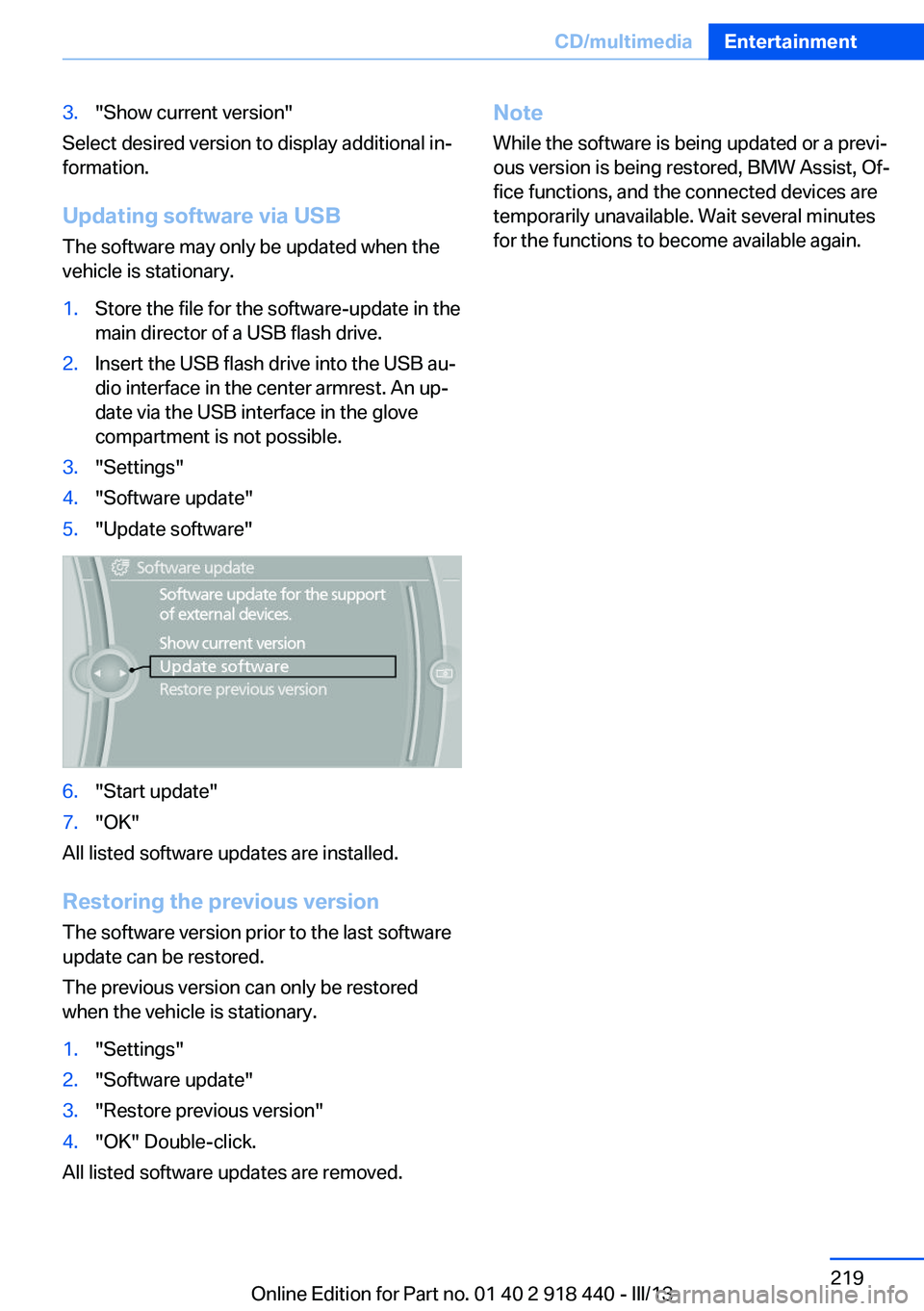
compartment is not possible.3."Settings"4."Software update"5."Update software"6."Start update"7."OK"
All listed software updates are installed.
Restoring the previous version
The software version prior to the last software
update can be restored.
The previous version can only be restored
when the vehicle is stationary.
1."Settings"2."Software update"3."Restore previous version"4."OK" Double-click.
All listed software updates are removed.
Note
While the software is being updated or a previ‐
ous version is being restored, BMW Assist, Of‐
fice functions, and the connected devices are
temporarily unavailable. Wait several minutes
for the functions to become available again.Seite 219CD/multimediaEntertainment219
Online Edition for Part no. 01 40 2 918 440 - III/13
Page 247 of 345
Snap-in adapter
General information More information on compatible snap-in
adapters that support the functions of the mo‐
bile phone is available at the service center.
Notes At high temperatures, the charging function of
the mobile phone may be limited and functions
may not be executed.
When using the mobile phone via the vehicle,
note the operating instructions of the mobile
phone.
Installation position
In the center armrest.
Inserting/removing the snap-in
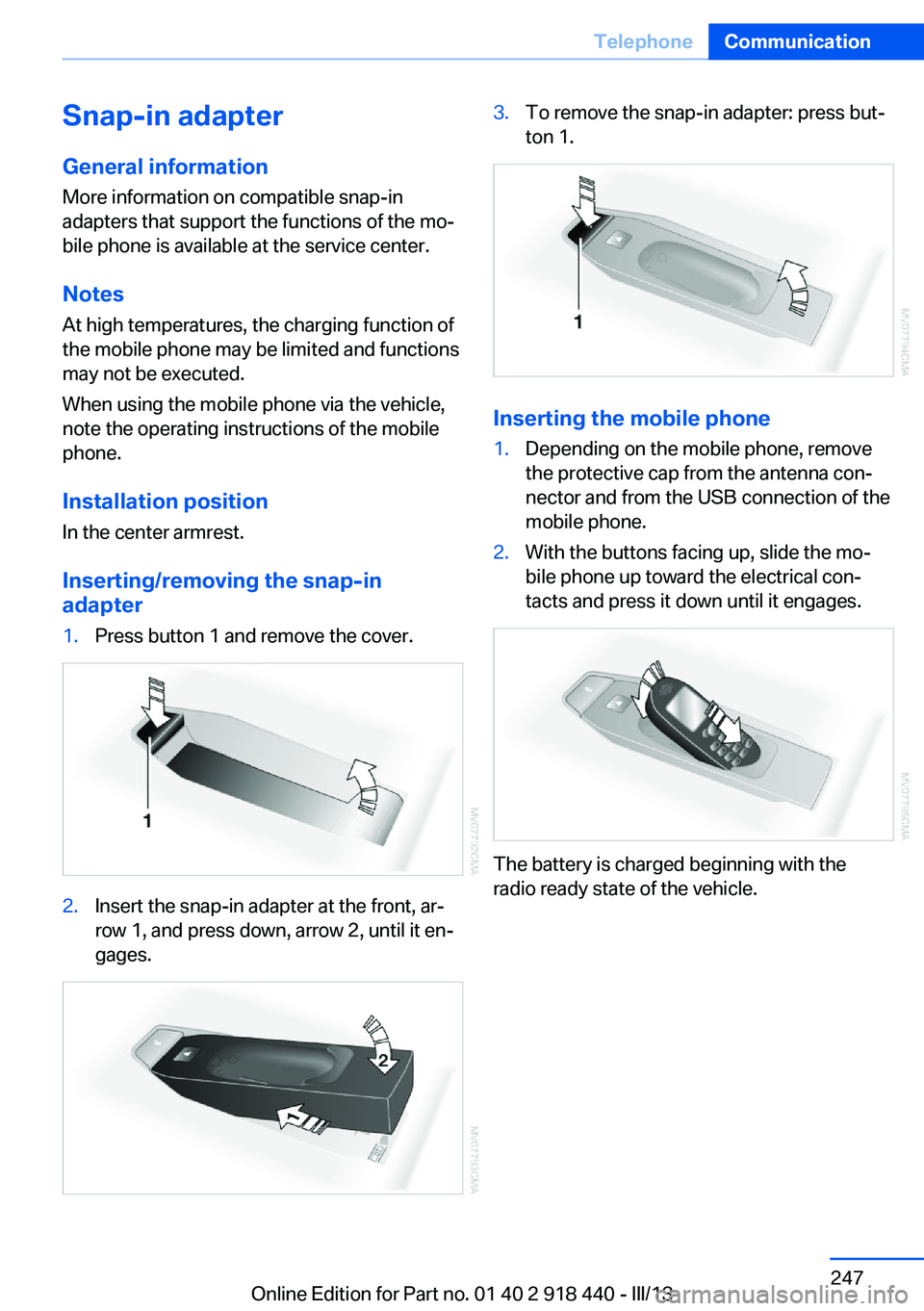
adapter1.Press button 1 and remove the cover.2.Insert the snap-in adapter at the front, ar‐
row 1, and press down, arrow 2, until it en‐
gages.3.To remove the snap-in adapter: press but‐
ton 1.
Inserting the mobile phone
1.Depending on the mobile phone, remove
the protective cap from the antenna con‐
nector and from the USB connection of the
mobile phone.2.With the buttons facing up, slide the mo‐
bile phone up toward the electrical con‐
tacts and press it down until it engages.
The battery is charged beginning with the
radio ready state of the vehicle.
Seite 247TelephoneCommunication247
Online Edition for Part no. 01 40 2 918 440 - III/13
Page 265 of 345
Data transfer
During the updating of BMW services, display
the status of the data transfer.1."BMW Assist" or "ConnectedDrive"2.Open "Options".3."Data transfer"
Apps
At a glance Certain software applications of a suitable mo‐
bile phone can be integrated in the vehicle.
These software applications are displayed on
the Control Display.
They are operated via iDrive.
Requirements
▷The mobile phone is suitable.▷The mobile phone operating system sup‐
ports the software applications of Apps.▷Software applications are installed on the
mobile phone and ready to use.▷Corresponding mobile wireless contract.
Any additionally incurred costs are not a
part of Apps.▷Use only BMW approved software applica‐
tions; otherwise, it may result in malfunc‐
tions.
Information about suitable mobile phones,
available software applications and their instal‐
lation can be found at www.bmw.com/connec‐
tivity or at the service center.
Create the entries.
Make entries only when traffic and road
conditions allow. Otherwise, the vehicle occu‐
pants and other road users may be put in dan‐
ger because of the distraction from driving.
For reasons of safety, some software applica‐
tions are usable only while the vehicle is sta‐
tionary.◀
Operating Apps1.Connect the mobile phone via the snap-in
adapter or via the USB audio interface.2."ConnectedDrive"3.Select the desired software application.
Displaying status
Information about the currently available soft‐
ware applications can be displayed.
1."ConnectedDrive"2."BMW apps"
Notes
▷The ranges of Apps that can be displayed
on the Control Display depend on the
range of installed software applications on
the mobile phone.▷The data transmission of the software ap‐
plications from the mobile phone to the ve‐
hicle can last some time. Some software
applications depend on the speed of the
available Internet connection of the mobile
phone.▷Some mobile phones cannot simultane‐
ously use Apps and the Bluetooth hands-
free system.
If necessary, restart the software applica‐
tion on the mobile phone after a phone
conversation.Seite 265ConnectedDriveCommunication265
Online Edition for Part no. 01 40 2 918 440 - III/13
Page 342 of 345
Temperature, adjusting in up‐per body region 132
Temperature, coolant, refer to Coolant temperature 80
Temperature display– External temperature 79– External temperature warn‐
ing 79
Temperature display, setting
the units 88
Temperature, engine oil 80
Temperature, setting with au‐ tomatic climate con‐
trol 132 , 136
Temperature warning 79
Text messages 252
Theft alarm system, refer to Alarm system 42
Thigh support adjustment 49
Third brake lamp, refer to Center brake lamp 298, 301
Seats, 3rd row seats 51
Tilting the passenger side mirror 58
Time, setting 87
Tire age 283
Tire identification marks 283
Tire inflation pressure 275
Tire inflation pressure, check‐ ing 275
Tire pressure monitor, refer to Flat Tire Monitor 97
Tire Pressure Monitor TPM 99
Tire Quality Grading 283
Tires
– Inflation pressure 275
Tires, breaking in 156
Tires, changing 285
Tires, condition 284
Tires, damage 284
Tire size 283
Tires, minimum tread 284
Tires, retreaded tires 286
Tires, run-flat tires 286
Tires, storage 286
Tire tread 284
Toll roads, route 179
Tone 190
Tool kit, refer to Onboard ve‐ hicle tool kit 295
Tools, refer to Onboard vehi‐ cle tool kit 295
Top View 124
Tow bar 310
Tow fitting 310
Towing 309
Town/city, navigation 171
Tow rope 310
Tow-starting 309, 311
TPM Tire Pressure Moni‐ tor 99
Traction control 106
Traffic bulletins, naviga‐ tion 183
Transmission, automatic transmission with Step‐
tronic 75
Transmission positions, auto‐ matic transmission with
Steptronic 75
Transporting children safely 61
Treble, tone 190
Trip computer, refer to Dis‐ plays on the Control Dis‐
play 82
Trip-distance counter, refer to Trip odometer 80
Triple turn signal activa‐ tion 73
Trip odometer 80
Trips, planning 177
Trunk lid, refer to Tailgate 38
Turning circle, refer to Dimen‐ sions 318
Turning lamps, refer to Adap‐ tive Light Control 91
Turn signal, indicator lamp 14
Turn signals 72
Turn signals, triple turn signal activation 73 U
Uniform Tire Quality Grading/ UTQG 283
Unintentional alarms, avoid‐ ing 43
Units, average fuel consump‐ tion 88
Units, temperature 88
Universal Garage Door Opener 139
Universal remote control 139
Unlocking– From the outside 32– Setting the unlocking char‐
acteristics 32– Tailgate 41– Without remote control, re‐
fer to Comfort Access 40
Unlocking, from the inside 35
Unlocking, hood 289
Updates made after the edito‐ rial deadline 6
Update, software 218
Upholstery care 313
Upper tailgate 36
Upper tailgate, automatic op‐ eration 37
Upper tailgate, closing 36
Upper tailgate, emergency operation, refer to Opening
manually 36
Upper tailgate, opening from the inside 36
Upper tailgate, opening from the outside 36
Upper tailgate, opening man‐ ually 36
USB audio interface 212
USB interface 147
V
Vacuum cleaner, connecting, refer to Connecting electri‐
cal devices 143
Seite 342ReferenceEverything from A to Z342
Online Edition for Part no. 01 40 2 918 440 - III/13