reset BMW X6 2008 Owner's Manual
[x] Cancel search | Manufacturer: BMW, Model Year: 2008, Model line: X6, Model: BMW X6 2008Pages: 288, PDF Size: 8.08 MB
Page 234 of 288
Wheels and tires
232
Wheels and tires
Tire inflation pressure
Information for your safety
The condition of the tires and the maintenance
of the specified tire pressure are crucial not only
to the tire's service life, but also to driving com-
fort and most importantly, driving safety.
Checking pressure
Only check tire inflation pressure when the tires
are cold. This means after a maximum of
1.25 miles/2 km driving or when the vehicle has
been parked for at least 2 hours. When tires are
warm, the tire inflation pressure increases.
Check the tire inflation pressure regularly
and correct it as needed, even on the
compact tire
*: at least twice a month and before
starting long trips. If you fail to observe this pre-
caution, you may be driving on tires with incor-
rect tire pressures, a condition that can not only
compromise your vehicle's driving stability, but
also lead to tire damage and the risk of an acci-
dent. Do not drive with depressurized, i.e. flat
tires, except run-flat tires. A flat tire will seri-
ously impair your vehicle's handling and braking
response. Attempts to drive on a flat tire can
lead to a loss of control over the vehicle.<
After correcting the tire inflation pressure,
reinitialize the Flat Tire Monitor, refer to
page90, or reset the Tire Pressure Monitor,
refer to page92.<
Pressure specifications
The tables below provide all the correct inflation
pressures for the specified tire sizes at ambient
temperature.
The inflation pressures apply to the tire
sizes and tire brands respectively
approved and recommended by BMW; a list of
these is available from your BMW Sports Activ-
ity Vehicle Center.
ing:
>Tire sizes of your vehicle
>Load conditions
>Maximum allowable driving speed
Tire inflation pressures for speeds
up to 100 mph/160 km/h
For normal driving up to 100 mph/160 km/h,
adjust pressures to the respective tire inflation
pressures listed on the following pages in
the column Traveling speeds up to max. of
100 mph/160 km/h to achieve optimum driving
comfort.
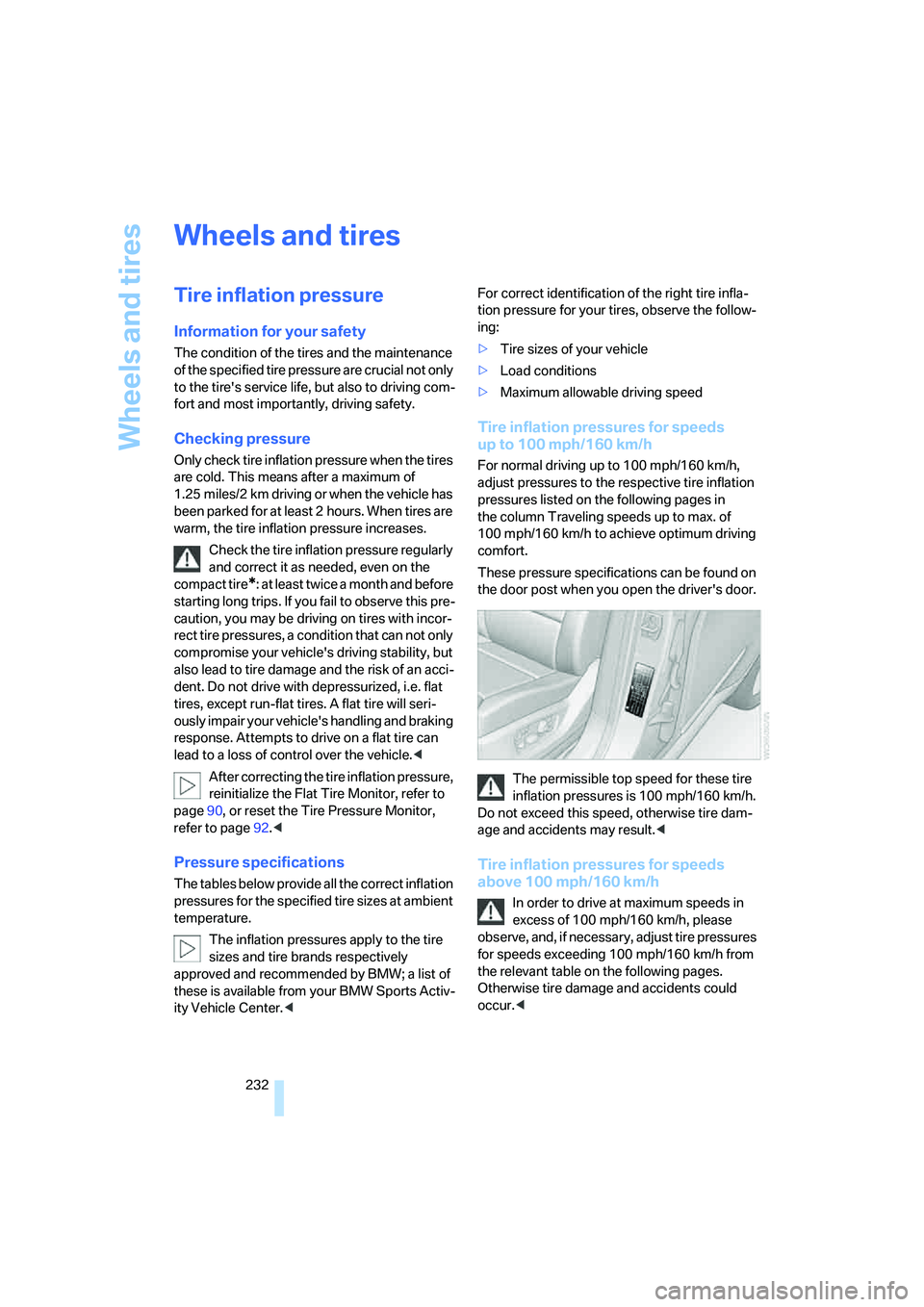
These pressure specifications can be found on
the door post when you open the driver's door.
The permissible top speed for these tire
inflation pressures is 100 mph/160 km/h.
Do not exceed this speed, otherwise tire dam-
age and accidents may result.<
Tire inflation pressures for speeds
above 100 mph/160 km/h
In order to drive at maximum speeds in
excess of 100 mph/160 km/h, please
observe, and, if necessary, adjust tire pressures
for speeds exceeding 100 mph/160 km/h from
the relevant table on the following pages.
Otherwise tire damage and accidents could
occur.<
Page 252 of 288
Replacing components
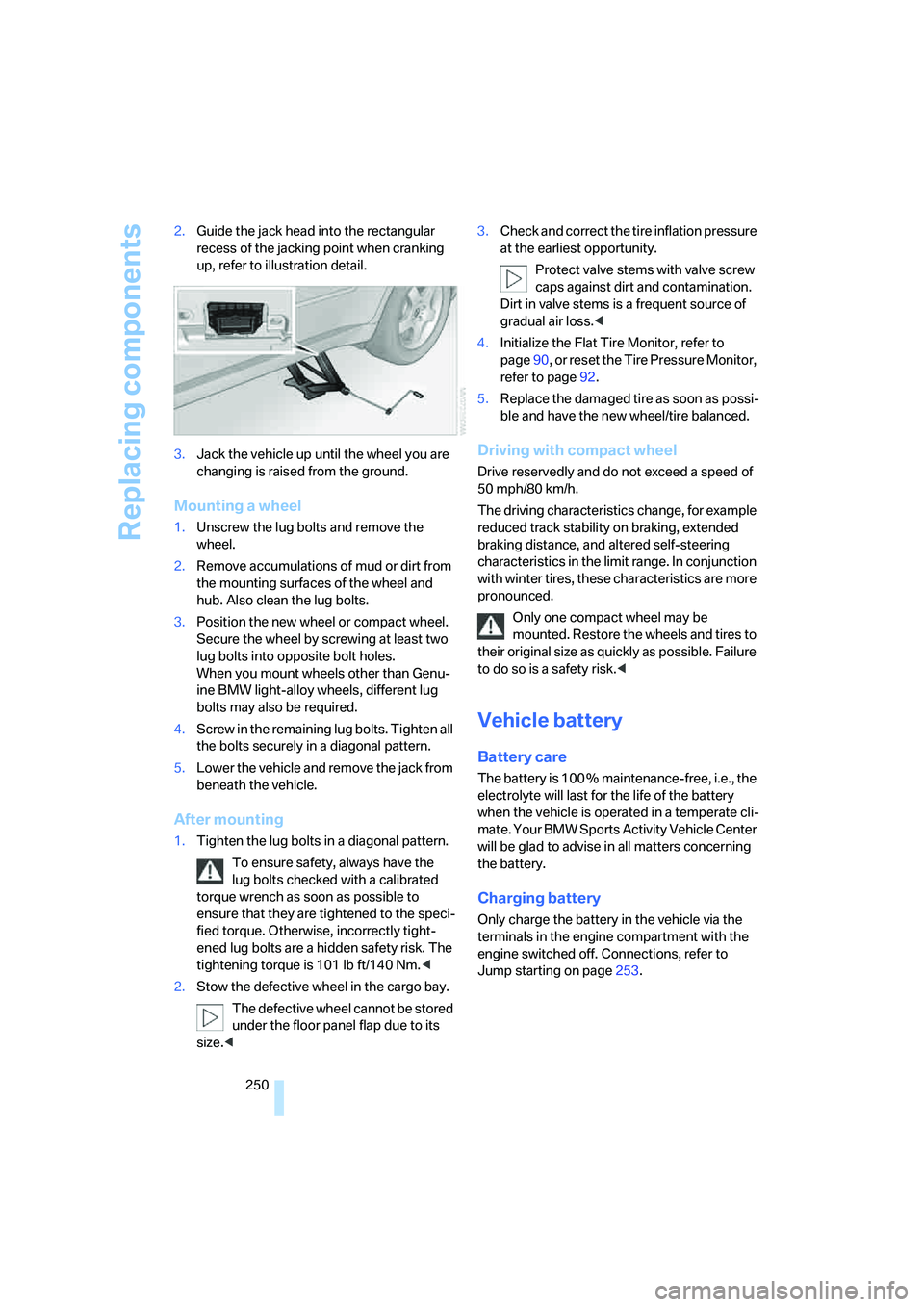
250 2.Guide the jack head into the rectangular
recess of the jacking point when cranking
up, refer to illustration detail.
3.Jack the vehicle up until the wheel you are
changing is raised from the ground.
Mounting a wheel
1.Unscrew the lug bolts and remove the
wheel.
2.Remove accumulations of mud or dirt from
the mounting surfaces of the wheel and
hub. Also clean the lug bolts.
3.Position the new wheel or compact wheel.
Secure the wheel by screwing at least two
lug bolts into opposite bolt holes.
When you mount wheels other than Genu-
ine BMW light-alloy wheels, different lug
bolts may also be required.
4.Screw in the remaining lug bolts. Tighten all
the bolts securely in a diagonal pattern.
5.Lower the vehicle and remove the jack from
beneath the vehicle.
After mounting
1.Tighten the lug bolts in a diagonal pattern.
To ensure safety, always have the
lug bolts checked with a calibrated
torque wrench as soon as possible to
ensure that they are tightened to the speci-
fied torque. Otherwise, incorrectly tight-
ened lug bolts are a hidden safety risk. The
tightening torque is 101 lb ft/140 Nm.<
2.Stow the defective wheel in the cargo bay.
The defective wheel cannot be stored
under the floor panel flap due to its
size.<3.Check and correct the tire inflation pressure
at the earliest opportunity.
Protect valve stems with valve screw
caps against dirt and contamination.
Dirt in valve stems is a frequent source of
gradual air loss.<
4.Initialize the Flat Tire Monitor, refer to
page90, or reset the Tire Pressure Monitor,
refer to page92.
5.Replace the damaged tire as soon as possi-
ble and have the new wheel/tire balanced.
Driving with compact wheel
Drive reservedly and do not exceed a speed of
50 mph/80 km/h.
The driving characteristics change, for example
reduced track stability on braking, extended
braking distance, and altered self-steering
characteristics in the limit range. In conjunction
with winter tires, these characteristics are more
pronounced.
Only one compact wheel may be
mounted. Restore the wheels and tires to
their original size as quickly as possible. Failure
to do so is a safety risk.<
Vehicle battery
Battery care
The battery is 100 % maintenance-free, i.e., the
electrolyte will last for the life of the battery
when the vehicle is operated in a temperate cli-
mate. Your BMW Sports Activity Vehicle Center
will be glad to advise in all matters concerning
the battery.
Charging battery
Only charge the battery in the vehicle via the
terminals in the engine compartment with the
engine switched off. Connections, refer to
Jump starting on page253.
Page 266 of 288
Short commands of voice command system
264
Entertainment
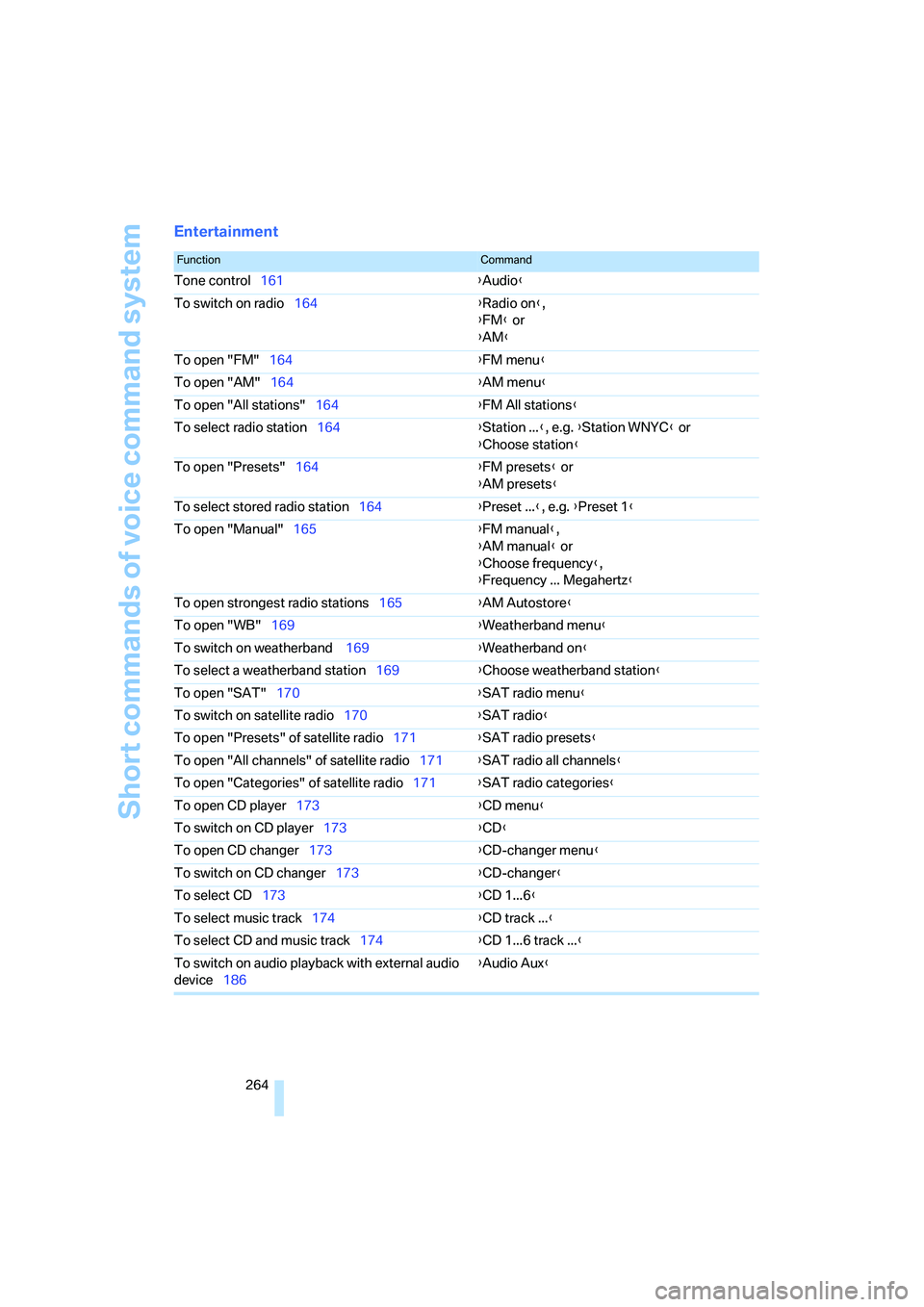
FunctionCommand
Tone control161{Audio}
To switch on radio164{Radio on},
{FM} or
{AM}
To open "FM"164{FM menu}
To open "AM"164{AM menu}
To open "All stations"164{FM All stations}
To select radio station164{Station ...}, e.g. {Station WNYC} or
{Choose station}
To open "Presets"164{FM presets} or
{AM presets}
To select stored radio station164{Preset ...}, e.g. {Preset 1}
To open "Manual"165{FM manual},
{AM manual} or
{Choose frequency},
{Frequency ... Megahertz}
To open strongest radio stations165{AM Autostore}
To open "WB"169{Weatherband menu}
To switch on weatherband 169{Weatherband on}
To select a weatherband station169{Choose weatherband station}
To open "SAT"170{SAT radio menu}
To switch on satellite radio170{SAT radio}
To open "Presets" of satellite radio171{SAT radio presets}
To open "All channels" of satellite radio171{SAT radio all channels}
To open "Categories" of satellite radio171{SAT radio categories}
To open CD player173{CD menu}
To switch on CD player173{CD}
To open CD changer173{CD-changer menu}
To switch on CD changer173{CD-changer}
To select CD173{CD 1...6}
To select music track174{CD track ...}
To select CD and music track174{CD 1...6 track ...}
To switch on audio playback with external audio
device186{Audio Aux}
Page 279 of 288
Reference 277
At a glance
Controls
Driving tips
Communications
Navigation
Entertainment
Mobility
Opening and closing
– comfort access36
– from inside32
– using remote control29
– using the door lock31
Operation by voice for mobile
phone217
– adjusting volume218
– canceling217
– correcting phone
number218
– dialing phone number218
– placing a call218
– redialing219
– voice commands217
– voice phone book218
Operation on poor roads130
"Options"225
Orientation menu, refer to
Start menu17
Output, refer to Engine
data258
Outside air, refer to AUC
Automatic recirculated-air
control106
Outside temperature
display68
– changing unit of measure79
Outside temperature
warning68
"Overview" for DVD system in
rear199
P
Panic mode30
Park Distance Control PDC81
"Parked car operation"110
"Parked car ventilation"110
Parked car ventilation109
– activating activation
time110
– preselecting activation
times110
– switching on and off
directly110
Parking, vehicle57Parking aid
– refer to PDC Park Distance
Control81
– refer to Rear view camera83
Parking assistant, refer to
PDC Park Distance
Control81
Parking brake57
– Automatic Hold58
– indicator lamp13
Parking lamps99
Parking with Automatic
Hold59
Parts and accessories6
"Passenger's seat climate"49
Passenger-side exterior
mirror, tilting down50
"Pathway lighting"100
Pathway lighting100
"Pause" for DVD system in
rear196
Paying attention to speed238
"PDC"82
"PDC in main window only"82
PDC Park Distance Control81
Personal Profile28
"Perspective"150
Phone book212
– creating and editing voice
phone book218
Phone numbers
– deleting from phone
book215
– dialing213
– most recent numbers215
– selecting in phone book215
– Top 8215
"Photo" for DVD system in
rear192,198
Pinch protection system
– glass sunroof, electric40
– power windows39
Plasters, refer to First-aid
kit253
"Play"
– for DVD system in rear196
– on satellite radio171
Playing videos, DVD system in
rear192Plug-in unit for remote
control, refer to Ignition
lock56
Pocket light, refer to
Flashlight116
Position
– displaying155
– storing, refer to Storing
current position144
Power failure251
Power windows, refer to
Windows38
Preselecting activation times
of parked car ventilation110
"Presets"
– displaying on radio164
– on satellite radio171
Pressure, tires232
– monitoring, refer to TPM
Tire Pressure Monitor91
"Profile"227
Programmable buttons on
steering wheel51
Programmable memory
buttons21
Protective function, refer to
Pinch protection
system39,40
R
Radio
– autostore165
– controls160
– High Definition Radio167
– sampling stations165
– satellite radio170
– selecting frequency
manually165
– selecting
waveband160,164
– station search165
– station with the best
reception165
– storing stations166
– switching on/off160
– tone control161
– volume161
– Weather Band169
Page 280 of 288
Everything from A to Z
278 Radio key, refer to Keys/
remote control28
Radio position, refer to Radio
readiness56
Radio readiness56
– switched off56
– switched on56
– with comfort access37
Rain sensor65
"Random"
– for DVD system in rear197
– refer to Random
sequence176
"Random all"
– for DVD system in rear198
– in audio mode176
"Random directory"
– for DVD system in rear198
– in audio mode176
Random sequence176
"RDS" Radio Data
System167
Reading lamps102
Rear automatic climate
control108
– activating on Control
Display108
– air supply109
– switching off109
"Rear climate control"108
"Rear enabled"190
Rear entertainment, refer to
DVD system in rear190
Rear lamps, refer to Tail
lamps246
– replacing bulbs246
Rear seat backrest,
folding120
Rear seats
– folding over backrest120
– heating48,49
Rear socket118
Rear ventilation108
– rear automatic climate
control108Rear view camera83
– cleaning85
– displaying85
– driver assistance
functions83
– switching off83
– switching on83
Rearview mirror49
Rear window, heating105
Rear window safety switch39
"Received calls"214
Recent numbers in mobile
phone215
Reception level of mobile
phone, refer to Status
information20
Recirculated-air mode106
– air recirculation106
– AUC Automatic
recirculated-air control106
Reclining seat, refer to
Seats43
Recording times, refer to
Stopwatch77
"Redial" for mobile phone214
Reflectors, refer to Tail
lamps246
Refueling230
Releasing
– hood239
– refer to Unlocking37
"Relock door if not
opened"32
Remaining distance, refer to
Cruising range70
Remaining distance to
destination, refer to
Computer70
Remote control28
– comfort access36
– DVD system in rear191
– garage door opener112
– liftgate30
– malfunction31,38
– replacing battery38
Removing condensation on
the windows105"Repeat"
– for DVD system in rear197
– in audio mode176
"Repeat directory"
– for DVD system in
rear196,198
– in audio mode176
"Repeat track"
– for DVD system in
rear196,198
– in audio mode176
Replacement fuses251
Replacement of tires237
– changing wheels248
– new wheels and tires237
Replacing bulbs, refer to
Lamps and bulbs245
Replacing wheels/tires, refer
to New wheels and tires237
Replacing wiper blades245
Reporting an accident, refer to
Initiating an emergency
request252
Reporting safety defects7
Reserve warning, refer to Fuel
gauge
69
"Reset"90,92
– DVD changer182
– DVD system in rear195
– sound settings163
– stopwatch77
Reset, refer to Resetting tone
settings163
"resetting FTM …"90
Residual heat107
Restraint systems
– for children53
– refer to Safety belts47
Retreaded tires237
"Return"
– DVD changer183
– DVD system in rear195
Reverse
– CD changer176
– CD player176
– DVD changer181
Page 284 of 288
Everything from A to Z
282 Town/city for destination
entry137
Tow-starting254,255
"TPM"92
TPM Tire Pressure
Monitor91
– resetting system92
– system limits91
– warning lamp92
Tracks
– finding175
– random sequence176
– sampling, scan175
Track width, refer to
Dimensions259
Traction-assist feature, refer
to DSC Dynamic Stability
Control86
Traction control, refer to
DSC Dynamic Stability
Control86
Traffic congestion
– bypassing155
– displaying traffic
information152
Traffic information for
navigation
– depiction in route map153
– displaying153
– during destination
guidance155
– switching on/off152
– symbols154
"Traffic Info settings"152
Transmission
– automatic transmission with
Steptronic61
– manually releasing
transmission lock on
automatic transmission with
Steptronic63
Transmission positions, refer
to Automatic transmission
with Steptronic61
Transporting children
safely53
Transport securing device,
refer to Securing cargo130Tread depth, refer to Minimum
tread depth236
Treble, refer to Tone
control161
"Treble / Bass" for DVD
system in rear195
"Trip computer"71
Trip computer71
Trip-distance counter, refer to
Trip odometer68
"Triple turn signal"64
Trip odometer68
Turning circle, refer to
Dimensions259
Turn signals64
– indicator lamp12
– replacing bulbs246
U
Underbody protection, refer to
Caring for your vehicle
brochure
Uniform Tire Quality Grading/
UTQR235
"Units"80
Units
– average fuel
consumption79
– temperature79
Universal garage-door
opener, refer to Integrated
universal remote
control112
Universal remote control112
"Unlock button"30
Unlocking
– from inside32
– liftgate30
– using remote control30
– without key, refer to Comfort
access36
Unlocking and locking doors,
using remote control30
Unlocking without key, refer to
Comfort access36
"Unlock rear menu" for DVD
system in rear190
"Update services"225USB audio interface187
"USB" in audio
mode186,188
Used batteries
– refer to Disposal251
– refer to Replacing battery38
V
Valve screw caps, refer to
After mounting250
Vehicle
– battery250
– breaking-in126
– care244
– care, refer to Caring for your
vehicle brochure
– decommissioning, refer to
Caring for your vehicle
brochure
– loading128
– measurements, refer to
Dimensions259
– parking57
– washing, refer to Caring for
your vehicle brochure
– weights260
"Vehicle / Tires" for
unlocking30
Vehicle jack249
– jacking points249
Vehicle position, refer to
Displaying current
position155
Ventilation107
– draft-free107
– in the rear108
– rear automatic climate
control109
– while stationary109
Vent outlets of automatic
climate control103
Vents, refer to Ventilation107
"Vent settings"106
"Video settings" for DVD
system in rear194
Voice, refer to Voice
instructions for navigation
system151