stop start BMW X6 2008 Owner's Manual
[x] Cancel search | Manufacturer: BMW, Model Year: 2008, Model line: X6, Model: BMW X6 2008Pages: 288, PDF Size: 8.08 MB
Page 196 of 288
DVD system in rear
194
Fast forward/reverse
Forward/reverse with DVD control
1.Press the button on the remote con-
trol during playback.
2.Select the symbol.
3.Press the button.
4.Press the button several times to
increase the fast forward/reverse speed.
The DVD playback will be distorted.
To cancel fast forward/reverse:
1.Select the symbol.
2.Press the button.
Or:
Press the button on the CD/DVD player.
The DVD will start play at the point selected.
Forward/reverse with remote control
Press and hold the button until you reach
the desired point.
Or:
1.During playback, turn the knurled wheel.
Fast forward/reverse is interrupted.
2.Continue to turn the knurled wheel.
The speed is increased.
3.Press the button on the CD/DVD player.
Fast forward/reverse is interrupted.
The DVD will start play at the point selected.
Skipping chapter
You can change to the next or previous chapter
during playback.
1.Press the button on the remote con-
trol during playback.
2.Select the symbol.
3.Press the button repeatedly, continuing
until you reach the desired chapter.
Or:
Press the button on the left or right on the
remote control repeatedly until you reach the
desired chapter.
Freeze frame
1.Press the button on the remote con-
trol during playback.
2.Select the symbol.
3.Press the button.
To continue playback:
1.Select the or symbol.
2.Press the button.
As an alternative you can also stop and con-
tinue playback with the button on the
CD/DVD player.
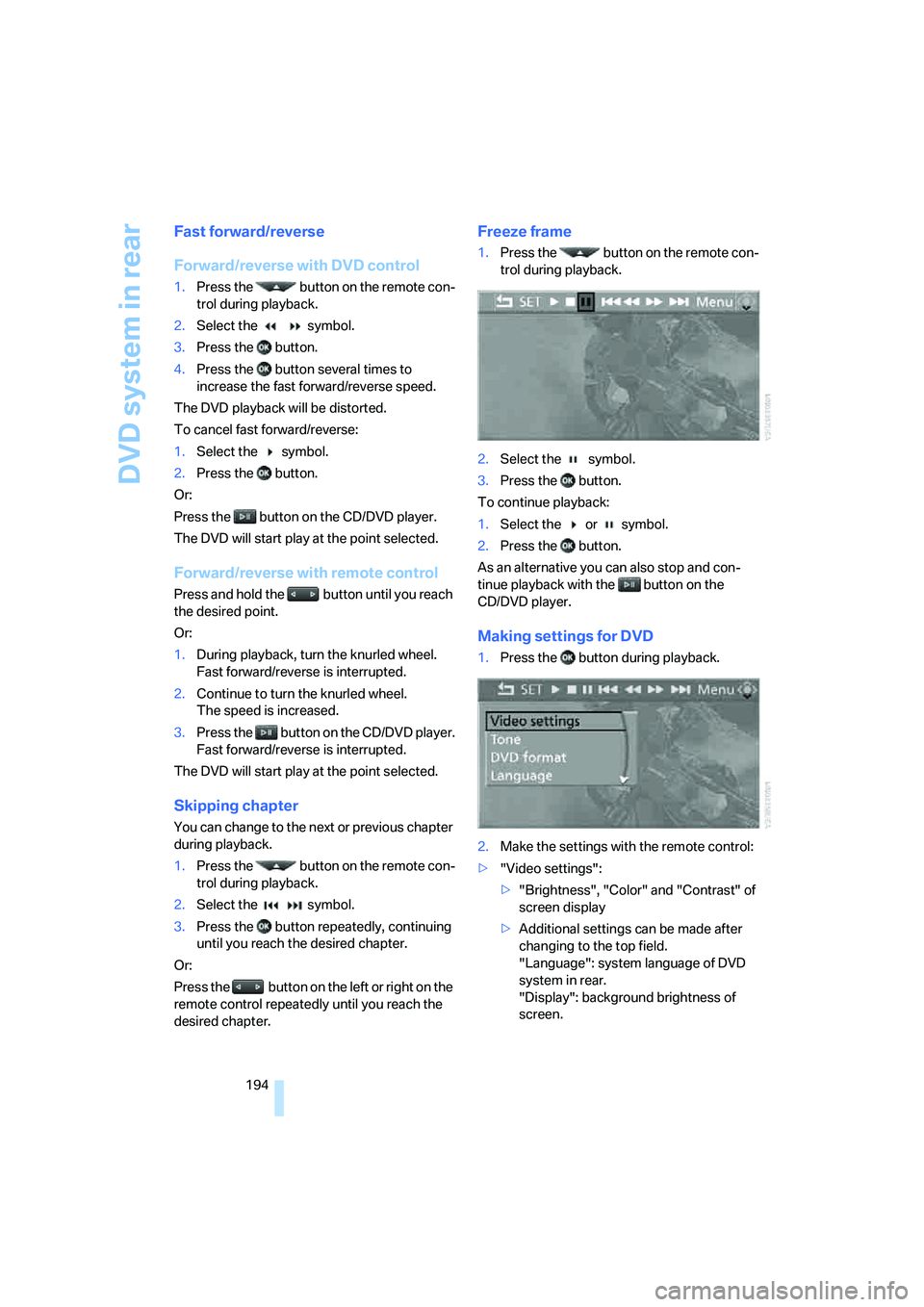
Making settings for DVD
1.Press the button during playback.
2.Make the settings with the remote control:
>"Video settings":
>"Brightness", "Color" and "Contrast" of
screen display
>Additional settings can be made after
changing to the top field.
"Language": system language of DVD
system in rear.
"Display": background brightness of
screen.
Page 198 of 288
DVD system in rear
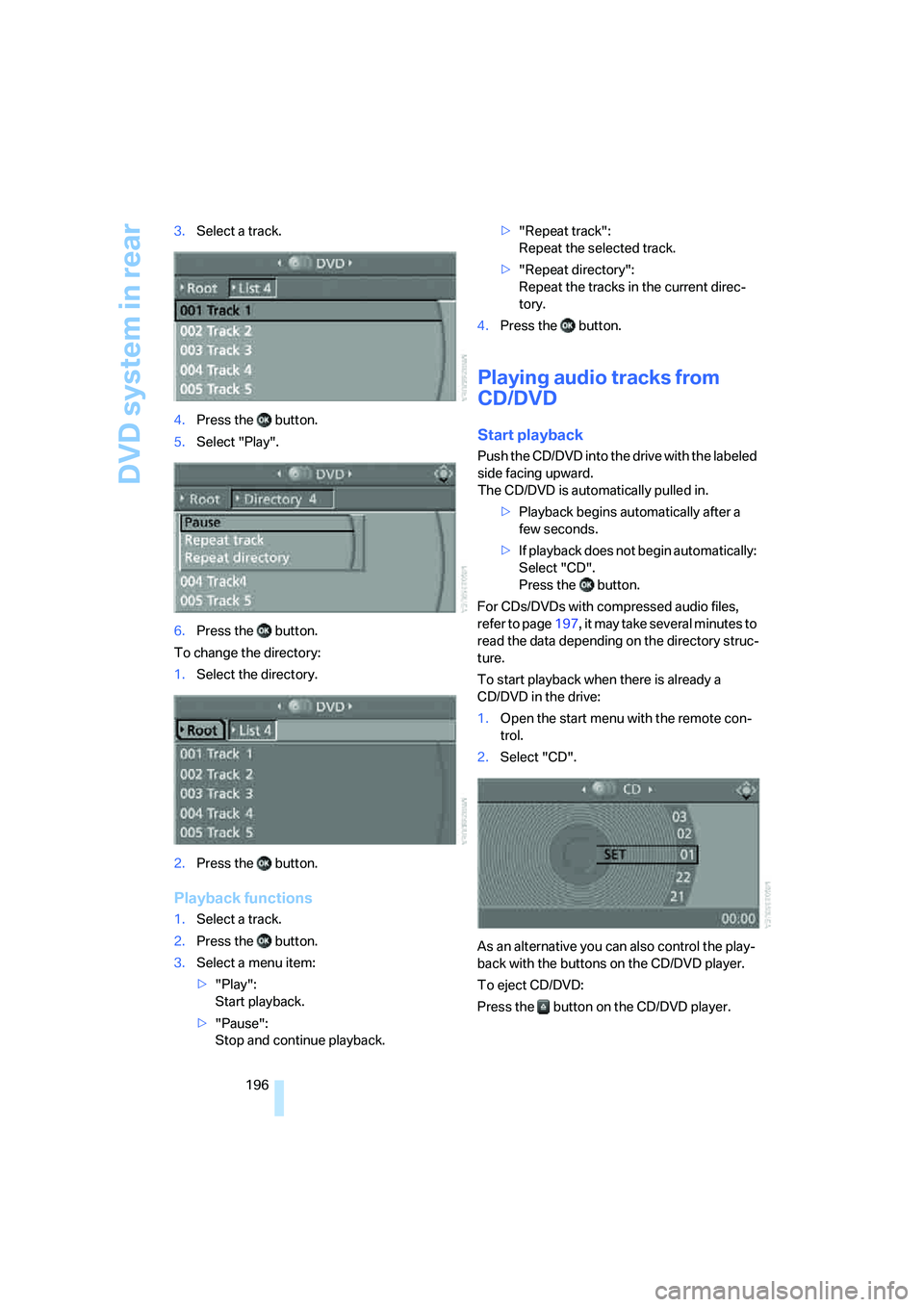
196 3.Select a track.
4.Press the button.
5.Select "Play".
6.Press the button.
To change the directory:
1.Select the directory.
2.Press the button.
Playback functions
1.Select a track.
2.Press the button.
3.Select a menu item:
>"Play":
Start playback.
>"Pause":
Stop and continue playback.>"Repeat track":
Repeat the selected track.
>"Repeat directory":
Repeat the tracks in the current direc-
tory.
4.Press the button.
Playing audio tracks from
CD/DVD
Start playback
Push the CD/DVD into the drive with the labeled
side facing upward.
The CD/DVD is automatically pulled in.
>Playback begins automatically after a
few seconds.
>If playback does not begin automatically:
Select "CD".
Press the button.
For CDs/DVDs with compressed audio files,
refer to page197, it may take several minutes to
read the data depending on the directory struc-
ture.
To start playback when there is already a
CD/DVD in the drive:
1.Open the start menu with the remote con-
trol.
2.Select "CD".
As an alternative you can also control the play-
back with the buttons on the CD/DVD player.
To eject CD/DVD:
Press the button on the CD/DVD player.
Page 199 of 288
Navigation
Entertainment
Driving tips
197Reference
At a glance
Controls
Communications
Mobility
Selecting a track
Buttons on CD/DVD player
Press the button for the corresponding
direction repeatedly until you reach the desired
track.
Playback begins at the start of the track.
Via the remote control
Press the button for the corresponding
direction repeatedly or turn the knurled wheel
until you reach the desired track.
Playback begins at the start of the track.
Settings and playback functions for
audio CDs/DVDs
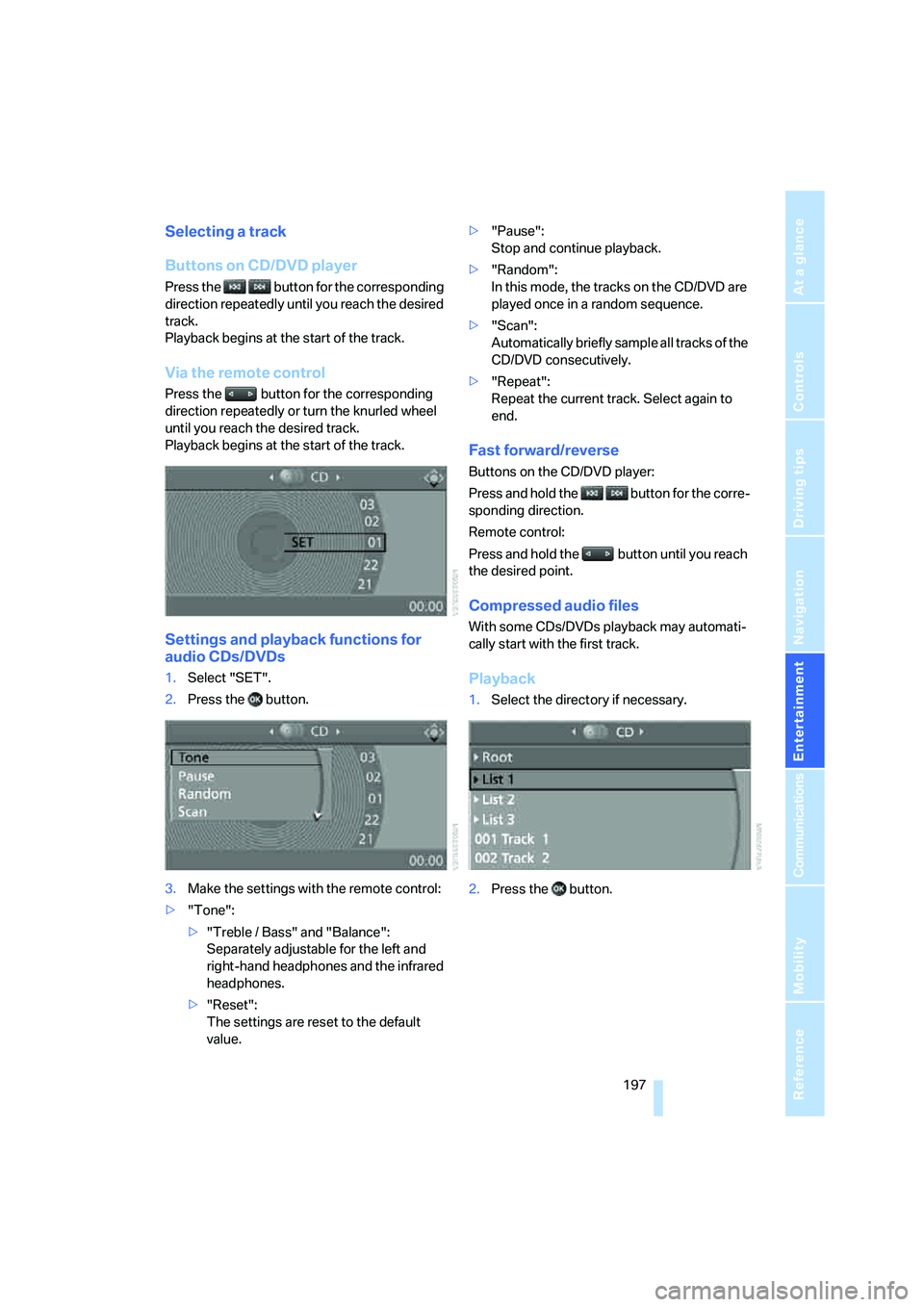
1.Select "SET".
2.Press the button.
3.Make the settings with the remote control:
>"Tone":
>"Treble / Bass" and "Balance":
Separately adjustable for the left and
right-hand headphones and the infrared
headphones.
>"Reset":
The settings are reset to the default
value.>"Pause":
Stop and continue playback.
>"Random":
In this mode, the tracks on the CD/DVD are
played once in a random sequence.
>"Scan":
Automatically briefly sample all tracks of the
CD/DVD consecutively.
>"Repeat":
Repeat the current track. Select again to
end.
Fast forward/reverse
Buttons on the CD/DVD player:
Press and hold the button for the corre-
sponding direction.
Remote control:
Press and hold the button until you reach
the desired point.
Compressed audio files
With some CDs/DVDs playback may automati-
cally start with the first track.
Playback
1.Select the directory if necessary.
2.Press the button.
Page 200 of 288
DVD system in rear
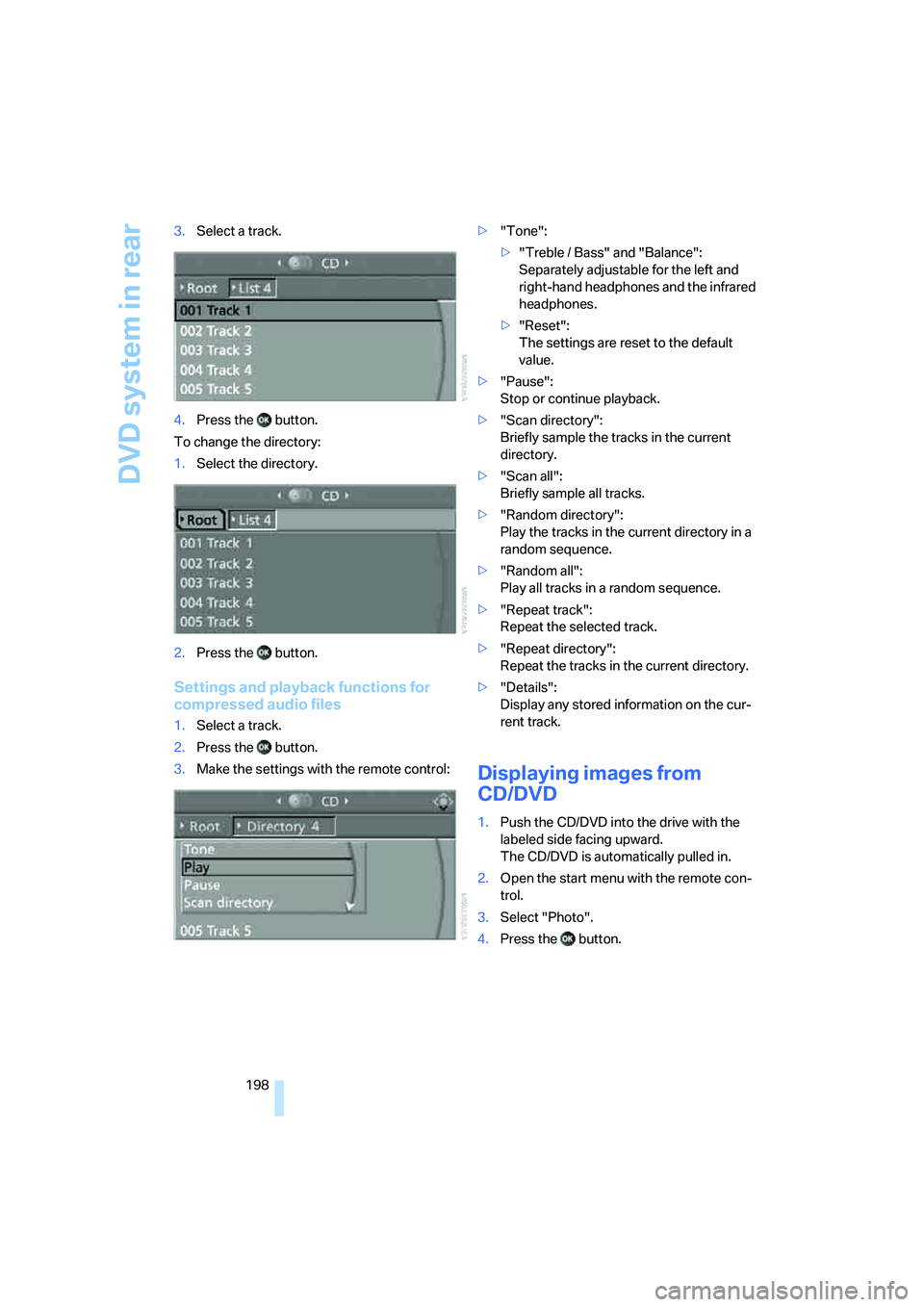
198 3.Select a track.
4.Press the button.
To change the directory:
1.Select the directory.
2.Press the button.
Settings and playback functions for
compressed audio files
1.Select a track.
2.Press the button.
3.Make the settings with the remote control:>"Tone":
>"Treble / Bass" and "Balance":
Separately adjustable for the left and
right-hand headphones and the infrared
headphones.
>"Reset":
The settings are reset to the default
value.
>"Pause":
Stop or continue playback.
>"Scan directory":
Briefly sample the tracks in the current
directory.
>"Scan all":
Briefly sample all tracks.
>"Random directory":
Play the tracks in the current directory in a
random sequence.
>"Random all":
Play all tracks in a random sequence.
>"Repeat track":
Repeat the selected track.
>"Repeat directory":
Repeat the tracks in the current directory.
>"Details":
Display any stored information on the cur-
rent track.
Displaying images from
CD/DVD
1.Push the CD/DVD into the drive with the
labeled side facing upward.
The CD/DVD is automatically pulled in.
2.Open the start menu with the remote con-
trol.
3.Select "Photo".
4.Press the button.
Page 201 of 288
Navigation
Entertainment
Driving tips
199Reference
At a glance
Controls
Communications
Mobility
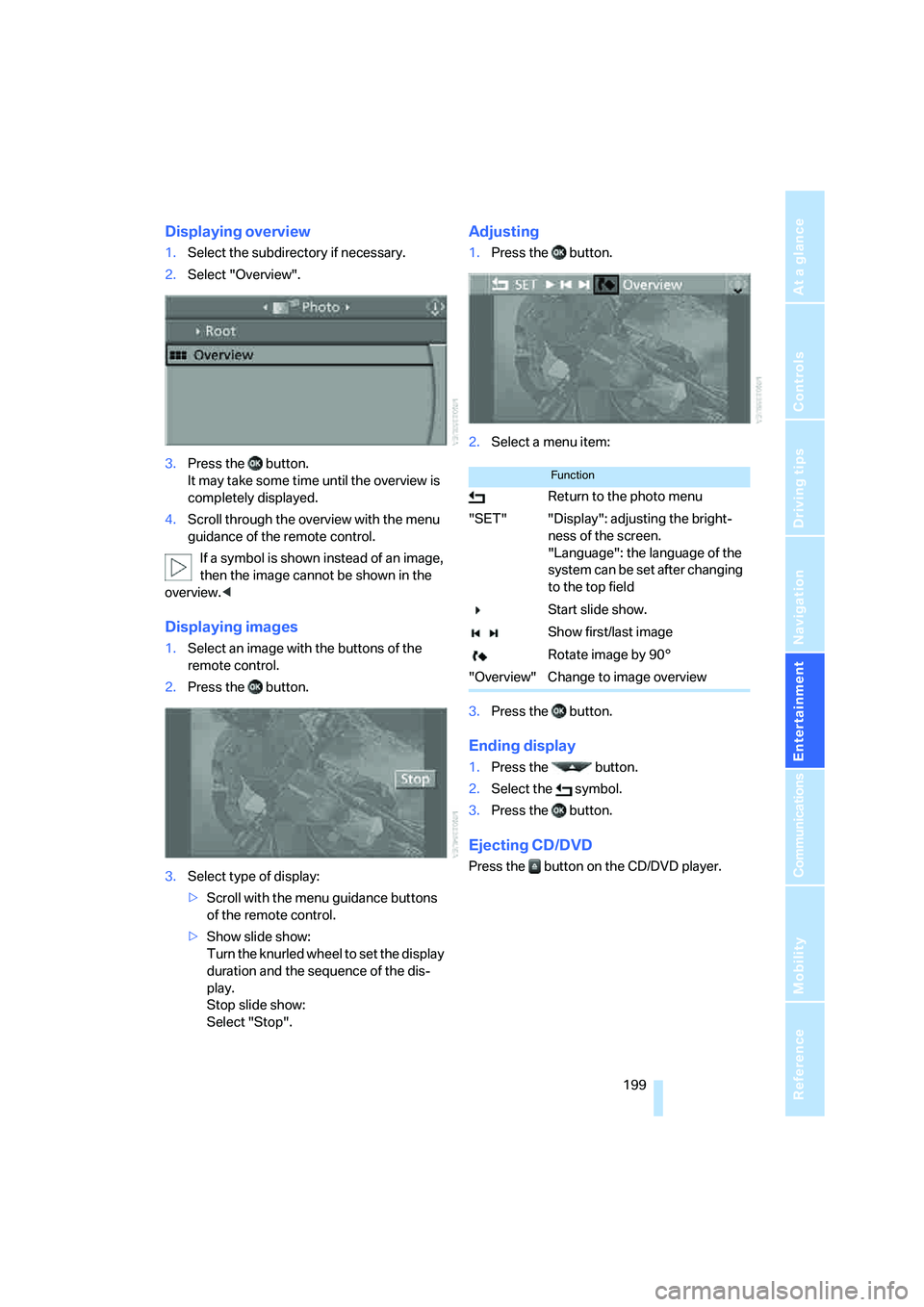
Displaying overview
1.Select the subdirectory if necessary.
2.Select "Overview".
3.Press the button.
It may take some time until the overview is
completely displayed.
4.Scroll through the overview with the menu
guidance of the remote control.
If a symbol is shown instead of an image,
then the image cannot be shown in the
overview.<
Displaying images
1.Select an image with the buttons of the
remote control.
2.Press the button.
3.Select type of display:
>Scroll with the menu guidance buttons
of the remote control.
>Show slide show:
Turn the knurled wheel to set the display
duration and the sequence of the dis-
play.
Stop slide show:
Select "Stop".
Adjusting
1.Press the button.
2.Select a menu item:
3.Press the button.
Ending display
1.Press the button.
2.Select the symbol.
3.Press the button.
Ejecting CD/DVD
Press the button on the CD/DVD player.
Function
Return to the photo menu
"SET" "Display": adjusting the bright-
ness of the screen.
"Language": the language of the
system can be set after changing
to the top field
Start slide show.
Show first/last image
Rotate image by 90°
"Overview" Change to image overview
Page 209 of 288
207
Entertainment
Reference
At a glance
Controls
Driving tips Communications
Navigation
Mobility
progress. If this happens, you must log off the
mobile phone from the vehicle if you wish to
place a call with the mobile phone.
Commissioning
Logging on mobile phone on vehicle
The following prerequisites must be met:
>Suitable mobile phone: the mobile phone
is supported by the full mobile phone prep-
aration package. Information on this subject
is also provided on the Internet at:
www.bmw.com
>The mobile phone is ready to operate.
>The Bluetooth link on the vehicle, refer to
page211, and on the mobile phone is
active.
>Depending on the mobile phone, it may be
necessary to adjust the presets of the
mobile phone, e.g. via the following menu
items:
>Bluetooth activated
>Connection not with confirmation
>Reconnect
>Depending on the mobile phone model, the
setting energy saving mode can, for exam-
ple, result in vehicle failing to detect the
paired mobile phone.
>For pairing, specify any desired number as
the Bluetooth passkey, e.g. 1. This Blue-
tooth passkey is no longer required follow-
ing successful logon.
>The ignition is switched on.
Only pair the mobile phone with the vehi-
cle stopped, otherwise the passengers
and other road users can be endangered due
to a lack of attentiveness on the part of the
driver.<
Switching on ignition
1.Insert the remote control as far as possible
into the ignition lock.
2.Switch on the ignition by pressing the Start/
Stop button without depressing the brake
pedal.
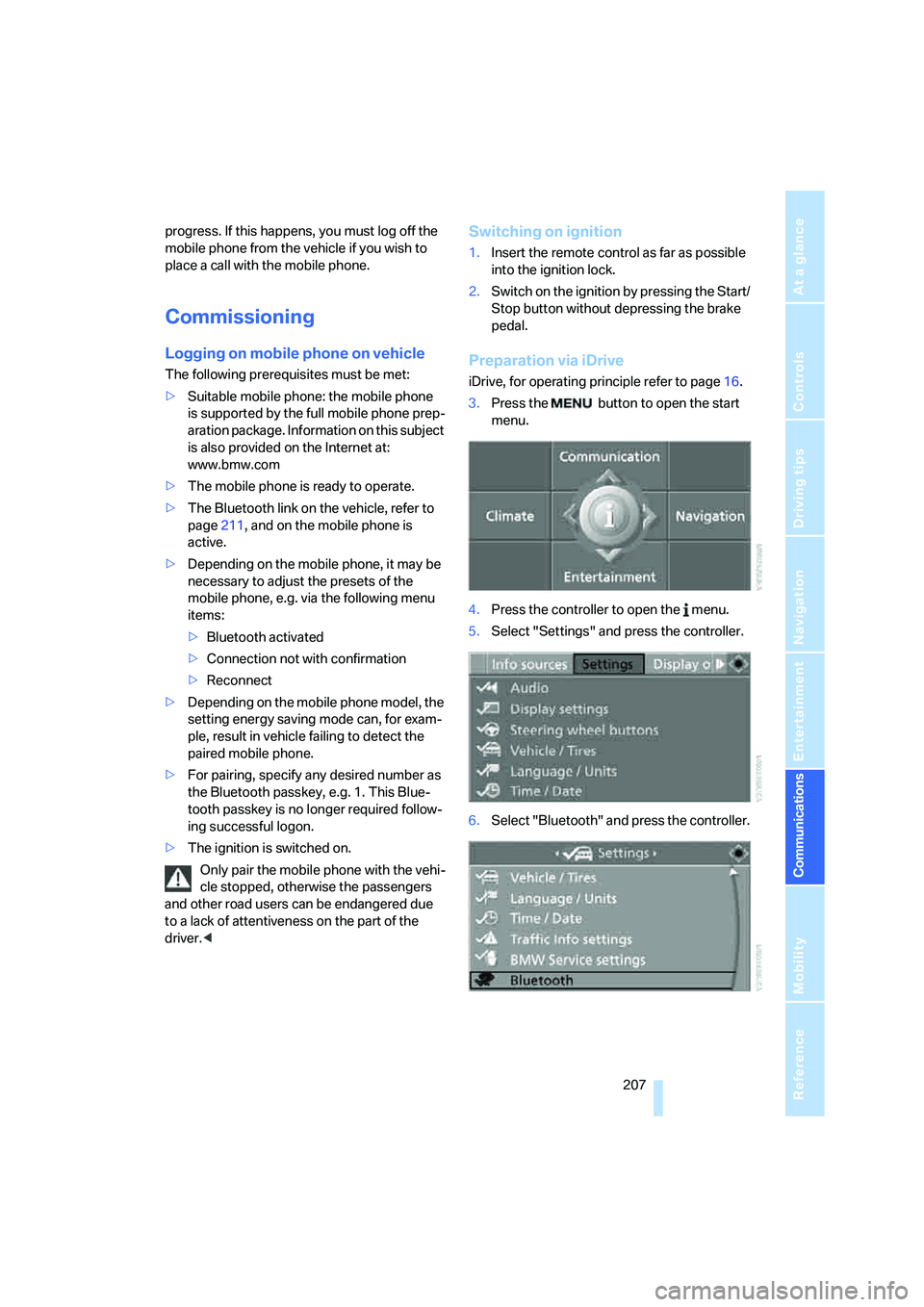
Preparation via iDrive
iDrive, for operating principle refer to page16.
3.Press the button to open the start
menu.
4.Press the controller to open the menu.
5.Select "Settings" and press the controller.
6.Select "Bluetooth" and press the controller.
Page 242 of 288
Under the hood
240
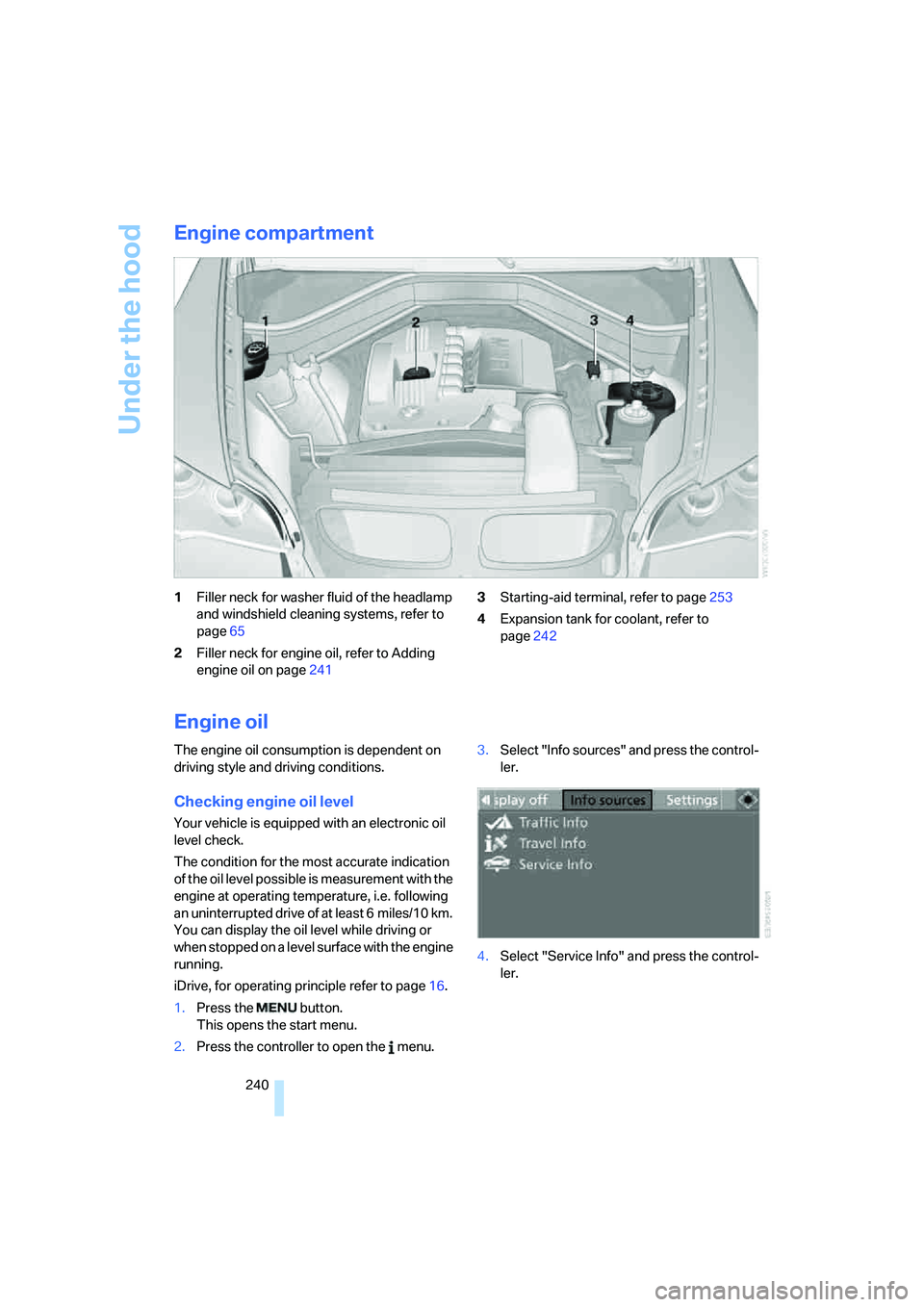
Engine compartment
1Filler neck for washer fluid of the headlamp
and windshield cleaning systems, refer to
page65
2Filler neck for engine oil, refer to Adding
engine oil on page2413Starting-aid terminal, refer to page253
4Expansion tank for coolant, refer to
page242
Engine oil
The engine oil consumption is dependent on
driving style and driving conditions.
Checking engine oil level
Your vehicle is equipped with an electronic oil
level check.
The condition for the most accurate indication
of the oil level possible is measurement with the
engine at operating temperature, i.e. following
an uninterrupted drive of at least 6 miles/10 km.
You can display the oil level while driving or
when stopped on a level surface with the engine
running.
iDrive, for operating principle refer to page16.
1.Press the button.
This opens the start menu.
2.Press the controller to open the menu.3.Select "Info sources" and press the control-
ler.
4.Select "Service Info" and press the control-
ler.
Page 257 of 288
Mobility
255Reference
At a glance
Controls
Driving tips
Communications
Navigation
Entertainment
Rear
Being towed
Make sure that the ignition is switched on,
refer to page56, otherwise the low
beams, tail lamps, turn signals and windshield
wipers would not be available. When the engine
is stopped, there is no power assist. This then
requires increased effort for braking and steer-
ing. Active steering is deactivated and larger
steering wheel movements are required.<
Switch on the hazard warning flashers depend-
ing on the local regulations. If the electrical sys-
tem fails, mark the vehicle to be towed, e.g. with
a sign or warning triangle in the rear window.
Before towing, manually unlock the trans-
mission lock, refer to page63; failure to
do so can result in damage to the transmis-
sion.<
Do not exceed a towing speed of 45 mph/
70 km/h and a towing distance of
90 miles/150 km, otherwise the automatic
transmission may be damaged.<
Towing methods
Do not lift vehicle by tow fitting or body
and chassis parts, otherwise damage may
result.<
In some countries, towing with tow bars or
ropes in public traffic is not permitted. Familiar-
ize yourself with the regulations on towing in the
respective country.
With tow bar
The towing vehicle may not be lighter
than the vehicle to be towed, otherwise it
will not be possible to reliably control vehicle
response.
ble to avoid mounting the tow bar at an offset
angle, please observe the following:
>Clearance and maneuvering capability will
be sharply limited during cornering.
>When mounted at an angle, the tow bar will
exert lateral forces, tending to push the
vehicle sideways.
Only attach the tow bar to the tow fittings,
as attachment to other vehicle parts can
lead to damage.<
With tow rope
When starting off in the towing vehicle, make
sure that the tow rope is taut.
To avoid jerking and the associated
stresses on vehicle components when
towing, always use nylon ropes or nylon straps.
Only attach tow ropes to the tow fittings, as
attachment to other vehicle parts can lead to
damage.<
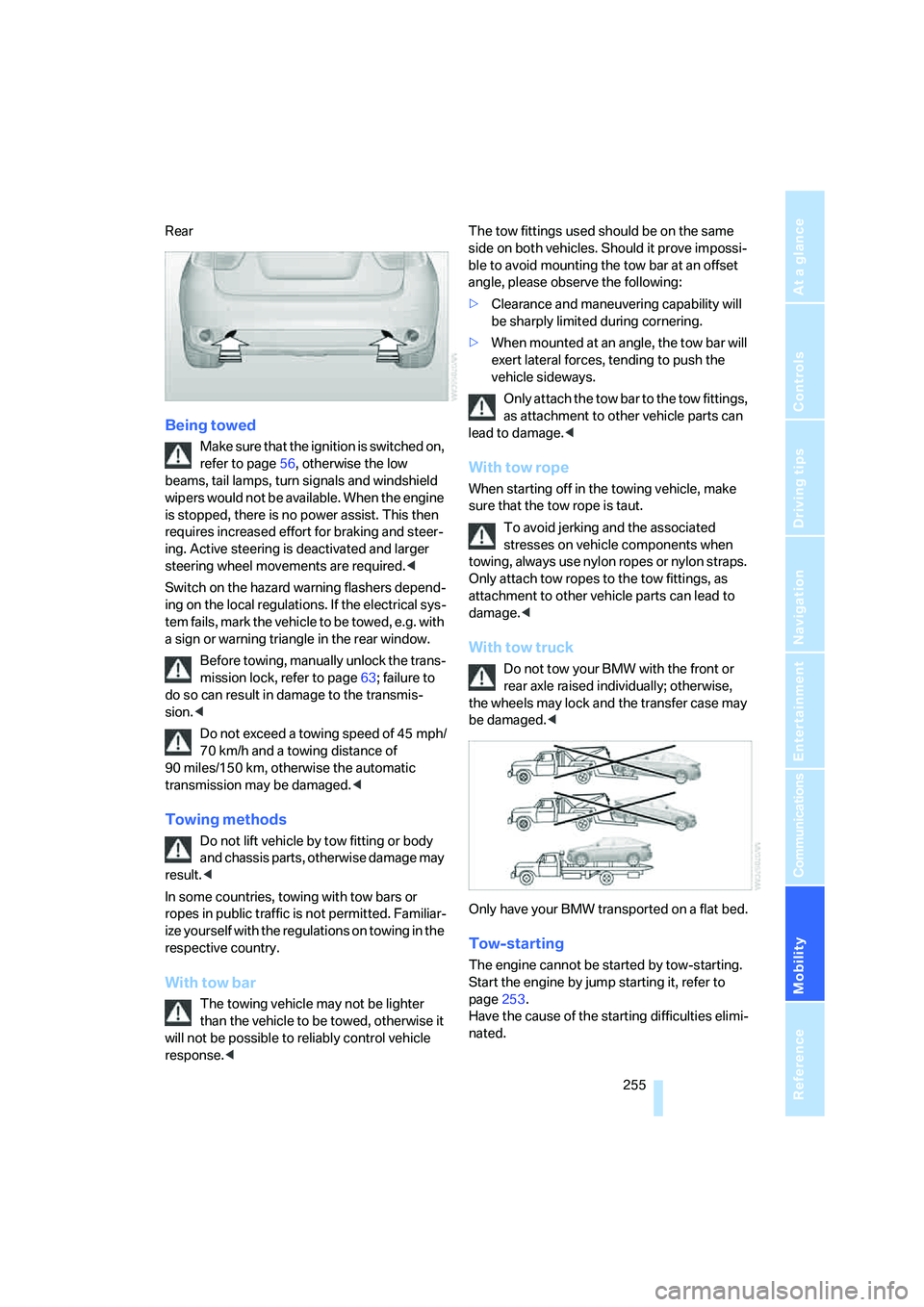
With tow truck
Do not tow your BMW with the front or
rear axle raised individually; otherwise,
the wheels may lock and the transfer case may
be damaged.<
Only have your BMW transported on a flat bed.
Tow-starting
The engine cannot be started by tow-starting.
Start the engine by jump starting it, refer to
page253.
Have the cause of the starting difficulties elimi-
nated.
Page 265 of 288
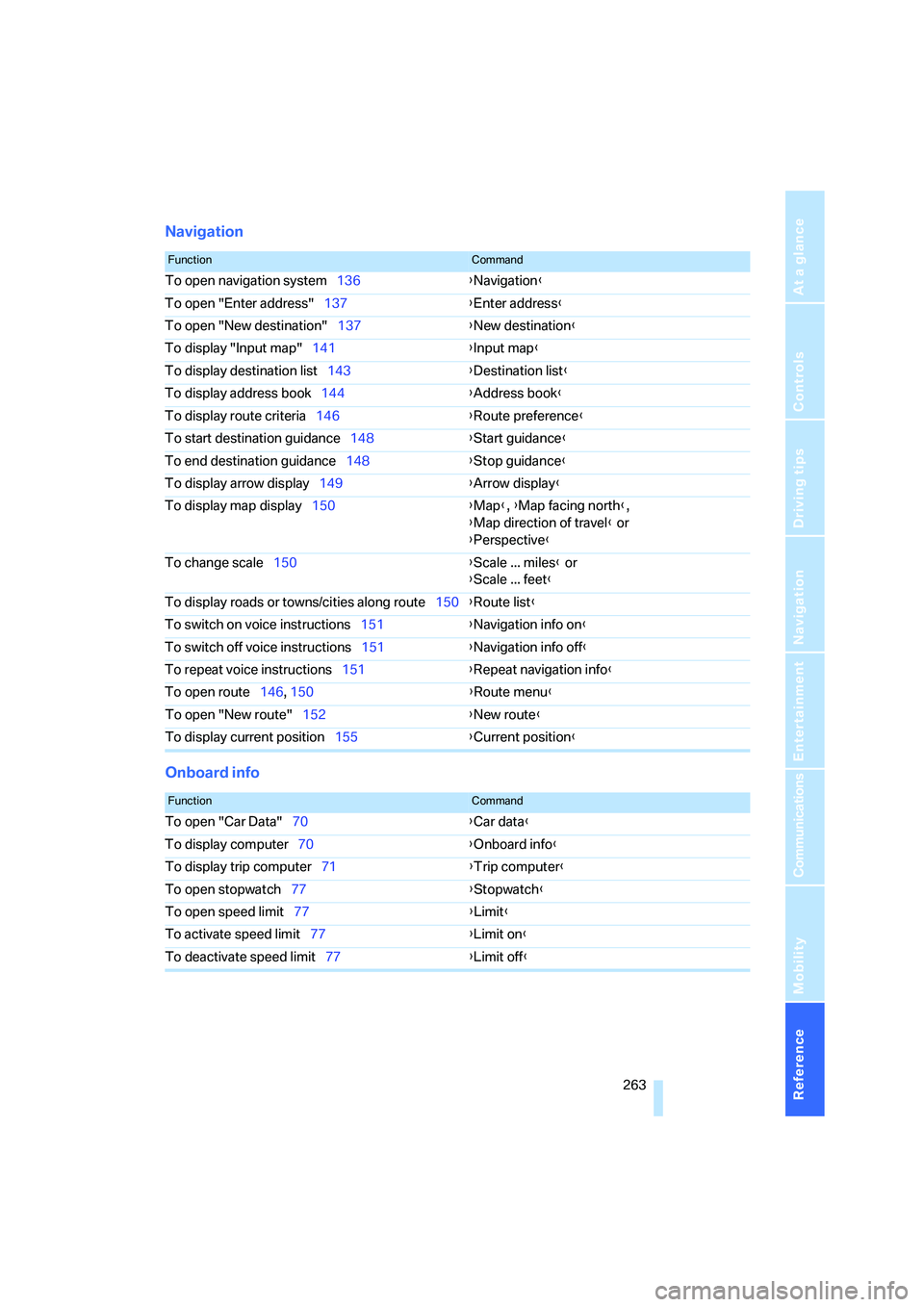
Reference 263
At a glance
Controls
Driving tips
Communications
Navigation
Entertainment
Mobility
Navigation
Onboard info
FunctionCommand
To open navigation system136{Navigation}
To open "Enter address"137{Enter address}
To open "New destination"137{New destination}
To display "Input map"141{Input map}
To display destination list143{Destination list}
To display address book144{Address book}
To display route criteria146{Route preference}
To start destination guidance148{Start guidance}
To end destination guidance148{Stop guidance}
To display arrow display149{Arrow display}
To display map display150{Map}, {Map facing north},
{Map direction of travel} or
{Perspective}
To change scale150{Scale ... miles} or
{Scale ... feet}
To display roads or towns/cities along route150{Route list}
To switch on voice instructions151{Navigation info on}
To switch off voice instructions151{Navigation info off}
To repeat voice instructions151{Repeat navigation info}
To open route146, 150
{Route menu}
To open "New route"152{New route}
To display current position155{Current position}
FunctionCommand
To open "Car Data"70{Car data}
To display computer70{Onboard info}
To display trip computer71{Trip computer}
To open stopwatch77{Stopwatch}
To open speed limit77{Limit}
To activate speed limit77{Limit on}
To deactivate speed limit77{Limit off}
Page 282 of 288
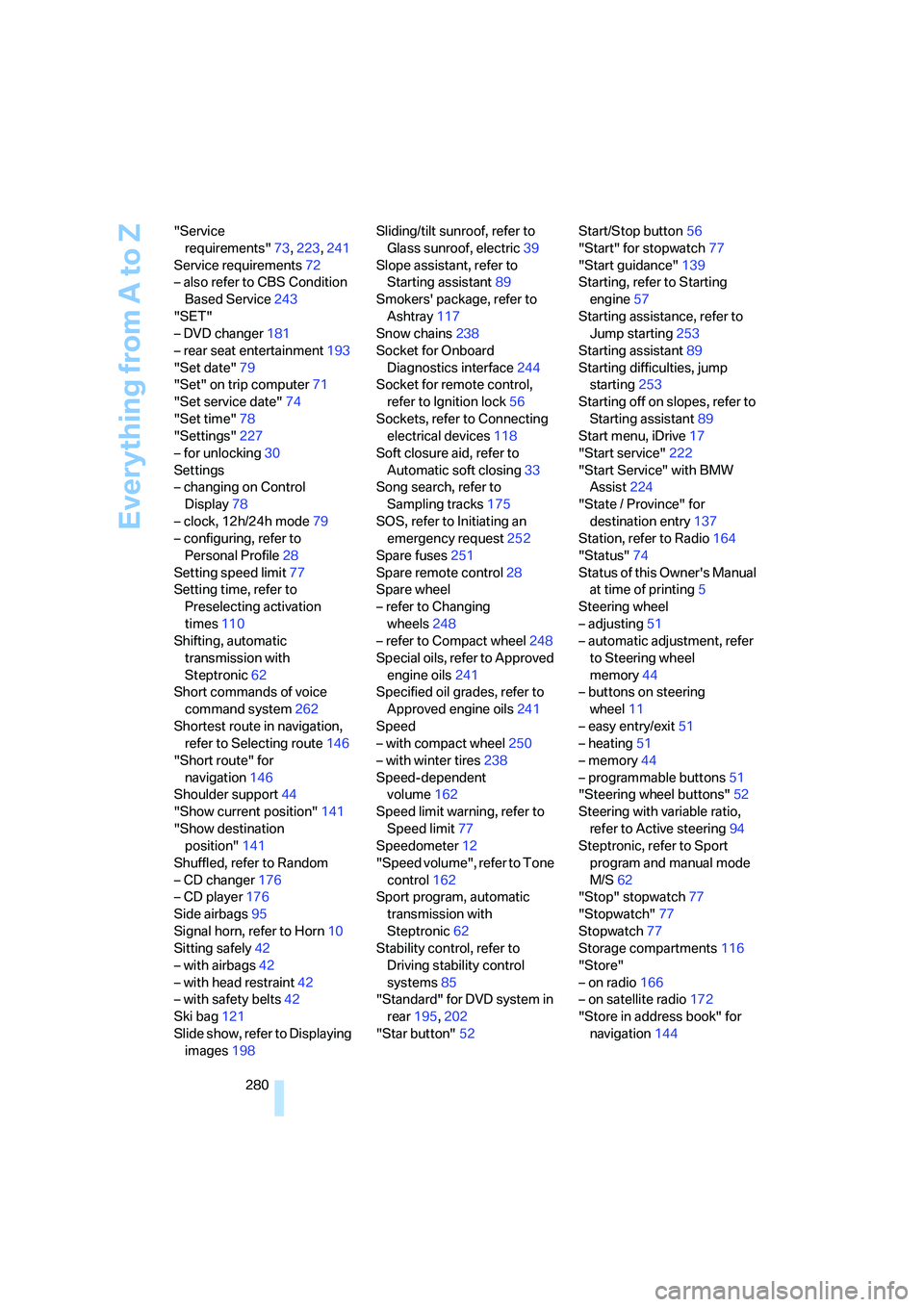
Everything from A to Z
280 "Service
requirements"73,223,241
Service requirements72
– also refer to CBS Condition
Based Service243
"SET"
– DVD changer181
– rear seat entertainment193
"Set date"79
"Set" on trip computer71
"Set service date"74
"Set time"78
"Settings"227
– for unlocking30
Settings
– changing on Control
Display78
– clock, 12h/24h mode79
– configuring, refer to
Personal Profile28
Setting speed limit77
Setting time, refer to
Preselecting activation
times110
Shifting, automatic
transmission with
Steptronic62
Short commands of voice
command system262
Shortest route in navigation,
refer to Selecting route146
"Short route" for
navigation146
Shoulder support44
"Show current position"141
"Show destination
position"141
Shuffled, refer to Random
– CD changer176
– CD player176
Side airbags95
Signal horn, refer to Horn10
Sitting safely42
– with airbags42
– with head restraint42
– with safety belts42
Ski bag121
Slide show, refer to Displaying
images198Sliding/tilt sunroof, refer to
Glass sunroof, electric39
Slope assistant, refer to
Starting assistant89
Smokers' package, refer to
Ashtray117
Snow chains238
Socket for Onboard
Diagnostics interface244
Socket for remote control,
refer to Ignition lock56
Sockets, refer to Connecting
electrical devices118
Soft closure aid, refer to
Automatic soft closing33
Song search, refer to
Sampling tracks175
SOS, refer to Initiating an
emergency request252
Spare fuses251
Spare remote control28
Spare wheel
– refer to Changing
wheels248
– refer to Compact wheel248
Special oils, refer to Approved
engine oils241
Specified oil grades, refer to
Approved engine oils241
Speed
– with compact wheel250
– with winter tires238
Speed-dependent
volume162
Speed limit warning, refer to
Speed limit77
Speedometer12
"Speed volume", refer to Tone
control162
Sport program, automatic
transmission with
Steptronic62
Stability control, refer to
Driving stability control
systems85
"Standard" for DVD system in
rear195,202
"Star button"52Start/Stop button56
"Start" for stopwatch77
"Start guidance"139
Starting, refer to Starting
engine57
Starting assistance, refer to
Jump starting253
Starting assistant89
Starting difficulties, jump
starting253
Starting off on slopes, refer to
Starting assistant89
Start menu, iDrive17
"Start service"222
"Start Service" with BMW
Assist224
"State / Province" for
destination entry137
Station, refer to Radio164
"Status"74
Status of this Owner's Manual
at time of printing5
Steering wheel
– adjusting51
– automatic adjustment, refer
to Steering wheel
memory44
– buttons on steering
wheel
11
– easy entry/exit51
– heating51
– memory44
– programmable buttons51
"Steering wheel buttons"52
Steering with variable ratio,
refer to Active steering94
Steptronic, refer to Sport
program and manual mode
M/S62
"Stop" stopwatch77
"Stopwatch"77
Stopwatch77
Storage compartments116
"Store"
– on radio166
– on satellite radio172
"Store in address book" for
navigation144