navigation BMW X6 2008 Owner's Guide
[x] Cancel search | Manufacturer: BMW, Model Year: 2008, Model line: X6, Model: BMW X6 2008Pages: 288, PDF Size: 8.08 MB
Page 59 of 288
Controls
57Reference
At a glance
Driving tips
Communications
Navigation
Entertainment
Mobility
Starting engine
Do not run the engine in closed rooms,
otherwise the inhalation of toxic exhaust
gases can cause unconsciousness and death.
The exhaust gases contain carbon monoxide,
an odorless and colorless, but highly toxic gas.
Never leave an unattended vehicle with the
engine running, as such a vehicle represents a
potential safety hazard.
To prevent the vehicle from rolling, always
engage transmission position N or P and set the
parking brake before leaving the vehicle with
the engine running.<
Do not allow the engine to warm up by leaving it
running while the vehicle remains stationary.
Instead, begin to drive at a moderate engine
speed.
The engine starts when you depress the
brake pedal while pressing the Start/Stop
button.<
Avoid frequent starting in quick succes-
sion or repeated starting attempts in
which the engine does not start. Otherwise, the
fuel is not burned or inadequately burned and
there is a danger of overheating and damaging
the catalytic converter.<
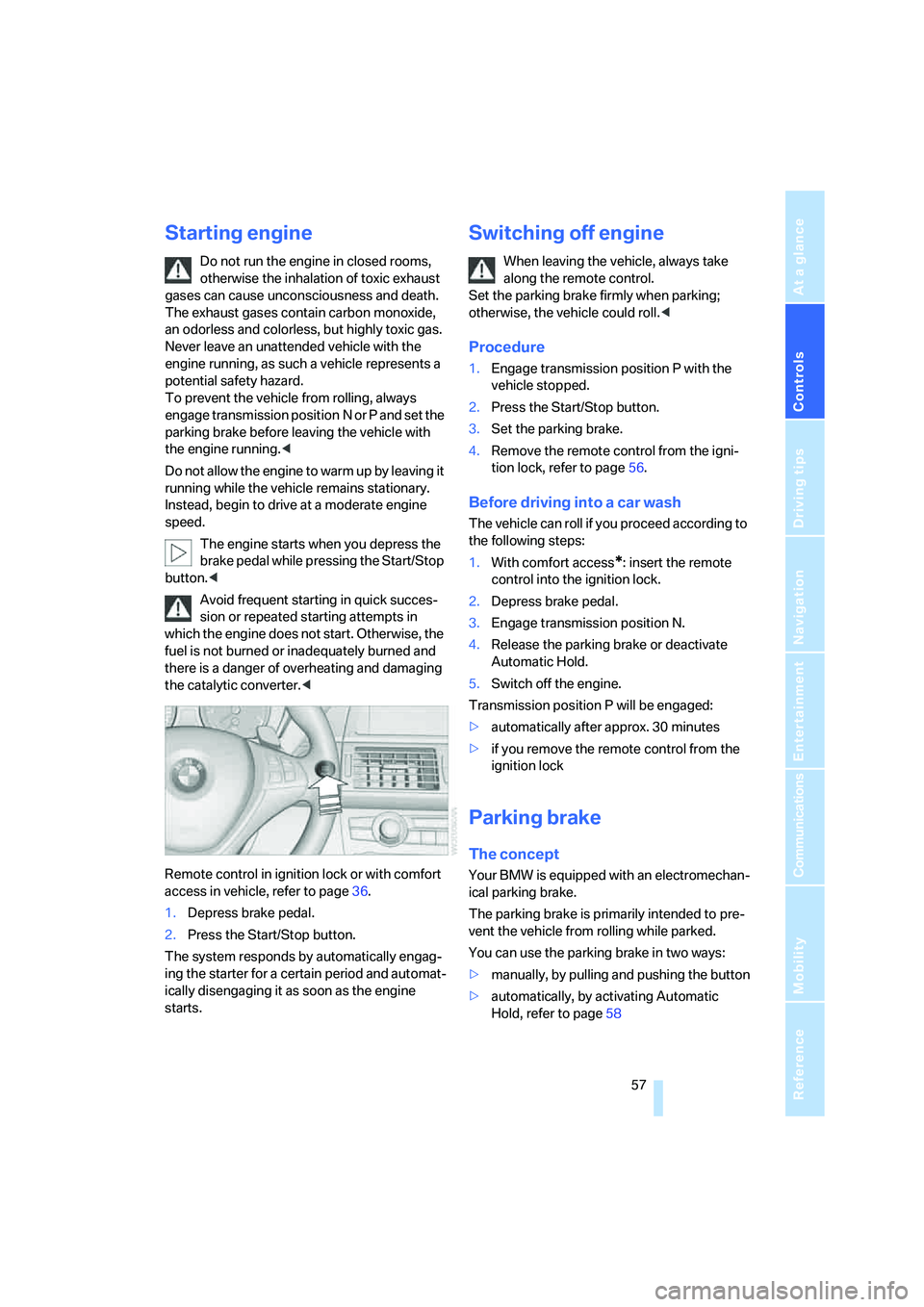
Remote control in ignition lock or with comfort
access in vehicle, refer to page36.
1.Depress brake pedal.
2.Press the Start/Stop button.
The system responds by automatically engag-
ing the starter for a certain period and automat-
ically disengaging it as soon as the engine
starts.
Switching off engine
When leaving the vehicle, always take
along the remote control.
Set the parking brake firmly when parking;
otherwise, the vehicle could roll.<
Procedure
1.Engage transmission position P with the
vehicle stopped.
2.Press the Start/Stop button.
3.Set the parking brake.
4.Remove the remote control from the igni-
tion lock, refer to page56.
Before driving into a car wash
The vehicle can roll if you proceed according to
the following steps:
1.With comfort access
*: insert the remote
control into the ignition lock.
2.Depress brake pedal.
3.Engage transmission position N.
4.Release the parking brake or deactivate
Automatic Hold.
5.Switch off the engine.
Transmission position P will be engaged:
>automatically after approx. 30 minutes
>if you remove the remote control from the
ignition lock
Parking brake
The concept
Your BMW is equipped with an electromechan-
ical parking brake.
The parking brake is primarily intended to pre-
vent the vehicle from rolling while parked.
You can use the parking brake in two ways:
>manually, by pulling and pushing the button
>automatically, by activating Automatic
Hold, refer to page58
Page 61 of 288
Controls
59Reference
At a glance
Driving tips
Communications
Navigation
Entertainment
Mobility
Activating
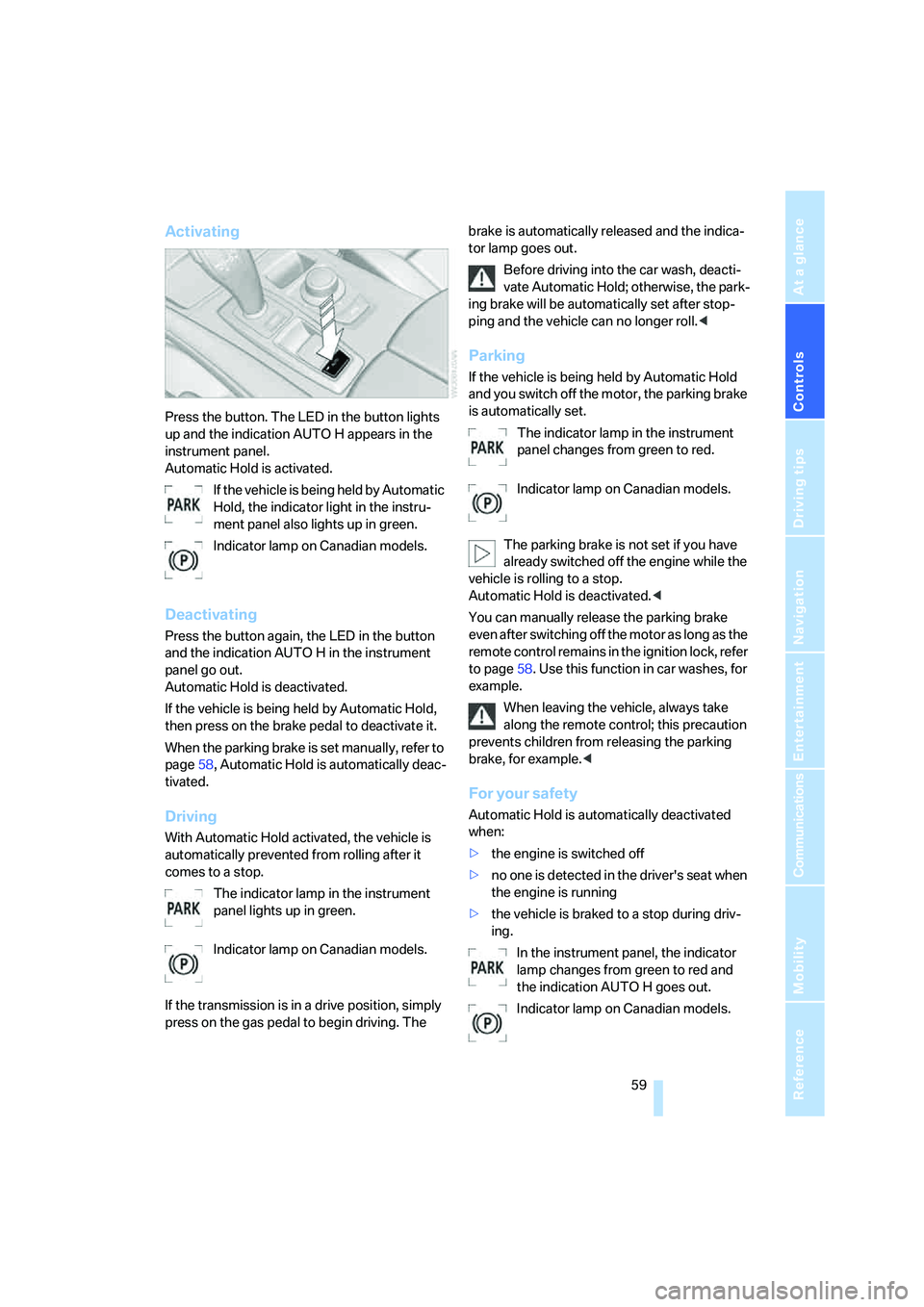
Press the button. The LED in the button lights
up and the indication AUTO H appears in the
instrument panel.
Automatic Hold is activated.
If the vehicle is being held by Automatic
Hold, the indicator light in the instru-
ment panel also lights up in green.
Indicator lamp on Canadian models.
Deactivating
Press the button again, the LED in the button
and the indication AUTO H in the instrument
panel go out.
Automatic Hold is deactivated.
If the vehicle is being held by Automatic Hold,
then press on the brake pedal to deactivate it.
When the parking brake is set manually, refer to
page58, Automatic Hold is automatically deac-
tivated.
Driving
With Automatic Hold activated, the vehicle is
automatically prevented from rolling after it
comes to a stop.
The indicator lamp in the instrument
panel lights up in green.
Indicator lamp on Canadian models.
If the transmission is in a drive position, simply
press on the gas pedal to begin driving. The brake is automatically released and the indica-
tor lamp goes out.
Before driving into the car wash, deacti-
vate Automatic Hold; otherwise, the park-
ing brake will be automatically set after stop-
ping and the vehicle can no longer roll.<
Parking
If the vehicle is being held by Automatic Hold
and you switch off the motor, the parking brake
is automatically set.
The indicator lamp in the instrument
panel changes from green to red.
Indicator lamp on Canadian models.
The parking brake is not set if you have
already switched off the engine while the
vehicle is rolling to a stop.
Automatic Hold is deactivated.<
You can manually release the parking brake
even after switching off the motor as long as the
remote control remains in the ignition lock, refer
to page58. Use this function in car washes, for
example.
When leaving the vehicle, always take
along the remote control; this precaution
prevents children from releasing the parking
brake, for example.<
For your safety
Automatic Hold is automatically deactivated
when:
>the engine is switched off
>no one is detected in the driver's seat when
the engine is running
>the vehicle is braked to a stop during driv-
ing.
In the instrument panel, the indicator
lamp changes from green to red and
the indication AUTO H goes out.
Indicator lamp on Canadian models.
Page 63 of 288
Controls
61Reference
At a glance
Driving tips
Communications
Navigation
Entertainment
Mobility
Indicator lamp on Canadian models.
Any noises which occur are normal. Start-up
may take several seconds.
Automatic transmission with
Steptronic
In addition to fully automatic operation, you can
also manually shift with the Steptronic, refer to
page62.
Transmission positions
P R N D M/S + –
To prevent the vehicle from creeping
after you select a driving position, main-
tain pressure on the brake pedal until you are
ready to start.<
Displays in instrument panel
P R N D S1 through S6 M1 through M6
The transmission position and the currently
engaged gear are displayed.
Engaging transmission position
>You can only engage transmission posi-
tions D, R or N when the engine is running.
>With the vehicle stationary, depress the
brake pedal before shifting out of P or N;
otherwise the shift command will not be
executed: shiftlock.
To prevent the vehicle from creeping
after you select a driving position,
maintain pressure on the brake pedal until
you are ready to start.<
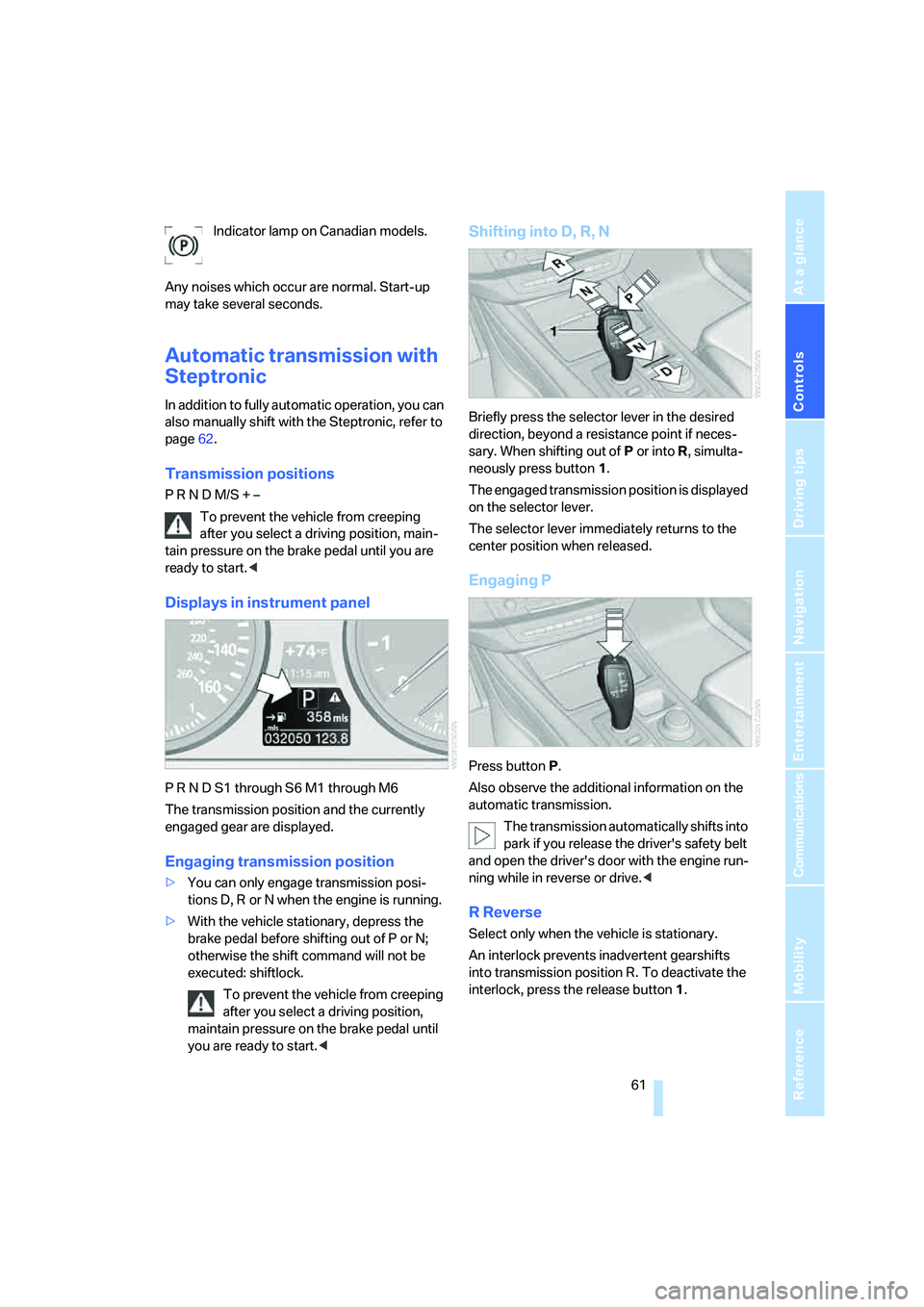
Shifting into D, R, N
Briefly press the selector lever in the desired
direction, beyond a resistance point if neces-
sary. When shifting out of P or into R, simulta-
neously press button1.
The engaged transmission position is displayed
on the selector lever.
The selector lever immediately returns to the
center position when released.
Engaging P
Press button P.
Also observe the additional information on the
automatic transmission.
The transmission automatically shifts into
park if you release the driver's safety belt
and open the driver's door with the engine run-
ning while in reverse or drive.<
R Reverse
Select only when the vehicle is stationary.
An interlock prevents inadvertent gearshifts
into transmission position R. To deactivate the
interlock, press the release button1.
Page 65 of 288
Controls
63Reference
At a glance
Driving tips
Communications
Navigation
Entertainment
Mobility
>Downshifting: press on one of the shifting
paddles, arrows –.
Upshifts and downshifts are executed only
when they will result in a plausible combination
of engine and vehicle speed; thus, for example,
a downshift that would cause the engine to
overrev will not be executed by the system. The
selected gear is briefly displayed in the instru-
ment panel, followed by the current gear.
Manually releasing and engaging
transmission lock
In case of a power failure, e.g. when the
battery is drained or disconnected, or an
electrical malfunction, the transmission lock
must be manually released, as otherwise the
rear wheels are blocked and the vehicle cannot
be towed.<
Step on the brake when manually releas-
ing the transmission lock; otherwise,
there is a danger of the vehicle rolling.<
The transmission lock should only be released
for towing. Reengage the transmission lock
after parking the vehicle at its destination.
If it also becomes necessary to manually
release the parking brake, follow this sequence:
1.Secure the vehicle against rolling.
2.Manually release the parking brake, refer to
page60.
3.Manually release the transmission lock of
the automatic transmission.
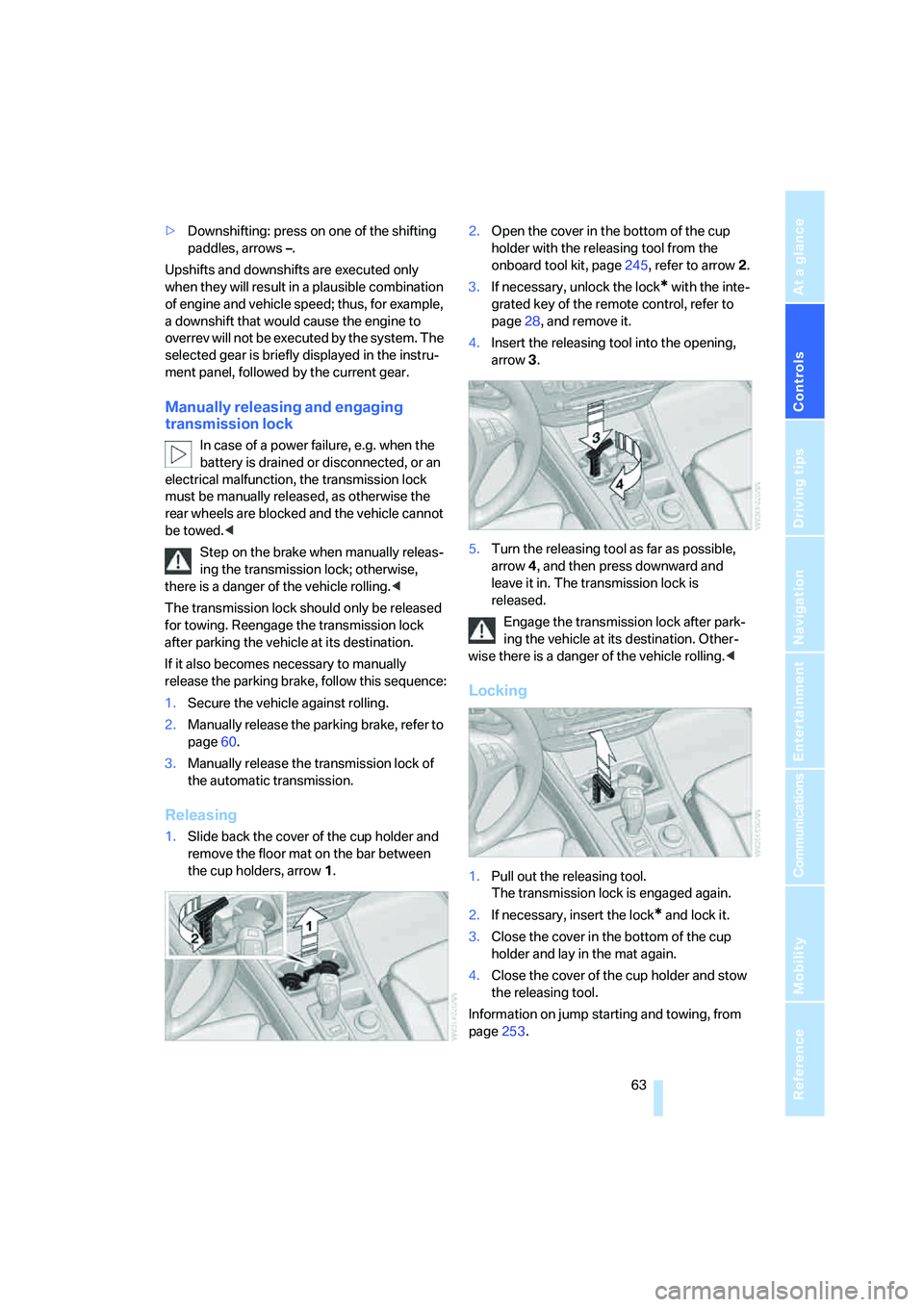
Releasing
1.Slide back the cover of the cup holder and
remove the floor mat on the bar between
the cup holders, arrow1.2.Open the cover in the bottom of the cup
holder with the releasing tool from the
onboard tool kit, page245, refer to arrow2.
3.If necessary, unlock the lock
* with the inte-
grated key of the remote control, refer to
page28, and remove it.
4.Insert the releasing tool into the opening,
arrow3.
5.Turn the releasing tool as far as possible,
arrow4, and then press downward and
leave it in. The transmission lock is
released.
Engage the transmission lock after park-
ing the vehicle at its destination. Other-
wise there is a danger of the vehicle rolling.<
Locking
1.Pull out the releasing tool.
The transmission lock is engaged again.
2.If necessary, insert the lock
* and lock it.
3.Close the cover in the bottom of the cup
holder and lay in the mat again.
4.Close the cover of the cup holder and stow
the releasing tool.
Information on jump starting and towing, from
page253.
Page 67 of 288
Controls
65Reference
At a glance
Driving tips
Communications
Navigation
Entertainment
Mobility
Fast wiper speed
Press twice or press beyond the resistance
point.
The system reverts to normal speed when the
vehicle is stationary.
Rain sensor
The wiper operation is controlled automatically
as a function of the intensity of the rain. The rain
sensor is located on the windshield, directly in
front of the interior rearview mirror.
Rain sensor activation
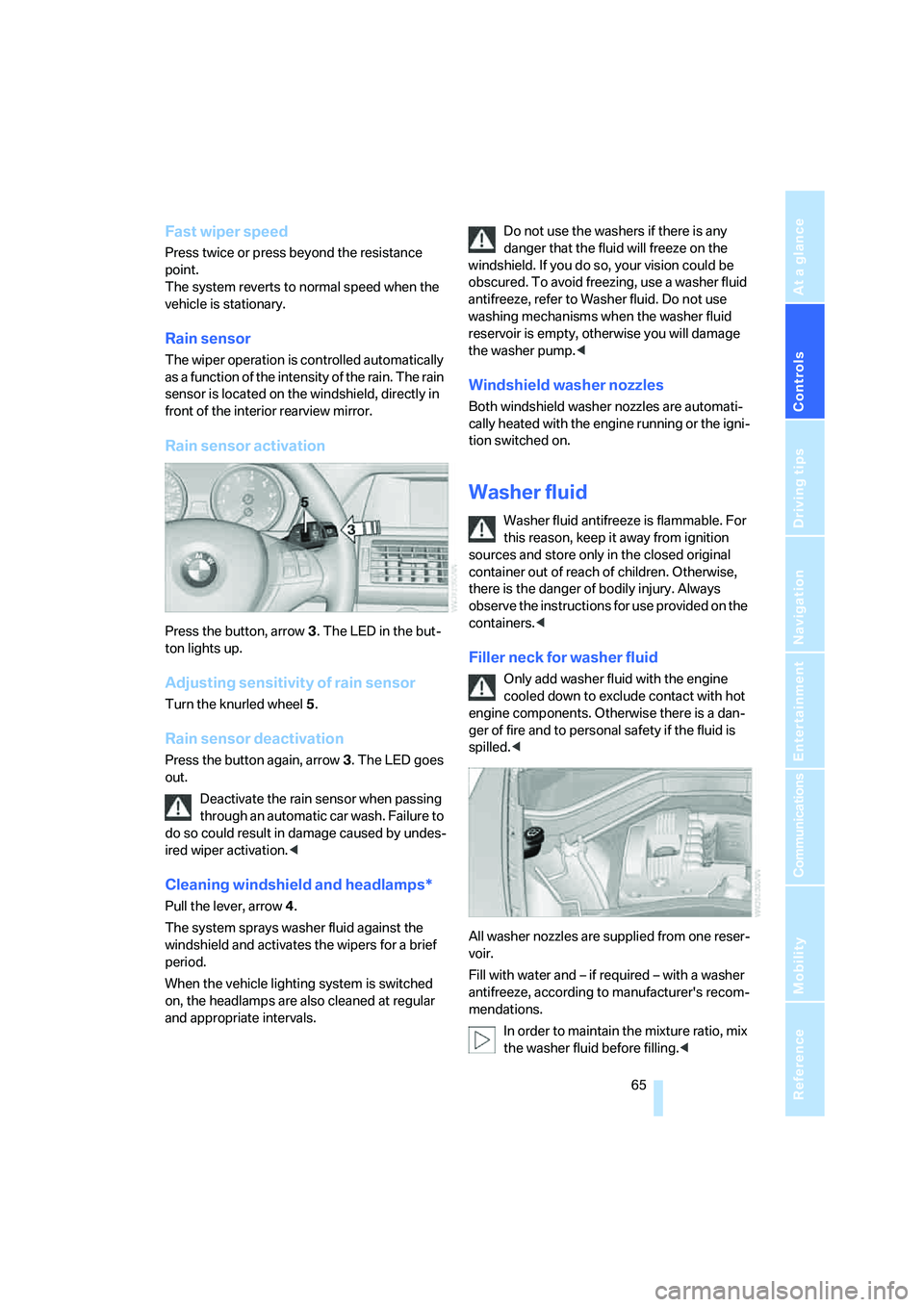
Press the button, arrow3. The LED in the but-
ton lights up.
Adjusting sensitivity of rain sensor
Turn the knurled wheel5.
Rain sensor deactivation
Press the button again, arrow3. The LED goes
out.
Deactivate the rain sensor when passing
through an automatic car wash. Failure to
do so could result in damage caused by undes-
ired wiper activation.<
Cleaning windshield and headlamps*
Pull the lever, arrow4.
The system sprays washer fluid against the
windshield and activates the wipers for a brief
period.
When the vehicle lighting system is switched
on, the headlamps are also cleaned at regular
and appropriate intervals.Do not use the washers if there is any
danger that the fluid will freeze on the
windshield. If you do so, your vision could be
obscured. To avoid freezing, use a washer fluid
antifreeze, refer to Washer fluid. Do not use
washing mechanisms when the washer fluid
reservoir is empty, otherwise you will damage
the washer pump.<
Windshield washer nozzles
Both windshield washer nozzles are automati-
cally heated with the engine running or the igni-
tion switched on.
Washer fluid
Washer fluid antifreeze is flammable. For
this reason, keep it away from ignition
sources and store only in the closed original
container out of reach of children. Otherwise,
there is the danger of bodily injury. Always
observe the instructions for use provided on the
containers.<
Filler neck for washer fluid
Only add washer fluid with the engine
cooled down to exclude contact with hot
engine components. Otherwise there is a dan-
ger of fire and to personal safety if the fluid is
spilled.<
All washer nozzles are supplied from one reser-
voir.
Fill with water and – if required – with a washer
antifreeze, according to manufacturer's recom-
mendations.
In order to maintain the mixture ratio, mix
the washer fluid before filling.<
Page 69 of 288
Controls
67Reference
At a glance
Driving tips
Communications
Navigation
Entertainment
Mobility
>Each time the lever is pulled beyond the
resistance point, the desired speed is
decreased by a maximum of 5 mph or
10 km/h until the minimum speed of
20 mph or 30 km/h is reached.
The system stores the setting and maintains
the set speed.
Deactivating cruise control
Briefly press the lever up or down, arrow3.
The displays in the speedometer go out.
In addition, the system is automatically deacti-
vated:
>when braking
>when transmission position N is engaged
>when DTC is activated or DSC is deacti-
vated
>when HDC is activated
>when the parking brake is set
>when driving stability control systems inter-
vene
Accelerating does not deactivate the cruise
control. After releasing the accelerator pedal,
the stored speed is reached and maintained
again.
Warning lamp
The warning lamp lights up if the
cruise control has been deactivated
automatically, e.g. by a control inter-
vention of the DSC. A message appears on the
Control Display.
Resuming stored speed
Briefly press the button, arrow4. The stored
speed is resumed and maintained.
With the ignition switched off, the stored speed
value is deleted and cannot be resumed again.
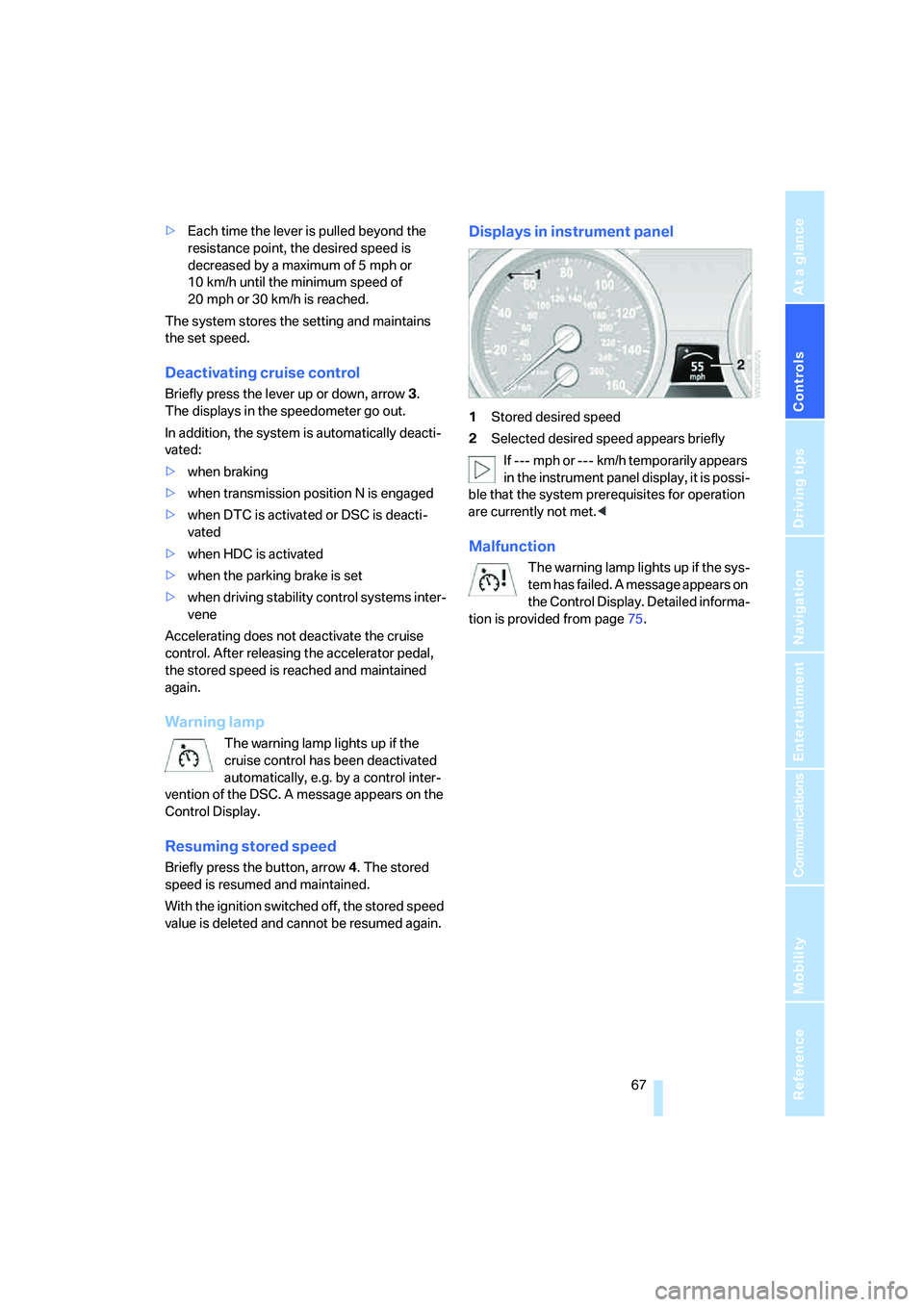
Displays in instrument panel
1Stored desired speed
2Selected desired speed appears briefly
If --- mph or --- km/h temporarily appears
in the instrument panel display, it is possi-
ble that the system prerequisites for operation
are currently not met.<
Malfunction
The warning lamp lights up if the sys-
tem has failed. A message appears on
the Control Display. Detailed informa-
tion is provided from page75.
Page 71 of 288
Controls
69Reference
At a glance
Driving tips
Communications
Navigation
Entertainment
Mobility
Tachometer
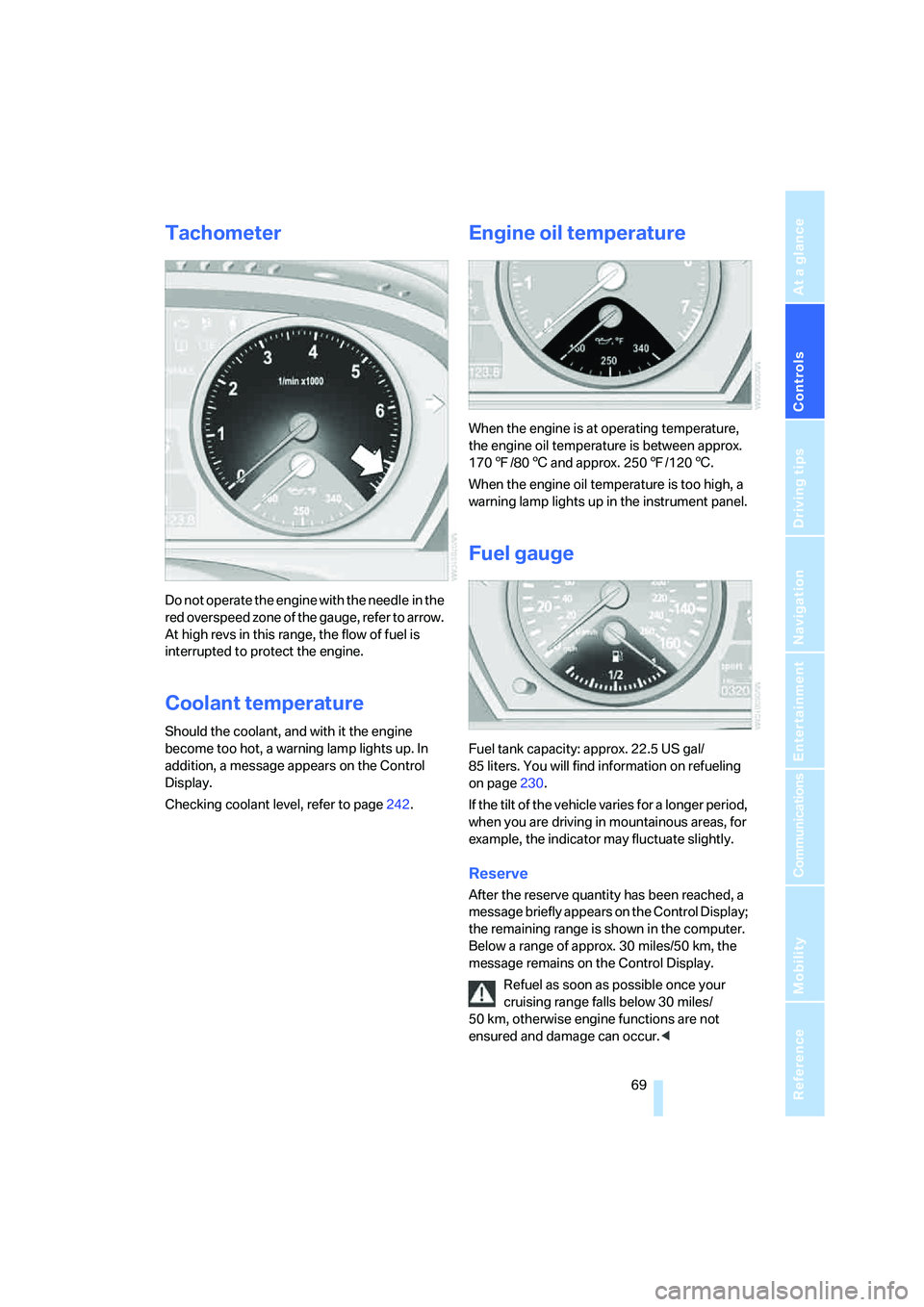
Do not operate the engine with the needle in the
red overspeed zone of the gauge, refer to arrow.
At high revs in this range, the flow of fuel is
interrupted to protect the engine.
Coolant temperature
Should the coolant, and with it the engine
become too hot, a warning lamp lights up. In
addition, a message appears on the Control
Display.
Checking coolant level, refer to page242.
Engine oil temperature
When the engine is at operating temperature,
the engine oil temperature is between approx.
1707/806 and approx. 2507/1206.
When the engine oil temperature is too high, a
warning lamp lights up in the instrument panel.
Fuel gauge
Fuel tank capacity: approx. 22.5 US gal/
85 liters. You will find information on refueling
on page230.
If the tilt of the vehicle varies for a longer period,
when you are driving in mountainous areas, for
example, the indicator may fluctuate slightly.
Reserve
After the reserve quantity has been reached, a
message briefly appears on the Control Display;
the remaining range is shown in the computer.
Below a range of approx. 30 miles/50 km, the
message remains on the Control Display.
Refuel as soon as possible once your
cruising range falls below 30 miles/
50 km, otherwise engine functions are not
ensured and damage can occur.<
Page 72 of 288
Everything under control
70
Computer
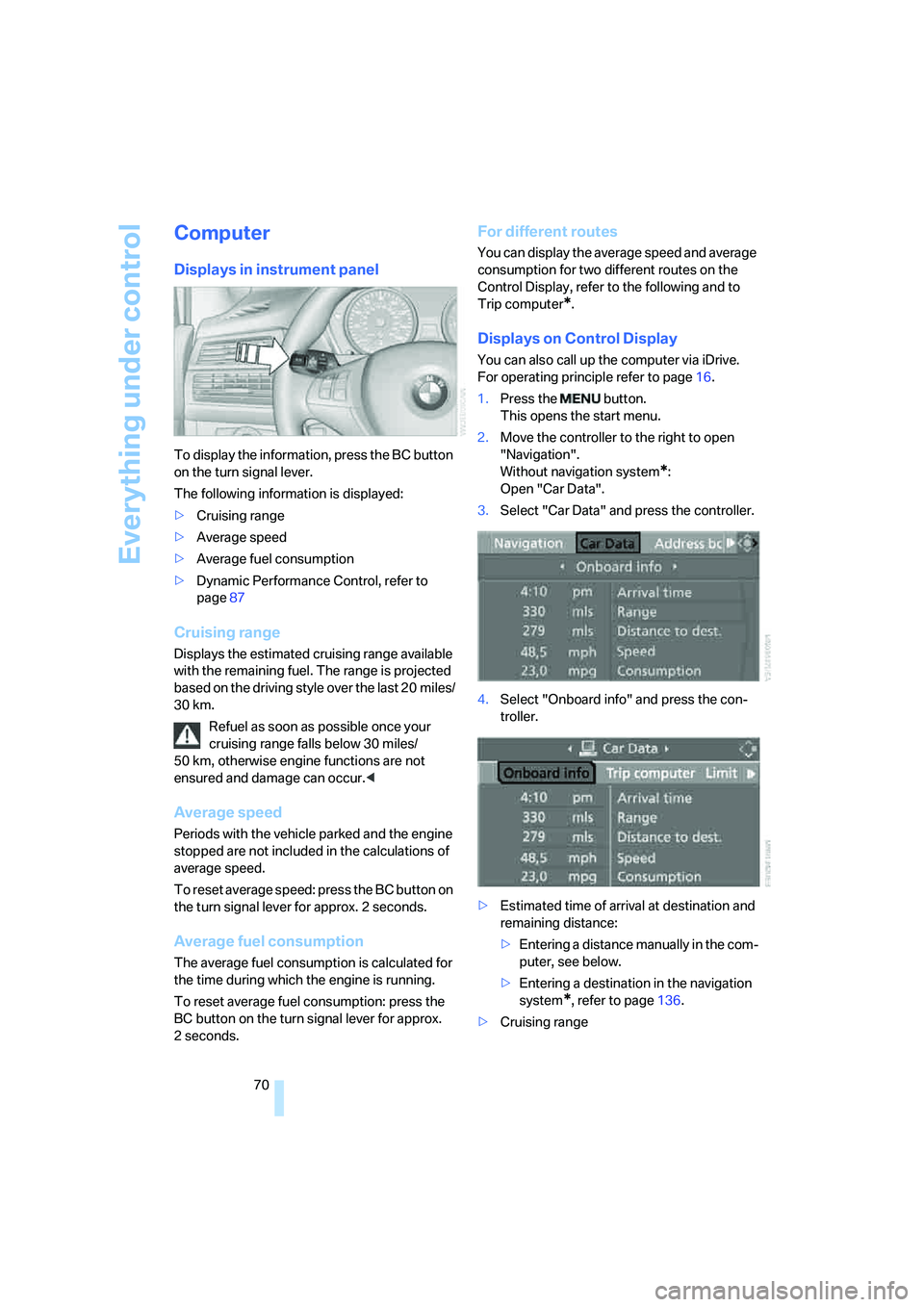
Displays in instrument panel
To display the information, press the BC button
on the turn signal lever.
The following information is displayed:
>Cruising range
>Average speed
>Average fuel consumption
>Dynamic Performance Control, refer to
page87
Cruising range
Displays the estimated cruising range available
with the remaining fuel. The range is projected
based on the driving style over the last 20 miles/
30 km.
Refuel as soon as possible once your
cruising range falls below 30 miles/
50 km, otherwise engine functions are not
ensured and damage can occur.<
Average speed
Periods with the vehicle parked and the engine
stopped are not included in the calculations of
average speed.
To reset average speed: press the BC button on
the turn signal lever for approx. 2 seconds.
Average fuel consumption
The average fuel consumption is calculated for
the time during which the engine is running.
To reset average fuel consumption: press the
BC button on the turn signal lever for approx.
2seconds.
For different routes
You can display the average speed and average
consumption for two different routes on the
Control Display, refer to the following and to
Trip computer
*.
Displays on Control Display
You can also call up the computer via iDrive.
For operating principle refer to page16.
1.Press the button.
This opens the start menu.
2.Move the controller to the right to open
"Navigation".
Without navigation system
*:
Open "Car Data".
3.Select "Car Data" and press the controller.
4.Select "Onboard info" and press the con-
troller.
>Estimated time of arrival at destination and
remaining distance:
>Entering a distance manually in the com-
puter, see below.
>Entering a destination in the navigation
system
*, refer to page136.
>Cruising range
Page 73 of 288
Controls
71Reference
At a glance
Driving tips
Communications
Navigation
Entertainment
Mobility
>Average speed
>Average fuel consumption
Resetting values
You can reset the values for the average speed
and average fuel consumption:
1.Select the respective menu item and press
the controller.
2.To confirm your selection, press the con-
troller again.
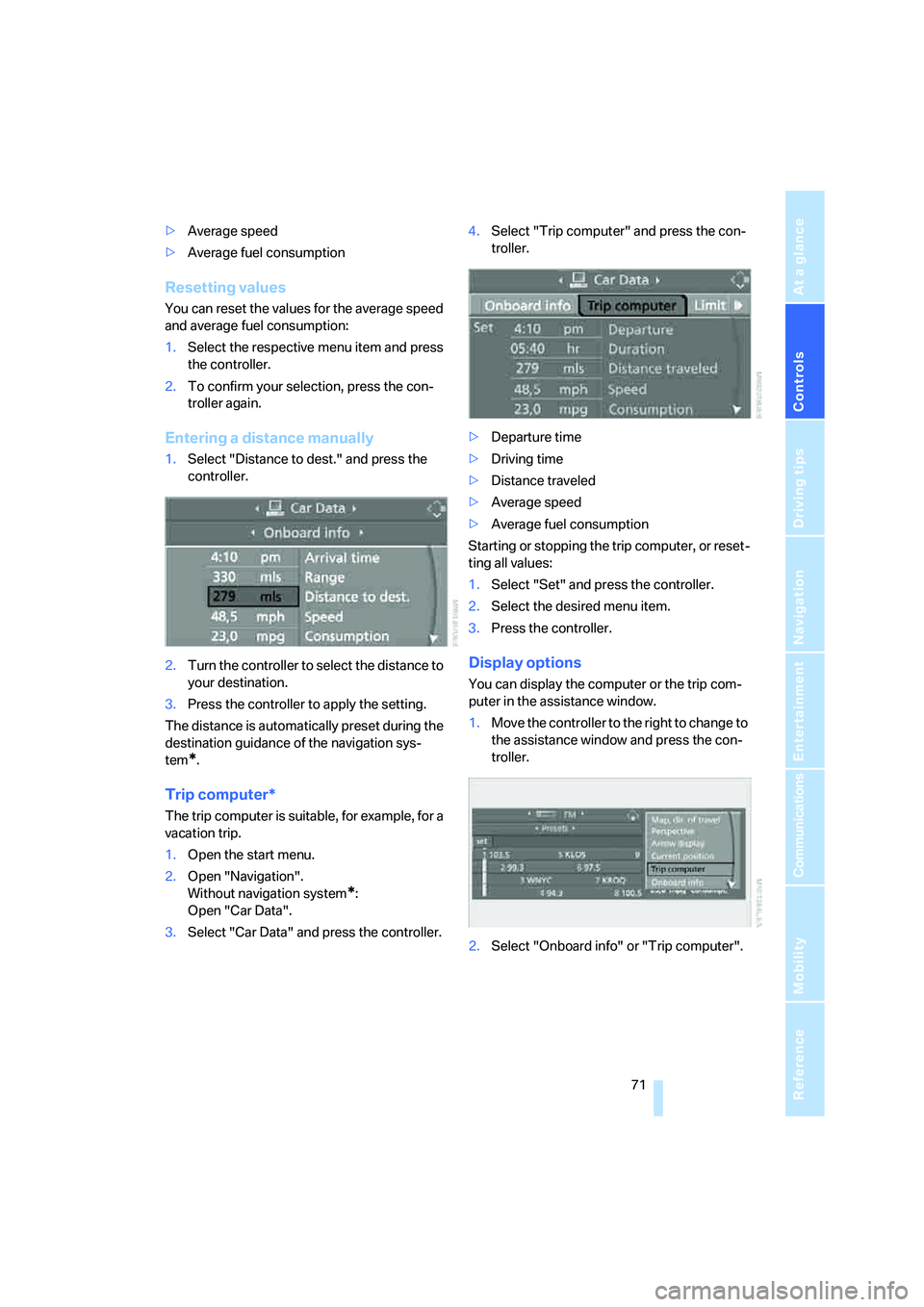
Entering a distance manually
1.Select "Distance to dest." and press the
controller.
2.Turn the controller to select the distance to
your destination.
3.Press the controller to apply the setting.
The distance is automatically preset during the
destination guidance of the navigation sys-
tem
*.
Trip computer*
The trip computer is suitable, for example, for a
vacation trip.
1.Open the start menu.
2.Open "Navigation".
Without navigation system
*:
Open "Car Data".
3.Select "Car Data" and press the controller.4.Select "Trip computer" and press the con-
troller.
>Departure time
>Driving time
>Distance traveled
>Average speed
>Average fuel consumption
Starting or stopping the trip computer, or reset-
ting all values:
1.Select "Set" and press the controller.
2.Select the desired menu item.
3.Press the controller.
Display options
You can display the computer or the trip com-
puter in the assistance window.
1.Move the controller to the right to change to
the assistance window and press the con-
troller.
2.Select "Onboard info" or "Trip computer".
Page 75 of 288
Controls
73Reference
At a glance
Driving tips
Communications
Navigation
Entertainment
Mobility
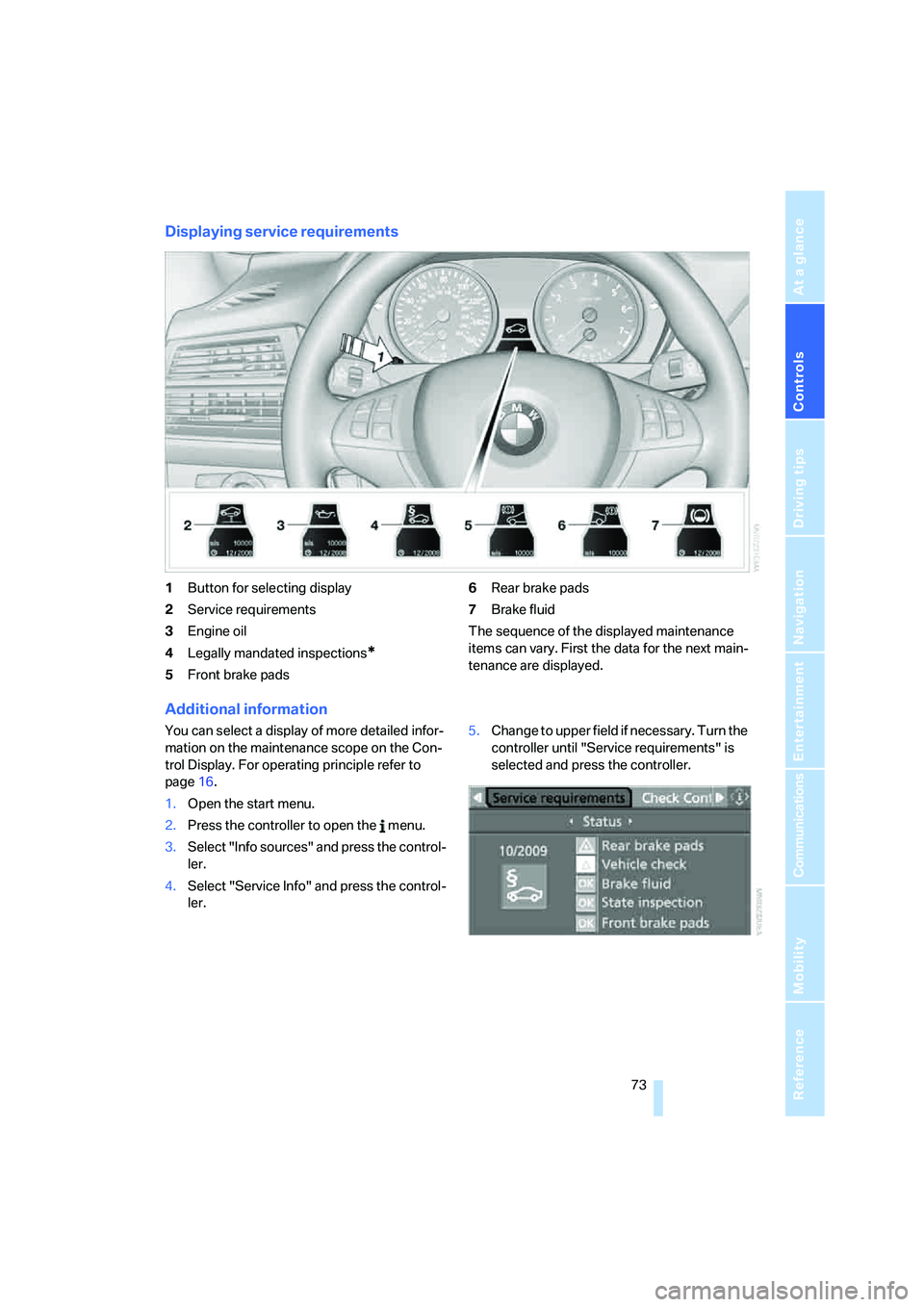
Displaying service requirements
1Button for selecting display
2Service requirements
3Engine oil
4Legally mandated inspections
*
5Front brake pads6Rear brake pads
7Brake fluid
The sequence of the displayed maintenance
items can vary. First the data for the next main-
tenance are displayed.
Additional information
You can select a display of more detailed infor-
mation on the maintenance scope on the Con-
trol Display. For operating principle refer to
page16.
1.Open the start menu.
2.Press the controller to open the menu.
3.Select "Info sources" and press the control-
ler.
4.Select "Service Info" and press the control-
ler.5.Change to upper field if necessary. Turn the
controller until "Service requirements" is
selected and press the controller.