steering BMW X6 2008 Service Manual
[x] Cancel search | Manufacturer: BMW, Model Year: 2008, Model line: X6, Model: BMW X6 2008Pages: 288, PDF Size: 8.08 MB
Page 252 of 288
Replacing components
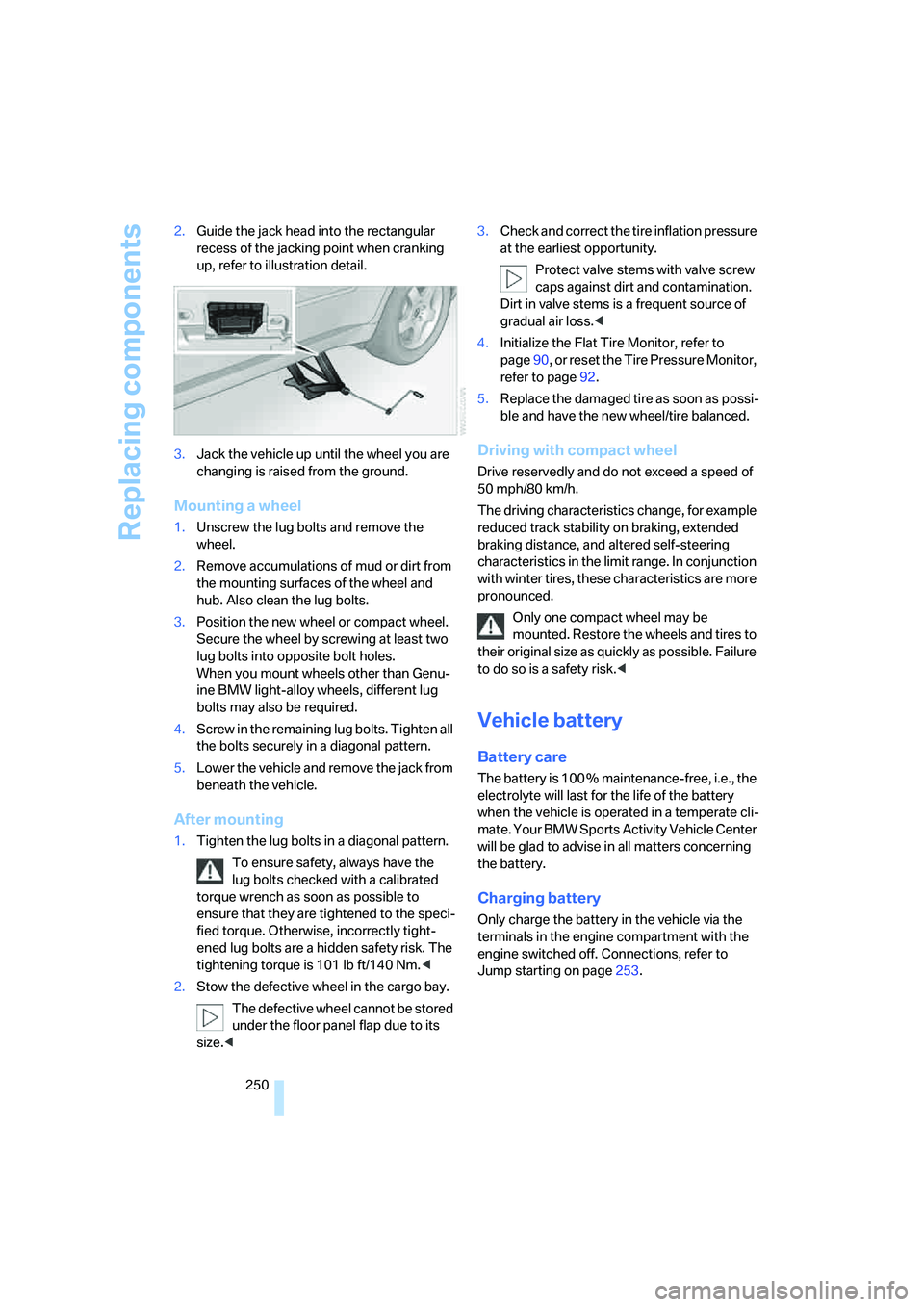
250 2.Guide the jack head into the rectangular
recess of the jacking point when cranking
up, refer to illustration detail.
3.Jack the vehicle up until the wheel you are
changing is raised from the ground.
Mounting a wheel
1.Unscrew the lug bolts and remove the
wheel.
2.Remove accumulations of mud or dirt from
the mounting surfaces of the wheel and
hub. Also clean the lug bolts.
3.Position the new wheel or compact wheel.
Secure the wheel by screwing at least two
lug bolts into opposite bolt holes.
When you mount wheels other than Genu-
ine BMW light-alloy wheels, different lug
bolts may also be required.
4.Screw in the remaining lug bolts. Tighten all
the bolts securely in a diagonal pattern.
5.Lower the vehicle and remove the jack from
beneath the vehicle.
After mounting
1.Tighten the lug bolts in a diagonal pattern.
To ensure safety, always have the
lug bolts checked with a calibrated
torque wrench as soon as possible to
ensure that they are tightened to the speci-
fied torque. Otherwise, incorrectly tight-
ened lug bolts are a hidden safety risk. The
tightening torque is 101 lb ft/140 Nm.<
2.Stow the defective wheel in the cargo bay.
The defective wheel cannot be stored
under the floor panel flap due to its
size.<3.Check and correct the tire inflation pressure
at the earliest opportunity.
Protect valve stems with valve screw
caps against dirt and contamination.
Dirt in valve stems is a frequent source of
gradual air loss.<
4.Initialize the Flat Tire Monitor, refer to
page90, or reset the Tire Pressure Monitor,
refer to page92.
5.Replace the damaged tire as soon as possi-
ble and have the new wheel/tire balanced.
Driving with compact wheel
Drive reservedly and do not exceed a speed of
50 mph/80 km/h.
The driving characteristics change, for example
reduced track stability on braking, extended
braking distance, and altered self-steering
characteristics in the limit range. In conjunction
with winter tires, these characteristics are more
pronounced.
Only one compact wheel may be
mounted. Restore the wheels and tires to
their original size as quickly as possible. Failure
to do so is a safety risk.<
Vehicle battery
Battery care
The battery is 100 % maintenance-free, i.e., the
electrolyte will last for the life of the battery
when the vehicle is operated in a temperate cli-
mate. Your BMW Sports Activity Vehicle Center
will be glad to advise in all matters concerning
the battery.
Charging battery
Only charge the battery in the vehicle via the
terminals in the engine compartment with the
engine switched off. Connections, refer to
Jump starting on page253.
Page 253 of 288
Mobility
251Reference
At a glance
Controls
Driving tips
Communications
Navigation
Entertainment
Disposal
Have old batteries disposed of following
replacement at your BMW Sports Activity
Vehicle Center or bring them to a collection
point. Maintain the battery in an upright position
for transport and storage. Always restrain the
battery to prevent it from tipping over during
transport.<
Power failure
After a temporary power loss, the functioning of
some equipment may be limited and require
reinitialization. Individual settings are also lost
and must be updated:
>Seat, mirror and steering wheel memory
The positions must be stored again, refer to
page44.
>Time and Date
The values must be updated, refer to
pages78, 79.
>Radio
Stations must be stored again if necessary,
refer to page166.
>Navigation system
Wait until the system starts, refer to
page156.
Fuses
Never attempt to repair a blown fuse and
do not replace a defective fuse with a sub-
stitute of another color or amperage rating, as
this could lead to a circuit overload, ultimately
resulting in a fire in the vehicle.<
Spare fuses, a pair of plastic tweezers and infor-
mation on the fuse assignment are located near
the fuses in the cargo bay.
In interior
The fuses are located in the front passenger
footwell on the underside of the instrument
panel.
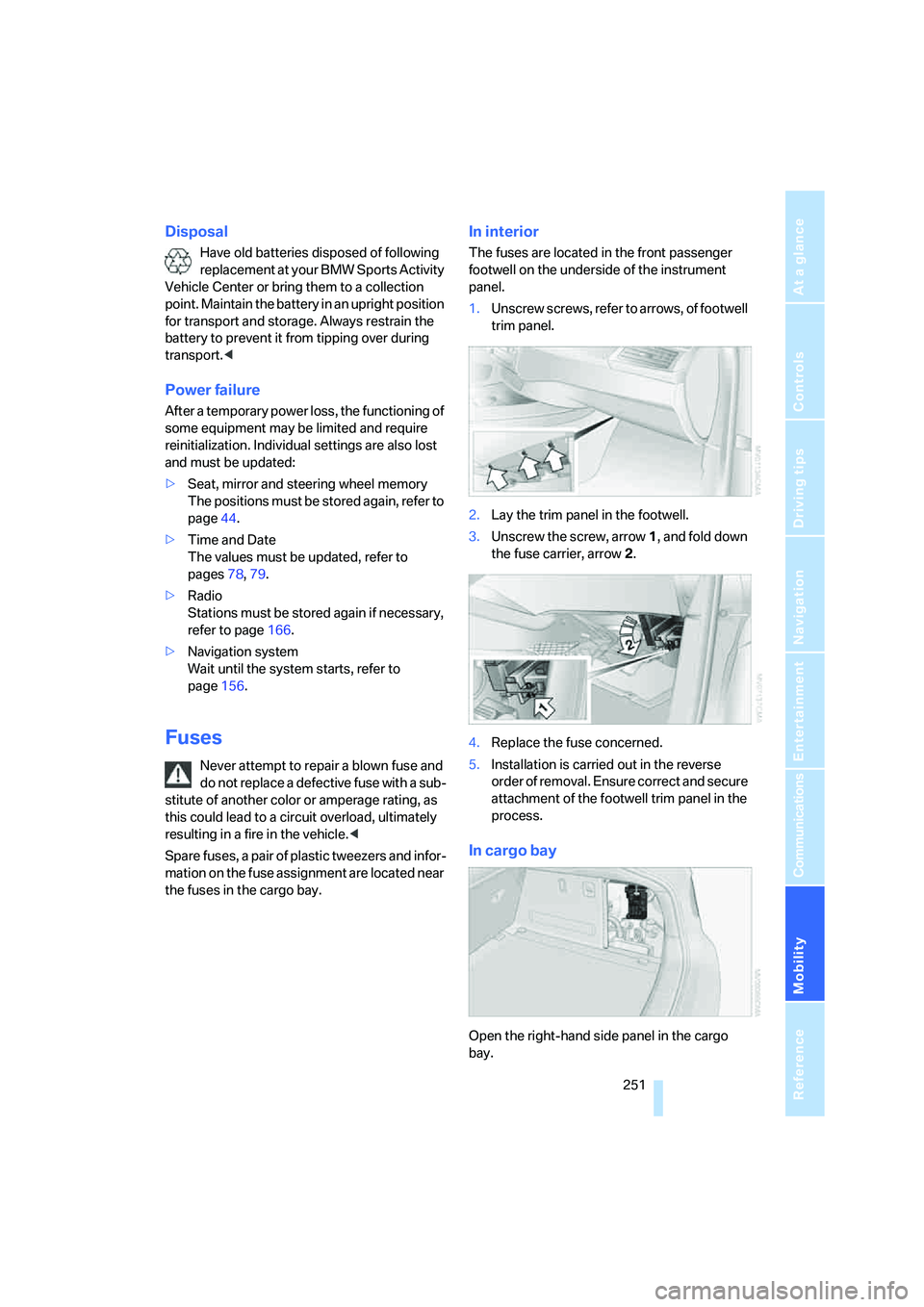
1.Unscrew screws, refer to arrows, of footwell
trim panel.
2.Lay the trim panel in the footwell.
3.Unscrew the screw, arrow1, and fold down
the fuse carrier, arrow2.
4.Replace the fuse concerned.
5.Installation is carried out in the reverse
order of removal. Ensure correct and secure
attachment of the footwell trim panel in the
process.
In cargo bay
Open the right-hand side panel in the cargo
bay.
Page 257 of 288
Mobility
255Reference
At a glance
Controls
Driving tips
Communications
Navigation
Entertainment
Rear
Being towed
Make sure that the ignition is switched on,
refer to page56, otherwise the low
beams, tail lamps, turn signals and windshield
wipers would not be available. When the engine
is stopped, there is no power assist. This then
requires increased effort for braking and steer-
ing. Active steering is deactivated and larger
steering wheel movements are required.<
Switch on the hazard warning flashers depend-
ing on the local regulations. If the electrical sys-
tem fails, mark the vehicle to be towed, e.g. with
a sign or warning triangle in the rear window.
Before towing, manually unlock the trans-
mission lock, refer to page63; failure to
do so can result in damage to the transmis-
sion.<
Do not exceed a towing speed of 45 mph/
70 km/h and a towing distance of
90 miles/150 km, otherwise the automatic
transmission may be damaged.<
Towing methods
Do not lift vehicle by tow fitting or body
and chassis parts, otherwise damage may
result.<
In some countries, towing with tow bars or
ropes in public traffic is not permitted. Familiar-
ize yourself with the regulations on towing in the
respective country.
With tow bar
The towing vehicle may not be lighter
than the vehicle to be towed, otherwise it
will not be possible to reliably control vehicle
response.
ble to avoid mounting the tow bar at an offset
angle, please observe the following:
>Clearance and maneuvering capability will
be sharply limited during cornering.
>When mounted at an angle, the tow bar will
exert lateral forces, tending to push the
vehicle sideways.
Only attach the tow bar to the tow fittings,
as attachment to other vehicle parts can
lead to damage.<
With tow rope
When starting off in the towing vehicle, make
sure that the tow rope is taut.
To avoid jerking and the associated
stresses on vehicle components when
towing, always use nylon ropes or nylon straps.
Only attach tow ropes to the tow fittings, as
attachment to other vehicle parts can lead to
damage.<
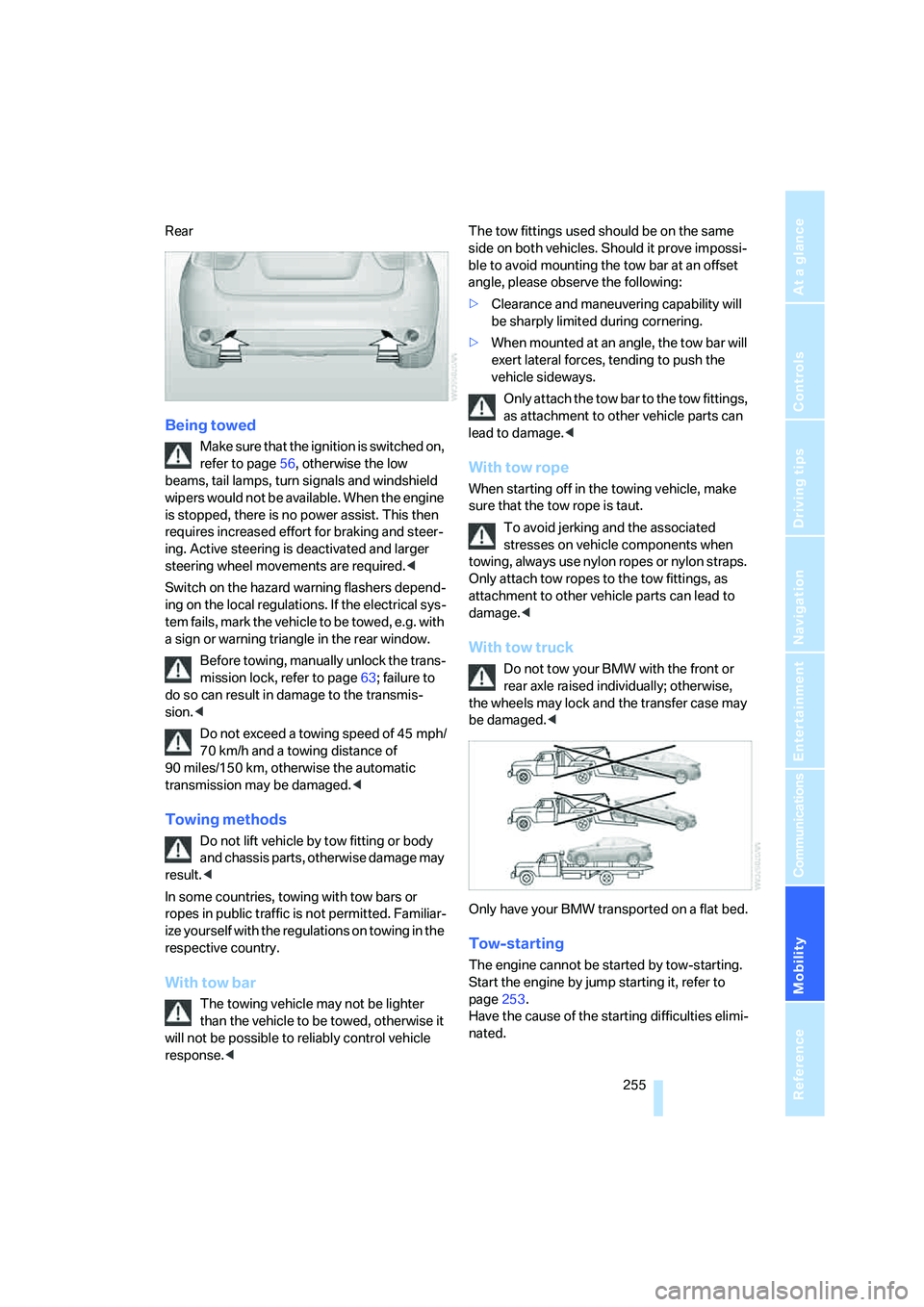
With tow truck
Do not tow your BMW with the front or
rear axle raised individually; otherwise,
the wheels may lock and the transfer case may
be damaged.<
Only have your BMW transported on a flat bed.
Tow-starting
The engine cannot be started by tow-starting.
Start the engine by jump starting it, refer to
page253.
Have the cause of the starting difficulties elimi-
nated.
Page 267 of 288
Reference 265
At a glance
Controls
Driving tips
Communications
Navigation
Entertainment
Mobility
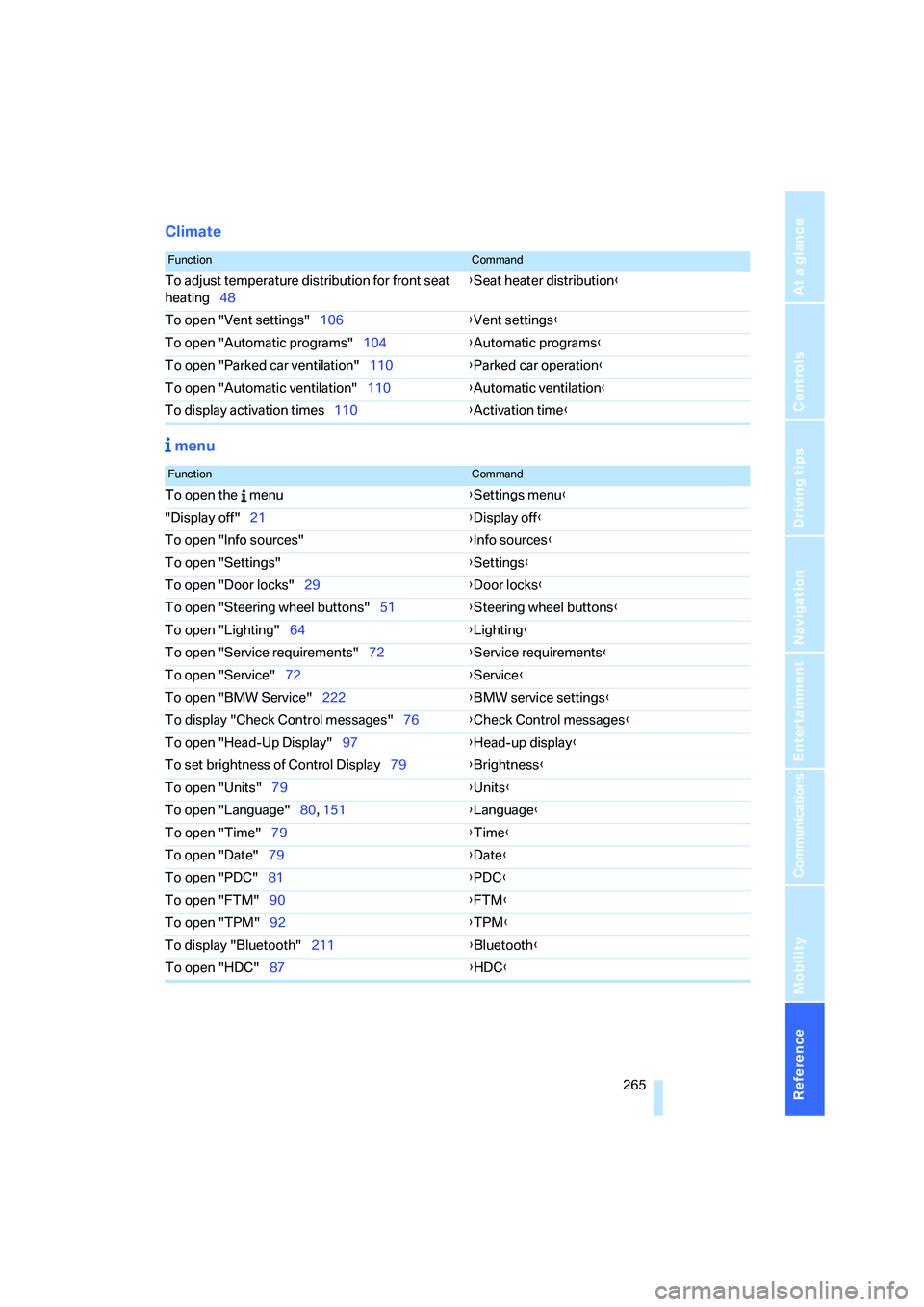
Climate
menu
FunctionCommand
To adjust temperature distribution for front seat
heating48{Seat heater distribution}
To open "Vent settings"106{Vent settings}
To open "Automatic programs"104{Automatic programs}
To open "Parked car ventilation"110{Parked car operation}
To open "Automatic ventilation"110{Automatic ventilation}
To display activation times110{Activation time}
FunctionCommand
To open the menu{Settings menu}
"Display off"21{Display off}
To open "Info sources"{Info sources}
To open "Settings"{Settings}
To open "Door locks"29{Door locks}
To open "Steering wheel buttons"51{Steering wheel buttons}
To open "Lighting"64{Lighting}
To open "Service requirements"72{Service requirements}
To open "Service"72{Service}
To open "BMW Service"222{BMW service settings}
To display "Check Control messages"76{Check Control messages}
To open "Head-Up Display"97{Head-up display}
To set brightness of Control Display79{Brightness}
To open "Units"79{Units}
To open "Language"80, 151{Language}
To open "Time"79{Time}
To open "Date"79{Date}
To open "PDC"81{PDC}
To open "FTM"90{FTM}
To open "TPM"92{TPM}
To display "Bluetooth"211
{Bluetooth}
To open "HDC"87{HDC}
Page 268 of 288
Everything from A to Z
266
Everything from A to Z
Index
"..." Identifies Control Display
texts used to select
individual functions, and
indicates where to find them
in the text.
A
ABS Antilock Brake
System85
Accessories6
Acoustic signal, refer to Check
Control75
Activated-charcoal filter108
"Activation time" for parked
car ventilation110
Active seat49
Active seat ventilation48
Active steering94
– warning lamp94
Adaptive brake lamps, refer to
Brake force display94
Adaptive Drive88
Adaptive fastening
system120
Adaptive Head Light101
"Add digits" for mobile
phone214
"Address book" for
navigation144
Address for navigation
– deleting145
– entering137,144
– selecting144
– storing144
– storing current position144
"Add to destination list"139
Adjusting confirmation signals
for locking and unlocking31
Adjusting temperature with
expanded-scope automatic
climate control105Adjusting the tone during
audio operation, refer to
Tone control161
Adjusting thigh
support43,44
"After door opened"45
"After unlocking"45
Airbags95
– sitting safely42
– warning lamp96
Air distribution
– automatic104,109
– manual105
Airing, refer to Ventilation107
Air recirculation106
– AUC Automatic
recirculated-air control106
– recirculated-air mode106
"Air recirculation on / off"52
Air vents103
– refer to Ventilation107
Air vents of automatic climate
control
103
Air volume105,109
AKI, refer to Fuel
specifications231
Alarm system35
– avoiding unintentional
alarms36
– interior motion sensor36
– switching off alarm35
– switching off tilt alarm
sensor and interior motion
sensor36
– tilt alarm sensor36
"All channels" on satellite
radio171
"All doors"30
All-season tires, refer to
Winter tires238
"All stations", displaying on
radio164All-wheel drive, refer to
xDrive87
Alterations, technical, refer to
For your own safety5
"AM", reception
range161,164
"Angle of view"
– DVD changer183
– DVD system in rear195
Antenna for mobile phone206
Antifreeze
– coolant242
– washer fluid65
Antilock Brake System
ABS85
Anti-theft system
– refer to Alarm system35
– refer to Central locking
system29
Approved axle loads, refer to
Weights260
Approved engine oils241
Approved gross vehicle
weight, refer to Weights260
Armrest, refer to Center
armrest, front116
Around the center console14
Around the steering wheel10
Arrival time
– refer to Computer70
– refer to Starting destination
guidance148
"Arrow display" for
navigation149
Arrow view for navigation
system149
Ashtray
– front117
– rear117
Assist, refer to separate
operating instructions
Page 269 of 288
Reference 267
At a glance
Controls
Driving tips
Communications
Navigation
Entertainment
Mobility
Assistance systems, refer to
Driving stability control
systems85
Assistance window20
"Assist. window off"21
AUC Automatic recirculated-
air control106
"Audio"163,167
– for DVD system in rear202
Audio160
– controls160
– switching on/off160
– tone control161
– volume161
Audio CD for DVD system in
rear196
Audio device, external116
Automatic
– air distribution104,109
– air volume104,109
– headlamp control99
– liftgate operation34
– service notification223
– steering wheel adjustment,
refer to Easy entry/exit51
– storing stations165
Automatic car washes128
– also refer to Caring for your
vehicle brochure
Automatic climate control104
– automatic air
distribution104,109
– in rear108
– switching off107,109
– ventilation in rear108
Automatic closing of doors,
refer to Automatic soft
closing33
Automatic curb monitor50
Automatic Hold58
– activating59
– deactivating59
– parking59Automatic lighting
– refer to Automatic headlamp
control99
– refer to Daytime running
lamps100
– refer to Interior lamps102
– refer to Pathway lighting100
"Automatic programs"105
Automatic recirculated-air
control AUC106
Automatic soft closing
33
Automatic station search165
Automatic transmission with
Steptronic61
– deactivating selector lever
interlock61
– kick-down62
– manually releasing
transmission lock63
– tow-starting255
– with comfort access37
"Automatic ventilation"110
AUTO program for automatic
climate control104,109
"Auto Request"223
"Autostore" on the radio166
"AUX"161,186,188
– AUX-In connection186
– for DVD system in rear201
– USB audio interface187
"AUX / Rear"192
AUX-In connection116,186
Average fuel consumption70
– setting units79
Average speed, refer to
Computer70
"Avoid ferries" for
navigation147
"Avoid highways" for
navigation146
Avoiding highways for
navigation146
Avoiding unintentional
alarms36
"Avoid tollroads" for
navigation147
Axle loads, refer to
Weights260
"A - Z"214
B
Backrest contour, refer to
Lumbar support44
Backrests, refer to Seats43
Backrest width adjustment44
Backup lamps, replacing
bulbs246
Balance, refer to Tone
control162
"Balance" for DVD system in
rear195
Band-aids, refer to First-aid
kit253
Bass, refer to Tone
control161
Battery
– charging250
– jump starting253
– power failure251
– refer to Vehicle battery250
Battery disposal
– remote control with comfort
access38
– vehicle battery251
Battery replacement
– remote control for DVD
system in rear192
– remote control with comfort
access38
Being towed255
Belts, refer to Safety belts47
Beverage holder, refer to Cup
holders117
Blower, refer to Air
volume105,109
"BMW Assist"222,223,224
BMW Assist
– activating226
– concierge service224
– contacting BMW Customer
Relations224
– offered services221
– roadside assistance222
– TeleService223
"BMW Contact"216
"BMW Contact
Numbers"216
BMW homepage4
Page 270 of 288
Everything from A to Z
268 BMW maintenance
system243
"BMW Service settings"227
BMW website4
Bottle holder, refer to Cup
holders117
Brake assistant86
Brake force display94
Brake lamps
– brake force display94
– replacing bulbs246
Brake rotors128
Brakes
– ABS Antilock Brake
System85
– brake assistant86
– brake force display94
– breaking-in126
– CBC Cornering Brake
Control85
– electronic brake-force
distribution85
– parking brake57
– refer to Braking safely127
– warning lamp13
Brake system126
– brake pads126
– breaking-in126
– disk brakes128
Braking safely127
Breakdown, Flat Tire
Monitor89
Breakdown services, refer to
Roadside Assistance253
Breaking-in brake pads126
Breaking-in differential126
Break-in period126
"Brightness"79
– DVD changer182
– DVD system in rear194
Brightness
– of Control Display79
– of the rear view camera85
– on Head-Up Display97
"Brightness / Position"98
Button for starting engine56
Buttons on steering wheel11
Bypassing traffic
congestion155
C
Calibrating driver's seat47
California Proposition 65
Warning6
"Call"214,225
Call
– accepting212
– displaying accepted215
– ending213
– in absence215
– starting213
Calling
– from phone book214
– from Top 8 list215
– redialing215
– refer to telephone operating
instructions
Camera, refer to Rear view
camera83
"Camera picture and PDC"85
"Camera view: full screen"85
"Camera view: main
window"85
Can holder, refer to Cup
holders117
Capacities261
Capacity of cargo bay260
Car battery, refer to Vehicle
battery250
Car care, refer to Caring for
your vehicle brochure
Car-care products, refer to
Caring for your vehicle
brochure
"Car Data"70
Care244
– refer to Caring for your
vehicle brochure
Cargo
– refer to Loading128
– securing130
– securing with ski bag122
Cargo area, refer to Cargo
bay119Cargo bay
– capacity260
– emergency operation, refer
to Opening manually33
– expanding120
– opening/closing, refer to
Liftgate33
– opening from inside33
– opening from outside33
– opening with remote
control30
Caring for artificial leather,
refer to Caring for your
vehicle brochure
Caring for leather, refer to
Caring for your vehicle
brochure
Caring for light-alloy wheels,
refer to Caring for your
vehicle brochure
Caring for the carpet, refer to
Caring for your vehicle
brochure
Caring for the vehicle finish,
refer to Caring for your
vehicle brochure
Car key, refer to Keys/remote
control28
Car phone206
– installation location, refer to
Center armrest, front116
– refer to Mobile phone206
– refer to separate operating
instructions
Car radio, refer to Radio164
Car wash128
– also refer to Caring for your
vehicle brochure
– before driving in57
– with comfort access38
Catalytic converter, refer to
Hot exhaust system127
"Categories" on satellite
radio171
CBC Cornering Brake
Control85
CBS Condition Based
Service243
Page 273 of 288
Reference 271
At a glance
Controls
Driving tips
Communications
Navigation
Entertainment
Mobility
"Distance to dest."71
Distance to destination, refer
to Computer70
Distance warning, refer to
PDC Park Distance
Control81
Door entry lighting102
Door key, refer to Keys/
remote control28
Door lock31
Door locking, confirmation
signals31
"Door locks"30,31,73
Doors
– manual operation32
– remote control29
DOT Quality Grades235
Downhill driving assistance,
refer to HDC87
Draft-free ventilation107
Drinks holder, refer to Cup
holders117
Drive for navigation DVDs160
"Driver's door only"30
Driver's seat, calibrating47
"Driver's seat climate"49
Driving lamps, refer to Parking
lamps/low beams99
Driving on poor roads130
Driving route, refer to
Displaying route149
Driving stability control
systems85
Driving through water127
Driving tips, refer to General
driving notes126
Dry air, refer to Cooling
function106
Drying the air, refer to Cooling
function106
DSC Dynamic Stability
Control86
– indicator lamp13,86
DTC Dynamic Traction
Control86
– activating86
– indicator lamp87"DVD"
– for DVD system in rear192
– in DVD changer180
DVD
– DVD changer179
– DVD system in rear190
– player for navigation
DVD160
DVD changer179
– adjusting brightness182
– adjusting contrast182
– adjusting tone182,185
– audio and video
playback180
– audio playback184
– chapter selection184
– controls179
– DVD audio content184
– DVD control181
– DVD country codes180
– DVD-specific menu183
– fast forward181
– filling179
– installation position179
– malfunctions180
– removing DVDs179
– reverse181
– selecting audio
language185
– selecting language182
– selecting subtitles183
– selecting track183
– selecting viewing angle183
– skip chapter181
– zoom182
"DVD format"
– for DVD system in rear195
– on DVD changer182
DVD for navigation134DVD system in rear190
– CD/DVD player191
– connecting headphones191
– controls190
– displaying images from CD/
DVD198
– DVD country codes192
– external device201
– information on CD/DVD
player200
– playing audio tracks from
CD/DVD196
– playing video from CD/
DVD192
– remote control191
– switching on/off192
Dynamic Performance
Control87
"Dynamic route" for
navigation147
Dynamic Stability Control
DSC86
Dynamic Traction Control
DTC86
E
Easy entry/exit51
Eject button, refer to Buttons
on the CD player160
Electrical malfunction
– automatic transmission with
Steptronic63
– door lock32
– driver's door32
– fuel filler door230
– glass sunroof, electric41
– parking brake60
Electric seat43
Electric steering wheel
adjustment51
Electronic brake-force
distribution85
Electronic oil level check240
Page 275 of 288
Reference 273
At a glance
Controls
Driving tips
Communications
Navigation
Entertainment
Mobility
Front seat adjustment43
FTM Flat Tire Monitor89
– false alarms90
– indicating a flat tire90
– initializing the system90
– malfunction94
– snow chains238
– system limits90
– warning lamp90
Fuel231
– capacity261
– display69
– high-quality brands231
– quality231
– saving126
– specifications231
Fuel clock, refer to Fuel
gauge69
Fuel consumption display
– computer, average fuel
consumption70
Fuel display, refer to Fuel
gauge69
Fuel filler door230
– closing230
– opening230
– releasing manually230
Fuses251
G
Garage door opener, refer to
Integrated universal remote
control112
Gasoline, refer to Required
fuel231
Gasoline display, refer to Fuel
gauge69
Gear changes, automatic
transmission with
Steptronic62
General driving
notes126,127Glass sunroof, electric39
– convenience operation from
outside32
– convenience operation with
comfort access37
– moving manually41
– opening, closing40
– power interruption40
– raising39
– remote control30
Glove compartment115
– lighting115
– opening manually115
GPS navigation, refer to
Navigation system134
Grills, refer to Ventilation107
Grills of the automatic climate
control103
Gross vehicle weight, refer to
Weights260
H
Handbrake, refer to Parking
brake57
– Automatic Hold58
Hands-free system, refer to
Microphone14
Hazard warning flashers15
HDC Hill Descent Control87
"HD radio"167
HD radio, refer to High
Definition Radio167
Head airbags95
Headlamp control,
automatic99
Headlamp flasher64
Headlamps99
– care, refer to Caring for your
vehicle brochure
– cleaning, refer to Washer/
wiper system64
– replacing bulbs245
Head Light, refer to Adaptive
Head Light101
Head restraints46
– sitting safely42
"Head-Up Display"97
Head-Up Display97Heated
– mirrors50
– rear window105
– seats48
– steering wheel51
Heating103
– exterior mirrors50
– interior103
– rear window105
– residual heat107
– seats48
– steering wheel51
Heating with engine switched
off, refer to Residual
heat107
Heavy cargo, refer to Securing
cargo130
Height, refer to
Dimensions259
Height adjustment
– seats43
– steering wheel51
High beams64,101
– headlamp flasher64
– indicator lamp13
High Definition Radio167
Highs, refer to Treble and
bass161
High water, refer to Driving
through water127
Highway, refer to Route
criteria146
Hill Descent Control HDC87
Hills128
Holder for cups117
Home address146
"Home address" for
navigation146
Homepage4
Hood239
Horn10
Hot exhaust system127
"Hour memo"79
"House number" for
destination entry139
Hydraulic brake assistant,
refer to Brake assistant86
Hydroplaning127
Page 276 of 288
Everything from A to Z
274
I
IBOC, refer to High Definition
Radio167
Ice, refer to Outside
temperature warning68
Ice warning, refer to Outside
temperature warning68
ID3 tag, refer to Information on
track174
Identification, tire238
Identification mark, run-flat
tires237
iDrive16
– assistance window20
– changing language80
– changing menu page19
– changing settings78
– changing units of measure
and display type79
– confirming selection or
entry19
– controller16
– controls16
– displays, menus17
– selecting menu item19
– setting brightness79
– setting date79
– setting time78
– start menu17
– status information20
– symbols18
Ignition56
– switched off56
– switched on56
Ignition key, refer to Keys/
remote control28
Ignition key position 1, refer to
Radio readiness56
Ignition key position 2, refer to
Ignition on56
Ignition lock56
– starting engine with comfort
access37
Independent ventilation, refer
to Parked car ventilation109Indicator/warning lamps13
– active steering94
– airbags96
– DSC13,86
– DTC87
– fasten safety belt47
– Flat Tire Monitor90
– TPM Tire Pressure
Monitor92
Individual air distribution106
Individually programmable
buttons on steering
wheel51
Individual settings, refer to
Personal Profile28
Inflation pressure, refer to Tire
inflation pressure232
Inflation pressure monitoring
– refer to FTM Flat Tire
Monitor89
– refer to TPM Tire Pressure
Monitor91
Information
– on another location142
– on country142
– on current position142
– on destination location142
"Information on
destination"143
"Info sources"73
Initializing
– Flat Tire Monitor90
– refer to Power failure251
– refer to Setting date79
– refer to Setting time78
– seat, mirror and steering
wheel memory44
"Input map"141
Installation position
– DVD changer179
– mobile phone116
Instructions for navigation
system, refer to Voice
instructions151
Instrument cluster, refer to
Instrument panel12
Instrument illumination, refer
to Instrument lighting102
Instrument lighting102Instrument panel12
– refer to Cockpit10
Integrated key28
Integrated universal remote
control112
Interesting destination for
navigation142
"Interim time"77
Interior lamps102
– switching on with remote
control30
Interior motion sensor36
– switching off36
Interior rearview mirror50
– automatic dimming
feature51
– compass114
Intermittent mode of the
wipers64
J
Jacking points249
Joystick
– refer to iDrive16
– refer to Selector lever,
selecting transmission
positions61
Jumpering, refer to Jump
starting253
Jump starting253
K
Keyless-Go, refer to Comfort
access36
Keyless opening and closing,
refer to Comfort access36
Key Memory, refer to Personal
Profile28
"Keypad"216
Keys28
– key-related settings, refer to
Personal Profile28
Kick-down, automatic
transmission with
Steptronic62
Knock control231