odometer BMW X6 2008 Owners Manual
[x] Cancel search | Manufacturer: BMW, Model Year: 2008, Model line: X6, Model: BMW X6 2008Pages: 288, PDF Size: 8.08 MB
Page 14 of 288
Cockpit
12
Instrument panel
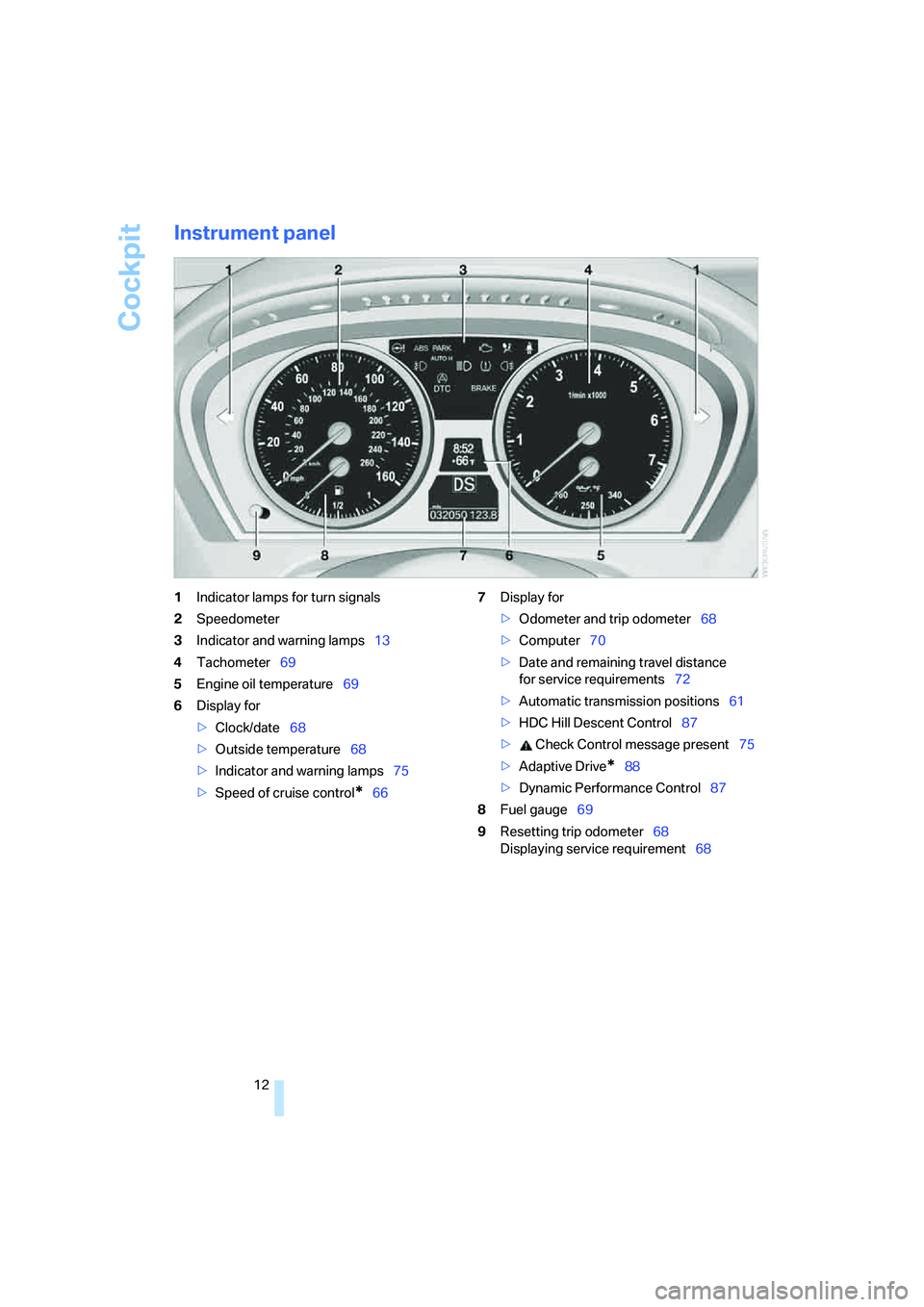
1Indicator lamps for turn signals
2Speedometer
3Indicator and warning lamps13
4Tachometer69
5Engine oil temperature69
6Display for
>Clock/date68
>Outside temperature68
>Indicator and warning lamps75
>Speed of cruise control
*667Display for
>Odometer and trip odometer68
>Computer70
>Date and remaining travel distance
for service requirements72
>Automatic transmission positions61
>HDC Hill Descent Control87
> Check Control message present75
>Adaptive Drive
*88
>Dynamic Performance Control87
8Fuel gauge69
9Resetting trip odometer68
Displaying service requirement68
Page 58 of 288
Driving
56
Driving
Ignition lock
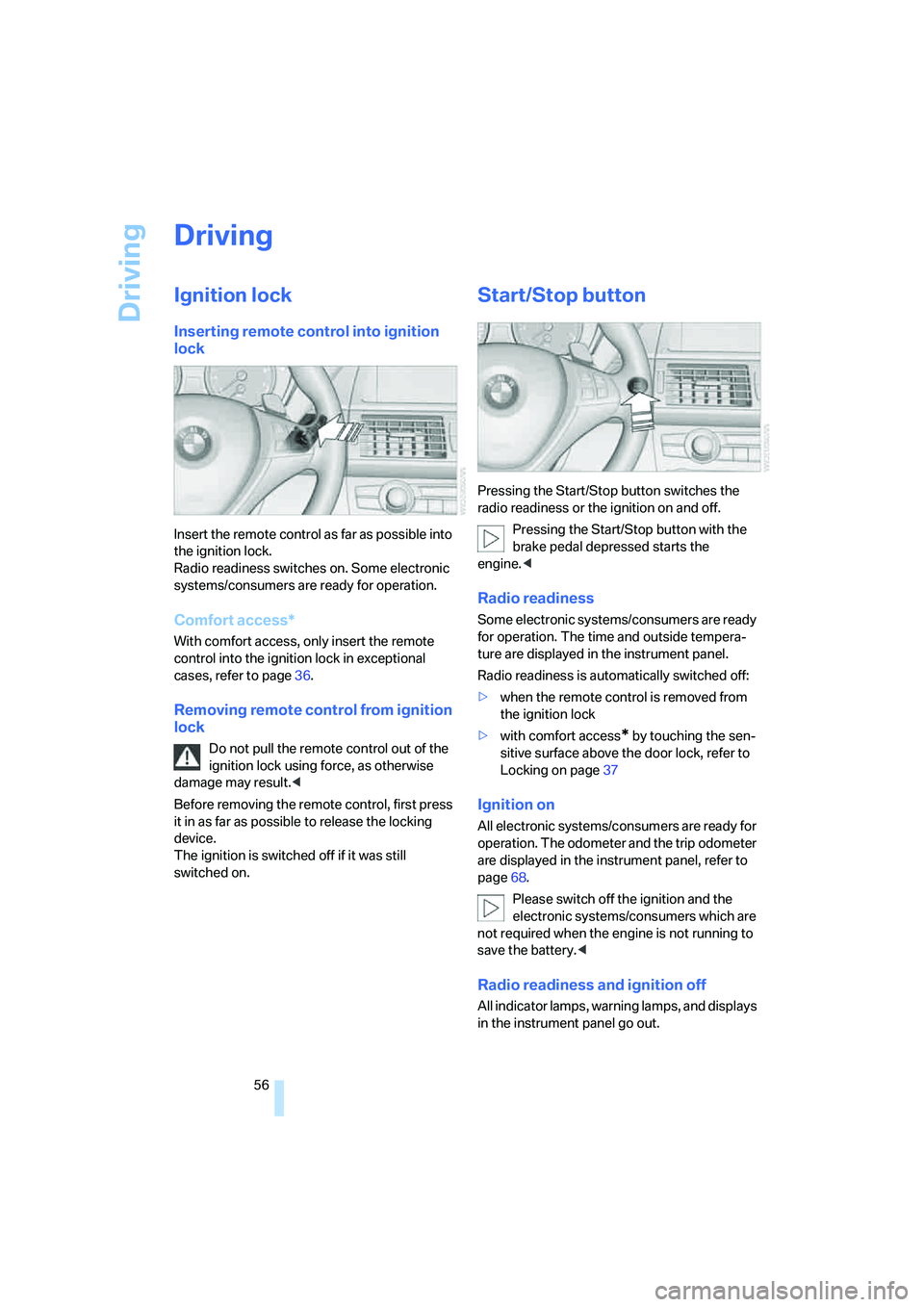
Inserting remote control into ignition
lock
Insert the remote control as far as possible into
the ignition lock.
Radio readiness switches on. Some electronic
systems/consumers are ready for operation.
Comfort access*
With comfort access, only insert the remote
control into the ignition lock in exceptional
cases, refer to page36.
Removing remote control from ignition
lock
Do not pull the remote control out of the
ignition lock using force, as otherwise
damage may result.<
Before removing the remote control, first press
it in as far as possible to release the locking
device.
The ignition is switched off if it was still
switched on.
Start/Stop button
Pressing the Start/Stop button switches the
radio readiness or the ignition on and off.
Pressing the Start/Stop button with the
brake pedal depressed starts the
engine.<
Radio readiness
Some electronic systems/consumers are ready
for operation. The time and outside tempera-
ture are displayed in the instrument panel.
Radio readiness is automatically switched off:
>when the remote control is removed from
the ignition lock
>with comfort access
* by touching the sen-
sitive surface above the door lock, refer to
Locking on page37
Ignition on
All electronic systems/consumers are ready for
operation. The odometer and the trip odometer
are displayed in the instrument panel, refer to
page68.
Please switch off the ignition and the
electronic systems/consumers which are
not required when the engine is not running to
save the battery.<
Radio readiness and ignition off
All indicator lamps, warning lamps, and displays
in the instrument panel go out.
Page 70 of 288
Everything under control
68
Everything under control
Odometer, outside
temperature display, clock
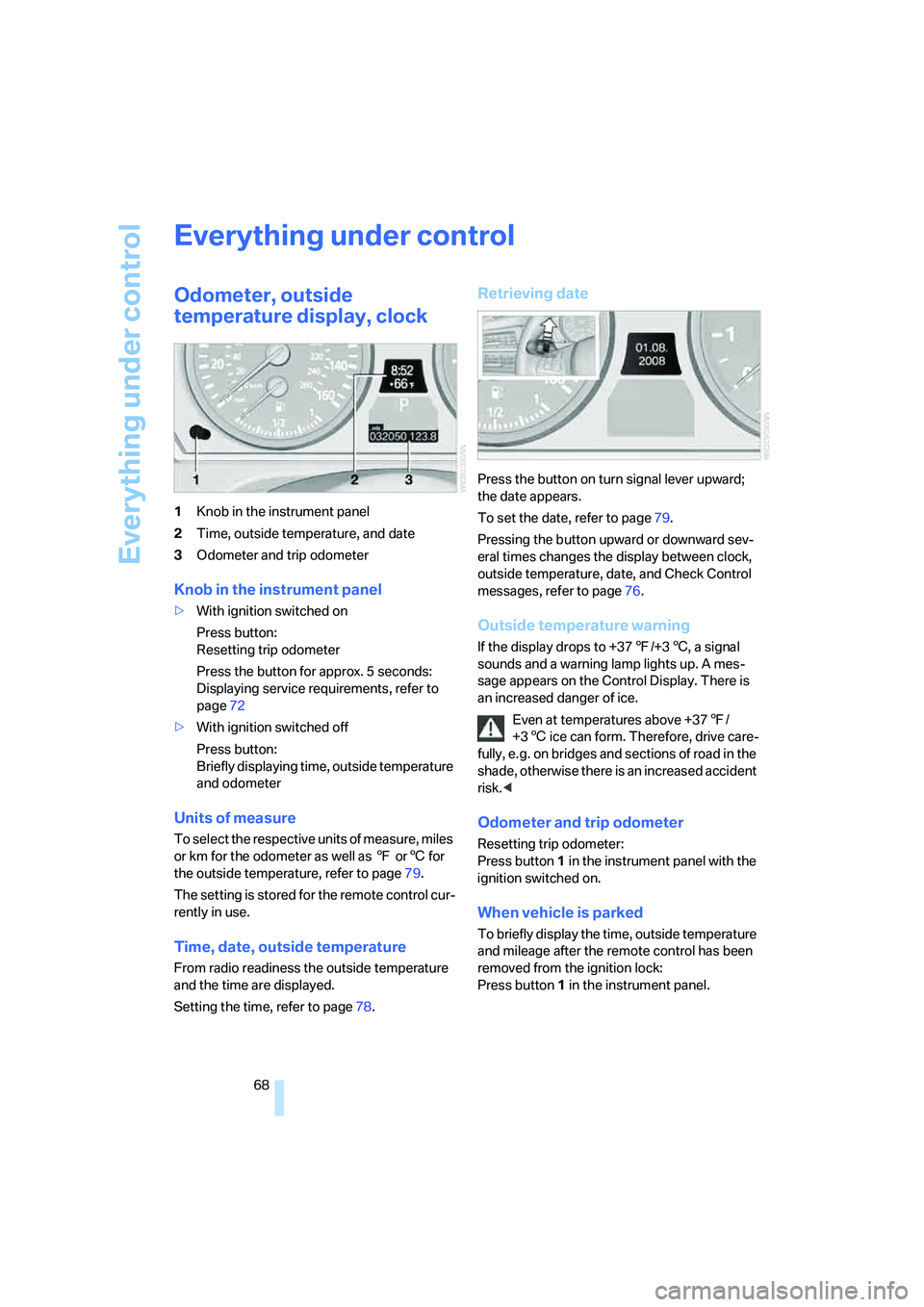
1Knob in the instrument panel
2Time, outside temperature, and date
3Odometer and trip odometer
Knob in the instrument panel
>With ignition switched on
Press button:
Resetting trip odometer
Press the button for approx. 5 seconds:
Displaying service requirements, refer to
page72
>With ignition switched off
Press button:
Briefly displaying time, outside temperature
and odometer
Units of measure
To select the respective units of measure, miles
or km for the odometer as well as 7 or6 for
the outside temperature, refer to page79.
The setting is stored for the remote control cur-
rently in use.
Time, date, outside temperature
From radio readiness the outside temperature
and the time are displayed.
Setting the time, refer to page78.
Retrieving date
Press the button on turn signal lever upward;
the date appears.
To set the date, refer to page79.
Pressing the button upward or downward sev-
eral times changes the display between clock,
outside temperature, date, and Check Control
messages, refer to page76.
Outside temperature warning
If the display drops to +377/+36, a signal
sounds and a warning lamp lights up. A mes-
sage appears on the Control Display. There is
an increased danger of ice.
Even at temperatures above +377/
+36 ice can form. Therefore, drive care-
fully, e.g. on bridges and sections of road in the
shade, otherwise there is an increased accident
risk.<
Odometer and trip odometer
Resetting trip odometer:
Press button 1 in the instrument panel with the
ignition switched on.
When vehicle is parked
To briefly display the time, outside temperature
and mileage after the remote control has been
removed from the ignition lock:
Press button1 in the instrument panel.
Page 278 of 288
Everything from A to Z
276 Mirror dimming feature51
Mirrors49
– automatic curb monitor50
– exterior mirrors49
– folding in and out50
– heating50
– interior rearview mirror50
– memory, refer to Seat, mirror
and steering wheel
memory44
"Missed calls"214
Missed calls215
Mobile phone
– accepted calls215
– adjusting volume212
– calling213
– ending call213
– installation location, refer to
Center armrest, front116
– missed calls215
– operation via iDrive212
– redialing215
– refer to separate operating
instructions
– Top 8215
– touch tone dialing216
Monitor, refer to iDrive16
Monitoring tire pressure, refer
to FTM Flat Tire Monitor89
"Monitor on / off"52
MP3, refer to Compressed
audio files173
Multifunction steering wheel,
refer to Buttons on steering
wheel11
Multifunction switch
– refer to Turn signals/
headlamp flasher/high
beams64
– refer to Washer/wiper
system64
Music track, refer to
Tracks174
"Mute on / off"52
N
"Navigation"70,136,142
Navigation destination
– entering manually137,139
– home address146
– selecting via map141
Navigation drive, installation
location134
Navigation DVD134
– player160
Navigation instructions, refer
to Switching voice
instructions on/off151
Navigation system134
– address book144
– changing route152
– destination entry136
– destination guidance in
assistance window134
– destination list143
– displaying current
position155
– displaying route149
– ending/continuing
destination guidance148
– entering a destination
manually137,139
– last destinations143
– navigation DVD134
– opening136
– route list150
– searching for a special
destination142
– selecting destination using
information142
– selecting destination via
map141
– selecting route criteria146
– starting destination
guidance148
– switching off, refer to
Ending/continuing
destination guidance148
– voice instructions151
– volume adjustment152"Navigation voice
instructions"52,135
Neck support, refer to Head
restraints46
"New address" for
navigation144
"New destination"137,141
New remote control28
"New route"152
New wheels and tires237
"Next entertainment
source"52
"No video signal" for DVD
system in rear201
Nozzles, refer to Windshield
washer nozzles65
"NTSC color" for DVD system
in rear202
Nylon rope, refer to Tow-
starting and towing254
O
OBD socket244
Octane ratings, refer to Fuel
specifications231
Odometer68
Oil
– additives, refer to Approved
engine oils241
– approved engine oils241
– consumption, refer to
Checking engine oil
level240
– level240
– refilling, refer to Adding
engine oil241
Oil change interval, refer to
Service requirements72
"On a new destination" for
navigation142
Onboard computer, refer to
iDrive16
"Onboard info"70
Onboard toolkit245
"On destination"142
"On location"142
Page 284 of 288
Everything from A to Z
282 Town/city for destination
entry137
Tow-starting254,255
"TPM"92
TPM Tire Pressure
Monitor91
– resetting system92
– system limits91
– warning lamp92
Tracks
– finding175
– random sequence176
– sampling, scan175
Track width, refer to
Dimensions259
Traction-assist feature, refer
to DSC Dynamic Stability
Control86
Traction control, refer to
DSC Dynamic Stability
Control86
Traffic congestion
– bypassing155
– displaying traffic
information152
Traffic information for
navigation
– depiction in route map153
– displaying153
– during destination
guidance155
– switching on/off152
– symbols154
"Traffic Info settings"152
Transmission
– automatic transmission with
Steptronic61
– manually releasing
transmission lock on
automatic transmission with
Steptronic63
Transmission positions, refer
to Automatic transmission
with Steptronic61
Transporting children
safely53
Transport securing device,
refer to Securing cargo130Tread depth, refer to Minimum
tread depth236
Treble, refer to Tone
control161
"Treble / Bass" for DVD
system in rear195
"Trip computer"71
Trip computer71
Trip-distance counter, refer to
Trip odometer68
"Triple turn signal"64
Trip odometer68
Turning circle, refer to
Dimensions259
Turn signals64
– indicator lamp12
– replacing bulbs246
U
Underbody protection, refer to
Caring for your vehicle
brochure
Uniform Tire Quality Grading/
UTQR235
"Units"80
Units
– average fuel
consumption79
– temperature79
Universal garage-door
opener, refer to Integrated
universal remote
control112
Universal remote control112
"Unlock button"30
Unlocking
– from inside32
– liftgate30
– using remote control30
– without key, refer to Comfort
access36
Unlocking and locking doors,
using remote control30
Unlocking without key, refer to
Comfort access36
"Unlock rear menu" for DVD
system in rear190
"Update services"225USB audio interface187
"USB" in audio
mode186,188
Used batteries
– refer to Disposal251
– refer to Replacing battery38
V
Valve screw caps, refer to
After mounting250
Vehicle
– battery250
– breaking-in126
– care244
– care, refer to Caring for your
vehicle brochure
– decommissioning, refer to
Caring for your vehicle
brochure
– loading128
– measurements, refer to
Dimensions259
– parking57
– washing, refer to Caring for
your vehicle brochure
– weights260
"Vehicle / Tires" for
unlocking30
Vehicle jack249
– jacking points249
Vehicle position, refer to
Displaying current
position155
Ventilation107
– draft-free107
– in the rear108
– rear automatic climate
control109
– while stationary109
Vent outlets of automatic
climate control103
Vents, refer to Ventilation107
"Vent settings"106
"Video settings" for DVD
system in rear194
Voice, refer to Voice
instructions for navigation
system151