steering wheel adjustment BMW X6 2008 Owners Manual
[x] Cancel search | Manufacturer: BMW, Model Year: 2008, Model line: X6, Model: BMW X6 2008Pages: 288, PDF Size: 8.08 MB
Page 13 of 288
At a glance
11Reference
Controls
Driving tips
Communications
Navigation
Entertainment
Mobility
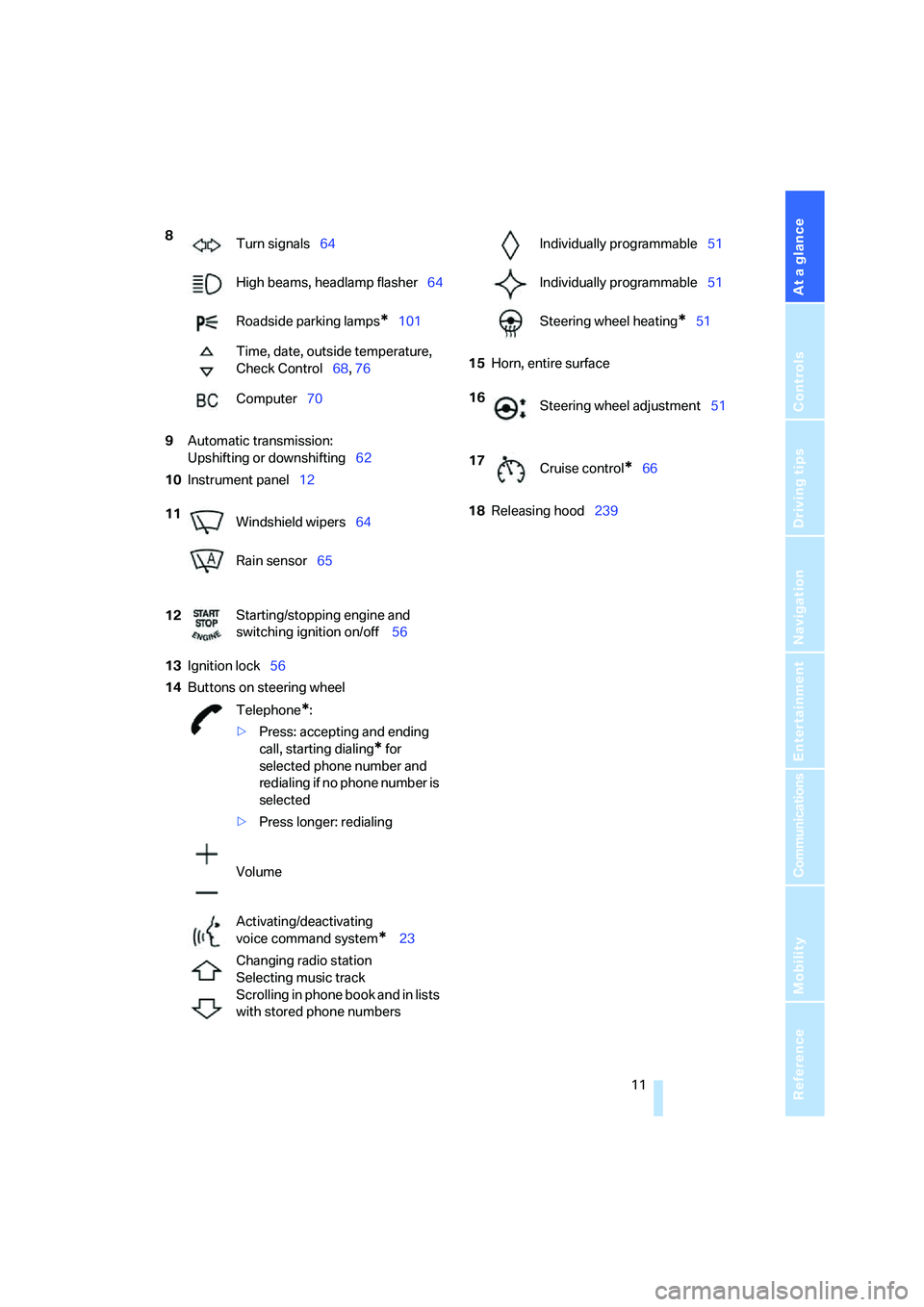
9Automatic transmission:
Upshifting or downshifting62
10Instrument panel12
13Ignition lock56
14Buttons on steering wheel15Horn, entire surface
18Releasing hood239 8
Turn signals64
High beams, headlamp flasher64
Roadside parking lamps
*101
Time, date, outside temperature,
Check Control68, 76
Computer70
11
Windshield wipers64
Rain sensor65
12Starting/stopping engine and
switching ignition on/off 56
Telephone
*:
>Press: accepting and ending
call, starting dialing
* for
selected phone number and
redialing if no phone number is
selected
>Press longer: redialing
Volume
Activating/deactivating
voice command system
* 23
Changing radio station
Selecting music track
Scrolling in phone book and in lists
with stored phone numbers
Individually programmable51
Individually programmable51
Steering wheel heating
*51
16
Steering wheel adjustment51
17
Cruise control
*66
Page 46 of 288
Adjusting
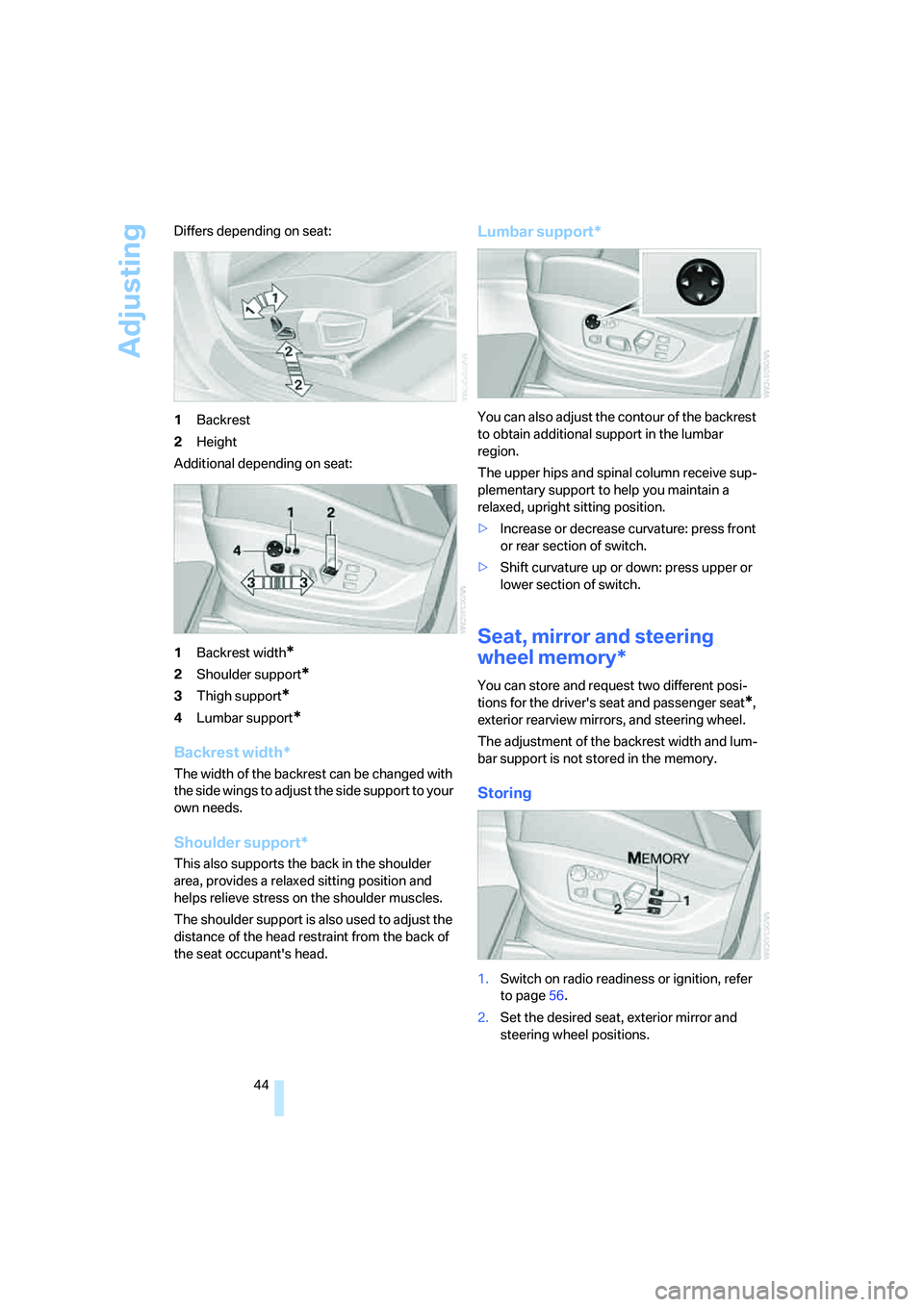
44 Differs depending on seat:
1Backrest
2Height
Additional depending on seat:
1Backrest width
*
2Shoulder support*
3Thigh support*
4Lumbar support*
Backrest width*
The width of the backrest can be changed with
the side wings to adjust the side support to your
own needs.
Shoulder support*
This also supports the back in the shoulder
area, provides a relaxed sitting position and
helps relieve stress on the shoulder muscles.
The shoulder support is also used to adjust the
distance of the head restraint from the back of
the seat occupant's head.
Lumbar support*
You can also adjust the contour of the backrest
to obtain additional support in the lumbar
region.
The upper hips and spinal column receive sup-
plementary support to help you maintain a
relaxed, upright sitting position.
>Increase or decrease curvature: press front
or rear section of switch.
>Shift curvature up or down: press upper or
lower section of switch.
Seat, mirror and steering
wheel memory*
You can store and request two different posi-
tions for the driver's seat and passenger seat
*,
exterior rearview mirrors, and steering wheel.
The adjustment of the backrest width and lum-
bar support is not stored in the memory.
Storing
1.Switch on radio readiness or ignition, refer
to page56.
2.Set the desired seat, exterior mirror and
steering wheel positions.
Page 47 of 288
Controls
45Reference
At a glance
Driving tips
Communications
Navigation
Entertainment
Mobility
3.Press the button:
The LED in the button lights up.
4.Press the desired memory button1 or2:
The LED goes out.
The positions of the driver's seat, the exte-
rior rearview mirrors, and steering wheel are
stored for the remote control currently in
use.
Calling up automatically
You can choose when the stored positions of
the driver's seat, exterior rearview mirrors, and
steering wheel are activated.
>Calling up when unlocking vehicle
>Calling up when opening driver's door
When using this feature, always make
sure that the footwell behind the driver's
seat is empty and unobstructed. Failure to do
so could cause injury to persons or damage to
objects behind the seat as a result of a rearward
movement of the seat.<
The system cancels the adjustment procedure
when you briefly press one of the seat adjust-
ment switches or one of the memory buttons.
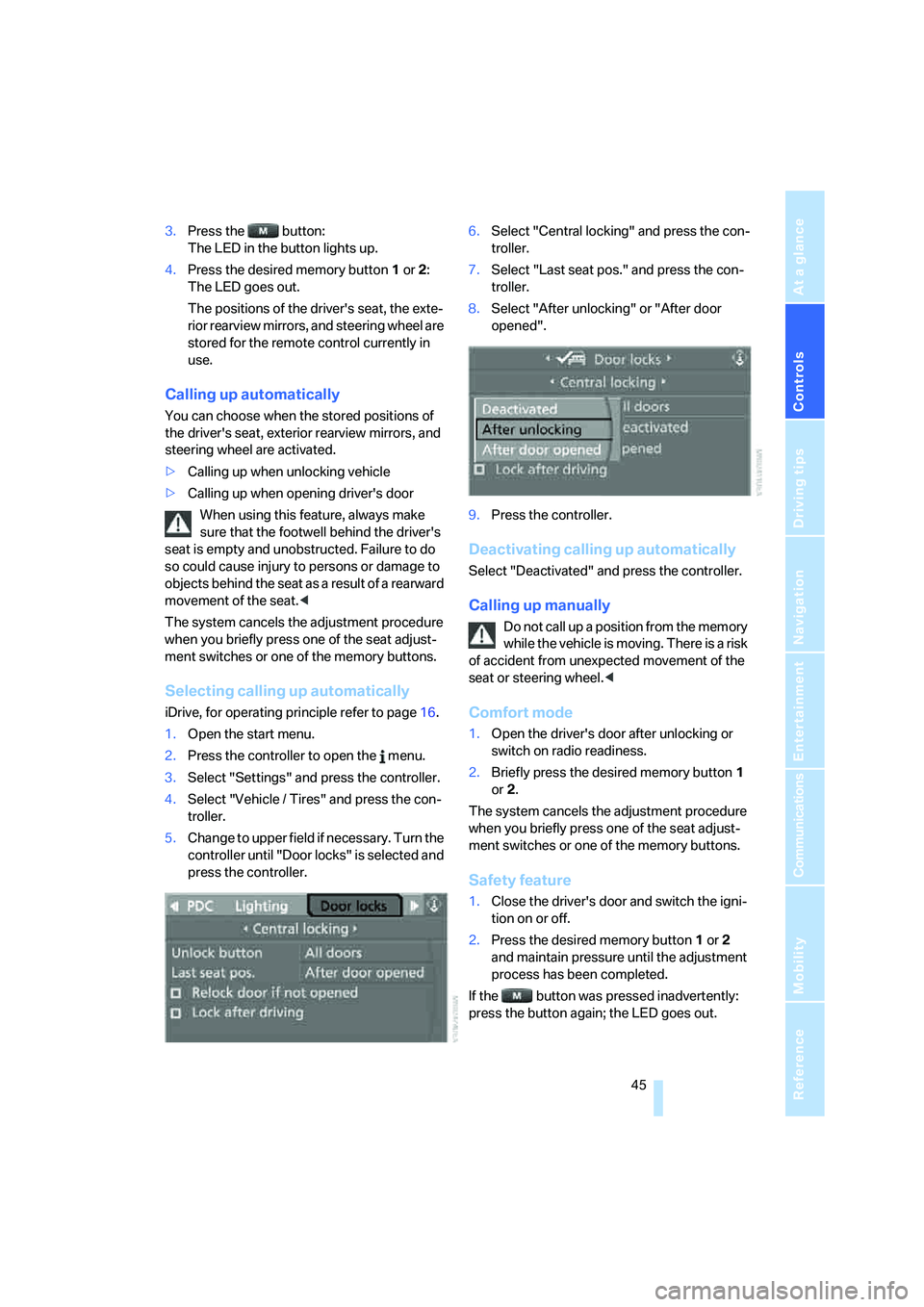
Selecting calling up automatically
iDrive, for operating principle refer to page16.
1.Open the start menu.
2.Press the controller to open the menu.
3.Select "Settings" and press the controller.
4.Select "Vehicle / Tires" and press the con-
troller.
5.Change to upper field if necessary. Turn the
controller until "Door locks" is selected and
press the controller.6.Select "Central locking" and press the con-
troller.
7.Select "Last seat pos." and press the con-
troller.
8.Select "After unlocking" or "After door
opened".
9.Press the controller.
Deactivating calling up automatically
Select "Deactivated" and press the controller.
Calling up manually
Do not call up a position from the memory
while the vehicle is moving. There is a risk
of accident from unexpected movement of the
seat or steering wheel.<
Comfort mode
1.Open the driver's door after unlocking or
switch on radio readiness.
2.Briefly press the desired memory button1
or2.
The system cancels the adjustment procedure
when you briefly press one of the seat adjust-
ment switches or one of the memory buttons.
Safety feature
1.Close the driver's door and switch the igni-
tion on or off.
2.Press the desired memory button1 or2
and maintain pressure until the adjustment
process has been completed.
If the button was pressed inadvertently:
press the button again; the LED goes out.
Page 97 of 288
Controls
95Reference
At a glance
Driving tips
Communications
Navigation
Entertainment
Mobility
Airbags
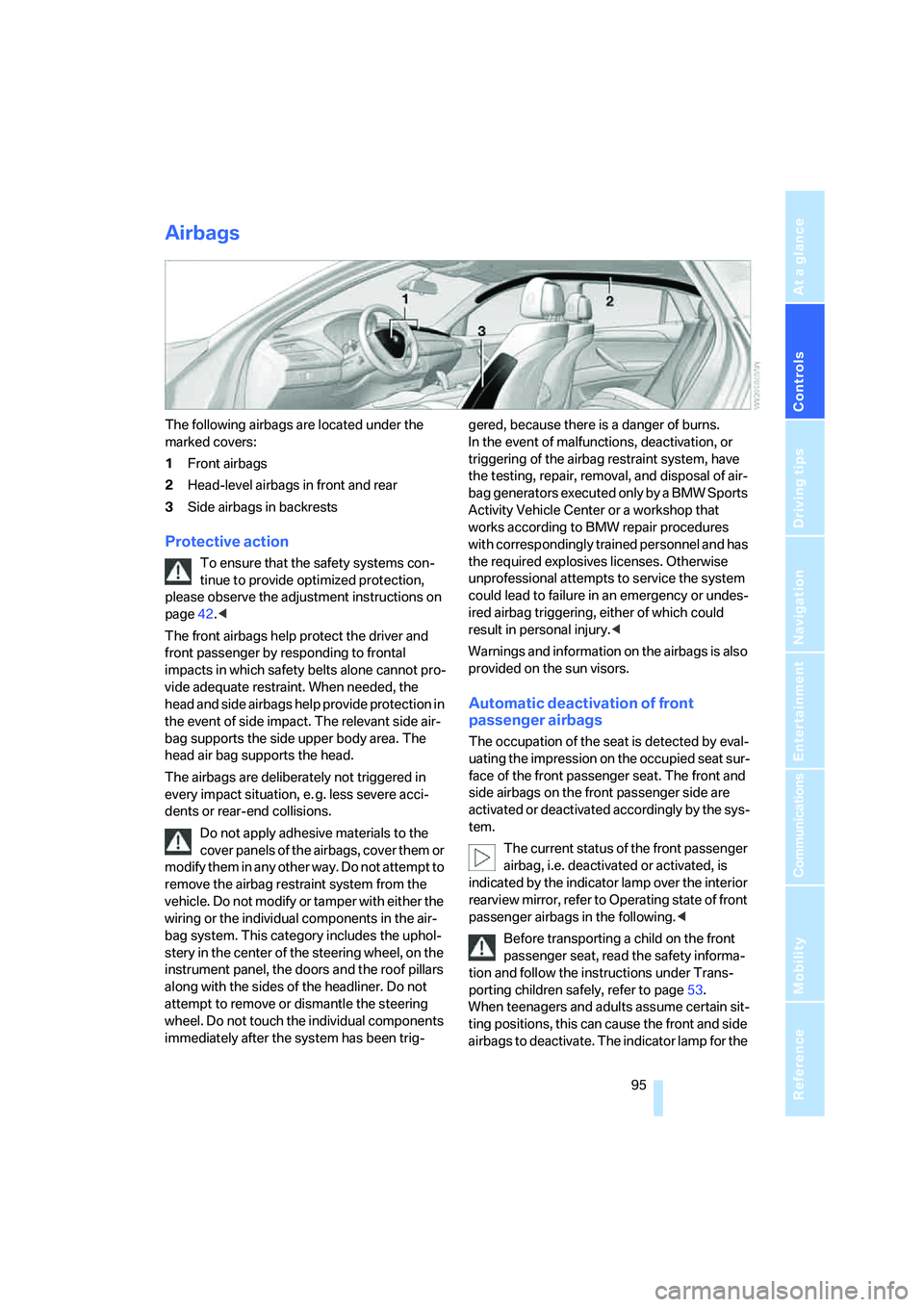
The following airbags are located under the
marked covers:
1Front airbags
2Head-level airbags in front and rear
3Side airbags in backrests
Protective action
To ensure that the safety systems con-
tinue to provide optimized protection,
please observe the adjustment instructions on
page42.<
The front airbags help protect the driver and
front passenger by responding to frontal
impacts in which safety belts alone cannot pro-
vide adequate restraint. When needed, the
head and side airbags help provide protection in
the event of side impact. The relevant side air-
bag supports the side upper body area. The
head air bag supports the head.
The airbags are deliberately not triggered in
every impact situation, e. g. less severe acci-
dents or rear-end collisions.
Do not apply adhesive materials to the
cover panels of the airbags, cover them or
modify them in any other way. Do not attempt to
remove the airbag restraint system from the
vehicle. Do not modify or tamper with either the
wiring or the individual components in the air-
bag system. This category includes the uphol-
stery in the center of the steering wheel, on the
instrument panel, the doors and the roof pillars
along with the sides of the headliner. Do not
attempt to remove or dismantle the steering
wheel. Do not touch the individual components
immediately after the system has been trig-gered, because there is a danger of burns.
In the event of malfunctions, deactivation, or
triggering of the airbag restraint system, have
the testing, repair, removal, and disposal of air-
bag generators executed only by a BMW Sports
Activity Vehicle Center or a workshop that
works according to BMW repair procedures
with correspondingly trained personnel and has
the required explosives licenses. Otherwise
unprofessional attempts to service the system
could lead to failure in an emergency or undes-
ired airbag triggering, either of which could
result in personal injury.<
Warnings and information on the airbags is also
provided on the sun visors.
Automatic deactivation of front
passenger airbags
The occupation of the seat is detected by eval-
uating the impression on the occupied seat sur-
face of the front passenger seat. The front and
side airbags on the front passenger side are
activated or deactivated accordingly by the sys-
tem.
The current status of the front passenger
airbag, i.e. deactivated or activated, is
indicated by the indicator lamp over the interior
rearview mirror, refer to Operating state of front
passenger airbags in the following.<
Before transporting a child on the front
passenger seat, read the safety informa-
tion and follow the instructions under Trans-
porting children safely, refer to page53.
When teenagers and adults assume certain sit-
ting positions, this can cause the front and side
airbags to deactivate. The indicator lamp for the
Page 162 of 288
On/Off and settings
160
On/Off and settings
The following audio sources share the same
controls and adjustment options:
>Radio
>CD player
>CD changer
*
Controls
The audio sources can be controlled using:
>Buttons in the area of the CD player
>iDrive
>Buttons
on steering wheel, refer to page11
>Programmable memory/direct selection
buttons, refer to page21
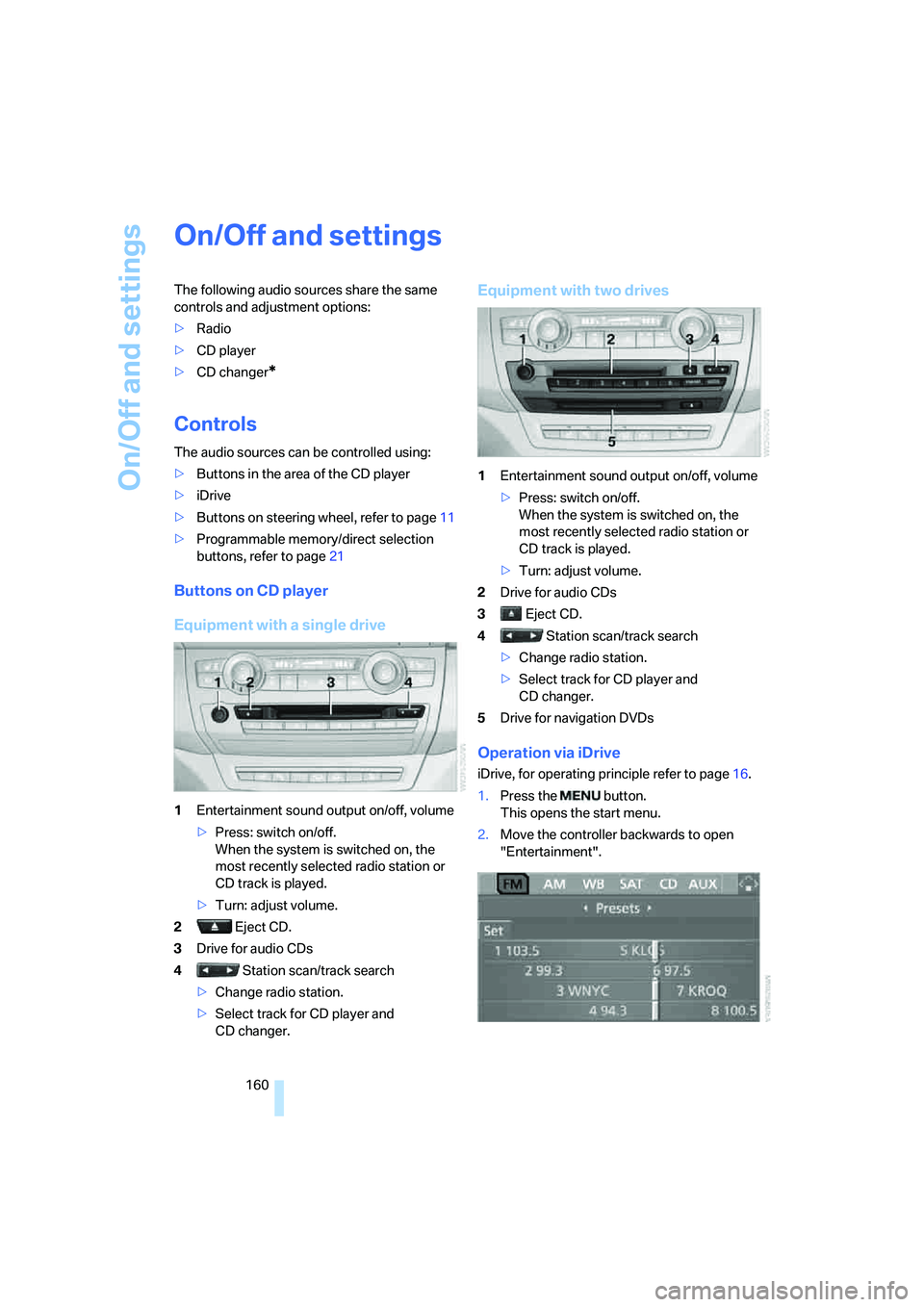
Buttons on CD player
Equipment with a single drive
1Entertainment sound output on/off, volume
>Press: switch on/off.
When the system is switched on, the
most recently selected radio station or
CD track is played.
>Turn: adjust volume.
2 Eject CD.
3Drive for audio CDs
4 Station scan/track search
>Change radio station.
>Select track for CD player and
CD changer.
Equipment with two drives
1Entertainment sound output on/off, volume
>Press: switch on/off.
When the system is switched on, the
most recently selected radio station or
CD track is played.
>Turn: adjust volume.
2Drive for audio CDs
3 Eject CD.
4 Station scan/track search
>Change radio station.
>Select track for CD player and
CD changer.
5Drive for navigation DVDs
Operation via iDrive
iDrive, for operating principle refer to page16.
1.Press the button.
This opens the start menu.
2.Move the controller backwards to open
"Entertainment".
Page 163 of 288
Navigation
Entertainment
Driving tips
161Reference
At a glance
Controls
Communications
Mobility
You have the following choices:
>"FM" and "AM": radio reception
>"WB": Weather Band station
>"SAT": satellite radio
*
>"CD": CD player or changer*
>"AUX": AUX-In connection, USB audio
interface
*
>"Set": depending on the audio source,
other adjustments can be made, e.g. with
the radio: update station with strongest
reception, store station, tone control, sam-
ple stations.
From another menu, you can change
directly to the screen last displayed,
refer to Comfort opening of menu items on
page18.<
From radio readiness, the selected audio
source is stored for the remote control currently
in use.
Switching on/off
To switch the Entertainment sound output on
and off:
Press knob1 on the CD player.
This symbol on the Control Display indi-
cates that sound output is switched off.
For equipment with a single drive, the sound
output is available for approx. 20 minutes with
the ignition switched off.
Switch on the sound output again for this pur-
pose.
Adjusting volume
Turn knob1 on the CD player until the desired
volume is set.
You can also adjust the volume with buttons on
the steering wheel, refer to page11.
From radio readiness, the setting is stored for
the remote control currently in use.
Tone control
You can alter various tone settings, e. g. treble
and bass, or the speed-dependent volume
increase.
The tone settings are set for all audio sources at
once.
From radio readiness, the settings are stored
for the remote control currently in use.
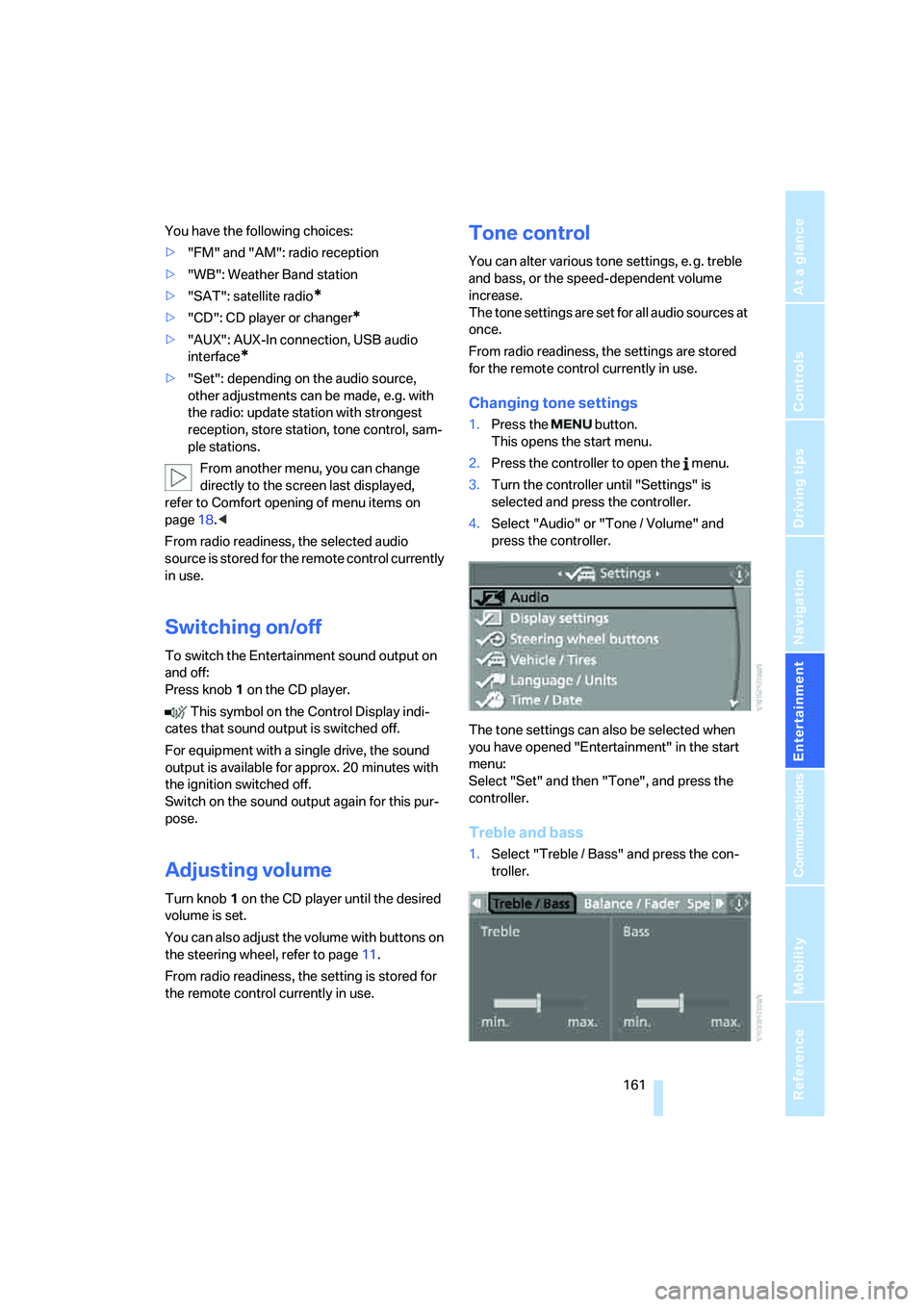
Changing tone settings
1.Press the button.
This opens the start menu.
2.Press the controller to open the menu.
3.Turn the controller until "Settings" is
selected and press the controller.
4.Select "Audio" or "Tone / Volume" and
press the controller.
The tone settings can also be selected when
you have opened "Entertainment" in the start
menu:
Select "Set" and then "Tone", and press the
controller.
Treble and bass
1.Select "Treble / Bass" and press the con-
troller.
Page 269 of 288
Reference 267
At a glance
Controls
Driving tips
Communications
Navigation
Entertainment
Mobility
Assistance systems, refer to
Driving stability control
systems85
Assistance window20
"Assist. window off"21
AUC Automatic recirculated-
air control106
"Audio"163,167
– for DVD system in rear202
Audio160
– controls160
– switching on/off160
– tone control161
– volume161
Audio CD for DVD system in
rear196
Audio device, external116
Automatic
– air distribution104,109
– air volume104,109
– headlamp control99
– liftgate operation34
– service notification223
– steering wheel adjustment,
refer to Easy entry/exit51
– storing stations165
Automatic car washes128
– also refer to Caring for your
vehicle brochure
Automatic climate control104
– automatic air
distribution104,109
– in rear108
– switching off107,109
– ventilation in rear108
Automatic closing of doors,
refer to Automatic soft
closing33
Automatic curb monitor50
Automatic Hold58
– activating59
– deactivating59
– parking59Automatic lighting
– refer to Automatic headlamp
control99
– refer to Daytime running
lamps100
– refer to Interior lamps102
– refer to Pathway lighting100
"Automatic programs"105
Automatic recirculated-air
control AUC106
Automatic soft closing
33
Automatic station search165
Automatic transmission with
Steptronic61
– deactivating selector lever
interlock61
– kick-down62
– manually releasing
transmission lock63
– tow-starting255
– with comfort access37
"Automatic ventilation"110
AUTO program for automatic
climate control104,109
"Auto Request"223
"Autostore" on the radio166
"AUX"161,186,188
– AUX-In connection186
– for DVD system in rear201
– USB audio interface187
"AUX / Rear"192
AUX-In connection116,186
Average fuel consumption70
– setting units79
Average speed, refer to
Computer70
"Avoid ferries" for
navigation147
"Avoid highways" for
navigation146
Avoiding highways for
navigation146
Avoiding unintentional
alarms36
"Avoid tollroads" for
navigation147
Axle loads, refer to
Weights260
"A - Z"214
B
Backrest contour, refer to
Lumbar support44
Backrests, refer to Seats43
Backrest width adjustment44
Backup lamps, replacing
bulbs246
Balance, refer to Tone
control162
"Balance" for DVD system in
rear195
Band-aids, refer to First-aid
kit253
Bass, refer to Tone
control161
Battery
– charging250
– jump starting253
– power failure251
– refer to Vehicle battery250
Battery disposal
– remote control with comfort
access38
– vehicle battery251
Battery replacement
– remote control for DVD
system in rear192
– remote control with comfort
access38
Being towed255
Belts, refer to Safety belts47
Beverage holder, refer to Cup
holders117
Blower, refer to Air
volume105,109
"BMW Assist"222,223,224
BMW Assist
– activating226
– concierge service224
– contacting BMW Customer
Relations224
– offered services221
– roadside assistance222
– TeleService223
"BMW Contact"216
"BMW Contact
Numbers"216
BMW homepage4
Page 273 of 288
Reference 271
At a glance
Controls
Driving tips
Communications
Navigation
Entertainment
Mobility
"Distance to dest."71
Distance to destination, refer
to Computer70
Distance warning, refer to
PDC Park Distance
Control81
Door entry lighting102
Door key, refer to Keys/
remote control28
Door lock31
Door locking, confirmation
signals31
"Door locks"30,31,73
Doors
– manual operation32
– remote control29
DOT Quality Grades235
Downhill driving assistance,
refer to HDC87
Draft-free ventilation107
Drinks holder, refer to Cup
holders117
Drive for navigation DVDs160
"Driver's door only"30
Driver's seat, calibrating47
"Driver's seat climate"49
Driving lamps, refer to Parking
lamps/low beams99
Driving on poor roads130
Driving route, refer to
Displaying route149
Driving stability control
systems85
Driving through water127
Driving tips, refer to General
driving notes126
Dry air, refer to Cooling
function106
Drying the air, refer to Cooling
function106
DSC Dynamic Stability
Control86
– indicator lamp13,86
DTC Dynamic Traction
Control86
– activating86
– indicator lamp87"DVD"
– for DVD system in rear192
– in DVD changer180
DVD
– DVD changer179
– DVD system in rear190
– player for navigation
DVD160
DVD changer179
– adjusting brightness182
– adjusting contrast182
– adjusting tone182,185
– audio and video
playback180
– audio playback184
– chapter selection184
– controls179
– DVD audio content184
– DVD control181
– DVD country codes180
– DVD-specific menu183
– fast forward181
– filling179
– installation position179
– malfunctions180
– removing DVDs179
– reverse181
– selecting audio
language185
– selecting language182
– selecting subtitles183
– selecting track183
– selecting viewing angle183
– skip chapter181
– zoom182
"DVD format"
– for DVD system in rear195
– on DVD changer182
DVD for navigation134DVD system in rear190
– CD/DVD player191
– connecting headphones191
– controls190
– displaying images from CD/
DVD198
– DVD country codes192
– external device201
– information on CD/DVD
player200
– playing audio tracks from
CD/DVD196
– playing video from CD/
DVD192
– remote control191
– switching on/off192
Dynamic Performance
Control87
"Dynamic route" for
navigation147
Dynamic Stability Control
DSC86
Dynamic Traction Control
DTC86
E
Easy entry/exit51
Eject button, refer to Buttons
on the CD player160
Electrical malfunction
– automatic transmission with
Steptronic63
– door lock32
– driver's door32
– fuel filler door230
– glass sunroof, electric41
– parking brake60
Electric seat43
Electric steering wheel
adjustment51
Electronic brake-force
distribution85
Electronic oil level check240
Page 275 of 288
Reference 273
At a glance
Controls
Driving tips
Communications
Navigation
Entertainment
Mobility
Front seat adjustment43
FTM Flat Tire Monitor89
– false alarms90
– indicating a flat tire90
– initializing the system90
– malfunction94
– snow chains238
– system limits90
– warning lamp90
Fuel231
– capacity261
– display69
– high-quality brands231
– quality231
– saving126
– specifications231
Fuel clock, refer to Fuel
gauge69
Fuel consumption display
– computer, average fuel
consumption70
Fuel display, refer to Fuel
gauge69
Fuel filler door230
– closing230
– opening230
– releasing manually230
Fuses251
G
Garage door opener, refer to
Integrated universal remote
control112
Gasoline, refer to Required
fuel231
Gasoline display, refer to Fuel
gauge69
Gear changes, automatic
transmission with
Steptronic62
General driving
notes126,127Glass sunroof, electric39
– convenience operation from
outside32
– convenience operation with
comfort access37
– moving manually41
– opening, closing40
– power interruption40
– raising39
– remote control30
Glove compartment115
– lighting115
– opening manually115
GPS navigation, refer to
Navigation system134
Grills, refer to Ventilation107
Grills of the automatic climate
control103
Gross vehicle weight, refer to
Weights260
H
Handbrake, refer to Parking
brake57
– Automatic Hold58
Hands-free system, refer to
Microphone14
Hazard warning flashers15
HDC Hill Descent Control87
"HD radio"167
HD radio, refer to High
Definition Radio167
Head airbags95
Headlamp control,
automatic99
Headlamp flasher64
Headlamps99
– care, refer to Caring for your
vehicle brochure
– cleaning, refer to Washer/
wiper system64
– replacing bulbs245
Head Light, refer to Adaptive
Head Light101
Head restraints46
– sitting safely42
"Head-Up Display"97
Head-Up Display97Heated
– mirrors50
– rear window105
– seats48
– steering wheel51
Heating103
– exterior mirrors50
– interior103
– rear window105
– residual heat107
– seats48
– steering wheel51
Heating with engine switched
off, refer to Residual
heat107
Heavy cargo, refer to Securing
cargo130
Height, refer to
Dimensions259
Height adjustment
– seats43
– steering wheel51
High beams64,101
– headlamp flasher64
– indicator lamp13
High Definition Radio167
Highs, refer to Treble and
bass161
High water, refer to Driving
through water127
Highway, refer to Route
criteria146
Hill Descent Control HDC87
Hills128
Holder for cups117
Home address146
"Home address" for
navigation146
Homepage4
Hood239
Horn10
Hot exhaust system127
"Hour memo"79
"House number" for
destination entry139
Hydraulic brake assistant,
refer to Brake assistant86
Hydroplaning127
Page 278 of 288
Everything from A to Z
276 Mirror dimming feature51
Mirrors49
– automatic curb monitor50
– exterior mirrors49
– folding in and out50
– heating50
– interior rearview mirror50
– memory, refer to Seat, mirror
and steering wheel
memory44
"Missed calls"214
Missed calls215
Mobile phone
– accepted calls215
– adjusting volume212
– calling213
– ending call213
– installation location, refer to
Center armrest, front116
– missed calls215
– operation via iDrive212
– redialing215
– refer to separate operating
instructions
– Top 8215
– touch tone dialing216
Monitor, refer to iDrive16
Monitoring tire pressure, refer
to FTM Flat Tire Monitor89
"Monitor on / off"52
MP3, refer to Compressed
audio files173
Multifunction steering wheel,
refer to Buttons on steering
wheel11
Multifunction switch
– refer to Turn signals/
headlamp flasher/high
beams64
– refer to Washer/wiper
system64
Music track, refer to
Tracks174
"Mute on / off"52
N
"Navigation"70,136,142
Navigation destination
– entering manually137,139
– home address146
– selecting via map141
Navigation drive, installation
location134
Navigation DVD134
– player160
Navigation instructions, refer
to Switching voice
instructions on/off151
Navigation system134
– address book144
– changing route152
– destination entry136
– destination guidance in
assistance window134
– destination list143
– displaying current
position155
– displaying route149
– ending/continuing
destination guidance148
– entering a destination
manually137,139
– last destinations143
– navigation DVD134
– opening136
– route list150
– searching for a special
destination142
– selecting destination using
information142
– selecting destination via
map141
– selecting route criteria146
– starting destination
guidance148
– switching off, refer to
Ending/continuing
destination guidance148
– voice instructions151
– volume adjustment152"Navigation voice
instructions"52,135
Neck support, refer to Head
restraints46
"New address" for
navigation144
"New destination"137,141
New remote control28
"New route"152
New wheels and tires237
"Next entertainment
source"52
"No video signal" for DVD
system in rear201
Nozzles, refer to Windshield
washer nozzles65
"NTSC color" for DVD system
in rear202
Nylon rope, refer to Tow-
starting and towing254
O
OBD socket244
Octane ratings, refer to Fuel
specifications231
Odometer68
Oil
– additives, refer to Approved
engine oils241
– approved engine oils241
– consumption, refer to
Checking engine oil
level240
– level240
– refilling, refer to Adding
engine oil241
Oil change interval, refer to
Service requirements72
"On a new destination" for
navigation142
Onboard computer, refer to
iDrive16
"Onboard info"70
Onboard toolkit245
"On destination"142
"On location"142