height BMW X6 2012 E71 User Guide
[x] Cancel search | Manufacturer: BMW, Model Year: 2012, Model line: X6, Model: BMW X6 2012 E71Pages: 312, PDF Size: 8.91 MB
Page 95 of 312
Controls
93Reference
At a glance
Driving tips
Communications
Navigation
Entertainment
Mobility
Cameras
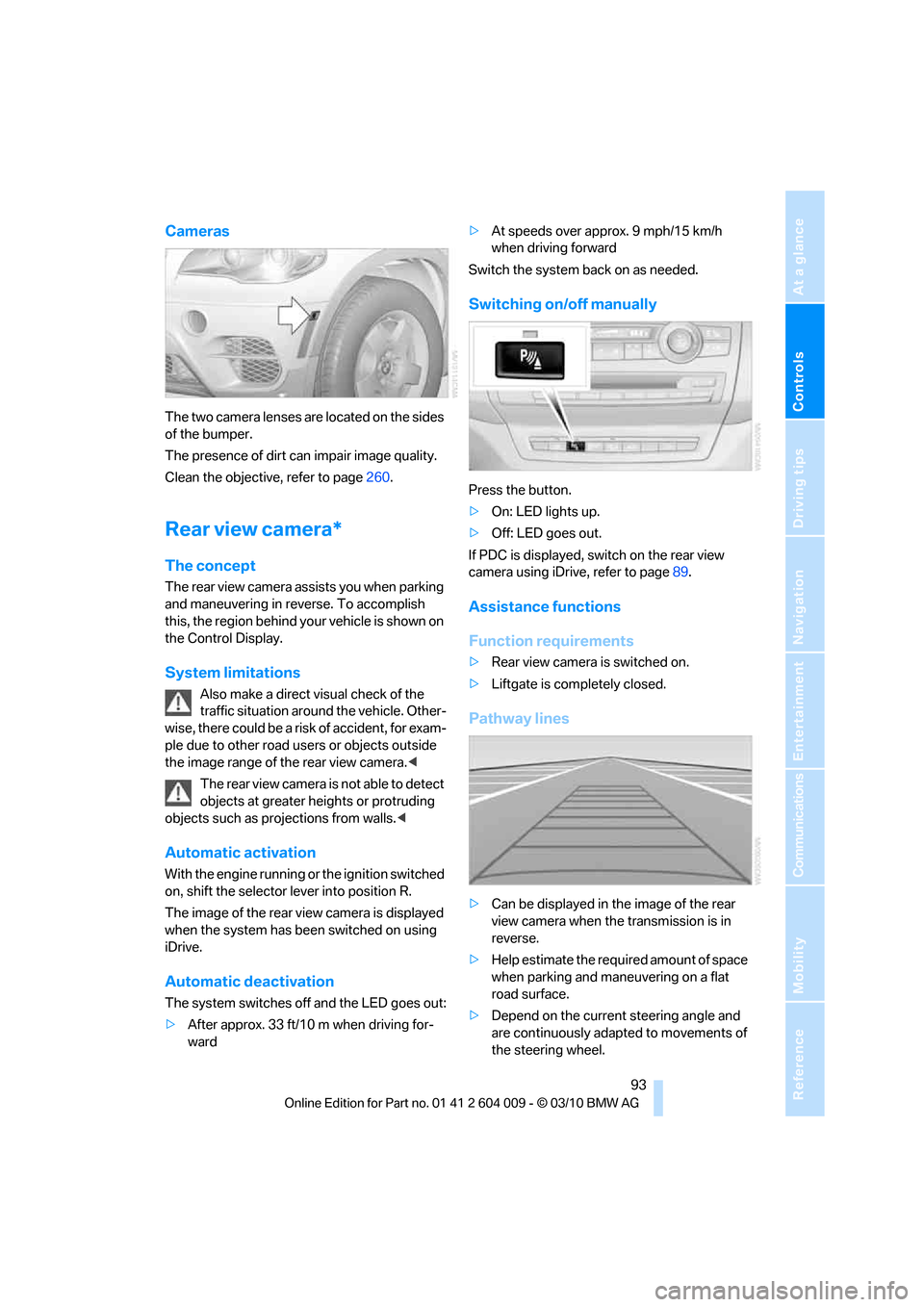
The two camera lenses are located on the sides
of the bumper.
The presence of dirt can impair image quality.
Clean the objective, refer to page260.
Rear view camera*
The concept
The rear view camera assists you when parking
and maneuvering in reverse. To accomplish
this, the region behind your vehicle is shown on
the Control Display.
System limitations
Also make a direct visual check of the
traffic situation around the vehicle. Other-
wise, there could be a risk of accident, for exam-
ple due to other road users or objects outside
the image range of the rear view camera.<
T he r e a r v i e w c a m e r a i s n o t a b l e t o de t e c t
objects at greater heights or protruding
objects such as projections from walls.<
Automatic activation
With the engine running or the ignition switched
on, shift the selector lever into position R.
The image of the rear view camera is displayed
when the system has been switched on using
iDrive.
Automatic deactivation
The system switches off and the LED goes out:
>After approx. 33 ft/10 m when driving for-
ward>At speeds over approx. 9 mph/15 km/h
when driving forward
Switch the system back on as needed.
Switching on/off manually
Press the button.
>On: LED lights up.
>Off: LED goes out.
If PDC is displayed, switch on the rear view
camera using iDrive, refer to page89.
Assistance functions
Function requirements
>Rear view camera is switched on.
>Liftgate is completely closed.
Pathway lines
>Can be displayed in the image of the rear
view camera when the transmission is in
reverse.
>Help estimate the required amount of space
when parking and maneuvering on a flat
road surface.
>Depend on the current steering angle and
are continuously adapted to movements of
the steering wheel.
Page 101 of 312
Controls
99Reference
At a glance
Driving tips
Communications
Navigation
Entertainment
Mobility
reduces the steering angle requirement,
improves the running comfort and increases
the dynamic driving characteristics of your
BMW.
Chassis and suspension tuning
You can choose between two types of chassis
and suspension tuning.
>Normal:
The comfortable basic setting offers opti-
mum comfort when traveling.
>Sport:
The sporty basic setting offers increased
driving agility.
Selecting chassis and suspension
tuning
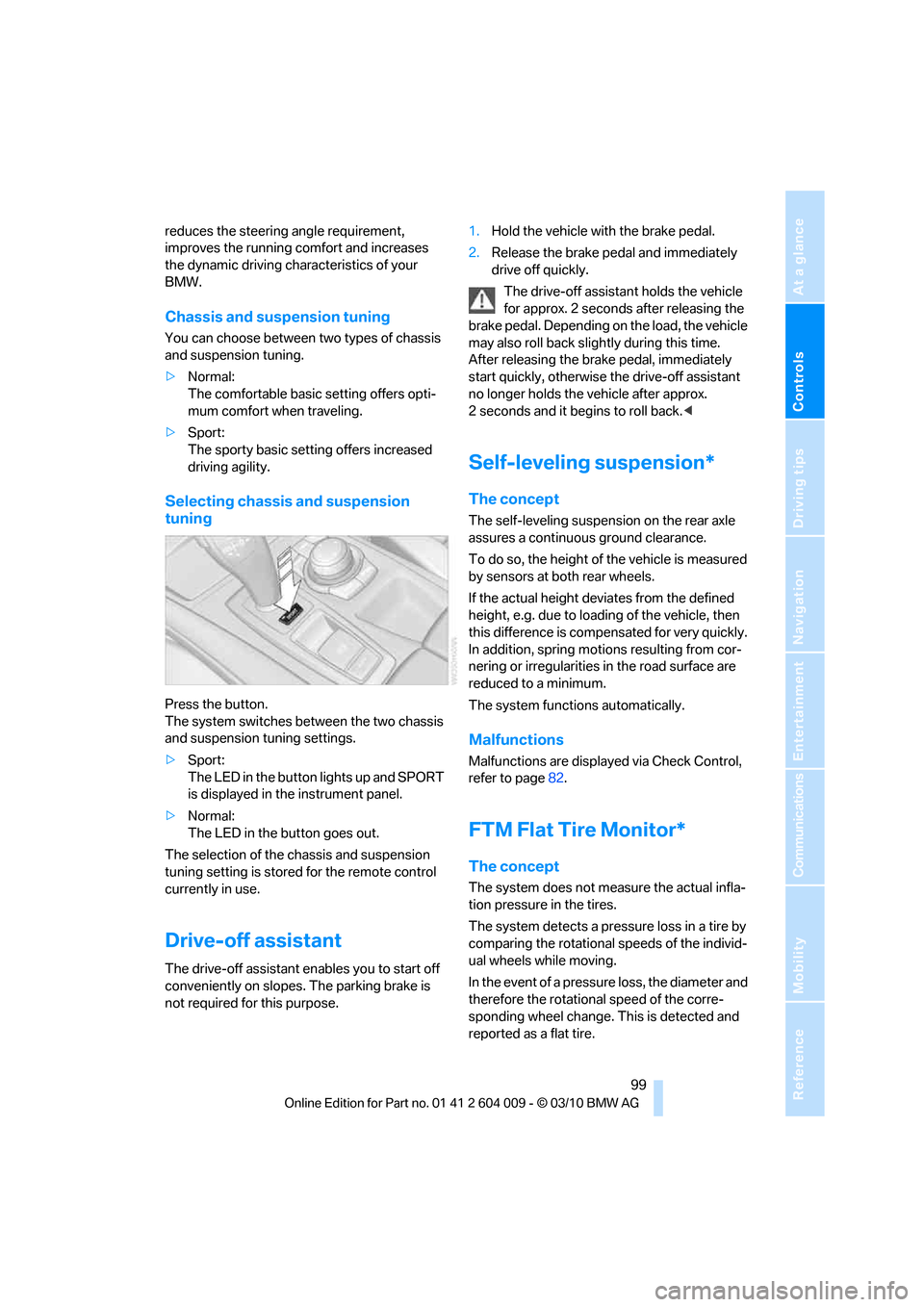
Press the button.
The system switches between the two chassis
and suspension tuning settings.
>Sport:
The LED in the button lights up and SPORT
is displayed in the instrument panel.
>Normal:
The LED in the button goes out.
The selection of the chassis and suspension
tuning setting is stored for the remote control
currently in use.
Drive-off assistant
The drive-off assistant enables you to start off
conveniently on slopes. The parking brake is
not required for this purpose.1.Hold the vehicle with the brake pedal.
2.Release the brake pedal and immediately
drive off quickly.
The drive-off assistant holds the vehicle
for approx. 2 seconds after releasing the
brake pedal. Depending on the load, the vehicle
may also roll back slightly during this time.
After releasing the brake pedal, immediately
start quickly, otherwise the drive-off assistant
no longer holds the vehicle after approx.
2 seconds and it begins to roll back.<
Self-leveling suspension*
The concept
The self-leveling suspension on the rear axle
assures a continuous ground clearance.
To do so, the height of the vehicle is measured
by sensors at both rear wheels.
If the actual height deviates from the defined
height, e.g. due to loading of the vehicle, then
this difference is compensated for very quickly.
In addition, spring motions resulting from cor-
nering or irregularities in the road surface are
reduced to a minimum.
The system functions automatically.
Malfunctions
Malfunctions are displayed via Check Control,
refer to page82.
FTM Flat Tire Monitor*
The concept
The system does not measure the actual infla-
tion pressure in the tires.
The system detects a pressure loss in a tire by
comparing the rotational speeds of the individ-
ual wheels while moving.
In the event of a pressure loss, the diameter and
therefore the rotational speed of the corre-
sponding wheel change. This is detected and
reported as a flat tire.
Page 111 of 312
Controls
109Reference
At a glance
Driving tips
Communications
Navigation
Entertainment
Mobility
Head-up Display*
The concept
With the Head-up Display important informa-
tion is projected into the driver's field of view,
e.g. navigation instructions. This enables you to
take in this information without looking away
from the road.
Switching on/off
Press the button.
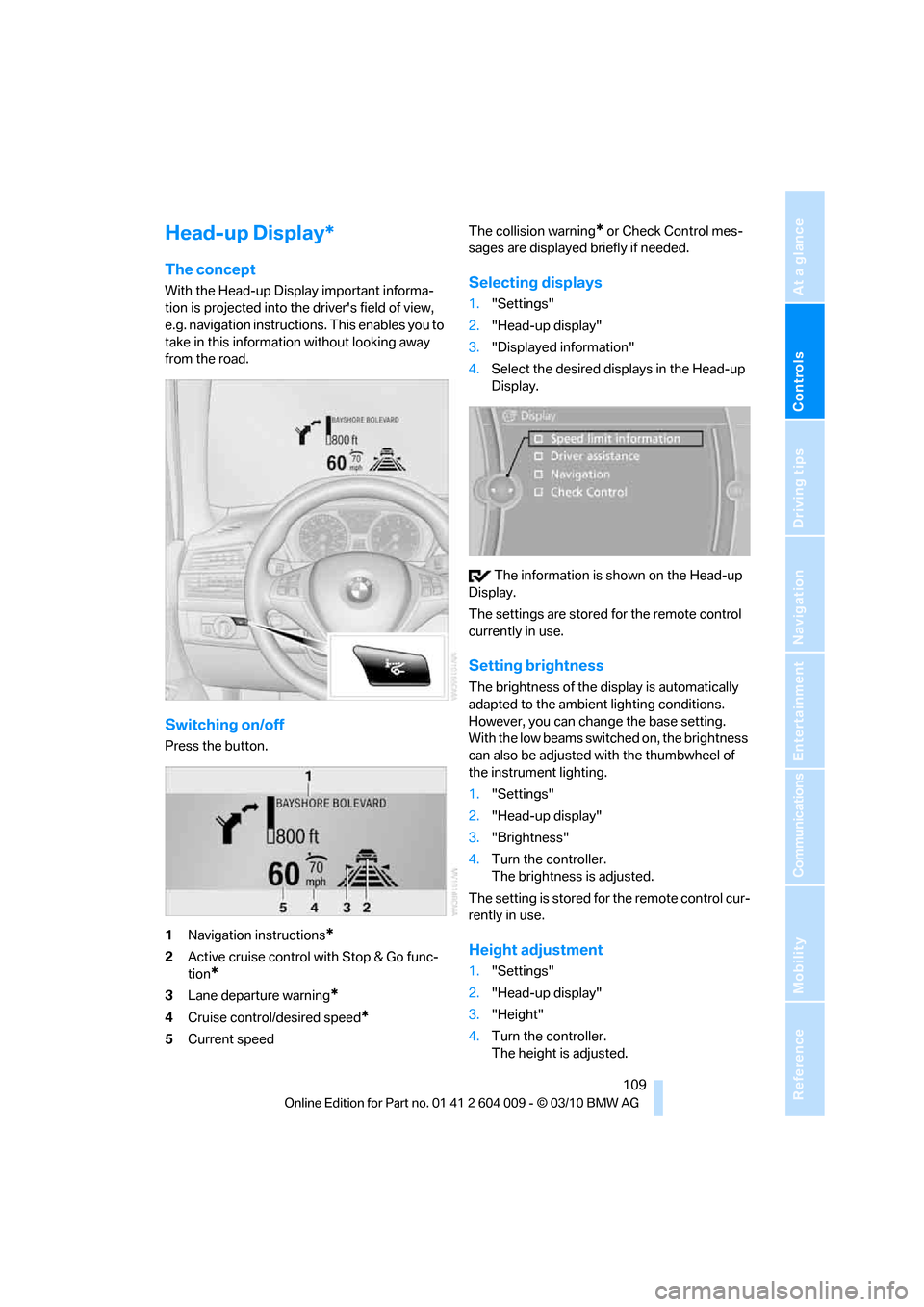
1Navigation instructions
*
2Active cruise control with Stop & Go func-
tion
*
3Lane departure warning*
4Cruise control/desired speed*
5Current speedThe collision warning
* or Check Control mes-
sages are displayed briefly if needed.
Selecting displays
1."Settings"
2."Head-up display"
3."Displayed information"
4.Select the desired displays in the Head-up
Display.
The information is shown on the Head-up
Display.
The settings are stored for the remote control
currently in use.
Setting brightness
The brightness of the display is automatically
adapted to the ambient lighting conditions.
However, you can change the base setting.
With the low beams switched on, the brightness
can also be adjusted with the thumbwheel of
the instrument lighting.
1."Settings"
2."Head-up display"
3."Brightness"
4.Turn the controller.
The brightness is adjusted.
The setting is stored for the remote control cur-
rently in use.
Height adjustment
1."Settings"
2."Head-up display"
3."Height"
4.Turn the controller.
The height is adjusted.
Page 253 of 312
Mobility
251Reference
At a glance
Controls
Driving tips
Communications
Navigation
Entertainment
Under the hood
Never attempt to perform any service or
repair operations on your vehicle without
the required professional technical training. If
you do not know what repair procedures to fol-
low, have work on your vehicle done only by
your BMW Sports Activity Vehicle Center or a
workshop that works according to BMW repair
procedures with correspondingly trained per-
sonnel. If this work is not carried out properly,
there is a danger of subsequent damage and
related safety hazards.<
Hood
Releasing
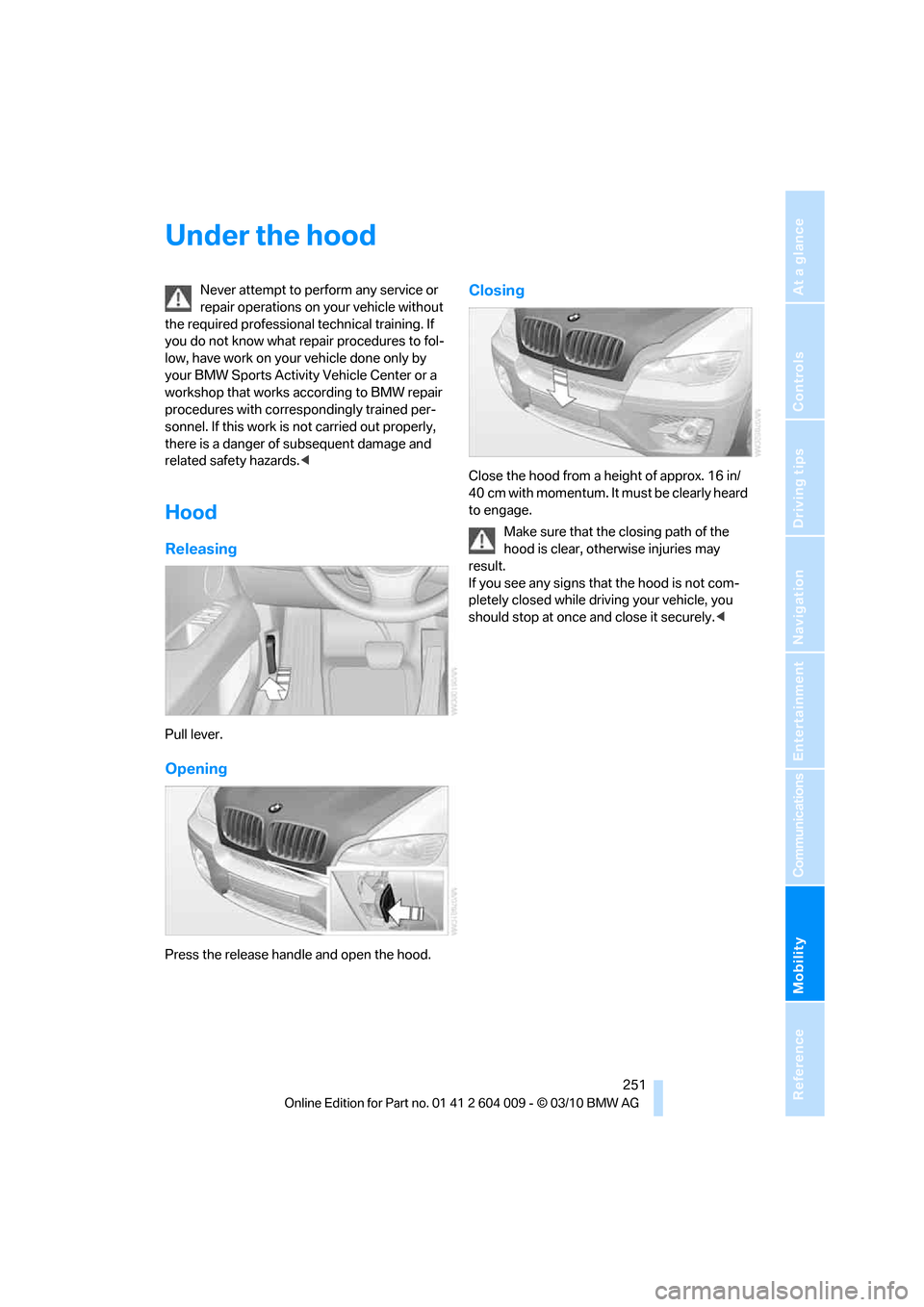
Pull lever.
Opening
Press the release handle and open the hood.
Closing
Close the hood from a height of approx. 16 in/
40 cm with momentum. It must be clearly heard
to engage.
Make sure that the closing path of the
hood is clear, otherwise injuries may
result.
If you see any signs that the hood is not com-
pletely closed while driving your vehicle, you
should stop at once and close it securely.<
Page 271 of 312
Mobility
269Reference
At a glance
Controls
Driving tips
Communications
Navigation
Entertainment
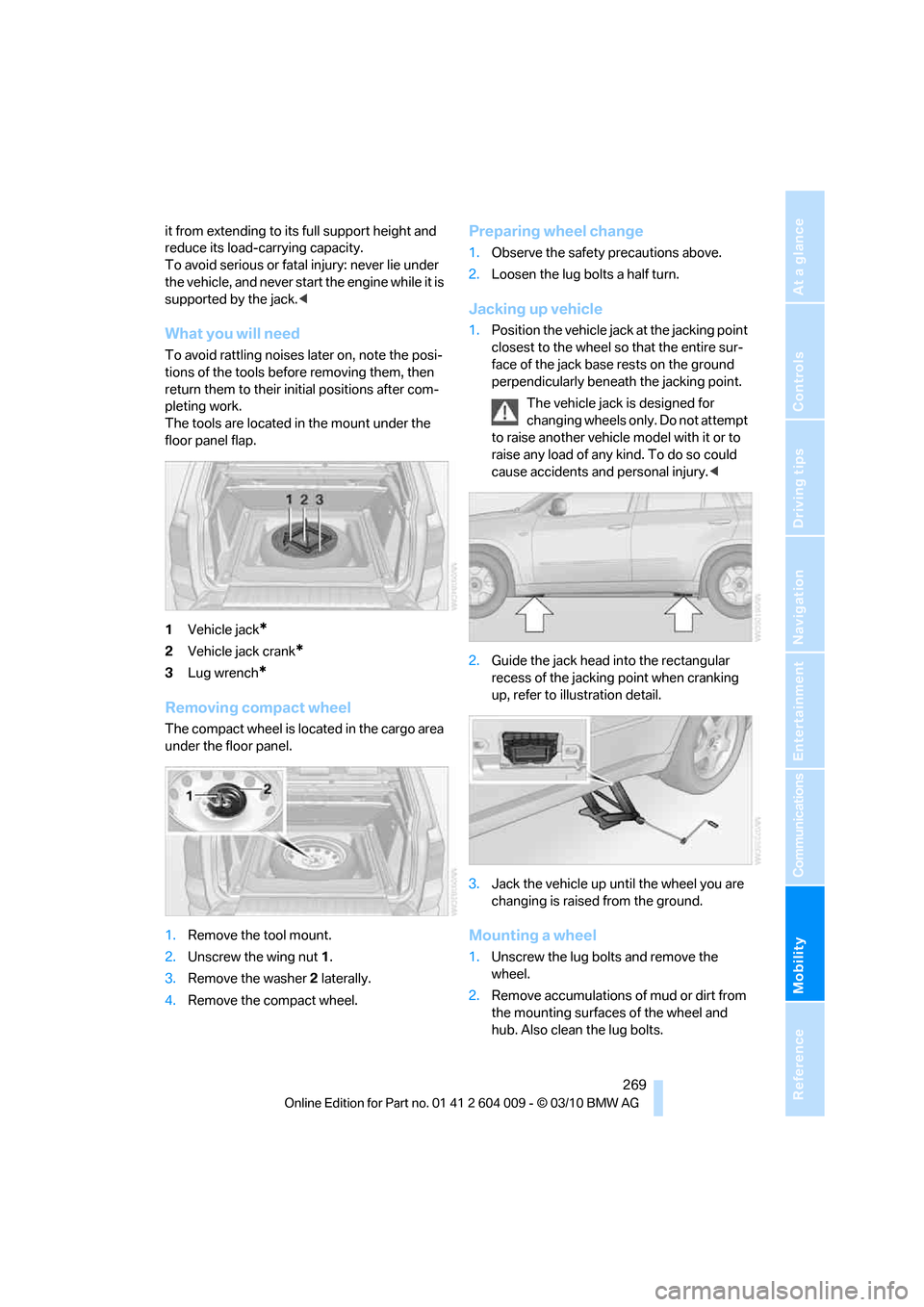
it from extending to its full support height and
reduce its load-carrying capacity.
To avoid serious or fatal injury: never lie under
the vehicle, and never start the engine while it is
supported by the jack.<
What you will need
To avoid rattling noises later on, note the posi-
tions of the tools before removing them, then
return them to their initial positions after com-
pleting work.
The tools are located in the mount under the
floor panel flap.
1Vehicle jack
*
2Vehicle jack crank*
3Lug wrench*
Removing compact wheel
The compact wheel is located in the cargo area
under the floor panel.
1.Remove the tool mount.
2.Unscrew the wing nut 1.
3.Remove the washer 2 laterally.
4.Remove the compact wheel.
Preparing wheel change
1.Observe the safety precautions above.
2.Loosen the lug bolts a half turn.
Jacking up vehicle
1.Position the vehicle jack at the jacking point
closest to the wheel so that the entire sur-
face of the jack base rests on the ground
perpendicularly beneath the jacking point.
The vehicle jack is designed for
changing wheels only. Do not attempt
to raise another vehicle model with it or to
raise any load of any kind. To do so could
cause accidents and personal injury.<
2.Guide the jack head into the rectangular
recess of the jacking point when cranking
up, refer to illustration detail.
3.Jack the vehicle up until the wheel you are
changing is raised from the ground.
Mounting a wheel
1.Unscrew the lug bolts and remove the
wheel.
2.Remove accumulations of mud or dirt from
the mounting surfaces of the wheel and
hub. Also clean the lug bolts.
Page 284 of 312
Technical data
282
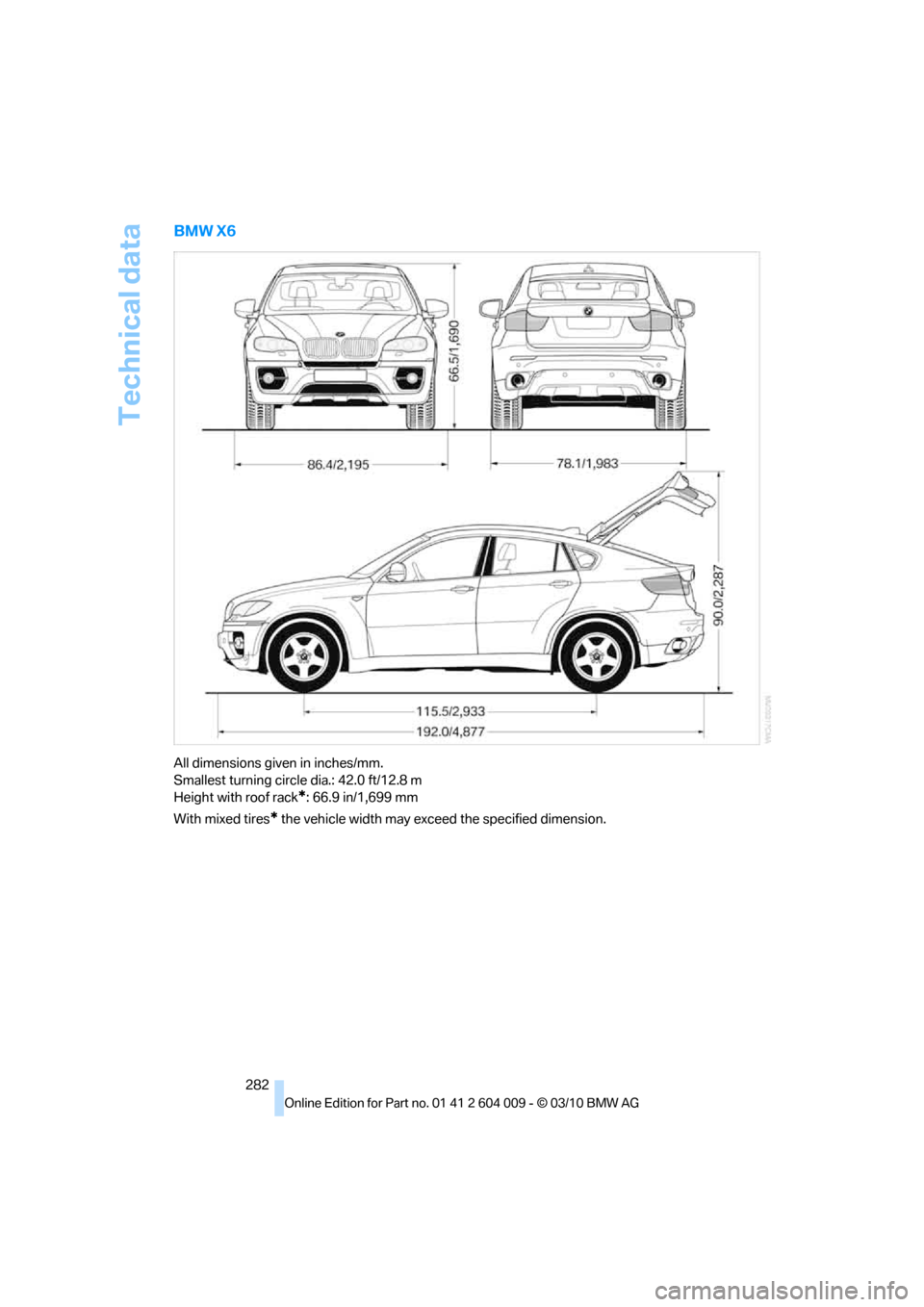
BMW X6
All dimensions given in inches/mm.
Smallest turning circle dia.: 42.0 ft/12.8 m
Height with roof rack
*: 66.9 in/1,699 mm
With mixed tires
* the vehicle width may exceed the specified dimension.
Page 294 of 312
Everything from A - Z
292
Everything from A - Z
Index
A
ABS Antilock Brake
System95
ACC, refer to Active cruise
control68
Accessories5
Access to 3rd row seats47
Acoustic signal, refer to Check
Control82
Activated-charcoal filter121
Active cruise control68
– distance, selecting70
– indicator lamp72
– radar sensor72
– warning lamps72
Active seat51
Active seat ventilation50
Active steering105
– malfunction105
– warning lamp105
Adaptive brake lamp
– brake force display106
Adaptive Drive98
Adaptive fixing system133
Adaptive Light Control112
Address, entering149,155
Address for navigation
– entering149
Adjusting opening
height31,33
Adjusting temperature with
expanded-scope automatic
climate control118
Adjusting the tone during
audio operation, refer to
Tone control168
Adjusting thigh
support43,44
Airbags107
– sitting safely42
– warning lamp108Air distribution
– automatic117,121
– manual118
Airing, refer to Ventilation120
Air recirculation119
– AUC Automatic
recirculated-air control119
– recirculated-air mode119
Air vents116
– refer to Ventilation120
Air vents of automatic climate
control116
Air volume118,
122
AKI, refer to Fuel
specifications235
Alarm system34
– avoiding unintentional
alarms35
– interior motion sensor35
– switching off alarm34
– switching off tilt alarm
sensor and interior motion
sensor35
– tilt alarm sensor35
Albums of music
collection189
Alloy wheels259
All-season tires, refer to
Winter tires250
All-wheel drive, refer to
xDrive97
Alterations, technical, refer to
For your own safety5
AM, waveband171
Antenna for mobile phone212
Antifreeze
– coolant255
– washer fluid67
Antilock Brake System
ABS95
Anti-theft system, refer to
Alarm system34Anti-theft system, refer to
Central locking system27
Approved axle weights, refer
to Weights283
Approved engine oils255
Approved gross vehicle
weight, refer to Weights283
Armrest, refer to Center
armrest, front128
Around the center console14
Around the steering wheel10
Arrival time, refer to
Computer79
Ashtray
– front129
– rear129
Assist, refer to separate
operating instructions
Assistance systems, refer to
Driving stability control
systems95
AUC Automatic recirculated-
air control119
Audio168
– controls168
– switching on/off168
– tone control168
– volume168
Audio CDs, DVD system in
rear202
Audio device, external128
Automatic
– air distribution117,121
– air volume
117,121
– cruise control68
– headlamp control111
– liftgate operation31
– steering wheel adjustment,
refer to Easy entry/exit53
Automatically switching high-
beams on and off, refer to
High-beam Assistant113
Automatic car washes258
Page 300 of 312
Everything from A - Z
298 FM, waveband171
Fog lamps114
– indicator lamp13,114
Folding display screen open/
closed, DVD system in
rear196
Folding rear seat backrest132
Footwell lamps115
For your own safety5
4-wheel drive system, refer to
xDrive97
Free memory capacity, music
collection190
Front airbags107
Front passenger airbags107
– deactivating107
– refer to Exception of front
passenger seat54
Front seat adjustment43
FTM Flat Tire Monitor99
– false alarms100
– indicating a flat tire100
– initializing the system100
– snow chains250
– system limits100
– warning lamp100
Fuel235
– capacity284
– display78
– high-quality brands235
– quality235
– saving138
– specifications235
Fuel clock, refer to Fuel
gauge78
Fuel consumption display
– computer, average fuel
consumption78
Fuel display, refer to Fuel
gauge78
Fuel filler flap234
– closing234
– opening234
– releasing manually234
Fuses271
G
Garage door opener, refer to
Integrated universal remote
control124
Gasoline, refer
to Required fuel235
Gasoline display, refer to Fuel
gauge78
Gas station
recommendations159
Gearshifts
– automatic transmission with
Steptronic64
General driving
notes138,139
Glass sunroof
– convenient opening and
closing from outside29
– convenient opening and
closing with Comfort
Access36
– remote control28
Glass sunroof, electric40
– opening, closing40
– power interruption41
– raising40
Glove compartment127
– lighting127
GPS navigation, refer to
Navigation system148
Grills, refer to Ventilation120
Grills of the automatic climate
control116
Gross vehicle weight, refer to
Weights283
H
Handbrake, refer to Parking
brake60
– Automatic Hold61
Hands-free system, refer to
Microphone14
Hand washing259
Have diesel exhaust fluid
– refilled237
Hazard warning flashers15
HDC Hill Descent Control97HD Radio172
Head airbags107
Headlamp control,
automatic111
Headlamp flasher65
Headlamps111
– cleaning, refer to Washer/
wiper system65
– replacing bulbs262
Head Light, refer to Adaptive
Light Control112
Head restraints45
– sitting safely42
Head-up Display109
Heated
– mirrors51
– rear window118
– seats49,50
– steering wheel53
Heating116
– exterior mirrors51
– interior116
– rear window118
– residual heat119
– seats49,50
– steering wheel53
Heating with engine switched
off, refer to Residual
heat119
Heavy cargo, refer to Securing
cargo142
Height
– on Head-up Display109
Height, refer to
Dimensions281
Height adjustment
– seats43
– steering wheel52
High-beam Assistant113
High beams65,113
– headlamp flasher65
– indicator lamp13
High-beams, automatically
switching on and off, refer to
High-beam Assistant113
High-pressure cleaning
jets259
High water, refer to Driving
through water140
Page 302 of 312
Everything from A - Z
300 LATCH child restraint fixing
system55
Leather care260
LEDs light-emitting
diodes263
Length, refer to
Dimensions281
License plate lamp, replacing
bulbs265,268
Liftgate30,33
– adjusting opening
height31,33
– automatic operation31
– closing31,33
– locking and unlocking from
inside30
– manually opening or
closing34
– opening33
– opening from inside31
– opening from outside31
– opening manually31
Light
– refer to High-beam
Assistant113
Light-emitting diodes
LEDs263
Lighter130
Lighter socket130
Lighting
– instruments115
– lamps and bulbs262
– of the vehicle, refer to
Lamps111
Light switch111
Load141
Loading140
– securing cargo142
– stowing cargo142
– vehicle140
Load securing equipment,
refer to Securing cargo142
Lock buttons in the doors,
refer to Locking30Locking
– from inside30
– setting confirmation
signals28
– using remote control28
– without key, refer to Comfort
Access35
Locking and unlocking doors
– from inside30
– setting confirmation
signals28
Locking without key, refer to
Comfort Access
35
Low beams111
– automatic111
Lower back support, refer to
Lumbar support44
Low-sulfur diesel235
Lug bolts269
– tightening torque, refer to
After mounting270
– wrench269
Luggage compartment
capacity, refer to Cargo area
capacity283
Luggage compartment roller
cover131
Luggage rack, refer to Roof-
mounted luggage rack143
Lumbar support44
M
M+S tires, refer to Winter
tires250
Main menu, iDrive17
Maintenance
– refer to Service and
Warranty Information
Booklet for US models256
– refer to Warranty and
Service Guide Booklet for
Canadian models256
Maintenance, refer to Service
requirements79
Maintenance system256Malfunction
– door lock29
– driver's door29
– fuel filler flap234
– liftgate31
– parking brake62
Malfunction warnings, refer to
Check Control82
Manual air distribution118
Manual mode, automatic
transmission with
Steptronic64
Manual operation
– door lock29
– driver's door29
– fuel filler flap234
Manual operation, Side
View92
Map display160
Map for navigation
– changing scale161
– entering destination154
Master key, refer to Keys/
remote control26
Maximum cooling119
Maximum speed
– for winter tires250
– with compact wheel270
Memory, refer to Seat, mirror
and steering wheel
memory44
Menus, refer to iDrive16
Messages218
Messages from the concierge
service219
Microfilter121
Microphone
– for mobile phone14
– for telephone14
– for voice activation
system14
Mirror dimming feature52