buttons BMW X6 2012 E71 Owner's Guide
[x] Cancel search | Manufacturer: BMW, Model Year: 2012, Model line: X6, Model: BMW X6 2012 E71Pages: 312, PDF Size: 8.91 MB
Page 214 of 312
Telephone
212
Telephone
The concept
Your BMW is equipped with a full preparation
package mobile phone. After pairing a suitable
mobile phone with the vehicle once, you can
operate the mobile phone using iDrive, the but-
tons on the steering wheel, or voice com-
mands
*.
Once a mobile phone has been paired with your
vehicle, it is automatically recognized as soon
as it is inside the vehicle while the engine is run-
ning or the ignition is switched on. The pairing
data of up to four mobile phones can be stored
simultaneously. If several mobile phones are
detected simultaneously, the respective last
mobile phone paired can be operated via the
vehicle.
Using a phone in your vehicle
Using snap-in adapter*
The so-called snap-in adapter, a mobile phone
cradle, enables the battery to be charged and
the mobile phone to be connected to the exter-
nal antenna of your vehicle. This ensures
improved network reception and a consistent
voice reproduction quality. Ask your BMW
Sports Activity Vehicle Center which mobile
phones snap-in adapters are offered for.
For your safety
A car phone makes life more convenient in
many ways, and can even save lives in an emer-
gency. While you should consult your mobile
phone's separate operating instructions for a
detailed description of safety precautions and
information, we request that you direct your
particular attention to the following:
Only make entries when the traffic situa-
tion allows you to do so. Do not hold the
mobile phone in your hand while you are driving;
use the hands-free system instead. If you do
not observe this precaution, your being dis-tracted can endanger vehicle occupants and
other road users.<
Suitable mobile phones
Please ask your BMW Sports Activity Vehicle
Center which mobile phones with Bluetooth
interface are supported by the mobile phone
preparation package and which mobile phones
are compatible with the snap-in adapter. By vir-
tue of their particular software versions, these
mobile phones support the functions described
in this Owner's Manual. Malfunctions can occur
with other mobile phones.
Operating options
You can operate the mobile phone using:
>Buttons on the steering wheel, refer to
page10
>iDrive, refer to page16
>Voice commands
*, refer to page219
>Programmable memory buttons, refer to
page20
Avoid operating a mobile phone detected by
the vehicle with the keypad of the mobile
phone, otherwise malfunctions can occur.
Commissioning
Pairing mobile phone in vehicle
The following prerequisites must be met:
>Compatible mobile phone: the mobile
phone is supported by the full mobile phone
preparation package. Information on this
subject is also provided on the Internet at:
www.bmw.com/bluetooth
>The mobile phone is ready to operate.
>Bluetooth has been activated in the vehicle,
refer to page214, and on the mobile phone.
*
Page 225 of 312
223
Entertainment
Reference
At a glance
Controls
Driving tips Communications
Navigation
Mobility
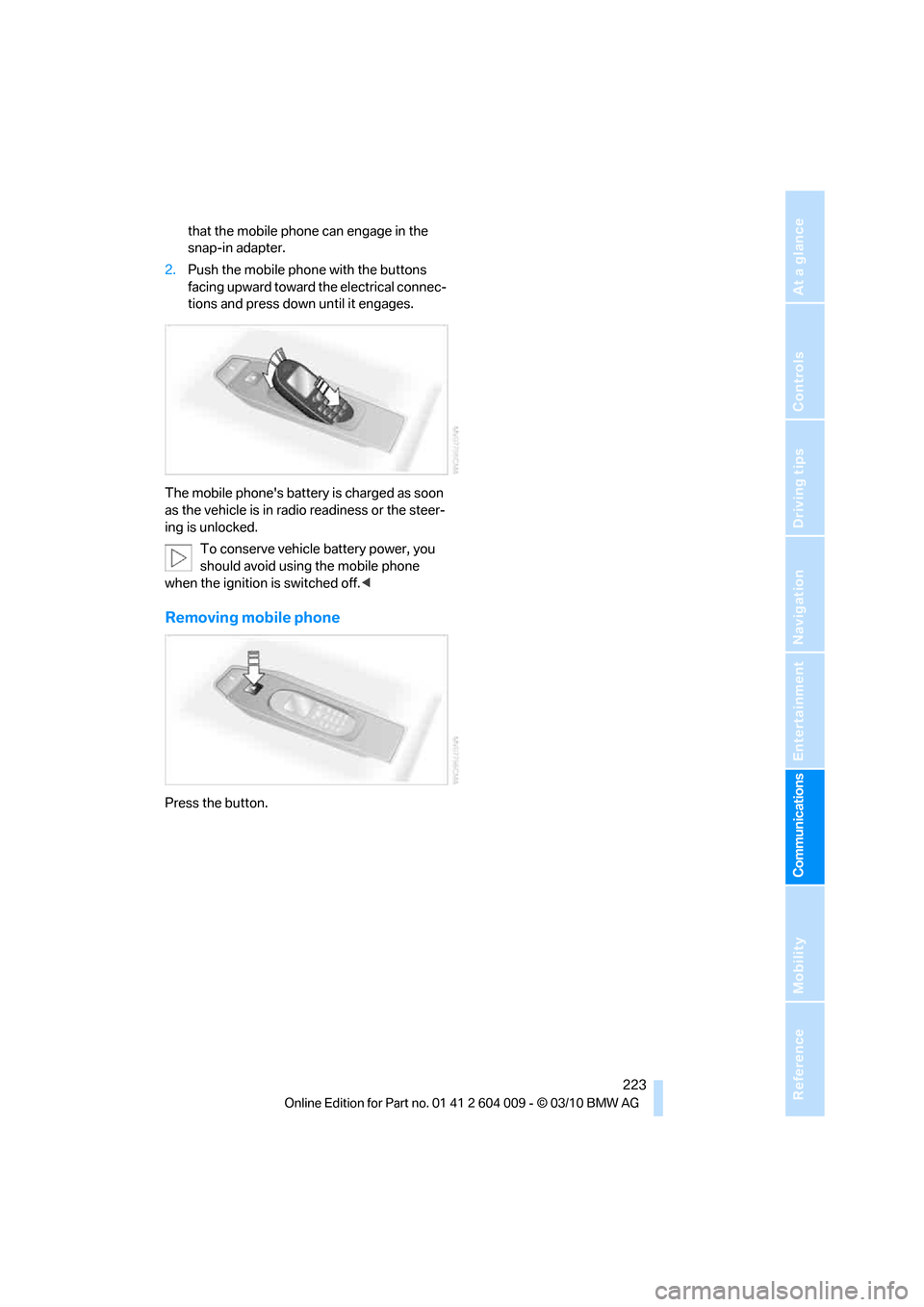
that the mobile phone can engage in the
snap-in adapter.
2.Push the mobile phone with the buttons
facing upward toward the electrical connec-
tions and press down until it engages.
The mobile phone's battery is charged as soon
as the vehicle is in radio readiness or the steer-
ing is unlocked.
To conserve vehicle battery power, you
should avoid using the mobile phone
when the ignition is switched off.<
Removing mobile phone
Press the button.
Page 296 of 312
Everything from A - Z
294 Breaking-in rear axle
differential138
Break-in period138
Brightness
– of Control Display86
– on Head-up Display109
Button for starting engine58
Buttons on steering wheel11
C
Calibrating driver's seat49
California Proposition 65
Warning6
Call
– accepting215
– ending216
– rejecting216
Calling, refer to Phone
numbers, dialing216
Calling, refer to the telephone
owner's manual
Camera
– refer to Rear view camera93
– refer to Top View90
Camera, Side View93
Can holder, refer to
Cupholders128
Capacities284
Capacity of cargo area283
Car battery, refer to Vehicle
battery270Care258
– car-care products258
– carpets260
– car washes258
– CD/DVD-player261
– chrome components259
– displays260
– exterior258
– fine wooden
components260
– hand washing259
– headlamps259
– high-pressure cleaning
jets259
– interior260
– leather260
– light-alloy wheels259
– paint259
– plastic components260
– rubber gaskets259
– running boards260
– safety belts260
– sensors and cameras260
– upholstery materials and
cloth-covered paneling260
– windows259
Cargo
– refer to Loading140
– securing142
– securing with ski bag135
Cargo area
– capacity283
– emergency actuation, refer
to Manually opening or
closing34
– emergency operation, refer
to Opening manually31
– expanding132
– opening
33
– opening/closing, refer to
Liftgate30,33
– opening/closing, refer to
Tailgate32
– opening from inside31
– opening from outside31
– opening with remote
control28
Cargo area, refer to Cargo
area131Cargo area cover, refer to
Luggage compartment
roller cover131
Caring for the vehicle
finish259
Car key, refer to Keys/remote
control26
Car phone
– installation location, refer to
Center armrest, front128
– refer to separate operating
instructions
Car phone, refer to
Telephone212
Car radio, refer to Radio171
Car wash258
– before driving in59
– with Comfort Access36
Car washes258
Catalytic converter, refer to
Hot exhaust system139
CBC Cornering Brake
Control95
CBS Condition Based
Service256
CD, audio playback180
CD, refer to Playing audio
tracks, DVD system in
rear202
CD/DVD changer
– magazine, loading183
CD-/DVD player in rear197
CD changer179,183
– controls168
– fast forward/reverse181
– random play sequence180
– selecting a track180
– switching on/off168
– tone control168
– volume168
CD player179
– controls168
– fast forward/reverse181
– random play sequence180
– selecting a track180
– switching on/off168
– tone control168
– volume168
Page 299 of 312
Reference 297
At a glance
Controls
Driving tips
Communications
Navigation
Entertainment
Mobility
DVD video181
Dynamic destination
guidance159
Dynamic Performance
Control97
Dynamic Stability Control
DSC95
Dynamic Traction, refer to
Dynamic Traction
Control96
Dynamic Traction Control
DTC96
E
Easy entry/exit53
Eject button, refer to Buttons
on the CD/DVD player168
Electrical malfunction
– door lock29
– driver's door29
– fuel filler flap234
– liftgate31
– parking brake62
Electric seat43
Electric steering wheel
adjustment53
Electronic brake-force
distribution95
Electronic oil level check253
Emergency operation, refer to
Manual operation
– door lock29
– driver's door29
– fuel filler flap234
– liftgate31
Emergency request273
Emergency services, refer to
Roadside Assistance274Engine
– breaking-in138
– data280
– oil temperature77
– overheated, refer to Coolant
temperature77
– speed280
– starting59
– starting, with Comfort
Access36
– switching off59
Engine compartment252
Engine coolant255
Engine oil
– adding254
– additives, refer to Approved
engine oils255
– approved engine oil255
– checking oil level253
– electronic oil level check253
– temperature77
Engine oil temperature77
Engine output, refer to Engine
data280
Engine speed280
Engine starting, refer to
Starting engine59
Entering special destinations
by name153
Entertainment sound output
on/off168
Entry map for destination154
Equalizer, tone setting169
ESP Electronic Stability
Program, refer to DSC
Dynamic Stability
Control95
Exhaust system, refer to Hot
exhaust system139
Extended connectivity of the
music player in the mobile
phone192Exterior mirrors51
– adjusting51
– automatic dimming
feature52
– automatic heating51
– folding in and out51
– tilting down passenger-side
exterior mirror52
External audio device128
External devices
– random sequence194
Eye for tow-starting and
towing, refer to Tow
fitting276
F
Failure messages, refer to
Check Control82
False alarm, refer to Avoiding
unintentional alarms35
Fastening safety belts, refer to
Safety belts48
– warning lamp48
Fastest route for
navigation158
Fast forward
– CD changer181
– CD player181
Fault displays, refer to Check
Control82
Filler neck for washer fluid67
First aid, refer to First-aid
kit273
First-aid kit273
Fixing system, adaptive133
Flashing during locking/
unlocking, refer to Setting
confirmation signals28
Flat tire
– changing wheels268
– compact wheel268
– Flat Tire Monitor99
– run-flat tires100,103,249
– TPM Tire Pressure
Monitor101
Flat Tire Monitor FTM99
Fluid reservoir, refer to Filler
neck for washer fluid67
Page 302 of 312
Everything from A - Z
300 LATCH child restraint fixing
system55
Leather care260
LEDs light-emitting
diodes263
Length, refer to
Dimensions281
License plate lamp, replacing
bulbs265,268
Liftgate30,33
– adjusting opening
height31,33
– automatic operation31
– closing31,33
– locking and unlocking from
inside30
– manually opening or
closing34
– opening33
– opening from inside31
– opening from outside31
– opening manually31
Light
– refer to High-beam
Assistant113
Light-emitting diodes
LEDs263
Lighter130
Lighter socket130
Lighting
– instruments115
– lamps and bulbs262
– of the vehicle, refer to
Lamps111
Light switch111
Load141
Loading140
– securing cargo142
– stowing cargo142
– vehicle140
Load securing equipment,
refer to Securing cargo142
Lock buttons in the doors,
refer to Locking30Locking
– from inside30
– setting confirmation
signals28
– using remote control28
– without key, refer to Comfort
Access35
Locking and unlocking doors
– from inside30
– setting confirmation
signals28
Locking without key, refer to
Comfort Access
35
Low beams111
– automatic111
Lower back support, refer to
Lumbar support44
Low-sulfur diesel235
Lug bolts269
– tightening torque, refer to
After mounting270
– wrench269
Luggage compartment
capacity, refer to Cargo area
capacity283
Luggage compartment roller
cover131
Luggage rack, refer to Roof-
mounted luggage rack143
Lumbar support44
M
M+S tires, refer to Winter
tires250
Main menu, iDrive17
Maintenance
– refer to Service and
Warranty Information
Booklet for US models256
– refer to Warranty and
Service Guide Booklet for
Canadian models256
Maintenance, refer to Service
requirements79
Maintenance system256Malfunction
– door lock29
– driver's door29
– fuel filler flap234
– liftgate31
– parking brake62
Malfunction warnings, refer to
Check Control82
Manual air distribution118
Manual mode, automatic
transmission with
Steptronic64
Manual operation
– door lock29
– driver's door29
– fuel filler flap234
Manual operation, Side
View92
Map display160
Map for navigation
– changing scale161
– entering destination154
Master key, refer to Keys/
remote control26
Maximum cooling119
Maximum speed
– for winter tires250
– with compact wheel270
Memory, refer to Seat, mirror
and steering wheel
memory44
Menus, refer to iDrive16
Messages218
Messages from the concierge
service219
Microfilter121
Microphone
– for mobile phone14
– for telephone14
– for voice activation
system14
Mirror dimming feature52
Page 303 of 312
Reference 301
At a glance
Controls
Driving tips
Communications
Navigation
Entertainment
Mobility
Mirrors51
– automatic curb monitor52
– exterior mirrors51
– folding in and out51
– heating51
– interior rearview mirror52
– memory, refer to Seat, mirror
and steering wheel
memory44
Mobile phone
– adjusting volume215
– connecting, refer to Mobile
phone, pairing212
– installation location, refer to
Center armrest, front128
– operation via iDrive215
– pairing212
– refer to separate operating
instructions
Mobile phone, refer to
Telephone212
Monitor, refer to iDrive16
Monitoring tire pressure, refer
to FTM Flat Tire Monitor99
MP3 player, connecting, refer
to AUX-IN connection192
MP3 player, connecting, refer
to USB audio interface192
Multichannel playback169
Multifunction steering wheel,
refer to Buttons on steering
wheel11
Multifunction switch
– refer to Turn signals/
headlamp flasher/high
beams65
– refer to Washer/wiper
system65
Music, managing190
Music, playing188
Music, storing187
Music collection187
– backup191
– delete191
– random sequence190
– restoring191
Music player, connecting,
refer to AUX-IN
connection192Music player, connecting,
refer to USB audio
interface192
Music search188
My Info219
N
Navigation
– starting destination
guidance after entering a
destination151
– storing current position151
– voice activation155
Navigation data148
Navigation destination
– entering manually149
– home address152
Navigation instructions, refer
to Switching voice
instructions on/off160Navigation system148
– address book151
– bypassing a route
section159
– continuing destination
guidance158
– destination entry149
– dynamic destination
guidance159
– entering a destination by
voice155
– entering a destination
manually149
– gas station
recommendations159
– planning a trip156
– questions about system165
– route list159
– selecting destination via
map154
– selecting route criteria158
– special destinations152
– starting destination
guidance158
– terminating destination
guidance158
– traffic bulletins161
– voice instructions160
– volume adjustment160
Neck support, refer to Head
restraints45
New remote control26
New wheels and tires249
North-facing map160
Nozzles, refer to Windshield
washer nozzles66
Nylon rope, refer to Tow-
starting and towing275
O
OBD socket257
Octane ratings, refer to Fuel
specifications235
Odometer76
Page 307 of 312
Reference 305
At a glance
Controls
Driving tips
Communications
Navigation
Entertainment
Mobility
Snow chains250
Socket for Onboard
Diagnostics interface257
Socket for remote control,
refer to Ignition lock58
Sockets, refer to Connecting
electrical devices130
Soft closure aid, refer to
Automatic soft closing30
Soot particle filter, refer to
Diesel particulate filter139
SOS, refer to
Initiating an emergency
request273
Spare fuses271
Spare remote control26
Spare wheel, refer to
Changing wheels268
Spare wheel, refer to Compact
wheel268
Special destinations152
Special oils, refer to Approved
engine oils255
Specified oil grades, refer to
Approved engine oils255
Speed
– with compact wheel270
– with winter tires250
Speed display, refer to
Speedometer12
Speed limit detection,
computer78
Speed limit warning, refer to
Speed limit84
Speedometer12
Speed Volume169
Split screen, refer to Control
Display, switching on/off19
Split screen content, refer to
Display for split screen
content, selecting19
Sport program, automatic
transmission with
Steptronic64
Stability control, refer to
Driving stability control
systems95
Start/Stop button58Starting, refer to Starting
engine59
Starting assistance, refer to
Jump starting274
Starting difficulties, jump
starting274
Starting off on slopes, refer to
Drive-off assistant99
State/province, for
navigation149
Station, selecting
– radio171
Status of this Owner's Manual
at time of printing5
Steam cleaners259
Steering wheel
– adjusting52
– automatic adjustment, refer
to Steering wheel
memory44
– buttons on steering
wheel11
– easy entry/exit53
– heating53
– memory44
Steering with variable ratio,
refer to Active steering105
Steptronic, refer to Sport
program and manual mode
M/S64
Storage compartments128
Stored trip, calling up157
Storing a destination in the
address book151
Storing a trip156
Storing sitting position, refer
to Seat, mirror and steering
wheel memory44
Storing tires250
Storing vehicle261
Storing your vehicle261
Street, entering,
navigation150
Summer tires, refer to Wheels
and tires239
Surround169
Surround View90
SVCD181
SW, waveband171Switches, refer to Cockpit10
Switching cooling function on
and off119
Switching off
– engine59
Switching on
– audio168
– CD changer168
– CD player168
– radio168
Swiveling headlamps, refer to
Adaptive Light Control112
Symbols4
– indicator/warning lamps13
– status information19
T
Tachometer77
Tailgate32
Tail lamps264,266
– replacing bulbs264,266
Tank contents, refer to
Capacities284
Target cursor for
navigation154
Technical alterations, refer to
For your own safety5
Technical data280
Telephone212
– voice commands219
Telephone, refer to separate
operating instructions
Teleservice Diagnosis228
Teleservice Help228
Temperature
– changing units of
measure86
– refer to Coolant
temperature77
– setting for automatic climate
control118,121
Temperature display
– outside temperature76
– setting units86
– temperature warning76
Temperature warning76
Tempomat, refer to Cruise
control67