wheel BMW X6 2012 E71 Workshop Manual
[x] Cancel search | Manufacturer: BMW, Model Year: 2012, Model line: X6, Model: BMW X6 2012 E71Pages: 312, PDF Size: 8.91 MB
Page 217 of 312
215
Entertainment
Reference
At a glance
Controls
Driving tips Communications
Navigation
Mobility
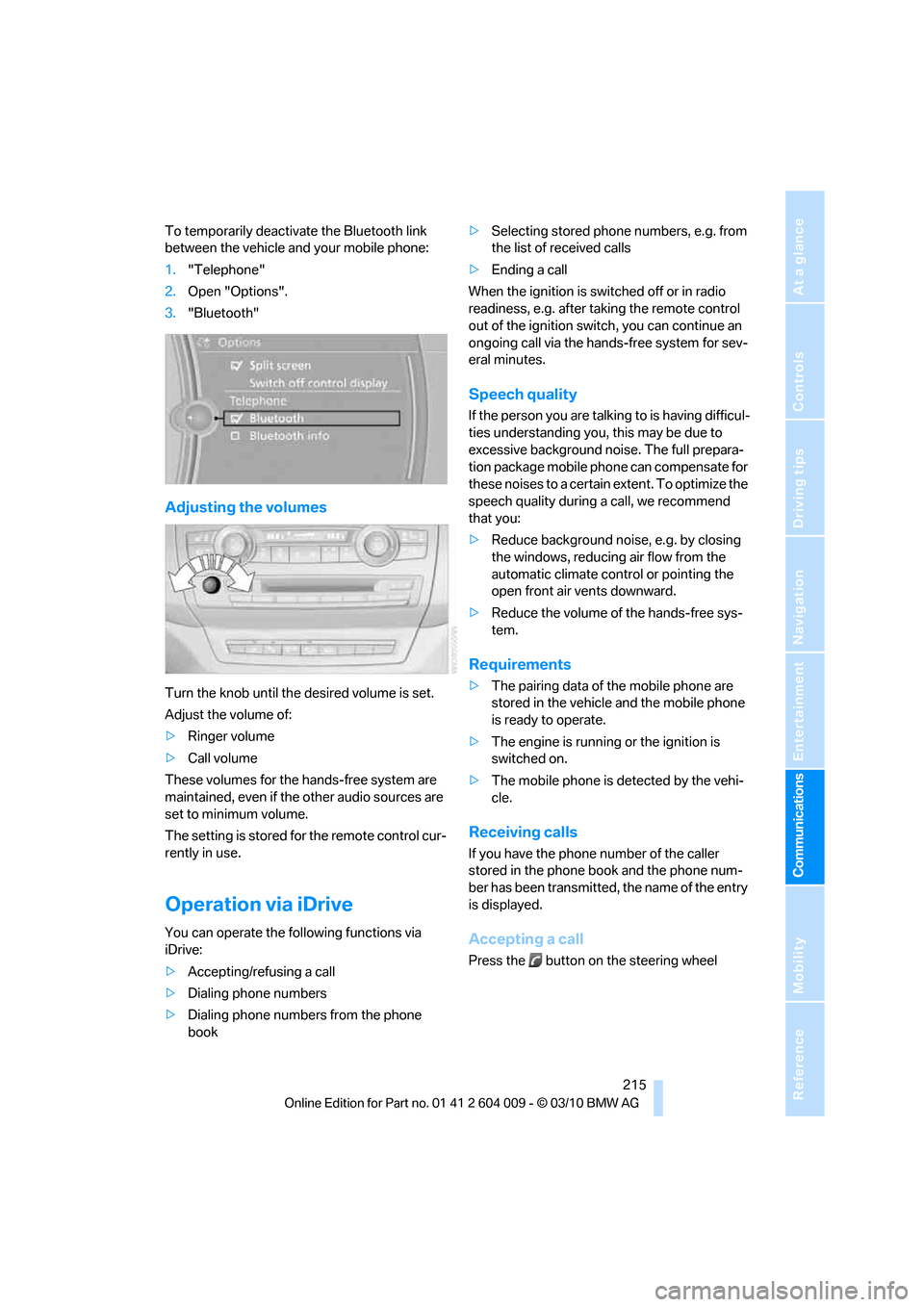
To temporarily deactivate the Bluetooth link
between the vehicle and your mobile phone:
1."Telephone"
2.Open "Options".
3."Bluetooth"
Adjusting the volumes
Turn the knob until the desired volume is set.
Adjust the volume of:
>Ringer volume
>Call volume
These volumes for the hands-free system are
maintained, even if the other audio sources are
set to minimum volume.
The setting is stored for the remote control cur-
rently in use.
Operation via iDrive
You can operate the following functions via
iDrive:
>Accepting/refusing a call
>Dialing phone numbers
>Dialing phone numbers from the phone
book>Selecting stored phone numbers, e.g. from
the list of received calls
>Ending a call
When the ignition is switched off or in radio
readiness, e.g. after taking the remote control
out of the ignition switch, you can continue an
ongoing call via the hands-free system for sev-
eral minutes.
Speech quality
If the person you are talking to is having difficul-
ties understanding you, this may be due to
excessive background noise. The full prepara-
tion package mobile phone can compensate for
these noises to a certain extent. To optimize the
speech quality during a call, we recommend
that you:
>Reduce background noise, e.g. by closing
the windows, reducing air flow from the
automatic climate control or pointing the
open front air vents downward.
>Reduce the volume of the hands-free sys-
tem.
Requirements
>The pairing data of the mobile phone are
stored in the vehicle and the mobile phone
is ready to operate.
>The engine is running or the ignition is
switched on.
>The mobile phone is detected by the vehi-
cle.
Receiving calls
If you have the phone number of the caller
stored in the phone book and the phone num-
ber has been transmitted, the name of the entry
is displayed.
Accepting a call
Press the button on the steering wheel
Page 218 of 312
Telephone
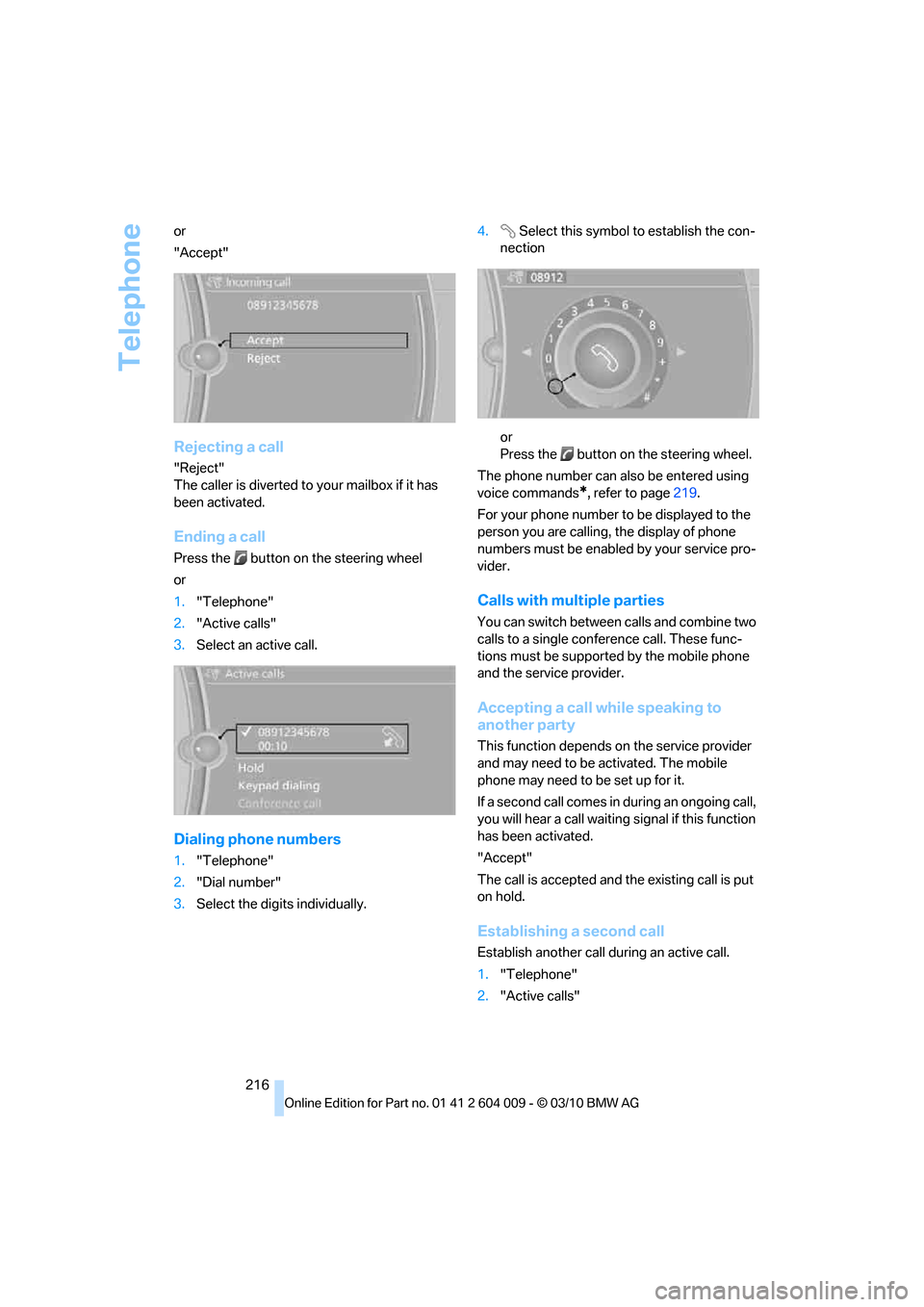
216 or
"Accept"
Rejecting a call
"Reject"
The caller is diverted to your mailbox if it has
been activated.
Ending a call
Press the button on the steering wheel
or
1."Telephone"
2."Active calls"
3.Select an active call.
Dialing phone numbers
1."Telephone"
2."Dial number"
3.Select the digits individually.4. Select this symbol to establish the con-
nection
or
Press the button on the steering wheel.
The phone number can also be entered using
voice commands
*, refer to page219.
For your phone number to be displayed to the
person you are calling, the display of phone
numbers must be enabled by your service pro-
vider.
Calls with multiple parties
You can switch between calls and combine two
calls to a single conference call. These func-
tions must be supported by the mobile phone
and the service provider.
Accepting a call while speaking to
another party
This function depends on the service provider
and may need to be activated. The mobile
phone may need to be set up for it.
If a second call comes in during an ongoing call,
you will hear a call waiting signal if this function
has been activated.
"Accept"
The call is accepted and the existing call is put
on hold.
Establishing a second call
Establish another call during an active call.
1."Telephone"
2."Active calls"
Page 221 of 312
219
Entertainment
Reference
At a glance
Controls
Driving tips Communications
Navigation
Mobility
My Info
To start destination guidance:
1.Select the message that contains the
desired destination.
2. "Start guidance" or "Add as another
dest.".
To dial the number in the message:
1.Select the message that contains the
desired number.
2. "Call"
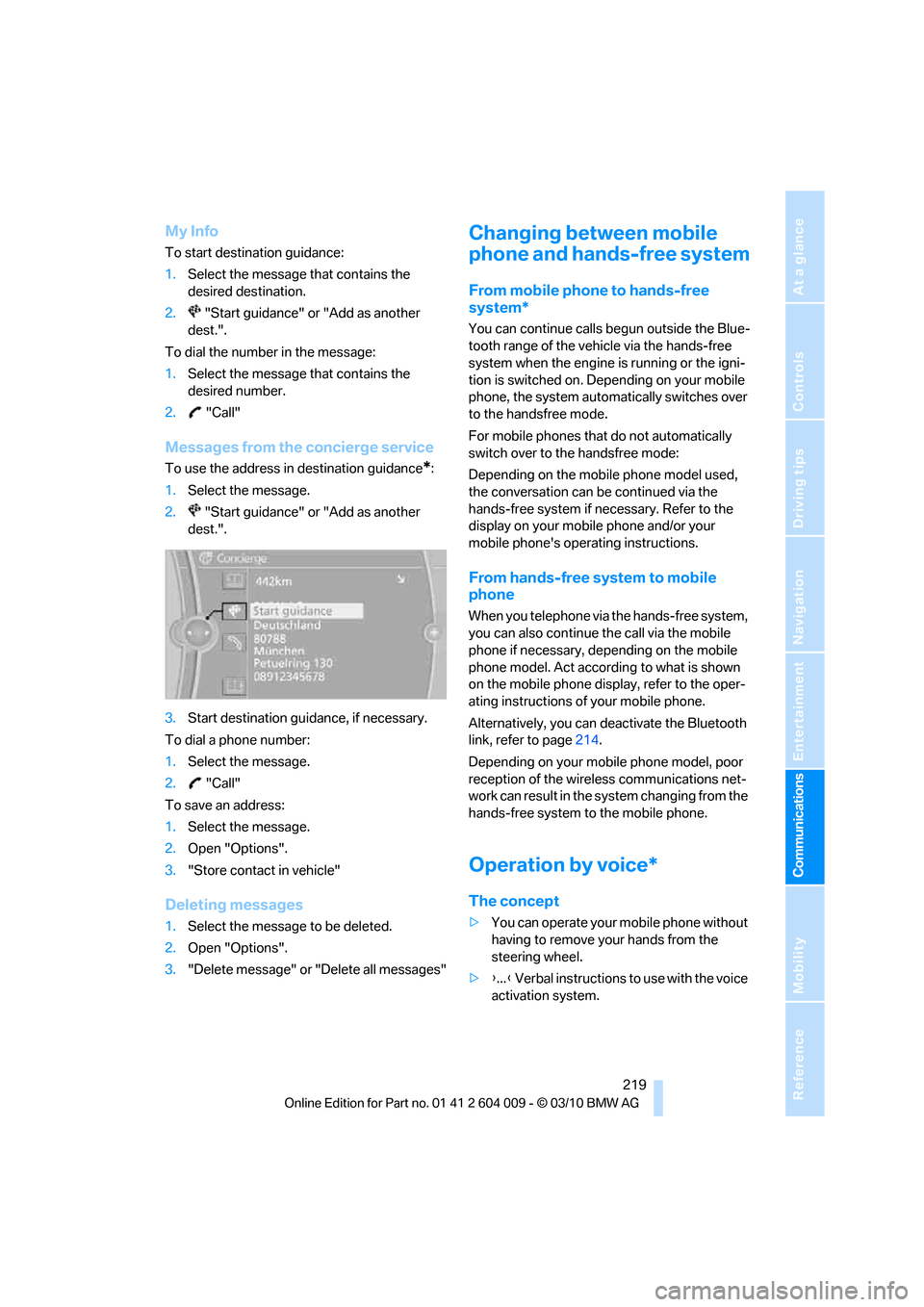
Messages from the concierge service
To use the address in destination guidance*:
1.Select the message.
2. "Start guidance" or "Add as another
dest.".
3.Start destination guidance, if necessary.
To dial a phone number:
1.Select the message.
2. "Call"
To save an address:
1.Select the message.
2.Open "Options".
3."Store contact in vehicle"
Deleting messages
1.Select the message to be deleted.
2.Open "Options".
3."Delete message" or "Delete all messages"
Changing between mobile
phone and hands-free system
From mobile phone to hands-free
system*
You can continue calls begun outside the Blue-
tooth range of the vehicle via the hands-free
system when the engine is running or the igni-
tion is switched on. Depending on your mobile
phone, the system automatically switches over
to the handsfree mode.
For mobile phones that do not automatically
switch over to the handsfree mode:
Depending on the mobile phone model used,
the conversation can be continued via the
hands-free system if necessary. Refer to the
display on your mobile phone and/or your
mobile phone's operating instructions.
From hands-free system to mobile
phone
When you telephone via the hands-free system,
you can also continue the call via the mobile
phone if necessary, depending on the mobile
phone model. Act according to what is shown
on the mobile phone display, refer to the oper-
ating instructions of your mobile phone.
Alternatively, you can deactivate the Bluetooth
link, refer to page214.
Depending on your mobile phone model, poor
reception of the wireless communications net-
work can result in the system changing from the
hands-free system to the mobile phone.
Operation by voice*
The concept
>You can operate your mobile phone without
having to remove your hands from the
steering wheel.
>{...} Verbal instructions to use with the voice
activation system.
Page 222 of 312
Telephone
220
Requirements
The same prerequisites as for operation via
iDrive apply, refer to page215.
Voice commands
Activating voice activation system
1.Briefly press the button on the steering
wheel.
An acoustic signal indicates that you can
say commands.
2.Say the command.
Ending/canceling operation by voice
commands
Press the button on the steering wheel
briefly
orIn dialogs where text is spoken, e.g. a name
rather than a command, canceling is only possi-
ble using the button on the steering wheel.
Having possible commands read aloud
The system understands default commands
that must be spoken word for word.
You can have the possible commands spoken
by the system at any point:
The system recognizes digits from zero to nine.
You can say each digit individually or group
them into a sequence to accelerate the input.
Using alternative commands
There are often a number of commands to run a
function, e.g.:
Example: dialing phone numbers
To start the dialog:
Press the button on the steering wheel.
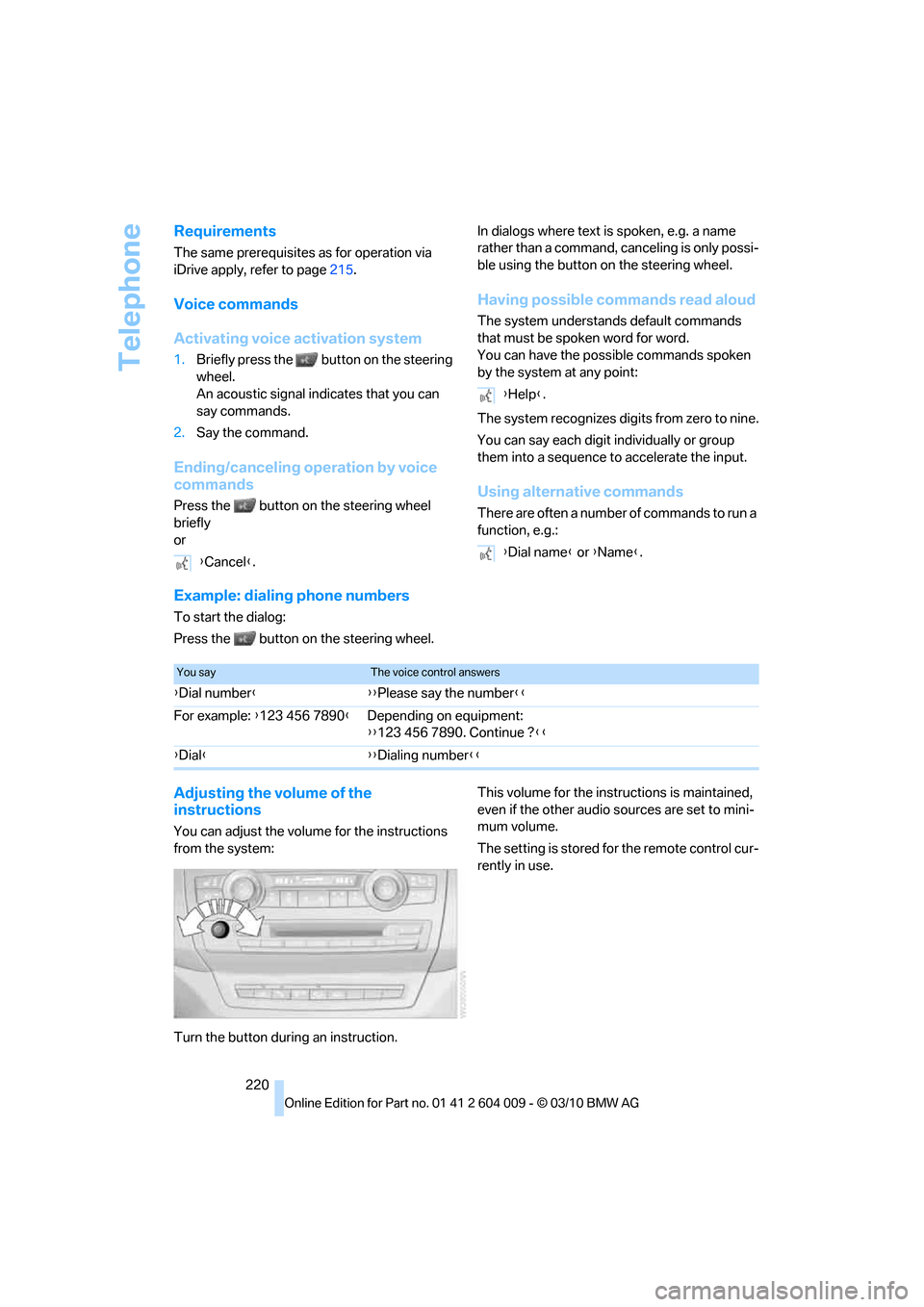
Adjusting the volume of the
instructions
You can adjust the volume for the instructions
from the system:
Turn the button during an instruction.This volume for the instructions is maintained,
even if the other audio sources are set to mini-
mum volume.
The setting is stored for the remote control cur-
rently in use. {Cancel}.
{Help}.
{Dial name} or {Name}.
You sayThe voice control answers
{Dial number}{{Please say the number}}
For example: {123 456 7890}Depending on equipment:
{{123 456 7890. Continue ?}}
{Dial}{{Dialing number}}
Page 235 of 312
Mobility
This section helps you maintain your
mobility by supplying important information
on vital topics including fuels and lubricants,
wheels and tires, service, maintenance
and roadside assistance.
Mobility
Page 241 of 312
Mobility
239Reference
At a glance
Controls
Driving tips
Communications
Navigation
Entertainment
Wheels and tires
Tire inflation pressure
Information for your safety
The condition of the tires and the maintenance
of the specified tire pressure are crucial not only
to the tire's service life, but also to driving com-
fort and most importantly, driving safety.
Checking pressure
Only check tire inflation pressure when the tires
are cold. This means after a maximum of
1.25 miles/2 km driving or when the vehicle has
been parked for at least 2 hours. When tires are
warm, the tire inflation pressure increases.
Check the tire inflation pressure regularly
and correct it as needed, even on the
compact tire
*: at least twice a month and before
starting long trips. If you fail to observe this pre-
caution, you may be driving on tires with incor-
rect tire pressures, a condition that can not only
compromise your vehicle's driving stability, but
also lead to tire damage and the risk of an acci-
dent. Do not drive with depressurized, i.e. flat
tires, except run-flat tires. A flat tire will seri-
ously impair your vehicle's handling and braking
response. Attempts to drive on a flat tire can
lead to a loss of control over the vehicle.<
After correcting the tire inflation pressure,
reinitialize the Flat Tire Monitor, refer to
page100, or reset the Tire Pressure Monitor,
refer to page102.<
Pressure specifications
The tables below provide all the correct inflation
pressures for the specified tire sizes at ambient
temperature.
The inflation pressures apply to the tire
sizes and tire brands respectively
approved and recommended by BMW; a list of
these is available from your BMW Sports Activ-
ity Vehicle Center.
ing:
>Tire sizes of your vehicle
>Load conditions
>Maximum allowable driving speed
Tire inflation pressures for speeds
up to 100 mph/160 km/h
For normal driving up to 100 mph/160 km/h,
adjust pressures to the respective tire inflation
pressures listed on the following pages in the
column Traveling speeds up to max. of
100 mph/160 km/h to achieve optimum driving
comfort.
These pressure specifications can be found on
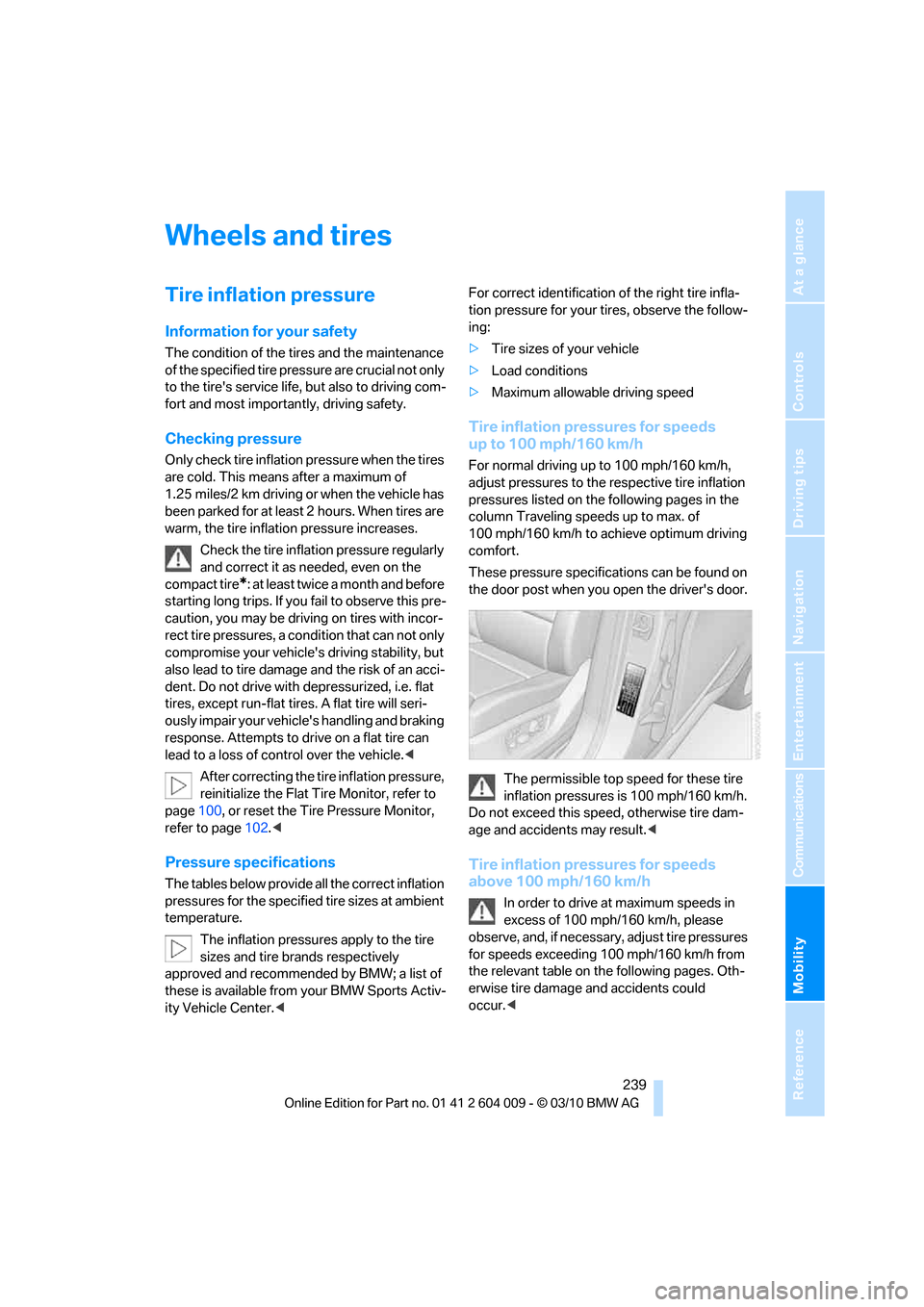
the door post when you open the driver's door.
The permissible top speed for these tire
inflation pressures is 100 mph/160 km/h.
Do not exceed this speed, otherwise tire dam-
age and accidents may result.<
Tire inflation pressures for speeds
above 100 mph/160 km/h
In order to drive at maximum speeds in
excess of 100 mph/160 km/h, please
observe, and, if necessary, adjust tire pressures
for speeds exceeding 100 mph/160 km/h from
the relevant table on the following pages. Oth-
erwise tire damage and accidents could
occur.<
Page 242 of 312

Wheels and tires
240 Observe all national and local maximum speed
limits, otherwise violations of the law could
occur.
Page 243 of 312
Mobility
241Reference
At a glance
Controls
Driving tips
Communications
Navigation
Entertainment
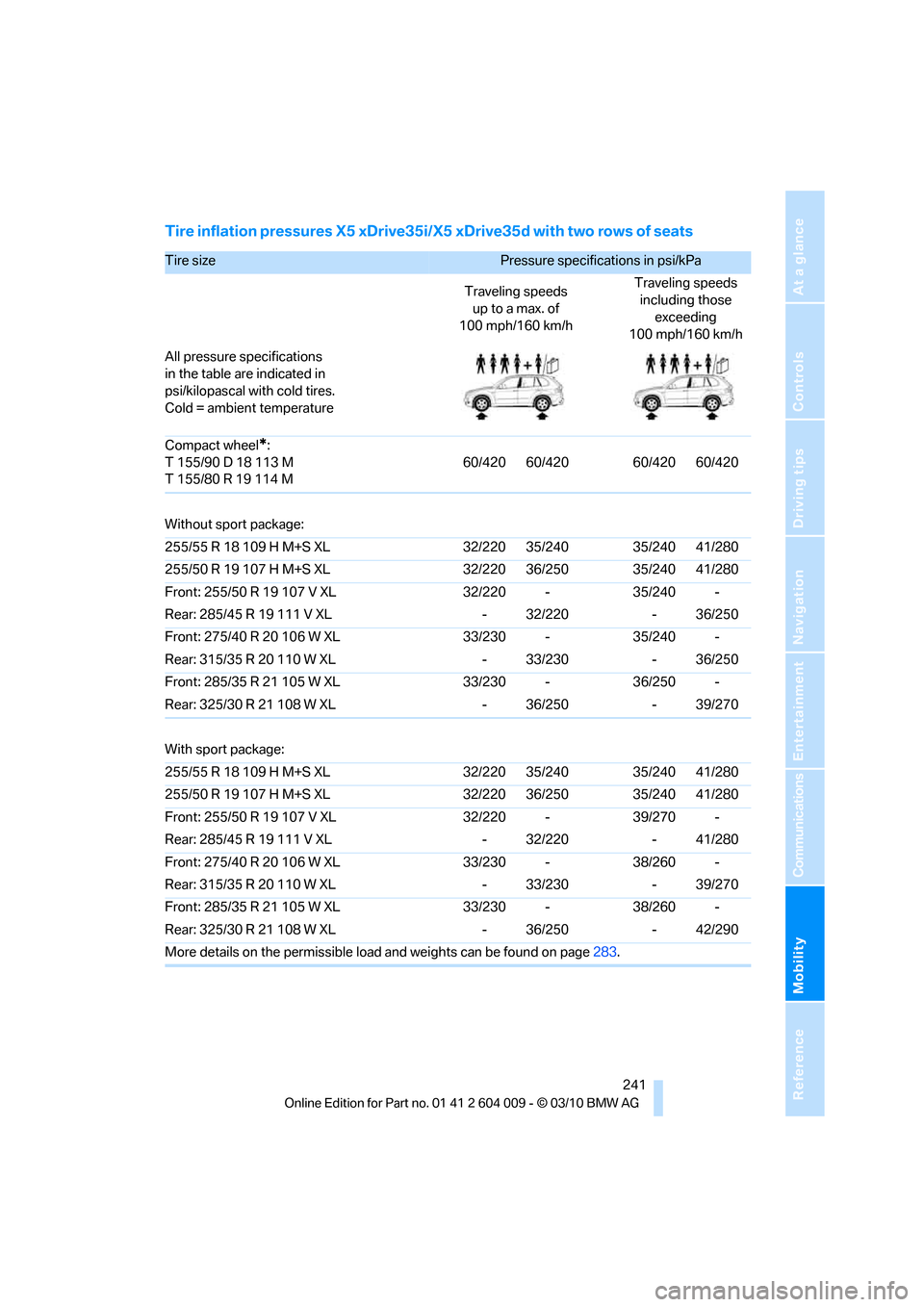
Tire inflation pressures X5 xDrive35i/X5 xDrive35d with two rows of seats
Tire size Pressure specifications in psi/kPa
Traveling speeds
up to a max. of
100 mph/160 km/hTraveling speeds
including those
exceeding
100 mph/160 km/h
All pressure specifications
in the table are indicated in
psi/kilopascal with cold tires.
Cold = ambient temperature
Compact wheel
*:
T 155/90 D 18 113 M
T 155/80 R 19 114 M60/420 60/420 60/420 60/420
Without sport package:
255/55 R 18 109 H M+S XL 32/220 35/240 35/240 41/280
255/50 R 19 107 H M+S XL 32/220 36/250 35/240 41/280
Front: 255/50 R 19 107 V XL 32/220 - 35/240 -
Rear: 285/45 R 19 111 V XL - 32/220 - 36/250
Front: 275/40 R 20 106 W XL 33/230 - 35/240 -
Rear: 315/35 R 20 110 W XL - 33/230 - 36/250
Front: 285/35 R 21 105 W XL 33/230 - 36/250 -
Rear: 325/30 R 21 108 W XL - 36/250 - 39/270
With sport package:
255/55 R 18 109 H M+S XL 32/220 35/240 35/240 41/280
255/50 R 19 107 H M+S XL 32/220 36/250 35/240 41/280
Front: 255/50 R 19 107 V XL 32/220 - 39/270 -
Rear: 285/45 R 19 111 V XL - 32/220 - 41/280
Front: 275/40 R 20 106 W XL 33/230 - 38/260 -
Rear: 315/35 R 20 110 W XL - 33/230 - 39/270
Front: 285/35 R 21 105 W XL 33/230 - 38/260 -
Rear: 325/30 R 21 108 W XL - 36/250 - 42/290
More details on the permissible load and weights can be found on page283.
Page 244 of 312
Wheels and tires
242
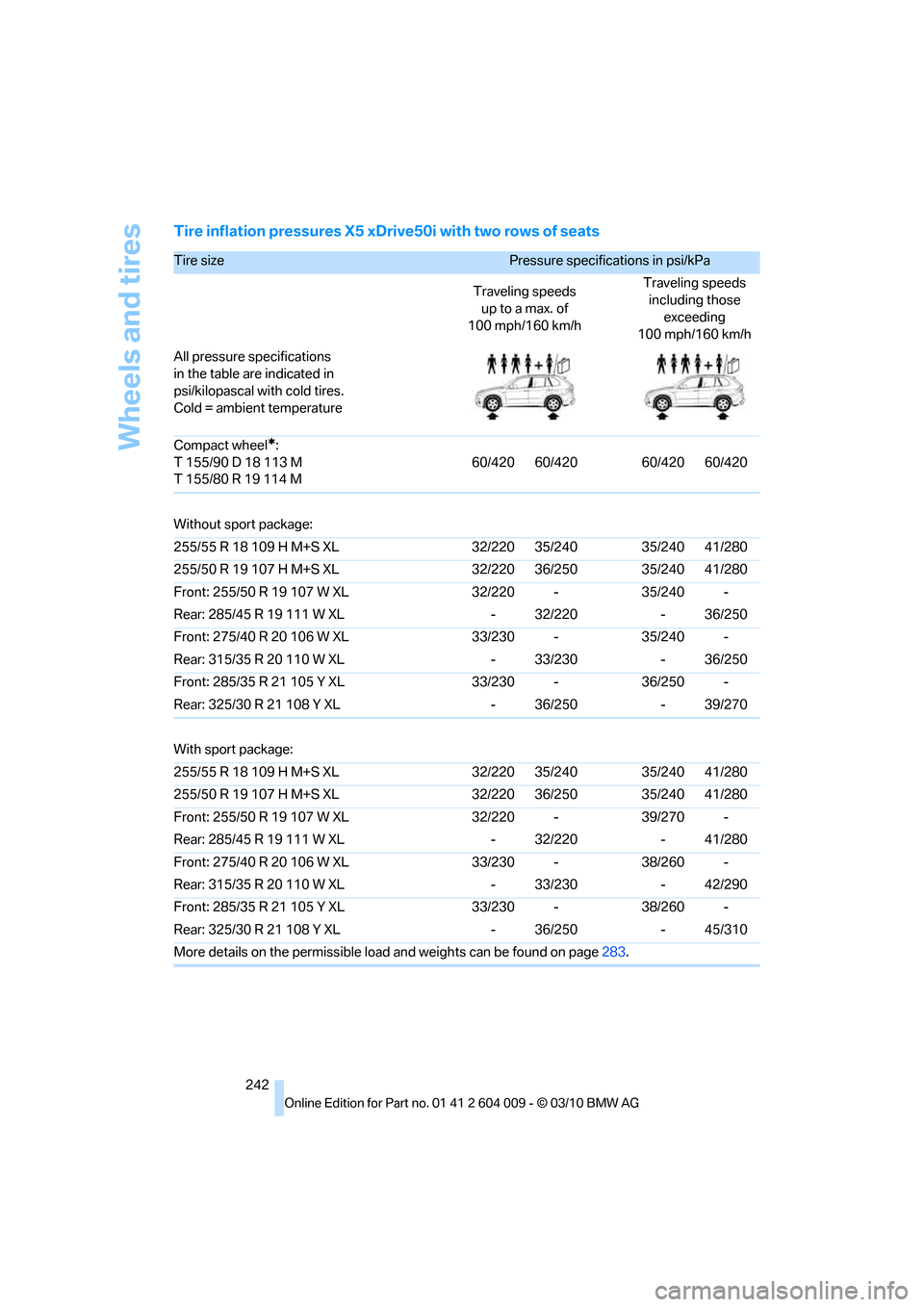
Tire inflation pressures X5 xDrive50i with two rows of seats
Tire size Pressure specifications in psi/kPa
Traveling speeds
up to a max. of
100 mph/160 km/hTraveling speeds
including those
exceeding
100 mph/160 km/h
All pressure specifications
in the table are indicated in
psi/kilopascal with cold tires.
Cold = ambient temperature
Compact wheel
*:
T 155/90 D 18 113 M
T 155/80 R 19 114 M60/420 60/420 60/420 60/420
Without sport package:
255/55 R 18 109 H M+S XL 32/220 35/240 35/240 41/280
255/50 R 19 107 H M+S XL 32/220 36/250 35/240 41/280
Front: 255/50 R 19 107 W XL 32/220 - 35/240 -
Rear: 285/45 R 19 111 W XL - 32/220 - 36/250
Front: 275/40 R 20 106 W XL 33/230 - 35/240 -
Rear: 315/35 R 20 110 W XL - 33/230 - 36/250
Front: 285/35 R 21 105 Y XL 33/230 - 36/250 -
Rear: 325/30 R 21 108 Y XL - 36/250 - 39/270
With sport package:
255/55 R 18 109 H M+S XL 32/220 35/240 35/240 41/280
255/50 R 19 107 H M+S XL 32/220 36/250 35/240 41/280
Front: 255/50 R 19 107 W XL 32/220 - 39/270 -
Rear: 285/45 R 19 111 W XL - 32/220 - 41/280
Front: 275/40 R 20 106 W XL 33/230 - 38/260 -
Rear: 315/35 R 20 110 W XL - 33/230 - 42/290
Front: 285/35 R 21 105 Y XL 33/230 - 38/260 -
Rear: 325/30 R 21 108 Y XL - 36/250 - 45/310
More details on the permissible load and weights can be found on page283.
Page 246 of 312
Wheels and tires
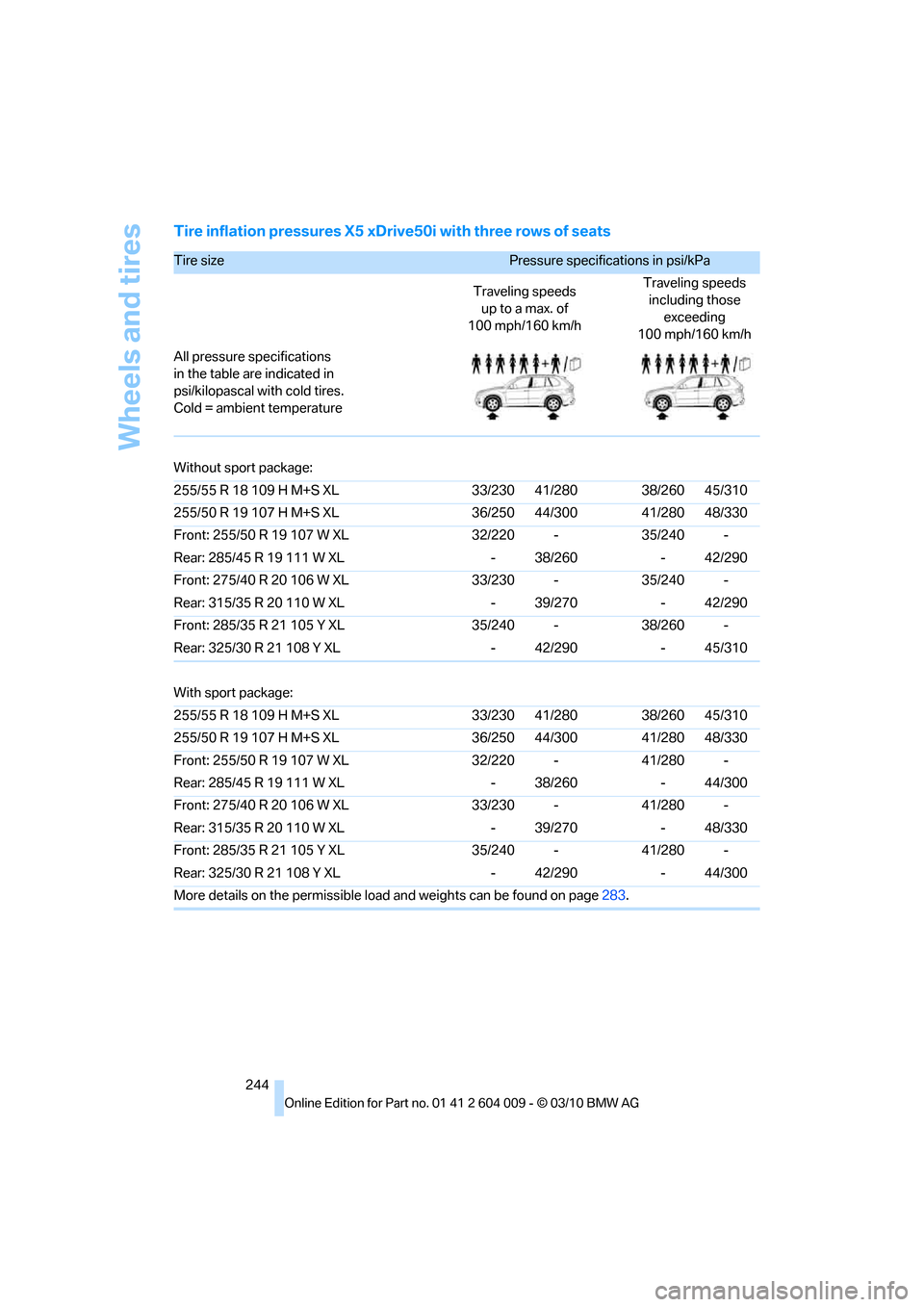
244
Tire inflation pressures X5 xDrive50i with three rows of seats
Tire size Pressure specifications in psi/kPa
Traveling speeds
up to a max. of
100 mph/160 km/hTraveling speeds
including those
exceeding
100 mph/160 km/h
All pressure specifications
in the table are indicated in
psi/kilopascal with cold tires.
Cold = ambient temperature
Without sport package:
255/55 R 18 109 H M+S XL 33/230 41/280 38/260 45/310
255/50 R 19 107 H M+S XL 36/250 44/300 41/280 48/330
Front: 255/50 R 19 107 W XL 32/220 - 35/240 -
Rear: 285/45 R 19 111 W XL - 38/260 - 42/290
Front: 275/40 R 20 106 W XL 33/230 - 35/240 -
Rear: 315/35 R 20 110 W XL - 39/270 - 42/290
Front: 285/35 R 21 105 Y XL 35/240 - 38/260 -
Rear: 325/30 R 21 108 Y XL - 42/290 - 45/310
With sport package:
255/55 R 18 109 H M+S XL 33/230 41/280 38/260 45/310
255/50 R 19 107 H M+S XL 36/250 44/300 41/280 48/330
Front: 255/50 R 19 107 W XL 32/220 - 41/280 -
Rear: 285/45 R 19 111 W XL - 38/260 - 44/300
Front: 275/40 R 20 106 W XL 33/230 - 41/280 -
Rear: 315/35 R 20 110 W XL - 39/270 - 48/330
Front: 285/35 R 21 105 Y XL 35/240 - 41/280 -
Rear: 325/30 R 21 108 Y XL - 42/290 - 44/300
More details on the permissible load and weights can be found on page283.