Glove BMW X6 2012 E71 Owner's Manual
[x] Cancel search | Manufacturer: BMW, Model Year: 2012, Model line: X6, Model: BMW X6 2012 E71Pages: 312, PDF Size: 8.91 MB
Page 17 of 312
At a glance
15Reference
Controls
Driving tips
Communications
Navigation
Entertainment
Mobility
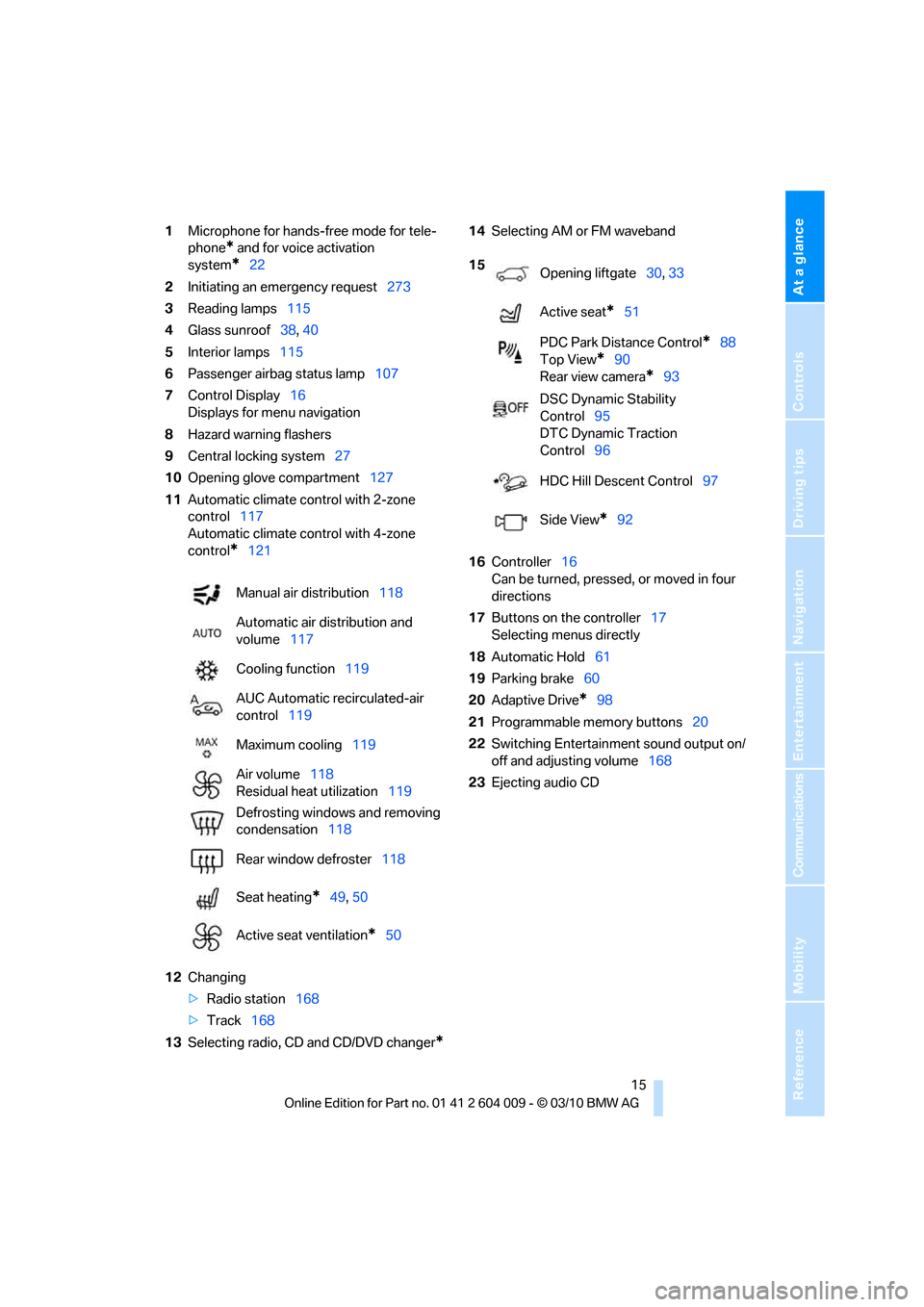
1Microphone for hands-free mode for tele-
phone
* and for voice activation
system
*22
2Initiating
an emergency request273
3Reading lamps115
4Glass sunroof38, 40
5Interior lamps115
6Passenger airbag status lamp107
7Control Display16
Displays for menu navigation
8Hazard warning flashers
9Central locking system27
10Opening glove compartment127
11Automatic climate control with 2-zone
control117
Automatic climate control with 4-zone
control
*121
12Changing
>Radio station168
>Track168
13Selecting radio, CD and CD/DVD changer
*
14Selecting AM or FM waveband
16Controller16
Can be turned, pressed, or moved in four
directions
17Buttons on the controller17
Selecting menus directly
18Automatic Hold61
19Parking brake60
20Adaptive Drive
*98
21Programmable memory buttons20
22Switching Entertainment sound output on/
off and adjusting volume168
23Ejecting audio CD Manual air distribution118
Automatic air distribution and
volume117
Cooling function119
AUC Automatic recirculated-air
control119
Maximum cooling119
Air volume118
Residual heat utilization119
Defrosting windows and removing
condensation118
Rear window defroster118
Seat heating
*49, 50
Active seat ventilation
*50
15
Opening liftgate30, 33
Active seat
*51
PDC Park Distance Control
*88
Top View
*90
Rear view camera
*93
DSC Dynamic Stability
Control95
DTC Dynamic Traction
Control96
HDC Hill Descent Control97
Side View
*92
Page 22 of 312
iDrive
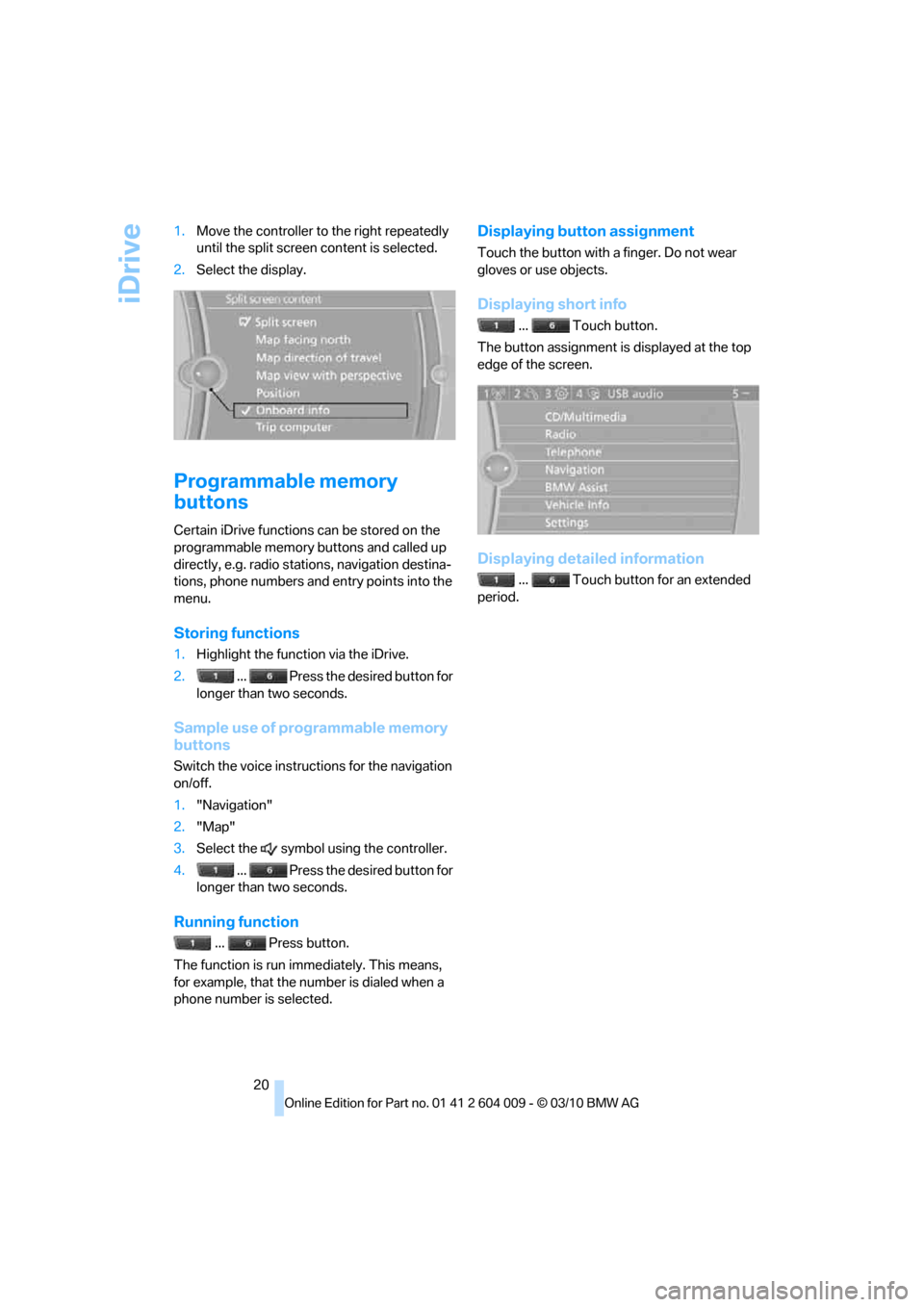
20 1.Move the controller to the right repeatedly
until the split screen content is selected.
2.Select the display.
Programmable memory
buttons
Certain iDrive functions can be stored on the
programmable memory buttons and called up
directly, e.g. radio stations, navigation destina-
tions, phone numbers and entry points into the
menu.
Storing functions
1.Highlight the function via the iDrive.
2. ... Press the desired button for
longer than two seconds.
Sample use of programmable memory
buttons
Switch the voice instructions for the navigation
on/off.
1."Navigation"
2."Map"
3.Select the symbol using the controller.
4. ... Press the desired button for
longer than two seconds.
Running function
... Press button.
The function is run immediately. This means,
for example, that the number is dialed when a
phone number is selected.
Displaying button assignment
Touch the button with a finger. Do not wear
gloves or use objects.
Displaying short info
... Touch button.
The button assignment is displayed at the top
edge of the screen.
Displaying detailed information
... Touch button for an extended
period.
Page 129 of 312
Controls
127Reference
At a glance
Driving tips
Communications
Navigation
Entertainment
Mobility
Procedure
1.Make sure that there are no large metal
objects or overhead power lines in the vicin-
ity of your vehicle and that you have enough
space to drive in a circle.
2.Enter the currently applicable compass
zone.
3.Press the adjustment button for approx. 6-
7 seconds to display C. Then drive in a
complete circle at least once at a maximum
speed of 4 mph/7 km/h.
If the calibration is successful, display C is
replaced with the points of the compass.
Setting right/left-hand drive vehicle
Your digital compass is already set to right or
left-hand drive vehicle to match your vehicle at
the factory.
Setting language
You can set the language of the display:
Press the adjustment button for approx. 12-
13 seconds. Briefly press the adjustment but-
ton again to change between English "E" and
German "O".
The setting is automatically stored after approx.
10 seconds.
Roller sun blinds for rear side
windows*
Pull the loop of the roller sun blind and hook
onto bracket.
Do not open the window with the roller
blind raised, as otherwise there is a dan-
ger of damage, and therefore a danger of inju-
ries at higher speeds.<
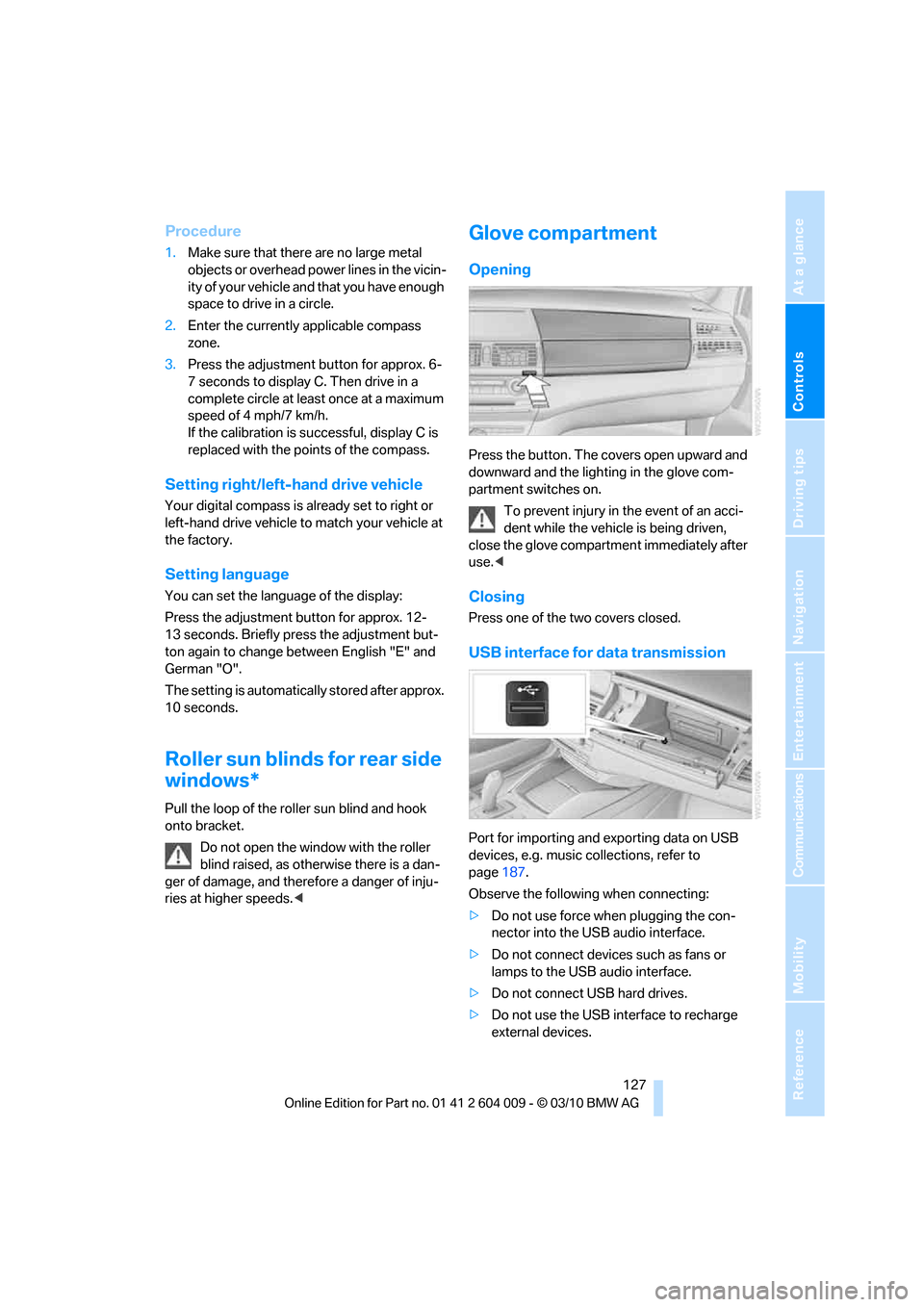
Glove compartment
Opening
Press the button. The covers open upward and
downward and the lighting in the glove com-
partment switches on.
To prevent injury in the event of an acci-
dent while the vehicle is being driven,
close the glove compartment immediately after
use.<
Closing
Press one of the two covers closed.
USB interface for data transmission
Port for importing and exporting data on USB
devices, e.g. music collections, refer to
page187.
Observe the following when connecting:
>Do not use force when plugging the con-
nector into the USB audio interface.
>Do not connect devices such as fans or
lamps to the USB audio interface.
>Do not connect USB hard drives.
>Do not use the USB interface to recharge
external devices.
Page 185 of 312
Navigation
Entertainment
Driving tips
183Reference
At a glance
Controls
Communications
Mobility
4."Zoom mode"
Selecting title
DVD video:
1.Turn the controller when the DVD menu is
displayed.
2.Open "Options".
3."Additional options"
4."Select title"
5.Select the desired track.
VCD/SVCD:
1."Select track"
2.Select the desired track.
Camera angle*
The camera angle depends on the DVD.
1.Turn the controller during playback.
2.Open "Options".
3."Additional options"
4."Viewing angle"
5.Select the desired camera angle.
Opening the main menu, back
These functions are not contained on every
DVD. Therefore, they may not be available for
use.
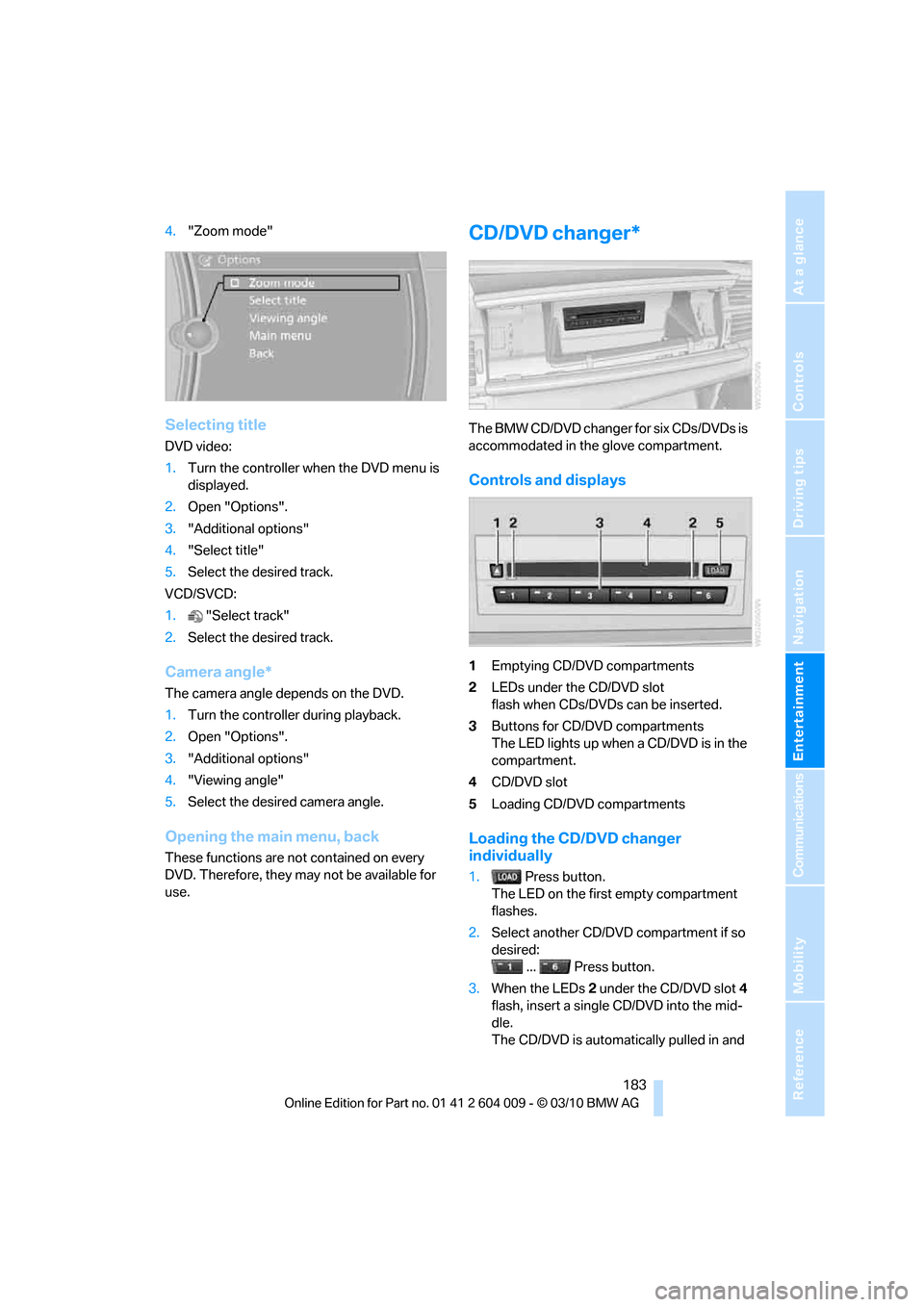
CD/DVD changer*
The BMW CD/DVD changer for six CDs/DVDs is
accommodated in the glove compartment.
Controls and displays
1Emptying CD/DVD compartments
2LEDs under the CD/DVD slot
flash when CDs/DVDs can be inserted.
3Buttons for CD/DVD compartments
The LED lights up when a CD/DVD is in the
compartment.
4CD/DVD slot
5Loading CD/DVD compartments
Loading the CD/DVD changer
individually
1. Press button.
The LED on the first empty compartment
flashes.
2.Select another CD/DVD compartment if so
desired:
... Press button.
3.When the LEDs 2 under the CD/DVD slot4
flash, insert a single CD/DVD into the mid-
dle.
The CD/DVD is automatically pulled in and
Page 190 of 312
Music collection
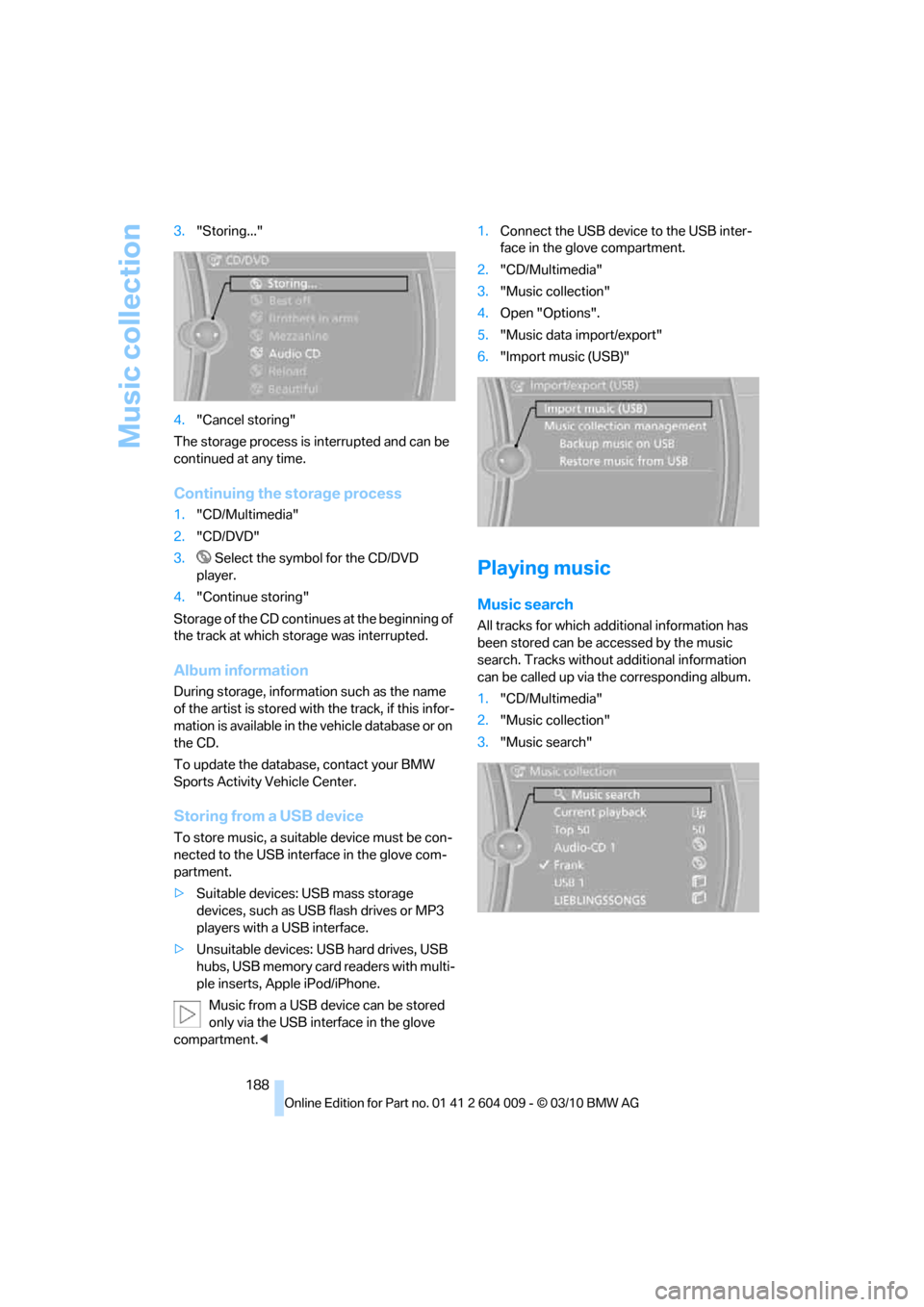
188 3."Storing..."
4."Cancel storing"
The storage process is interrupted and can be
continued at any time.
Continuing the storage process
1."CD/Multimedia"
2."CD/DVD"
3. Select the symbol for the CD/DVD
player.
4."Continue storing"
Storage of the CD continues at the beginning of
the track at which storage was interrupted.
Album information
During storage, information such as the name
of the artist is stored with the track, if this infor-
mation is available in the vehicle database or on
the CD.
To update the database, contact your BMW
Sports Activity Vehicle Center.
Storing from a USB device
To store music, a suitable device must be con-
nected to the USB interface in the glove com-
partment.
>Suitable devices: USB mass storage
devices, such as USB flash drives or MP3
players with a USB interface.
>Unsuitable devices: USB hard drives, USB
hubs, USB memory card readers with multi-
ple inserts, Apple iPod/iPhone.
Music from a USB device can be stored
only via the USB interface in the glove
compartment.<1.Connect the USB device to the USB inter-
face in the glove compartment.
2."CD/Multimedia"
3."Music collection"
4.Open "Options".
5."Music data import/export"
6."Import music (USB)"
Playing music
Music search
All tracks for which additional information has
been stored can be accessed by the music
search. Tracks without additional information
can be called up via the corresponding album.
1."CD/Multimedia"
2."Music collection"
3."Music search"
Page 193 of 312
Navigation
Entertainment
Driving tips
191Reference
At a glance
Controls
Communications
Mobility
Music collection
Backing up the music collection
The entire music collection can be stored on a
USB medium. Make sure there is enough free
memory capacity on the USB device.
Depending on the number of tracks, backing up
the music collection may take several hours.
Therefore, it is best to perform the backup dur-
ing a long trip.
1.Start the engine.
2.Connect the USB device to the USB inter-
face in the glove compartment, refer to
page127.
3."CD/Multimedia"
4."Music collection"
5.Open "Options".
6."Music data import/export"
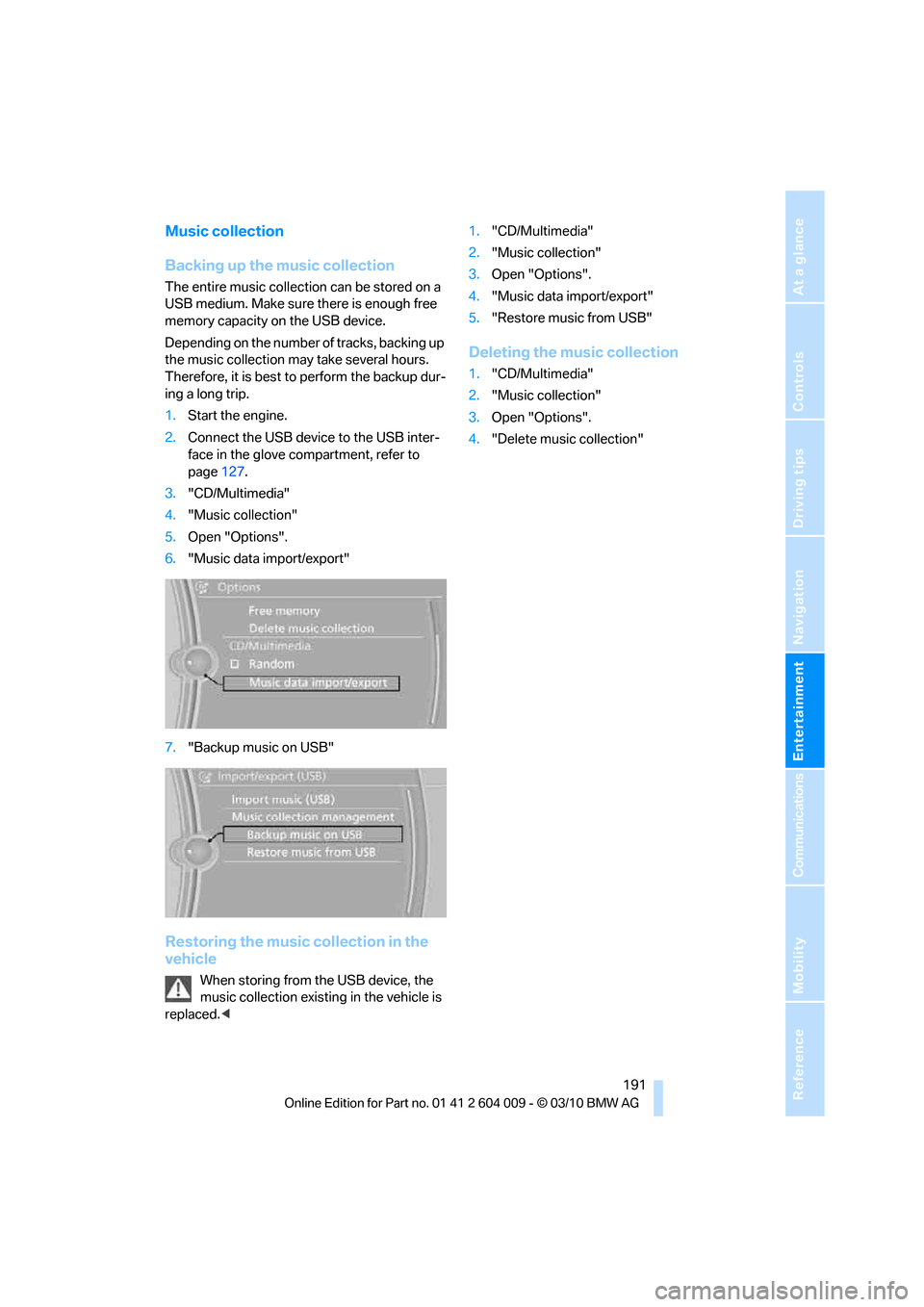
7."Backup music on USB"
Restoring the music collection in the
vehicle
When storing from the USB device, the
music collection existing in the vehicle is
replaced.<1."CD/Multimedia"
2."Music collection"
3.Open "Options".
4."Music data import/export"
5."Restore music from USB"
Deleting the music collection
1."CD/Multimedia"
2."Music collection"
3.Open "Options".
4."Delete music collection"
Page 239 of 312
Mobility
237Reference
At a glance
Controls
Driving tips
Communications
Navigation
Entertainment
Have diesel exhaust fluid refilled
Your BMW Sports Activity Vehicle Center refills
the diesel exhaust fluid as part of the regular
maintenance. If you adhere to this maintenance
schedule, it is usually not necessary to refill any
fluids between the maintenance dates.
Under certain circumstances, e.g. due to a par-
ticularly sporty driving style or operation of the
vehicle at high altitudes, it may be necessary to
refill fluids between maintenance dates.
As soon as the reserve display has appeared in
the instrument panel, have the diesel exhaust
fluid refilled to prevent the engine from being
unable to restart.
You can have the fluid refilled by a BMW Sports
Activity Vehicle Center.
Diesel exhaust fluid at low
temperatures
Due to its physical properties, it may be
necessary to replenish the level of diesel
exhaust fluid at temperatures below +237/
-56 even between the regular maintenance
intervals.
If the fluid needs to be refilled, this will be indi-
cated with the reserve display in the instrument
panel, refer to page236.<
Only refill the diesel exhaust fluid
yourself in exceptional circumstances
In order to get your vehicle to reach the nearest
BMW Sports Activity Vehicle Center, you may
refill the diesel exhaust fluid yourself, making
sure to heed the warning notices.
Do not allow diesel exhaust fluid to come
into contact with you. This can lead to
skin and eye irritation. Wear protective goggles
and gloves as needed. Follow the safety
instructions on the bottle.
When opening the bottle or reservoir, pungent
smelling vapors can escape. Before refilling,
close the vehicle completely so that the vapors
do not get into the interior of the vehicle. When
handling diesel exhaust fluid in enclosed
spaces, make sure to have sufficient ventilation.
After handling diesel exhaust fluid, wash hands
thoroughly. Failure to do so may lead to irrita-tion, e.g. due to inadvertent contact with the
eyes.
If eye irritation occurs, immediately rinse eyes
with ample water and contact a doctor if neces-
sary.
If diesel exhaust fluid comes into contact with
surfaces of your vehicle, rinse the affected sur-
faces with water or else damage may occur.
Keep diesel exhaust fluid out of reach of chil-
dren.<
Suitable diesel exhaust fluid
>Preferred: BMW Diesel Exhaust Fluid.
This bottle and its special adapter permit
convenient refilling with diesel exhaust
fluid.
>Alternative: NOx reduction agent AUS 32
You can get diesel exhaust fluid at your BMW
Sports Activity Vehicle Center.
Refilling quantity
Refilling quantity at the start of the reserve dis-
play: approx. 0.75 gallons/2.7 liters
Open reservoir for diesel exhaust fluid
1.Open hood, refer to page251.
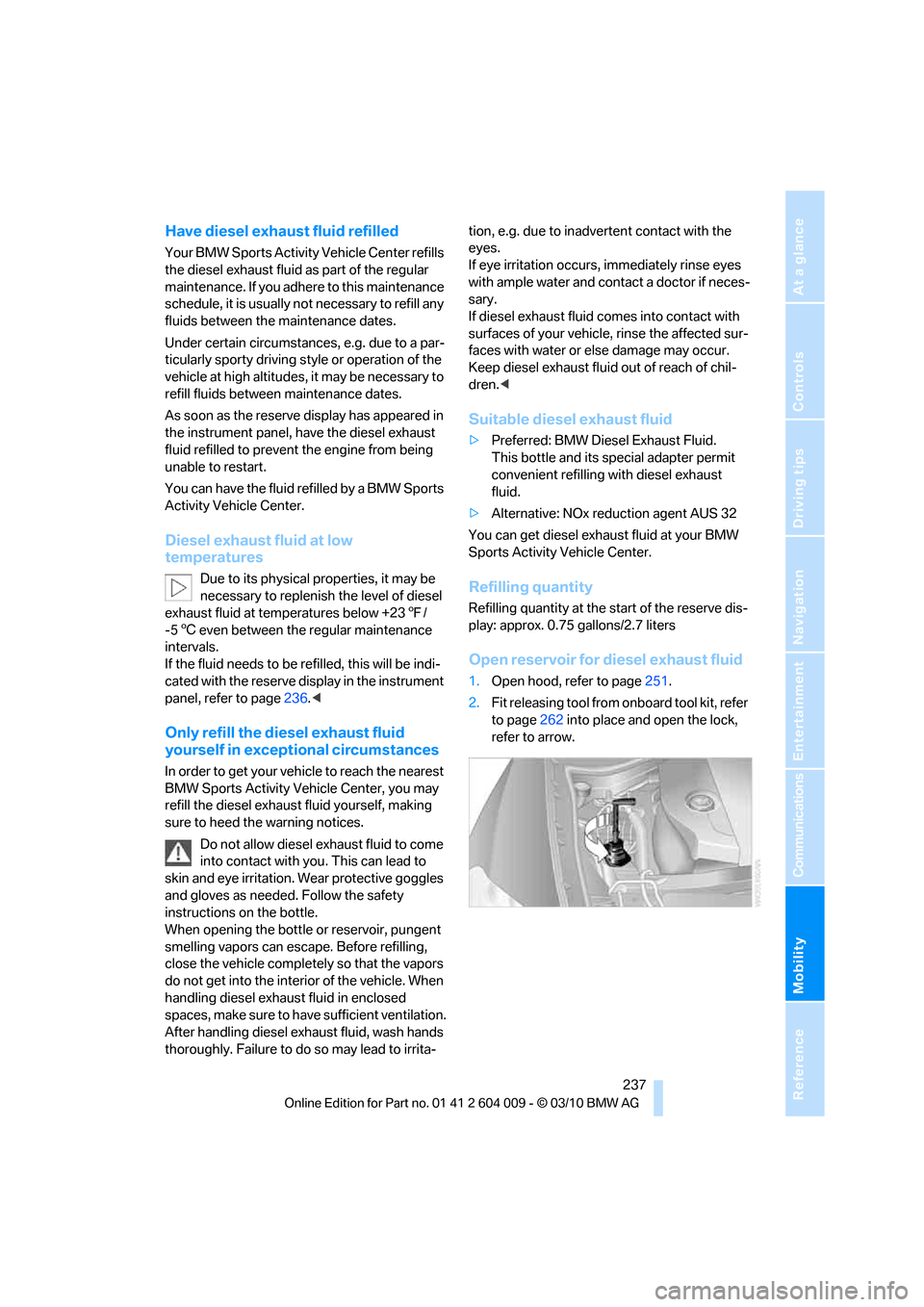
2.Fit releasing tool from onboard tool kit, refer
to page262 into place and open the lock,
refer to arrow.
Page 265 of 312
Mobility
263Reference
At a glance
Controls
Driving tips
Communications
Navigation
Entertainment
When performing care and maintenance on the
headlamps, please observe the information on
page259.
For bulbs for which replacement is not
described and for checking and adjusting
headlamp aim, please contact your BMW
Sports Activity Vehicle Center.<
Light-emitting diodes LEDs
Light-emitting diodes installed behind translu-
c e n t l e n s e s s e r v e a s t h e l i g h t s o u r c e f o r m a n y o f
the controls and displays in your vehicle. These
light-emitting diodes, which operate using a
concept similar to that applied in conventional
lasers, are officially designated as Class 1 light-
emitting diodes.
Do not remove the covers, and never
stare into the unfiltered light for several
hours, as irritation of the retina could result.<
Headlamp glass
Condensation can form on the inside of the
external lamps in cool or humid weather. When
the light is switched on, the condensation evap-
orates after a short time. The headlamp glasses
do not need to be changed.
If there is a large amount of moisture, for exam-
ple if water droplets form in the lamp, have it
checked by your BMW Sports Activity Vehicle
Center.
BMW X5: changing lamps
Xenon lamps
These bulbs have a very long service life and
the probability of a failure is very low. If a lamp
should nevertheless fail, you can continue driv-
ing cautiously with fog lamps
* provided that
this is permitted by the country-specific laws.
Have work on the xenon light unit includ-
ing changing the bulb carried out only by
your BMW Sports Activity Vehicle Center or a
workshop that works according to BMW repair
procedures with correspondingly trained per-
sonnel. Due to the high voltage present in the system, there is a danger of fatal injuries when
work is carried out improperly.<
Halogen bulbs:
Parking lamps and roadside parking
lamps, daytime driving lamps
35-Watt bulb, H8
The bulb is pressurized. Therefore, wear
safety glasses and protective gloves.
Otherwise there is a danger of injuries if the
bulb is accidentally damaged during replace-
ment.<
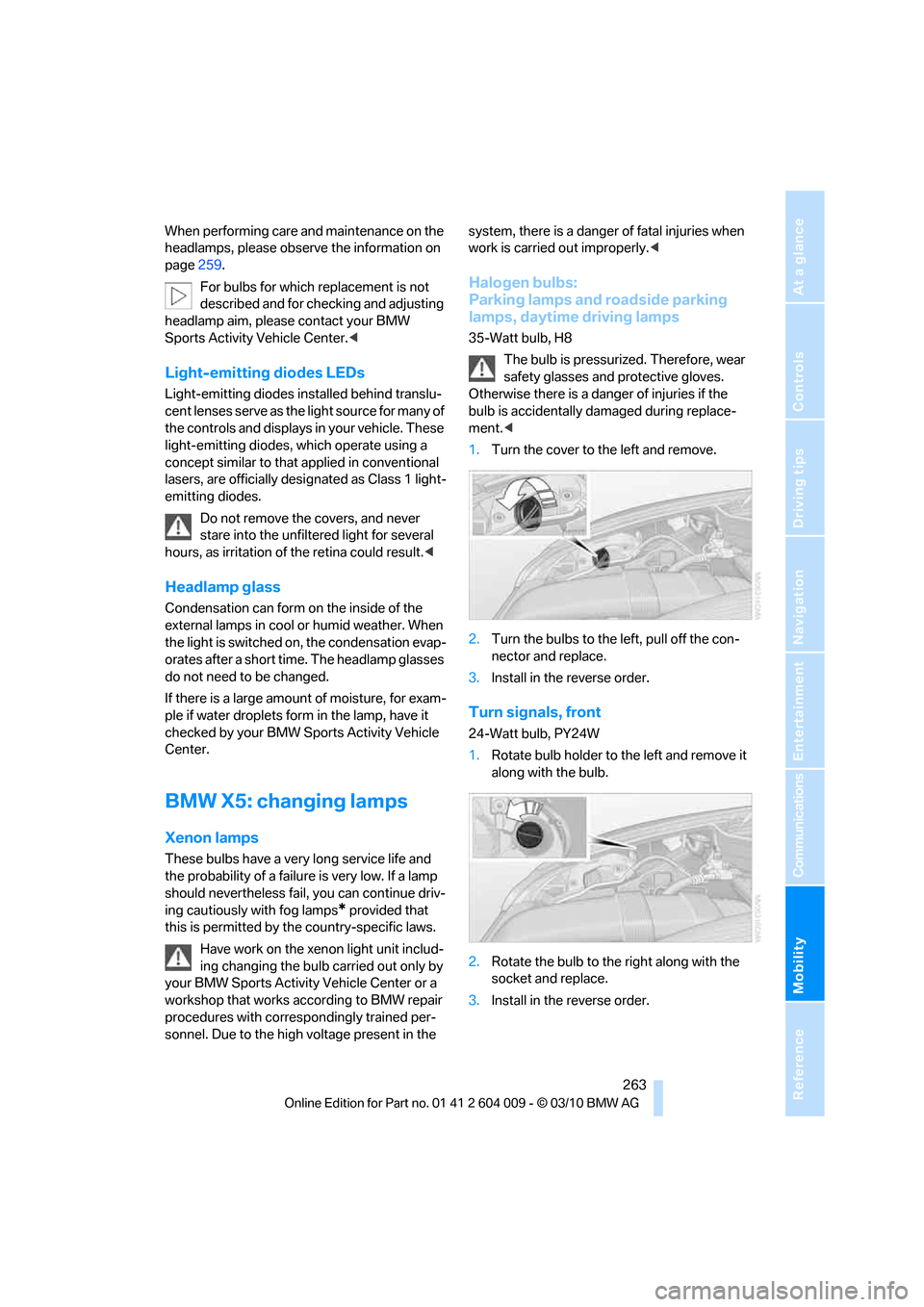
1.Turn the cover to the left and remove.
2.Turn the bulbs to the left, pull off the con-
nector and replace.
3.Install in the reverse order.
Turn signals, front
24-Watt bulb, PY24W
1.Rotate bulb holder to the left and remove it
along with the bulb.
2.Rotate the bulb to the right along with the
socket and replace.
3.Install in the reverse order.
Page 267 of 312
Mobility
265Reference
At a glance
Controls
Driving tips
Communications
Navigation
Entertainment
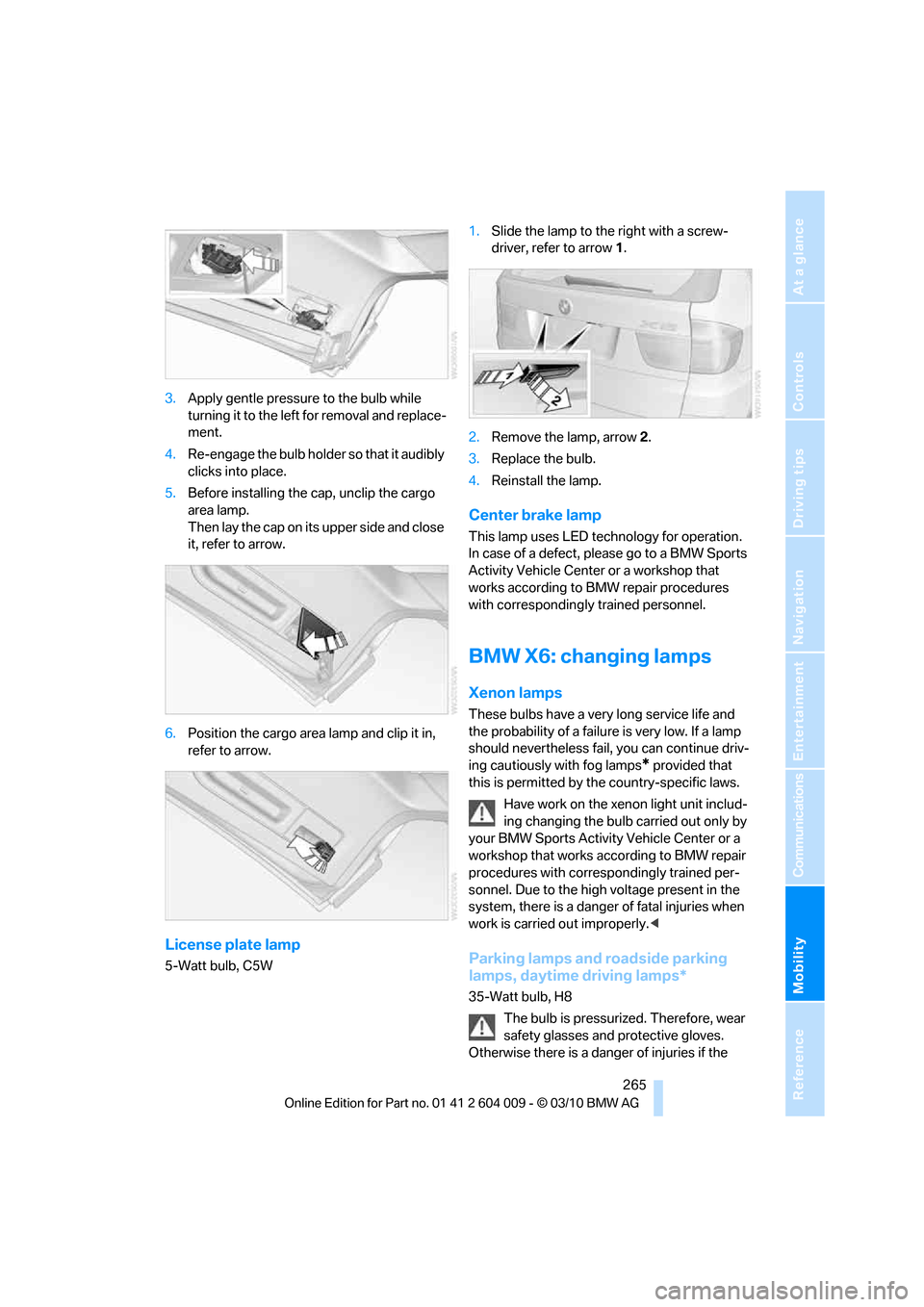
3.Apply gentle pressure to the bulb while
turning it to the left for removal and replace-
ment.
4.Re-engage the bulb holder so that it audibly
clicks into place.
5.Before installing the cap, unclip the cargo
area lamp.
Then lay the cap on its upper side and close
it, refer to arrow.
6.Position the cargo area lamp and clip it in,
refer to arrow.
License plate lamp
5-Watt bulb, C5W1.Slide the lamp to the right with a screw-
driver, refer to arrow1.
2.Remove the lamp, arrow2.
3.Replace the bulb.
4.Reinstall the lamp.
Center brake lamp
This lamp uses LED technology for operation.
In case of a defect, please go to a BMW Sports
Activity Vehicle Center or a workshop that
works according to BMW repair procedures
with correspondingly trained personnel.
BMW X6: changing lamps
Xenon lamps
These bulbs have a very long service life and
the probability of a failure is very low. If a lamp
should nevertheless fail, you can continue driv-
ing cautiously with fog lamps
* provided that
this is permitted by the country-specific laws.
Have work on the xenon light unit includ-
ing changing the bulb carried out only by
your BMW Sports Activity Vehicle Center or a
workshop that works according to BMW repair
procedures with correspondingly trained per-
sonnel. Due to the high voltage present in the
system, there is a danger of fatal injuries when
work is carried out improperly.<
Parking lamps and roadside parking
lamps, daytime driving lamps*
35-Watt bulb, H8
The bulb is pressurized. Therefore, wear
safety glasses and protective gloves.
Otherwise there is a danger of injuries if the
Page 300 of 312
Everything from A - Z
298 FM, waveband171
Fog lamps114
– indicator lamp13,114
Folding display screen open/
closed, DVD system in
rear196
Folding rear seat backrest132
Footwell lamps115
For your own safety5
4-wheel drive system, refer to
xDrive97
Free memory capacity, music
collection190
Front airbags107
Front passenger airbags107
– deactivating107
– refer to Exception of front
passenger seat54
Front seat adjustment43
FTM Flat Tire Monitor99
– false alarms100
– indicating a flat tire100
– initializing the system100
– snow chains250
– system limits100
– warning lamp100
Fuel235
– capacity284
– display78
– high-quality brands235
– quality235
– saving138
– specifications235
Fuel clock, refer to Fuel
gauge78
Fuel consumption display
– computer, average fuel
consumption78
Fuel display, refer to Fuel
gauge78
Fuel filler flap234
– closing234
– opening234
– releasing manually234
Fuses271
G
Garage door opener, refer to
Integrated universal remote
control124
Gasoline, refer
to Required fuel235
Gasoline display, refer to Fuel
gauge78
Gas station
recommendations159
Gearshifts
– automatic transmission with
Steptronic64
General driving
notes138,139
Glass sunroof
– convenient opening and
closing from outside29
– convenient opening and
closing with Comfort
Access36
– remote control28
Glass sunroof, electric40
– opening, closing40
– power interruption41
– raising40
Glove compartment127
– lighting127
GPS navigation, refer to
Navigation system148
Grills, refer to Ventilation120
Grills of the automatic climate
control116
Gross vehicle weight, refer to
Weights283
H
Handbrake, refer to Parking
brake60
– Automatic Hold61
Hands-free system, refer to
Microphone14
Hand washing259
Have diesel exhaust fluid
– refilled237
Hazard warning flashers15
HDC Hill Descent Control97HD Radio172
Head airbags107
Headlamp control,
automatic111
Headlamp flasher65
Headlamps111
– cleaning, refer to Washer/
wiper system65
– replacing bulbs262
Head Light, refer to Adaptive
Light Control112
Head restraints45
– sitting safely42
Head-up Display109
Heated
– mirrors51
– rear window118
– seats49,50
– steering wheel53
Heating116
– exterior mirrors51
– interior116
– rear window118
– residual heat119
– seats49,50
– steering wheel53
Heating with engine switched
off, refer to Residual
heat119
Heavy cargo, refer to Securing
cargo142
Height
– on Head-up Display109
Height, refer to
Dimensions281
Height adjustment
– seats43
– steering wheel52
High-beam Assistant113
High beams65,113
– headlamp flasher65
– indicator lamp13
High-beams, automatically
switching on and off, refer to
High-beam Assistant113
High-pressure cleaning
jets259
High water, refer to Driving
through water140