heating BMW X6 2013 E71 User Guide
[x] Cancel search | Manufacturer: BMW, Model Year: 2013, Model line: X6, Model: BMW X6 2013 E71Pages: 345, PDF Size: 9.45 MB
Page 135 of 345
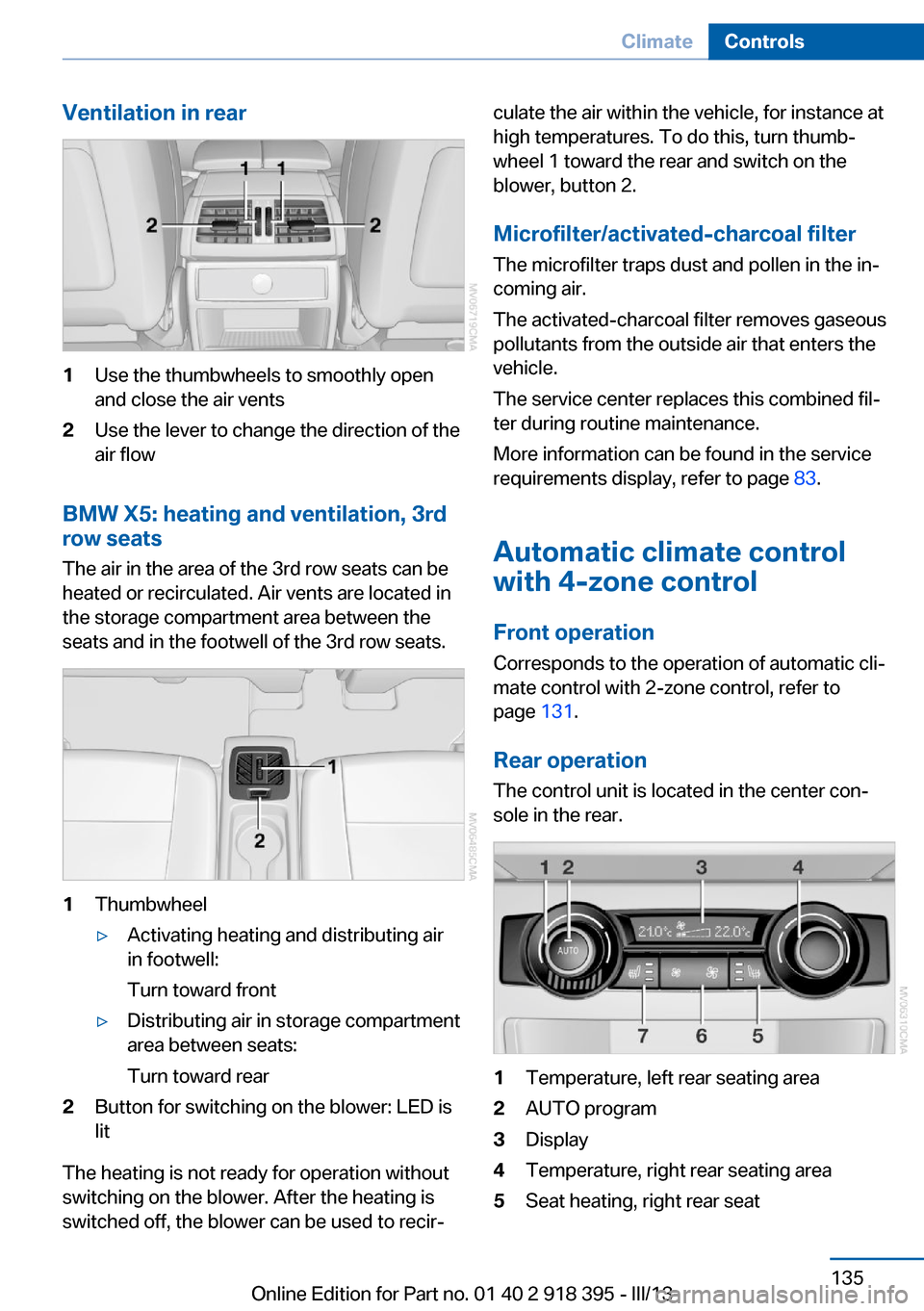
Ventilation in rear1Use the thumbwheels to smoothly open
and close the air vents2Use the lever to change the direction of the
air flow
BMW X5: heating and ventilation, 3rd
row seats
The air in the area of the 3rd row seats can be
heated or recirculated. Air vents are located in
the storage compartment area between the
seats and in the footwell of the 3rd row seats.
1Thumbwheel▷Activating heating and distributing air
in footwell:
Turn toward front▷Distributing air in storage compartment
area between seats:
Turn toward rear2Button for switching on the blower: LED is
lit
The heating is not ready for operation without
switching on the blower. After the heating is
switched off, the blower can be used to recir‐
culate the air within the vehicle, for instance at
high temperatures. To do this, turn thumb‐
wheel 1 toward the rear and switch on the
blower, button 2.
Microfilter/activated-charcoal filter The microfilter traps dust and pollen in the in‐
coming air.
The activated-charcoal filter removes gaseous
pollutants from the outside air that enters the
vehicle.
The service center replaces this combined fil‐
ter during routine maintenance.
More information can be found in the service
requirements display, refer to page 83.
Automatic climate control
with 4-zone control
Front operation Corresponds to the operation of automatic cli‐
mate control with 2-zone control, refer to
page 131.
Rear operation
The control unit is located in the center con‐
sole in the rear.1Temperature, left rear seating area2AUTO program3Display4Temperature, right rear seating area5Seat heating, right rear seatSeite 135ClimateControls135
Online Edition for Part no. 01 40 2 918 395 - III/13
Page 136 of 345
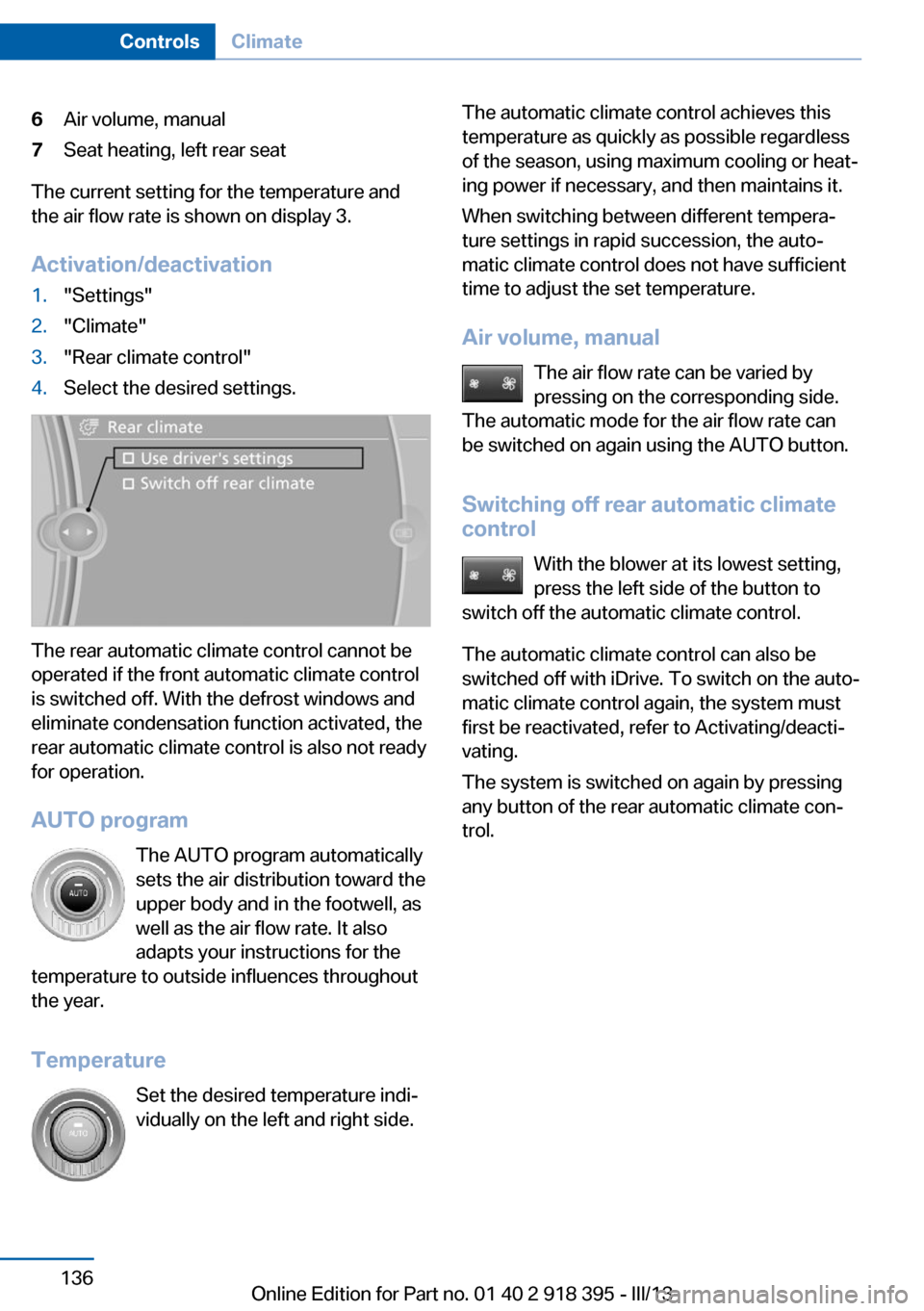
6Air volume, manual7Seat heating, left rear seat
The current setting for the temperature and
the air flow rate is shown on display 3.
Activation/deactivation
1."Settings"2."Climate"3."Rear climate control"4.Select the desired settings.
The rear automatic climate control cannot be
operated if the front automatic climate control
is switched off. With the defrost windows and
eliminate condensation function activated, the
rear automatic climate control is also not ready
for operation.
AUTO program The AUTO program automatically
sets the air distribution toward the
upper body and in the footwell, as
well as the air flow rate. It also
adapts your instructions for the
temperature to outside influences throughout the year.
Temperature Set the desired temperature indi‐
vidually on the left and right side.
The automatic climate control achieves this
temperature as quickly as possible regardless
of the season, using maximum cooling or heat‐
ing power if necessary, and then maintains it.
When switching between different tempera‐
ture settings in rapid succession, the auto‐
matic climate control does not have sufficient
time to adjust the set temperature.
Air volume, manual The air flow rate can be varied by
pressing on the corresponding side.
The automatic mode for the air flow rate can
be switched on again using the AUTO button.
Switching off rear automatic climate
control
With the blower at its lowest setting,
press the left side of the button to
switch off the automatic climate control.
The automatic climate control can also be
switched off with iDrive. To switch on the auto‐
matic climate control again, the system must
first be reactivated, refer to Activating/deacti‐
vating.
The system is switched on again by pressing
any button of the rear automatic climate con‐
trol.Seite 136ControlsClimate136
Online Edition for Part no. 01 40 2 918 395 - III/13
Page 160 of 345
LoadingVehicle equipment
This chapter describes all series equipment as
well as country-specific and special equipment
offered for this model series.Therefore, it also
describes equipment that may not be found in
your vehicle, for instance due to the selected
special equipment or the country version. This
also applies to safety-related functions and
systems.
General information Overloading the vehicle
To avoid exceeding the approved carry‐
ing capacity of the tires, never overload the ve‐
hicle. Overloading can lead to overheating and
increases the rate at which damage develops
inside the tires. This could result in a sudden
loss of tire inflation pressure.◀
No fluids in the cargo area
Make sure that fluids do not leak into the
cargo area; otherwise, the vehicle may be dam‐
aged.◀
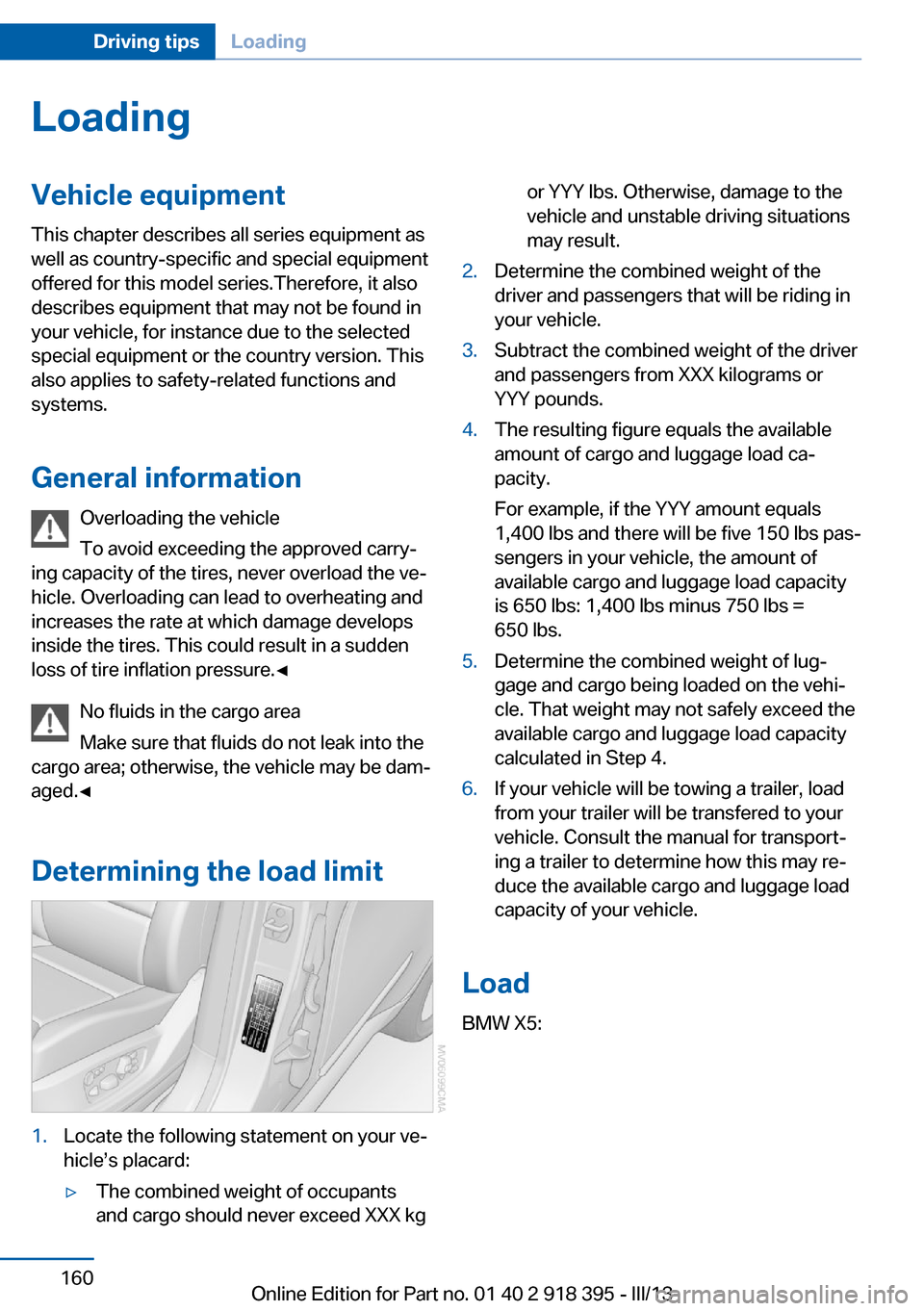
Determining the load limit1.Locate the following statement on your ve‐
hicle’s placard:▷The combined weight of occupants
and cargo should never exceed XXX kgor YYY lbs. Otherwise, damage to the
vehicle and unstable driving situations
may result.2.Determine the combined weight of the
driver and passengers that will be riding in
your vehicle.3.Subtract the combined weight of the driver
and passengers from XXX kilograms or
YYY pounds.4.The resulting figure equals the available
amount of cargo and luggage load ca‐
pacity.
For example, if the YYY amount equals
1,400 lbs and there will be five 150 lbs pas‐
sengers in your vehicle, the amount of
available cargo and luggage load capacity
is 650 lbs: 1,400 lbs minus 750 lbs =
650 lbs.5.Determine the combined weight of lug‐
gage and cargo being loaded on the vehi‐
cle. That weight may not safely exceed the
available cargo and luggage load capacity
calculated in Step 4.6.If your vehicle will be towing a trailer, load
from your trailer will be transfered to your
vehicle. Consult the manual for transport‐
ing a trailer to determine how this may re‐
duce the available cargo and luggage load
capacity of your vehicle.
Load
BMW X5:
Seite 160Driving tipsLoading160
Online Edition for Part no. 01 40 2 918 395 - III/13
Page 165 of 345
Use coasting conditions
When approaching a red light, take your foot
off the accelerator and let the vehicle coast to
a halt.
On a downhill gradient, take your foot off the
accelerator and let the vehicle roll.
The flow of fuel is interrupted while coasting.
Switch off the engine during longer stops
Switch off the engine during longer stops, e.g.,
at traffic lights, railroad crossings or in traffic
congestion.
Fuel savings are already achieved after the en‐
gine is turned off for as little as 4 seconds.
Switch off any functions that
are not currently needed
Functions such as seat heating and the rear
window defroster require a lot of energy and
consume additional fuel, especially in city and
stop-and-go traffic.
Therefore, switch off these functions if they
are not actually needed.
Have maintenance carried
out
Have vehicles maintained regularly to achieve
optimal vehicle economy and operating life.
Have the maintenance carried out by your
service center.
Please also note the BMW Maintenance Sys‐
tem, refer to page 293.Seite 165Saving fuelDriving tips165
Online Edition for Part no. 01 40 2 918 395 - III/13
Page 271 of 345
Ultra-low sulfur diesel ASTM D 975-xx.
xx: always adhere to the currently applicable
standard.
Only refuel with ultra-low sulfur diesel.
The percentage of biodiesel in the fuel
must not exceed 5%, referred to as B5. Do not
refuel with gasoline. If the vehicle has been re‐
fueled with incorrect fuel such as gasoline, do
not start the engine; otherwise, there is a dan‐
ger of engine damage.◀
If you added the wrong fuel, contact the serv‐
ice center.
If the nozzle cannot be inserted into the fuel
filler pipe of your BMW, please check to make
sure that you are refueling with a diesel fuel
pump and whether this is equipped with a die‐
sel nozzle.
In the event the Ultra-Low Sulfur Diesel fuel
cannot be fully inserted into the fuel filler neck,
please contact BMW Roadside Assistance for
instructions on how to add fuel. For more infor‐
mation on BMW Roadside Assistance, refer to
page 308.
Winter diesel To ensure that the diesel engine remains op‐
erational in the winter, use winter diesel.
It is available at gas stations during winter
months.
The standard fuel filter heating prevents the
supply of fuel from stalling during driving.
Do not use diesel additives
Do not use additives, including gasoline;
otherwise, engine damage may occur.◀BMW X5 with BMW
Advanced Diesel
The concept
BMW Advanced Diesel reduces nitrogen ox‐
ides in the diesel exhaust of your vehicle by in‐
jecting the reducing agent diesel exhaust fluid
into the exhaust line. In the catalytic converter,
a chemical reaction occurs that minimizes ni‐
trogen oxides.
In order to be able to start the engine in the
usual way, there must be a sufficient supply of
diesel exhaust fluid in the separate reservoir.
System heating
In order to bring the system to operating tem‐
perature after a cold start of the engine, the au‐
tomatic transmission shifts into the next higher
gear at a later point.
Reserve display
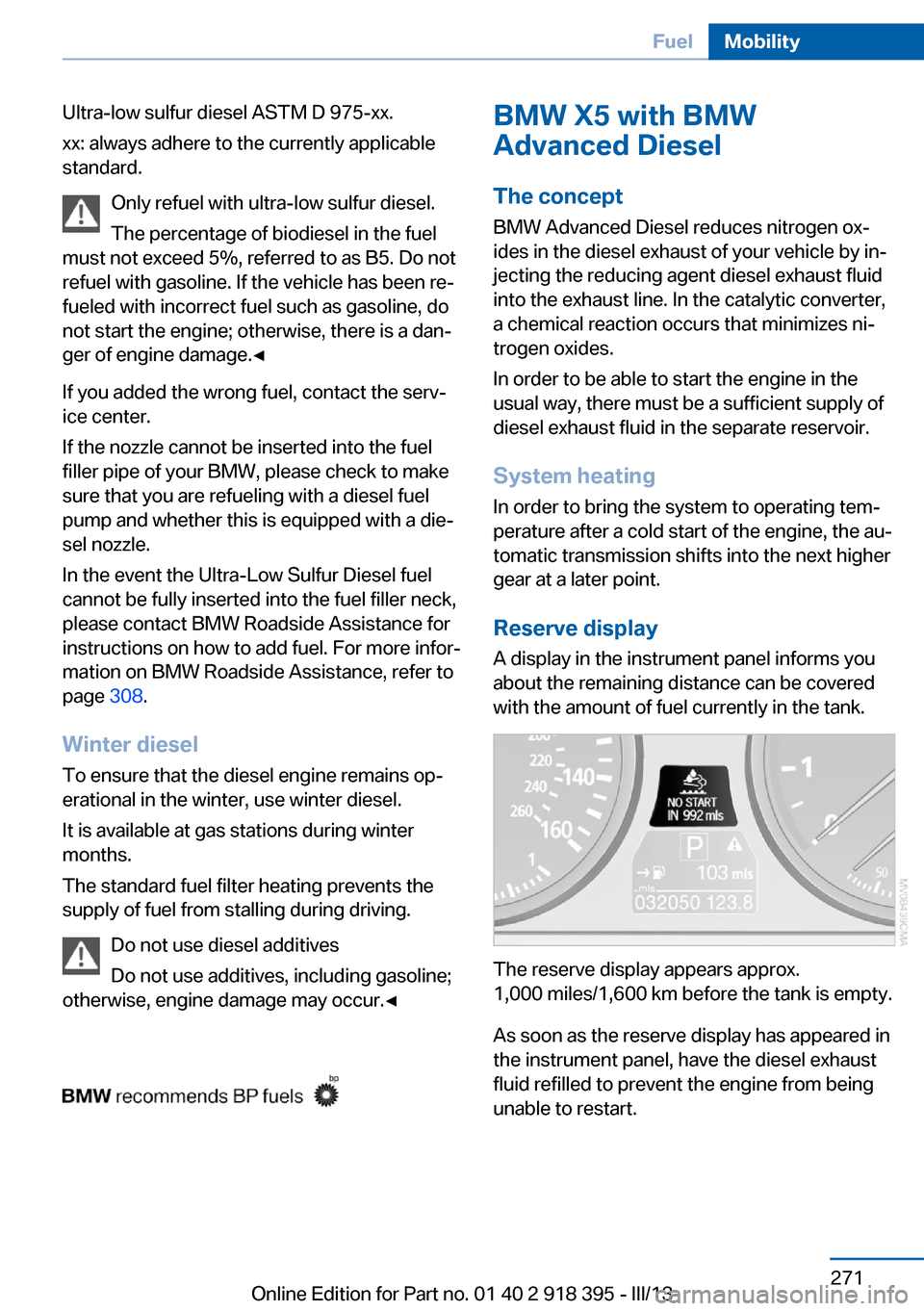
A display in the instrument panel informs you
about the remaining distance can be covered
with the amount of fuel currently in the tank.
The reserve display appears approx.
1,000 miles/1,600 km before the tank is empty.
As soon as the reserve display has appeared in
the instrument panel, have the diesel exhaust
fluid refilled to prevent the engine from being
unable to restart.
Seite 271FuelMobility271
Online Edition for Part no. 01 40 2 918 395 - III/13
Page 334 of 345
Divided screen view, splitscreen 22
Door key, refer to Remote control with integrated
key 30
Door lock 34
Doors, manual operation 34
Doors, unlocking and locking– Confirmation signals 33– From the inside 35– From the outside 32
DOT Quality Grades 283
Downhill control 108
Draft-free ventilation 134
Drive-off assistant 109
Driver's seat, calibrating 55
Driving away on inclines, refer to Drive-off assistant 109
Driving notes, breaking in 156
Driving notes, general 156
Driving on poor roads 158
Driving stability control sys‐ tems 105
Driving through water 157
Driving tips, refer to Driving notes 156
Dry air, refer to Cooling func‐ tion 133
DSC Dynamic Stability Con‐ trol 105
DTC Dynamic Traction Con‐ trol 106
DTMF suffix dialing 242
DVD/CD 200
DVDs, storing 207
DVD system in rear 220
DVD, video 202
Dynamic destination guid‐ ance 186
Dynamic Performance Con‐ trol 107
Dynamic Stability Control DSC 105
Dynamic Traction Control DTC 106
E
Easy entry/exit 60
EfficientDynamics, refer to Saving fuel 164
Electrical malfunction– Door lock 34– Driver's door 34– Fuel filler flap 268
Electrical malfunction of up‐
per tailgate 36
Electrical malfunction, park‐ ing brake 71
Electric seat adjustment 50
Electric steering wheel ad‐ justment 60
Electronic brake-force distri‐ bution 105
Electronic engine oil level check 290
Electronic Stability Program ESP, refer to Dynamic Sta‐
bility Control DSC 105
Emergency operation
– Door lock, refer to Manual
operation 34
Emergency operation, fuel
filler flap, unlocking man‐
ually 268
Emergency Request 307
Emergency service, refer to Roadside Assistance 308
Energy-conscious driving, re‐ fer to Current fuel consump‐
tion 80
Energy, saving, refer to Sav‐ ing fuel 164
Engine, breaking in 156
Engine compartment 288
Engine coolant, refer to Cool‐ ant 292
Engine oil, adding 291
Engine oil, additives, refer to Approved engine oils 291
Engine oil, alternative oil types 292
Engine oil, BMW maintenance
system 293
Engine oil change intervals, refer to Service require‐
ments 83
Engine oil, checking the level 290
Engine oil, filling ca‐ pacity 321
Engine oil temperature 80
Engine oil types, alterna‐ tive 291
Engine oil types, ap‐ proved 291
Engine, overheating, refer to Coolant temperature 80
Engine start, assistance 308
Engine, starting 68
Engine, starting– Comfort Access 40
Engine, starting, Start/Stop
button 67
Engine, stopping, Start/Stop
button 67
Engine, switching off 69
Environmentally friendly driv‐ ing, refer to Current fuel
consumption 80
Equalizer 190
Equipment, interior 139
ESP Electronic Stability Pro‐ gram, refer to Dynamic Sta‐
bility Control DSC 105
Exchanging wheels/tires 285
Exhaust system 157
Exterior mirrors 58
Exterior mirrors, adjusting 58
Exterior mirrors, automatic dimming 59
Exterior mirrors, automatic heating 59
Exterior mirrors, folding in and out 59
External audio device 148
External devices 212
External temperature dis‐ play 79
Seite 334ReferenceEverything from A to Z334
Online Edition for Part no. 01 40 2 918 395 - III/13
Page 336 of 345
Hand-held transmitter, alter‐nating code 140
Hands-free microphone 16
Hazard warning sys‐ tem 16, 307
HDC Hill Descent Con‐ trol 108
HD Radio 193
Head airbags 95
Headlamp control, auto‐ matic 90, 91
Headlamp courtesy delay fea‐ ture 91
Headlamp flasher 72, 92
Headlamp flasher, indicator lamp 15
Headlamps 90
Headlamps, care 313
Headlamps, cleaning 74
Headlamps, cleaning, washer fluid 75
Headliner 17
Headphones, connecting, rear DVD system 221
Head restraints 55
Head-up Display 127
Head-up Display, care 315
Heatable rear window 132
Heating 130
Heating– Seats 52
Heating, interior 130
Heating, mirrors 59
Heating, residual heat 134
Heating with the engine switched off, refer to Resid‐
ual heat 134
Heavy cargo, refer to Stowing cargo 161
Height, refer to Dimen‐ sions 318
High-beam Assistant 92
High beams 92
High beams/low beams, auto‐ matic, refer to High-beam
Assistant 92
High beams, indicator
lamp 15
High-pressure washers 312
Hill Descent Control HDC 108
Hill drive-off assistant, refer to Drive-off assistant 109
Hills 158
Holder for beverages 149
Holder for remote control, re‐ fer to Ignition lock 67
Homepage 6
Hood 289
Hood, opening 289
Horn 12
Hot exhaust system 157
Hotline 263
House number, entering for navigation 171
Hydraulic brake assis‐ tant 105
Hydroplaning 157
I Ice warning, refer to External temperature warning 79
Icy roads, refer to External temperature warning 79
Identification marks, tires 283
iDrive 18
iDrive, changing settings 87
iDrive, changing the lan‐ guage 88
iDrive, changing the units of measure and display for‐
mat 88
iDrive, setting the bright‐ ness 88
iDrive, setting the date 87
iDrive, setting the time 87
Ignition 68
Ignition key position 1, refer to Radio ready state 67
Ignition key position 2, refer to Ignition on 68 Ignition key, refer to Remote
control with integrated
key 30
Ignition lock 67
Ignition, switched off 68
Ignition, switched on 68
Images, displaying, rear DVD system 228
Indication of a flat tire 98, 100
Indicator and warning lamps 15
Inflation pressure monitor, re‐ fer to Flat Tire Monitor 97
Inflation pressure, refer to Tire inflation pressure 275
Information on the navigation data 168
Initialization after power fail‐ ure 305
Initializing– Compass, refer to Calibrat‐
ing 142– Panoramic glass sunroof 46
Initializing, Flat Tire Monitor
FTM 98
Initializing, glass sunroof 48
Initializing, refer to Setting the date 87
Initializing, refer to Setting the time 87
Initializing, Tire Pressure Monitor TPM 100
Installation location, tele‐ phone 148
Instrument cluster 14
Instrument lighting 94
Instrument panel, refer to In‐ strument cluster 14
Instruments, refer to Cock‐ pit 12
Integrated key 30
Interactive map 175
Interior equipment 139
Interior lamps 94
Interior lamps
– Remote control 33
Interior mirror 59
Seite 336ReferenceEverything from A to Z336
Online Edition for Part no. 01 40 2 918 395 - III/13
Page 338 of 345
Manual air distribution 133
Manual mode, automatic transmission with Step‐
tronic 77
Manual operation– Door lock 34– Driver's door 34
Manual operation, fuel filler
flap 268
Manual operation of upper tailgate 36
Manual operation, Side View 127
Manual operation, Top View 125
Map, destination entry 175
Map display in black and white 184
Map in split screen 183
Map view 181
Marking on approved tires 286
Master key, refer to Remote control with integrated
key 30
Maximum cooling 133
Maximum speed, winter tires 286
Medical kit, refer to First aid kit 308
Memory, refer to Seat and mirror memory 57
Menus, operating, iDrive 18
Menus, refer to iDrive operat‐ ing concept 19
Message list, traffic bulle‐ tins 183
Messages 252
Microfilter 135
Minimum tread, tires 284
Mirror
– Mirror memory, refer to Seat
and mirror memory 57
Mirrors 58
Mirrors
– Automatic Curb Monitor 58
Mirrors, folding in and out 59
Mirrors, heating 59
Mirrors, interior mirror 59
Mobile communication devi‐ ces in the vehicle 157
Mobile phone, installation lo‐ cation, refer to Center arm‐
rest 148
Mobile phone, refer to Tele‐ phone 236
Modifications, technical, refer to Safety 6
Monitor, refer to Control Dis‐ play 19
Mounting of child restraint fix‐ ing systems 61
MP3 player 212
Multimedia 200
Music collection 207
Music search 208
Music, storing 207
N
Navigation 168
Navigation data 168
Navigation data, updat‐ ing 168
Navigation system– Destination entry by
voice 176
Neck restraints, refer to Head
restraints 55
Nets, refer to Storage com‐ partments 148
Neutral cleaner, care 314
New wheels and tires 285
Notes 6, 255
Nozzles of automatic climate control 130
Nozzles, refer to Ventila‐ tion 134
O OBD Onboard Diagnos‐ tics 294
OBD socket, refer to Socket
for OBD Onboard Diagno‐
sis 294
Octane number, refer to Fuel quality 270
Octane rating, refer to Gaso‐ line quality 270
Odometer 80
Office 249
Oil additives 291
Oil consumption 290
Oil level 290
Oil, refer to Engine oil 290
Oil types, alternative 291
Oil types, approved 291
Old batteries, disposal 305
Onboard Diagnostics OBD 294
Onboard monitor, refer to Control Display 19
Onboard vehicle tool kit 295
Opening and closing– Comfort Access 40– From the inside 35– From the outside 32– Using the door lock 34– Using the remote control 32
Opening height, adjust‐
ing 37, 38
Operating concept, iDrive 18
Outside-air mode, automatic climate control 133
Outside air, refer to Recircu‐ lated air mode 133
Overheating of engine, refer to Coolant temperature 80
P Paint, vehicle 313
Pairing, mobile phone 237
Panic mode 33
Seite 338ReferenceEverything from A to Z338
Online Edition for Part no. 01 40 2 918 395 - III/13
Page 339 of 345
Panoramic glass sunroof– Convenient operation 33– Initializing 46– Opening, closing 45– Pinch protection 46– Power failure 46– Remote control 33– Tilting 45
Park Distance Control
PDC 120
Parked-car ventilation 137
Parked vehicle, condensa‐ tion 158
Parking aid, refer to Park Dis‐ tance Control PDC 120
Parking assistant, refer to Park Distance Control
PDC 120
Parking brake 69
Parking brake, Automatic Hold 70
Parking brake, releasing man‐ ually 70, 71
Parking brake, setting man‐ ually 69
Parking lamps 90
Parking lamps/low beams 90
Parking with Automatic Hold 71
Particulate filter, refer to Die‐ sel particulate filter 157
Passenger airbags, deactivat‐ ing 96
Passenger side mirror, tilt‐ ing 58
PDC Park Distance Con‐ trol 120
Personal information 249
Personal Profile 30
Pinch protection
– Panoramic glass sunroof 46– Windows 44
Pinch protection, glass sun‐
roof 47
Plastic, care 314
Playing videos, rear DVD sys‐ tem 223
Pollen, refer to Microfilter/
activated-charcoal filter 135
Poor road operation 158
Position, storing 172
Postal code, entering in navi‐ gation 171
Power windows– Safety switch 44
Power windows, opening and
closing 44
Power windows, refer to Win‐ dows 43
Preheating, refer to Diesel en‐ gine 68
Prescribed engine oils, refer to Approved engine oils 291
Pressure, tires 275
Pressure warning, tires 97
Profile depth, refer to Mini‐ mum tread depth 284
Profile, tires 284
Programmable memory but‐ tons, iDrive 23
Protection function, refer to Pinch protection 47
Protection function, refer to
Pinch protection
– Panoramic glass sunroof 46
Protective function, refer to
Pinch protection
– Windows 44
Push-and-turn switch, refer to
Controls 18
R Radiator fluid, refer to Cool‐ ant 292
Radio-operated key, refer to Remote control with
integrated key 30
Radio ready state 67
Radio ready state, switched off 68
Radio ready state, switched on 67
Radio setting, refer to Radio
ready state 67
Rain sensor 74
Random 201
Random playback 201
Range 81
RDS 193
Reading lamps 94
Reading out loud 256
Rear entertainment, refer to DVD system in rear 220
Rear lamps, refer to Tail lamps 297, 300
Rear seat backrest, folda‐ ble 146
Rear seats, adjusting 51
Rear seats, adjusting the head restraints 57
Rear seats, heating 52
Rear socket 144
Rear ventilation 135
Rear ventilation, 3rd row seats 135
Rear ventilation, automatic climate control in rear 135
Rearview mirror, refer to Mir‐ rors 58
Rear window defroster 132
Rear window, washing 74
Rear window wiper 74
Recirculated air mode 133
Recommended tire brands 286
Redialing 243
Refueling 268
Remaining distance to desti‐ nation, refer to Com‐
puter 82
Remaining range for service, refer to Service require‐
ments 83
Remaining range, refer to Range 81
Reminders 256 Seite 339Everything from A to ZReference339
Online Edition for Part no. 01 40 2 918 395 - III/13
Page 340 of 345
Remote control– Battery replacement 42– Comfort Access 40– Garage door opener 139– Malfunction 34, 41– Tailgate 33– Universal 139
Remote control, rear DVD
system 221
Remote control, removing from the ignition lock 67
Remote control, service data 293
Remote inquiry 242
Replacement fuse 305
Replacement remote con‐ trol 30
Replacing wheels/tires 285
Reporting safety defects 8
Reserve warning, refer to Fuel gauge 81
Reservoir for washer fluid, re‐ fer to Washer fluid reser‐
voir 75
Resetting, Tire Pressure Monitor TPM 100
Residual heat 134
Restraining systems
– Refer to Safety belts 54
Restraint systems for chil‐
dren 61
Retaining straps, securing cargo 162
Retreaded tires 286
Rim cleaner, care 314
Road, avoiding 179
Road detour 179
Roadside Assistance 262
Roadside parking lamps 92
Roller sunblinds 45
RON gasoline quality 270
RON, refer to Fuel qual‐ ity 270
Roof load capacity 320
Roof-mounted luggage rack 162
Rope, refer to Towing 310
Route 180
Route criteria, route 179
Route, displaying 180
Route section, bypass‐ ing 180
RSC Runflat System Compo‐ nent, refer to Run-flat
tires 286
Rubber components, care 314
Run-flat tires 286
Run-flat tires, tire inflation pressure 275
Running lights, refer to Park‐ ing lamps/low beams 90
S Safe braking 157
Safety 6
Safety belts 54
Safety belts– Damage 55
Safety belts, care 314
Safety belts, indicator/warn‐ ing lamp 55
Safety belts, reminder 55
Safety switch for rear win‐ dows 44
Safety systems
– Safety belts 54
Safety systems, airbags 95
Safety tires, refer to Run-flat tires 286
Satellite radio 194
Saving fuel 164
Scale, changing during navi‐ gation 182
Screen, folding open/closed, rear DVD system 220
Screen, refer to Control Dis‐ play 19
Search, refer to BMW On‐ line 262
Seat adjustment, electric 50
Seat adjustment, manual 49
Seat and mirror memory 57
Seat belts– Refer to Safety belts 54
Seat heating 52, 53
Seat heating, rear 52
Seats
– Adjusting electrically 50– Heating 52– Memory, refer to Seat and
mirror memory 57– Sitting safely 49– Storing the setting, refer to
Seat and mirror memory 57– Ventilation, refer to Active
seat ventilation and seat
heating 53
Seats, adjusting 49
Seats, backrest width 50
Seats in the rear 51
Seats, shoulder support 50
2nd row seats 51
Selector lever, automatic transmission with Step‐
tronic 76
Selector lever lock, releas‐ ing 76
Self-leveling suspension 110
Sensors, care 315
Service and warranty 7
Service data in the remote control 293
Service interval display, refer to Condition Based Service
CBS 293
Service interval display, refer to Service requirements 83
Service requirements 83
Service requirements, CBS Condition Based Serv‐
ice 293
Service, Roadside Assis‐ tance 308
Settings, clock, 12h/24h mode 87
Settings, configuring, refer to Personal Profile 30
Settings, DVD 203
Seite 340ReferenceEverything from A to Z340
Online Edition for Part no. 01 40 2 918 395 - III/13