start stop button BMW X6 2014 F16 User Guide
[x] Cancel search | Manufacturer: BMW, Model Year: 2014, Model line: X6, Model: BMW X6 2014 F16Pages: 259, PDF Size: 5.92 MB
Page 84 of 259
4.Press the selector lever again into posi‐
tion N within approx. 6 seconds.
Position N is displayed in the instrument
cluster.5.Release brake, as soon as the starter
stops.6.Maneuver the vehicle from the danger area
and secure it against moving on its own.
Launch Control
The concept Launch Control enables optimum accelerationon surfaces with good traction.
Hints Component wear
Do not use Launch Control too often;
otherwise, this may result in premature wear of
components due to the high stress placed on
the vehicle.◀
Do not use Launch Control during the break-in,
refer to page 186, period.
To increase vehicle stability, activate DSC
again as soon as possible.
An experienced driver may be able to achieve
better acceleration values in DSC OFF mode.
Requirements Launch Control is available when the engine is
warmed up, that is, after uninterrupted driving
of at least 6 miles/10 km.
To start with Launch Control do not steer the
steering wheel.
Start with launch controlWhile the engine is running:
1. Press button or select Sport+ with
the Driving Dynamics Control.TRACTION is displayed in the instrument
cluster and the indicator lamp for DSC OFF
lights up.2.Engage selector lever position S.3.With the left foot, forcefully press down on
the brake.4.Press and hold down the accelerator pedal
beyond the resistance point at the full
throttle position.
A flag symbol is displayed in the instru‐
ment cluster.5.The starting engine speed adjusts. Within
3 seconds, release the brake.
Before using Launch Control, allow the trans‐
mission to cool down for approx. 5 minutes.
Launch Control adjusts to the surrounding
conditions, e.g., wet pavement, when used
again.
Seite 80ControlsDriving80
Online Edition for Part no. 01 40 2 954 468 - X/14
Page 125 of 259
▷The menu for the intelligent safety system
is displayed. The systems are individually
switched off according to their respective
settings.▷LED lights up orange or goes out respec‐
tive to their individual settings.
Adjust as needed. Individual settings are
stored for the profile currently in use.
Press button again:
▷All Intelligent Safety systems are
activated.▷The LED lights up green.
Hold down button:
▷All Intelligent Safety systems are
turned off.▷The LED goes out.
Warning with braking function
Note Adapting your speed and driving styleThe warning does not relieve the driver
of the responsibility to adapt his or her driving
speed and style to the traffic conditions.◀
Display If a collision with a person detected in this way
is imminent, a warning symbol appears on the
instrument cluster and in the Head-up Display.
The red symbol is displayed and a sig‐
nal sounds.
With instrument display: The red sym‐
bol is displayed and a signal sounds.
Intervene immediately by braking or make an
evasive maneuver.
Braking intervention The warning prompts the driver himself/herself
to react. During a warning, the maximum brak‐
ing force is used. Premise for the brake boos‐
ter is sufficiently quick and hard stepping on
the brake pedal. The system can assist with
some braking intervention if there is risk of a
collision. At low speeds vehicles may thus
come to a complete stop.
The braking intervention is executed only if
DSC Dynamic Stability Control is switched on
and Dynamic Traction Control DTC is acti‐
vated.
The braking intervention can be interrupted by
stepping on the accelerator pedal or by ac‐
tively moving the steering wheel.
Object detection can be restricted. Limitations
of the detection range and functional restric‐
tions are to be considered.
Tow-starting and towing
For towing the vehicle turn, switch off the
Intelligent Safety systems; otherwise malfunc‐
tions of the individual braking systems might
lead to accidents.◀
System limits Be alert
Due to system limitations, warnings may
be not issued at all, or may be issued late or
improperly. Therefore, always be alert and
ready to intervene; otherwise, there is the risk
of an accident.◀
Detection range
The detection potential of the camera is lim‐
ited.
Thus a warning might not be issued or be is‐
sued late.
E. g. the following situations may not be de‐
tected:▷Partially covered pedestrians.▷Pedestrians that are not detected as such
because of the viewing angle or contour.▷Pedestrians outside of the detection range.Seite 121SafetyControls121
Online Edition for Part no. 01 40 2 954 468 - X/14
Page 130 of 259
Lane departure warningThe concept Starting at a specific speed, this system alerts
you when the vehicle on streets with lane
markings is about to leave the lane. This
speed, depending on the country version, is
between 35 mph/55 km/h and
45 mph/70 km/h.
The steering wheel begins vibrating gently in
the event of warnings. The time of the warning
may vary depending on the current driving sit‐
uation.
The system does not provide a warning if the
turn signal is set before leaving the lane.
Hints Personal responsibility
The system cannot serve as a substitute
for the driver's personal judgment of the
course of the road and the traffic situation.
In the event of a warning, do not jerk the steer‐
ing wheel, as you may lose control of the vehi‐
cle.◀
At a glance
Button in the vehicle
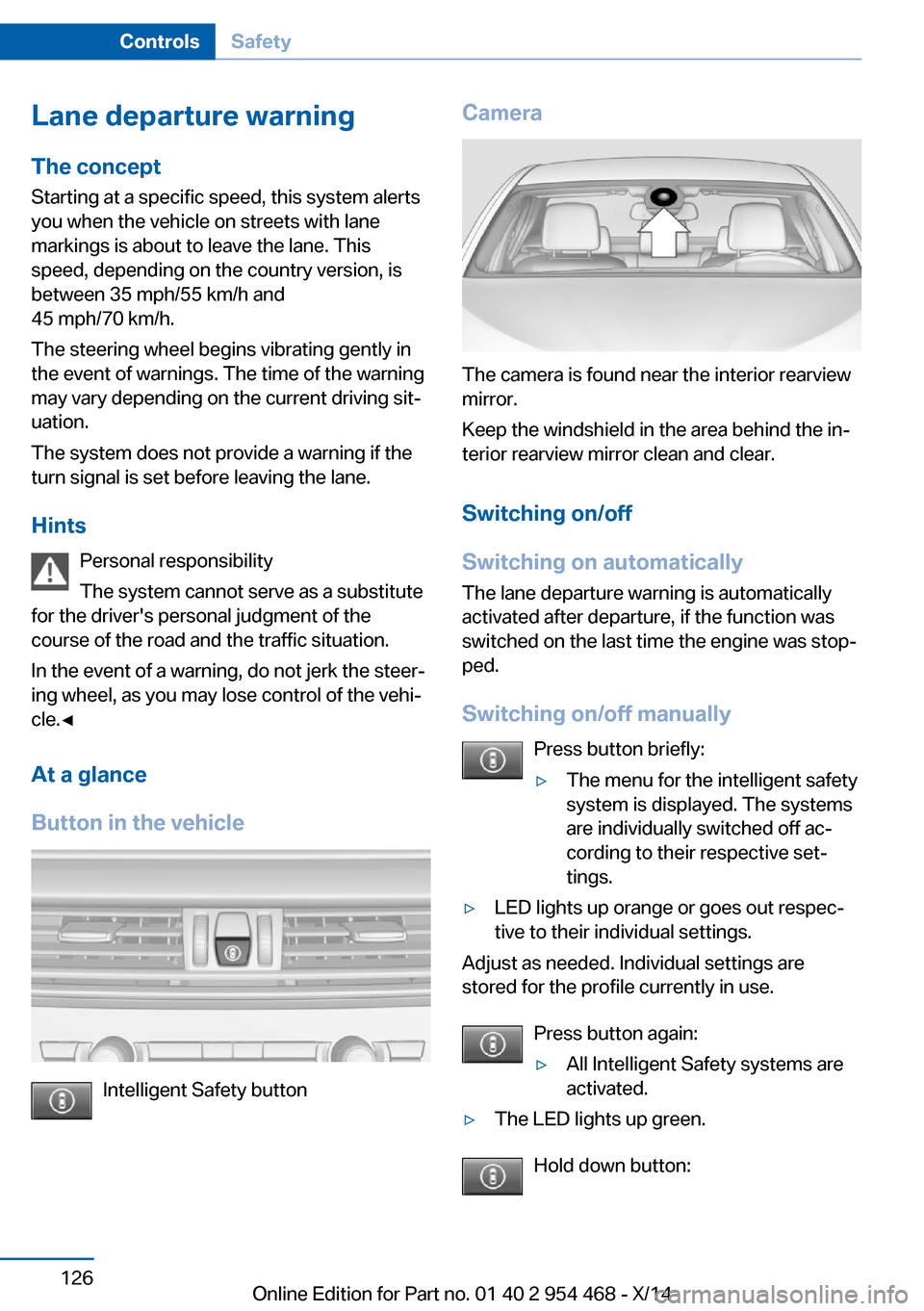
Intelligent Safety button
Camera
The camera is found near the interior rearview
mirror.
Keep the windshield in the area behind the in‐
terior rearview mirror clean and clear.
Switching on/off
Switching on automatically The lane departure warning is automatically
activated after departure, if the function was
switched on the last time the engine was stop‐
ped.
Switching on/off manually Press button briefly:
▷The menu for the intelligent safety
system is displayed. The systems
are individually switched off ac‐
cording to their respective set‐
tings.▷LED lights up orange or goes out respec‐
tive to their individual settings.
Adjust as needed. Individual settings are
stored for the profile currently in use.
Press button again:
▷All Intelligent Safety systems are
activated.▷The LED lights up green.
Hold down button:
Seite 126ControlsSafety126
Online Edition for Part no. 01 40 2 954 468 - X/14
Page 162 of 259
Parking assistantThe concept
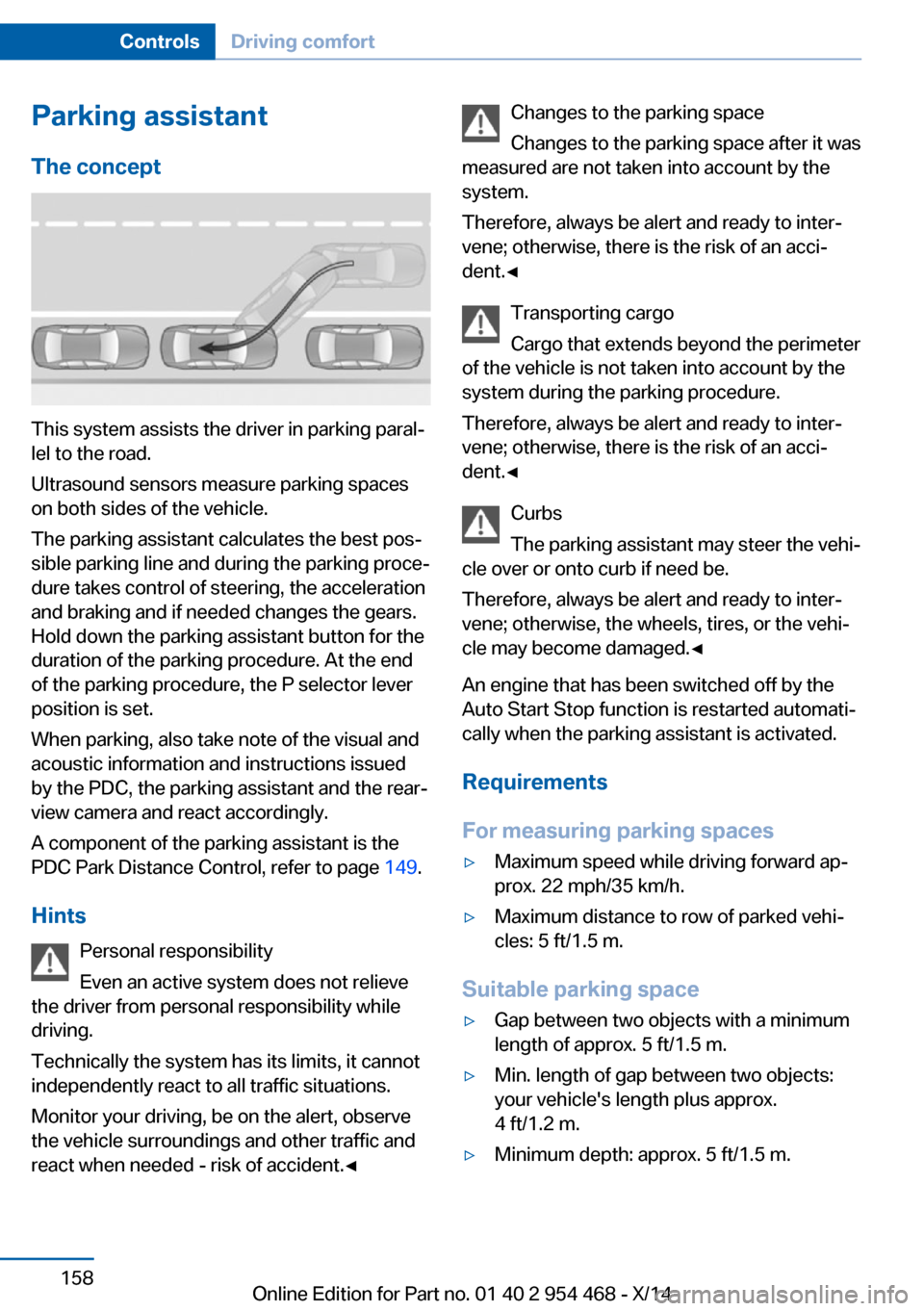
This system assists the driver in parking paral‐
lel to the road.
Ultrasound sensors measure parking spaces
on both sides of the vehicle.
The parking assistant calculates the best pos‐
sible parking line and during the parking proce‐
dure takes control of steering, the acceleration
and braking and if needed changes the gears.
Hold down the parking assistant button for the
duration of the parking procedure. At the end
of the parking procedure, the P selector lever
position is set.
When parking, also take note of the visual and
acoustic information and instructions issued
by the PDC, the parking assistant and the rear‐
view camera and react accordingly.
A component of the parking assistant is the
PDC Park Distance Control, refer to page 149.
Hints Personal responsibility
Even an active system does not relieve
the driver from personal responsibility while
driving.
Technically the system has its limits, it cannot
independently react to all traffic situations.
Monitor your driving, be on the alert, observe
the vehicle surroundings and other traffic and
react when needed - risk of accident.◀
Changes to the parking space
Changes to the parking space after it was
measured are not taken into account by the
system.
Therefore, always be alert and ready to inter‐
vene; otherwise, there is the risk of an acci‐
dent.◀
Transporting cargo
Cargo that extends beyond the perimeter
of the vehicle is not taken into account by the
system during the parking procedure.
Therefore, always be alert and ready to inter‐
vene; otherwise, there is the risk of an acci‐
dent.◀
Curbs
The parking assistant may steer the vehi‐
cle over or onto curb if need be.
Therefore, always be alert and ready to inter‐
vene; otherwise, the wheels, tires, or the vehi‐
cle may become damaged.◀
An engine that has been switched off by the
Auto Start Stop function is restarted automati‐
cally when the parking assistant is activated.
Requirements
For measuring parking spaces▷Maximum speed while driving forward ap‐
prox. 22 mph/35 km/h.▷Maximum distance to row of parked vehi‐
cles: 5 ft/1.5 m.
Suitable parking space
▷Gap between two objects with a minimum
length of approx. 5 ft/1.5 m.▷Min. length of gap between two objects:
your vehicle's length plus approx.
4 ft/1.2 m.▷Minimum depth: approx. 5 ft/1.5 m.Seite 158ControlsDriving comfort158
Online Edition for Part no. 01 40 2 954 468 - X/14
Page 179 of 259
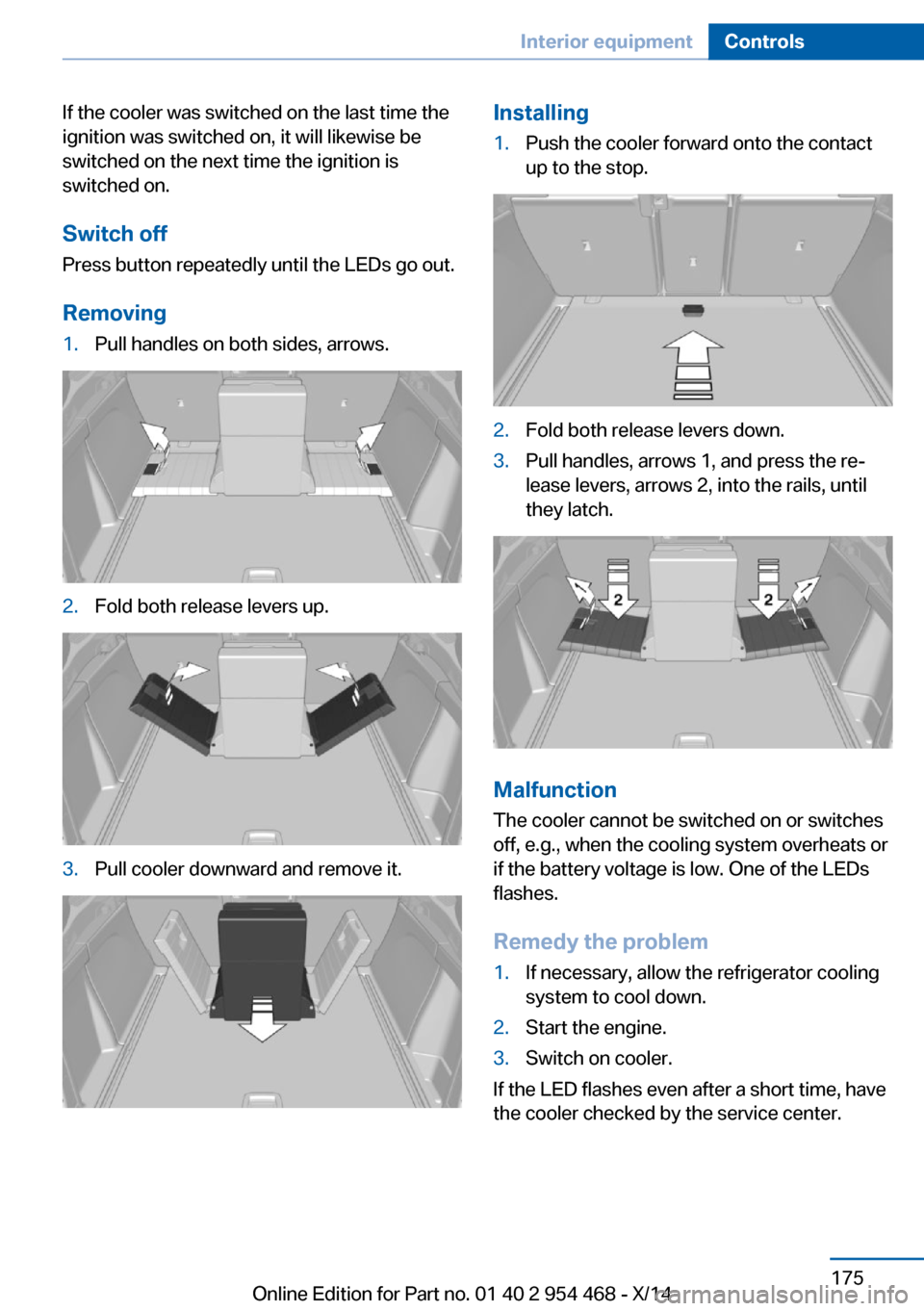
If the cooler was switched on the last time the
ignition was switched on, it will likewise be
switched on the next time the ignition is
switched on.
Switch off
Press button repeatedly until the LEDs go out.
Removing1.Pull handles on both sides, arrows.2.Fold both release levers up.3.Pull cooler downward and remove it.Installing1.Push the cooler forward onto the contact
up to the stop.2.Fold both release levers down.3.Pull handles, arrows 1, and press the re‐
lease levers, arrows 2, into the rails, until
they latch.
Malfunction
The cooler cannot be switched on or switches
off, e.g., when the cooling system overheats or
if the battery voltage is low. One of the LEDs
flashes.
Remedy the problem
1.If necessary, allow the refrigerator cooling
system to cool down.2.Start the engine.3.Switch on cooler.
If the LED flashes even after a short time, have
the cooler checked by the service center.
Seite 175Interior equipmentControls175
Online Edition for Part no. 01 40 2 954 468 - X/14
Page 239 of 259
Before driving into a car wash
In order to ensure that the vehicle can roll in a
car wash, take the following steps:1.Drive into the car wash.2.Engage selector lever position N.3.Deactivating Automatic Hold, refer to
page 72.4.Release the parking brake.5.Switch the engine off.
In this way, the ignition remains switched
on, and a Check-Control message is dis‐
played.
Do not turn off the ignition in the car
wash
Do not turn off the ignition in the car wash;
otherwise, selector lever position P is en‐
gaged and damages can result.◀
The vehicle cannot be locked from the outside
when in selector lever position N. A signal
sounds when an attempt is made to lock the
vehicle.
To start the engine:
1.Depress the brake pedal.2.Press the Start/Stop button.
Pressing the Start/Stop button without step‐
ping on the brake turns the ignition off.
Selector lever positionSelector lever position P is engaged automati‐
cally:
▷When the ignition is switched off.▷After approx. 15 minutes.
Headlights
▷Do not rub dry and do not use abrasive or
acidic cleansers.▷Soak areas that have been dirtied e. g.,
from insects, with shampoo and wash off
with water.▷Thaw ice with de-icing spray; do not use an
ice scraper.
After washing the vehicle
After washing the vehicle, apply the brakes
briefly to dry them; otherwise, braking action
can be reduced and corrosion of the brake
discs can occur.
Completely remove all residues on the win‐
dows, to minimize loss of visibility due to
smearing and to reduce wiper noises and
wiper blade wear.
Vehicle care
Car care products BMW recommends using care and cleaning
products from BMW, since these have been
tested and approved.
Car care and cleaning products
Follow the instructions on the container.
When cleaning the interior, open the doors or
windows.
Only use products intended for cleaning vehi‐
cles.
Cleansers can contain substances that are
dangerous and harmful to your health.◀
Vehicle paint
Regular care contributes to driving safety and
value retention. Environmental influences in
areas with elevated air pollution or natural con‐
taminants, such as tree resin or pollen can af‐
fect the vehicle's paintwork. Tailor the fre‐
quency and extent of your car care to these
influences.
Aggressive substances such as spilled fuel, oil,
grease or bird droppings, must be removed im‐
mediately to prevent the finish from being al‐
tered or discolored.
Seite 235CareMobility235
Online Edition for Part no. 01 40 2 954 468 - X/14
Page 248 of 259
Everything from A to Z
IndexA ABS, Antilock Brake Sys‐ tem 132
ACC, Active Cruise Control with Stop & Go 140
Acceleration Assistant, refer to Launch Control 80
Activated-charcoal filter 165
Active Blind Spot Detec‐ tion 127
Active Cruise Control with Stop & Go, ACC 140
Active Protection 129
Active roll stabilization 136
Active seat ventilation, front 54
Active Steering 136
Adaptive brake lights, refer to Brake force display 129
Adaptive Light Control 100
Additives, oil 215
Adjustments, seats/head re‐ straints 51
After washing vehicle 235
Airbags 104
Airbags, indicator/warning light 105
Air circulation, refer to Recir‐ culated-air mode 164
Air, dehumidifying, refer to Cooling function 164
Air distribution, manual 163
Air flow, automatic climate control 163
Air outlets, see ventila‐ tion 165
Air pressure, tires 204
Alarm system 45
Alarm, unintentional 46 All around the center con‐
sole 16
All around the roofliner 17
All around the steering wheel 14
All-season tires, refer to Win‐ ter tires 210
All-wheel-drive 134
Alternating-code hand-held transmitter 170
Alternative oil types 216
Animal detection, see Night Vision 122
Antifreeze, washer fluid 76
Antilock Brake System, ABS 132
Anti-slip control, refer to DSC 133
Approved axle load 241
Approved engine oils 216
Arrival time 95
Ashtray 171
Ashtray, front 171
Ashtray, rear 172
Assistance, Roadside Assis‐ tance 230
Assistance when driving off 132
Assist system, refer to Intelli‐ gent Safety 112
Attentiveness assistant 129
AUTO H button 71
AUTO H button, refer to Au‐ tomatic Hold 71
AUTO intensity 163
Automatic car wash 234
Automatic climate con‐ trol 162
Automatic Cruise Control with Stop & Go 140
Automatic Curb Monitor 59 Automatic deactivation, front-
seat passenger airbags 106
Automatic headlight con‐ trol 100
Automatic Hold 71
Automatic locking 45
Automatic recirculated-air control 164
Automatic Soft Closing, doors 40
Automatic tailgate 40
Automatic transmission, see Steptronic transmission 77
AUTO program, automatic cli‐ mate control 163
AUTO program, intensity 163
Auto Start/Stop function 69
Average fuel consumption 94
Average speed 94
Axle loads, weights 241
B Backrest curvature, refer to Lumbar support 53
Backrest, seats 51
Backrest, width 54
Bad road trips 188
Band-aids, refer to First aid kit 230
Bar for tow-starting/ towing 232
Battery replacement, vehicle battery 227
Battery replacement, vehicle remote control 34
Battery, vehicle 226
Belts, safety belts 55
Beverage holder, cu‐ pholder 181
Blinds, sun protection 48 Seite 244ReferenceEverything from A to Z244
Online Edition for Part no. 01 40 2 954 468 - X/14
Page 249 of 259
BMW Assist, see user'smanual for Navigation, En‐
tertainment and Communi‐
cation
BMW maintenance sys‐ tem 219
Bonus range, ECO PRO 195
Bottle holder, refer to Cu‐ pholder 181
Brake assistant 132
Brake discs, break-in 186
Brake force display 129
Brake lights, adaptive 129
Brake lights, brake force dis‐ play 129
Brake pads, break-in 186
Braking, hints 187
Breakdown assis‐ tance 229, 230
Break-in 186
Brightness of Control Dis‐ play 97
Bulb replacement 222
Bulb replacement, front 223
Bulb replacement, rear 224
Bulbs and lights 222
Button, RES 143
Button, Start/Stop 67
Bypassing, refer to Jump- starting 231
C
California Proposition 65 Warning 7
Calling up mirror adjust‐ ment 45
Calling up seat adjust‐ ment 45
Calling up steering wheel ad‐ justment 45
Camera, care 237
Camera, rearview cam‐ era 152
Camera, Side View 156
Camera, Top View 155 Can holder, refer to Cu‐
pholder 181
Car battery 226
Car care products 235
Care, displays 237
Care, vehicle 235
Cargo 190
Cargo area 176
Cargo area, enlarging 176
Cargo area, storage compart‐ ments 182
Cargo cover 176
Cargo, securing 191
Cargo straps, securing cargo 191
Car key, refer to Remote con‐ trol 34
Carpet, care 237
Car wash 234
Catalytic converter, refer to Hot exhaust system 186
CBS Condition Based Serv‐ ice 219
CD/Multimedia, see user's manual for Navigation, En‐
tertainment and Communi‐
cation
Center armrest 179
Center console 16
Central locking system 39
Central screen, refer to Con‐ trol Display 18
Changes, technical, refer to Safety 7
Changing parts 221
Changing wheels 224
Changing wheels/tires 209
Chassis number, see vehicle identification number 9
Check Control 85
Checking the engine oil level electronically 214
Checking the oil level elec‐ tronically 214
Children, seating position 62 Children, transporting
safely 62
Child restraint fixing sys‐ tem 62
Child restraint fixing system LATCH 64
Child restraint fixing systems, mounting 62
Child safety locks 65
Child seat, mounting 62
Child seats 62
Chrome parts, care 236
Cigarette lighter 172
Cleaning displays 237
Climate control 162
Climate control wind‐ shield 187
Clock 90
Closing/opening via door lock 39
Closing/opening with remote control 37
Closing the tailgate with no- touch activation 43
Clothes hooks 182
Coasting 196
Coasting with engine decou‐ pled, coasting 196
Coasting with idling en‐ gine 196
Cockpit 14
Combination reel, refer to Turn signals 74
Combination reel, refer to Wiper system 74
Comfort Access 42
COMFORT program, Driving Dynamics Control 138
Compact wheel 225
Compartments in the doors 179
Compass 95
Computer 94
Condensation on win‐ dows 163 Seite 245Everything from A to ZReference245
Online Edition for Part no. 01 40 2 954 468 - X/14
Page 255 of 259
SSafe braking 187
Safety 7
Safety belt reminder for driv‐ er's seat and front passen‐
ger seat 56
Safety belts 55
Safety belts, care 237
Safety Package, refer to Ac‐ tive Protection 129
Safety reel, windows 48
Safety systems, airbags 104
Saving fuel 193
Screen, refer to Control Dis‐ play 18
Screwdriver, see Onboard ve‐ hicle tool kit 221
Screw thread, see screw thread for tow fitting, screw
thread for tow fitting 233
Seat belts, refer to Safety belts 55
Seat heating, front 54
Seat heating, rear 55
Seating position for chil‐ dren 62
Seat, mirror, and steering wheel memory 58
Seats 51
Seats, front 51
Seats, rear 55
Seat ventilation, front 54
Selection list in instrument cluster 93
Selector lever, Steptronic transmission 77
Self-leveling suspension, air suspension 136
Self-leveling suspension, malfunction 137
Sensors, care 237
Service and warranty 8
Service requirements, Condi‐ tion Based Service
CBS 219 Service requirements, dis‐
play 91
Service, Roadside Assis‐ tance 230
Services, ConnectedDrive
SET button, see Active Cruise Control, ACC 140
SET button, see Cruise con‐ trol 147
Settings, locking/unlock‐ ing 44
Settings on Control Dis‐ play 96
Settings, storing for seat, mir‐ rors, steering wheel 58
Shift Lights 84
Shift paddles on steering wheel 79
Shoulder support 54
Side airbags 104
Side View 156
Signaling, horn 14
Signals when unlocking 44
Sitting safely 51
Size 240
Ski and snowboard bag 177
Slide/tilt glass roof 48
Smoker's package 171
Snow chains 211
Socket, OBD Onboard Diag‐ nostics 219
Sockets, see Connecting electrical devices 173
SOS button 229
Spare fuse 227
Spare tire 225
Specified engine oil types 216
Speed, average 94
Speed limit detection, com‐ puter 95
Speed limiter, display 92
Speed Limit Information 92
Speed warning 95
Split screen 23 SPORT+ - program, Dynamic
Driving Control 138
Sport displays, torque dis‐ play, performance dis‐
play 95
SPORT program, driving dy‐ namics 138
Sport program, transmis‐ sion 78
Stability control systems 132
Start/stop, automatic func‐ tion 69
Start/Stop button 67
Start function during malfunc‐ tion 35
Starting the engine 68
Status control display, tires 108
Status information, iDrive 23
Status of Owner's Manual 6
Steering, Active Steering 136
Steering wheel, adjusting 60
Steering wheel heating 61
Steering wheel memory 58
Steptronic Sport transmis‐ sion 79
Steptronic transmission 77
Stopping the engine 68
Storage compartment on the center console 179
Storage compartments 178
Storage compartments, loca‐ tions 178
Storage, tires 211
Storing the vehicle 237
Summer tires, tread 208
Sun visor 171
Supplementary text mes‐ sage 88
Surround View 151
Suspension settings 137
Switch for Dynamic Driving Control 137
Switch, refer to Cockpit 14
Symbols 6
Symbols in the status field 23 Seite 251Everything from A to ZReference251
Online Edition for Part no. 01 40 2 954 468 - X/14