Back BMW X6 2015 F16 Service Manual
[x] Cancel search | Manufacturer: BMW, Model Year: 2015, Model line: X6, Model: BMW X6 2015 F16Pages: 265, PDF Size: 6.17 MB
Page 183 of 265
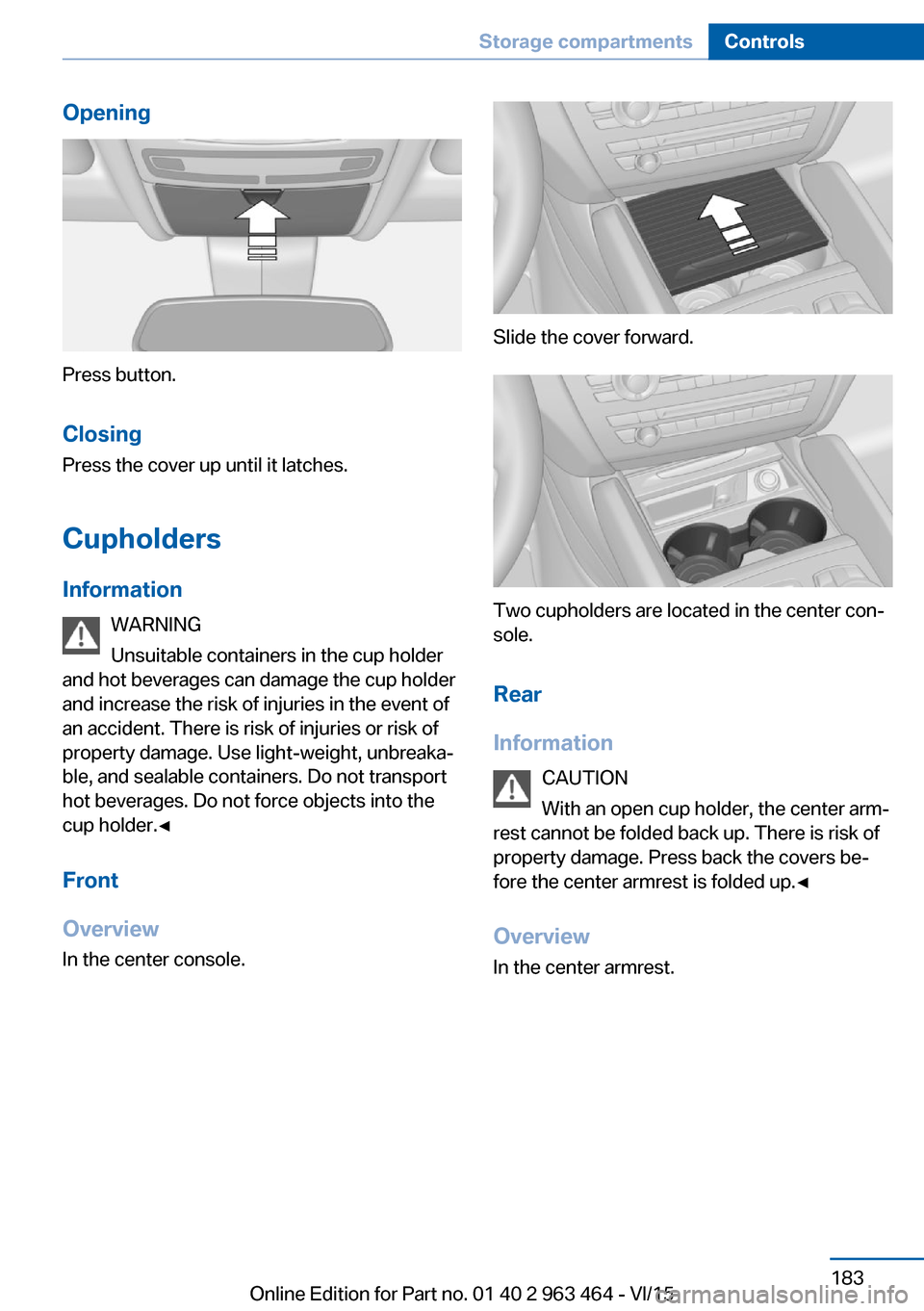
Opening
Press button.
Closing Press the cover up until it latches.
Cupholders Information WARNING
Unsuitable containers in the cup holder
and hot beverages can damage the cup holder
and increase the risk of injuries in the event of
an accident. There is risk of injuries or risk of
property damage. Use light-weight, unbreaka‐
ble, and sealable containers. Do not transport
hot beverages. Do not force objects into the
cup holder.◀
Front
Overview
In the center console.
Slide the cover forward.
Two cupholders are located in the center con‐
sole.
Rear
Information CAUTION
With an open cup holder, the center arm‐
rest cannot be folded back up. There is risk of
property damage. Press back the covers be‐
fore the center armrest is folded up.◀
Overview In the center armrest.
Seite 183Storage compartmentsControls183
Online Edition for Part no. 01 40 2 963 464 - VI/15
Page 184 of 265
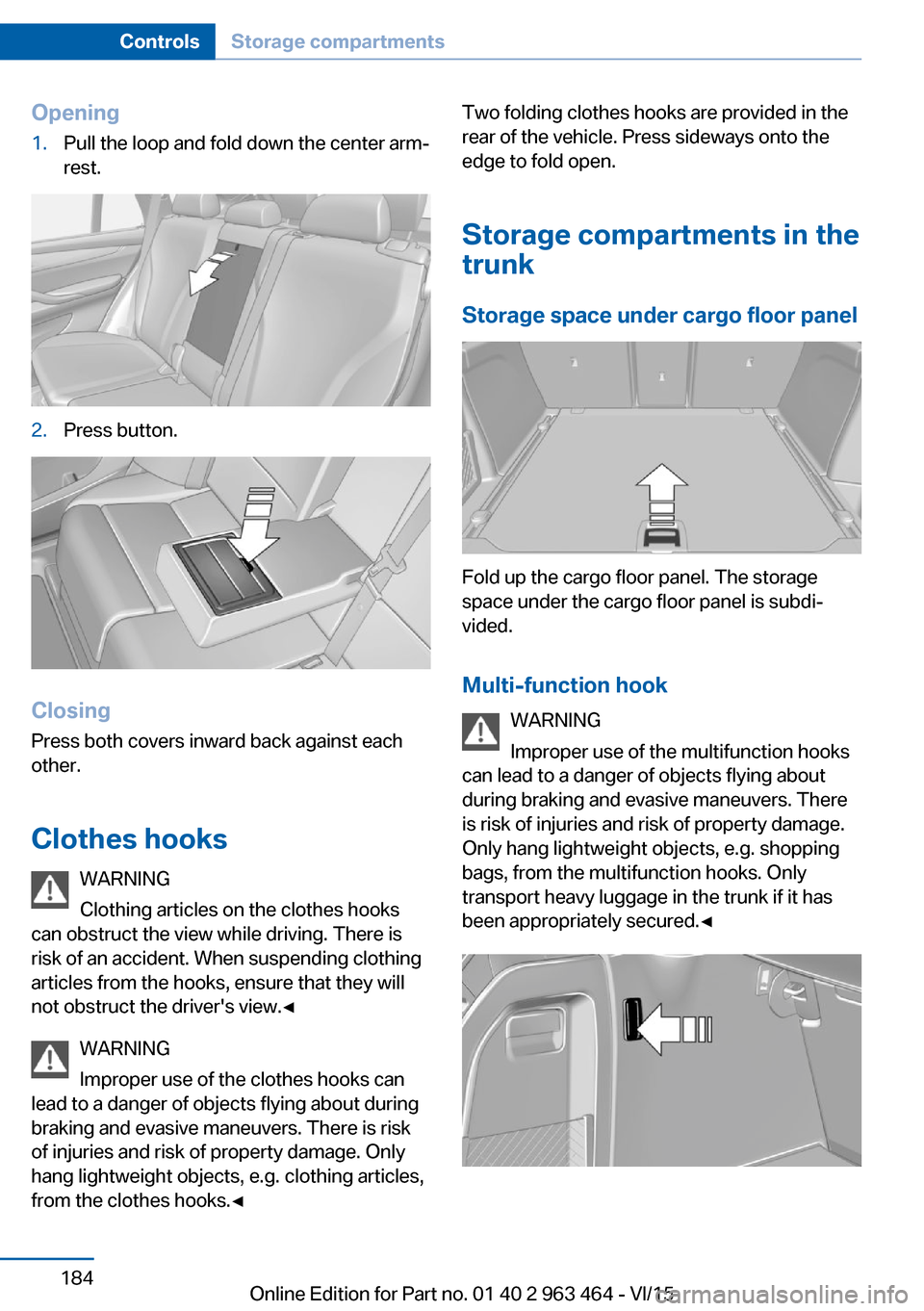
Opening1.Pull the loop and fold down the center arm‐
rest.2.Press button.
Closing
Press both covers inward back against each
other.
Clothes hooks WARNING
Clothing articles on the clothes hooks
can obstruct the view while driving. There is
risk of an accident. When suspending clothing
articles from the hooks, ensure that they will
not obstruct the driver's view.◀
WARNING
Improper use of the clothes hooks can
lead to a danger of objects flying about during
braking and evasive maneuvers. There is risk
of injuries and risk of property damage. Only
hang lightweight objects, e.g. clothing articles,
from the clothes hooks.◀
Two folding clothes hooks are provided in the
rear of the vehicle. Press sideways onto the
edge to fold open.
Storage compartments in thetrunk
Storage space under cargo floor panel
Fold up the cargo floor panel. The storage
space under the cargo floor panel is subdi‐
vided.
Multi-function hook WARNING
Improper use of the multifunction hooks
can lead to a danger of objects flying about
during braking and evasive maneuvers. There
is risk of injuries and risk of property damage.
Only hang lightweight objects, e.g. shopping
bags, from the multifunction hooks. Only
transport heavy luggage in the trunk if it has
been appropriately secured.◀
Seite 184ControlsStorage compartments184
Online Edition for Part no. 01 40 2 963 464 - VI/15
Page 193 of 265
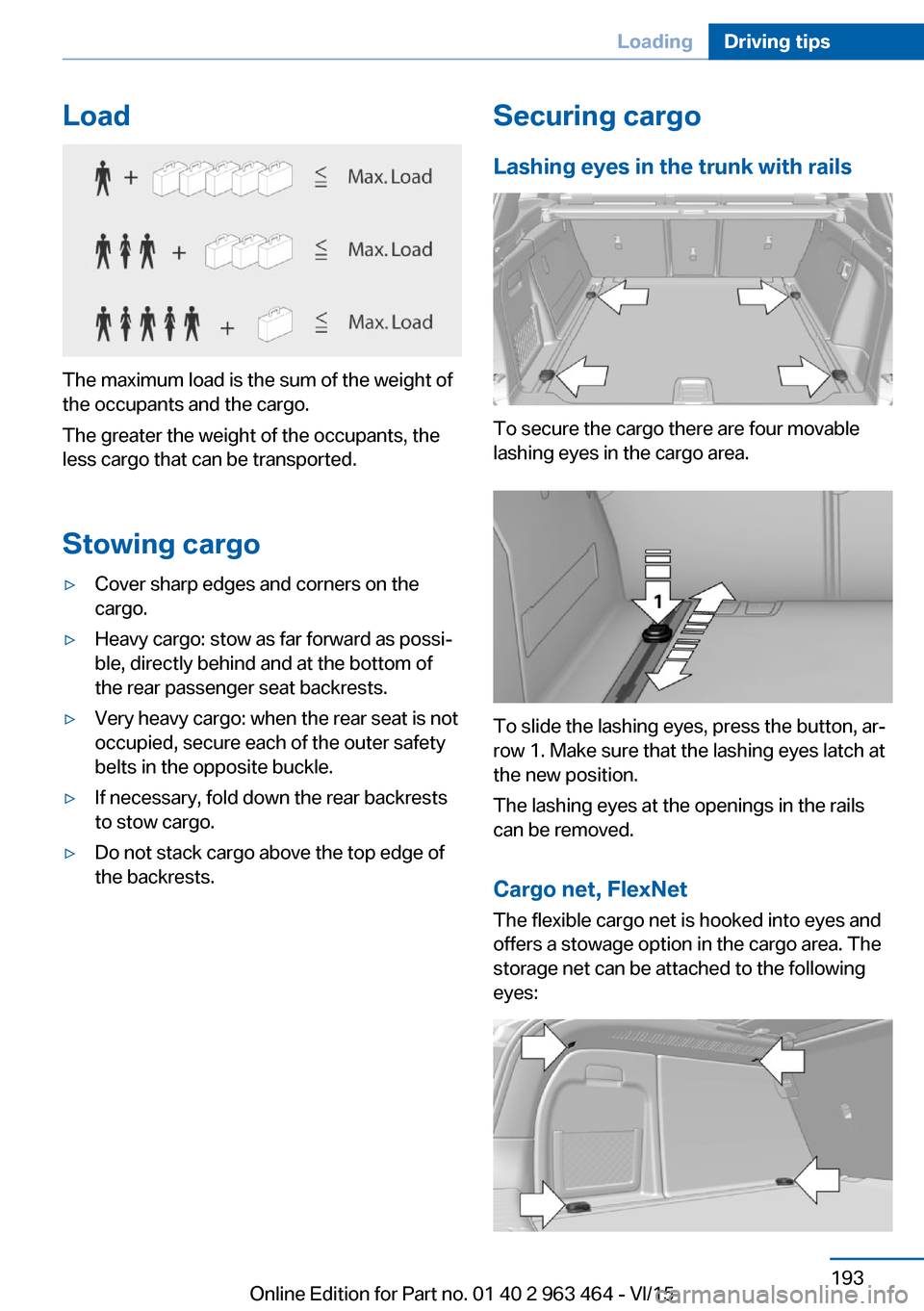
Load
The maximum load is the sum of the weight of
the occupants and the cargo.
The greater the weight of the occupants, the
less cargo that can be transported.
Stowing cargo
▷Cover sharp edges and corners on the
cargo.▷Heavy cargo: stow as far forward as possi‐
ble, directly behind and at the bottom of
the rear passenger seat backrests.▷Very heavy cargo: when the rear seat is not
occupied, secure each of the outer safety
belts in the opposite buckle.▷If necessary, fold down the rear backrests
to stow cargo.▷Do not stack cargo above the top edge of
the backrests.Securing cargo
Lashing eyes in the trunk with rails
To secure the cargo there are four movable
lashing eyes in the cargo area.
To slide the lashing eyes, press the button, ar‐
row 1. Make sure that the lashing eyes latch at
the new position.
The lashing eyes at the openings in the rails
can be removed.
Cargo net, FlexNet The flexible cargo net is hooked into eyes and
offers a stowage option in the cargo area. The
storage net can be attached to the following
eyes:
Seite 193LoadingDriving tips193
Online Edition for Part no. 01 40 2 963 464 - VI/15
Page 198 of 265
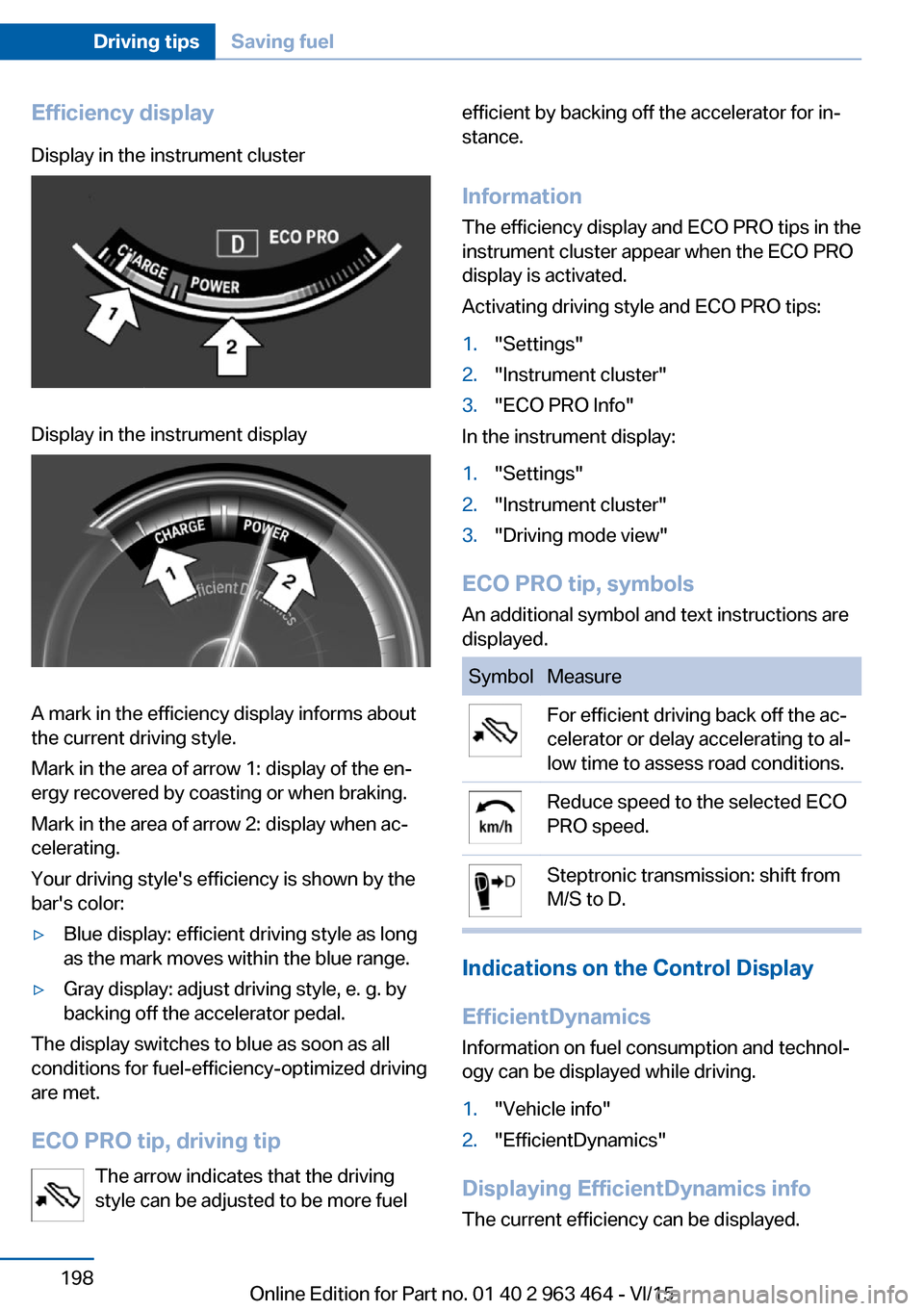
Efficiency displayDisplay in the instrument clusterDisplay in the instrument display
A mark in the efficiency display informs about
the current driving style.
Mark in the area of arrow 1: display of the en‐
ergy recovered by coasting or when braking.
Mark in the area of arrow 2: display when ac‐
celerating.
Your driving style's efficiency is shown by the
bar's color:
▷Blue display: efficient driving style as long
as the mark moves within the blue range.▷Gray display: adjust driving style, e. g. by
backing off the accelerator pedal.
The display switches to blue as soon as all
conditions for fuel-efficiency-optimized driving
are met.
ECO PRO tip, driving tip The arrow indicates that the driving
style can be adjusted to be more fuel
efficient by backing off the accelerator for in‐
stance.
Information The efficiency display and ECO PRO tips in the
instrument cluster appear when the ECO PRO
display is activated.
Activating driving style and ECO PRO tips:1."Settings"2."Instrument cluster"3."ECO PRO Info"
In the instrument display:
1."Settings"2."Instrument cluster"3."Driving mode view"
ECO PRO tip, symbols
An additional symbol and text instructions are
displayed.
SymbolMeasureFor efficient driving back off the ac‐
celerator or delay accelerating to al‐
low time to assess road conditions.Reduce speed to the selected ECO
PRO speed.Steptronic transmission: shift from
M/S to D.
Indications on the Control Display
EfficientDynamics Information on fuel consumption and technol‐
ogy can be displayed while driving.
1."Vehicle info"2."EfficientDynamics"
Displaying EfficientDynamics info
The current efficiency can be displayed.
Seite 198Driving tipsSaving fuel198
Online Edition for Part no. 01 40 2 963 464 - VI/15
Page 199 of 265
"EfficientDynamics info"
The following systems are displayed:▷Auto Start/Stop function.▷Energy recovery.▷Climate control output.
Display ECO PRO tips
"ECO PRO tips"
Settings are stored for the profile currently
used.
Coasting
The concept The system helps to conserve fuel.
To do this, under certain conditions the engine
is automatically decoupled from the transmis‐
sion when selector lever position D is set. The
vehicle continues traveling with the engine
idling to reduce fuel consumption. Selector
lever position D remains engaged.
This driving condition is referred to as coast‐
ing.
As soon as you step on the brake or accelera‐
tor pedal, the engine is automatically coupled
again.
Information Coasting is a component of the ECO PRO, re‐
fer to page 196, driving mode.
Coasting is automatically activated when ECO
PRO mode is called via the Driving Dynamics
Control.
The function is available in a certain speed
range.
A proactively driving style helps the driver to
use the function as often as possible and sup‐
ports the fuel-conserving effect of coasting.
Safety mode
The function is not available under one of the
following conditions.
▷DSC OFF or TRACTION activated.▷Driving in the dynamic limit range and on
steep uphill or downhill grades.▷Battery charge status temporarily too low
or vehicle electrical system drawing exces‐
sive current.▷Cruise control activated.
Functional requirements
In ECO PRO mode, this function is available in
a speed range from approximately 30 mph, ap‐
prox. 50 km/h to 100 mph, approx. 160 km/h, if
the following conditions are met:
▷Accelerator pedal and brake pedal are not
operated.▷The selector lever is in selector lever posi‐
tion D.▷Engine and transmission are at operating
temperature.
The driving status Coast can be influenced
with the shift paddles.
Display Display in the instrument cluster The mark in the efficiency dis‐
play below the tachometer is
backlit in blue and is located at
the zero point. The tachometer
approximately indicates idle
speed.
The coasting point indicator is illuminated at
the zero point during coasting.
Display in the instrument display The mark in the efficiency dis‐
play is backlit in blue and is lo‐
cated at the zero point.
The coasting point indicator is il‐
luminated at the zero point dur‐
ing coasting.
Seite 199Saving fuelDriving tips199
Online Edition for Part no. 01 40 2 963 464 - VI/15
Page 217 of 265
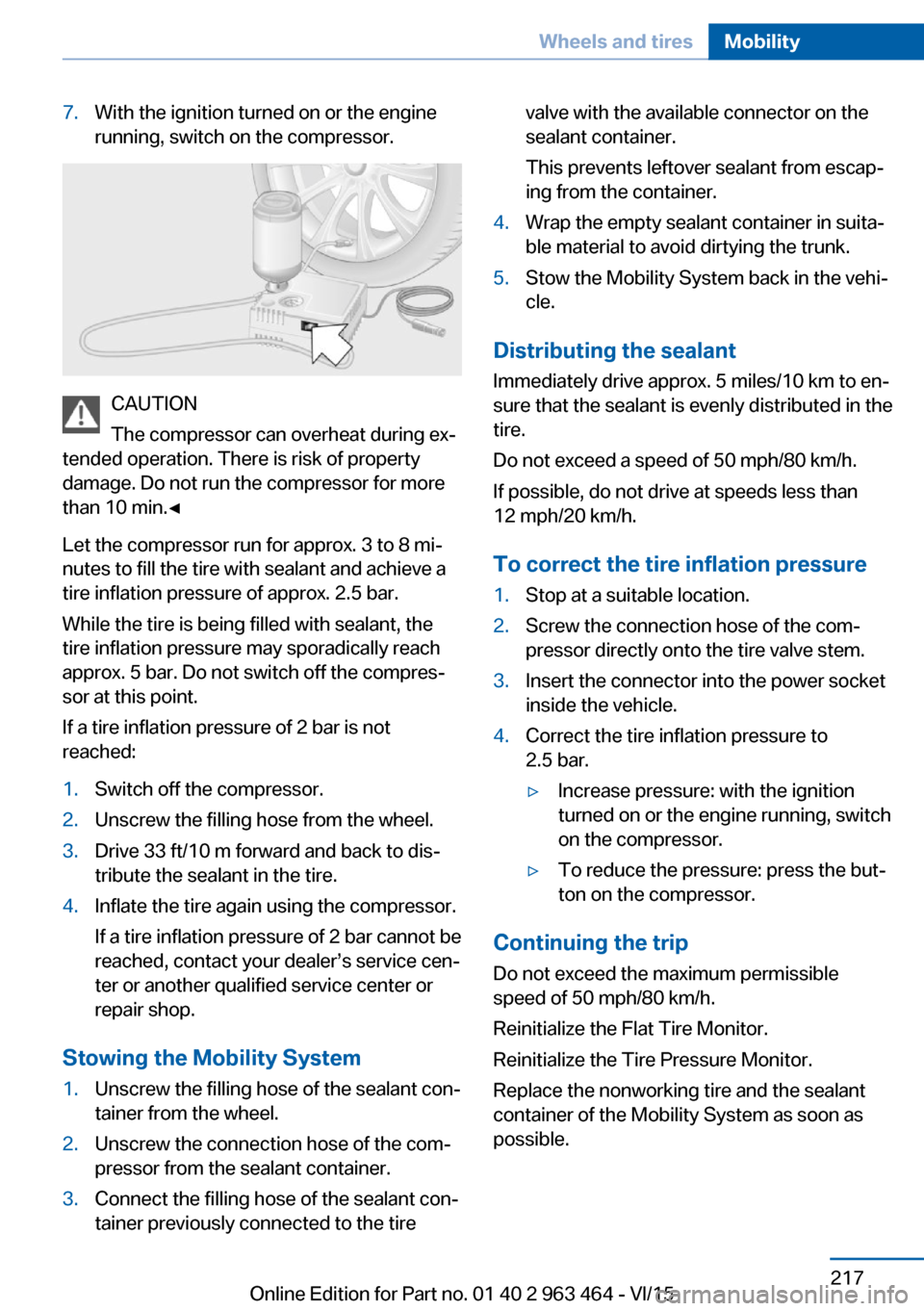
7.With the ignition turned on or the engine
running, switch on the compressor.
CAUTION
The compressor can overheat during ex‐
tended operation. There is risk of property
damage. Do not run the compressor for more
than 10 min.◀
Let the compressor run for approx. 3 to 8 mi‐
nutes to fill the tire with sealant and achieve a
tire inflation pressure of approx. 2.5 bar.
While the tire is being filled with sealant, the
tire inflation pressure may sporadically reach
approx. 5 bar. Do not switch off the compres‐
sor at this point.
If a tire inflation pressure of 2 bar is not
reached:
1.Switch off the compressor.2.Unscrew the filling hose from the wheel.3.Drive 33 ft/10 m forward and back to dis‐
tribute the sealant in the tire.4.Inflate the tire again using the compressor.
If a tire inflation pressure of 2 bar cannot be
reached, contact your dealer’s service cen‐
ter or another qualified service center or
repair shop.
Stowing the Mobility System
1.Unscrew the filling hose of the sealant con‐
tainer from the wheel.2.Unscrew the connection hose of the com‐
pressor from the sealant container.3.Connect the filling hose of the sealant con‐
tainer previously connected to the tirevalve with the available connector on the
sealant container.
This prevents leftover sealant from escap‐
ing from the container.4.Wrap the empty sealant container in suita‐
ble material to avoid dirtying the trunk.5.Stow the Mobility System back in the vehi‐
cle.
Distributing the sealant
Immediately drive approx. 5 miles/10 km to en‐
sure that the sealant is evenly distributed in the
tire.
Do not exceed a speed of 50 mph/80 km/h.
If possible, do not drive at speeds less than
12 mph/20 km/h.
To correct the tire inflation pressure
1.Stop at a suitable location.2.Screw the connection hose of the com‐
pressor directly onto the tire valve stem.3.Insert the connector into the power socket
inside the vehicle.4.Correct the tire inflation pressure to
2.5 bar.▷Increase pressure: with the ignition
turned on or the engine running, switch
on the compressor.▷To reduce the pressure: press the but‐
ton on the compressor.
Continuing the trip
Do not exceed the maximum permissible
speed of 50 mph/80 km/h.
Reinitialize the Flat Tire Monitor.
Reinitialize the Tire Pressure Monitor.
Replace the nonworking tire and the sealant
container of the Mobility System as soon as
possible.
Seite 217Wheels and tiresMobility217
Online Edition for Part no. 01 40 2 963 464 - VI/15
Page 246 of 265
Safety belts
Dirty belt straps impede the reeling action and
thus have a negative impact on safety.
WARNING
Chemical cleansers can destroy the
safety belt webbing. Missing protective effect
of the safety belts. There is risk of injuries or
danger to life. Use only a mild soapy solution
for cleaning the safety belts.◀
Use only a mild soapy solution, with the safety
belts clipped into their buckles.
Do not allow the switchs to retract the safety
belts until they are dry.
Carpets and floor mats WARNING
Objects in the driver's floor area can limit
the pedal distance or block a depressed pedal.
There is risk of an accident. Stow objects in
the vehicle such that they are secured and
cannot enter into the driver's floor area. Use
floor mats that are suitable for the vehicle and
can be safely attached to the floor. Do not use
loose floor mats and do not layer several floor
mats. Make sure that there is sufficient clear‐
ance for the pedals. Ensure that the floor mats
are securely fastened again after they were re‐
moved, e.g. for cleaning.◀
Floor mats can be removed from the car's inte‐
rior for cleaning.
If the floor carpets are very dirty, clean with a
microfiber cloth and water or a textile cleaner.
To prevent matting of the carpet, rub back and
forth in the direction of travel only.
Sensor/camera lenses
To clean sensors and camera lenses, use a
cloth moistened with a small amount of glass
detergent.Displays/Screens/protective glass of
the Head-up Display
CAUTION
Chemical cleansers, moisture or fluids of
any kind can damage the surface of displays
and screens. There is risk of property damage.
Clean with a clean, antistatic microfiber cloth.◀
CAUTION
The surface of displays can be damaged
with improper cleaning. There is risk of prop‐
erty damage. Avoid pressure that is too high
and do not use any scratching materials.◀
Clean with a clean, antistatic microfiber cloth.
Clean the protective glass of the Head-up Dis‐
play using a microfiber cloth and commercially
available dish-washing soap.
Long-term
When the vehicle is shut down for longer than
three months, special measures must be
taken. Further information is available from a
dealer’s service center or another qualified
service center or repair shop.Seite 246MobilityCare246
Online Edition for Part no. 01 40 2 963 464 - VI/15
Page 254 of 265
Everything from A to Z
IndexA ABS, Antilock Brake Sys‐ tem 134
ACC, Active Cruise Control with Stop & Go 142
Acceleration Assistant, refer to Launch Control 81
Accessories and parts 7
Activated-charcoal filter 167
Active Blind Spot Detec‐ tion 130
Active Cruise Control with Stop & Go, ACC 142
Active Protection 132
Active roll stabilization 138
Active seat ventilation, front 54
Active Steering 138
Adaptive brake assistant 134
Adaptive brake lights, see Brake force display 132
Adaptive Light Control 103
Additives, oil 224
Adjustments, seats/head re‐ straints 52
After washing vehicle 244
Airbags 106
Airbags, indicator/warning light 107
Air circulation, refer to Recir‐ culated-air mode 166
Air, dehumidifying, see Cool‐ ing function 165
Air distribution, manual 166
Air flow, automatic climate control 166
Air outlets, see ventila‐ tion 167
Air pressure, tires 208
Alarm system 46 Alarm, unintentional 47
All around the center con‐ sole 16
All around the roofliner 17
All around the steering wheel 14
All-season tires, see Winter tires 214
All-wheel-drive 136
Alternating-code hand-held transmitter 172
Alternative oil types 224
Ambient light 105
Animal detection, see Night Vision 124
Antifreeze, washer fluid 77
Antilock Brake System, ABS 134
Anti-slip control, see DSC 135
Approved axle load 251
Arrival time 96
Ashtray 173
Ashtray, front 173
Ashtray, rear 174
Assistance when driving off 134
Assist system, see Intelligent Safety 115
Attentiveness assistant 132
AUTO H button 72
AUTO H button, refer to Au‐ tomatic Hold 72
AUTO intensity 166
Automatic car wash 243
Automatic climate con‐ trol 164
Automatic Cruise Control with Stop & Go 142
Automatic Curb Monitor 59 Automatic deactivation,
Front-seat passenger air‐
bags 108
Automatic headlight con‐ trol 102
Automatic Hold 72
Automatic locking 46
Automatic recirculated-air control 166
Automatic Soft Closing, doors 40
Automatic tailgate 41
Automatic transmission, see Steptronic transmission 78
AUTO program, automatic cli‐ mate control 165
AUTO program, intensity 166
Auto Start/Stop function 69
Average fuel consumption 95
Average speed 95
Axle loads, weights 251
B Backrest curvature, see Lum‐ bar support 53
Backrest, seats 52
Backrest, width 54
Bad road trips 190
Band-aids, see First-aid kit 239
Bar for tow-starting/ towing 241
Battery replacement, vehicle battery 236
Battery replacement, vehicle remote control 35
Battery, vehicle 236
Belts, safety belts 55
Beverage holder, cu‐ pholder 183 Seite 254ReferenceEverything from A to Z254
Online Edition for Part no. 01 40 2 963 464 - VI/15
Page 257 of 265
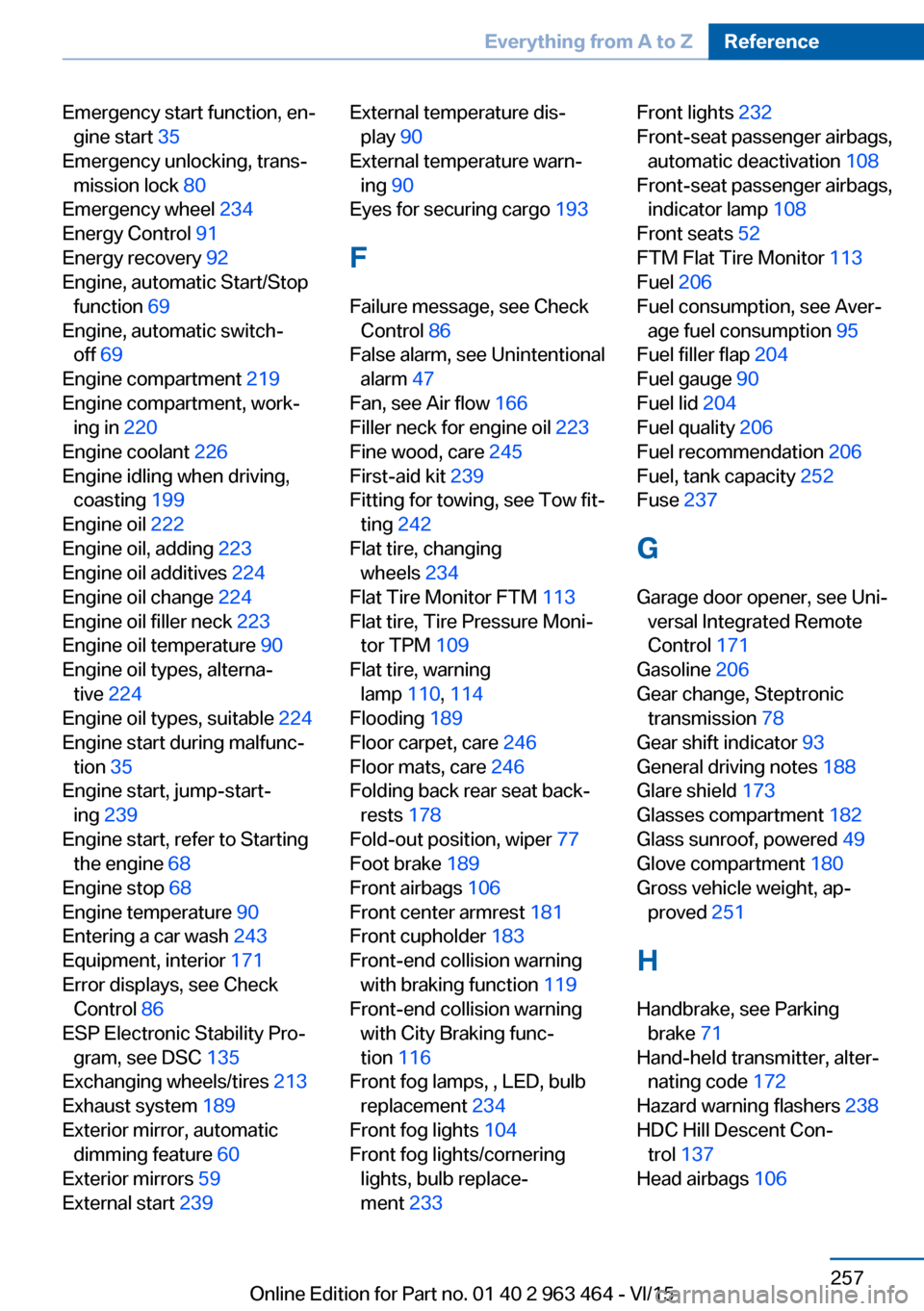
Emergency start function, en‐gine start 35
Emergency unlocking, trans‐ mission lock 80
Emergency wheel 234
Energy Control 91
Energy recovery 92
Engine, automatic Start/Stop function 69
Engine, automatic switch- off 69
Engine compartment 219
Engine compartment, work‐ ing in 220
Engine coolant 226
Engine idling when driving, coasting 199
Engine oil 222
Engine oil, adding 223
Engine oil additives 224
Engine oil change 224
Engine oil filler neck 223
Engine oil temperature 90
Engine oil types, alterna‐ tive 224
Engine oil types, suitable 224
Engine start during malfunc‐ tion 35
Engine start, jump-start‐ ing 239
Engine start, refer to Starting the engine 68
Engine stop 68
Engine temperature 90
Entering a car wash 243
Equipment, interior 171
Error displays, see Check Control 86
ESP Electronic Stability Pro‐ gram, see DSC 135
Exchanging wheels/tires 213
Exhaust system 189
Exterior mirror, automatic dimming feature 60
Exterior mirrors 59
External start 239 External temperature dis‐
play 90
External temperature warn‐ ing 90
Eyes for securing cargo 193
F
Failure message, see Check Control 86
False alarm, see Unintentional alarm 47
Fan, see Air flow 166
Filler neck for engine oil 223
Fine wood, care 245
First-aid kit 239
Fitting for towing, see Tow fit‐ ting 242
Flat tire, changing wheels 234
Flat Tire Monitor FTM 113
Flat tire, Tire Pressure Moni‐ tor TPM 109
Flat tire, warning lamp 110, 114
Flooding 189
Floor carpet, care 246
Floor mats, care 246
Folding back rear seat back‐ rests 178
Fold-out position, wiper 77
Foot brake 189
Front airbags 106
Front center armrest 181
Front cupholder 183
Front-end collision warning with braking function 119
Front-end collision warning with City Braking func‐
tion 116
Front fog lamps, , LED, bulb replacement 234
Front fog lights 104
Front fog lights/cornering lights, bulb replace‐
ment 233 Front lights 232
Front-seat passenger airbags, automatic deactivation 108
Front-seat passenger airbags, indicator lamp 108
Front seats 52
FTM Flat Tire Monitor 113
Fuel 206
Fuel consumption, see Aver‐ age fuel consumption 95
Fuel filler flap 204
Fuel gauge 90
Fuel lid 204
Fuel quality 206
Fuel recommendation 206
Fuel, tank capacity 252
Fuse 237
G
Garage door opener, see Uni‐ versal Integrated Remote
Control 171
Gasoline 206
Gear change, Steptronic transmission 78
Gear shift indicator 93
General driving notes 188
Glare shield 173
Glasses compartment 182
Glass sunroof, powered 49
Glove compartment 180
Gross vehicle weight, ap‐ proved 251
H
Handbrake, see Parking brake 71
Hand-held transmitter, alter‐ nating code 172
Hazard warning flashers 238
HDC Hill Descent Con‐ trol 137
Head airbags 106 Seite 257Everything from A to ZReference257
Online Edition for Part no. 01 40 2 963 464 - VI/15
Page 259 of 265
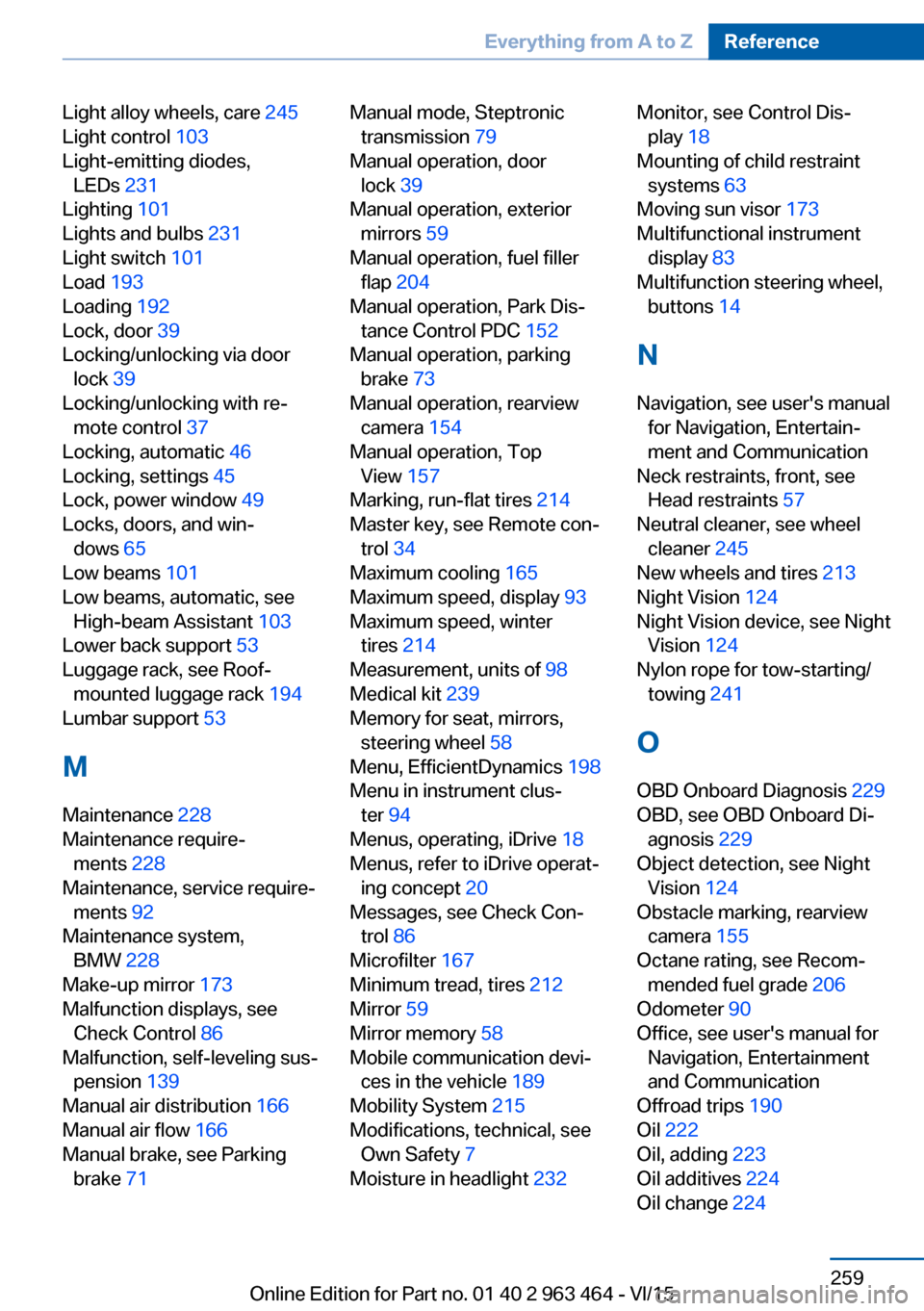
Light alloy wheels, care 245
Light control 103
Light-emitting diodes, LEDs 231
Lighting 101
Lights and bulbs 231
Light switch 101
Load 193
Loading 192
Lock, door 39
Locking/unlocking via door lock 39
Locking/unlocking with re‐ mote control 37
Locking, automatic 46
Locking, settings 45
Lock, power window 49
Locks, doors, and win‐ dows 65
Low beams 101
Low beams, automatic, see High-beam Assistant 103
Lower back support 53
Luggage rack, see Roof- mounted luggage rack 194
Lumbar support 53
M
Maintenance 228
Maintenance require‐ ments 228
Maintenance, service require‐ ments 92
Maintenance system, BMW 228
Make-up mirror 173
Malfunction displays, see Check Control 86
Malfunction, self-leveling sus‐ pension 139
Manual air distribution 166
Manual air flow 166
Manual brake, see Parking brake 71 Manual mode, Steptronic
transmission 79
Manual operation, door lock 39
Manual operation, exterior mirrors 59
Manual operation, fuel filler flap 204
Manual operation, Park Dis‐ tance Control PDC 152
Manual operation, parking brake 73
Manual operation, rearview camera 154
Manual operation, Top View 157
Marking, run-flat tires 214
Master key, see Remote con‐ trol 34
Maximum cooling 165
Maximum speed, display 93
Maximum speed, winter tires 214
Measurement, units of 98
Medical kit 239
Memory for seat, mirrors, steering wheel 58
Menu, EfficientDynamics 198
Menu in instrument clus‐ ter 94
Menus, operating, iDrive 18
Menus, refer to iDrive operat‐ ing concept 20
Messages, see Check Con‐ trol 86
Microfilter 167
Minimum tread, tires 212
Mirror 59
Mirror memory 58
Mobile communication devi‐ ces in the vehicle 189
Mobility System 215
Modifications, technical, see Own Safety 7
Moisture in headlight 232 Monitor, see Control Dis‐
play 18
Mounting of child restraint systems 63
Moving sun visor 173
Multifunctional instrument display 83
Multifunction steering wheel, buttons 14
N
Navigation, see user's manual for Navigation, Entertain‐
ment and Communication
Neck restraints, front, see Head restraints 57
Neutral cleaner, see wheel cleaner 245
New wheels and tires 213
Night Vision 124
Night Vision device, see Night Vision 124
Nylon rope for tow-starting/ towing 241
O OBD Onboard Diagnosis 229
OBD, see OBD Onboard Di‐ agnosis 229
Object detection, see Night Vision 124
Obstacle marking, rearview camera 155
Octane rating, see Recom‐ mended fuel grade 206
Odometer 90
Office, see user's manual for Navigation, Entertainment
and Communication
Offroad trips 190
Oil 222
Oil, adding 223
Oil additives 224
Oil change 224 Seite 259Everything from A to ZReference259
Online Edition for Part no. 01 40 2 963 464 - VI/15