seats BMW X6 M 2012 User Guide
[x] Cancel search | Manufacturer: BMW, Model Year: 2012, Model line: X6 M, Model: BMW X6 M 2012Pages: 317, PDF Size: 8.83 MB
Page 60 of 317
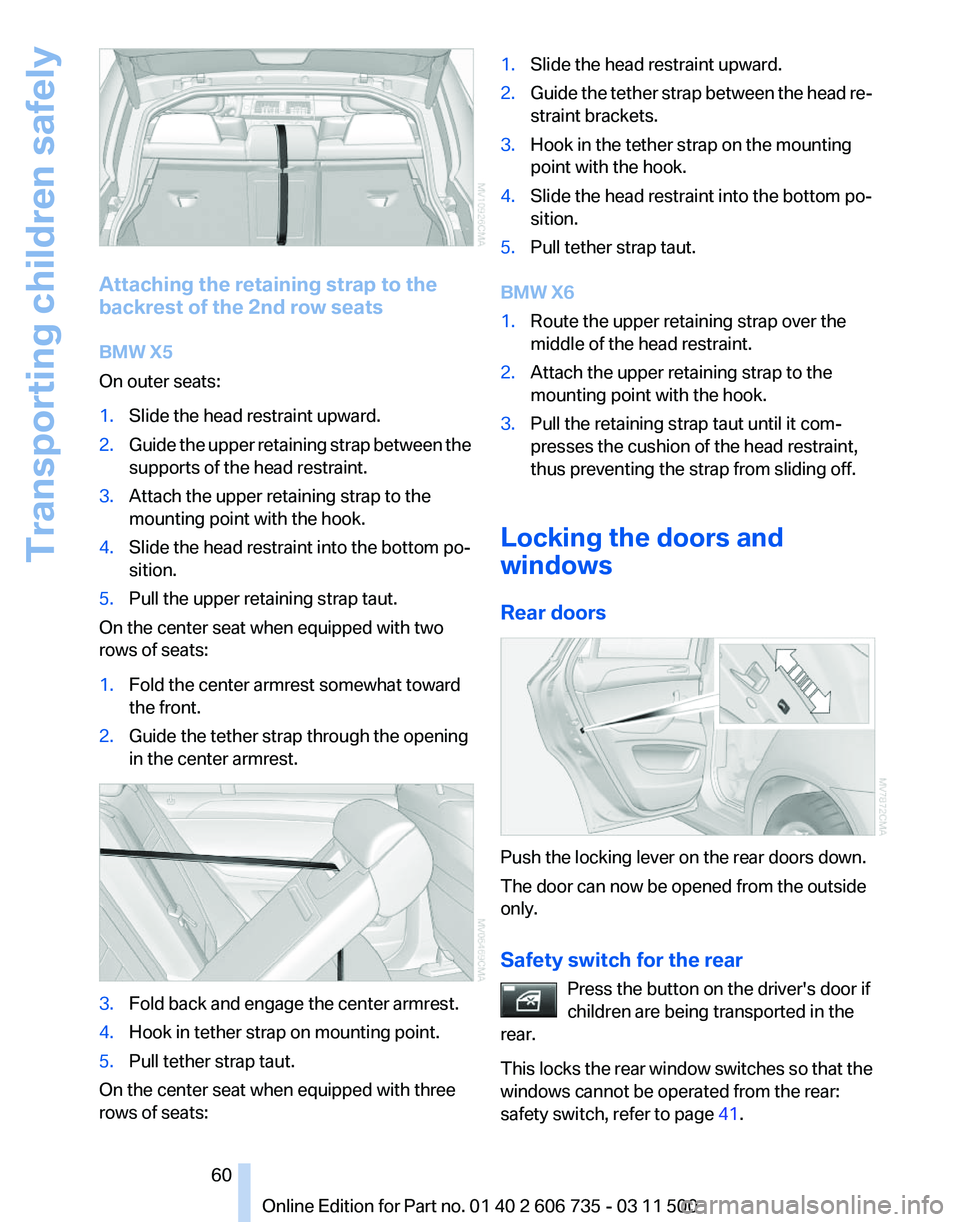
Attaching the retaining strap to the
backrest of the 2nd row seats
BMW X5
On outer seats:
1.
Slide the head restraint upward.
2. Guide the upper retaining strap between the
supports of the head restraint.
3. Attach the upper retaining strap to the
mounting point with the hook.
4. Slide the head restraint into the bottom po‐
sition.
5. Pull the upper retaining strap taut.
On the center seat when equipped with two
rows of seats:
1. Fold the center armrest somewhat toward
the front.
2. Guide the tether strap through the opening
in the center armrest. 3.
Fold back and engage the center armrest.
4. Hook in tether strap on mounting point.
5. Pull tether strap taut.
On the center seat when equipped with three
rows of seats: 1.
Slide the head restraint upward.
2. Guide the tether strap between the head re‐
straint brackets.
3. Hook in the tether strap on the mounting
point with the hook.
4. Slide the head restraint into the bottom po‐
sition.
5. Pull tether strap taut.
BMW X6
1. Route the upper retaining strap over the
middle of the head restraint.
2. Attach the upper retaining strap to the
mounting point with the hook.
3. Pull the retaining strap taut until it com‐
presses the cushion of the head restraint,
thus preventing the strap from sliding off.
Locking the doors and
windows
Rear doors Push the locking lever on the rear doors down.
The door can now be opened from the outside
only.
Safety switch for the rear
Press the button on the driver's door if
children are being transported in the
rear.
This
locks the rear window switches so that the
windows cannot be operated from the rear:
safety switch, refer to page 41. Seite 60
60 Online Edition for Part no. 01 40 2 606 735 - 03 11 500
Transporting children safely
Page 86 of 317
Safety
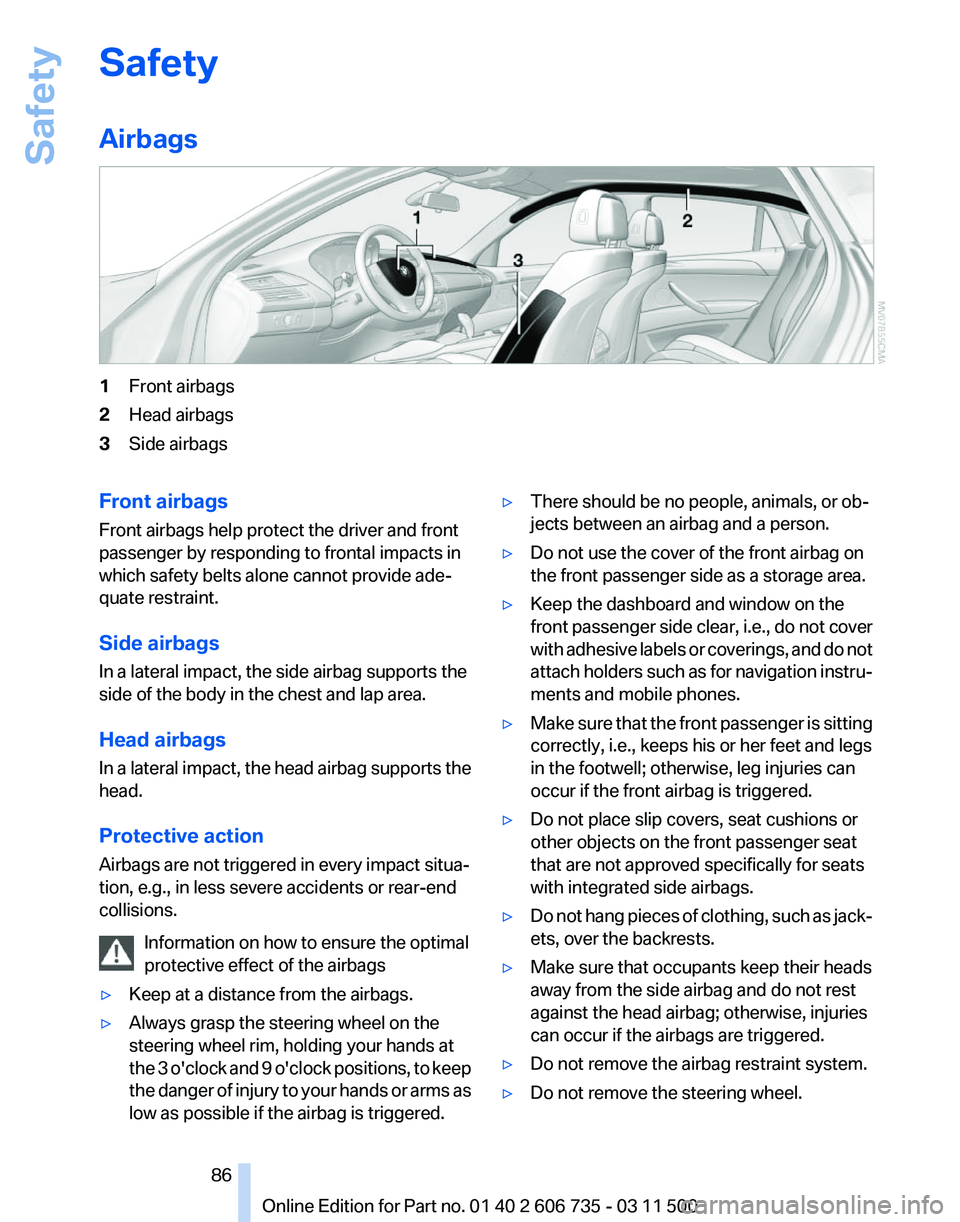
Airbags
1
Front airbags
2 Head airbags
3 Side airbags
Front airbags
Front airbags help protect the driver and front
passenger by responding to frontal impacts in
which safety belts alone cannot provide ade‐
quate restraint.
Side airbags
In a lateral impact, the side airbag supports the
side of the body in the chest and lap area.
Head airbags
In
a lateral impact, the head airbag supports the
head.
Protective action
Airbags are not triggered in every impact situa‐
tion, e.g., in less severe accidents or rear-end
collisions.
Information on how to ensure the optimal
protective effect of the airbags
▷ Keep at a distance from the airbags.
▷ Always grasp the steering wheel on the
steering wheel rim, holding your hands at
the
3 o'clock and 9 o'clock positions, to keep
the danger of injury to your hands or arms as
low as possible if the airbag is triggered. ▷
There should be no people, animals, or ob‐
jects between an airbag and a person.
▷ Do not use the cover of the front airbag on
the front passenger side as a storage area.
▷ Keep the dashboard and window on the
front
passenger side clear, i.e., do not cover
with adhesive labels or coverings, and do not
attach holders such as for navigation instru‐
ments and mobile phones.
▷ Make sure that the front passenger is sitting
correctly, i.e., keeps his or her feet and legs
in the footwell; otherwise, leg injuries can
occur if the front airbag is triggered.
▷ Do not place slip covers, seat cushions or
other objects on the front passenger seat
that are not approved specifically for seats
with integrated side airbags.
▷ Do not hang pieces of clothing, such as jack‐
ets, over the backrests.
▷ Make sure that occupants keep their heads
away from the side airbag and do not rest
against the head airbag; otherwise, injuries
can occur if the airbags are triggered.
▷ Do not remove the airbag restraint system.
▷ Do not remove the steering wheel.
Seite 86
86 Online Edition for Part no. 01 40 2 606 735 - 03 11 500
Safety
Page 87 of 317
▷
Do not apply adhesive materials to the air‐
bag cover panels, cover them or modify
them in any way.
▷ Never modify either the individual compo‐
nents
or the wiring in the airbag system. This
also applies to steering wheel covers, the
dashboard, the seats, the roof pillars and the
sides of the headliner.◀
Even when all instructions are followed closely,
injury from contact with the airbags cannot be
ruled out in certain situations.
The ignition and inflation noise may lead to
short-term
and, in most cases, temporary hear‐
ing impairment in sensitive individuals.
In the case of a malfunction, deactivation
and after triggering of the airbags
Do not touch the individual components imme‐
diately after the system has been triggered; oth‐
erwise, there is the danger of burns.
Only have the airbags checked, repaired or dis‐
mantled and the airbag generator scrapped by
your service center or a workshop that has the
necessary authorization for handling explosives.
Non-professional attempts to service the sys‐
tem could lead to failure in an emergency or un‐
desired triggering of the airbag, either of which
could result in injury.◀
Warnings and information on the airbags are
also found on the sun visors.
Automatic deactivation of the front
passenger airbags
The occupation of the seat is detected by eval‐
uating the impression on the occupied seat sur‐
face of the front passenger seat.
The front and side airbags on the front passen‐
ger side are activated or deactivated accordingly
by the system.
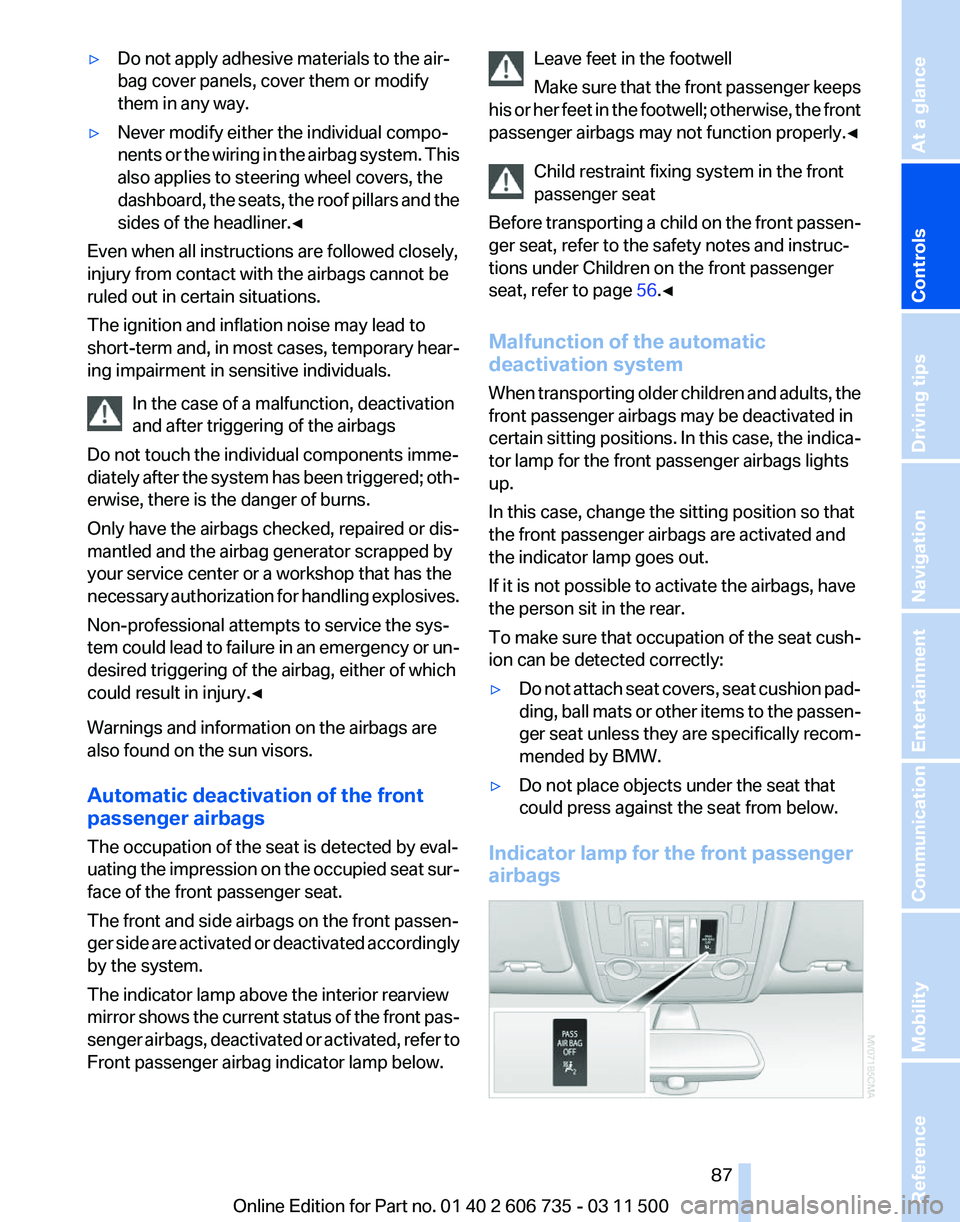
The indicator lamp above the interior rearview
mirror shows the current status of the front pas‐
senger airbags, deactivated or activated, refer to
Front passenger airbag indicator lamp below. Leave feet in the footwell
Make
sure that the front passenger keeps
his or her feet in the footwell; otherwise, the front
passenger airbags may not function properly.◀
Child restraint fixing system in the front
passenger seat
Before transporting a child on the front passen‐
ger seat, refer to the safety notes and instruc‐
tions under Children on the front passenger
seat, refer to page 56.◀
Malfunction of the automatic
deactivation system
When transporting older children and adults, the
front passenger airbags may be deactivated in
certain sitting positions. In this case, the indica‐
tor lamp for the front passenger airbags lights
up.
In this case, change the sitting position so that
the front passenger airbags are activated and
the indicator lamp goes out.
If it is not possible to activate the airbags, have
the person sit in the rear.
To make sure that occupation of the seat cush‐
ion can be detected correctly:
▷ Do not attach seat covers, seat cushion pad‐
ding,
ball mats or other items to the passen‐
ger seat unless they are specifically recom‐
mended by BMW.
▷ Do not place objects under the seat that
could press against the seat from below.
Indicator lamp for the front passenger
airbags Seite 87
87Online Edition for Part no. 01 40 2 606 735 - 03 11 500
Reference Mobility Communication Entertainment Navigation Driving tips
Controls At a glance
Page 88 of 317
Depending on the vehicle's equipment, the ar‐
rangement of the switches and indicator lamps
may differ somewhat.
The indicator lamp for the front passenger air‐
bags indicates the operating state of the front
passenger airbags.
The lamp indicates whether the airbags are ac‐
tivated or deactivated.
▷
The indicator lamp lights up when a child in
a child restraint fixing system intended for
the purpose is properly detected on the
seat. The airbags on the front passenger
side are not activated.
▷ The indicator lamp does not light up when,
for example, a correctly seated person of
sufficient size is detected on the seat. The
airbags on the front passenger side are ac‐
tivated.
▷ The indicator lamp does not light up when
the seat is empty. However, the airbags on
the front passenger side are not activated.
The system generally detects children seated in
a child seat, especially in the child seats that
were required by NHTSA when the vehicle was
manufactured.
After installing a child seat, make
sure that the indicator lamp for the front pas‐
senger airbags lights up. This indicates that the
child seat has been detected and the front pas‐
senger airbags are not activated.
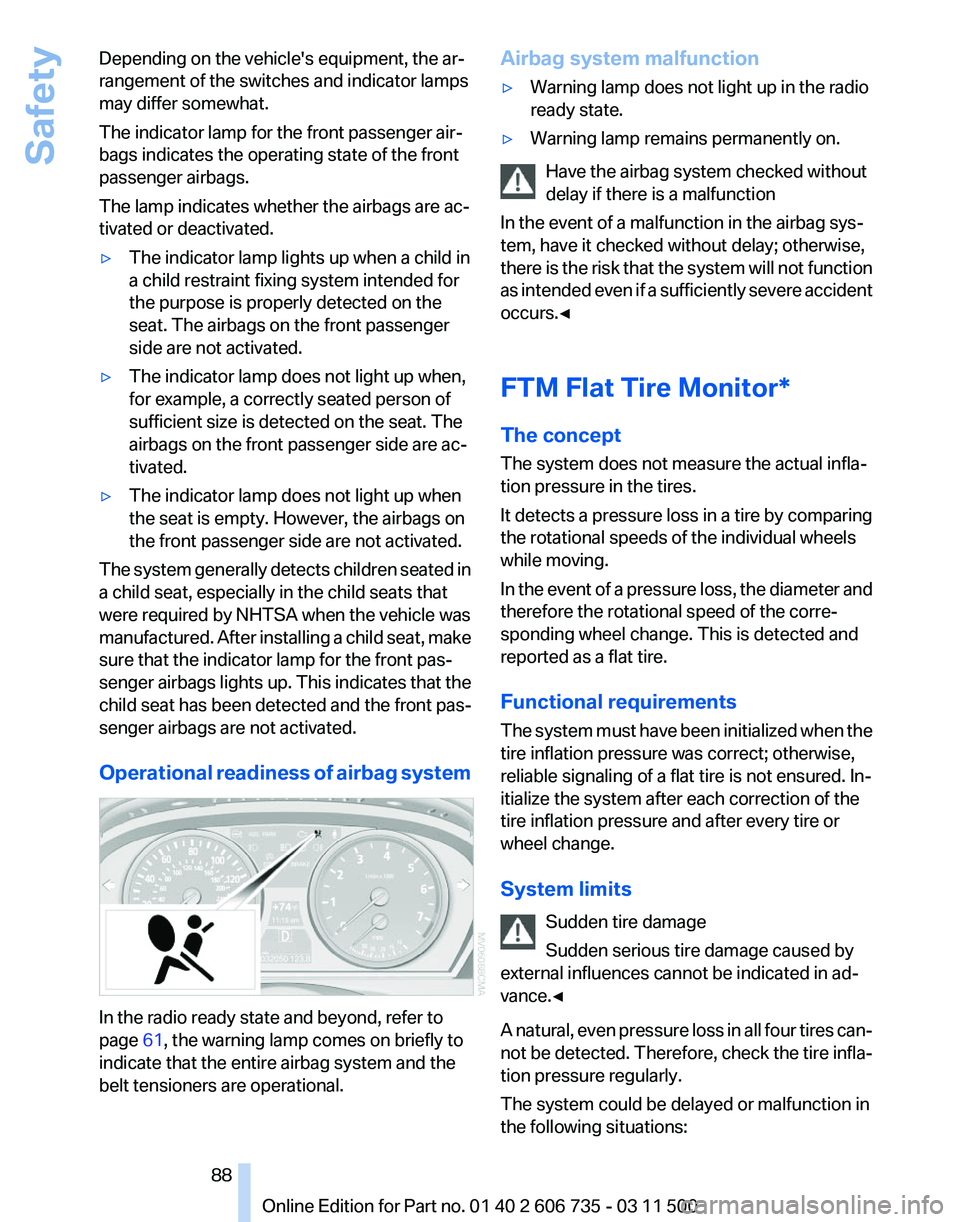
Operational readiness of airbag system In the radio ready state and beyond, refer to
page
61, the warning lamp comes on briefly to
indicate that the entire airbag system and the
belt tensioners are operational. Airbag system malfunction
▷
Warning lamp does not light up in the radio
ready state.
▷ Warning lamp remains permanently on.
Have the airbag system checked without
delay if there is a malfunction
In the event of a malfunction in the airbag sys‐
tem, have it checked without delay; otherwise,
there
is the risk that the system will not function
as intended even if a sufficiently severe accident
occurs.◀
FTM Flat Tire Monitor*
The concept
The system does not measure the actual infla‐
tion pressure in the tires.
It detects a pressure loss in a tire by comparing
the rotational speeds of the individual wheels
while moving.
In the event of a pressure loss, the diameter and
therefore the rotational speed of the corre‐
sponding wheel change. This is detected and
reported as a flat tire.
Functional requirements
The system must have been initialized when the
tire inflation pressure was correct; otherwise,
reliable signaling of a flat tire is not ensured. In‐
itialize the system after each correction of the
tire inflation pressure and after every tire or
wheel change.
System limits
Sudden tire damage
Sudden serious tire damage caused by
external influences cannot be indicated in ad‐
vance.◀
A natural, even pressure loss in all four tires can‐
not be detected. Therefore, check the tire infla‐
tion pressure regularly.
The system could be delayed or malfunction in
the following situations: Seite 88
88 Online Edition for Part no. 01 40 2 606 735 - 03 11 500Safety
Page 123 of 317
Switching on
1.
Switch off the ignition.
2. Press the right-hand button. REST appears on the display of the automatic
climate
control when the residual heat utilization
is switched on.
From radio readiness the interior temperature,
the air volume and the air distribution can be set.
Switching off
You can select the lowest blower speed by
pressing and holding the left side. Pressing
again switches off the residual heat utilization.
REST disappears from the display of the auto‐
matic climate control.
Switching on/off the automatic climate
control
Switching off
With the blower at its lowest setting,
press the left side of the button to
switch off the automatic climate control.
Switching on
Press any button to switch the automatic cli‐
mate control back on.
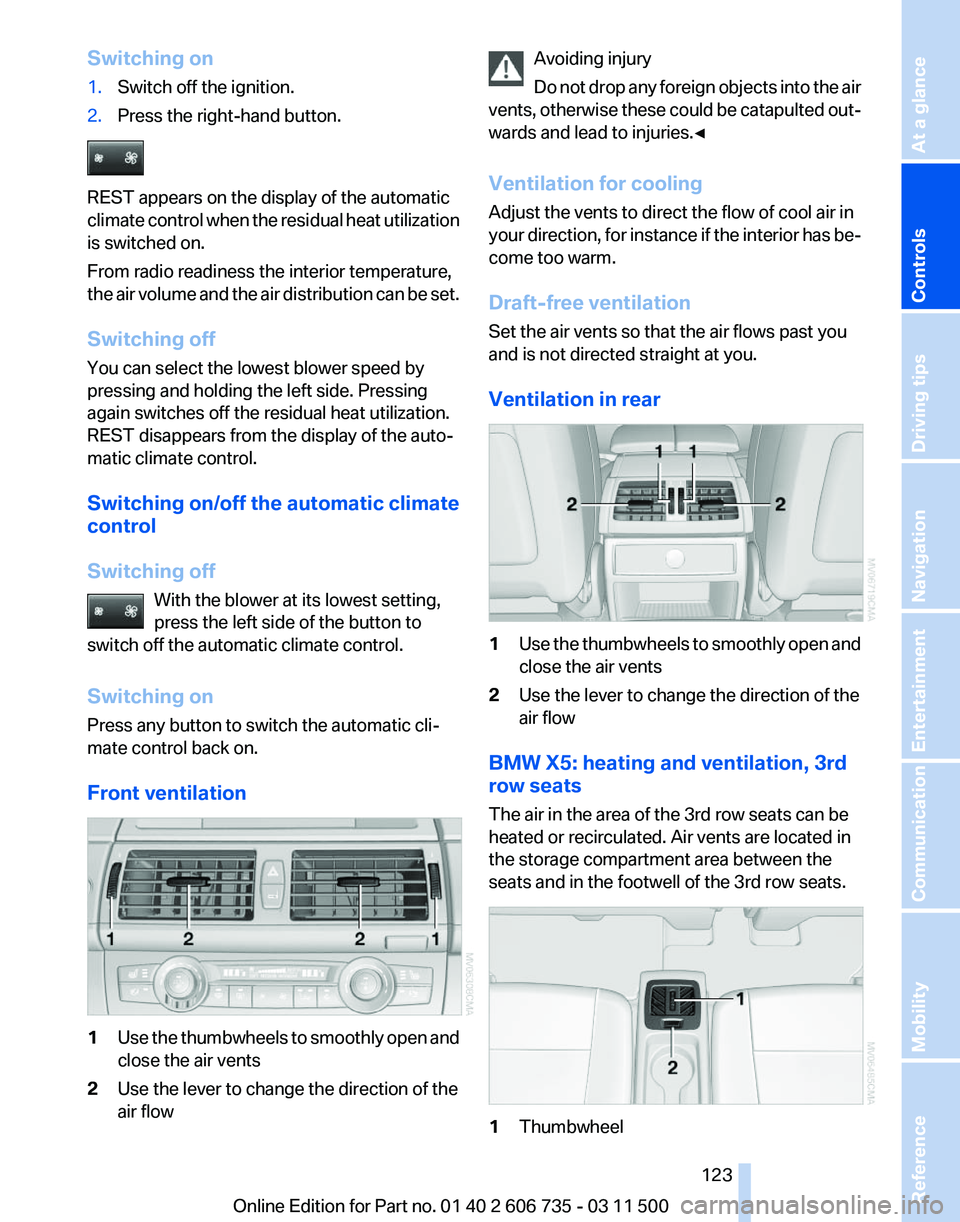
Front ventilation 1
Use the thumbwheels to smoothly open and
close the air vents
2 Use the lever to change the direction of the
air flow Avoiding injury
Do
not drop any foreign objects into the air
vents, otherwise these could be catapulted out‐
wards and lead to injuries.◀
Ventilation for cooling
Adjust the vents to direct the flow of cool air in
your direction, for instance if the interior has be‐
come too warm.
Draft-free ventilation
Set the air vents so that the air flows past you
and is not directed straight at you.
Ventilation in rear 1
Use the thumbwheels to smoothly open and
close the air vents
2 Use the lever to change the direction of the
air flow
BMW X5: heating and ventilation, 3rd
row seats
The air in the area of the 3rd row seats can be
heated or recirculated. Air vents are located in
the storage compartment area between the
seats and in the footwell of the 3rd row seats. 1
Thumbwheel Seite 123
123Online Edition for Part no. 01 40 2 606 735 - 03 11 500
Reference Mobility Communication Entertainment Navigation Driving tips
Controls At a glance
Page 124 of 317
▷
Activating heating and distributing air in
footwell:
Turn toward front
▷ Distributing air in storage compartment
area between seats:
Turn toward rear
2 Button for switching on the blower: LED is lit
The heating is not ready for operation without
switching on the blower. After the heating is
switched
off, the blower can be used to recircu‐
late the air within the vehicle, for instance at high
temperatures. To do this, turn thumbwheel 1 to‐
ward the rear and switch on the blower, button 2.
Microfilter/activated-charcoal filter
The microfilter traps dust and pollen in the in‐
coming air.
The activated-charcoal filter removes gaseous
pollutants from the outside air that enters the
vehicle.
The service center replaces this combined filter
during routine maintenance.
More information can be found in the service re‐
quirements display, refer to page 75.
Automatic climate control
with 4-zone control*
Front operation
Corresponds to the operation of automatic cli‐
mate control with 2-zone control, refer to
page 120.
Rear operation
The control unit is located in the center console
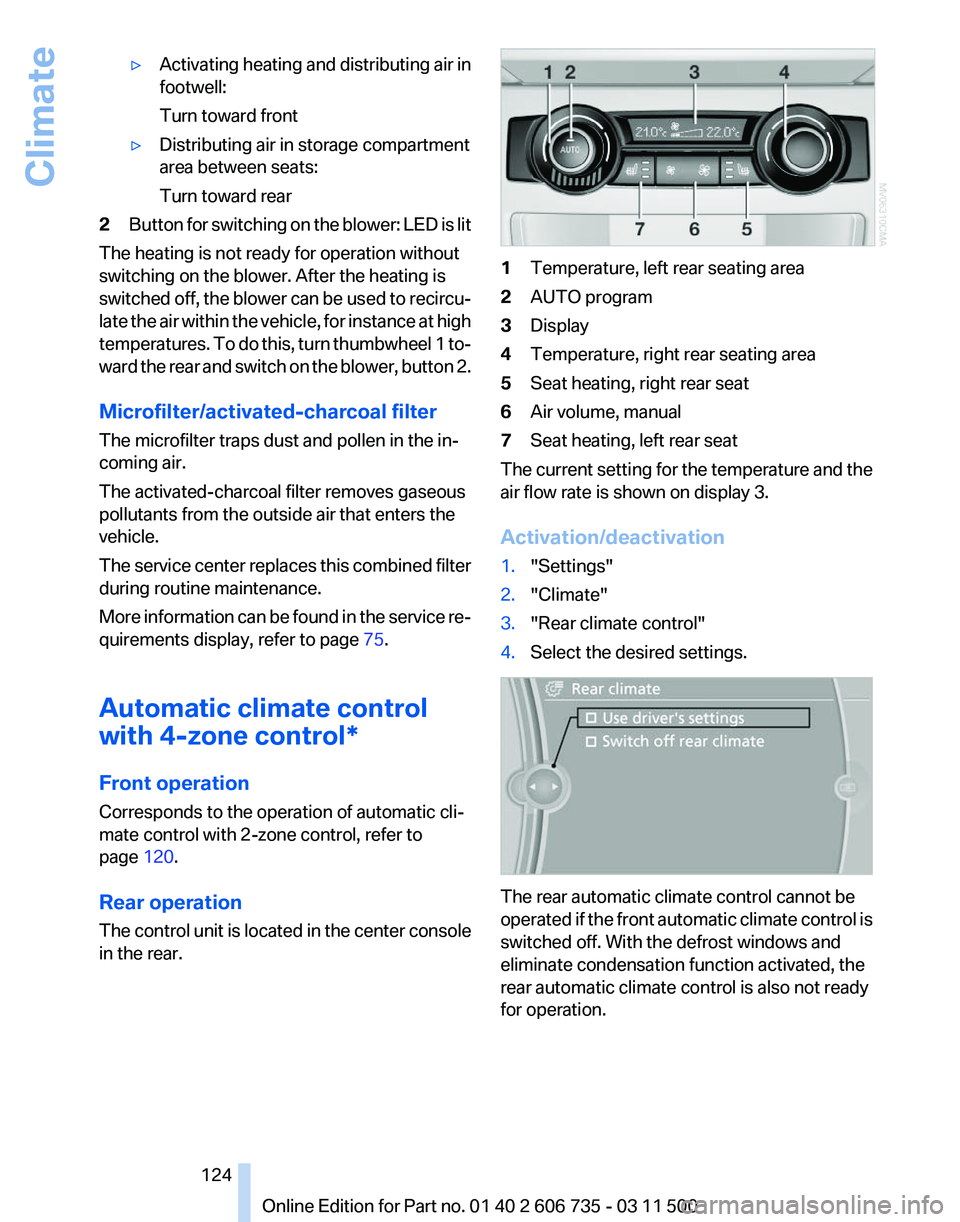
in the rear. 1
Temperature, left rear seating area
2 AUTO program
3 Display
4 Temperature, right rear seating area
5 Seat heating, right rear seat
6 Air volume, manual
7 Seat heating, left rear seat
The current setting for the temperature and the
air flow rate is shown on display 3.
Activation/deactivation
1. "Settings"
2. "Climate"
3. "Rear climate control"
4. Select the desired settings. The rear automatic climate control cannot be
operated
if the front automatic climate control is
switched off. With the defrost windows and
eliminate condensation function activated, the
rear automatic climate control is also not ready
for operation.
Seite 124
124 Online Edition for Part no. 01 40 2 606 735 - 03 11 500
Climate
Page 125 of 317
AUTO program
The AUTO program automatically
sets the air distribution toward the
upper body and in the footwell, as
well as the air flow rate. It also
adapts your instructions for the
temperature to outside influences throughout
the year.
Temperature
Set the desired temperature indi‐
vidually on the left and right side.
The automatic climate control achieves this
temperature
as quickly as possible regardless of
the season, using maximum cooling or heating
power if necessary, and then maintains it.
When switching between different temperature
settings in rapid succession, the automatic cli‐
mate control does not have sufficient time to
adjust the set temperature.
Air volume, manual
The air flow rate can be varied by press‐
ing on the corresponding side. The au‐
tomatic mode for the air flow rate can be
switched on again using the AUTO button.
Switching off rear automatic climate
control
With the blower at its lowest setting,
press the left side of the button to
switch off the automatic climate control.
The automatic climate control can also be
switched off with iDrive. To switch on the auto‐
matic climate control again, the system must
first be reactivated, refer to Activating/deacti‐
vating.
The system is switched on again by pressing
any button of the rear automatic climate control. Ventilation in rear
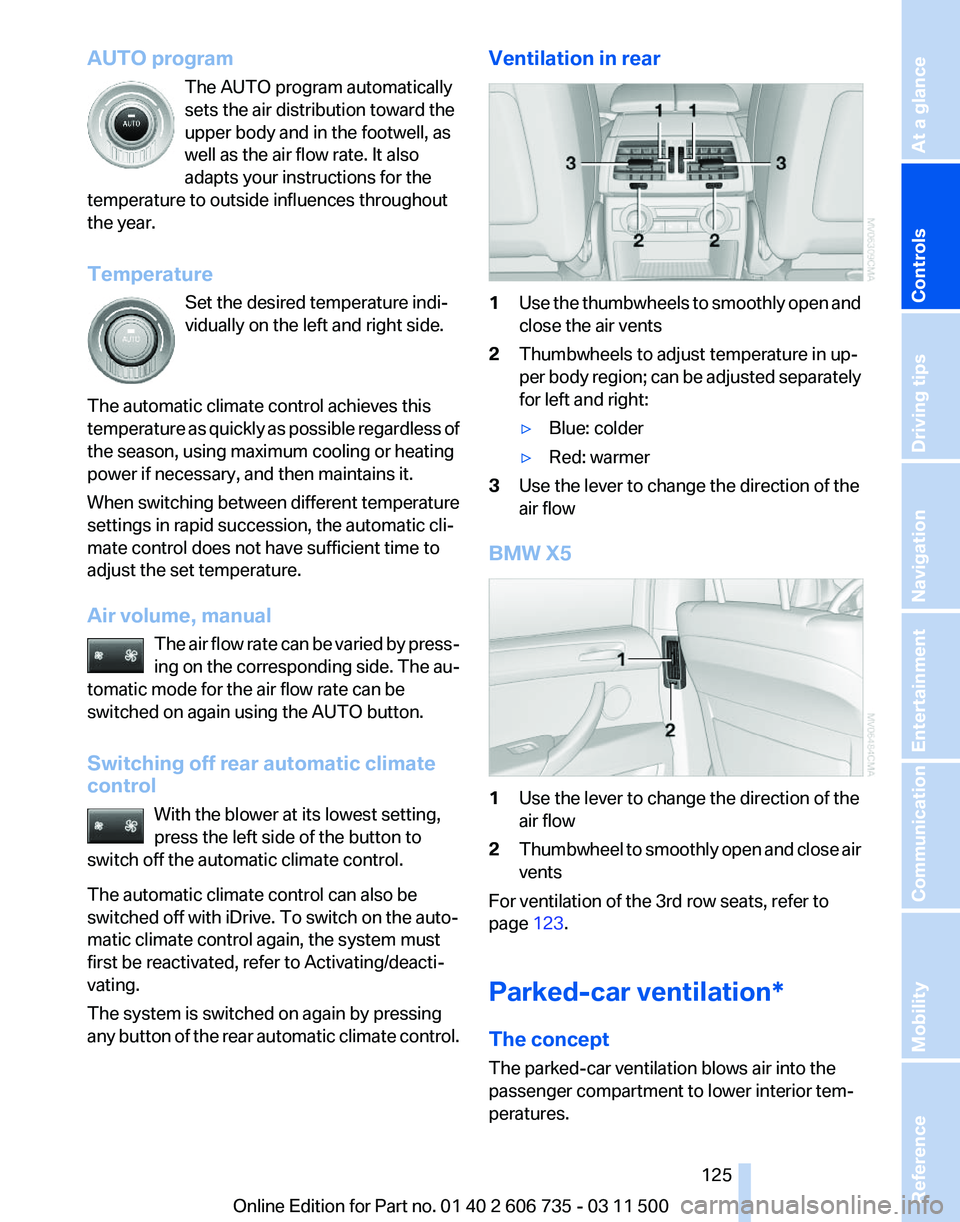
1
Use the thumbwheels to smoothly open and
close the air vents
2 Thumbwheels to adjust temperature in up‐
per
body region; can be adjusted separately
for left and right:
▷ Blue: colder
▷ Red: warmer
3 Use the lever to change the direction of the
air flow
BMW X5 1
Use the lever to change the direction of the
air flow
2 Thumbwheel to smoothly open and close air
vents
For ventilation of the 3rd row seats, refer to
page 123.
Parked-car ventilation*
The concept
The parked-car ventilation blows air into the
passenger compartment to lower interior tem‐
peratures.
Seite 125
125Online Edition for Part no. 01 40 2 606 735 - 03 11 500
Reference Mobility Communication Entertainment Navigation Driving tips
Controls At a glance
Page 134 of 317
Storage compartments
Glove compartment
Opening
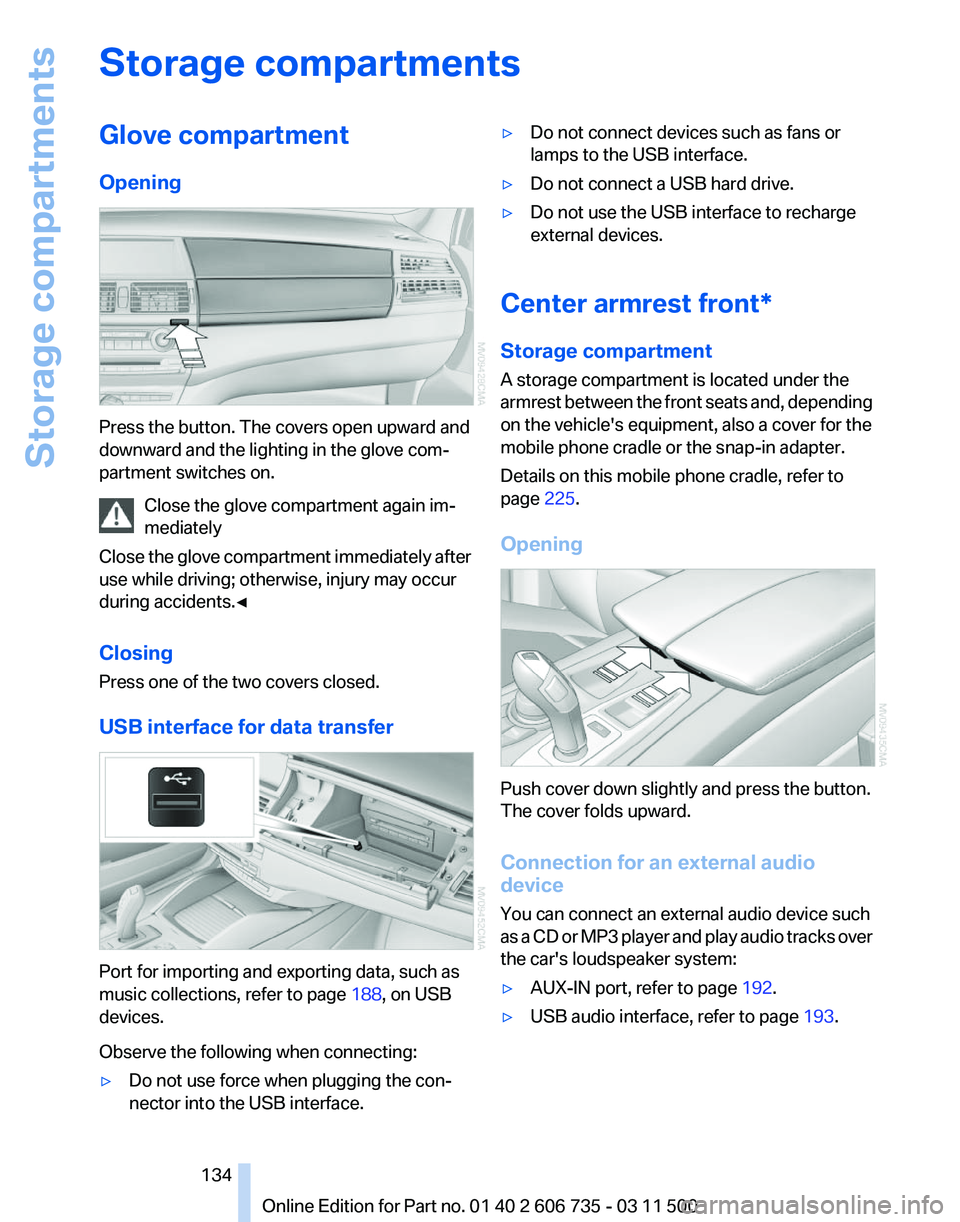
Press the button. The covers open upward and
downward and the lighting in the glove com‐
partment switches on.
Close the glove compartment again im‐
mediately
Close
the glove compartment immediately after
use while driving; otherwise, injury may occur
during accidents.◀
Closing
Press one of the two covers closed.
USB interface for data transfer Port for importing and exporting data, such as
music collections, refer to page
188, on USB
devices.
Observe the following when connecting:
▷ Do not use force when plugging the con‐
nector into the USB interface. ▷
Do not connect devices such as fans or
lamps to the USB interface.
▷ Do not connect a USB hard drive.
▷ Do not use the USB interface to recharge
external devices.
Center armrest front*
Storage compartment
A storage compartment is located under the
armrest
between the front seats and, depending
on the vehicle's equipment, also a cover for the
mobile phone cradle or the snap-in adapter.
Details on this mobile phone cradle, refer to
page 225.
Opening Push cover down slightly and press the button.
The cover folds upward.
Connection for an external audio
device
You can connect an external audio device such
as
a CD or MP3 player and play audio tracks over
the car's loudspeaker system:
▷ AUX-IN port, refer to page 192.
▷ USB audio interface, refer to page 193.
Seite 134
134 Online Edition for Part no. 01 40 2 606 735 - 03 11 500
Storage compartments
Page 135 of 317
Rear center armrest
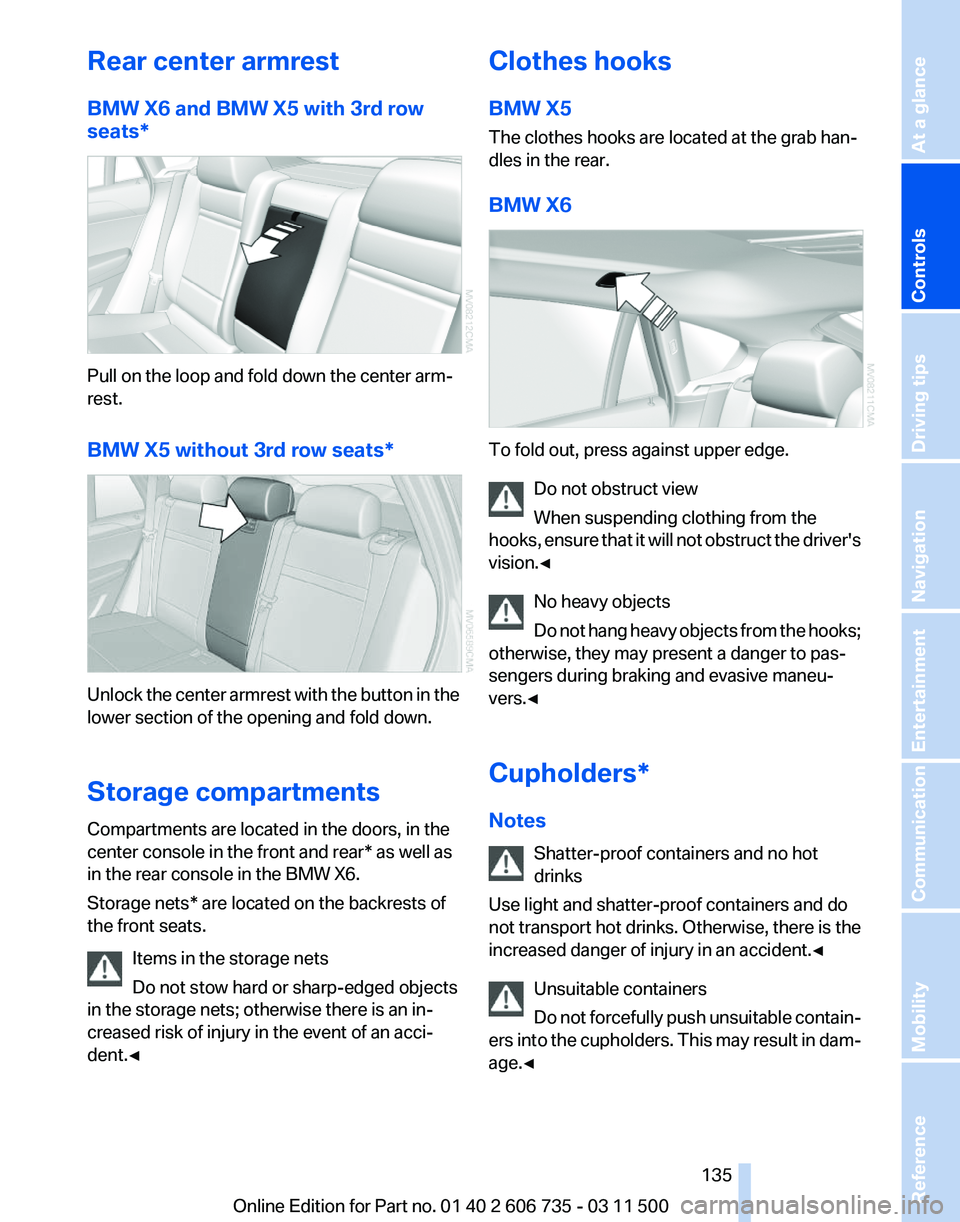
BMW X6 and BMW X5 with 3rd row
seats*
Pull on the loop and fold down the center arm‐
rest.
BMW X5 without 3rd row seats*
Unlock the center armrest with the button in the
lower section of the opening and fold down.
Storage compartments
Compartments are located in the doors, in the
center console in the front and rear* as well as
in the rear console in the BMW X6.
Storage nets* are located on the backrests of
the front seats.
Items in the storage nets
Do not stow hard or sharp-edged objects
in the storage nets; otherwise there is an in‐
creased risk of injury in the event of an acci‐
dent.◀ Clothes hooks
BMW X5
The clothes hooks are located at the grab han‐
dles in the rear.
BMW X6
To fold out, press against upper edge.
Do not obstruct view
When suspending clothing from the
hooks,
ensure that it will not obstruct the driver's
vision.◀
No heavy objects
Do not hang heavy objects from the hooks;
otherwise, they may present a danger to pas‐
sengers during braking and evasive maneu‐
vers.◀
Cupholders*
Notes
Shatter-proof containers and no hot
drinks
Use light and shatter-proof containers and do
not transport hot drinks. Otherwise, there is the
increased danger of injury in an accident.◀
Unsuitable containers
Do not forcefully push unsuitable contain‐
ers into the cupholders. This may result in dam‐
age.◀ Seite 135
135Online Edition for Part no. 01 40 2 606 735 - 03 11 500
Reference Mobility Communication Entertainment Navigation Driving tips
Controls At a glance
Page 136 of 317
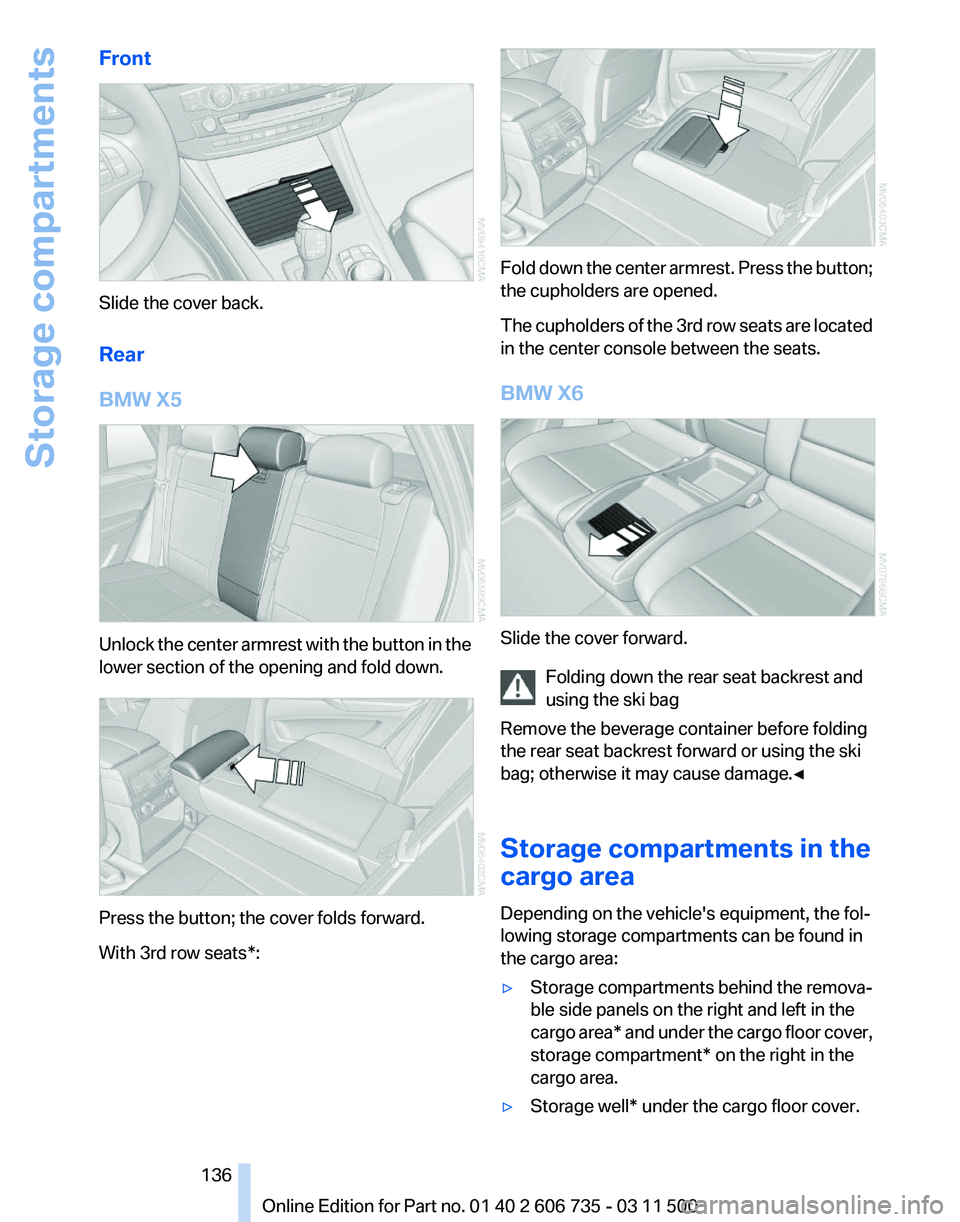
Front
Slide the cover back.
Rear
BMW X5
Unlock the center armrest with the button in the
lower section of the opening and fold down.
Press the button; the cover folds forward.
With 3rd row seats*: Fold down the center armrest. Press the button;
the cupholders are opened.
The
cupholders of the 3rd row seats are located
in the center console between the seats.
BMW X6 Slide the cover forward.
Folding down the rear seat backrest and
using the ski bag
Remove the beverage container before folding
the rear seat backrest forward or using the ski
bag; otherwise it may cause damage.
◀
Storage compartments in the
cargo area
Depending on the vehicle's equipment, the fol‐
lowing storage compartments can be found in
the cargo area:
▷ Storage compartments behind the remova‐
ble side panels on the right and left in the
cargo
area* and under the cargo floor cover,
storage compartment* on the right in the
cargo area.
▷ Storage well* under the cargo floor cover. Seite 136
136 Online Edition for Part no. 01 40 2 606 735 - 03 11 500
Storage compartments