lights BMW X6 M 2012 Owner's Manual
[x] Cancel search | Manufacturer: BMW, Model Year: 2012, Model line: X6 M, Model: BMW X6 M 2012Pages: 317, PDF Size: 8.83 MB
Page 88 of 317
Depending on the vehicle's equipment, the ar‐
rangement of the switches and indicator lamps
may differ somewhat.
The indicator lamp for the front passenger air‐
bags indicates the operating state of the front
passenger airbags.
The lamp indicates whether the airbags are ac‐
tivated or deactivated.
▷
The indicator lamp lights up when a child in
a child restraint fixing system intended for
the purpose is properly detected on the
seat. The airbags on the front passenger
side are not activated.
▷ The indicator lamp does not light up when,
for example, a correctly seated person of
sufficient size is detected on the seat. The
airbags on the front passenger side are ac‐
tivated.
▷ The indicator lamp does not light up when
the seat is empty. However, the airbags on
the front passenger side are not activated.
The system generally detects children seated in
a child seat, especially in the child seats that
were required by NHTSA when the vehicle was
manufactured.
After installing a child seat, make
sure that the indicator lamp for the front pas‐
senger airbags lights up. This indicates that the
child seat has been detected and the front pas‐
senger airbags are not activated.
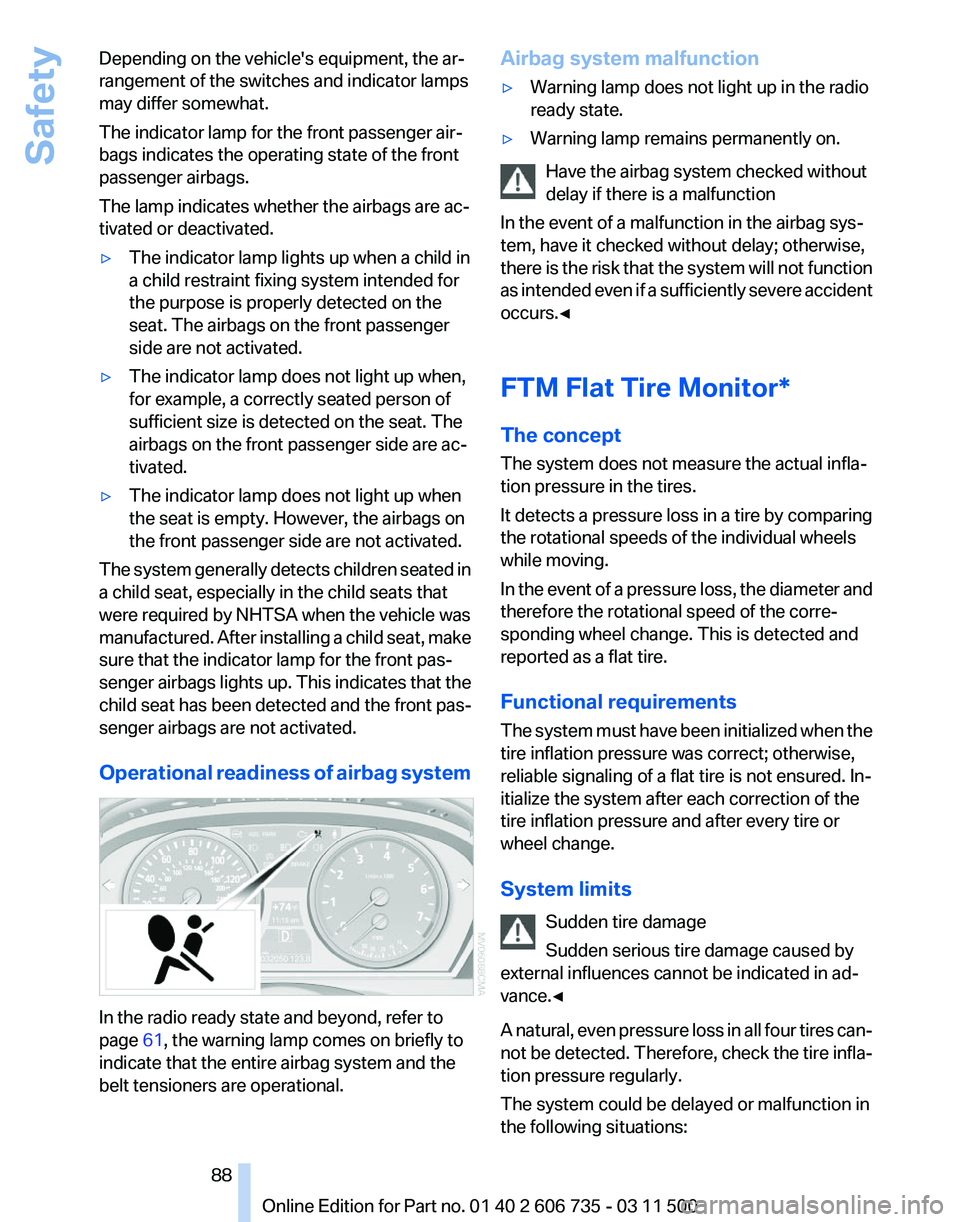
Operational readiness of airbag system In the radio ready state and beyond, refer to
page
61, the warning lamp comes on briefly to
indicate that the entire airbag system and the
belt tensioners are operational. Airbag system malfunction
▷
Warning lamp does not light up in the radio
ready state.
▷ Warning lamp remains permanently on.
Have the airbag system checked without
delay if there is a malfunction
In the event of a malfunction in the airbag sys‐
tem, have it checked without delay; otherwise,
there
is the risk that the system will not function
as intended even if a sufficiently severe accident
occurs.◀
FTM Flat Tire Monitor*
The concept
The system does not measure the actual infla‐
tion pressure in the tires.
It detects a pressure loss in a tire by comparing
the rotational speeds of the individual wheels
while moving.
In the event of a pressure loss, the diameter and
therefore the rotational speed of the corre‐
sponding wheel change. This is detected and
reported as a flat tire.
Functional requirements
The system must have been initialized when the
tire inflation pressure was correct; otherwise,
reliable signaling of a flat tire is not ensured. In‐
itialize the system after each correction of the
tire inflation pressure and after every tire or
wheel change.
System limits
Sudden tire damage
Sudden serious tire damage caused by
external influences cannot be indicated in ad‐
vance.◀
A natural, even pressure loss in all four tires can‐
not be detected. Therefore, check the tire infla‐
tion pressure regularly.
The system could be delayed or malfunction in
the following situations: Seite 88
88 Online Edition for Part no. 01 40 2 606 735 - 03 11 500Safety
Page 89 of 317
▷
When the system has not been initialized.
▷ When driving on a snowy or slippery road
surface.
▷ Sporty driving style: slip in the drive wheels,
high lateral acceleration.
▷ When driving with snow chains*.
When driving with a compact wheel*, the Flat
Tire Monitor is unable to function.
Status display
The current status of the Flat Tire Monitor can
be displayed on the Control Display, e.g.,
whether or not the FTM is active.
1. "Vehicle Info"
2. "Vehicle status"
3. "Flat Tire Monitor"
The status is displayed.
Initialization
The
initialization process adopts the set inflation
tire pressures as reference values for the detec‐
tion of a flat tire. Initialization is started by con‐
firming the inflation pressures.
Do not initialize the system when driving with
snow chains* or with a compact wheel*.
1. "Vehicle Info"
2. "Vehicle status"
3. "Reset"
4. Start the engine - do not drive away.
5. Start the initialization with "Reset".
6. Drive away.
The initialization is completed while driving,
which can be interrupted at any time.
The initialization automatically continues when
driving resumes.
Indication of a flat tire The warning lamp lights up red. A
message appears on the Control Dis‐
play. In addition, a signal sounds.
There is a flat tire or a major loss in tire inflation
pressure. Reduce your speed and stop cautiously. Avoid
sudden braking and steering maneuvers.
When a flat tire is indicated, DSC Dynamic Sta‐
bility Control is switched on if necessary.
Actions in the event of a flat tire
Run-flat tires
You
can continue driving with a damaged tire at
speeds up to 50 mph/80 km/h.
Do not continue driving without run-flat
tires
If the vehicle is not equipped with run-flat tires
as provided at the factory, do not continue driv‐
ing. Continuing to drive could cause severe ac‐
cidents.◀
Continued driving with a flat tire
If continuing to drive with a damaged tire:
1. Avoid sudden braking and steering maneu‐
vers.
2. Do not exceed a speed of 50 mph/80 km/h.
If the defective tire continues to lose pres‐
sure, its position will be indicated to you on
the Control Display.
3. At the next opportunity, check the inflation
pressure in all four tires.
If the tire inflation pressure in all four tires is
correct, the Flat Tire Monitor may not have
been initialized. In this case, initialize the
system.
Possible driving distance with complete loss of
tire inflation pressure:
▷ With a light load:
1 to 2 people without luggage:
Approx. 155 miles/200 km.
▷ With a medium load:
2
persons, cargo area full, or 4 persons with‐
out luggage:
Approx. 94 miles/150 km.
▷ With a full load:
4 or more persons, cargo area full: Seite 89
89Online Edition for Part no. 01 40 2 606 735 - 03 11 500
Reference Mobility Communication Entertainment Navigation Driving tips
Controls At a glance
Page 91 of 317
All wheels are yellow
▷
A flat tire or major drop in inflation pressure
in several tires.
▷ The system was not reset after a wheel
change
and thus issues a warning based on
the inflation pressures initialized last.
▷ A flat tire in one or more tires while the sys‐
tem is being reset.
Wheels, gray
The system cannot detect a flat tire.
Reasons for this may be:
▷ TPM is being reset.
▷ Disturbance by systems or devices with the
same radio frequency.
▷ Malfunction.
Resetting the system
Reset the system after each correction of the
tire inflation pressure and after every tire or
wheel change.
1. "Vehicle Info"
2. "Vehicle status"
3. "Reset"
4. Start the engine - do not drive away.
5. Reset the tire pressure using "Reset".
6. Drive away.
The tires are shown in gray and "Resetting
TPM..." is displayed.
After driving for a few minutes, the set tire infla‐
tion
pressures are applied as set values. The re‐
setting process is completed automatically as
you drive. The tires are shown in green and
"TPM active" is shown on the Control Display.
The trip can be interrupted at any time. If you
drive away again, the process resumes auto‐
matically. Do not reset the system when driving
with a compact wheel*.
If a flat tire is detected while the system is re‐
setting, all tires on the Control Display are dis‐
played in yellow. The message "Low tire!" is
shown. Low tire pressure message
The small warning lamp lights up yel‐
low and the large warning lamp lights
up red. A message appears on the
Control Display. In addition, a signal
sounds.
▷ There is a flat tire or a major loss in tire in‐
flation pressure.
▷ The system was not reset after a wheel
change and thus issues warnings based on
the inflation pressures initialized last.
Reduce your speed and stop cautiously. Avoid
sudden braking and steering maneuvers.
When
a low inflation pressure is indicated, DSC
Dynamic Stability Control is switched on if nec‐
essary.
Actions in the event of a flat tire
Run-flat tires
You can continue driving with a damaged tire at
speeds up to 50 mph/80 km/h.
Do not continue driving without run-flat
tires
If the vehicle is not equipped with run-flat tires
as provided at the factory, do not continue driv‐
ing. Continuing to drive could cause severe ac‐
cidents.◀
Continued driving with a flat tire
If continuing to drive with a damaged tire:
1. Avoid sudden braking and steering maneu‐
vers.
2. Do not exceed a speed of 50 mph/80 km/h.
3. Check the air pressure in all four tires at the
next opportunity.
If the tire inflation pressure in all four tires is
correct, the Tire Pressure Monitor may not
have been reset. Reset the system.
Possible driving distance with complete loss of
tire inflation pressure:
▷ With a light load:
1 to 2 people without luggage: Seite 91
91Online Edition for Part no. 01 40 2 606 735 - 03 11 500
Reference Mobility Communication Entertainment Navigation Driving tips
Controls At a glance
Page 92 of 317
Approx. 155 miles/200 km.
▷ With a medium load:
2
persons, cargo area full, or 4 persons with‐
out luggage:
Approx. 94 miles/150 km.
▷ With a full load:
4 or more persons, cargo area full:
Approx. 30 miles/50 km.
The possible driving distance after a loss of tire
inflation pressure depends on the cargo load
and the driving style and conditions.
When the vehicle is driven with a damaged tire,
its handling characteristics change, e.g., re‐
duced lane stability during braking, a longer
braking distance, and altered self-steering
properties. Adjust your driving style accord‐
ingly. Avoid abrupt steering maneuvers or driv‐
ing over obstacles, e. g., curbs, potholes, etc.
Because
the possible driving distance depends
on how the vehicle is used during the trip, the
actual distance may be smaller or greater de‐
pending on the driving speed, road conditions,
external temperature, cargo load, etc.
Continued driving with a flat tire
Drive moderately and do not exceed a
speed of 50 mph/80 km/h.
A loss of tire inflation pressure results in a
change in the handling characteristics, e.g., re‐
duced lane stability during braking, a longer
braking distance and altered self-steering prop‐
erties.◀
Final tire failure
Vibrations or loud noises while driving can
indicate the final failure of the tire. Reduce speed
and stop; otherwise, pieces of the tire could
come loose and cause an accident. Do not con‐
tinue driving, and contact your service center.◀
Message when the system was not
reset
The yellow warning lamp lights up. A
message appears on the Control Dis‐
play. The system detected a wheel change but was
not reset.
Warnings regarding the current tire inflation
pressure are not reliable.
Check the tire inflation pressure and reset the
system.
Malfunction
The
small warning lamp flashes in yel‐
low and then lights up continuously;
the larger warning lamp comes on in
yellow. On the Control Display, the
tires are shown in gray and a message appears.
No flat tire can be detected.
Display in the following situations:
▷ If a wheel without TPM electronics is fitted,
for instance a compact wheel*: have the
service center check it if necessary.
▷ Malfunction: have the system checked by
your service center.
▷ TPM could not be fully reset. Reset the sys‐
tem again.
▷ Disturbance by systems or devices with the
same
radio frequency: after leaving the area
of the disturbance, the system automatically
becomes active again.
Declaration according to NHTSA/
FMVSS 138 Tire Pressure Monitoring
Systems
Each tire, including the spare (if provided)
should be checked monthly when cold and in‐
flated
to the inflation pressure recommended by
the vehicle manufacturer on the vehicle placard
or tire inflation pressure label. (If your vehicle has
tires of a different size than the size indicated on
the vehicle placard or tire inflation pressure la‐
bel, you should determine the proper tire infla‐
tion pressure for those tires.)
As an added safety feature, your vehicle has
been equipped with a tire pressure monitoring
system (TPMS) that illuminates a low tire pres‐
sure telltale when one or more of your tires is
significantly under-inflated. Accordingly, when
the low tire pressure telltale illuminates, you Seite 92
92 Online Edition for Part no. 01 40 2 606 735 - 03 11 500
Safety
Page 94 of 317
▷
During heavy brake application.
▷ When the turn signal flashes.
System limits Personal responsibility
The system cannot serve as a substitute
for
the driver's personal judgment of the course
of the road and the traffic situation.
In the event of a warning, do not jerk the steering
wheel; otherwise, you may lose control over the
vehicle.◀
The system may not be fully functional in the
following situations:
▷ In heavy fog, rain or snowfall.
▷ In the event of worn, poorly visible, merging,
diverging,
or multiple lane markings such as
in construction areas.
▷ When the demarcation lines are covered by
snow, ice, dirt or water.
▷ In tight curves or on narrow lanes.
▷ When the demarcation lines are covered by
objects.
▷ When driving very close to the vehicle in
front of you.
▷ When driving toward bright lights.
▷ When the windshield is fogged over, dirty or
covered by a sticker, etc., in front of the in‐
terior rearview mirror.
Malfunctions
Steering wheel vibration
Frequent
activation of the steering wheel vibra‐
tion causes the system to overheat.
This causes the lane departure warning to be‐
come deactivated.
Let the system cool and reactivate it by pressing
the button. Camera
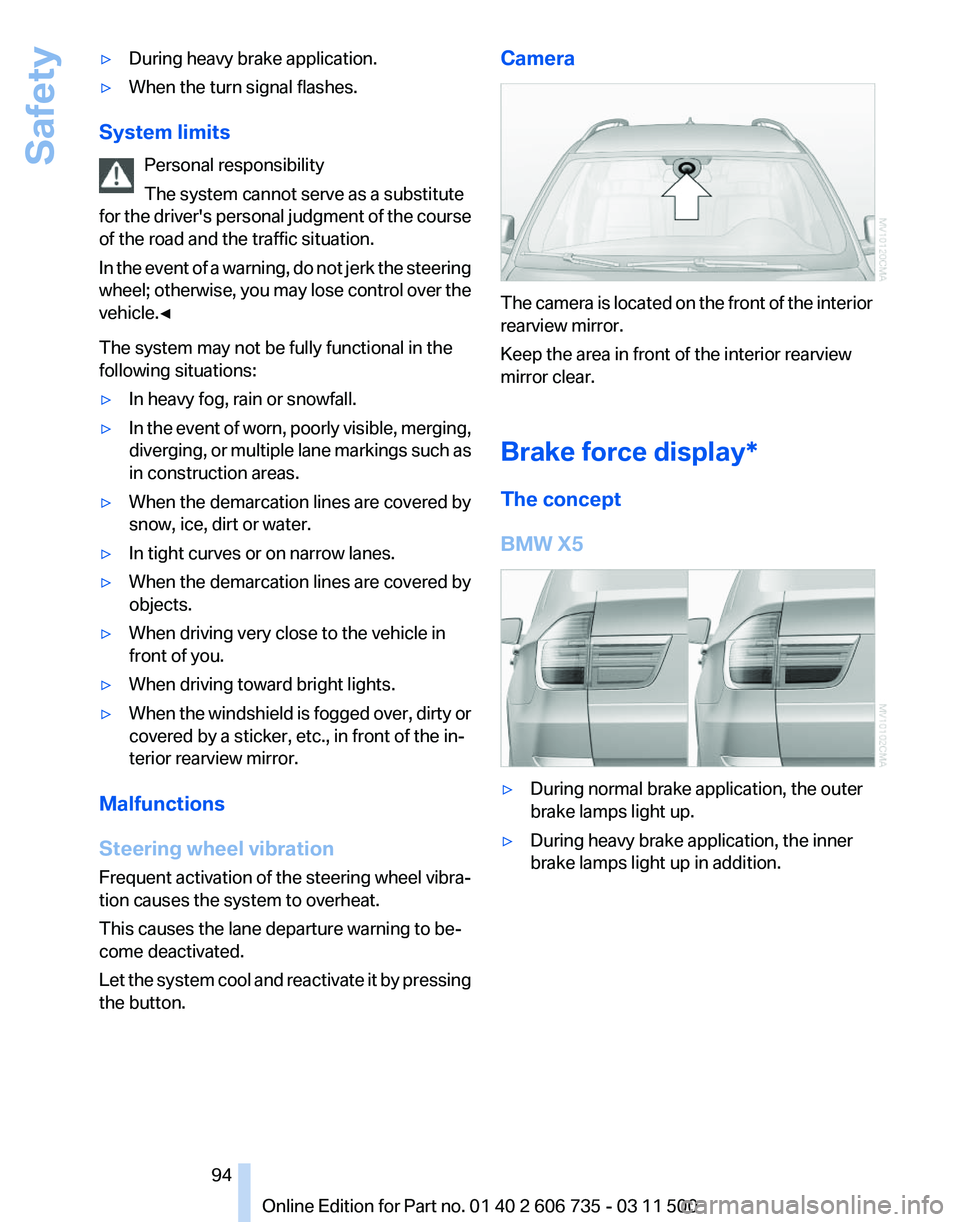
The camera is located on the front of the interior
rearview mirror.
Keep the area in front of the interior rearview
mirror clear.
Brake force display*
The concept
BMW X5
▷
During normal brake application, the outer
brake lamps light up.
▷ During heavy brake application, the inner
brake lamps light up in addition.
Seite 94
94 Online Edition for Part no. 01 40 2 606 735 - 03 11 500
Safety
Page 96 of 317
Driving stability control systems
Antilock Brake System ABS
ABS
prevents locking of the wheels during brak‐
ing.
The vehicle remains steerable even during full
brake applications, thus increasing active
safety.
ABS is operational every time you start the en‐
gine.
CBC Cornering Brake Control
When braking during curves or when braking
during a lane change, driving stability and steer‐
ing response are improved further.
Electronic brake-force
distribution
The system controls the brake pressure in the
rear wheels to ensure stable braking behavior.
Brake assistant
When you apply the brakes rapidly, this system
automatically produces the maximum braking
force boost. It thus helps to achieve the shortest
possible braking distance during full braking.
This system utilizes all of the benefits provided
by ABS.
Do not reduce the pressure on the brake pedal
for the duration of the full braking.
Dynamic Stability Control
DSC
The concept
DSC prevents traction loss in the driving wheels
when driving away and accelerating. DSC also recognizes unstable vehicle condi‐
tions,
such as fishtailing or nose-diving. Subject
to physical limits, DSC helps to keep the vehicle
on a steady course by reducing engine speed
and by applying brakes to the individual wheels.
Adjust your driving style to the situation
An appropriate driving style is always the
responsibility of the driver.
The laws of physics cannot be repealed, even
with DSC.
Do not reduce the additional safety margin with
a risky driving style, as otherwise there is a risk
of an accident.◀
Deactivating DSC: DSC OFF
When DSC is deactivated, driving stability is re‐
duced during acceleration and when driving in
bends.
To increase vehicle stability, activate DSC again
as soon as possible.
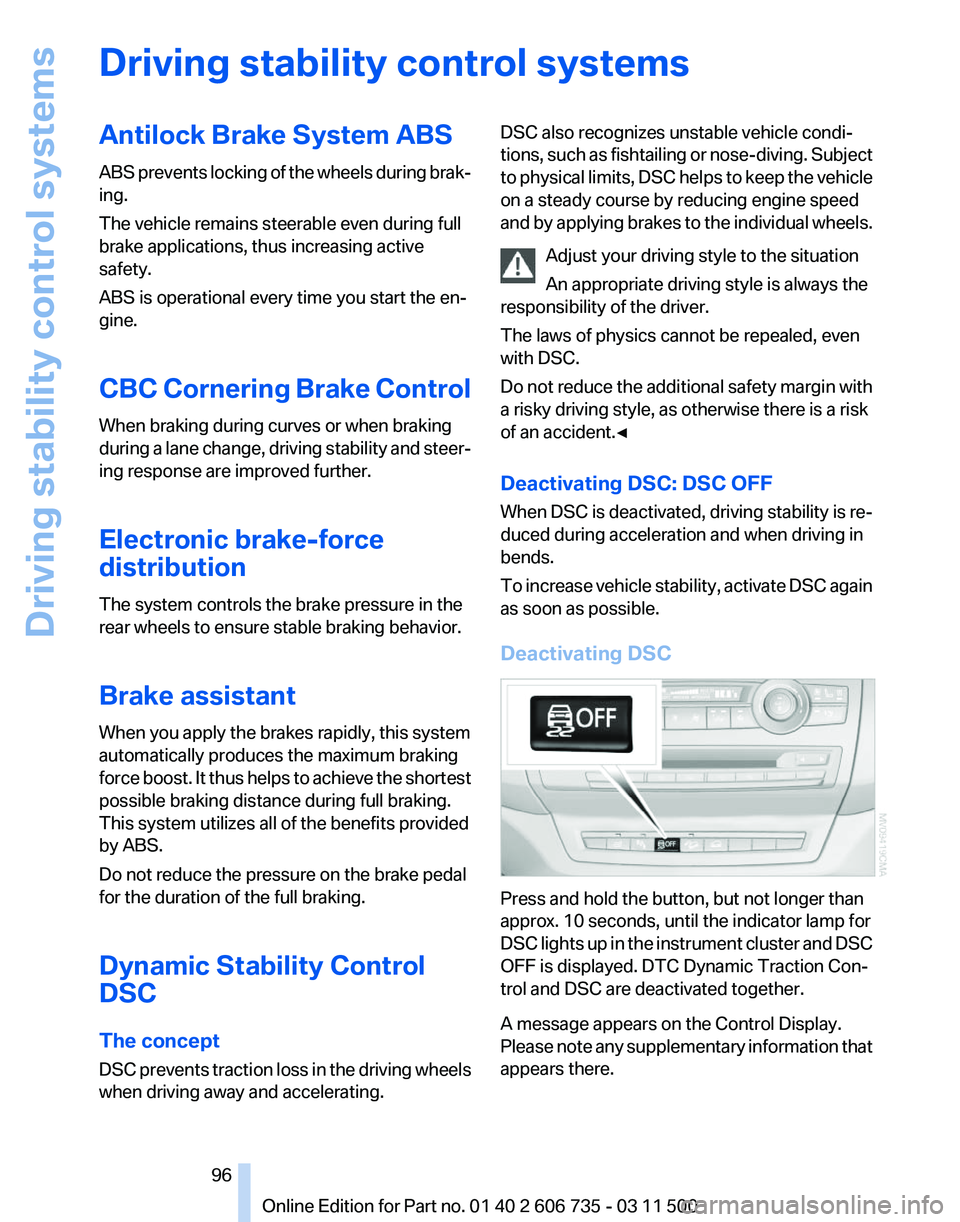
Deactivating DSC Press and hold the button, but not longer than
approx. 10 seconds, until the indicator lamp for
DSC
lights up in the instrument cluster and DSC
OFF is displayed. DTC Dynamic Traction Con‐
trol and DSC are deactivated together.
A message appears on the Control Display.
Please note any supplementary information that
appears there. Seite 96
96 Online Edition for Part no. 01 40 2 606 735 - 03 11 500
Driving stability control systems
Page 97 of 317
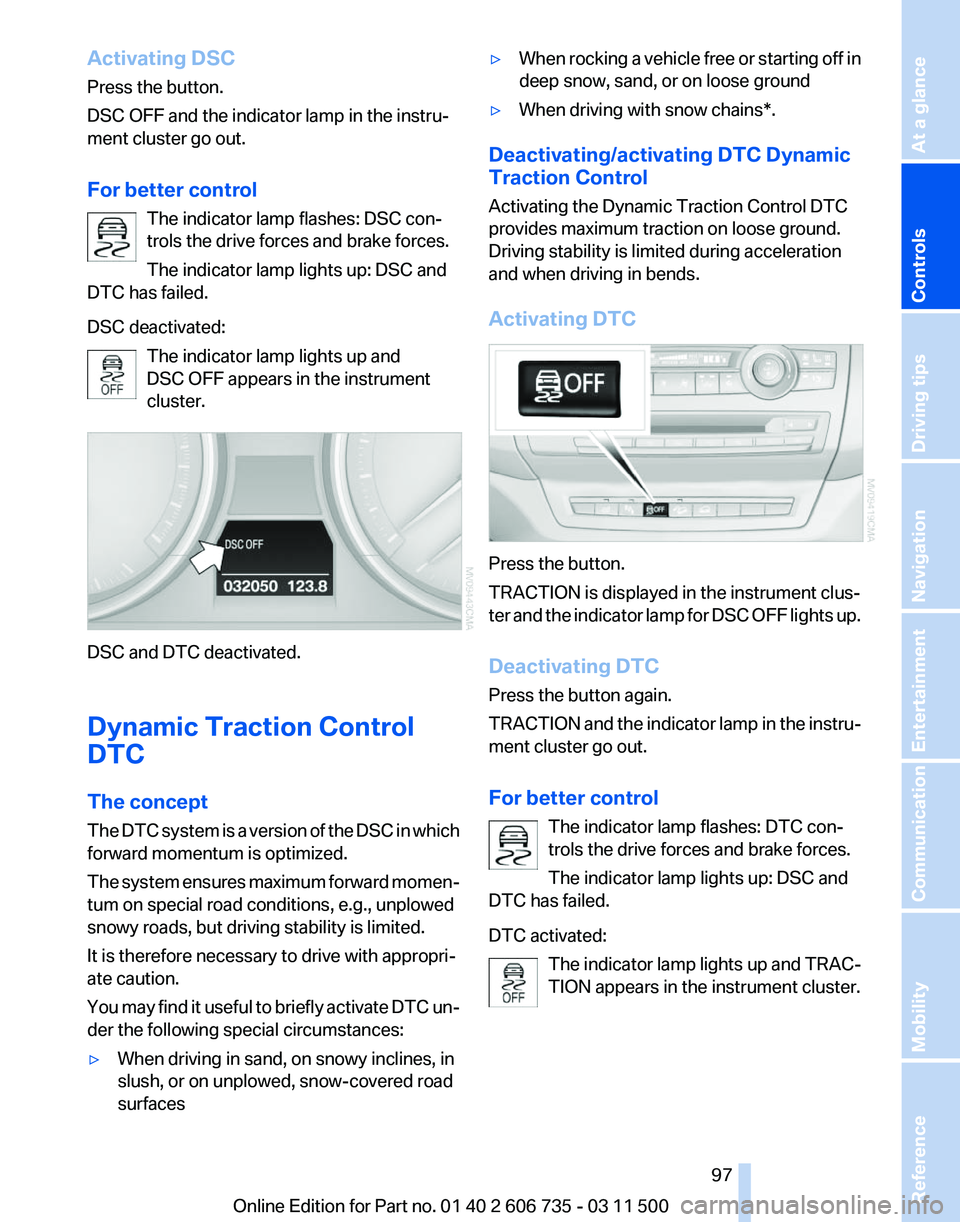
Activating DSC
Press the button.
DSC OFF and the indicator lamp in the instru‐
ment cluster go out.
For better control
The indicator lamp flashes: DSC con‐
trols the drive forces and brake forces.
The indicator lamp lights up: DSC and
DTC has failed.
DSC deactivated:
The indicator lamp lights up and
DSC OFF appears in the instrument
cluster. DSC and DTC deactivated.
Dynamic Traction Control
DTC
The concept
The
DTC system is a version of the DSC in which
forward momentum is optimized.
The system ensures maximum forward momen‐
tum on special road conditions, e.g., unplowed
snowy roads, but driving stability is limited.
It is therefore necessary to drive with appropri‐
ate caution.
You may find it useful to briefly activate DTC un‐
der the following special circumstances:
▷ When driving in sand, on snowy inclines, in
slush, or on unplowed, snow-covered road
surfaces ▷
When rocking a vehicle free or starting off in
deep snow, sand, or on loose ground
▷ When driving with snow chains*.
Deactivating/activating DTC Dynamic
Traction Control
Activating the Dynamic Traction Control DTC
provides maximum traction on loose ground.
Driving stability is limited during acceleration
and when driving in bends.
Activating DTC Press the button.
TRACTION is displayed in the instrument clus‐
ter
and the indicator lamp for DSC OFF lights up.
Deactivating DTC
Press the button again.
TRACTION and the indicator lamp in the instru‐
ment cluster go out.
For better control The indicator lamp flashes: DTC con‐
trols the drive forces and brake forces.
The indicator lamp lights up: DSC and
DTC has failed.
DTC activated:
The indicator lamp lights up and TRAC‐
TION appears in the instrument cluster. Seite 97
97Online Edition for Part no. 01 40 2 606 735 - 03 11 500
Reference Mobility Communication Entertainment Navigation Driving tips
Controls At a glance
Page 99 of 317
A target speed within the same range can be
specified using the lever of the cruise control.
On
inclines over 10 %, you can reduce the speed
to approx. 3 mph/4 km/h. Pull the lever of the
cruise control beyond the resistance point, ar‐
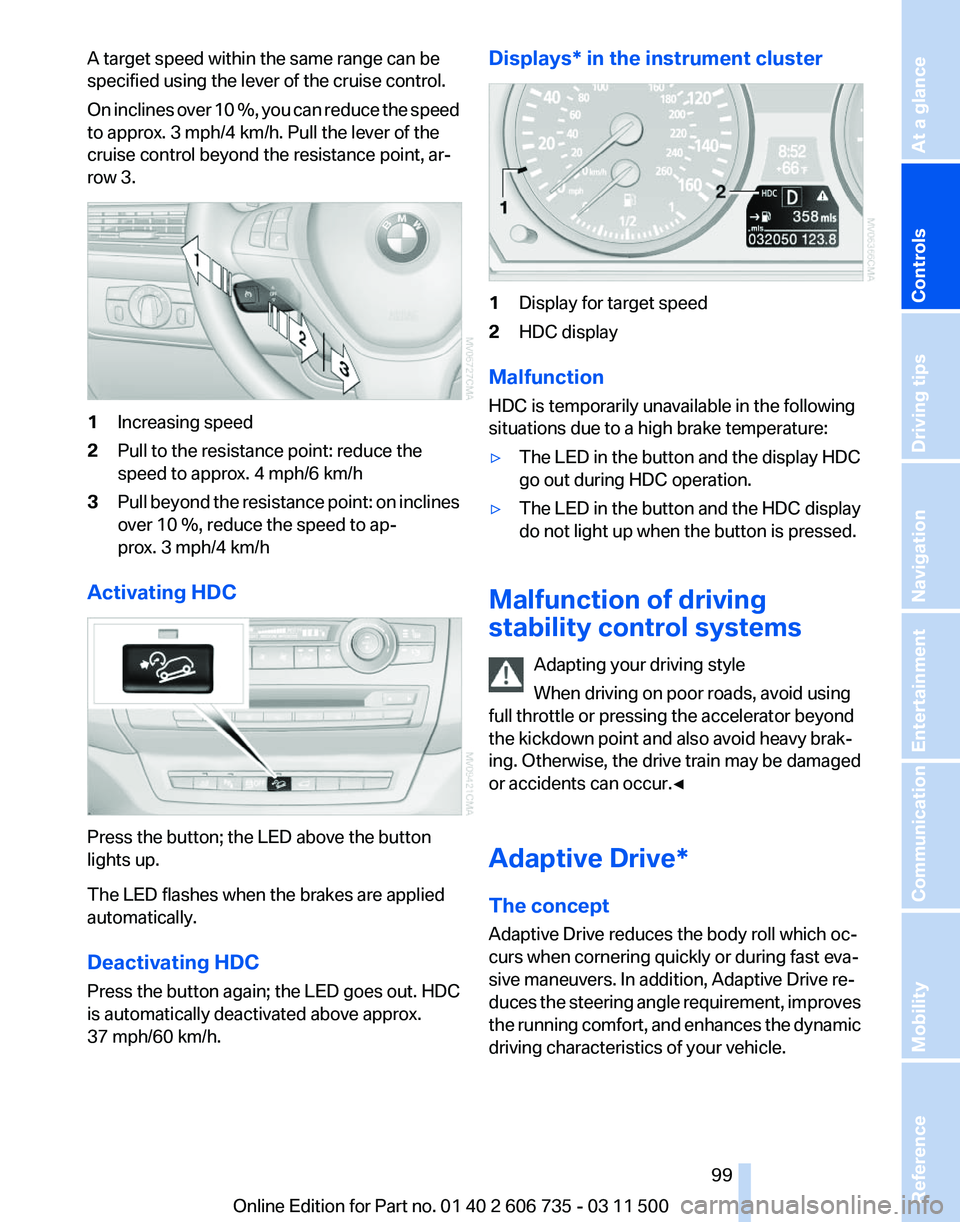
row 3. 1
Increasing speed
2 Pull to the resistance point: reduce the
speed to approx. 4 mph/6 km/h
3 Pull beyond the resistance point: on inclines
over 10 %, reduce the speed to ap‐
prox. 3 mph/4 km/h
Activating HDC Press the button; the LED above the button
lights up.
The LED flashes when the brakes are applied
automatically.
Deactivating HDC
Press the button again; the LED goes out. HDC
is automatically deactivated above approx.
37 mph/60 km/h. Displays* in the instrument cluster
1
Display for target speed
2 HDC display
Malfunction
HDC is temporarily unavailable in the following
situations due to a high brake temperature:
▷ The LED in the button and the display HDC
go out during HDC operation.
▷ The LED in the button and the HDC display
do not light up when the button is pressed.
Malfunction of driving
stability control systems Adapting your driving style
When driving on poor roads, avoid using
full throttle or pressing the accelerator beyond
the kickdown point and also avoid heavy brak‐
ing. Otherwise, the drive train may be damaged
or accidents can occur.◀
Adaptive Drive*
The concept
Adaptive Drive reduces the body roll which oc‐
curs when cornering quickly or during fast eva‐
sive maneuvers. In addition, Adaptive Drive re‐
duces
the steering angle requirement, improves
the running comfort, and enhances the dynamic
driving characteristics of your vehicle. Seite 99
99Online Edition for Part no. 01 40 2 606 735 - 03 11 500
Reference Mobility Communication Entertainment Navigation Driving tips
Controls At a glance
Page 100 of 317
Chassis and suspension tuning
Two chassis and suspension tunings are avail‐
able for selection.
▷
Normal:
The comfortable basic setting offers opti‐
mum comfort when traveling.
▷ Sport:
The sporty basic setting offers increased
driving agility.
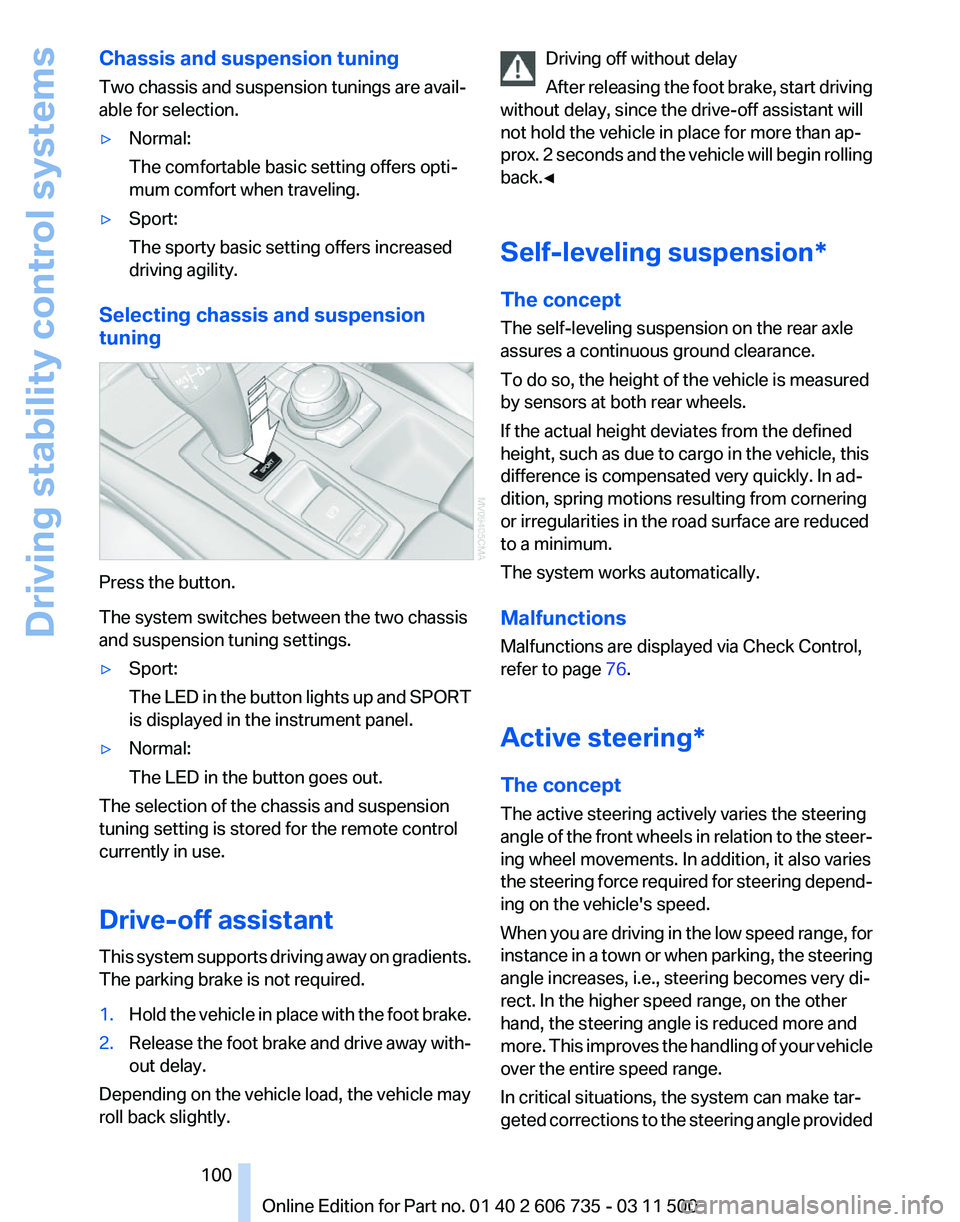
Selecting chassis and suspension
tuning Press the button.
The system switches between the two chassis
and suspension tuning settings.
▷
Sport:
The
LED in the button lights up and SPORT
is displayed in the instrument panel.
▷ Normal:
The LED in the button goes out.
The selection of the chassis and suspension
tuning setting is stored for the remote control
currently in use.
Drive-off assistant
This
system supports driving away on gradients.
The parking brake is not required.
1. Hold the vehicle in place with the foot brake.
2. Release the foot brake and drive away with‐
out delay.
Depending on the vehicle load, the vehicle may
roll back slightly. Driving off without delay
After
releasing the foot brake, start driving
without delay, since the drive-off assistant will
not hold the vehicle in place for more than ap‐
prox. 2 seconds and the vehicle will begin rolling
back.◀
Self-leveling suspension*
The concept
The self-leveling suspension on the rear axle
assures a continuous ground clearance.
To do so, the height of the vehicle is measured
by sensors at both rear wheels.
If the actual height deviates from the defined
height, such as due to cargo in the vehicle, this
difference is compensated very quickly. In ad‐
dition, spring motions resulting from cornering
or irregularities in the road surface are reduced
to a minimum.
The system works automatically.
Malfunctions
Malfunctions are displayed via Check Control,
refer to page 76.
Active steering*
The concept
The active steering actively varies the steering
angle of the front wheels in relation to the steer‐
ing wheel movements. In addition, it also varies
the steering force required for steering depend‐
ing on the vehicle's speed.
When you are driving in the low speed range, for
instance in a town or when parking, the steering
angle increases, i.e., steering becomes very di‐
rect. In the higher speed range, on the other
hand, the steering angle is reduced more and
more. This improves the handling of your vehicle
over the entire speed range.
In critical situations, the system can make tar‐
geted corrections to the steering angle provided Seite 100
100 Online Edition for Part no. 01 40 2 606 735 - 03 11 500
Driving stability control systems
Page 101 of 317
by the driver and thus stabilize the vehicle before
the driver intervenes.
Malfunction
The
warning lamp lights up yellow and
a message is shown on the Control
Display. The active steering is defec‐
tive or has been temporarily deacti‐
vated. At low speeds, greater steering wheel
movements are required, whereas at higher
speeds, the vehicle reacts more sensitively to
steering wheel movements. The stability-pro‐
moting intervention can also be deactivated.
Proceed cautiously and drive defensively.
Deactivation
Active steering deactivates in order to carry out
an initialization. This deactivation is displayed by
means of a message. The initialization can take
several minutes.
If the message does not disappear during the
current trip, have the system checked.
Defect
In the event of a defect, a corresponding text
message is displayed. Have the system
checked. Seite 101
101Online Edition for Part no. 01 40 2 606 735 - 03 11 500
Reference Mobility Communication Entertainment Navigation Driving tips
Controls At a glance