change language BMW X6 XDRIVE35I 2008 User Guide
[x] Cancel search | Manufacturer: BMW, Model Year: 2008, Model line: X6 XDRIVE35I, Model: BMW X6 XDRIVE35I 2008Pages: 288, PDF Size: 9.28 MB
Page 201 of 288
Navigation
Entertainment
Driving tips
199Reference
At a glance
Controls
Communications
Mobility
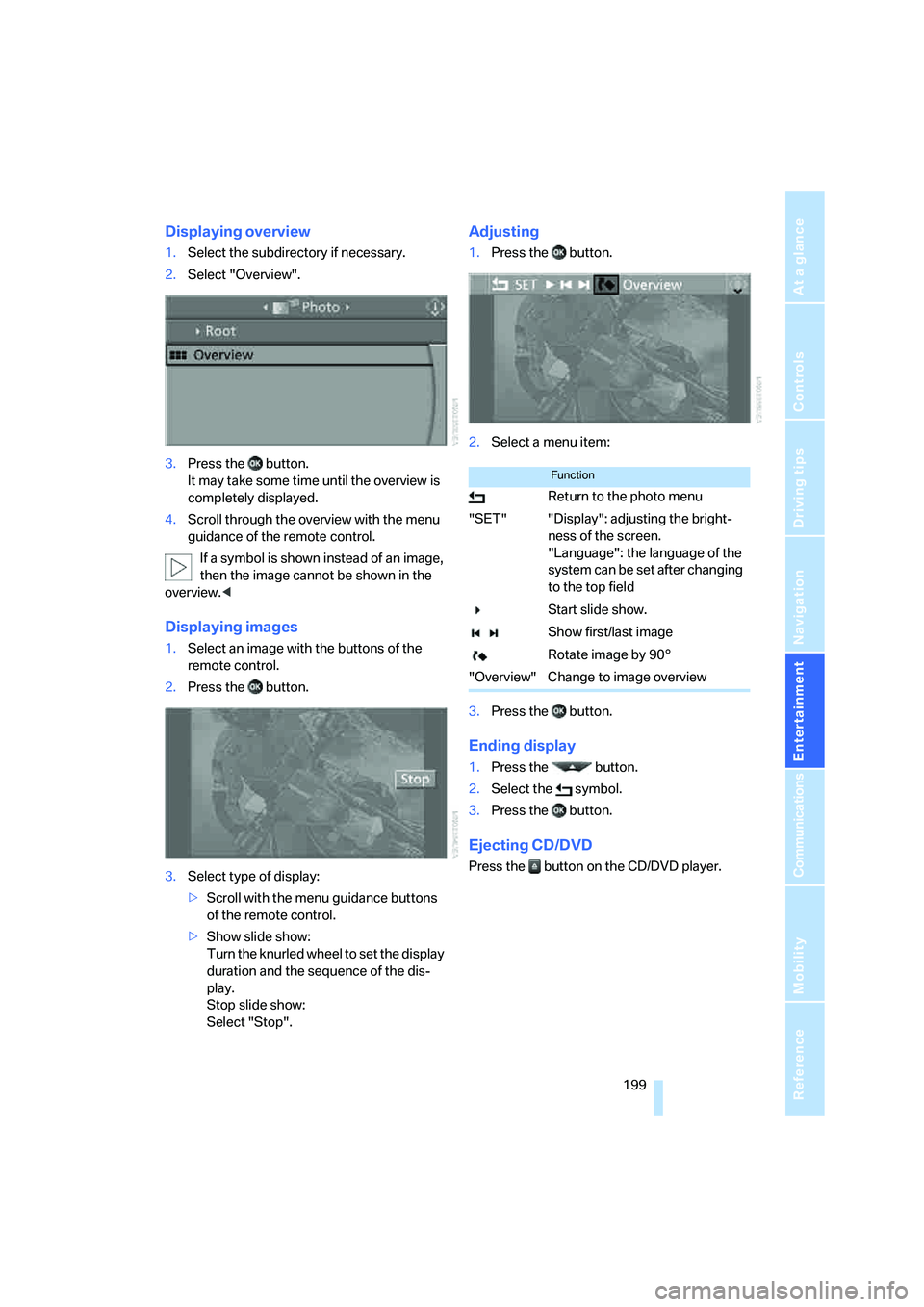
Displaying overview
1.Select the subdirectory if necessary.
2.Select "Overview".
3.Press the button.
It may take some time until the overview is
completely displayed.
4.Scroll through the overview with the menu
guidance of the remote control.
If a symbol is shown instead of an image,
then the image cannot be shown in the
overview.<
Displaying images
1.Select an image with the buttons of the
remote control.
2.Press the button.
3.Select type of display:
>Scroll with the menu guidance buttons
of the remote control.
>Show slide show:
Turn the knurled wheel to set the display
duration and the sequence of the dis-
play.
Stop slide show:
Select "Stop".
Adjusting
1.Press the button.
2.Select a menu item:
3.Press the button.
Ending display
1.Press the button.
2.Select the symbol.
3.Press the button.
Ejecting CD/DVD
Press the button on the CD/DVD player.
Function
Return to the photo menu
"SET" "Display": adjusting the bright-
ness of the screen.
"Language": the language of the
system can be set after changing
to the top field
Start slide show.
Show first/last image
Rotate image by 90°
"Overview" Change to image overview
Page 271 of 288
Reference 269
At a glance
Controls
Driving tips
Communications
Navigation
Entertainment
Mobility
"CD"161,173
– for DVD system in rear192
CD, refer to Playing audio
tracks, DVD system in
rear196
CD/DVD player, DVD system
in rear191
CD changer173
– compressed audio files173
– controls160
– fast forward/reverse176
– random sequence176
– repeating a track175
– sampling tracks175
– selecting a CD173
– selecting a track174
– switching on/off160
– tone control161
– volume161
CD player173
– compressed audio files173
– controls160
– fast forward/reverse176
– random sequence176
– repeating a track175
– sampling tracks175
– selecting a track174
– switching on/off160
– tone control161
– volume161
Cell phone, refer to Mobile
phone
Center armrest
– front116
– rear119
Center brake lamp248
Center console14
"Central locking"30
Central locking system29
– comfort access36
– from inside vehicle32
Changes, technical
– refer to For your own
safety5
– refer to Parts and
accessories6
Changing language on
Control Display80Changing tires237
Changing units of measure on
Control Display79
Changing wheels248
Check Control75
"Check Control
messages"76
Checking the air pressure,
refer to Tire inflation
pressure232
Children, transporting53
Child restraint fixing system
LATCH54
Child restraint systems53
Child-safety locks55
Child seats53
Chime, refer to Check
Control75
Chrome parts, care, refer to
Caring for your vehicle
brochure
Cigarette lighter, refer to
Lighter118
Cleaning, refer to Caring for
your vehicle brochure
"Climate"48
Clock68
– 12h/24h mode79
– setting time78
Closing
– from inside32
– using remote control29
Closing fuel filler cap230
Clothes hooks116
Cockpit10
Cold start, refer to Starting
engine57
"Color" for DVD system in
rear194
Comfort access36
– observe in car wash38
– replacing battery38
Comfort area, refer to Around
the center console14
Comfort start, refer to Starting
engine57
"Communica-
tion"212,222,223,224Compact Disc
– refer to CD changer173
– refer to CD player173
Compact wheel, wheel
change248
Compartment for remote
control, refer to Ignition
lock56
Compartments, refer to
Storage compartments116
Compass, digital114
Computer70
– displays in instrument
panel70
– displays on Control
Display70
– trip computer71
"Concierge"224
Concierge service224
Condition Based Service
CBS243
"Confirmation"31
Connecting car vacuum
cleaner, refer to Connecting
electrical devices118
Connecting headphones191
Consumption, refer to
Average fuel
consumption70
Consumption statistics, refer
to Average fuel
consumption70
"Continue guidance to
destination?"149
"Contrast"
– DVD changer182
– DVD system in rear194
Control Center, refer to
iDrive16
Control Display, refer to
iDrive16
– setting brightness79
Controller, refer to iDrive16
Controls
– DVD changer179
– DVD system in rear190
– refer to Cockpit10
Page 273 of 288
Reference 271
At a glance
Controls
Driving tips
Communications
Navigation
Entertainment
Mobility
"Distance to dest."71
Distance to destination, refer
to Computer70
Distance warning, refer to
PDC Park Distance
Control81
Door entry lighting102
Door key, refer to Keys/
remote control28
Door lock31
Door locking, confirmation
signals31
"Door locks"30,31,73
Doors
– manual operation32
– remote control29
DOT Quality Grades235
Downhill driving assistance,
refer to HDC87
Draft-free ventilation107
Drinks holder, refer to Cup
holders117
Drive for navigation DVDs160
"Driver's door only"30
Driver's seat, calibrating47
"Driver's seat climate"49
Driving lamps, refer to Parking
lamps/low beams99
Driving on poor roads130
Driving route, refer to
Displaying route149
Driving stability control
systems85
Driving through water127
Driving tips, refer to General
driving notes126
Dry air, refer to Cooling
function106
Drying the air, refer to Cooling
function106
DSC Dynamic Stability
Control86
– indicator lamp13,86
DTC Dynamic Traction
Control86
– activating86
– indicator lamp87"DVD"
– for DVD system in rear192
– in DVD changer180
DVD
– DVD changer179
– DVD system in rear190
– player for navigation
DVD160
DVD changer179
– adjusting brightness182
– adjusting contrast182
– adjusting tone182,185
– audio and video
playback180
– audio playback184
– chapter selection184
– controls179
– DVD audio content184
– DVD control181
– DVD country codes180
– DVD-specific menu183
– fast forward181
– filling179
– installation position179
– malfunctions180
– removing DVDs179
– reverse181
– selecting audio
language185
– selecting language182
– selecting subtitles183
– selecting track183
– selecting viewing angle183
– skip chapter181
– zoom182
"DVD format"
– for DVD system in rear195
– on DVD changer182
DVD for navigation134DVD system in rear190
– CD/DVD player191
– connecting headphones191
– controls190
– displaying images from CD/
DVD198
– DVD country codes192
– external device201
– information on CD/DVD
player200
– playing audio tracks from
CD/DVD196
– playing video from CD/
DVD192
– remote control191
– switching on/off192
Dynamic Performance
Control87
"Dynamic route" for
navigation147
Dynamic Stability Control
DSC86
Dynamic Traction Control
DTC86
E
Easy entry/exit51
Eject button, refer to Buttons
on the CD player160
Electrical malfunction
– automatic transmission with
Steptronic63
– door lock32
– driver's door32
– fuel filler door230
– glass sunroof, electric41
– parking brake60
Electric seat43
Electric steering wheel
adjustment51
Electronic brake-force
distribution85
Electronic oil level check240
Page 276 of 288
Everything from A to Z
274
I
IBOC, refer to High Definition
Radio167
Ice, refer to Outside
temperature warning68
Ice warning, refer to Outside
temperature warning68
ID3 tag, refer to Information on
track174
Identification, tire238
Identification mark, run-flat
tires237
iDrive16
– assistance window20
– changing language80
– changing menu page19
– changing settings78
– changing units of measure
and display type79
– confirming selection or
entry19
– controller16
– controls16
– displays, menus17
– selecting menu item19
– setting brightness79
– setting date79
– setting time78
– start menu17
– status information20
– symbols18
Ignition56
– switched off56
– switched on56
Ignition key, refer to Keys/
remote control28
Ignition key position 1, refer to
Radio readiness56
Ignition key position 2, refer to
Ignition on56
Ignition lock56
– starting engine with comfort
access37
Independent ventilation, refer
to Parked car ventilation109Indicator/warning lamps13
– active steering94
– airbags96
– DSC13,86
– DTC87
– fasten safety belt47
– Flat Tire Monitor90
– TPM Tire Pressure
Monitor92
Individual air distribution106
Individually programmable
buttons on steering
wheel51
Individual settings, refer to
Personal Profile28
Inflation pressure, refer to Tire
inflation pressure232
Inflation pressure monitoring
– refer to FTM Flat Tire
Monitor89
– refer to TPM Tire Pressure
Monitor91
Information
– on another location142
– on country142
– on current position142
– on destination location142
"Information on
destination"143
"Info sources"73
Initializing
– Flat Tire Monitor90
– refer to Power failure251
– refer to Setting date79
– refer to Setting time78
– seat, mirror and steering
wheel memory44
"Input map"141
Installation position
– DVD changer179
– mobile phone116
Instructions for navigation
system, refer to Voice
instructions151
Instrument cluster, refer to
Instrument panel12
Instrument illumination, refer
to Instrument lighting102
Instrument lighting102Instrument panel12
– refer to Cockpit10
Integrated key28
Integrated universal remote
control112
Interesting destination for
navigation142
"Interim time"77
Interior lamps102
– switching on with remote
control30
Interior motion sensor36
– switching off36
Interior rearview mirror50
– automatic dimming
feature51
– compass114
Intermittent mode of the
wipers64
J
Jacking points249
Joystick
– refer to iDrive16
– refer to Selector lever,
selecting transmission
positions61
Jumpering, refer to Jump
starting253
Jump starting253
K
Keyless-Go, refer to Comfort
access36
Keyless opening and closing,
refer to Comfort access36
Key Memory, refer to Personal
Profile28
"Keypad"216
Keys28
– key-related settings, refer to
Personal Profile28
Kick-down, automatic
transmission with
Steptronic62
Knock control231
Page 277 of 288
Reference 275
At a glance
Controls
Driving tips
Communications
Navigation
Entertainment
Mobility
L
Lamps, refer to Parking lamps/
low beams99
Lamps and bulbs245
"Language / Units"79,80
– for navigation135,151
"Language" for DVD system
in rear194,195
"Languages"80
– for navigation135,151
Lashing eyes, refer to
Securing cargo130
Last destinations, refer to
Destination list143
"Last seat pos."45
LATCH child restraint fixing
system54
LEDs light-emitting
diodes245
Length, refer to
Dimensions259
License plate lamp, replacing
bulbs248
Liftgate33
– automatic operation34
– closing34
– locking and unlocking from
inside32
– opening from inside33
– opening from outside33
– opening manually33
Light-emitting diodes
LEDs245
Lighter118
Lighter socket118
"Lighting"64,100
Lighting
– instruments102
– lamps and bulbs245
– of the vehicle, refer to
Lamps99
Light switch99
"Limit"77
Loading
– securing cargo130
– stowing cargo129
– vehicle128Load securing equipment,
refer to Securing cargo130
"Lock after driving"32
Lock buttons in the doors,
refer to Locking32
Locking
– from inside32
– setting confirmation
signals
31
– using remote control29
– without key, refer to Comfort
access36
Locking and unlocking doors
– from inside32
– setting confirmation
signals31
Low beams99
– automatic99
Lower back support, refer to
Lumbar support44
Lows, refer to Treble and
bass161
Lug bolts249
– tightening torque, refer to
After mounting250
– wrench249
Luggage compartment
capacity, refer to Cargo bay
capacity260
Luggage rack, refer to Roof-
mounted luggage rack130
Lumbar support44
M
M+S tires, refer to Winter
tires238
"Main menu" for DVD system
in rear195
Maintenance
– refer to Service and
Warranty Information
Booklet for US models243
– refer to Service
requirements72
– refer to Warranty and
Service Guide Booklet for
Canadian models243
Maintenance system243Malfunction
– door lock32
– driver's door32
– fuel filler door230
– glass sunroof, electric41
– parking brake60
Malfunction warnings, refer to
Check Control75
Manual air distribution105
Manually releasing
transmission lock63
Manual mode, automatic
transmission with
Steptronic62
"Manual" on radio165
Manual operation
– door lock32
– driver's door32
– fuel filler door230
– transmission lock, automatic
transmission63
Map
– changing scale150
– destination entry141
"Map direction of travel"150
"Map facing north"150
Map facing north150
Master key, refer to Keys/
remote control28
Maximum cooling106
Maximum speed
– for winter tires238
– with compact wheel250
Memory, refer to Seat, mirror
and steering wheel
memory44
"Menu"
– for DVD system in
rear193,195
– on DVD changer181,183
Menus, refer to iDrive16
Message list for traffic
information153
Microfilter108
Microphone
– for mobile phone14
– for telephone14
– for voice command
system14
Page 283 of 288
Reference 281
At a glance
Controls
Driving tips
Communications
Navigation
Entertainment
Mobility
Storing current position144
Storing radio stations166
Storing sitting position, refer
to Seat, mirror and steering
wheel memory44
Storing tires238
"Street" for destination
entry138
"Subtitles" for DVD system in
rear195
Summer tires, refer to Wheels
and tires232
Switches, refer to Cockpit10
Switching cooling function on
and off106
Switching off engine57
Switching on
– audio160
– CD changer160
– CD player160
– radio160
Switching on hour signal79
Swiveling headlamps, refer to
Adaptive Head Light101
Symbols4
– indicator/warning lamps13
– navigation system154
– traffic information with
navigation system152
T
Tachometer69
"Tailgate"34
Tail lamps246
– replacing bulbs246
Tank contents, refer to
Capacities261
Target cursor for
navigation141
Technical alterations, refer to
For your own safety5
Technical data258
Telematic, refer to
TeleService,
BMW Assist221Telephone
– refer to Mobile phone206
– refer to separate operating
instructions
"Telephone list"52
TeleService223
Temperature
– adjusting in upper body
region105
– adjusting with automatic
climate control105,109
– changing units of
measure79
– refer to Coolant
temperature69
Temperature display
– outside temperature68
– setting units79
– temperature warning68
Temperature warning68
Tempomat, refer to Cruise
control66
"Terminate services"226
"Text language"80
The individual vehicle5
Third brake lamp, refer to
Center brake lamp248
Tightening torque of the lug
bolts, refer to After
mounting250
Tilt alarm sensor, switching
off36
Tilting down passenger-side
exterior mirror50
"Time"78
"Time / Date"78
"Time format"79
Timer, refer to Preselecting
activation times110
"Timer 1" for parked car
ventilation110
"Timer 2" for parked car
ventilation110
Tire inflation pressures232
– checking232
– monitoring, refer to Flat Tire
Monitor89
Tire Pressure Monitor
TPM
91Tire Quality Grading235
Tires
– age235
– air loss90,92
– breaking-in126
– changing237
– condition236
– damage236
– flat tire, refer to Changing
wheels248
– inflation pressure232
– inflation pressure
monitoring, refer to FTM
Flat Tire Monitor89
– new wheels and tires237
– pressure loss90,92
– pressure monitoring, refer to
TPM Tire Pressure
Monitor91
– replacing248
– retreaded tires237
– run-flat tires237
– size235
– tread236
– wear indicators236
– wheel/tire combination237
– winter tires238
"Title" for DVD system in
rear195
TMC station, refer to Traffic
information152
"Tone"161
– for DVD system in rear195
Tone in audio mode
– adjusting161
– middle setting163
Tools, refer to Onboard
toolkit245
"Top 8" for mobile phone214
Torque
– engine258
– lug bolts, refer to After
mounting250
Touch tone dialing216
Tow fitting254
Towing254
– tow fitting254
"Town / City" for destination
entry137