phone BMW X6M 2009 E71 Service Manual
[x] Cancel search | Manufacturer: BMW, Model Year: 2009, Model line: X6M, Model: BMW X6M 2009 E71Pages: 317, PDF Size: 9.56 MB
Page 235 of 317
233
Entertainment
Reference
At a glance
Controls
Driving tips
Communications
Navigation
Mobility
Creating and editing voice phone
book*
Store entry:
An entry always consists of a name and phone
number.
Delete entry:
You can delete any entr y from the voice phone
book.
Delete all entries:
{ Delete phone book } deletes all entries in the
phone book.
Have entries read aloud and select:
You can have all the entries of your voice phone
book read aloud in the order of input and select
a certain entry to establish a connection:
Selecting an entry
The connection to the phone number of the
selected entry is established.
Redialing
The {Redial } command opens "Redial".
Notes
Important for voice commands
For voice commands, keep the following in
mind:
>Issue the commands smoothly and at nor-
mal volume, avoiding excessive emphases
and pauses.
> Keep the doors, windows and glass sunroof
closed to prevent interference from ambi-
ent noise.
> Avoid making other noise in the vehicle
while speaking.
Inserting/removing snap-in
adapter*
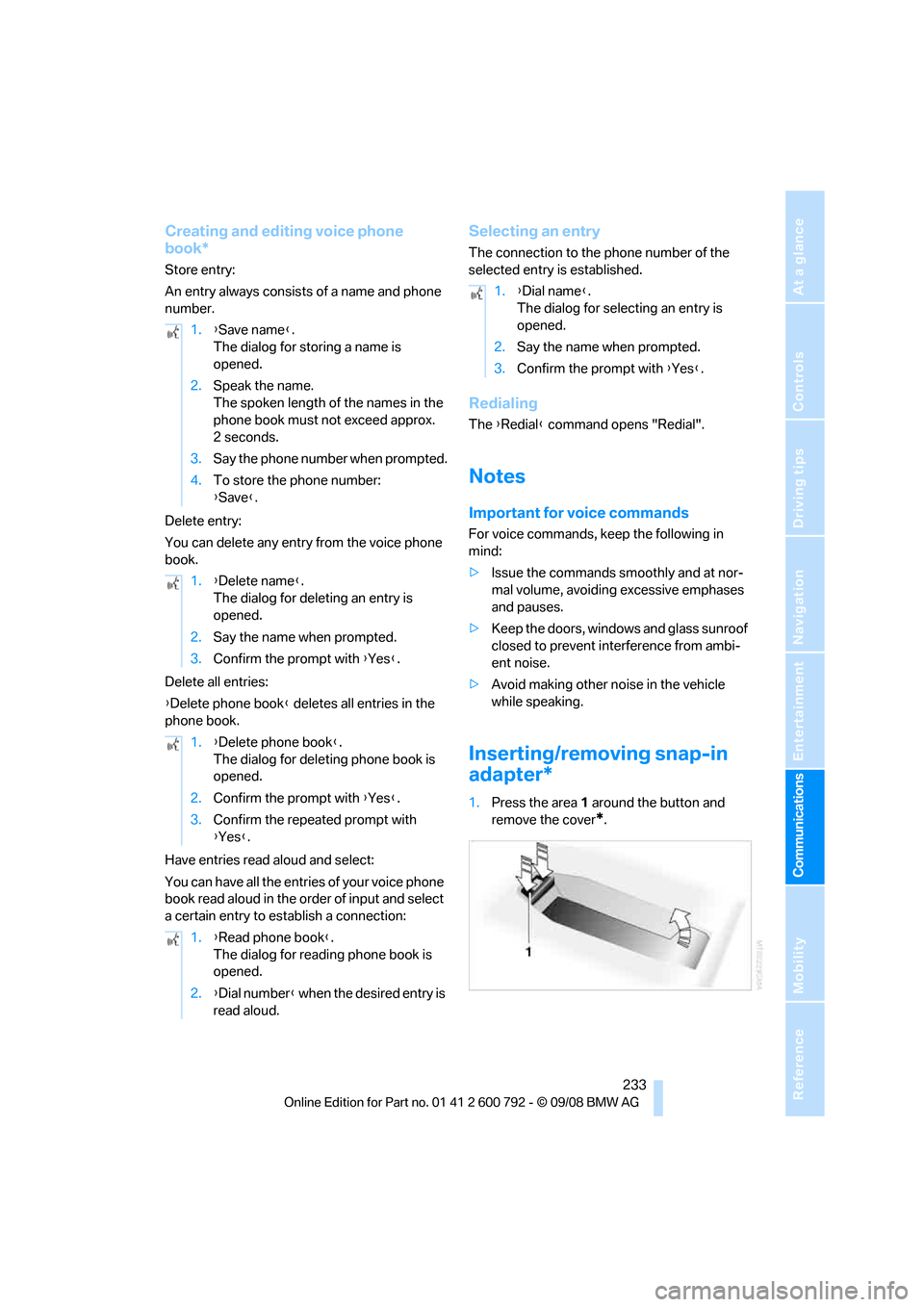
1.Press the area 1 around the button and
remove the cover
*.
1.
{Save name }.
The dialog for storing a name is
opened.
2. Speak the name.
The spoken length of the names in the
phone book must not exceed approx.
2seconds.
3. Say the phone number when prompted.
4. To store the phone number:
{Save }.
1. {Delete name }.
The dialog for deleting an entry is
opened.
2. Say the name when prompted.
3. Confirm the prompt with {Yes }.
1. {Delete phone book }.
The dialog for deleting phone book is
opened.
2. Confirm the prompt with {Yes }.
3. Confirm the repeated prompt with
{Yes }.
1. {Read phone book }.
The dialog for reading phone book is
opened.
2. {Dial number } when the desired entry is
read aloud.
1. {Dial name }.
The dialog for selecting an entry is
opened.
2. Say the name when prompted.
3. Confirm the prompt with {Yes }.
Page 236 of 317
Telephoning
234
2.
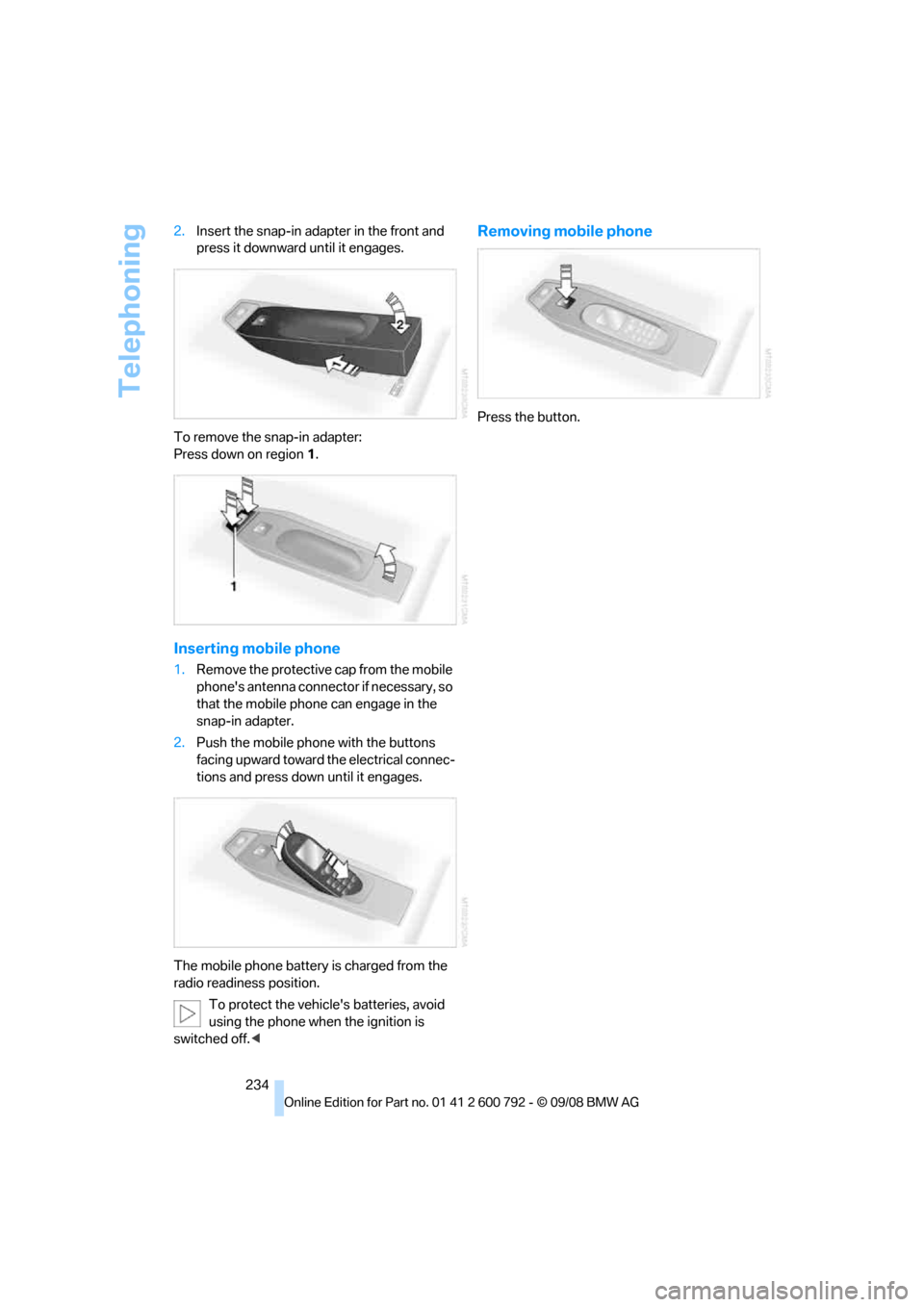
Insert the snap-in adapter in the front and
press it downward until it engages.
To remove the snap-in adapter:
Press down on region 1.
Inserting mobile phone
1. Remove the protective cap from the mobile
phone's antenna connector if necessary, so
that the mobile phone can engage in the
snap-in adapter.
2. Push the mobile phone with the buttons
facing upward toward the electrical connec-
tions and press down until it engages.
The mobile phone battery is charged from the
radio readiness position. To protect the vehicle's batteries, avoid
using the phone when the ignition is
switched off. <
Removing mobile phone
Press the button.
Page 238 of 317
BMW Assist
236
on route planning, traffic conditions, and the
weather. With Critical
Calling, you can make a
limited number of calls via the BMW Assist
Response Center, e.g. if you do not have your
mobile phone with you.
Press the SOS button to contact the BMW
Assist Response Center, see below.
You also have access to the BMW Assist con-
cierge service via the Internet.
Characteristics of offered services
The following special aspects apply to the ser-
vices:
>The services offered are country-specific.
> Voice contact is esta blished or data are
transferred, depending on the equipment
and the country. In some countries, it is
possible to do both.
> The data transferred can, for example, be
the vehicle data, your cu rrent position or the
data of the CBS Cond ition Based Service.
Using services
Contact to the BMW Assist Response
Center
You can contact the BMW Assist Response
Center via the SOS button.
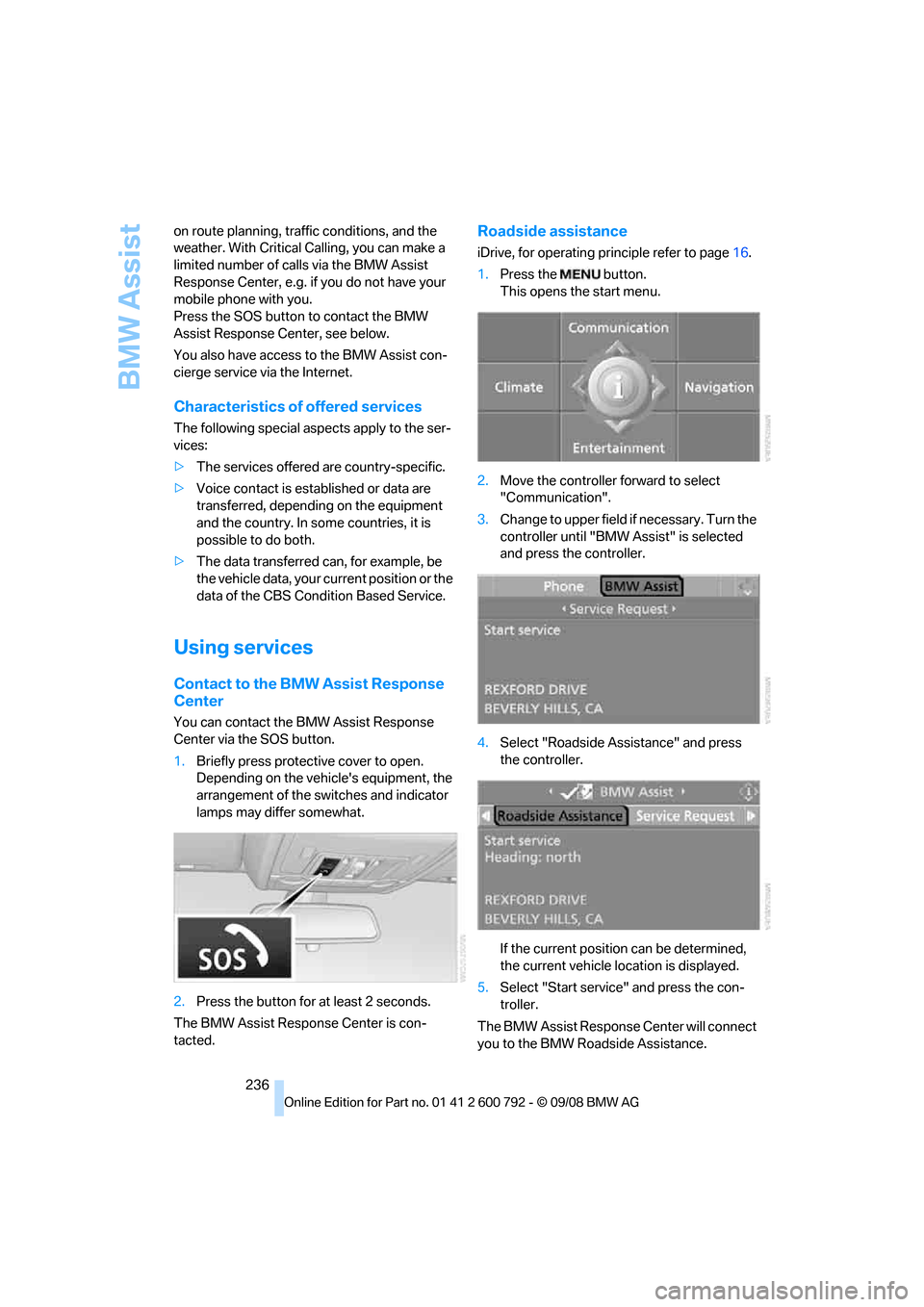
1.Briefly press protective cover to open.
Depending on the vehicle's equipment, the
arrangement of the switches and indicator
lamps may differ somewhat.
2. Press the button for at least 2 seconds.
The BMW Assist Response Center is con-
tacted.
Roadside assistance
iDrive, for operating pr inciple refer to page16.
1. Press the button.
This opens the start menu.
2. Move the controller forward to select
"Communication".
3. Change to upper field if necessary. Turn the
controller until "BMW Assist" is selected
and press the controller.
4. Select "Roadside Assistance" and press
the controller.
If the current position can be determined,
the current vehicle location is displayed.
5. Select "Start service" and press the con-
troller.
The BMW Assist Response Center will connect
you to the BMW Roadside Assistance.
Page 241 of 317
239
Entertainment
Reference
At a glance
Controls
Driving tips
Communications
Navigation
Mobility
Concierge service*
When you call the BMW Assist concierge ser-
vice, you can, for example, obtain information
on current events, filling stations or hotels and
have their phone numbers and addresses
transmitted. Many ho tels can be booked
directly through the BMW concierge service.
The concierge service must be enabled sepa-
rately by the BMW Assist Response Center.
Calling up information
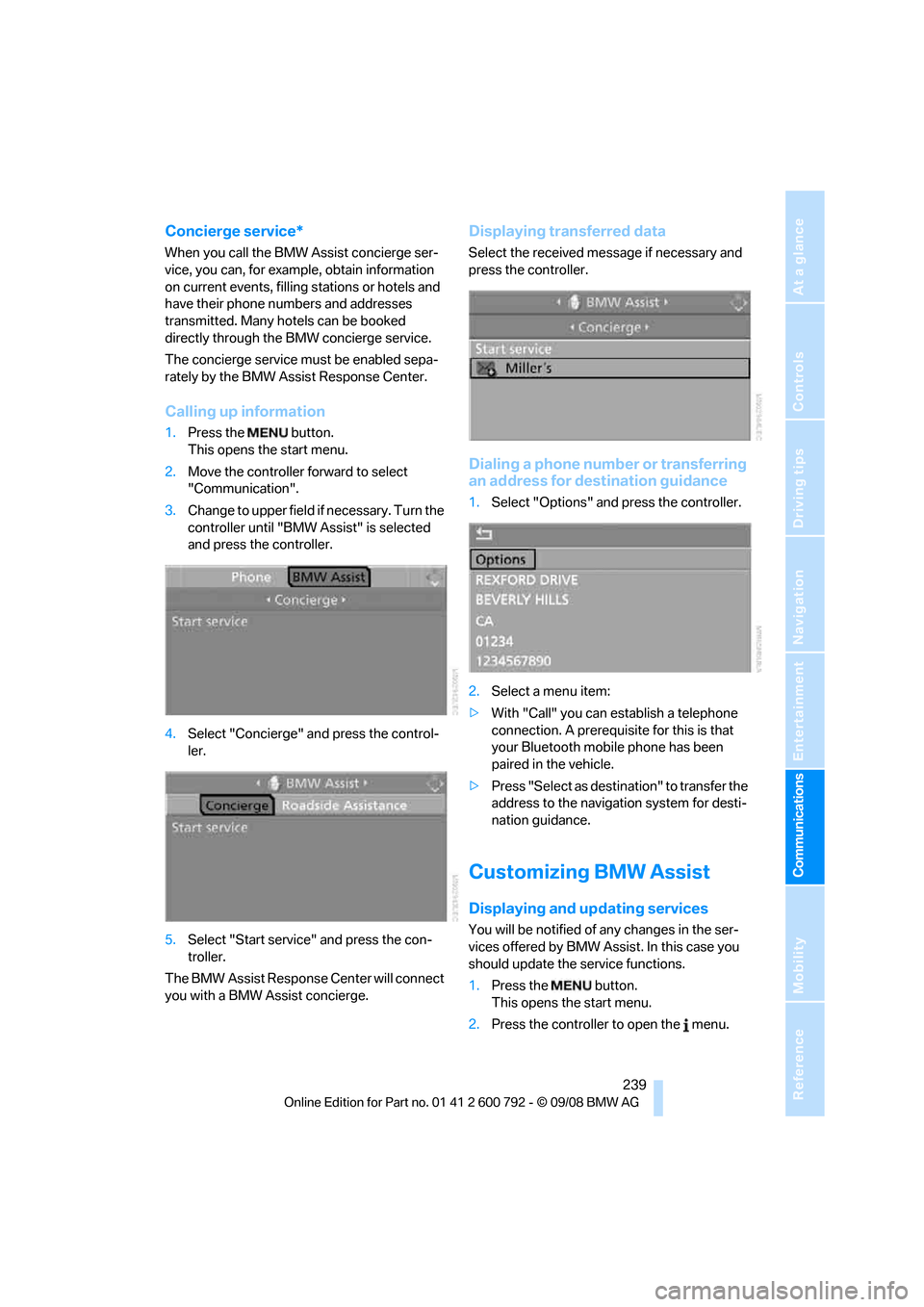
1. Press the button.
This opens the start menu.
2. Move the controller forward to select
"Communication".
3. Change to upper field if necessary. Turn the
controller until "BMW Assist" is selected
and press the controller.
4. Select "Concierge" an d press the control-
ler.
5. Select "Start service" and press the con-
troller.
The BMW Assist Response Center will connect
you with a BMW Assist concierge.
Displaying tr ansferred data
Select the received me ssage if necessary and
press the controller.
Dialing a phone number or transferring
an address for destination guidance
1. Select "Options" and press the controller.
2. Select a menu item:
> With "Call" you can establish a telephone
connection. A prerequisite for this is that
your Bluetooth mobile phone has been
paired in the vehicle.
> Press "Select as destination" to transfer the
address to the navigation system for desti-
nation guidance.
Customizing BMW Assist
Displaying and updating services
You will be notified of any changes in the ser-
vices offered by BMW Assist. In this case you
should update the service functions.
1. Press the button.
This opens the start menu.
2. Press the controller to open the menu.
Page 267 of 317
Mobility
265Reference
At a glance
Controls
Driving tips
Communications
Navigation
Entertainment
Care
Car-care products
For the cleaning and care of your vehicle, BMW
recommends using only products that BMW
has approved for this purpose.
Regular cleaning and care make a significant
contribution to retain ing your BMW's value.
The BMW Sports Activity Vehicle Center will be
happy to consult you on products and services
for the cleaning and care of your BMW.
Genuine BMW Care Products are materi-
als tested, laboratory tested, and tested in
actual use. They offer optimum care and pro-
tection for your vehicle. <
Do not use cleaners that contain alcohol
or solvents; they can damage your vehi-
cle. <
Cleaning agents can contain substances
that are dangerous or pose health risks.
You should therefore heed the warnings and
hazard indications on the packaging. Open the
doors or windows on your vehicle whenever
cleaning the interior. Make sure there is suffi-
cient ventilation in enclosed spaces. Use only
products that are formul ated for vehicle clean-
ing. <
Exterior care
Washing your vehicle
In the winter months, it is especially
important to ensure that the vehicle is
washed on a regular basis. Otherwise, signifi-
cant soiling and road salt can cause damage to
the vehicle.<
After washing the vehicle, apply the
brakes briefly to dry th em. Failure to do so
may lead to a reduction in braking efficiency and
also to corrosion of the brake rotors. <
Car washes
Give preference to cloth car washes.
Before driving into the car wash, make sure that
it is suitable for your BMW. Pay attention to the
following points:
> Dimensions of your vehicle, refer to
page 287.
> If necessary: fold in door mirror, refer to
page 57.
> Maximum permissible tire width.
Preparations for driving into the car wash:
> Deactivate rain sensor
* to prevent
unwanted wiper activation.
> BMW X5: deactivate rear window wiper and
protect it from damage. Take appropriate
protective measures; inquiring with the car
wash operator as needed.
> Remove additional add- on parts, e.g. spoil-
ers or phone antennas, if they could be
damaged.
Automatic transmission with
Steptronic
Before driving into the car wash, observe the
following so that the vehicle is able to roll:
1. Insert the remote cont rol into the ignition
lock, even with comfort access.
2. Shift into transmission position N.
3. Release the parking brake.
4. Deactivate Automatic Hold, refer to
page 68.
5. Switch off the engine.
6. Leave the remote control in the ignition lock
so that the vehicle can roll.
Page 281 of 317
Mobility
279Reference
At a glance
Controls
Driving tips
Communications
Navigation
Entertainment
Giving and receiving assistance
Emergency request
Conditions for an emergency request:
>Full preparation package mobile phone.
With this equipment, an emergency request
is still possible when no mobile phone is
paired in the vehicle.
> BMW Assist is activated.
Activating BMW Assist, refer to page 240.
> Radio readiness is switched on.
> The BMW Assist system is logged in on a
wireless communications network.
> The emergency request system is opera-
ble.
When the contract of participation with BMW
Assist expires, the BMW Assist system can be
deactivated by a BMW Sports Activity Vehicle
Center without having to visit a workshop. Once
the BMW Assist system has been deactivated,
emergency requests are not possible. The
BMW Assist system be reactivated by a BMW
Sports Activity Vehicle Center after signing a
new contract.
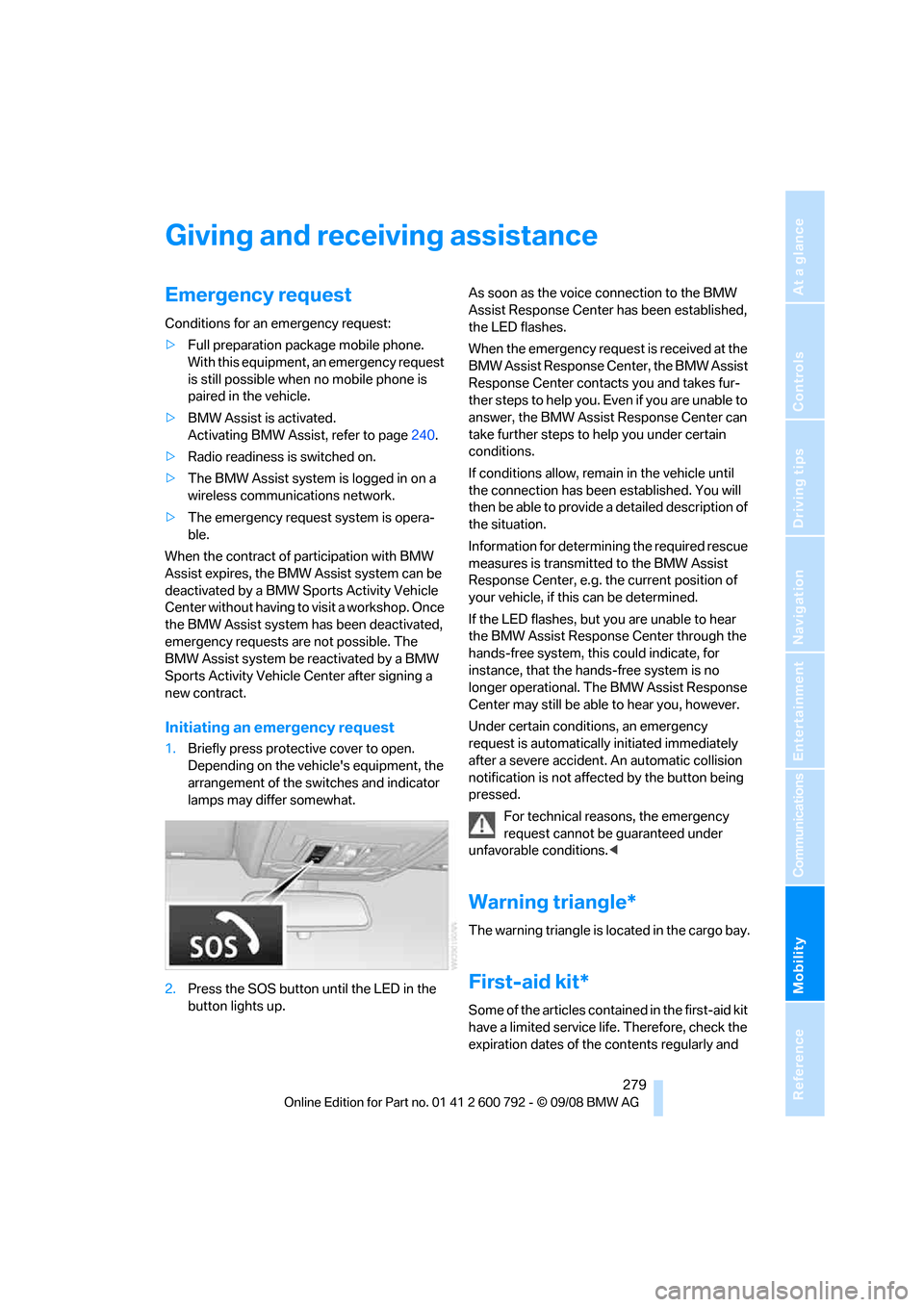
Initiating an emergency request
1. Briefly press protective cover to open.
Depending on the vehicle's equipment, the
arrangement of the switches and indicator
lamps may differ somewhat.
2. Press the SOS button until the LED in the
button lights up. As soon as the voice connection to the BMW
Assist Response Center has been established,
the LED flashes.
When the emergency request is received at the
BMW Assist Response Center, the BMW Assist
Response Center contacts you and takes fur-
ther steps to help you. Even if you are unable to
answer, the BMW Assist Response Center can
take further steps to help you under certain
conditions.
If conditions allow, remain in the vehicle until
the connection has been
established. You will
then be able to provide a detailed description of
the situation.
Information for determining the required rescue
measures is transmitted to the BMW Assist
Response Center, e.g. the current position of
your vehicle, if this can be determined.
If the LED flashes, but you are unable to hear
the BMW Assist Response Center through the
hands-free system, this could indicate, for
instance, that the hand s-free system is no
longer operational. The BMW Assist Response
Center may still be able to hear you, however.
Under certain conditions, an emergency
request is automatically initiated immediately
after a severe accident . An automatic collision
notification is not affected by the button being
pressed.
For technical reasons, the emergency
request cannot be guaranteed under
unfavorable conditions. <
Warning triangle*
The warning triangle is located in the cargo bay.
First-aid kit*
Some of the articles cont ained in the first-aid kit
have a limited service life. Therefore, check the
expiration dates of the contents regularly and
Page 282 of 317
Giving and receiving assistance
280
replace the contents conc
erned in good time if
necessary.
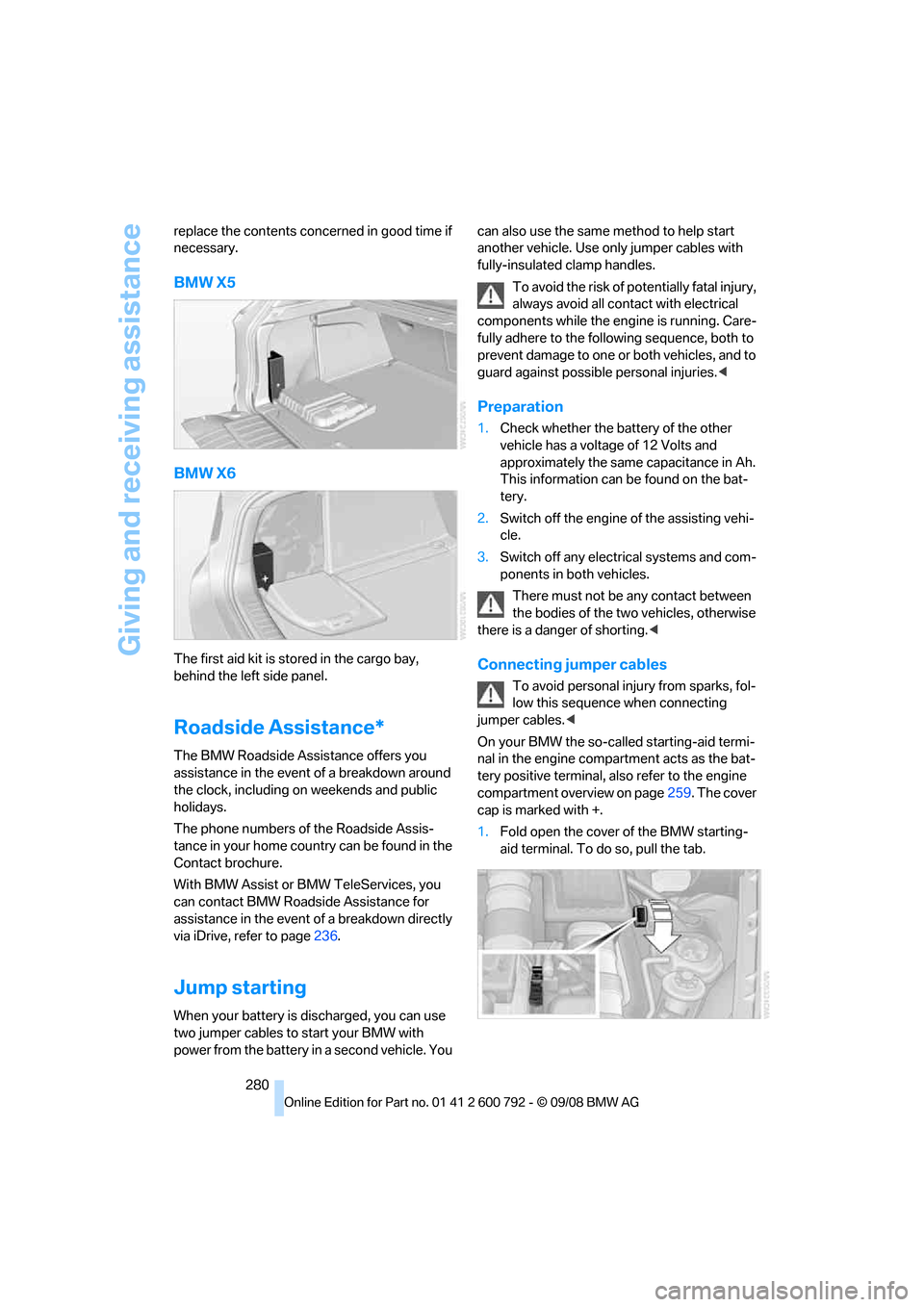
BMW X5
BMW X6
The first aid kit is stored in the cargo bay,
behind the left side panel.
Roadside Assistance*
The BMW Roadside Assistance offers you
assistance in the event of a breakdown around
the clock, including on weekends and public
holidays.
The phone numbers of the Roadside Assis-
tance in your home country can be found in the
Contact brochure.
With BMW Assist or BMW TeleServices, you
can contact BMW Roadside Assistance for
assistance in the event of a breakdown directly
via iDrive, refer to page 236.
Jump starting
When your battery is discharged, you can use
two jumper cables to start your BMW with
power from the battery in a second vehicle. You can also use the same
method to help start
another vehicle. Use only jumper cables with
fully-insulated clamp handles.
To avoid the risk of po tentially fatal injury,
always avoid all contact with electrical
components while the engine is running. Care-
fully adhere to the following sequence, both to
prevent damage to one or both vehicles, and to
guard against possible personal injuries.<
Preparation
1. Check whether the battery of the other
vehicle has a voltage of 12 Volts and
approximately the same capacitance in Ah.
This information can be found on the bat-
tery.
2. Switch off the engine of the assisting vehi-
cle.
3. Switch off any electrical systems and com-
ponents in both vehicles.
There must not be any contact between
the bodies of the tw o vehicles, otherwise
there is a danger of shorting. <
Connecting jumper cables
To avoid personal injury from sparks, fol-
low this sequence when connecting
jumper cables. <
On your BMW the so-called starting-aid termi-
nal in the engine compar tment acts as the bat-
tery positive terminal, al so refer to the engine
compartment overview on page 259. The cover
cap is marked with +.
1. Fold open the cover of the BMW starting-
aid terminal. To do so, pull the tab.
Page 293 of 317
Reference 291
At a glance
Controls
Driving tips
Communications
Navigation
Entertainment
Mobility
Short commands of voice activation
system
With short commands you can carry out certain
functions directly, rega rdless of which menu item is selected. Here are the important short
commands for the voice activation system.
Assistance window
Communication
*
FunctionCommand
To open assistance window
20{Assistance window }
To select display in assistance window 20{Assistance window map facing north },
{ Assistance window map direction of travel },
{ Assistance window arrow display },
{ Assistance window perspective },
{ Assistance window current position },
{ Assistance window trip computer } or
{ Assistance window onboard info }
To change scale in assistance window 164{Assistance window scale ... feet } or
{ Assistance window scale ... miles }
FunctionCommand
To open phone221 {Phone }
To dial phone number 227 {Dial number }
To display phone book 228 {A to Z }
To select from the phone book 228{Call ... } or
{ Dial name }
To display "Top 8" 229 {Top 8}
To redial 228 {Redial }
To display "Received calls" 229{Received calls }
To display "Missed calls" 229{Missed calls }
To display "Bluetooth" 224 {Bluetooth }
To open "BMW Service" 236{BMW Service }
Page 298 of 317
Everything from A to Z
296
Everything from A to Z
Index
"..." Identifies Control Display texts used to select
individual functions, and
indicates where to find them
in the text.
A
ABS Antilock Brake System 96
Accessories 6
Access to 3rd row seats 54
Acoustic signal, refer to Check Control 85
Activated-charcoal filter 119
"Activation time" for parked- car ventilation 122
Active seat 57
Active seat ventilation 56
Active steering 104
– malfunction 104
– warning lamp 104
Adaptive brake lamp, brake force display 105
Adaptive Drive 99
Adaptive fixing system 133
Adaptive Head Light 112
"Add digits" for mobile phone 228
Address for navigation
– deleting 159
– entering 151,158
– selecting 159
– storing 158
– storing current position 158
"Add to destination list" 153
Adjusting confirmation signals for locking and unlocking 31
Adjusting opening
height 34,36, 37 Adjusting temperature with
expanded-scope automatic
climate control 116
Adjusting the tone during audio operation, refer to
Tone control 175
Adjusting thigh support 49,50
"After door opened" 51
"After unlocking" 51
Airbags 105
– sitting safely 48
– warning lamp 107
Air distribution
– automatic 115,120
– manual 116
Airing, refer to Ventilation 118
Air recirculation 117
– AUC Automatic recirculated-air control 117
– recirculated-air mode 117
"Air recirculation on / off" 59
Air vents 11
4
– refer to Ventilation 118
Air vents of automatic climate control 114
Air volume 116,120
AKI, refer to Fuel specifications 245
Alarm system 38
– avoiding unintentional alarms 39
– interior motion sensor 39
– switching off alarm 38
– switching off tilt alarm sensor and interior motion
sensor 39
– tilt alarm sensor 39
"All channels" in Satellite
radio 185
"All doors" 30
Alloy wheels 267 All-season tires, refer to
Winter tires 257
"All stations" displaying in
radio mode, 178
All-wheel drive, refer to xDrive 97
Alterations, tech nical, refer to
For your own safety 5
"AM", reception
range 175,178
"Angle of view"
– DVD changer 197
– DVD system in rear 209
Antenna for mobile phone 220
Antifreeze
– coolant 262
– washer fluid 75
Antilock Brake System
ABS 96
Anti-theft system
– refer to Alarm system 38
– refer to Central locking system 29
Approved axle weights, refer
to Weights 289
Approved engine oils 262
Approved gross vehicle
weight, refer to Weights 289
Armrest, refer to Center armrest, front 127
Around the center console 14
Around the steering wheel 10
Arrival time
– refer to Computer 80
– refer to Starting destination guidance 162
"Arrow display" in navigation 163
"Arrow display pop-up
instructions" 149
Arrow view for navigation system 163
Page 300 of 317
Everything from A to Z
298
"BMW
Assist" 236,237, 238, 239
BMW Assist
– activating 240
– concierge service 239
– contacting BMW Customer Relations 238
– offered services 235
– roadside assistance 236
– TeleServices 237
"BMW Contact" 230
"BMW Contact Numbers" 230
BMW homepage 4
BMW maintenance system 263
"BMW Service settings" 241
BMW Teleservice call
– automatic 237
– manual 237
BMW TeleServices 237
BMW TeleServices services
– displaying 238
– updating 238
BMW website 4
Bottle holder, refer to Cup holders 127
Brake assistant 96
Brake force display 105
Brake lamps
– brake force display 105
– replacing bulbs 270,273
Brake rotors 140
Brakes
– ABS Antilock Brake System 96
– brake assistant 96
– brake force display 105
– breaking-in 138
– CBC Cornering Brake
Control 96
– electronic brake-force distribution 96
– parking brake 67
– refer to Braking safely 140
– warning lamp 13 Brake system
138
– brake pads 138
– breaking-in 138
– disk brakes 140
Braking safely 140
Breakdown, Flat Tire Monitor 100
Breakdown services, refer to
Roadside Assistance 280
Breaking-in brake pads 138
Breaking-in d
ifferential 138
Break-in period 138
"Brightness" 89
– DVD changer 196
– DVD system in rear 208
Brightness
– of Control Display 89
– of the rear view camera 95
– on Head-Up Display 108
"Brightness / Position" 108
Button for starting engine 65
Buttons on steering wheel 11
Bypassing traffic congestion 169
C
Calibrating driver's seat 55
California Proposition 65 Warning 6
"Call" 228,239
Call
– accepting 226
– displaying accepted 229
– ending 227
– in absence 229
– starting 227
Calling
– from phone book 228
– from Top 8 list 229
– redialing 229
– refer to telephone operating instructions
Camera, refer to Rear view camera 93
"Camera picture and PDC" 95"Camera view
– full screen"
95
– main window" 95
Can holder, refer to Cup holders 127
Capacities 290
Capacity of cargo bay 289
Car battery, refer to Vehicle
battery 277
"Car Data" 81
Care 265
– car-care products 265
– carpets 267
– car washes 265
– CD/DVD-player 268
– chrome components 266
– displays 268
– exterior 265
– fine wooden
components 267
– hand washing 266
– headlamps 266
– high-pressure cleaning jets 266
– interior 267
– leather 267
– light-alloy wheels 267
– paint 266
– plastic components 267
– rubber gaskets 266
– running boards 267
– safety belts 268
– sensors and cameras 267,268
– upholstery materials and cloth-covered paneling 267
– windows 266
–
wiper blades 266
Cargo
– refer to Loading 141
– securing 143
– securing with ski bag 134
Cargo area, refer to Cargo
bay 130
Cargo area cover, refer to Roll- up cover 130