tow BMW X6M 2009 E71 Service Manual
[x] Cancel search | Manufacturer: BMW, Model Year: 2009, Model line: X6M, Model: BMW X6M 2009 E71Pages: 317, PDF Size: 9.56 MB
Page 257 of 317
Mobility
255Reference
At a glance
Controls
Driving tips
Communications
Navigation
Entertainment
Temperature
The temperature grades are A, the highest, B,
and C, representing the tire's resistance to the
generation of heat and its ability to dissipate
heat when tested under controlled conditions
on a specified indoor laboratory test wheel.
Sustained high temperature can cause the
material of the tire to degenerate and reduce
tire life, and excessive temperature can lead to
sudden tire failure. The grade C corresponds to
a level of performance which all passenger car
tires must meet under the Federal Motor Vehi-
cle Safety Standard No. 109. Grades B and A
represent higher levels of performance on the
laboratory test wheel than the minimum
required by law.
The temperature grade for this tire is
established for a tire that is properly
inflated and not overloaded. Excessive speed,
underinflation, or excessive loading, either sep-
arately or in combination, can cause heat
buildup and possible tire failure. <
RSC – run-flat tires
You will recognize run-flat tires by a circular
symbol containing the letters RSC on the side
of the tire, refer to page256.
M+S
Winter and all-season tires.
These have better winter properties than sum-
mer tires.
XL
Indicates specially reinforced tires.
Tire condition
Inspect your tires freq uently for tread wear,
signs of damage and for foreign objects lodged
in the tread. Check the tread depth.
Minimum tread depth
The tread depth should not drop below 0.12 in/
3 mm, although, for example, European legisla-
tion only specifies a minimum tread depth of 0.063 in/1.6 mm. At tread depths below 0.12 in/
3 mm there is an increased risk of high-speed
hydroplaning, even when only small amounts of
water are present on the road surface.
When winter tires wear down past a tread depth
of 0.16 in/4 mm, they become perceptibly less
suitable for winter conditions. For the sake of
safety, new tires should be installed.
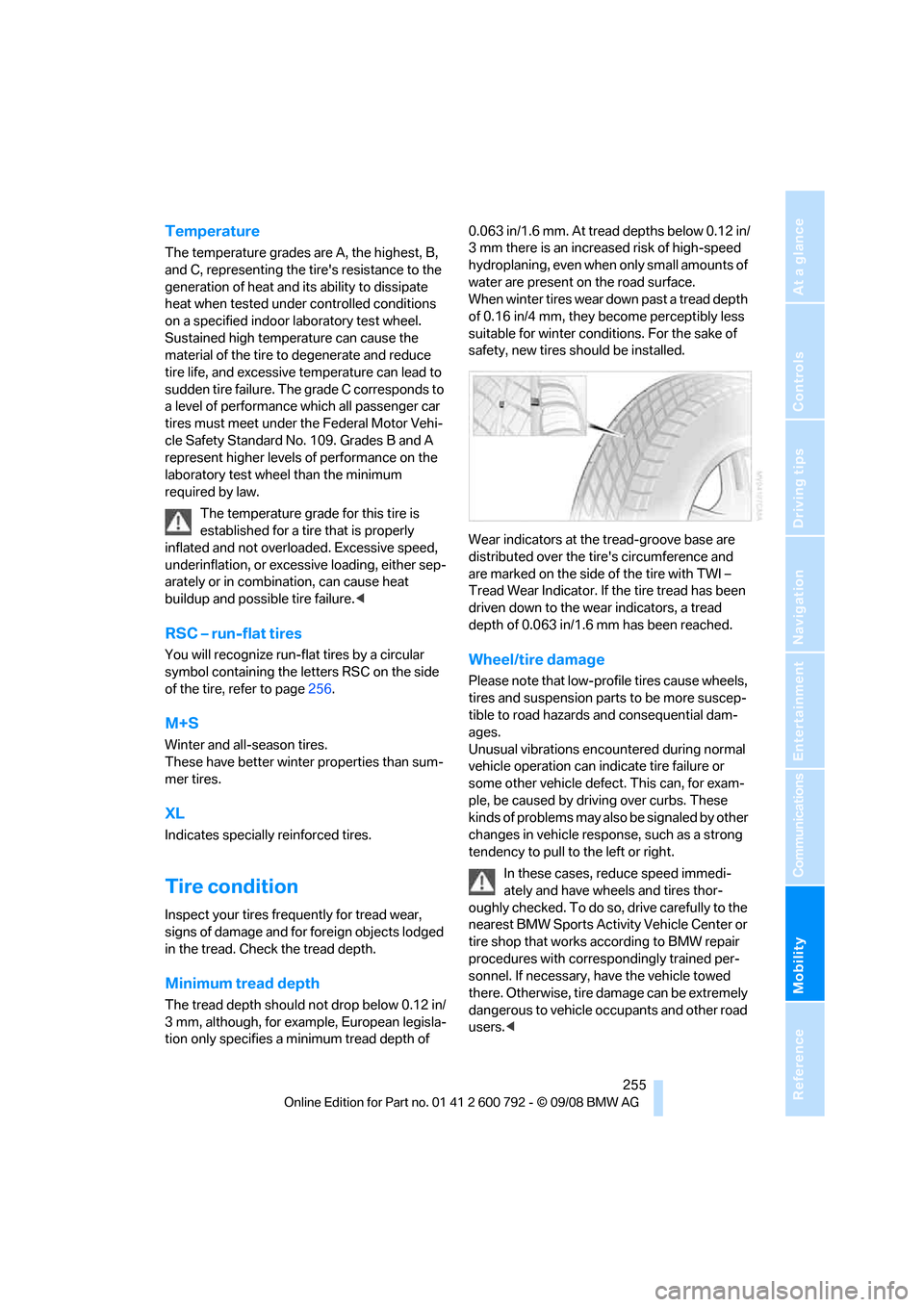
Wear indicators at the tread-groove base are
distributed over the ti
re's circumference and
are marked on the side of the tire with TWI –
Tread Wear Indicator. If the tire tread has been
driven down to the we ar indicators, a tread
depth of 0.063 in/1.6 mm has been reached.
Wheel/tire damage
Please note that low-pr ofile tires cause wheels,
tires and suspension parts to be more suscep-
tible to road hazards and consequential dam-
ages.
Unusual vibrations encountered during normal
vehicle operation can indi cate tire failure or
some other vehicle defect. This can, for exam-
ple, be caused by driving over curbs. These
kinds of problems may also be signaled by other
changes in vehicle response, such as a strong
tendency to pull to the left or right.
In these cases, reduce speed immedi-
ately and have wheels and tires thor-
oughly checked. To do so , drive carefully to the
nearest BMW Sports Activity Vehicle Center or
tire shop that works ac cording to BMW repair
procedures with corres pondingly trained per-
sonnel. If necessary, have the vehicle towed
there. Otherwise, tire damage can be extremely
dangerous to vehicle occupants and other road
users. <
Page 271 of 317
Mobility
269Reference
At a glance
Controls
Driving tips
Communications
Navigation
Entertainment
Replacing components
Onboard toolkit
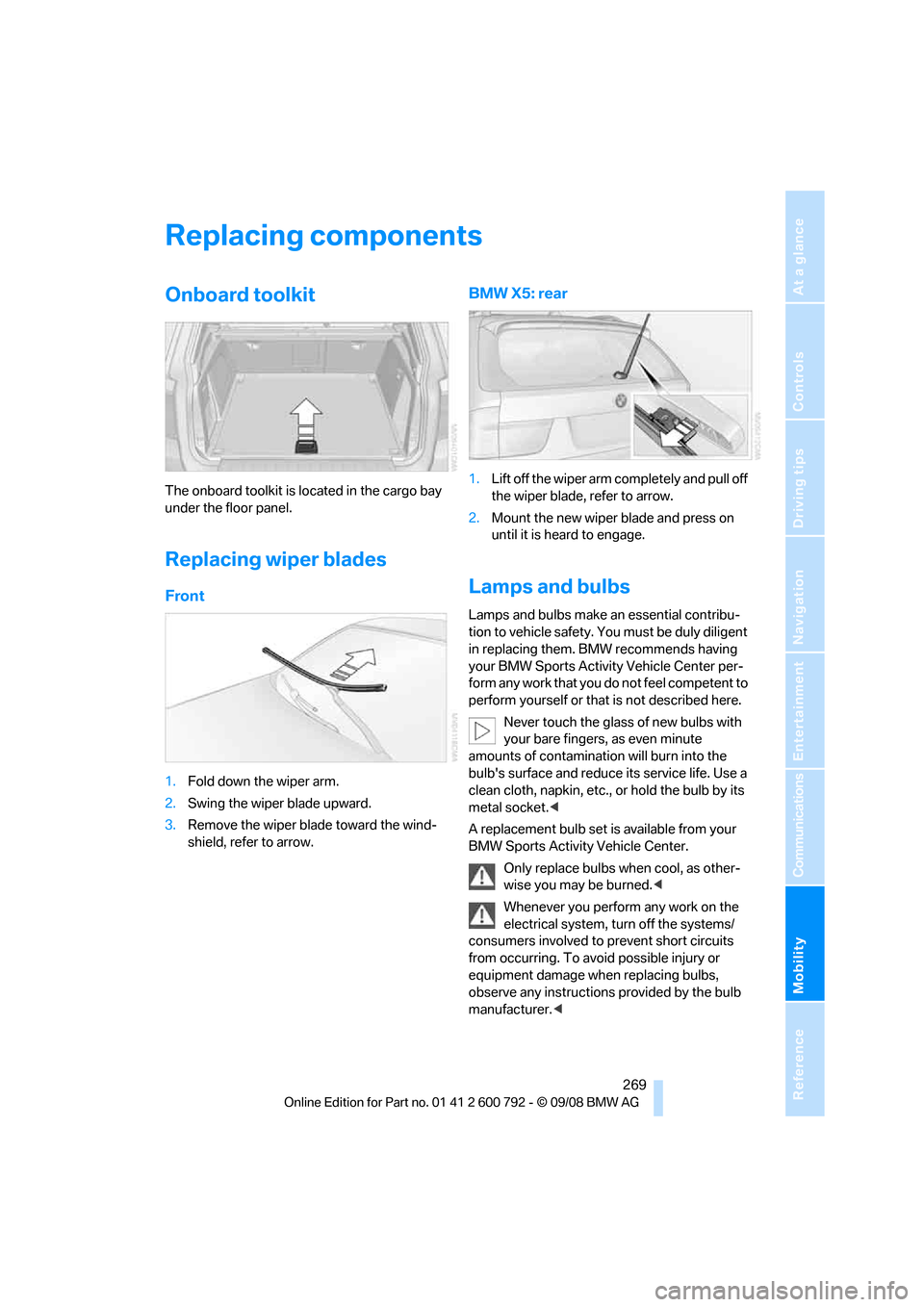
The onboard toolkit is located in the cargo bay
under the floor panel.
Replacing wiper blades
Front
1. Fold down the wiper arm.
2. Swing the wiper blade upward.
3. Remove the wiper blade toward the wind-
shield, refer to arrow.
BMW X5: rear
1.Lift off the wiper arm completely and pull off
the wiper blade, refer to arrow.
2. Mount the new wiper blade and press on
until it is heard to engage.
Lamps and bulbs
Lamps and bulbs make an essential contribu-
tion to vehicle safety. You must be duly diligent
in replacing them. BMW recommends having
your BMW Sports Activity Vehicle Center per-
form any work that you do not feel competent to
perform yourself or that is not described here.
Never touch the glass of new bulbs with
your bare fingers, as even minute
amounts of contamination will burn into the
bulb's surface and reduce its service life. Use a
clean cloth, napkin, etc., or hold the bulb by its
metal socket. <
A replacement bulb set is available from your
BMW Sports Activity Vehicle Center.
Only replace bulbs when cool, as other-
wise you may be burned. <
Whenever you perform any work on the
electrical system, turn off the systems/
consumers involved to prevent short circuits
from occurring. To avoid possible injury or
equipment damage when replacing bulbs,
observe any instructions provided by the bulb
manufacturer. <
Page 279 of 317
Mobility
277Reference
At a glance
Controls
Driving tips
Communications
Navigation
Entertainment
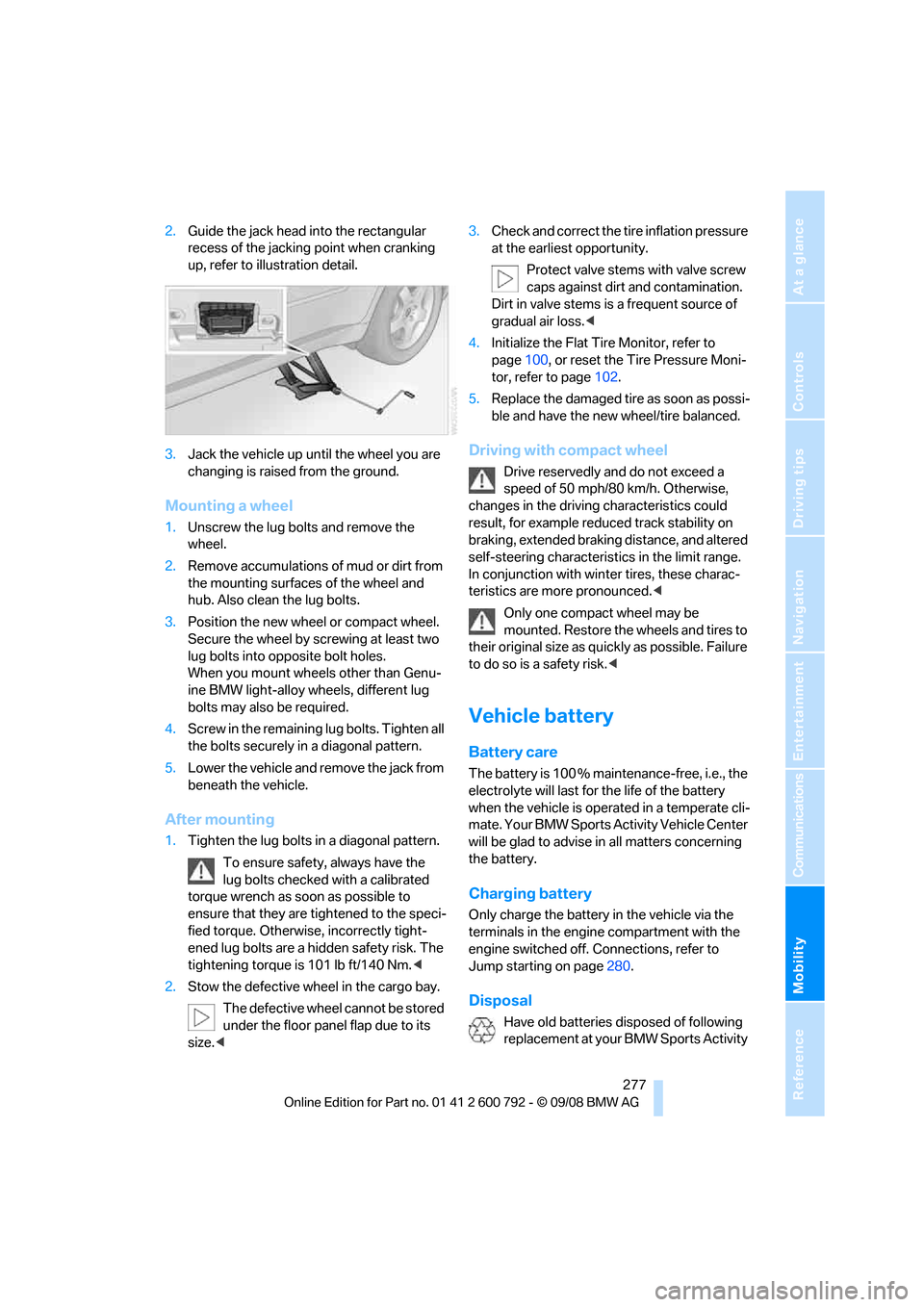
2.Guide the jack head into the rectangular
recess of the jacking point when cranking
up, refer to illustration detail.
3. Jack the vehicle up until the wheel you are
changing is raised from the ground.
Mounting a wheel
1.Unscrew the lug bolts and remove the
wheel.
2. Remove accumulations of mud or dirt from
the mounting surfaces of the wheel and
hub. Also clean the lug bolts.
3. Position the new wheel or compact wheel.
Secure the wheel by sc rewing at least two
lug bolts into opposite bolt holes.
When you mount wheels other than Genu-
ine BMW light-alloy wheels, different lug
bolts may also be required.
4. Screw in the remaining lug bolts. Tighten all
the bolts securely in a diagonal pattern.
5. Lower the vehicle and remove the jack from
beneath the vehicle.
After mounting
1.Tighten the lug bolts in a diagonal pattern.
To ensure safety, always have the
lug bolts checked with a calibrated
torque wrench as soon as possible to
ensure that they are tightened to the speci-
fied torque. Otherwis e, incorrectly tight-
ened lug bolts are a hidden safety risk. The
tightening torque is 101 lb ft/140 Nm. <
2. Stow the defective wheel in the cargo bay.
The defective wheel cannot be stored
under the floor panel flap due to its
size. < 3.
Check and correct the ti re inflation pressure
at the earliest opportunity.
Protect valve stems with valve screw
caps against dirt and contamination.
Dirt in valve stems is a frequent source of
gradual air loss. <
4. Initialize the Flat Tire Monitor, refer to
page 100, or reset the Tire Pressure Moni-
tor, refer to page 102.
5. Replace the damaged tire as soon as possi-
ble and have the new wheel/tire balanced.
Driving with compact wheel
Drive reservedly and do not exceed a
speed of 50 mph/80 km/h. Otherwise,
changes in the driving characteristics could
result, for example reduced track stability on
braking, extended brakin g distance, and altered
self-steering characterist ics in the limit range.
In conjunction with wint er tires, these charac-
teristics are more pronounced. <
Only one compact wheel may be
mounted. Restore the wheels and tires to
their original size as quickly as possible. Failure
to do so is a safety risk. <
Vehicle battery
Battery care
The battery is 100 % main tenance-free, i.e., the
electrolyte will last for the life of the battery
when the vehicle is operated in a temperate cli-
mate. Your BMW Sports Activity Vehicle Center
will be glad to advise in all matters concerning
the battery.
Charging battery
Only charge the battery in the vehicle via the
terminals in the engine compartment with the
engine switched off. Connections, refer to
Jump starting on page 280.
Disposal
Have old batteries disposed of following
replacement at your BMW Sports Activity
Page 283 of 317
Mobility
281Reference
At a glance
Controls
Driving tips
Communications
Navigation
Entertainment
2.Attach one end of the jumper cable plus/+
to the positive terminal of the battery or a
starting-aid terminal of the vehicle provid-
ing assistance.
3. Attach the second end of the cable to the
positive terminal of th e battery or to a start-
ing-aid terminal of the vehicle to be started.
4. Attach one end of the jumper cable minus/–
to the negative terminal of the battery or to
an engine or body ground of the assisting
vehicle.
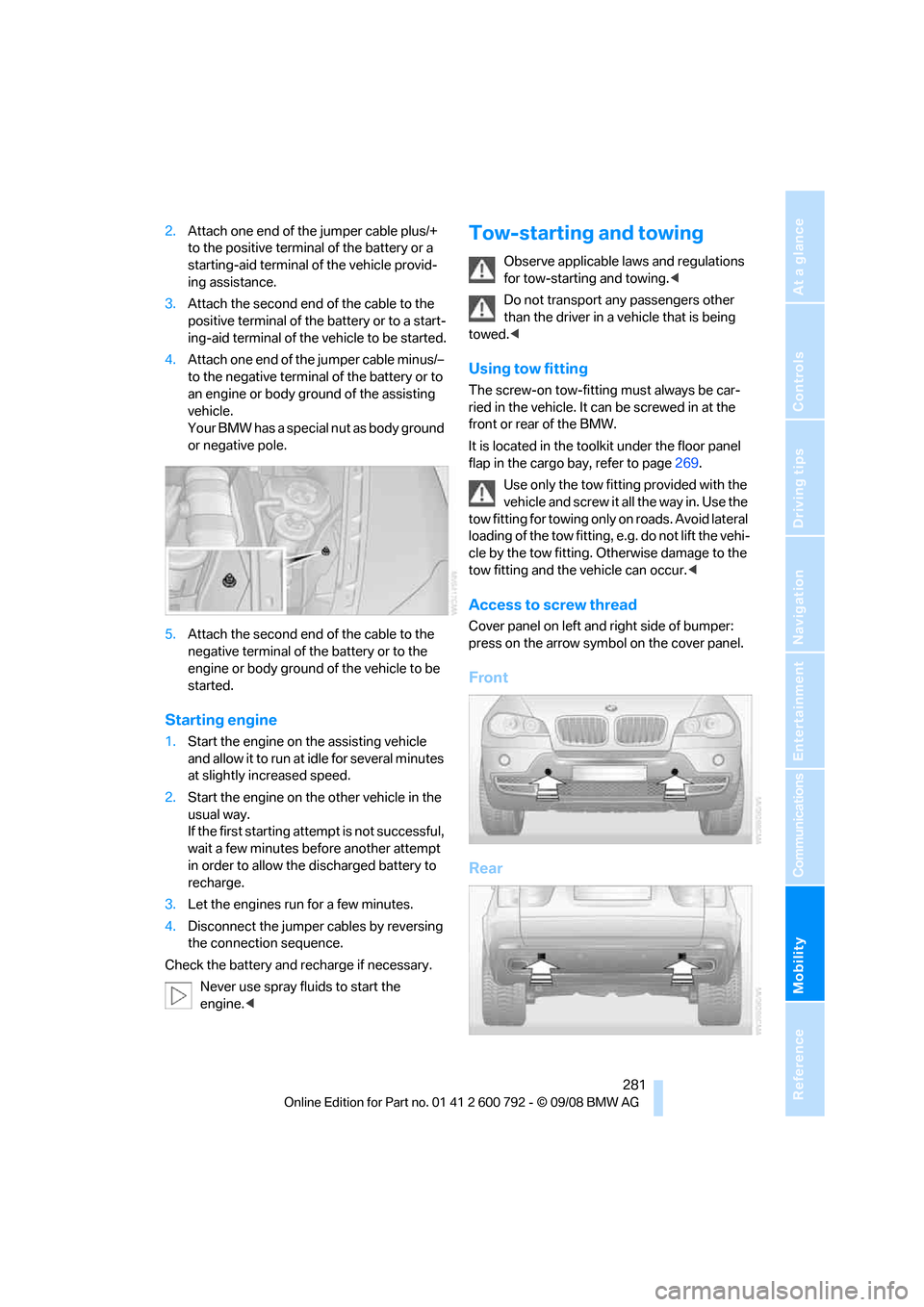
Your BMW has a special nut as body ground
or negative pole.
5. Attach the second end of the cable to the
negative terminal of the battery or to the
engine or body ground of the vehicle to be
started.
Starting engine
1. Start the engine on the assisting vehicle
and allow it to run at idle for several minutes
at slightly increased speed.
2. Start the engine on the other vehicle in the
usual way.
If the first starting attempt is not successful,
wait a few minutes be fore another attempt
in order to allow the discharged battery to
recharge.
3. Let the engines run for a few minutes.
4. Disconnect the jumper cables by reversing
the connection sequence.
Check the battery and recharge if necessary.
Never use spray fluids to start the
engine. <
Tow-starting and towing
Observe applicable la ws and regulations
for tow-starting and towing. <
Do not transport any passengers other
than the driver in a vehicle that is being
towed. <
Using tow fitting
The screw-on tow-fitting must always be car-
ried in the vehicle. It can be screwed in at the
front or rear of the BMW.
It is located in the tool kit under the floor panel
flap in the cargo bay, refer to page 269.
Use only the tow fitting provided with the
vehicle and screw it all the way in. Use the
tow fitting for towing only on roads. Avoid lateral
loading of the tow fitting, e.g. do not lift the vehi-
cle by the tow fitting. Ot herwise damage to the
tow fitting and the vehicle can occur. <
Access to screw thread
Cover panel on left and right side of bumper:
press on the arrow symbol on the cover panel.
Front
Rear
Page 284 of 317
Giving and receiving assistance
282
Being towed
Make sure that the ignition is switched on,
refer to page65, otherwise the low
beams, tail lamps, turn signals and windshield
wipers would not be available. When the engine
is stopped, there is no power assist. This then
requires increased effort for braking and steer-
ing. Active steering is deactivated and larger
steering wheel movements are required.<
Switch on the hazard wa rning flashers depend-
ing on the local regulations. If the electrical sys-
tem fails, mark the vehicle to be towed, e.g. with
a sign or warning triangle in the rear window.
Before towing, manua lly unlock the trans-
mission lock, refer to page 72; failure to
do so can result in damage to the transmis-
sion. <
Do not exceed a towing speed of 45 mph/
70 km/h and a towing distance of
90 miles/150 km, otherwise the automatic
transmission may be damaged. <
Towing methods
Do not lift vehicle by tow fitting or body
and chassis parts, otherwise damage may
result. <
In some countries, towi ng with tow bars or
ropes in public traffic is not permitted. Familiar-
ize yourself with the regu lations on towing in the
respective country.
With tow bar
The towing vehicle may not be lighter
than the vehicle to be towed, otherwise it
will not be possible to reliably control vehicle
response. <
The tow fittings used sh ould be on the same
side on both vehicles. Should it prove impossi-
ble to avoid mounting the tow bar at an offset
angle, observe the following:
> Clearance and maneuvering capability will
be sharply limited during cornering.
> When mounted at an angle, the tow bar will
exert lateral forces, tending to push the
vehicle sideways. Only attach the tow bar to the tow fittings,
as attachment to other vehicle parts can
lead to damage. <
With tow rope
When starting off in the towing vehicle, make
sure that the tow rope is taut.
To avoid jerking and the associated
stresses on vehicle components when
towing, always use nylon ropes or nylon straps.
Only attach tow ropes to the tow fittings, as
attachment to other vehi cle parts can lead to
damage. <
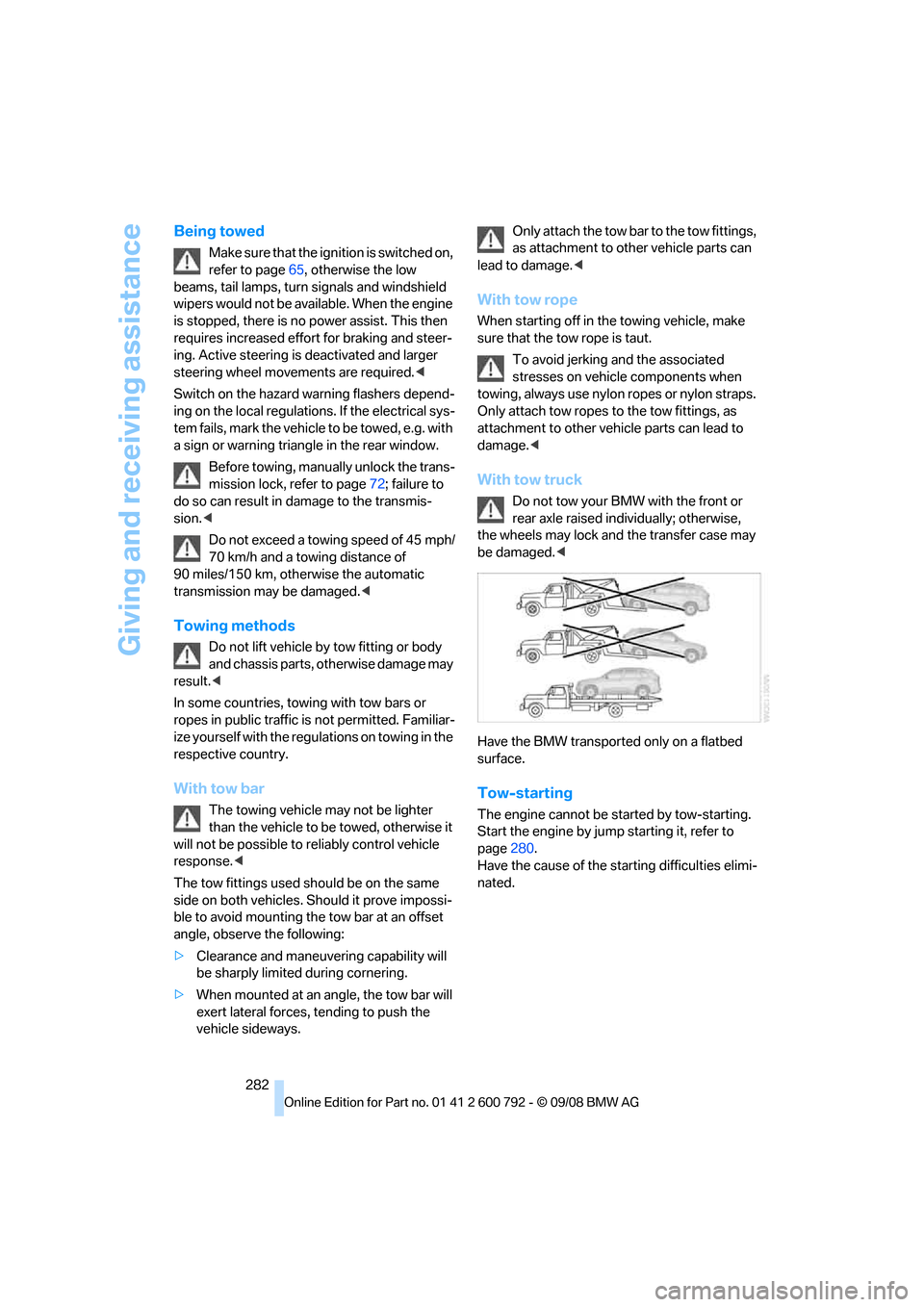
With tow truck
Do not tow your BMW with the front or
rear axle raised indi vidually; otherwise,
the wheels may lock and the transfer case may
be damaged. <
Have the BMW transported only on a flatbed
surface.
Tow-starting
The engine cannot be started by tow-starting.
Start the engine by jump starting it, refer to
page 280.
Have the cause of the st arting difficulties elimi-
nated.
Page 299 of 317
Reference 297
At a glance
Controls
Driving tips
Communications
Navigation
Entertainment
Mobility
Ashtray
– front128
– rear 129
Assist 235
– refer to separate operating
instructions
Assistance systems, refer to Driving stability control
systems 96
Assistance window 20
"Assist profile" 241
"Assist. window off" 21
AUC Automatic recirculated-
air control 117
"Audio" 177,181
– for DVD system in rear 216
Audio 174
– controls 174
– switching on/off 174
– tone control 175
– volume 175
Audio CD for DVD system in
rear 210
Audio device, external 127
Automatic
– air distribution 115,120
– air volume 115,120
– BMW Teleservice call 237
– headlamp control 110
– liftgate operation 34,37
– steering wheel adjustment,
refer to Easy entry/exit 58
– storing stations 179
Automatic car washes 140
Automatic climate control
– automatic air distribution 115,120
– in rear 119
– in rear, activating on Control Display 120
– switching off 118,120
– ventilation in rear 119
– with 2-zone control 115
– with 4-zone control 119
Automatic closing of doors, refer to Automatic soft
closing 33 Automatic curb monitor
58
Automatic garage door
opener 123
Automatic Hold 67
– activating 68
– deactivating 68
– parking 68
Auto
matic lighting
– refer to Automatic headlamp control 110
– refer to Daytime driving
lamps 111
– refer to Interior lamps 113
– refer to Pathway lighting 111
"Automatic programs" 116
Automatic recirculated-air
control AUC 117
Automatic soft closing 33
Automatic station search 179
Automatic transmission with Steptronic 70
– deactivating selector lever
interlock 71
– kick-down 71
– manually releasing
transmission lock 72
– tow-starting 282
– with comfort access 40
"Automatic ventilation" 121
AUTO program for automatic climate control 115,120
"Auto Request" 237
"Autostore"
– on the radio 180
"AUX" 175,200 ,202
– AUX-In connection 200
– for DVD system in rear 215
– USB audio interface 201
"AUX / Rear" 206
AUX-In connection 127,200
Average fuel consumption 80
– setting units 89
Average speed, refer to
Computer 80
"Avoid ferries" in navigation 161
"Avoid highways" in navigation 160 Avoiding highways for
navigation 160
Avoiding unintentional alarms 39
"Avoid tollroads" in
navigation 161
Axle weights, refer to Weights 289
"A - Z" 228
B
Backrest contour, refer to
Lumbar support 50
Backrests, refer to Seats 49
Backrest width adjustment 50
Backup lamps, replacing bulbs 270,273
Balance, refer to Tone
control 176
"Balance" for DVD system in rear 209
Band-aids, refer to First-aid kit 279
Bass, refer to Tone
control 175
Battery
– charging 277
– jump starting 280
– power failure 278
– refer to Vehicle battery 277
Battery disposal
– remote control with comfort access 41
– vehicle battery 277
Battery replacement
– remote control for DVD
system in rear 206
– remote control with comfort access 41
Being towed 282
Belts, refer to Safety belts 54
Beverage holder, refer to Cup
holders 127
Blower, refer to Air volume 116,120
BMW Advanced Diesel 245
Page 304 of 317
Everything from A to Z
302
Dynamic Performance
Control 97
"Dynamic route" in navigation 161
Dynamic Stability Control
DSC 96
Dynamic Traction Control DTC 97
E
Easy entry/exit 58
Eject button, refer to Buttons
on the CD player 174
Electrical malfunction
– automatic transmission with
Steptronic 72
– door lock 32
– driver's door 32
– fuel filler door 244
– glass sunroof, electric 46
– liftgate 33
– panorama glass sunroof 44
– parking brake 69
Electric seat 49
Electronic brake-force distribution 96
Electronic oil level check 260
Emergency operation, refer to Manual operation
– door lock 32
– driver's door 32
– fuel filler door 244
– liftgate 33
– transmission lock, automatic transmission 72
Emergency request 279
Emergency services, refer to Roadside Assistance 280
"Enabled services" 241
"Enabled TeleServices" 238
"End call" 228 Engine
– breaking-in
138
– data 286
– oil temperature 79
– overheated, refer to Coolant
temperature 79
– speed 286
– starting 66
– starting, with comfort access 40
– switching off 66
Engine compartment 259
Engine coolant 262
Engine oil
– adding 261
– additives, refer to Approved
engine oils 262
– approved engine oil 262
– checking oil level 260
– electronic oil level check 260
– temperature 79
Engine oil temperature 79
Engine output, refer to Engine data 286
Engine overheating, refer to
Coolant temperature 79
Engine speed 286
Engine starting, refer to
Starting engine 66
E
ntering country of destination 151
Entering destination 151
Entering house number or intersection 152
Entering intersection 152
Entering street 152
"Entertainment" 174
Entertainment sound output on/off 175
"Equalizer", refer to Tone
control 177
Equalizer, refer to Tone control 177
"ESN" 184
ESP Electronic Stability Program, refer to DSC
Dynamic Stability
Control 96 Event Data Recorders
264
Exhaust system, refer to Hot
exhaust system 139
Exterior mirrors 57
– adjusting 57
– automatic dimming feature 58
– automatic heating 58
– folding in and out 57
– tilting down passenger-side exterior mirror 58
External audio device 127
– refer to AUX-In
connection 200
Eye for tow-starting and towing, refer to Tow
fitting 281
F
Fader, refer to Tone
control 176
Failure messages, refer to Check Control 85
False alarm, refer to Avoiding
unintentional alarms 39
Fastening safety belts, refer to Safety belts 54
– warning lamp 55
Fastest route for navigation 160
Fast forward
– CD changer 190
– CD player 190
– DVD changer 195
"Fast route" in navigation 160
Fault displays, refer to Check
Control 85
Filler neck for washer fluid 75
First aid, refer to First-aid
kit 279
First-aid kit 279
Fixing system, adaptive 133
Flashing during locking/ unlocking, refer to Setting
confirmation signals 31
Page 307 of 317
Reference 305
At a glance
Controls
Driving tips
Communications
Navigation
Entertainment
Mobility
Interior rearview mirror58
– automatic dimming
feature 58
– compass 124
Intermittent mode of the
wipers 74
J
Jacking points 276
Joystick
– refer to iDrive 16
– refer to Selector lever,
selecting transmission
positions 70
Jump starting 280
K
Keyless-Go, refer to Comfort
access 39
Keyless opening and closing,
refer to Comfort access 39
Key Memory, refer to Personal Profile 28
"Keypad" 230
Keys 28
– key-related settings, refer to
Personal Profile 28
Kick-down, automatic transmission with
Steptronic 71
Knock control 245
L
Lamps, refer to Parking lamps/
low beams 110
Lamps and bulbs 269
"Language / Units" 89,90
– for navigation 149
"Language" for DVD system in rear 208,209
"Languages" 90
– for navigation 149,165
Lashing eyes, refer to
Securing cargo 143
Last destinations, refer to Destination list 157 "Last seat pos."
51
LATCH child restraint fixing
system 62
Leather care 267
LEDs light-emitting
diodes 270
Length, refer to Dimensions 287
License plate lamp, replacing bulbs 272,275
Liftgate 33,35
– adjusting opening height 34,36, 37
– automatic operation 34,37
– closing 34,37
– locking and unlocking from
inside 32
– opening from inside 33,36
– opening from outside 33,36
– opening manually 33,36
Light-emitting diodes LEDs 270
Lighter 129
Lighter socket 129
"Lighting" 73,111
Lighting
– instruments 113
– lamps and bulbs 269
– of the vehicle, refer to Lamps 110
Light switch 110
"Limit" 87
Load 141
Loadin
g141
– securing cargo 143
– stowing cargo 142
– vehicle 141
Load securing equipment, refer to Securing cargo 143
"Lock after driving" 33
Lock buttons in the doors, refer to Locking 33
Locking
– from inside 32
– setting confirmation signals 31
– using remote control 29
– without key, refer to Comfort access 39 Locking and unlocking doors
– from inside
32
– setting confirmation signals 31
Locking without key, refer to
Comfort access 39
Low beams 110
– automatic 110
Lower back support, refer to Lumbar support 50
Lows, refer to Treble and
bass 175
Lug bolts 276
– tightening torque, refer to After mounting 277
– wrench 276
Luggage compartment capacity, refer to Cargo bay
capacity 289
Luggage rack, refer to Roof- mounted luggage rack 143
Lumbar support 50
M
M+S tires, refer to Winter
tires 257
"Main menu" for DVD system
in rear 209
Maintenance
– refer to Service and
Warranty Information
Booklet for US models 263
– refer to Service
requirements 82
– refer to Warranty and Service Guide Booklet for
Canadian models 263
Maintenance system 263
Malfunction
– door lock 32
– driver's door 32
– fuel filler door 244
– glass sunroof, electric 46
– liftgate 33
– panorama glass sunroof 44
– parking brake 69
Page 309 of 317
Reference 307
At a glance
Controls
Driving tips
Communications
Navigation
Entertainment
Mobility
Neck support, refer to Head restraints 52
"New address" for navigation 158
"New destination" 151,155
New remote control 28
"New route" 166
New wheels and tires 256
"Next entertainment source" 59
Nozzles, refer to Windshield
washer nozzles 75
"NTSC color" for DVD system
in rear 216
Nylon rope, refer to Tow- starting and towing 281
O
OBD socket264
Octane ratings, refer to Fuel specifications 245
Odometer 78
Oil
– additives, refer to Approved
engine oils 262
– approved engine oils 262
– consumption, refer to
Checking engine oil
level 260
– level 260
– refilling, refer to Adding engine oil 261
Oil change interval, refer to
Service requirements 82
"On a new destination" for navigation 156
Onboard computer, refer to iDrive 16
Onboard toolkit 269
"On destination" 156
"On location" 156
Opening and closing
– comfort access 39
– from inside 32
– panorama glass sunroof 43
– using remote control 29
– using the door lock 32Operation by voice for mobile
phone 231
– adjusting volume 232
– canceling 231
– correcting phone
number 232
– dialing phone number 232
– placing a call 232
– redialing 233
– voice commands 231
– voice phone book 232
Operation on poor roads 144
"Options" 239,240
Orientation menu, refer to Start menu 17
Output, refer to Engine
data 286
Outside air, refer to AUC Automatic recirculated-air
control 117
Outside temperature display 78
– changing unit of measure 89
Outside temperature warning 78
"Overview" for DVD system in rear 213
P
Panic mode 30
Panorama glass sunroof 42
– moving manually 44
– power failure 44
– raising, opening, closing 43
Park Distance Control PDC 91
"Parked car operation" 121
"Parked car ventilation" 121
Parked-car ventilation 121
– activating activation
time 122
– preselecting activation times 122
– switching on and off directly 121
Parking, vehicle 66 Parking aid
– refer to PDC Park Distance
Control 91
– refer to Rear view camera 93
Parking assistant, refer to
PDC Park Distance
Control 91
Parking brake 67
– Automatic Hold 67
– indicator lamp 13
– releasing manually 67
– releasing manually in case of an electrical malfunction 69
– setting manually 67
Parking lamps 110
Parking with Automatic
Hold 68
Parts and accessories 6
"Passenger's seat climate" 56
Passenger-side exterior mirror, tilting down 58
Pathway lighting 111
"Pause" for DVD system in rear 210
Paying attention to speed 257
"PDC" 92
PDC Park Distance Control 91
Personal Profile 28
"Perspective" 164
Phone book 226
– creating and editing voice
phone book 232
Phone numbers
– deleting from phone
book 229
– dialing 227
– most recent numbers 229
– selecting in phone book 229
– Top 8 229
"Photo" for DVD-System in
rear 206,212
Pinch protection system
– glass sunroof, electric 45
– panorama glass
sunroof43
– power windows 42
Plasters, refer to First-aid
kit 279
Page 311 of 317
Reference 309
At a glance
Controls
Driving tips
Communications
Navigation
Entertainment
Mobility
"Redial" for mobile phone228
Reflectors, refer to Tail
lamps 270,273
Refueling 244
Releasing
– hood 258
– refer to Unlocking 40
"Relock door if not
opened" 32
Remaining distance, refer to Cruising range 80
Remaining distance to destination, refer to
Computer 80
Remote control 28
– comfort access 39
– DVD system in rear 205
– garage door opener 123
– liftgate 30
– malfunction 31,41
– replacing battery 41
Removing condensation on
the windows 116
"Repeat directory"
– for DVD system in
rear 210,212
– in audio mode 190
"Repeat" for DVD system in
rear 211
"Repeat track"
– for DVD system in
rear 210,212
– in audio mode 190
Replacement fuses 278
Replacement of tires 256
– changing wheels 275
– new wheels and tires 256
Replacing bulbs, refer to Lamps and bulbs 269
Replacing wheels/tires, refer
to New wheels and tires 256
Replacing wiper blades 269
Reporting an accident, refer to
Initiating an emergency
request 279
Reporting safety defects 7
Reserve warning, refer to Fuel gauge 80 "Reset"
101,103
– DVD changer 196
– DVD system in rear 209
– the stopwatch 87
– tone settings 177
Reset, refer to Resetting tone settings 177
Residual heat 118
R
estraint systems
– for children 61
– refer to Safety belts 54
Retreaded tires 256
"Return"
– DVD changer 197
– DVD system in rear 209
Reverse
– CD changer 190
– CD player 190
– DVD changer 195
Reverse gear, automatic transmission with
Steptronic 71
Road map 164
"Roadside Assistance" 236
Roadside Assistance 280
Roadside assistance 236
Roadside parking lamps 112
Roller sun blinds 126
Roll-up cover 130
Roof load capacity 289
Roof-mounted luggage
rack 143
Rope, refer to Tow-starting and towing 281
Rotary pushbutto n, refer to
iDrive 16
Route 160
– changing 166
– displaying 163
– displaying arrow display 163
– displaying map view 164
– displaying roads and towns/ cities 164
– displaying towns/cities 164
– list 164
– selecting 160
– selecting criteria 160RSC Runflat System
Component, refer to Run-
flat tires 256
Runflat System Component RSC, refer to Run-Flat
Tires 256
Run-flat tires 256
– continuing driving with a
damaged tire 101,103
– flat tire 101,103
– new wheels and tires 256
– tire inflation pressure 101,103 ,249
– tire replacement 256
S
Safety5
Safety belts 54
– damage 55
– sitting safely 48
– warning lamp 55
Safety belt tensioners
– refer to Airbags 105
– refer to Safety belts 54
Safety systems
– ABS Antilock Brake System 96
– airbags 105
– driving stability control systems 96
– DSC Dynamic Stability Control 96
– safety belts 54
Safety tires, refer to Run-flat tires 256
"SAT" 175,184
Satellite radio 184
– displaying additional information 185
– enabling 184
– selecting channel 185
– storing channel 185
"Scan"
– for DVD system in rear 211
– sampling stations in radio
mode 179