washer BMW X6M 2009 E71 Owner's Manual
[x] Cancel search | Manufacturer: BMW, Model Year: 2009, Model line: X6M, Model: BMW X6M 2009 E71Pages: 317, PDF Size: 9.56 MB
Page 76 of 317
Driving
74
Washer/wiper system
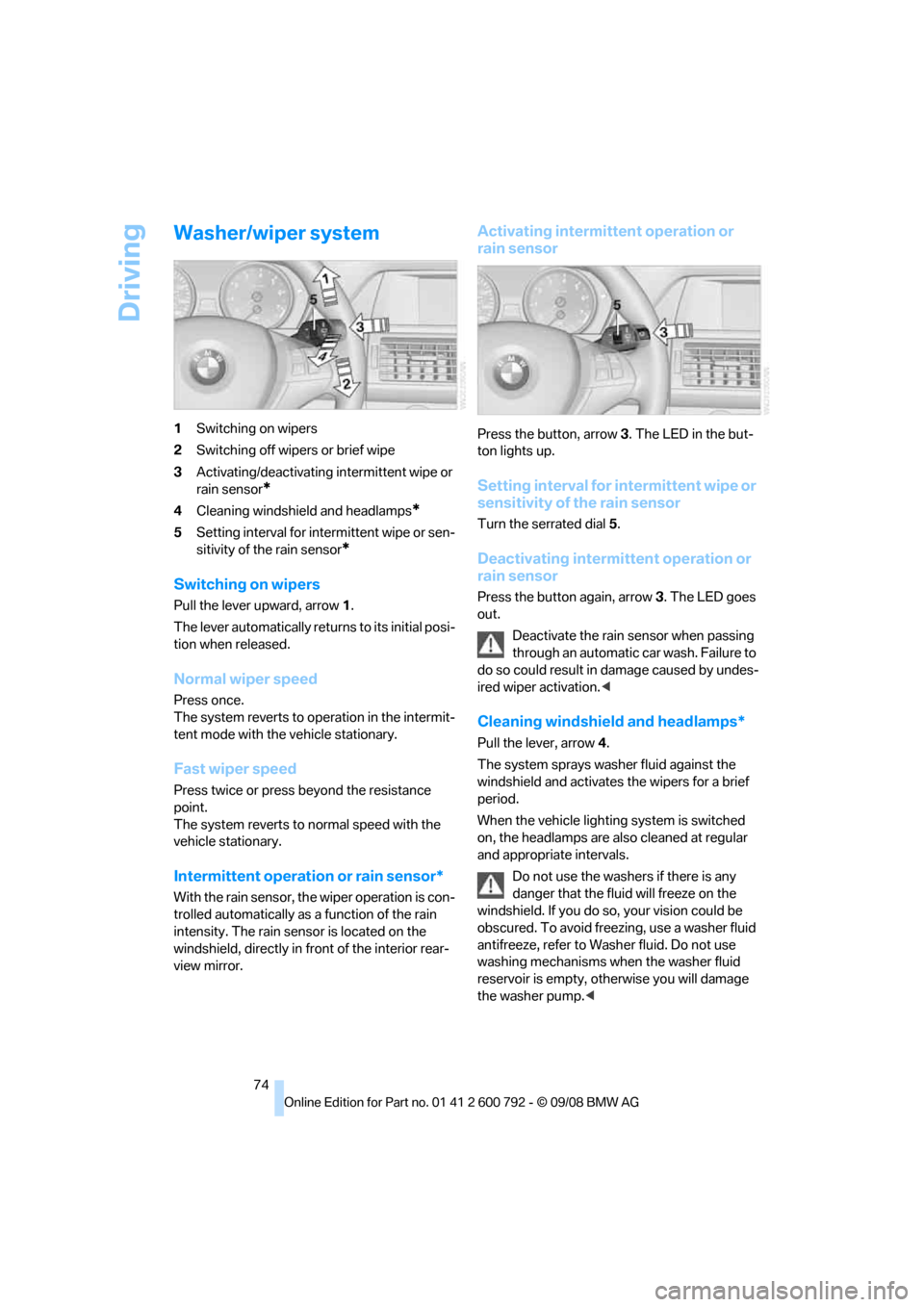
1Switching on wipers
2 Switching off wipers or brief wipe
3 Activating/deactivating intermittent wipe or
rain sensor
*
4Cleaning windshield and headlamps*
5Setting interval for inte rmittent wipe or sen-
sitivity of the rain sensor
*
Switching on wipers
Pull the lever upward, arrow 1.
The lever automatically retu rns to its initial posi-
tion when released.
Normal wiper speed
Press once.
The system reverts to op eration in the intermit-
tent mode with the vehicle stationary.
Fast wiper speed
Press twice or press beyond the resistance
point.
The system reverts to normal speed with the
vehicle stationary.
Intermittent operation or rain sensor*
With the rain sensor, th e wiper operation is con-
trolled automatically as a function of the rain
intensity. The rain sensor is located on the
windshield, directly in fr ont of the interior rear-
view mirror.
Activating intermittent operation or
rain sensor
Press the button, arrow 3. The LED in the but-
ton lights up.
Setting interval for intermittent wipe or
sensitivity of the rain sensor
Turn the serrated dial 5.
Deactivating intermittent operation or
rain sensor
Press the button again, arrow 3. The LED goes
out.
Deactivate the rain sensor when passing
through an automatic car wash. Failure to
do so could result in damage caused by undes-
ired wiper activation. <
Cleaning windshield and headlamps*
Pull the lever, arrow4.
The system sprays washer fluid against the
windshield and ac tivates the wipers for a brief
period.
When the vehicle lighting system is switched
on, the headlamps are also cleaned at regular
and appropriate intervals.
Do not use the washers if there is any
danger that the fluid will freeze on the
windshield. If you do so, your vision could be
obscured. To avoid freezing, use a washer fluid
antifreeze, refer to Wash er fluid. Do not use
washing mechanisms when the washer fluid
reservoir is empty, ot herwise you will damage
the washer pump.<
Page 77 of 317
Controls
75Reference
At a glance
Driving tips
Communications
Navigation
Entertainment
Mobility
Windshield washer nozzles
Both windshield washer nozzles are automati-
cally heated with the engine running or the igni-
tion switched on.
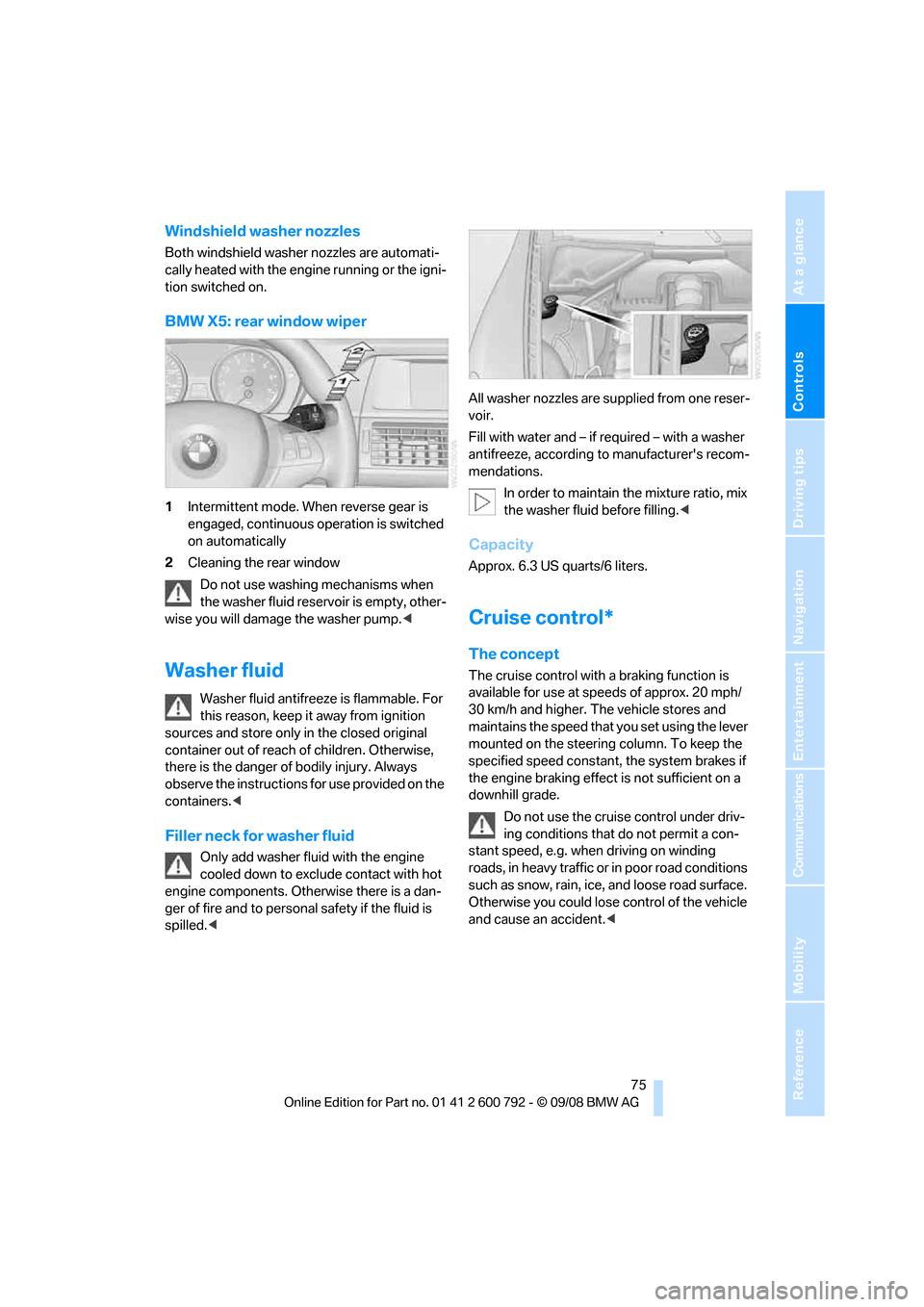
BMW X5: rear window wiper
1Intermittent mode. When reverse gear is
engaged, continuous operation is switched
on automatically
2 Cleaning the rear window
Do not use washing mechanisms when
the washer fluid reservoir is empty, other-
wise you will damage the washer pump. <
Washer fluid
Washer fluid antifreeze is flammable. For
this reason, keep it away from ignition
sources and store only in the closed original
container out of reach of children. Otherwise,
there is the danger of bodily injury. Always
observe the instructions for use provided on the
containers. <
Filler neck for washer fluid
Only add washer fluid with the engine
cooled down to excl ude contact with hot
engine components. Otherwise there is a dan-
ger of fire and to personal safety if the fluid is
spilled. < All washer nozzles are supplied from one reser-
voir.
Fill with water and – if re
quired – with a washer
antifreeze, according to manufacturer's recom-
mendations.
In order to maintain the mixture ratio, mix
the washer fluid before filling. <
Capacity
Approx. 6.3 US quarts/6 liters.
Cruise control*
The concept
The cruise control with a braking function is
available for use at speeds of approx. 20 mph/
30 km/h and higher. The vehicle stores and
maintains the speed that you set using the lever
mounted on the steering column. To keep the
specified speed constant, the system brakes if
the engine braking effect is not sufficient on a
downhill grade.
Do not use the cruise control under driv-
ing conditions that do not permit a con-
stant speed, e.g. when driving on winding
roads, in heavy traffic or in poor road conditions
such as snow, rain, ice, and loose road surface.
Otherwise you could lose control of the vehicle
and cause an accident. <
Page 261 of 317
Mobility
259Reference
At a glance
Controls
Driving tips
Communications
Navigation
Entertainment
Engine compartment
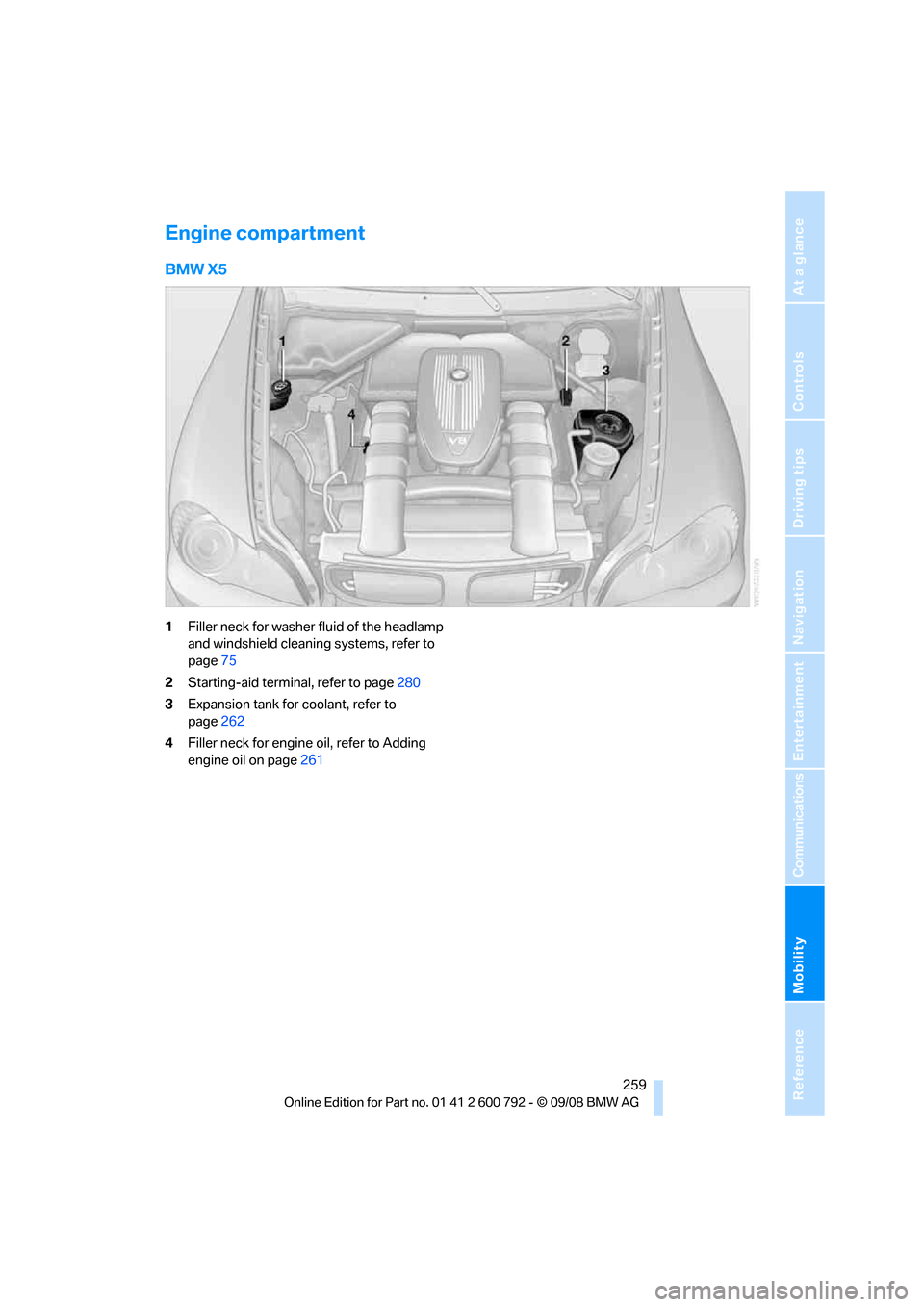
BMW X5
1Filler neck for washer fluid of the headlamp
and windshield cleaning systems, refer to
page 75
2 Starting-aid terminal, refer to page 280
3 Expansion tank for coolant, refer to
page 262
4 Filler neck for engine oil, refer to Adding
engine oil on page 261
Page 262 of 317
Under the hood
260
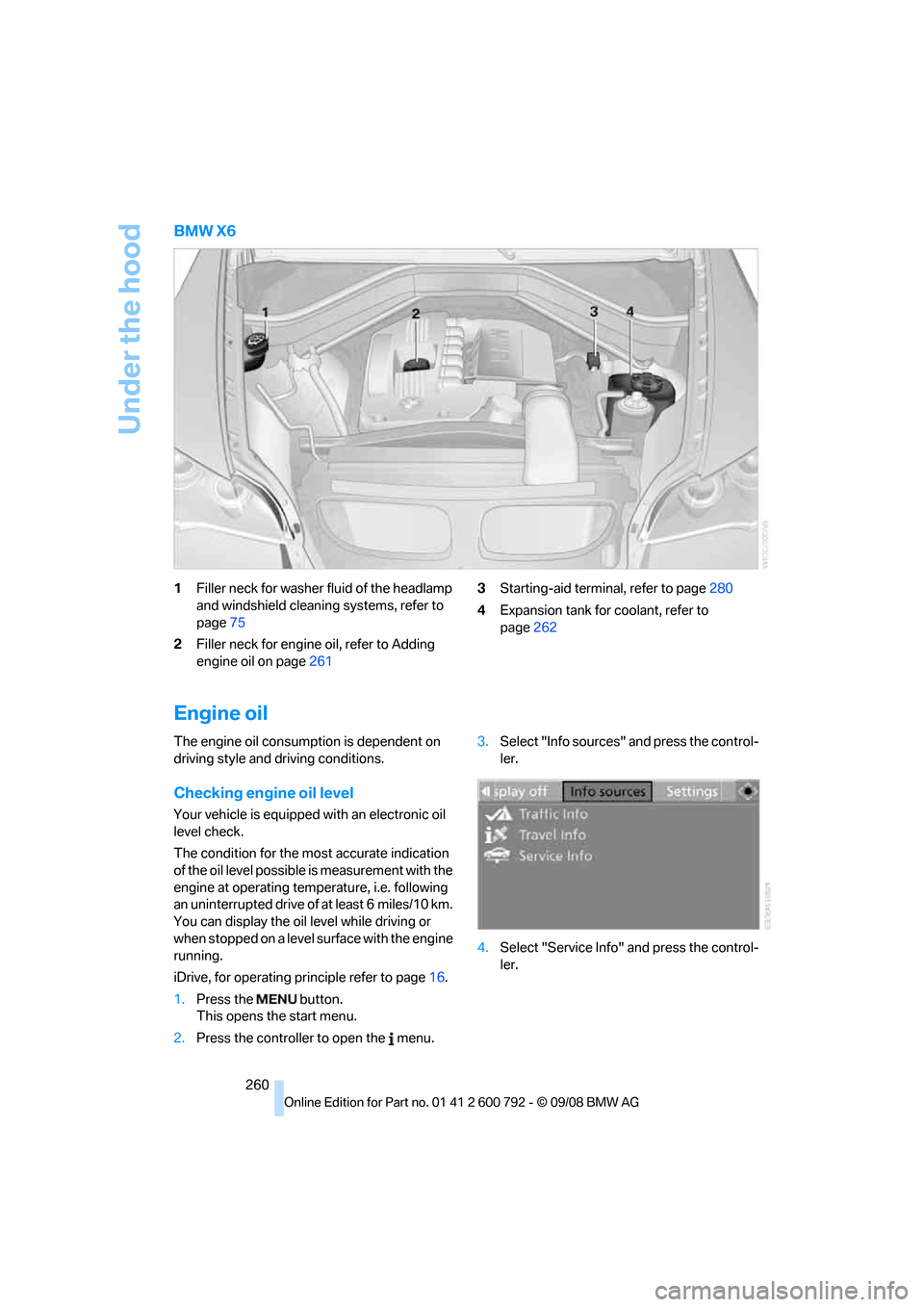
BMW X6
1Filler neck for washer fluid of the headlamp
and windshield cleaning systems, refer to
page 75
2 Filler neck for engine oil, refer to Adding
engine oil on page 261 3
Starting-aid termin al, refer to page280
4 Expansion tank for coolant, refer to
page 262
Engine oil
The engine oil consumption is dependent on
driving style and driving conditions.
Checking engine oil level
Your vehicle is equipped with an electronic oil
level check.
The condition for the most accurate indication
of the oil level possible is measurement with the
engine at operating temperature, i.e. following
an uninterrupted drive of at least 6 miles/10 km.
You can display the oil level while driving or
when stopped on a level surface with the engine
running.
iDrive, for operating pr inciple refer to page16.
1. Press the button.
This opens the start menu.
2. Press the controller to open the menu. 3.
Select "Info sources" and press the control-
ler.
4. Select "Service Info" and press the control-
ler.
Page 278 of 317
Replacing components
276
far as possible from passi
ng traffic and on solid
ground. Switch on the ha zard warning flashers.
Set the parking brake and engage transmission
position P.
Have all vehicle occupants get out of the vehicle
and ensure that they remain outside the imme-
diate area in a safe place, such as behind a
guardrail.
If a warning triangle
* or portable hazard warning
lamp
* is required, set it up on the roadside at an
appropriate distance from the rear of the vehi-
cle. Comply with all safe ty guidelines and regu-
lations.
Change the wheel only on a level, firm surface
which is not slippery. Th e vehicle or the jack
could slip to the side if you attempt to raise the
vehicle on a soft or slippery surface such as
snow, ice, tiles, etc.
Position the jack on a firm support surface.
Do not use a wooden block or similar object as a
support base for the jack, as this would prevent
it from extending to its full support height and
reduce its load-carrying capacity.
To avoid serious or fata l injury: never lie under
the vehicle, and never start the engine while it is
supported by the jack. <
What you will need
To avoid rattling noises later on, note the posi-
tions of the tools before removing them, then
return them to their in itial positions after com-
pleting work.
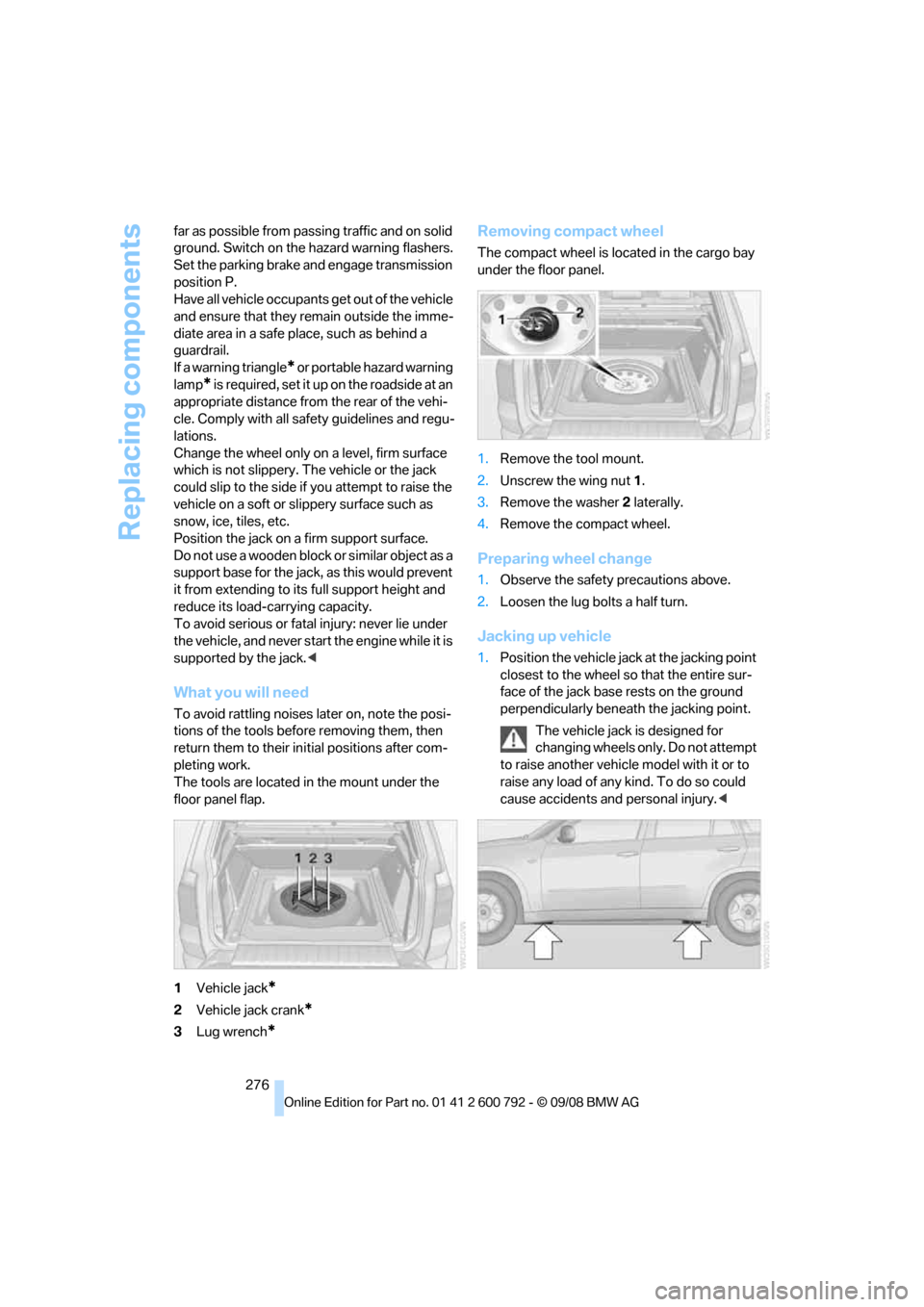
The tools are located in the mount under the
floor panel flap.
1 Vehicle jack
*
2Vehicle jack crank*
3Lug wrench*
Removing compact wheel
The compact wheel is lo cated in the cargo bay
under the floor panel.
1. Remove the tool mount.
2. Unscrew the wing nut 1 .
3. Remove the washer 2 laterally.
4. Remove the compact wheel.
Preparing wheel change
1.Observe the safety precautions above.
2. Loosen the lug bolts a half turn.
Jacking up vehicle
1.Position the vehicle jack at the jacking point
closest to the wheel so that the entire sur-
face of the jack base rests on the ground
perpendicularly beneat h the jacking point.
The vehicle jack is designed for
changing wheels only. Do not attempt
to raise another vehicle model with it or to
raise any load of any kind. To do so could
cause accidents and personal injury. <
Page 292 of 317
Technical data
290
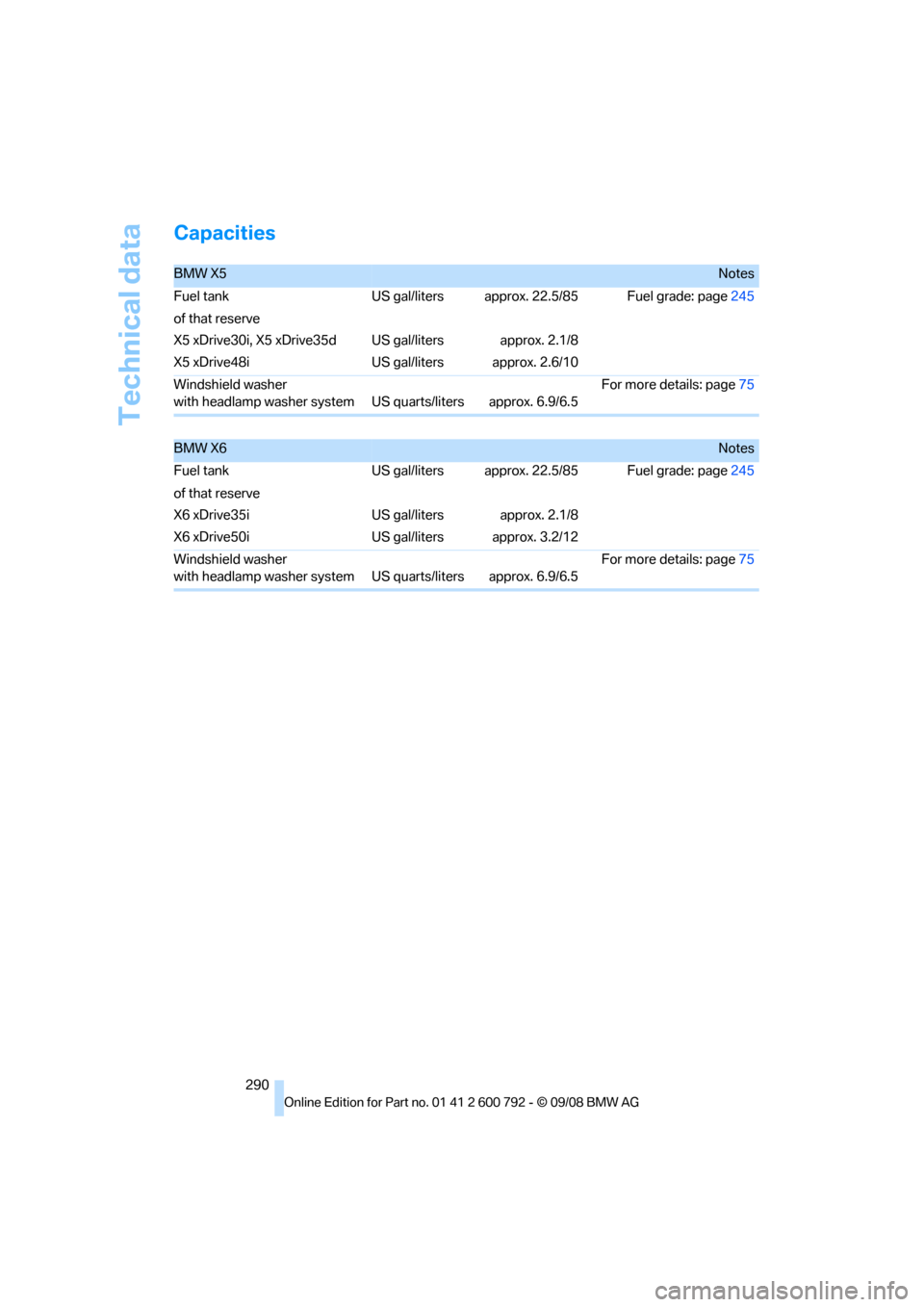
Capacities
BMW X5Notes
Fuel tank US gal/liters approx. 22.5/85 Fuel grade: page 245
of that reserve
X5 xDrive30i, X5 xDrive35d
X5 xDrive48i US gal/liters
US gal/litersapprox. 2.1/8
approx. 2.6/10
Windshield washer
with headlamp washer system US quarts/liters approx. 6.9/6.5For more details: page
75
BMW X6Notes
Fuel tank US gal/liters approx. 22.5/85 Fuel grade: page 245
of that reserve
X6 xDrive35i
X6 xDrive50i US gal/liters
US gal/litersapprox. 2.1/8
approx. 3.2/12
Windshield washer
with headlamp washer system US quarts/liters approx. 6.9/6.5For more details: page
75
Page 298 of 317
Everything from A to Z
296
Everything from A to Z
Index
"..." Identifies Control Display texts used to select
individual functions, and
indicates where to find them
in the text.
A
ABS Antilock Brake System 96
Accessories 6
Access to 3rd row seats 54
Acoustic signal, refer to Check Control 85
Activated-charcoal filter 119
"Activation time" for parked- car ventilation 122
Active seat 57
Active seat ventilation 56
Active steering 104
– malfunction 104
– warning lamp 104
Adaptive brake lamp, brake force display 105
Adaptive Drive 99
Adaptive fixing system 133
Adaptive Head Light 112
"Add digits" for mobile phone 228
Address for navigation
– deleting 159
– entering 151,158
– selecting 159
– storing 158
– storing current position 158
"Add to destination list" 153
Adjusting confirmation signals for locking and unlocking 31
Adjusting opening
height 34,36, 37 Adjusting temperature with
expanded-scope automatic
climate control 116
Adjusting the tone during audio operation, refer to
Tone control 175
Adjusting thigh support 49,50
"After door opened" 51
"After unlocking" 51
Airbags 105
– sitting safely 48
– warning lamp 107
Air distribution
– automatic 115,120
– manual 116
Airing, refer to Ventilation 118
Air recirculation 117
– AUC Automatic recirculated-air control 117
– recirculated-air mode 117
"Air recirculation on / off" 59
Air vents 11
4
– refer to Ventilation 118
Air vents of automatic climate control 114
Air volume 116,120
AKI, refer to Fuel specifications 245
Alarm system 38
– avoiding unintentional alarms 39
– interior motion sensor 39
– switching off alarm 38
– switching off tilt alarm sensor and interior motion
sensor 39
– tilt alarm sensor 39
"All channels" in Satellite
radio 185
"All doors" 30
Alloy wheels 267 All-season tires, refer to
Winter tires 257
"All stations" displaying in
radio mode, 178
All-wheel drive, refer to xDrive 97
Alterations, tech nical, refer to
For your own safety 5
"AM", reception
range 175,178
"Angle of view"
– DVD changer 197
– DVD system in rear 209
Antenna for mobile phone 220
Antifreeze
– coolant 262
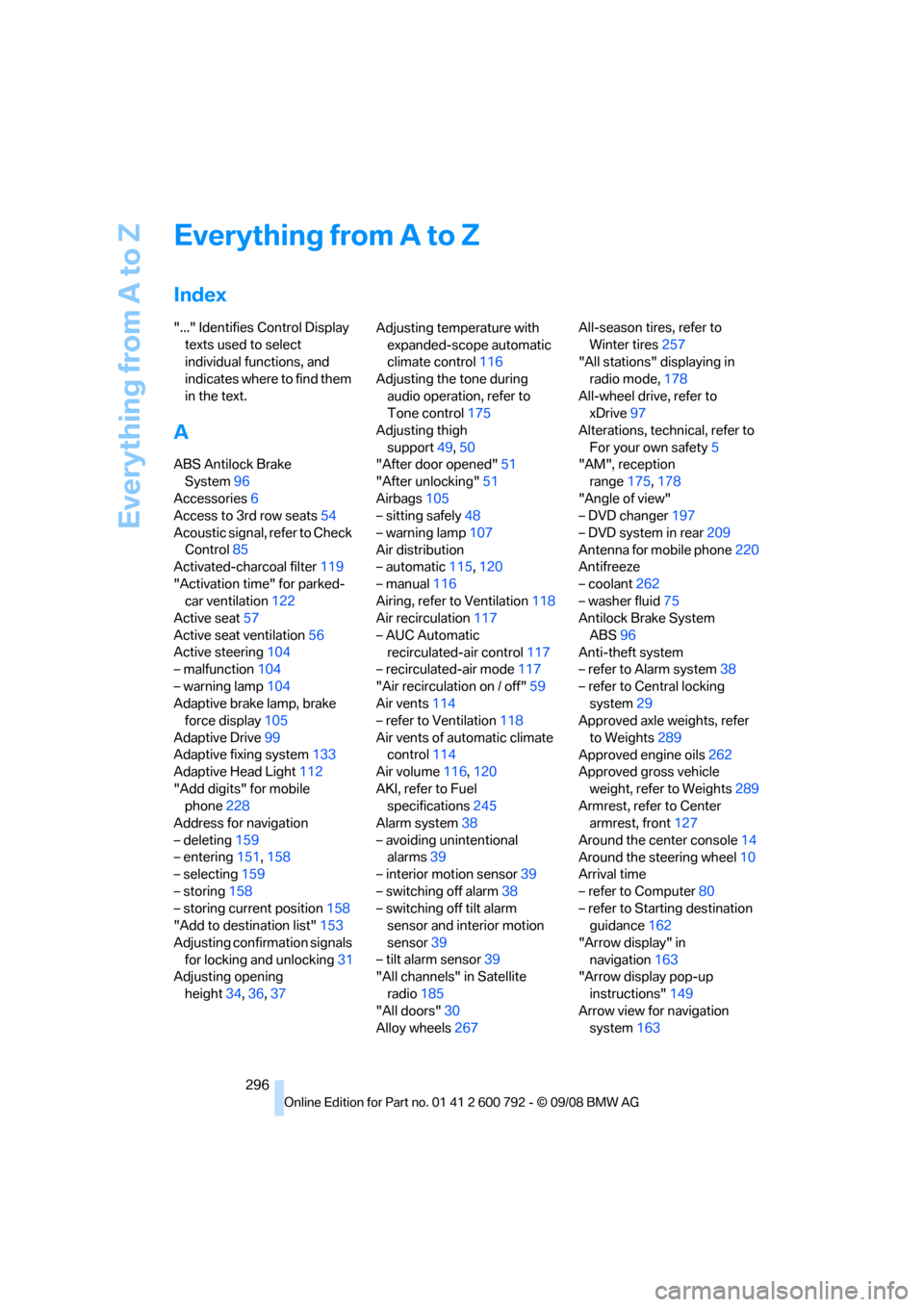
– washer fluid 75
Antilock Brake System
ABS 96
Anti-theft system
– refer to Alarm system 38
– refer to Central locking system 29
Approved axle weights, refer
to Weights 289
Approved engine oils 262
Approved gross vehicle
weight, refer to Weights 289
Armrest, refer to Center armrest, front 127
Around the center console 14
Around the steering wheel 10
Arrival time
– refer to Computer 80
– refer to Starting destination guidance 162
"Arrow display" in navigation 163
"Arrow display pop-up
instructions" 149
Arrow view for navigation system 163
Page 304 of 317
Everything from A to Z
302
Dynamic Performance
Control 97
"Dynamic route" in navigation 161
Dynamic Stability Control
DSC 96
Dynamic Traction Control DTC 97
E
Easy entry/exit 58
Eject button, refer to Buttons
on the CD player 174
Electrical malfunction
– automatic transmission with
Steptronic 72
– door lock 32
– driver's door 32
– fuel filler door 244
– glass sunroof, electric 46
– liftgate 33
– panorama glass sunroof 44
– parking brake 69
Electric seat 49
Electronic brake-force distribution 96
Electronic oil level check 260
Emergency operation, refer to Manual operation
– door lock 32
– driver's door 32
– fuel filler door 244
– liftgate 33
– transmission lock, automatic transmission 72
Emergency request 279
Emergency services, refer to Roadside Assistance 280
"Enabled services" 241
"Enabled TeleServices" 238
"End call" 228 Engine
– breaking-in
138
– data 286
– oil temperature 79
– overheated, refer to Coolant
temperature 79
– speed 286
– starting 66
– starting, with comfort access 40
– switching off 66
Engine compartment 259
Engine coolant 262
Engine oil
– adding 261
– additives, refer to Approved
engine oils 262
– approved engine oil 262
– checking oil level 260
– electronic oil level check 260
– temperature 79
Engine oil temperature 79
Engine output, refer to Engine data 286
Engine overheating, refer to
Coolant temperature 79
Engine speed 286
Engine starting, refer to
Starting engine 66
E
ntering country of destination 151
Entering destination 151
Entering house number or intersection 152
Entering intersection 152
Entering street 152
"Entertainment" 174
Entertainment sound output on/off 175
"Equalizer", refer to Tone
control 177
Equalizer, refer to Tone control 177
"ESN" 184
ESP Electronic Stability Program, refer to DSC
Dynamic Stability
Control 96 Event Data Recorders
264
Exhaust system, refer to Hot
exhaust system 139
Exterior mirrors 57
– adjusting 57
– automatic dimming feature 58
– automatic heating 58
– folding in and out 57
– tilting down passenger-side exterior mirror 58
External audio device 127
– refer to AUX-In
connection 200
Eye for tow-starting and towing, refer to Tow
fitting 281
F
Fader, refer to Tone
control 176
Failure messages, refer to Check Control 85
False alarm, refer to Avoiding
unintentional alarms 39
Fastening safety belts, refer to Safety belts 54
– warning lamp 55
Fastest route for navigation 160
Fast forward
– CD changer 190
– CD player 190
– DVD changer 195
"Fast route" in navigation 160
Fault displays, refer to Check
Control 85
Filler neck for washer fluid 75
First aid, refer to First-aid
kit 279
First-aid kit 279
Fixing system, adaptive 133
Flashing during locking/ unlocking, refer to Setting
confirmation signals 31
Page 305 of 317
Reference 303
At a glance
Controls
Driving tips
Communications
Navigation
Entertainment
Mobility
Flat tire
– changing wheels275
– compact wheel 275
– Flat Tire Monitor 100
– run-flat tires 101,103, 256
– TPM Tire Pressure Monitor 101
Flat Tire Monitor FTM 100
Fluid reservoir, refer to Filler neck for washer fluid 75
"FM", reception
range 175,178
FM, waveband 178
Fog lamps 112
– indicator lamp 13,112
Folding display screen open/
closed, DVD system in
rear 204
Folding rear seat backrest 132
Footbrake, refer to Braking safely 140
Footwell lamps 113
For your own safety 5
4-wheel drive system, refer to xDrive 97
Front airbags 105
Front passenger airbags 105
– deactivating 106
– refer to Exception of front passenger seat 61
Front seat adjustment 49
FTM Flat Tire Monitor 100
– false alarms 100
– indicating a flat tire 101
– initializing the system 100
– snow chains 257
– system limits 100
– warning lamp 101
Fuel 245
– capacity 290
– display 80
– high-quality brands 245
– quality 245
– saving 138
– specifications 245
Fuel clock, refer to Fuel
gauge 80 Fuel consumption display
– computer, average fuel
consumption 80
Fuel display, refer to Fuel gauge 80
Fuel filler door 244
– closing 24
4
– opening 244
– releasing manually 244
Fuses 278
G
Garage door opener, refer to
Integrated universal remote
control 123
Gasoline, refer to Required fuel 245
Gasoline display, refer to Fuel
gauge 80
Gearshifts, automatic transmission with
Steptronic 71
General driving notes 138,139
Glass sunroof
– convenience operation from outside 32
– convenience operation with comfort access 40
– remote control 30
Glass sunroof, electric 45
– moving manually 46
– opening, closing 45
– power interruption 46
– raising 45
Glove compartment 126
– lighting 126
GPS navigation, refer to Navigation system 148
Grills, refer to Ventilation 118
Grills of the automatic climate control 114
Gross vehicle weight, refer to Weights 289
H
Handbrake, refer to Parking
brake 67
Hands-free system, refer to
Microphone 14
Hand washing 266
Have diesel exhaust fluid
refilled 246
Hazard warning flashers 15
HDC Hill Descent Control 98
"HD radio" 181
HD radio, refer to High
Definition Radio 181
Head airbags 105
Headlamp control,
automatic 110
Headlamp flasher 73
Headlamps 110
– cleaning, refer to Washer/ wiper system 74
– replacing bulbs 269
Head Light, refer to Adaptive Head Light 112
Head restraints 52
– sitting safely 48
"Head-Up Display" 108
Head-Up Display 107
Heated
– mirrors 58
– rear window 116
– seats 55,56
– steering wheel 59
Heating 114
– exterior mirrors 58
– interior 114
– rear window 116
– residual heat 118
– seats 55,56
– steering wheel 59
Heating with engine switched off, refer to Residual
heat 118
Heavy cargo, refer to Securing cargo 143
Height, refer to
Dimensions 287
Page 308 of 317
Everything from A to Z
306
Malfunction warnings, refer to
Check Control 85
Manual air distribution 116
Manual BMW Teleservice call 237
"Manual" in radio mode 179
Manually releasing transmission lock 72
Manual mode, automatic transmission with
Steptronic 71
Manual operation
– door lock 32
– driver's door 32
– fuel filler door 244
– transmission lock, automatic
transmission 72
Map
– changing scale 164
– destination entry 155
"Map direction of travel" 164
"Map facing north" 164
Map facing north 164
Master key, refer to Keys/ remote control 28
Maximum cooling 117
Maximum speed
– for winter tires 257
– with compact wheel 277
Memory, refer to Seat, mirror and steering wheel
memory 50
"Menu"
– for DVD system in
rear 207,209
– in DVD changer 195,197
Menus, refer to iDrive 16
Message list for traffic information 167
Microfilter 119
Microphone
– for mobile phone 14
– for telephone 14
– for voice activation system 14
Mirror dimming feature 58Mirrors
57
– automatic curb monitor 58
– exterior mirrors 57
– folding in and out 57
– heating 58
– interior rearview mirror 58
– memory, refer to Seat, mirror and steering wheel
memory 50
"Missed calls" 228
Missed calls 229
Mobile phone
– accepted calls 229
– adjusting volume 226
– calling 227
– e
nding call 227
– installation location, refer to Center armrest, front 127
– missed calls 229
– operation via iDrive 226
– redialing 229
– refer to separate operating
instructions
– Top 8 229
– touch tone dialing 230
Monitor, refer to iDrive 16
Monitoring tire pressure, refer to FTM Flat Tire
Monitor 100
"Monitor on / off" 59
MP3, refer to Compressed
audio files 187
Multifunction steering wheel, refer to Buttons on steering
wheel 11
Multifunction switch
– refer to Turn signals/
headlamp flasher/high
beams 73
– refer to Washer/wiper
system 74
Music track, refer to Tracks 188
"Mute on / off" 59
N
"Navigation"80,156
Navigation destination
– entering manually 151,153
– home address 160
– selecting via map 155
Navigation drive, installation
location 148
Navigation DVD 148
– player 174
Navigation instructions, refer to Switching voice
instructions on/off 165
Navigation system 148
– address book 158
– changing route 166
– destination entry 150
– destination guidance in
assistance window 148
– destination list 157
– displaying current
position 169
– displaying route 163
– ending/continuing
destination guidance 162
– entering a destination manually 151,153
– last destinations 157
– navigation DVD 148
– opening 150
– route list 164
– searching for a special destination 156
– selecting destination using information 156
– selecting destination via
map 155
– selecting route criteria 160
– starting destination
guidance 162
– switching off, refer to Ending/continuing
destination guidance 162
– voice instructions 165
– volume adjustment 166
"Navigation voice instructions" 59