change wheel BMW X6M 2010 E71 Owner's Guide
[x] Cancel search | Manufacturer: BMW, Model Year: 2010, Model line: X6M, Model: BMW X6M 2010 E71Pages: 300, PDF Size: 12.41 MB
Page 239 of 300
Mobility
237Reference
At a glance
Controls
Driving tips
Communications
Navigation
Entertainment
Run-flat tires
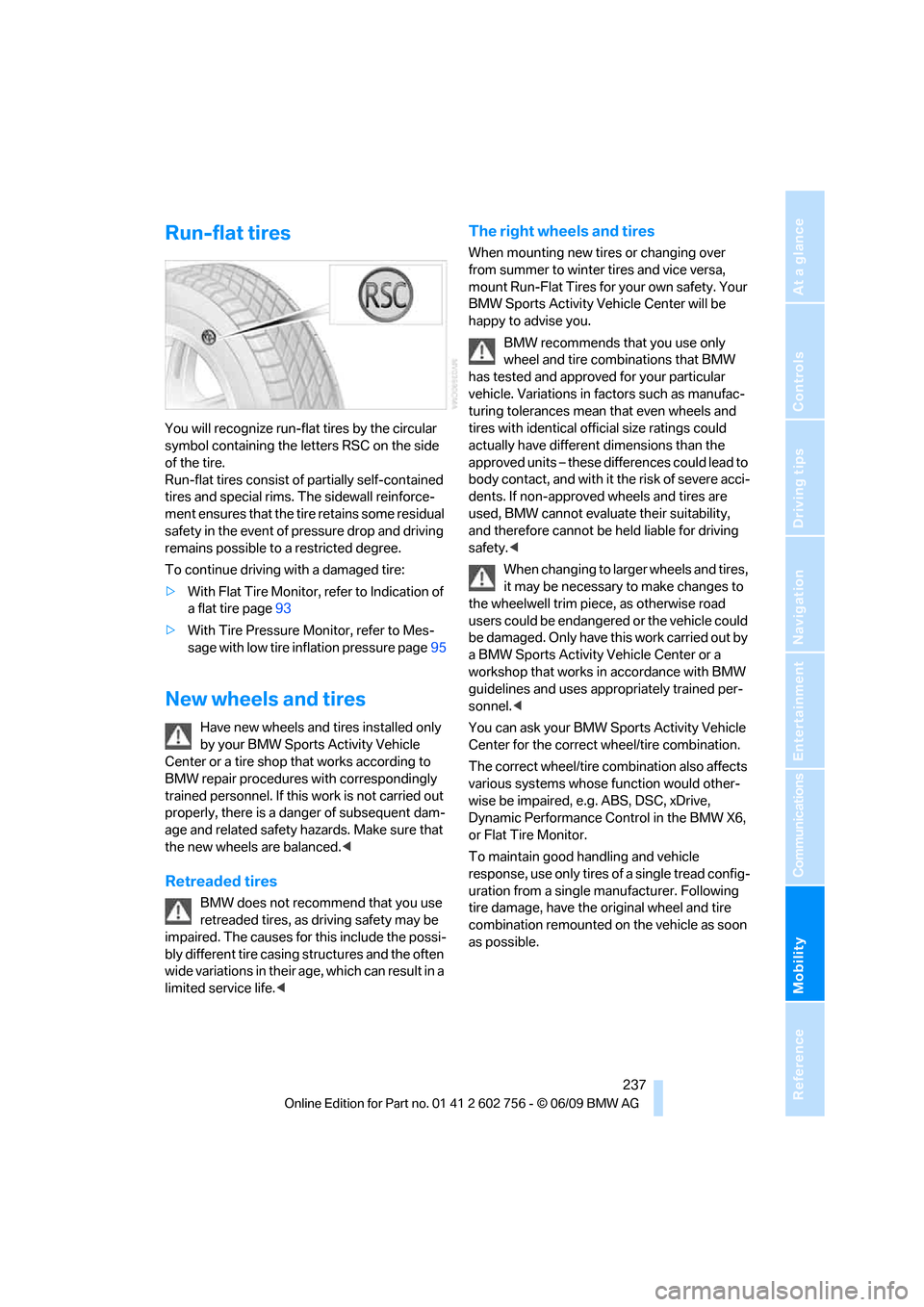
You will recognize run-flat tires by the circular
symbol containing the letters RSC on the side
of the tire.
Run-flat tires consist of partially self-contained
tires and special rims. The sidewall reinforce-
ment ensures that the tire retains some residual
safety in the event of pressure drop and driving
remains possible to a restricted degree.
To continue driving with a damaged tire:
>With Flat Tire Monitor, refer to Indication of
a flat tire page93
>With Tire Pressure Monitor, refer to Mes-
sage with low tire inflation pressure page95
New wheels and tires
Have new wheels and tires installed only
by your BMW Sports Activity Vehicle
Center or a tire shop that works according to
BMW repair procedures with correspondingly
trained personnel. If this work is not carried out
properly, there is a danger of subsequent dam-
age and related safety hazards. Make sure that
the new wheels are balanced.<
Retreaded tires
BMW does not recommend that you use
retreaded tires, as driving safety may be
impaired. The causes for this include the possi-
bly different tire casing structures and the often
wide variations in their age, which can result in a
limited service life.<
The right wheels and tires
When mounting new tires or changing over
from summer to winter tires and vice versa,
mount Run-Flat Tires for your own safety. Your
BMW Sports Activity Vehicle Center will be
happy to advise you.
BMW recommends that you use only
wheel and tire combinations that BMW
has tested and approved for your particular
vehicle. Variations in factors such as manufac-
turing tolerances mean that even wheels and
tires with identical official size ratings could
actually have different dimensions than the
approved units – these differences could lead to
body contact, and with it the risk of severe acci-
dents. If non-approved wheels and tires are
used, BMW cannot evaluate their suitability,
and therefore cannot be held liable for driving
safety.<
When changing to larger wheels and tires,
it may be necessary to make changes to
the wheelwell trim piece, as otherwise road
users could be endangered or the vehicle could
be damaged. Only have this work carried out by
a BMW Sports Activity Vehicle Center or a
workshop that works in accordance with BMW
guidelines and uses appropriately trained per-
sonnel.<
You can ask your BMW Sports Activity Vehicle
Center for the correct wheel/tire combination.
The correct wheel/tire combination also affects
various systems whose function would other-
wise be impaired, e.g. ABS, DSC, xDrive,
Dynamic Performance Control in the BMW X6,
or Flat Tire Monitor.
To maintain good handling and vehicle
response, use only tires of a single tread config-
uration from a single manufacturer. Following
tire damage, have the original wheel and tire
combination remounted on the vehicle as soon
as possible.
ba8_e70ag.book Seite 237 Freitag, 5. Juni 2009 11:42 11
Page 258 of 300
Replacing components
256 3.Apply gentle pressure to the bulb while
turning it to the left for removal and replace-
ment.
4.Insert the bulb socket in the liftgate and
engage it.
5.Replace the cover.
License plate lamp
5-Watt bulb, C5W
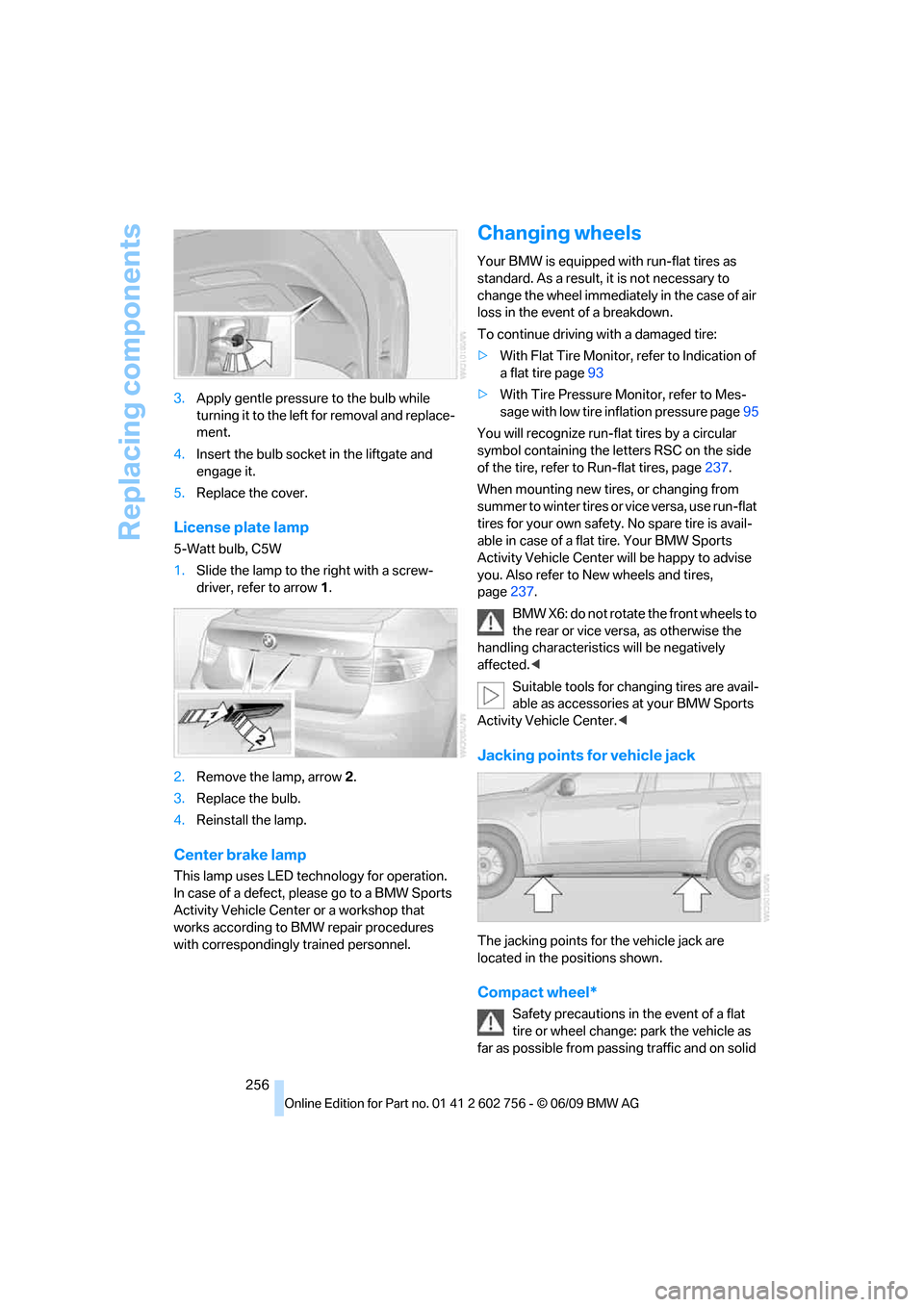
1.Slide the lamp to the right with a screw-
driver, refer to arrow1.
2.Remove the lamp, arrow2.
3.Replace the bulb.
4.Reinstall the lamp.
Center brake lamp
This lamp uses LED technology for operation.
In case of a defect, please go to a BMW Sports
Activity Vehicle Center or a workshop that
works according to BMW repair procedures
with correspondingly trained personnel.
Changing wheels
Your BMW is equipped with run-flat tires as
standard. As a result, it is not necessary to
change the wheel immediately in the case of air
loss in the event of a breakdown.
To continue driving with a damaged tire:
>With Flat Tire Monitor, refer to Indication of
a flat tire page93
>With Tire Pressure Monitor, refer to Mes-
sage with low tire inflation pressure page95
You will recognize run-flat tires by a circular
symbol containing the letters RSC on the side
of the tire, refer to Run-flat tires, page237.
When mounting new tires, or changing from
s u m m e r t o w i n t e r t i r e s o r v i c e v e r s a , u s e r u n - f l a t
tires for your own safety. No spare tire is avail-
able in case of a flat tire. Your BMW Sports
Activity Vehicle Center will be happy to advise
you. Also refer to New wheels and tires,
page237.
BMW X6: do not rotate the front wheels to
the rear or vice versa, as otherwise the
handling characteristics will be negatively
affected.<
Suitable tools for changing tires are avail-
able as accessories at your BMW Sports
Activity Vehicle Center.<
Jacking points for vehicle jack
The jacking points for the vehicle jack are
located in the positions shown.
Compact wheel*
Safety precautions in the event of a flat
tire or wheel change: park the vehicle as
far as possible from passing traffic and on solid
ba8_e70ag.book Seite 256 Freitag, 5. Juni 2009 11:42 11
Page 259 of 300
Mobility
257Reference
At a glance
Controls
Driving tips
Communications
Navigation
Entertainment
ground. Switch on the hazard warning flashers.
Set the parking brake and engage transmission
position P.
Have all vehicle occupants get out of the vehicle
and ensure that they remain outside the imme-
diate area in a safe place, such as behind a
guardrail.
If a warning triangle
* or portable hazard warning
lamp
* is required, set it up on the roadside at an
appropriate distance from the rear of the vehi-
cle. Comply with all safety guidelines and regu-
lations.
Change the wheel only on a level, firm surface
which is not slippery. The vehicle or the jack
could slip to the side if you attempt to raise the
vehicle on a soft or slippery surface such as
snow, ice, tiles, etc.
Position the jack on a firm support surface.
Do not use a wooden block or similar object as a
support base for the jack, as this would prevent
it from extending to its full support height and
reduce its load-carrying capacity.
To avoid serious or fatal injury: never lie under
the vehicle, and never start the engine while it is
supported by the jack.<
What you will need
To avoid rattling noises later on, note the posi-
tions of the tools before removing them, then
return them to their initial positions after com-
pleting work.
The tools are located in the mount under the
floor panel flap.
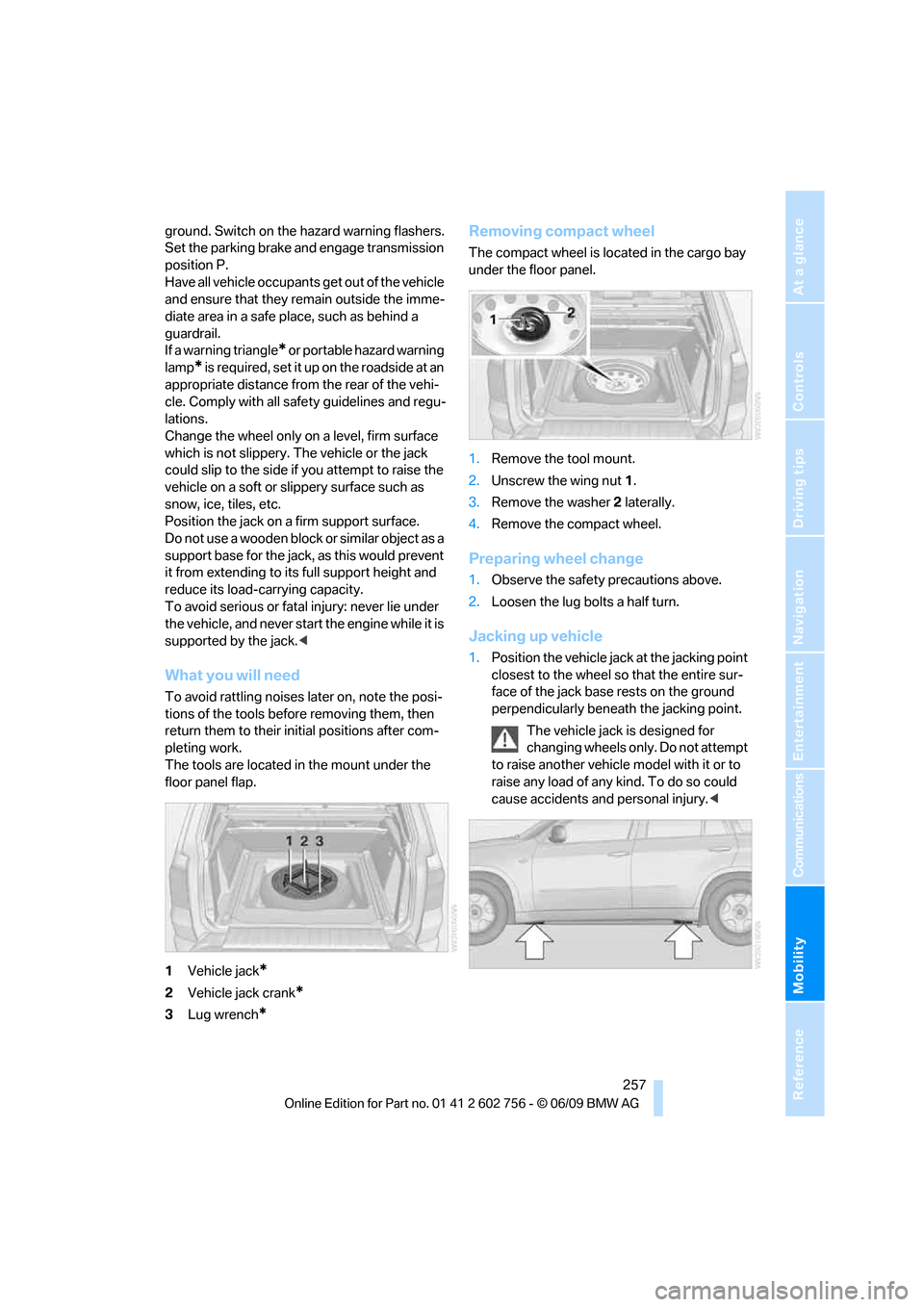
1Vehicle jack
*
2Vehicle jack crank*
3Lug wrench*
Removing compact wheel
The compact wheel is located in the cargo bay
under the floor panel.
1.Remove the tool mount.
2.Unscrew the wing nut 1.
3.Remove the washer 2 laterally.
4.Remove the compact wheel.
Preparing wheel change
1.Observe the safety precautions above.
2.Loosen the lug bolts a half turn.
Jacking up vehicle
1.Position the vehicle jack at the jacking point
closest to the wheel so that the entire sur-
face of the jack base rests on the ground
perpendicularly beneath the jacking point.
The vehicle jack is designed for
changing wheels only. Do not attempt
to raise another vehicle model with it or to
raise any load of any kind. To do so could
cause accidents and personal injury.<
ba8_e70ag.book Seite 257 Freitag, 5. Juni 2009 11:42 11
Page 260 of 300
Replacing components
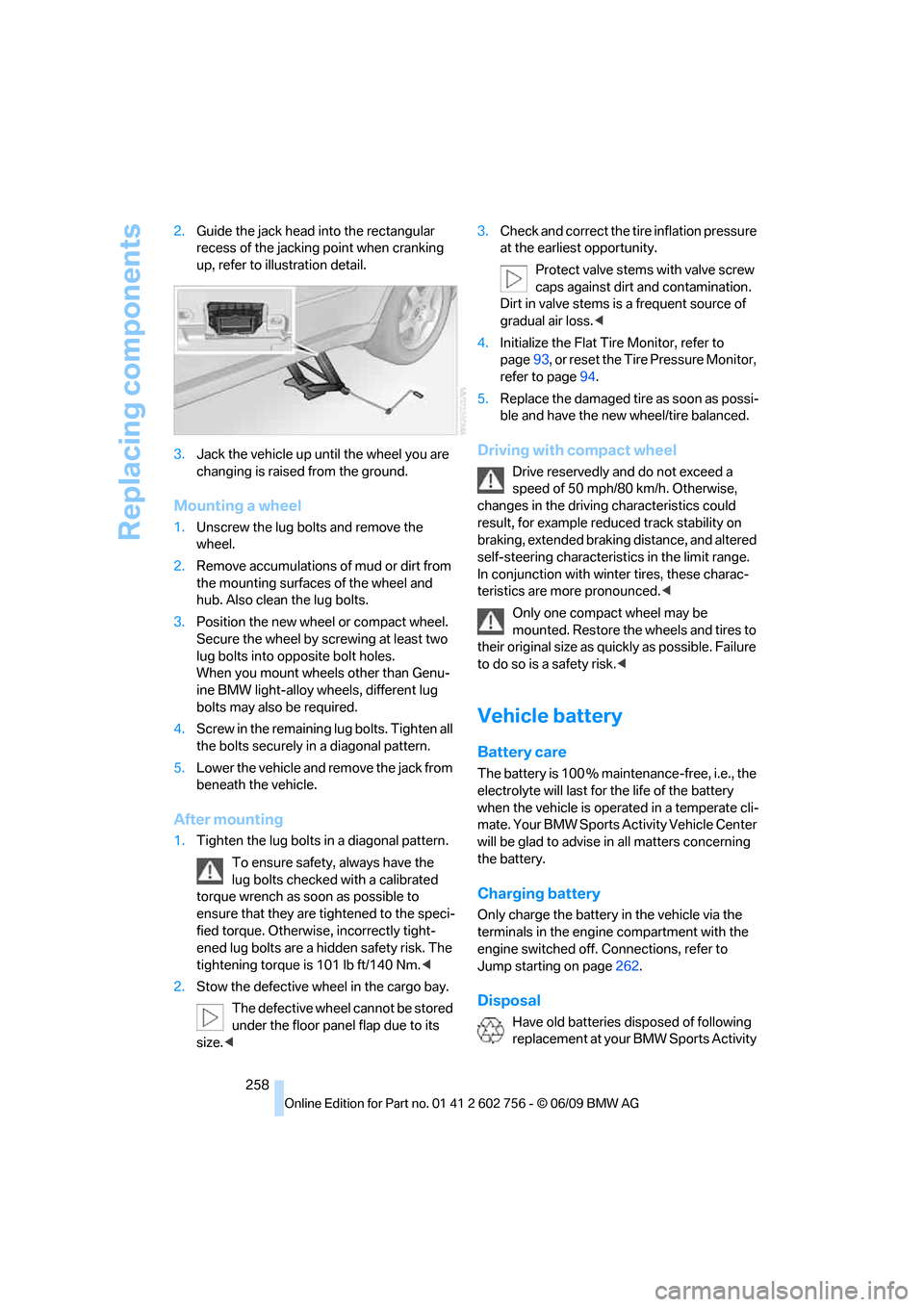
258 2.Guide the jack head into the rectangular
recess of the jacking point when cranking
up, refer to illustration detail.
3.Jack the vehicle up until the wheel you are
changing is raised from the ground.
Mounting a wheel
1.Unscrew the lug bolts and remove the
wheel.
2.Remove accumulations of mud or dirt from
the mounting surfaces of the wheel and
hub. Also clean the lug bolts.
3.Position the new wheel or compact wheel.
Secure the wheel by screwing at least two
lug bolts into opposite bolt holes.
When you mount wheels other than Genu-
ine BMW light-alloy wheels, different lug
bolts may also be required.
4.Screw in the remaining lug bolts. Tighten all
the bolts securely in a diagonal pattern.
5.Lower the vehicle and remove the jack from
beneath the vehicle.
After mounting
1.Tighten the lug bolts in a diagonal pattern.
To ensure safety, always have the
lug bolts checked with a calibrated
torque wrench as soon as possible to
ensure that they are tightened to the speci-
fied torque. Otherwise, incorrectly tight-
ened lug bolts are a hidden safety risk. The
tightening torque is 101 lb ft/140 Nm.<
2.Stow the defective wheel in the cargo bay.
The defective wheel cannot be stored
under the floor panel flap due to its
size.<3.Check and correct the tire inflation pressure
at the earliest opportunity.
Protect valve stems with valve screw
caps against dirt and contamination.
Dirt in valve stems is a frequent source of
gradual air loss.<
4.Initialize the Flat Tire Monitor, refer to
page93, or reset the Tire Pressure Monitor,
refer to page94.
5.Replace the damaged tire as soon as possi-
ble and have the new wheel/tire balanced.
Driving with compact wheel
Drive reservedly and do not exceed a
speed of 50 mph/80 km/h. Otherwise,
changes in the driving characteristics could
result, for example reduced track stability on
braking, extended braking distance, and altered
self-steering characteristics in the limit range.
In conjunction with winter tires, these charac-
teristics are more pronounced.<
Only one compact wheel may be
mounted. Restore the wheels and tires to
their original size as quickly as possible. Failure
to do so is a safety risk.<
Vehicle battery
Battery care
The battery is 100 % maintenance-free, i.e., the
electrolyte will last for the life of the battery
when the vehicle is operated in a temperate cli-
mate. Your BMW Sports Activity Vehicle Center
will be glad to advise in all matters concerning
the battery.
Charging battery
Only charge the battery in the vehicle via the
terminals in the engine compartment with the
engine switched off. Connections, refer to
Jump starting on page262.
Disposal
Have old batteries disposed of following
replacement at your BMW Sports Activity
ba8_e70ag.book Seite 258 Freitag, 5. Juni 2009 11:42 11
Page 283 of 300
Reference 281
At a glance
Controls
Driving tips
Communications
Navigation
Entertainment
Mobility
C
Calibrating driver's seat50
California Proposition 65
Warning6
Call
– accepting205
– ending205
– rejecting205
Calling, refer to Phone
numbers, dialing206
Calling, refer to telephone
operating instructions
Camera
– refer to Rear view camera86
– refer to Top View84
Can holder, refer to Cup
holders119
Capacities272
Capacity of cargo bay271
Car battery, refer to Vehicle
battery258
Care246
– car-care products246
– carpets248
– car washes246
– CD/DVD-player249
– chrome components247
– displays249
– exterior246
– fine wooden
components248
– hand washing247
– headlamps247
– high-pressure cleaning
jets247
– interior248
– leather248
– light-alloy wheels247
– paint247
– plastic components248
– rubber gaskets247
– running boards248
– safety belts248
– sensors and cameras248
– upholstery materials and
cloth-covered paneling248
– windows247Cargo
– refer to Loading133
– securing134
– securing with ski bag126
Cargo area, refer to Cargo
bay122
Cargo area cover, refer to Roll-
up cover122
Cargo bay
– capacity271
– emergency actuation, refer
to Manually opening or
closing
34
– emergency operation, refer
to Opening manually31
– expanding124
– opening33
– opening/closing, refer to
Liftgate30,33
– opening/closing, refer to
Tailgate33
– opening from inside31
– opening from outside31
– opening with remote
control28
Cargo bay cover, refer to Roll-
up cover122
Caring for the vehicle
finish247
Car key, refer to Keys/remote
control26
Car phone
– installation location, refer to
Center armrest, front119
– refer to separate operating
instructions
– refer to Telephone202
Car radio, refer to Radio163
Car wash246
– before driving in60
– with comfort access37
Catalytic converter, refer to
Hot exhaust system131
CBC Cornering Brake
Control88
CBS Condition Based
Service244CD
– audio playback172
– refer to Playing audio tracks,
DVD system in rear193
CD-/DVD player in rear188
CD changer171
– controls160
– fast forward/reverse173
– random play sequence172
– selecting a track172
– switching on/off160
– tone control160
– volume160
CD player171
– controls160
– fast forward/reverse173
– random play sequence172
– selecting a track172
– switching on/off160
– tone control160
– volume160
Cell phone, refer to Mobile
phone
Center armrest
– front119
– rear122
Center brake lamp253,256
Center console14
Central locking system27
– comfort access35
– from inside vehicle30
Changes, technical
– refer to For your own
safety5
– refer to Parts and
accessories5
Changing gears using shift
paddles65
Changing language on
Control Display81
Changing tires237
Changing trips149
Changing units of measure on
Control Display80
Changing wheels256
Check Control77
Checking the air pressure,
refer to Tire inflation
pressure229
ba8_e70ag.book Seite 281 Freitag, 5. Juni 2009 11:42 11
Page 284 of 300
Everything from A to Z
282 Children, transporting55
Child restraint devices55
Child restraint fixing system
LATCH56
Child-safety locks58
Child seats55
Chime, refer to Check
Control77
Cigarette lighter, refer to
Lighter121
Cleaning your BMW, refer to
Care246
Clock71
– 12h/24h mode80
– setting time79
Closing
– from inside30
– using remote control27
Closing fuel filler cap224
Clothes hooks119
Cockpit10
Cold start, refer to Starting
engine60
Comfort access35
– observe in car wash37
– replacing battery37
Comfort area, refer to Around
the center console14
Comfort start, refer to Starting
engine60
Compact wheel
– inflation pressure231
– wheel change256
Compartment for remote
control, refer to Ignition
lock59
Compartments, refer to
Storage compartments119
Compass, digital116
Computer73
– displays in instrument
panel73
– displays on Control
Display74
Concierge service216
Condition Based Service
CBS244Connecting car vacuum
cleaner, refer to Connecting
electrical devices121
Connecting headphones188
Consumption, refer to
Average fuel
consumption73
Consumption indicator,
energy control72
Consumption statistics, refer
to Average fuel
consumption73
Contacts, creating213
Control Center, refer to
iDrive
16
Control Display, refer to
iDrive16
– setting brightness80
– switching on/off19
Controller, refer to iDrive16
Controls, refer to Cockpit10
Controls DVD system in
rear187
Convenience operation
– glass sunroof28,29
– glass sunroof with comfort
access36
– windows28,29
– windows with comfort
access36
– with comfort access36
Coolant243
– checking level243
– temperature72
Cooling, maximum110
Cornering Brake Control
CBC88
Country codes DVD173
Country information from
BMW Online157
Courtesy lamps, refer to
Interior lamps106
Cradle for telephone or mobile
phone119
Criteria for route150
Cruise control69
Cruising range73
Cup holders119Current playback
– external devices185
– of music collection180
Customer Relations218
Cylinders, refer to Engine
data268
D
Data268
– capacities272
– dimensions269
– engine268
– technical data268
– weights271
Data transfer220
Date71
– display format80
– retrieving71
– setting80
Daytime driving lamps103
Defrosting windows109
Defrosting windows and
removing condensation109
Defrost position, refer to
Defrosting windows109
Deleting a trip149
Deleting special
destinations146
Destination, entering by town/
city name141
Destination address,
entering141,147
Destination entry using BMW
Assist145
Destination for navigation
– entering141
– entering by voice147
– entering via map146
Destination guidance150
– bypassing a route
section151
– changing specified
route150
– continuing150
– starting150
– voice instructions152
– volume of voice
instructions152
ba8_e70ag.book Seite 282 Freitag, 5. Juni 2009 11:42 11
Page 286 of 300
Everything from A to Z
284 Emergency operation, refer to
Manual operation
– door lock29
– driver's door29
– fuel filler door224
– liftgate31
– transmission lock, automatic
transmission66
Emergency request261
Emergency services, refer to
Roadside Assistance262
Engine
– breaking-in130
– data268
– oil temperature72
– overheated, refer to Coolant
temperature72
– speed268
– starting60
– starting, with comfort
access36
– switching off60
Engine compartment240
Engine coolant243
Engine oil
– adding242
– additives, refer to Approved
engine oils243
– approved engine oil243
– checking oil level241
– electronic oil level check241
– temperature72
Engine oil temperature72
Engine output, refer to Engine
data268
Engine overheating, refer to
Coolant temperature72
Engine speed268
Engine starting, refer to
Starting engine60
Entering special destinations
by name145
Entertainment sound output
on/off160
Entry map for destination146
Equalizer, tone setting161ESP Electronic Stability
Program, refer to DSC
Dynamic Stability
Control88
Event Data Recorders245
Exhaust system, refer to Hot
exhaust system131
Extended connectivity of the
music player in the mobile
phone183
Exterior mirrors52
– adjusting52
– automatic dimming
feature53
– automatic heating
52
– folding in and out52
– tilting down passenger-side
exterior mirror53
External audio device119
Eye for tow-starting and
towing, refer to Tow
fitting263
F
Failure messages, refer to
Check Control77
False alarm, refer to Avoiding
unintentional alarms35
Fastening safety belts, refer to
Safety belts49
– warning lamp50
Fastest route for
navigation150
Fast forward
– CD changer173
– CD player173
Fault displays, refer to Check
Control77
Filler neck for washer fluid69
First aid, refer to First-aid
kit262
First-aid kit262
Fixing system, adaptive124
Flashing during locking/
unlocking, refer to Setting
confirmation signals28Flat tire
– changing wheels256
– compact wheel256
– Flat Tire Monitor92
– run-flat tires93,95,237
– TPM Tire Pressure
Monitor94
Flat Tire Monitor FTM92
Fluid reservoir, refer to Filler
neck for washer fluid69
FM, waveband163
Fog lamps105
– indicator lamp13,105
Folding display screen open/
closed, DVD system in
rear187
Folding rear seat backrest124
Footbrake, refer to Braking
safely132
Footwell lamps106
For your own safety5
4-wheel drive system, refer to
xDrive90
Free memory capacity, music
collection181
Front airbags98
Front passenger airbags98
– deactivating98
– refer to Exception of front
passenger seat55
Front seat adjustment44
FTM Flat Tire Monitor92
– false alarms92
– indicating a flat tire93
– initializing the system93
– snow chains238
– system limits92
– warning lamp93
Fuel225
– capacity272
– display73
– high-quality brands225
– quality225
– saving130
– specifications225
Fuel clock, refer to Fuel
gauge73
ba8_e70ag.book Seite 284 Freitag, 5. Juni 2009 11:42 11
Page 290 of 300
Everything from A to Z
288 Music player
– connecting, refer to USB-
audio interface183
Music player, connecting
– refer to AUX-IN
connection183
Music search179
My Info208
N
Navigation data140
Navigation destination
– entering manually141
– home address144
Navigation instructions, refer
to Switching voice
instructions on/off152
Navigation system140
– address book143
– bypassing a route
section151
– continuing destination
guidance150
– destination entry141
– entering a destination by
voice147
– entering a destination
manually141
– questions about system157
– route list151
– selecting destination via
map146
– selecting route criteria150
– special destinations144
– starting destination
guidance150
– terminating destination
guidance150
– trip planner148
– voice instructions152
– volume adjustment152
Neck support, refer to Head
restraints46
New remote control26
New wheels and tires237
North-facing map152Nozzles, refer to Windshield
washer nozzles68
Nylon rope, refer to Tow-
starting and towing263
O
OBD socket245
Octane ratings, refer to Fuel
specifications225
Odometer71
Oil
– additives, refer to Approved
engine oils243
– approved engine oils243
– consumption, refer to
Checking engine oil
level241
– level241
– refilling, refer to Adding
engine oil242
Oil change interval, refer to
Service requirements74
Onboard computer, refer to
iDrive16
Onboard toolkit250
Opening and closing
– comfort access35
– from inside30
– panorama glass sunroof39
– using remote control27
– using the door lock29
Opening liftgate33
Operation on poor roads135
Options, selecting for
navigation150
Orientation menu, refer to
Main menu17
Output, refer to Engine
data268
Outside air, refer to AUC
Automatic recirculated-air
control110
Outside temperature
display71
– changing unit of measure80
Outside temperature
warning71
Overview, radio control160
P
Panic mode28
Panorama glass sunroof38
– moving manually40
– power failure40
– raising, opening, closing39
Park Distance Control PDC82
Parked-car ventilation114
– preselecting activation
times114
– switching on and off
directly114
Parking, vehicle60
Parking aid
– refer to PDC Park Distance
Control82
– refer to Rear view camera86
Parking assistance
– refer to PDC Park Distance
Control82
– refer to Top View84
Parking brake61
– Automatic Hold61
– indicator lamp13
– releasing manually61
– releasing manually in case of
an electrical malfunction63
– setting manually61
Parking lamps102
Parking with Automatic
Hold62
Particulate filter, refer to
Diesel particulate filter131
Parts and accessories5
Passenger-side exterior
mirror, tilting down53
Pathway lighting103
Paying attention to speed238
PDC Park Distance Control82
Personal Profile26
Phone book205
Phone numbers, dialing206
Pinch protection system
– glass sunroof, electric41
– panorama glass sunroof39
– power windows38
Plasters, refer to First-aid
kit262
ba8_e70ag.book Seite 288 Freitag, 5. Juni 2009 11:42 11
Page 292 of 300
Everything from A to Z
290 Restraint systems
– for children55
– refer to Safety belts49
Retreaded tires237
Reverse
– CD changer173
– CD player173
Reverse gear, automatic
transmission with
Steptronic65
Road map152
Roadside Assistance262
Roadside assistance216
Roadside parking lamps104
Roller blinds, refer to Roller
sun blinds118
Roller sun blinds118
Roll-up cover122
roll-up cover122
Roof load capacity271
Roof-mounted luggage
rack135
Rope, refer to Tow-starting
and towing263
Rotary pushbutton, refer to
iDrive16
Route150,151
– bypassing sections151
– changing150,151
– changing criteria150
– displaying map view152
– displaying streets or towns/
cities151
– selecting150
Route instructions, refer to
Destination guidance
through voice
instructions152
Route map, refer to Map
display152
Route section, changing151
Route selection150
RSC Runflat System
Component, refer to Run-
flat tires237Runflat System Component
RSC, refer to Run-Flat
Tires237
Run-flat tires237
– continuing driving with a
damaged tire93,95
– flat tire93,95
– new wheels and tires237
– tire inflation
pressure93,95
,229
– tire replacement237
S
Safety5
Safety belts49
– damage50
– sitting safely43
– warning lamp50
Safety belt tensioners
– refer to Airbags98
– refer to Safety belts49
Safety systems
– ABS Antilock Brake
System88
– airbags98
– driving stability control
systems88
– DSC Dynamic Stability
Control88
– safety belts49
Safety tires, refer to Run-flat
tires237
Satellite radio166
Screen, refer to iDrive16
Screw thread for tow
fitting263
SDARS, refer to Satellite
radio166
Seat heating50,51Seats44
– adjusting44
– adjusting electrically44
– adjusting manually44
– backrest width45
– heating50,51
– in rear48
– lumbar support45
– memory, refer to Seat, mirror
and steering wheel
memory45
– 2nd row seats48
– shoulder support45
– sitting safely43
– storing the setting45
– thigh support44,45
– 3rd row seats49
– ventilation, refer to Active
seat ventilation and Seat
heating51
2nd row seats48
Securing load
– refer to Securing cargo134
– with ski bag, refer to
Securing cargo126
Selecting new scale for
navigation153
Selector lever, automatic
transmission with
Steptronic64
Selector lever lock, refer to
Reverse gear65
Self-leveling suspension92
Service, refer to Roadside
Assistance262
Service and Warranty
Information Booklet for
US models244
Service interval indicator, refer
to Service requirements74
Service Request219
Service requirements74
– also refer to CBS Condition
Based Service244
Service status220
ba8_e70ag.book Seite 290 Freitag, 5. Juni 2009 11:42 11
Page 293 of 300
Reference 291
At a glance
Controls
Driving tips
Communications
Navigation
Entertainment
Mobility
Settings
– changing on Control
Display79
– clock, 12h/24h mode80
– configuring, refer to
Personal Profile26
– DVD174
– language81
Settings for the map
display153
Setting speed limit78
Setting time, refer to
Preselecting activation
times114
Shifting, automatic
transmission with
Steptronic65
Shift paddles65
Short commands of voice
activation system273
Short route in navigation, refer
to Selecting route150
Shoulder support45
Shuffled, refer to Random
– CD changer172
– CD player172
Side airbags98
Side marker lamps, replacing
bulbs251
Signal horn, refer to Horn10
Sitting safely43
– with airbags43
– with head restraint43
– with safety belts43
Ski bag125
Slide show, refer to Displaying
images195
Sliding/tilt sunroof
– refer to Glass sunroof,
electric40
– refer to Panorama glass
sunroof38
Slope assistant, refer to
Starting assistant92
Smokers' package, refer to
Ashtray120
SMS208Snap-in adapter
– inserting/removing212
– use202
Snow chains238
Socket for Onboard
Diagnostics interface245
Socket for remote control,
refer to Ignition lock59
Sockets, refer to Connecting
electrical devices121
Soft closure aid, refer to
Automatic soft closing30
Soot particle filter, refer to
Diesel particulate filter131
SOS, refer to Initiating an
emergency request261
Spare fuses
259
Spare remote control26
Spare wheel
– refer to Changing
wheels256
– refer to Compact wheel256
Special destinations144
Special oils, refer to Approved
engine oils243
Specified oil grades, refer to
Approved engine oils243
Speed
– with compact wheel258
– with winter tires238
Speed limit warning, refer to
Speed limit78
Speedometer12
Speed Volume161
Split screen, refer to Control
Display, switching on/off19
Split screen content, refer to
Display for split screen
content, selecting19
Sport program, automatic
transmission with
Steptronic65
Stability control, refer to
Driving stability control
systems88
Start/Stop button59
Starting, refer to Starting
engine60Starting assistance, refer to
Jump starting262
Starting assistant92
Starting difficulties, jump
starting262
Starting off on slopes, refer to
Starting assistant92
State/province, for
navigation141
Station selection, radio163
Status of this Owner's Manual
at time of printing5
Steam cleaners247
Steering wheel
– adjusting53
– automatic adjustment, refer
to Steering wheel
memory45
– buttons on steering
wheel11
– easy entry/exit54
– heating54
– memory45
Steering with variable ratio,
refer to Active steering96
Steptronic, refer to Sport
program and manual mode
M/S65
Storage compartments119
Storing a trip148
Storing sitting position, refer
to Seat, mirror and steering
wheel memory45
Storing tires
238
Storing vehicle249
Storing your vehicle249
Street, entering,
navigation142
Summer tires, refer to Wheels
and tires229
SVCD173
SW, waveband163
Switches, refer to Cockpit10
Switching cooling function on
and off110
Switching off engine60
ba8_e70ag.book Seite 291 Freitag, 5. Juni 2009 11:42 11