wiper BMW X6M 2011 E71 Owner's Manual
[x] Cancel search | Manufacturer: BMW, Model Year: 2011, Model line: X6M, Model: BMW X6M 2011 E71Pages: 312, PDF Size: 8.96 MB
Page 13 of 312
At a glance
11Reference
Controls
Driving tips
Communications
Navigation
Entertainment
Mobility
9BMW X6: upshifting or downshifting with
automatic transmission64
10Instrument panel12
13Ignition lock5814Buttons on steering wheel
15Horn, entire surface
18Releasing hood251 6
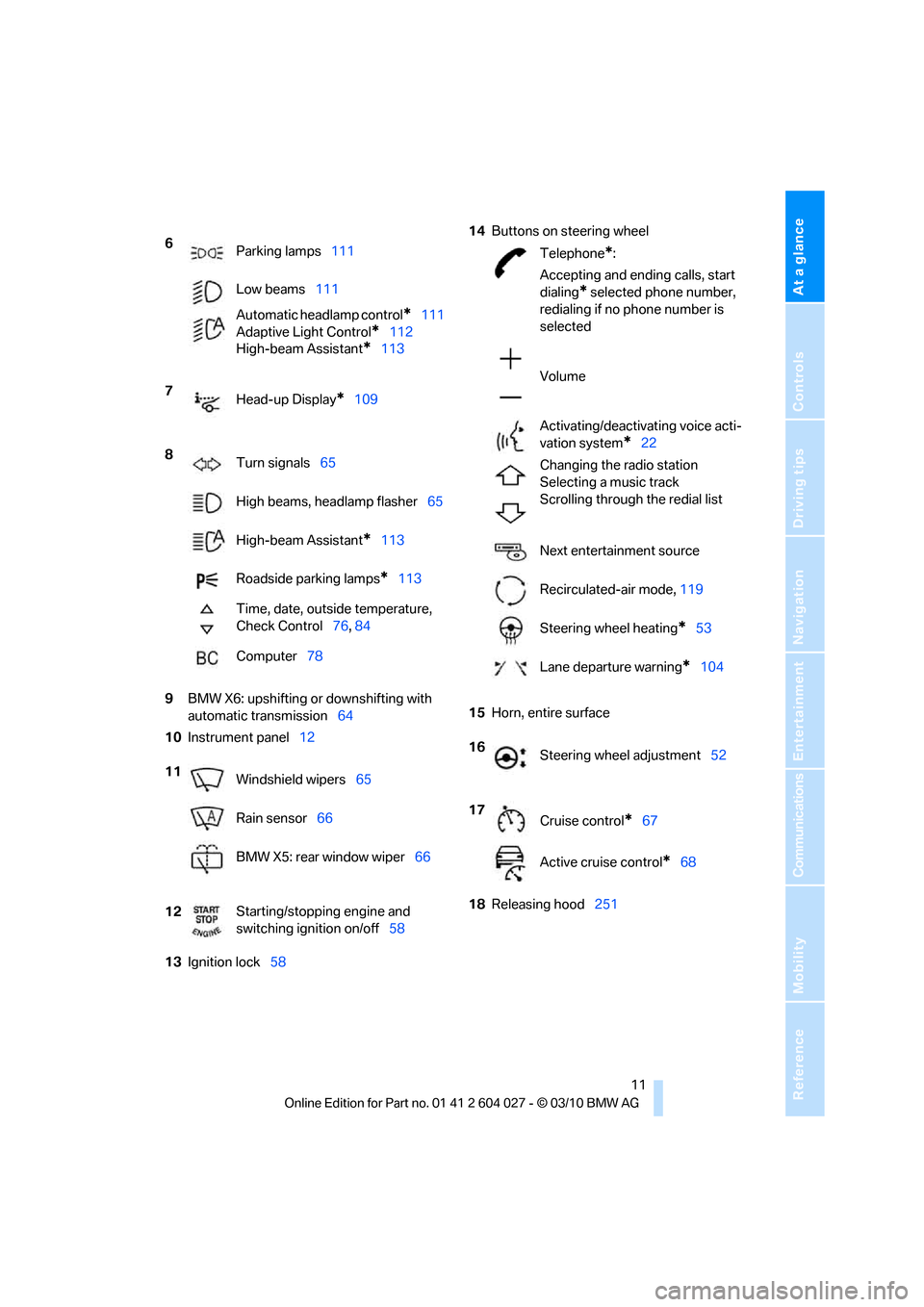
Parking lamps111
Low beams111
Automatic headlamp control
*111
Adaptive Light Control
*112
High-beam Assistant
*113
7
Head-up Display
*109
8
Turn signals65
High beams, headlamp flasher65
High-beam Assistant
*113
Roadside parking lamps
*113
Time, date, outside temperature,
Check Control76, 84
Computer78
11
Windshield wipers65
Rain sensor66
BMW X5: rear window wiper66
12Starting/stopping engine and
switching ignition on/off58
Telephone*:
Accepting and ending calls, start
dialing
* selected phone number,
redialing if no phone number is
selected
Volume
Activating/deactivating voice acti-
vation system
*22
Changing the radio station
Selecting a music track
Scrolling through the redial list
Next entertainment source
Recirculated-air mode, 119
Steering wheel heating
*53
Lane departure warning
*104
16
Steering wheel adjustment52
17
Cruise control
*67
Active cruise control
*68
Page 67 of 312
Controls
65Reference
At a glance
Driving tips
Communications
Navigation
Entertainment
Mobility
With the transmission position M/S
selected, the manual mode remains
active.<
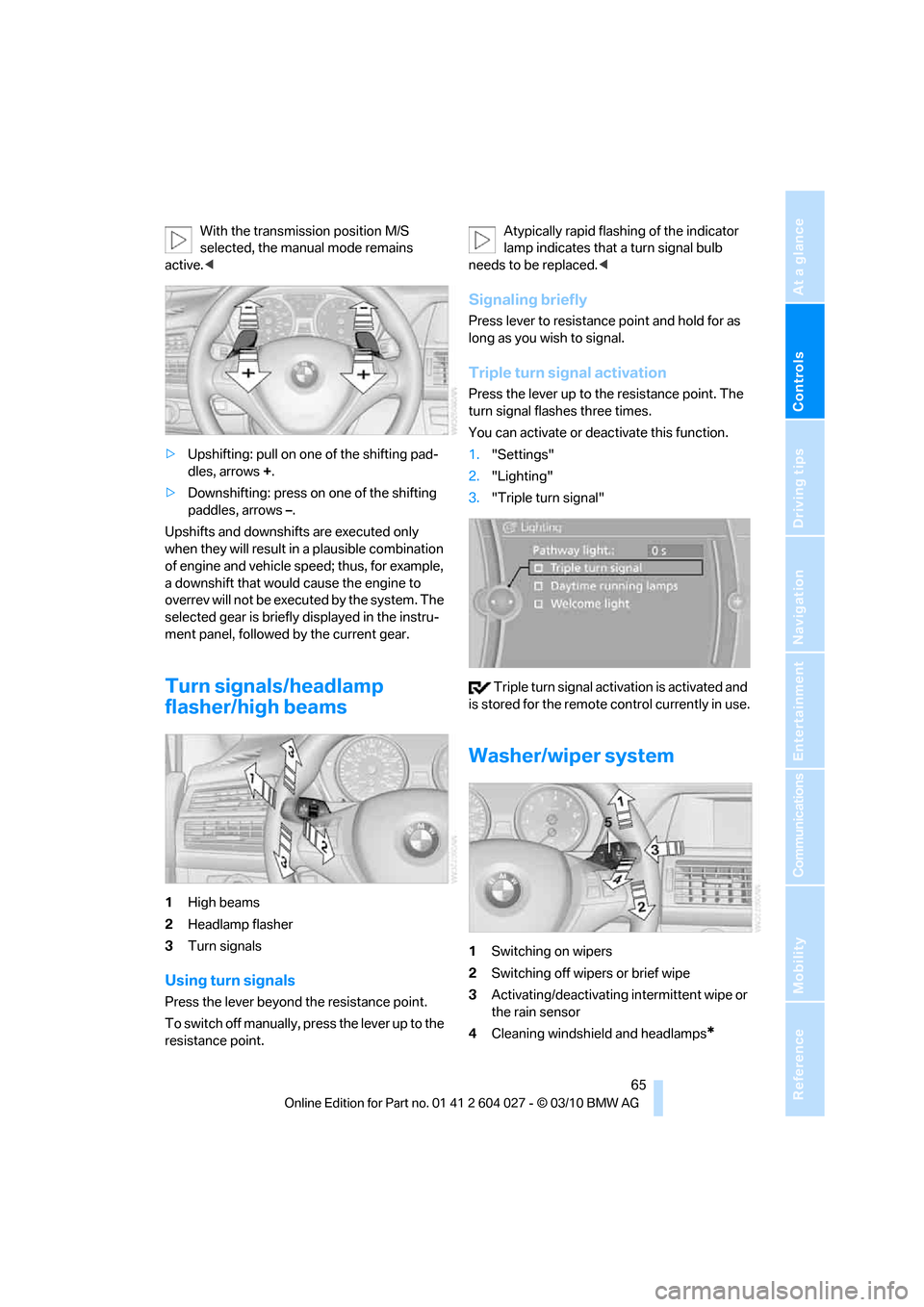
>Upshifting: pull on one of the shifting pad-
dles, arrows +.
>Downshifting: press on one of the shifting
paddles, arrows –.
Upshifts and downshifts are executed only
when they will result in a plausible combination
of engine and vehicle speed; thus, for example,
a downshift that would cause the engine to
overrev will not be executed by the system. The
selected gear is briefly displayed in the instru-
ment panel, followed by the current gear.
Turn signals/headlamp
flasher/high beams
1High beams
2Headlamp flasher
3Turn signals
Using turn signals
Press the lever beyond the resistance point.
To switch off manually, press the lever up to the
resistance point.Atypically rapid flashing of the indicator
lamp indicates that a turn signal bulb
needs to be replaced.<
Signaling briefly
Press lever to resistance point and hold for as
long as you wish to signal.
Triple turn signal activation
Press the lever up to the resistance point. The
turn signal flashes three times.
You can activate or deactivate this function.
1."Settings"
2."Lighting"
3."Triple turn signal"
Triple turn signal activation is activated and
is stored for the remote control currently in use.
Washer/wiper system
1Switching on wipers
2Switching off wipers or brief wipe
3Activating/deactivating intermittent wipe or
the rain sensor
4Cleaning windshield and headlamps*
Page 68 of 312
Driving
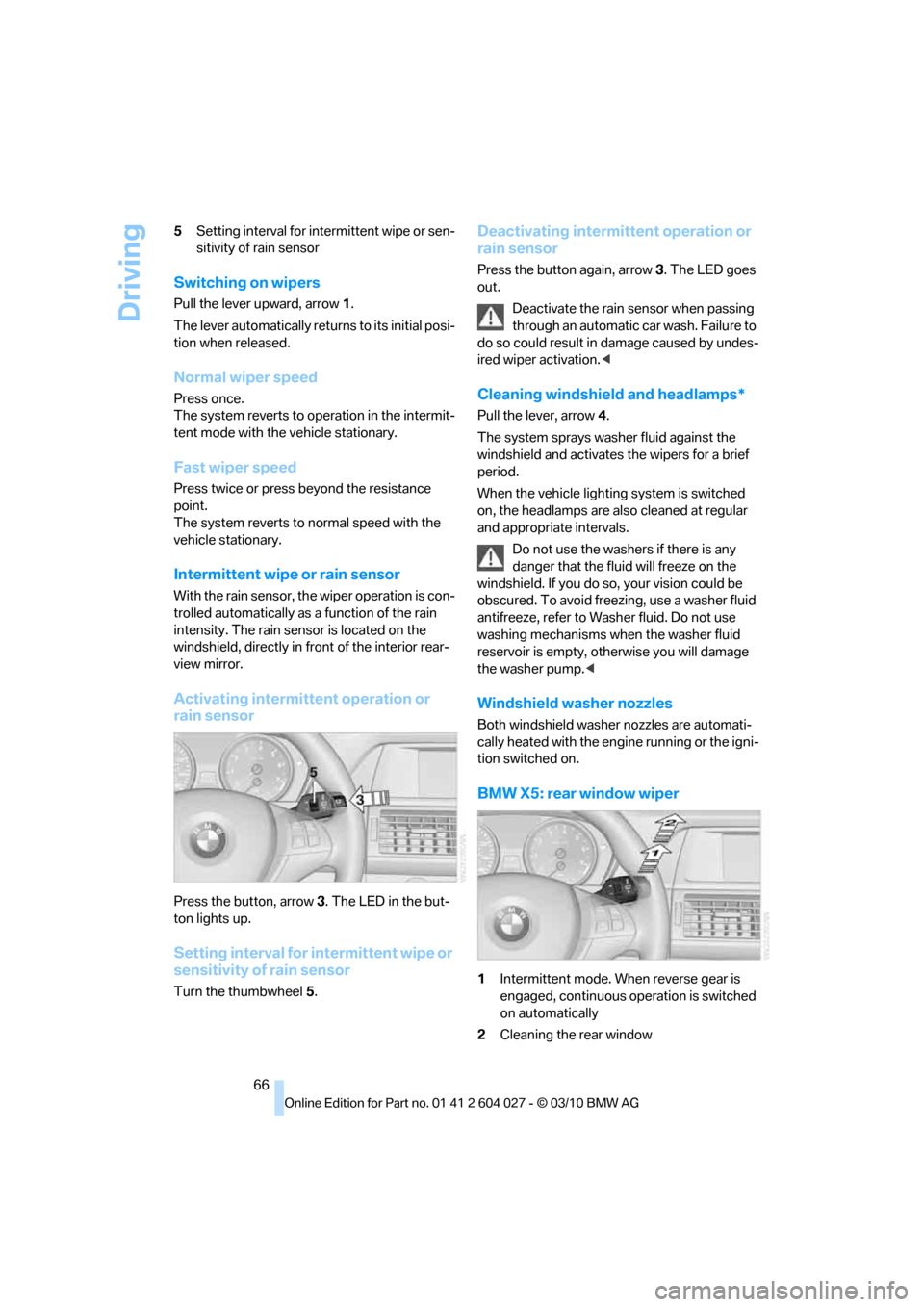
66 5Setting interval for intermittent wipe or sen-
sitivity of rain sensor
Switching on wipers
Pull the lever upward, arrow1.
The lever automatically returns to its initial posi-
tion when released.
Normal wiper speed
Press once.
The system reverts to operation in the intermit-
tent mode with the vehicle stationary.
Fast wiper speed
Press twice or press beyond the resistance
point.
The system reverts to normal speed with the
vehicle stationary.
Intermittent wipe or rain sensor
With the rain sensor, the wiper operation is con-
trolled automatically as a function of the rain
intensity. The rain sensor is located on the
windshield, directly in front of the interior rear-
view mirror.
Activating intermittent operation or
rain sensor
Press the button, arrow3. The LED in the but-
ton lights up.
Setting interval for intermittent wipe or
sensitivity of rain sensor
Turn the thumbwheel5.
Deactivating intermittent operation or
rain sensor
Press the button again, arrow3. The LED goes
out.
Deactivate the rain sensor when passing
through an automatic car wash. Failure to
do so could result in damage caused by undes-
ired wiper activation.<
Cleaning windshield and headlamps*
Pull the lever, arrow4.
The system sprays washer fluid against the
windshield and activates the wipers for a brief
period.
When the vehicle lighting system is switched
on, the headlamps are also cleaned at regular
and appropriate intervals.
Do not use the washers if there is any
danger that the fluid will freeze on the
windshield. If you do so, your vision could be
obscured. To avoid freezing, use a washer fluid
antifreeze, refer to Washer fluid. Do not use
washing mechanisms when the washer fluid
reservoir is empty, otherwise you will damage
the washer pump.<
Windshield washer nozzles
Both windshield washer nozzles are automati-
cally heated with the engine running or the igni-
tion switched on.
BMW X5: rear window wiper
1Intermittent mode. When reverse gear is
engaged, continuous operation is switched
on automatically
2Cleaning the rear window
Page 240 of 312
Refueling
238
Refilling BMW diesel exhaust fluid
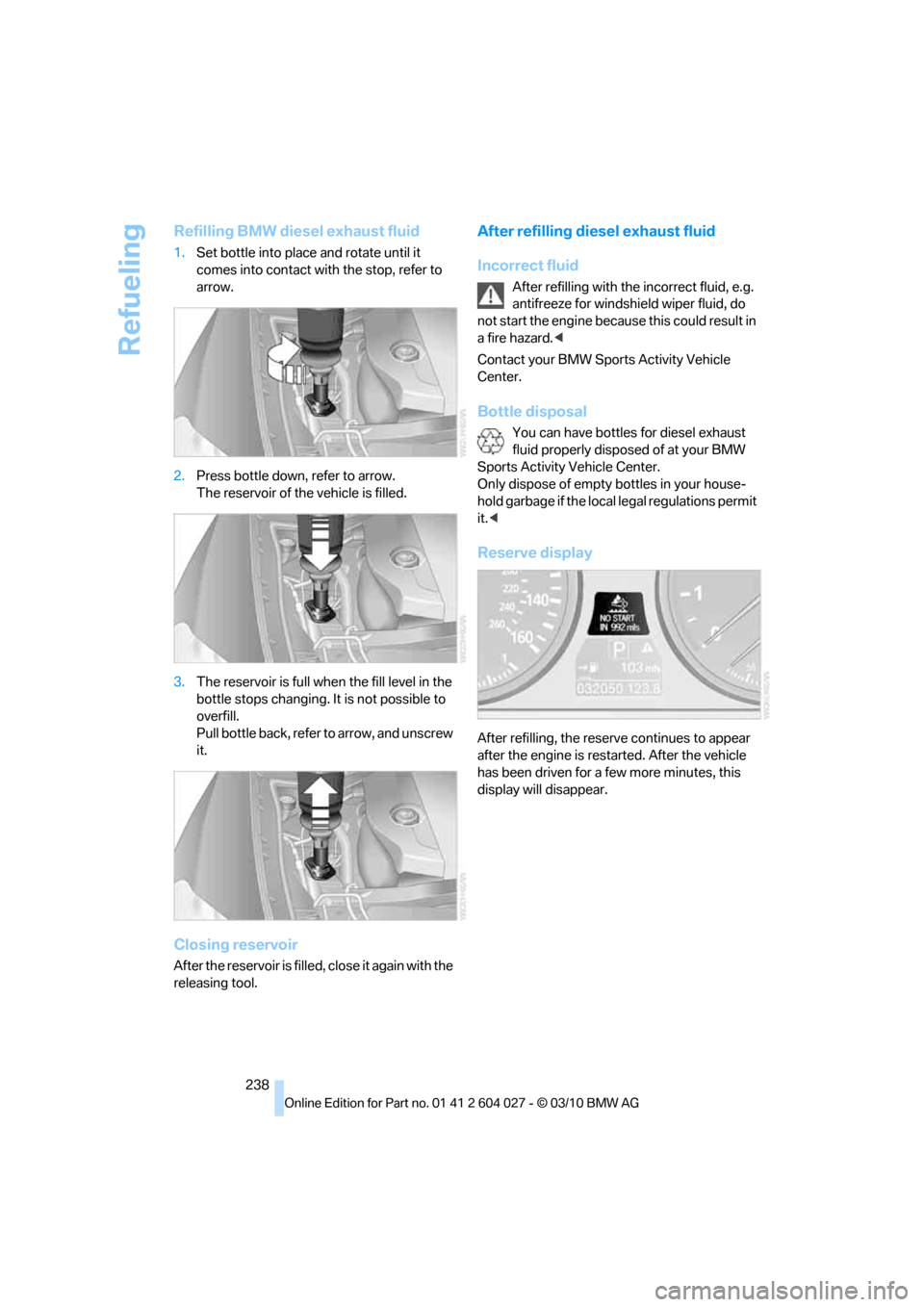
1.Set bottle into place and rotate until it
comes into contact with the stop, refer to
arrow.
2.Press bottle down, refer to arrow.
The reservoir of the vehicle is filled.
3.The reservoir is full when the fill level in the
bottle stops changing. It is not possible to
overfill.
Pull bottle back, refer to arrow, and unscrew
it.
Closing reservoir
After the reservoir is filled, close it again with the
releasing tool.
After refilling diesel exhaust fluid
Incorrect fluid
After refilling with the incorrect fluid, e.g.
antifreeze for windshield wiper fluid, do
not start the engine because this could result in
a fire hazard.<
Contact your BMW Sports Activity Vehicle
Center.
Bottle disposal
You can have bottles for diesel exhaust
fluid properly disposed of at your BMW
Sports Activity Vehicle Center.
Only dispose of empty bottles in your house-
hold garbage if the local legal regulations permit
it.<
Reserve display
After refilling, the reserve continues to appear
after the engine is restarted. After the vehicle
has been driven for a few more minutes, this
display will disappear.
Page 260 of 312
Care
258
Care
Car-care products
For the cleaning and care of your vehicle, BMW
recommends using only products that BMW
has approved for this purpose.
Regular cleaning and care make a significant
contribution to retaining your BMW's value.
The BMW Sports Activity Vehicle Center will be
happy to consult you on products and services
for the cleaning and care of your BMW.
Genuine BMW Care Products are materi-
als tested, laboratory tested, and tested in
actual use. They offer optimum care and pro-
tection for your vehicle.<
Do not use cleaners that contain alcohol
or solvents; they can damage your vehi-
cle.<
Cleaning agents can contain substances
that are dangerous or pose health risks.
You should therefore heed the warnings and
hazard indications on the packaging. Open the
doors or windows on your vehicle whenever
cleaning the interior. Make sure there is suffi-
cient ventilation in enclosed spaces. Use only
products that are formulated for vehicle clean-
ing.<
Exterior care
Washing your vehicle
In the winter months, it is especially
important to ensure that the vehicle is
washed on a regular basis. Otherwise, signifi-
cant soiling and road salt can cause damage to
the vehicle.<
After washing the vehicle, apply the
brakes briefly to dry them. Failure to do so
may lead to a reduction in braking efficiency and
also to corrosion of the brake rotors.<
Car washes
Give preference to cloth car washes.Before driving into the car wash, make sure that
it is suitable for your BMW. Pay attention to the
following points:
>Dimensions of your vehicle, refer to
page281.
>If necessary, fold in exterior mirrors, refer to
page51.
>Maximum permissible tire width.
Avoid car washes with guide rails higher
than 4 in/10 cm as these may damage
parts of the vehicle body.<
Preparations for driving into the car wash:
>Deactivate the rain sensor to prevent
undesired wiper operation.
>BMW X5: deactivate rear window wiper and
protect it from damage. Take appropriate
protective measures; inquiring with the car
wash operator as needed.
>Remove add-on parts such as spoilers or
phone antennas if they risk being damaged.
Before driving into the car wash, observe the
following so that the vehicle is able to roll:
1.Insert the remote control into the ignition
lock, even with Comfort Access.
2.Shift into transmission position N.
3.Release the parking brake.
4.Deactivate Automatic Hold, refer to
page61.
5.Switch off the engine.
6.Leave the remote control in the ignition lock
so that the vehicle can roll.
Mixed tires*
Before driving into a car wash, make sure
that the vehicle width is not too large for
the car wash, as otherwise the vehicle and the
car wash could be damaged.<
Page 261 of 312
Mobility
259Reference
At a glance
Controls
Driving tips
Communications
Navigation
Entertainment
Steam cleaners/high-pressure
cleaning jets
When using steam cleaners or high-pres-
sure cleaning jets, make sure to maintain
a sufficient distance and stay below a maximum
temperature of 1407/606.
Insufficient distance or excessive pressure or
temperature can damage parts of the vehicle or
can result in water penetration. Follow the oper-
ating instructions for the high-pressure clean-
ing jets.<
Do not spray the sensors and cameras,
e.g. of Park Distance Control, Top View,
or rear view camera, with high-pressure clean-
ers for long periods and keep the spray nozzle
at least 12 in/30 cm away from them.<
Hand washing
When washing the vehicle by hand, use plenty
of water and car washing shampoo. Clean the
vehicle with gentle pressure using a sponge or a
washing brush.
Before cleaning the windshield, deacti-
vate the rain sensor or switch off the igni-
tion to prevent unwanted wiper operation.<
Follow local guidelines for washing vehi-
cles by hand.<
Headlamps
Do not rub dry and never use abrasives or
strong solvents to clean the covers.
Loosen dirt, e.g. insects, with shampoo or
insect remover and wash away with plenty of
water.
Use a window de-icer to remove accumulated
ice and snow, not a scraper.
Windows
Use a glass cleaner to clean the inside and out-
side surfaces of the windows and the glass sur-
faces of the mirrors.
Do not use quartz-containing cleansers
to clean glass surfaces of the mirrors.<
Caring for the vehicle finish
Regular care helps your vehicle retain its value
and protects the paint from the long-term
effects of aggressive substances.
Regionally occurring environmental factors can
affect and damage vehicle finish. It is therefore
important to tailor the frequency and extent of
your car care accordingly.
Immediately remove particularly aggressive
substances such as spilled fuel, oil, grease,
brake fluid, tree resin, or bird droppings; other-
wise, they may damage your paint.
Repairing paint damage
Repair stone damage or scratches imme-
diately, depending on the severity of the
damage, to prevent the formation of rust.<
BMW recommends having paint damage pro-
fessionally repaired using Genuine BMW finish
materials in accordance with factory guidelines.
Waxing
Sealant is required when water no longer beads
on the clean surface of the paint. Use only prod-
ucts that contain carnauba wax or synthetic wax
to seal your finish.
Rubber gaskets
Treat only with water or a rubber care product.
To avoid noise or damage, do not use
products that contain silicone to care for
rubber gaskets.<
Chrome components
Particularly after exposure to road salt, thor-
oughly cleanse parts like the radiator grille, door
handles, or window frames with plenty of water
with shampoo added to it. For additional treat-
ment, use chrome polish.
Alloy wheels
Depending on your system, braking can gener-
ate dust, which settles on the light-alloy wheels.
Remove this dust regularly with acid-free wheel
cleaner.
Page 264 of 312
Replacing components
262
Replacing components
Onboard toolkit
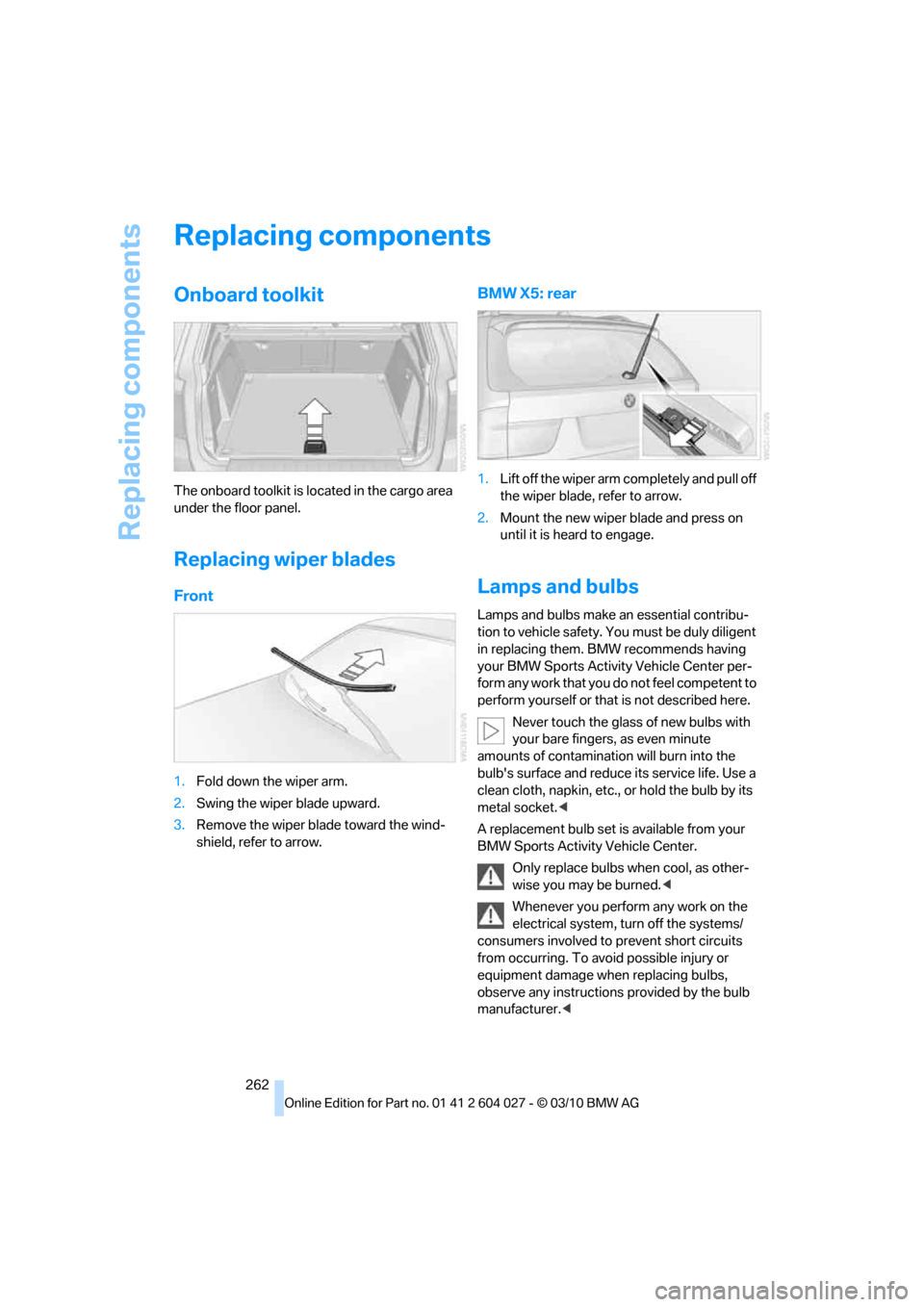
The onboard toolkit is located in the cargo area
under the floor panel.
Replacing wiper blades
Front
1.Fold down the wiper arm.
2.Swing the wiper blade upward.
3.Remove the wiper blade toward the wind-
shield, refer to arrow.
BMW X5: rear
1.Lift off the wiper arm completely and pull off
the wiper blade, refer to arrow.
2.Mount the new wiper blade and press on
until it is heard to engage.
Lamps and bulbs
Lamps and bulbs make an essential contribu-
tion to vehicle safety. You must be duly diligent
in replacing them. BMW recommends having
your BMW Sports Activity Vehicle Center per-
form any work that you do not feel competent to
perform yourself or that is not described here.
Never touch the glass of new bulbs with
your bare fingers, as even minute
amounts of contamination will burn into the
bulb's surface and reduce its service life. Use a
clean cloth, napkin, etc., or hold the bulb by its
metal socket.<
A replacement bulb set is available from your
BMW Sports Activity Vehicle Center.
Only replace bulbs when cool, as other-
wise you may be burned.<
Whenever you perform any work on the
electrical system, turn off the systems/
consumers involved to prevent short circuits
from occurring. To avoid possible injury or
equipment damage when replacing bulbs,
observe any instructions provided by the bulb
manufacturer.<
Page 300 of 312
Everything from A - Z
298 FM, waveband171
Fog lamps114
– indicator lamp13,114
Folding display screen open/
closed, DVD system in
rear196
Folding rear seat backrest132
Footwell lamps115
For your own safety5
4-wheel drive system, refer to
xDrive97
Free memory capacity, music
collection190
Front airbags107
Front passenger airbags107
– deactivating107
– refer to Exception of front
passenger seat54
Front seat adjustment43
FTM Flat Tire Monitor99
– false alarms100
– indicating a flat tire100
– initializing the system100
– snow chains250
– system limits100
– warning lamp100
Fuel235
– capacity284
– display78
– high-quality brands235
– quality235
– saving138
– specifications235
Fuel clock, refer to Fuel
gauge78
Fuel consumption display
– computer, average fuel
consumption78
Fuel display, refer to Fuel
gauge78
Fuel filler flap234
– closing234
– opening234
– releasing manually234
Fuses271
G
Garage door opener, refer to
Integrated universal remote
control124
Gasoline, refer
to Required fuel235
Gasoline display, refer to Fuel
gauge78
Gas station
recommendations159
Gearshifts
– automatic transmission with
Steptronic64
General driving
notes138,139
Glass sunroof
– convenient opening and
closing from outside29
– convenient opening and
closing with Comfort
Access36
– remote control28
Glass sunroof, electric40
– opening, closing40
– power interruption41
– raising40
Glove compartment127
– lighting127
GPS navigation, refer to
Navigation system148
Grills, refer to Ventilation120
Grills of the automatic climate
control116
Gross vehicle weight, refer to
Weights283
H
Handbrake, refer to Parking
brake60
– Automatic Hold61
Hands-free system, refer to
Microphone14
Hand washing259
Have diesel exhaust fluid
– refilled237
Hazard warning flashers15
HDC Hill Descent Control97HD Radio172
Head airbags107
Headlamp control,
automatic111
Headlamp flasher65
Headlamps111
– cleaning, refer to Washer/
wiper system65
– replacing bulbs262
Head Light, refer to Adaptive
Light Control112
Head restraints45
– sitting safely42
Head-up Display109
Heated
– mirrors51
– rear window118
– seats49,50
– steering wheel53
Heating116
– exterior mirrors51
– interior116
– rear window118
– residual heat119
– seats49,50
– steering wheel53
Heating with engine switched
off, refer to Residual
heat119
Heavy cargo, refer to Securing
cargo142
Height
– on Head-up Display109
Height, refer to
Dimensions281
Height adjustment
– seats43
– steering wheel52
High-beam Assistant113
High beams65,113
– headlamp flasher65
– indicator lamp13
High-beams, automatically
switching on and off, refer to
High-beam Assistant113
High-pressure cleaning
jets259
High water, refer to Driving
through water140
Page 301 of 312
Reference 299
At a glance
Controls
Driving tips
Communications
Navigation
Entertainment
Mobility
Highway, refer to Route
criteria158
Hill Descent Control HDC97
Hills140
Holder for cups128
Homepage4
Hood251
Horn10
Hot exhaust system139
Hydraulic brake assistant,
refer to Brake assistant95
Hydroplaning139
I
IBOC, refer to HD Radio172
Ice, refer to Outside
temperature warning76
Ice warning, refer to Outside
temperature warning76
Identification
– tire250
Identification mark
– run-flat tires249
iDrive16
– changing language86
– changing settings85
– changing units of measure
and display type86
– controller16
– controls16
– main menu17
– setting brightness86
– setting date85
– setting time85
– status information19
Ignition58
– switched off58
– switched on58
Ignition key, refer to Keys/
remote control26
Ignition key position 1, refer to
Radio readiness58
Ignition key position 2, refer to
Ignition on58
Ignition lock58
– starting engine with Comfort
Access36
Imprint2Indicator/warning lamps13
– active steering105
– airbags108
– DSC13,96
– DTC97
– fasten safety belt48
– Flat Tire Monitor100
– fog lamps13
– TPM Tire Pressure
Monitor103
Individual settings, refer to
Personal Profile26
Inflation pressure, refer to Tire
inflation pressure239
Inflation pressure monitoring,
refer to FTM Flat Tire
Monitor99
Inflation pressure monitoring,
refer to TPM Tire Pressure
Monitor101
Initializing
– Flat Tire Monitor100
– radio, refer to Station,
storing171
– refer to Power failure270
– refer to Setting date
85
– refer to Setting time85
– seat, mirror and steering
wheel memory44
Installation location
– mobile phone128
Instructions for navigation
system, refer to Voice
instructions160
Instrument lighting115
Instrument panel12
Instrument panel, refer to
Cockpit10
Integrated key26
Integrated universal remote
control124
Interactive map154
Interior lamps115
– switching on with remote
control28
Interior motion sensor35
– switching off35Interior rearview mirror52
– automatic dimming
feature52
– compass125
Intermittent mode of the
wipers66
Intersection, entering,
navigation150
iPod, connecting, refer to
AUX-IN connection192
iPod, connecting, refer to USB
audio interface192
J
Jacking points269
Joystick
– refer to iDrive16
– refer to Selector lever,
selecting transmission
positions63
Jumpering, refer to Jump
starting274
Jump starting274
K
Keyless go, refer to Comfort
Access35
Keyless opening and closing,
refer to Comfort Access35
Key Memory, refer to Personal
Profile26
Keys26
– key-related settings, refer to
Personal Profile26
Kickdown, automatic
transmission with
Steptronic64
Knock control235
L
Lamps, refer to Parking lamps/
low beams111
Lamps and bulbs262
Lashing eyes, refer to
Securing cargo142
Last destinations152
Page 303 of 312
Reference 301
At a glance
Controls
Driving tips
Communications
Navigation
Entertainment
Mobility
Mirrors51
– automatic curb monitor52
– exterior mirrors51
– folding in and out51
– heating51
– interior rearview mirror52
– memory, refer to Seat, mirror
and steering wheel
memory44
Mobile phone
– adjusting volume215
– connecting, refer to Mobile
phone, pairing212
– installation location, refer to
Center armrest, front128
– operation via iDrive215
– pairing212
– refer to separate operating
instructions
Mobile phone, refer to
Telephone212
Monitor, refer to iDrive16
Monitoring tire pressure, refer
to FTM Flat Tire Monitor99
MP3 player, connecting, refer
to AUX-IN connection192
MP3 player, connecting, refer
to USB audio interface192
Multichannel playback169
Multifunction steering wheel,
refer to Buttons on steering
wheel11
Multifunction switch
– refer to Turn signals/
headlamp flasher/high
beams65
– refer to Washer/wiper
system65
Music, managing190
Music, playing188
Music, storing187
Music collection187
– backup191
– delete191
– random sequence190
– restoring191
Music player, connecting,
refer to AUX-IN
connection192Music player, connecting,
refer to USB audio
interface192
Music search188
My Info219
N
Navigation
– starting destination
guidance after entering a
destination151
– storing current position151
– voice activation155
Navigation data148
Navigation destination
– entering manually149
– home address152
Navigation instructions, refer
to Switching voice
instructions on/off160Navigation system148
– address book151
– bypassing a route
section159
– continuing destination
guidance158
– destination entry149
– dynamic destination
guidance159
– entering a destination by
voice155
– entering a destination
manually149
– gas station
recommendations159
– planning a trip156
– questions about system165
– route list159
– selecting destination via
map154
– selecting route criteria158
– special destinations152
– starting destination
guidance158
– terminating destination
guidance158
– traffic bulletins161
– voice instructions160
– volume adjustment160
Neck support, refer to Head
restraints45
New remote control26
New wheels and tires249
North-facing map160
Nozzles, refer to Windshield
washer nozzles66
Nylon rope, refer to Tow-
starting and towing275
O
OBD socket257
Octane ratings, refer to Fuel
specifications235
Odometer76