brake function BMW X6M 2013 E71 User Guide
[x] Cancel search | Manufacturer: BMW, Model Year: 2013, Model line: X6M, Model: BMW X6M 2013 E71Pages: 327, PDF Size: 7.71 MB
Page 104 of 327
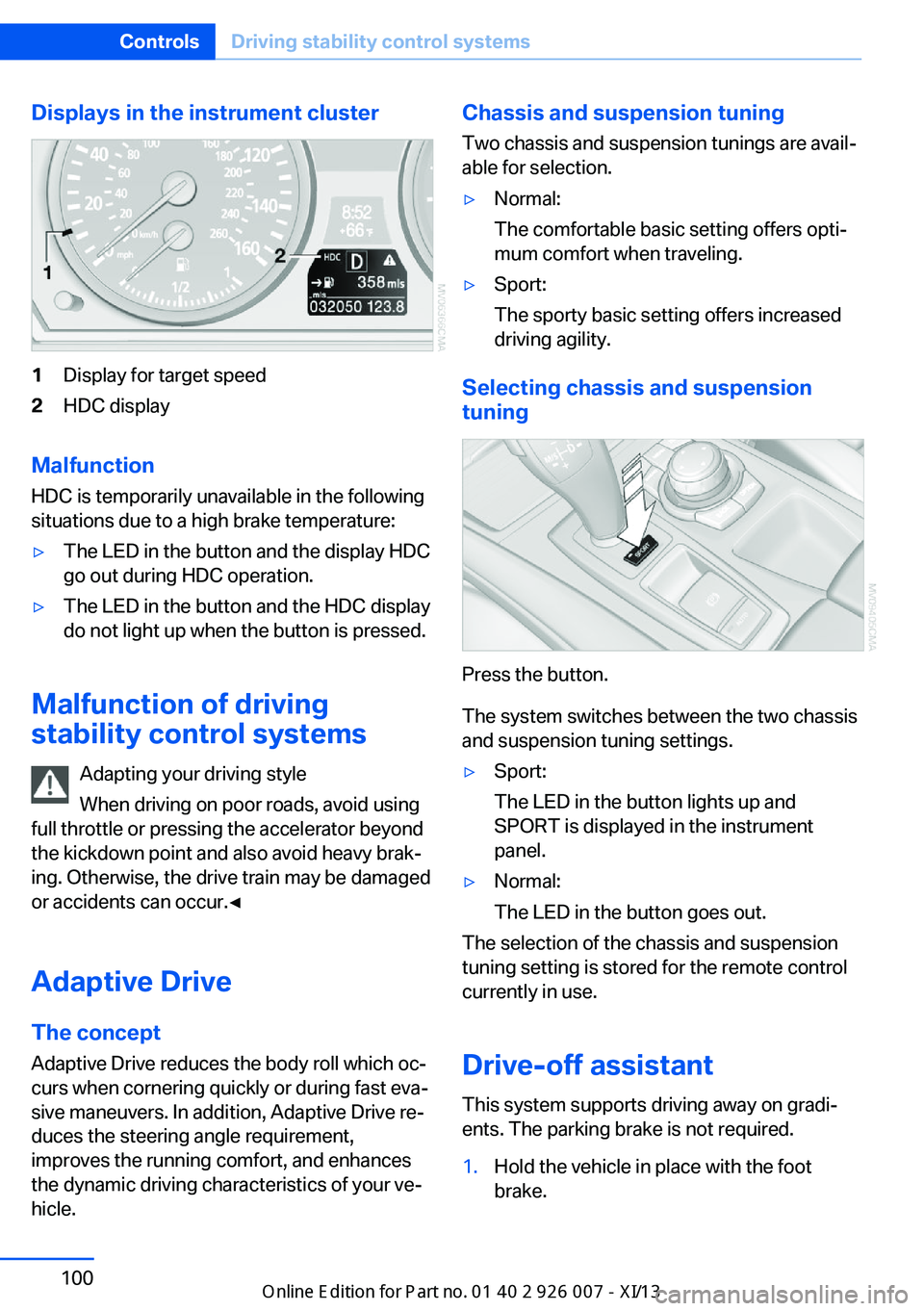
Displays in the instrument cluster1Display for target speed2HDC display
Malfunction
HDC is temporarily unavailable in the following
situations due to a high brake temperature:
▷The LED in the button and the display HDC
go out during HDC operation.▷The LED in the button and the HDC display
do not light up when the button is pressed.
Malfunction of driving
stability control systems
Adapting your driving style
When driving on poor roads, avoid using
full throttle or pressing the accelerator beyond
the kickdown point and also avoid heavy brak‐
ing. Otherwise, the drive train may be damaged
or accidents can occur.◀
Adaptive Drive The concept
Adaptive Drive reduces the body roll which oc‐
curs when cornering quickly or during fast eva‐
sive maneuvers. In addition, Adaptive Drive re‐
duces the steering angle requirement,
improves the running comfort, and enhances
the dynamic driving characteristics of your ve‐
hicle.
Chassis and suspension tuning
Two chassis and suspension tunings are avail‐
able for selection.▷Normal:
The comfortable basic setting offers opti‐
mum comfort when traveling.▷Sport:
The sporty basic setting offers increased
driving agility.
Selecting chassis and suspension
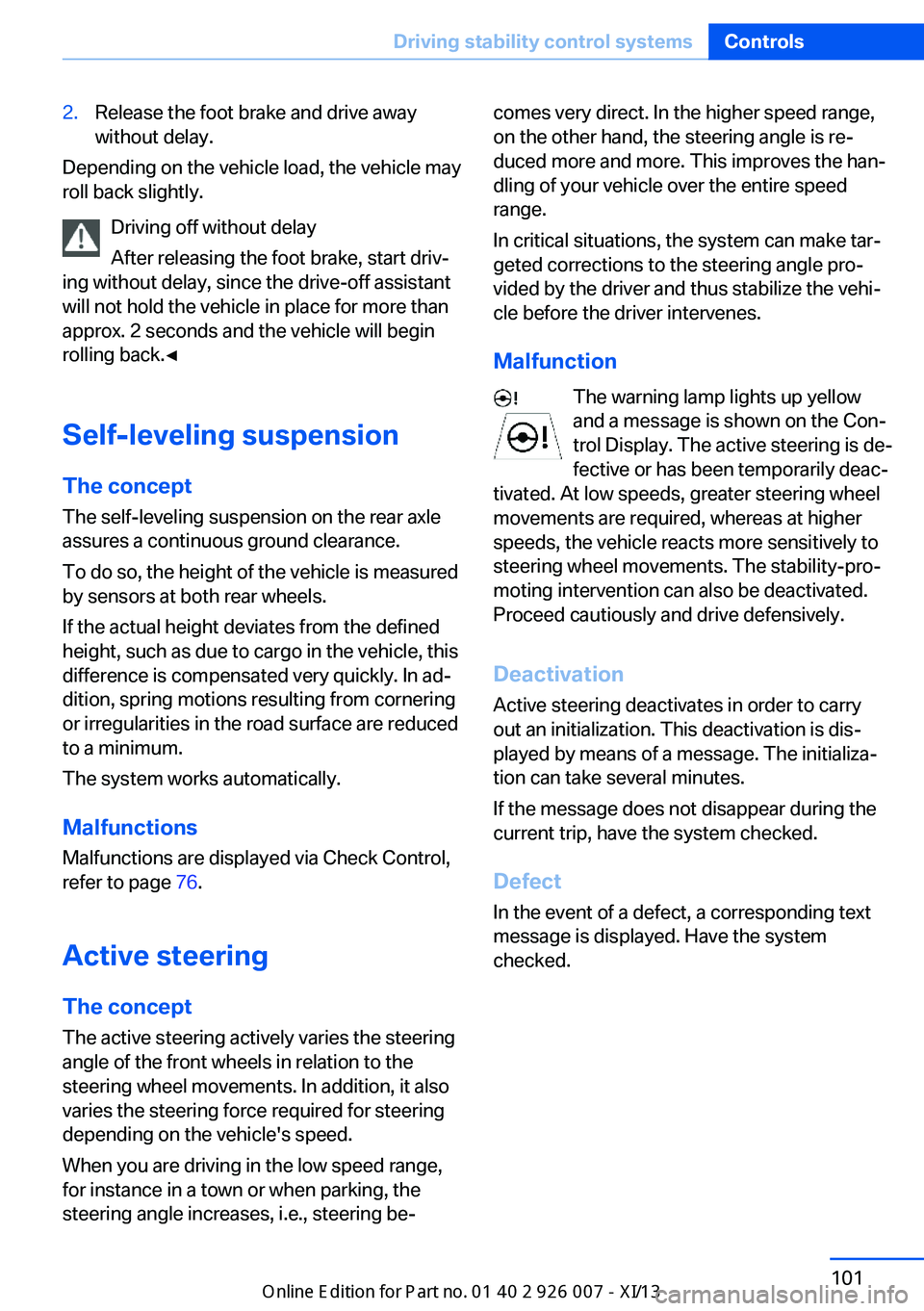
tuning
Press the button.
The system switches between the two chassis
and suspension tuning settings.
▷Sport:
The LED in the button lights up and
SPORT is displayed in the instrument
panel.▷Normal:
The LED in the button goes out.
The selection of the chassis and suspension
tuning setting is stored for the remote control
currently in use.
Drive-off assistant This system supports driving away on gradi‐
ents. The parking brake is not required.
1.Hold the vehicle in place with the foot
brake.Seite 100ControlsDriving stability control systems100
Online Edition for Part no. 01 40 2 910 876 - VII/13
Page 105 of 327
2.Release the foot brake and drive away
without delay.
Depending on the vehicle load, the vehicle may
roll back slightly.
Driving off without delay
After releasing the foot brake, start driv‐
ing without delay, since the drive-off assistant
will not hold the vehicle in place for more than
approx. 2 seconds and the vehicle will begin
rolling back.◀
Self-leveling suspension The concept The self-leveling suspension on the rear axle
assures a continuous ground clearance.
To do so, the height of the vehicle is measured
by sensors at both rear wheels.
If the actual height deviates from the defined
height, such as due to cargo in the vehicle, this
difference is compensated very quickly. In ad‐
dition, spring motions resulting from cornering
or irregularities in the road surface are reduced
to a minimum.
The system works automatically.
Malfunctions Malfunctions are displayed via Check Control,
refer to page 76.
Active steering The concept
The active steering actively varies the steering
angle of the front wheels in relation to the
steering wheel movements. In addition, it also
varies the steering force required for steering
depending on the vehicle's speed.
When you are driving in the low speed range,
for instance in a town or when parking, the
steering angle increases, i.e., steering be‐
comes very direct. In the higher speed range,
on the other hand, the steering angle is re‐
duced more and more. This improves the han‐
dling of your vehicle over the entire speed
range.
In critical situations, the system can make tar‐
geted corrections to the steering angle pro‐
vided by the driver and thus stabilize the vehi‐
cle before the driver intervenes.
Malfunction The warning lamp lights up yellow
and a message is shown on the Con‐
trol Display. The active steering is de‐
fective or has been temporarily deac‐
tivated. At low speeds, greater steering wheel
movements are required, whereas at higher
speeds, the vehicle reacts more sensitively to
steering wheel movements. The stability-pro‐
moting intervention can also be deactivated.
Proceed cautiously and drive defensively.
Deactivation
Active steering deactivates in order to carry
out an initialization. This deactivation is dis‐
played by means of a message. The initializa‐ tion can take several minutes.
If the message does not disappear during the
current trip, have the system checked.
Defect In the event of a defect, a corresponding text
message is displayed. Have the system
checked.Seite 101Driving stability control systemsControls101
Online Edition for Part no. 01 40 2 910 876 - VII/13
Page 106 of 327
Driving comfortVehicle equipment
This chapter describes all series equipment as
well as country-specific and special equipment
offered for this model series.Therefore, it also
describes equipment that may not be found in
your vehicle, for instance due to the selected
special equipment or the country version. This
also applies to safety-related functions and
systems.
Active cruise control
With active cruise control you can select a de‐ sired speed which is then automatically main‐
tained when driving on open roadways and is
varied to maintain a selected distance setting
to slower moving vehicles ahead.
Active cruise control represents a technologi‐
cal advance over the familiar cruise control and
is a welcome relief from the constant adjust‐
ment of speed that can accompany driving in
traffic on highways or other high-speed thor‐
oughfares. Especially on longer trips and in
traffic congestion, the system can reduce fati‐
gue and tension, while increasing your enjoy‐
ment of driving. Please use it safely and re‐
sponsibly.
In addition to holding a steady cruising speed,
if you encounter slower vehicles ahead, active
cruise control will, within limits, adjust your ve‐
hicle's speed automatically so that you can
flow with the traffic without having to make
constant adjustments. If, for example, while
cruising at the selected speed, you begin to
approach a slower vehicle ahead of you in the
same lane, the system will reduce your vehi‐
cle's speed to the same as that of the vehicle
ahead to maintain your selected distance set‐
ting. You can vary the following distance,
which will vary with speed. Based on your se‐
lected distance setting, the system automati‐cally decreases the throttle setting and lightly
applies the brakes if necessary. In addition, if
the vehicle ahead of you slows to a complete
stop, the system can follow this action within
the given scope and can also accelerate from a
complete stop if the vehicle ahead of you
drives off again shortly thereafter. During brak‐
ing, your vehicle brake lamps will automatically
illuminate to alert a following driver to take ac‐
tion. In addition, it may be necessary for your
vehicle to downshift the automatic transmis‐
sion to maintain the distance setting selected.
As soon as the road in front of you has no mov‐
ing vehicles, the system will accelerate to your
desired speed. This set speed is also main‐
tained on downhill grades, however the vehicle
speed can drop below the set speed when
driving uphill if the engine output is not suffi‐
cient.
Personal responsibility
Active cruise control cannot detect stop
signs, red lights, or any object that is stopped
or is blocking the road. Active cruise control is
not and must not be used as a collision avoid‐
ance/warning system. Since this active cruise
control system is a new technology and oper‐
ates differently from conventional cruise con‐
trol systems to which you may be accustomed,
it is necessary that you read all of the pages re‐
lating to this system before use. Carefully read
and observe the information on the system
limitations, refer to page 107, to obtain a good
command of the system and its range of appli‐
cations.◀
Brake pedal feel
When the system brakes and you also depress
the brake pedal, a somewhat different braking
feel results.Seite 102ControlsDriving comfort102
Online Edition for Part no. 01 40 2 910 876 - VII/13
Page 107 of 327
Professional navigation system
If the vehicle is equipped with a Professional
navigation system, the system adapts the ac‐
celeration and deceleration behavior of the ve‐
hicle to the road on which you are currently
driving.
To ensure that the system has the latest infor‐
mation on the course of the road, use the most
recent version of the navigation data.
If the vehicle position is unknown, e.g., if you
have left the region covered by the map, the
navigation system ceases to influence vehicle
behavior.
Applications Please try the system first during sparse traffic
and clear road conditions so that you can get
used to the system. After you have experience
and understand the system, only then use it
during normal traffic.
As with conventional cruise control systems,
active cruise control in no way reduces or sub‐
stitutes for the driver's own personal experi‐
ence, responsibility, alertness and awareness
in adjusting speed, braking or otherwise con‐
trolling the vehicle. The driver should decide
when to use the system on the basis of road,
traffic, visibility, and weather conditions. Active
cruise control is intended for use on highway-
type roadways where traffic is moving rela‐
tively smoothly as well as in slow-moving traf‐
fic congestion. Do not use the system in city
driving; in complex driving situations; heavy
traffic such as during rush hour; on curvy,
winding roads, slippery roads or roads with
sharp curves such as highway off-ramps; dur‐
ing inclement weather such as snow, strong
rain or fog; or when entering interchanges,
service/parking areas or toll booths. It is also
important to regulate your vehicle's speed and
distance setting within applicable legal limits.
Always be ready to take action or apply the
brakes if necessary, especially when the sys‐
tem is actively following a vehicle in front of
you. Otherwise, driving conditions can resultwhich lead to a violation of the law or elevated
risk of an accident.
The minimum initial activation speed is
20 mph/ 30 km/h, and the maximum speed is
110 mph/ 180 km/h. The system can also be
activated while the vehicle is stationary, refer
to page 105.
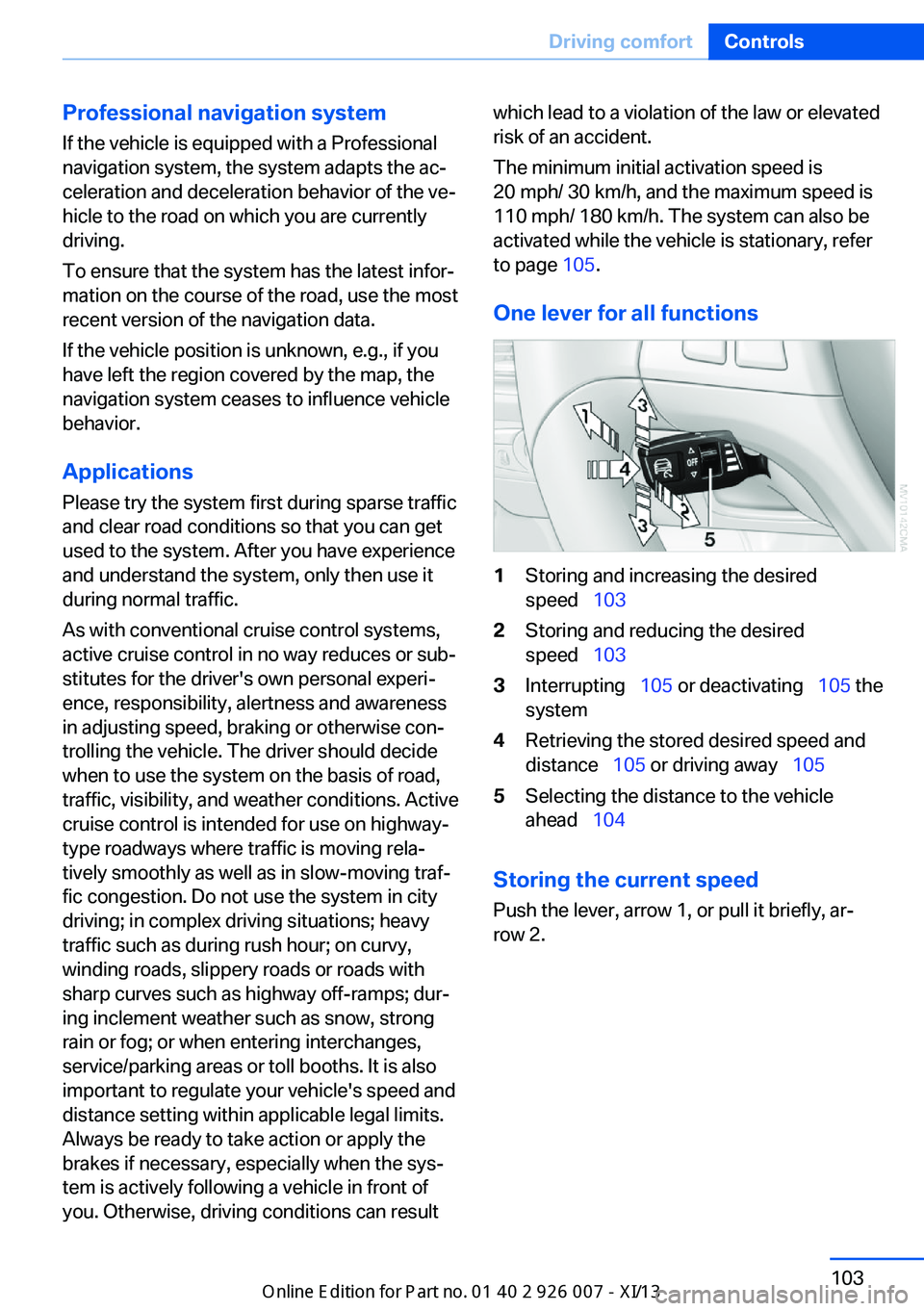
One lever for all functions1Storing and increasing the desired
speed 1032Storing and reducing the desired
speed 1033Interrupting 105 or deactivating 105 the
system4Retrieving the stored desired speed and
distance 105 or driving away 1055Selecting the distance to the vehicle
ahead 104
Storing the current speed
Push the lever, arrow 1, or pull it briefly, ar‐
row 2.
Seite 103Driving comfortControls103
Online Edition for Part no. 01 40 2 910 876 - VII/13
Page 110 of 327
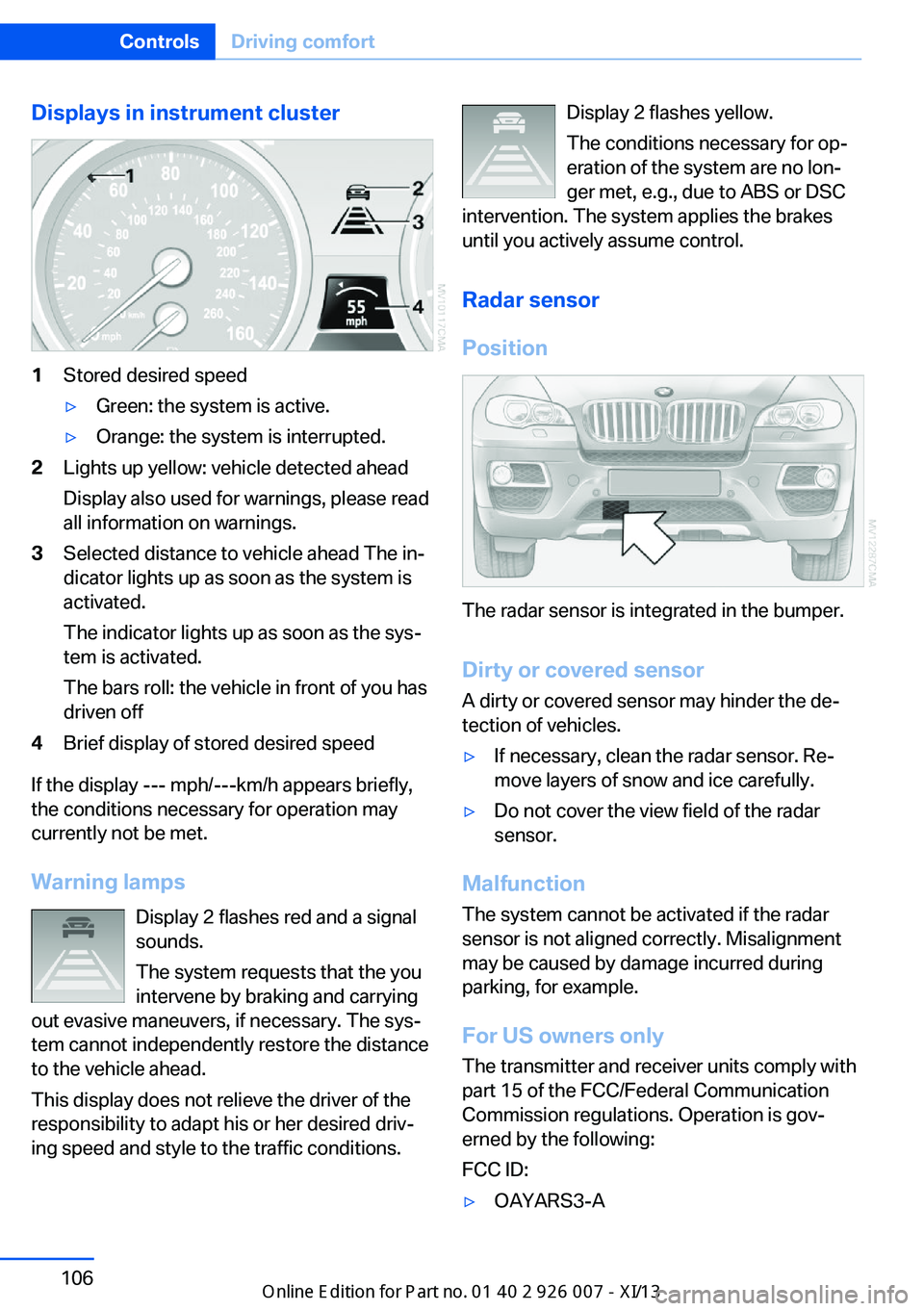
Displays in instrument cluster1Stored desired speed▷Green: the system is active.▷Orange: the system is interrupted.2Lights up yellow: vehicle detected ahead
Display also used for warnings, please read
all information on warnings.3Selected distance to vehicle ahead The in‐
dicator lights up as soon as the system is
activated.
The indicator lights up as soon as the sys‐
tem is activated.
The bars roll: the vehicle in front of you has
driven off4Brief display of stored desired speed
If the display --- mph/---km/h appears briefly,
the conditions necessary for operation may
currently not be met.
Warning lamps Display 2 flashes red and a signal
sounds.
The system requests that the you
intervene by braking and carrying
out evasive maneuvers, if necessary. The sys‐
tem cannot independently restore the distance
to the vehicle ahead.
This display does not relieve the driver of the
responsibility to adapt his or her desired driv‐
ing speed and style to the traffic conditions.
Display 2 flashes yellow.
The conditions necessary for op‐
eration of the system are no lon‐
ger met, e.g., due to ABS or DSC
intervention. The system applies the brakes
until you actively assume control.
Radar sensor
Position
The radar sensor is integrated in the bumper.
Dirty or covered sensor
A dirty or covered sensor may hinder the de‐
tection of vehicles.
▷If necessary, clean the radar sensor. Re‐
move layers of snow and ice carefully.▷Do not cover the view field of the radar
sensor.
Malfunction
The system cannot be activated if the radar
sensor is not aligned correctly. Misalignment
may be caused by damage incurred during
parking, for example.
For US owners only
The transmitter and receiver units comply with
part 15 of the FCC/Federal Communication
Commission regulations. Operation is gov‐
erned by the following:
FCC ID:
▷OAYARS3-ASeite 106ControlsDriving comfort106
Online Edition for Part no. 01 40 2 910 876 - VII/13
Page 113 of 327
system activated, resting your foot on the acel‐
erator pedal will cause the system not to brake
even if necessary. Be certain that floormats or
other objects on the vehicle floor do not inter‐
fere with movement of the acccelerator
pedal.◀
Limits of automatic braking
While active cruise control is capable of
braking your vehicle automatically when you
approach a slower vehicle ahead, it is impor‐
tant to be aware that the ability of the system
to apply the brakes is also limited, e.g. when
you reduce your desired speed sharply. lt uses
only a portion of braking system capacity and
does not utilize the full capacity of the vehicle
braking system. Therefore, the system cannot
decrease your speed for large differences in
speed between your vehicle and the vehicle
ahead. Examples: when you approach a vehicle
traveling at a much lower speed than your own
speed such as approaching a toll booth or
when a much slower vehicle cuts in front of
you at close range.◀
Cruise controlThe concept The system is functional at speeds beginning
at approx. 20 mph/30 km/h.
The speed specified using the lever on the
steering column is maintained.
The system brakes on downhill gradients if en‐
gine braking action is insufficient.
Do not use cruise control
Do not use the system if unfavorable
conditions make it impossible to drive at a con‐
stant speed, for instance:▷On curvy roads.▷In heavy traffic.▷On slippery roads, in fog, snow or rain, or
on a loose road surface.Otherwise, you could lose control of the vehi‐
cle and cause an accident.◀
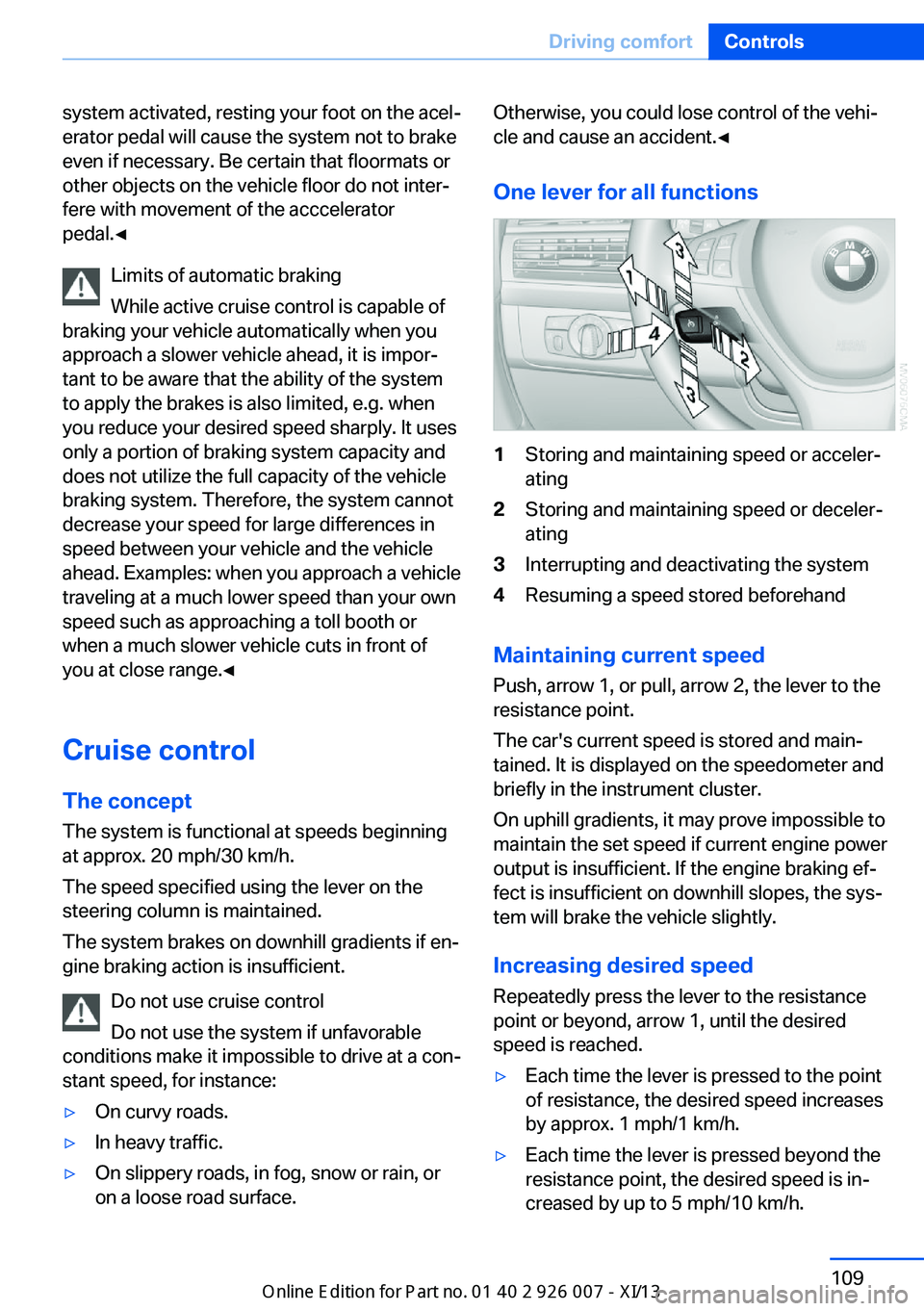
One lever for all functions1Storing and maintaining speed or acceler‐
ating2Storing and maintaining speed or deceler‐
ating3Interrupting and deactivating the system4Resuming a speed stored beforehand
Maintaining current speed
Push, arrow 1, or pull, arrow 2, the lever to the
resistance point.
The car's current speed is stored and main‐ tained. It is displayed on the speedometer and
briefly in the instrument cluster.
On uphill gradients, it may prove impossible to
maintain the set speed if current engine power
output is insufficient. If the engine braking ef‐
fect is insufficient on downhill slopes, the sys‐
tem will brake the vehicle slightly.
Increasing desired speed
Repeatedly press the lever to the resistance
point or beyond, arrow 1, until the desired
speed is reached.
▷Each time the lever is pressed to the point
of resistance, the desired speed increases
by approx. 1 mph/1 km/h.▷Each time the lever is pressed beyond the
resistance point, the desired speed is in‐
creased by up to 5 mph/10 km/h.Seite 109Driving comfortControls109
Online Edition for Part no. 01 40 2 910 876 - VII/13
Page 114 of 327
The system stores and maintains the speed.
Accelerating using the lever Accelerating slightly:
Press the lever to the resistance point, arrow 1,
until the desired speed is reached.
Accelerating significantly:
Press the lever beyond the resistance point,
arrow 1, until the desired speed is reached.
The vehicle accelerates without pressure on
the accelerator pedal. The system stores and
maintains the speed.
Decreasing speed
Repeatedly pull the lever to the resistance
point or beyond, arrow 2, until the desired
speed is displayed.▷Each time the lever is pulled to the resist‐
ance point, the desired speed is decreased
by approx. 1 mph/1 km/h.▷Each time the lever is pulled beyond the
resistance point, the desired speed is re‐
duced by up to 5 mph/10 km/h until the
minimum speed of 20 mph/30 km/h is ach‐
ieved.
The system stores and maintains the speed.
Interrupting the system
Press the lever up or down, arrow 3: dis‐
play 1 in the speedometer changes color, refer
to page 110.
In addition, the system is interrupted:
▷When the brakes are applied.▷When the transmission position D is disen‐
gaged.▷When DTC is activated or DSC is deacti‐
vated.▷When DSC or ABS is intervening.
Warning lamp
The warning lamp lights up if cruise
control has been deactivated auto‐
matically, e.g., by a control intervention of the
DSC. A message appears on the Control Dis‐
play.
Resuming cruising speed
Press button 4:
The stored speed is resumed and maintained.
Deactivating the system▷Press the lever upward or downward twice,
arrow 3.▷Switch off the ignition.
The stored speed is cleared.
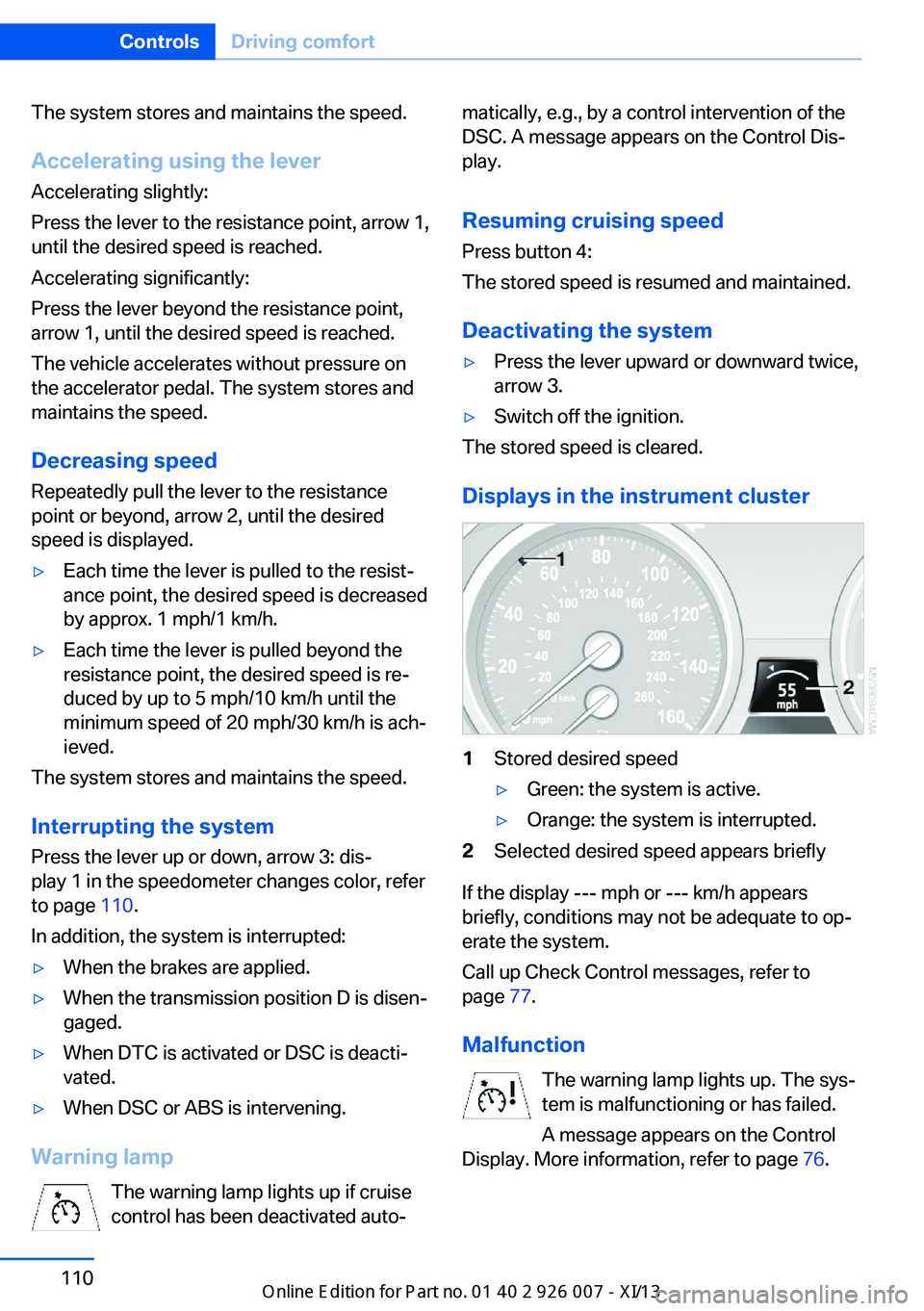
Displays in the instrument cluster
1Stored desired speed▷Green: the system is active.▷Orange: the system is interrupted.2Selected desired speed appears briefly
If the display --- mph or --- km/h appears
briefly, conditions may not be adequate to op‐
erate the system.
Call up Check Control messages, refer to
page 77.
Malfunction The warning lamp lights up. The sys‐
tem is malfunctioning or has failed.
A message appears on the Control
Display. More information, refer to page 76.
Seite 110ControlsDriving comfort110
Online Edition for Part no. 01 40 2 910 876 - VII/13
Page 150 of 327
Things to remember when drivingVehicle equipment
This chapter describes all series equipment as
well as country-specific and special equipment
offered for this model series.Therefore, it also
describes equipment that may not be found in
your vehicle, for instance due to the selected
special equipment or the country version. This
also applies to safety-related functions and
systems.
Breaking-in period
General information Moving parts need to be broken in to adjust to
each other.
The following instructions will help achieve a
long vehicle life and good economy.
Engine and differential Always obey all official speed limits.
Up to 1,200 miles/2,000 km
Do not exceed the maximum engine and road
speeds:▷4,500 rpm and 100 mph/160 km/h.
Avoid full-throttle operation and use of the
transmission's kickdown mode for the initial
miles.
From 1,200 miles/2,000 km The engine and vehicle speed can gradually be
increased.
Tires
Due to technical factors associated with their
manufacture, tires do not achieve their full
traction potential until after an initial breaking-
in period.
Drive conservatively for the first
200 miles/300 km.
Brake system
Brakes require an initial break-in period of ap‐
prox. 300 miles/500 km to achieve optimized
contact and wear patterns between brake pads and discs. Drive cautiously during this break-in
period.
Following part replacement
The same breaking in procedures should be
observed if any of the components mentioned
above have to be renewed in the course of the
vehicle's operating life.
General driving notes
Closing tailgate Drive with the tailgate closed
Only drive with the tailgate closed; other‐
wise, passengers and other road users may be endangered or the vehicle may be damaged if
an accident occurs or during braking or evasive
maneuvers. In addition, exhaust fumes may enter the passenger compartment.◀
If, despite this, the vehicle must be driven with
the tailgate open:▷Drive moderately.▷Close all windows and the glass sunroof.▷Greatly increase the blower speed.
Hot exhaust system
Hot exhaust system
High temperatures are generated in the
exhaust system.
Seite 146Driving tipsThings to remember when driving146
Online Edition for Part no. 01 40 2 910 876 - VII/13
Page 151 of 327
Do not remove the heat shields installed and
never apply undercoating to them. Make sure
that flammable materials, e. g. hay, leaves,
grass, etc. do not come in contact with the hot
exhaust system during driving, while in idle po‐
sition mode, or when parked. Such contact
could lead to a fire, and with it the risk of seri‐
ous personal injury as well as property dam‐
age.
Do not touch hot exhaust pipes; otherwise,
there is the danger of getting burned.◀
Mobile communication devices in the
vehicle
Mobile communication devices in the ve‐
hicle
It is not recommended to use mobile phones,
such as mobile phones without a direct con‐
nection to an external aerial in the vehicle's
passenger compartment. Otherwise, the vehi‐
cle electronics and mobile communication de‐ vices can interfere with each other. In addition,
there is no assurance that the radiation gener‐
ated during transmission will be discharged
from the vehicle interior.◀
Hydroplaning On wet or slushy roads, a wedge of water can
form between the tires and road surface.
This phenomenon is referred to as hydroplan‐
ing. It is characterized by a partial or complete loss of contact between the tires and the road
surface, ultimately undermining your ability to
steer and brake the vehicle.
Hydroplaning
When driving on wet or slushy roads, re‐
duce your speed to prevent hydroplaning.◀
The risk of hydroplaning increases as the tire
tread depth decreases. Minimum tread depth,
refer to page 266.
Driving through water
Maximum water height: 17 inches/45 cm.Adhere to water depth and speed limita‐
tions
Do not exceed this water depth and walking
speed; otherwise, the vehicle's engine, the
electrical systems and the transmission may
be damaged.◀
Braking safely
Your vehicle is equipped with ABS as a stand‐ ard feature.
Applying the brakes fully is the most effective
way of braking in situations when this is neces‐
sary.
The vehicle maintains steering responsive‐
ness. You can still avoid any obstacles with a
minimum of steering effort.
Pulsation of the brake pedal and sounds from
the hydraulic circuits indicate that ABS is in its
active mode.
Do not let your foot rest on the brake
pedal
Do not drive with your foot resting on the brake
pedal. Even light but consistent pedal pressure
can lead to high temperatures, brake wear and
possibly even brake failure.◀
Objects in the area around the pedals No objects in the area around the pedals
Keep floor mats, carpets, and any other
objects out of the area of motion of the pedals;
otherwise, the function of the pedals could be
impeded while driving
Do not place additional floor mats over existing
mats or other objects.
Only use floor mats that have been approved
for the vehicle and can be properly fixed in
place.
Ensure that the floor mats are securely fas‐
tened again when they are returned after being
removed, such as for cleaning.◀Seite 147Things to remember when drivingDriving tips147
Online Edition for Part no. 01 40 2 910 876 - VII/13
Page 196 of 327
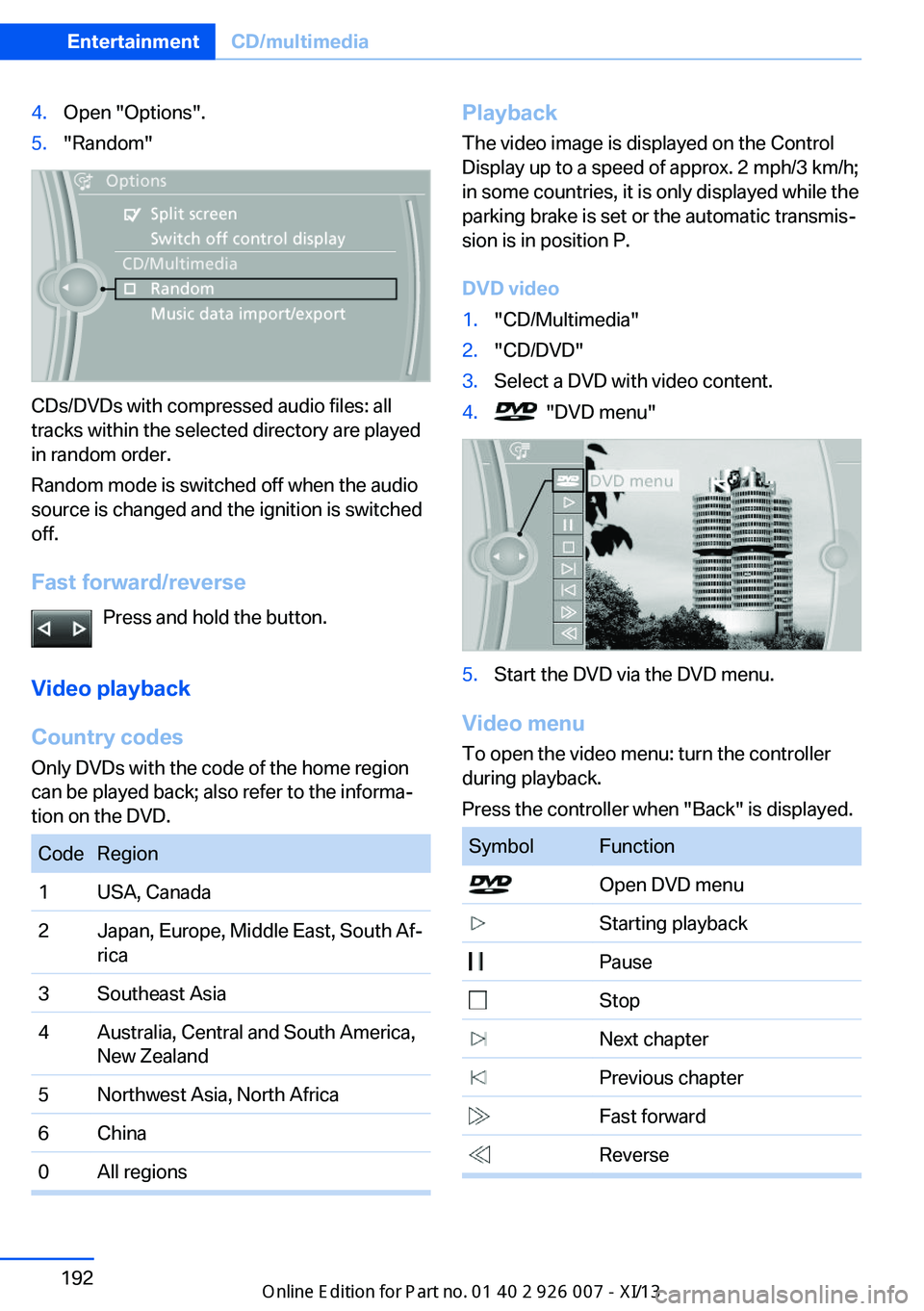
4.Open "Options".5."Random"
CDs/DVDs with compressed audio files: all
tracks within the selected directory are played
in random order.
Random mode is switched off when the audio
source is changed and the ignition is switched
off.
Fast forward/reverse Press and hold the button.
Video playback
Country codes
Only DVDs with the code of the home region
can be played back; also refer to the informa‐
tion on the DVD.
CodeRegion1USA, Canada2Japan, Europe, Middle East, South Af‐
rica3Southeast Asia4Australia, Central and South America,
New Zealand5Northwest Asia, North Africa6China0All regionsPlayback
The video image is displayed on the Control
Display up to a speed of approx. 2 mph/3 km/h;
in some countries, it is only displayed while the
parking brake is set or the automatic transmis‐
sion is in position P.
DVD video1."CD/Multimedia"2."CD/DVD"3.Select a DVD with video content.4. "DVD menu"5.Start the DVD via the DVD menu.
Video menu
To open the video menu: turn the controller
during playback.
Press the controller when "Back" is displayed.
SymbolFunction Open DVD menu Starting playback Pause Stop Next chapter Previous chapter Fast forward ReverseSeite 192EntertainmentCD/multimedia192
Online Edition for Part no. 01 40 2 910 876 - VII/13