ignition BMW Z3 2002 User Guide
[x] Cancel search | Manufacturer: BMW, Model Year: 2002, Model line: Z3, Model: BMW Z3 2002Pages: 187, PDF Size: 2.73 MB
Page 54 of 187
54n
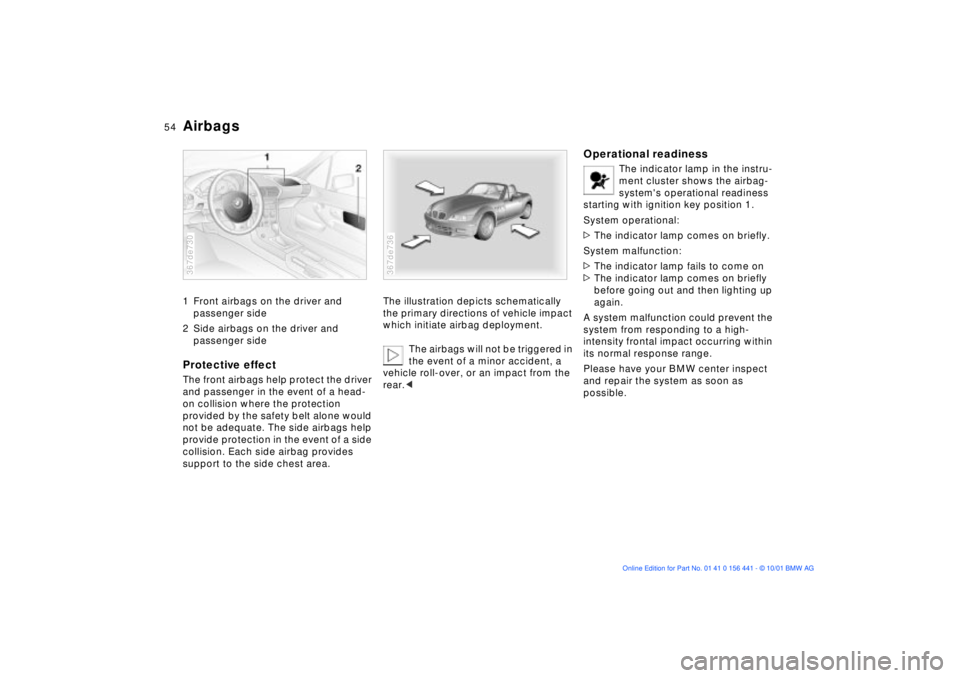
Airbags1 Front airbags on the driver and
passenger side
2 Side airbags on the driver and
passenger sideProtective effectThe front airbags help protect the driver
and passenger in the event of a head-
on collision where the protection
provided by the safety belt alone would
not be adequate. The side airbags help
provide protection in the event of a side
collision. Each side airbag provides
support to the side chest area.367de730
The illustration depicts schematically
the primary directions of vehicle impact
which initiate airbag deployment.
The airbags will not be triggered in
the event of a minor accident, a
vehicle roll-over, or an impact from the
rear.< 367de736
Operational readiness
The indicator lamp in the instru-
ment cluster shows the airbag-
system's operational readiness
starting with ignition key position 1.
System operational:
>The indicator lamp comes on briefly.
System malfunction:
>The indicator lamp fails to come on
>The indicator lamp comes on briefly
before going out and then lighting up
again.
A system malfunction could prevent the
system from responding to a high-
intensity frontal impact occurring within
its normal response range.
Please have your BMW center inspect
and repair the system as soon as
possible.
Page 55 of 187
55n
IndexDataTechnologyRepairsMaintenanceControlsOverview
AirbagsSitting correctly with airbags
For your safety, comply with the
following instructions for the
airbags. If you do not, the airbags may
not be able to provide their maximum
protection. All passengers in the vehicle
should be aware of and comply with this
information:
The airbags are supplemental restraint
devices designed to provide extra
protection; they are not a substitute for
safety belts. Wear your safety belt at
all times.
Adjust your seat to a position that is
comfortable for you, allowing unre-
stricted vehicle operation, and is not
closer to the steering wheel than neces-
sary.
Always grasp the steering wheel by the
steering wheel rim, keeping your hands
at the "9-o'clock" and "3-o'clock" posi-
tions in order to minimize any risk of
injury to hands or arms if the airbag does
deploy.
There should not be any other persons,
animals or objects between the airbag
and the passenger in that seat.
Do not use the cover panel for the front
airbag on the passenger side as a
storage area.
Do not apply adhesive materials to the
cover panels of the airbags, cover them
or modify them in any other way.
If you use a child-restraint system, read
carefully and comply with the instruc-
tions on page 56.
Be sure that child-restraint systems are
installed correctly and with the greatest
possible distance from the airbag in the
side trim panel. Do not allow children to
lean out of the child-restraint system in
the direction of the side trim panel.
Otherwise, serious injuries could occur
if the airbag is triggered.<
Even when you have complied with all
of these guidelines, there is still a small
residual risk of minor facial, hand and
arm injuries from airbag deployment
occurring in isolated instances.
The ignition and inflation noise may
cause a mild temporary hearing loss in
extremely sensitive individuals.
Corresponding airbag safety precau-
tions are provided on both sun visors
and the instrument panel (US models).
For additional information concerning
the airbag system, refer to pages 130
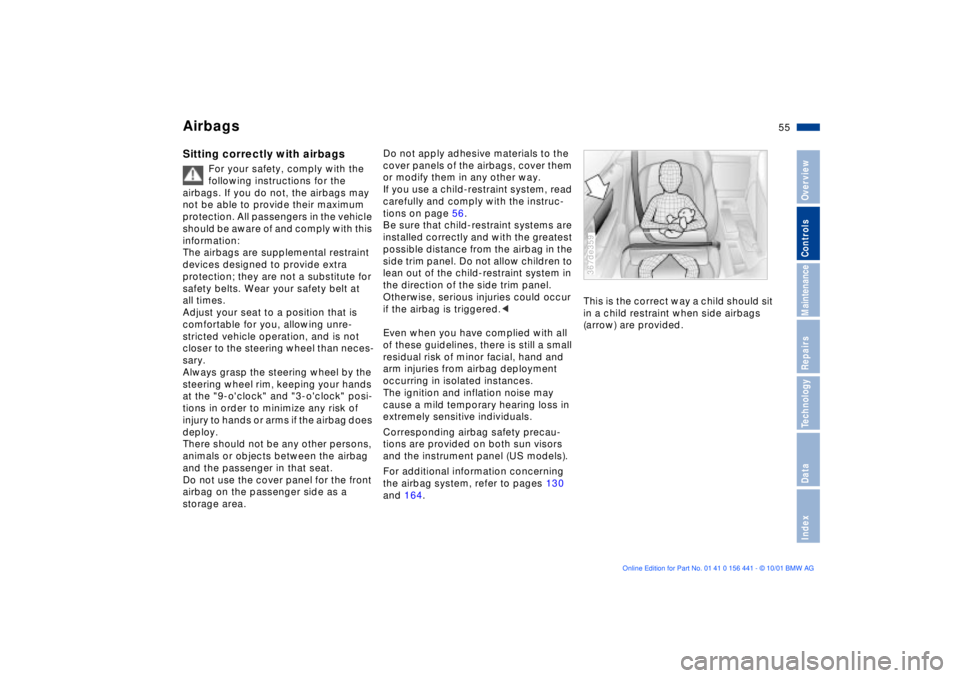
and 164.This is the correct way a child should sit
in a child restraint when side airbags
(arrow) are provided.
367de359
Page 58 of 187
58n
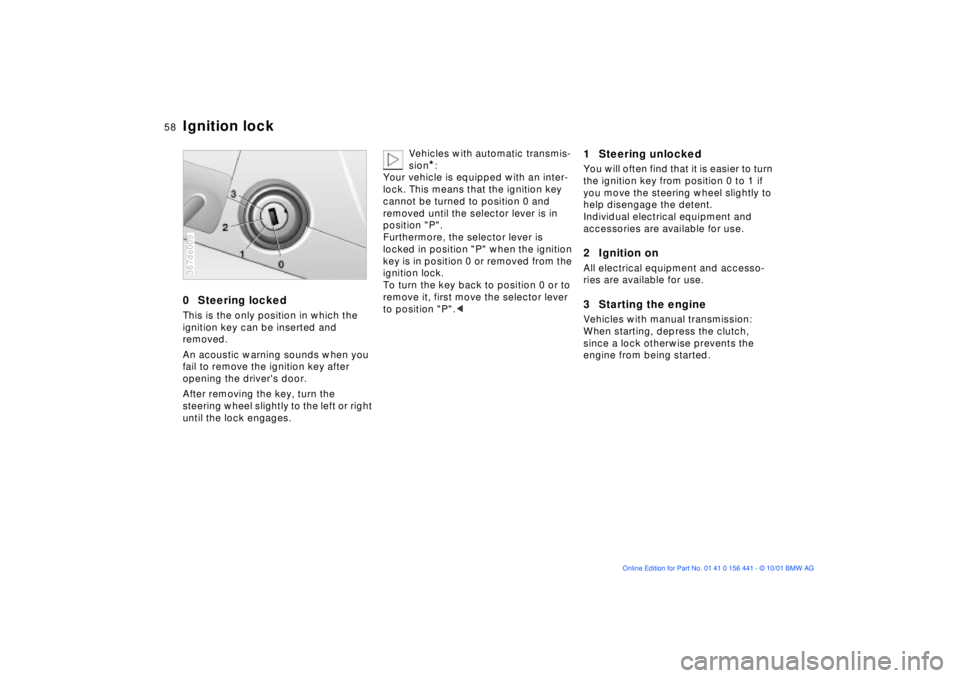
0 Steering lockedThis is the only position in which the
ignition key can be inserted and
removed.
An acoustic warning sounds when you
fail to remove the ignition key after
opening the driver's door.
After removing the key, turn the
steering wheel slightly to the left or right
until the lock engages.367de009
Vehicles with automatic transmis-
sion
*:
Your vehicle is equipped with an inter-
lock. This means that the ignition key
cannot be turned to position 0 and
removed until the selector lever is in
position "P".
Furthermore, the selector lever is
locked in position "P" when the ignition
key is in position 0 or removed from the
ignition lock.
To turn the key back to position 0 or to
remove it, first move the selector lever
to position "P".<
1 Steering unlockedYou will often find that it is easier to turn
the ignition key from position 0 to 1 if
you move the steering wheel slightly to
help disengage the detent.
Individual electrical equipment and
accessories are available for use.2 Ignition onAll electrical equipment and accesso-
ries are available for use.3 Starting the engineVehicles with manual transmission:
When starting, depress the clutch,
since a lock otherwise prevents the
engine from being started.
Ignition lock
Page 59 of 187
59n
IndexDataTechnologyRepairsMaintenanceControlsOverview
Starting the engineBefore starting>Engage the parking brake
>Be sure that the gearshift lever is in
"Neutral" (or the selector lever in "P"
if the vehicle is equipped with auto-
matic transmission)
>Depress the clutch pedal.
Do not run the engine in enclosed
spaces. The exhaust gases
contain carbon monoxide, an odorless
and colorless, but highly toxic gas.
Breathing the exhaust gases poses an
extreme health risk, and can lead to
unconsciousness and death.
Do not leave the vehicle unattended
with the engine running. An unattended
vehicle with a running engine repre-
sents a potential safety hazard.<
Starting the engine>Do not press the accelerator pedal
while starting the engine.
Do not actuate the starter for too
short a time. Do not turn it for
more than approx. 20 seconds. Release
the ignition key immediately after the
engine starts.
Do not allow the engine to warm up
by leaving it running while the vehicle
remains stationary. Instead, begin to
drive immediately at a moderate engine
speed.<
Should the engine fail to start on the
first attempt (if it is very hot or cold, for
instance):
>Press the accelerator pedal halfway
down while engaging the starter.
Cold starts at very low temperatures,
from approx. +5 7 (Ð15 6) and at
altitudes above approx. 3,300 ft
(1,000 m):
>On the first start attempt, engage the
starter for a longer period (approx.
10 seconds).
If these temperature conditions are
anticipated for a longer period, have the
engine oil changed to a special oil, refer
to page 124. Please contact your BMW
center for additional information.
Usually, it is not necessary to depress
the accelerator pedal. However, at high
altitudes or in very hot or very cold
weather, depress the pedal halfway
down when starting the engine.
Engine idle speed is controlled by the
engine computer system. Increased
speeds at start-up are normal and
should decrease as the engine warms
up. If engine speed does not decrease,
service is required.
To prevent the battery from
discharging, always switch off any
accessories which are not required.
Switch off the ignition when the vehicle
is not being driven.
Page 60 of 187
60n
Switching off the engine Parking brakeTurn the ignition key to position 1 or 0.
Do not remove the ignition key
while the vehicle is rolling. The
steering locks and it is impossible to
steer the vehicle.
Always remove the ignition key and
engage the steering lock before leaving
the vehicle.
Vehicles with manual transmission:
Always engage the parking brake when
parking on slopes and inclined
surfaces, since even placing the gear-
shift lever in 1st gear or reverse may not
provide adequate resistance to rolling.
Vehicles with automatic transmission:
Place the selector lever in "P".<
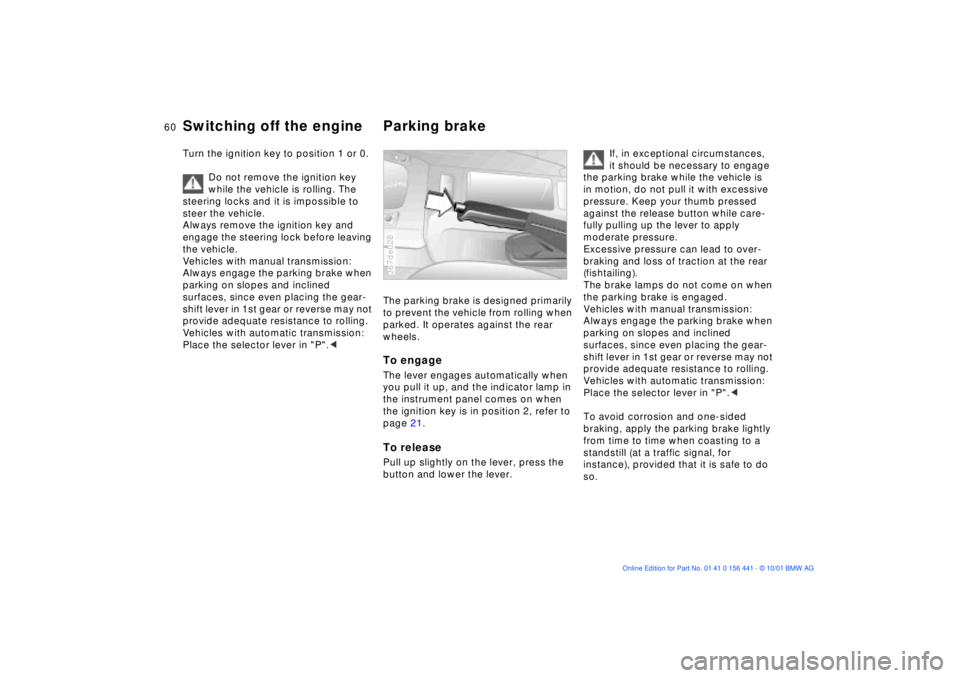
The parking brake is designed primarily
to prevent the vehicle from rolling when
parked. It operates against the rear
wheels.To engageThe lever engages automatically when
you pull it up, and the indicator lamp in
the instrument panel comes on when
the ignition key is in position 2, refer to
page 21.To releasePull up slightly on the lever, press the
button and lower the lever.367de028
If, in exceptional circumstances,
it should be necessary to engage
the parking brake while the vehicle is
in motion, do not pull it with excessive
pressure. Keep your thumb pressed
against the release button while care-
fully pulling up the lever to apply
moderate pressure.
Excessive pressure can lead to over-
braking and loss of traction at the rear
(fishtailing).
The brake lamps do not come on when
the parking brake is engaged.
Vehicles with manual transmission:
Always engage the parking brake when
parking on slopes and inclined
surfaces, since even placing the gear-
shift lever in 1st gear or reverse may not
provide adequate resistance to rolling.
Vehicles with automatic transmission:
Place the selector lever in "P".<
To avoid corrosion and one-sided
braking, apply the parking brake lightly
from time to time when coasting to a
standstill (at a traffic signal, for
instance), provided that it is safe to do
so.
Page 61 of 187
61n
IndexDataTechnologyRepairsMaintenanceControlsOverview
Manual transmissionPress the clutch pedal all the way down
each time you shift, pressing the gear-
shift lever into its proper end position.
Depress the clutch when starting the
vehicle, too, otherwise, lockout will
prevent the engine from starting.
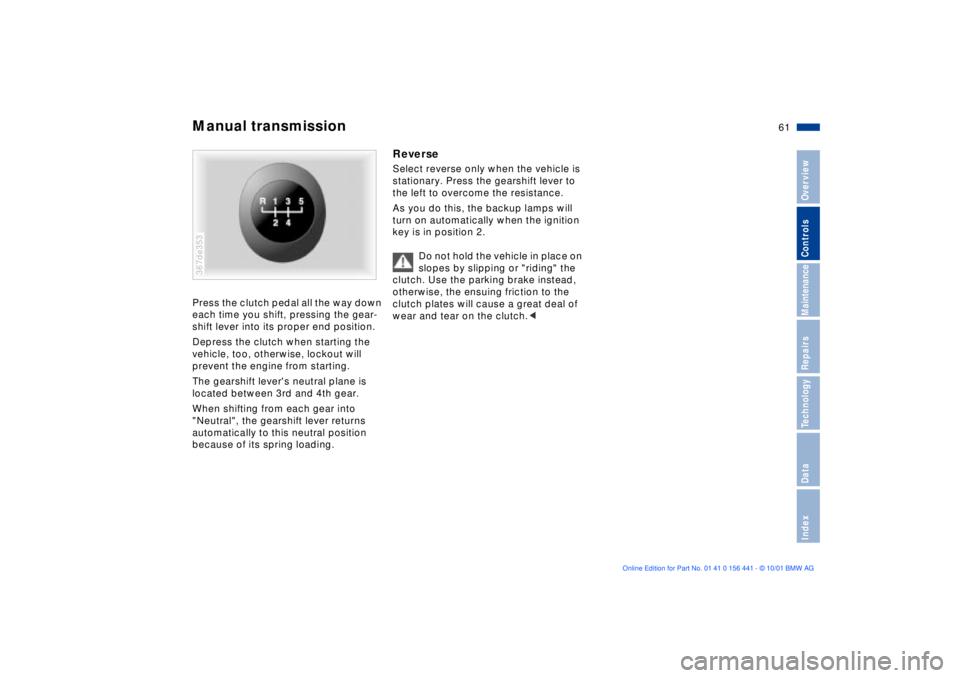
The gearshift lever's neutral plane is
located between 3rd and 4th gear.
When shifting from each gear into
"Neutral", the gearshift lever returns
automatically to this neutral position
because of its spring loading.367de353
ReverseSelect reverse only when the vehicle is
stationary. Press the gearshift lever to
the left to overcome the resistance.
As you do this, the backup lamps will
turn on automatically when the ignition
key is in position 2.
Do not hold the vehicle in place on
slopes by slipping or "riding" the
clutch. Use the parking brake instead,
otherwise, the ensuing friction to the
clutch plates will cause a great deal of
wear and tear on the clutch.<
Page 65 of 187
65n
IndexDataTechnologyRepairsMaintenanceControlsOverview
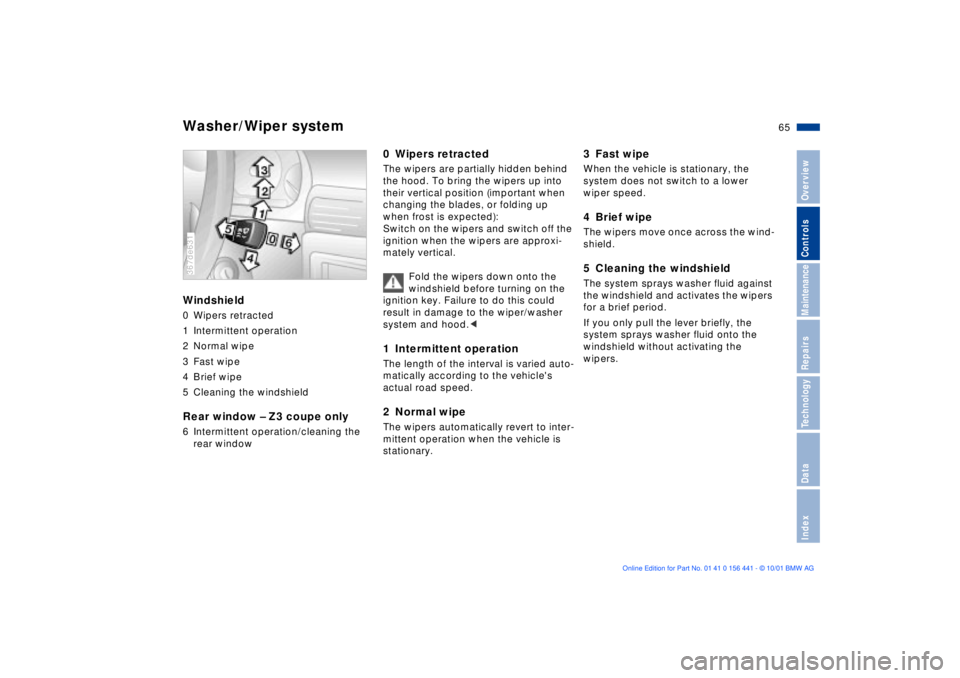
Washer/Wiper systemWindshield0 Wipers retracted
1 Intermittent operation
2 Normal wipe
3 Fast wipe
4 Brief wipe
5 Cleaning the windshieldRear window Ð Z3 coupe only6 Intermittent operation/cleaning the
rear window367de631
0 Wipers retractedThe wipers are partially hidden behind
the hood. To bring the wipers up into
their vertical position (important when
changing the blades, or folding up
when frost is expected):
Switch on the wipers and switch off the
ignition when the wipers are approxi-
mately vertical.
Fold the wipers down onto the
windshield before turning on the
ignition key. Failure to do this could
result in damage to the wiper/washer
system and hood.< 1 Intermittent operationThe length of the interval is varied auto-
matically according to the vehicle's
actual road speed.2 Normal wipeThe wipers automatically revert to inter-
mittent operation when the vehicle is
stationary.
3 Fast wipeWhen the vehicle is stationary, the
system does not switch to a lower
wiper speed.4 Brief wipeThe wipers move once across the wind-
shield.5 Cleaning the windshieldThe system sprays washer fluid against
the windshield and activates the wipers
for a brief period.
If you only pull the lever briefly, the
system sprays washer fluid onto the
windshield without activating the
wipers.
Page 66 of 187
66n
Washer/Wiper system Rear window defroster6 Intermittent operation/
Cleaning the rear windowPress the lever briefly:
The intermittent setting of the rear
window wiper is switched on or off.
Press and hold the lever:
The system sprays washer fluid against
the rear window and activates the
wiper. After the lever is released, the
wiper continues to cycle for a few
seconds.
To change the wiper blades, refer to
page 136.
Cleaning the headlamps*If the headlamps are on, they will also
be cleaned every fifth time you activate
the cleaning the windshield 5 mode.
Do not use the washers if there is
any danger that the fluid will freeze
on the windshield, otherwise vision
could be obscured. For this reason, use
an antifreeze agent, refer to page 122.
Do not use the washers when the reser-
voir is empty, otherwise damage to the
washer pump could result.< Windshield washer nozzlesThe windshield washer nozzles are
heated automatically
* when the ignition
key is in position 2.
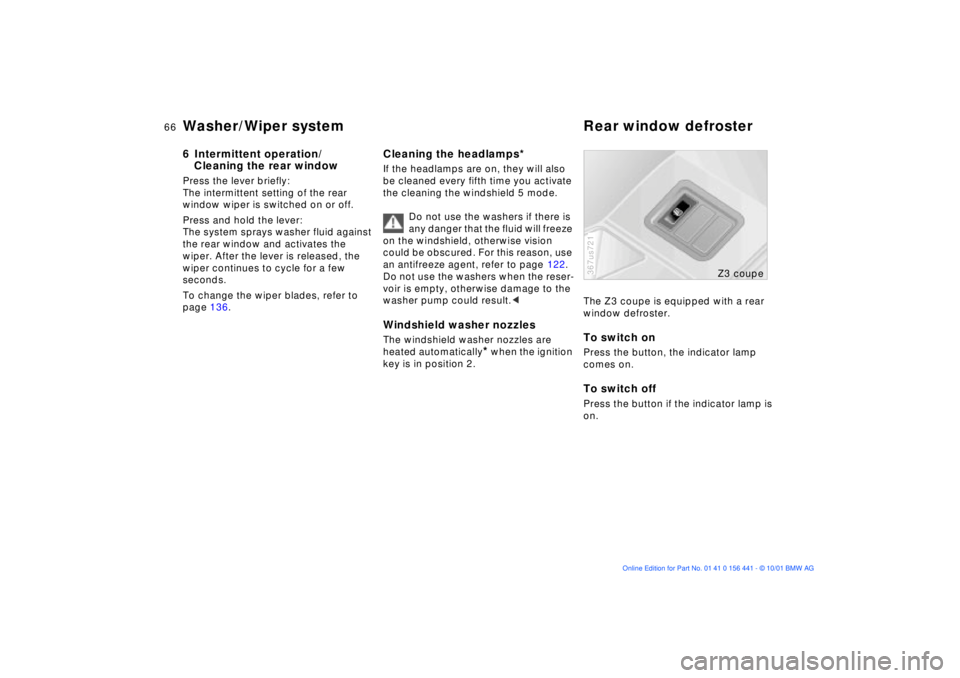
The Z3 coupe is equipped with a rear
window defroster.To switch onPress the button, the indicator lamp
comes on.To switch offPress the button if the indicator lamp is
on.367us721
Z3 coupe
Page 67 of 187
67n
IndexDataTechnologyRepairsMaintenanceControlsOverview
Cruise control
*
You can maintain and store any desired
vehicle speed above approx. 25 mph
(40 km/h).
The system is switched off and the
stored speed deleted from its memory
when you turn the ignition key to posi-
tion 0.
Do not use the cruise control on
winding roads, when high traffic
density prevents driving at a constant
speed, when the road surface is slick
(snow, rain, ice) or when the road
surface is loose (rocks or gravel,
sand).< 365us059
To maintain and store speed/
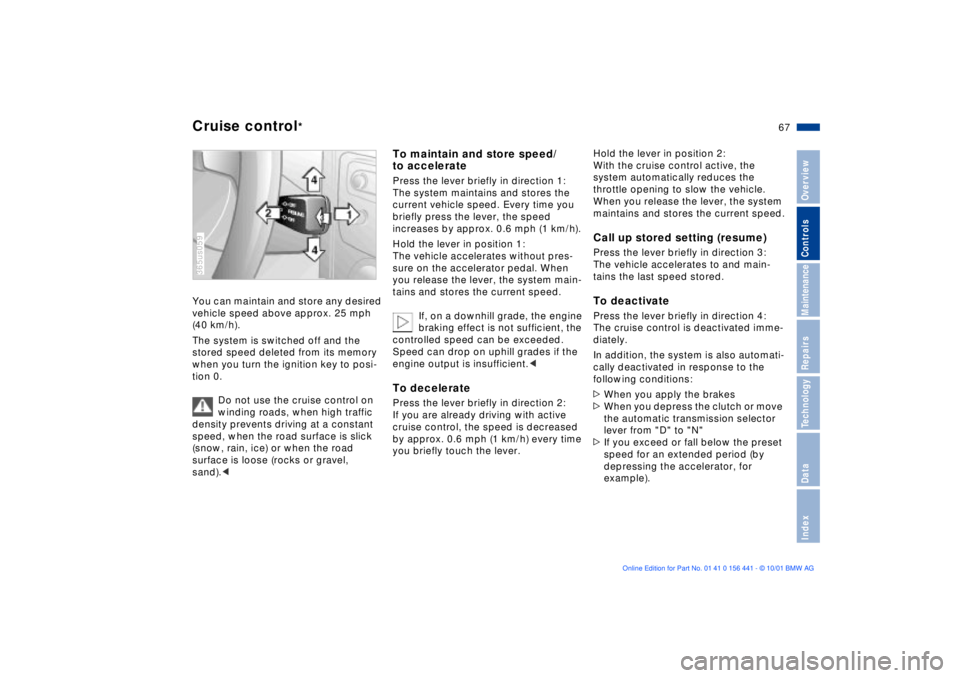
to acceleratePress the lever briefly in direction 1:
The system maintains and stores the
current vehicle speed. Every time you
briefly press the lever, the speed
increases by approx. 0.6 mph (1 km/h).
Hold the lever in position 1:
The vehicle accelerates without pres-
sure on the accelerator pedal. When
you release the lever, the system main-
tains and stores the current speed.
If, on a downhill grade, the engine
braking effect is not sufficient, the
controlled speed can be exceeded.
Speed can drop on uphill grades if the
engine output is insufficient.< To deceleratePress the lever briefly in direction 2:
If you are already driving with active
cruise control, the speed is decreased
by approx. 0.6 mph (1 km/h) every time
you briefly touch the lever.
Hold the lever in position 2:
With the cruise control active, the
system automatically reduces the
throttle opening to slow the vehicle.
When you release the lever, the system
maintains and stores the current speed.Call up stored setting (resume)Press the lever briefly in direction 3:
The vehicle accelerates to and main-
tains the last speed stored.To deactivatePress the lever briefly in direction 4:
The cruise control is deactivated imme-
diately.
In addition, the system is also automati-
cally deactivated in response to the
following conditions:
>When you apply the brakes
>When you depress the clutch or move
the automatic transmission selector
lever from "D" to "N"
>If you exceed or fall below the preset
speed for an extended period (by
depressing the accelerator, for
example).
Page 68 of 187
68n
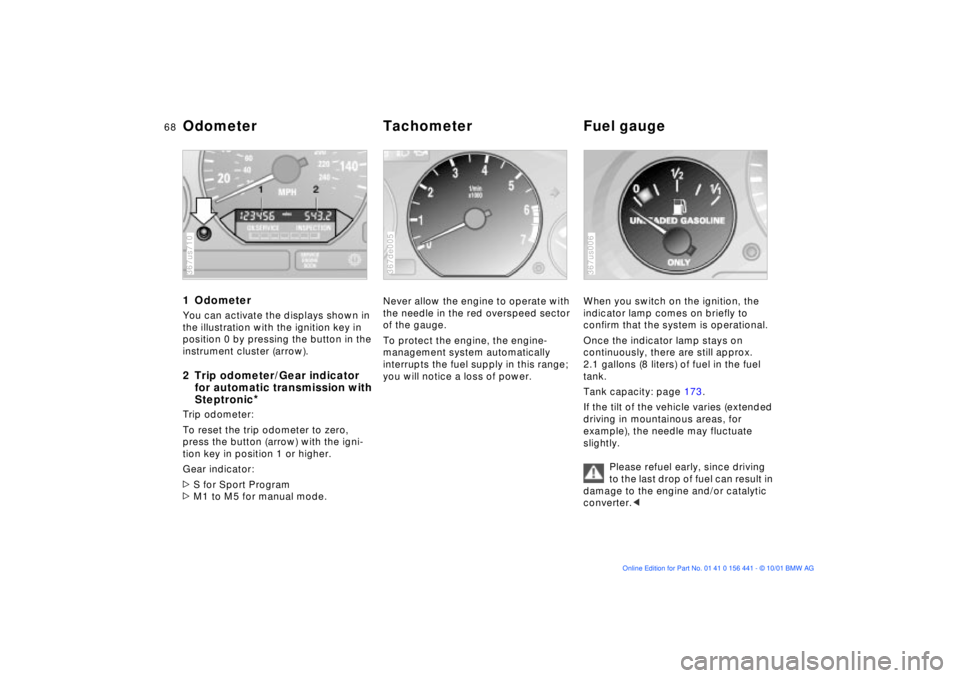
1 OdometerYou can activate the displays shown in
the illustration with the ignition key in
position 0 by pressing the button in the
instrument cluster (arrow).2 Trip odometer/Gear indicator
for automatic transmission with
Steptronic
*
Trip odometer:
To reset the trip odometer to zero,
press the button (arrow) with the igni-
tion key in position 1 or higher.
Gear indicator:
>S for Sport Program
>M1 to M5 for manual mode.367us710
Never allow the engine to operate with
the needle in the red overspeed sector
of the gauge.
To protect the engine, the engine-
management system automatically
interrupts the fuel supply in this range;
you will notice a loss of power.367de005
When you switch on the ignition, the
indicator lamp comes on briefly to
confirm that the system is operational.
Once the indicator lamp stays on
continuously, there are still approx.
2.1 gallons (8 liters) of fuel in the fuel
tank.
Tank capacity: page 173.
If the tilt of the vehicle varies (extended
driving in mountainous areas, for
example), the needle may fluctuate
slightly.
Please refuel early, since driving
to the last drop of fuel can result in
damage to the engine and/or catalytic
converter.< 367us006
Odometer Tachometer Fuel gauge