lock BMW Z4 2.5I 2004 Owner's Manual
[x] Cancel search | Manufacturer: BMW, Model Year: 2004, Model line: Z4 2.5I, Model: BMW Z4 2.5I 2004Pages: 120, PDF Size: 3.44 MB
Page 38 of 120
Driving
36
Driving
Ignition lock
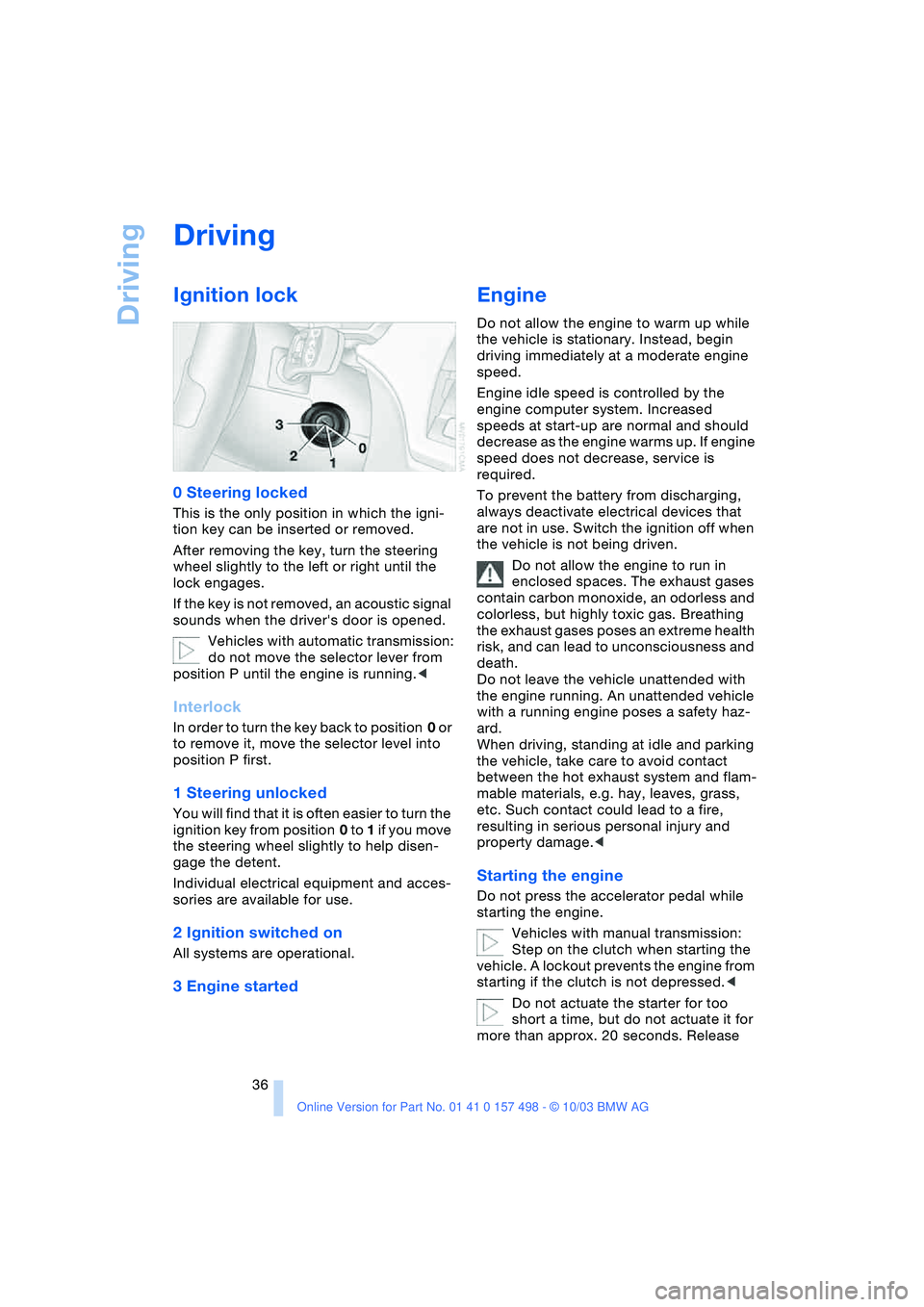
0 Steering locked
This is the only position in which the igni-
tion key can be inserted or removed.
After removing the key, turn the steering
wheel slightly to the left or right until the
lock engages.
If the key is not removed, an acoustic signal
sounds when the driver's door is opened.
Vehicles with automatic transmission:
do not move the selector lever from
position P until the engine is running.<
Interlock
In order to turn the key back to position 0 or
to remove it, move the selector level into
position P first.
1 Steering unlocked
You will find that it is often easier to turn the
ignition key from position 0 to 1 if you move
the steering wheel slightly to help disen-
gage the detent.
Individual electrical equipment and acces-
sories are available for use.
2 Ignition switched on
All systems are operational.
3 Engine started
Engine
Do not allow the engine to warm up while
the vehicle is stationary. Instead, begin
driving immediately at a moderate engine
speed.
Engine idle speed is controlled by the
engine computer system. Increased
speeds at start-up are normal and should
decrease as the engine warms up. If engine
speed does not decrease, service is
required.
To prevent the battery from discharging,
always deactivate electrical devices that
are not in use. Switch the ignition off when
the vehicle is not being driven.
Do not allow the engine to run in
enclosed spaces. The exhaust gases
contain carbon monoxide, an odorless and
colorless, but highly toxic gas. Breathing
the exhaust gases poses an extreme health
risk, and can lead to unconsciousness and
death.
Do not leave the vehicle unattended with
the engine running. An unattended vehicle
with a running engine poses a safety haz-
ard.
When driving, standing at idle and parking
the vehicle, take care to avoid contact
between the hot exhaust system and flam-
mable materials, e.g. hay, leaves, grass,
etc. Such contact could lead to a fire,
resulting in serious personal injury and
property damage.<
Starting the engine
Do not press the accelerator pedal while
starting the engine.
Vehicles with manual transmission:
Step on the clutch when starting the
vehicle. A lockout prevents the engine from
starting if the clutch is not depressed.<
Do not actuate the starter for too
short a time, but do not actuate it for
more than approx. 20 seconds. Release
Page 39 of 120
Reference
At a glance
Controls
Driving tips
Mobility
37
the ignition key immediately when the
engine starts.<
Extended starting attempts, charac-
terized by excessively frequent or
long periods with the starter engaged, can
damage the catalytic converter.<
If the engine fails to start on the first
attempt, for instance if it is very hot or cold:
>Press the accelerator pedal halfway
down.
Cold starts at very low temperatures, start-
ing at approx. 57/–156:
>Press the accelerator pedal halfway
down.
>On the first start attempt, engage the
starter for a longer period, approx.
10 seconds.
Manual transmission
1.Engage the parking brake
2.Gearshift lever in idling position
3.Depress clutch pedal
4.Start the engine.
Automatic transmission
1.Depress footbrake
2.Place selector lever in position P or N
3.Start the engine.
Before leaving the vehicle with the
engine running, place the selector
lever in position P and pull the parking
brake.
Do not leave the vehicle unattended with
the engine running. An unattended vehicle
with a running engine poses a safety haz-
ard.<
Sequential manual gearbox SMG
1.Depress footbrake
2.Move selector lever to neutral
position N
3.Start the engine.
If the engine does not start, re-
engage the gear last selected, refer to
the display in the instrument cluster, and move the selector lever to neutral position
N again.<
Before leaving the vehicle with the
engine running, place the selector
lever in position N and pull the parking
brake.
Do not leave the vehicle unattended with
the engine running. An unattended vehicle
with a running engine poses a safety haz-
ard.<
Switching off the engine
Do not remove the ignition key while
the vehicle is still moving. If you did
so, the steering lock would engage when
the steering wheel is turned.
When you leave the vehicle, always remove
the ignition key and engage the steering
lock.
Always engage the parking brake when
parking on downhill roads.<
You can have an acoustic signal set
as a reminder that the ignition key is
still in the ignition switch after the driver's
door has been opened.<
Manual transmission
Turn the ignition key to position 1 or 0.
Automatic transmission
Place the selector lever in position P and
turn the ignition key to position 1 or 0.
Sequential manual gearbox SMG
If you turn the ignition key to position 1 or 0
with the selector lever in position R, or in
sequential mode, a gear automatically
remains engaged.
If you turn the ignition key to position 1 or 0
with the selector lever in neutral position N,
a warning tone and the flashing gear indi-
cator in the display remind you that the
vehicle is not secured against rolling.
The warning stops after approx. 9 seconds.
Always engage the parking brake
when parking on downhill roads.
Engaging a gear may not sufficiently secure
the vehicle against rolling.<
Page 41 of 120
Reference
At a glance
Controls
Driving tips
Mobility
39
Automatic transmission
with Steptronic*
You can drive as with a normal automatic
transmission. In addition, you can also shift
manually.
When you move the selector lever from the
D position to the left into the M/S range, the
performance-oriented shift programs of the
automatic transmission are engaged. As
soon as you briefly tap the selector lever in
the + or — direction, Steptronic changes the
gear. The manual mode is engaged. When
you wish to use the automatic transmission
mode again, move the selector lever to the
right to position D.
Selector lever positions
P R N D M/S + —
Range selection
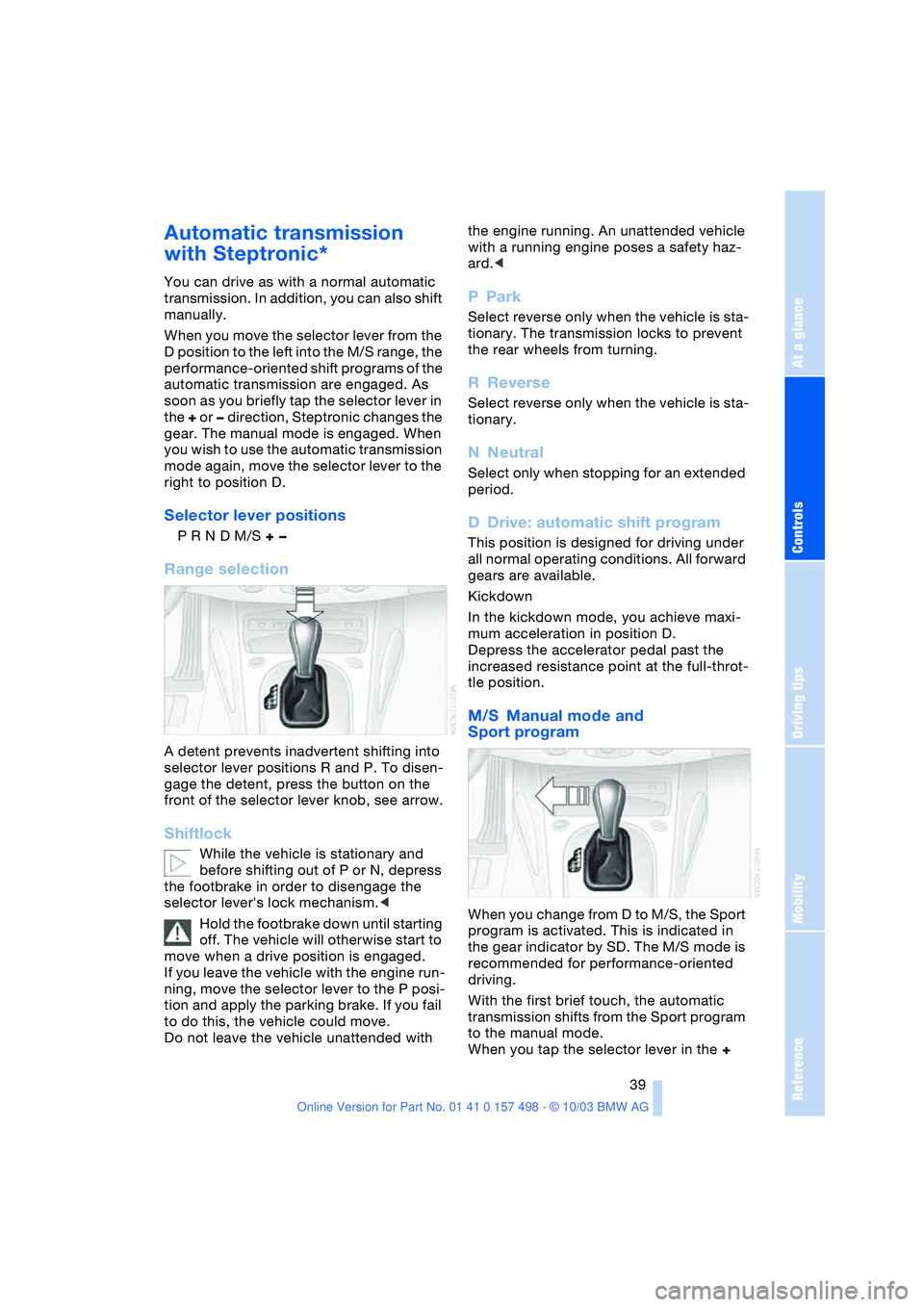
A detent prevents inadvertent shifting into
selector lever positions R and P. To disen-
gage the detent, press the button on the
front of the selector lever knob, see arrow.
Shiftlock
While the vehicle is stationary and
before shifting out of P or N, depress
the footbrake in order to disengage the
selector lever's lock mechanism.<
Hold the footbrake down until starting
off. The vehicle will otherwise start to
move when a drive position is engaged.
If you leave the vehicle with the engine run-
ning, move the selector lever to the P posi-
tion and apply the parking brake. If you fail
to do this, the vehicle could move.
Do not leave the vehicle unattended with the engine running. An unattended vehicle
with a running engine poses a safety haz-
ard.<
PPark
Select reverse only when the vehicle is sta-
tionary. The transmission locks to prevent
the rear wheels from turning.
RReverse
Select reverse only when the vehicle is sta-
tionary.
NNeutral
Select only when stopping for an extended
period.
DDrive: automatic shift program
This position is designed for driving under
all normal operating conditions. All forward
gears are available.
Kickdown
In the kickdown mode, you achieve maxi-
mum acceleration in position D.
Depress the accelerator pedal past the
increased resistance point at the full-throt-
tle position.
M/S Manual mode and
Sport program
When you change from D to M/S, the Sport
program is activated. This is indicated in
the gear indicator by SD. The M/S mode is
recommended for performance-oriented
driving.
With the first brief touch, the automatic
transmission shifts from the Sport program
to the manual mode.
When you tap the selector lever in the +
Page 43 of 120
Reference
At a glance
Controls
Driving tips
Mobility
41
Forward position with one-touch functions:
Sequential mode
+:manual upshifting
—:manual downshifting
D: drive mode.
The SMG is ready for operation in ignition
key positions 2 and 3.
The gearbox is automatically taken
out of gear if the driver's door is
opened while the engine is running and the
driver does not actuate the pedals, the shift
paddles or the selector lever.
This is accompanied by an acoustic signal
and the flashing gear indicator.
The gear indicator in the instrument cluster
displays N.
A driving position can only be engaged
when the driver's door is closed.
When the vehicle is unlocked, a buzzing
sound in the area of the transmission indi-
cates that the system is ready to operate.<
Shiftlock
For your safety, it is only possible to
engage a driving position from selector
lever position N when the footbrake is
depressed.
Please keep in mind while driving
When driving off on inclines, drive
smoothly without pausing. Do not
keep the vehicle in place by depressing the
accelerator pedal; instead, apply the park-
ing brake. Otherwise, the SMG gearbox
could overheat.<
RReverse
Select reverse only when the vehicle is sta-
tionary.
NNeutral
Always engage before starting the engine,
refer to Starting the engine.
Sequential mode
Each time the engine is started, the
sequential mode is activated as soon as you move the selector lever into the for-
ward driving position.
The gears are shifted via the shift paddles
or the selector lever.
It is also possible to drive off in second
gear, e.g. on snow-covered roads.
D Drive mode
In the drive mode all forward gears are
shifted automatically.
To switch from sequential to drive mode:
tap the selector lever to the right toward D.
For rapid acceleration, e.g. during passing,
depress the accelerator pedal completely:
kickdown.
Kickdown:
In the kickdown mode, you achieve maxi-
mum acceleration.
Depress the accelerator pedal past the
increased resistance point at the full-throt-
tle position.
To switch back to sequential mode: tap the
selector lever again to the right toward D,
or change the current gear via the shift
paddles or the selector lever.
Shifting gears
With selector lever
>To upshift, tap the selector lever
toward +
>To downshift, tap the lever toward —.
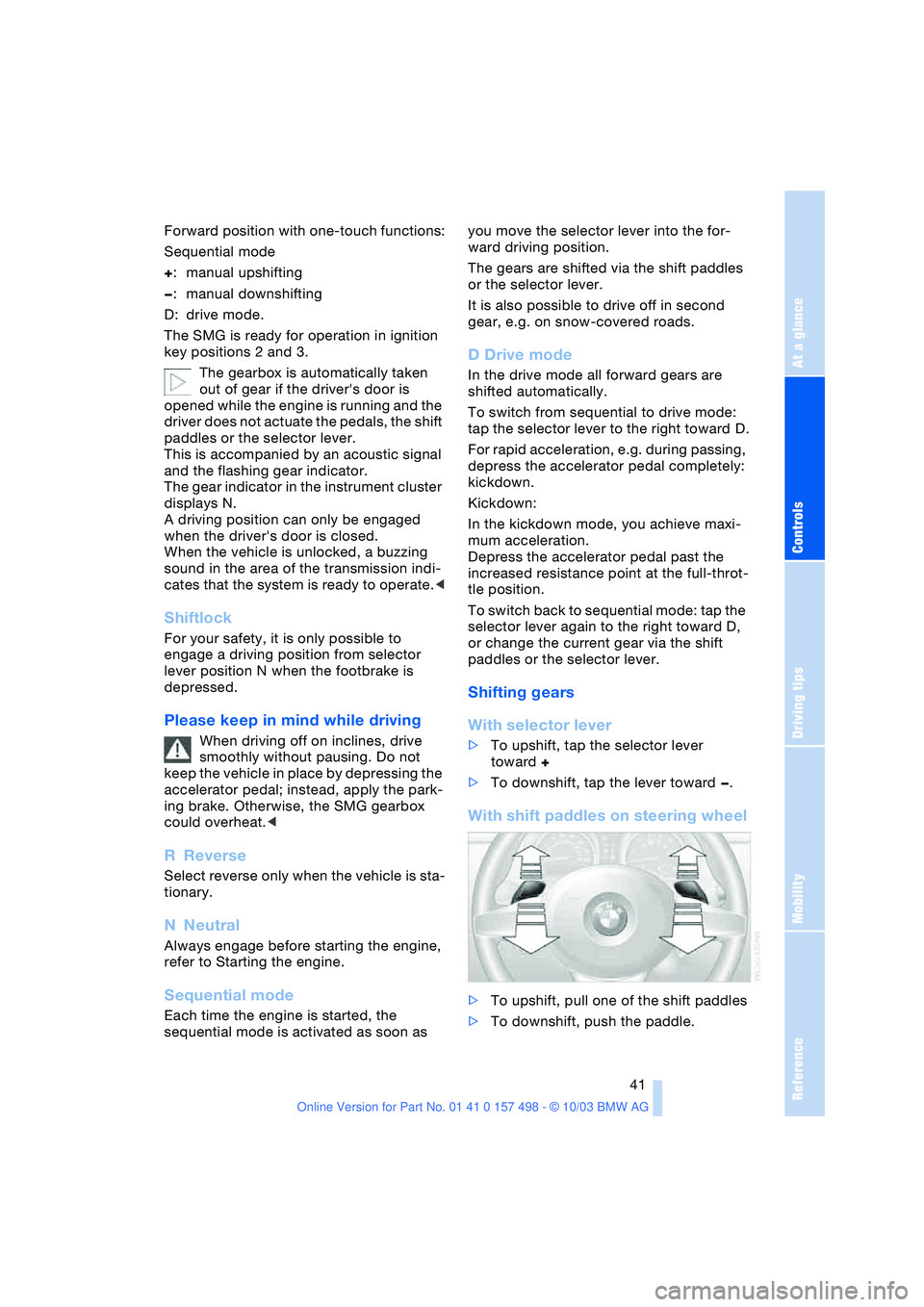
With shift paddles on steering wheel
>To upshift, pull one of the shift paddles
>To downshift, push the paddle.
Page 51 of 120
Reference
At a glance
Controls
Driving tips
Mobility
49
Between the blue and red zones
Normal operating range. The needle may
rise as far as the edge of the red sector dur-
ing normal operation.
Red
When you switch on the ignition, warning
lamp 1 comes on briefly to indicate an
operational check.
Comes on while driving:
The engine has overheated. Stop and
switch the engine off immediately and
allow it to cool down.
For checking the coolant level, refer to
page 84.
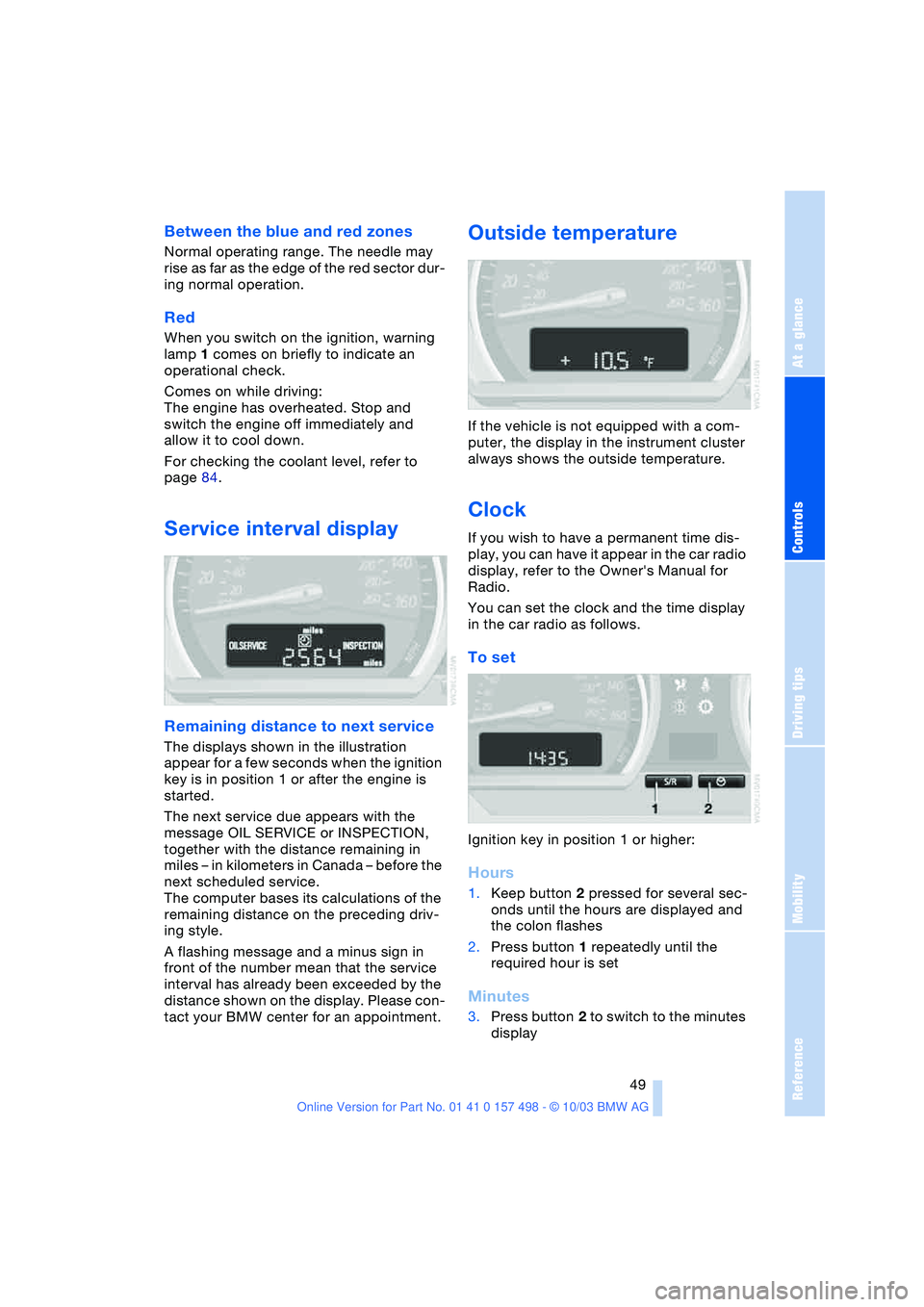
Service interval display
Remaining distance to next service
The displays shown in the illustration
appear for a few seconds when the ignition
key is in position 1 or after the engine is
started.
The next service due appears with the
message OIL SERVICE or INSPECTION,
together with the distance remaining in
miles – in kilometers in Canada – before the
next scheduled service.
The computer bases its calculations of the
remaining distance on the preceding driv-
ing style.
A flashing message and a minus sign in
front of the number mean that the service
interval has already been exceeded by the
distance shown on the display. Please con-
tact your BMW center for an appointment.
Outside temperature
If the vehicle is not equipped with a com-
puter, the display in the instrument cluster
always shows the outside temperature.
Clock
If you wish to have a permanent time dis-
play, you can have it appear in the car radio
display, refer to the Owner's Manual for
Radio.
You can set the clock and the time display
in the car radio as follows.
To set
Ignition key in position 1 or higher:
Hours
1.Keep button 2 pressed for several sec-
onds until the hours are displayed and
the colon flashes
2.Press button 1 repeatedly until the
required hour is set
Minutes
3.Press button 2 to switch to the minutes
display
Page 52 of 120
Everything under control
50 4.Press button 1 repeatedly until the
required minutes are set
5.Press button 2 to confirm the settings.
The set time of day is transferred to the car
radio display or appears in the instrument
cluster display.
Display mode
In ignition key position 0:
Press button 1.
The time of day is displayed for several
seconds.
Computer*
Mode selection
With the ignition key in position 1 or higher,
you can use the button in the turn signal
lever to retrieve information from the com-
puter for display in the instrument cluster.
Every time you press the button briefly in
the direction of the steering column, a new
function is called up for display.
The displays appear in the following order:
time of day, outside temperature, average
fuel consumption, cruising range, average
vehicle speed.
With the ignition key in position 1 or higher,
the last active setting is displayed.
If you wish, you can have all the dis-
plays of the following functions
shown in another unit of measure.<
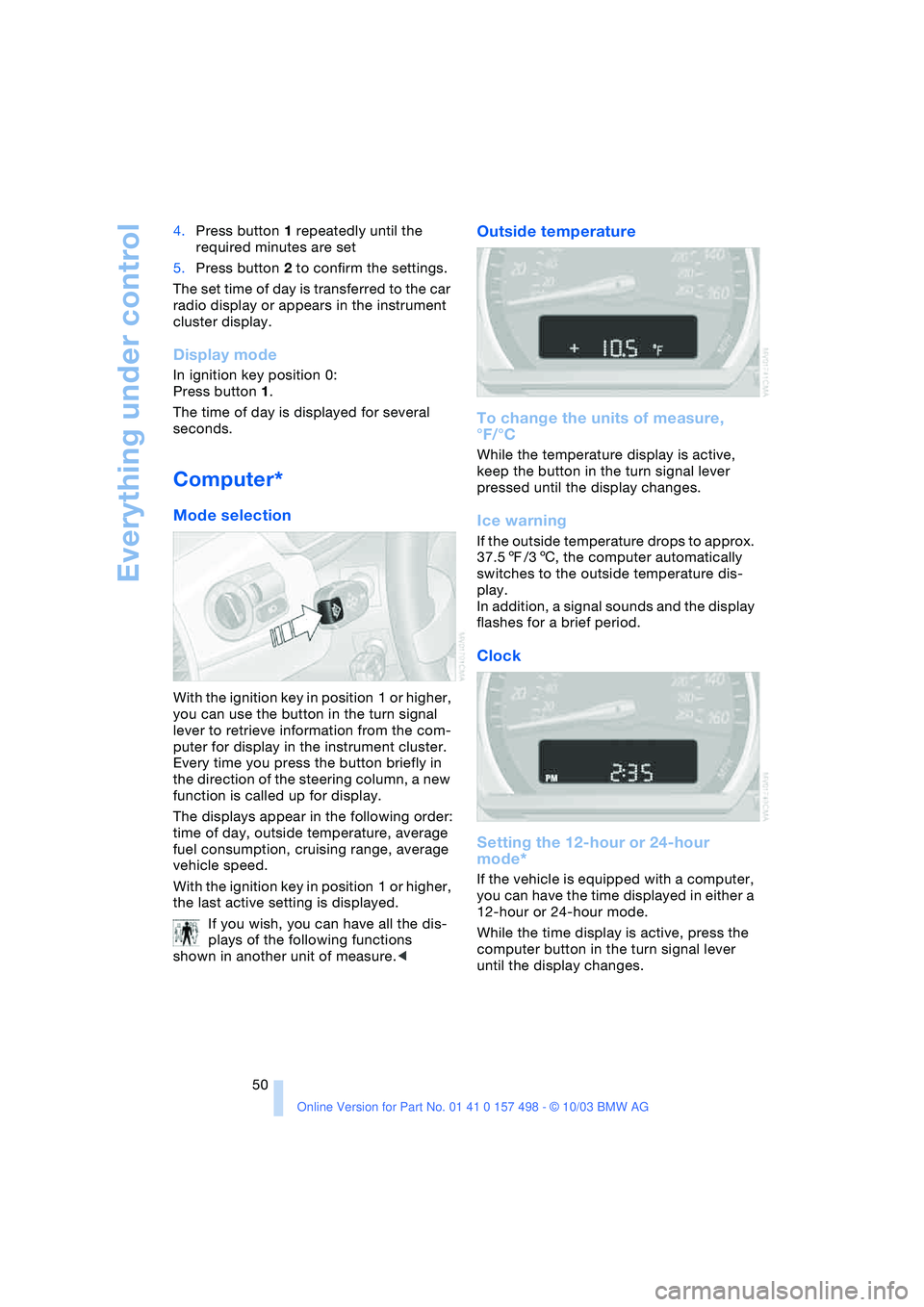
Outside temperature
To change the units of measure,
°F/°C
While the temperature display is active,
keep the button in the turn signal lever
pressed until the display changes.
Ice warning
If the outside temperature drops to approx.
37.57/36, the computer automatically
switches to the outside temperature dis-
play.
In addition, a signal sounds and the display
flashes for a brief period.
Clock
Setting the 12-hour or 24-hour
mode*
If the vehicle is equipped with a computer,
you can have the time displayed in either a
12-hour or 24-hour mode.
While the time display is active, press the
computer button in the turn signal lever
until the display changes.
Page 55 of 120
Reference
At a glance
Controls
Driving tips
Mobility
53
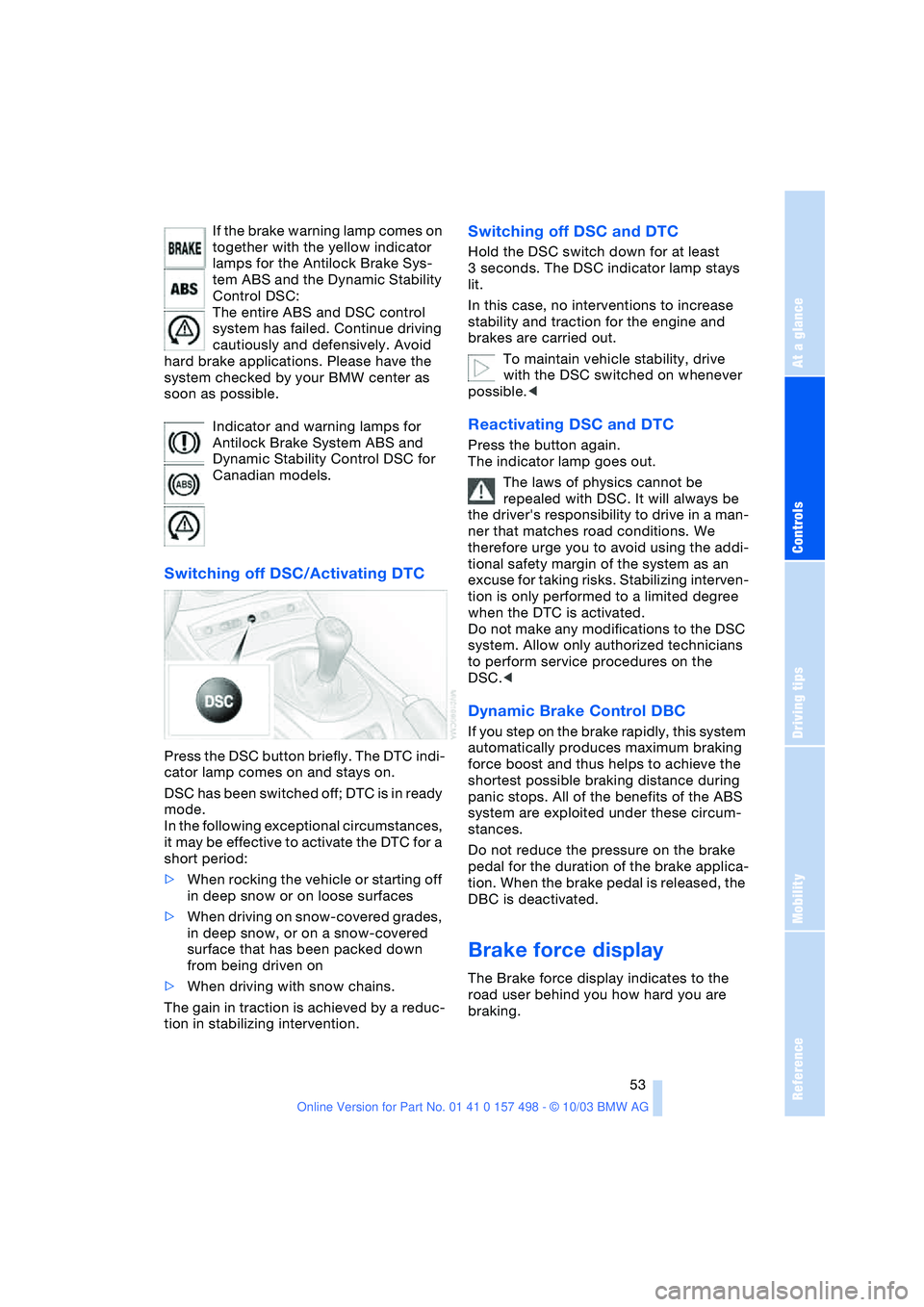
If the brake warning lamp comes on
together with the yellow indicator
lamps for the Antilock Brake Sys-
tem ABS and the Dynamic Stability
Control DSC:
The entire ABS and DSC control
system has failed. Continue driving
cautiously and defensively. Avoid
hard brake applications. Please have the
system checked by your BMW center as
soon as possible.
Indicator and warning lamps for
Antilock Brake System ABS and
Dynamic Stability Control DSC for
Canadian models.
Switching off DSC/Activating DTC
Press the DSC button briefly. The DTC indi-
cator lamp comes on and stays on.
DSC has been switched off; DTC is in ready
mode.
In the following exceptional circumstances,
it may be effective to activate the DTC for a
short period:
>When rocking the vehicle or starting off
in deep snow or on loose surfaces
>When driving on snow-covered grades,
in deep snow, or on a snow-covered
surface that has been packed down
from being driven on
>When driving with snow chains.
The gain in traction is achieved by a reduc-
tion in stabilizing intervention.
Switching off DSC and DTC
Hold the DSC switch down for at least
3 seconds. The DSC indicator lamp stays
lit.
In this case, no interventions to increase
stability and traction for the engine and
brakes are carried out.
To maintain vehicle stability, drive
with the DSC switched on whenever
possible.<
Reactivating DSC and DTC
Press the button again.
The indicator lamp goes out.
The laws of physics cannot be
repealed with DSC. It will always be
the driver's responsibility to drive in a man-
ner that matches road conditions. We
therefore urge you to avoid using the addi-
tional safety margin of the system as an
excuse for taking risks. Stabilizing interven-
tion is only performed to a limited degree
when the DTC is activated.
Do not make any modifications to the DSC
system. Allow only authorized technicians
to perform service procedures on the
DSC.<
Dynamic Brake Control DBC
If you step on the brake rapidly, this system
automatically produces maximum braking
force boost and thus helps to achieve the
shortest possible braking distance during
panic stops. All of the benefits of the ABS
system are exploited under these circum-
stances.
Do not reduce the pressure on the brake
pedal for the duration of the brake applica-
tion. When the brake pedal is released, the
DBC is deactivated.
Brake force display
The Brake force display indicates to the
road user behind you how hard you are
braking.
Page 56 of 120
Technology for safety and driving convenience
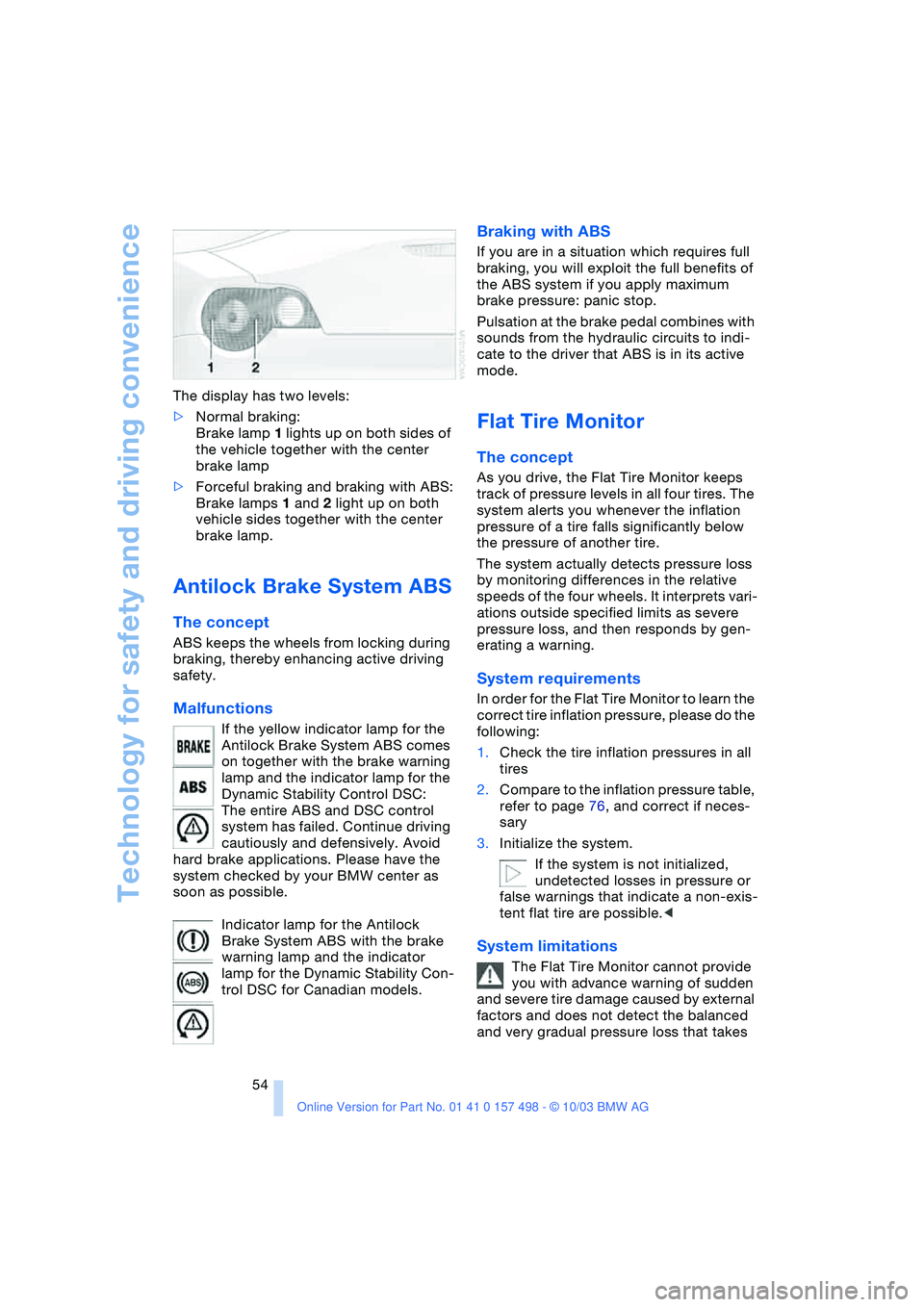
54 The display has two levels:
>Normal braking:
Brake lamp 1 lights up on both sides of
the vehicle together with the center
brake lamp
>Forceful braking and braking with ABS:
Brake lamps 1 and 2 light up on both
vehicle sides together with the center
brake lamp.
Antilock Brake System ABS
The concept
ABS keeps the wheels from locking during
braking, thereby enhancing active driving
safety.
Malfunctions
If the yellow indicator lamp for the
Antilock Brake System ABS comes
on together with the brake warning
lamp and the indicator lamp for the
Dynamic Stability Control DSC:
The entire ABS and DSC control
system has failed. Continue driving
cautiously and defensively. Avoid
hard brake applications. Please have the
system checked by your BMW center as
soon as possible.
Indicator lamp for the Antilock
Brake System ABS with the brake
warning lamp and the indicator
lamp for the Dynamic Stability Con-
trol DSC for Canadian models.
Braking with ABS
If you are in a situation which requires full
braking, you will exploit the full benefits of
the ABS system if you apply maximum
brake pressure: panic stop.
Pulsation at the brake pedal combines with
sounds from the hydraulic circuits to indi-
cate to the driver that ABS is in its active
mode.
Flat Tire Monitor
The concept
As you drive, the Flat Tire Monitor keeps
track of pressure levels in all four tires. The
system alerts you whenever the inflation
pressure of a tire falls significantly below
the pressure of another tire.
The system actually detects pressure loss
by monitoring differences in the relative
speeds of the four wheels. It interprets vari-
ations outside specified limits as severe
pressure loss, and then responds by gen-
erating a warning.
System requirements
In order for the Flat Tire Monitor to learn the
correct tire inflation pressure, please do the
following:
1.Check the tire inflation pressures in all
tires
2.Compare to the inflation pressure table,
refer to page 76, and correct if neces-
sary
3.Initialize the system.
If the system is not initialized,
undetected losses in pressure or
false warnings that indicate a non-exis-
tent flat tire are possible.<
System limitations
The Flat Tire Monitor cannot provide
you with advance warning of sudden
and severe tire damage caused by external
factors and does not detect the balanced
and very gradual pressure loss that takes
Page 61 of 120
Reference
At a glance
Controls
Driving tips
Mobility
59
Air distribution
You can direct airflow onto the
windows , toward the upper
body and into the footwell .
All intermediate settings are pos-
sible.
Air supply/blower
You can set the blower to 8 differ-
ent levels. Both heating and ven-
tilation become more effective as
the air supply rate is increased.
Turn the rotary control toward zero:
The blower and the heating are turned off,
and the air supply is stopped.
Temperature
In order to increase the tempera-
ture of the passenger compart-
ment, turn to the right toward the
red zone.
Air conditioning
The air is cooled and dehumidi-
fied and – depending on the tem-
perature setting – rewarmed.
Depending on the weather, the
windshield may fog over briefly when the
engine is started.
Condensation forms during operation
of the air conditioning system, which
then exits under the vehicle. Traces of con-
densed water on the ground underneath
the vehicle are thus normal.<
Outside-air/recirculated-air mode
If there are unpleasant odors in
the outside air, you can tempo-
rarily block the supply of incom-
ing air. The system then recircu-
lates the air currently within the vehicle.
If the windows fog over in the recircu-
lated air mode, switch this mode off
and increase the air supply as required. Do
not use the recirculated-air mode continu-
ously over a long period of time as this
would otherwise reduce the air quality in
the interior of the vehicle.<
Rear window defroster
The indicator lamp lights up when
the rear window defroster is
active. The rear window defroster
switches off automatically.
Ventilation
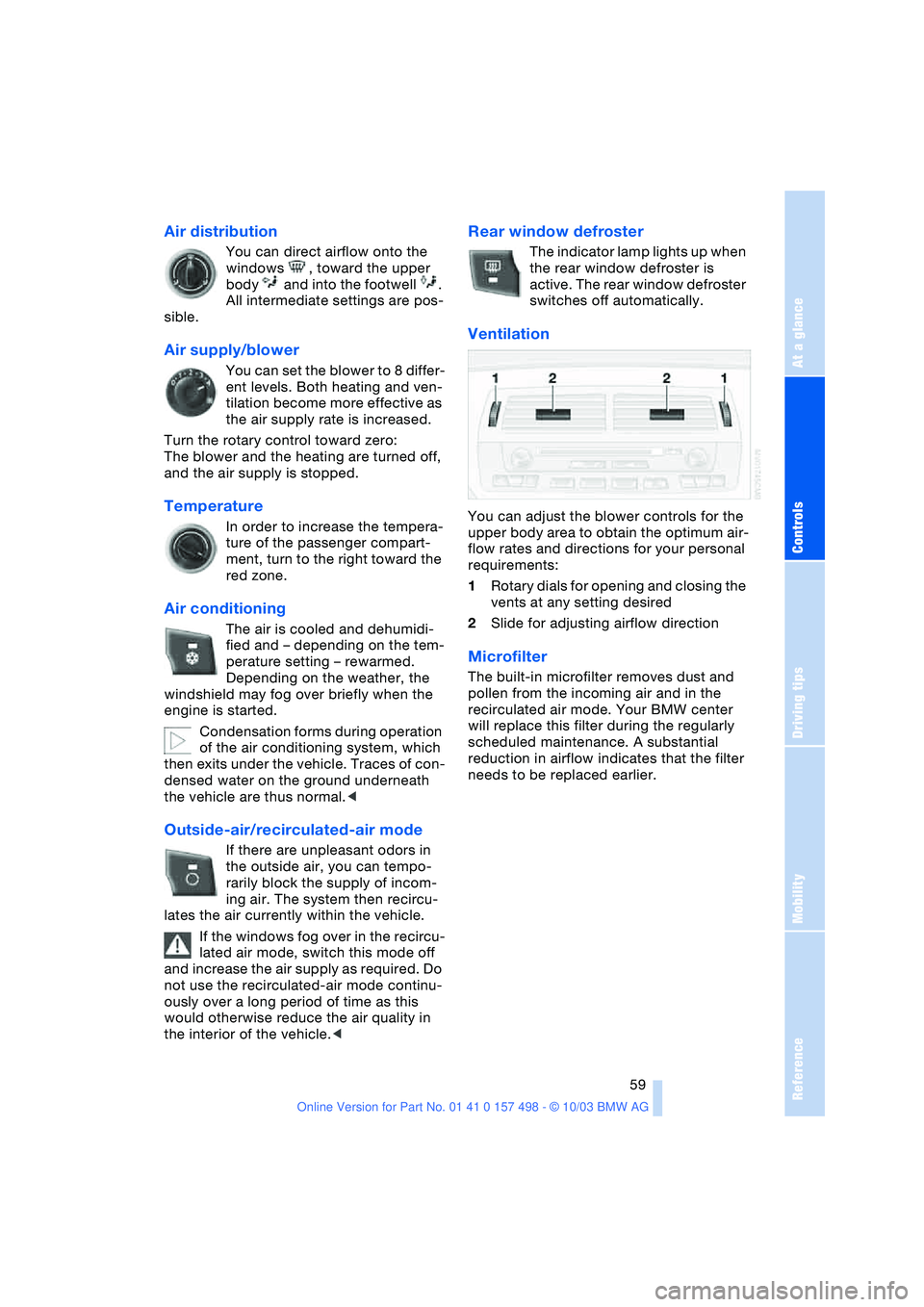
You can adjust the blower controls for the
upper body area to obtain the optimum air-
flow rates and directions for your personal
requirements:
1Rotary dials for opening and closing the
vents at any setting desired
2Slide for adjusting airflow direction
Microfilter
The built-in microfilter removes dust and
pollen from the incoming air and in the
recirculated air mode. Your BMW center
will replace this filter during the regularly
scheduled maintenance. A substantial
reduction in airflow indicates that the filter
needs to be replaced earlier.
Page 65 of 120
Reference
At a glance
Controls
Driving tips
Mobility
63
Outside air/Automatic recirculated
air control AUC/recirculated air
mode
You can respond to unpleasant
external odors or pollutants by
temporarily stopping the flow of
outside air. The system then
recirculates the air currently within the
vehicle.
By repeatedly pressing the button, you can
select one of three different operating
modes.
>Indicator lamps off: outside air flows
into the vehicle
>Left-hand indicator lamp on, AUC
mode: the system detects pollutants in
the outside air and responds by deacti-
vating the outside airflow as required.
The system then recirculates the air
currently within the vehicle. Depending
on air quality requirements, the system
automatically switches between out-
side air supply and recirculation of the
air already within the vehicle
>Right-hand indicator lamp on: the flow
of outside air is permanently blocked.
The system recirculates the air already
within the vehicle.
If the windows fog over in the recircu-
lated air mode, switch this mode off
and increase the air supply as required. Do
not use the recirculated-air mode continu-
ously over a long period of time as this
would reduce the air quality in the interior
of the vehicle.<
Rear window defroster
The indicator lamp lights up when
the rear window defroster is
active. The rear window defroster
switches off automatically.
Ventilation
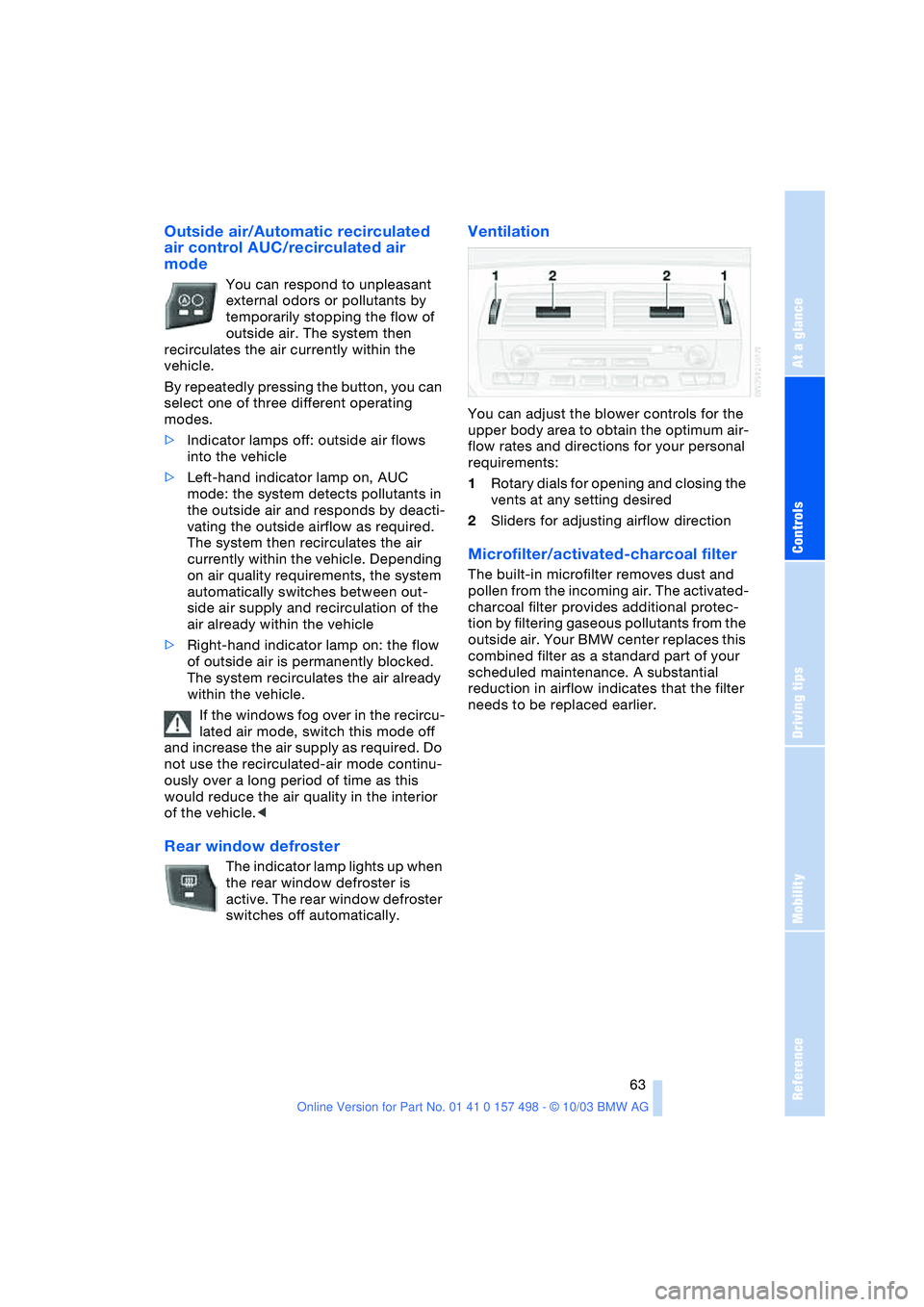
You can adjust the blower controls for the
upper body area to obtain the optimum air-
flow rates and directions for your personal
requirements:
1Rotary dials for opening and closing the
vents at any setting desired
2Sliders for adjusting airflow direction
Microfilter/activated-charcoal filter
The built-in microfilter removes dust and
pollen from the incoming air. The activated-
charcoal filter provides additional protec-
tion by filtering gaseous pollutants from the
outside air. Your BMW center replaces this
combined filter as a standard part of your
scheduled maintenance. A substantial
reduction in airflow indicates that the filter
needs to be replaced earlier.