reset BMW Z4 2013 E89 User Guide
[x] Cancel search | Manufacturer: BMW, Model Year: 2013, Model line: Z4, Model: BMW Z4 2013 E89Pages: 289, PDF Size: 6.86 MB
Page 172 of 289
If there is no message, the system changes to
the My Favorites category. All favorites cur‐
rently being broadcast can be selected from a
list.
Managing the favorites
Activating/deactivating the favorites
Favorites can be activated and deactivated
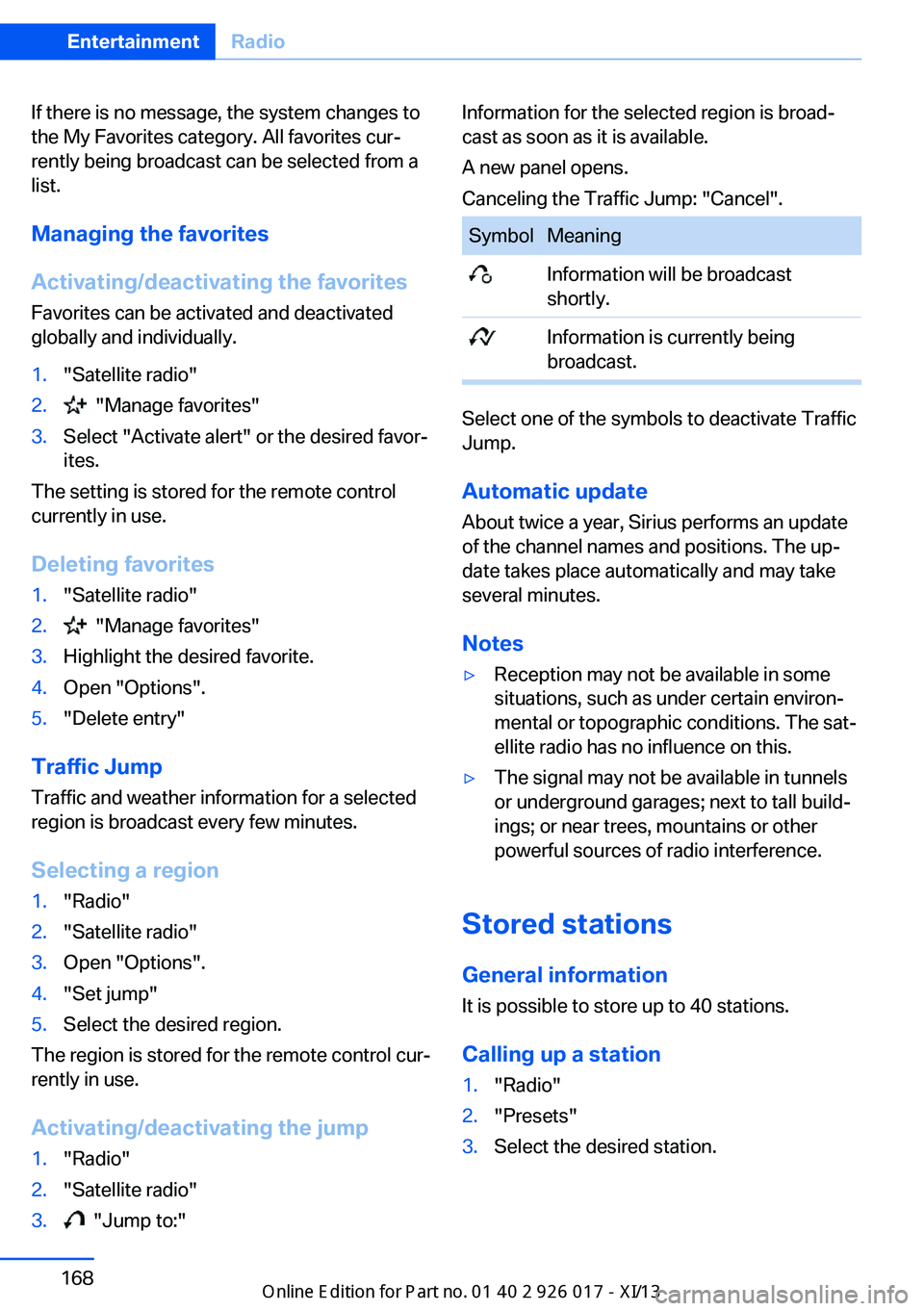
globally and individually.1."Satellite radio"2. "Manage favorites"3.Select "Activate alert" or the desired favor‐
ites.
The setting is stored for the remote control
currently in use.
Deleting favorites
1."Satellite radio"2. "Manage favorites"3.Highlight the desired favorite.4.Open "Options".5."Delete entry"
Traffic Jump Traffic and weather information for a selected
region is broadcast every few minutes.
Selecting a region
1."Radio"2."Satellite radio"3.Open "Options".4."Set jump"5.Select the desired region.
The region is stored for the remote control cur‐
rently in use.
Activating/deactivating the jump
1."Radio"2."Satellite radio"3. "Jump to:"Information for the selected region is broad‐
cast as soon as it is available.
A new panel opens.
Canceling the Traffic Jump: "Cancel".SymbolMeaning Information will be broadcast
shortly. Information is currently being
broadcast.
Select one of the symbols to deactivate Traffic
Jump.
Automatic update
About twice a year, Sirius performs an update
of the channel names and positions. The up‐
date takes place automatically and may take
several minutes.
Notes
▷Reception may not be available in some
situations, such as under certain environ‐
mental or topographic conditions. The sat‐
ellite radio has no influence on this.▷The signal may not be available in tunnels
or underground garages; next to tall build‐
ings; or near trees, mountains or other
powerful sources of radio interference.
Stored stations
General information It is possible to store up to 40 stations.
Calling up a station
1."Radio"2."Presets"3.Select the desired station.Seite 168EntertainmentRadio168
Online Edition for Part no. 01 40 2 911 315 - VI/13
Page 173 of 289
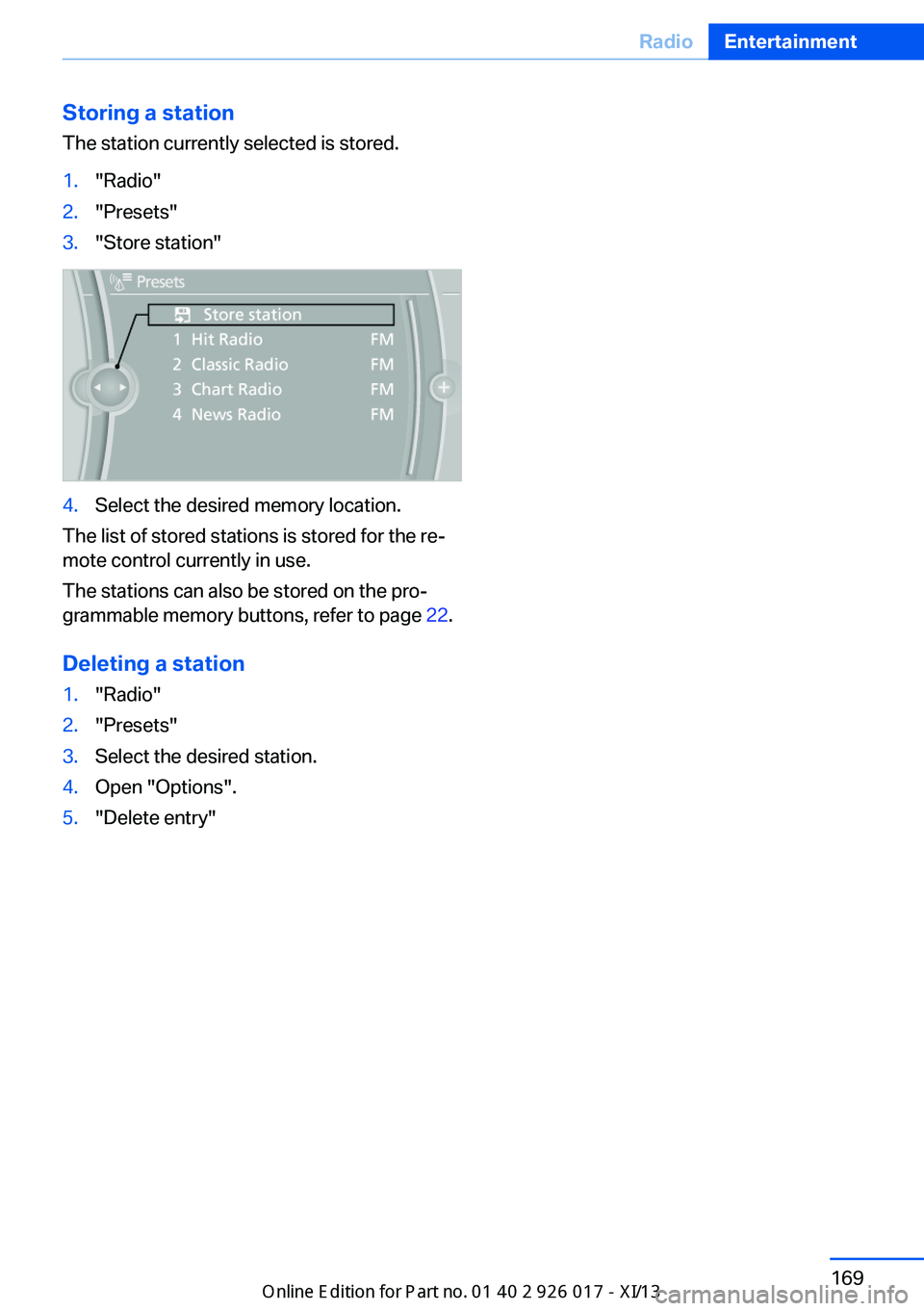
Storing a station
The station currently selected is stored.1."Radio"2."Presets"3."Store station"4.Select the desired memory location.
The list of stored stations is stored for the re‐
mote control currently in use.
The stations can also be stored on the pro‐
grammable memory buttons, refer to page 22.
Deleting a station
1."Radio"2."Presets"3.Select the desired station.4.Open "Options".5."Delete entry"Seite 169RadioEntertainment169
Online Edition for Part no. 01 40 2 911 315 - VI/13
Page 188 of 289
Use of a mobile phone as an audio source,
refer to page 194.▷Bluetooth® is a registered trademark of
Bluetooth® SIG, Inc.▷The sound is output on the vehicle loud‐
speakers.▷The volume of the sound output is de‐
pendent on the device. If necessary, adjust
the volume on the device.▷Up to four external devices can be paired
with the vehicle.
Requirements
▷The device is suitable. Information at
www.bmwusa.com/bluetooth.▷The device is ready for operation.▷The ignition is switched on.▷Bluetooth is activated on the vehicle, refer
to page 193, and on the device.▷Bluetooth presettings must be made on
the device, such as for a connection with‐
out confirmation or visibility; refer to the
device operating instructions.▷A number with at least four and a maximum
of 16 digits is defined as the Bluetooth
passkey. It is only required once for pairing.
Pairing and connecting
Pairing a device
To avoid becoming distracted and pos‐
ing an unnecessary hazard both to your own
vehicle's occupants and to other road users,
only pair the device while the vehicle is station‐
ary.◀
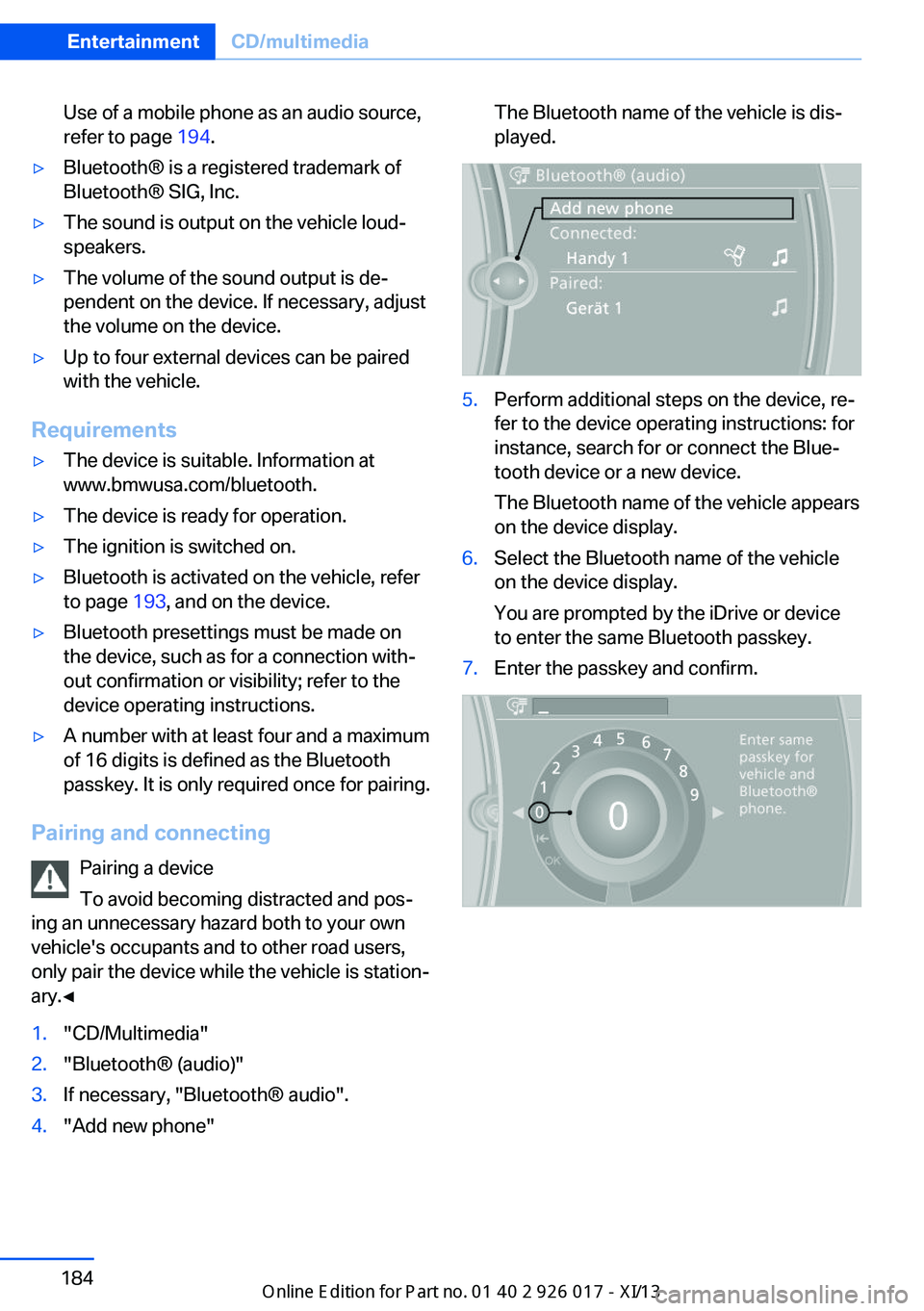
1."CD/Multimedia"2."Bluetooth® (audio)"3.If necessary, "Bluetooth® audio".4."Add new phone"The Bluetooth name of the vehicle is dis‐
played.5.Perform additional steps on the device, re‐
fer to the device operating instructions: for
instance, search for or connect the Blue‐
tooth device or a new device.
The Bluetooth name of the vehicle appears
on the device display.6.Select the Bluetooth name of the vehicle
on the device display.
You are prompted by the iDrive or device
to enter the same Bluetooth passkey.7.Enter the passkey and confirm.Seite 184EntertainmentCD/multimedia184
Online Edition for Part no. 01 40 2 911 315 - VI/13
Page 197 of 289
Notes
At high temperatures, the charging function of the mobile phone may be limited and functions
may not be executed.
When using the mobile phone via the vehicle,
note the operating instructions of the mobile
phone.
Pairing/unpairing the mobile
phone
General information
The following functions are available:▷Use of a mobile phone as a telephone.▷Use of a mobile phone as an additional te‐
lephone.▷Use of a mobile phone as an audio source.▷Use of an audio device as an audio source,
refer to page 183.
Requirements
▷The mobile phone is suitable, refer to
page 192.▷The mobile phone is ready for operation.▷Bluetooth is activated in the vehicle and on
the mobile phone.▷Bluetooth presettings may need to be
made on the mobile phone, e.g., for a con‐
nection without confirmation or visibility,
refer to the mobile phone operating in‐
structions.▷Deactivate Bluetooth audio if necessary.▷A number with at least four and a maximum
of 16 digits was defined as the Bluetooth
passkey. It is only required once for pairing.▷The ignition is switched on.Activating/deactivating Bluetooth
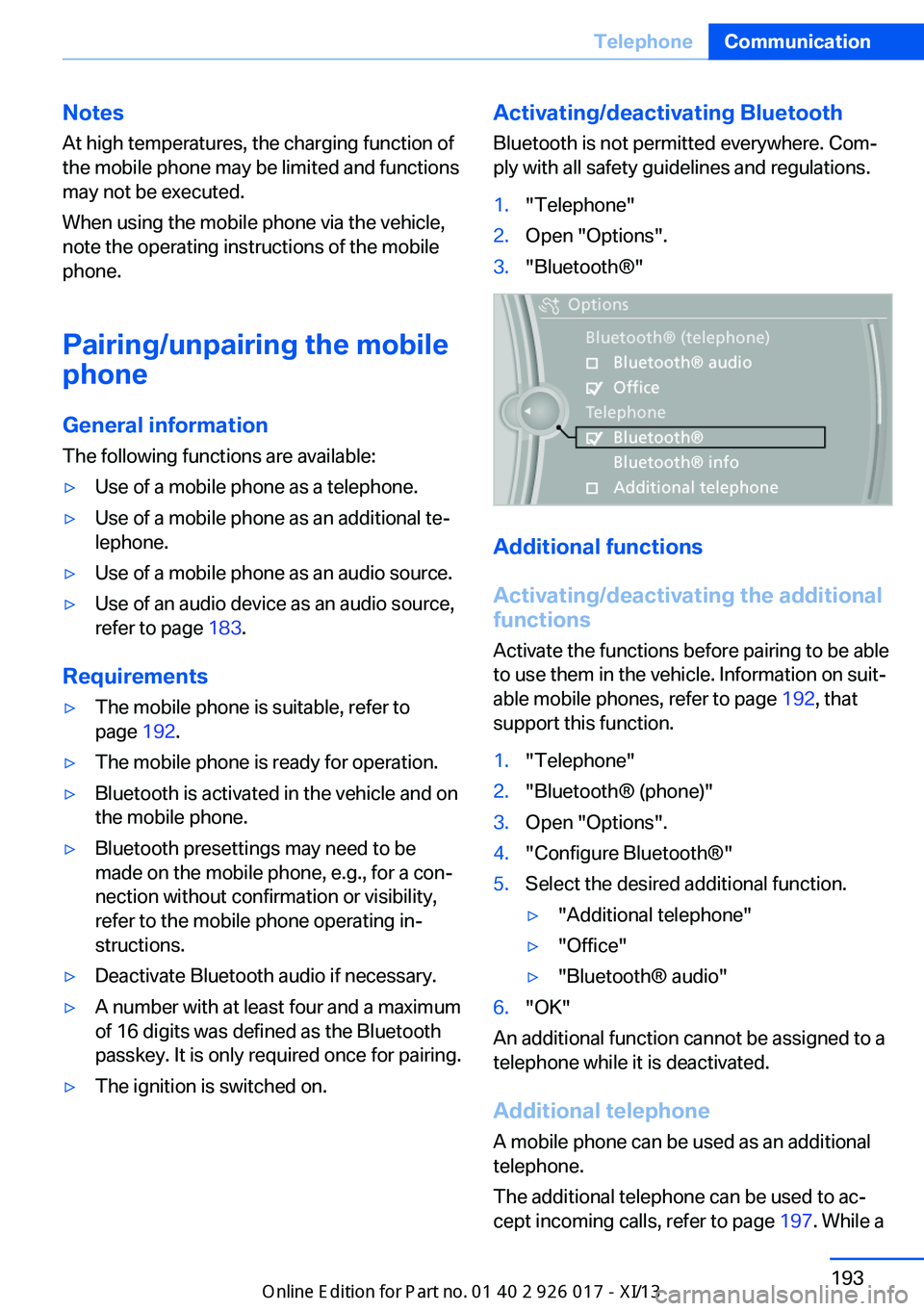
Bluetooth is not permitted everywhere. Com‐
ply with all safety guidelines and regulations.1."Telephone"2.Open "Options".3."Bluetooth®"
Additional functions
Activating/deactivating the additional
functions
Activate the functions before pairing to be able
to use them in the vehicle. Information on suit‐
able mobile phones, refer to page 192, that
support this function.
1."Telephone"2."Bluetooth® (phone)"3.Open "Options".4."Configure Bluetooth®"5.Select the desired additional function.▷"Additional telephone"▷"Office"▷"Bluetooth® audio"6."OK"
An additional function cannot be assigned to a
telephone while it is deactivated.
Additional telephone A mobile phone can be used as an additional
telephone.
The additional telephone can be used to ac‐
cept incoming calls, refer to page 197. While a
Seite 193TelephoneCommunication193
Online Edition for Part no. 01 40 2 911 315 - VI/13
Page 206 of 289
Redialing
›Redial‹
Voice phone book
Depending on how your vehicle is equipped, it
may be necessary to create your own voice
phone book.
The entries must be entered using voice acti‐
vation and are separate from the memory in
the mobile phone. Up to 50 entries can be set
up.
Saving an entry1.›Save name‹2.Say the name. Do not exceed the speaking
duration of approx. 2 seconds.3.Say the phone number after being
prompted to do so by the system.4.›Save‹
Deleting an entry
1.›Delete name‹2.Say the name after being prompted to do
so.3.Confirm the prompt: ›Yes‹
Deleting all entries
1.›Delete phone book‹2.Confirm the prompt: ›Yes‹3.Confirm the prompt again: ›Yes‹
Reading and selecting entries
1.›Read phonebook‹2.When the desired entry is read aloud: say ›
Dial number‹
Selecting an entry
1.›Dial name‹2.Say the name after being prompted to do
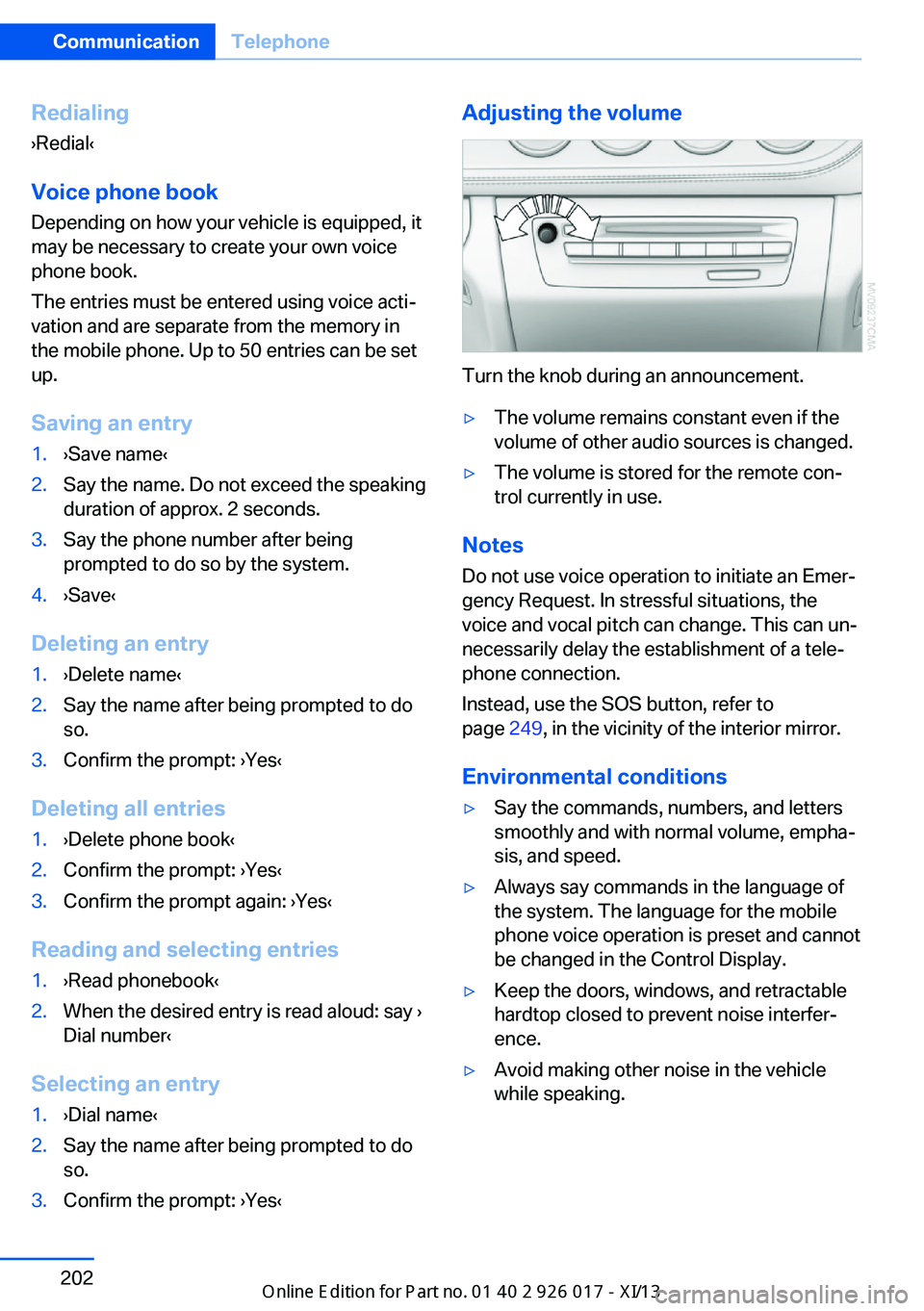
so.3.Confirm the prompt: ›Yes‹Adjusting the volume
Turn the knob during an announcement.
▷The volume remains constant even if the
volume of other audio sources is changed.▷The volume is stored for the remote con‐
trol currently in use.
Notes
Do not use voice operation to initiate an Emer‐
gency Request. In stressful situations, the
voice and vocal pitch can change. This can un‐
necessarily delay the establishment of a tele‐
phone connection.
Instead, use the SOS button, refer to
page 249, in the vicinity of the interior mirror.
Environmental conditions
▷Say the commands, numbers, and letters
smoothly and with normal volume, empha‐
sis, and speed.▷Always say commands in the language of
the system. The language for the mobile
phone voice operation is preset and cannot
be changed in the Control Display.▷Keep the doors, windows, and retractable
hardtop closed to prevent noise interfer‐
ence.▷Avoid making other noise in the vehicle
while speaking.Seite 202CommunicationTelephone202
Online Edition for Part no. 01 40 2 911 315 - VI/13
Page 272 of 289
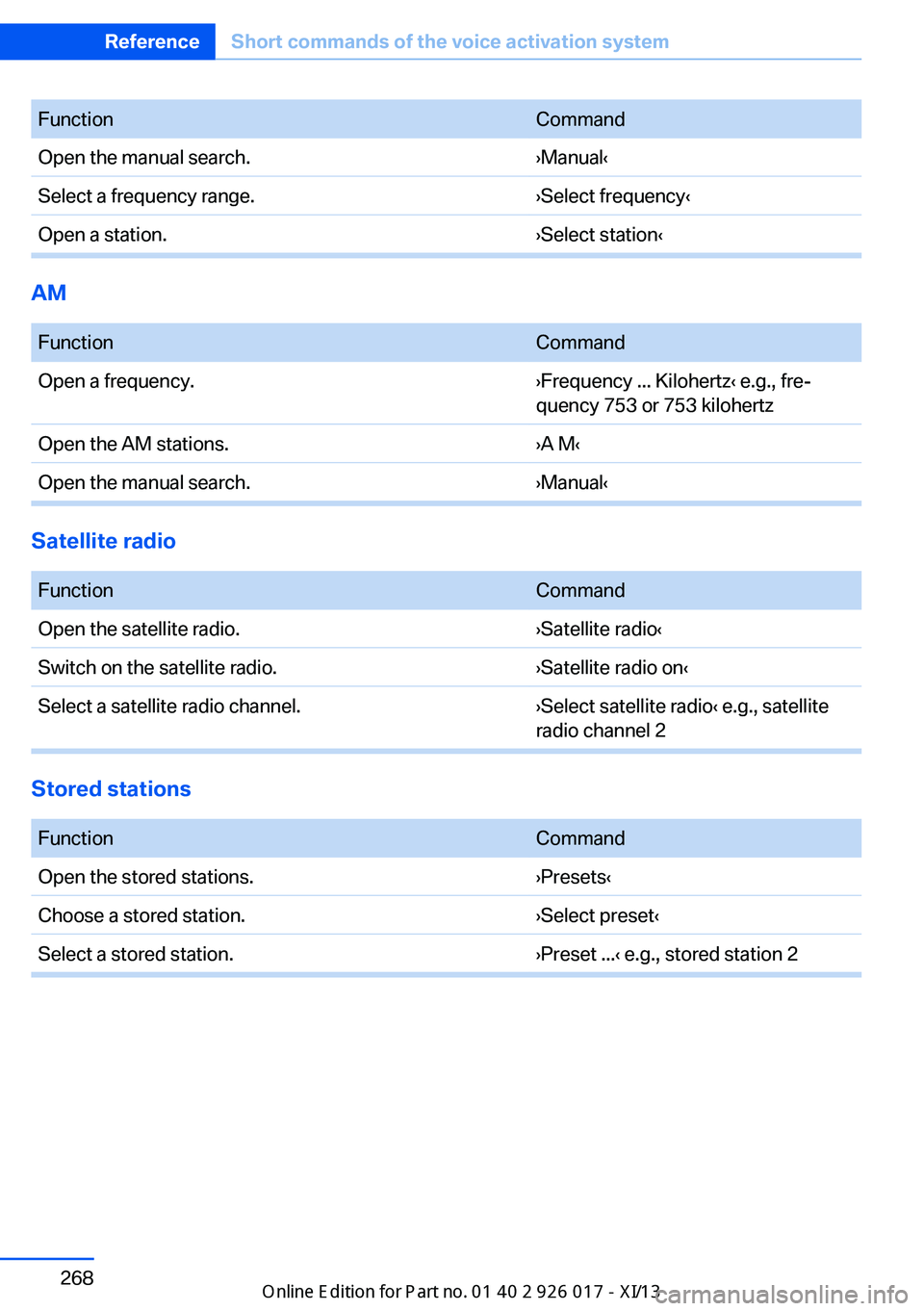
FunctionCommandOpen the manual search.›Manual‹Select a frequency range.›Select frequency‹Open a station.›Select station‹
AM
FunctionCommandOpen a frequency.›Frequency ... Kilohertz‹ e.g., fre‐
quency 753 or 753 kilohertzOpen the AM stations.›A M‹Open the manual search.›Manual‹
Satellite radio
FunctionCommandOpen the satellite radio.›Satellite radio‹Switch on the satellite radio.›Satellite radio on‹Select a satellite radio channel.›Select satellite radio‹ e.g., satellite
radio channel 2
Stored stations
FunctionCommandOpen the stored stations.›Presets‹Choose a stored station.›Select preset‹Select a stored station.›Preset ...‹ e.g., stored station 2Seite 268ReferenceShort commands of the voice activation system268
Online Edition for Part no. 01 40 2 911 315 - VI/13
Page 286 of 289
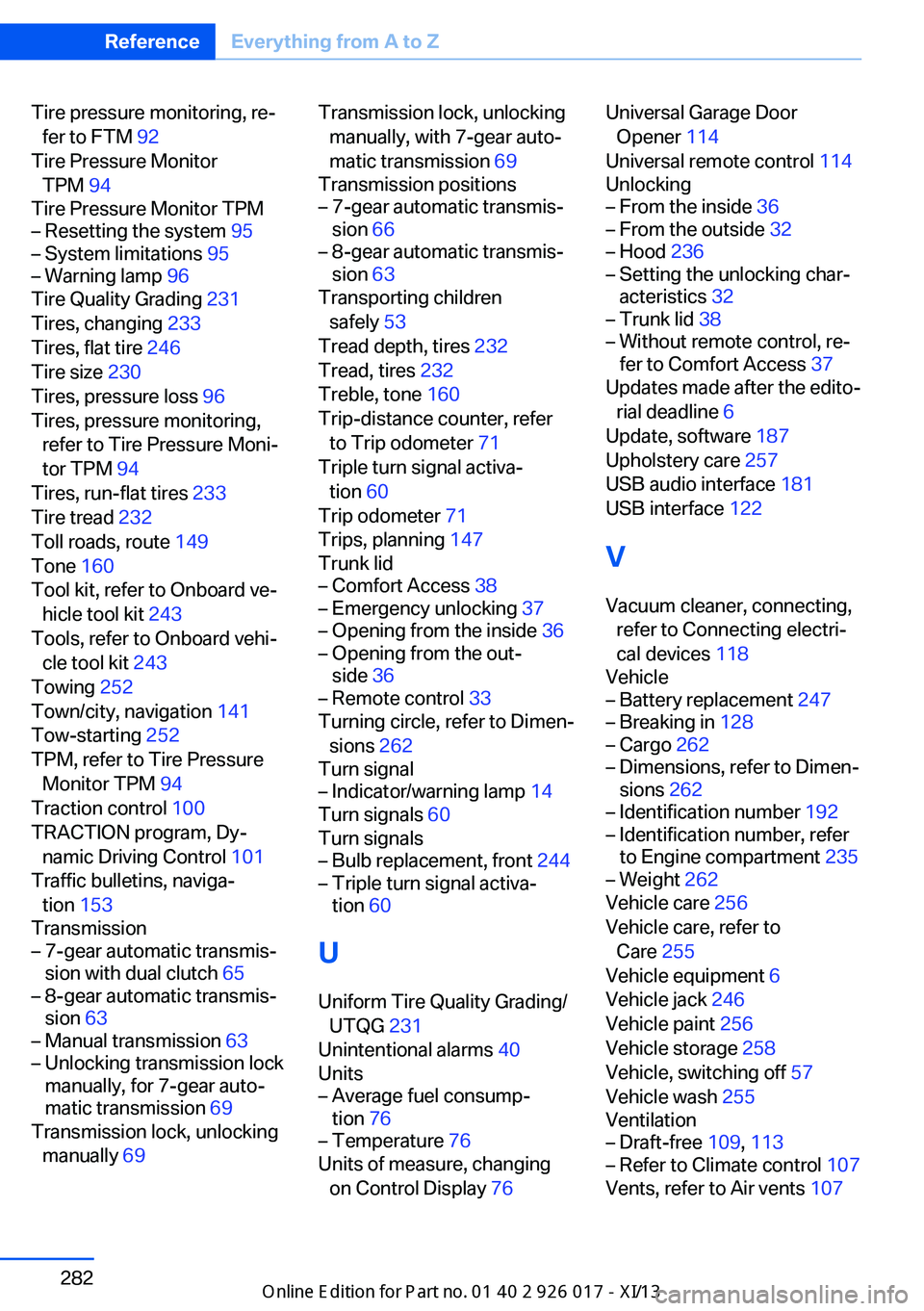
Tire pressure monitoring, re‐fer to FTM 92
Tire Pressure Monitor TPM 94
Tire Pressure Monitor TPM– Resetting the system 95– System limitations 95– Warning lamp 96
Tire Quality Grading 231
Tires, changing 233
Tires, flat tire 246
Tire size 230
Tires, pressure loss 96
Tires, pressure monitoring, refer to Tire Pressure Moni‐
tor TPM 94
Tires, run-flat tires 233
Tire tread 232
Toll roads, route 149
Tone 160
Tool kit, refer to Onboard ve‐ hicle tool kit 243
Tools, refer to Onboard vehi‐ cle tool kit 243
Towing 252
Town/city, navigation 141
Tow-starting 252
TPM, refer to Tire Pressure Monitor TPM 94
Traction control 100
TRACTION program, Dy‐ namic Driving Control 101
Traffic bulletins, naviga‐ tion 153
Transmission
– 7-gear automatic transmis‐
sion with dual clutch 65– 8-gear automatic transmis‐
sion 63– Manual transmission 63– Unlocking transmission lock
manually, for 7-gear auto‐
matic transmission 69
Transmission lock, unlocking
manually 69
Transmission lock, unlocking
manually, with 7-gear auto‐
matic transmission 69
Transmission positions– 7-gear automatic transmis‐
sion 66– 8-gear automatic transmis‐
sion 63
Transporting children
safely 53
Tread depth, tires 232
Tread, tires 232
Treble, tone 160
Trip-distance counter, refer to Trip odometer 71
Triple turn signal activa‐ tion 60
Trip odometer 71
Trips, planning 147
Trunk lid
– Comfort Access 38– Emergency unlocking 37– Opening from the inside 36– Opening from the out‐
side 36– Remote control 33
Turning circle, refer to Dimen‐
sions 262
Turn signal
– Indicator/warning lamp 14
Turn signals 60
Turn signals
– Bulb replacement, front 244– Triple turn signal activa‐
tion 60
U
Uniform Tire Quality Grading/ UTQG 231
Unintentional alarms 40
Units
– Average fuel consump‐
tion 76– Temperature 76
Units of measure, changing
on Control Display 76
Universal Garage Door
Opener 114
Universal remote control 114
Unlocking– From the inside 36– From the outside 32– Hood 236– Setting the unlocking char‐
acteristics 32– Trunk lid 38– Without remote control, re‐
fer to Comfort Access 37
Updates made after the edito‐
rial deadline 6
Update, software 187
Upholstery care 257
USB audio interface 181
USB interface 122
V
Vacuum cleaner, connecting, refer to Connecting electri‐
cal devices 118
Vehicle
– Battery replacement 247– Breaking in 128– Cargo 262– Dimensions, refer to Dimen‐
sions 262– Identification number 192– Identification number, refer
to Engine compartment 235– Weight 262
Vehicle care 256
Vehicle care, refer to Care 255
Vehicle equipment 6
Vehicle jack 246
Vehicle paint 256
Vehicle storage 258
Vehicle, switching off 57
Vehicle wash 255
Ventilation
– Draft-free 109, 113– Refer to Climate control 107
Vents, refer to Air vents 107
Seite 282ReferenceEverything from A to Z282
Online Edition for Part no. 01 40 2 911 315 - VI/13