trunk lid BMW Z4 2014 E89 User Guide
[x] Cancel search | Manufacturer: BMW, Model Year: 2014, Model line: Z4, Model: BMW Z4 2014 E89Pages: 289, PDF Size: 7.13 MB
Page 44 of 289
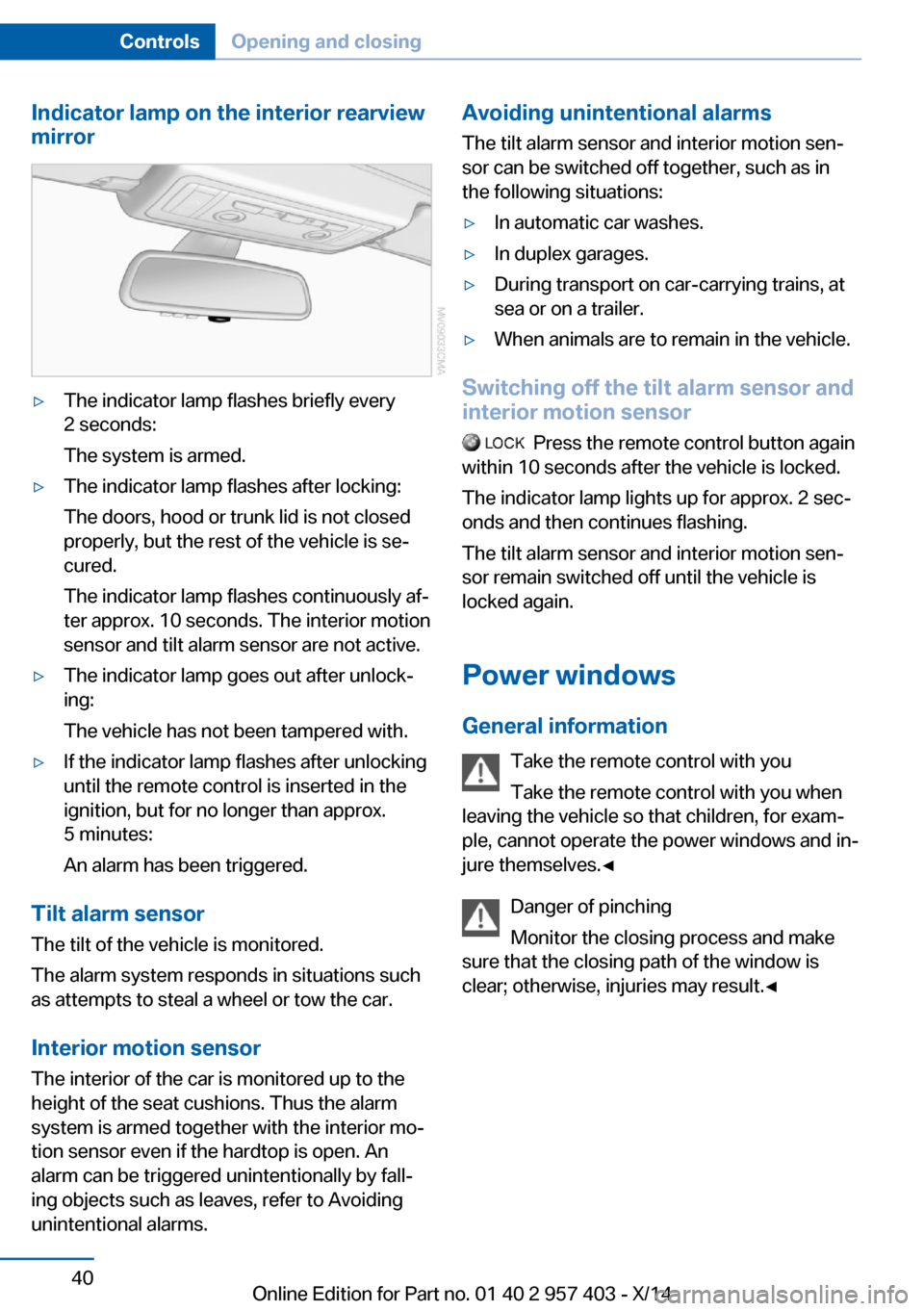
Indicator lamp on the interior rearview
mirror▷The indicator lamp flashes briefly every
2 seconds:
The system is armed.▷The indicator lamp flashes after locking:
The doors, hood or trunk lid is not closed
properly, but the rest of the vehicle is se‐
cured.
The indicator lamp flashes continuously af‐
ter approx. 10 seconds. The interior motion
sensor and tilt alarm sensor are not active.▷The indicator lamp goes out after unlock‐
ing:
The vehicle has not been tampered with.▷If the indicator lamp flashes after unlocking
until the remote control is inserted in the
ignition, but for no longer than approx.
5 minutes:
An alarm has been triggered.
Tilt alarm sensor The tilt of the vehicle is monitored.
The alarm system responds in situations such
as attempts to steal a wheel or tow the car.
Interior motion sensor The interior of the car is monitored up to the
height of the seat cushions. Thus the alarm
system is armed together with the interior mo‐
tion sensor even if the hardtop is open. An
alarm can be triggered unintentionally by fall‐
ing objects such as leaves, refer to Avoiding
unintentional alarms.
Avoiding unintentional alarms
The tilt alarm sensor and interior motion sen‐
sor can be switched off together, such as in
the following situations:▷In automatic car washes.▷In duplex garages.▷During transport on car-carrying trains, at
sea or on a trailer.▷When animals are to remain in the vehicle.
Switching off the tilt alarm sensor and
interior motion sensor
Press the remote control button again
within 10 seconds after the vehicle is locked.
The indicator lamp lights up for approx. 2 sec‐
onds and then continues flashing.
The tilt alarm sensor and interior motion sen‐
sor remain switched off until the vehicle is
locked again.
Power windows General information Take the remote control with youTake the remote control with you when
leaving the vehicle so that children, for exam‐
ple, cannot operate the power windows and in‐
jure themselves.◀
Danger of pinching
Monitor the closing process and make
sure that the closing path of the window is
clear; otherwise, injuries may result.◀
Seite 40ControlsOpening and closing40
Online Edition for Part no. 01 40 2 957 403 - X/14
Page 46 of 289
Retractable hardtopGeneral information
Adhere to the following instructions:▷It is advisable that you close the retractable
hardtop when you park the vehicle. Not
only does the closed hardtop protect the
vehicle interior against unanticipated
weather damage, it also offers theft protec‐
tion. However, even when the hardtop is
closed, valuables should only be stored in
the locked cargo area.▷Do not attach roof rack systems to the re‐
tractable hardtop, and in particular do not
attach magnetic racks.▷Do not attach rack systems to the trunk lid,
and in particular do not attach magnetic
racks.▷When the retractable hardtop is operated,
the trunk lid swings back and up.
Before operating the retractable hardtop,
ensure that there is enough clearance, e.g.,
in tight parking spaces.▷If you open the hardtop while it is wet, e.g.,
after driving in the rain, water may drip into
the cargo area.
If necessary, remove items from the cargo
area beforehand to avoid water stains or
soiling.▷Opening and closing while the vehicle is
moving can cause air turbulence in the
cargo area.
Properly stow away objects in the cargo
area.▷At temperatures below 14 ℉/-10 ℃, the
retractable hardtop cannot be moved.
A message appears on the Control Display.
Do not touch the mechanism and keep
the opening path clear.
During opening and closing, do not reach into
the mechanism and keep children away from
the opening path of the retractable hardtop;
otherwise, there is the risk of injury.◀
Do not place objects on the retractable
hardtop.
Do not place any objects on the retractable
hardtop or on the trunk lid; otherwise, they
could fall during movements of the retractable
hardtop and cause damage or injury.◀
Before opening and closing Always open or close the hardtop fully.
Do not let the hardtop stop in an inter‐
mediate position when opening or closing.
Otherwise, there is the danger of personal in‐
jury since the hardtop will be lowered automat‐
ically after a few minutes.◀▷Observe the safety precautions above.▷Ensure that the trunk lid is closed.▷The vehicle should be parked on fairly level
ground. Excessive angle is indicated by a
light.▷Fold down the cargo area partition and
make sure it engages, refer to the instruc‐
tions below.▷Do not place any objects next to or on the
cargo area partition and close the storage
compartment on the left side of the cargo
area.▷Do not exceed the maximum loading
height under the cargo area partition; refer
to the label in the cargo area showing a line
indicating the maximum height.Seite 42ControlsOpening and closing42
Online Edition for Part no. 01 40 2 957 403 - X/14
Page 47 of 289
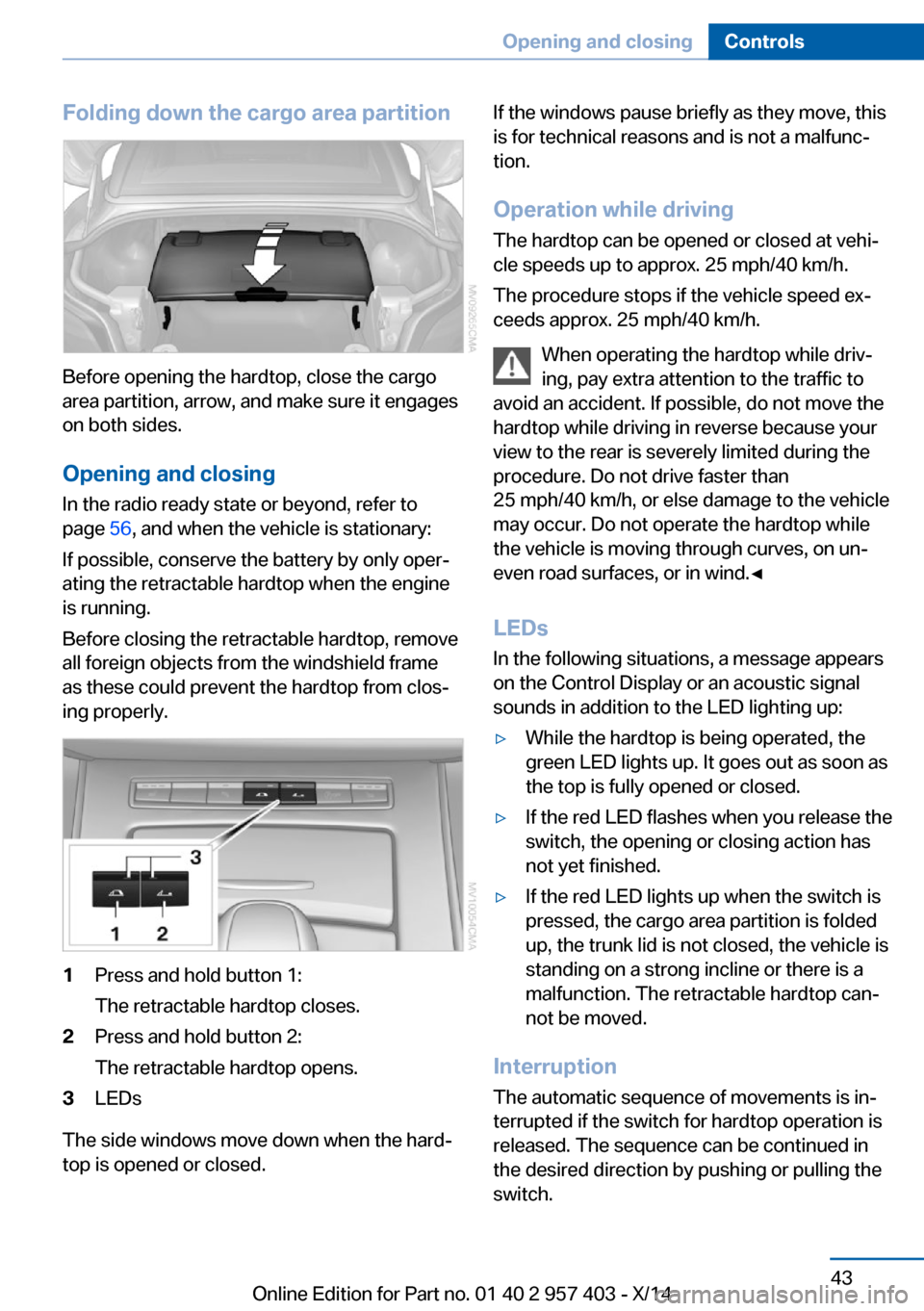
Folding down the cargo area partition
Before opening the hardtop, close the cargo
area partition, arrow, and make sure it engages
on both sides.
Opening and closing In the radio ready state or beyond, refer to
page 56, and when the vehicle is stationary:
If possible, conserve the battery by only oper‐
ating the retractable hardtop when the engine
is running.
Before closing the retractable hardtop, remove
all foreign objects from the windshield frame
as these could prevent the hardtop from clos‐
ing properly.
1Press and hold button 1:
The retractable hardtop closes.2Press and hold button 2:
The retractable hardtop opens.3LEDs
The side windows move down when the hard‐
top is opened or closed.
If the windows pause briefly as they move, this
is for technical reasons and is not a malfunc‐
tion.
Operation while driving
The hardtop can be opened or closed at vehi‐
cle speeds up to approx. 25 mph/40 km/h.
The procedure stops if the vehicle speed ex‐
ceeds approx. 25 mph/40 km/h.
When operating the hardtop while driv‐
ing, pay extra attention to the traffic to
avoid an accident. If possible, do not move the hardtop while driving in reverse because your
view to the rear is severely limited during the
procedure. Do not drive faster than
25 mph/40 km/h, or else damage to the vehicle
may occur. Do not operate the hardtop while
the vehicle is moving through curves, on un‐
even road surfaces, or in wind.◀
LEDs
In the following situations, a message appears
on the Control Display or an acoustic signal
sounds in addition to the LED lighting up:▷While the hardtop is being operated, the
green LED lights up. It goes out as soon as
the top is fully opened or closed.▷If the red LED flashes when you release the
switch, the opening or closing action has
not yet finished.▷If the red LED lights up when the switch is
pressed, the cargo area partition is folded
up, the trunk lid is not closed, the vehicle is
standing on a strong incline or there is a
malfunction. The retractable hardtop can‐
not be moved.
Interruption
The automatic sequence of movements is in‐
terrupted if the switch for hardtop operation is
released. The sequence can be continued in
the desired direction by pushing or pulling the
switch.
Seite 43Opening and closingControls43
Online Edition for Part no. 01 40 2 957 403 - X/14
Page 48 of 289
Always open or close the hardtop fully.
Open or close the hardtop fully; other‐
wise, there is a risk of injury or damage when
driving. Do not interrupt and resume the clos‐
ing procedure several times in close succes‐
sion as this could damage the mechanism.◀
If the hardtop is not fully opened or closed, the
trunk lid cannot be opened and the windows
cannot be moved.
Convenient operation via the remote
control
Information on convenient operation, refer to
page 33.
Wind deflector
The wind deflector keeps air movements in the
passenger compartment to a minimum when
the hardtop is open and provides an even more
comfortable ride, particularly at high speeds.
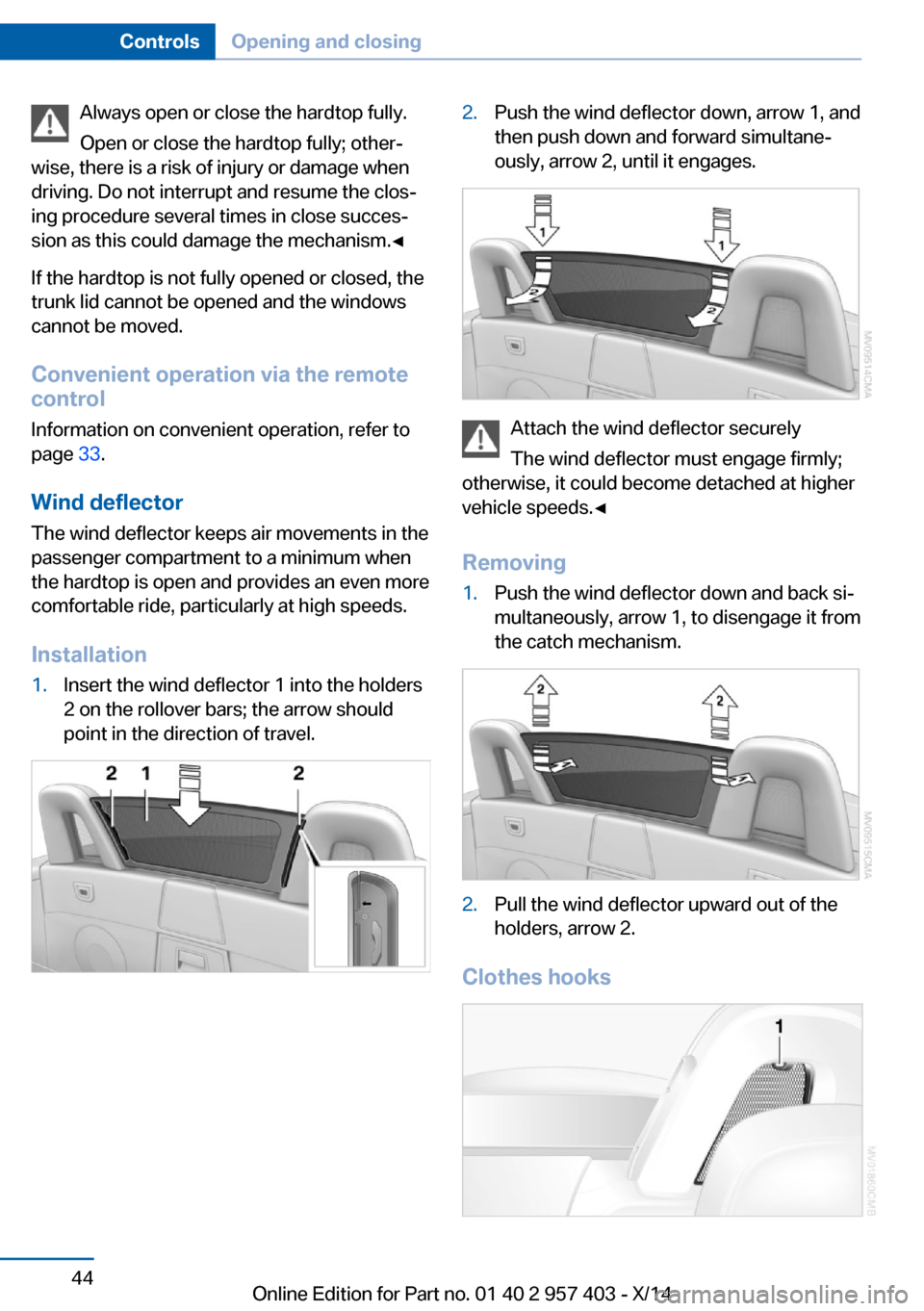
Installation1.Insert the wind deflector 1 into the holders
2 on the rollover bars; the arrow should
point in the direction of travel.2.Push the wind deflector down, arrow 1, and
then push down and forward simultane‐
ously, arrow 2, until it engages.
Attach the wind deflector securely
The wind deflector must engage firmly;
otherwise, it could become detached at higher
vehicle speeds.◀
Removing
1.Push the wind deflector down and back si‐
multaneously, arrow 1, to disengage it from
the catch mechanism.2.Pull the wind deflector upward out of the
holders, arrow 2.
Clothes hooks
Seite 44ControlsOpening and closing44
Online Edition for Part no. 01 40 2 957 403 - X/14
Page 125 of 289
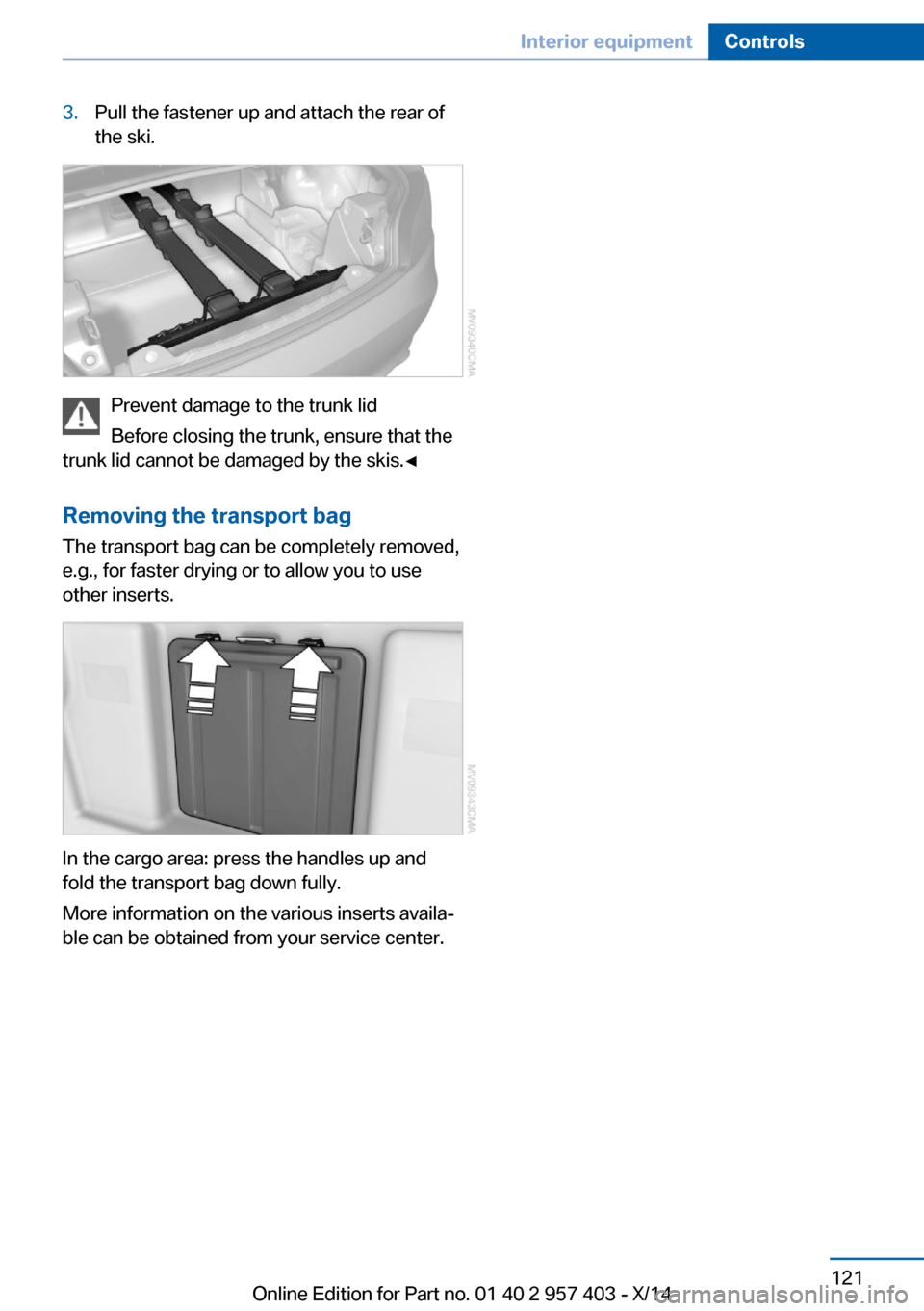
3.Pull the fastener up and attach the rear of
the ski.
Prevent damage to the trunk lid
Before closing the trunk, ensure that the
trunk lid cannot be damaged by the skis.◀
Removing the transport bag
The transport bag can be completely removed,
e.g., for faster drying or to allow you to use
other inserts.
In the cargo area: press the handles up and
fold the transport bag down fully.
More information on the various inserts availa‐
ble can be obtained from your service center.
Seite 121Interior equipmentControls121
Online Edition for Part no. 01 40 2 957 403 - X/14
Page 133 of 289
Closing the trunk lidDrive with the trunk lid closed
Only operate the vehicle with the trunk
lid closed; otherwise, exhaust fumes could en‐
ter the passenger compartment.◀
If the vehicle must be driven with the trunk lid
open:1.Close all windows.2.Greatly increase the air flow rate of the air
conditioner or automatic climate control.
Hot exhaust system
Hot exhaust system
High temperatures are generated in the
exhaust system.
Do not remove the heat shields installed and
never apply undercoating to them. Make sure
that flammable materials, e. g. hay, leaves,
grass, etc. do not come in contact with the hot
exhaust system during driving, while in idle po‐
sition mode, or when parked. Such contact
could lead to a fire, and with it the risk of seri‐
ous personal injury as well as property dam‐
age.
Do not touch hot exhaust pipes; otherwise,
there is the danger of getting burned.◀
Mobile communication devices in the
vehicle
Mobile communication devices in the ve‐
hicle
It is not recommended to use mobile phones,
such as mobile phones without a direct con‐
nection to an external aerial in the vehicle's
passenger compartment. Otherwise, the vehi‐
cle electronics and mobile communication de‐
vices can interfere with each other. In addition,
there is no assurance that the radiation gener‐
ated during transmission will be discharged
from the vehicle interior.◀
Hydroplaning
On wet or slushy roads, a wedge of water can
form between the tires and road surface.
This phenomenon is referred to as hydroplan‐
ing. It is characterized by a partial or complete
loss of contact between the tires and the road
surface, ultimately undermining your ability to
steer and brake the vehicle.
Hydroplaning
When driving on wet or slushy roads, re‐
duce your speed to prevent hydroplaning.◀
Driving through water Drive though calm water only if it is not deeper
than 9.8 inches/25 cm and at this height, no
faster than walking speed, up to
6 mph/10 km/h.
Adhere to water depth and speed limita‐
tions
Do not exceed this water depth and walking speed; otherwise, the vehicle's engine, the
electrical systems and the transmission may
be damaged.◀
Braking safely
Your vehicle is equipped with ABS as a stand‐
ard feature.
Applying the brakes fully is the most effective
way of braking in situations when this is neces‐
sary.
The vehicle maintains steering responsive‐
ness. You can still avoid any obstacles with a
minimum of steering effort.
Pulsation of the brake pedal and sounds from
the hydraulic circuits indicate that ABS is in its
active mode.Seite 129Things to remember when drivingDriving tips129
Online Edition for Part no. 01 40 2 957 403 - X/14
Page 254 of 289
▷If the LED is flashing but the BMW Re‐
sponse Center cannot be heard on the
hands-free system, the hands-free system
may be malfunctioning. However, the
BMW Response Center may still be able to
hear you.
Initiating an Emergency Request
automatically
Under certain conditions, an Emergency Re‐
quest is automatically initiated immediately af‐
ter a severe accident. Automatic Collision Noti‐
fication is not affected by pressing the SOS
button.
Warning triangle
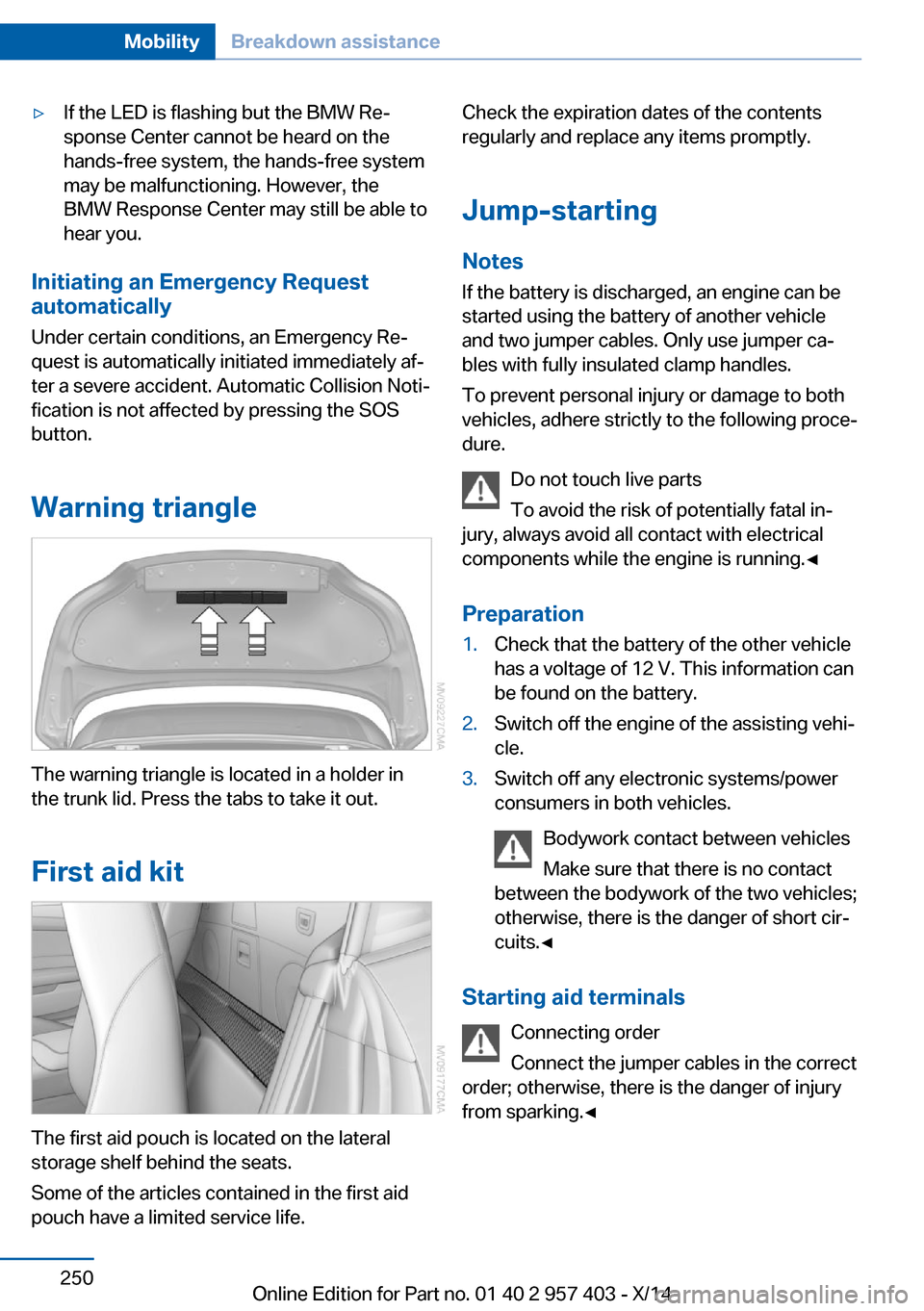
The warning triangle is located in a holder in
the trunk lid. Press the tabs to take it out.
First aid kit
The first aid pouch is located on the lateral
storage shelf behind the seats.
Some of the articles contained in the first aid
pouch have a limited service life.
Check the expiration dates of the contents
regularly and replace any items promptly.
Jump-starting
Notes If the battery is discharged, an engine can be
started using the battery of another vehicle
and two jumper cables. Only use jumper ca‐
bles with fully insulated clamp handles.
To prevent personal injury or damage to both
vehicles, adhere strictly to the following proce‐
dure.
Do not touch live parts
To avoid the risk of potentially fatal in‐
jury, always avoid all contact with electrical
components while the engine is running.◀
Preparation1.Check that the battery of the other vehicle
has a voltage of 12 V. This information can
be found on the battery.2.Switch off the engine of the assisting vehi‐
cle.3.Switch off any electronic systems/power
consumers in both vehicles.
Bodywork contact between vehicles
Make sure that there is no contact
between the bodywork of the two vehicles;
otherwise, there is the danger of short cir‐
cuits.◀
Starting aid terminals
Connecting order
Connect the jumper cables in the correct
order; otherwise, there is the danger of injury
from sparking.◀
Seite 250MobilityBreakdown assistance250
Online Edition for Part no. 01 40 2 957 403 - X/14
Page 279 of 289
DBC Dynamic Brake Con‐trol 99
DCC, refer to Cruise con‐ trol 103
Defogging windows 109
Defroster– Rear window 109, 112
Defrosting windows 109
Destination entry via the ad‐ dress book 142
Destination guidance 149
Destination guidance with in‐ termediate destinations 147
Destination input, naviga‐ tion 140
Digital clock 71
Digital compass 116
Digital radio 163
Dimensions 262
Dimming mirrors 51
Directional indicators, refer to Turn signals 60
Display lighting, refer to In‐ strument lighting 88
Display, refer to Control Dis‐ play 18
Displays and controls 12
Displays, care 258
Displays, cleaning 258
Displays, refer to Instrument cluster 14
Disposal
– Coolant 239– Remote control battery 39– Vehicle battery 248
Distance control, refer to
PDC 105
Divided screen view, split screen 22
Door key, refer to Remote control with integrated
key 30
Door lock 35
Doors, manual operation 35
Doors, unlocking and locking– Confirmation signals 34– From the inside 35– From the outside 32
DOT Quality Grades 230
Draft-free ventila‐ tion 109, 112
Drive-off assistant 102
Drive-off assistant, refer to DSC 99
Driving notes, breaking in 128
Driving notes, general 128
Driving stability control sys‐ tems 99
Driving tips 128
DSC Dynamic Stability Con‐ trol 99
DTC Dynamic Traction Con‐ trol 100
DTMF suffix dialing 198
DVD/CD 170
DVDs, storing 175
DVD, video 172
Dynamic Brake Control DBC 99
Dynamic destination guid‐ ance 156
Dynamic Driving Control 100
Dynamic Stability Control DSC 99
Dynamic Traction Control DTC 100
E
EBV electronic brake-force distribution 99
EfficientDynamics, refer to Saving fuel 132
Electrical fault
– 7-gear automatic transmis‐
sion 69
Electrical malfunction
– Door lock 35– Driver's door 35– Fuel filler flap 222Electric seat adjustment 47
Electronic brake-force distri‐ bution 99
Electronic engine oil level check 236
Electronic Stability Program ESP, refer to DSC 99
Emergency operation– Fuel filler flap, unlocking
manually 222
Emergency Request 249
Emergency unlocking
– Trunk lid, from the inside 37
Energy, saving
– Automatic Engine Start/
Stop Function 57
Engine compartment 235
Engine coolant, refer to Cool‐ ant 239
Engine oil, adding 238
Engine oil additives 238
Engine oil, checking the level 236
Engine oil temperature 72
Engine oil types, alterna‐ tive 238
Engine oil types, ap‐ proved 238
Engine, overheating, refer to Coolant temperature 72
Engine start, Help 250
Engine, starting 56
Engine, starting
– Comfort Access 37– Start/Stop button 55
Engine, stopping, Start/Stop
button 55
Engine, switching off 57
Engine temperature 72
Entry comparison 23
Entry lamps, refer to Interior lamps 89
Equalizer 160
Equipment, interior 114
Error messages, refer to Check Control 82
Seite 275Everything from A to ZReference275
Online Edition for Part no. 01 40 2 957 403 - X/14
Page 284 of 289
Remaining range, refer toRange 73
Reminders 210
Remote app 219
Remote control 30
Remote control– Battery replacement 39– Comfort Access 37– Malfunction 34, 38– Removing from the ignition
lock 55– Trunk lid 33
Remote control, univer‐
sal 114
Remote inquiry 198
Remote Services 219
Replacement fuses, refer to Spare fuses 248
Replacement remote con‐ trol 30
Replacing wheels/tires 232
Reporting safety defects 9
Reservoir for washer fluid 62
Restraining systems
– Refer to Safety belts 48
Restraint system
– For children 53
Retaining straps, securing
cargo 132
Retractable hardtop
– Convenient opening and
closing 33– Opening and closing 42– Remote control 33
Retreaded tires 233
Reverse gear
– 7-gear automatic transmis‐
sion 67– 8-gear automatic transmis‐
sion 63– Manual transmission 63
Rim cleaner, care 257
Road, avoiding 149
Road detour 149
Roadside Assistance 215
Roadside parking lamps 87
Roadworthiness test 78
Roof, refer to Retractable
hardtop 42
Route 150
Route criteria, route 149
Route, displaying 150
Route section, bypass‐ ing 150
RSC Runflat System Compo‐ nent, refer to Run-flat
tires 232
Rubber components, care 257
Run-flat tires 232
Run-flat tires– Tire inflation pressure 226
Running lights, refer to Park‐
ing lamps/low beams 85
S Safety 6
Safety-belt height adjust‐ ment 49
Safety belts 48
Safety belts
– Damage 49– Indicator/warning light 49– Reminder 49
Safety belts, care 257
Safety systems
– Airbags 90– Safety belts 48
Safety tires 232
Satellite radio 164
Saving fuel 132
Scale, changing during navi‐ gation 152
Screen, refer to Control Dis‐ play 18
Search, refer to BMW On‐ line 216
Seat adjustment, electric 47
Seat adjustment, mechani‐ cal 46
Seat and mirror memory 49
Seat and mirror memory, re‐ trieving automatically 34
Seat Belt Reminder, refer to
Safety belt reminder 49
Seat belts– Refer to Safety belts 48
Seat heating 48
Seats 46
Seats
– Adjusting 46– Adjusting electrically 47– Heating 48– Memory, refer to Seat and
mirror memory 49– Storing the setting, refer to
Seat and mirror memory 49
Sensors, care 258
Service and warranty 7
Service requirements, CBS Condition Based Serv‐
ice 241
Service requirements, dis‐ play 78
Services, remote 219
Servotronic 102
Settings and information 75
Settings, configuring, refer to Personal Profile 30
Settings, DVD 173
Settings on Control Dis‐ play 78
Setting the clock, 12h/24h format 77
Shift paddles on steering
wheel
– 7-gear automatic transmis‐
sion 68– 8-gear automatic transmis‐
sion 65
Short commands, voice acti‐
vation 264
Side airbags 90
Side windows, refer to Win‐ dows 40
Signal horn, refer to Horn 12
Sitting safely 46
Ski bag, refer to Through- loading opening with
integrated transport
bag 119
Seite 280ReferenceEverything from A to Z280
Online Edition for Part no. 01 40 2 957 403 - X/14
Page 285 of 289
Slot for remote control 55
Smokers' package, refer to Ashtray 118
Snap-in adapter, mobile phone 201
Snap-in adapter, refer to Cen‐ ter armrest storage com‐
partment 122
Snow chains 233
Socket, OBD Onboard Diag‐ nostics 242
Socket, refer to Connecting electrical devices 118
Software applications, iPhone 218
Software part number 192
Software update 187
SOS, refer to Emergency Re‐ quest, initiating 249
Sound output 162, 170
Spare fuses 248
Special destinations, naviga‐ tion 143
Special equipment, series equipment 6
Specified oil types 238
Speed, average 73
Speed limit 83
Speedometer 14
Split screen 22
Split screen map set‐ tings 153
Spoken instructions, naviga‐ tion 151
SPORT+ program, Dynamic Driving Control 101
Sport program– 7-gear automatic transmis‐
sion 67– 8-gear automatic transmis‐
sion 64
SPORT program, Dynamic
Driving Control 101
Spray nozzles, refer to Clean‐ ing the windshield and head‐
lamps 62
Stability control systems 99
Start/Stop button 55
Start/Stop button– Starting the engine 56– Switching off the engine 57
Starting aid 250
Starting the engine 56
State/province, selecting for navigation 140
Stations, stored 168
Station, storing 162
Status information, iDrive 21
Status of Owner's Manual 6
Steam jets 255
Steering wheel 52
Steering wheel
– Adjusting 52– Buttons on the steering
wheel 12
Stopping
– Engine 57
Storage compartments 123
Storage, tires 233
Storing the seat position, re‐ fer to Seat and mirror mem‐
ory 49
Storing the vehicle 258
Street, entering for naviga‐ tion 141
Summer tires, refer to Wheels and tires 226
Summer tires, tread 231
Suspension settings 100
Switches, refer to Cockpit 12
Switch for Dynamic Driving Control 100
Switching off
– Engine 57– Vehicle 57
Symbols 6
T Tachometer 72
Tailgate, opening from the in‐ side 36
Tailgate, refer to Trunk lid 36
Tail lights 245
Tail lights– Bulb replacement 245, 246
Tank display 72
Tasks 209
Technical changes, refer to Safety 6
Technical data 262
Telephone 192
Telephone, adjusting the vol‐ ume 196
Telephone, installation loca‐ tion, refer to Center arm‐
rest 122
TeleService 215
Temperature, air condi‐ tioner 109
Temperature, automatic cli‐ mate control 110
Temperature, changing the unit of measure 76
Temperature, coolant 72
Temperature display
– External temperature 71– External temperature warn‐
ing 71– Setting the unit 76
Temperature, engine oil 72
Text messages 206
Theft alarm system, refer to Alarm system 39
Thigh support adjustment 47
Third brake light, refer to Center brake light 246
Through-loading opening with integrated transport
bag 119
Tilt alarm sensor 40
Tilting the passenger side mirror 50
Time
– Setting the time 76– Setting the time zone 76
Tire age 230
Tire damage 231
Tire identification marks 229
Tire inflation pressure 226
Seite 281Everything from A to ZReference281
Online Edition for Part no. 01 40 2 957 403 - X/14