Interior BMW Z4 2015 E89 User Guide
[x] Cancel search | Manufacturer: BMW, Model Year: 2015, Model line: Z4, Model: BMW Z4 2015 E89Pages: 289, PDF Size: 7.16 MB
Page 55 of 289
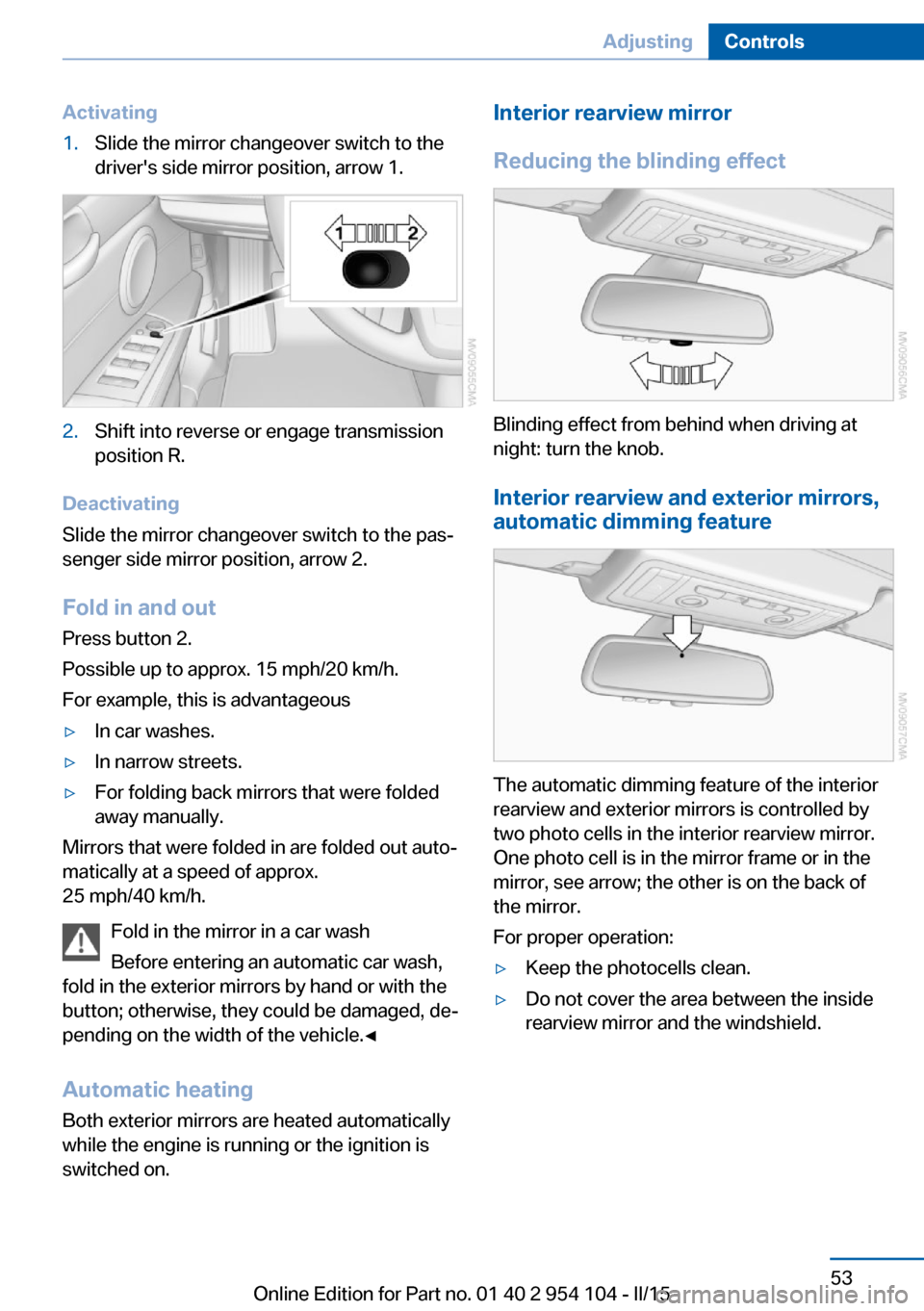
Activating1.Slide the mirror changeover switch to the
driver's side mirror position, arrow 1.2.Shift into reverse or engage transmission
position R.
Deactivating
Slide the mirror changeover switch to the pas‐
senger side mirror position, arrow 2.
Fold in and outPress button 2.
Possible up to approx. 15 mph/20 km/h.
For example, this is advantageous
▷In car washes.▷In narrow streets.▷For folding back mirrors that were folded
away manually.
Mirrors that were folded in are folded out auto‐
matically at a speed of approx.
25 mph/40 km/h.
Fold in the mirror in a car wash
Before entering an automatic car wash,
fold in the exterior mirrors by hand or with the
button; otherwise, they could be damaged, de‐
pending on the width of the vehicle.◀
Automatic heating
Both exterior mirrors are heated automatically
while the engine is running or the ignition is
switched on.
Interior rearview mirror
Reducing the blinding effect
Blinding effect from behind when driving at
night: turn the knob.
Interior rearview and exterior mirrors,
automatic dimming feature
The automatic dimming feature of the interior
rearview and exterior mirrors is controlled by
two photo cells in the interior rearview mirror.
One photo cell is in the mirror frame or in the
mirror, see arrow; the other is on the back of
the mirror.
For proper operation:
▷Keep the photocells clean.▷Do not cover the area between the inside
rearview mirror and the windshield.Seite 53AdjustingControls53
Online Edition for Part no. 01 40 2 954 104 - II/15
Page 62 of 289
▷High external temperature and operation of
the automatic climate control.▷The interior is not yet heated or cooled as
much as desired.▷The engine is not yet at operating temper‐
ature.▷Sharp steering angle or the steering wheel
is being turned.▷After driving in reverse.▷Fogging of the windows when the auto‐
matic climate control is switched on.▷Vehicle battery charge is very low.▷Hood is unlocked.▷Stop-and-go traffic.
The indicator lamp is lit.
Parking the vehicle during an
automatic engine stop
The vehicle can be parked safely during an au‐
tomatic engine stop, such as when you wish to
leave the vehicle.
1.Press the Start/Stop button. The ignition is
switched off. The Auto Start/Stop function
is deactivated.2.Set the parking brake.
Start the engine as usual using the Start/Stop
button.
Automatic engine start To drive away, the engine starts automatically
as soon as the clutch pedal is depressed.
After the engine starts, accelerate as usual.
Safety mode
The engine does not start by itself after it is
switched off automatically if any of the follow‐
ing conditions are fulfilled:
▷The driver's safety belt is unfastened or
the driver's door is open.▷Hood was unlocked.The indicator lamp lights up. A mes‐
sage appears on the Control Display.
The engine can only be started via
the Start/Stop button.
Note Even if you do not wish to drive away, the stop‐
ped engine still starts automatically in the fol‐
lowing situations:▷The interior has heated up strongly with
the cooling function switched on.▷The steering wheel is turned.▷The vehicle begins to roll.▷Fogging of the windows when the auto‐
matic climate control is switched on.▷Vehicle battery charge is very low.▷The interior has cooled down strongly with
the heating switched on.▷Low braking pressure, such as from de‐
pressing the brake pedal a number of times
consecutively.
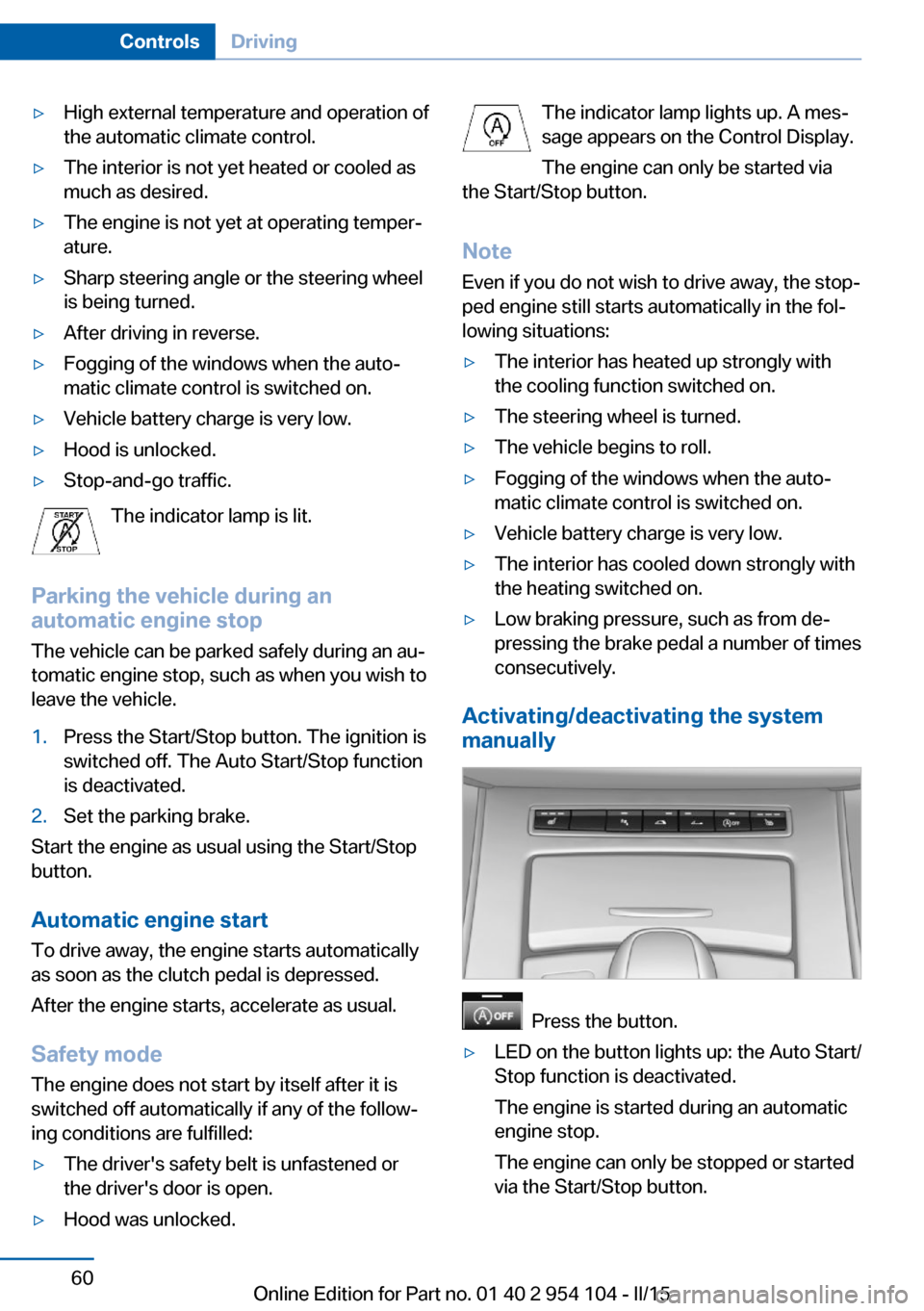
Activating/deactivating the system
manually
Press the button.
▷LED on the button lights up: the Auto Start/
Stop function is deactivated.
The engine is started during an automatic
engine stop.
The engine can only be stopped or started
via the Start/Stop button.Seite 60ControlsDriving60
Online Edition for Part no. 01 40 2 954 104 - II/15
Page 65 of 289
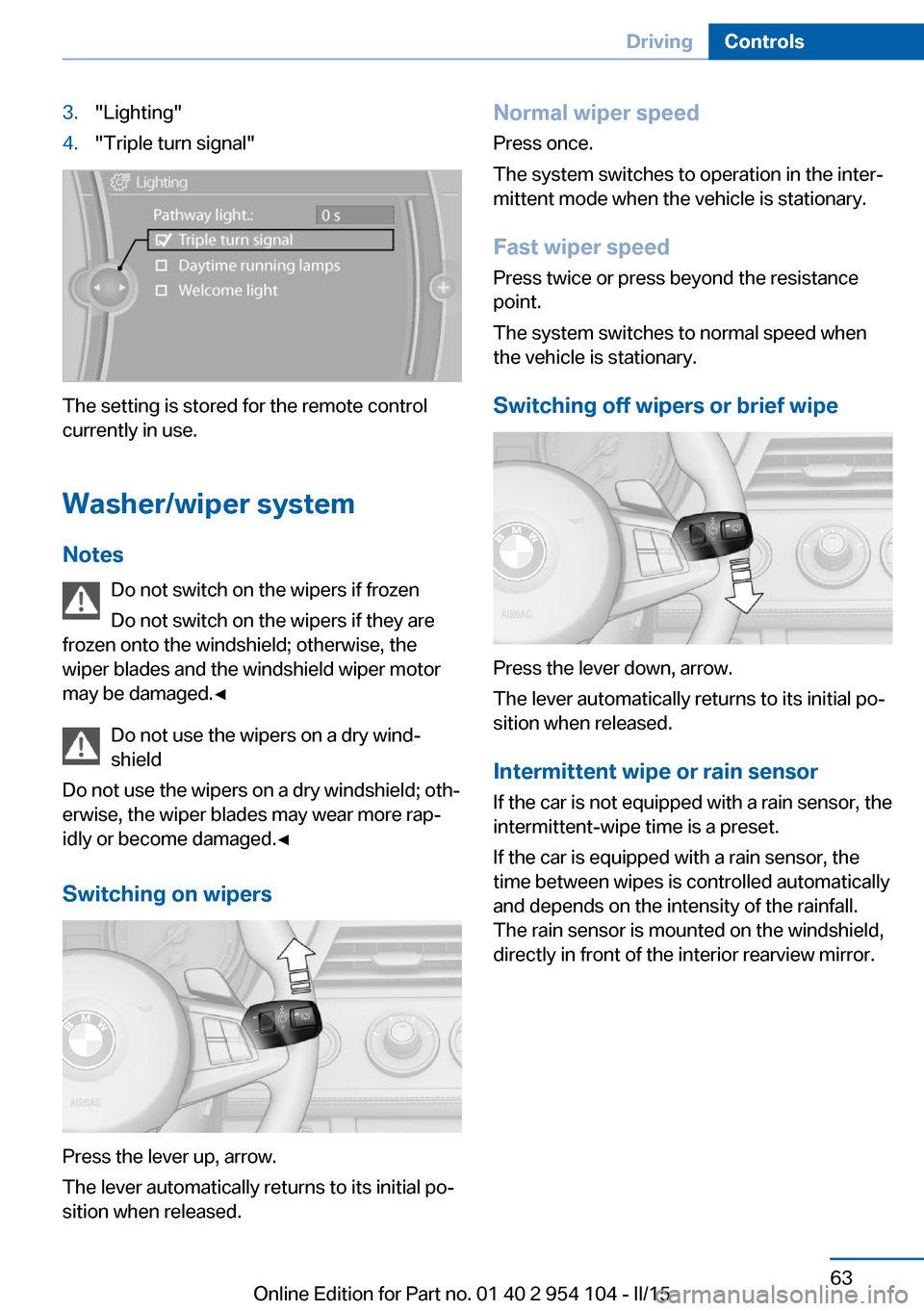
3."Lighting"4."Triple turn signal"
The setting is stored for the remote control
currently in use.
Washer/wiper system Notes Do not switch on the wipers if frozen
Do not switch on the wipers if they are
frozen onto the windshield; otherwise, the wiper blades and the windshield wiper motor
may be damaged.◀
Do not use the wipers on a dry wind‐
shield
Do not use the wipers on a dry windshield; oth‐
erwise, the wiper blades may wear more rap‐
idly or become damaged.◀
Switching on wipers
Press the lever up, arrow.
The lever automatically returns to its initial po‐
sition when released.
Normal wiper speed
Press once.
The system switches to operation in the inter‐
mittent mode when the vehicle is stationary.
Fast wiper speed
Press twice or press beyond the resistance
point.
The system switches to normal speed when
the vehicle is stationary.
Switching off wipers or brief wipe
Press the lever down, arrow.
The lever automatically returns to its initial po‐
sition when released.
Intermittent wipe or rain sensor
If the car is not equipped with a rain sensor, the
intermittent-wipe time is a preset.
If the car is equipped with a rain sensor, the
time between wipes is controlled automatically and depends on the intensity of the rainfall.
The rain sensor is mounted on the windshield,
directly in front of the interior rearview mirror.
Seite 63DrivingControls63
Online Edition for Part no. 01 40 2 954 104 - II/15
Page 89 of 289
LampsVehicle equipment
This chapter describes all series equipment as
well as country-specific and special equipment
offered for this model series. Therefore, it also
describes equipment that may not be found in
your vehicle, for instance due to the selected
special equipment or the country version. This
also applies to safety-related functions and
systems.
When using the features and systems descri‐
bed here, adhere to local regulations.
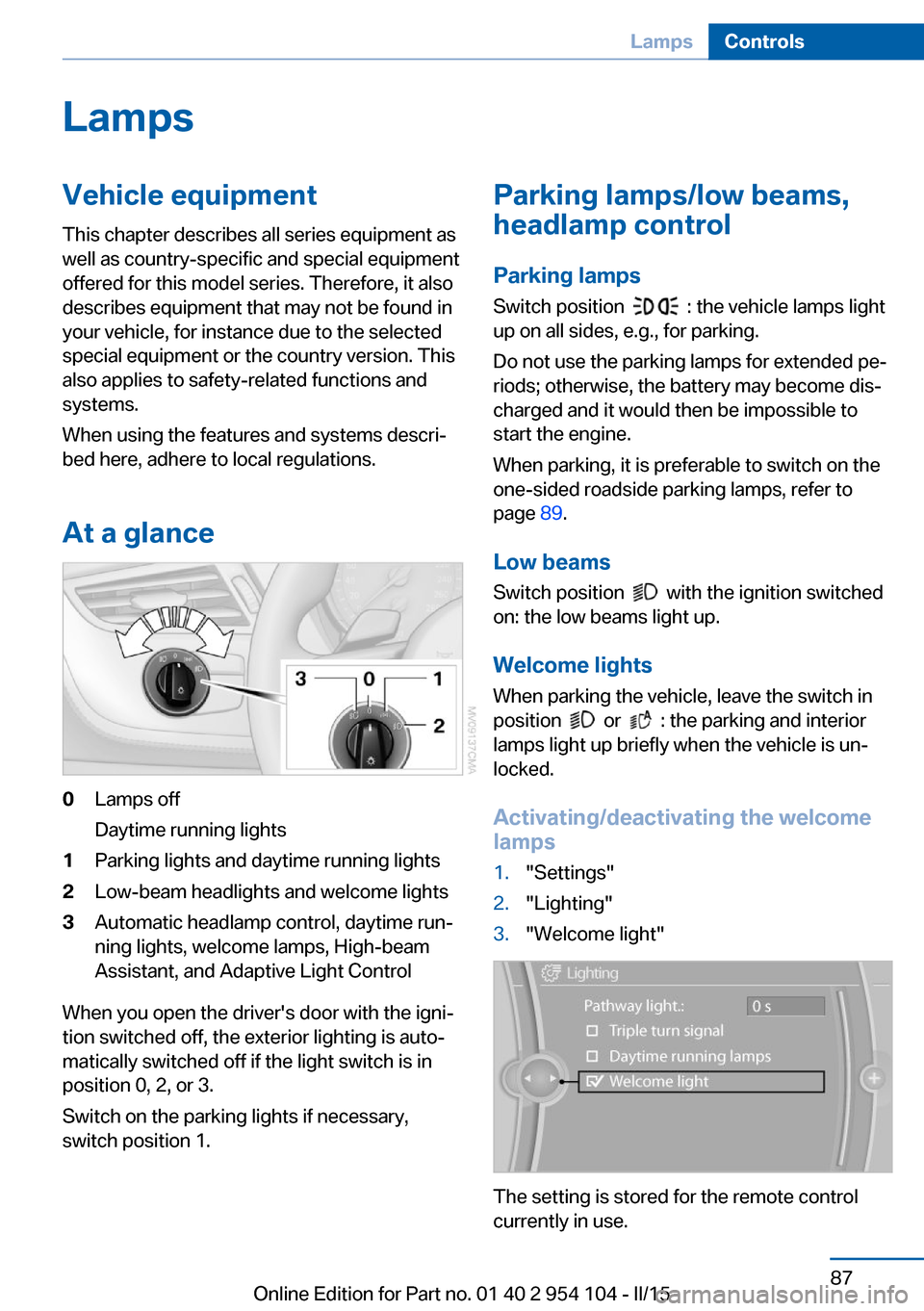
At a glance0Lamps off
Daytime running lights1Parking lights and daytime running lights2Low-beam headlights and welcome lights3Automatic headlamp control, daytime run‐
ning lights, welcome lamps, High-beam
Assistant, and Adaptive Light Control
When you open the driver's door with the igni‐
tion switched off, the exterior lighting is auto‐
matically switched off if the light switch is in
position 0, 2, or 3.
Switch on the parking lights if necessary,
switch position 1.
Parking lamps/low beams,
headlamp control
Parking lamps Switch position
: the vehicle lamps light
up on all sides, e.g., for parking.
Do not use the parking lamps for extended pe‐
riods; otherwise, the battery may become dis‐
charged and it would then be impossible to
start the engine.
When parking, it is preferable to switch on the
one-sided roadside parking lamps, refer to
page 89.
Low beams Switch position
with the ignition switched
on: the low beams light up.
Welcome lights When parking the vehicle, leave the switch in
position
or : the parking and interior
lamps light up briefly when the vehicle is un‐
locked.
Activating/deactivating the welcome
lamps
1."Settings"2."Lighting"3."Welcome light"
The setting is stored for the remote control
currently in use.
Seite 87LampsControls87
Online Edition for Part no. 01 40 2 954 104 - II/15
Page 91 of 289
To avoid blinding oncoming traffic, the Adap‐
tive Light Control does not swivel to the driv‐
er's side when the vehicle is at a standstill.
Malfunction The warning lamp lights up. A mes‐
sage appears on the Control Display.
Adaptive Light Control is malfunc‐
tioning or has failed. Have the system checked
as soon as possible.
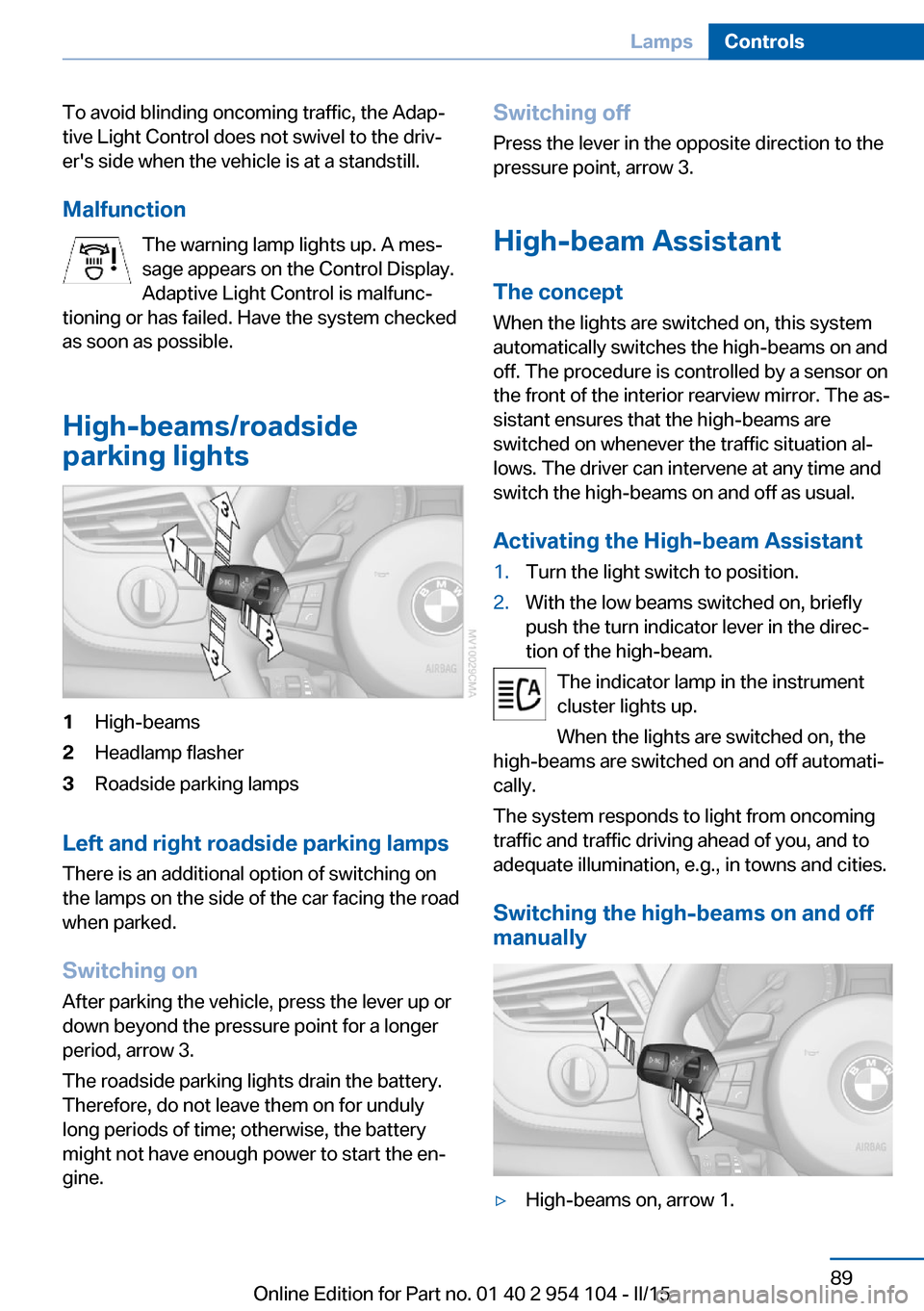
High-beams/roadside
parking lights1High-beams2Headlamp flasher3Roadside parking lamps
Left and right roadside parking lamps
There is an additional option of switching on
the lamps on the side of the car facing the road
when parked.
Switching on After parking the vehicle, press the lever up or
down beyond the pressure point for a longer
period, arrow 3.
The roadside parking lights drain the battery.
Therefore, do not leave them on for unduly
long periods of time; otherwise, the battery
might not have enough power to start the en‐
gine.
Switching off
Press the lever in the opposite direction to the
pressure point, arrow 3.
High-beam Assistant The concept
When the lights are switched on, this system
automatically switches the high-beams on and
off. The procedure is controlled by a sensor on
the front of the interior rearview mirror. The as‐
sistant ensures that the high-beams are
switched on whenever the traffic situation al‐
lows. The driver can intervene at any time and
switch the high-beams on and off as usual.
Activating the High-beam Assistant1.Turn the light switch to position.2.With the low beams switched on, briefly
push the turn indicator lever in the direc‐
tion of the high-beam.
The indicator lamp in the instrument
cluster lights up.
When the lights are switched on, the
high-beams are switched on and off automati‐
cally.
The system responds to light from oncoming
traffic and traffic driving ahead of you, and to
adequate illumination, e.g., in towns and cities.
Switching the high-beams on and off
manually
▷High-beams on, arrow 1.Seite 89LampsControls89
Online Edition for Part no. 01 40 2 954 104 - II/15
Page 92 of 289
▷High-beams off/headlamp flasher, arrow 2.
To reactivate the High-beam Assistant, briefly
push the turn indicator lever toward the high-
beams.
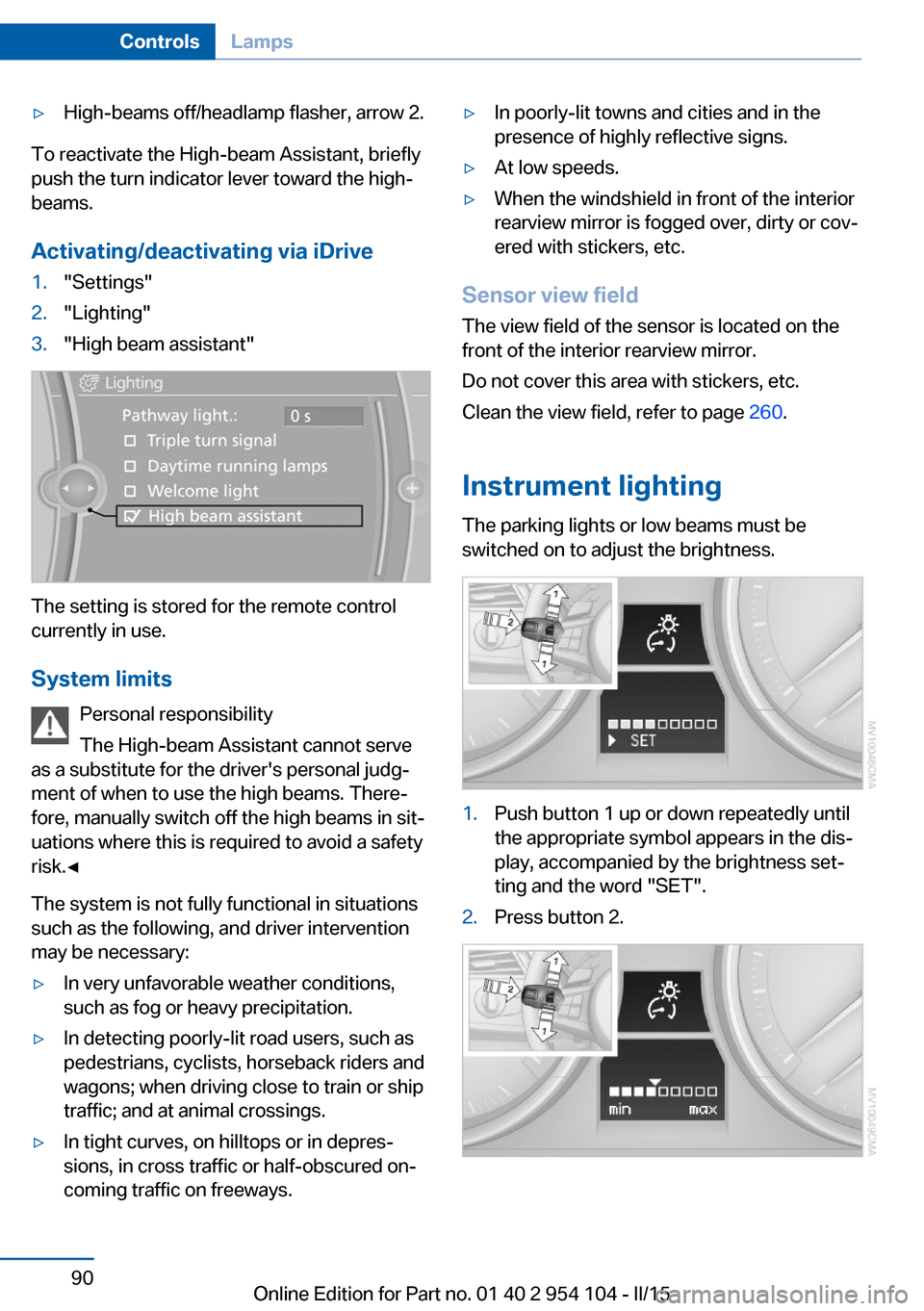
Activating/deactivating via iDrive
1."Settings"2."Lighting"3."High beam assistant"
The setting is stored for the remote control
currently in use.
System limits Personal responsibility
The High-beam Assistant cannot serve
as a substitute for the driver's personal judg‐
ment of when to use the high beams. There‐
fore, manually switch off the high beams in sit‐
uations where this is required to avoid a safety
risk.◀
The system is not fully functional in situations
such as the following, and driver intervention
may be necessary:
▷In very unfavorable weather conditions,
such as fog or heavy precipitation.▷In detecting poorly-lit road users, such as
pedestrians, cyclists, horseback riders and
wagons; when driving close to train or ship
traffic; and at animal crossings.▷In tight curves, on hilltops or in depres‐
sions, in cross traffic or half-obscured on‐
coming traffic on freeways.▷In poorly-lit towns and cities and in the
presence of highly reflective signs.▷At low speeds.▷When the windshield in front of the interior
rearview mirror is fogged over, dirty or cov‐
ered with stickers, etc.
Sensor view field
The view field of the sensor is located on thefront of the interior rearview mirror.
Do not cover this area with stickers, etc.
Clean the view field, refer to page 260.
Instrument lighting The parking lights or low beams must be
switched on to adjust the brightness.
1.Push button 1 up or down repeatedly until
the appropriate symbol appears in the dis‐
play, accompanied by the brightness set‐
ting and the word "SET".2.Press button 2.Seite 90ControlsLamps90
Online Edition for Part no. 01 40 2 954 104 - II/15
Page 93 of 289
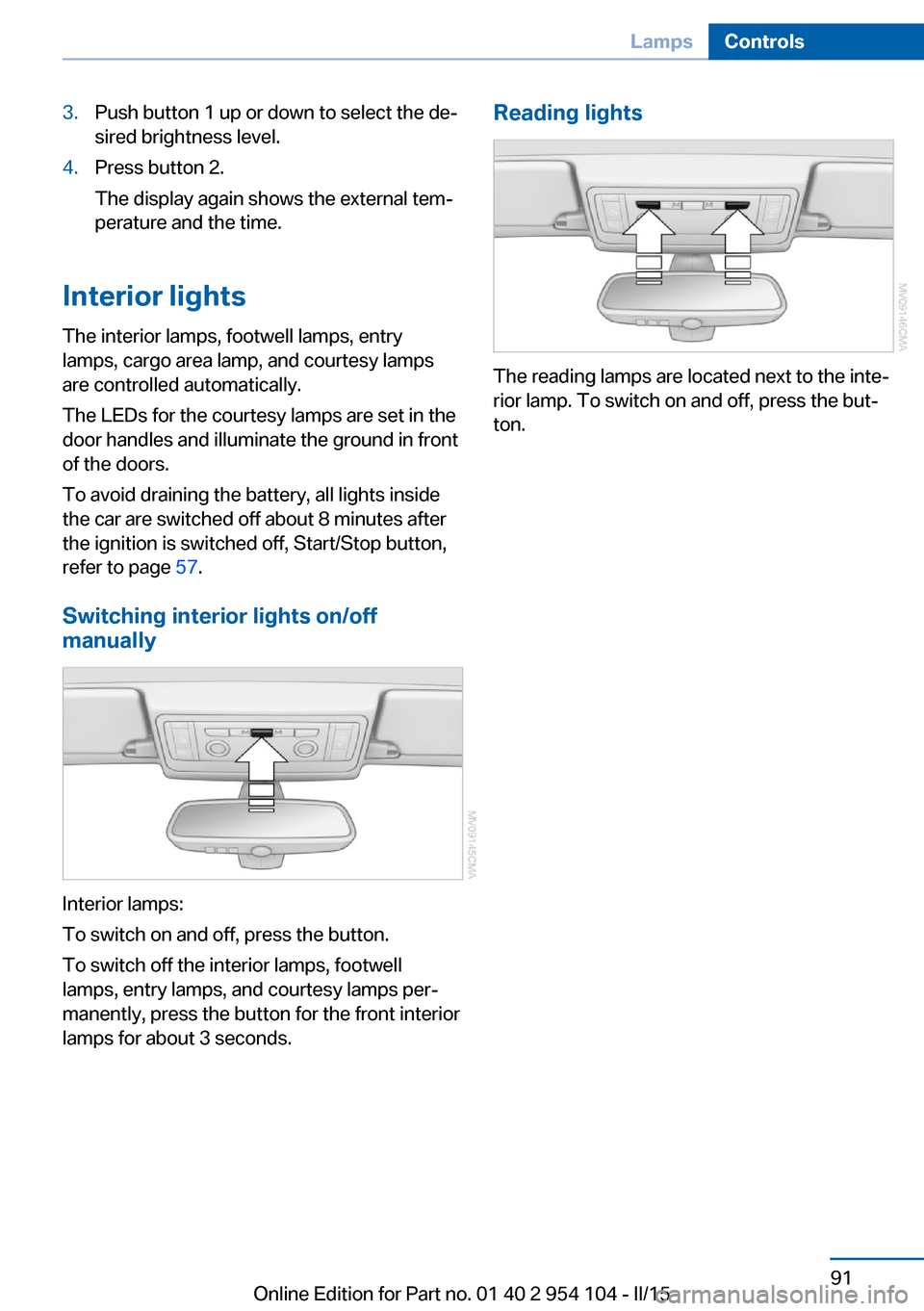
3.Push button 1 up or down to select the de‐
sired brightness level.4.Press button 2.
The display again shows the external tem‐
perature and the time.
Interior lights
The interior lamps, footwell lamps, entry
lamps, cargo area lamp, and courtesy lamps
are controlled automatically.
The LEDs for the courtesy lamps are set in the
door handles and illuminate the ground in front
of the doors.
To avoid draining the battery, all lights inside
the car are switched off about 8 minutes after
the ignition is switched off, Start/Stop button,
refer to page 57.
Switching interior lights on/off
manually
Interior lamps:
To switch on and off, press the button.
To switch off the interior lamps, footwell
lamps, entry lamps, and courtesy lamps per‐
manently, press the button for the front interior
lamps for about 3 seconds.
Reading lights
The reading lamps are located next to the inte‐
rior lamp. To switch on and off, press the but‐
ton.
Seite 91LampsControls91
Online Edition for Part no. 01 40 2 954 104 - II/15
Page 95 of 289
▷Do not place slip covers, seat cushions or
other objects on the front passenger seat
that are not approved specifically for seats
with integrated side airbags.▷Do not hang pieces of clothing, such as
jackets, over the backrests.▷Make sure that passengers do not lean
their heads against the side airbag; other‐
wise, serious injuries could result if the air‐
bag suddenly deployed.▷Do not remove the airbag restraint system.▷Do not remove the steering wheel.▷Do not apply adhesive materials to the air‐
bag cover panels, cover them or modify
them in any way.▷Never modify either the individual compo‐
nents or the wiring in the airbag system.
This also applies to the covers of the steer‐
ing wheel, the dashboard and the seats.◀
In the case of a malfunction, deactivation
and after triggering of the airbags
Do not touch the individual components imme‐
diately after the system has been triggered;
otherwise, there is the danger of burns.
Only have the airbags checked, repaired or dis‐
mantled and the airbag generator scrapped by
your service center or a workshop that has the
necessary authorization for handling explo‐
sives.
Non-professional attempts to service the sys‐
tem could lead to failure in an emergency or
undesired triggering of the airbag, either of
which could result in injury.◀
Warning notices and information about the air‐
bags can also be found on the sun visors.
Automatic deactivation of the
passenger airbags
The system determines whether the front pas‐
senger seat is occupied by measuring the re‐
sistance of the human body. The front and side
airbags on the front passenger side are acti‐
vated or deactivated accordingly by the sys‐
tem.
The indicator lamp above the interior rearview
mirror shows the current status of the passen‐
ger airbags, deactivated or activated, refer to
Status of passenger airbags below.
Passenger feet in the footwellMake sure that the front passenger
keeps his or her feet in the footwell; otherwise,
the front passenger airbags may not function
properly.◀
Child restraint fixing system in the front
passenger seat
Before transporting a child on the passenger
seat, read the safety and operating instructions
under Transporting children safely, refer to
page 55.◀
Malfunction of the automatic
deactivation system
The front passenger airbags may be deacti‐
vated if adolescents and adults sit in certain
positions; the indicator lamp for the front pas‐
senger airbags comes on. In this case, change
the sitting position so that the front passenger
airbags are activated and the indicator lamp
goes out. If the desired airbag status cannot be
achieved by changing the sitting position, do
not transport the passenger in the vehicle.
To make sure that occupation of the seat
cushion can be detected correctly:▷Do not attach seat covers, seat cushion
padding, ball mats or other items to the
passenger seat unless they are specifically
recommended by BMW.▷Do not place any objects on the front pas‐
senger seat.▷Do not place objects under the seat that
could press against the seat from below.Seite 93SafetyControls93
Online Edition for Part no. 01 40 2 954 104 - II/15
Page 112 of 289
4Air vent: air for the upper body area. The
thumbwheels increase and decrease theair supply continuously; the levers change
the direction of the airflow.5Air vent: air for the knee area, footwell
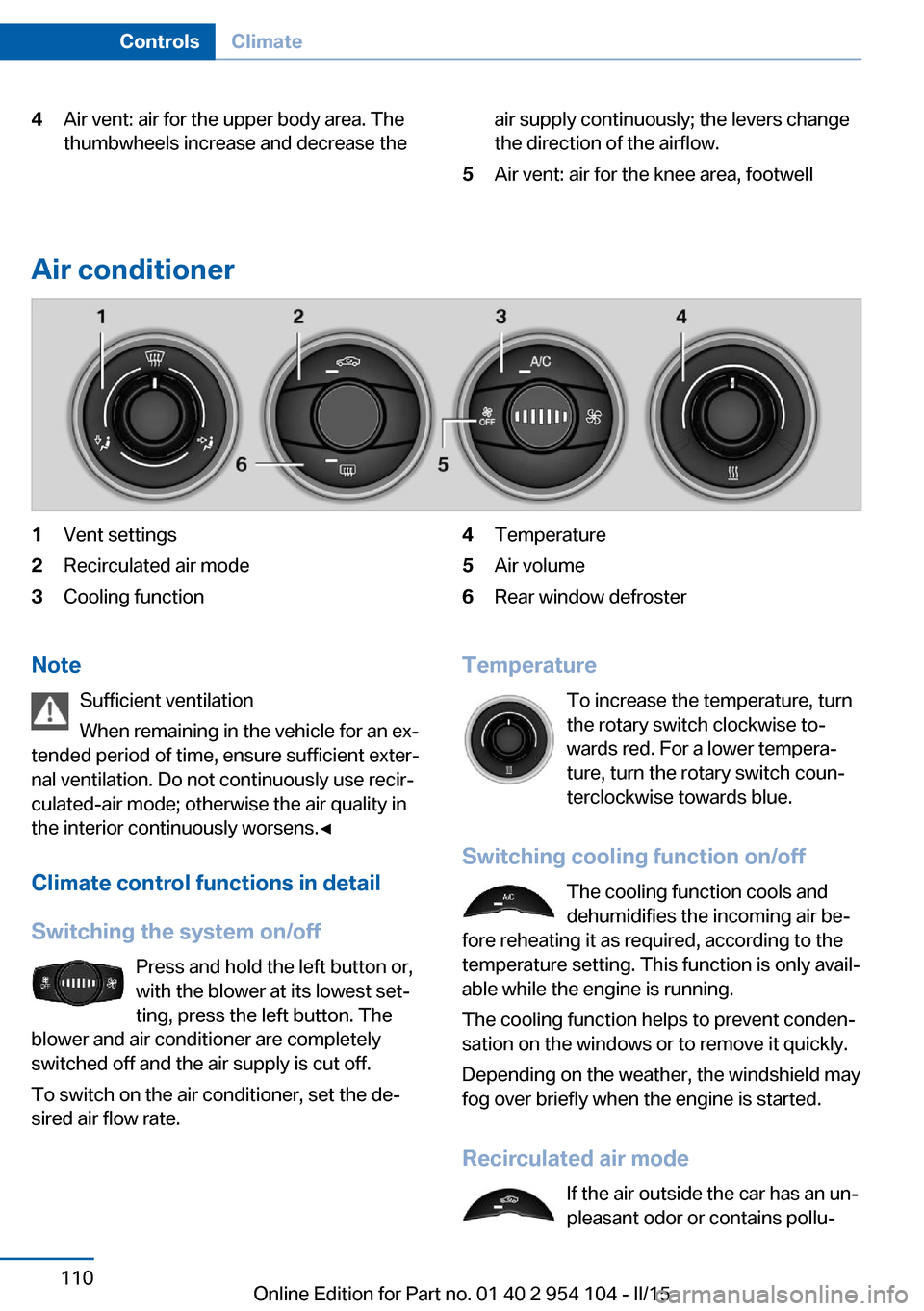
Air conditioner
1Vent settings2Recirculated air mode3Cooling function4Temperature5Air volume6Rear window defrosterNote
Sufficient ventilation
When remaining in the vehicle for an ex‐
tended period of time, ensure sufficient exter‐
nal ventilation. Do not continuously use recir‐
culated-air mode; otherwise the air quality in
the interior continuously worsens.◀
Climate control functions in detail
Switching the system on/off Press and hold the left button or,
with the blower at its lowest set‐
ting, press the left button. The
blower and air conditioner are completely
switched off and the air supply is cut off.
To switch on the air conditioner, set the de‐
sired air flow rate.Temperature
To increase the temperature, turn
the rotary switch clockwise to‐
wards red. For a lower tempera‐
ture, turn the rotary switch coun‐
terclockwise towards blue.
Switching cooling function on/off The cooling function cools and
dehumidifies the incoming air be‐
fore reheating it as required, according to the
temperature setting. This function is only avail‐
able while the engine is running.
The cooling function helps to prevent conden‐
sation on the windows or to remove it quickly.
Depending on the weather, the windshield may
fog over briefly when the engine is started.
Recirculated air mode If the air outside the car has an un‐
pleasant odor or contains pollu‐Seite 110ControlsClimate110
Online Edition for Part no. 01 40 2 954 104 - II/15
Page 113 of 289
tants, shut off the supply to the interior of the
car temporarily. The system then recirculates
the air currently within the vehicle.
The recirculated air mode can also be acti‐
vated/deactivated, refer to page 14, via a but‐
ton on the steering wheel.
Air volume Press the corresponding button.
The higher the rate, the more ef‐
fective the heating or cooling will
be.
The air flow rate may be reduced or the blower
may be switched off entirely to save on battery
power.
Vent settings Direct the flow of air to the win‐
dows
, to the upper body area
, or to the knee area and foot‐
well
. Intermediate positions
are possible. In the 6 o'clock posi‐
tion, a small amount of air is also directed to‐
ward the windows to keep them from fogging
over.
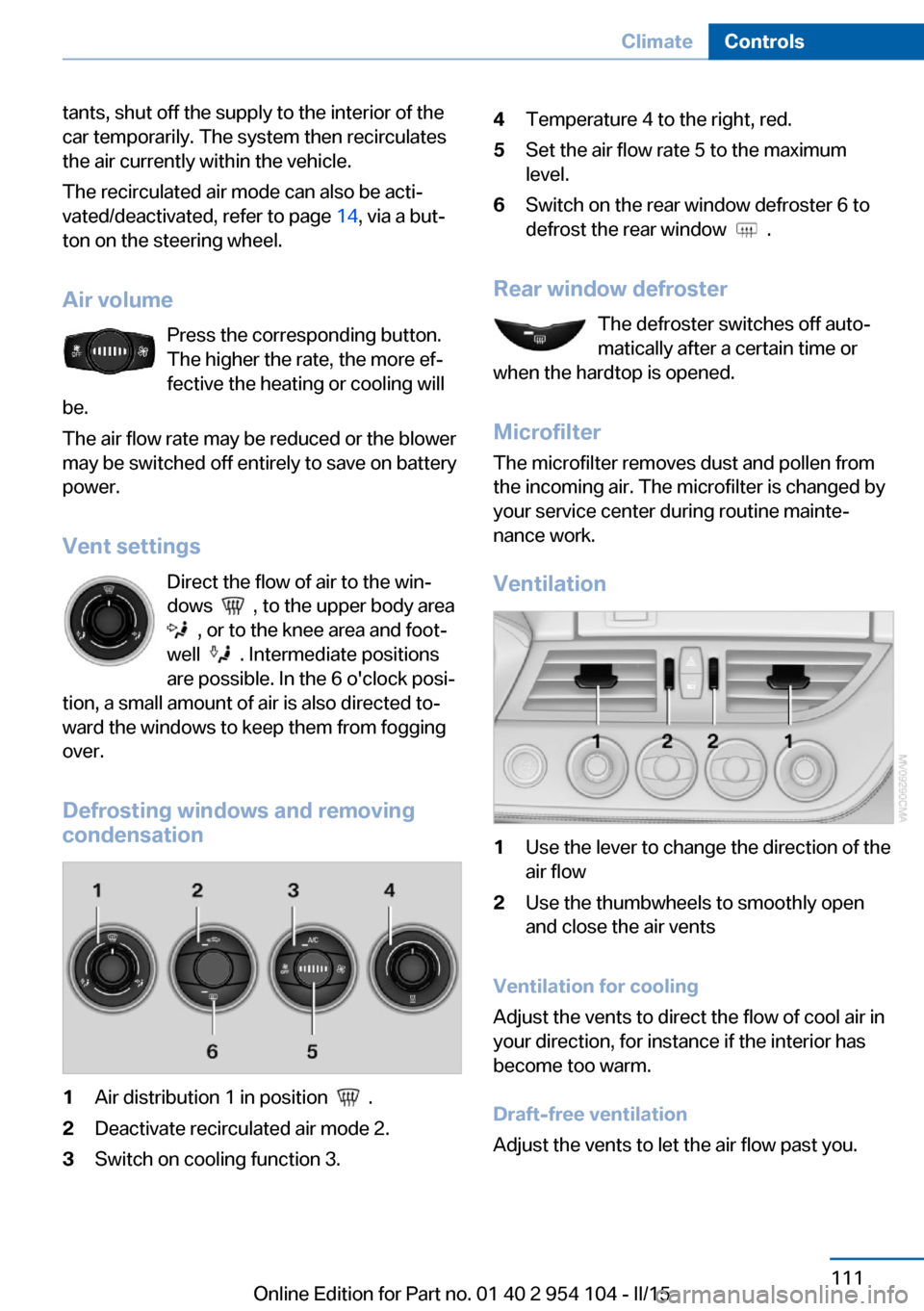
Defrosting windows and removing
condensation
1Air distribution 1 in position .2Deactivate recirculated air mode 2.3Switch on cooling function 3.4Temperature 4 to the right, red.5Set the air flow rate 5 to the maximum
level.6Switch on the rear window defroster 6 to
defrost the rear window
.
Rear window defroster
The defroster switches off auto‐
matically after a certain time or
when the hardtop is opened.
Microfilter
The microfilter removes dust and pollen from
the incoming air. The microfilter is changed by
your service center during routine mainte‐
nance work.
Ventilation
1Use the lever to change the direction of the
air flow2Use the thumbwheels to smoothly open
and close the air vents
Ventilation for cooling
Adjust the vents to direct the flow of cool air in
your direction, for instance if the interior has
become too warm.
Draft-free ventilation
Adjust the vents to let the air flow past you.
Seite 111ClimateControls111
Online Edition for Part no. 01 40 2 954 104 - II/15