Trunk lock BMW Z4 2015 E89 User Guide
[x] Cancel search | Manufacturer: BMW, Model Year: 2015, Model line: Z4, Model: BMW Z4 2015 E89Pages: 289, PDF Size: 7.16 MB
Page 44 of 289
▷Insert the remote control all the way into
the ignition lock.▷With Comfort Access: if you are carrying
the remote control with you, pull on the
door handle.
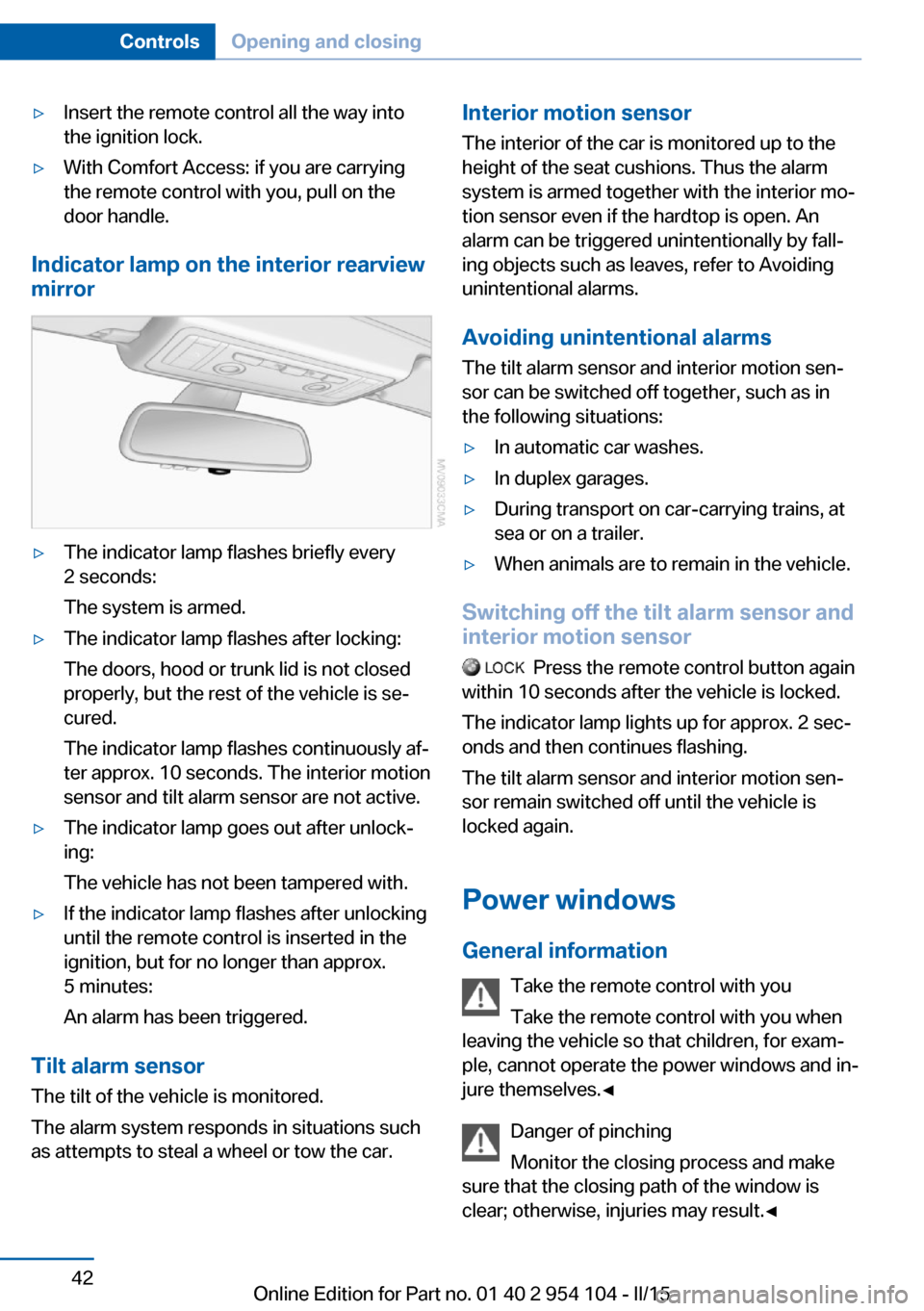
Indicator lamp on the interior rearview
mirror
▷The indicator lamp flashes briefly every
2 seconds:
The system is armed.▷The indicator lamp flashes after locking:
The doors, hood or trunk lid is not closed
properly, but the rest of the vehicle is se‐
cured.
The indicator lamp flashes continuously af‐
ter approx. 10 seconds. The interior motion
sensor and tilt alarm sensor are not active.▷The indicator lamp goes out after unlock‐
ing:
The vehicle has not been tampered with.▷If the indicator lamp flashes after unlocking
until the remote control is inserted in the
ignition, but for no longer than approx.
5 minutes:
An alarm has been triggered.
Tilt alarm sensor The tilt of the vehicle is monitored.
The alarm system responds in situations such
as attempts to steal a wheel or tow the car.
Interior motion sensor
The interior of the car is monitored up to theheight of the seat cushions. Thus the alarm
system is armed together with the interior mo‐
tion sensor even if the hardtop is open. An
alarm can be triggered unintentionally by fall‐
ing objects such as leaves, refer to Avoiding unintentional alarms.
Avoiding unintentional alarms The tilt alarm sensor and interior motion sen‐
sor can be switched off together, such as in
the following situations:▷In automatic car washes.▷In duplex garages.▷During transport on car-carrying trains, at
sea or on a trailer.▷When animals are to remain in the vehicle.
Switching off the tilt alarm sensor and
interior motion sensor
Press the remote control button again
within 10 seconds after the vehicle is locked.
The indicator lamp lights up for approx. 2 sec‐
onds and then continues flashing.
The tilt alarm sensor and interior motion sen‐
sor remain switched off until the vehicle is
locked again.
Power windows General information Take the remote control with youTake the remote control with you when
leaving the vehicle so that children, for exam‐
ple, cannot operate the power windows and in‐
jure themselves.◀
Danger of pinching
Monitor the closing process and make
sure that the closing path of the window is
clear; otherwise, injuries may result.◀
Seite 42ControlsOpening and closing42
Online Edition for Part no. 01 40 2 954 104 - II/15
Page 46 of 289
Retractable hardtopGeneral information
Adhere to the following instructions:▷It is advisable that you close the retractable
hardtop when you park the vehicle. Not
only does the closed hardtop protect the
vehicle interior against unanticipated
weather damage, it also offers theft protec‐
tion. However, even when the hardtop is
closed, valuables should only be stored in
the locked cargo area.▷Do not attach roof rack systems to the re‐
tractable hardtop, and in particular do not
attach magnetic racks.▷Do not attach rack systems to the trunk lid,
and in particular do not attach magnetic
racks.▷When the retractable hardtop is operated,
the trunk lid swings back and up.
Before operating the retractable hardtop,
ensure that there is enough clearance, e.g.,
in tight parking spaces.▷If you open the hardtop while it is wet, e.g.,
after driving in the rain, water may drip into
the cargo area.
If necessary, remove items from the cargo
area beforehand to avoid water stains or
soiling.▷Opening and closing while the vehicle is
moving can cause air turbulence in the
cargo area.
Properly stow away objects in the cargo
area.▷At temperatures below 14 ℉/-10 ℃, the
retractable hardtop cannot be moved.
A message appears on the Control Display.
Do not touch the mechanism and keep
the opening path clear.
During opening and closing, do not reach into
the mechanism and keep children away from
the opening path of the retractable hardtop;
otherwise, there is the risk of injury.◀
Do not place objects on the retractable
hardtop.
Do not place any objects on the retractable
hardtop or on the trunk lid; otherwise, they
could fall during movements of the retractable
hardtop and cause damage or injury.◀
Before opening and closing Always open or close the hardtop fully.
Do not let the hardtop stop in an inter‐
mediate position when opening or closing.
Otherwise, there is the danger of personal in‐
jury since the hardtop will be lowered automat‐
ically after a few minutes.◀▷Observe the safety precautions above.▷Ensure that the trunk lid is closed.▷The vehicle should be parked on fairly level
ground. Excessive angle is indicated by a
light.▷Fold down the cargo area partition and
make sure it engages, refer to the instruc‐
tions below.▷Do not place any objects next to or on the
cargo area partition and close the storage
compartment on the left side of the cargo
area.▷Do not exceed the maximum loading
height under the cargo area partition; refer
to the label in the cargo area showing a line
indicating the maximum height.Seite 44ControlsOpening and closing44
Online Edition for Part no. 01 40 2 954 104 - II/15
Page 123 of 289
Under the center armrest
External audio device, refer to page 125.
In the passenger footwell A socket is located on the left below the glove
compartment.
Cargo area
Depending on your vehicle's equipment, the
following storage spaces can be found in the
cargo area:▷Rubber band for securing light objects.▷Storage compartment.
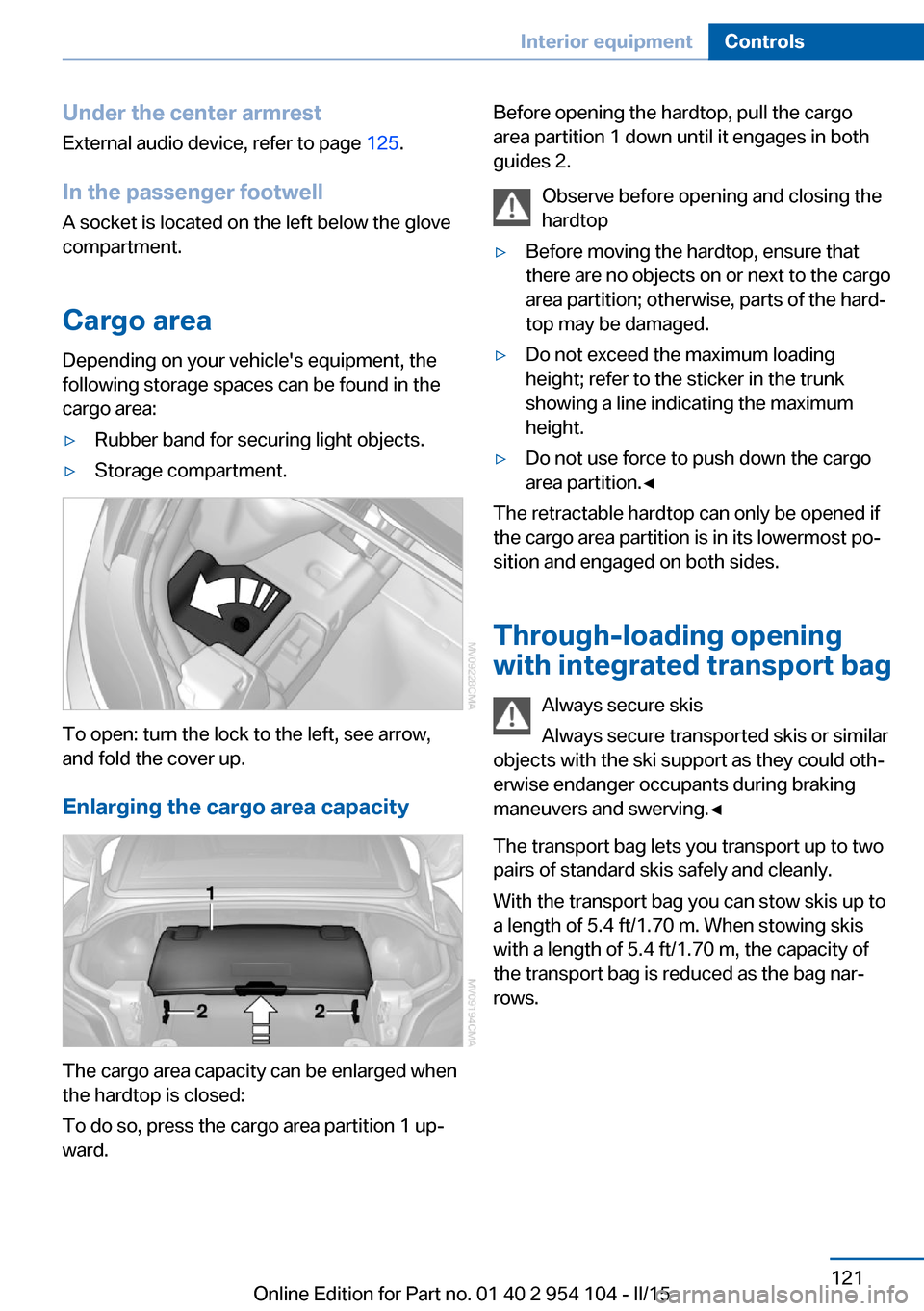
To open: turn the lock to the left, see arrow,
and fold the cover up.
Enlarging the cargo area capacity
The cargo area capacity can be enlarged when
the hardtop is closed:
To do so, press the cargo area partition 1 up‐
ward.
Before opening the hardtop, pull the cargo
area partition 1 down until it engages in both
guides 2.
Observe before opening and closing the
hardtop▷Before moving the hardtop, ensure that
there are no objects on or next to the cargo
area partition; otherwise, parts of the hard‐
top may be damaged.▷Do not exceed the maximum loading
height; refer to the sticker in the trunk
showing a line indicating the maximum
height.▷Do not use force to push down the cargo
area partition.◀
The retractable hardtop can only be opened if
the cargo area partition is in its lowermost po‐
sition and engaged on both sides.
Through-loading opening
with integrated transport bag
Always secure skis
Always secure transported skis or similar
objects with the ski support as they could oth‐
erwise endanger occupants during braking
maneuvers and swerving.◀
The transport bag lets you transport up to two
pairs of standard skis safely and cleanly.
With the transport bag you can stow skis up to a length of 5.4 ft/1.70 m. When stowing skis
with a length of 5.4 ft/1.70 m, the capacity of
the transport bag is reduced as the bag nar‐
rows.
Seite 121Interior equipmentControls121
Online Edition for Part no. 01 40 2 954 104 - II/15
Page 279 of 289
Data, technical, dimen‐sions 264
Data, technical, filling capaci‐ ties 265
Data, technical, weights 264
Date, date format 79
Date, setting 79
Daytime running lights 88
DBC Dynamic Brake Con‐ trol 101
DCC, refer to Cruise con‐ trol 105
Defogging windows 111
Defroster, rear win‐ dow 111, 114
Defrosting windows 111
Destination entry via the ad‐ dress book 144
Destination guidance 151
Destination guidance with in‐ termediate destinations 149
Destination input, naviga‐ tion 142
Digital clock 73
Digital compass 118
Digital radio 165
Dimensions 264
Dimming mirrors 53
Directional indicators, refer to Turn signals 62
Display lighting, refer to In‐ strument lighting 90
Display, refer to Control Dis‐ play 20
Displays and controls 14
Displays, care 260
Displays, cleaning 260
Displays, refer to Instrument cluster 16
Disposal, coolant 241
Disposal, remote control bat‐ tery 41
Disposal, vehicle battery 250
Distance control, refer to PDC 107 Divided screen view, split
screen 24
Door key, refer to Remote control with integrated
key 32
Door lock 37
Doors, manual operation 37
Doors, unlocking and locking, confirmation signals 36
Doors, unlocking and locking from the inside 37
Doors, unlocking and locking from the outside 34
DOT Quality Grades 232
Draft-free ventila‐ tion 111, 115
Drive-off assistant 104
Drive-off assistant, refer to DSC 101
Driving instructions, break- in 130
Driving notes, general 130
Driving stability control sys‐ tems 101
Driving tips 130
DSC Dynamic Stability Con‐ trol 101
DTC Dynamic Traction Con‐ trol 102
DTMF suffix dialing 200
DVD/CD 172
DVDs, storing 177
DVD, video 174
Dynamic Brake Control DBC 101
Dynamic destination guid‐ ance 158
Dynamic Driving Control 102
Dynamic Stability Control DSC 101
Dynamic Traction Control DTC 102 E
EBV electronic brake-force distribution 101
EfficientDynamics, refer to Saving fuel 134
Electrical fault, 7-gear auto‐ matic transmission 71
Electrical malfunction, door lock 37
Electrical malfunction, driver's door 37
Electrical malfunction, fuel filler flap 224
Electric seat adjustment 49
Electronic brake-force distri‐ bution 101
Electronic engine oil level check 238
Electronic Stability Program ESP, refer to DSC 101
Emergency operation, fuel filler flap, unlocking man‐
ually 224
Emergency Request 251
Emergency unlocking, trunk lid, from the inside 39
Energy, saving, Automatic Start/Stop function 59
Engine compartment 237
Engine coolant, refer to Cool‐ ant 241
Engine oil, adding 240
Engine oil additives 240
Engine oil, checking the level 238
Engine oil temperature 74
Engine oil types, alterna‐ tive 240
Engine oil types, ap‐ proved 240
Engine, overheating, refer to Coolant temperature 74
Engine start, Help 252
Engine, starting 58 Seite 277Everything from A to ZReference277
Online Edition for Part no. 01 40 2 954 104 - II/15
Page 285 of 289
Seats, storing the setting, re‐fer to Seat and mirror mem‐
ory 51
Sensors, care 260
Service and warranty 8
Service requirements, CBS Condition Based Serv‐
ice 243
Service requirements, dis‐ play 80
Services, remote 221
Servotronic 104
Settings and information 77
Settings, clock, 12h/24h mode 79
Settings, configuring, refer to Personal Profile 32
Settings, DVD 175
Settings on Control Dis‐ play 80
Shift paddles on steering wheel, 7-gear automatic
transmission 70
Shift paddles on steering wheel, 8-gear automatic
transmission 67
Short commands, voice acti‐ vation 266
Side airbags 92
Side windows, refer to Win‐ dows 42
Sitting safely 48
Ski bag, refer to Through- loading opening with
integrated transport
bag 121
Slot for remote control 57
Smokers' package, refer to Ashtray 120
Snap-in adapter, mobile phone 203
Snap-in adapter, refer to Cen‐ ter armrest storage com‐
partment 124
Snow chains 235 Socket, OBD Onboard Diag‐
nostics 244
Socket, refer to Connecting electrical devices 120
Software applications, iPhone 220
Software part number 194
Software update 189
SOS, refer to Emergency Re‐ quest, initiating 251
Spare fuses 250
Special destinations, naviga‐ tion 145
Special equipment, series equipment 6
Specified oil types 240
Speed, average 75
Speed limit 85
Speedometer 16
Split screen 24
Split screen map set‐ tings 155
Spoken instructions, naviga‐ tion 153
SPORT+ program, Dynamic Driving Control 103
Sport program, 7-gear auto‐ matic transmission 70
Sport program, 8-gear auto‐ matic transmission 67
SPORT program, Dynamic Driving Control 103
Spray nozzles, refer to Clean‐ ing the windshield and head‐
lamps 64
Stability control systems 101
Start/Stop button 57
Start/Stop button, starting the engine 58
Start/Stop button, switching off the engine 59
Starting aid 252
Starting the engine 58
State/province, selecting for navigation 142
Stations, stored 170 Station, storing 164
Status information, iDrive 23
Status of Owner's Manual 6
Steam jets 257
Steering wheel 54
Steering wheel, adjusting 54
Steering wheel, buttons on the steering wheel 14
Stopping, engine 59
Storage compartments 125
Storage, tires 235
Storing the seat position, re‐ fer to Seat and mirror mem‐
ory 51
Storing the vehicle 260
Street, entering for naviga‐ tion 143
Summer tires, refer to Wheels and tires 228
Summer tires, tread 233
Suspension settings 102
Switches, refer to Cockpit 14
Switch for Dynamic Driving Control 102
Switching off, engine 59
Switching off, vehicle 59
Symbols 6
T Tachometer 74
Tailgate, opening from the in‐ side 38
Tailgate, refer to Trunk lid 38
Tailgate, remote control 35
Tail lamps, bulb replace‐ ment 247
Tail lights 247
Tank display 74
Tasks 211
Technical changes, refer to Safety 7
Technical data 264
Telephone 194
Telephone, adjusting the vol‐ ume 198 Seite 283Everything from A to ZReference283
Online Edition for Part no. 01 40 2 954 104 - II/15
Page 286 of 289
Telephone, installation loca‐tion, refer to Center arm‐
rest 124
TeleService 217
Temperature, air condi‐ tioner 110
Temperature, automatic cli‐ mate control 112
Temperature, changing the unit of measure 78
Temperature, coolant 74
Temperature display, external temperature 73
Temperature display, external temperature warning 73
Temperature display, setting the units 78
Temperature, engine oil 74
Text messages 208
Theft alarm system, refer to Alarm system 41
Thigh support adjustment 49
Third brake light, refer to Center brake light 248
Through-loading opening with integrated transport
bag 121
Tilt alarm sensor 42
Tilting the passenger side mirror 52
Time, setting the time 78
Tire age 232
Tire damage 233
Tire identification marks 231
Tire inflation pressure 228
Tire inflation pressure, pres‐ sure loss 97
Tire pressure monitoring, re‐ fer to FTM 94
Tire Pressure Monitor TPM 96
Tire Pressure Monitor TPM, system reset 97
Tire Pressure Monitor TPM, warning lamp 98
Tire Quality Grading 232 Tires, changing 234
Tires, flat tire 249
Tire size 231
Tires, run-flat tires 234
Tires, Tire Pressure Monitor TPM 96
Tire tread 233
Toll roads, route 151
Tone 162
Tool kit, refer to Onboard ve‐ hicle tool kit 245
Tools, refer to Onboard vehi‐ cle tool kit 245
Towing 253
Town/city, navigation 143
Tow-starting 253
TPM Tire Pressure Moni‐ tor 96
Traction control 102
TRACTION program, Dy‐ namic Driving Control 103
Traffic bulletins, naviga‐ tion 155
Transmission, 7-gear auto‐ matic transmission with dual
clutch 68
Transmission, 8-gear auto‐ matic transmission 66
Transmission lock, unlocking manually 71
Transmission lock, unlocking manually, with 7-gear auto‐
matic transmission 71
Transmission, manual trans‐ mission 65
Transmission positions, 7- gear automatic transmis‐
sion 68
Transmission positions, 8- gear automatic transmis‐
sion 66
Transmission, unlocking transmission lock manually,
for 7-gear automatic trans‐
mission 71 Transporting children
safely 55
Tread depth, tires 233
Tread, tires 233
Treble, tone 162
Trip-distance counter, refer to Trip odometer 73
Triple turn signal activa‐ tion 62
Trip odometer 73
Trips, planning 149
Trunk lid 38
Trunk lid, Comfort Access 40
Trunk lid, emergency unlock‐ ing 39
Trunk lid, opening from the inside 38
Trunk lid, opening from the outside 38
Turning circle, refer to Dimen‐ sions 264
Turn signal, indicator/warning lamp 16
Turn signals 62
Turn signals, bulb replace‐ ment, front 247
Turn signals, triple turn signal activation 62
U Uniform Tire Quality Grading/ UTQG 232
Unintentional alarms 42
Units, average fuel consump‐ tion 78
Units of measure, changing on the Control Display 78
Units, temperature 78
Universal remote control 116
Unlocking, from the inside 38
Unlocking, from the out‐ side 34
Unlocking, hood 238
Unlocking, setting the unlock‐ ing characteristics 34 Seite 284ReferenceEverything from A to Z284
Online Edition for Part no. 01 40 2 954 104 - II/15
Page 287 of 289
Unlocking, trunk lid 40
Unlocking without remote control, refer to Comfort Ac‐
cess 39
Updates made after the edito‐ rial deadline 6
Update, software 189
Upholstery care 259
USB audio interface 183
USB interface 124
V
Vacuum cleaner, connecting, refer to Connecting electri‐
cal devices 120
Vehicle– Identification number, refer
to Engine compartment 237
Vehicle battery 249
Vehicle, battery replace‐ ment 249
Vehicle, break-in 130
Vehicle care 258
Vehicle care, refer to Care 257
Vehicle, cargo 264
Vehicle dimensions, refer to Dimensions 264
Vehicle equipment 6
Vehicle identification num‐ ber 194
Vehicle jack 249
Vehicle paint 258
Vehicle storage 260
Vehicle, switching off 59
Vehicle wash 257
Vehicle, weight 264
Ventilation 111, 115
Ventilation, draft- free 111, 115
Ventilation, refer to Climate control 109
Vents, refer to Air vents 109
Version of the navigation data 140
Video playback 174
Voice activation, naviga‐
tion 148
Voice activation, short com‐ mands 266
Voice activation system 27
Volume, setting 162
W Warning and indicator lamps 17
Warning messages, refer to Check Control 84
Warning signal volumes 163
Warning triangle 252
Washer/wiper system 63
Washer fluid 65
Washing, vehicle 257
Waste tray, refer to Ash‐ tray 120
Water on roads 131
Wear indicator in tire 233
Weights 264
Welcome lights 87
Wheelbase, refer to Dimen‐ sions 264
Wheel change 248
Wheels and tires 228
Wheels, changing 234
Wheels, Flat Tire Monitor FTM 94
Wheels, Tire Pressure Moni‐ tor TPM 96
Width, refer to Dimen‐ sions 264
Wind deflector 46
Window, convenient opera‐ tion 35
Windows 42
Windows, defrosting and de‐ fogging, automatic climate
control 114
Windows, defrosting and re‐ moving condensation, air
conditioner 111 Windows, pinch protec‐
tion 43
Windshield, cleaning 64
Windshield, defrosting and defogging, air condi‐
tioner 111
Windshield, defrosting and defogging, automatic cli‐
mate control 114
Windshield, defrosting, refer to Defrosting windows 111
Windshield wash 63
Windshield washer fluid 65
Windshield wash, nozzles 64
Windshield wash, washer fluid 65
Windshield wiper blades, changing 245
Windshield wiper, refer to Washer/wiper system 63
Winter storage, care 260
Winter tires, suitable tires 235
Winter tires, tread 233
Wiper blades, changing 245
Wiper fluid 65
Wood, care 259
Wordmatch principle, naviga‐ tion 25
Working in the engine com‐ partment 238
Wrench/screwdriver, refer to Onboard vehicle tool kit 245
X
Xenon headlights, bulb re‐ placement 246
Y Your individual vehicle, set‐ tings, refer to Personal Pro‐
file 32 Seite 285Everything from A to ZReference285
Online Edition for Part no. 01 40 2 954 104 - II/15