consumption BMW Z4 2015 E89 Owner's Manual
[x] Cancel search | Manufacturer: BMW, Model Year: 2015, Model line: Z4, Model: BMW Z4 2015 E89Pages: 289, PDF Size: 7.16 MB
Page 35 of 289
▷The settings are automatically saved in the
profile currently activated.▷The remote control used is detected when
the vehicle is unlocked and the stored pro‐
file is called up.▷Your personal settings will be recognized
and called up again even if the vehicle has
been used in the meantime by someone
else with another remote control.
The individual settings are stored for a maxi‐
mum of four remote controls. They are stored
for two remote controls if Comfort Access is in
use.
Personal Profile settingsThe following functions and settings can be
stored in a profile.
More information on the settings can be found
under:
▷Assigning the programmable memory but‐
tons, refer to page 24.▷Response of the central locking system
when the car is being unlocked, refer to
page 34.▷Automatic locking of the vehicle, refer to
page 37.▷Automatic retrieval of the driver's seat and
exterior mirror positions after unlocking,
refer to page 36.▷Triple turn signal activation, refer to
page 62.▷Settings for the display on the Control Dis‐
play and in the instrument cluster:▷12h/24h clock format, refer to
page 78.▷Date format, refer to page 79.▷Brightness of the Control Display, refer
to page 80.▷Language on the Control Display, refer
to page 80.▷Split screen, refer to page 24.▷Units of measure for fuel consumption,
distance covered/remaining distances,
and temperature, refer to page 78.▷Volume of PDC Park Distance Control, re‐
fer to page 108.▷Light settings:▷Welcome lights, refer to page 87.▷Headlight courtesy delay feature, refer
to page 88.▷Daytime running lights, refer to
page 88.▷High-beam Assistant, refer to
page 89.▷Automatic climate control: AUTO program,
cooling function, and automatic recircu‐
lated air control activated/deactivated,
temperature, air flow rate, and air distribu‐
tion, refer to page 112.▷Navigation:▷Voice activation, refer to page 153.▷Map view settings, refer to page 155.▷Route criteria, refer to page 151.▷Entertainment:▷Tone control, refer to page 162.▷Radio, stored stations, refer to
page 170.▷CD/multimedia, audio source listened
to last, refer to page 172.▷Telephone:▷Volume, refer to page 198.
Central locking system
The concept The central locking system becomes active
when the driver's door is closed.
The system simultaneously engages and re‐
leases the locks on the following:
▷Doors.Seite 33Opening and closingControls33
Online Edition for Part no. 01 40 2 954 104 - II/15
Page 77 of 289
▷The remaining range is shown on the com‐
puter.▷When a dynamic driving style is used, such
as when corners are taken rapidly, engine
functions are not ensured.
Below a range of approx. 30 miles/50 km, the
message is displayed continuously.
Refuel promptly
At the latest, refuel at a range of
30 miles/50 km; otherwise, the engine function
is not ensured and damage may occur.◀
Computer Displays in the instrument cluster
Calling up information
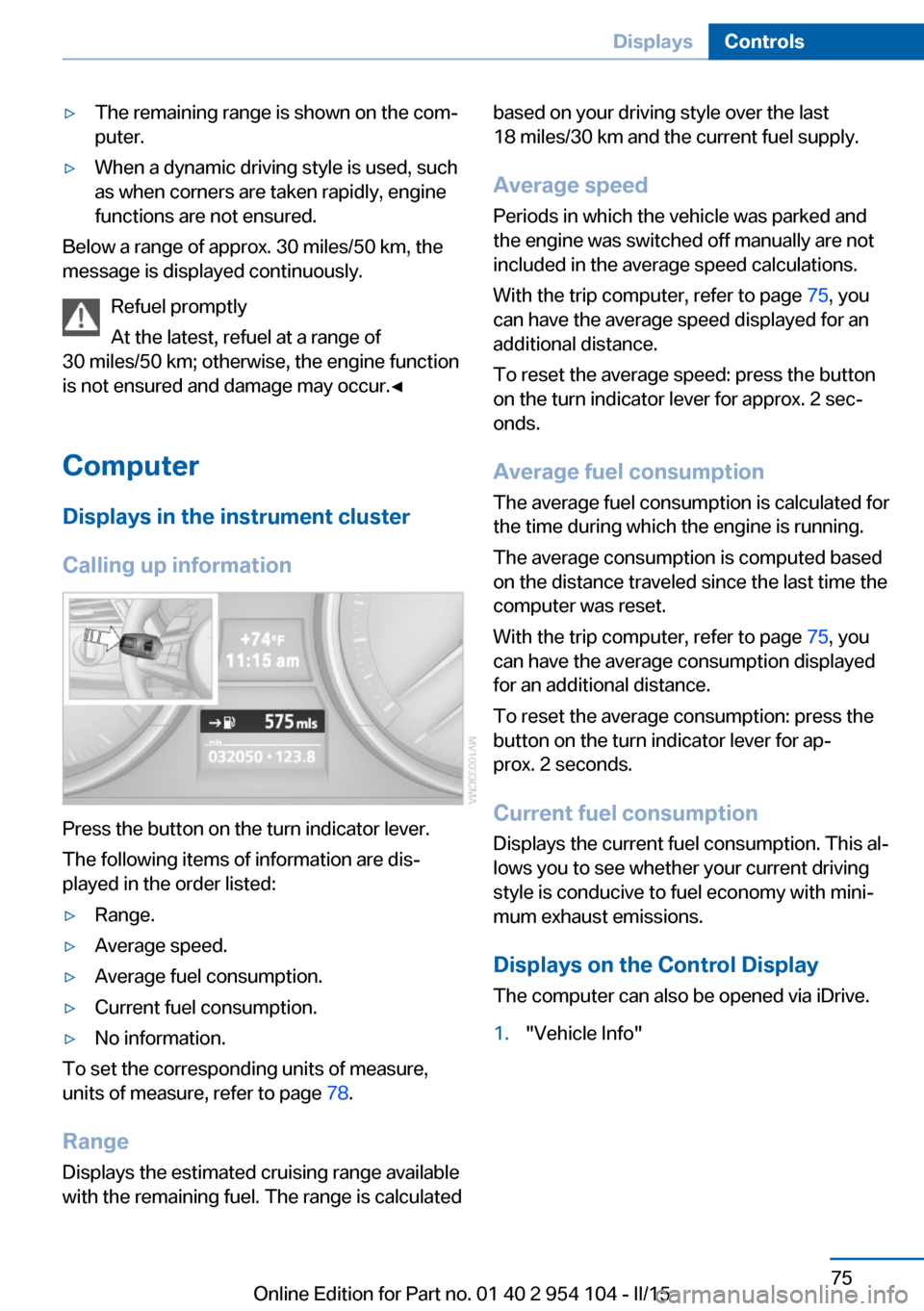
Press the button on the turn indicator lever.
The following items of information are dis‐
played in the order listed:
▷Range.▷Average speed.▷Average fuel consumption.▷Current fuel consumption.▷No information.
To set the corresponding units of measure,
units of measure, refer to page 78.
Range
Displays the estimated cruising range available
with the remaining fuel. The range is calculated
based on your driving style over the last
18 miles/30 km and the current fuel supply.
Average speed
Periods in which the vehicle was parked and
the engine was switched off manually are not
included in the average speed calculations.
With the trip computer, refer to page 75, you
can have the average speed displayed for an
additional distance.
To reset the average speed: press the button
on the turn indicator lever for approx. 2 sec‐
onds.
Average fuel consumption
The average fuel consumption is calculated for
the time during which the engine is running.
The average consumption is computed based
on the distance traveled since the last time the
computer was reset.
With the trip computer, refer to page 75, you
can have the average consumption displayed
for an additional distance.
To reset the average consumption: press the
button on the turn indicator lever for ap‐
prox. 2 seconds.
Current fuel consumption Displays the current fuel consumption. This al‐
lows you to see whether your current driving
style is conducive to fuel economy with mini‐
mum exhaust emissions.
Displays on the Control Display
The computer can also be opened via iDrive.1."Vehicle Info"Seite 75DisplaysControls75
Online Edition for Part no. 01 40 2 954 104 - II/15
Page 78 of 289
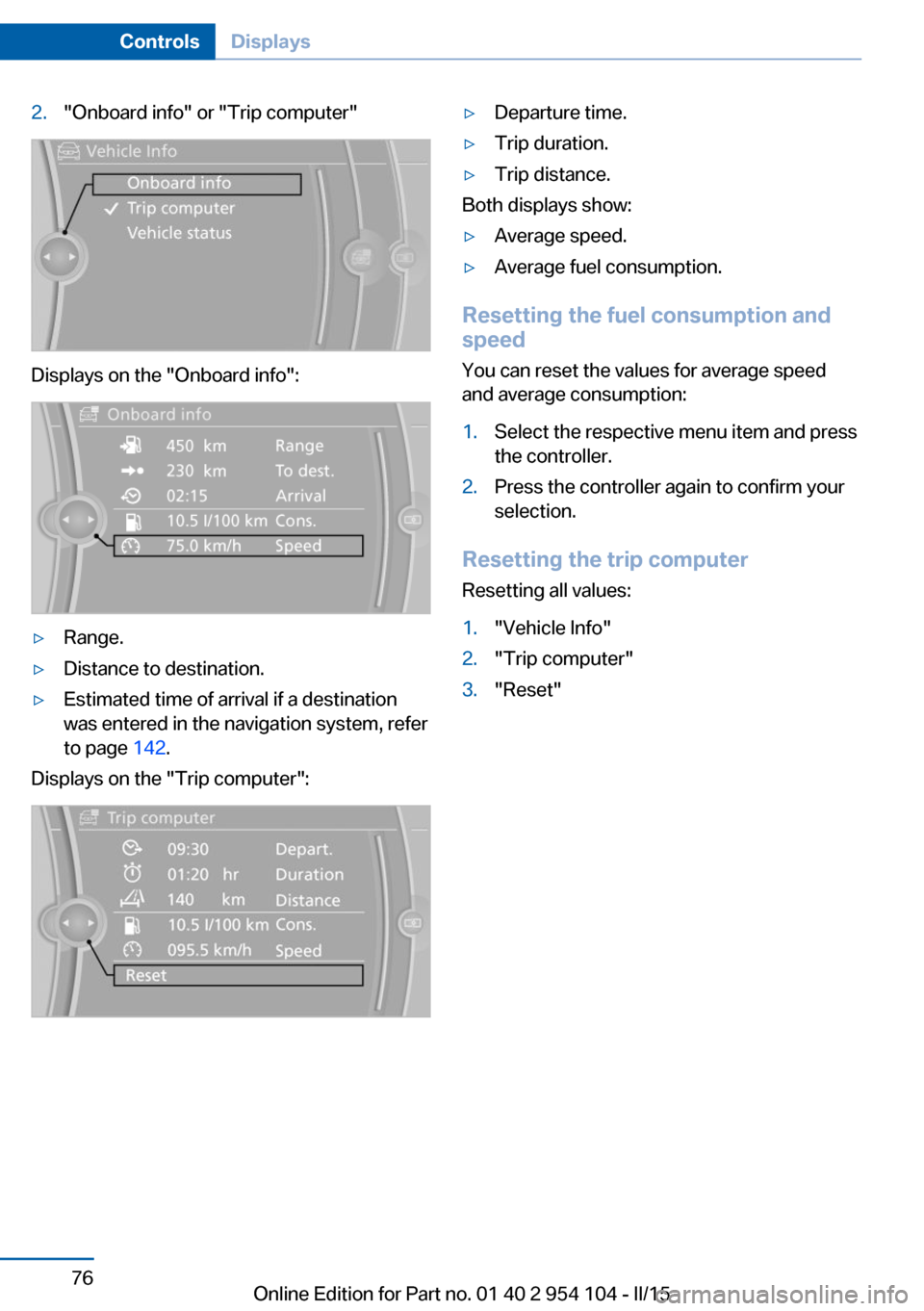
2."Onboard info" or "Trip computer"
Displays on the "Onboard info":
▷Range.▷Distance to destination.▷Estimated time of arrival if a destination
was entered in the navigation system, refer
to page 142.
Displays on the "Trip computer":
▷Departure time.▷Trip duration.▷Trip distance.
Both displays show:
▷Average speed.▷Average fuel consumption.
Resetting the fuel consumption and
speed
You can reset the values for average speed
and average consumption:
1.Select the respective menu item and press
the controller.2.Press the controller again to confirm your
selection.
Resetting the trip computer
Resetting all values:
1."Vehicle Info"2."Trip computer"3."Reset"Seite 76ControlsDisplays76
Online Edition for Part no. 01 40 2 954 104 - II/15
Page 80 of 289
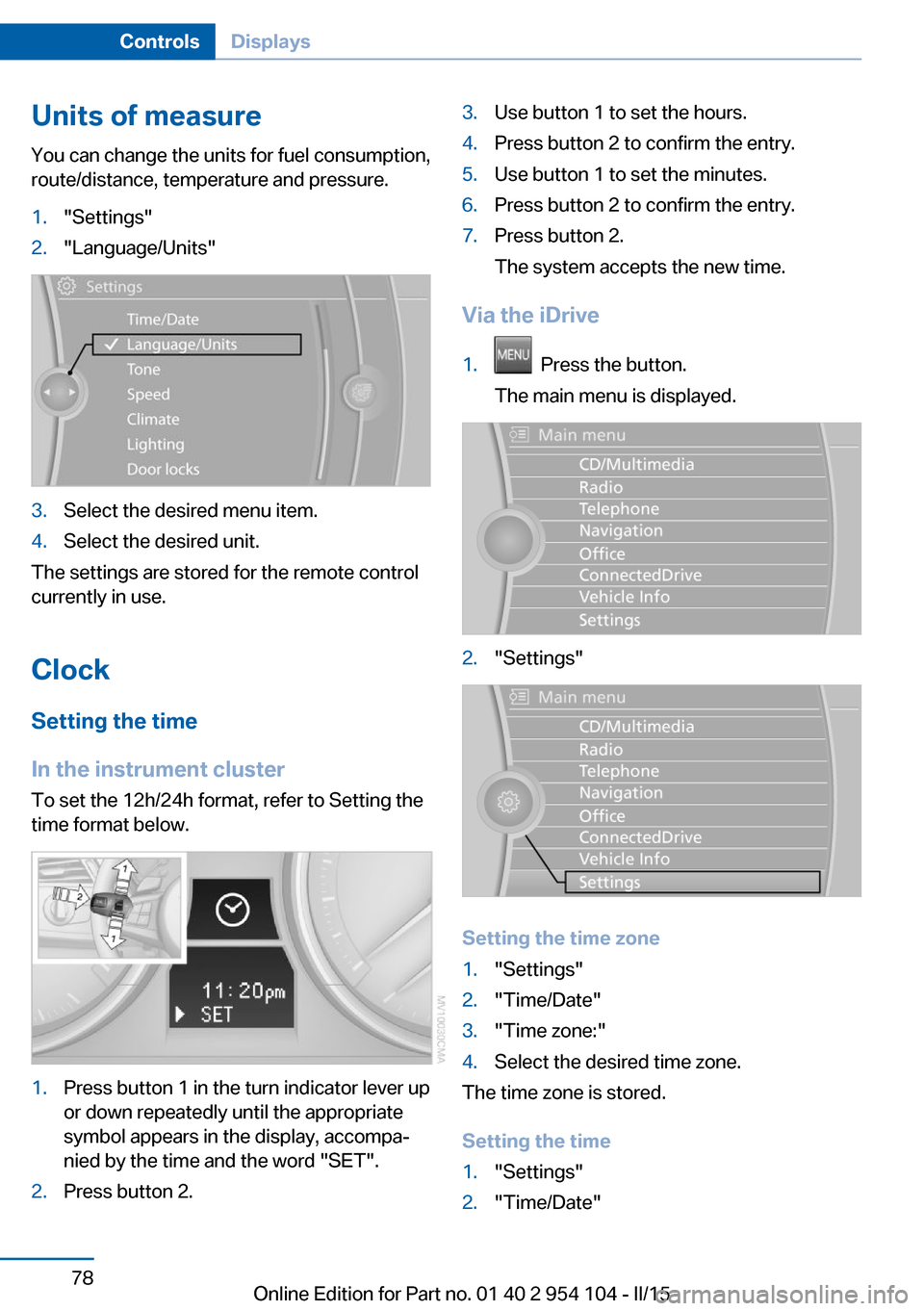
Units of measureYou can change the units for fuel consumption,
route/distance, temperature and pressure.1."Settings"2."Language/Units"3.Select the desired menu item.4.Select the desired unit.
The settings are stored for the remote control
currently in use.
Clock
Setting the time
In the instrument cluster To set the 12h/24h format, refer to Setting the
time format below.
1.Press button 1 in the turn indicator lever up
or down repeatedly until the appropriate
symbol appears in the display, accompa‐
nied by the time and the word "SET".2.Press button 2.3.Use button 1 to set the hours.4.Press button 2 to confirm the entry.5.Use button 1 to set the minutes.6.Press button 2 to confirm the entry.7.Press button 2.
The system accepts the new time.
Via the iDrive
1. Press the button.
The main menu is displayed.2."Settings"
Setting the time zone
1."Settings"2."Time/Date"3."Time zone:"4.Select the desired time zone.
The time zone is stored.
Setting the time
1."Settings"2."Time/Date"Seite 78ControlsDisplays78
Online Edition for Part no. 01 40 2 954 104 - II/15
Page 136 of 289
▷Heavy cargo: stow as far forward and as
low as possible, ideally directly behind the
cargo area separating wall.▷Cover sharp edges and corners.
Loading with the hardtop open
Before opening the hardtop, fold down
the cargo area partition and make sure the
cargo area is loaded correctly; otherwise, parts
of the hardtop could be damaged.◀
Fold down the cargo area partition, refer to
page 45.
Rear storage shelf Loading the rear storage shelf
When loading the rear storage shelf, do
not move both seats all the way forward while
moving them to their uppermost position and
leaning the backrests forward. Otherwise, the
seats could hit and damage the seal on the
windshield and the sun visor.◀
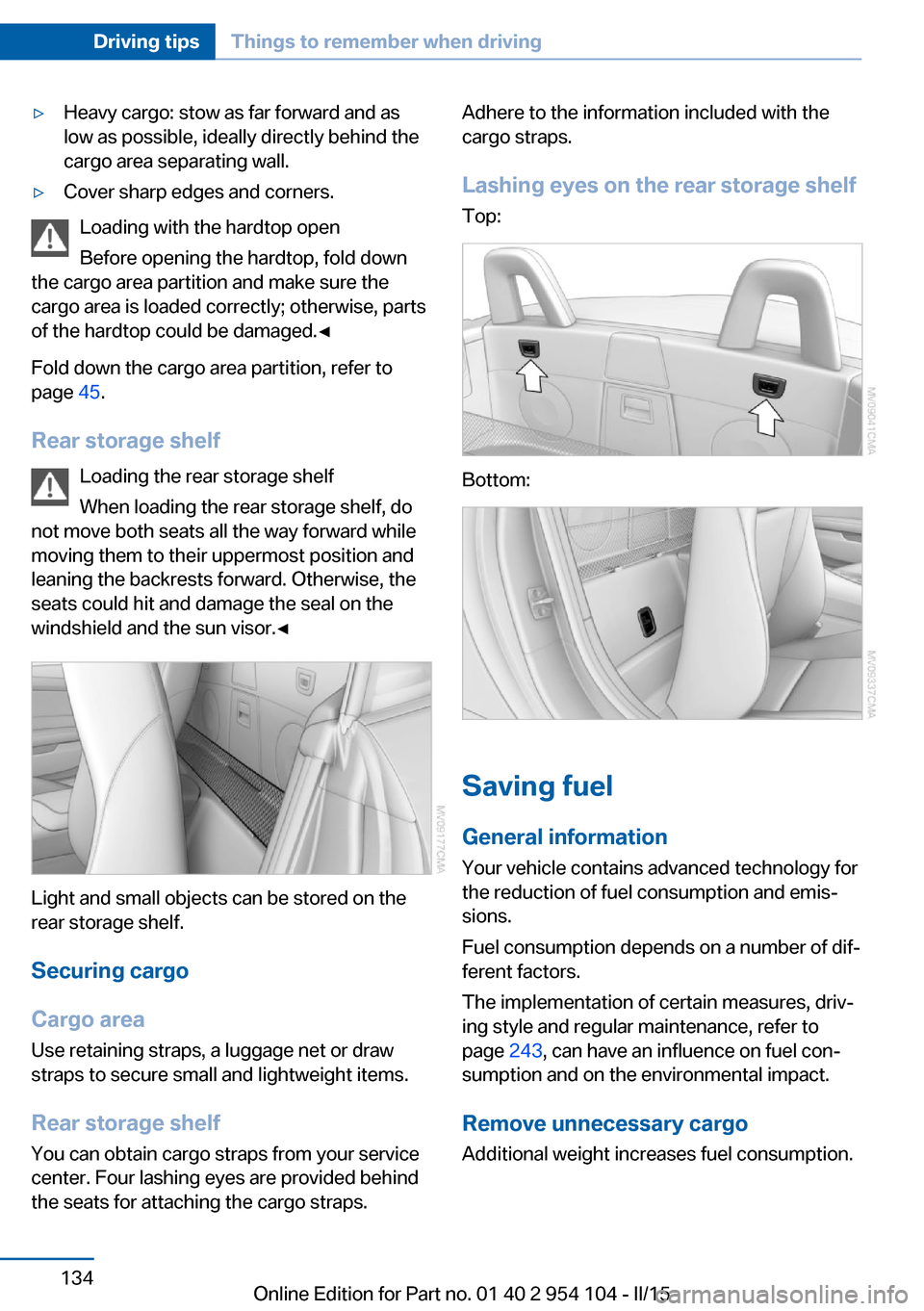
Light and small objects can be stored on the
rear storage shelf.
Securing cargo
Cargo area
Use retaining straps, a luggage net or draw
straps to secure small and lightweight items.
Rear storage shelf You can obtain cargo straps from your service
center. Four lashing eyes are provided behind
the seats for attaching the cargo straps.
Adhere to the information included with the
cargo straps.
Lashing eyes on the rear storage shelf
Top:
Bottom:
Saving fuel
General information
Your vehicle contains advanced technology for
the reduction of fuel consumption and emis‐
sions.
Fuel consumption depends on a number of dif‐
ferent factors.
The implementation of certain measures, driv‐
ing style and regular maintenance, refer to
page 243, can have an influence on fuel con‐
sumption and on the environmental impact.
Remove unnecessary cargo
Additional weight increases fuel consumption.
Seite 134Driving tipsThings to remember when driving134
Online Edition for Part no. 01 40 2 954 104 - II/15
Page 137 of 289
Remove attached parts following use
Remove auxiliary mirrors or rear-mounted lug‐
gage racks after use.
Attached parts on the vehicle impair the aero‐
dynamics and increase the fuel consumption.
Close both windows
An open window causes higher air resistance
and thus increases fuel consumption.
Tires
General information
Tires can have varying effects on fuel con‐
sumption; for example, fuel consumption can
be influenced by the tire size.
Check the tire inflation pressure
regularly
Check and, if necessary, correct the tire infla‐
tion pressure, refer to page 228, at least twice
a month and before starting on a long trip.
Low tire inflation pressure increases rolling re‐
sistance and thus raises fuel consumption and
tire wear.
Drive away without delay Do not wait for the engine to warm-up while
the vehicle remains stationary. Start driving
right away, but at moderate engine speeds.
This is the fastest way for the cold engine to
reach its operating temperature.
Look well ahead when driving
Avoid unnecessary acceleration and braking.
By maintaining a suitable distance to the vehi‐ cle driving ahead of you.
Driving smoothly and looking ahead reduces
fuel consumption.
Avoid high engine speeds Use 1st gear to get the vehicle in motion. Be‐
ginning with 2nd gear, accelerate rapidly.When accelerating, shift up before reaching high engine speeds.
When you reach the desired speed, shift into
the highest applicable gear and drive with the
engine speed as low as possible and at a con‐
stant speed.
As a rule: driving at low engine speeds lowers
fuel consumption and reduces wear.
Use coasting conditions When approaching a red light, take your foot
off the accelerator and coast to a halt in the
highest applicable gear.
On a downhill slope, take your foot off the ac‐
celerator and coast in a suitable gear.
The flow of fuel is interrupted while coasting.
Switch off the engine during longer
stops
Switch off the engine during longer stops, e.g.,
at traffic lights, railroad crossings or in traffic
congestion.
Automatic Engine Start/Stop Function The Automatic Engine Start/Stop Function au‐
tomatically switches the engine off during a
stop.
If the engine is stopped and then started again,
fuel consumption and emissions drop com‐
pared to an engine that runs permanently.
Stopping the engine even for just a few sec‐
onds can result in savings.
Use of this system can cause premature wear
on certain vehicle components.
In addition, fuel consumption depends on
other factors as well, such as driving style, road
conditions, maintenance, and environmental
factors.
Additional information on the Automatic En‐
gine Start/Stop Function, refer to page 59.Seite 135Things to remember when drivingDriving tips135
Online Edition for Part no. 01 40 2 954 104 - II/15
Page 240 of 289
Hood
Opening the hood Working in the engine compartment
Never attempt to perform any service or
repair operations on your vehicle without the necessary professional technical training.
If you are unfamiliar with the statutory guide‐
lines, have any work on the vehicle performed
only by a service center.
If this work is not carried out properly, there is
the danger of subsequent damage and related
safety hazards.◀
To avoid damage, make sure that the
wiper arms are resting against the wind‐
shield before you open the engine compart‐
ment. Do not open the engine hood before the
engine has cooled down; otherwise, injuries
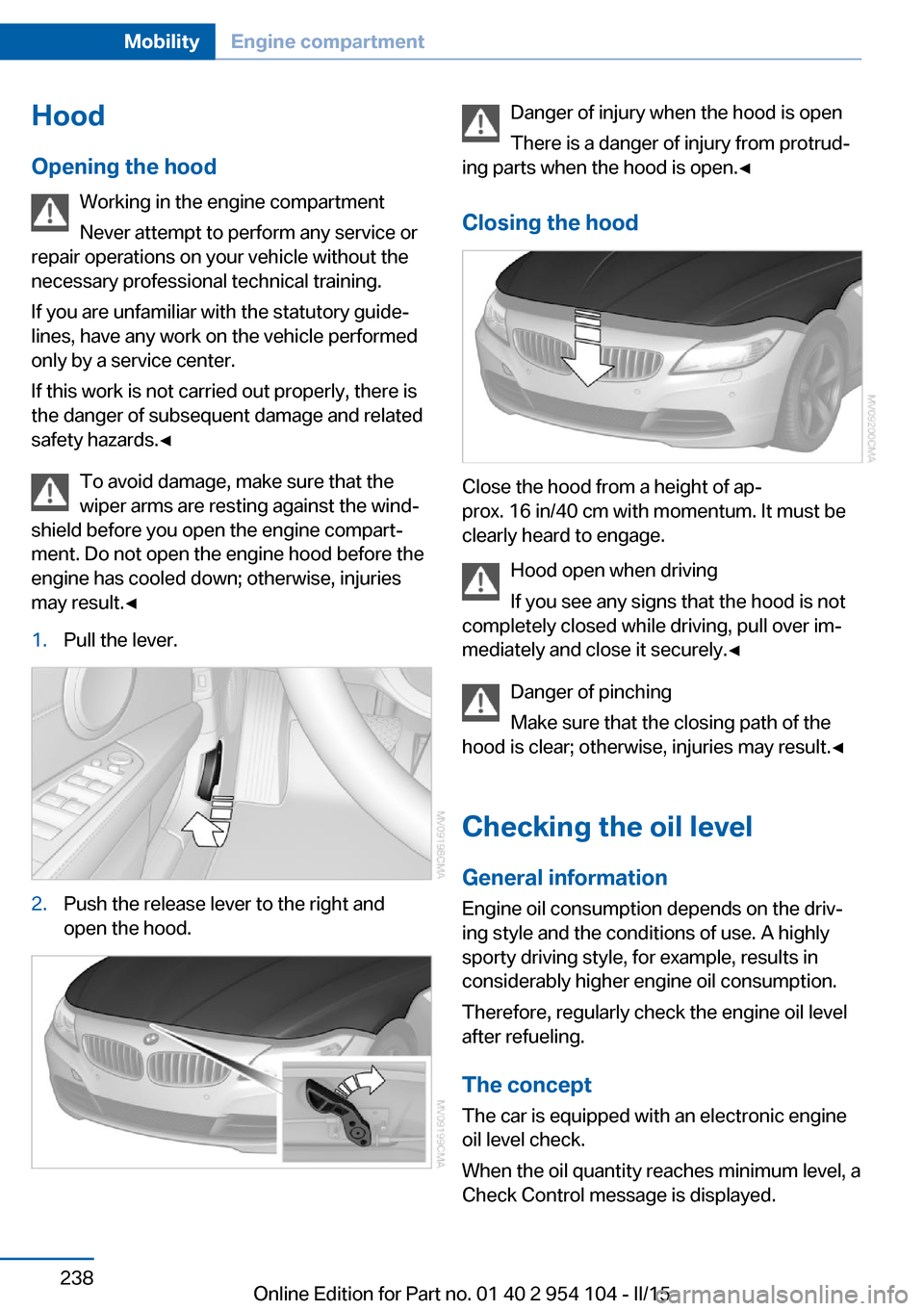
may result.◀1.Pull the lever.2.Push the release lever to the right and
open the hood.Danger of injury when the hood is open
There is a danger of injury from protrud‐
ing parts when the hood is open.◀
Closing the hood
Close the hood from a height of ap‐
prox. 16 in/40 cm with momentum. It must be
clearly heard to engage.
Hood open when driving
If you see any signs that the hood is not
completely closed while driving, pull over im‐
mediately and close it securely.◀
Danger of pinching
Make sure that the closing path of the
hood is clear; otherwise, injuries may result.◀
Checking the oil level General information
Engine oil consumption depends on the driv‐
ing style and the conditions of use. A highly
sporty driving style, for example, results in
considerably higher engine oil consumption.
Therefore, regularly check the engine oil level
after refueling.
The concept
The car is equipped with an electronic engine
oil level check.
When the oil quantity reaches minimum level, a
Check Control message is displayed.
Seite 238MobilityEngine compartment238
Online Edition for Part no. 01 40 2 954 104 - II/15
Page 277 of 289
AUTO program with auto‐matic climate control 113
AUX-IN port 182
Average fuel consumption 75
Average fuel consumption, setting the unit 78
Average speed 75
Axle loads, refer to Weights 264
B
Backrest curvature, refer to Lumbar support 49
Backrests, refer to Seat ad‐ justment 48
Backrest width adjust‐ ment 50
Backup lights, bulb replace‐ ment 247
Balance 162
Band-aids, refer to First aid kit 252
Bass 162
Battery, disposal 41
Battery, power failure 249
Battery, remote control 32
Battery, replacement in the remote control 41
Battery replacement, vehicle battery 249
Battery, vehicle 249
Before entering the car wash 257
Belts, refer to Safety belts 50
Belt tensioners, refer to Safety belts 50
Beverage holder, refer to Cu‐ pholder 126
Black and white map dis‐ play 156
Blower, refer to Air flow rate 111, 114
Bluetooth audio 185
Bluetooth connection, acti‐ vating/deactivating 195 BMW Apps 220
BMW Driver's Guide App 6
BMW EfficientDynamics, re‐ fer to Saving fuel 134
BMW Homepage 6
BMW Internet page 6
BMW Maintenance Sys‐ tem 243
BMW Online 218
Bottle holder, refer to Cu‐ pholder 126
Brake assistant, refer to Dy‐ namic Brake Control 101
Brake discs, breaking in 130
Brake force display 100
Brake force distribution, elec‐ tronic 101
Brake lights, adaptive 100
Brake lights, brake force dis‐ play 100
Brake lights, bulb replace‐ ment 247
Brake pads, breaking in 130
Brake, refer to Parking brake 61
Brakes, ABS 101
Braking, notes 131
Braking, parking brake 61
Breakdown assistance, refer to Roadside Assistance 217
Break-in 130
Brightness of Control Dis‐ play 80
Bulbs, replacing, refer to Lamps and bulbs 245
Button for starting the engine, refer to Start/Stop but‐
ton 57
Buttons on the steering wheel 14
Bypassing, see Starting aid 252
C Calendar 210 California Proposition 65
Warning 7
Camera, care 260
Can holder, refer to Cu‐ pholder 126
Capacities 265
Capacities, cargo area, refer to Weights 264
Capacities, fuel tank, refer to Filling capacities 265
Car battery 249
Car care products 258
Care 257
Care, displays 260
Care, vehicle 258
Cargo 132
Cargo area 121
Cargo area, capacity 264
Cargo area capacity, enlarg‐ ing 121
Cargo area, Comfort Ac‐ cess 40
Cargo area, lamp, refer to In‐ terior lights 91
Cargo area, opening from the inside 38
Cargo area, opening from the outside 38
Cargo, securing 122
Cargo straps, securing cargo 134
Car key, refer to Integrated key/remote control 32
Carpet, care 260
Car phone installation loca‐ tion, refer to Center arm‐
rest 124
Car phone, refer to Tele‐ phone 194
Car vacuum cleaner, connect‐ ing, refer to Connecting
electrical devices 120
Car wash 257
Car wash, with Comfort Ac‐ cess 40 Seite 275Everything from A to ZReference275
Online Edition for Part no. 01 40 2 954 104 - II/15
Page 278 of 289
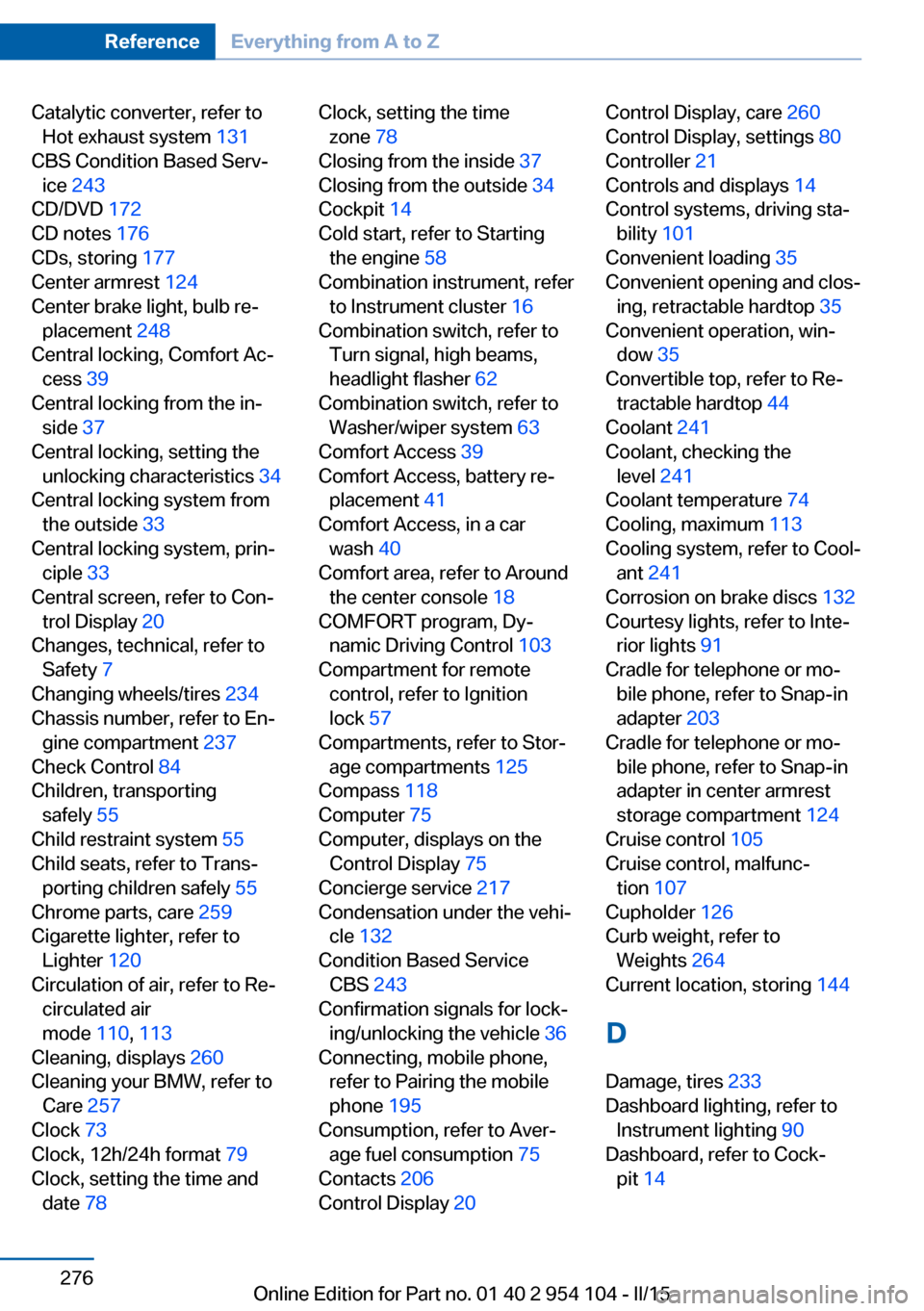
Catalytic converter, refer toHot exhaust system 131
CBS Condition Based Serv‐ ice 243
CD/DVD 172
CD notes 176
CDs, storing 177
Center armrest 124
Center brake light, bulb re‐ placement 248
Central locking, Comfort Ac‐ cess 39
Central locking from the in‐ side 37
Central locking, setting the unlocking characteristics 34
Central locking system from the outside 33
Central locking system, prin‐ ciple 33
Central screen, refer to Con‐ trol Display 20
Changes, technical, refer to Safety 7
Changing wheels/tires 234
Chassis number, refer to En‐ gine compartment 237
Check Control 84
Children, transporting safely 55
Child restraint system 55
Child seats, refer to Trans‐ porting children safely 55
Chrome parts, care 259
Cigarette lighter, refer to Lighter 120
Circulation of air, refer to Re‐ circulated air
mode 110, 113
Cleaning, displays 260
Cleaning your BMW, refer to Care 257
Clock 73
Clock, 12h/24h format 79
Clock, setting the time and date 78 Clock, setting the time
zone 78
Closing from the inside 37
Closing from the outside 34
Cockpit 14
Cold start, refer to Starting the engine 58
Combination instrument, refer to Instrument cluster 16
Combination switch, refer to Turn signal, high beams,
headlight flasher 62
Combination switch, refer to Washer/wiper system 63
Comfort Access 39
Comfort Access, battery re‐ placement 41
Comfort Access, in a car wash 40
Comfort area, refer to Around the center console 18
COMFORT program, Dy‐ namic Driving Control 103
Compartment for remote control, refer to Ignition
lock 57
Compartments, refer to Stor‐ age compartments 125
Compass 118
Computer 75
Computer, displays on the Control Display 75
Concierge service 217
Condensation under the vehi‐ cle 132
Condition Based Service CBS 243
Confirmation signals for lock‐ ing/unlocking the vehicle 36
Connecting, mobile phone, refer to Pairing the mobile
phone 195
Consumption, refer to Aver‐ age fuel consumption 75
Contacts 206
Control Display 20 Control Display, care 260
Control Display, settings 80
Controller 21
Controls and displays 14
Control systems, driving sta‐ bility 101
Convenient loading 35
Convenient opening and clos‐ ing, retractable hardtop 35
Convenient operation, win‐ dow 35
Convertible top, refer to Re‐ tractable hardtop 44
Coolant 241
Coolant, checking the level 241
Coolant temperature 74
Cooling, maximum 113
Cooling system, refer to Cool‐ ant 241
Corrosion on brake discs 132
Courtesy lights, refer to Inte‐ rior lights 91
Cradle for telephone or mo‐ bile phone, refer to Snap-in
adapter 203
Cradle for telephone or mo‐ bile phone, refer to Snap-in
adapter in center armrest
storage compartment 124
Cruise control 105
Cruise control, malfunc‐ tion 107
Cupholder 126
Curb weight, refer to Weights 264
Current location, storing 144
D
Damage, tires 233
Dashboard lighting, refer to Instrument lighting 90
Dashboard, refer to Cock‐ pit 14 Seite 276ReferenceEverything from A to Z276
Online Edition for Part no. 01 40 2 954 104 - II/15
Page 280 of 289
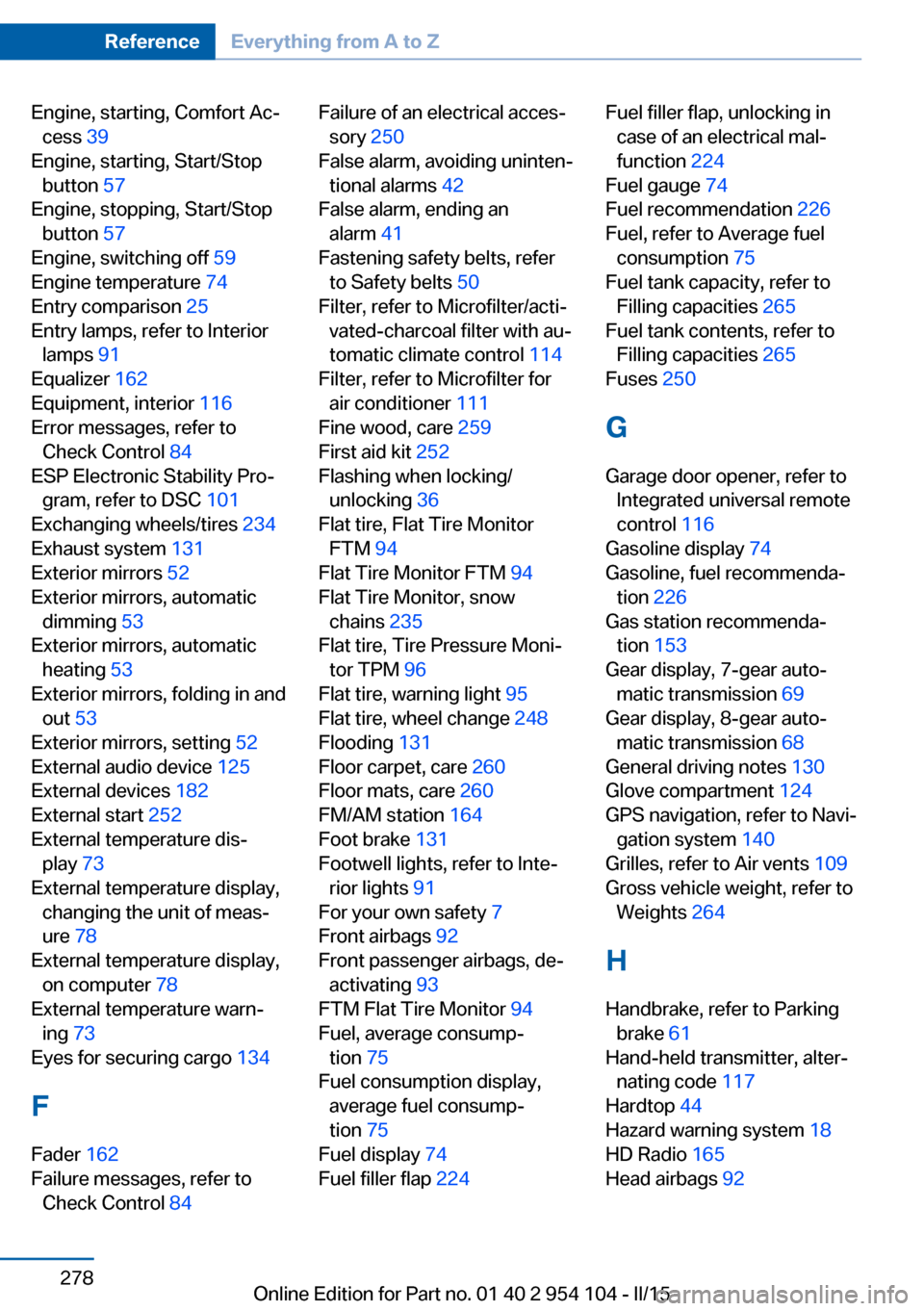
Engine, starting, Comfort Ac‐cess 39
Engine, starting, Start/Stop button 57
Engine, stopping, Start/Stop button 57
Engine, switching off 59
Engine temperature 74
Entry comparison 25
Entry lamps, refer to Interior lamps 91
Equalizer 162
Equipment, interior 116
Error messages, refer to Check Control 84
ESP Electronic Stability Pro‐ gram, refer to DSC 101
Exchanging wheels/tires 234
Exhaust system 131
Exterior mirrors 52
Exterior mirrors, automatic dimming 53
Exterior mirrors, automatic heating 53
Exterior mirrors, folding in and out 53
Exterior mirrors, setting 52
External audio device 125
External devices 182
External start 252
External temperature dis‐ play 73
External temperature display, changing the unit of meas‐
ure 78
External temperature display, on computer 78
External temperature warn‐ ing 73
Eyes for securing cargo 134
F
Fader 162
Failure messages, refer to Check Control 84 Failure of an electrical acces‐
sory 250
False alarm, avoiding uninten‐ tional alarms 42
False alarm, ending an alarm 41
Fastening safety belts, refer to Safety belts 50
Filter, refer to Microfilter/acti‐ vated-charcoal filter with au‐
tomatic climate control 114
Filter, refer to Microfilter for air conditioner 111
Fine wood, care 259
First aid kit 252
Flashing when locking/ unlocking 36
Flat tire, Flat Tire Monitor FTM 94
Flat Tire Monitor FTM 94
Flat Tire Monitor, snow chains 235
Flat tire, Tire Pressure Moni‐ tor TPM 96
Flat tire, warning light 95
Flat tire, wheel change 248
Flooding 131
Floor carpet, care 260
Floor mats, care 260
FM/AM station 164
Foot brake 131
Footwell lights, refer to Inte‐ rior lights 91
For your own safety 7
Front airbags 92
Front passenger airbags, de‐ activating 93
FTM Flat Tire Monitor 94
Fuel, average consump‐ tion 75
Fuel consumption display, average fuel consump‐
tion 75
Fuel display 74
Fuel filler flap 224 Fuel filler flap, unlocking in
case of an electrical mal‐
function 224
Fuel gauge 74
Fuel recommendation 226
Fuel, refer to Average fuel consumption 75
Fuel tank capacity, refer to Filling capacities 265
Fuel tank contents, refer to Filling capacities 265
Fuses 250
G
Garage door opener, refer to Integrated universal remote
control 116
Gasoline display 74
Gasoline, fuel recommenda‐ tion 226
Gas station recommenda‐ tion 153
Gear display, 7-gear auto‐ matic transmission 69
Gear display, 8-gear auto‐ matic transmission 68
General driving notes 130
Glove compartment 124
GPS navigation, refer to Navi‐ gation system 140
Grilles, refer to Air vents 109
Gross vehicle weight, refer to Weights 264
H Handbrake, refer to Parking brake 61
Hand-held transmitter, alter‐ nating code 117
Hardtop 44
Hazard warning system 18
HD Radio 165
Head airbags 92 Seite 278ReferenceEverything from A to Z278
Online Edition for Part no. 01 40 2 954 104 - II/15